EHXT20 - Facial care device PANASONIC - Free user manual and instructions
Find the device manual for free EHXT20 PANASONIC in PDF.



| Product Type | Microcurrent Facial Device |
| Model | EH-XT20 |
| Brand | Panasonic |
| Power Supply | Rechargeable Li-Ion battery, AC adapter (RE6-37) |
| Operating Modes | PURIFYING, MOISTURIZING, COOLING, AUTO |
| Main Functions | Microcurrent, heat, cooling, vibration |
| Recommended Usage Time | Up to 9 minutes per session |
| Charging Time | Approx. 1 hour |
| Battery Life | Approx. 3 uses of 9 minutes each |
| Treatment Head | Titanium head |
| Included Accessories | AC adapter, charging stand, cotton ring, protective cap |
| Noise Level | MOISTURIZING mode: 40 dB(A), COOLING mode: 47 dB(A) |
| Operating Ambient Temperature | 15 °C to 35 °C |
| Care and Cleaning | Wipe the head with a tissue; clean the ring and cap with water; do not wash the main unit with water |
| Safety | Do not use near medical devices, in a bathtub, or on damaged skin; stop if abnormal |
| Spare Parts and Repairability | Repair by authorized center; battery replacement by a professional |
| Weight | Approx. 200 g (main unit only) |
Frequently Asked Questions - EHXT20 PANASONIC
User questions about EHXT20 PANASONIC
0 question about this device. Answer the ones you know or ask your own.
Ask a new question about this device
Download the instructions for your Facial care device in PDF format for free! Find your manual EHXT20 - PANASONIC and take your electronic device back in hand. On this page are published all the documents necessary for the use of your device. EHXT20 by PANASONIC.
USER MANUAL EHXT20 PANASONIC
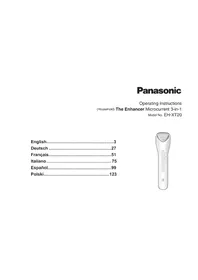
Operating Instructions
(Household) The Enhancer Microcurrent 3-in-1
Model No. EH-XT20
English....3
Deutsch 27
Français....51
Italiano....75
Español....99
Polski....123
natural_image
Illustration of a white handheld electronic device with a handle and control buttons (no text or symbols)Panasonic
Operating Instructions
(Household) The Enhancer Microcurrent 3-in-1
Model No. EH-XT20
Contents
Safety precautions...... 6
Parts identification....11
Modes and recommended treatment sequence....13
Preparation....15
How to use ....17
How to move the titanium head in each mode....20
After use....21
Frequently asked questions......22
Troubleshooting 23
Battery life....25
Removing the built-in rechargeable battery....25
Specifications 25
Thank you for purchasing this Panasonic product.
Before operating this unit, please read these instructions completely and save them for future use.

Warning
- This appliance can be used by children aged from 8 years and above and persons with reduced physical, sensory or mental capabilities or lack of experience and knowledge if they have been given supervision or instruction concerning use of the appliance in a safe way and understand the hazards involved. Children shall not play with the appliance. Cleaning and user maintenance shall not be made by children without supervision.
- The supply cord cannot be replaced. If the cord is damaged, the AC adaptor should be scrapped.
- Do not use anything other than the supplied AC adaptor for any purpose.
Also, do not use any other product with the supplied AC adaptor. (See page 11.)
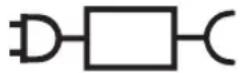
- The following symbol indicates that a specific detachable power supply unit is required for connecting the electrical appliance to the supply mains. The type reference of power supply unit is marked near the symbol.

Safety precautions
To reduce the risk of injury, loss of life, electric shock, fire, and damage to property, always observe the following safety precautions.
Explanation of symbols
The following symbols are used to classify and describe the level of hazard, injury, and property damage caused when the denotation is disregarded and improper use is performed.
| ⚠️ DANGER | Denotes a potential hazard that will result in serious injury or death. |
| ⚠️ WARNING | Denotes a potential hazard that could result in serious injury or death. |
| ⚠️ CAUTION | Denotes a hazard that could result in minor injury or property damage. |
The following symbols are used to classify and describe the type of instructions to be observed.
| This symbol is used to alert users to a specific operating procedure that must not be performed. | |
 | This symbol is used to alert users to a specific operating procedure that must be followed in order to operate the unit safely. |
DANGER
▶ Preventing accidents
Never use this appliance near electronic medical devices or home electrical therapy devices such as the following:
· Pacemakers and other electronic medical devices implanted in the body
· Heart-lung machines and other life-supporting electronic medical devices
- Wearable electronic medical devices, such as electrocardiographs and intravenous drip equipment
- Doing so may cause incorrect operation of electronic medical devices and home electrical therapy devices, resulting in accidents or causing patients to feel unwell.

WARNING
▶ To prevent skin or health problems
The following persons should not use this appliance:
· Individuals with heart disease
· Individuals with a nervous disorder in their face
- Individuals with diabetes
· Individuals with hemorrhagic disease, hemophilia or other blood disorder
- Individuals with high blood pressure
· Individuals undergoing treatment on their teeth
· Individuals with a detached retina, or who once had a detached retina
· Individuals with severe nearsightedness (-6D or higher)
· Individuals with metal, silicon or plastic implants in their face due to bone fracture or plastic surgery, etc.
· Babies, toddlers or other child in the growth stage, or other individual who cannot indicate intent
- Individuals with head or eye aftereffect condition due to a traffic accident, etc.
· Individuals who have had eye surgery (Individuals who have had LASIK surgery should consult with their doctor prior to use)
- Doing so may cause accidents, illness or blindness.
Do not use this appliance in the following body area or following cases.
· When you do not feel well
· After drinking alcohol or taking medicine, or when you are very tired
- Areas with skin damage, eczema or swelling
· When there are abnormalities on the skin such as dermatitis or extreme sunburns
· Body parts where epilation was performed on the same day
· Where cosmetic surgery has been performed
· Upper eye lids or throat
- Doing so may cause problems with the skin or body, or blindness.


Individuals without sense of heat should not use this appliance.
- Doing so may cause burn, electric shock, or injury.

Do not use COOLING mode if the ambient temperature is less than 15^ C.
- Doing so may cause the titanium head to not detach from the skin, causing damage to the skin.
The following persons should consult own physician before using this appliance:
· Persons with allergies
- Persons with sensitive skin
· Persons with skin diseases or atopic dermatitis
- Failure to do so may cause problems with the skin or body.
· Menstruating or pregnant women, or within one month of childbirth.
- Failure to do so may cause skin trouble due to hormonal imbalance.

WARNING
The following individuals must consult a doctor prior to use:

· Individuals with serious disease
· Individuals with acute disease
· Individuals with febrile disease
· Individuals with infectious disease
· Individuals with malignant tumors
- Failure to do so may cause accidents or illness.

If you feel pain or abnormality on your skin or other part of your body, immediately stop using this product.
- Failure to do so may cause accidents or skin/physical trouble.
▶ This product

This product has a built-in rechargeable battery. Do not throw into flame or heat.
Do not charge, use, or leave in high temperatures.
- Doing so may cause overheating, ignition, or explosion.

Do not store within the reach of children. Do not let them use it.
- Otherwise, small parts may be accidentally swallowed, thus causing accidents or injuries.

Do not modify or repair.
- Doing so may cause fire, electric shock, or injury. Contact Panasonic authorized service centre for repair (battery change etc.).

Never disassemble except when disposing of the product.
- Doing so may cause fire, electric shock, or injury.
▶ In case of an abnormality or malfunction
Immediately stop using and remove the adaptor if there is an abnormality or malfunction.
- Failure to do so may cause fire, electric shock, or injury.
- The main unit, adaptor or cord is deformed or abnormally hot.
• The main unit, adaptor or cord smells of burning. - There is an abnormal sound during the use of the main unit, adaptor or cord.
- Immediately request inspection or repair at an authorized service centre.
▶ Power supply

Do not connect or disconnect the adaptor to a household outlet with a wet hand.
- Doing so may cause electric shock or injury.
Do not immerse the main body and AC adaptor in water or wash it with water.

Do not use or store the appliance in a bathroom or location with high humidity. Also, do not place in a location where water may spill (such as top of a vanity).
- Doing so may cause electric shock or fire.

Never use the appliance if the AC adaptor is damaged or if the power plug fits loosely in a household outlet.
Never use the appliance if the AC adaptor is damaged or if the power plug fits loosely in a household outlet.
Do not damage or modify, or forcefully bend, pull, or twist the cord. Also, do not place anything heavy on or pinch the cord.
- Doing so may cause electric shock or fire due to a short circuit.

WARNING

Do not use in a way exceeding the rating of the household outlet or the wiring.
- Exceeding the rating by connecting too many plugs to one household outlet may cause fire due to overheating.
Always ensure the appliance is operated on an

electric power source matched to the rated voltage indicated on the AC adaptor.
Fully insert the adaptor or appliance plug.
- Failure to do so may cause fire or electric shock.

Always unplug the adaptor from a household outlet when cleaning.
- Failure to do so may cause electric shock or injury.

Regularly clean the power plug and the appliance plug to prevent dust from accumulating.
- Failure to do so may cause fire due to insulation failure caused by humidity.
Disconnect the adaptor and wipe with a dry cloth.

CAUTION
▶ Power supply

Do not allow metal objects or trash to adhere to the power plug or the appliance plug.
- Doing so may cause electric shock or fire due to a short circuit.

Do not wrap the cord around the adaptor when storing.
- Doing so may cause the wire in the cord to break with the load, and may cause fire due to a short circuit.

Disconnect the adaptor or the appliance plug by holding onto the adaptor or the appliance plug instead of the cord.
- Disconnecting by holding onto the cord may cause electric shock or injury.

Disconnect the adaptor from the household outlet when not charging.
- Failure to do so may cause electric shock or fire due to electrical leakage resulting from insulation deterioration.
▶ Note the following precautions

Do not drop or hit against other objects.
- Doing so may cause injury.

Do not use continuously for an extended period on the same area.
- Doing so may cause injury to the skin, infection, inflammation, bleeding, pigmentation or other trouble, or worsening of such symptoms.

Before using, check that the titanium head is free from cracks, chips, deformities, and other damage.
- Failure to do so may cause injury to the skin.

Use only for care of the face, chest and neck (excluding the arm used for a patch test).
- Failure to do so may cause skin damage, inflammation, etc.
Handling of the removed battery when disposing

DANGER
The rechargeable battery is exclusively for use with this appliance. Do not use the battery with other products. Do not charge the battery after it has been removed from the product.
- Do not throw into fire or apply heat.
- Do not hit, disassemble, modify, or puncture with a nail.
- Do not let the positive and negative terminals of the battery get in contact with each other through metallic objects.
- Do not carry or store the battery together with metallic jewellery such as necklaces and hairpins.
- Do not use or leave the battery where it will be exposed to high temperatures, such as under direct sunlight or near other sources of heat.
- Never peel off the tube.
- Doing so may cause overheating, ignition, or explosion.


WARNING

After removing the rechargeable battery, do not keep it within reach of children and infants.
- The battery will harm the body if accidentally swallowed. If this happens, consult a physician immediately.
If the battery fluid leaks out, do not touch the battery with your bare hands.
- The battery fluid may cause blindness if it comes in contact with your eyes.
Do not rub your eyes. Wash immediately with clean water and consult a physician. - The battery fluid may cause inflammation or injury if it comes in contact with the skin or clothes.
Wash it off thoroughly with clean water and consult a physician.
Parts identification
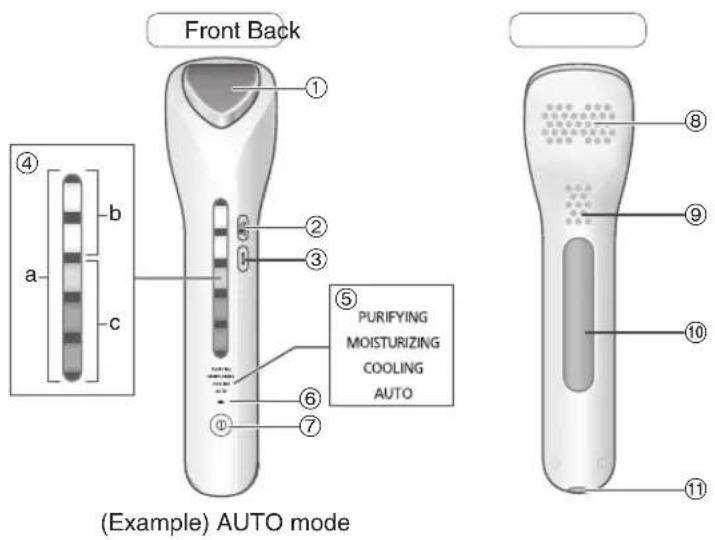
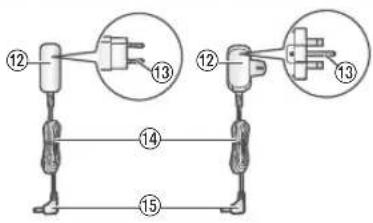

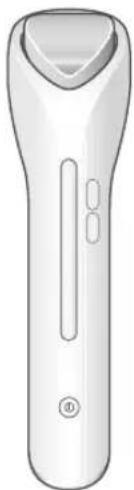
A Main body
①Titanium head
② MICROCURRENT switch
③WARM switch
④ Lamp display
When mode is selected
a. Mode function display lamp
When microcurrent/temperature level is selected
b. Microcurrent level display lamp c. Temperature level display lamp
⑤Mode indicator
⑥Charging indication/ notification lamp (→)
⑦ POWER/SELECT switch
⑧Air inlet
⑨Air outlet
⑩ Microcurrent panel
• Touch the microcurrent panel and apply the titanium head to the skin and the appliance vibrates.
(See page 17.)
⑪Appliance socket
B AC adaptor (RE6-37)
(The shape of the AC adaptor differs depending on the area.)
⑫Adaptor
⑬Power plug
⑭ Cord
⑮Appliance plug
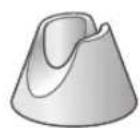
©Stand
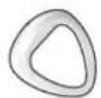
D Cotton ring
E Protective cap
POWER/SELECT switch
Press once for next mode.
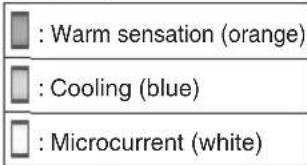
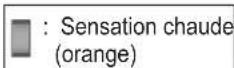
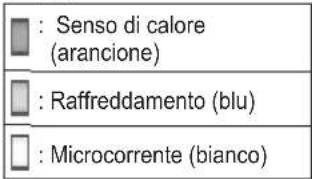
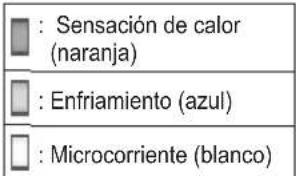
| : Warm sensation (orange) | : Cooling (blue) | : Microcurrent (white) |
| Mode Mode | display Mode function display | |
| OFF | ||
| PURIFYING | ||
| MOISTURIZING | ||
| COOLING | ||
| AUTO | ||
- The appliance starts from PURIFYING mode each time the power is turned on.
• The indicator of the selected mode turns on.
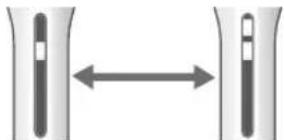
MICROCURRENT switch
Press once to switch to the next microcurrent level.
natural_image
Diagram showing two vertical bars with a bidirectional arrow between them, no text or symbols present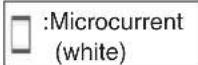
LOW HIGH
- Indicator shows the selected microcurrent level.
- Lamp display will automatically switch to mode function display after approximately 5 seconds after selection. (Microcurrent level will not be displayed.)
- Not applicable for COOLING mode.
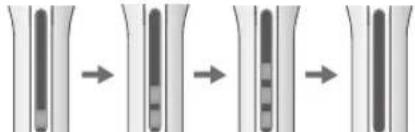
WARM switch
Press once to switch to the next temperature level.
flowchart
graph LR
    A["Step 1"] --> B["Step 2"]
    B --> C["Step 3"]
    C --> D["Step 4"]
LOW MED HIGH OFF
- Indicator shows the selected temperature level.
- Lamp display will automatically switch to mode function display after approximately 5 seconds after selection.
(Temperature level will not be displayed.)
• Not applicable for COOLING mode.
Memory function
The appliance records last used microcurrent and temperature level, and starts with the same setting when switched on. This memory function will reset when the appliance has not been used for a long period of time or when the battery has ran out.
Modes and recommended treatment sequence
Select a mode or combination of modes according to your skin conditions or concerns.
| Mode | Description Usage time | Cotton pad | Applicable skin care products | Recommended skin care products | |
| PURIFYING | Removes dirt/residue from pores/skin without damaging skin. | 3 min.(Warm) | √ | Toner, lotion Toner, lotion | |
| MOISTURIZING | Enhances penetration of moisturizing ingredients into the skin layers. | 3 min.(Warm) | — | Moisturizer, serum, eyecream, cream mask*1, sheet mask, massage cream, gel | Moisturizer, serum |
| √ | Lotion | ||||
| COOLING | Tightens pores after skin treatment with cool stimulation. | 2 min.(Cool) | — — — | ||
| AUTO Quick | moisturizing & cooling | 3 min.(2 min. (Warm) + 1 min. (Cool))*2 | — | Moisturizer, serum, eyecream, cream mask*1, sheet mask, massage cream, gel | Moisturizer, serum |
| √ | Lotion | ||||
*1 Soak-in-type that is not washed off
*2 The mode switches automatically from (Warm) to (Cool).
Recommended treatment sequence
In the case of using a single mode
PURIFYING mode
Warm (3 min.)
With toner, lotion on cotton pad
MOISTURIZING mode
Warm (3 min.)
With moisturizer, serum
COOLING mode
Cool (2 min.)
AUTO mode
Warm (2 min.)
With moisturizer, serum
Cool 1 min.)
The mode switches automatically.
(Warm): Warm sensation + Microcurrent + Vibration (Cool): Cooling
In the case of using a combination of modes
▶ Recommended full treatment (Total 8 min.)
1 PURIFYING mode
Warm (3 min.)
With toner, lotion on cotton pad
2 MOISTURIZING mode
Warm (3 min.)
With moisturizer, serum
3 COOLING mode
Cool (2 min.)
▶ Shortened treatment (Total 6 min.)
1 PURIFYING mode
Warm (3 min.)
With toner, lotion on cotton pad
2 AUTO mode
Warm (2 min.)
With moisturizer, serum
Cool
(1 min.)
The mode switches automatically.
▶ Moisturizing & Cooling (Total 5 min.)
1 MOISTURIZING mode
Warm (3 min.)
With moisturizer, serum
2 COOLING mode
Cool (2 min.)
Notes
- Use the appliance for 9 minutes or less in total.
- The power will be automatically turned off after each mode is completed.
- Change the cotton pad for each mode.
• Results may vary depending on the individual.
Preparation
Charging
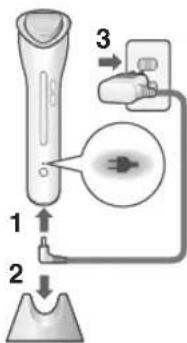
Attach the protective cap when charging.
1 Insert the appliance plug into the appliance socket.
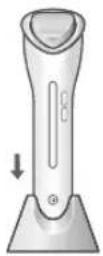
2 Mount the main body in the stand.
3 Insert the adaptor into a household outlet.
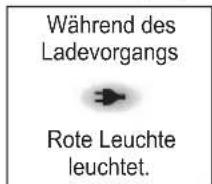
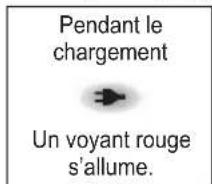
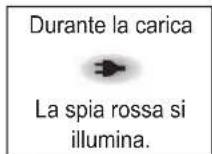
- Check that the charging indication/notification lamp (→) is glowing.
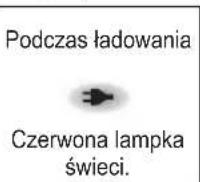
While charging

Red light glows.
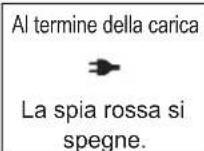
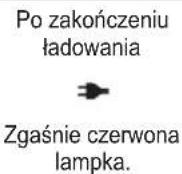
After charging is completed

Red light goes off.
- Charging is completed after approx. 1 hour.
If you remove and reinsert the appliance plug while charging, the charging indication/notification lamp (→) glows and turns off after approximately 5 seconds.
4 After charging is completed, unplug the adaptor from the household outlet and unplug the appliance plug from the main body.
(for safety and to reduce energy usage)
- Charging the battery for more than 1 hour will not affect battery performance.
▶ When charging indication/notification lamp (▶) blinks
Charging notification After charging is completed
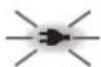
Once per second
• The battery level is low. Charge the appliance.
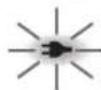
Twice per second
- Charge the appliance within the recommended ambient temperature range 15 °C – 35 °C.
If the symptom occurs repeatedly, contact an authorized service centre.
Notes
- When charging the appliance for the first time or when it has not been in use for more than 6 months, the charging time may change or the charging indication/notification lamp (→) may not glow for a few minutes. It will eventually glow if kept connected.
- Once fully charged, the appliance can be used approximately 3 times. (In the case of using the appliance for 9 minutes or less at a time) However, the usage time may be reduced depending on the usage environment.
- Recommended ambient temperature for charging is 15^ - 35^ . It may take longer to charge or the battery may fail to charge properly in extremely high or low temperatures.
- If there is crackling noise on radios or other devices while charging, charge the appliance using a different household outlet.
- Charging the appliance every time it is used will not affect the life of the rechargeable battery.
Before use
- Use the appliance for 9 minutes or less in total.
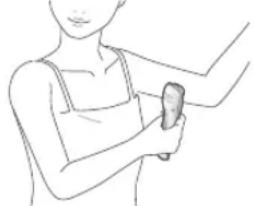
- Perform a skin (allergy) test for the safe use.
- Please use this appliance with bare skin (after removing make-up and washing your face).
- Please check the condition of your skin while using this appliance. When having abnormal sensation on skin, stop using the appliance immediately and consult a physician.
- Select the desired microcurrent and temperature level according to your skin conditions and personal preferences. When using the appliance for the first time or if any skin discomfort occurs, you are advised to adjust microcurrent and temperature level to "LOW".
- The COOLING mode does not have a microcurrent function. (Microcurrent and temperature level cannot be selected.)
- Before using the appliance, be sure to remove any jewellery such as earrings on your face or around your neck.
Skin (Allergy) test procedure
This is a simple test, used to check whether any adverse reactions will be caused to the skin in advance.
natural_image
Line drawing of a person holding a small object, possibly a tool or device, with no visible text or symbols.To prevent skin problems before using the appliance for the first time, please be sure to carry out a test.
- Testing is required for each of your skin care products.
1 Clean the test area (inner arm) with soap and water, and dry it with a towel.
2 Remove the protective cap.
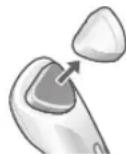
3 Follow steps 1 to 2 of "How to use" (See page 17.), and select MOISTURIZING mode.
- Except for toner and lotion, apply the skin care product to the inside of the arm.
4 Hold the titanium head against the test area for about 10 seconds.
• The titanium head vibrates. (See page 17.)
5 Wait for 48 hours later, and check if any reaction occurs in the skin.
- If any adverse reaction is found in the allergy test, immediately stop using this skin care product together with the appliance.
Skin detection function
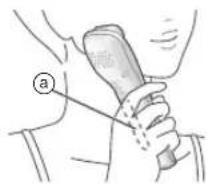
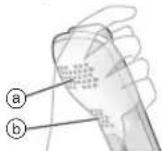
Hold the main unit tightly so that your palm fully comes into contact with the microcurrent panel (a) on its back. When the titanium head senses contact with your skin, it will automatically vibrate.
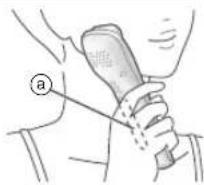
- There may be a slight noise (chatter) when the head vibrates, but this is not a malfunction.
- While the titanium head is kept against your skin, none of the switches will be available.
- If the titanium head does not vibrate, there is no microcurrent effect.
- During AUTO mode cooling or COOLING mode, there is no skin detection or vibration. (Titanium head cooling only)
- The appliance will automatically turn off if you do not touch the microcurrent panel or apply the titanium head to the skin for approximately 20 seconds.
(Except for AUTO mode cooling or COOLING mode)
How to use
- Unplug the AC adaptor.
The appliance will not turn on when the AC adaptor is connected. - Remove the protective cap before use.
• Refer to page 19 when using COOLING mode.
1 Prepare your skin care products.
Lotion, toner
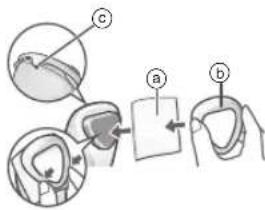
① Attach a cotton pad (a) into the titanium head.
• Fix it with the cotton ring (⑥).
- Fix it so that the cotton pad does not cover the depression (©).
- Use a thicker cotton pad if it comes off easily.
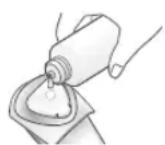
② Soak the cotton pad with lotion till it is fully saturated.
- Make sure that lotion fully penetrates into the inner side of the cotton pad.
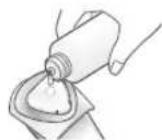
Skin care products other than toner and lotion
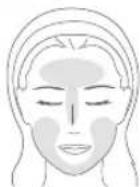
Apply the skin care product to necessary portions of the face.
• A cotton pad is not required.

English
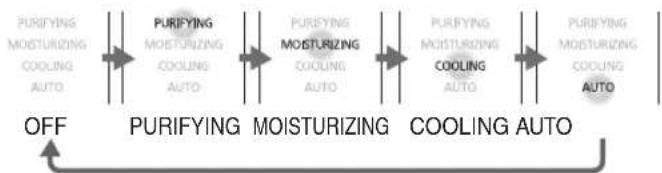
2 Press the switch and select a mode. Each press switches to the next mode.
flowchart
graph LR
    A["PURIFYING MOISTURIZING COOLING AUTO"] --> B["PURIFYING MOISTURIZING COOLING AUTO"]
    B --> C["PUREYING MOISTURIZING COOLING AUTO"]
    C --> D["PURIFYING MOISTURIZING COOLING AUTO"]
    D --> E["PURIFYING MOISTURIZING COOLING AUTO"]
    E --> F["OFF"]
    F --> G["MOISTURIZING COOLING AUTO"]
- The appliance starts from PURIFYING mode each time the power is turned on.
3 Press the switch and select a microcurrent level.
Press once to switch to the next microcurrent level. (Except for COOLING mode)
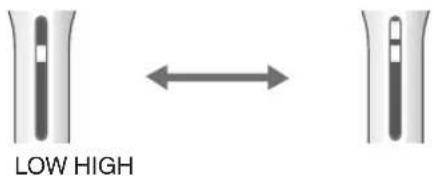
- Lamp display will automatically switch to mode function display after approximately 5 seconds after selection. (Microcurrent level will not be displayed.)
4 Press the switch and select a temperature level of the titanium head.
- Press once to switch to the next temperature level. (Except for COOLING mode)
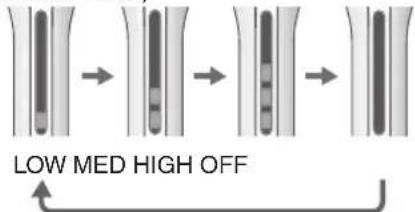
- Lamp display will automatically switch to mode function display after approximately 5 seconds after selection. (Temperature level will not be displayed.) - Warming may fail when the ambient temperature is below 15^ .
Memory function
The appliance records last used microcurrent and temperature level, and starts with the same setting when switched on. This memory function will reset when the appliance has not been used for a long period of time or when the battery has ran out.
5 Hold the main body firmly touching the microcurrent panel (a) on the rear of the main body.
- When the titanium head is applied to the skin in this state, the titanium head detects the skin and vibrates. (See page 17.)
- If the titanium head is applied to the skin immediately after selecting the microcurrent or temperature level, the lamp display will switch to mode function display even before 5 seconds have passed.
6 Move the titanium head while touching the skin.
PURIFYING mode (Seage 20.)
MOISTURIZING mode → (See page 20.)
AUTO mode → (See pages 20 and 21.)
- The power will be automatically turned off after each mode is completed.
- You can also turn it off by a long press of the POWER/SELECT switch.
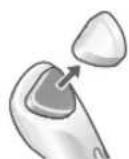
If using a cotton pad, please remove it.
- Do not reuse the used cotton pad. Doing so may result in skin discomfort.
When using COOLING mode
- Skin care products, cotton pads and cotton rings are not required.
1 Press the switch and select COOLING mode.
• Each press switches to the next mode. (See page 18.)
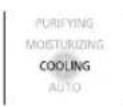
2 Move the titanium head while touching the skin. (See page 21.)
Notes
- Avoid continuous use.
• The titanium head does not vibrate. (See page 17.)
- The fan operates. Do not block the air inlet (a) or air outlet (b).
- 2 minutes after selecting the mode, the power automatically turns off. (The fan also stops.)
- To turn off the power during use, please press ⓑ and hold the POWER/SELECT switch.
- The titanium head temperature depends on the ambient temperature. Please use the appliance in an ambient temperature range of 15 °C to 35 °C.
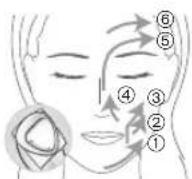
How to move the titanium head in each mode
Move repeatedly left and right.
→ Slide Do not slide
PURIFYING mode (Warm 3 min.)
Move the titanium head slowly, gently stroking the skin in the order ① to ⑥.
- Do not use excessive force.
- After moisture in the cotton pad is used up, it is hard to move the titanium head or implement the skin detection function. In this case, replenish lotion at once.
MOISTURIZING mode (Warm 3 min.) / AUTO mode (Warm 2 min.)
Move titanium head slowly, pushing the face-line upward in steps ① and ②, and lifting the face-line in steps ③, ④ and ⑤.
- If the appliance becomes hard to slide over your face during use, move the titanium head slowly, repeatedly pressing it lightly against and away from your skin.
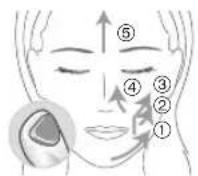
▶ When using serum, sheet mask or gel type
In the order ① to ⑤, move the titanium head slowly, repeatedly pressing it lightly against and away from your skin.
- Move the titanium head to enhance the penetration of serum.
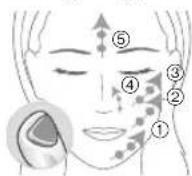
▶ When using eye cream
Apply the titanium head gently and move it slowly.
- Do not to apply excessive pressure to the eyes or skin.
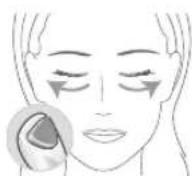
▶ When using massage cream or cream mask
Move titanium head slowly, pushing the face-line upward in steps ① and ②, and lifting the face-line in steps ③ and ④.
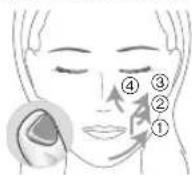
▶ When using lotion
In the order ① to ⑥, move the titanium head slowly, repeatedly pressing it lightly against and away from your skin.
- If it is difficult to detect the skin, replenish lotion.
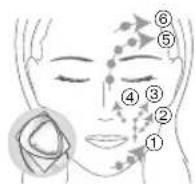
COOLING mode (Cool 2 min.) / AUTO mode (Cool 1 min.)
In the order from ① to ⑤, move the titanium head slowly, repeatedly "pressing it lightly against the skin for 2 to 3 seconds then removing it and changing the location".
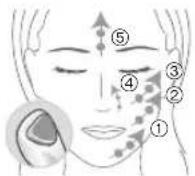
After use
The main body cannot be washed with water.
1 Wipe the titanium head clean with tissue.
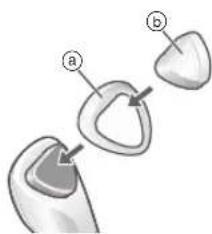
Please wash the cotton ring and protective cap with water.
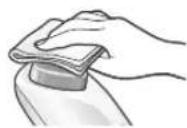
- If you are concerned that the main body is dirty, use a cloth soaked with soapy water to wipe the dirt. Wring out the cloth before wiping.
- Do not use alcohol, nail polish remover, or detergent (ex. liquid hand soap), etc. to clean the appliance. Doing so may cause failure, cracking or discoloration of parts.
2 Attach the cotton ring (a) and protective cap (b).
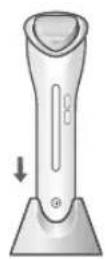
3 Store the main body in the stand.
Frequently asked questions
| Question Answer | |
| Can I use the appliance more frequently than once a day? | Use the appliance for 9 minutes or less in total. |
| Does the effect increase with the pressing strength? | Do not apply too much force to the titanium head.Keep the titanium head held slightly against your skin and move it gently to avoid burden on your skin. |
| Can I use the appliance in a bathtub? | It cannot be used in a bathtub.Do not use or store it in places with high humidity or where it is likely to be splashed with water. |
| Can I use the PURIFYING mode to take off my makeup? | It can not be used to take off makeup.Please use after cleansing or washing your face. |
| I cannot attach the cotton pad. | You may not be able to attach it depending on the shape and size of the cotton pad.Please use another cotton pad. |
| My skin tingles, why is this? | If there is too little skin care product, you may feel stimulation.Please increase the amount of skin care product or set the microcurrent level to “LOW”. |
Question Answer
| Can I replace the battery myself? | Please consult an authorized service centre. Changing the battery by yourself may cause failure. |
| Will the battery deteriorate if not used for an extended period of time? | The battery will deteriorate if not used for over 6 months, so make sure to perform a full charge at least once every 6 months. |
Troubleshooting
| Problem Possible cause | Action | |
| The power does not turn on even after the POWER/SELECT switch is pressed. | The appliance has not been charged. | Charge the appliance.(See page 15.) |
| The AC adaptor is connected. | Disconnect the AC adaptor before use. | |
| The charging indication/notification lamp (→) does not turn on or goes out. | This lamp turns off after charging is complete.(See page 15.) | |
| The adaptor is not inserted into the household outlet correctly. | Correctly insert the adaptor into the household outlet. | |
| The appliance plug is not firmly inserted into the socket. | Firmly insert the appliance plug into the socket. | |
| The mode function display lamp (orange) blinks. | The protection function has operated in the main body, and the appliance has stopped abnormally. | Turn off the power and turn it back on again after some time has passed.If the symptom occurs repeatedly, contact an authorized service centre. |
| The power turns off during use. | The power will be automatically turned off after each mode is completed. | |
| There is no power remaining in the battery. | Charge the appliance.(See page 15.) | |
| The appliance will automatically turn off if you do not touch the microcurrent panel or apply the titanium head to the skin for approximately 20 seconds. (Except for AUTO mode cooling or COOLING mode) | Turn on the power, re-select the mode and use the appliance, applying it to the skin. | |
| The appliance can only be used for a few minutes after charging. | The battery has reached the end of its life.(approximately 3 years) (See page 25.) | Please contact the store where purchased.(Customers cannot replace the battery as doing so may cause malfunction.) |
| The titanium head does not warm up. | The appliance is being used in an ambient temperature approximately lower than 15 °C. | Use the appliance in an ambient temperature approximately 15 °C or higher. |
| The appliance has not been charged. | Charge the appliance. (See page 15.) | |
| Temperature level is set to “OFF”. | Set temperature level to “LOW”, “MED” or “HIGH”. (See page 18.) | |
| The titanium head does not become cool. | Use the appliance in an ambient temperature approximately 35 °C or higher. | We recommend using the appliance in an ambient temperature range of 15 °C – 35 °C. |
| The appliance has not been charged. | Charge the appliance. (See page 15.) | |
| The air inlet or air outlet is blocked. Do not block the air inlet or air outlet. | ||
| COOLING mode has been used continuously. | Do not use COOLING mode continuously. | |
| The titanium head becomes warm a while after the power is turned off. | After COOLING mode is used, the titanium head temporarily becomes warm for a while after the power is turned off. This is not a fault. | |
| The titanium head does not vibrate during AUTO mode cooling or COOLING mode. | ||
| The titanium head does not vibrate. | Your hand is not touching the microcurrent panel. | The skin detection function is not working. Please grip the main unit so that your hand firmly touches the microcurrent panel when you apply the appliance to your skin. (See page 17.) |
| There is not sufficient lotion in the cotton pad. (In the case of using toner or lotion) | Make sure that lotion fully penetrates into the inner side of the cotton pad. | |
| The fan makes a noise. | The fan operates in AUTO mode cooling and COOLING mode. | |
If the problems still cannot be solved, contact the store where you purchased the unit or a service centre authorized by Panasonic for repair.
Battery life
Approximately 3 years.
If the operating time is significantly shorter even after a full charge, the battery has reached the end of its life.
(The battery life may change due to usage and storage conditions.)
The battery in this appliance is not intended to be replaced by consumers. Have the battery replaced by an authorized service centre.
Removing the built-in rechargeable battery
Remove the built-in rechargeable battery before disposing of the appliance.
Please make sure that the battery is disposed of at an officially designated location if there is one.
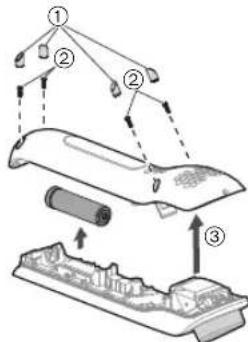
This figure must only be used when disposing of the appliance, and must not be used to repair it. If you dismantle the appliance yourself, it may cause malfunction.
- Remove the appliance from the AC adaptor.
- Press the POWER/SELECT switch to turn on the power and then keep the power on until the battery is completely discharged.
- Perform steps ① to ③ and lift the battery, and then remove it. - Take care not to short circuit the positive and negative terminals of the removed battery, and insulate the terminals by applying tape to them.
For environmental protection and recycling of materials
This appliance contains a Li-ion battery.
Please make sure that the battery is disposed of at an officially assigned location, if there is one in your country.
Specifications
| Power source | See the name plate on the AC adaptor. (Automatic voltage conversion) |
| Charging time Approx. 1 hour | |
| Airborne Acoustical Noise | MOISTURIZING mode 40 (dB (A) re 1 pW) Cooling operation 47 (dB (A) re 1 pW) |
This product is intended for household use only.

English
Disposal of Old Equipment and Batteries Only for European Union and countries with recycling systems
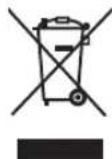
These symbols on the products, packaging, and/or accompanying documents mean that used electrical and electronic products and batteries must not be mixed with general household waste.
For proper treatment, recovery and recycling of old products and batteries, please take them to applicable collection points in accordance with your national legislation.
By disposing of them correctly, you will help to save valuable resources and prevent any potential negative effects on human health and the environment.
For more information about collection and recycling, please contact your local municipality.
Penalties may be applicable for incorrect disposal of this waste, in accordance with national legislation.
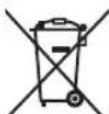
Note for the battery symbol (bottom symbol)
This symbol might be used in combination with a chemical symbol. In this case it complies with the requirement set by the Directive for the chemical involved.
Panasonic
Betriebsanleitung
(Haushalts-) Der Hautoptimierer Mikrostrom 3-in-1
Modellnr. EH-XT20
Inhalt
AHauptgehäuse
①Titankopf
②MICROCURRENT
(MIKROSTROM)-Schalter
natural_image
Diagram showing two vertical bars with arrows pointing to adjacent shapes (no text or symbols)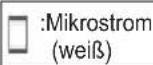
NIEDRIG HOCH
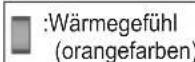
NIEDRIG MITTEL HOCH AUS
natural_image
Line drawing of a person holding a smartphone (no text or symbols)Lotion/Reinigungswasser

Deutsch
▶ Prévention des accidents
natural_image
Diagram showing two vertical bars with a bidirectional arrow between them, no text or symbols present
BAS ÉLEVÉ
flowchart
graph LR
    A["Vertical Bars"] --> B["Segmented Blocks"]
    B --> C["Segmented Blocks"]
    C --> D["Segmented Blocks"]
BAS MOYEN ÉLEVÉ ARRÊT
natural_image
Line drawing of a person holding a small object, no text or symbols present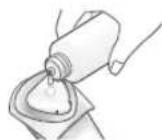
natural_image
Diagram showing three labeled parts (a, b, and a) interacting with a central object, no text or symbols present.ACorpo principale
① Testina in titanio
②Interruttore MICROCURRENT (MICROCORRENTE)
③ Interruttore WARM (CALDO)
④Display luminoso
natural_image
Diagram showing two vertical bars with a bidirectional arrow between them, no text or symbols present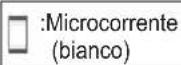
BASSO ALTO
flowchart
graph LR
    A["Vertical Bars"] --> B["Segmented Blocks"]
    B --> C["Segmented Blocks"]
    C --> D["Segmented Blocks"]
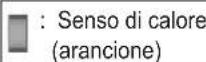
BASSO MEDIO ALTO SPENTO
natural_image
Line drawing of a person holding a smartphone (no text or symbols)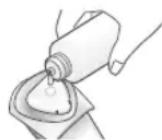
natural_image
Diagram showing three dental or implant components labeled a, b, and c (no text or symbols present)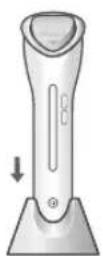
Domande frequenti
ACuerpo principal
① Cabezal de titanio
②Interruptor MICROCURRENT (MICROCORRIENTE)
③ Interruptor WARM (CALOR)
④Pantalla luminosa
natural_image
Diagram showing two vertical bars with a bidirectional arrow between them, no text or symbols present:Microcorriente (blanco)
BAJO ALTO
Durante la carga

natural_image
Line drawing of a person holding an object, no text or symbols present| → Deslizar No deslizar | ←→ |
Modo de PURIFYING (Calor 3 min.)
natural_image
Diagram showing three dental or implant components labeled a, b, and c (no text or symbols present)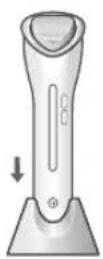

natural_image
Diagram showing two vertical bars with a bidirectional arrow between them, no text or symbols present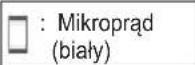
NISKI WYSOKI
natural_image
Line drawing of a person holding a small object, no text or symbols present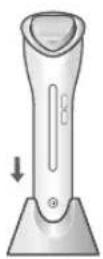

© Panasonic Corporation 2016
⑤ EN, GE, FR, IT, SP, PL
Printed in China
XXXXXXXXXXXX XXXXX-X

- Panasonic
- Contents
- Safety precautions...... 6
- Warning
- Safety precautions
- Explanation of symbols
- DANGER
- ▶ Preventing accidents
- ▶ To prevent skin or health problems
- The following persons should not use this appliance:
- Do not use this appliance in the following body area or following cases.
- Individuals without sense of heat should not use this appliance.
- Do not use COOLING mode if the ambient temperature is less than 15° C.
- The following persons should consult own physician before using this appliance:
- ▶ This product
- ▶ In case of an abnormality or malfunction
- ▶ Power supply
- CAUTION
- Handling of the removed battery when disposing
- A Main body
- When mode is selected
- When microcurrent/temperature level is selected
- POWER/SELECT switch
- MICROCURRENT switch
- LOW HIGH
- WARM switch
- LOW MED HIGH OFF
- Memory function
- Recommended treatment sequence
- In the case of using a single mode
- PURIFYING mode
- MOISTURIZING mode
- COOLING mode
- AUTO mode
- In the case of using a combination of modes
- ▶ Recommended full treatment (Total 8 min.)
- ▶ Shortened treatment (Total 6 min.)
- ▶ Moisturizing & Cooling (Total 5 min.)
- Notes
- Preparation
- Charging
- Before use
- Skin (Allergy) test procedure
- Skin detection function
- How to use
- Prepare your skin care products.
- Lotion, toner
- Skin care products other than toner and lotion
- Press the switch and select a microcurrent level.
- Press the switch and select a temperature level of the titanium head.
- Hold the main body firmly touching the microcurrent panel (a) on the rear of the main body.
- Move the titanium head while touching the skin.
- If using a cotton pad, please remove it.
- When using COOLING mode
- Press the switch and select COOLING mode.
- Move the titanium head while touching the skin. (See page 21.)
- How to move the titanium head in each mode
- PURIFYING mode (Warm 3 min.)
- MOISTURIZING mode (Warm 3 min.) / AUTO mode (Warm 2 min.)
- After use
- Wipe the titanium head clean with tissue.
- Battery life
- Removing the built-in rechargeable battery
- Remove the built-in rechargeable battery before disposing of the appliance.
- For environmental protection and recycling of materials
- Disposal of Old Equipment and Batteries Only for European Union and countries with recycling systems
- Note for the battery symbol (bottom symbol)
- Inhalt
- AHauptgehäuse
- NIEDRIG HOCH
- NIEDRIG MITTEL HOCH AUS
- Lotion/Reinigungswasser
- ▶ Prévention des accidents
- BAS ÉLEVÉ
- BAS MOYEN ÉLEVÉ ARRÊT
- ACorpo principale
- BASSO ALTO
- BASSO MEDIO ALTO SPENTO
- ACuerpo principal
- BAJO ALTO
- Modo de PURIFYING (Calor 3 min.)
- NISKI WYSOKI
Brand : PANASONIC
Model : EHXT20
Category : Facial care device