VDV810 - Intercom ME - Free user manual and instructions
Find the device manual for free VDV810 ME in PDF.



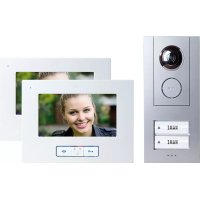
| Product Type | Video Intercom |
| Brand | ME (VISTADOOR) |
| Model | VDV810 |
| Cover Material | Brushed Stainless Steel |
| Power Supply | 15 V DC |
| Current Consumption | 130 ± 50 mA |
| Temperature Range | -10 to +50 °C |
| Electric Strike Connection | 12 V DC, max. 1 A |
| Number of Doorbells | 1 (up to 4 in parallel with other outdoor stations) |
| Maximum Indoor Units | 4 per living unit |
| Built-in Camera | Yes |
| Lighting | Backlit Light Field |
| Recommended Mounting Height | 1.5 to 1.6 m (camera center) |
| Mounting Type | Flush Mounted |
| Main Functions | Doorbell, video intercom, electric strike release, external camera switching |
| Stainless Steel Care | Clean with special stainless steel cleaner or clear water, in the direction of the grain |
| Safety | Disconnect power before cleaning; do not use abrasive products |
| Warranty | 2 years limited |
| Spare Parts Included | Spare Torx screws, wall plugs, mounting screws |
Frequently Asked Questions - VDV810 ME
User questions about VDV810 ME
0 question about this device. Answer the ones you know or ask your own.
Ask a new question about this device
Download the instructions for your Intercom in PDF format for free! Find your manual VDV810 - ME and take your electronic device back in hand. On this page are published all the documents necessary for the use of your device. VDV810 by ME.
USER MANUAL VDV810 ME
ID2 = Schalter 1 "off", Schalter 2 "on"
ID3 = Schalter 1 "off", Schalter 2 "off"

Thank you for choosing the VISTADOOR video intercom system. You have purchased a high quality system with a stainless steel cover. The elaborate stainless steel covers are made by hand and thus have individual characteristics that should be considered a sign of quality.

NOTES ON CARING FOR STAINLESS STEEL
Please never clean the stainless steel surfaces with standard cleaning materials, as these are too harsh. Please simply clean using spray designed for the cleaning and care of stainless steel. If this is not available please use only clear water.
Brushed surfaces should always be cleaned with the grain and never in a circular motion. This will avoid the creation of scratches.
Failure to observe these notes may lead to discoloration or even to corrosion damage in extreme cases.

The system should be assembled by a specialist.
KEY
1 Outdoor unit
1.1 Wall box
1.2 Stainless steel front plate
2 Indicator field
3 Camera
4 Loudspeaker perforations
5 Bell button
6 Microphone
7 Casing screws
8 Lightness sensor
9 Volume potentiometer
10 Dip switch for the opening time of the door opener
11 Dip switch for the ID code
12 Connection terminal door opener
13 Connection terminal power supply
14 Connection terminal signal line
15 Connection terminal external camera
16 Installation aid
SCOPE OF DELIVERY
1x Outdoor unit
1x Wall box
1x Plaster aid
7x Tox screw for front plate (1pc. spare)
3x Installation aid incl. screw
8xDowel and screw
PREPARATION FOR INSTALLATION
The following lines are required:
Single-family house: 4 lines from the outdoor unit to the indoor unit and 2 lines from the outdoor unit to the door opener.
Multi-family house (from VDV-820): In this case 4 lines are required per bell button from the outdoor unit into each residential unit. Example VDV-840: 16 lines are required at the outdoor unit for the residential units (4 lines each x 4 bell buttons) and 2 lines to the door opener.
Up to four indoor units can be connected in parallel per residential unit. The connection can either be laid from the indoor station or in a stor formation from a central point (distribution box).
The lines should be laid in such a way that they are fed out of the wall directly behind the relevant outdoor/indoor unit.

Note: It is also possible to combine video and audio components with the VISTADOOR system.
INSTALLATION OF THE OUTDOOR UNIT
The intercom system is designed to be flush-mounted.

Preparation
When removing the front cover, take care that the indicator field and the nameplate do not fall out and get damaged.
The camera should be mounted at a height of approx. 1.5-1.6m (middle of the camera) (Fig. 3). Before installing the intercom system, test whether the camera captures a sufficient image of the visitor. If necessary, adjust the installation height and location to suit the local conditions.
- Remove the six screws from the stainless steel front plate using a Torx screwdriver (T10) and then lift it upwards. Now you can uncover the wall box by carefully removing the rubber seal and taking out the actual outside station.
- Hold the wall box straight on the wall and draw around it on the wall with a suitable pencil. Take care that the necessary connecting cables are in the middle part of the wall box. The cables should not be measured too short.
- The cable feedthrough can be detached with a sharp knife.

Note:
The hole for the intercom system should be measured so that the wall box fits precisely inside and is flush with the building wall.
- In order to anchor the wall box to the wall, first use the holes in the base of the wall box to mark the 8 fixing holes in the wall and then drill corresponding holes (diameter approx. 6mm
- Next place the supplied dowels in the holes. The wall box can now be affixed with the 4 outer screws. Take care here to ensure that the wall box is level; check this if necessary with a spirit level. The wall box must also not be twisted.

NOTE: If the wall box is affixed only insecurely by the screws, the wooden frame can be filled along the sides with appropriate glue.
- For plastering insert the supplied plaster aid into the wall box. This prevents the wall box from being filled with mortar / plaster. When plastering make sure that the threaded inserts will not be soiled with mortar / plaster.
- Insert the outer unit into the wall box. In order to prevent the outer
VISTA DOOR
SYSTEM
unit from falling out, use the supplied installation aid (16). It is easily screwed to the wall box using one of the Torx screws and holds the outer unit in position.
- Remove the cover over the screw terminals on the outer unit and feed the cable through the relevant inlet.
- Now connect the cable to the intercom system. (See Point CONNECTION)
NAME
Adjustment of nameplate and indicator field
The nameplate consists of two transparent plastic parts, which are joined together with 2 respectively 4 small screws.
- Remove both screws on the nameplate and take it apart; the foil for inscription is between the plastic parts.
- Write on the foil with a smear-resistant felt pen or print a nameplate inlay using a PC and a printer.
- Place the written nameplate inlay between the two plastic parts and screw these back together.

* Naneplate size:
VDV 810, VDV 820 and VDV 830: 71mm× 34mm VDV 840 and VDV 860: 71mm× 15mm
The indicator field likewise consists of two plastic parts; one is permanently affixed to the outer unit and the other is simply clipped over the top and can be pulled off from the front. Write on the foil with a smear-resistant felt pen or print an inlay sized 72 × 62 mm using a PC and a printer.
- In order to replace the front cover on the outside station, the inscribed indicator field must be placed correctly on the outside station.
- Place the nameplate on the outside station and affix it with the supplied adhesive strip so that it cannot fall out. Alternatively you can affix the nameplate with transparent adhesive tape.
- Remove the installation aid and assure the outdoor unit by hand against falling out. A second person can be very helpful here.
- Place the front cover onto the outside station.
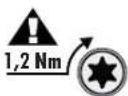
- Screw on the front cover with the 6 supplied Torx screws. Be careful not to cant or over-tighten the screws. The maximum torque is 1,2 Nm. This value must not be exceeded. Otherwise, the threaded inserts in the wall box will become unusable or be torn out.
Note: Self-adhesive foam is supplied to seal the front plate against water. It is affixed to the edge of the front plate from behind.
CONNECTION
Connect the laid line to Audio, +15V, GND and Video (figure 2.1, no. 14) on the outdoor station and connect it with the indoor station/s. These are also present on the indoor station and need only be connected with one another 1:1.
Note on the multi-family house version: one 4-pole connection terminal is provided per residential unit; the connector terminals are numbered. Terminal 1 is for the lowest bell button, terminal 2 for the bell button above it, etc.
Connecting a door opener
The door opener is connected directly to the outdoor station by two
lines (figure 2.2, no. 12). No additional power supply is necessary to control the door opener. The door opener must be designed for 12 V direct current and may not require more than 1 A current. The two connector terminals are marked 'lock +' and 'lock -' if the door opener needs to be poled.
Connecting the power supply
The power supply can either be connected to the indoor and/or to the outdoor station. Separate screw terminals exist for this purpose (figure 2.2, no.13). It is also possible to connect the power supply directly to the signal line, e.g. if all signal lines have been laid from the fuse box to the outdoor and indoor units. The power supply unit then needs to be connected with earth (GND) and +15V (figure 2.1, no.14).

Up to 8 units can be supplied with power from one power supply unit. A second power supply unit is required if there are more than eight units, e.g. if 2 outdoor and 7 indoor stations need to be used.
The second power supply unit can simply be switched parallel to the first power supply unit.
The second power supply unit should be connected with a short line to the indoor or outdoor station that is farthest away so that any drop in current in the connection line can be compensated.
Connecting an external camera
An external camera can be connected to this screw terminal (figure 2.3, no.15) in order, for example, to provide additional monitoring of areas that cannot be seen by the main camera. All cameras can be connected that require operating voltage of 12VDC and supply an FBAS video signal.
The video line is connected to the terminal (VIDEO) and the earth line to the terminal (GND), operating voltage for the camera is taken from the terminals 'VCC' (positive pole) and 'GND' (negative pole). The external camera automatically has the ID 4 (see chapter on ID code).
No sound transmission is possible when the external camera is active.
POSSIBLE SETTINGS
The outdoor station offers the following possibilities to set the system to your personal circumstances:
Volume of the outdoor station
The potentiometer (figure 2.3, no.9) is used to set the volume on the outdoor station. To set the highest volume, turn the potentiometer carefully clockwise as far as possible and then back a little. Reduce the volume by turning in an anti-clockwise direction.
ID code
If several outdoor stations are switched in parallel (e.g. at the gate entrance and the house) then the ID code is set via the dip switch (figure 2.2, no.11). This makes it possible to activate the individual outdoor units in sequence, e.g. in order to monitor the coverage of the relevant outdoor unit. The switch is carried out on the indoor station with the 'monitor' switch.
ID1 = Switch 1 'on' Switch 2 'on'
ID2 = Switch 1 'off' Switch 2 'on'
ID3 = Switch 1 'off' Switch 2 'off'


Opening time of the door opener
The dip switches (figure 2.3, no. 10) are used to set how long the door opener should be activated. The possible settings are either 1 second or 5 seconds. 5 seconds are set at the factory and function for most standard door openers.
Switch 1 'off', Switch 2 'on' is equivalent to an opening time of 1 second.
Switch 1 'on', Switch 2 'off' is equivalent to an opening time of 5 seconds.
OPERATION
- Press the bell button.
- The set ringing tone will sound at the relevant indoor station/s and the screen shows the picture from the outdoor station.
- Accept the conversation at the indoor unit by briefly pressing the speak button (MOUTH).
- If an additional camera is connected to the outdoor station you can switch to this by briefly pressing the 'MONITOR' button. Pressing the 'Monitor' button again switches back to the internal camera.
- If a door opener is connected then you can activate the door opener by pressing briefly on the door opener button (KEY).
- Switch the system back to standby operation by briefly pressing the speak button (MOUTH).
TECHNICAL DATA
Operating voltage: 15 V DC
Current consumption: 130 ± 50 ~mA
Temperature range: -10^ to +50^
Door opener connection: DC 12V, max. 1A
INFORMATION
Information regarding CE - Conformity
The functionality of the unit can be affected by the influence of strong static, electrical or high frequency fields (discharging, mobile phones, radios, microwaves).
Cleaning and maintenance
Always disconnect mains powered units from the mains supply before cleaning (disconnect the plug). The unit housing can be cleaned using a soapy soft cloth. Do not use any abrasive materials or chemicals. Remove dust build-up from ventilation slits using a brush and clean up using a vacuum cleaner. Do not hold the vacuum cleaner nozzle directly against the unit.
Safety instruction
In the event of damage to the housing, connectors, power cables or isolation shielding, switch off the device immediately and disconnect from the mains power. ELECTRIC SHOCK - DANGER OF LOSS OF LIFE. (Unplug the mains connector from the socket!). Damage should be repaired immediately by a specialist!

Never carry out repairs yourself!
Warranty
2 years warranty from date of purchasing, on base of correct using.
The producer is not responsible for consequential damages which are effected directly or indirectly from this item.
SAFETY NOTES
The warranty will be null and void in case of damages arising from violations of these operating instructions. We are not liable for consequential damages!
We accept no liability for material damages or injuries arising from inappropriate use or violation of the safety instructions. In such cases all warranty claims are null and void!
For reasons of safety and licensing (CE), unauthorised conversion and / or modification of the product is prohibited.
The design of the product complies with protection class 1. Only a standard mains socket (230V / - / 50Hz) of the public mains supply may be used to power the device. Devices powered by mains voltage must be kept away from children. Please therefore be particularly careful in the presence of children.

Do not take the product apart! There is a danger of lethal electric shock!
Do not leave packaging material lying about since plastic foils and pockets and polystyrene parts etc. could be lethal toys for children.
The interior units are suitable only for dry interior rooms (not bathrooms and other moist places). Do not allow the devices to get moist or wet. There is a danger of lethal electric shock!
In industrial institutions, the accident prevention regulations of the Association of Commercial Professional Associations for electrical installations and equipment must be observed. Please consult a specialist should you have doubts regarding the method of operation, the safety, or the connections of the device.
Handle the product with care - it is sensitive to bumps, knocks or falls even from low heights.
GB
These operating instruction are published by m-e GmbH modern-electronics,
The operating instructions reflect the current technical specifications at time of print. We reserve the right to change the technical or physical specifications.