VD6720 - Intercom ME - Free user manual and instructions
Find the device manual for free VD6720 ME in PDF.



| Brand | ME |
| Model | VD6720 |
| Product type | Video intercom with 7-inch screen |
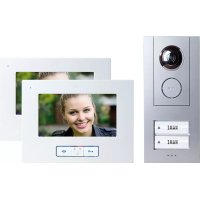
| Included components | 1 outdoor unit with two doorbell buttons, 2 indoor units with 7" screen, 1 ST-1000 power supply, 1 installation kit |
| Outdoor unit power supply | 15 V DC, no-load operation < 0.5 W |
| Indoor unit power supply | 15 V DC, no-load operation < 0.5 W |
| Camera resolution | 380 video lines |
| Screen resolution (7") | 480 × 270 px |
| Camera angle | Horizontal and vertical |
| Door opening system | 12 V DC, 0.9 A max., adjustable delay (1 s or 5 s) |
| Maximum number of indoor units | 4 per dwelling (in series or star configuration) |
| Main functions | Audio/video communication, door opening, silent mode, internal communication, screen settings (brightness, contrast, saturation), ringtone selection, external camera connection |
| Maintenance and cleaning | Clean the unit with a slightly damp cloth, without corrosive products. Disconnect before cleaning. |
| Safety | Do not disassemble. Disconnect immediately if damaged. Use in dry environment only (not in bathroom). |
| Warranty | 2-year limited warranty against material and manufacturing defects |
Frequently Asked Questions - VD6720 ME
User questions about VD6720 ME
0 question about this device. Answer the ones you know or ask your own.
Ask a new question about this device
Download the instructions for your Intercom in PDF format for free! Find your manual VD6720 - ME and take your electronic device back in hand. On this page are published all the documents necessary for the use of your device. VD6720 by ME.
USER MANUAL VD6720 ME
B. 4 = Schlüsseltaste
B. 5 = Mikrofon
B. 6 = Spechtastete
命
B. 7 = Intertaste
B. 8 = Helligkeit
B. 9 = Kontrast
ID2 = Schalter 1 "on", Schalter 2 "off"
ID3 = Schalter 1 "off", Schalter 2 "on"

Input and output are connected parallel
C
Abb.C DIAGRAMC ILLUSTRATION C AFBEELDING C
7* INNNENSTATION · INDOOR STATION · BOITIER INTERIEUR · BINNENSTATION
INTRODUCTION
Thank you for choosing the VISTUS Video intercom system. You have purchased a high quality system.
The assembly should be carried out by a specialist.
Care Information
Wipe the plastic casing with a slightly damp cloth. Do not use aggressive cleaning materials.
Legend
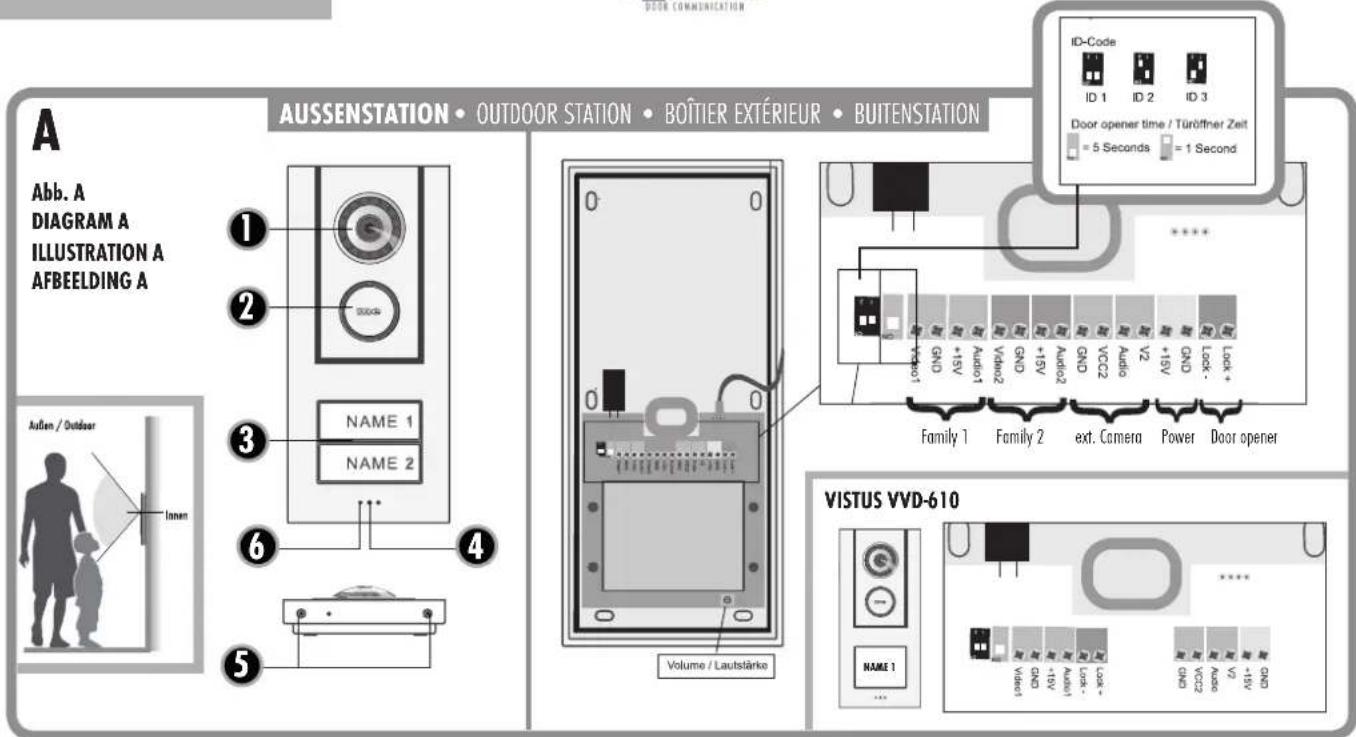
Outdoor station
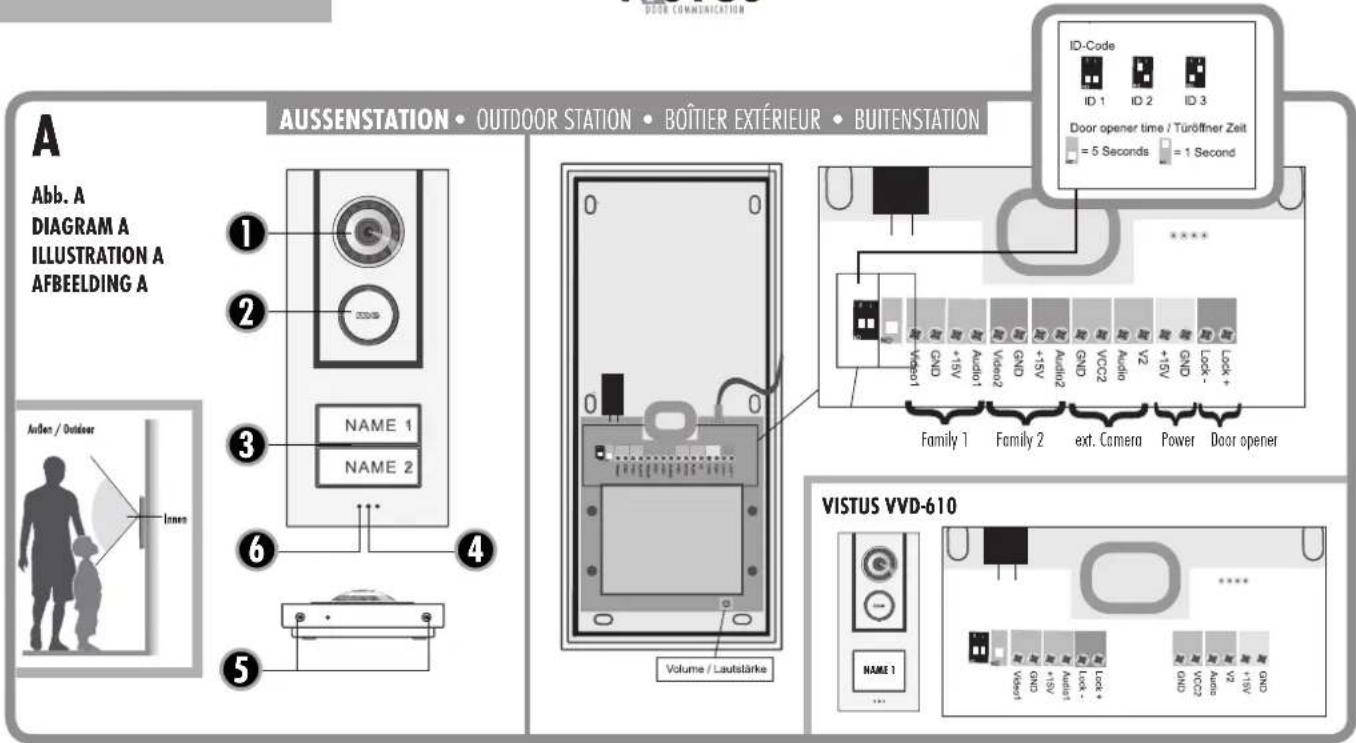
A.1 = Camero
A.2 = Loudspeaker
A.3=Nameplates/Bell button
A.4= Microphone
A.5 = Casing screws
A.6 = Brightness sensor
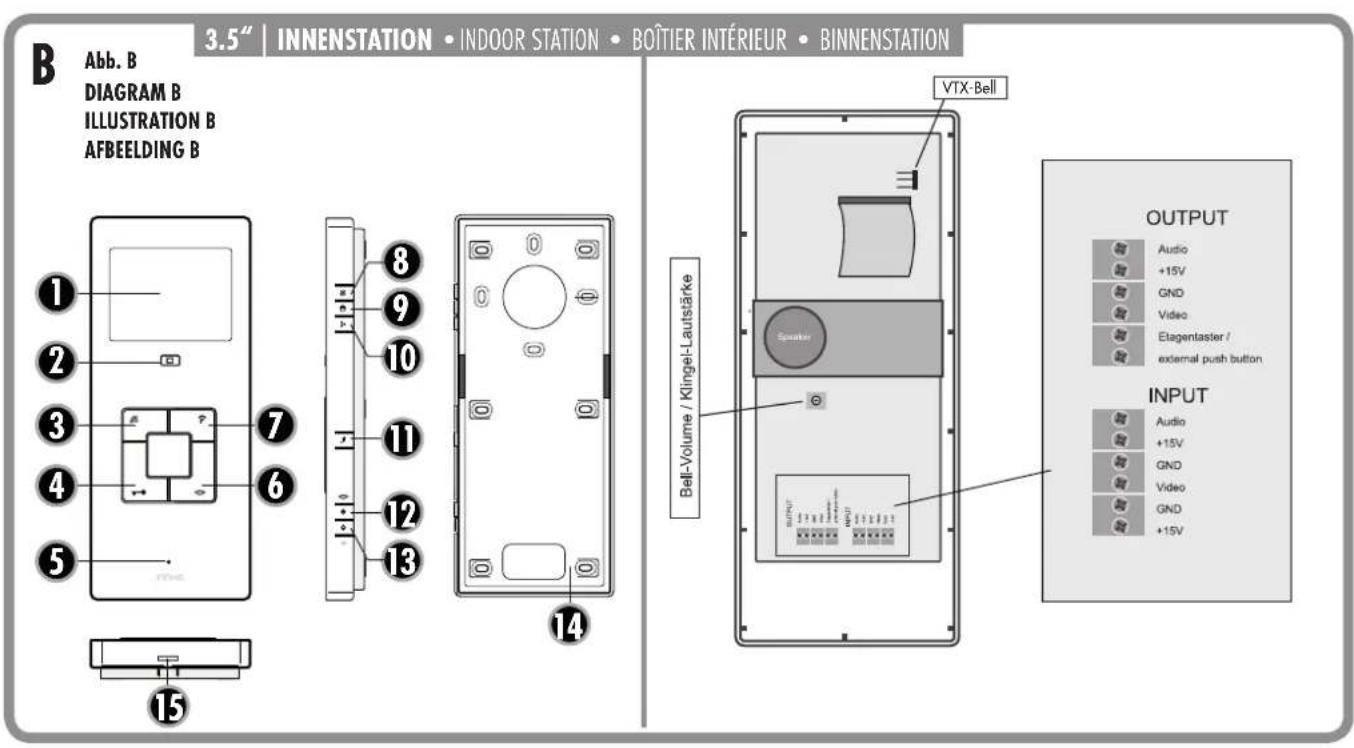
Indoor station with 3.5^ screen
(VISTUS VD-6310 and VISTUS VD-6320)
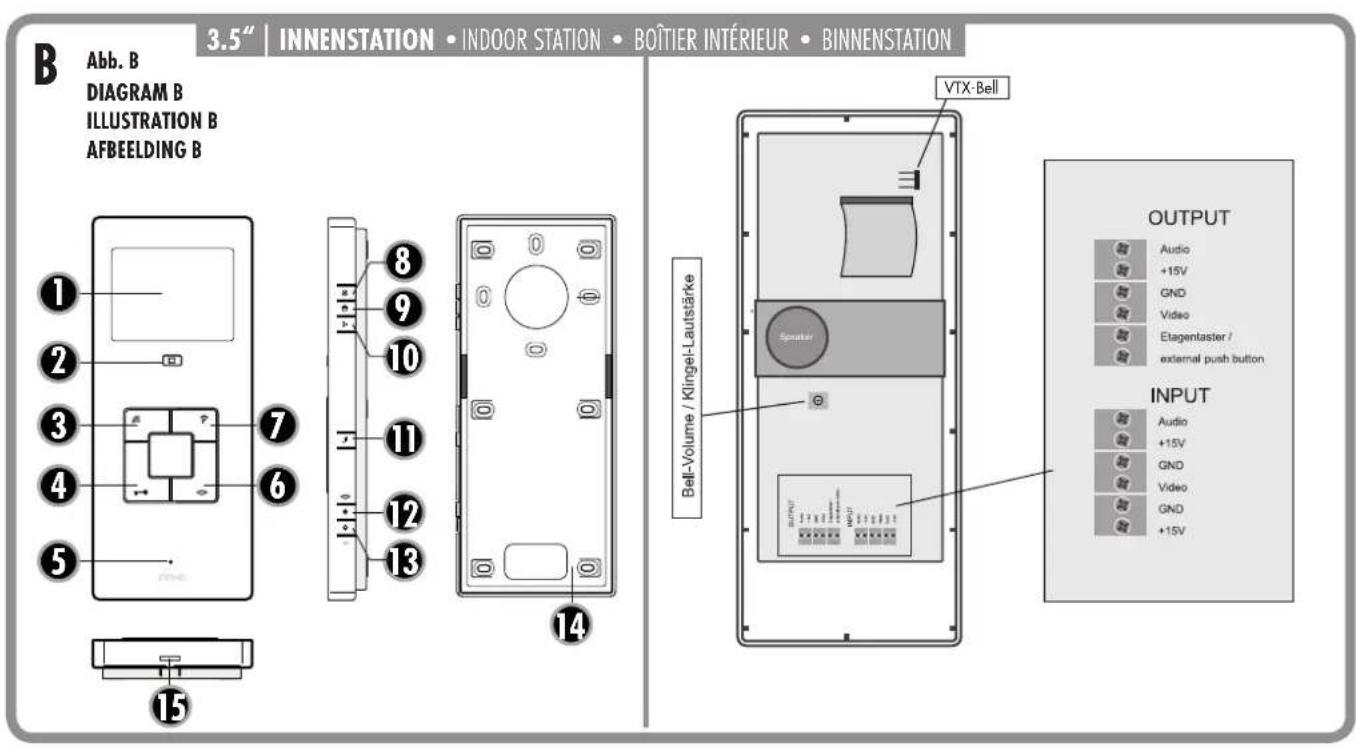
B. 1 = Screen
B. 2 = Screen button
B. 3 = Mute button
B. 4=Key button
B. 5 = Microphone
B. 6 = Talk button
B. 7= Internal button
B. 8 = Brightness
B. 9 = Contrast
B. 10 = Colour saturation
B.11 = Melody
B.12=Volume+
8.13=Volume-
B.14 = Casing back
B.15 = Snap fastener
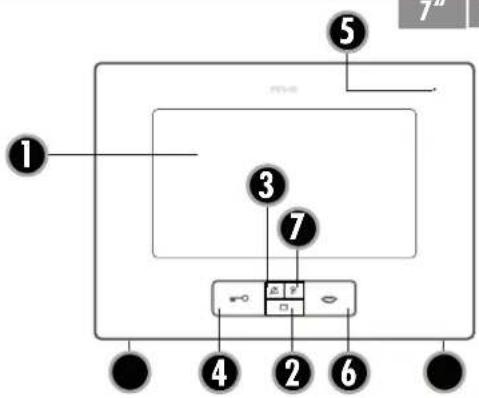
Indoor station with 7^ screen
(VISTUS VD-6710 and VISTUS VD-6720)
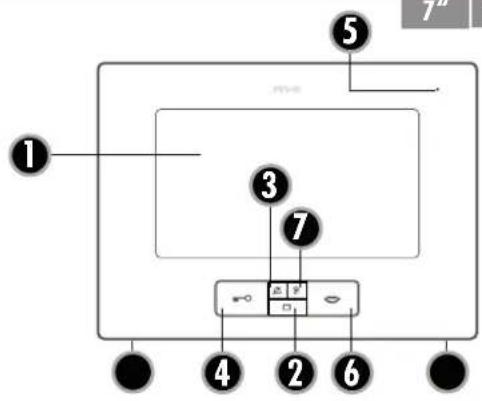
C. 1 = Screen
C. 2 = Screen button
C. 3 = Mute button
C. 4=Key button
C. 5 = Microphone
C. 6 = Talk button
C. 7 = Internal button
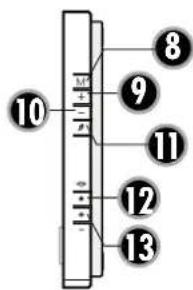
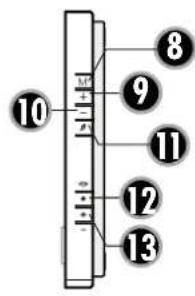
M C.8=Menu button
+ C. 9 = 0SD + Taste
C.10=OSD-Taste
C.11 = Melody
C.12=Volume+
C. 13 = Volume
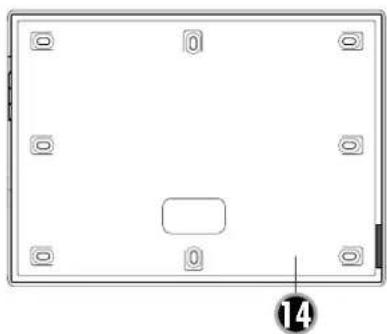
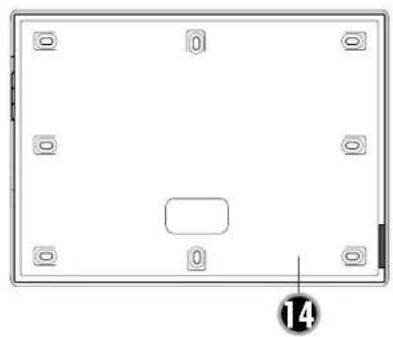
C. 14 = Casing back
C. 15 = Casing screws
Scope of delivery VISTUS VD 6310:
1x Outdoor station with one bell button
1x Indoor station with 3.5^ monitor
1x Power supply ST-1000
1x Assembly materials
Scope of delivery VISTUS VD 6320:
1x Outdoor station with two bell buttons
2x Indoor station with 3.5^ monitor
1x Power supply ST-1000
1x Assembly materials
Scope of delivery VISTUS VD 6710:
1x Outdoor station with one bell button
1x Indoor station with 7^ monitor
1x Power supply ST-1000
1x Assembly materials
Scope of delivery VISTUS VD 6720:
1x Outdoor station with two bell buttons
2x Indoor station with 7^ monitor
1x Power supply ST-1000
1x Assembly materials
Scope of delivery VISTUS VD-603:
1x Indoor station with 3.5^ monitor
1x Assembly materials
Scope of delivery VISTUS VD-607:
1x Indoor station with 7^ monitor
1x Assembly materials
PREPARING FOR INSTALLATION
The following lines are required:
Single-family house: 4 lines from the outdoor unit to the indoor unit and 2 lines from the outdoor unit to the door opener.
Two-family house: Here 4 lines are required per bell button from the outdoor unit into each residential unit. 4 lines for family 1 and 4 lines for family 2, as well as 2 lines to the door opener.
NOTES:
- A wiring plan can be found in the affix.
- With the VISTUS-System you can also combined video and audio components.
Up to four indoor units can be connected in parallel per residential unit. The connection can be laid as
- Serial connections (from indoor station to indoor station) or as
- Radial connections (parallel) from one central point (distribution box).
The wiring plan in the affix is base on a radial wiring system as this is preferable.
The lines should be laid in such a way that each is fed out of the wall directly behind the corresponding outdoor/indoor unit.
ASSEMBLY OF THE OUTDOOR STATION
The door intercom point is designed for surface mounting.
Preparation
When removing the front cover ensure that the nameplate does not fall out and become damaged.
Also take care of the cable in the loudspeaker, which is attached in the front part of the casing.
The camera should be fitted at a height of approximately 1.5m - 1.6 m (from the centre of the camera) (Figure A). Before assembling the door intercom you should test whether the camera shows enough of a visitor. Adjust the assembly height and assembly location to your circumstances as necessary.
- Remove the two screws in order to be able to open the casing on the outdoor station. The casing is also fitted with notches and projections that connect the upper and lower parts of the casing. Thus a certain amount of force is necessary in order to separate the casing parts.
- Position the drilling template for the outdoor station in a level location at the intended assembly location (a spirit level is helpful for this) and attach it with sticky tape.
-
Use the drilling template to drill the attachment holes with a 6mm drill and insert a dowel into each hole.
-
Now remove the drilling template.
- Feed the lines through the large hole in the outdoor station and secure them with 4 screws.
- Connect the line in accordance with the wiring plan.
Adjusting the nameplate
The nameplate comprises two transparent plastic parts that are connected with 2 or 4 small screws.
- Remove all screws from the nameplate and take the plate apart. The foil for the name can be found between the plastic parts.
- Write on the foil with a smudge proof felt tip pen or print a nameplate* using a PC and printer.
- Lay the complete nameplate (foil) between the two plastic parts and screw them back together.
* Size of the nameplate:
VISTUSVD6X10:71mm×50mm
VISTUS 6D X20:71 mm x 25 mm
- Replace the nameplate in the front cover before re-attaching the front cover to the outdoor station. You can attach a strip of sticky tape over the nameplate and the casing to ensure that the nameplate does not fall out during assembly.
A Note: Remove the sticky tape from the casing immediately following installation in order to prevent damage to the front cover!
- Screw the front cover on using both casing screws. Please ensure that the screws are not tilted as this can damage the thread in the lower section of the casing.
ASSEMBLY OF THE INDOOR STATION (3.5" AND 7")
The installation height of the Indoor stations can be selected freely according to your circumstances.
- The casing on the 3.5^ indoor station is kept together with notches and projections. To separate the lower section from the front section, press a small slotted screwdriver against the snap fastener (B.15) on the bottom side. The 7^ indoor station is kept together by 2 casing screws (C.15).
- Use the lower section of the casing as an aid to mark the drill holes. Make sure that you hold the lower section in a horizontal position for this step.
NOTE: The lower casing section on the 3.5^ indoor station can also be attached to a hollow wall box. The corresponding attachment holes are located around the line feed hole. If this does not provide
enough hold then drill more holes and use them to also screw the indoor station in place.
- Drill the attachment holes with a 6mm drill and insert one dowel in each hole.
- Feed the lines through the feed hole in the lower casing part designed for this purpose and screw this down.
- Attach the lines in accordance with the wiring plan and replace the front casing section onto the lower casing section. Make sure that it clicks correctly into place.
CONNECTION
An exact description of where the individual connections and terminals are located can be found in the figures. The recommended wiring can be seen in the corresponding wiring plan in the affix.
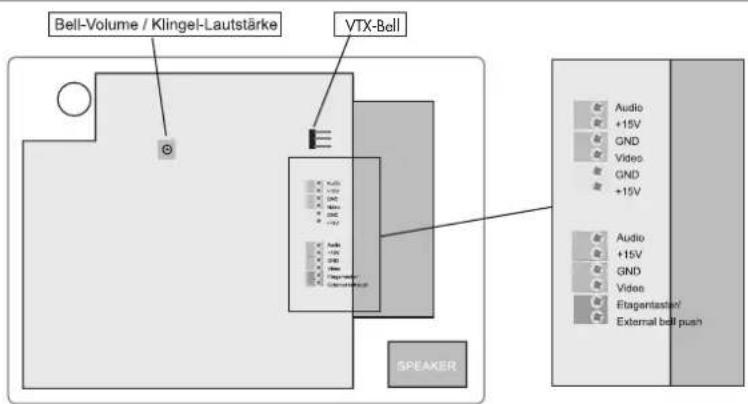
Connect the lines to the audio, +15V, GND and video on the outdoor station. These terminals are also present on the indoor stations and need to be connected to one another 1:1.
Note on the 2-family versions: One four-pole connection terminal is present in each residential unit. The connection terminals are numbered. Connection terminal 1 is for the lower and connection terminal 2 is for the upper bell button.
Connecting the door opener
The door opener is connected directly to the outdoor station with two lines (Figure A, Door opener'). No additional power supply is necessary in order to control the door opener. The door opener must be designed for 12 volt DC voltage and may not require more than 1A of power. In the event that the door opener needs to be correctly polarised then both connection terminals must be marked 'lock +' and 'lock -'.

Note: In order to prevent a door opening by tampering of the outdoor station, we recommend the installation of the separately available security door opener module SD0-10, which is mounted in the service entrance box. The SD0-10 is also suitable for motor locking systems and offers several adjustable door opening times and an auto-door-open function.
Connecting the power supply
The power supply can be connected to either the indoor or the outdoor station. Separate spring clips are present for this purpose. It is also possible to connect the power supply directly to the signal line e.g. from the fuse box to the outdoor and indoor units. The power supply unit then needs to be connection with the ground (GND) and +15V . Open power supply unit can supply up to 8 units with power.
Connecting the external camera
An external camera can be connected to the spring clips (Figure A,ext Cam'), for example in order to be able to monitor an additional area that is not visible on the main camera. All cameras can be connected that require a supply voltage of 12 Volt DC and supply an FBAS video signal.
The video line is connected to the terminal (V2) and the ground line is connected to the terminal (GND); the supply voltage for the camera is taken from the terminals 'VCC2' (positive terminal) and 'GND' (negative terminal).
The external camera automatically receives ID 4 (see chapter on the ID code). When the external camera is active it is not possible to transmit sound. The X-module on the VDV 500 XCam is not required.
Connecting a floor button
Any floor button that is present (normal closing contact) is connected to the terminals 'floor button' on the indoor unit. Alternative the button can also be connected in parallel to the lines 'audio' and 'GND'. On the two-family version please note that the correct audio line is used (Audio1 and GND for fam. 1 and Audio2 and GND for fam. 2).


Note: If a floor button is connected then an unchangeable ring tone is played when the floor button is activated. This ring tone is fixed and is not included in the 'normal' tones/melodies to make it easy to differentiate.
Connecting the wireless expansion model VTX-BELL
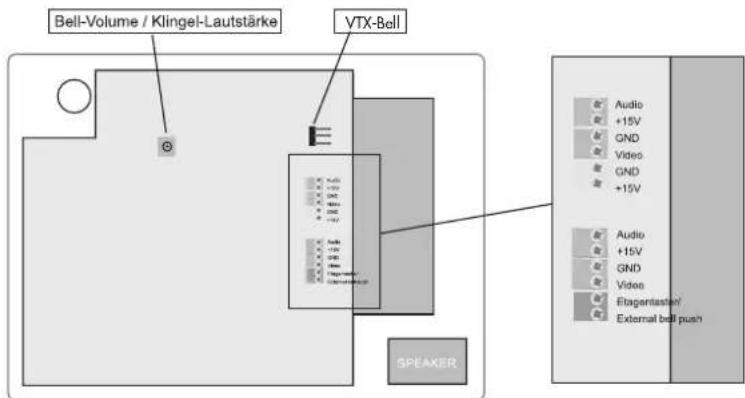
The VTX-BELL can be used to send the bell signal wirelessly to the receiver in the BELL series (currently BELL 200 RX, BELL 210 USB and BELL 220 RX). The wireless module will be attached to the 3-pole plug inside the indoor station (Figures B+C). For more information please see the VTX-BELL instructions.
POSSIBLE SETTINGS ON THE OUTDOOR STATION
The outdoor station has the following possibilities of adjusting the system to your personal circumstances:
Volume on the outdoor station
The potentiometer (Figure A, Volume / Lautstärke') is used to set the speaking volume on the outdoor station. For full volume turn the potentiometer carefully in a clockwise connection until it stops and turn it back a little. Turning the potentiometer in an anti-clockwise direction reduces the volume.
ID code
If several outdoor stations are used in parallel (e.g. on the gate and on the house), the DIP switch is used to set the ID code (Figure A,
ID-CODE'). This makes it possible to activate the individual outdoor stations in turn from one indoor unit in order to be able to monitor the scope of the corresponding outdoor units. The switch is activated on the indoor station with the 'monitor' button.
ID1 = Switch 1 'on', Switch 2 'on'
ID2 = Switch 1 'on', Switch 2 'off'
ID3 = Switch 1 'off', Switch 2 'on'

Note: ID 4 is not available for the outdoor station. It is reserved for the outdoor camera. If several outdoor stations are used in parallel then only one outdoor station can be connected to the external camera.
Door opener time
The DIP switch (Figure A, Door opener time') is used to set how long the door opener should be activated for. The possible settings are 1 second or 5 seconds. 5 seconds is the factory setting and works for most standard door openers.
Switch 'off' corresponds to an opening time of 1 second.
Switch 'on' corresponds to an opening time of 5 seconds.
POSSIBLE SETTINGS ON THE INDOOR STATION
The following settings are possible on the indoor station to adjust the system to your personal circumstances:
Ring tone volume (3.5" and 7" monitor)
The potentiometer (Figure B and C 'Bell Volume'') is used to set the ring/volume on the indoor station. For full volume turn the potentiometer carefully in a clockwise connection until it stops. Turning the potentiometer in an anti-clockwise direction reduces the volume.

Deactivate ring tone/melody (e.g. during the night)
The ring tone/melody can be deactivated, e.g. in order to prevent disturbance during the night. Either press the mute button on the indoor unit once briefly. The LED below the mute button lights up red as a reminder that the melody is deactivated. To activate the melody again press the mute button again briefly. When the red LED goes out the melody has been re-activated.
The optical signal (surround light on the talk and door opener button) remains active, even then the ring tone/melody is deactivated and still rings. The red LED flashes if the bell is rung while the mute is activated.

NOTE: If the VTX-BELL module is used then this will also be deactivated in the silent mode, i.e. the connected receivers will not give a signal either.

IMPORTANT: The monitor on the indoor station needs to be activated for the following settings (e.g. by pressing the screen button). Otherwise it is not possible to set the talk/volume, brightness, contrast, colour saturation and melody.

Speaking volume (3.5" and 7" monitor)

The two side buttons (B/C. 12 and 13) can be used to set the speaking

volume in several steps. Button 12 is used to increase the volume and button 13 to reduce it.

Brightness (3.5" monitor)
The button (B.8) is used to set the brightness on the monitor. The button is pressed multiple times to increase the brightness. Once the highest level of brightness has been reached another press will switch it to the lowest level of brightness.

Contrast (3.5" monitor)
The button (8.9) is used to set the contrast on the monitor. The button is pressed multiple times to increase the contrast. Once the highest level of contrast has been reached another press will switch it to the lowest level of contrast.

Colour saturation (3.5" Monitor)
The button (B.10) is used to set the colour saturation on the monitor. The button is pressed multiple times to increase the saturation. Once the highest level of saturation has been reached another press will switch it to the lowest level of saturation.
Brightness (7" monitor)

Press the Mutton (C.8) on the indoor station once and the OSD will display 'Bright'. You can now increase the brightness using button (C.9) and reduce it using button (C.10).
Contrast (7^ monitor)

Press the Mutton (C.8) on the indoor station twice and the OSD will display 'Contrast'. You can now increase the contrast using button (C.9) and reduce it using button (C.10).
Colour saturation (7" monitor)

Press the button (C.8) on the indoor station three times and the OSD will display 'Colour'. You can now increase the colour saturation using button (C.9) and reduce it using button (C.10).

Melody selection (3.5" and 7" monitor)
The next melody is played every time you press the button (B/C.11). The last melody to be played is automatically stored.
OPERATION (as door intercom system)
- Press the bell button.
- The stored ring tone will play on the corresponding indoor station(s) and the screen will show the image of the outdoor station.
- Accept the conversation on the indoor unit by pressing briefly on the talk button (
- If an external camera is connected to the outdoor station then you can switch to it by briefly pressing the 'monitor' (C) button. Press on the button again to switch back to the internal camera.
- If a door opener is connection then you can activate it by briefly pressing the door opener button () The bell button will light green for the duration of the door opener as confirmation.
- Press the talk button ( )briefly in order to switch the system back to standby operation.

Note: If a floor button is connected then an unchangeable ring tone is played when the floor button is activated. This ring tone is fixed and is not included in the 'normal' tones/melodies to make it easy to differentiate.

OPERATION (as internal house intercom)
All indoor units that are connected to the same bell button can also be used as an internal intercom.
- Press the internal button /C.7) on the indoor station from which you wish to reach another indoor station. All the connected indoor station will ring. No image will be shown.
- To accept the conversation on one of the other connected indoor stations you need to briefly press the talk button there (B/C.6).
- The talk button needs to be pressed briefly on one of the two indoor stations in order to end the conversation.

Note: It is not possible to set different ring tones for internal and external calls.
Technical data:
Outdoor station
Operating voltage: 15V DC
Standby power: < 0.5W
Camera resolution: 380 TV lines
Camera capture angle: Horizontal 125^ ; vertical 90^
Connection for door opener: 12V DC, max. 0.9A
Indoor station (3.5^ )
Operating voltage: 15V DC
Standby power: < 0.5W
Monitor resolution: 320 × 240 px
Bell button illumination: automatic via CDS sensor
Indoor station (7^ )
Operating voltage: 1.5V DC
Standby power: < 0.5W
Monitor resolution: 480× 270px
NOTES
The functionality of the unit can be affected by the influence of strong static, electrical or high frequency fields (discharging, mobile phones, radios, microwaves).
Cleaning and maintenance
Always disconnect mains powered units from the mains supply before cleaning (disconnect the plug). The unit housing can be cleaned using a soapy soft cloth. Do not use any abrasive materials or chemicals. Remove dust build-up from ventilation slits using a brush and clean up using a vacuum cleaner. Do not hold the vacuum cleaner nozzle directly against the unit.
SAFETY INSTRUCTION
In the event of damage to the housing, connectors, power cables or isolation shielding, switch off the device immediately and disconnect from the mains power. ELECTRIC SHOCK - DANGER OF
LOSS OF LIFE. (Unplug the mains connector from the socket!).
Damage should be repaired immediately by a specialist!

Do not take the product apart! There is a danger of lethal electric shock!

Never carry out repairs yourself!
For reasons of safety and licensing (CE), unauthorised conversion and / or modification of the product is prohibited.
The design of the product complies with protection class 1. Only a standard mains socket (230V / 50Hz) of the public mains supply may be used to power the device. Devices powered by mains voltage must be kept away from children. Please therefore be particularly careful in the presence of children.
Do not leave packaging material lying about since plastic foils and pockets and polystyrene parts etc. could be lethal toys for children. The interior unit is suitable only for dry interior rooms (not bathrooms and other moist places). Do not allow the devices to get moist or wet. There is a danger of lethal electric shock!
In industrial institutions, the accident prevention regulations of the Association of Commercial Professional Associations for electrical installations and equipment must be observed. Please consult a specialist should you have doubts regarding the method of operation, the safety, or the connections of the device.

Handle the product with care - it is sensitive to bumps, knocks or falls even from low heights.
WARRANTY
2 years warranty from date of purchasing, on base of correct using.
The producer is not responsible for consequential damages which are effected directly or indirectly from this item.
The warranty will be null and void in case of damages arising from violations of these operating instructions. We are not liable for consequential damages!
We accept no liability for material damages or injuries arising from inappropriate use or violation of the safety instructions. In such cases all warranty claims are null and void!
GB
These operating instruction are published by m-e GmbH modern-electronics, An den Kolonaten 37, 26160 Bad Zwischenohn/Germany
The operating instructions reflect the current technical specifications at time of print. We reserve the right to change the technical or physical specifications.
C
Abb.C DIAGRAMC ILLUSTRATION C AFBEELING C
7* INNNENSTATION · INDOOR STATION · BOTIER INTERIEUR · BINNENSTATION
INTRODUCTION
Luminosite (ecran 3,5^ )
m-e GmbH modem-electronics,