
SBCRU258-00H - Remote control PHILIPS - Free user manual and instructions
Find the device manual for free SBCRU258-00H PHILIPS in PDF.


| Product type | Universal remote control |
| Brand | PHILIPS |
| Model | SBCRU258-00H |
| Number of controllable devices | Up to 8 devices (TV, DVD, VCR, satellite, cable, etc.) |
| Power supply | 2 R03 / UM4 / AAA batteries (1.5 V) |
| Infrared range | Approximately 8 to 10 meters |
| Dimensions (approx.) | 20 x 5 x 2 cm |
| Weight (with batteries) | Approximately 100 g |
| Main functions | On/Standby, volume, channels, menu, teletext, play/forward/rewind, recording, mute, input selection, number keys, SHIFT key Manual code programming or automatic |
| Care and cleaning | Clean with a soft, dry cloth. Do not use solvents or abrasive cleaners. |
| Safety | Avoid shocks, humidity, extreme temperatures and direct sunlight. Do not open or attempt to repair. |
| Spare parts and repairability | Batteries available commercially. No spare parts other than batteries. Device not user-serviceable. |
| General information | Universal remote control compatible with most brands (Philips and others). Requires initial setup by manual code or automatic search. Instructions available in several languages. |
Frequently Asked Questions - SBCRU258-00H PHILIPS
User questions about SBCRU258-00H PHILIPS
0 question about this device. Answer the ones you know or ask your own.
Ask a new question about this device
Download the instructions for your Remote control in PDF format for free! Find your manual SBCRU258-00H - PHILIPS and take your electronic device back in hand. On this page are published all the documents necessary for the use of your device. SBCRU258-00H by PHILIPS.
USER MANUAL SBCRU258-00H PHILIPS
Instructions for use
English 3
Mode d'emploi
Français 7
Bedienungsanleitung
Deutsch 11
Gebruiksaanwijzing
Nederlands 15
- Introduction....3
- Installing the remote control....3-5
Inserting the batteries....3
Testing the remote control....3
Setting the remote control 4
Automatically setting the remote control....5
- Keys and functions....6
Code list of all brands / equipment....55-59
1. Introduction
Congratulations on your purchase of the Philips SBC RU258 universal remote control. After installing the remote control you can operate a maximum of 8 different appliances with it: TV, DVD player, DVD-recorder, video recorder, satellite receiver, cable decoder, a second TV and a second video recorder. You can find information about how to prepare this remote control for use in the chapter 'Installing the remote control'.
2. Installing the remote control
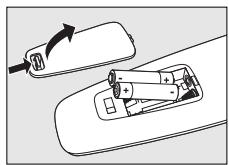
Inserting the batteries
1 Press the cover inwards and slide it in the direction of the arrow.
2 Place two R03, UM4 or AAA type batteries into the battery compartment, as shown.
3 Slide the cover back and click it firmly into place.
Testing the remote control
The remote control has been programmed to operate most Philips appliances. Because the RU258 may use different signals for each make and even for different models of the same make, it is advisable to test whether your appliance responds to the RU258.
The example below (TV) instructs you how to do this. You can repeat the same steps for other appliances (DVD, video recorder, etc.) which you want to operate using the RU258.
Example of TV:
1 Turn your TV on manually or use the original remote control. Tune to channel 1.
2 Press the RU258's TV key to select TV.
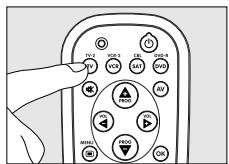
3 Check whether all the keys are working. For an overview of the keys and their functions see '3. Keys and functions'.
- If the TV responds as it should to all of the key commands the RU258 is ready for use.
- If the device does not respond at all or not to all of the key commands, follow the instructions under 'Setting the remote control'.
Instructions for use
English
Setting the remote control
This is only necessary if your appliance does not respond to the RU258. If that is the case, the RU258 does not recognize the brand and/or model of your appliance and you need to program the remote control to do so.
The example below (TV) instructs you how to do this. You can repeat the same steps for other appliances (DVD, video recorder, etc.) which you want to operate using the RU258.
Example of TV:
1 Turn on the TV manually or use the original remote control. Tune in to channel 1.
2 Look up the brand of your TV in the code list at the back of this manual. One or more three-figure codes are shown for each brand. Note the first code.
Be careful! There are separate tables for TV, video, DVD, etc.
Make sure you use the codes from the correct table.
3 Press the RU258's TV key to select TV. (See 'Testing the remote control').
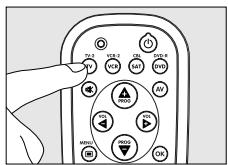
4 Keep keys '1' and '3' pressed simultaneously for three seconds until the green indicator light remains lit.
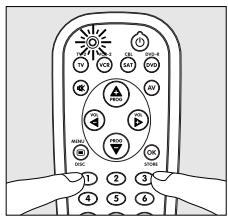
5 Then enter the code noted in step 2 using the digital keys. - The green indicator light will now flash twice. If the light flashes once for an extended period, the code has not been entered properly or the wrong code has been entered.
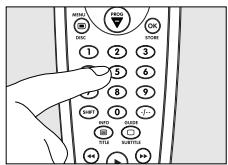
Start again from step 2. 6 Point the RU258 at the TV and check that it responds as it should. – If the TV responds to all of the key commands, the RU258 is ready for use. Do not forget to note your code.
- If the device does not respond at all, or not to all of the key commands, start again from step 2 and try the next code from the list.
Automatically setting the remote control
If you cannot find the right code for your brand device, the remote control can automatically search for the right code.
Example of TV:
1 Make sure the TV is switched on and select a channel using the original remote control or the keys on the TV (for example channel 1). The RU258 emits the 'switch off TV' signal for all models of TV that are stored in the memory.
• If the device is a DVD-player or video recorder, insert a disk or tape and start playback.
2 Then keep keys 1 and 3 on the RU258 pressed simultaneously for three seconds, until the green indicator light remains lit.
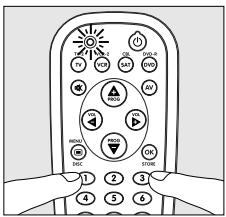
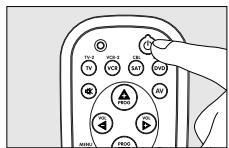
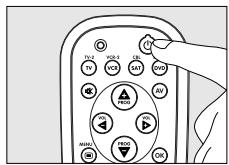
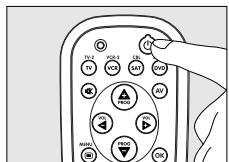
3 Press the Standby key of the RU258 briefly.
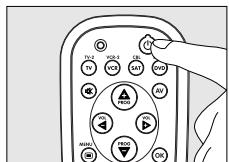
- The RU258 now starts emitting all known 'TV Each time a code is sent, the green indicator light flashes.
off' signals, one by one.
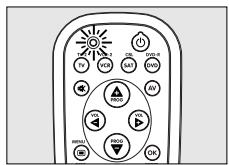
4 When your TV switches off (stand-by), you press the Standby key of the RU258 twice within 1 second, to confirm.
- The RU258 has now found a code that works on your TV.
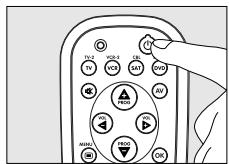
5 Check if you can operate all functions on your TV with the RU258.
• If this is not the case, you can redo the automatic setting. The RU258 will then search for a code that perhaps works better.
- After the RU258 has run through all the known codes, the search will stop automatically and the green light will stop flashing.
- Automatic programming takes a maximum of 8 minutes for TV, 4 minutes for VCR, 5 minutes for SAT and CBL (Satellite box/Cable box) and 4 minutes for DVD.
3. Keys and functions
The illustration on page 3 gives an overview of all keys and their functions.
① ⏻ Standby. . . . . . . switches TV, VCR, SAT, CBL or DVD mode on or off.
② Indicator light..... lights up green when an IR signal is being sent. - flashes green when a code is being entered and when automatically setting the remote control.
③ TV/VCR/SAT/DVD. select the device you want to operate: TV, VCR, SAT (satellite) or DVD. Pressed simultaneously with SHIFT: select resp.: second TV, second VCR, CBL (cable) and DVD-R.
④ (Mute)....mutes the sound of the TV.
⑤ - PROG + . . . . . . . selects a previous or following channel.
⑥ MENU/ ☐ /DISC . turns the menu on and off. DVD: selects Disc menu.
⑦ Digital keys ..... direct choice of channels and other functions.
⑧ SHIFT ..... for extra functions. When pressed at the same time as a second key, the second key will get another function. For example:
SHIFT + PROG+: . . 'menu up' / SHIFT + PROG-: 'menu down'/SHIFT + VOL+: . . . 'menu right' / SHIFT + VOL-: 'menu left'
Try out other combinations with the Shift-key on your appliance in order to find out which functions are available. Only functions featured on the original remote control are available.
⑨ INFO/ /TITLE . TV: switches teletext on. SAT: info. DVD: direct title/track selection.
⑩ ◀. . . . . . . . . . . . . . . - red teletext key - rewind (VCR/DVD)
- green teletext key - stop (VCR/DVD)
● record (VCR/DVD)
II. ........ - yellow teletext key - pause (VCR/DVD)
▶. . . . . . . . . . . . . - blue teletext key - wind (VCR/DVD)
▶ ..... - white teletext key - play (VCR/DVD)
⑪ GUIDE/ □ / . . . . . TV: switches teletext off. SUBTITLE SAT: Electronic Programme Guide. DVD: Subtitles.
⑫ -/--. selects between one- and two-figure channel numbers.
⑬ OK / STORE ..... confirms your selection. TV: (together with SHIFT): stores channels.
⑭ -VOL + .... adjusts the TV volume.
⑮ AV.... switches between external inputs of your equipment.
Note! The VOL - /VOL + and 📋 (Mute) keys give direct access to the TV volume even if you are operating your VCR, DVD or SAT/CBL equipment.
If the device does not respond at all, or not to all of the key commands, follow the instructions under 'Setting the remote control'. It is possible that you must enter another code for the device.
Sommaire
natural_image
Diagram showing a battery being placed on a surface with an arrow indicating rotation (no text or symbols present)natural_image
Diagram showing a battery being placed on top of a device with an arrow indicating rotation (no text or symbols present)Nederlands
TV,VCR (videorecorder), SAT (satelliet) of DVD.
natural_image
Diagram showing a battery being placed on top of a device with an arrow indicating rotation (no text or symbols present)Español
natural_image
Diagram showing a battery being placed on a surface with an arrow indicating rotation (no text or symbols present)Testar o telecomando
Portugues
natural_image
Diagram showing a battery being inserted into a motor compartment, with no text or symbols present.Italiano
Collaudo del telecomando
natural_image
Diagram showing a battery being inserted into a motor compartment, with no text or symbols present.5 Knappa sedan in koden som du noterade under steg 2.
natural_image
Diagram showing a battery being placed on a surface with an arrow indicating rotation (no text or symbols present)3 Tryk kort på Standby-knappen på RU258'en.
natural_image
Diagram showing a battery being inserted into a car's side panel, with no text or symbols present.Teste fjernkontrollen
3 Trykk kort på Standby-knappen på RU258-kontrollen.
natural_image
Diagram showing a device being inserted into a car's side panel, with an arrow indicating the direction (no text or symbols present)Testowanie pilota
Akai....014, 048, 053
Akura....015, 019
Alba....001, 015, 016, 035, 038, 114
Amplivision 042
Amstrad....001, 048
Anitech....001, 004
Ansonic....035
Arc en Ciel 047
Arcam....042
ASA....005, 006, 024
Asberg....004
Atlantic 013
Audiosonic....053
Autovox......004, 005, 013, 024, 035, 049
Baird....031, 043, 052
Bang & Olufsen....005
Barco 051
Baur....033, 034, 045, 049
Beko 030, 074, 075
Binatone 042
Blaupunkt......011, 012, 025, 033, 034, 124
Boots....042
BPL 020
Brandt....027, 028, 041, 115
Brionvega....005
Bruns 005
BSR....023
BTC....015
Bush 001, 015, 016, 020, 023,
038, 045, 046, 051, 116
Cascade 001
Century 005, 035
CGE....004, 035, 051
Cimline 001,016
Clatronic 004, 030, 035, 053
Condor....030, 035
Contec 001
Continental Edison....027, 041, 047
Crosley....004, 005, 035, 044
Crown 001, 004, 030, 053
CS Electronics....035, 053
CTC....035
Daewoo....001, 053, 064, 072, 076
Dainichi 015
Daytron....001
Decca 003,048
Dixi....001
Dual 049
Dumont....005, 006, 024, 044
Elbe....017, 037
Elcit....035
Elin 006,050
Elite....015
Elta....001
Emerson 005,035
Erres 002
Europhon....035, 048
Expert....013
Ferguson.... 010, 021, 028, 043, 106
Fidelity 046,049
Finlandia 014,046
Finlux......003, 005, 006, 024, 044, 048
Firstline......001, 016, 023, 035, 038, 042
Fisher....006, 014, 030, 042, 049
Formenti 005, 044, 051
Frontech....019, 035, 040, 046
Fujitsu
Funai....019,023
GBC 051,053
GEC....003, 042, 048, 052
Geloso....001, 035, 044, 053
Genexxa....015, 040
GoldStar......022, 035, 042, 046, 056
Goodmans......003, 016, 042, 043, 064
Gorenje....030
GPM015,053
Graetz 040, 044, 052
Granada....003, 014, 042, 046, 048
Grandin....020
Grundig....011, 012, 033,
.034, 053, 066, 118
Hanseatic 049
Hantarex 048
HCM....001,020
Hinari....001, 015, 016
Hisawa 020,036
Hitachi......040, 041, 042, 044, 045, 046,
.050, 052, 055, 056, 077, 119
Hoshai....036, 053
Hyper 035,053
ICE....019, 042, 053
Imperial 004, 030, 035, 051
Inno Hit....003, 032, 035, 048, 053
Interbuy....035
Interfunk....040, 047, 052
Intervision......019, 035, 036, 039, 042
Irradio 035,053
ITC....051
ITT 031,040,044,049,050,052
ITV 035
JVC....010, 069, 078, 088, 089, 120
Kaisui....001, 015, 020, 036, 042, 053
Kapsch 006, 013, 040, 052
Karcher....037
Kendo 016, 035, 037
Kennedy....051
Kneissel....017
Korting....005
Lenco 006
LG....035, 090, 121, 126, 127
Loewe....005,107
Codes
TV
1
Luma....013,046
Luxor 031, 045, 046
M Electronic....001, 006, 021, ....035, 040, 042
Magnadyne....005, 035, 039, 044, 048, 049
Magnafon....004, 039, 048
Matsui ....001, 003, 014, 016, 018, ....023, 036, 042, 046, 048, 049
Medion....038
Memorex....001
Metz 005, 029, 033
MGA....053
Minerva....033, 034
Mitsubishi....005, 007, 033, 108
Mivar....022, 032, 048
MTC 045
Multitech......001, 004, 035, 039, 046, 053
Murphy....006
NEC....009
Neckermann 005, 011, 034, 035, 045, 046
Nesco 035
Nikkai....003, 015, 019
Nokia....031,050
Oceanic....040, 044
Orion....016, 023, 048, 049, 062, 109
Osaki....003, 015, 019, 042
Oso 015
Osume....003,008
Otto Versand.....011, 016, 033, 034, 035, .....042, 043, 044, 045, 051
Palladium....030, 035, 046
Panasonic....029, 040, 044, 052, 061, ....083, 084, 091, 101, 128
Pathe Cinema....051
Pathe Marconi....027, 041, 047
Philco 004, 005, 035, 051
Philips.....000, 002, 005, 026, 034, 079, 080
Phoenix....005
Phonola....002, 005
Pioneer....021, 040, 056, 057
Prandoni-Prince 035
Profex....001, 004, 046
Protech ....001, 019, 039, 042, 051
Pye 002,073
Quelle ...006, 024, 033, 034, 035, 049, 051
Radiola....002, 026
Radiomarelli 005, 035, 048
Rex....013, 017, 019, 035, 040
RFT 005
Roadstar....001, 015, 019, 053
Saba....005, 021, 028, 040, 041, ....043, 044, 047, 052, 110
Sagem....036, 037
Saisho ....001, 016, 018, 019, 048, 049, 053
Salora....040, 045, 046, 050
Sambers 004, 032, 039, 048
Samsung ....001, 019, 022, 030, 032, ....042, 054, 067, 070, 085, 086
Sanyo......003, 006, 008, 014, 031, 117
SBR....002
Schaub Lorenz....044, 052
Schneider....015, 026, 035, 038, ....049, 053, 103, 104
SEG....004, 019, 035, 038, 042, 051
SEI 005, 023, 039, 044, 048, 049
Seleco....013, 017, 040
Sharp .....092, 093, 094, 095, 122, 129
Shorai....023
Siarem....005, 039, 044, 048
Siemens....008, 011, 012, ....031, 033, 034, 044
Singer....005, 035
Sinudyne 005, 016, 039, 044, 048, 049, 053
Solavox....040
Sonitron....014
Sonoko....001, 053
Sonolor....014, 040
Sony 081, 096, 097, 098, 099
Stern 013, 017, 040
Sunkai 016, 023, 036
Susumu....015
Tandberg....024
Tandy....003, 015, 035, 040, 042
Tashiko....042, 046
Tatung....003, 042, 048
Teac....036
Tec....035, 042, 051
Technics 101
Teleavia 027, 043, 047
Telefunken....028, 043, 047, 056, ....058, 059, 065, 111
Teletech....001, 035
Teleton....013, 042, 045, 046
Tensai 006, 015, 023, 035, 053
Texet....015
Thomson....021, 027, 041, 043, ....045, 047, 056, 123
Thorn ....003, 006, 010, 033, 043, 060, 064
Toshiba....063, 082, 100
Towada....051
Triumph 048
Uher....013
Ultravox....035, 039
Universum.....006, 019, 030, 033, 035, 051
Voxson....005, 040
Waltham....042
Watt Radio....039, 049, 051
Wega....005
Yoko 019,042
Yorx....053
Zanussi....013, 046
SETUP CODES FOR VCR
Aiwa....030, 034, 039
Akai 024,027
Alba 007,018,028
Ambassador....007
Amstrad....033
Anitech....018
ASA....009,020
Baird....022
Blaupunkt 003,006
Brandt....031
Bush....018, 028
Cimline....018
Clatronic....007
Condor 007
Crown....007, 018
Cyrus....020
Daewoo....007, 056
Dansai....018
Decca....020
Dumont....020, 022, 023
Elbe 010
Elcatech....018
Ferguson....021, 031
Finlandia....020, 022
Finlux....020, 022, 023
Firstline....009, 011, 012, 018
Fisher 013, 015, 022
Frontech....007
GEC 020
GoldHand....018
GoldStar....009
Goodmans....007, 009, 016, 018
Graetz....022
Granada 013, 020, 022
Grandin 009, 018
Grundig....003, 004, 006,
018, 020, 025, 028
Hanseatic 009
HCM....018,028
Hinari....002, 018, 028
Hitachi....002, 023, 026
Ingersol....002
Interfunk 020
ITT 007,009,013,022,024
JVC....017, 021, 025, 038, 049, 052
Kaisui....018
Kendo....024, 034
LG 041,046
Loewe....002, 003, 009, 020, 036
Logik....002
Luxor......011, 013, 014, 016, 022, 024
M Electronic....010
Marantz 003, 016, 020
Matsui....002, 008, 034
Memorex....009, 013, 022
Metz 003,009
Minerva....003, 006
Mitsubishi......011, 017, 019, 020, 058
Multitech 018
NEC 010,017
Neckermann....020
Nesco 018
Nokia....013, 022, 024
Nordmende 029, 031
Okano....034
Orion....002, 008, 034, 061
Osaki....009,018
Otto Versand....020
Palladium....003, 009, 018
Panasonic....036, 050, 053, 054
Pathe Cinema....008
Pentax....023
Philco....010
Philips....000, 001, 020, 047, 048
Phonola....020
Pioneer 017,020,026
Portland....007
Profex 032
Proline 028
Pye 020,059
Quelle....020
Radiola....020
Roadstar....009, 018
Saba 025, 029, 031, 037
Saisho 002,008
Salora....011, 013, 024
Samsung....035, 051
Sansui 017
Sanyo 013,022,060
SBR....020
Schaub Lorenz....022
Schneider....018, 020
SEG 032
SEI 002,020
Sentra....007
Sharp....014, 016, 042, 055
Shintom....018, 022
Shorai....002
Siemens......003, 006, 009, 015, 020, 022
Singer 012
Sinudyne 002, 020
Solavox....007
Sonolor....013, 016
Sontec....009
Sony 005,040
Sunkai....034
Tatung....020
Tec 007
Telefunken 031
Tensai 032
Thomson....037
Thorn 008,021,022
Toshiba..011, 012, 020, 043, 044, 045, 057
Towada....032
Universum.....003, 006, 009, 020, 024, 033
Yoko....007
SETUP CODES FOR DVD
Aiwa....024
Alba....050
Bush....025, 026
CyberHome 014,015
Daewoo....048
Dansai....049
Denon....002, 044
Goodmans....045
Grundig....023, 027
Hitachi 028
JVC 038
Kenwood....007,043
LG....029
Magnavox....003
Mitsubishi....004
Mustek....016
Onkyo....003
Orion 046
Panasonic 002,017
Philips.....000, 001, 003, 009, 018, 039, 040
Pioneer 019, 020, 030
Samsung....008, 031, 032
Sanyo....042
Scott 021
SEG....022, 033
Sharp....034
Sony 006,035
Technics....002, 047
Thomson....005, 010, 011, 012, 013
Toshiba....003, 036, 037
Xbox 005
Yamaha....002, 041
Zenith 003
SETUP CODES FOR SAT
Alba....039
Allsat....039
Amstrad 006, 044, 049, 050
Armstrong....006
AST 017
Astra....006, 031
Astro 002
Blaupunkt......002
Boca....006, 042, 071, 072,
.073, 074, 075, 093
Brain Wave....012
BSkyB 050
Bush 001
Cambridge 015
Canal Satellite....052
Chaparral....004
CityCom....020
Condor 031
Conrad....031
Contec....019, 020
Cosat....028
Crown 006
DNT 024
Dynasat....029
Echostar....046, 052, 059, 062, 066
Einhell....006, 042
Elta....027
Eurosat 006
Eurosky 006, 009, 031
Eurostar....031, 051
Fagor....028
Ferguson....001, 014
Finlux....015, 021
Fracarro 029,046
FTE....011,029
Fuba....010, 020
Galaxis....019, 028, 043
GMI 006
GoldStar 013
Grundig......002, 044, 050, 057, 058, 061
Hirschmann ..002, 009, 021, 026, 029, 047
Humax....076, 095
Huth....006, 016, 031, 042
Intertronic 006
Intervision....028, 031
Johansson....012
Kathrein 002, 011, 020, 029,
.032, 067, 068, 069
Kosmos....011, 013
Kreiselmeyer....002, 022
Lasat....006, 031
Lenco 013
Lennox 028
LG....013
Loewe....006
Lorenzen....031, 042, 049
Manhattan....028, 043
Maspro 014
Matsui 015
Mediamarkt 006
Mediasat 052
Metronic....006
Morgan's 006, 035, 042
Multistar....011, 025
NEC....003
Neuhaus....028, 031, 043
Neusat....043
Nikko....006, 018, 039
Nokia....021, 077, 087, 090
Okano 006,011
Ondigital....005
Optex....020, 028, 029
Orbit....017
Orbitech....008
Pace....001, 005, 014, 038, 044,
050, 060, 061, 063, 064
Palcom....010
Palladium....006
Panasonic 044, 050
Panda....031
Philips.....000, 034, 052, 055, 056, 061, 063
Phoenix....019
Phonotrend 028
Pioneer....052
Polytron 020
Premier 028
Pyxis....043
Quadral....022, 033
Quelle....031
Radix....047, 089
Rediffusion....003
Saba....014, 031, 039, 048
Sagem....036, 037
Sakura....019
Samsung 009
Satcom....016, 030, 031
SatPartner....012, 013, 026, 039
Schneider 034
Seemann 006
SEG....040, 049, 081, 082, 092, 094
Seleco 028
Siemens....002, 035
Skymaster....030, 033, 051, 065,
Techniland......016, 028
TechniSat 007, 008, 024,
078, 083, 091, 097
Teco 006
Teleciel....039
Teleka 006,008
Telesat....030
Teletech....051
Telewire 028
Thomson....031, 052, 054, 063, 070
Tioko 020
Tonna....016,028
Triad....013,017
Uniden....041
Unisat 006,019
Unitor 012
Universum 002, 031, 049
Vestel....049
Visiosat....017
Vortec....009
Wela 042
Winersat....012
Wisi....002, 017, 043, 080,
.084, 088, 089, 090, 091
Zehnder 011, 020, 023, 049
Zenith 045
SETUP CODES FOR CABLE
Alcatel....017
BT Cable 003
Cabletime....006, 009, 013
France Telecom....016, 018, 020
Grundig....012
Jerrold 001,007
Macab 016
Nokia....014
Philips....000, 016, 019, 020
Pioneer....004
Sagem....015, 016
Scientific Atlanta....002, 008
Tele+1 011
United Cable 001
Videoway 005
Visiopass 016,020
Westminster Cable....003
Guarantee certificate Certificat de garantie Garantiebewijs Záruční list