
SBCRU110-00U - Universal remote PHILIPS - Free user manual and instructions
Find the device manual for free SBCRU110-00U PHILIPS in PDF.



| Product Type | Universal Remote Control |
| Brand | Philips |
| Model | SBCRU110-00U |
| Power Supply | 2 x 1.5V batteries type R03/UM4/AAA |
| Visual Indicator | Green LED |
| Compatibility | All TVs (pre-programmed for Philips, adjustable for other brands) |
| Configuration | Manual by 5-digit code or automatic search |
| Main Functions | TV control: on/off, volume, channels, teletext, etc. |
| Maintenance | Replace batteries at least once a year; do not leave batteries out of the remote for more than one hour |
| Safety | Use recommended battery type; do not mix new and used batteries |
| Phone Support | Free hotline in France: 0800-904-013, Belgium: 0800-723-77, Switzerland: 0800-554-166 |
| Package Contents | Remote control, user manual |
Frequently Asked Questions - SBCRU110-00U PHILIPS
User questions about SBCRU110-00U PHILIPS
0 question about this device. Answer the ones you know or ask your own.
Ask a new question about this device
Download the instructions for your Universal remote in PDF format for free! Find your manual SBCRU110-00U - PHILIPS and take your electronic device back in hand. On this page are published all the documents necessary for the use of your device. SBCRU110-00U by PHILIPS.
USER MANUAL SBCRU110-00U PHILIPS
Universal Remote Control
SBCRU 110
Instructions for Use
Mode d'emploi
Bedienungsanleitung
Gebruiksaaanwijzng
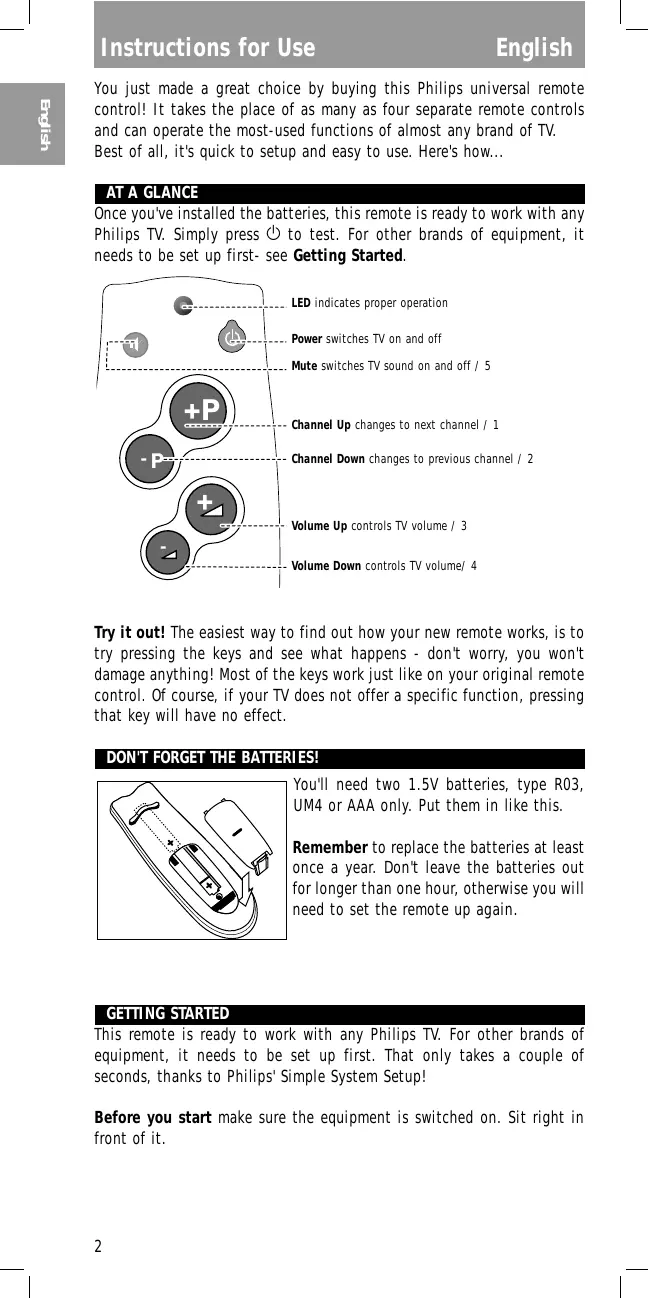
You just made a great choice by buying this Philips universal remote control! It takes the place of as many as four separate remote controls and can operate the most-used functions of almost any brand of TV. Best of all, it's quick to setup and easy to use. Here's how...
AT A GLANCE
Once you've installed the batteries, this remote is ready to work with any Philips TV. Simply press ① to test. For other brands of equipment, it needs to be set up first- see Getting Started.
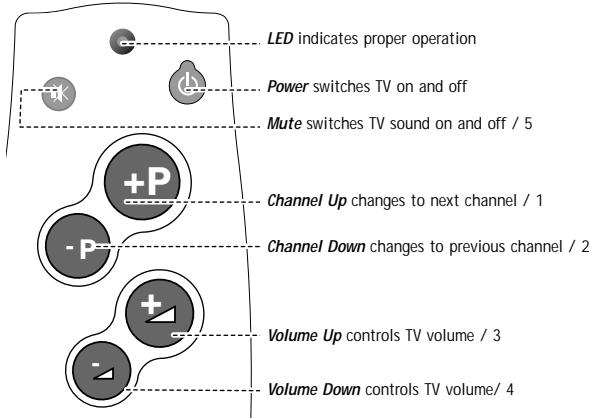
Try it out! The easiest way to find out how your new remote works, is to try pressing the keys and see what happens - don't worry, you won't damage anything! Most of the keys work just like on your original remote control. Of course, if your TV does not offer a specific function, pressing that key will have no effect.
DON'T FORGET THE BATTERIES!
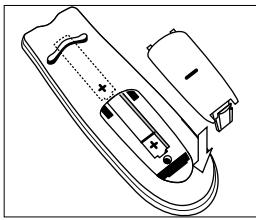
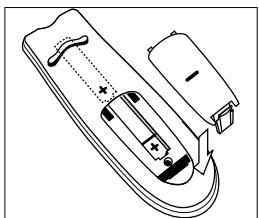
You'll need two 1.5V batteries, type R03, UM4 or AAA only. Put them in like this.
Remember to replace the batteries at least once a year. Don't leave the batteries out for longer than one hour, otherwise you will need to set the remote up again.
GETTING STARTED
This remote is ready to work with any Philips TV. For other brands of equipment, it needs to be set up first. That only takes a couple of seconds, thanks to Philips' Simple System Setup!
Before you start make sure the equipment is switched on. Sit right in front of it.
If you know the brand of your equipment, look at the code list at the back of this booklet, and find the first 5-digit code for your equipment.
① Press and hold 和 at the same time until the green LED lights up. (Release the keys, the green LED should stay on)
② Enter the 5-digit code using the numbers that correspond to the function keys (see diagram). The green LED blinks twice.
That's it! Now, press a few keys on the remote to check that the equipment responds correctly. If it doesn't, try again using the next code in the list. In the rare instance that none of the codes work, follow the instructions in the next section.
Tip: Make a note of the code inside the battery case, and in the back of this booklet in case you ever need to setup again.
If you don't know the brand of your equipment or if you can not find it in the coderlist, setup still won't take long. Philips' patented Handsfree autosearch tests all the codes one after another and finds the right one for you! The search time averages about 90 seconds. (Maximum search time is 5 minutes for TV.)
Make sure the TV is switched on. You will know when the correct code has been found because the equipment will switch off.
① Press and hold 和 at the same time until the green LED lights up.
② Press to start the search. Each time the green LED blinks, another code is sent. When the right code is found, the equipment switches off.
③ Immediately press to stop the search.
If you missed the correct code because the search went too far, switch the equipment back on, the press -P (down) to send the previous code again. Press -P (down) repeatedly until the equipment switches off again.
④ Once you've found the correct code, press to lock it in memory. The green LED blinks twice.
That's it! Now, switch the equipment manually on again, then press a few keys on the remote to check that the equipment responds correctly. In the rare instance that it doesn't, try again from step 1 to find a better code.
Note that code! To save time if you ever need to setup again, make a note of the correct code inside the battery case and in the back of this booklet. In case you have forgotten to note the code you can still 'read out' the code from the remote. Here's how:
① Press and release and at the same time; the green LED lights up.
② Press . The green LED goes out.
③ Press +P and count the number of times the green LED blinks. This is the first digit of the 5-digit code. (No blinks means the digit is zero.)
Press -P and count the number of blinks for the second digit.
Press 串 and count the number of blinks for the third digit.
Press and count the number of blinks for the fourth digit.
Press and count the number of blinks for the fifth digit.
NEED HELP?
If you have questions about your remote or if you are missing certain functions on your remote, call our free-phone helpline!
Before you call, please read the manual carefully. Most questions will clear themselves. If you don't find an answer to your questions, make a note of your equipment in the table below - this makes it easier for the operators to help you quickly. Look for model numbers in the equipment instruction manual, or on the back of the equipment. Be in front of the equipment, this way our operators can help you verify the functionality of your remote.
In the UK. call 0800 968 118. In Ireland, call 1 800 553 136.
The model number of your Philips universal remote control is:
SBC RU110
Date of purchase:

Day/month/year
| Equipment | Brand | Model nr. | Nr. of origi- nal remote | Used code |
| TV |
As you add new components to your home entertainment system, Philips again offers a universal remote control that will fit your new needs. Look for below unique full range of universal remote controls from Philips at a retailer near you.
RU 410: 1 in 1 Universal TV Remote with digits and TXT
RU 422: 2 in 1 Universal Remote Control for TV and VCR
RU 430 : 3 in 1 Universal Remote Control for TV, VCR and SAT/Cable
RU 440: 4 in 1 Universal Remote Control for TV, VCR, SAT/Cable and AUX for audio
RU 455: 4 in 1 Universal Remote Control for TV, VCR, SAT/Cable and AUX for second device
RU 460: 6 in 1 Universal Remote Control-Pre-programmed and Learnable
Another very nice product from Philips is the Philips SBC LI510 Remote Control Extender Set, the wireless extension of your infra-red (IR) remote control! This system allows you to operate every IR driven equipment (i.e. Sat-receivers, VCRs or Hi-Fi-sets) from anywhere in or around the house.
N'OUBLIEZ PAS LES PILES!
Fidelity. 14414 23121 31434
Finlandia 14334 22422 23113
Finlux 32124 12312 12314 12413 13121 22422 23423 31244
Firstline. 11321 14414 14421 21213 22112 22241
Fisher 14334 14421 22133 23142 31434 32123
Flint 24313
Formenti 32124 12413 14411 22234
Frontech 344321213 213142413324234
Fujitsu. 12314 14332
Funai. 21314 22112 22133
G GEC 32124 12123 12314 14331 14421 31244 32131
Geloso. 11321 14411
Genexxa. 13443 14422
GoldStar 32124 13131 14421 21442 23221
Goodmans 11444 32124 12314 14421 21123 22231 22413 23143 23212 31143
Gorenje 23142
GPM. 14422
Graetz. 13443 23121 32131
Granada 32124 12314 13342 14321 14334 14421 22343 23113 .31244
Grandin 21422
Grundig 12312 14233 14243 14331 31113 31413
H
Hanseatic. 32124 22234 23121 24124 31434
Hantarex 31244
HCM 11321 21422 23424
Hinari 11321 11444 32124 14422
Hisawa 21422 23334 24313
Hitachi 11434 11444 12123 12124 13121 13131 13443 14244 14421 14441 22142 22431 31444 32131
Huanyu. 14414 23212
Hypson 32124 21314 21422
ICE 14421 21314 23143
Imperial. 12322 12324 12344 21213 23142 23442
Indiana 32124
Ingelen 13443 32131
Inno Hit 12314 31244
Interbuy. 12244
Interfunk 32124 13443 21213 23121 31234 32131
Intervention 12244 13112 14421 21314
Isuka 14422
ITS 23143
ITT. 13443 23121 31434 31444 32131
J
JVC 11444 12211 14232
14234 23143
K Kaisui 11321 14414 14421 14422 21422
Kapsch. 13443 14332 32131
Kathrein 32124
Kendo. 32124 21123 23122
Kingsley 14414
Kneissel. 21243 24143
Korpel 32124
Korting 12413
Koyoda. 11321
L Leyco. 32124 12314 21314 22112
Liesenk & Tter. 32124
Lloytron 11434
Loewe. 12323 12413 31234
Luma 14332
Luxor 22431 23121
M
M Electronic 11321 32124 12244 13121 13131 13443 14421 21433 22422 23212 24434
Magnadyne. 12413 13112 21213 31244 31434
Magnafon. 12324 13112 14411 22222 31244
Manesth. 14421 21123 21314 22234
Marantz. 32124
Marelli 12413
Mark 32124
Matsui 11321 11323 11443
11444 32124 12314 14334
14343 14421 21123 22112
22442 22443 23143 24223
31113 31244 31434 32243
McMichael 12123
Mediator. 11324 32124
Memorex. 11321
Memphis 22341
Metz. 12413 14411 21343
23133 31413
Minerva 12312 31113
31413
Minoka 23141 23424
Mitsubishi 11444 12413
13124 13412 14321 22442
31234 31413
Mivar. 14414 21442 21443
21444 31244
Motion 12324
MTC. 22431 31234
Multitech. 11321 12324
13112 14414
N
Neckermann 32124 12413
14233 14411 22431 31221
32124
NEI. 32124 22341 24133
Nicam. 31434
Nikkai. 11434 11443 32124
12314 14414 14422 21314
22341
Nobliko. 12324 13112
Nokia. 23121 24434 31444
Nordmende. 13131 14244
14411 21433 22413
0
Oceanic 13443 14413
23121
Onwa 24141
Orion 32124 21123 22112
22234 22241 22443 31244
31434 31434
Osaki 11434 12314 14421
14422 21314 23424
Os0 14422
Osume 11434 12314 13431
Otake. 22231
Otto Versand 11322 11444
32124 14233 14411 14421
22234 22413 22431 31221
31234 31413 32124
P
Palladium 23142
Panama 14421 21314
Panasonic 13443 14411
14412 14442 21222 22344
23133 32131
PatheCinema. 14411 14414
21132 22234
PatheMarconi. 14244 14331
22331
Pausa. 11321
Perdio 22234
Phase 11434
Philco. 12322 12324 12344
12413 14411 21213
Philips. 11413 11324 11331
...12111 12123 12413 22243 23212
32124
Phoenix. 12413
Phonola 11324 11331
32124 12413
Pioneer 13131 13443 21433
Prandoni Prince 31244
Profex. 11321 12324 23121
Proline 22241
Protech 11321 32124
13112 14421 21213 21314
22341 23442 24133
Pye. 11324
0
Quelle. 11322 11323 32124
12312 12322 12344 14314
14411 22142 22313 23121
31221 31234 31413 31434
Questa 11444
R
R-Line. 32124
Radiola 11324 32124 22243
Radiomarelli 12413 31244
Rank Arena 11444
RBM 12312