WF05 - Interdental brush Waterpik - Free user manual and instructions
Find the device manual for free WF05 Waterpik in PDF.



User questions about WF05 Waterpik
0 question about this device. Answer the ones you know or ask your own.
Ask a new question about this device
Download the instructions for your Interdental brush in PDF format for free! Find your manual WF05 - Waterpik and take your electronic device back in hand. On this page are published all the documents necessary for the use of your device. WF05 by Waterpik.
USER MANUAL WF05 Waterpik
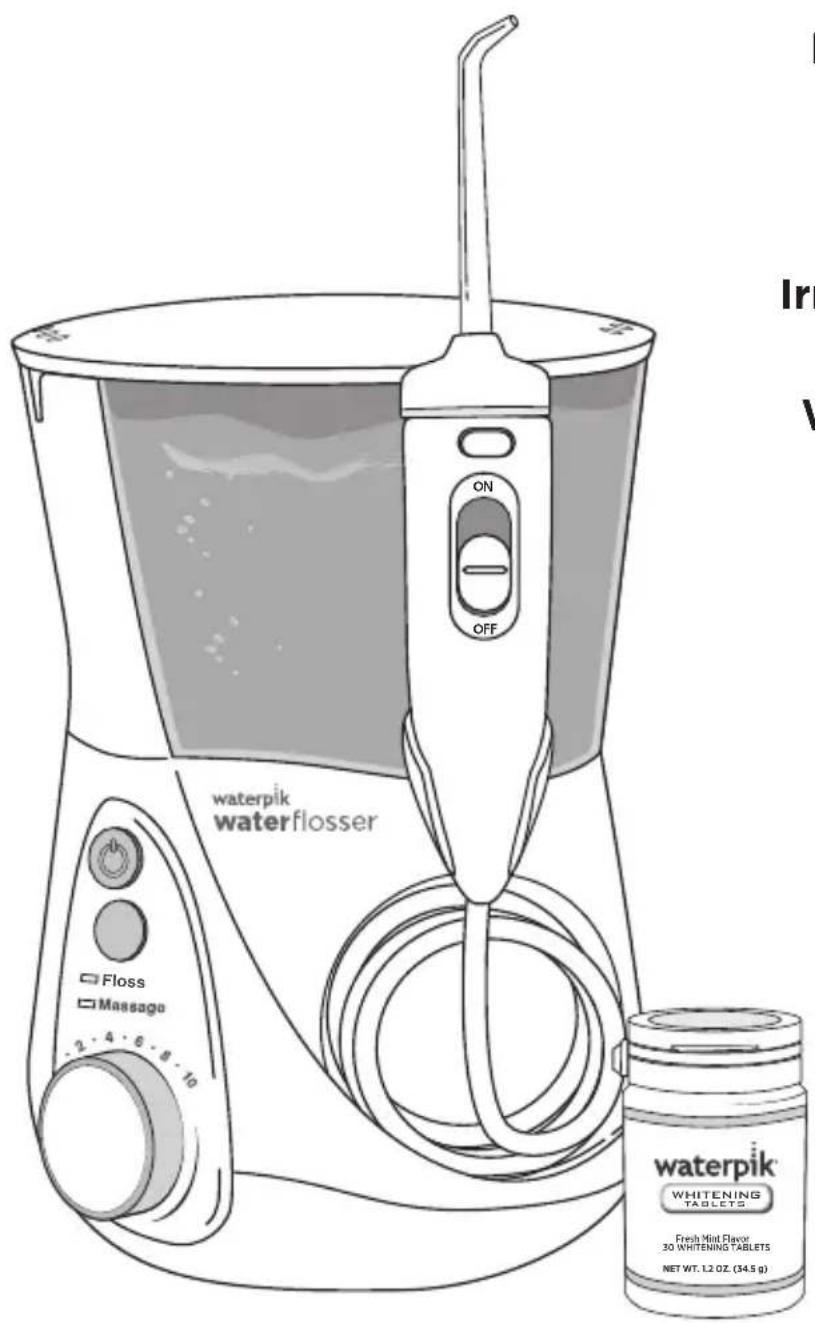
Waterpik® Water Flosser Model WF-05
text_image
waterpik waterflosser Floss Massage 2 4 6 8 10 ON OFF waterpik WHITENING TABLETS. Fresh Mint Flavor 30 WHITENING TABLETS NET WT. 12 OZ. (54.5 g)Munddusche Waterpik®
Modells WF-05
When using electrical products, especially when children are present, basic safety precautions should always be followed, including the following:
READ ALL INSTRUCTIONS BEFORE USING.
DANGER:
To reduce the risk of electrocution:
- Do not handle plug with wet hands.
- Do not place in or drop into water or other liquid.
- Do not use while bathing.
- Do not place or store product where it can fall or be pulled into a tub or sink.
- Do not reach for a product that has fallen into water. Unplug immediately.
- Check the power supply cord for damage before the first use and during the life of the product.
WARNING:
To reduce the risk of burns, electrocution, fire, or injury to persons:
- If product is opened/disassembled for ANY reason, warranty is VOID.
- Do not use this product if it has a damaged cord or plug, if it is not working properly, if it has been dropped or damaged, or dropped into water. Contact Water Pik, Inc. via email at InternationalService@waterpik.com.
- Do not direct water under the tongue, into the ear, nose or other delicate areas. This product is capable of producing pressures that may cause serious damage in these areas.
- Use this product only as indicated in these instructions or as recommended by your dental professional.
- Only use tips and accessories recommended by Water Pik, Inc.
- Do not drop or insert any foreign object into any opening or hose unless otherwise stated.
-
Keep electrical cord away from heated surfaces.
-
Do not use outdoors or operate where aerosol (spray) products are being used or where oxygen is being administered.
- Do not use iodine or water insoluble concentrated essential oils in this product. Use of these can reduce performance and will shorten the life of the product. Use of these products may void warranty.
- Remove any oral jewelry prior to use of this product.
- Do not use if you have an open wound on your tongue or in your mouth.
- If your physician or cardiologist has advised you to receive antibiotic premedication before dental procedures, you should consult your dentist before using this instrument or any other oral hygiene aid.
- Do not use this product for more than 5 minutes in each two-hour period.
- Unit will shut off automatically after 5 minutes of continuous usage.
- Keep whitening tablet bottle and tablets out of reach of children and pets.
-
Whitening tablets contain xylitol which may be harmful to pets.
-
Closely instruct and supervise children 8 years and above and individuals with special needs in the proper use of this product.
• Children should be supervised to ensure that they do not play with the appliance. - There are no consumer serviceable parts in this appliance and it does not require maintenance.
- Fill reservoir with warm water or other dental professional recommended solution only.
SAVE THESE INSTRUCTIONS
TABLE OF CONTENTS
Product Description 5
Getting Started 6
Cleaning and Troubleshooting Your Waterpik® Water Flosser 9
Limited Two-Year Warranty 10
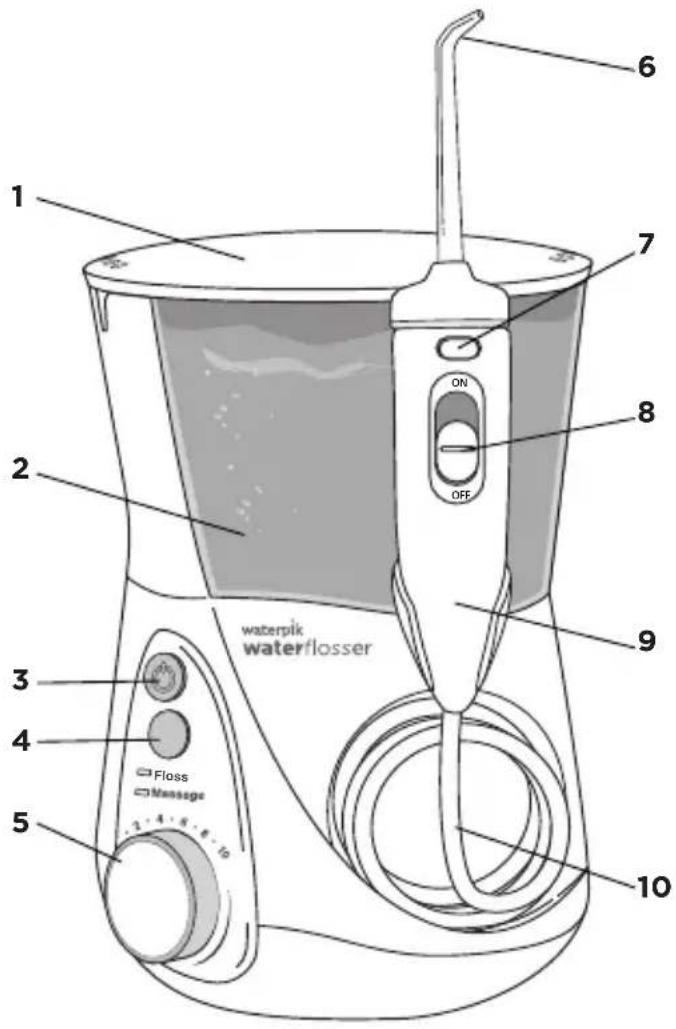
- Hinged Reservoir Lid
- Reservoir
90 Seconds of Water Capacity - Power Button (Motor)
- Mode Button
Choose between Floss and Massage modes for customized water pulsation - Pressure Control Dial
Ergonomic Ribs for easy adjustment - Interchangeable Tips
Personalize depending on tip preference - Single Press Flip Top Button
Easy open for tablet loading - Water On/Off Control
On/Off switch on handle for easy water control - Water Flosser Handle
Handle hose swivel for easy access to all areas - Water Hose
text_image
waterpik waterflosser Floss Massage 2 3 4 5 6 7 ON OFF 8 9 10TIPS
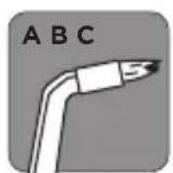
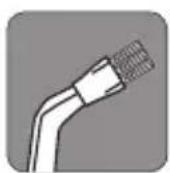
Replace Every 3 months
A. Orthodontic Tip
- Braces/General Use
B. Plaque Seeker® Tip
- Implants/Crowns/Bridges/
Retainers/General Use
Replace Every 6 months
C. Classic Jet Tip
- General Use
NOTE: Tips sold with this model are unique in design for the whitening tablet handle. They are not compatible with traditional Water Flosser handles.

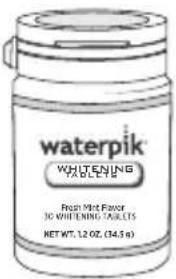
Whitening Tablets
30-Count Bottle
text_image
waterpik WHITENING TABLES Fresh Mint Flavor 30 WHITENING TABLES NET WT. 12 OZ. (34.5 %)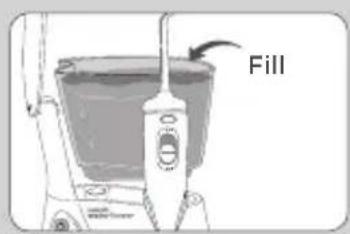
text_image
Fill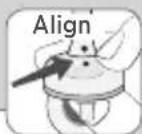
text_image
1. 2. Notch 3. 4.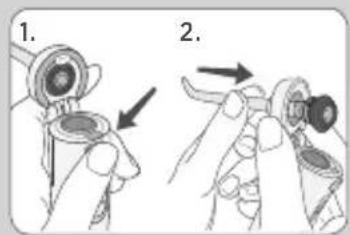
text_image
Diagram showing two-step instructions for adjusting a mechanical component, labeled with arrows and numbered parts.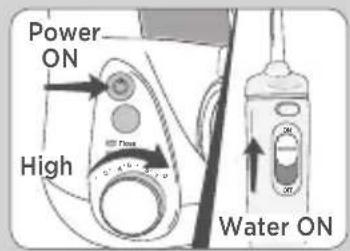
text_image
Power ON High Power Water ONPowering the Unit
Plug the cord into an electrical outlet. If the outlet is controlled by a wall switch, be sure it is turned on.
Preparing the Reservoir
Lift the reservoir lid, remove the reservoir from base, and fill with lukewarm water. Replace the reservoir onto the base, press down firmly, close reservoir lid.
Inserting and Removing Tips
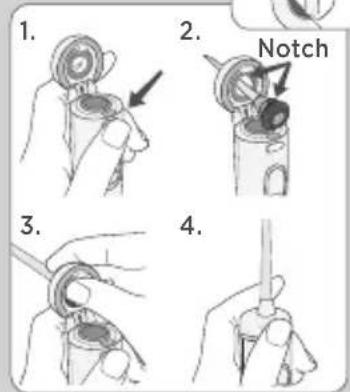
Tip Insertion
- Press top button on handle to release flip top.
- Insert tip through top, align notches on tip and handle (dots on tip and flip top will align).
- Using thumb, press tip firmly into opening to click into place.
- Close flip top. Check to ensure top is secured to handle prior to water flossing.
Tip Removal
- Press top button on handle to release flip top.
- Firmly push tip through opening to click out of position.
Prime Unit (First Time Use Only)
Set pressure control dial on base to high (pressure setting No.10), point the handle and tip into sink. Turn power and water ON until water flows. Turn water and power off.
NOTE: A tablet does NOT need to be loaded into handle for priming.
natural_image
Illustration of a hand adjusting a mechanical component with a magnified inset showing a crossed-out device (no text or symbols present)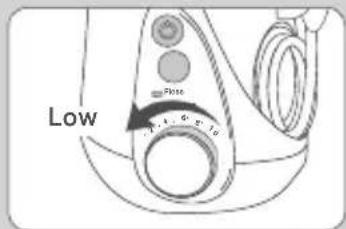
text_image
Low State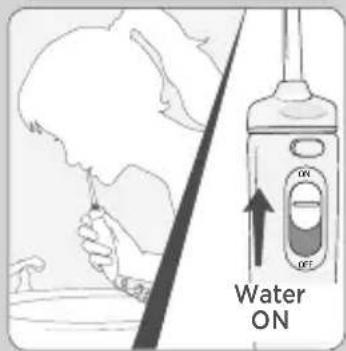
text_image
Water ON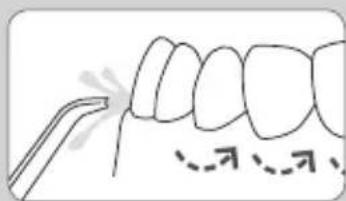
text_image
Diagram showing dental alignment with labeled tooth positions and a tool tip, likely for orthodontic or dental procedure.Tablet Loading
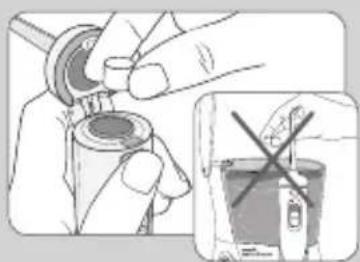
Insert tablet into water flosser handle by pressing the flip top button at top of handle. Insert tablet into opening and close flip top by clicking it securely into place on handle.
NOTE: Do NOT place tablet in reservoir.
Use one tablet daily to remove stains from hard to reach areas, between teeth, and at the gumline, that other products miss.
Adjusting the Pressure Setting
Turn the pressure control dial on the base of the unit to the lowest setting (pressure setting No.1) for first-time use. Gradually increase pressure over time to the setting you prefer – or as instructed by your dental professional.
Using the Water Flosser
Always place the tip in your mouth before turning the power on.
With water switch on handle in OFF position, turn power on.
Lean over sink and slightly close lips enough to prevent splashing while still allowing water to flow from mouth into the sink. Turn water switch ON. When finished, turn water switch and power OFF.
During use you can stop the flow of water by sliding the water switch on handle to the OFF position.
NOTE: Motor will continue to run.
Recommended Technique
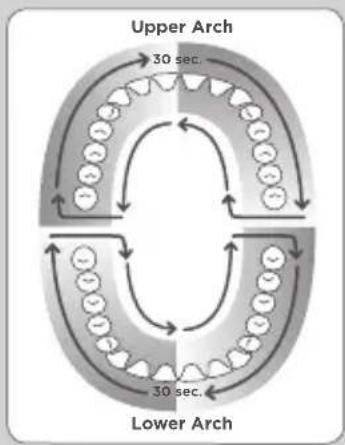
For best results, start with front teeth and work toward the back teeth. Direct the stream at a 90-degree angle to your gumline with tip in mouth. Glide tip along gumline and pause briefly between teeth. Continue until you have cleaned the inside and outside of both the upper and lower teeth.
flowchart
graph TD
    A["Upper Arch"] --> B["30 sec."]
    B --> C["Lower Arch"]
    C --> D["30 sec."]
    D --> A
    style A fill:#f9f,stroke:#333
    style B fill:#ccf,stroke:#333
    style C fill:#cfc,stroke:#333
    style D fill:#fcc,stroke:#333
text_image
Mode Pass Message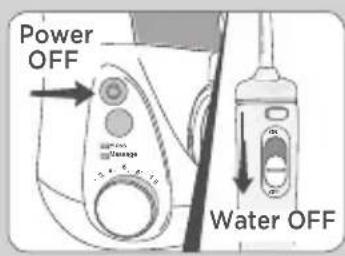
text_image
Power OFF Water OFFOne-Minute Timer/30-second Pacer (Floss Mode Only)
The Water Flosser will create a short pause at 30-seconds, to remind you to move to the other arch of your mouth and another short pause at 1-minute to signal you have reached the recommended cleaning time. The unit will continue to run without pauses until the unit is turned off. Depending on the pressure setting, some water
will remain in the reservoir after 1-minute.
Timer may be deactivated if desired. Steps to deactivate:
- While unit is off, press the mode button once to wake the unit up. One of the LEDs should light up.
- Press and hold the mode button for approximately 3-seconds until the Massage Mode light blinks. The timer is now deactivated.
If you wish to reactivate the timer:
- While unit is off, press the mode button once to wake the unit up. One of the LEDs should light up.
- Press and hold the mode button for approximately 3-seconds until the Floss Mode light blinks. The timer is now activated.
Or unplug unit to reset to factory settings.
Hydro-Pulse Massage Mode
Hydro-Pulse Massage offers a unique water pulsation pattern designed to enhance gum stimulation. For best results, use the Floss Mode as instructed. After using Floss Mode for 1-minute, switch the unit to Massage Mode, adjust pressure as desired, and aim the water stream at your gums and massage throughout your mouth.
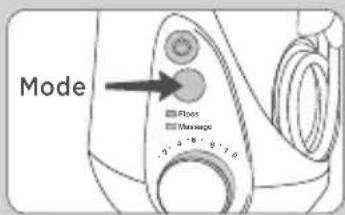
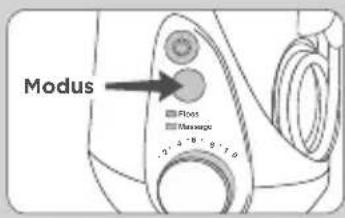
To determine in which mode the unit is set while it is off simply press mode button and the LED light will indicate current mode. To change mode, press mode button again. You may also press the mode button while unit is on to change mode during use.
When Finished
Turn the power OFF. Empty any liquid left in the reservoir. Unplug the unit.
NOTE: If you have any residual tablet left in the handle, simply discard in trash.
SPECIALTY TIP USAGE
Orthodontic Tip
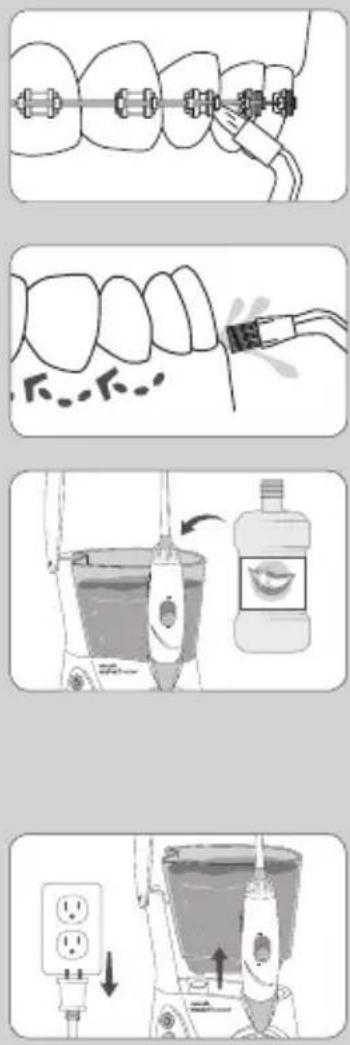
To use the orthodontic tip, gently glide tip along gumline, pausing briefly to lightly brush area between teeth and all around orthodontic bracket, before proceeding to the next tooth.
Plaque Seeker® Tip
To use the Plaque Seeker ^® tip, place the tip close to the teeth so that the bristles are gently touching the teeth. Gently glide tip along gumline, pausing briefly between teeth to gently brush and allow the water to flow between the teeth.
Using Mouthwash and Other Solutions
Your Waterpik® Water Flosser can be used to deliver mouthwash and antibacterial solutions. After using any special solution, rinse unit to prevent clogging by partially filling reservoir with warm water and running unit with tip pointed into sink until unit is empty.
NOTE: Using mouthwash with tablet is NOT recommended. Unpleasant taste may occur.
Cleaning
Before cleaning, unplug from the electrical outlet. Clean the product when necessary by using a soft cloth and mild non-abrasive cleanser. The water reservoir is removable for easy cleaning and is top rack dishwasher safe.
General Cleaning/Removing Hard Water Deposits
Hard water deposits may build up in your unit, depending on the mineral content of your water. If left unattended, it can hinder performance. Cleaning internal parts: add 2 tablespoons of white vinegar to a full reservoir of warm water. Point the handle and tip into sink. Turn unit ON and run until reservoir is empty. Rinse by repeating with a full reservoir of clean warm water.
This process should be done every 1 to 3 months to ensure optimal performance. If using mouthwash or other solutions, more frequent cleaning is recommended.
Leakage
If leaking due to a damaged hose, please email
InternationalService@Waterpik.com
Still have questions? Email us at InternationalService@Waterpik.com
Service Maintenance
Waterpik® Water Flossers have no consumer serviceable electrical items and do not require routine service maintenance. For all your warranty and accessory needs, please email InternationalService@Waterpik.com. Please do not ship product to Waterpik International, Inc. offices, this will delay service. Refer to the serial and model numbers in all correspondence. These numbers are located on the back of the handle and bottom of the reservoir respectively.
Still have questions? Email us at InternationalService@Waterpik.com
Water Pik, Inc. warrants to the original purchaser/ owner of this product that it is free from defects in materials and workmanship for two years from date of purchase. Save your receipt as your proof of purchase date. Water Pik, Inc. reserves the right to request the product to be returned for analysis to confirm the claim falls within our warranty policy. We will replace any part of the product, which in our opinion is defective, provided the product has not been abused, misused, altered or damaged after purchase and was used according to these instructions. For repair or replacement services provided for by the guarantee, please contact, via email, InternationalService@Waterpik.com. Upon request of the consumer, a copy of the guarantee will be provided by email or mail. This limited warranty excludes accessories or consumable parts such as tips, brush heads, etc.
This warranty gives you specific legal rights. You may also have other rights that vary depending on the law in your place of residence. Contact Water Pik, Inc. via email at InternationalService@Waterpik.com
text_image
waterpik WHITEING TABLETS Fresh Mint Flavor 30 WHITENING TABLETS NET WT. 12 OZ. (34.5 g)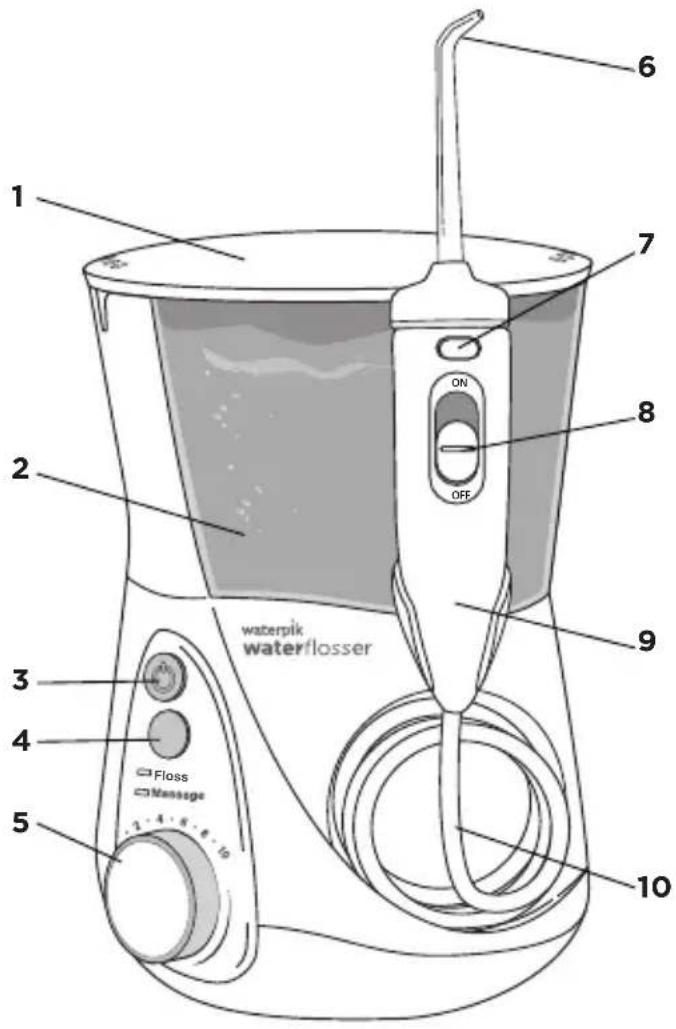
text_image
waterpik water/flosser Floss Massage 2 3 4 5 6 7 ON OFF 8 9 10text_image
Diagram showing two-step instructions for inserting a device into a ring, labeled with arrows and numbered steps.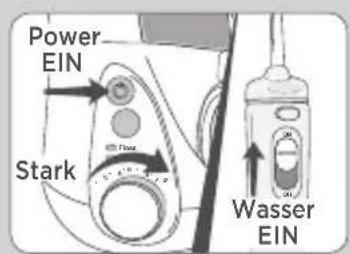
text_image
Power EIN Stark Wasser EINGerät einschalten
natural_image
Illustration showing a hand holding a mechanical component and a magnified view of a device with a crossed-out X (no text or symbols present)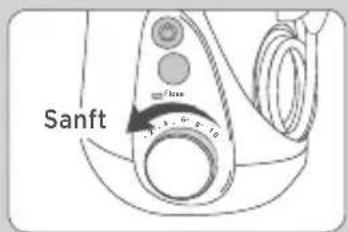
text_image
Sanft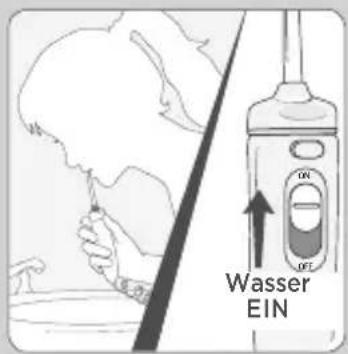
text_image
Wasser EIN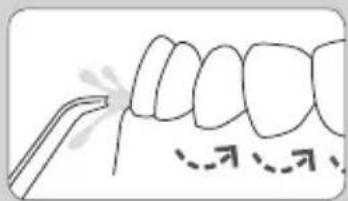
text_image
Diagram showing dental alignment with labeled tooth structures and a tool pointing to the upper teethTabletten einsetzen
flowchart
graph TD
    A["Oberkiefer"] --> B["30 sec."]
    B --> C["Unterklefer"]
    C --> D["30 sec."]
    D --> E["25 sec."]
    E --> F["15 sec."]
    F --> G["10 sec."]
    G --> H["5 sec."]
    H --> I["3 sec."]
    I --> J["2 sec."]
    J --> K["1 sec."]
    K --> L["0 sec."]
    L --> M["0 sec."]
    M --> N["0 sec."]
    N --> O["0 sec."]
    O --> P["0 sec."]
    P --> Q["0 sec."]
    Q --> R["0 sec."]
    R --> S["0 sec."]
    S --> T["0 sec."]
    T --> U["0 sec."]
    U --> V["0 sec."]
    V --> W["0 sec."]
    W --> X["0 sec."]
    X --> Y["0 sec."]
    Y --> Z["0 sec."]
    Z --> AA["0 sec."]
    AA --> AB["0 sec."]
    AB --> AC["0 sec."]
    AC --> AD["0 sec."]
    AD --> AE["0 sec."]
    AE --> AF["0 sec."]
    AF --> AG["0 sec."]
text_image
Modus Ross Massage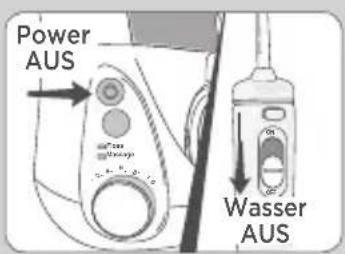
text_image
Power AUS Wasser AUSnatural_image
Diagram of dental braces with a hand adjusting the teeth (no text or labels)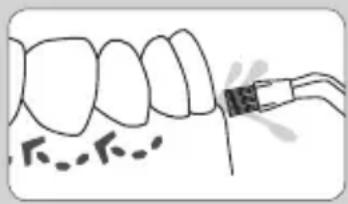
natural_image
Illustration of a dental procedure showing tooth alignment and instrument placement (no text or symbols)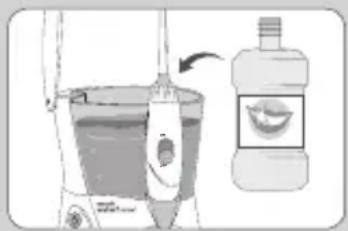
natural_image
Illustration of a hand washing a toothbrush with a bottle and toothpaste applicator nearby (no text or symbols)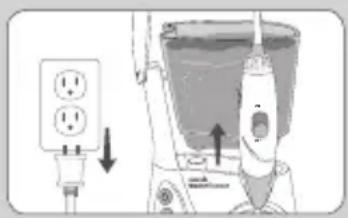
natural_image
Diagram showing a power outlet connected to a bucket with an arrow indicating direction (no text or symbols present)Your Waterpik ^® Water Flosser can be used to deliver mouthwash and antibacterial solutions. After using any special solution, rinse unit to prevent clogging by partially filling reservoir with warm water and running unit with tip pointed into sink until unit is empty.
B. Embout Plaque Seeker®
text_image
Diagram showing two-step installation of a mechanical component, labeled with arrows indicating assembly steps.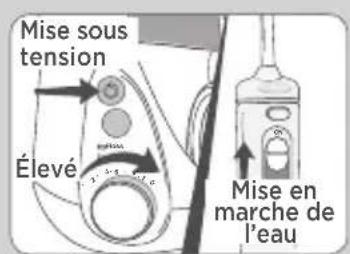
natural_image
Illustration showing a hand holding a mechanical component and a magnified view of a device with a crossed-out X (no text or symbols present)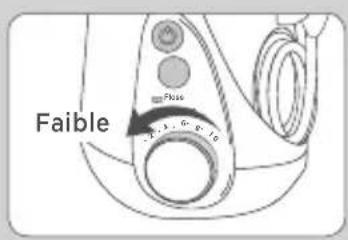
text_image
Faible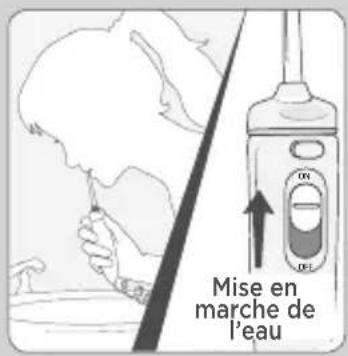
text_image
Diagram showing dental alignment with a tool and dashed line indicating specific teeth positionsMode Massage hydro-pulsage
Embout Plaque Seeker®
text_image
waterpik WHITENING TABLETS Fresh Mint Filter 3D WHITENING TABLETS NET WT.12 OZ. (54.5 g)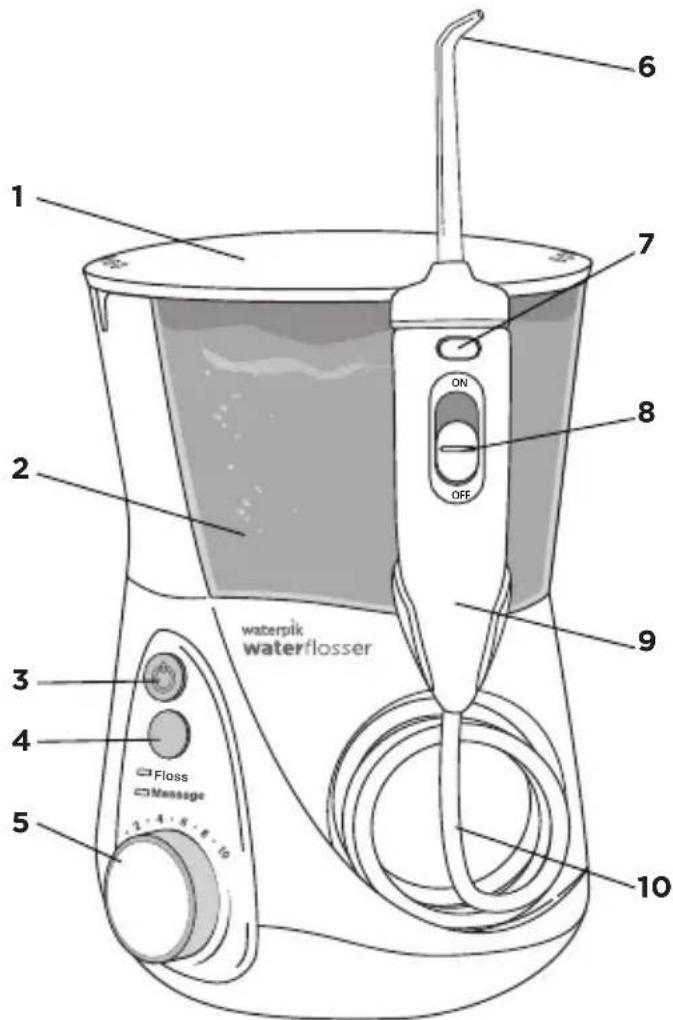
text_image
waterpik waterflosser 1 2 3 4 5 6 7 ON OFF 9 10 Floss Messagetext_image
Diagram showing two-step instructions for inserting a component, labeled with arrows indicating step 1 and step 2.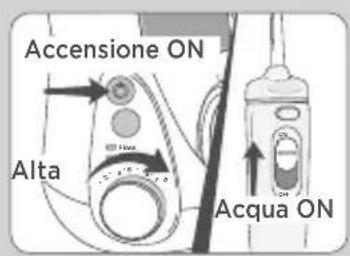
text_image
Accensione ON Alta Acqua ONnatural_image
Illustration of a hand holding a small mechanical component with a magnified inset showing a crossed-out device (no text or symbols present)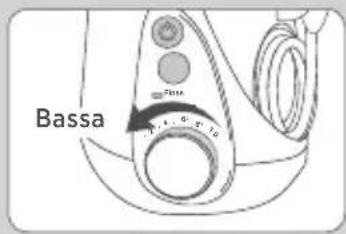
text_image
Bassa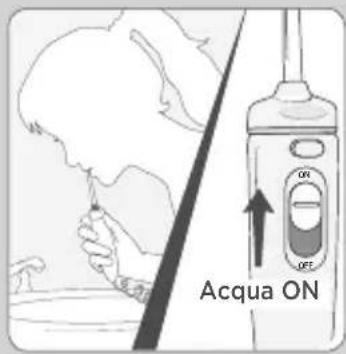
text_image
Acqua ON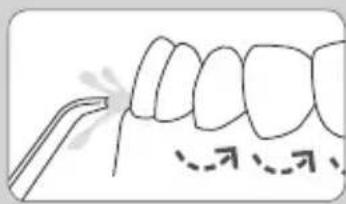
text_image
Diagram showing dental alignment with labeled tooth structures and a tool interacting with the upper teethtext_image
waterpik WHITENING TABLETS Fresh Mix Flower 30 WHITENING TABLETS NET WT. 12 OZ. (34.5 g)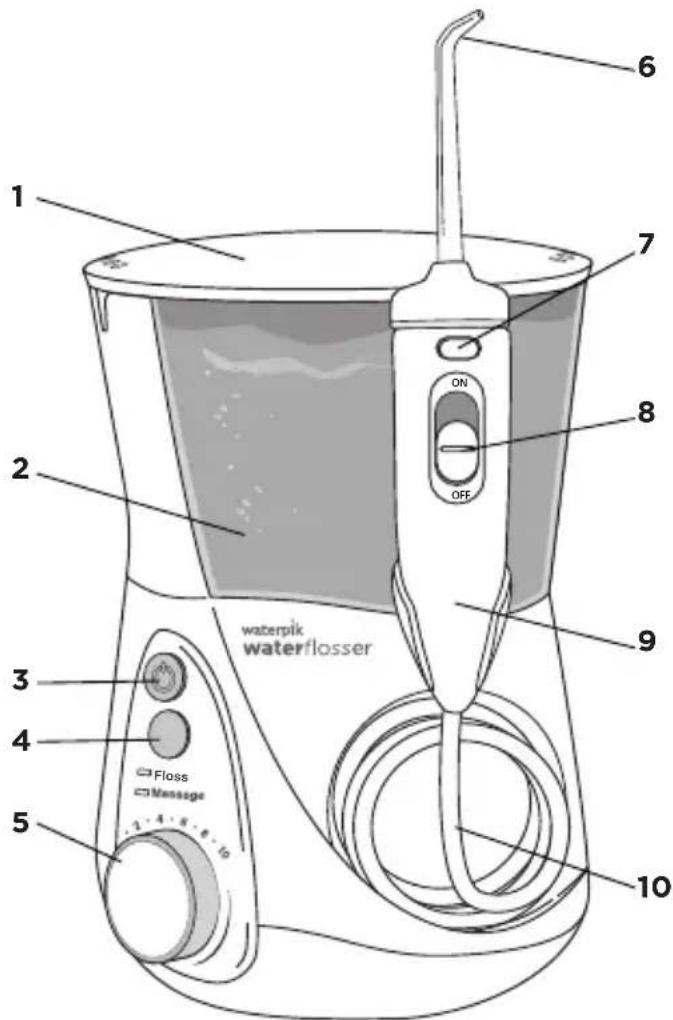
text_image
waterpik waterflosser 1 2 3 4 5 6 7 ON OFF 9 10 Floss Messagetext_image
Diagram showing two-step instructions for adjusting a mechanical component, labeled with arrows and numbered parts.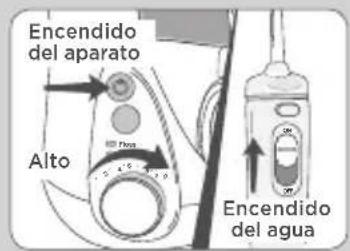
natural_image
Illustration of a hand adjusting a mechanical component with a magnified inset showing a crossed-out device (no text or symbols present)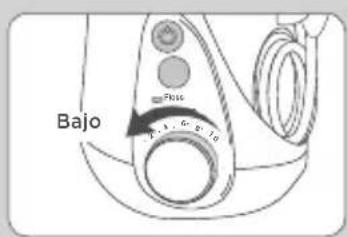
text_image
Diagram showing dental alignment with labeled tooth structures and a tool tip, likely for orthodontic or dental examination.natural_image
Diagram of dental braces with a hand adjusting the teeth (no text or labels)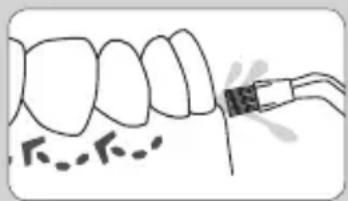
natural_image
Illustration of a dental procedure showing tooth removal with a tool (no text or symbols)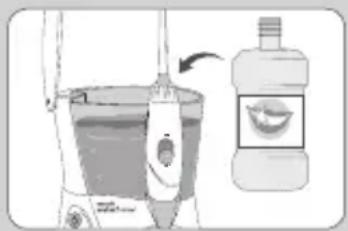
text_image
Illustration showing a hand holding a toothbrush with a bottle and its mouth, accompanied by a small inset image of the tooth.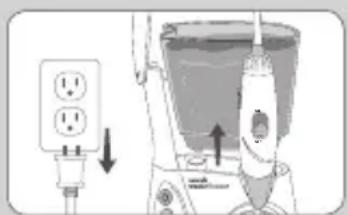
text_image
Diagram showing electrical outlet and motor assembly with labeled components and directional arrowsUSO DE LA PUNTA ESPECIALIZADA
BELANGRIJKE WAARSCHUWING
To reduce the risk of burns, electrocution, fire, or injury to persons:
B. Plaque Seeker® Tip
text_image
Diagram showing two-step instructions for adjusting a mechanical component, labeled with arrows and numbered parts.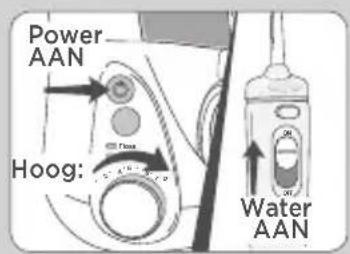
text_image
Power AAN Hoog: Water AANnatural_image
Illustration of a hand adjusting a mechanical component with a magnified inset showing a crossed-out device (no text or symbols present)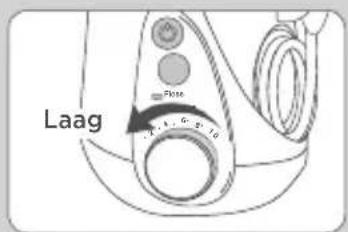
text_image
Laag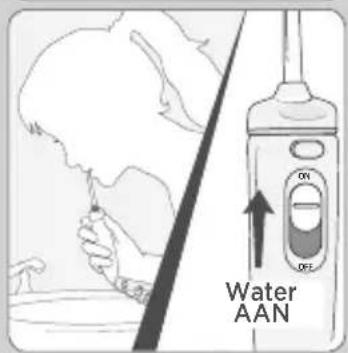
text_image
Water AAN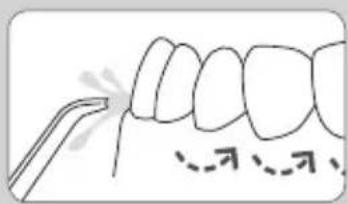
natural_image
Diagram of a tooth with dental tool application, showing teeth and jaw structure (no text or labels)Tablet plaatsen
text_image
Apparaat UIT Water UITB. Ponta Plaque Seeker®
text_image
waterpik® WHITENING TABLETS Roast Mint Flavor 30 WHITENING TABLETS NET WT. 12 OZ. (34.5 s)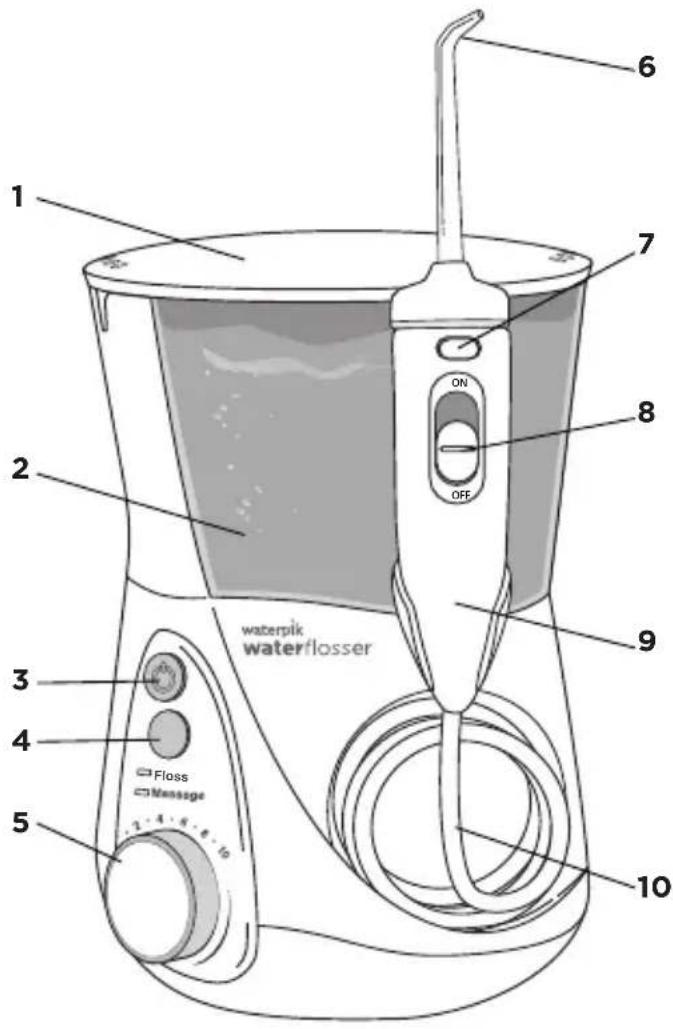
text_image
waterpik waterflosser Floss Message 2 1 3 4 5 6 7 ON OFF 8 9 10text_image
Illustration showing two-step instructions for adjusting a mechanical component, labeled with arrows and numbered steps.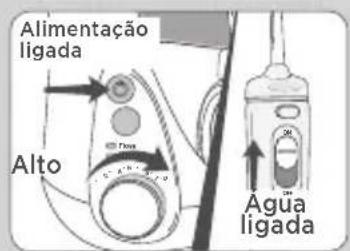
natural_image
Illustration of a hand adjusting a mechanical component with a magnified inset showing a crossed-out device (no text or symbols present)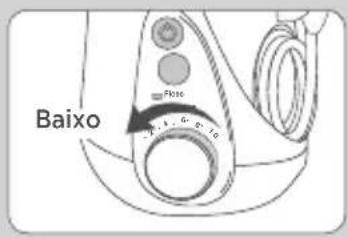
text_image
Baixo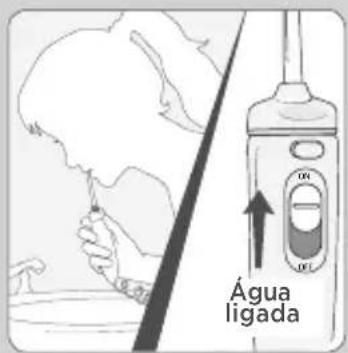
text_image
Água ligada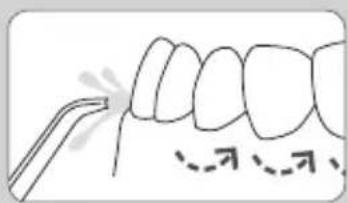
text_image
Diagram showing dental alignment with labeled tooth structures and a tool for identificationPonta Plaque Seeker®
text_image
waterpik WHITENING TABLETS Fresh Melt Flavor 30 WHITENING TABLETS NET WT: 12.0 oz. (34.5 g)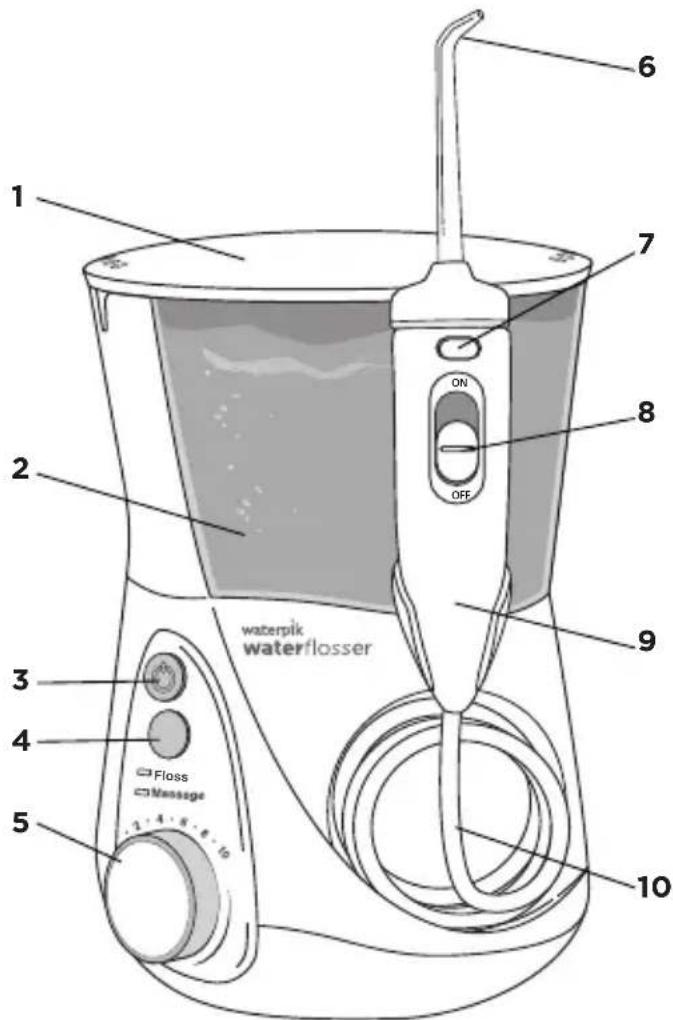
text_image
waterpik waterflosser Floss Message 2 3 4 5 6 7 ON OFF 8 9 10text_image
Illustration showing two-step instructions for adjusting a mechanical component, labeled with arrows and numbered parts.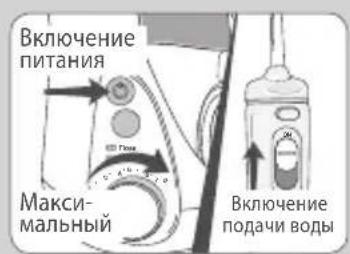
natural_image
Illustration of a hand holding a mechanical component with a magnified inset showing a cross symbol (no text or labels present)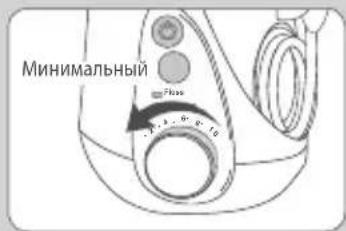
text_image
Минимальный 70000 1.3 1.9 2.10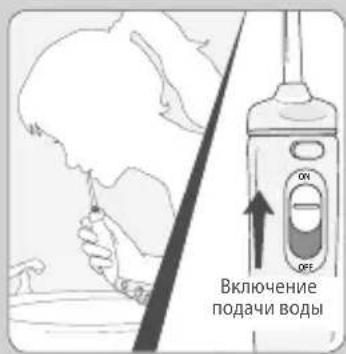
text_image
Diagram showing dental alignment with a tool and dashed line indicating specific teeth positionsДобавление таблеток
natural_image
Diagram of dental braces with a hand adjusting the teeth (no text or symbols present)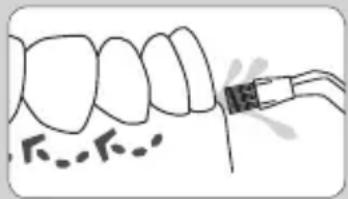
natural_image
Diagram of a dental procedure showing tooth alignment and root canal insertion (no text or labels)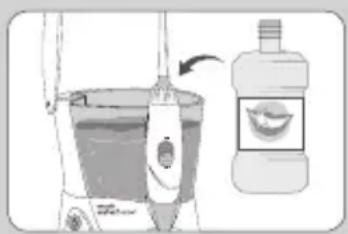
text_image
Illustration showing a hand washing a toothbrush with a bottle and its product, including a cartoon tooth.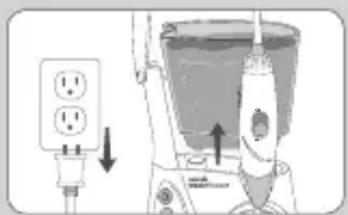
text_image
Diagram showing a power plug connected to a vacuum cleaner with labeled components and directional arrows indicating electrical or mechanical operation.1730 East Prospect Road
Fort Collins, CO 80553-0001 USA
844-821-4873
www.waterpik.com
Waterpik, International, Inc.
Castle Court,
41 London Road Reigate,
Surrey RH2 9RJ
United Kingdom
Waterpik ^® is a trademark of Water Pik, Inc. registered in Argentina, Australia, Benelux, Brazil, Canada, Chile, China, Czech Republic, Denmark, EU, Finland, France, Germany, Hong Kong, Hungary, India, Israel, Italy, Japan, Kazakhstan, Korea, Malaysia, Mexico, New Zealand, Norway, Pakistan, Philippines, Poland, Russian Federation, Saudi Arabia, Singapore, South Africa, Spain, Sweden, Switzerland, Taiwan, Turkey, Ukraine, United Kingdom, United States and Vietnam.
Waterpik ^® (stylized) is a trademark of Water Pik, Inc. registered in Australia, Brazil, Canada, China, EU, Hong Kong, India, Israel, Japan, Korea, Malaysia, Mexico, Philippines, Russian Federation, Saudi Arabia, South Africa, Switzerland, Taiwan, Thailand, Trinidad & Tobago, Ukraine, United States, and Vietnam.
waterflosser ^® (stylized) is a trademark of Water Pik, Inc. registered in Brazil, Canada, China, Mexico, Switzerland and the United States.
Plaque Seeker ^® is a trademark of Water Pik, Inc. registered in Canada, China, EU, and the United States.
Designed and Tested in the USA. Made in China.