IQ Office Pro P4 - Shredder LEITZ - Free user manual and instructions
Find the device manual for free IQ Office Pro P4 LEITZ in PDF.



| Brand | Leitz |
| Model | IQ Office Pro P4 |
| Product type | Document shredder |
| Shredding capacity | 20 sheets per pass (70 g/m²) |
| Cut type | Cross cut |
| Continuous operation cycle | 120 minutes max |
| Cooling time | Approximately 60 minutes |
| Functions | Forward, reverse, auto stop, sleep mode |
| Indicator lights | On (blue), cooling (red), reverse (flashing red), bin full (red), door open (red) |
| Safety | Open door detection, bin full detection, overheating detection, safety lock |
| Included accessories | Casters, removable bin |
| Optional accessories | Lubricating sheets (ref. 80070000), bags (ref. 80080000) |
| Maintenance | Use lubricating sheets, do not use aerosols |
| Warranty | 2 years |
| Usage | Indoor only |
| Recycling | WEEE – do not dispose of with household waste |
Frequently Asked Questions - IQ Office Pro P4 LEITZ
User questions about IQ Office Pro P4 LEITZ
0 question about this device. Answer the ones you know or ask your own.
Ask a new question about this device
Download the instructions for your Shredder in PDF format for free! Find your manual IQ Office Pro P4 - LEITZ and take your electronic device back in hand. On this page are published all the documents necessary for the use of your device. IQ Office Pro P4 by LEITZ.
USER MANUAL IQ Office Pro P4 LEITZ
To register and activate the warranty go to www.leitz.com

CE


natural_image
Line drawing of a portable air purifier unit (no text or symbols visible)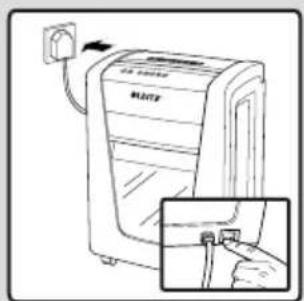
natural_image
Line drawing of a portable air conditioner unit with a power outlet and a close-up inset showing the internal components (no text or symbols)
text_image
R LEITZ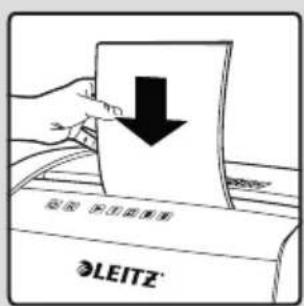
text_image
LEITZ
text_image
LEITZ®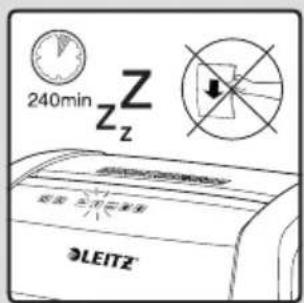
text_image
240min Z Z Z LEITZ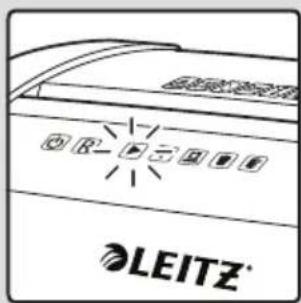
text_image
LEITZ®
text_image
LEITZ®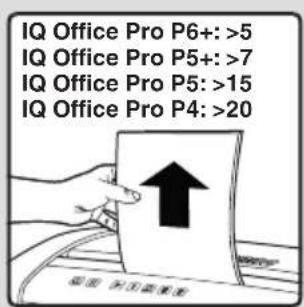
text_image
IQ Office Pro P6+: >5 IQ Office Pro P5+: >7 IQ Office Pro P5: >15 IQ Office Pro P4: >20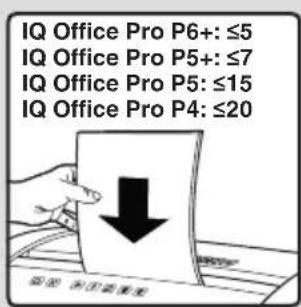
text_image
IQ Office Pro P6+: ≤5 IQ Office Pro P5+: ≤7 IQ Office Pro P5: ≤15 IQ Office Pro P4: ≤20
text_image
LEITZ®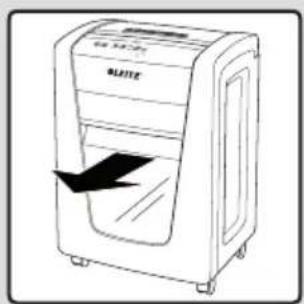
natural_image
Line drawing of a BAE machine with a black arrow indicating compression or disassembly (no text or symbols)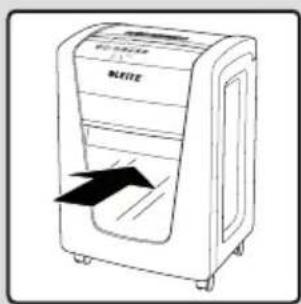
natural_image
Line drawing of a white electronic device with a black arrow indicating airflow or movement (no text or symbols)
text_image
LEITZ®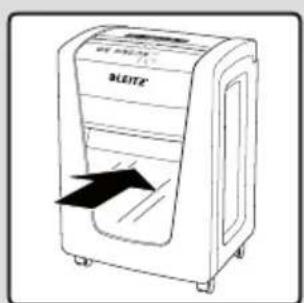
text_image
ALEITE®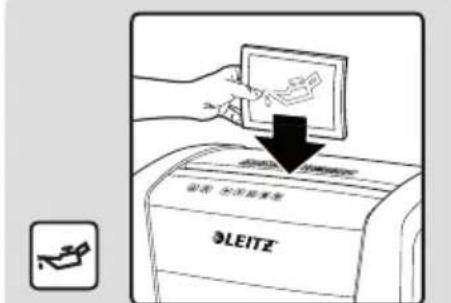
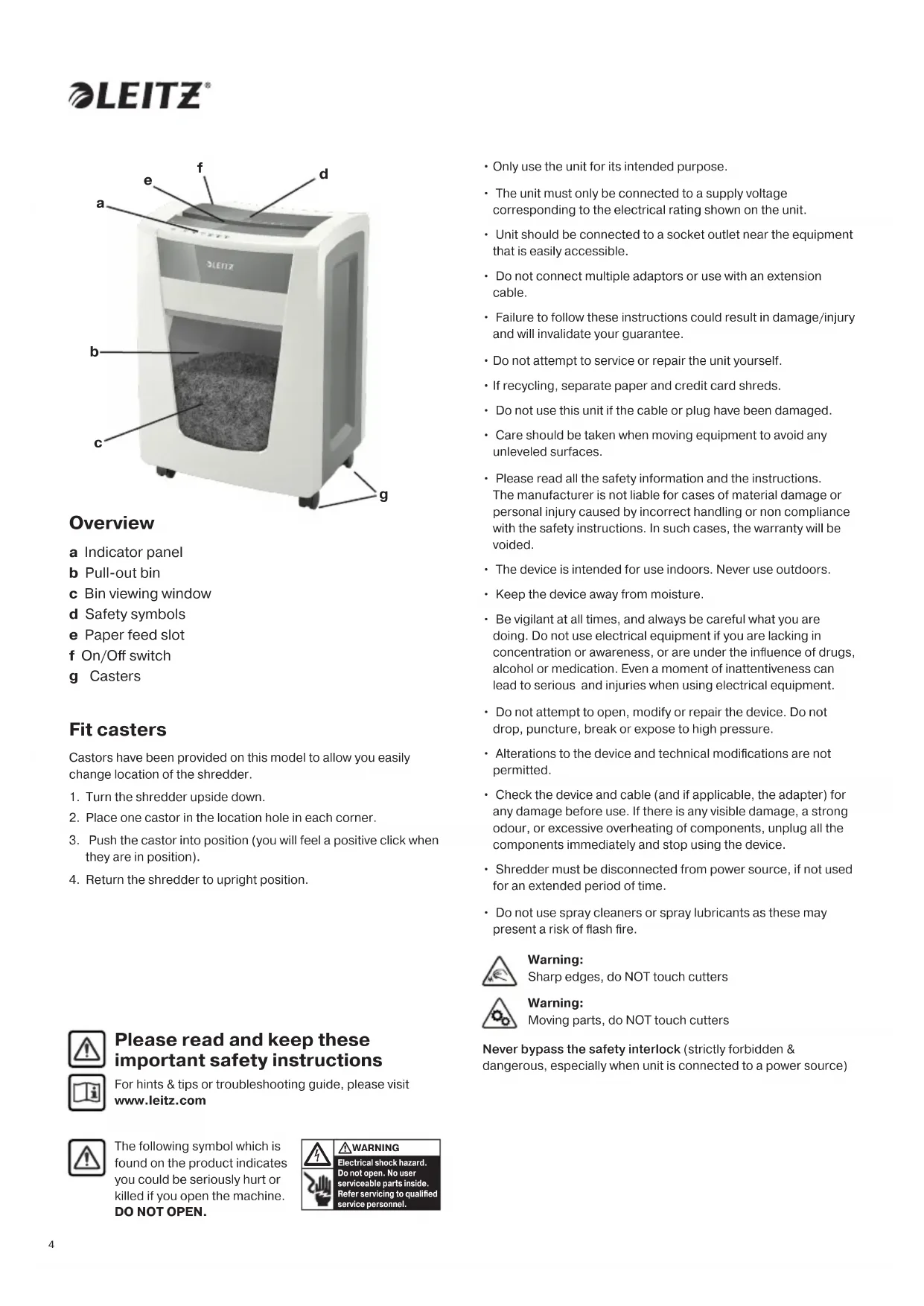
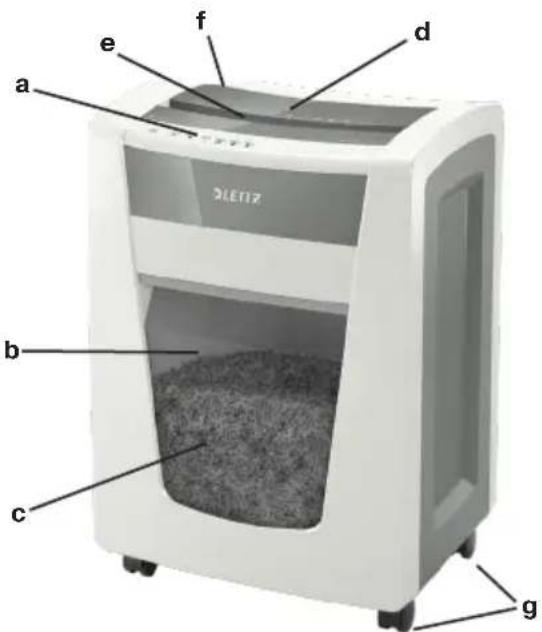
a Indicator panel
b Pull-out bin
c Bin viewing window
d Safety symbols
e Paper feed slot
f On/Off switch
g Casters
Fit casters
Castors have been provided on this model to allow you easily change location of the shredder.
- Turn the shredder upside down.
- Place one castor in the location hole in each corner.
- Push the castor into position (you will feel a positive click when they are in position).
- Return the shredder to upright position.

Please read and keep these important safety instructions
For hints & tips or troubleshooting guide, please visit www.leitz.com

The following symbol which is found on the product indicates you could be seriously hurt or killed if you open the machine. DO NOT OPEN.

WARNING
Electrical shock hazard. Do not open. No user serviceable parts inside. Refer servicing to qualified service personnel.
- Only use the unit for its intended purpose.
- The unit must only be connected to a supply voltage corresponding to the electrical rating shown on the unit.
- Unit should be connected to a socket outlet near the equipment that is easily accessible.
- Do not connect multiple adaptors or use with an extension cable.
- Failure to follow these instructions could result in damage/injury and will invalidate your guarantee.
- Do not attempt to service or repair the unit yourself.
- If recycling, separate paper and credit card shreds.
- Do not use this unit if the cable or plug have been damaged.
- Care should be taken when moving equipment to avoid any unleveled surfaces.
- Please read all the safety information and the instructions. The manufacturer is not liable for cases of material damage or personal injury caused by incorrect handling or non compliance with the safety instructions. In such cases, the warranty will be voided.
• The device is intended for use indoors. Never use outdoors. - Keep the device away from moisture.
- Be vigilant at all times, and always be careful what you are doing. Do not use electrical equipment if you are lacking in concentration or awareness, or are under the influence of drugs, alcohol or medication. Even a moment of inattentiveness can lead to serious and injuries when using electrical equipment.
- Do not attempt to open, modify or repair the device. Do not drop, puncture, break or expose to high pressure.
- Alterations to the device and technical modifications are not permitted.
- Check the device and cable (and if applicable, the adapter) for any damage before use. If there is any visible damage, a strong odour, or excessive overheating of components, unplug all the components immediately and stop using the device.
- Shredder must be disconnected from power source, if not used for an extended period of time.
- Do not use spray cleaners or spray lubricants as these may present a risk of flash fire.

Warning:
Sharp edges, do NOT touch cutters

Warning:
Moving parts, do NOT touch cutters
Never bypass the safety interlock (strictly forbidden & dangerous, especially when unit is connected to a power source)
| Indicator Panel Icon Colour | ||
| Power On BUTTON |  | White Press and release to turn on shredder. |
| Reserve BUTTON Pres |  old to old to | manually remove paper. |
| Shredding in operation INDICATOR |  | Blue Constantly illuminated – unless in Power Save mode. |
| Cooling Down INDICATOR |  | Red Illuminates when shredder is cooling |
| Auto jam clearance INDICATOR |  | Red Flashes when motor is in reverse |
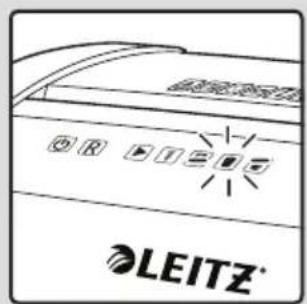
| Bin full INDICATOR |  | Red Illuminates when bin is full |
| Door open INDICATOR |  | Red illuminates when door is open |
Operation
- Remove the shredder from the packaging and place the bin inside the shredder housing. Put the casters in place and plug the power cord into the rear of the shredder.
- Connect the shredder to an appropriate mains supply.
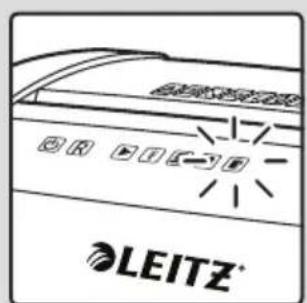
Ensure the on/off switch is in the 'on' position. The blue shredder in operation icon will flash every 3 seconds.
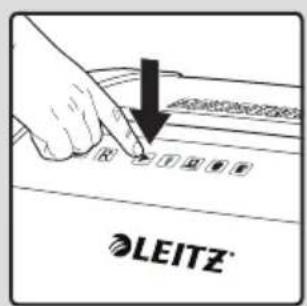
- To commence shredding press and release the button. The flashing icon changes to a solid blue light. You are now able to shred.
- Insert paper to be shredded into the feed slot 'e'.
While paper is being shredded the blue shredder in operation icon will remain illuminated.
Note: Make sure the paper to be inserted is neatly stacked.
If the paper thickness is within the shredder's capacity, the motor will start and your documents will be shredded. The cutters will stop once the shredding process is complete.
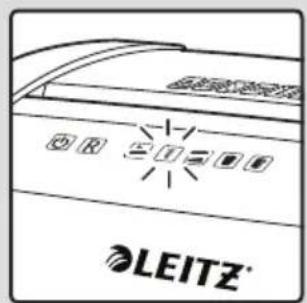
- If the paper thickness is greater than the shredder's capacity the auto reverse icon will flash red and the motor will run in reverse.
- If this happens, remove some of the sheets from the paper stack and re-try. The shredder will automatically start and allow the paper to be shredded.
- If the shredder is left in shredder operational mode for more than 15 minutes without being used the shredder will automatically switch off in order to save power.

Warning: Do NOT under any circumstances use any metal objects (scissors, letter openers, etc.) in an attempt to clear the entry.
Warning symbols


No CDs

Keep loose jewellery clear

No credit cards

Ties and loose clothing hazard

Keep long hair clear

Do not reach into opening

This equipment is not intended for use by children

Do not use spray cleaners or spray lubricants as these may present a risk of flash fire

Manual feed slot capacity

No aerosols
Rare occasions of jamming
Should the paper jam not clear, press and hold the button for 2 seconds, then press and hold the button for 2 seconds. Repeat until the jam has cleared. Please do not alternate between the Reverse and Forward functions quickly as this may damage the motor.
Reverse function
- Should you wish to reverse the shredding direction whilst shredding a document a reverse function R has been fitted for your convenience.
- By pressing and holding the reverse button the cutters will change direction allowing the retrieval of the document being shredded.
- The reverse function will only run whilst[R] is being pressed. When the reverse button has been released the shredder will revert to ready mode.
Operation time
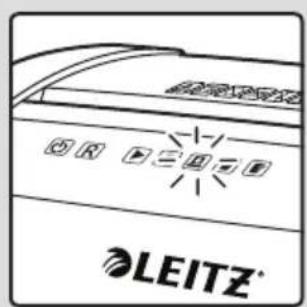
When the shredder is used continuously for 120 minutes or more the shredder may overheat. If this occurs the overheat icon will illuminate red.
When the shredder is ready to be used again the red overheat icon will go out. This will take approx. 60 minutes.
To resume shredding, press the On button and start feeding documents into the feed slot.
Quiet shredding
This shredder has been designed with quiet shredding technology.
This allows you to shred with peace of mind you will not disturb others.
IQ Office Pro P6+/P5+/P5/P4 shredding capability
CAN shred the following:

- IQ Office Pro P6+: 5 sheets IQ Office Pro P5+: 7 sheets IQ Office Pro P5: 15 sheets IQ Office Pro P4: 20 sheets
- Stapled paper, 25mm within the corner
• 26/6 and 24/6 or smaller staples - Small sized paper

- IQ Office Pro P6+: 5 sheets IQ Office Pro P5+: 7 sheets IQ Office Pro P5: 15 sheets IQ Office Pro P4: 20 sheets
• Paperclipped paper, 25mm within the corner
- Capable of shredding small/medium paperclips (max. wire thickness = 0.9 mm)
• >80/100gsm paper

Thick paper or card <200gsm

Glossy paper or a sheet covered with print on both sides.
Multiple folded sheets (A3 sheets folded in half).
CANNOT shred the following:

Heavy duty staples. Check the staple leg length is not greater than 6mm.

Large clips. Check the length of the paperclip is not longer than 32mm.

Plastic sheets, laminated documents, plastic folders.

Bulldog clips

Bound documents

Credit cards

Adhesive labels.

Magazines or other documents bound by multiple staples or clips.


No aerosols No oil
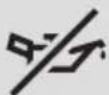

CDs & DVDs
Bin full
When the bin is full the shredder will not function and the bin full symbol will illuminate and flash red.
When this happens you must empty the bin.
Pull out the bin to empty.
Once the bin is empty, push it back in and press the On button to resume shredding.

WARNING: The shredder bin must be fully pushed closed for the machine to operate.
- Empty the shredder bin when it is full otherwise the shredder's performance will be adversely affected. Operating the shredder with a full shredder bin can result in paper jamming in the cutters, which will increase the machine's noise level.
- Do not force down shredder paper in the bin using your feet.
Door open
If the door is opened during shredding as a safety precaution the shredder will instantly stop, and the door open symbol on the indicator panel will flash red.
To resume shredding, shut the door and press the button.

WARNING
- The shredder DOOR must be fully pushed closed for the machine to operate.
Troubleshooting
If the paper shredder will not start, please check the following:
-
Is the machine plugged in correctly?
-
Is the switch pushed to the ▶ position?
-
Is the machine jammed with paper?
-
Has the motor overheated?
-
Is the shredder bin fully pushed in?
-
Is the shredder door closed?
Castors
This shredder is fitted with castors to allow you to move the shredder.

WARNING
- Always remember to lock castors in place if shredder has been moved.
Accessories
Only use Leitz accessories:
Oil Sheets - 80070000
Bags - 80080000
Waste Electrical and Electronic Equipment (WEEE)
At the end of its useful life, your product is considered to be WEEE. As such it is important to note that WEEE is not to be disposed of as an unsorted municipal waste. It is to be collected separately such that it can be disassembled so its components and materials can be recycled, re-used, and recovered (burned for energy content in the production of electricity)
Public collection points have been set up by municipalities for the collection of WEEE, free of charge to you.
Please return your WEEE to the collection facility nearest your home or office.
If you have difficulty in locating a collection facility, the retailer that sold you the product should accept your WEEE.
If you are no longer in contact with the retailer, please contact ACCO for assistance with this matter
Recycling of WEEE is geared toward protecting the environment, protecting human health, preserving raw materials. Improving sustainable development, and ensuring a better supply of commodities within the European Union. This will be achieved by retrieving valuable secondary raw materials and reducing the disposal of waste. You can contribute to the success of these goals by returning your WEEE to a collection facility.
Your product is marked with the WEEE symbol (wheelie bin with an X through it). This symbol is to inform you that the WEEE is not to be disposed off as unsorted municipal waste.
Guarantee
Operation of this machine is guaranteed for two years within the date of purchase, subject to normal use. Within the guarantee period, ACCO Brands Europe will at its own discretion either repair of replace the defective machine free of charge. Defects due to misuse or use for inappropriate purposes are not covered under the guarantee.
Proof of date of purchase will be required. Repairs or alterations made by persons not authorised by ACCO Brands Europe will invalidate the guarantee. It is our aim to ensure that our products perform to the specifications stated. This guarantee does not affect the legal rights which consumers have under applicable national legislation governing sale of goods.
This guarantee does not apply to Australian customers - see warranty on page 100.
text_image
a b c d e f g DLETIZÜberblick
This document details the terms and conditions of the warranty against defects provided with this product. Please disregard any other representation contained on this product's packaging or provided with this product which constitutes or appears to constitute a warranty against defects.
WARRANTY AGAINST DEFECTS
This product comes with ACCO Brands Australia Pty Ltd (ACCO Brands) warranty against defects, the details and conditions of which are set out below.
Subject to the terms and conditions set out in this warranty, ACCO Brands will (at ACCO Brands' option) repair or replace this product with a new or refurbished product if it contains defects which are a result of faulty manufacturer workmanship or materials.
PERIOD OF WARRANTY
You may claim on this warranty if you notify ACCO Brands within 2 years of the date of purchase in the manner set out below and if you comply with the other conditions of this warranty.
WHO CAN CLAIM UNDER THIS WARRANTY?
This warranty applies to and can be exercised by the original purchaser of the product only. This warranty is not transferrable to any other person or party under any circumstances.
WHAT THIS WARRANTY DOES NOT COVER
If we reasonably consider that any of the following situations are present, this warranty does not apply. The situations to which this warranty does not apply are:
- any cosmetic damage;
- any product where the product's serial number is no longer present or visible;
- loss or damage caused by factors beyond ACCO Brands' control including, but not limited to, damage or failure due to power fluctuations, overload, excessive heat or humidity;
- any product which has not been installed and/or maintained according to any care or operating instructions provided with the product;
- any alterations or repairs to the product not authorised in writing or performed by ACCO Brands;
- damage or defects caused to the product due to unusual, abnormal, non-recommended or negligent use of the product;
- any wearable component in any product, including but not limited to blades, slitters, cutting sticks, cutting light bulbs, drill bits, base boards, feed wheels, separators, fuses, cutters and carriers, manual punches and cutting disks, light bulbs and staple inserts; or
- liability based on any service agreement entered into with third parties.
PROCEDURE FOR MAKING A CLAIM
Any claim made under this warranty must be made by sending the faulty product to ACCO Brands at the address noted below, together with the following information in writing:
- Your name or company name (if applicable);
- Your address;
- Your telephone number;
- Contact name;
• Machine type, model number and serial number; - Proof of your purchase of this product, such as your receipt; and
- A detailed description of the defect you believe the product to have.
WHAT WE WILL DO TO HONOUR THIS WARRANTY
Upon delivery to us we will organise for the product to be assessed to determine if the fault or problem is covered by this warranty. We will advise you by telephone, email or in writing whether the fault is covered by this warranty.
STATUTORY GUARANTEES AND YOUR OTHER RIGHTS AND REMEDIES
This warranty against defects is provided in addition to other rights or remedies you, as a consumer, may have under a law in relation to this product.
Our goods come with guarantees that cannot be excluded under the Australian Consumer Law.
You are entitled to a replacement or refund for a major failure and for compensation for any reasonably foreseeable loss or damage. You are also entitled to have the goods repaired or replaced if the goods fail to be of acceptable quality and the failure does not amount to a major failure.
CONTACTING US
ACCO Brands Australia Pty Ltd (ABN 16 000 265 047)
Australia and New Zealand Distributor
Locked Bag 50
Blacktown BC NSW 2148
For product purchased in Australia call: 1300 278 546
Email: enquiry.nsw@acco.com
For product purchased in New Zealand call: 0800 800 526
Email: enquiry.nz@acco.com