R8.0 - Indoor bike trainer Horizon - Free user manual and instructions
Find the device manual for free R8.0 Horizon in PDF.


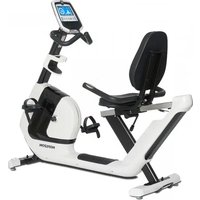
| Product Type | Recumbent indoor bike |
| Brand | Horizon |
| Model | R8.0 |
| Dimensions (L × W × H) | 165 × 64 × 135 cm |
| Net weight | 49.5 kg |
| Maximum user weight | 136 kg |
| Power supply | Mains, power cord included |
| Resistance type | Magnetic induction, 16 levels |
| Number of programs | 16 training programs |
| Display | Backlit LCD display: time, distance, speed, RPM, level, calories, heart rate, watts, profile |
| Connectivity | Built-in Wi-Fi, Passport, 3.5 mm audio jack, speakers |
| Heart rate sensors | Handgrip sensors + wireless receiver for chest strap (optional) |
| Seat | Adjustable seat with backrest, cushioned |
| Pedals | Pedals with adjustable straps |
| Bottle holder | Yes, integrated into console mast |
| Usage | Domestic and indoor use only |
| Assembly | Requires included tools (Allen keys, flat wrench). Detailed instructions included |
| Maintenance and cleaning | Clean with a damp cloth; regularly check bolt tightness |
| Safety | Do not use barefoot; keep children away; stop if pain occurs |
| Spare parts and repairability | Available from local dealer; recyclable at waste disposal site |
| General information | User manual available free in PDF format. Multilingual manuals included |
Frequently Asked Questions - R8.0 Horizon
User questions about R8.0 Horizon
0 question about this device. Answer the ones you know or ask your own.
Ask a new question about this device
Download the instructions for your Indoor bike trainer in PDF format for free! Find your manual R8.0 - Horizon and take your electronic device back in hand. On this page are published all the documents necessary for the use of your device. R8.0 by Horizon.
USER MANUAL R8.0 Horizon
Read the BIKE GUIDE before using this OWNER'S MANUAL.
SAVE THESE INSTRUCTIONS
When using an exercise product, basic precautions should always be followed, including the following: Read all instructions before using this exercise bike. It is the responsibility of the owner to ensure that all users of this exercise bike are adequately informed of all warnings and precautions. If you have any questions after reading this owner's manual, contact your local dealer.

WARNING
READ AND SAVE ALL INSTRUCTIONS BEFORE ASSEMBLING OR USING THIS EXERCISE BIKE. IT IS STRONGLY RECOMMENDED TO TAKE THE FOLLOWING SAFETY INSTRUCTIONS.
- CAUTION: If you experience chest pains, nausea, dizziness or shortness of breath, stop exercising immediately and consult your physician before continuing.
- Use this exercise bike for its intended purpose as described in this manual. Do not use attachments that have not been recommended by the manufacturer.
- Never operate the exercise bike if it is not working properly, or if it has been damaged. Contact the authorized dealers for examination and repair.
- Do not use the exercise bike without proper footwear. NEVER operate the exercise bike with bare feet.
- Do not wear any clothing that might catch on any moving parts of this exercise bike.
- Keep hands and feet clear at all times from moving parts to avoid injury. Never turn the pedal cranks by hand.
- Do not dismount the exercise bike until the pedals are at a complete STOP
- Do not attempt to ride the exercise bike in a standing position at high RPMs until you have practiced at slower speeds.
- Do not insert any object, hands or feet into any openings, or expose hands, arms or feet to the drive mechanism or other potentially moving part of the exercise bike.
- Do not operate where aerosol (spray) products are being used or when oxygen is being administered.
- Close supervision is necessary when used near children, invalids or disabled people.
- When the exercise bike is in use, young children and pets should be kept at least 3 meters / 10 feet away.
- Ensure that adjustment levers (seat and handlebar fore-and-aft) are properly secured and do not interfere with range of motion during exercise.
- This application is for home and indoor use only.
- This application with speed independent system.
- If any of the adjustment devices are left projecting, they could interfere with the user's movement.
- WARNING! Heart rate monitoring systems may be inaccurate. Over exercising may result in serious injury or death. If you feel faint stop exercising immediately.
ASSEMBLY

WARNING
There are several areas during the assembly process that special attention must be paid. It is very important to follow the assembly instructions correctly and to make sure all parts are firmly tightened. If the assembly instructions are not followed correctly, the exercise bike could have parts that are not tightened and will seem loose and may cause irritating noises. To prevent damage to the exercise bike, the assembly instructions must be reviewed and corrective actions should be taken.
Before proceeding, find your exercise bike's serial number located on the front stabilizer tube and enter it in the space provided below.
ENTER YOUR SERIAL NUMBER AND MODEL NAME IN THE BOX BELOW:
SERIAL NUMBER:

MODEL NAME: HORIZON

» Refer to the SERIAL NUMBER and MODEL NAME when calling for service.
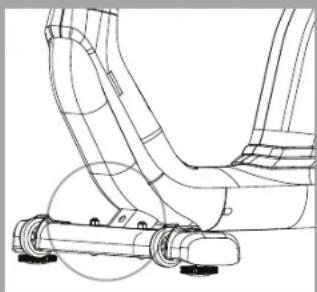
SERIAL NUMBER LOCATION

TOOLS REQUIRED:
13/15mm Flat Wrench/Screwdriver
5mm L-Wrench
6mm L-Wrench
PARTS INCLUDED:
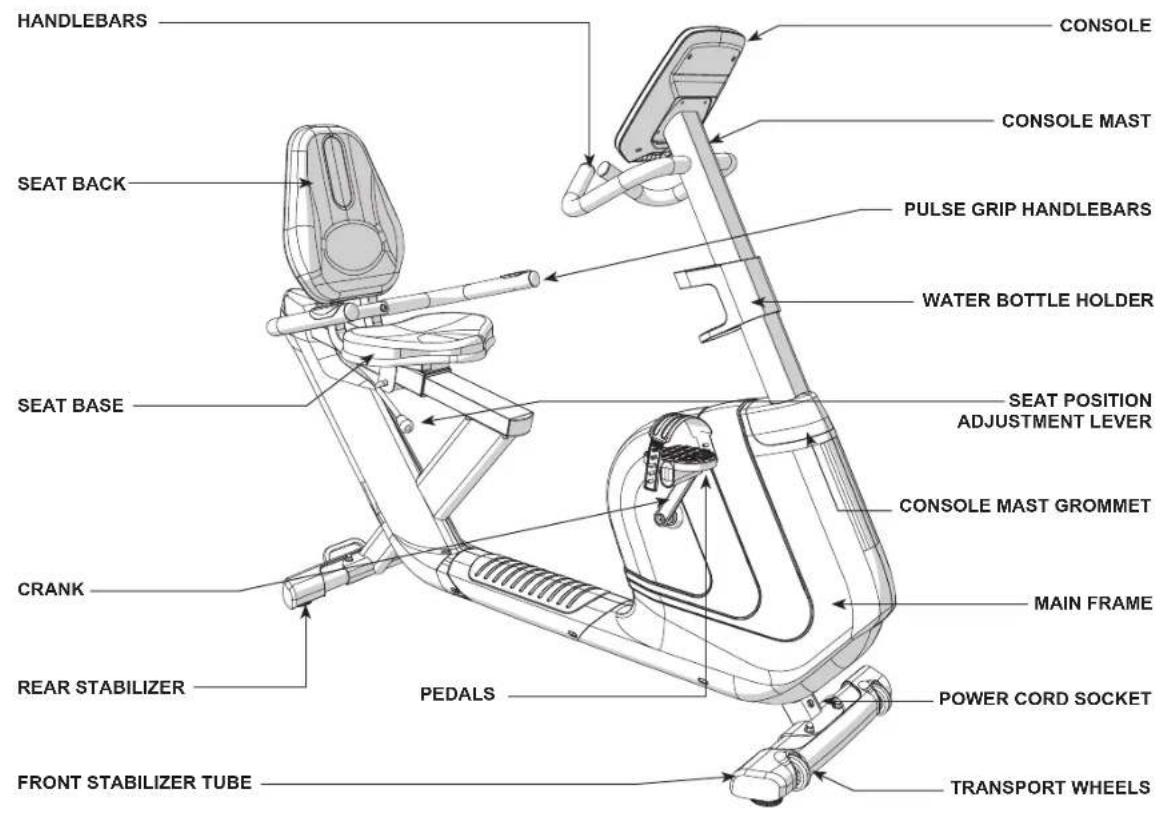
1 Main Frame
□1 Console
□1 ConsoleMast
□ 1 Console Mast Grommet
1 Water Bottle Holder
1 Front Stabilizer Tube
1 Rear Stabilizer Tube
1 Seat Base
1 Seat Back
1 Seat Frame
1 Seat Frame Cover
1 Pulse Grip Handlebars
2 Pedals with Straps
1 Audio Adapter Cable
1 Power Cord
1 Hardware Kit
RECUMBENT BIKE PRE ASSEMBLY
UNPACKING
Unpack the product where you will be using it. Place the bike carton on a level flat surface. It is recommended that you place a protective covering on your floor. Never open box when it is on its side.
IMPORTANT NOTES
During each assembly step, ensure that ALL nuts and bolts are in place and partially threaded. It is recommended you complete the full assembly of your unit before completely tightening any ONE bolt.
Several parts have been pre-lubricated to aid in assembly and usage. Please do not wipe this off. If you have difficulty, a light application of lithium bike grease is recommended.
NEED HELP?
If you have questions or if there are any missing parts, contact your local dealer. Contact information may be located on the back panel of your manual or on the warranty card.

Comfort R8.0
RECUMBENT BIKE ASSEMBLY STEP 1
| HARDWARE FOR STEP 1 | ||
| BOLT (A) | FLAT WASHER (B) | |
| M8 X 56 MM | Φ9X Φ18 X 2.0T MM | |
| QTY: 4 | QTY: 4 | |
| SPRING WASHER (C) | NUT (D) | |
| M8 X 2.0T MM | M8 | |
| QTY: 4 | QTY: 4 | |
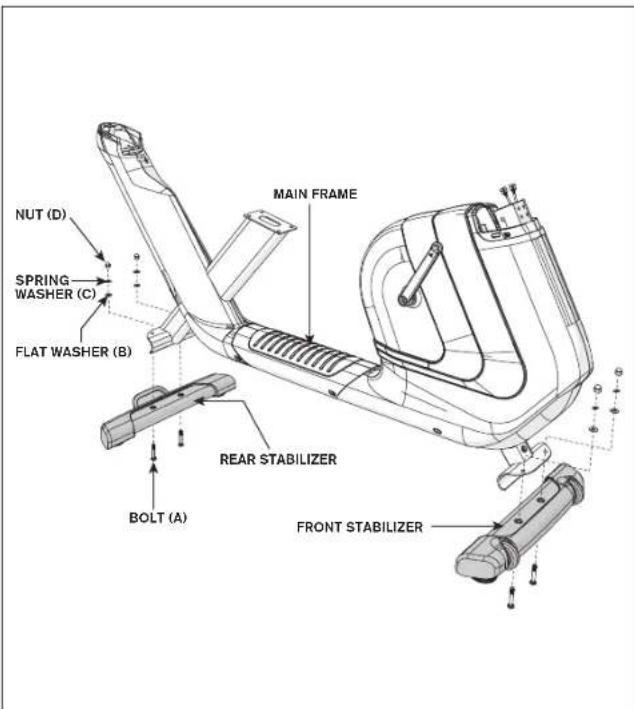
A Open HARDWARE FOR STEP 1.
B Attach the REAR STABILIZER to the MAIN FRAME using 2 BOLTS (A), 2 FLAT WASHERS (B), 2 SPRING WASHERS (C) and 2 NUTS (D).
C Attach the FRONT STABILIZER to the MAIN FRAME using 2 BOLTS (A), 2 FLAT WASHERS (B), 2 SPRING WASHERS (C) and 2 NUTS (D).
Note: Lifting up the machine will help your assembly. First put in place the stabilizer and then insert the bolts will also make your assembly easier.
RECUMBENT BIKE ASSEMBLY STEP 2
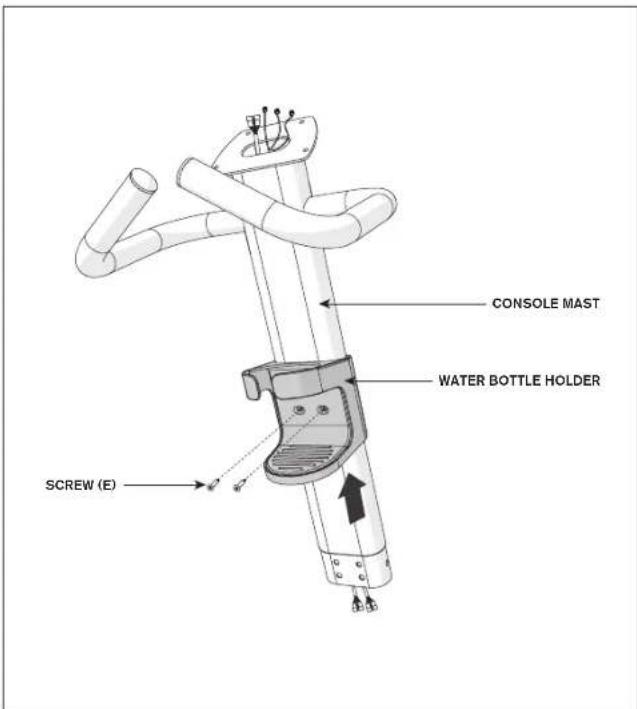
HARDWARE FOR STEP 2

SCREW (E)
M4X 12 MM
QTY: 2
A Open HARDWARE FOR STEP 2.
B Slide WATER BOTTLE HOLDER up CONSOLE MAST and align screw holes in WATER BOTTLE HOLDER with holes in CONSOLE MAST.
C Attach the WATER BOTTLE HOLDER using 2 SCREWS (E).

Comfort R8.0
RECUMBENT BIKE ASSEMBLY STEP 3
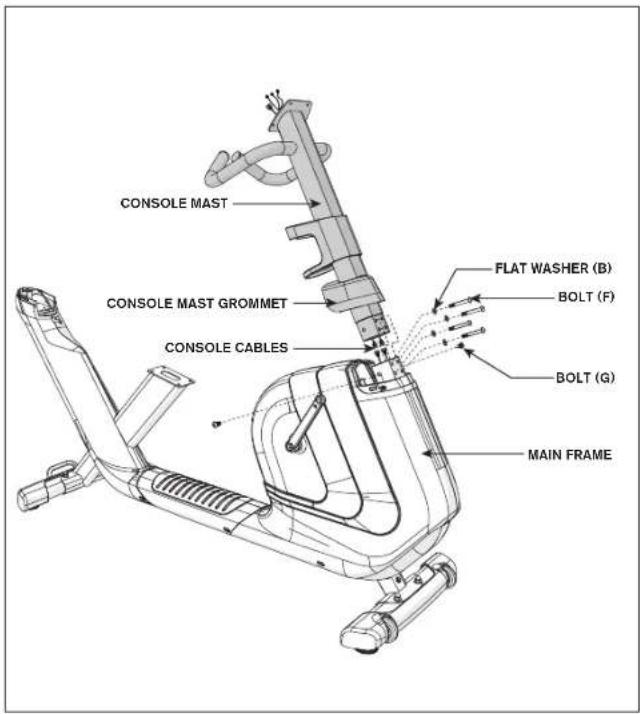
HARDWARE FOR STEP 3
BOLT(F) M8X60MM QTY:4 FLAT WASHER(B) 9× 18× 2.0T MM QTY:4
M8X18MM QTY:2
A Open HARDWARE FOR STEP 3
B Slide CONSOLE MAST GROMMET from the bottom up the CONSOLE MAST.
C Attach CONSOLE CABLES and carefully tuck all cables into MAIN FRAME. Slide CONSOLE MAST into MAIN FRAME.
D Attach the CONSOLE MAST using 2 BOLTS (G) from the sides and 4 BOLTS (F) and 4 FLAT WASHERS (B) from the front.
E Slide CONSOLE MAST GROMMET down over MAIN FRAME.
RECUMBENT BIKE ASSEMBLY STEP 4
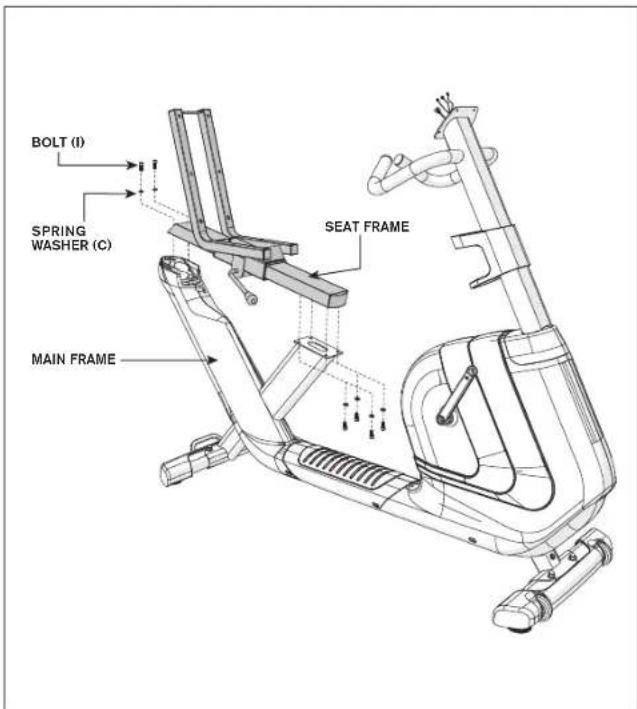
| HARDWARE FOR STEP 4 | |
| BOLT (I) | SPRING WASHERS (C) |
| M8 X 18 MM | M8 X 2.0T MM |
| QTY: 6 | QTY: 6 |
A Open HARDWARE FOR STEP 4.
B Attach SEAT FRAME to the MAIN FRAME using 6 SOCKET HEAD CAP SCREWS (I) and 6 SPRING WASHERS (C) as shown.

Comfort R8.0
RECUMBENT BIKE ASSEMBLY STEP 5
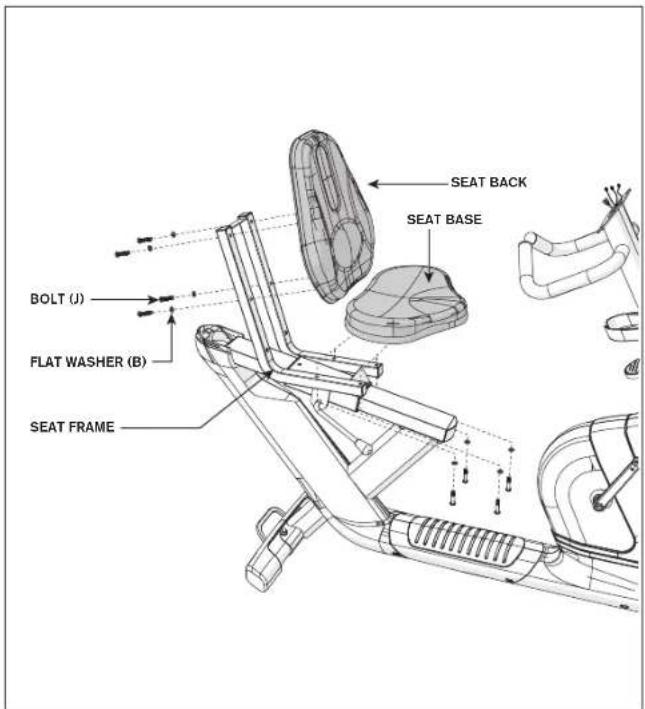
HARDWARE FOR STEP 5

BOLT (J)
M8 X 45 MM
QTY: 8

FLAT WASHER(B)
Φ9 XΦ18 X 2.0T MM
QTY: 8
A Open HARDWARE FOR STEP 5.
B Attach SEAT BASE to SEAT FRAME using 4 BOLTS (J) and 4 FLAT WASHERS (B).
C Attach SEAT BACK to SEAT FRAME using 4 BOLTS (J) and 4 FLAT WASHERS (B).
RECUMBENT BIKE ASSEMBLY STEP 6
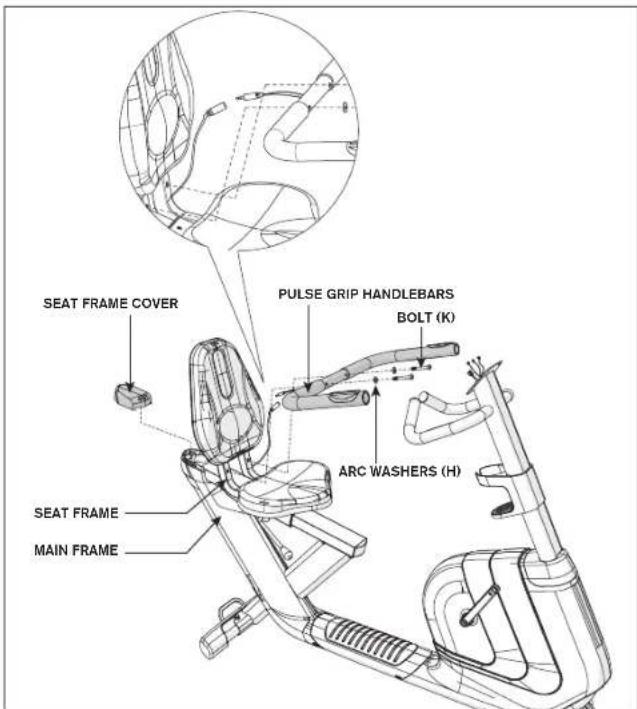
HARDWARE FOR STEP 6
A Open HARDWARE FOR STEP 6.
B Attach PULSE GRIP HANDLEBARS to the SEAT FRAME using 2 BOLTS (K) and 2 ARC WASHERS (H).
C Attach SEAT FRAME COVER to MAIN FRAME as shown.
D Attach the heart rate wires from the PULSE GRIP HANDLEBARS to the heart rate wires on the MAIN FRAME.
Note: Before assembly the handle make sure the handle is in right position with heart rate grip facing up and cable down.

Comfort R8.0
RECUMBENT BIKE ASSEMBLY STEP 7
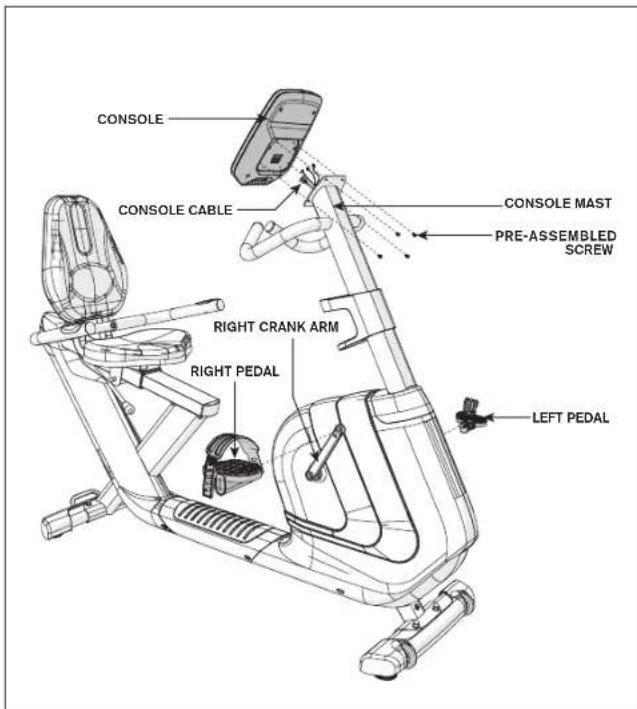
HARDWARE FOR STEP 7

PRE-ASSEMBLED
SCREW
M5 X 7 MM
QTY: 4
A HARDWARE FOR STEP 7 is pre-installed.
B Attach the RIGHT PEDAL to the RIGHT CRANK ARM, tightening it clockwise with the provided 13mm / 15mm flat wrench.
C Attach the LEFT PEDAL onto the left crank arm, tightening it counter-clockwise with the provided 13mm / 15mm flat wrench. (NOTE: The left crank arm is reversed threaded so it is very important that it is tightened counter-clockwise. Tightening it the opposite way can damage the pedal or the crank arm or both.)
D Connect the CONSOLE CABLE and carefully tuck into the CONSOLE MAST.
E Attach the CONSOLE to the CONSOLE MAST using 4 PRE-ASSEMBLED SCREWS.
Note: You may need a 15mm wrench to assemble the pedal. Please be care not to pinch yourself when assembling.
RECUMBENT BIKE ASSEMBLY
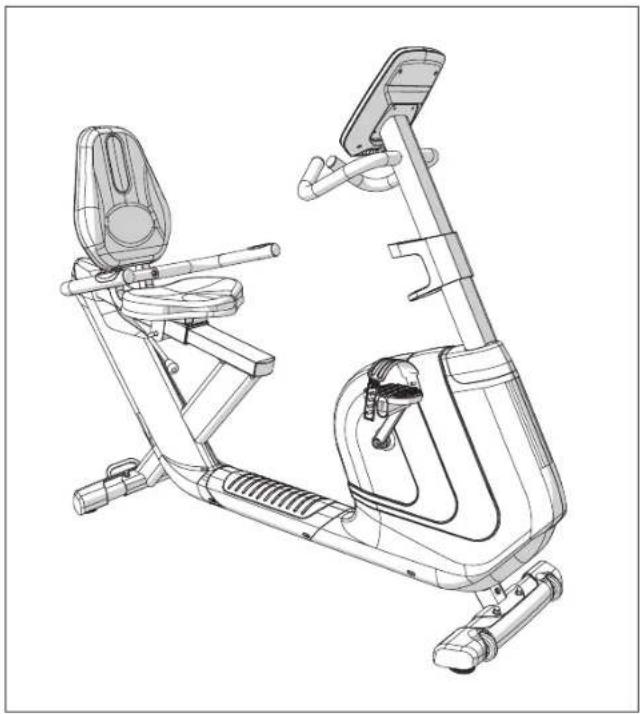
ASSEMBLY COMPLETE!
Comfort R8.0
Overall Dimension: 165 × 64 × 135 cm
Net Weight: 49.5 kg / 109 lbs.
Gross Weight: 56.5kg / 124 lbs.
Max. User Weight: 136 kg / 300 lbs.

Comfort Upright Bike
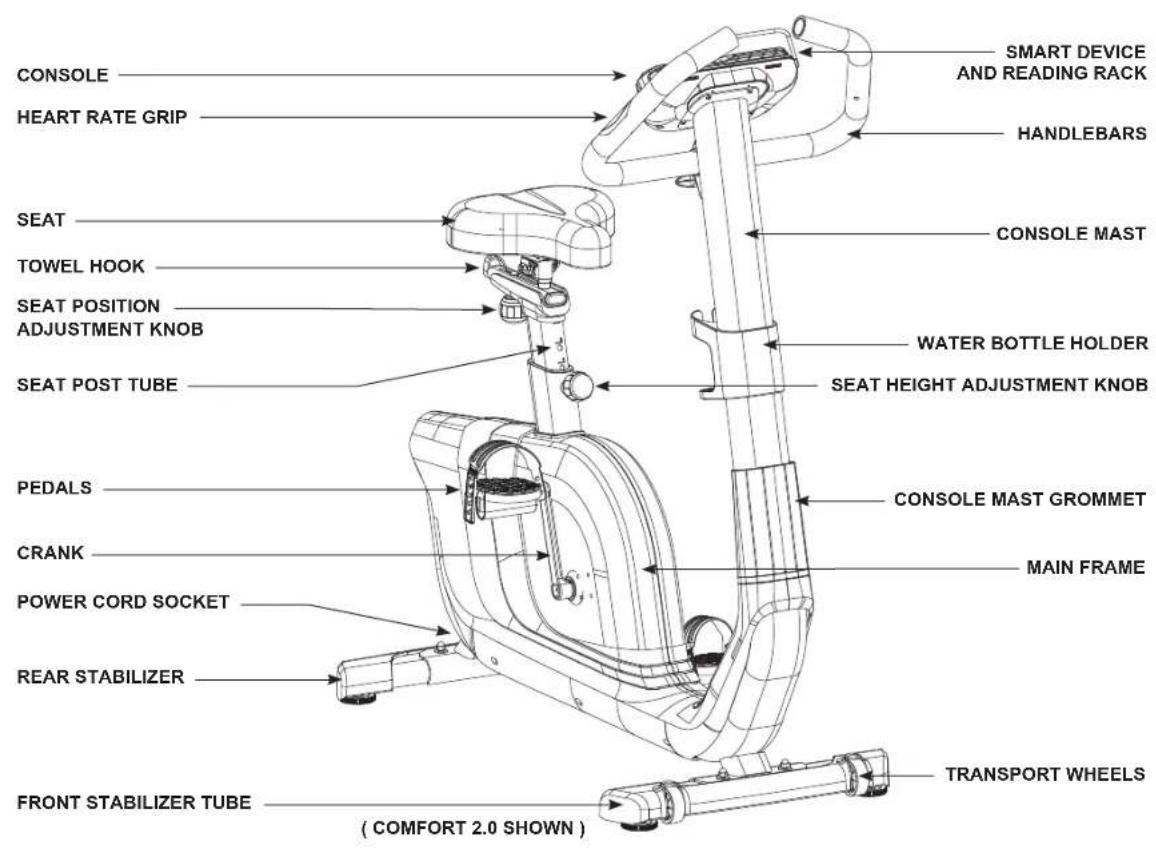
TOOLS REQUIRED:
13/15mm Flat Wrench/Screwdriver
6mm L-Wrench
PARTS INCLUDED:
1 Main Frame
□1Console
□ 1 Console Mast
1 Console Mast Grommet
1 Water Bottle Holder
1 Front Stabilizer
1 Rear Stabilizer
1 Seat
1 Seat Post Tube
2 Pedals with Straps
1 Audio Adapter Cable
1 Power Cord
1 Hardware Kit
UPRIGHT BIKE PRE ASSEMBLY
UNPACKING
Unpack the product where you will be using it. Place the bike carton on a level flat surface. It is recommended that you place a protective covering on your floor. Never open box when it is on its side.
IMPORTANT NOTES
During each assembly step, ensure that ALL nuts and bolts are in place and partially threaded. It is recommended you complete the full assembly of your unit before completely tightening any ONE bolt.
Several parts have been pre-lubricated to aid in assembly and usage. Please do not wipe this off. If you have difficulty, a light application of lithium bike grease is recommended.

NEED HELP?
If you have questions or if there are any missing parts, contact your local dealer. Contact information may be located on the back panel of your manual or on the warranty card.


Comfort Upright Bike
A Open HARDWARE FOR STEP 1.
B Attach the REAR STABILIZER to the MAIN FRAME using 2 BOLTS (A), 2 FLAT WASHERS (B), 2 SPRING WASHER (I) and 2 NUTS (C).
C Attach the FRONT STABILIZER to the MAIN FRAME using 2 BOLTS (A), 2 FLAT WASHERS (B), 2 SPRING WASHER (I) and 2 NUTS (C).
Note: Lifting up the machine will help your assembly. First put in place the stabilizer and then insert the bolts will also make your assembly easier.
Note: There is no hardware needed at this step.
A Attach the SEAT to the SEAT POST TUBE and tighten the SEAT NUTS by using 13mm wrench. (You may need additional 13mm wrench to make the seat assembly more easier.)
B Loosen the SEAT HEIGHT ADJUSTMENT KNOB by turning it two half turns counter-clockwise.
C Then pull the SEAT HEIGHT ADJUSTMENT KNOB outward while sliding the SEAT POST TUBE into the MAIN FRAME.
Note: While assembling the SEAT please make sure the seat is in right position. Tilt up the front of the SEAT might help you gain a more stable riding experience.


Comfort Upright Bike
A Open HARDWARE FOR STEP 3.
B Slide WATER BOTTLE HOLDER up CONSOLE MAST and align screw holes in WATER BOTTLE HOLDER with holes in CONSOLE MAST.
C Attach the WATER BOTTLE HOLDER using 2 SCREWS (D).
Note: Be careful not to pinch any cable while assembling.
B Slide CONSOLE MAST GROMMET from the bottom up the CONSOLE MAST with the small POSITIONING NOTCH facing forward.
C Attach CONSOLE CABLES and carefully tuck all cables into MAIN FRAME. Slide CONSOLE MAST into MAIN FRAME.
D Attach the CONSOLE MAST using 2 BOLTS (G) from the sides and 4 BOLTS (E), 4 FLAT WASHERS (B), 4 NUTS (H).
E Slide CONSOLE MAST GROMMET down over MAIN FRAME.


Comfort Upright Bike
A Open HARDWARE FOR STEP 5.
B Holding HANDLEBAR close to CONSOLE MAST and feed the HANDLEBAR WIRES through the hole in the CONSOLE MAST and out the top of the CONSOLE MAST.
C Attach handlebar to CONSOLE MAST using 1 T KNOB (F).
Note: You may need extra help to route the heart rate cable and tighten the handlebar.
Note: There is no hardware needed at this step.
A HARDWARE is pre-installed.
B Attach the RIGHT PEDAL to the RIGHT CRANK ARM, tightening it clockwise with the provided 13mm / 15mm flat wrench.
C Attach the LEFT PEDAL onto the left crank arm, tightening it counter-clockwise with the provided 13mm / 15mm flat wrench. (NOTE: The left crank arm is reversed threaded so it is very important that it is tightened counter-clockwise. Tightening it the opposite way can damage the pedal or the crank arm or both.)
D Connect the CONSOLE CABLE and carefully tuck into the CONSOLE MAST.
E Attach the CONSOLE to the CONSOLE MAST using 4 PRE-INSTALLED SCREWS.
Note: You may need a 15mm wrench to assemble the pedal. Please be care not to pinch yourself when assembling.


Comfort Upright Bike
Net Weight: 35.5 kg / 78 lbs.
Gross Weight: 41 kg / 90 lbs.
Max. User Weight: 136 kg / 300 lbs.
Comfort 4.0
Overall Dimension: 120 × 55 × 134 cm
Net Weight: 38 kg / 84 lbs.
Gross Weight: 43.5 kg / 96 lbs.
Max. User Weight: 136 kg / 300 lbs.
Comfort 8.1
Overall Dimension: 120 × 55 × 134 cm
Net Weight: 38 kg / 84 lbs.
Gross Weight: 43.5 kg / 96 lbs.
Max. User Weight: 136 kg / 300 lbs.
BIKE OPERATION
This section explains how to use your bike's console and programming.
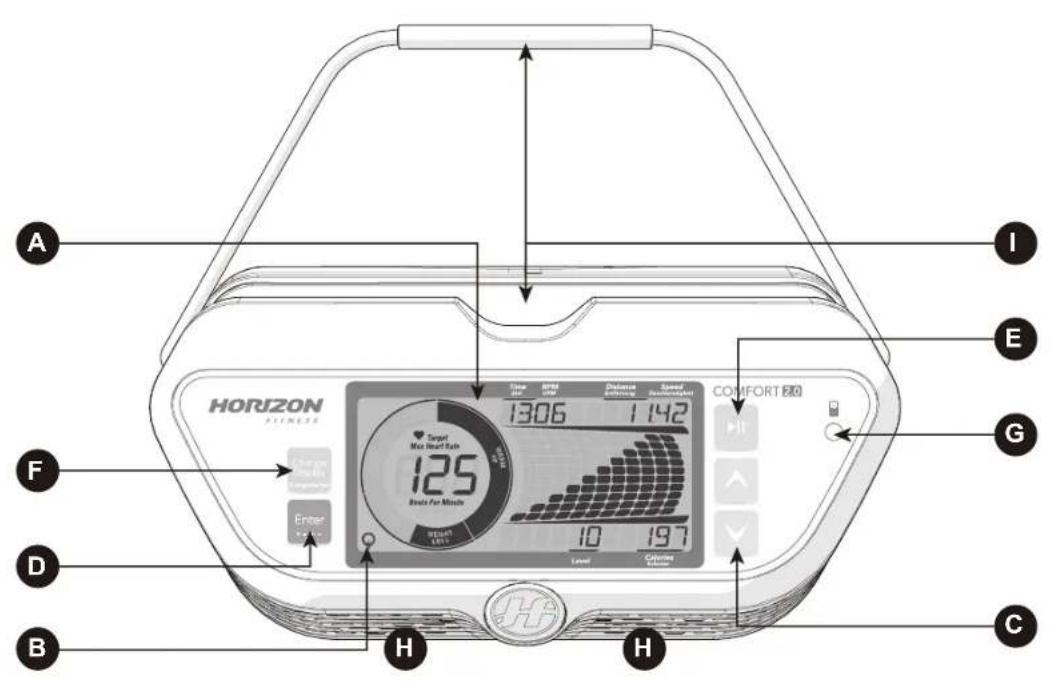
Note: There is a thin protective sheet of clear plastic on the overlay of the console that should be removed before use.
A) LCD DISPLAY WINDOWs: Time, Distance, Calories, Speed, RPM, Resistance Level, Heart Rate, Calories, HR Wheel, Workout Profile.
B) ENERGY SAVER: to minimize energy consumption, your machine will enter energy saver mode automatically (after entering stand-by mode for 15 mins) and can be quickly woken up with a press of a button.
C) ARROW BUTTONS: used up and down arrow button to select program, set up your console or change resistance while exercising.
D) ENTER BUTTON: used to confirm setting of workout program or user profile.
E) START AND STOP BUTTON: press to begin exercising, pause your workout or resume exercising after pause. Hold for 3 seconds to reset the console.
F) CHANGE DISPLAY BUTTON: used to scroll through display modes and workout feedbacks. Press to switch display column and change between profile display mode for resistance(upper bar displayed) or watt profile for your current workout watt.(lower bar displayed)
G) AUDIO IN JACK: use to connect with your cellphone or MP3 to play your workout music with integrated speaker.
H) SPEAKER: play music through speakers when connected to your media player.
I) SMART DEVICE AND READING RACK: holds your smart phone, tablet or reaing materials.

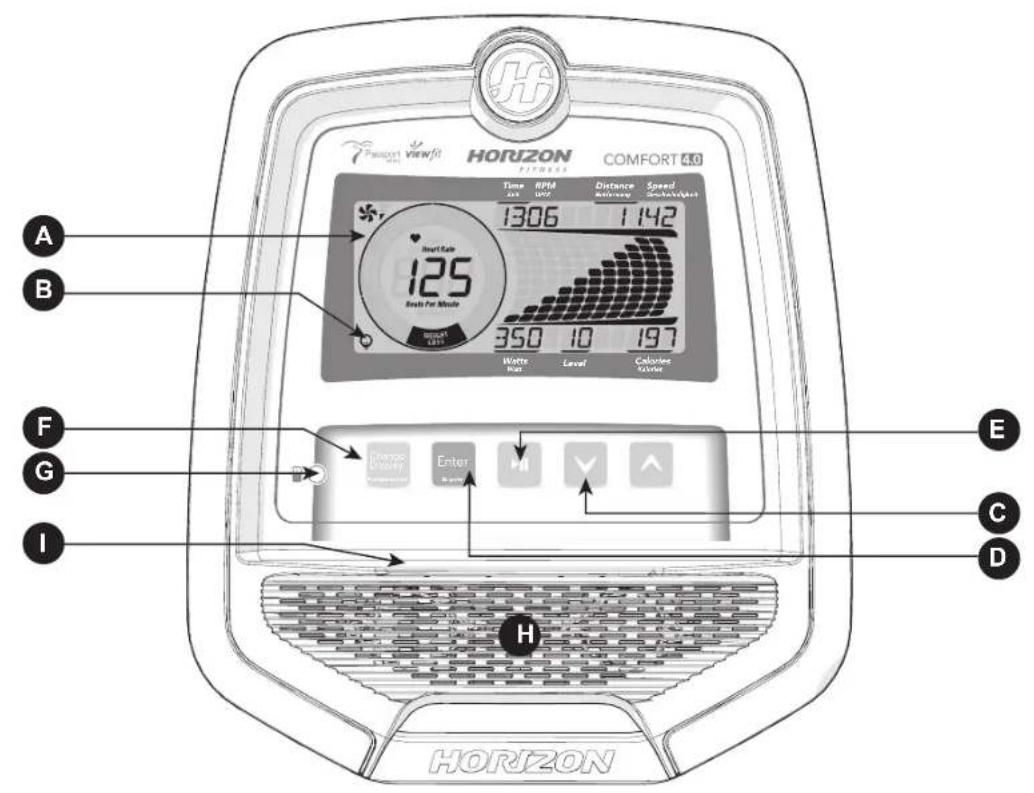
Note: There is a thin protective sheet of clear plastic on the overlay of the console that should be removed before use.
A) LCD DISPLAY WINDOWS: Time, Distance, Calories, Speed, RPM, Resistance Level, Heart Rate, Calories, Watts, HR Wheel, Profile.
B) ENERGY SAVER: to minimize energy consumption, your machine will enter energy saver mode automatically (after entering stand-by mode for 15 mins) and cab be quickly woken up with a touch of a button.
C) ARROW BUTTONS: used up and down arrow button to select program, set up your console or change resistance while exercising.
D) ENTER BUTTON: used to confirm setting of workout program or user profile.
E) START AND STOP BUTTON: press to begin exercising, pause your workout or resume exercising after pause. Hold for 3 seconds to reset the console.
F) CHANGE DISPLAY BUTTON: used to scroll through display modes and workout feedbacks. Press to switch display column and change between profile display mode for resistance(upper bar displayed) or watt profile for your current workout watt (lower bar displayed).
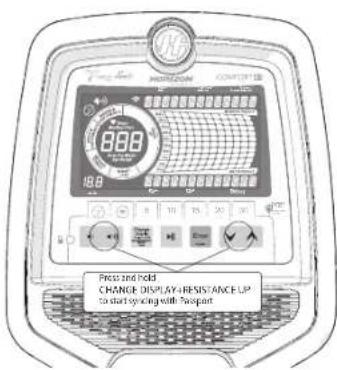
(Note: use with arrow button up to activate Passport sync process, see page 50 for more details).
G) AUDIO IN JACK: use to connect with your cellphone or MP3 to play your workout music with integrated speaker.
H) SPEAKER: play music through speakers when connected to your media player.
I) SMART DEVICE AND READING RACK: holds your smart phone, tablet or reaing materials.

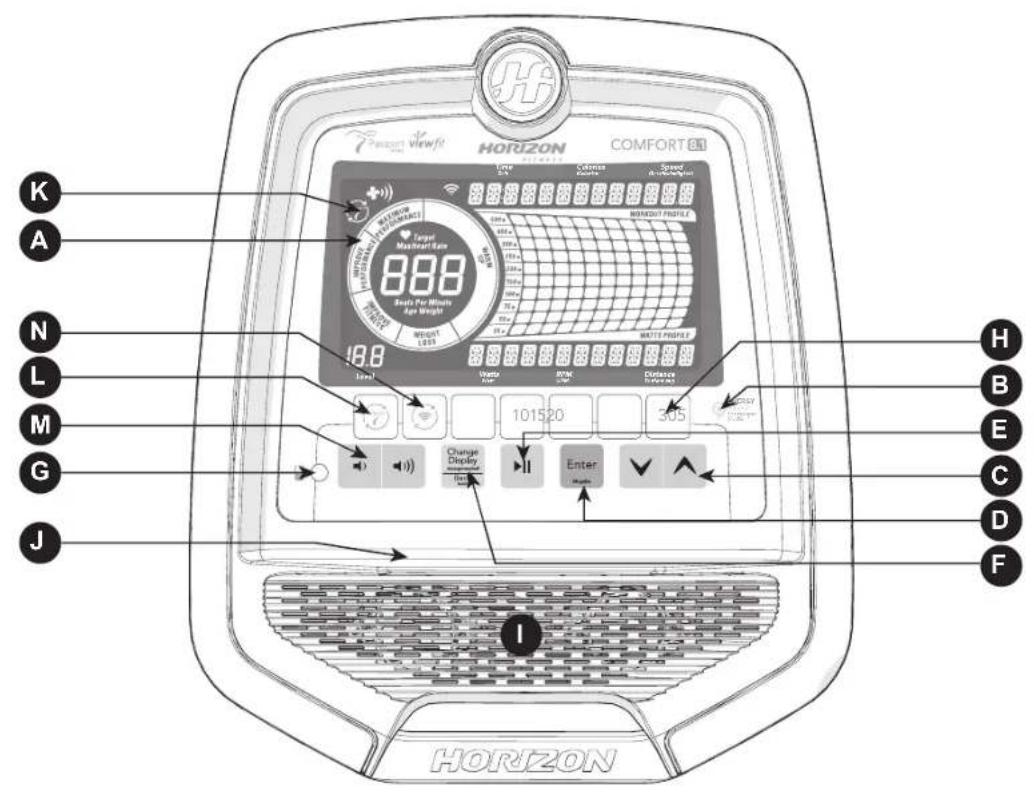
COMFORT 8.1 / R8.0 CONSOLE OPERATION
Note: There is a thin protective sheet of clear plastic on the overlay of the console that should be removed before use.
A) LCD DISPLAY WINDOWS: Time, Distance, Speed, RPM, Resistance Level, Heart Rate, Calories, Watts, HR Wheel, Resistance Profile, Passport Connection.
B) ENERGY SAVER: to minimize energy consumption, your machine will enter energy saver mode automatically (after entering stand-by mode for 15 mins) and can be quickly woken up with a press of a button.
C) ARROW BUTTONS: used up and down arrow button to select program, set up your console or change resistance while exercising.
D) ENTER BUTTON: used to confirm setting of workout program or user profile.
E) START AND STOP BUTTON: press to begin exercising, pause your workout or resume exercising after pause. Hold for 3 seconds to reset the console.
F) CHANGE DISPLAY / BACK BUTTON : used to scroll through display modes and workout feedbacks. Press to switch display column and change between profile display mode for resistance(upper bar displayed) or watt profile for your current workout watt (lower bar displayed). also used to navigate back to the user setup progress.
G) AUDIO IN JACK: use to connect with your cellphone or MP3 to play your workout music with integrated speaker.
H) RESISTANCE DIRECT BUTTON: use the direct button to chose your desired workout resistance.
I) SPEAKER: play music through speakers when connected to your media player.
J) SMART DEVICE AND READING RACK: holds your smart phone, tablet or reading materials.
K) PASSPORT: It will show on the screen when the machine is connected to Passport.
L) PASSPORT QUICK KEY: used to connect to Passport. Press and sync with Passport.
M) VOLUME BUTTON: used to turn up and turn down the volume.
N) WI-FI CONNECT & SYNC & TIMEZONE: press to reset and connect your wireless internet connection and set time zone. See Page 36 for more info.
COMFORT 2.0 / 4.0 DISPLAYS
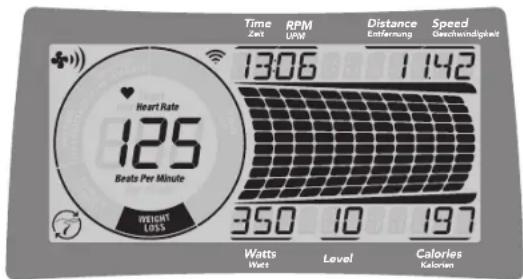
DISPLAYWINDOWS
- TIME: Shown as minutes: seconds. View the time remaining or the time elapsed in your workout.
RPM: Revolutions Per Minute. - DISTANCE: Shown as km. Indicates distance traveled or distance remaining during your workout.
- SPEED: Shown as KM/H. Indicates how fast the wheels are moving.
-
WATTS (COMFORT 4.0 ONLY): Displays current user power output. Your workout watt performance will also be calculated and shown as dot-matrix profile at right hand side.
LEVEL: Shows the current level of resistance. -
CALORIES: Total calories burned during your workout.
- HEART RATE: Shown as BPM (beats per minute). Used to monitor your heart rate.
MAXIMUM HEART RATE: Shows your maximum heart rate. The Change Display button switches between your MAXIMUM HEART RATE and your current HEART RATE. The MAXIMUM HEART RATE is calculated as (220-age) x 0.85. - HEART RATE WHEEL: Displays your current activity zone during your workout. With this Heart rate wheel you can be certain if your exercise level fits your workout goal. WARM UP: 0-60% of maximum heart rate.
WEIGHT LOSS: 60-70% of maximum heart rate.
IMPROVE FITNESS: 70-80% of maximum heart rate.
IMPROVE PERFORMANCE: 80-90% of maximum heart rate.
MAXIMUM PERFORMANCE: 90-100% of maximum heart rate.
- ENERGY SAVER: Indicates when the machine is in Energy Saver mode to conserve power consumption(see page 51 for more detail information.
PASSPORT (COMFORT 4.0 ONLY): Indicates when the machine is in Passport mode to sync with Passport.
COMFORT 8.1 / R8.0 DISPLAYS
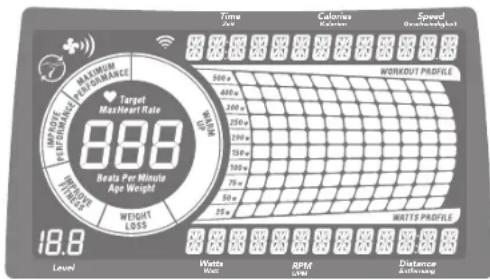
DISPLAYWINDOWS
- TIME: Shown as minutes : seconds. View the time remaining or the time elapsed in your workout.
RPM: Revolutions Per Minute - DISTANCE: Shown as km. Indicates distance traveled or distance remaining during your workout.
- SPEED: Shown as KM/H. Indicates how fast the wheels are moving.
WATTS: Displays current user power output.
LEVEL: Shows the current level of resistance. - CALORIES: Total calories burned during your workout.
- HEART RATE: Shown as BPM (beats per minute). Used to monitor your heart rate.
MAXIMUM HEART RATE: Shows your maximum heart rate. The Change Display button switches between your MAXIMUM HEART RATE and your current HEART RATE. The MAXIMUM HEART RATE is calculated as (220-age) x 0.85.
- HEART RATE WHEEL: Displays your current activity zone during your workout. With this Heart rate wheel you can be certain if your exercise level fits your workout goal.
WARM UP: 0-60% of maximum heart rate.
WEIGHT LOSS: 60-70% of maximum heart rate.
IMPROVE FITNESS: 70 - 80% of maximum heart rate.
IMPROVE PERFORMANCE: 80-90% of maximum heart rate.
MAXIMUM PERFORMANCE: 90-100% of maximum heart rate.
WATT SCALE AND PROFILE DISPLAY: shows your current workout watt. ex. 50W dot will light up to show when reaching or selecting 25-50 watt. You may use change display key to switch back to workout profile display.Note: Scale will only show up to 400w in Watts programs to reflect your target watt range of 25-400 watt.
- ENERGY SAVER: Indicates when the machine is in Energy Saver mode to conserve power consumption(see page 51 for more detail information.
- PASSPORT: Indicates when the machine is in Passport mode to sync with Passport.
WI-FI: Indicates wireless connection is present and the strength (low, medium, high).

SET UP XID ACCOUNT FOR VIEWFIT CONNECTIVITY
Creating an xID account will allow you to save and share workout data online at viewfit.com Up to four users can be saved on a machine. This process is the first step in connecting your equipment. It must be done from a computer, tablet, or mobile device.
1) Visit the web site: viewfit.com
2) Once at the web site, select the CONNECT YOUR EQUIPMENT option on the top menu bar.
3) The first step in connecting your equipment will to be creating your xID account. This will be your login to ViewFit.
4) Enter your phone number or another easy-to-remember 10-14 digit number. This will be your account number.
5) Fill in your profile information to finish the xID account set up process. You will be asked to provide an email address not associated with any other xID account. Check your email after the set-up process for a link to validate your account.
CONNECT WI-FI
Once you have created your xID account, you will be able to move on to activating the Wi-Fi on your equipment. Reminder, this requires you to use your computer, tablet, or mobile device that is connected to the internet.
1) Press and hold for 3-5 seconds you can use up/down button to set your time zone, please refer to time zone code in the last page, then press enter button you will see the message ACTIVATED on your screen.
2) On your computer or other device, go to your Wi-Fi settings. You should select the "ViewFit" network. Doing this enables you to connect your equipment to your wireless network.
3) A new window will pop up with the list of wireless networks your equipment can see. Select your home Wi-Fi network and connect.
4) The remaining step is to reconnect your computer or other device back to your Wi-Fi network. Go to your settings again and connect as you normally would.
Congratulations! You are now connected and ready to get started.
GETTING STARTED
QUICK START
1) Make sure the power is on.
2) Press START / STOP to start exercise in MANUAL mode.
3) Press to adjust resistance level during the workout.
START YOUR WORKOUT
1) Select guest / user1 / user2 / user3 / user4.
2) Select your desired program.
3) Select your gender (required only under Fit-Test program).
4) Select the program settings, time, level, etc.
5) Press Start/Stop to start your workout.
TO CLEAR SELECTION/RESET THE CONSOLE
Hold START/STOP for 3 seconds.

When your workout is complete, the bike will stop and beep. You can unplug the machine or it will enter Energy Saver Mode in 15 mins.

PROGRAM INFORMATION
Comfort 2.0: 11 Programs (Manual / Intervals / Game / Weight Loss / Rolling / Cadence / Random / THR Zone / %THR / Custom 1 / Custom 2)
Comfort 4.0: 14 Programs (Constant Watts / Manual / Intervals / Game / Fitness Test / Weight Loss / Weight Loss Plus / Rolling / Cadence / Random / THR Zone / % THR / Custom 1 / Custom 2)
Comfort 8.1: 16 Programs (Constant Watts / Interval Watts / Manual / Intervals / Game / Fitness Test / Weight Loss / Weight Loss Plus / Rolling / Cadence / Random / THR Zone / %THR / Strength Builder / Custom 1 / Custom 2)
Comfort R8.0: 16 Programs (Constant Watts / Interval Watts / Manual / Intervals / Game / Fitness Test / Weight Loss / Weight Loss Plus / Rolling / Cadence / Random / THR Zone / %THR / Strength Builder / Custom 1 / Custom 2)
1) MANUAL: Allows you to adjust the resistance level to your preference, without a preset program. Adjust your resistance manually during your workout. User sets time and resistance using (up/down arrow) and ENTER.
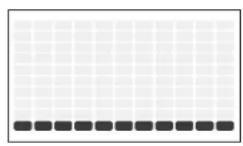
2) INTERVALs: Improves your strength, speed, and endurance by raising and lowering the resistance levels throughout your workout to involve both your heart and muscles. Time based program with 16 levels to choose from. User sets time and level using (up/down arrows) and ENTER.
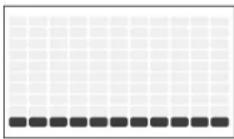
(Comfort 2.0)
| INTERVALS | |||||||||||||||||||||||||||||||
| Warm Up Program | Segments - Repeat Cool down | ||||||||||||||||||||||||||||||
| Seconds | 60 | 60 | 60 | 60 | 30 | 60 | 30 | 30 | 60 | 60 | 60 | 30 | 30 | 60 | 60 | 60 | 60 | 60 | 60 | 60 | 60 | 60 | 60 | 60 | 60 | 60 | 60 | 60 | 60 | 60 | 60 |
| Segment | 1 | 2.3 | 4 | 5.6 | 7.8 | 9 | 10 | 11 | 12 | 13 | 14 | 15 | 16 | 17 | 18 | 19 | 20 | ||||||||||||||
| Level 1 | 1 | 2.2 | 3 | 5.1 | 5.5 | 1 | 5.1 | 11 | 5.5 | 13 | 2.2 | 1 | |||||||||||||||||||
| Level 2 | 1 | 2.2 | 3 | 6.2 | 2.6 | 6.2 | 6.2 | 2.6 | 6.2 | 2.3 | 2.2 | 1 | |||||||||||||||||||
| Level 3 | 1 | 2.2 | 4 | 7.3 | 3.7 | 7.3 | 7.3 | 3.7 | 7.3 | 3.4 | 2.2 | 1 | |||||||||||||||||||
| Level 4 | 1 | 2.2 | 5 | 8.4 | 4.8 | 8.4 | 8.4 | 4.8 | 8.4 | 4.5 | 2.2 | 1 | |||||||||||||||||||
| Level 5 | 2 | 3.5 | 6 | 9.5 | 9.9 | 5 | 9.5 | 5 | 9.9 | 5.6 | 5.3 | 2 | |||||||||||||||||||
| Level 6 | 2 | 3.5 | 7 | 10.6 | 6 | 10 | 10.6 | 6 | 10 | 10.6 | 6 | 10 | 10.6 | 7 | 5 | 3 | 2 | ||||||||||||||
| Level 7 | 2 | 2 | 3 | 5 | 8 | 11 | 7 | 7 | 7 | 11 | 11 | 7 | 7 | 11 | 7 | 7 | 7 | 11 | 11 | 7 | 11 | 7 | 8 | 5 | 3 | 2 | |||||
| Level 8 | 2 | 3.5 | 9 | 12.8 | 8 | 12 | 12.8 | 12 | 8.8 | 12 | 12.8 | 8 | 5 | 3.2 | |||||||||||||||||
| Level 9 | 3 | 4.5 | 10 | 13.9 | 9.9 | 13 | 13.9 | 9.9 | 13 | 9.9 | 13 | 13.9 | 9 | 5 | 4.3 | ||||||||||||||||
| Level 10 | 3 | 4.8 | 11 | 14.10 | 10 | 14 | 14.10 | 14 | 14.10 | 14.10 | 14.10 | 14.10 | 14.10 | 11 | 8.4 | 3 | |||||||||||||||
| Level 11 | 1 | 3 | 6 | 10 | 12 | 15 | 11 | 11 | 11 | 15 | 15 | 11 | 15 | 11 | 15 | 11 | 11 | 15 | 15 | 11 | 15 | 15 | 11 | 12 | 10 | 6 | 3 | ||||
| Level 12 | 12 | 3.6 | 10 | 13.16 | 12 | 12.16 | 16 | 12.16 | 16 | 12.16 | 16 | 12.16 | 16 | 12.16 | 13 | 10.6 | 3 | ||||||||||||||
(Comfort 4.0, 8.1, R8.0)
| INTERVALS | |||||||||||||||||||
| Warm Up Program | ram Segments - Repeat Cool down | ||||||||||||||||||
| Seconds | 60 | 60 | 60 | 60 | 30 | 60 | 30 | 30 | 60 | 80 | 60 | 60 | 30 | 60 | 60 | 60 | 60 | 60 | 60 |
| Segment | 1 | 2 | 4 | 5 | 6 | 7 | 8 | 9 | 10 | 11 | 12 | 13 | 14 | 15 | 16 | 17 | 18 | 19 | 20 |
| Level 1 | 1 | 3 | 4 | 7 | 11 | 7 | 7 | 7 | 7 | 7 | 7 | 14 | 3 | 1 | |||||
| Level 2 | 2 | 3 | 4 | 9 | 3 | 3 | 9 | 9 | 9 | 9 | 9 | 3 | 9 | 9 | 3 | 4 | 3 | 1 | |
| Level 3 | 3 | 3 | 6 | 10 | 4 | 10 | 10 | 4 | 10 | 4 | 4 | 10 | 10 | 4 | 6 | 3 | 1 | ||
| Level 4 | 4 | 3 | 7 | 12 | 6 | 12 | 12 | 6 | 12 | 6 | 6 | 12 | 12 | 6 | 7 | 3 | 1 | ||
| Level 5 | 5 | 4 | 7 | 9 | 13 | 7 | 13 | 13 | 7 | 13 | 7 | 13 | 13 | 7 | 9 | 7 | 4 | 3 | |
| Level 6 | 6 | 3 | 4 | 7 | 10 | 15 | 9 | 15 | 15 | 9 | 9 | 15 | 15 | 9 | 10 | 7 | 4 | 3 | |
| Level 7 | 7 | 3 | 4 | 7 | 12 | 16 | 10 | 16 | 10 | 16 | 10 | 16 | 10 | 16 | 10 | 12 | 7 | 4 | 3 |
| Level 8 | 8 | 3 | 4 | 7 | 15 | 18 | 12 | 12 | 18 | 18 | 12 | 18 | 12 | 18 | 12 | 13 | 7 | 4 | 3 |
| Level 9 | 9 | 4 | 7 | 15 | 19 | 13 | 13 | 19 | 9 | 13 | 19 | 13 | 13 | 15 | 7 | 6 | 4 | ||
| Level 10 | 10 | 4 | 6 | 12 | 16 | 21 | 15 | 5 | 21 | 21 | 5 | 21 | 15 | 15 | 21 | 21 | 15 | 16 | |
| Level 11 | 11 | 4 | 9 | 15 | 18 | 22 | 16 | 22 | 22 | 16 | 22 | 16 | 16 | 22 | 22 | 16 | 18 | 15 | 9 |
| Level 12 | 12 | 4 | 9 | 15 | 19 | 24 | 18 | 18 | 24 | 24 | 18 | 18 | 18 | 24 | 18 | 19 | 15 | 9 | 4 |
| Level 13 | 13 | 7 | 13 | 19 | 21 | 25 | 15 | 19 | 25 | 25 | 19 | 25 | 19 | 25 | 25 | 19 | 21 | 19 | 13 |
| Level 14 | 17 | 7 | 13 | 19 | 22 | 27 | 21 | 21 | 27 | 27 | 21 | 27 | 21 | 21 | 27 | 27 | 21 | 19 | 13 |
| Level 15 | 17 | 7 | 13 | 19 | 24 | 28 | 22 | 28 | 22 | 28 | 22 | 28 | 22 | 28 | 22 | 24 | 19 | 13 | 7 |
| Level 16 | 17 | 7 | 13 | 19 | 25 | 30 | 24 | 30 | 30 | 24 | 30 | 24 | 24 | 30 | 30 | 24 | 25 | 19 | |


3) GAME: This warm up game simulates a Car Racing Game. To control the car up and down, you pedal faster or slower. Try to avoid those barriers and keep on track. Your remaining chances will be shown on upper LCD with 10 dots and each time you fit a barrier one dot will be removed. You only have 11 chances to complete the circuit, so be careful.
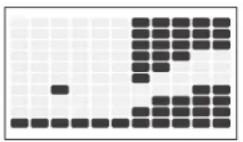
4) FITNESS TEST: Test your current level of physical condition. Keep RPM between 60 and 80 during test, program will change resistance automatically during test per an embedded chart. Try to keep your RPM until you can not go any further. Console will look up the table and give you your current physical condition estimation.
| Scores Results | |
| 1-4 | Very Poor |
| 5-6 | Poor |
| 7-8 | Average |
| 9-10 | Good |
| >10 | Excellent |
5) WEIGHT LOSS: Promotes weight loss by raising and lowering the resistance level, while keeping you in your fat burning zone. Time based program with 16 levels to choose from. User sets time and level using (up/down arrows) and ENTER. Please drink enough water while and after doing exercise to enhance the weight loss results.
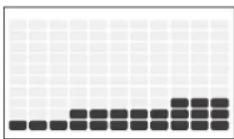
(Comfort 2.0)
| WEIGHT LOSS | |||||||||||||||||||||||||||||||||||||||||||||||||||||||||||||||||||||||||||||||||||||||||||||||||||||||||||||||||||||||||||||||||||||||||||||||||||||||||||||||||||||||||||||||||||||||||||||||||||||||||||||||||||||||||||||||||||||||||
| Warm Up Program Segments - Repeat Cool down | |||||||||||||||||||||||||||||||||||||||||||||||||||||||||||||||||||||||||||||||||||||||||||||||||||||||||||||||||||||||||||||||||||||||||||||||||||||||||||||||||||||||||||||||||||||||||||||||||||||||||||||||||||||||||||||||||||||||||
| Seconds | 60 | 60 | 60 | 60 | 60 | 60 | 60 | 60 | 60 | 60 | 60 | 60 | 60 | 60 | 60 | 60 | 60 | 60 | 60 | 60 | 60 | 60 | 60 | 60 | 60 | 60 | 60 | 60 | 60 | 60 | 60 | 60 | 60 | 60 | |||||||||||||||||||||||||||||||||||||||||||||||||||||||||||||||||||||||||||||||||||||||||||||||||||||||||||||||||||||||||||||||||||||||||||||||||||||||||||||||||||||||||||||||||||||||||||||||||||||||
(Comfort 4.0, 8.1, R8.0)
| WEIGHT LOSS | |||||||||||||||||||||||||||||||||||||||||||||||||||||||||||||||||||||||||||||||||||||||||||||||||||||||||||||||||||||||||||||||||||||||||||||||||||||||||||||||||||||||||||||||||||||||||||||||||||||||||||||||||||||||||||||||||||||||||
| Warm Up Program Segments - Repeat Cool down | |||||||||||||||||||||||||||||||||||||||||||||||||||||||||||||||||||||||||||||||||||||||||||||||||||||||||||||||||||||||||||||||||||||||||||||||||||||||||||||||||||||||||||||||||||||||||||||||||||||||||||||||||||||||||||||||||||||||||
| Seconds | 60 | 60 | 60 | 60 | 60 | 60 | 60 | 60 | 60 | 60 | 60 | 60 | 60 | 60 | 60 | 60 | 60 | 60 | 60 | 60 | 60 | 60 | 60 | 60 | 60 | 60 | 60 | 60 | 60 | 60 | 60 | 60 | 60 | 60 | |||||||||||||||||||||||||||||||||||||||||||||||||||||||||||||||||||||||||||||||||||||||||||||||||||||||||||||||||||||||||||||||||||||||||||||||||||||||||||||||||||||||||||||||||||||||||||||||||||||||


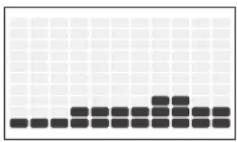
6) WEIGHT LOSS PLUS: Promotes weight loss by increasing and decreasing the resistance, while keeping you in your fat burning zone. Time based program with 15 levels to choose from and greater intensity than the weight loss program. User sets time and level using (up/down arrows) and ENTER. Please drink enough water while and after doing exercise to enhance the weight loss results.
(Comfort 4.0, 8.1, R8.0)
| WEIGHT LOSS PLUS | |||||||||||||||||||||||||||||||||||||||||||||||||||||||||||||||||||||||||||||||||||||||||||||||||||||||||||||||||||||||||||||||||||||
| Seconds | 60 | 60 | 60 | 60 | 60 | 60 | 60 | 60 | 60 | 60 | 60 | 60 | 60 | 60 | 60 | 60 | 60 | 60 | 60 | 60 | 60 | 60 | 60 | 60 | 60 | 60 | 60 | 60 | 60 | 60 | 60 | 60 | 60 | 60 | |||||||||||||||||||||||||||||||||||||||||||||||||||||||||||||||||||||||||||||||||||||||||||||||||||
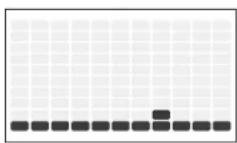
7) ROLLING: Maintains weight by gradually raising and lowering the resistance level to gradually raise and lower your heart rate.
(Comfort 4.0, 8.1, R8.0)
(Comfort 2.0)
| ROLLING | |||||||||||||||||||||||||||||||||||||||||||||||||||||||||||||||||||||||||||||||||||||||||||||||||||||||||||||||||||||||||||||||||||||||||||||||||||||||||||||||||||||||||||||||||||||||||||||||||||||||||||||||||||||||||||||||||||||||||||||||||||||||||||||||||||||||||||||||||||||||||||||||||||||||||||||||||||||||||||||||||||||||||||||||||||||||||||||||||||||||||||||||||||||||||||||||||||||||||||||||||||||||||||||||||||||||||||||||||||||||||||||||||||||||||||||||||||||||||||||||||||||||||||||||||||||||||||||||||||||||||||||||||||||||||||||||||||||||||||||||||||||||||||||||||||||||||||||||||||||||||||||||||||||||||||||||||||||||||||||||||||||||||||||||||||||||||||||||||||||||||||||||||||||||||||||||||||||||||||||||||||||||||||||||||||||||||||||||||||||||||||||||||||||||||||||||||||||||||||||||||||||||||||||||||||||||||||||||||||||||||||||||||||||||||||||||||||||||||||||||||||||||||||||||||||||||||||||||||||||||||||||||||||||||||||||||||||||||||||||||||||||||||||||||||||||||||||||||||||||||
| Warm Up Program segments Cool Down | |||||||||||||||||||||||||||||||||||||||||||||||||||||||||||||||||||||||||||||||||||||||||||||||||||||||||||||||||||||||||||||||||||||||||||||||||||||||||||||||||||||||||||||||||||||||||||||||||||||||||||||||||||||||||||||||||||||||||||||||||||||||||||||||||||||||||||||||||||||||||||||||||||||||||||||||||||||||||||||||||||||||||||||||||||||||||||||||||||||||||||||||||||||||||||||||||||||||||||||||||||||||||||||||||||||||||||||||||||||||||||||||||||||||||||||||||||||||||||||||||||||||||||||||||||||||||||||||||||||||||||||||||||||||||||||||||||||||||||||||||||||||||||||||||||||||||||||||||||||||||||||||||||||||||||||||||||||||||||||||||||||||||||||||||||||||||||||||||||||||||||||||||||||||||||||||||||||||||||||||||||||||||||||||||||||||||||||||||||||||||||||||||||||||||||||||||||||||||||||||||||||||||||||||||||||||||||||||||||||||||||||||||||||||||||||||||||||||||||||||||||||||||||||||||||||||||||||||||||||||||||||||||||||||||||||||||||||||||||||||||||||||||||||||||||||||||||||||||||||||
| Seconds | 60 | 60 | 60 | 60 | 60 | 30 | 30 | 30 | 30 | 30 | 30 | 30 | 30 | 30 | 30 | 30 | 30 | 30 | 30 | 30 | 30 | 30 | 60 | 60 | 60 | 60 | 60 | 60 | 60 | 60 | 60 | 60 | 60 | 60 | 60 | 60 | 60 | 60 | 60 | 60 | 60 | 60 | 60 | 60 | 60 | 60 | 60 | 60 | 60 | 60 | 60 | 60 | 60 | 60 | 60 | 61 | 11 | 12 | 13 | 14 | 15 | 16 | 17 | 18 | 19 | 20 | 21 | 22 | 23 | 24 | 25 | 26 | 27 | 28 | 29 | 30 | 31 | 32 | 33 | 34 | 35 | 36 | 37 | 38 | 39 | 40 | 41 | 42 | 43 | 44 | 45 | 46 | 47 | 48 | 49 | 50 | 51 | 52 | 53 | 54 | 55 | 56 | 57 | 58 | 59 | 60 | 61 | 62 | 63 | 64 | 65 | 66 | 67 | 68 | 69 | 70 | 71 | 72 | 73 | 74 | 75 | 76 | 77 | 78 | 79 | 80 | 81 | 82 | 83 | 84 | 85 | 86 | 87 | 88 | 89 | 90 | 91 | 92 | 93 | 94 | 95 | 96 | 97 | 98 | 99 | 100 | 101 | 102 | 103 | 104 | 105 | 106 | 107 | 108 | 109 | 110 | 111 | 112 | 113 | 114 | 115 | 116 | 117 | 118 | 119 | 120 | 121 | 122 | 123 | 124 | 125 | 126 | 127 | 128 | 129 | 130 | 131 | 132 | 133 | 134 | 135 | 136 | 137 | 138 | 139 | 140 | 141 | 142 | 143 | 144 | 145 | 146 | 147 | 148 | 149 | 150 | 151 | 152 | 153 | 154 | 155 | 156 | 157 | 158 | 159 | 160 | 161 | 162 | 163 | 164 | 165 | 166 | 167 | 168 | 169 | 170 | 171 | 172 | 173 | 174 | 175 | 176 | 177 | 178 | 179 | 180 | 181 | 182 | 183 | 184 | 185 | 186 | 187 | 188 | 189 | 190 | 191 | 192 | 193 | 194 | 195 | 196 | 197 | 198 | 199 | 200 | 201 | 202 | 203 | 204 | 205 | 206 | 207 | 208 | 209 | 210 | 211 | 212 | 213 | 214 | 215 | 216 | 217 | 218 | 219 | 220 | 221 | 222 | 223 | 224 | 225 | 226 | 227 | 228 | 229 | 230 | 231 | 232 | 233 | 234 | 235 | 236 | 237 | 238 | 239 | 240 | 241 | 242 | 243 | 244 | 245 | 246 | 247 | 248 | 249 | 250 | 251 | 252 | 253 | 254 | 255 | 256 | 257 | 258 | 259 | 260 | 261 | 262 | 263 | 264 | 265 | 266 | 267 | 268 | 269 | 270 | 271 | 272 | 273 | 274 | 275 | 276 | 277 | 278 | 279 | 280 | 281 | 282 | 283 | 284 | 285 | 286 | 287 | 288 | 289 | 290 | 291 | 292 | 293 | 294 | 295 | 296 | 297 | 298 | 299 | 300 | 301 | 302 | 303 | 304 | 305 | 306 | 307 | 308 | 309 | 310 | 311 | 312 | 313 | 314 | 315 | 316 | 317 | 318 | 319 | 320 | 321 | 322 | 323 | 324 | 325 | 326 | 327 | 328 | 329 | 330 | 331 | 332 | 333 | 334 | 335 | 336 | 337 | 338 | 339 | 340 | 341 | 342 | 343 | 344 | 345 | 346 | 347 | 348 | 349 | 350 | 351 | 352 | 353 | 354 | 355 | 356 | 357 | 358 | 359 | 360 | 361 | 362 | 363 | 364 | 365 | 366 | 367 | 368 | 369 | 370 | 371 | 372 | 373 | 374 | 375 | 376 | 377 | 378 | 379 | 380 | 381 | 382 | 383 | 384 | 385 | 386 | 387 | 388 | 389 | 390 | 391 | 392 | 393 | 394 | 395 | 396 | 397 | 398 | 399 | 400 | 401 | 402 | 403 | 404 | 405 | 406 | 407 | 408 | 409 | 410 | 411 | 412 | 413 | 414 | 415 | 416 | 417 | 418 | 419 | 420 | 421 | 422 | 423 | 424 | 425 | 426 | 427 | 428 | 429 | 430 | 431 | 432 | 433 | 434 | 435 | 436 | 437 | 438 | 439 | 440 | 441 | 442 | 443 | 444 | 445 | 446 | 447 | 448 | 449 | 450 | 451 | 452 | 453 | 454 | 455 | 456 | 457 | 458 | 459 | 460 | 461 | 462 | 463 | 464 | 465 | 466 | 467 | 468 | 469 | 470 | 471 | 472 | 473 | 474 | 475 | 476 | 477 | 478 | 479 | 480 | 481 | 482 | 483 | 484 | 485 | 486 | 487 | 488 | 489 | 490 | 491 | 492 | 493 | 494 | 495 | 496 | 497 | 498 | 499 | 500 | 501 | 502 | 503 | 504 | 505 | 506 | 507 | 508 | 509 | 510 | 511 | 512 | 513 | 514 | 515 | 516 | 517 | 518 | 519 | 520 | 521 | 522 | 523 | 524 | 525 | 526 | 527 | 528 | 529 | 530 | 531 | 532 | 533 | 534 | 535 | 536 | 537 | 538 | 539 | 540 | 541 | 542 | 543 | 544 | 545 | 546 | 547 | 548 | 549 | 550 | 551 | 552 | 553 | 554 | 555 | 556 | 557 | 558 | 559 | 560 | 561 | 562 | 563 | 564 | 565 | 566 | 567 | 568 | 569 | 570 | 571 | 572 | 573 | 574 | 575 | 576 | 577 | 578 | 579 | 580 | 581 | 582 | 583 | 584 | 585 | 586 | 587 | 588 | 589 | 590 | 591 | 592 | 593 | 594 | 595 | 596 | 597 | 598 | 599 | 600 | 601 | 602 | 603 | 604 | 605 | 606 | 607 | 608 | 609 | 610 | 611 | 612 | 613 | 614 | 615 | 616 | 617 | 618 | 619 | 620 | 621 | 622 | 623 | 624 | 625 | 626 | 627 | 628 | 629 | 630 | 631 | 632 | 633 | 634 | 635 | 636 | 637 | 638 | 639 | 640 | 641 | 642 | 643 | 644 | 645 | 646 | 647 | 648 | 649 | 650 | 651 | 652 | 653 | 654 | 655 | 656 | 657 | 658 | 659 | 660 | 661 | 662 | 663 | 664 | 665 | 666 | 667 | 668 | 669 | 670 | 671 | 672 | 673 | 674 | 675 | 676 | 677 | 678 | 679 | 680 | 681 | 682 | 683 | 684 | 685 | 686 | 687 | 688 | 689 | 690 | 691 | 692 | 693 | 694 | 695 | 696 | 697 | 698 | 699 | 700 | 701 | 702 | 703 | 704 | 705 | 706 | 707 | 708 | 709 | 710 | 711 | 712 | 713 | 714 | 715 | 716 | 717 | 718 | 719 | 720 | 721 | 722 | 723 | 724 | 725 | 726 | 727 | 728 | 729 | 730 | 731 | 732 | 733 | 734 | 735 | 736 | 737 | 738 | 739 | 740 | 741 | 742 | 743 | 744 | 745 | 746 | 747 | 748 | 749 | 750 | 751 | 752 | 753 | 754 | 755 | 756 | 757 | 758 | 759 | 760 | 761 | 762 | 763 | 764 | 765 | 766 | 767 | 768 | 769 | 770 | 771 | 772 | 773 | 774 | 775 | 776 | 777 | 778 | 779 | 780 | 781 | 782 | 783 | 784 | 785 | 786 | 787 | 788 | 789 | 790 | 791 | 792 | 793 | 794 | 795 | 796 | 797 | 798 | 799 | 800 | 801 | 802 | 803 | 804 | 805 | 806 | 807 | 808 | 809 | 810 | 811 | 812 | 813 | 814 | 815 | 816 | 817 | 818 | 819 | 820 | 821 | 822 | 823 | 824 | 825 | 826 | 827 | 828 | 829 | 830 | 831 | 832 | 833 | 834 | 835 | 836 | 837 | 838 | 839 | 840 | 841 | 842 | 843 | 844 | 845 | 846 | 847 | 848 | 849 | 850 | 851 | 852 | 853 | 854 | 855 | 856 | 857 | 858 | 859 | 860 | 861 | 862 | 863 | 864 | 865 | 866 | 867 | 868 | 869 | 870 | 871 | 872 | 873 | 874 | 875 | 876 | 877 | 878 | 879 | 880 | 881 | 882 | 883 | 884 | 885 | 886 | 887 | 888 | 889 | 890 | 891 | 892 | 893 | 894 | 895 | 896 | 897 | 898 | 899 | 900 | 901 | 902 | 903 | 904 | 905 | 906 | 907 | 908 | 909 | 910 | 911 | 912 | 913 | 914 | 915 | 916 | 917 | 918 | 919 | 920 | 921 | 922 | 923 | 924 | 925 | 926 | 927 | 928 | 929 | 930 | 931 | 932 | 933 | 934 | 935 | 936 | 937 | 938 | 939 | 940 | 941 | 942 | 943 | 944 | 945 | 946 | 947 | 948 | 949 | 950 | 951 | 952 | 953 | 954 | 955 | 956 | 957 | 958 | 959 | 960 | 961 | 962 | 963 | 964 | 965 | 966 | 967 | 968 | 969 | 970 | 971 | 972 | 973 | 974 | 975 | 976 | 977 | 978 | 979 | 980 | 981 | 982 | 983 | 984 | 985 | 986 | 987 | 988 | 989 | 990 | 991 | 992 | 993 | 994 | 995 | 996 | 997 | 998 | 999 | 1000 |
| ROLLING | |||||||||||||||||||||||||||||||||||||||||||||||||||||||||||||||||||||||||||||||||||||||||||||||||||||||||||||||||||||||||||||||||||||||||||||||||||||||||||||||||||||||||||||||||||||||||||||||||||||||||||||||||||||||||||||||||||||||||||||||||||||||||||||||||||||||||||||||||||||||||||||||||||||||||||||||||||||||||||||||||||||||||||||||||||||||||||||||||||||||||||||||||||||||||||||||||||||||||||||||||||||||||||||||||||||||||||||||||||||||||||||||||||||||||||||||||||||||||||||||||||||||||||||||||||||||||||||||||||||||||||||||||||||||||||||||||||||||||||||||||||||||||||||||||||||||||||||||||||||||||||||||||||||||||||||||||||||||||||||||||||||||||||||||||||||||||||||||||||||||||||||||||||||||||||||||||||||||||||||||||||||||||||||||||||||||||||||||||||||||||||||||||||||||||||||||||||||||||||||||||||||||||||||||||||||||||||||||||||||||||||||||||||||||||||||||||||||||||||||||||||||||||||||||||||||||||||||||||||||||||||||||||||||||||||||||||||||||||||||||||||||||||||||||||||||||||||||||||||||||
| Seconds | 60 | 60 | 60 | 60 | 30 | 30 | 30 | 30 | 30 | 30 | 30 | 30 | 30 | 30 | 30 | 30 | 30 | 30 | 30 | 30 | 60 | 60 | 60 | 60 | 60 | 60 | 60 | 60 | 60 | 60 | 60 | 60 | 60 | 60 | 60 | 60 | 60 | 60 | 60 | 60 | 60 | 60 | 60 | 60 | 60 | 60 | 60 | 60 | 60 | 60 | 60 | 60 | 60 | 61 | 61 | 61 | 61 | 61 | 61 | 61 | 61 | 61 | 61 | 61 | 61 | 61 | 61 | 61 | 61 | 61 | 61 | 61 | 61 | 61 | 61 | 61 | 61 | 61 | 61 | 61 | 61 | 61 | 61 | 61 | 61 | 61 | 61 | ||||||||||||||||||||||||||||||||||||||||||||||||||||||||||||||||||||||||||||||||||||||||||||||||||||||||||||||||||||||||||||||||||||||||||||||||||||||||||||||||||||||||||||||||||||||||||||||||||||||||||||||||||||||||||||||||||||||||||||||||||||||||||||||||||||||||||||||||||||||||||||||||||||||||||||||||||||||||||||||||||||||||||||||||||||||||||||||||||||||||||||||||||||||||||||||||||||||||||||||||||||||||||||||||||||||||||||||||||||||||||||||||||||||||||||||||||||||||||||||||||||||||||||||||||||||||||||||||||||||||||||||||||||||||||||||||||||||||||||||||||||||||||||||||||||||||||||||||||||||||||||||||||||||||||||||||||||||||||||||||||||||||||||||||||||||||||||||||||||||||||||||||||||||||||||||||||||||||||||||||||||||||||||||||||||||||||||||||||||||||||||||||||||||||||||||||||||||||||||||||||||||||||||||||||||||||||||||||||||||||||||||||||||||||||||||||||||||||||||||||||||||||||||||||||||||||||||||||
| Segment | 1 | 3.4 | 6 | 7.9 | 10 | 12 | 13 | 15 | 16 | 18 | 19 | 21 | 22 | 24 | 25 | 27 | |||||||||||||||||||||||||||||||||||||||||||||||||||||||||||||||||||||||||||||||||||||||||||||||||||||||||||||||||||||||||||||||||||||||||||||||||||||||||||||||||||||||||||||||||||||||||||||||||||||||||||||||||||||||||||||||||||||||||||||||||||||||||||||||||||||||||||||||||||||||||||||||||||||||||||||||||||||||||||||||||||||||||||||||||||||||||||||||||||||||||||||||||||||||||||||||||||||||||||||||||||||||||||||||||||||||||||||||||||||||||||||||||||||||||||||||||||||||||||||||||||||||||||||||||||||||||||||||||||||||||||||||||||||||||||||||||||||||||||||||||||||||||||||||||||||||||||||||||||||||||||||||||||||||||||||||||||||||||||||||||||||||||||||||||||||||||||||||||||||||||||||||||||||||||||||||||||||||||||||||||||||||||||||||||||||||||||||||||||||||||||||||||||||||||||||||||||||||||||||||||||||||||||||||||||||||||||||||||||||||||||||||||||||||||||||||||||||||||||||||||||||||||||||||||||||||||||||||||||||||||||||||||||||||||||||||||||||||||||||||||||||||||||||||||||||||
| Level | 11 | 1.3 | 3.3 | 13.4 | 6.4 | 3.1 | 3.4 | 3.1 | 1.1 | 1.1 | 1.1 | 1.1 | 1.1 | 1.1 | 1.1 | 1.1 | 1.1 | 1.1 | 1.1 | 1.1 | 1.1 | 1.1 | 1.1 | 1.1 | 1.1 | 1.1 | 1.1 | 1.1 | 1.1 | 1.1 | 1.1 | 1.1 | 1.1 | 0.9 | 7.6 | 3.1 | 1.1 | 1.1 | 1.1 | 1.1 | 1.1 | 1.1 | 1.1 | 1.1 | 1.1 | 1.1 | 1.1 | 1.1 | 1.1 | 1.1 | 1.1 | 1.1 | 1.1 | 1.1 | 1.1 | 1.1 | 1.1 | 1.1 | 1.1 | 1.0 | 9.7 | 4.1 | 1.1 | 1.1 | 1.1 | 1.1 | 1.1 | 1.1 | 1.1 | 1.1 | 1.1 | 1.1 | 1.1 | 1.1 | 1.1 | 1.1 | 1.1 | 1.1 | 1.1 | 1.1 | 1.1 | 1.1 | 1.1 | 1.1 | 1.1 | 1.1 | 2.9 | 4.3 | 3.1 | 1.1 | 1.1 | 1.1 | 1.1 | 1.1 | 1.1 | 1.1 | 1.1 | 1.1 | 1.1 | 1.1 | 1.1 | 1.1 | 1.1 | 1.1 | 1.1 | 1.1 | 1.1 | 1.1 | 1.1 | 1.1 | 1.1 | 1.1 | 1.2 | 1.5 | 1.5 | 1.5 | 1.5 | 1.5 | 1.5 | 1.5 | 1.5 | 1.5 | 1.5 | 1.5 | 1.5 | 1.5 | 1.5 | 1.5 | 1.5 | 1.5 | 1.5 | 1.5 | 1.5 | 1.5 | 1.5 | 1.5 | 1.5 | 1.5 | 1.6 | 7.6 | 3.1 | 1.1 | 1.1 | 1.1 | 1.1 | 1.1 | 1.1 | 1.1 | 1.1 | 1.1 | 1.1 | 1.1 | 1.1 | 1.1 | 1.1 | 1.1 | 1.1 | 1.1 | 1.1 | 1.1 | 1.1 | 1.1 | 1.1 | 1.2 | 1.5 | 2.9 | 4.3 | 3.1 | 1.1 | 1.1 | 1.1 | 1.1 | 1.1 | 1.1 | 1.1 | 1.1 | 1.1 | 1.1 | 1.1 | 1.1 | 1.1 | 1.1 | 1.1 | 1.1 | 1.1 | 1.1 | 1.1 | 1.1 | 1.1 | 1.2 | 1.5 | 2.9 | 5.7 | 3.1 | 1.1 | 1.1 | 1.1 | 1.1 | 1.1 | 1.1 | 1.1 | 1.1 | 1.1 | 1.1 | 1.1 | 1.1 | 1.1 | 1.1 | 1.1 | 1.1 | 1.1 | 1.1 | 1.1 | 1.1 | 1.1 | 1.1 | 1.1 | 1.5 | 2.9 | 4.3 | 3.1 | 1.1 | 1.1 | 1.1 | 1.1 | 1.1 | 1.1 | 1.1 | 1.1 | 1.1 | 1.1 | 1.1 | 1.1 | 1.1 | 1.1 | 1.1 | 1.1 | 1.1 | 1.1 | 1.1 | 1.1 | 1.2 | 1.5 | 2.9 | 5.7 | 4.1 | 1.1 | 1.1 | 1.1 | 1.1 | 1.1 | 1.1 | 1.1 | 1.1 | 1.1 | 1.1 | 1.1 | 1.1 | 1.1 | 1.1 | 1.1 | 1.1 | 1.1 | 1.1 | 1.1 | 1.1 | 1.1 | 1.1 | 1.1 | 2.9 | 5.7 | 3.1 | 1.1 | 1.1 | 1.1 | 1.1 | 1.1 | 1.1 | 1.1 | 1.1 | 1.1 | 1.1 | 1.1 | 1.1 | 1.1 | 1.1 | 1.1 | 1.1 | 1.1 | 1.1 | 1.1 | 1.1 | 1.1 | 1.2 | 1.5 | 2.8 | 4.3 | 3.1 | 1.1 | 1.1 | 1.1 | 1.1 | 1.1 | 1.1 | 1.1 | 1.1 | 1.1 | 1.1 | 1.1 | 1.1 | 1.1 | 1.1 | 1.1 | 1.1 | 1.1 | 1.1 | 1.1 | 1.1 | 1.1 | 1.1 | 1.2 | 1.6 | 4.3 | 3.1 | 1.1 | 1.1 | 1.1 | 1.1 | 1.1 | 1.1 | 1.1 | 1.1 | 1.1 | 1.1 | 1.1 | 1.1 | 1.1 | 1.1 | 1.1 | 1.1 | 1.1 | 1.1 | 1.1 | 1.1 | 1.1 | 1.1 | 1.5 | 2.9 | 5.7 | 3.1 | 1.1 | 1.1 | 1.1 | 1.1 | 1.1 | 1.1 | 1.1 | 1.1 | 1.1 | 1.1 | 1.1 | 1.1 | 1.1 | 1.1 | 1.1 | 1.1 | 1.1 | 1.1 | 1.1 | 1.1 | 1.2 | 2.9 | 4.3 | 3.1 | 1.1 | 1.1 | 1.1 | 1.1 | 1.1 | 1.1 | 1.1 | 1.1 | 1.1 | 1.1 | 1.1 | 1.1 | 1.1 | 1.1 | 1.1 | 1.1 | 1.1 | 1.1 | 1.1 | 1.1 | 1.1 | 1.5 | 2.9 | 5.7 | 4.3 | 3.1 | 1.1 | 1.1 | 1.1 | 1.1 | 1.1 | 1.1 | 1.1 | 1.1 | 1.1 | 1.1 | 1.1 | 1.1 | 1.1 | 1.1 | 1.1 | 1.1 | 1.1 | 1.1 | 1.1 | 1.1 | 1.1 | 1.5 | 2.8 | 4.3 | 3.1 | 1.1 | 1.1 | 1.1 | 1.1 | 1.1 | 1.1 | 1.1 | 1.1 | 1.1 | 1.1 | 1.1 | 1.1 | 1.5 | 2.9 | 5.7 | 4.3 | 3.1 | 1.1 | 1.1 | 1.1 | 1.1 | 1.1 | 1.1 | 1.1 | 2.9 | 4.3 | 3.1 | 1.1 | 1.1 | 1.1 | 1.1 | 1.1 | 1.1 | 1.5 | 2.9 | 5.7 | 4.3 | 3.1 | 1.1 | 1.1 | 1.1 | 1.1 | 1.5 | 2.8 | 4.3 | 3.1 | 1.1 | 1.1 | 1.1 | 1.5 | 2.9 | 5.7 | 4.3 | 3.1 | 1.1 | 1.1 | 1.1 | 1.5 | 2.9 | 5.7 | 4.3 | 3.1 | 1.1 | 1.1 | 1.1 | 1.5 | 2.9 | 5.7 | 4.3 | 3.1 | 1.1 | 1.1 | 1.5 | 2.9 | 5.7 | 4.3 | 3.1 | 1.1 | 1.1 | 1.5 | 2.9 | 5.7 | 4.3 | 3.1 | 1.1 | 1.1 | 1.5 | 2.9 | 5.7 | 4.3 | 3.1 | 1.1 | 1.1 | 1.5 | 3.4 | 3.1 | 1.1 | 1.1 | 1.5 | 2.9 | 5.7 | 4.3 | 3.1 | 1.1 | 1.1 | 1.5 | 2.9 | 5.7 | 4.3 | 3.1 | 1.1 | 1.1 | 1.5 | 2.9 | 5.7 | 4.3 | 3.1 | 1.1 | 1.1 | 1.6 | 2.8 | 4.3 | 3.1 | 1.1 | 1.1 | 1.5 | 2.9 | 5.7 | 4.3 | 3.1 | 1.1 | 1.1 | 1.5 | 2.9 | 5.7 | 4.3 | 3.1 | 1.1 | 1.1 | 1.5 | 2.9 | 5.7 | 4.3 | 3.1 | 1.1 | 1.5 | 2.9 | 5.7 | 4.3 | 3.1 | 1.1 | 1.5 | 2.9 | 5.7 | 4.3 | 3.1 | 1.1 | 1.5 | 2.9 | 5.7 | 4.3 | 3.1 | 1.1 | 1.5 | 2.9 | 5.7 | 4.3 | 3.1 | 0.9 | 7.6 | 3.1 | 1.1 | 1.1 | 1.5 | 2.9 | 5.7 | 4.3 | 3.1 | 0.9 | 7.6 | 3.1 | 0.9 | 7.6 | 3.1 | 0.9 | 7.6 | 3.1 | 0.9 | 7.6 | 3.1 | 0.9 | 7.6 | 3.1 | 0.9 | 7.6 | 3.1 | 0.9 | 7.6 | 3.1 | 0.9 | 7.6 | 3.1 | 0.9 | 7.6 | 3.2 | 0.9 | 7.6 | 3.2 | 0.9 | 7.6 | 3.2 | 0.9 | 7.6 | 3.2 | 0.9 | 7.6 | 3.2 | 0.9 | 7.6 | 3.2 | 0.9 | 7.6 | 3.2 | 0.9 | 7.6 | 3.2 | 0.9 | 7.6 | 3.2 | 0.8 | 7.6 | 3.2 | 0.9 | 7.6 | 3.2 | 0.9 | 7.6 | 3.2 | 0.9 | 7.6 | 3.2 | 0.9 | 7.6 | 3.2 | 0.9 | 7.6 | 3.2 | 0.9 | 7.6 | 3.2 | 0.9 | 7.6 | 3.2 | 0.9 | 7.5 | 3.2 | 0.9 | 7.6 | 3.2 | 0.9 | 7.6 | 3.2 | 0.9 | 7.6 | 3.2 | 0.9 | 7.6 | 3.2 | 0.9 | 7.6 | 3.2 | 0.9 | 7.6 | 3.2 | 0.9 | 7.6 | 3.2 | 0.9 | 7.6 | 3.3 | 0.9 | 7.6 | 3.2 | 0.9 | 7.6 | 3.2 | 0.9 | 7.6 | 3.2 | 0.9 | 7.6 | 3.2 | 0.9 | 7.6 | 3.2 | 0.9 | 7.6 | 3.2 | 0.9 | 7.6 | 3.2 | 0.9 | 7.6 | 3.2 | 0.7 | 7.6 | 3.2 | 0.9 | 7.6 | 3.2 | 0.9 | 7.6 | 3.2 | 0.9 | 7.6 | 3.2 | 0.9 | 7.6 | 3.2 | 0.9 | 7.6 | 3.2 | 0.9 | 7.6 | 3.2 | 0.9 | 7.6 | 3.2 | 0.9 | 7.7 | 3.2 | 0.9 | 7.6 | 3.2 | 0.9 | 7.6 | 3.2 | 0.9 | 7.6 | 3.2 | 0.9 | 7.6 | 3.2 | 0.9 | 7.6 | 3.2 | 0.9 | 7.6 | 3.2 | 0.9 | 7.6 | 3.2 | 0.9 | 7.6 | 3.4 | 0.9 | 7.6 | 3.2 | 0.9 | 7.6 | 3.2 | 0.9 | 7.6 | 3.2 | 0.9 | 7.6 | 3.2 | 0.9 | 7.6 | 3.2 | 0.9 | 7.6 | 3.2 | 0.9 | 7.6 | 3.2 | 0.9 | 7.6 | 3.2 | 0.5 | 7.6 | 3.2 | 0.9 | 7.6 | 3.2 | 0.9 | 7.6 | 3.2 | 0.9 | 7.6 | 3.2 | 0.9 | 7.6 | 3.2 | 0.9 | 7.6 | 3.2 | 0.9 | 7.6 | 3.2 | 0.9 | 7.6 | 3.2 | 0.9 | 7.2 | 3.5 | 0.9 | 7.6 | 3.2 | 0.9 | 7.6 | 3.2 | 0.9 | 7.6 | 3.2 | 0.9 | 7.6 | 3.2 | 0.9 | 7.6 | 3.2 | 0.9 | 7.6 | 3.2 | 0.9 | 7.6 | 3.2 | 0.9 | 7.6 | 3.2 | 0.6 | 7.6 | 3.2 | 0.9 | 7.6 | 3.2 | 0.9 | 7.6 | 3.2 | 0.9 | 7.6 | 3.2 | 0.9 | 7.6 | 3.2 | 0.9 | 7.6 | 3.2 | 0.9 | 7.6 | 3.2 | 0.9 | 7.6 | 3.2 | 0.9 | 7.8 | 3.2 | 0.9 | 7.6 | 3.2 | 0.9 | 7.6 | 3.2 | 0.9 | 7.6 | 3.2 | 0.9 | 7.6 | 3.2 | 0.9 | 7.6 | 3.2 | 0.9 | 7.6 | 3.2 | 0.9 | 7.6 | 3.2 | 0.9 | 7.6 | 3.8 | 0.9 | 7.6 | 3.2 | 0.9 | 7.6 | 3.2 | 0.9 | 7.6 | 3.2 | 0.9 | 7.6 | 3.2 | 0.9 | 7.6 | 3.2 | 0.9 | 7.6 | 3.2 | 0.9 | 7.6 | 3.2 | 0.9 | 7.6 | 3.2 | 0.25 | 7.6 | 25 25 25 25 25 25 25 25 25 25 25 25 25 25 25 25 25 25 25 25 25 25 25 25 25 25 25 25 25 25 25 25 25 25 30 30 30 30 30 30 30 30 30 30 30 30 30 30 30 30 30 30 30 30 30 30 30 30 30 30 30 30 30 30 30 30 30 30 | ||||||||||||||||||||||||||||||||||||||||||||||||||||||||||||||||||


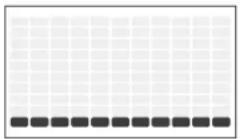
8) CADENCE: Special bike training program to build your stamina and increase endurance. This program will gradually increases resistance level and prompt you to pedal at a low speed (L), medium speed (M), or high speed (H) to help you reach your fitness goal.
(Comfort 2.0)
(Comfort 4.0, 8.1, R8.0)
| CADENCE | ||||||||||||||||||||||||
| Warm up L M L H M L H M L H M L Cool down | ||||||||||||||||||||||||
| Seconds | 60 | 60 | 60 | 90 | 45 | 90 | 30 | 45 | 90 | 30 | 45 | 90 | 60 | 60 | 60 | 60 | 60 | 60 | 60 | 60 | 60 | |||
| Segment | 1 | 2 | 3 | 4 | 5 | 7 | 8 | 9 | 10 | 11 | 12 | 13 | 14 | 15 | 16 | 17 | 18 | 19 | 20 | |||||
| Level 1 | 1 | 1 | 2 | 3 | 2 | 3 | 1 | 2 | 3 | 1 | 2 | 2 | 1 | 1 | ||||||||||
| Level 2 | 1 | 1 | 2 | 4 | 3 | 4 | 2 | 3 | 4 | 2 | 1 | 1 | ||||||||||||
| Level 3 | 1 | 1 | 2 | 5 | 4 | 3 | 3 | 4 | 3 | 4 | 3 | 2 | 1 | 1 | ||||||||||
| Level 4 | 1 | 1 | 1 | 3 | 6 | 5 | 6 | 4 | 5 | 4 | 5 | 6 | 3 | 1 | 1 | |||||||||
| Level 5 | 1 | 1 | 2 | 3 | 3 | 7 | 6 | 5 | 6 | 7 | 5 | 6 | 7 | 3 | 2 | 1 | ||||||||
| Level 6 | 1 | 1 | 2 | 3 | 4 | 8 | 7 | 6 | 8 | 7 | 6 | 8 | 7 | 4 | 3 | 2 | 1 | |||||||
| Level 7 | 1 | 1 | 2 | 3 | 4 | 9 | 8 | 7 | 8 | 7 | 8 | 9 | 4 | 3 | 2 | 1 | ||||||||
| Level 8 | 1 | 2 | 3 | 5 | 10 | 9 | 10 | 8 | 9 | 10 | 8 | 9 | 10 | 5 | 3 | 2 | 1 | |||||||
| Level 9 | 1 | 1 | 1 | 1 | 1 | 2 | 1 | 11 | 10 | 11 | 9 | 10 | 11 | 9 | 10 | 11 | 9 | 10 | 11 | 2 | 1 | 1 | 1 | |
| Level 10 | 1 | 1 | 1 | 1 | 1 | 2 | 12 | 11 | 11 | 12 | 10 | 11 | 11 | 12 | 10 | 11 | 12 | 10 | 11 | 12 | 2 | 1 | 1 | 1 |
| Level 11 | 1 | 2 | 2 | 2 | 2 | 3 | 13 | 12 | 13 | 11 | 12 | 11 | 12 | 13 | 11 | 12 | 13 | 11 | 12 | 13 | 2 | 1 | 1 | 1 |
| Level 12 | 3 | 3 | 4 | 14 | 13 | 14 | 12 | 13 | 14 | 12 | 13 | 14 | 12 | 13 | 3 | 1 | 1 | |||||||
| Level 13 | 3 | 4 | 4 | 5 | 15 | 14 | 15 | 13 | 14 | 15 | 13 | 14 | 15 | 13 | 3 | 2 | 1 | |||||||
| Level 14 | 3 | 4 | 5 | 6 | 16 | 15 | 16 | 14 | 15 | 16 | 14 | 15 | 16 | 14 | 4 | 3 | 2 | 1 | ||||||
| CADENCE | |||||||||||||||||||||
| Warm up L M L H M L H M L H M L Cool down | |||||||||||||||||||||
| Seconds | 60 | 60 | 80 | 60 | 90 | 45 | 90 | 30 | 45 | 90 | 30 | 45 | 90 | 30 | 45 | 90 | 60 | 60 | 60 | 60 | 60 |
| Segment | 1 | 23 | 4 | 5 | 6 | 7 | 8 | 9 | 10 | 11 | 12 | 18 | 14 | 15 | 16 | 17 | 18 | 19 | 20 | ||
| Level 13 | 1 | 13 | 4 | 3 | 4 | 1 | 3 | 4 | 1 | 3 | 4 | 3 | 1 | 1 | |||||||
| Level 21 | 1 | 11 | 3 | 6 | 4 | 6 | 3 | 4 | 3 | 4 | 3 | 4 | 3 | 1 | 1 | ||||||
| Level 31 | 1 | 11 | 3 | 7 | 6 | 7 | 4 | 6 | 7 | 4 | 6 | 7 | 3 | 1 | 1 | ||||||
| Level 41 | 1 | 11 | 4 | 9 | 7 | 9 | 6 | 7 | 9 | 6 | 7 | 9 | 8 | 7 | 4 | 1 | 1 | ||||
| Level 51 | 1 | 3 | 4 | 4 | 10 | 9 | 10 | 7 | 9 | 10 | 9 | 10 | 7 | 9 | 10 | 4 | 3 | 1 | |||
| Level 61 | 1 | 3 | 4 | 6 | 12 | 10 | 12 | 9 | 10 | 12 | 9 | 10 | 12 | 9 | 10 | 12 | 6 | 4 | 3 | 1 | |
| Level 71 | 3 | 4 | 6 | 13 | 12 | 13 | 12 | 10 | 12 | 13 | 10 | 12 | 13 | 10 | 12 | 13 | 6 | 4 | 3 | 1 | |
| Level 81 | 3 | 4 | 7 | 15 | 13 | 15 | 12 | 13 | 15 | 12 | 13 | 15 | 13 | 15 | 7 | 4 | 3 | 1 | |||
| Level 91 | 1 | 1 | 3 | 16 | 15 | 16 | 13 | 15 | 16 | 13 | 15 | 16 | 13 | 15 | 16 | 3 | 1 | 1 | |||
| Level 101 | 1 | 11 | 3 | 18 | 16 | 18 | 15 | 16 | 18 | 15 | 16 | 18 | 15 | 16 | 18 | 3 | 1 | 1 | |||
| Level 111 | 3 | 3 | 3 | 19 | 18 | 19 | 18 | 16 | 18 | 19 | 16 | 18 | 19 | 16 | 18 | 3 | 1 | 1 | |||
| Level 121 | 4 | 4 | 4 | 21 | 19 | 21 | 18 | 19 | 21 | 18 | 21 | 18 | 21 | 18 | 21 | 4 | 1 | 1 | |||
| Level 131 | 4 | 4 | 6 | 7 | 22 | 21 | 22 | 9 | 21 | 22 | 21 | 22 | 19 | 21 | 22 | 24 | 4 | 3 | 1 | ||
| Level 141 | 4 | 4 | 6 | 7 | 24 | 22 | 24 | 21 | 22 | 24 | 21 | 22 | 24 | 21 | 22 | 24 | 6 | 3 | 1 | ||
| Level 151 | 4 | 7 | 9 | 10 | 25 | 25 | 25 | 22 | 24 | 25 | 22 | 24 | 25 | 22 | 24 | 25 | 6 | 4 | 3 | 1 | |
| Level 161 | 6 | 9 | 10 | 12 | 21 | 25 | 27 | 24 | 25 | 27 | 24 | 25 | 27 | 24 | 25 | 27 | 7 | 4 | 3 | 1 | |
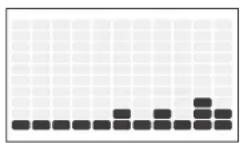
9) RANDOM: Special designed chart based program that will simulate resistance being changed randomly.
(Comfort 2.0)
| RANDOM | ||||||||||||||||||||||||||||||||||||||||||||||||||||||||||||||||||||||||||||||||||||||||||||||||||||||||||||||||||||||||||||||||||||||||||||||||||||||||||||||||||||||||||||||||||||||||||||||||||||||||||||||||||||||||||||||||||||||||||||||||||||
| Warm Up Program segments Cool Down | ||||||||||||||||||||||||||||||||||||||||||||||||||||||||||||||||||||||||||||||||||||||||||||||||||||||||||||||||||||||||||||||||||||||||||||||||||||||||||||||||||||||||||||||||||||||||||||||||||||||||||||||||||||||||||||||||||||||||||||||||||||
| Seconds | 60 | 60 | 60 | 69 | 60 | 60 | 60 | 60 | 60 | 60 | 60 | 60 | 60 | 60 | 60 | 60 | 60 | 60 | 60 | 60 | 60 | 60 | 60 | 60 | 60 | 60 | 60 | 60 | 60 | 60 | 60 | 60 | 60 | 60 | 60 | 60 | 60 | 60 | 11 | 12 | 13 | 14 | 15 | 16 | 17 | 18 | ||||||||||||||||||||||||||||||||||||||||||||||||||||||||||||||||||||||||||||||||||||||||||||||||||||||||||||||||||||||||||||||||||||||||||||||||||||||||||||||||||||||||||||||||||||||||||||||||||||||
(Comfort 4.0, 8.1, R8.0)
| RANDOM | ||||||||||||||||||||||||||||||||||||||||||||||||||||||||||||||||||||||||||||||||||||||||||||||||||||||||||||||||||||||||||||||||||||||||||||||||||||||||||||||||||||||||||||||||||||||||||||||||||||||||||||||||||||||||||||||||||||||||||||
| Warm Up Program segments Cool Down | ||||||||||||||||||||||||||||||||||||||||||||||||||||||||||||||||||||||||||||||||||||||||||||||||||||||||||||||||||||||||||||||||||||||||||||||||||||||||||||||||||||||||||||||||||||||||||||||||||||||||||||||||||||||||||||||||||||||||||||
| Seconds | 00 | 60 | 60 | 60 | 60 | 60 | 60 | 60 | 60 | 60 | 60 | 60 | 60 | 60 | 60 | 60 | 60 | 60 | 60 | 60 | 60 | 60 | 60 | 60 | 60 | 60 | 60 | 60 | 60 | 60 | 60 | 60 | 60 | 60 | 61 | 17 | 18 | |||||||||||||||||||||||||||||||||||||||||||||||||||||||||||||||||||||||||||||||||||||||||||||||||||||||||||||||||||||||||||||||||||||||||||||||||||||||||||||||||||||||||||||||||||||||||||||||||||||||


10)CONSTANT WATTS: This workout automatically adjusts the resistance to keep you within a set Watts range and maintains your desired level of exercise intensity.
1) Select Constant Watts program using and press ENTER.
2) Set time using and press ENTER.
3) Select desired watts using end press ENTER.
4) Press START to being the program.
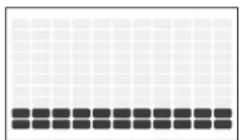
11)INTERVAL WATT PROGRAM: Allows you to choose a high WATTs value and a low WATTs value. The interval program will switch between High and Low WATTs values, making for a very intense and effective workout.
1) Select Constant Watts program using and press enter.
2) Set time using and press enter.
3) Select your desired low watts target and press enter.
4) Select your desired high watts target and press enter.
5) Press START to being the program.
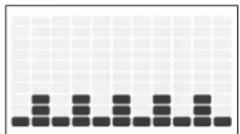
Note: The watts programs is RPM related. Resistance will change automatically according to your pedaling speed and make sure you keep your workout in your target watt. Please do not pedal too slow or too fast. If you are out of the target zone LCD will show arrow sign beside RPM column to tell you to adjust your speed. Upper arrow for speed up your RPM and arrow down for slowing down your workout.
12) THR ZONE: Simulate the intensity of your favorite sport as the program resistance automatically adjusts to maintain a set Target Heart Rate range. (Suggest to use chest belt with this program. You may purchase chest belt separately from your dealer)
1) Select THR Zone program using and press ENTER.
2) Select TIME using and press ENTER.
3) The HEART RATE window will flash showing the default target heart rate of 80 beats per minute. Select your target heart rate (from heart rate training chart) using and press ENTER.
4) Press START to begin.
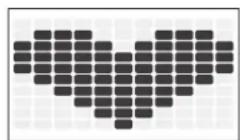
13)% THR: Benefits weight loss by maintaining an optimum exercise level to burn fat, while adjusting the resistance to keep you in your target heart rate zone. First set up your personal data (your machine will automatically calculate your maximum workout heart rate) and select the percentage you wish to workout base on your maximum heart rate. (Suggest to use chest belt with this program. You may purchase chest belt separately from your dealer)
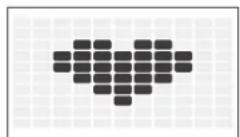
Note: The heart rate program is based on your heart rate target. Resistance will change automatically according to your pedaling speed and make sure you keep your workout in your target heart rate. Please do not pedal too slow or too fast. If you are out of the target zone LCD will show arrow sign beside RPM column to tell you to adjust your speed. Upper arrow for speed up your RPM and arrow down for slowing down your workout.


14)STRENGTH BUILDER: Help you gradually increase your muscle strength with a preset workout program. Time based program with 20 levels to choose from. User sets time and level using (up/down arrows) and ENTER.
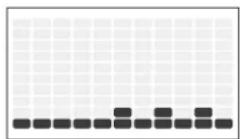
(Comfort 4.0, 8.1, R8.0)
| STRENGTH BUILDER | ||||||||||||||||||||||||||||||||||||||||||||||||||||||||||||||||||||||||||||||||||||||||||||||||||||||||||||||||||||||||||||||||||||||||||||||||||||||||||||||||||||||||||||||||||||||||||||||||||||||||||||||||||||||||||||||||||||||||||||||||||||||||||||||||||||||||||||||||||||||||||||||||||||||||||||||||||||||||||||||||||||||||||||||||||||||||||||||||||||||||||||||||||||||||||||||||||||||||||||||||||||
| Warm Up Program Segments - Repeat Cool Down | ||||||||||||||||||||||||||||||||||||||||||||||||||||||||||||||||||||||||||||||||||||||||||||||||||||||||||||||||||||||||||||||||||||||||||||||||||||||||||||||||||||||||||||||||||||||||||||||||||||||||||||||||||||||||||||||||||||||||||||||||||||||||||||||||||||||||||||||||||||||||||||||||||||||||||||||||||||||||||||||||||||||||||||||||||||||||||||||||||||||||||||||||||||||||||||||||||||||||||||||||||||
| Seconds | 60 | 60 | 60 | 60 | 60 | 60 | 60 | 60 | 60 | 60 | 60 | 60 | 60 | 60 | 60 | 60 | 60 | 60 | 60 | 60 | 60 | 60 | 60 | 60 | 60 | 60 | 60 | 60 | 60 | 60 | 60 | 60 | 60 | 60 | 16 | 17 | 18 | 19 | 20 | 41 | 14 | 14 | 14 | 15 | 16 | 17 | 18 | 19 | 20 | 31 | 11 | 11 | 11 | 11 | 11 | 11 | 11 | 11 | 11 | 11 | 11 | 11 | 11 | 11 | 11 | 11 | 11 | 11 | 11 | 11 | 11 | 11 | 11 | 11 | 11 | 11 | 11 | 11 | 11 | 11 | 11 | 11 | 11 | 12 | 12 | 12 | 12 | 12 | 12 | 12 | 12 | 12 | 12 | 12 | 12 | 12 | 12 | 12 | 12 | 12 | 12 | 12 | 12 | 12 | 12 | 12 | 12 | 12 | 12 | 12 | 12 | 12 | 12 | 12 | 12 | 12 | 12 | |||||||||||||||||||||||||||||||||||||||||||||||||||||||||||||||||||||||||||||||||||||||||||||||||||||||||||||||||||||||||||||||||||||||||||||||||||||||||||||||||||||||||||||||||||||||||||||||||||||||||||||||||||||||||||||||||||||||||||||||||||||||||||||||||||||||||||||||||||||||||||||||
| Segment | 1.3 | 2.3 | 4.5 | 6.6 | 7.9 | 8.9 | 10.1 | 11.1 | 12.1 | 13.14 | 15.16 | 17.18 | 19.20 | 1.6 | 17 | 18 | 19 | 20 | 16 | 17 | 18 | 19 | 19 | 20 | 16 | 17 | ||||||||||||||||||||||||||||||||||||||||||||||||||||||||||||||||||||||||||||||||||||||||||||||||||||||||||||||||||||||||||||||||||||||||||||||||||||||||||||||||||||||||||||||||||||||||||||||||||||||||||||||||||||||||||||||||||||||||||||||||||||||||||||||||||||||||||||||||||||||||||||||||||||||||||||||||||||||||||||||||||||||||||||||||||||||||||||||||||||||||||||||||||||||||||
| Level | 1.1 | 1.3 | 1.3 | 1.4 | 1.4 | 1.4 | 1.4 | 1.4 | 1.4 | 1.4 | 1.4 | 1.4 | 1.4 | 1.4 | 1.4 | 1.4 | 1.4 | 1.4 | 1.4 | 1.4 | 1.4 | 1.4 | 1.4 | 1.4 | 1.4 | 1.4 | 1.4 | 1.4 | 1.1 | 16 | 17 | 18 | 19 | 20 | ||||||||||||||||||||||||||||||||||||||||||||||||||||||||||||||||||||||||||||||||||||||||||||||||||||||||||||||||||||||||||||||||||||||||||||||||||||||||||||||||||||||||||||||||||||||||||||||||||||||||||||||||||||||||||||||||||||||||||||||||||||||||||||||||||||||||||||||||||||||||||||||||||||||||||||||||||||||||||||||||||||||||||||||||||||||||||||||||||||||||||||||||||
| Level | 2.1 | 1.1 | 1.3 | 3.3 | 4.3 | 6.3 | 6.3 | 6.3 | 6.3 | 6.3 | 6.3 | 6.3 | 6.3 | 6.3 | 6.3 | 6.3 | 6.3 | 6.3 | 6.3 | 6.3 | 6.3 | 6.3 | 6.3 | 6.3 | 6.3 | 6.3 | 6.3 | 6.3 | 6.3 | 6.3 | 1.1 | 16 | 17 | 18 | 19 | 20 | 10 | 11 | 12 | 12 | 12 | 12 | 12 | 12 | 12 | 12 | 12 | 12 | 12 | 12 | 12 | 12 | 12 | 12 | 12 | 12 | 12 | 12 | 12 | 12 | 12 | 12 | 12 | 12 | 12 | 12 | 12 | 12 | 12 | 12 | ||||||||||||||||||||||||||||||||||||||||||||||||||||||||||||||||||||||||||||||||||||||||||||||||||||||||||||||||||||||||||||||||||||||||||||||||||||||||||||||||||||||||||||||||||||||||||||||||||||||||||||||||||||||||||||||||||||||||||||||||||||||||||||||||||||||||||||||||||||||||||||||||||||||||||||||||||||||||||||||||||||||||||||||
| Level | 3.1 | 1.3 | 3.3 | 4.4 | 4.4 | 4.4 | 4.4 | 4.4 | 4.4 | 4.4 | 4.4 | 4.4 | 4.4 | 4.4 | 4.4 | 4.4 | 4.4 | 4.4 | 4.4 | 4.4 | 4.4 | 4.4 | 4.4 | 4.4 | 4.4 | 4.4 | 4.4 | 4.4 | 4.3 | 3.1 | 1.1 | 16 | 17 | 18 | 19 | 20 | ||||||||||||||||||||||||||||||||||||||||||||||||||||||||||||||||||||||||||||||||||||||||||||||||||||||||||||||||||||||||||||||||||||||||||||||||||||||||||||||||||||||||||||||||||||||||||||||||||||||||||||||||||||||||||||||||||||||||||||||||||||||||||||||||||||||||||||||||||||||||||||||||||||||||||||||||||||||||||||||||||||||||||||||||||||||||||||||||||||||||||||||||
| Level | 4.1 | 1.3 | 3.3 | 4.6 | 6.3 | 6.6 | 6.6 | 6.6 | 6.6 | 6.6 | 6.6 | 6.6 | 6.6 | 6.6 | 6.6 | 6.6 | 6.6 | 6.6 | 6.6 | 6.6 | 6.6 | 6.6 | 6.6 | 6.6 | 6.6 | 6.6 | 6.6 | 6.6 | 6.6 | 6.6 | 6.3 | 3.1 | 1.1 | 16 | 17 | 18 | 19 | 20 | ||||||||||||||||||||||||||||||||||||||||||||||||||||||||||||||||||||||||||||||||||||||||||||||||||||||||||||||||||||||||||||||||||||||||||||||||||||||||||||||||||||||||||||||||||||||||||||||||||||||||||||||||||||||||||||||||||||||||||||||||||||||||||||||||||||||||||||||||||||||||||||||||||||||||||||||||||||||||||||||||||||||||||||||||||||||||||||||||||||||||||||||
| Level | 5.3 | 3.4 | 4.4 | 4.4 | 4.7 | 7.4 | 7.4 | 7.4 | 7.4 | 7.4 | 7.4 | 7.4 | 7.4 | 7.4 | 7.4 | 7.4 | 7.4 | 7.4 | 7.4 | 7.4 | 7.4 | 7.4 | 7.4 | 7.4 | 7.4 | 7.4 | 7.4 | 7.4 | 7.4 | 7.4 | 7.3 | 3.1 | 1.1 | 16 | 17 | 18 | 19 | |||||||||||||||||||||||||||||||||||||||||||||||||||||||||||||||||||||||||||||||||||||||||||||||||||||||||||||||||||||||||||||||||||||||||||||||||||||||||||||||||||||||||||||||||||||||||||||||||||||||||||||||||||||||||||||||||||||||||||||||||||||||||||||||||||||||||||||||||||||||||||||||||||||||||||||||||||||||||||||||||||||||||||||||||||||||||||||||||||||||||||||||
| Level | 6.3 | 3.4 | 6.6 | 6.9 | 6.9 | 6.9 | 6.9 | 6.9 | 6.9 | 6.9 | 6.9 | 6.9 | 6.9 | 6.9 | 6.9 | 6.9 | 6.9 | 6.9 | 6.9 | 6.9 | 6.9 | 6.9 | 6.9 | 6.9 | 6.9 | 6.9 | 6.9 | 6.9 | 6.3 | 3.1 | 1.1 | 16 | 17 | 18 | ||||||||||||||||||||||||||||||||||||||||||||||||||||||||||||||||||||||||||||||||||||||||||||||||||||||||||||||||||||||||||||||||||||||||||||||||||||||||||||||||||||||||||||||||||||||||||||||||||||||||||||||||||||||||||||||||||||||||||||||||||||||||||||||||||||||||||||||||||||||||||||||||||||||||||||||||||||||||||||||||||||||||||||||||||||||||||||||||||||||||||||||||||
| Level | 7.4 | 6.8 | 7.9 | 9.9 | 12.7 | 12.9 | 12.7 | 12.9 | 12.7 | 12.9 | 12.9 | 12.9 | 12.9 | 12.9 | 12.9 | 12.9 | 12.9 | 12.9 | 12.9 | 12.9 | 12.9 | 12.9 | 12.9 | 12.9 | 12.9 | 12.9 | 12.9 | 12.9 | 12.9 | 12.8 | 7.4 | 6.4 | 6.4 | 6.4 | 6.4 | 6.4 | 6.4 | 6.4 | 6.4 | 6.4 | 6.4 | 6.4 | 6.4 | 6.4 | 6.4 | 6.4 | 6.4 | 6.4 | 6.4 | 6.4 | 6.4 | 6.4 | 6.4 | 6.4 | 6.4 | 6.4 | 5.3 | 5.3 | 5.3 | 5.3 | 5.3 | 5.3 | 5.3 | 5.3 | 5.3 | 5.3 | 5.3 | 5.3 | 5.3 | 5.3 | 5.3 | 5.3 | 5.3 | 5.3 | 5.3 | 5.3 | 5.3 | 5.3 | 5.3 | 5.3 | 5.3 | 5.4 | 5.4 | 5.4 | 5.4 | 5.4 | 5.4 | 5.4 | 5.4 | 5.4 | 5.4 | 5.4 | 5.4 | 5.4 | 5.4 | 5.4 | 5.4 | 5.4 | 5.4 | 5.4 | 5.4 | 5.4 | 5.4 | 5.4 | 5.4 | 5.4 | 5.3 | 5.3 | 5.3 | 5.3 | 5.3 | 5.3 | 5.3 | 5.3 | 5.3 | 5.3 | 5.3 | 5.3 | 5.3 | 5.3 | 5.3 | 5.3 | 5.3 | 5.3 | 5.3 | 5.3 | 5.3 | 5.3 | 5.3 | 5.3 | 6.4 | 6.4 | 6.4 | 6.4 | 6.4 | 6.4 | 6.4 | 6.4 | 6.4 | 6.4 | 6.4 | 6.4 | 6.4 | 6.4 | 6.4 | 6.4 | 6.4 | 6.4 | 6.4 | 6.4 | 6.4 | 6.4 | 6.4 | 6.4 | 6.3 | 6.3 | 6.3 | 6.3 | 6.3 | 6.3 | 6.3 | 6.3 | 6.3 | 6.3 | 6.3 | 6.3 | 6.3 | 6.3 | 6.3 | 6.3 | 6.3 | 6.3 | 6.3 | 6.3 | 6.3 | 6.3 | 6.3 | 6.3 | 6.4 | 6.4 | 6.4 | 6.4 | 6.4 | 6.4 | 6.4 | 6.4 | 6.4 | 6.4 | 6.4 | 6.4 | 6.4 | 6.4 | 6.4 | 6.4 | 6.4 | 6.4 | 6.4 | 6.4 | 6.4 | 6.4 | 6.4 | 6.4 | 5.8 | 5.7 | 5.6 | 5.5 | 5.4 | 5.3 | 5.3 | 5.3 | 5.3 | 5.3 | 5.3 | 5.3 | 5.3 | 5.3 | 5.3 | 5.3 | 5.3 | 5.3 | 5.3 | 5.3 | 5.3 | 5.3 | 5.3 | 5.3 | 5.3 | 5.3 | 5.3 | 5.3 | 5.4 | 5.3 | 5.3 | 5.3 | 5.3 | 5.3 | 5.3 | 5.3 | 5.3 | 5.3 | 5.3 | 5.3 | 5.3 | 5.3 | 5.3 | 5.3 | 5.3 | 5.3 | 5.3 | 5.3 | 5.3 | 5.3 | 5.3 | 5.3 | 5.2 | 5.2 | 5.2 | 5.2 | 5.2 | 5.2 | 5.2 | 5.2 | 5.2 | 5.2 | 5.2 | 5.2 | 5.2 | 5.2 | 5.2 | 5.2 | 5.2 | 5.2 | 5.2 | 5.2 | 5.2 | 5.2 | 5.2 | 5.2 | 5.2 | 5.3 | 5.3 | 5.3 | 5.3 | 5.3 | 5.3 | 5.3 | 5.3 | 5.3 | 5.3 | 5.3 | 5.3 | 5.3 | 5.3 | 5.3 | 5.3 | 5.3 | 5.3 | 5.3 | 5.3 | 5.3 | 5.3 | 5.3 | 5.3 | 5.2 | 5.1 | 5.0 | 5.0 | 5.0 | 5.0 | 5.0 | 5.0 | 5.0 | 5.0 | 5.0 | 5.0 | 5.0 | 5.0 | 5.0 | 5.0 | 5.0 | 5.0 | 5.0 | 5.0 | 5.0 | 5.0 | 5.0 | 5.0 | 5.0 | 5.0 | 5.0 | 5.1 | 5.0 | 5.0 | 5.0 | 5.0 | 5.0 | 5.0 | 5.0 | 5.0 | 5.0 | 5.0 | 5.0 | 5.0 | 5.0 | 5.0 | 5.0 | 5.0 | 5.0 | 5.0 | 5.0 | 5.0 | 5.0 | 5.0 | 5.0 | 5.1 | 5.1 | 5.1 | 5.1 | 5.1 | 5.1 | 5.1 | 5.1 | 5.1 | 5.1 | 5.1 | 5.1 | 5.1 | 5.1 | 5.1 | 5.1 | 5.1 | 5.1 | 5.1 | 5.1 | 5.1 | 5.1 | 5.1 | 5.1 | 5.1 | 5.0 | 5.0 | 5.0 | 5.0 | 5.0 | 5.0 | 5.0 | 5.0 | 5.0 | 5.0 | 5.0 | 5.0 | 5.0 | 5.0 | 5.0 | 5.0 | 5.0 | 5.0 | 5.0 | 5.0 | 5.0 | 5.0 | 5.0 | 5.2 | 5.2 |
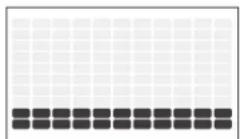
15)CUSTOM 1 & 2: Customized workout, time defaults to 15 minutes. (Comfort 3 does not have Custom 2)
1) First enter the program setting and profile display will guide you trough all the workout column.
2) Use upper and lower arrow to change the resistance and press enter to confirm. Console will display your current segment number and guide you through segment 1 to segment 15.
3) After finish all setting press START to begin.

HEART RATE TRAINING
The first step in knowing the right intensity for your training is to find out your maximum heart rate (max HR = 220 - your age). The age-based method provides an average statistical prediction of your max HR and is a good method for the majority of people, especially those new to heart rate training. The most precise and accurate way of determining your individual max HR is to have it clinically tested by a cardiologist or exercise physiologist through the use of a maximal stress test. If you are over the age of 40, overweight, have been sedentary for several years, or have a history of heart disease in your family, clinical testing is recommended. This chart gives examples of the heart rate range for a 30 year old exercising at 5 different heart rate zones. For example, a 30-year-old's max HR is 220 - 30 = 190 bpm and 90% max HR is 190 × 0.9 = 171 bpm.
| Target Heart Rate Zone | Workout Duration | Example THR Zone (age 30) | Your THR Zone | Recommended For |
| VERY HARD 90-100% | <5 MIN | 171-190 BPM | Fit persons and for athletic training | |
| HARD 80-90% | 2-10 MIN | 152-171 BPM | Shorter workouts | |
| MODERATE 70-80% | 10-40 MIN | 133-152 BPM | Moderately long workouts | |
| LIGHT 60-70% | 40-80 MIN | 114-133 BPM | Longer and frequently repeated shorter exercises | |
| VERY LIGHT 50-60% | 20-40 MIN | 104-114 BPM | Weight management and active recovery |

USING YOUR MEDIA PLAYER

1) Connect the included AUDIO ADAPTOR CABLE to the AUDIO IN JACK on the console and the headphone jack on your media player.
2) Use your media player buttons to adjust song settings.
3) Remove the AUDIO ADAPTOR CABLE when not in use.
SYNCING BIKE WITH PASSPORT (COMFORT 2.0 IS NOT INCLUDED)
1) Using the arrow key on the passport remote control to scroll to the setup icon and press the Select.
2) Follow the on-screen prompt to press and hold on the equipment's console for 3-5 seconds.
3) Once your sync is successful, your bike message bar will change from RF Sync to Passport Ready.
4) The message displayed on-screen will notify you if the sync was successful or failed.
ENERGYSAVERMODE
This machine is equipped with Energy Saver mode. When Energy Saver mode is activated, the display will automatically enter standby mode (Energy Saver mode) after 15 minutes of inactivity. This feature saves energy by disabling most power to the machine until a key is pressed on the console. You may switch this function on and off using engineering menu.
ENGINEERING MODE:
To enter the engineering menu, press and hold the and for 3-5 seconds.
SWITCHING BETWEEN BRITISH AND METRIC MODE
Use the and arrow keys to navigate to Eng2 and press Enter. Use the Enter key to navigate to P1. Use the and arrow keys to switch between STANDARD (BRITISH) and METRIC.
SWITCHING DISPLAY LANGUAGE
Use the and arrow keys to navigate to Eng2 and press Enter. Use the Enter key to navigate to P2 Press ENTER to select language mode, use arrow keys to select the language you desire.
Press and hold STOP for 3-5 seconds to exit ENG2. Press and hold STOP again for 3-5 seconds to exit the engineering menu.
SWITCHING ON/OFF THE ENGERGY SAVER FUNCTION
Use the and arrow keys to navigate to Eng2 and press Enter. Use the Enter key to navigate to P5.
Press ENTER to select Energy Saver mode, use the and arrow keys to select ENRGY SAVE ON or OFF. Press and hold STOP for 3-5 seconds to exit ENG2. Press and hold STOP again for 3-5 seconds to exit the engineering menu.

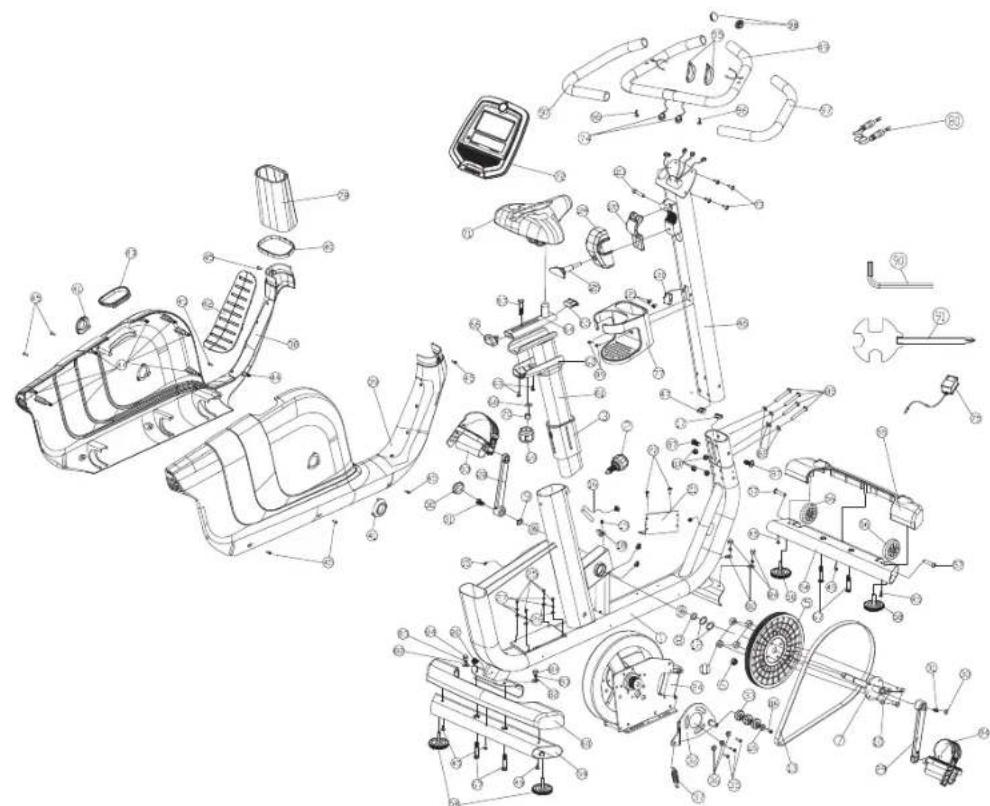
COMFORT 2.0 EXPLODED VIEW
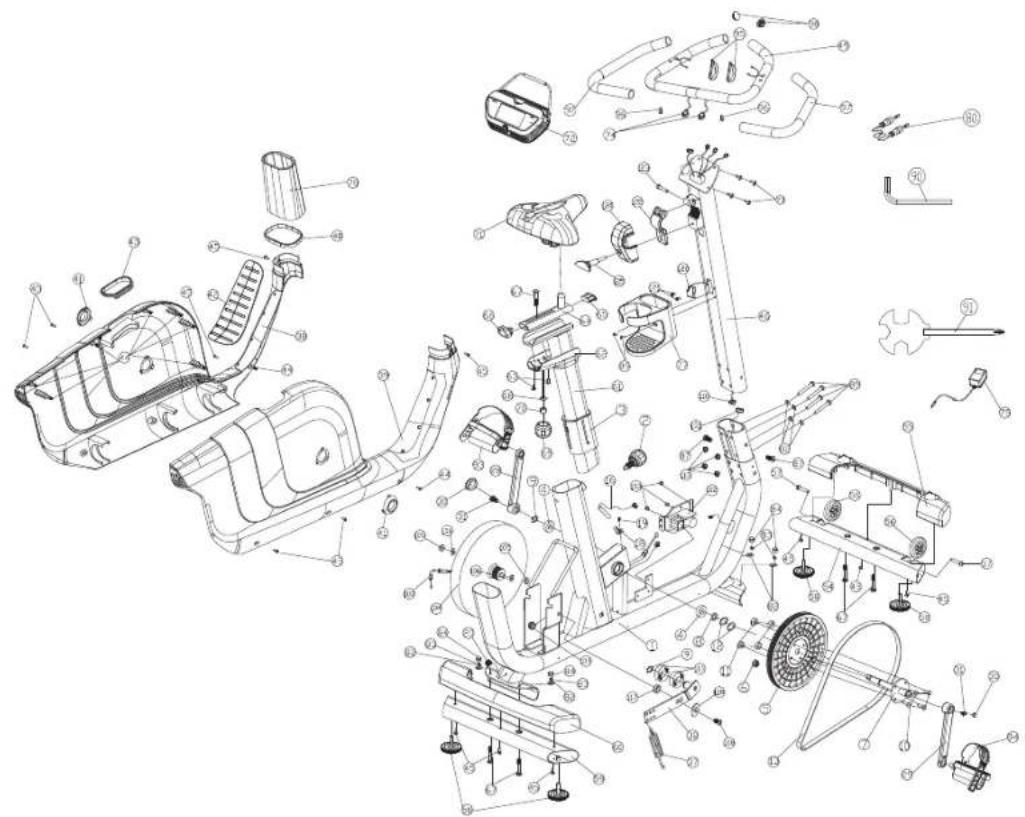
COMFORT 2.0 PARTS LIST
| NO. | DESCRIPTION | QTY |
| 1 MAIN | FRAME 1 | |
| 2 POP | PIN 1 | |
| 3 INNER BUSHING 1 | ||
| 4 BEARING 2 | ||
| 5 DRIVE PULLEY 1 | ||
| 6 MAGNET 1 | ||
| 7 TRANSMISSION SHAFT 1 | ||
| 8 SPACER 1 | ||
| 9 C-CLIP 1 | ||
| 9 C-CLIP 1 | ||
| 10 ALLEN HEX SCREW 4 | ||
| 11 NYLON NUT | 4 | |
| 12 WAVE WASHER | 2 | |
| 13 BELT | 1 | |
| 16 SENSOR CABLE | 1 | |
| 18 ROUND SENSOR FIXING PLASTIC | 1 | |
| 19 ROUND HEAD PHILIPS DRILLING SELF TAPPING | 1 | |
| 20 POWER CORD | 1 | |
| 28 LEFT CRANK | 1 | |
| 29 RIGHT CRANK | 1 | |
| 30 CRANK COVER | 2 | |
| 31 HEX FLANGE SCREW | 2 | |
| 32 IDLE WHEEL FIXING PLATE | 1 | |
| 37 IDLE WHEEL FLEXING SPRING | 1 | |
| 38 LEFT SHROUD | 1 |
| NO. | DESCRIPTION | QTY |
| 39 RIGHT SHROUD | 1 | |
| 40 CONSOLE MAST DECORATIVE RING | 1 | |
| 41 CRANK DECORATIVE RING | 2 | |
| 42 RUBBER STEP-THROUGH PAD | 1 | |
| 43 SEAT POST SUPPORT TUBE PAD | 1 | |
| 44 CLIP | 8 | |
| 45 TRUSS PHILIPS SELF TAPPING SCREW | 14 | |
| 46 CONSOLE MAST 1 | ||
| 54 FRONT STABILIZER | 1 | |
| 55 FRONT STABILIZER COVER | 1 | |
| 56 TRANSPORTATION WHEEL | 2 | |
| 57 TRUSS HEX SCREW | 2 | |
| 58 LEVELER 4 | ||
| 59 REAR STABILIZER | 1 | |
| 60 REAR STABILIZER COVER | 1 | |
| 61 SEAT POST | 1 | |
| 62 SEAT POST COVER | 1 | |
| 63 ROUND HEAD PHILIPS SCREW | 2 | |
| 64 SEAT SUPPORTING SHAFT | 1 | |
| 65 END CAP | 1 | |
| 66 TOWEL HOOK | 1 | |
| 67 CARRIAGE SCREW | 9 | |
| 68 FLAT WASHER | 1 | |
| 69 KNOB | 1 | |
| 70 SPACER 1 |
COMFORT 2.0 PARTS LIST
| NO. | DESCRIPTION | QTY |
| 71 SEAT PAD 1 | ||
| 72 CONSOLE 1 | ||
| 73 TRUSS PHILIPS SCREW 4 | ||
| 74 HAND GRIP HR SENSOR CABLE 2 | ||
| 75 POWER ADAPTOR 1 | ||
| 77 BOTTLLE HOLDER B 1 | ||
| 78 CONSOLE MAST GROMMET 1 | ||
| 80 AUDIO CABLE 1 | ||
| 82 FLAT WASHER 20 | ||
| 83 SPRING WASHER 12 | ||
| 84 NUT 12 | ||
| 85 TRUSS HEX SCREW | 8 | |
| 87 TRUSS HEX SCREW | 4 | |
| 89 COUNTER SINK PHILIPS SCREW | 4 | |
| 90 HEX WRENCH | 2 | |
| 91 "PLUS" WRENCH | 2 | |
| 93 LEFT PEDAL | 1 | |
| 94 RIGHT PEDAL | 1 | |
| 95 HAND GRIP HR SENSOR | 2 | |
| 96 TRUSS PHILIPS SELF TAPPING SCREW ST4X25 | 2 | |
| 97 FOAM GRIP | 1 | |
| 98 TRUSS END CAP | 2 | |
| 100 | ADJUSTMENT CABLE | 1 |
| 101 | LOWER CONSOLE CABLE | 1 |
| 102 | MOTOR | 1 |
| NO. | DESCRIPTION | QTY |
| 103 | ROUND HEAD PHILIPS SCREW | 3 |
| 104 | FLY WHEEL | 1 |
| 105 | ALLEN FLANGE SCREW NUT | 2 |
| 106 | WASHER | 2 |
| 107 | BEARING | 2 |
| 108 | FLAT HEAD HEX SCREW | 1 |
| 109 | NYLON NUT | 1 |
| 110 | MIDDLE CONSOLE CABLE | 1 |
| 113 | NYLON NUT | 4 |
| 117 | SPACER | 1 |
| 118 | FLAT WASHER | 1 |
| 120 | WIRELESS HAND PULSE RECEIVER | 1 |
| 121 | COUNTER SINK PHILIPS SELF TAPPING SCREW | 2 |
| 49+97 | HAND GRIP+FOAM GRIP | 1 |
| 122 | CLAMPPII | 1 |
| 123 | SCKT-HD CAP SCREW | 1 |
| 124 | HANDLE BAR COVER | 1 |
| 125 | TSHAPE KNOB | 1 |
COMFORT 4.0 / 8.1 EXPLODED VIEW
COMFORT 4.0 / 8.1 PARTS LIST
| NO. | DESCRIPTION | QTY |
| 2 | POP-PIN | 1 |
| 3 | INNER BUSHING | 1 |
| 4 | BEARING 1 | |
| 5 | DRIVE PULSEY | 1 |
| 6 | MAGNET | 1 |
| 7 | TRANSMISSION SHAFT,NEW; | 1 |
| 8 | SPACER;NEW; 1 | |
| 9 | C-CLIP | 1 |
| 10 | ALLEN HEX SCREW;NEW; 1 | |
| 11 | NYLON NUT | 1 |
| 12 | WAVE WASHER | 1 |
| 13 | BELT | 1 |
| 15 | INDUCTION LOWER CONTROLLER CONNECT- | 1 |
| 16 | SENSOR CABLE | 1 |
| 17 | LOWER CONSOLE CABLE | 1 |
| 18 | ROUND SENSOR FIXING PLASTIC | 1 |
| 19 | ROUND HEAD PHILIPS DRILLING SELF TAPPING | 1 |
| 20 | POWER CORD | 1 |
| 21 | LOWER CONTROL BOARD | 1 |
| 22 | TRUSS PHILIPS SELF TAPPING SCREW | 1 |
| 24 | INDUCTION FLY WHEEL | 1 |
| 25 | ROUND HEAD HEX SCREW | 1 |
| 26 | WASHER | 1 |
| 27 | SPRING WASHER | 1 |
| 28 | LEFT CRANK | 1 |
| NO. | DESCRIPTION | QTY |
| 29 RIGHT CRANK 1 | ||
| 30 CRANK COVER 1 | ||
| 31 HEX FLANGE SCREW 1 | ||
| 32 IDLE WHEEL FIXING PLATE;NEW; 1 | ||
| 33 BEARING 1 | ||
| 35 COUNTER SINK PHILIPS SCREW 1 | ||
| 36 SLEEVE 1 | ||
| 37 IDLE WHEEL FLEXING SPRING 1 | ||
| 38 LEFT SHROUD 1 | ||
| 39 RIGHT SHROUD 1 | ||
| 40 CONSOLE MAST DECORATIVE RING 1 | ||
| 41 CRANK DECORATIVE RING | 1 | |
| 42 RUBBER STEP-THROUGH PAD 1 | ||
| 43 SEAT POST SUPPORT TUBE PAD | 1 | |
| 44 CLIP | 1 | |
| 45 TRUSS PHILIPS SELF TAPPING SCREW | 1 | |
| 46 CONSOLE MAST | 1 | |
| 47 MIDDLE CONSOLE CABLE | 1 | |
| 49+97 | HAND GRIP | 1 |
| 54 FRONT STABILIZER | 1 | |
| 55 FRONT STABILIZER COVER | 1 | |
| 56 TRANSPORTATION WHEEL | 1 | |
| 57 TRUSS HEX SCREW | 1 | |
| 58 LEVELER 1 | ||
| 59 REAR STABILIZER | 1 | |
| 60 REAR STABILIZER COVER 1 | ||
| 61 SEAT POST 1 | ||
| 62 SEAT POST COVER 1 | ||
| 63 ROUND HEAD PHILIPS SCREW 1 | ||
| 64 SEAT SUPPORTING SHAFT 1 | ||
| 65 END CAP 1 | ||
| 66 TOWEL HOOK 1 | ||
| 67 CARRIAGE BOLT 2 | ||
| 68 FLAT WASHER 1 | ||
| 69 KNOB 1 | ||
| 70 SPACER 1 | ||
| 71 SEAT 1 | ||
| 72 CONSOLE 1 | ||
| 73 TRUSS PHILIPS SCREW 1 | ||
| 74 HAND GRIP HR SENSOR CABLE 2 | ||
| 75 ADAPTOR 1 | ||
| 77 BOTTLE HOLDER B 1 | ||
| 78 CONSOLE MAST GROMMET 1 | ||
| 80 AUDIO CABLE 1 | ||
| 82 FLAT WASHER 3 | ||
| 83 SPRING WASHER 2 | ||
| 84 NUT 2 | ||
| 85 TRUSS HEX SCREW 2 | ||
| 87 TRUSS HEX SCREW 12 | ||
| 89 COUNTER SINK PHILIPS SCREW 1 |
| NO. | DESCRIPTION | QTY |
| 90 HEX | WRENCH | 1 |
| 91 "PLUS" WRENCH | 1 | |
| 93 LEFT PEDAL | 1 | |
| 94 RIGHT PEDAL | 1 | |
| 95 HAND GRIP HR SENSOR | 2 | |
| 96 TRUSS PHILIPS SELF TAPPING SCREW | 2 | |
| 97 FOAM--HANDLE BAR | 1 | |
| 98 TRUSS END CAP | 2 | |
| 113 | NYLON NUT | 2 |
| 115 | WASHER | 1 |
| 116 | COUNTER SINK PHILIPS SCREW | 1 |
| 120 | WIRELESS HAND PULSE RECEIVER | 1 |
| 121 | COUNTER SINK PHILIPS SELF TAPPING SCREW | 2 |
| 1-1 | MAIN FRAME;NEW | 1 |
| 122 | CLAMPII | 1 |
| 123 | SCKT-HD CAP SCREW | 1 |
| 124 | HANDLE BAR COVER | 1 |
| 125 | TSHAPE KNOB | 1 |
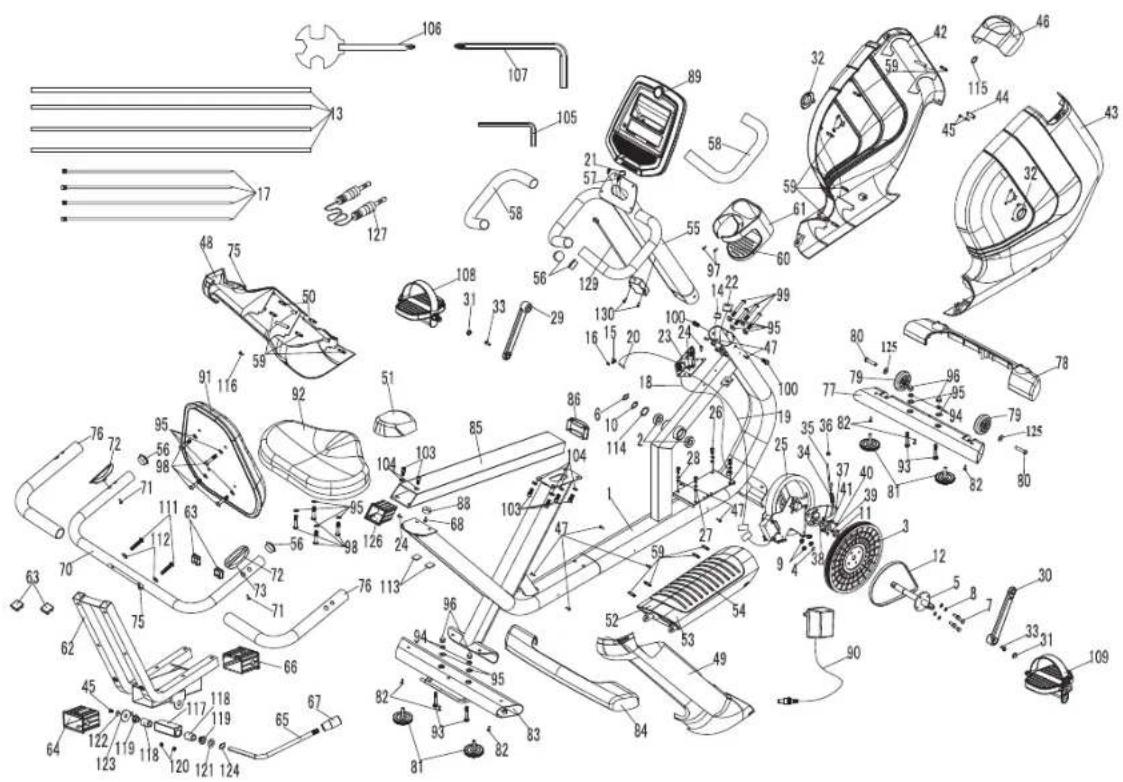
COMFORT R8.0 EXPLODED VIEW
COMFORT R8.0 PARTS LIST
| NO. | DESCRIPTION | QTY |
| 1 MAIN | FRAME 1 | |
| 2 BEARING 2 | ||
| 3 DRIVE PULLEY 1 | ||
| 4 MAGNET 1 | ||
| 5 TRANSMISSION SHAFT 1 | ||
| 6 C-CLIP 1 | ||
| 7 ALLEN HEX SCREW 4 | ||
| 8 SPRING WASHER 4 | ||
| 9 NYLON NUT 4 | ||
| 10 WAVE WASHER 1 | ||
| 11 | BUSHING | 1 |
| 12 BELT | 1 | |
| 13 TWIST TIE | 4 | |
| 14 HAND PULSE WIRE FOR FRAME | 1 | |
| 15 ROUND SENSOR FIXING PLASTIC | 1 | |
| 16 ROUND HEAD PHILIPS DRILLING SELF TAPPING | 1 | |
| 17 ZIP TIE | 4 | |
| 18 POWER CORD | 1 | |
| 20 SPEED SENSOR CABLE | 1 | |
| 21 MIDDLE CONSOLE CABLE | 1 | |
| 22 LOWER CONSOLE CABLE | 1 | |
| 23 LOWER CONTROL BOARD | 1 | |
| 24 ALLEN HEX FLANGE SLIP SCREW NUT | 3 | |
| 24 TRUSS SELF TAPPING SCREW | 1 | |
| 25 IND UCTION FLY WHEEL | 1 |
| NO. | DESCRIPTION | QTY |
| 26 HEX SCREW | 4 | |
| 27 WASHER | 4 | |
| 28 SPRING WASHER 4 | ||
| 29 LEFT CRANK | 1 | |
| 30 RIGHT CRANK | 1 | |
| 31 CRANK COVER | 1 | |
| 31 CRANK COVER | 1 | |
| 32 CRANK DECORATIVE RING | 2 | |
| 33 ALLEN HEX FLANGE SLIP SCREW | 1 | |
| 33 ALLEN HEX FLANGE SLIP SCREW | 1 | |
| 34 IDLE WHEEL FLEXING SPRING | 1 | |
| 35 ADJUSTMENT SCREW | 1 | |
| 36 FLANGE SCREW | 1 | |
| 37 IDLE WHEEL FIXING PLATE | 1 | |
| 38 BEARING 3 | ||
| 39 C-CLIP 1 | ||
| 40 COUNTER SINK PHILIPS SCREW | 3 | |
| 41 BUSHING | 3 | |
| 42 LEFT SHROUD | 1 | |
| 43 RIGHT SHROUD | 1 | |
| 44 CONNECTING PLATE | 1 | |
| 45 TRUSS PHILIPS SCREW | 1 | |
| 45 TRUSS PHILIPS SCREW | 2 | |
| 46 CONSOLE MAST GROMMET | 1 | |
| 47 TRUSS PHILIPS SELF TAPPING SCREW | 4 |
COMFORT R8.0 PARTS LIST
| NO. | DESCRIPTION | QTY |
| 47 TRUSS PHILIPS SELF TAPPING SCREW | 4 | |
| 48 REAR SUPPORT TUBE LEFT COVER | 1 | |
| 49 REAR SUPPORT TUBE RIGHT COVER | 1 | |
| 50 CLIP-SHORT | 2 | |
| 51 REAR SUPPORT TUBE TOP COVER | 1 | |
| 52 BASE TUBE LEFT COVER | 1 | |
| 53 BASE TUBE RIGHT COVER | 1 | |
| 54 RUBBER STEP-THROUGH PAD | 1 | |
| 55 CONSOLE MAST | 1 | |
| 56 TRUSS END CAP | 2 | |
| 56 TRUSS END CAP | 2 | |
| 57 UPPER HAND GRIP HR CABLE | 1 | |
| 58 FOAM GRIP-FRONT | 2 | |
| 59 CLIP-SHORT | 5 | |
| 60 BOTTLER HOLDER A | 1 | |
| 62 SEAT FRAME BASE ASSEMBLY | 1 | |
| 63 END CAP | 4 | |
| 64 BUSHING | 1 | |
| 65 SEAT ADJUSTMENT HANDLE | 1 | |
| 66 BUSHING | 1 | |
| 67 HANDLE PLASTIC CAP | 1 | |
| 68 TRUSS PHILIPS SELF TAPPING SCREW | 1 | |
| 70 REAR HANDLEBAR WELDING SET | 1 | |
| 71 TAPPING SCREW | 2 | |
| 72 HAND GRIP HR SENSOR | 2 |
| NO. | DESCRIPTION | QTY |
| 73 HAND GRIP HR SENSOR CABLE FOR THE 1 | ||
| 75 CORD CAP 1 | ||
| 75 CORD CAP 1 | ||
| 76 FOAM GRIP 2 | ||
| 77 FRONT STABILIZER ASSEMBLY 1 | ||
| 78 FRONT STABILIZER COVER 1 | ||
| 79 TRANSPORTATION WHEEL 2 | ||
| 80 TRUSS HEX SCREW 2 | ||
| 81 LEVELER 2 | ||
| 81 LEVELER 2 | ||
| 82 TRUSS PHILIPS SCREW 6 | ||
| 83 REAR STABILIZER ASSEMBLY 1 | ||
| 84 REAR STABILIZER COVER 1 | ||
| 85 SEAT RAIL | 1 | |
| 86 ARC END CAP | 1 | |
| 88 SEAT STOP | 1 | |
| 89 CONSOLE | 1 | |
| 90 ADAPTOR | 1 | |
| 91 BACKREST PAD | 1 | |
| 92 SEAT PAD | 1 | |
| 93 CARRIAGE SCREW | 8 | |
| 94 SPRING WASHER | 8 | |
| 95 FLAT WASHER | 32 | |
| 96 NUT | 8 | |
| 97 TRUSS PHILIPS SELF TAPPING SCREW | 4 | |
| 98 TRUSS HEX SCREW 16 | ||
| 99 TRUSS HEX SCREW 8 | ||
| 100 TRUSS HEX SCREW 4 | ||
| 103 CKS HEX SCREW 12 | ||
| 104 SPRING WASHER 6 | ||
| 105 HEX WRENCH 2 | ||
| 106 "PLUS" WRENCH 2 | ||
| 107 HEX WRENCH 2 | ||
| 108 LEFT PEDAL 1 | ||
| 109 RIGHT PEDAL 1 | ||
| 111 COUNTER SINK HEX SCREW 4 | ||
| 112 ARC WASHER 4 | ||
| 114 FLAT WASHER | 2 | |
| 115 PLASTIC PAD 1 | ||
| 116 ROUND HEAD SELF TAPPING SCREW 1 | ||
| 125 FLAT WASHER 2 | ||
| 126 BUSHING 1 | ||
| 127 SOUND SOURCE WIRE 1 | ||
| 129 WIRELESS HAND PULSE RECEIVER 1 | ||
| 130 COUNTER SINK PHILIPS SELF TAPPING SCREW 2 | ||
| 42-1 LEFT SHROUD | 1 | |
| 43-1 RIGHT SHROUD | 1 | |
| 46-1 CONSOLE MAST GROMMET | 1 | |
| 48-1 REAR SUPPORT TUBE LEFT COVER | 1 | |
| 49-1 REAR SUPPORT TUBE RIGHT COVER | 1 |
Eng: Waste Disposal
VISION Fitness / HORIZON Fitness / TEMPO Fitness / TREO Fitness products are recyclable. At the end if its useful life please dispose of this article correctly and safely (local refuse sites).
SCHRAUBE (A) M8X56 MM MENGE:4

FEDERSCHEIBE (C) M8X2.0T MM MENGE:4

UNTERLEGSCHEIBE (B) 9 18× 2.0TMM Menge:4

MUTTER(D) M8 Menge:4
SCHRAUBE (E) M4 X 12 MM MENGE:2
SCHRAUBE (J) M8 X 45 MM MENGE:8

UNTERLEGSCHEIBE (B) 9X 18× 2.0TMM. Menge:8
SCHRAUBE (K)
M10 X 65 MM
MENGE: 2

UNTERLEGSCHEIBE (GEBOGEN) (H) 10.5× 20× 2.0TMM Menge:2

Comfort Upright Bike
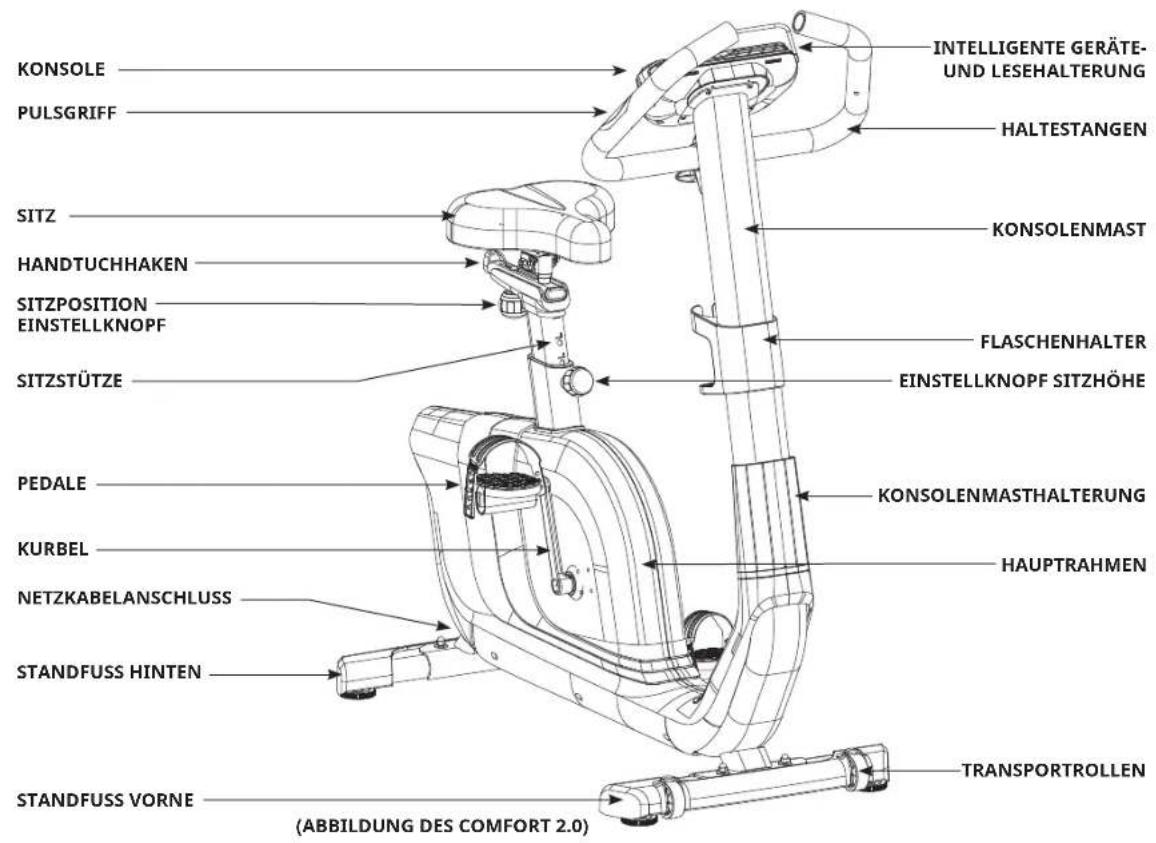
Comfort Upright Bike
SCHRAUBE (D) M4 X 12 MM MENG:2

Comfort Upright Bike

Comfort Upright Bike
Comfort Upright Bike
UPRIGHT BIKE AUFBAU
PROGRAMMINFORMATIONEN
VISION Fitness / HORIZON Fitness / TEMPO Fitness / TREO Fitness products are recyclable. At the end if its useful life please dispose of this article correctly and safely (local refuse sites).
VOORZORGSGMAATREGELEN
BEWAAR DEZE INSTRUCTIES

Comfort Upright Flets

Comfort Upright Flets
Comfort Upright Ficts
Comfort Upright Ficts
Comfort Upright Flets
PROGRAMMA-INFORMATIE
Comfort 2.0: 11 programma's (Handmatig / Intervallen / Spel / Gewichtsverlies / Rollende heuvels / Kadans / Willekeurig / THR-zone / %THR / Aangepast 1 / Aangepast 2)
Comfort 4.0: 14 programma's (Constant watts/ Handmatig / Intervallen / Spel / Fitnesstest / Gewichtsverlies / Gewichtsverlies Plus / Rollende heuvels / Kadans / Willekeurig / THR-zone / %THR / Aangepast 1 / Aangepast 2)
Comfort 8.1: 16 programme's (Constant watts / Interval watt / Handmatig / Intervallen / Spel / Fitnesstest / Gewichtsverlies / Gewichtsverlies Plus / Rollende heuvels / Kadans / Willekeurig / THR Zone / %THR / Krachtopbouw / Aangepast 1 / Aangepast 2)
Comfort R8.0: 16 programma's (Constant watts / Interval watt / Handmatig / Intervallen / Spel / Fitnesstest / Gewichtsverlies / Gewichtsverlies Plus / Rollende heuvels / Kadans / Willekeurig / THR Zone / %THR / Krachtopbouw / Aangepast 1 / Aangepast 2)
Poids brut:56,5kg/124lbs.
VISION Fitness / HORIZON Fitness / TEMPO Fitness / TREO Fitness products are recyclable. At the end if its useful life please dispose of this article correctly and safely (local refuse sites).
Horizon Comfort 2.0/4.0/8.1/RB.0|Rev.1.0A©2020Johnson Health Tech