303362 - Alarm Clock Bearware - Free user manual and instructions
Find the device manual for free 303362 Bearware in PDF.


| Product type | Mirror radio alarm clock |
| Brand | Bearware |
| Model | 303362 |
| Dimensions (estimated) | Approximately 200 x 150 x 30 mm |
| Weight (estimated) | Approximately 300 g |
| Power supply | 3 AAA 1.5V batteries or USB 5V DC adapter (cable included) |
| Display | LED with mirror |
| Main functions | Alarm, snooze, temperature display, night mode, brightness adjustment, 12/24h switch |
| Alarm settings | Hour, minute, snooze delay (5-60 min) |
| Night mode | Automatic brightness reduction between set hours |
| Temperature display | °C or °F, switchable alternately with time |
| Temperature range | 0 to 50 °C |
| Material | Mirror and plastic |
| Care and cleaning | Wipe with a soft dry cloth; do not use abrasive cleaners |
| Safety | Keep out of reach of children; do not expose to moisture or direct sunlight; use only recommended batteries |
| Spare parts and repairability | Commercially available AAA batteries; USB cable included; do not open the device |
| General information | Private use only; not suitable for medical use |
Frequently Asked Questions - 303362 Bearware
User questions about 303362 Bearware
0 question about this device. Answer the ones you know or ask your own.
Ask a new question about this device
Download the instructions for your Alarm Clock in PDF format for free! Find your manual 303362 - Bearware and take your electronic device back in hand. On this page are published all the documents necessary for the use of your device. 303362 by Bearware.
USER MANUAL 303362 Bearware
ENG: Current drivers, user manuals and other relevant documents for this product can be found on our homepage.
Thank you for choosing a BEARWARE product. Please read the following user manual carefully so as to be able to get the most from the product you have purchased.
1. Scope of delivery
- Mirror alarm clock
- USB to DC connection cable
- User manual
2. Technical data
| Power supply | Three 1.5V AAA batteries or alternatively one DC 5, 150mA USB charging adapter via USB to DC plug cable (3.5 mm/1.25 mm)/polarity: - ---(o--- + |
| Temperature range 0-50°C | |
| Features | • Alarm function (alarm) • Temperature display • Snooze function • 12/24-hours display • Night mode |

3. Additional pieces of information about this mirror alarm clock
Before using, make sure that the device is not damaged. If this is the case, then do not use it. The mirror alarm clock should not be exposed to moisture and direct sunlight. Before using the product, ensure that the available supply voltage corresponds to the operating voltage indicated on the specification plate. The product is intended only for private use and not for medical purposes or for public information.
Note concerning protective film: The display protection film serves only as protection against scratches and damage during transport of the product. You should completely remove the protective film from the display before operating the clock for the first time.

Caution!
Keep the batteries and the device out of reach of children. Batteries contain harmful acids. Weak batteries should be replaced as soon as possible to prevent leakage! Never use new and old batteries or batteries of different types together. Never throw batteries into a fire and do not short-circuit them. Do not recharge the batteries and do not take them apart. There is a risk of explosion!
4. Product details
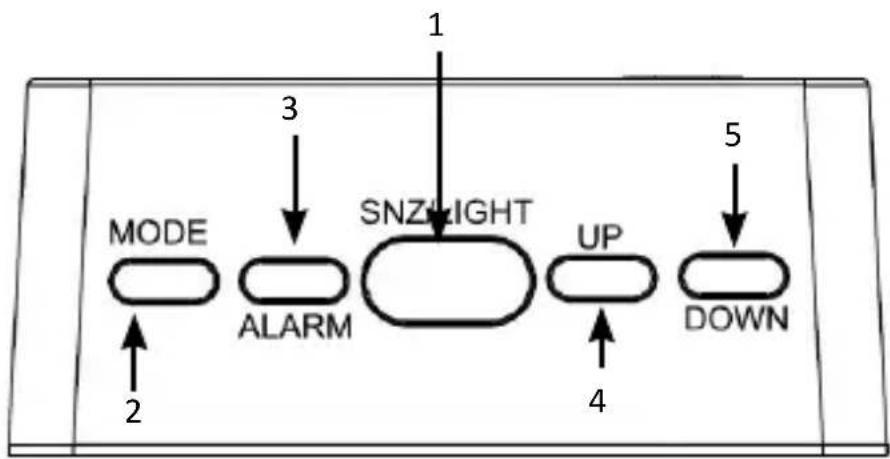
| 1 Snoze/light button |
| 2 Mode button |
| 3 Alarm button |
| 4 UP button |
| 5 DOWN button |
5. Initial use
Take the product out of the package and remove all the packaging material. Open the battery compartment at the back of the device and insert three 1.5 v AAA batteries. Pay attention to the correct polarity of the contacts. Alternatively, you can operate the device with a 4.5V-5V DC mains adapter or with the supplied USB to DC plug cable.

Note: If you want to use the device with batteries, then the backlight is not permanently switched on. The backlight is permanently switched on only in combination with a USB power supply unit and the supplied USB to DC plug cable.
By repeatedly pressing the "MODE" button, you can toggle between the display, the time, the temperature and the night mode status (see Chapter 8).
6. Setting the time
When the time is shown in the display, press and hold the "MODE" button for about 2 seconds to access the time settings. The setting sequence is as follows: Hour - minute - 12/24 hour display.
You can adjust the time using the buttons "UP" and "DOWN" and confirm your input using the "MODE" button.
7. Alarm setting
7.1 Setting the alarm
Press and hold the "ALARM" button for about 4 seconds to access the alarm settings. The alarm time is now displayed instead of the time. You can make the desired settings using the "UP" and "DOWN" buttons. Confirm using the "ALARM" button. Then press the "ALARM" button again to save the alarm setting. The sequence is as follows: Hour - minute - snooze time (can be set between 5 and 60 minutes).
7.2 Enabling/disabling the alarm
Press the "ALARM" button to enable/disable the alarm. An alarm icon ("AL") is then displayed above the time. The alarm is enabled as long as the alarm icon is shown in the display. If the "AL" icon is not displayed, then the Alarm is disabled.
7.3 Snoozing the alarm
Press the "SNZ/LIGHT" button to snooze an alarm. The alarm now sounds for the snooze time previously set in the alarm settings and then sounds again.
7.4 Turning off the alarm
To turn off the alarm, press the "MODE", "ALARM", "UP" or "DOWN" button.
8. Night mode
The night mode dims the LED light during the night time. Press the "MODE" button twice in the time display. The display shows "OFF". Press the "DOWN" button once. As soon as the display shows "ON", press and hold the "MODE" button until the start time of the night mode is displayed. You can set this using the "UP" and "DOWN" buttons. Confirm using the "MODE" button and repeat the procedure for the end time. The setting sequence is as follows: Starting hour - Starting minute - Ending hour - Ending minute.
The display is automatically dimmed during the set duration.
9. Manually dimming the LED light
Press the "UP" button to dim the backlight or to make it bright once again. Press the "DOWN" button for 3 seconds to turn off the backlight
10. Temperature display
Press the "MODE" button once during the time display to display the temperature. Press the "DOWN" button to change between ° C and ° F .
To change between temperature and time, press and hold the "MODE" button in the temperature display until you hear a beep. The display now alternately shows the temperature for 5 seconds and the time for 10 seconds. Repeat the procedure if you want to switch off this mode.

11. Safety instructions and liability disclaimer
Never try to open the device to carry out repairs or conversions. Avoid contact with mains voltages. Do not short-circuit the product. The device is not certified for use in the open air; only use it in dry conditions. Protect it from high humidity, water and snow. Keep it away from high temperatures. Do not subject the device to sudden changes in temperature or heavy vibration as this might damage electronic components. Examine the device for damage before using it. The unit should not be used if it has received an impact or has been damaged in any other way. Please observe national regulations and restrictions. Do not use the device for purposes other than those described in the instructions. This product is not a toy. Keep it out of the reach of children or mentally impaired persons. Any repair or alteration to the device not carried out by the original supplier, will invalidate the warranty or guarantee. The product may only be used by persons who have read and understood these instructions. The device specifications may change without any separate prior notice to this effect.

12. Disposal instructions
Electrical and electronic devices may only be disposed of in accordance with the European WEEE Directive and not with household rubbish. Components must be disposed of or recycled separately as dangerous, toxic elements can inflict sustained damage on the environment if they are disposed of incorrectly. As a consumer, you are bound by the Electrical and Electronic Devices Act (ElektroG) to return electrical and electronic goods free of charge at the end of their useful life to the manufacturer, the place of purchase or to specially set up, public collection points. The details in each case are governed by national law. The symbol on the product, the operating instructions and/or the packaging refers to these regulations. By separating materials in this way, recycling and disposing of old devices, you are making an important contribution towards protecting our environment. For information on authorised collection points in your area, please contact your local city or municipal administration

13. Instructions on the disposal of batteries
With regard to the sale of batteries or the supply of devices containing batteries, the supplier is obliged to draw the customer's attention to the following:
As the end user, the customer has a statutory obligation to return used batteries. He can return old batteries stocked or previously stocked by the supplier in the form of new batteries to the supplier's despatch warehouse (despatch address) free of charge. The symbols shown on the batteries have the following meanings: Pb = battery contains more than 0.004 percent by mass of lead, Cd = battery contains more than 0.002 percent by mass of cadmium, Hg = battery contains more than 0.0005 percent by mass of quicksilver.

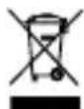
The symbol of the rubbish bin with a cross through it indicates that the battery may not be put in household waste.

C
WEEE guideline: 2012/19/EU
WEEE register number: DE 67896761
WD Plus GmbH, herewith declares that this product 303362 conforms to the principle requirements and other relevant stipulations. The complete Declaration of Conformity can be obtained from: WD Plus GmbH, Wohlenbergstraße 16, 30179 Hanover
(IT) +49511/13221740
(ES) +49511/13221750
MO-FR 9:30am - 18pm CET

- SCOPE OF DELIVERY
- TECHNICAL DATA
- ADDITIONAL PIECES OF INFORMATION ABOUT THIS MIRROR ALARM CLOCK
- CAUTION
- PRODUCT DETAILS
- INITIAL USE
- SETTING THE TIME
- ALARM SETTING
- 7.1 SETTING THE ALARM
- 7.2 ENABLING/DISABLING THE ALARM
- 7.3 SNOOZING THE ALARM
- 7.4 TURNING OFF THE ALARM
- NIGHT MODE
- MANUALLY DIMMING THE LED LIGHT
- TEMPERATURE DISPLAY
- SAFETY INSTRUCTIONS AND LIABILITY DISCLAIMER
- DISPOSAL INSTRUCTIONS
- INSTRUCTIONS ON THE DISPOSAL OF BATTERIES
Brand : Bearware
Model : 303362
Category : Alarm Clock