EasyManual
Dolmen 3 - Fan Sonnenkönig - Free user manual and instructions
Find the device manual for free Dolmen 3 Sonnenkönig in PDF.



| Feature | Details |
|---|---|
| Product type | Fan |
| Dimensions | Not specified |
| Weight | Not specified |
| Power | Not specified |
| Speed levels | Not specified |
| Oscillation function | Not specified |
| Motor type | Not specified |
| Power supply | Not specified |
| Indoor/outdoor use | Indoor |
| Maintenance | Regular cleaning of grills and blades |
| Safety instructions | Do not use near water, avoid obstructions |
| Warranty | Not specified |
| Included accessories | Not specified |
| Additional information | Check compatibility with electrical outlets |
Frequently Asked Questions - Dolmen 3 Sonnenkönig
User questions about Dolmen 3 Sonnenkönig
0 question about this device. Answer the ones you know or ask your own.
Ask a new question about this device
Download the instructions for your Fan in PDF format for free! Find your manual Dolmen 3 - Sonnenkönig and take your electronic device back in hand. On this page are published all the documents necessary for the use of your device. Dolmen 3 by Sonnenkönig.
USER MANUAL Dolmen 3 Sonnenkönig
Festnetz 14 Cent/Minute
Modifications techniques
Telephone Fixe 14 Cent/Minute
1 Safety instructions 33
2 Components 35
3 Installation 36
4 Maintenance 37
5 Operation 37
6 Warranty / Disposal / Technical change. 38
1 Safety instructions
Please read before first commissioning the safety instructions carefully and observe the safety instructions to prevent damage due to misuse, improper operation, and improper environmental conditions to be avoided. Keep these for later reference.
EN
Check the device after removing the packaging for damage. Do not put the unit in case of suspected corruption in operation and consult a specialist. The recyclable packaging material must not be stored or disposed accessible for young children, but must be disposed of properly.
This appliance is only for the purpose for which it was explicitly developed. Any other use is regarded as improper and therefore dangerous. The supplier is not liable for damage to persons and / or property damage due to an improper or incorrect use.
This appliance can be used by children aged from 8 years and above and persons with reduced physical, sensory or mental capabilities or lack of experience and knowledge if they have been given supervision or instruction concerning use of the appliance in a safe way and understand the hazards involved. Children shall not play with the appliance. Cleaning and user maintenance shall not be made by children without supervision. Please make sure to place the device on a suitable and waterproof surfaces, so that spilled liquids can not cause harm.
Repairs to electrical appliances must only be carried out by trained personnel only. Improperly performed repairs and alterations to the equipment can have dangerous consequences for the user according to what the warranty will be rejected.
- To ensure you are satisfied with the product and properly clean and maintain it, please read the instruction manual carefully before use. Also, please take good care of this manual for future reference.
- Examine the device for any visible external damages prior to using it. Never put a damaged device into operation.
- Persons, who are not able to operate the device because of any physical, mental may only use the device under the supervision or under the instructions of a responsible person.
- Do not permit children to use the device, unless they are supervised.
- Only qualified electricians, who have been trained by the manufacturer, may carry out any repairs that may be needed. Improperly performed repairs can cause considerable dangers for the user.
- Only qualified electricians, who have been trained by the manufacturer, may carry out any repairs that may be needed.
- This appliance is to be used in the household only
- Please use a separate outlet in accordance with the appliance current/voltage. Don't use more than one electrical appliance at the same time on the same outlet.
- Do not pull the connecting cable to remove the plug from the mains socket.
- Do not use the appliance if the mains cable or mains plug is damaged.
- Do not open the housing of the appliance.
-
Danger from electric current if live connections are touched and/or the electrical and mechanical configuration is changed.
-
Never immerse the appliance or the mains cable into water or other liquids.
- Do not touch the connecting cable with wet hands when disconnecting the appliance from the mains supply.
- This appliance may be used by children under the age 8 years and by persons with decreased physical, sensory or mental abilities or lack of experience and/or knowledge only if they are
- supervised or were instructed on using the appliance and have understood the resulting dangers.
- Cleaning or user-maintenance may not be performed by children who are not under supervision. Children must be supervised to ensure that they do not play with the appliance.
- Store the appliance and accessory parts out of the reach of children.
- Never cover the appliance when it is in operation.
- Do not put the appliance in the vicinity of easily inflammable materials such paint, varnish or gas.
- Allow a gap of at least 1 metre between the fan and all flammable and heat-sensitive materials (furniture, curtains, paper, clothes etc.).
- Place the appliance on a firm, dry, flat and waterproof surface.
- Do not install the appliance in a hot, wet or very humid environment.
- Never place the appliance or parts of the appliance in the vicinity of strong heat sources and hot surfaces (e.g., heating, oven, grill).
- Do not place the appliance in a confined, in an alcove, corner or constricted between items of furniture. Allow sufficient space around it so that the air can circulate.
- The appliance becomes very hot during operation. Therefore, do not touch the hot surfaces
- of the appliance during operation and for a short time afterwards.
- Wait until the appliance has cooled down before transporting it.
- Do not spray air freshener into the airflow.
- Do not place the appliance in front of an automatic air freshener atomizer system.
- Always switch off the appliance at the control panel and wait for it to run down before switching the main ON/OFF switch and pulling the plug out.
- Do not put objects into the openings or ventilation grilles.
- Keep the appliance free from dust, fluff, hair and above all, anything that could restrict the airflow.
Children and infant must be supervised to ensure that they do not play with the appliance. - Check the air inlets and the air slot for free flow. Eliminate contamination such as dirt or dust particles with a soft brush.
| Model | DOLMEN 3 DOLMEN 4 | |
| Art. No. | 10520811 10520911 | |
| Power Supply | 220-240V~ 50/60 Hz 220 | -240V~ 50/60 Hz |
| Rated Power | 20 W 25 W | |
| Dimensions | 34 x 98.5 x 34 cm 34 x 11 | 7 x 34 cm |
2 Components
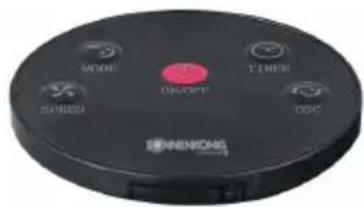
REMOTE
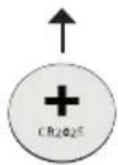
- Remote controller is stored at the top of fan
- Before using the remote controller, remove the plastic protection from the battery.
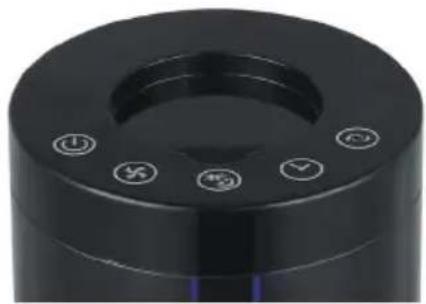
CONTROL PANEL
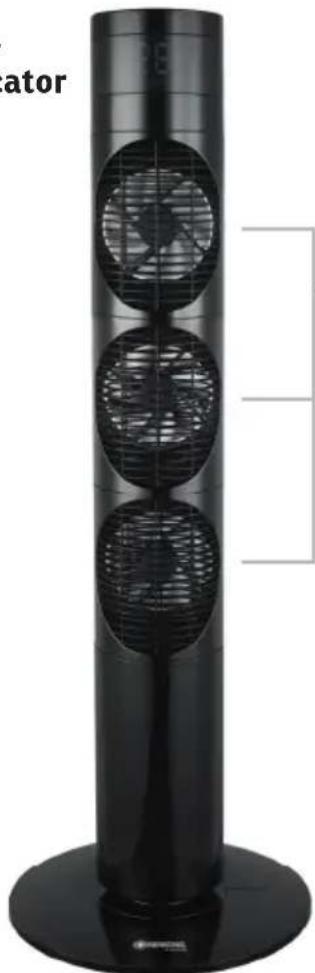
LED-Indicator
Air outlet
NOTE This tower fans are including 3 or 4 individual DC fans, each fan body can be rotated by hand, the rotation angle is 90 degree to right and left, total is 180 degree.
LED-Indicator
NOTE The display turns dark after 5 minutes.
3 Maintenance
EN
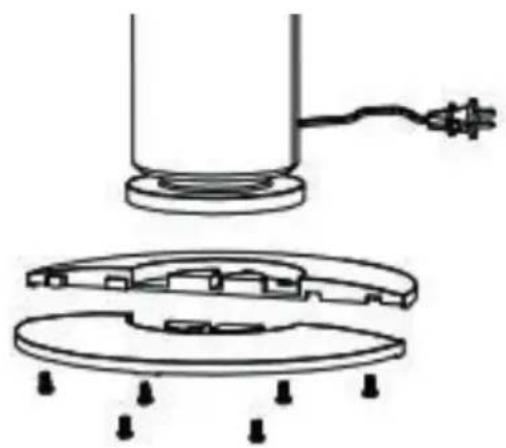
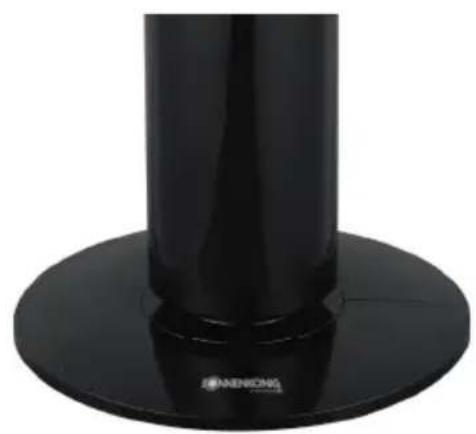
- Snap the two parts of base together.
- Attach the tower fan on the base and secure with 6 screws.
4 Maintenance
- Clean the body with soft, slightly damp, cloth; do not use abrasive or corrosive products.
- Do not immerse any part of the fan in water or other liquid: if this should happen, do not put your hand in the liquid, but first remove the plug from the socket. Carefully dry the appliance and make sure that all the electrical parts are dry: in the case of doubt, ask for professionally qualified help.
- It is essential that the motor's air holes be kept from dust and lint.
- If the fan will not be used for long periods, it must be protected from dust and humidity; we recommend storing it in its original packaging.
5 Operation
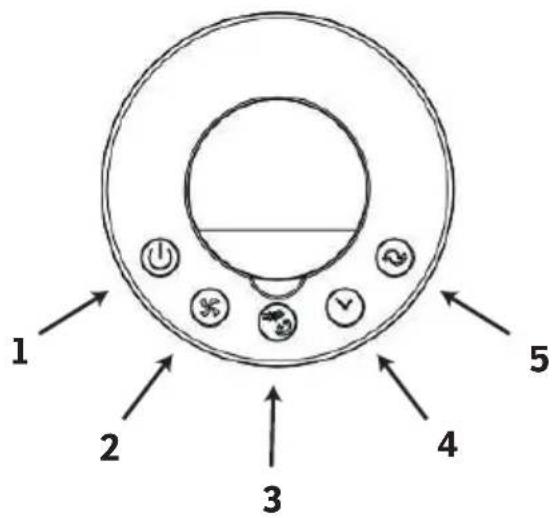
Fig. 1
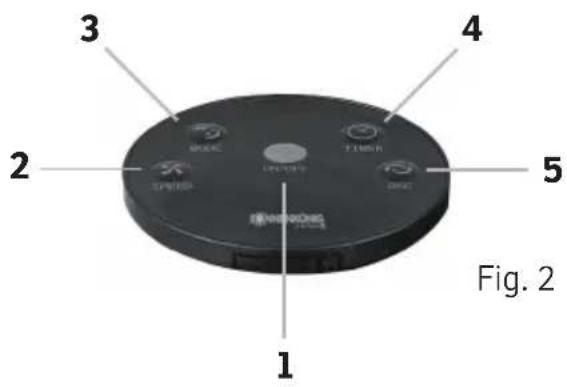
- ON/OFF
- Ventilation
- Mode
- Timer
- Oscillation
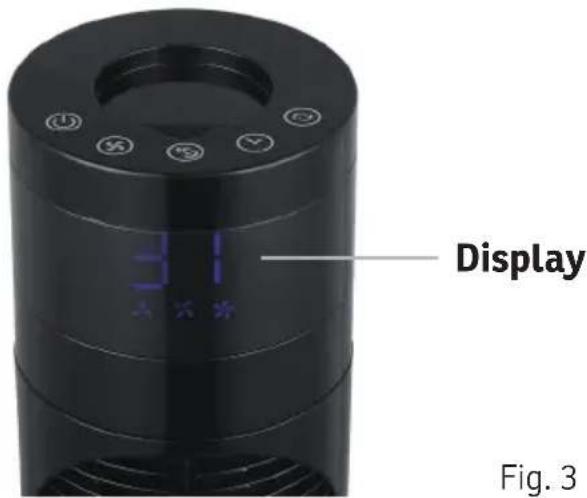
Fig. 3
ON / OFF The device can be turned on and off with the button "POWER" (Fig. 1-2; 3).
VENTILATION LEVELS Select via the Button "SPEED" (Fig. 1-2; 2) between the Ventilations levels: Low, Mid and Hight.
MODE Press the Button "MODE" (Fig. 1-2; 1) To select between the modes: Normal, Sleep und Nature.
TIMER Select via the Button "TIMER" (Fig. 1-2; 4) between 0.5 and 7.5 Hours at 30-minute intervals.
OSCILLATION Press the Button "OSC" (Fig. 1-2; 5) and device begins swinging from left to right in a 75 Degree angle.
EN
FAN SURFACE
Please gently wipe the surface which a clean soft cloth you can use a mild detergent after diluted with wet cloth to wipe the fan surface, then wipe with a soft dry cloth If the fan surface is dirty
- AIR INLET, AIR OUTLET
Use a soft brush to clean the opening around the air outlet, alternatively, lightly run a vacuum cleaner nozzle (soft brush) over the air outlet to remove any debris that may have accumulated inside.
- REMOTE CONTROL
Wipe the remote control surface gently with a dry, soft cloth. Remove the battery inside of remote control. If it is not used for a long time
- POWER PLUG
Please clean the power plug with a dry soft cloth.
STORAGE
Place in a large plastic bag for dust protection. Please avoid to put in the shaking places and nearby electrical appliances with refrigeration/heating function. Please store the fan in the clean and dry place. Please place it where children can't touch it.
6 Warranty / Disposal / Technical change
Warranty
The Products are controlled just before delivery. If despite a lack of your product, try trustfully your seller. Please bring your receipt, as this is to be submitted for each warranty. The guarantee period is 24 months from date of purchase.
Disposal
The device must be disposed of properly. The device can be distributed free of charge for disposal at each dealer.
Technical changes
Reserving technical changes in technology and design
CE Declaration of Conformity
This device complies with the following standards
EMC EN 55014-1:2017
EN 55014-2:2015
EN 61000-3-2:2014
EN 61000-3-3:2013
LVD EN 60335-2-80: 2003 + A1: 2004 + A2: 2009
EN 60335-1:2012/A13:2017
EN 62233: 2008
RoHS 2015/863/EU
EMC 2014/30/EU
LVD 2014/35/EU
DISPOSAL INSTRUCTIONS FOR THE ELECTRICAL PART OF THE PRODUCT
In accordance with Article 26 of the Decree-Law of 15 March 2015 implementing Directive 2012/19/EC, and the Law of 31 March 2015 implementing Directive 2015/863/EU on the reduction of the use of hazardous substances in electrical and electronic equipment and on waste management.
The crossed-out dustbin symbol on the machine or packaging indicates that the waste generated at the end of its useful life must be collected separately from other waste. The user must therefore take the device to the appropriate collection points at the end of its service life. Sort electronic and electrical waste or send back to the retailer when purchasing new, equivalent devices in a one-to-one process. Appropriate separate collection for subsequent commissioning of the equipment to be recycled, treatment and environmentally sound disposal helps to avoid possible adverse effects on the environment and health, and promote the reuse and/or recycling of the materials to which they belong. Misuse of this product by the user will result in the application of the administrative penalties provided for in the applicable legislation. Batteries contained in the device must be disposed of separately in the appropriate containers for the collection of used batteries.
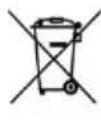
DISPOSAL OF BATTERIES AND ACCUMULATORS
In accordance with Legislative Decree 188 of 20 November 2008 implementing Directive 2006/66/EC on batteries, accumulators and related waste, the symbol of the crossed-out waste bin on the battery indicates that the disposal of used batteries is prohibited in household waste.
Single-use and rechargeable batteries contain substances that are highly polluting for the environment. The user is obliged to dispose of used batteries at collection points in the municipality or in appropriate containers. This service is free. In this way, legal requirements are adhered to and the environment protected. The symbols identifying hazardous materials that may be present in single-use and rechargeable batteries are as follows: Hg = Mercury, Cd = Cadmium, Pb = Lead.
Company
Armin Schmid
Olensbachstrasse 9-15
CH-9631 Ulisbach
Tel. Int. +41 58 611 60 00
Tel.Nat.0848870850
www.sonnenkoenig.ch
Company
Armin Schmid
Landline 14 Cent/Minute
Mobile network 42 Cent/Minute