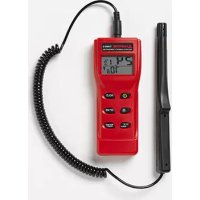
THWD5 - Thermometer Hygrometer Amprobe - Free user manual and instructions
Find the device manual for free THWD5 Amprobe in PDF.


| Product Type | Digital Thermometer Hygrometer with Remote Probe |
| Brand and Model | Amprobe THWD5 |
| Display | Dual LCD Screen with Backlight (10 seconds) |
| Relative Humidity (RH) Measurement Range | 0 to 100% |
| Temperature Measurement Range | -10 to 60 °C (14 to 140 °F) |
| Dew Point (DP) Range | -73.4 to 59.9 °C (-100 to 139.8 °F) |
| Wet Bulb Temperature (WBT) Range | -13.4 to 59.9 °C (7.88 to 139.8 °F) |
| Relative Humidity Accuracy | ±3% from 10 to 90% RH (at calibration temperature), ±5% elsewhere |
| Temperature Accuracy | ±0.6 °C (±1 °F) |
| Power Supply | 4 AAA batteries (included) |
| Main Functions | RH, temperature, dew point, wet bulb measurement; Min/Max, Data Hold, backlight, auto power off (20 min), disable sleep, salt calibration |
| Probe Type | Integrated remote probe, tripod mount |
| Operating Temperature | 0 to 50 °C (32 to 122 °F) |
| Storage Temperature | -20 to 60 °C (-4 to 140 °F) |
| Included Accessories | 1 THWD-5 tester, 1 remote probe, 1 user manual, 1 rigid carrying case, 4 AAA batteries |
| Maintenance and Cleaning | Clean with a dry cloth; store in the provided carrying case; replace batteries when low battery indicator appears |
| Safety | Use within specified operating ranges; avoid shocks and immersion; turn off after use to save batteries |
| Warranty | 1 year against defects in materials and workmanship (excluding batteries, abuse, modifications) |
| Repairability | Contact an authorized Amprobe service center for repair or calibration; do not open yourself |
Frequently Asked Questions - THWD5 Amprobe
User questions about THWD5 Amprobe
0 question about this device. Answer the ones you know or ask your own.
Ask a new question about this device
Download the instructions for your Thermometer Hygrometer in PDF format for free! Find your manual THWD5 - Amprobe and take your electronic device back in hand. On this page are published all the documents necessary for the use of your device. THWD5 by Amprobe.
USER MANUAL THWD5 Amprobe
Limited Warranty and Limitation of Liability
Your Amprobe product will be free from defects in material and workmanship for 1 year from the date of purchase. This warranty does not cover fuses, disposable batteries or damage from accident, neglect, misuse, alteration, contamination, or abnormal conditions of operation or handling. Resellers are not authorized to extend any other warranty on Amprobe's behalf. To obtain service during the warranty period, return the product with proof of purchase to an authorized Amprobe Test Tools Service Center or to an Amprobe dealer or distributor. See Repair Section for details. THIS WARRANTY IS YOUR ONLY REMEDY. ALL OTHER WARRANTYES - WHETHER EXPRESS, IMPLIED OR STAUTORY - INCLUDING IMPLIED WARRANTYES OF FITNESS FOR A PARTICULAR PURPOSE OR MERCHANTABILITY, ARE HEREBY DISCLAIMED. MANUFACTURER SHALL NOT BE LIABLE FOR ANY SPECIAL, INDIRECT, INCIDENTAL OR CONSEQUENTIAL DAMAGES OR LOSSES, ARISING FROM ANY CAUSE OR THEORY. Since some states or countries do not allow the exclusion or limitation of an implied warranty or of incidental or consequential damages, this limitation of liability may not apply to you.
Repair
All test tools returned for warranty or non-warranty repair or for calibration should be accompanied by the following: your name, company's name, address, telephone number, and proof of purchase. Additionally, please include a brief description of the problem or the service requested and include the test leads with the meter. Non-warranty repair or replacement charges should be remitted in the form of a check, a money order, credit card with expiration date, or a purchase order made payable to Amprobe® Test Tools.
In-Warranty Repairs and Replacement – All Countries
Please read the warranty statement and check your battery before requesting repair. During the warranty period any defective test tool can be returned to your Amprobe® Test Tools distributor for an exchange for the same or like product. Please check the "Where to Buy" section on www.amprobe.com for a list of distributors near you. Additionally, in the United States and Canada In-Warranty repair and replacement units can also be sent to a Amprobe® Test Tools Service Center (see address below).
Non-Warranty Repairs and Replacement - US and Canada
Non-warranty repairs in the United States and Canada should be sent to a Amprobe® Test Tools Service Center. Call Amprobe® Test Tools or inquire at your point of purchase for current repair and replacement rates.
In USA In Canada
Amprobe Test Tools Amprobe Test Tools
Everett, WA 98203 Mississauga, ON L4Z 1X9
Tel: 877-AMPROBE (267-7623) Tel: 905-890-7600
Non-Warranty Repairs and Replacement - Europe
European non-warranty units can be replaced by your Amprobe® Test Tools distributor for a nominal charge. Please check the "Where to Buy" section on www.amprobe.com for a list of distributors near you.
European Correspondence Address*
Amprobe Test Tools Europe
In den Engematten 14
79286 Glottertal, Germany
Tel.: +49 (0) 7684 8009 - 0
*Correspondence only - no repair or replacement available from this address. European customers please contact your distributor.)
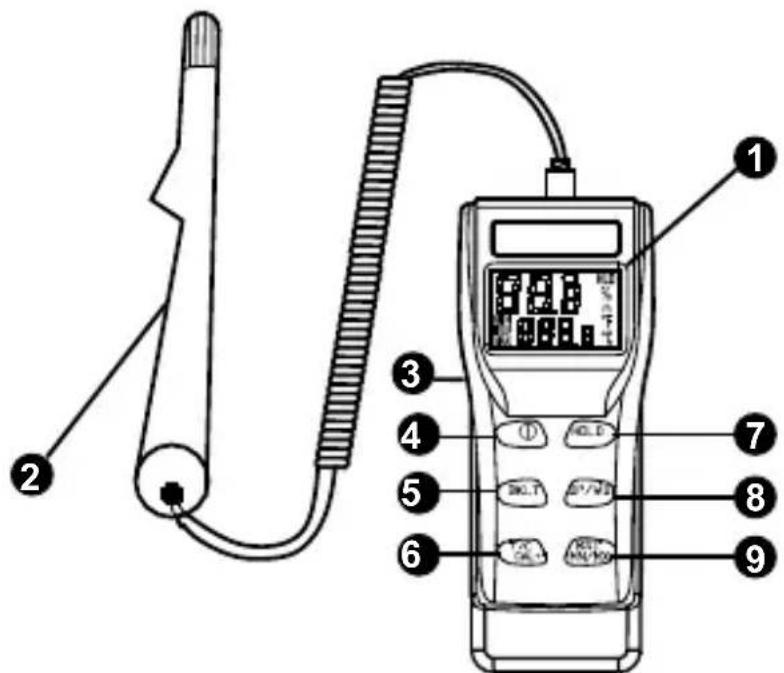
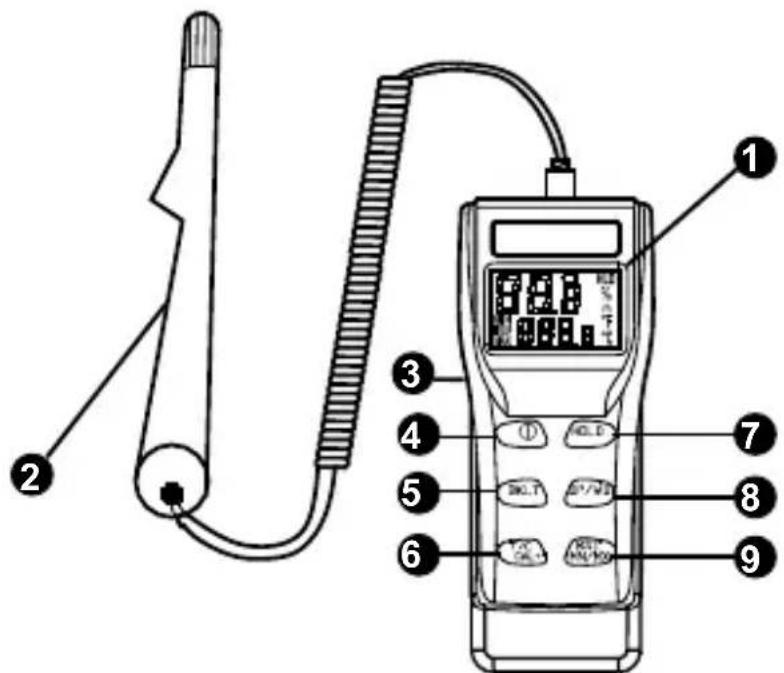
Large LCD digital dual display
Extended probe for easy target access.
Tripod mountable
ON/OFF pushbutton to turn the unit on and off
Backlight pushbutton for easy use in dark places
6 Temperature (°C& °F units selectable)/ Calibration pushbutton
7 Data Hold pushbutton to stop on the last reading
DP/WB pushbutton for dew point or wet bulb.
RST/Min/Max pushbutton to display the minimum or the maximum of the actual measurement. Also use to reset the Min/Max value.
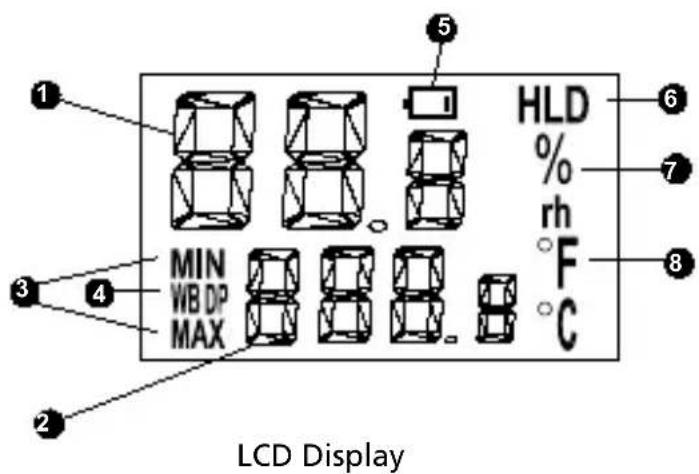
Relative Humidity display
Temperature, Wet Bulb, Dew Point display
3 Min/Max indicator
Dew point and Wet bulb indicator
Low battery indicator
Data Hold Indicator
Humidity indicator
8 Temperature unit indicator
CONTENTS
Introduction. 5
Operations 5
Power On/off 5
Backlight. 5
Temperature unit selection 5
Hold Reading 5
Air/Dew Point/Wet Bulb measurement 5
Reset/Min/Max value reading 5
Disable the Auto Sleep mode 5
Calibration 6
Troubleshooting 6
Power on but no display 6
Flickering display and then disappears 6
Calibration failure. 7
E 11. 7
E 33
E 34
Specifications. 7
Standard accessories 7
INTRODUCTION
The THWD-5 psychrometer is a microprocessor-based design for HVAC and Plant Maintenance technicians and engineers.
Easy to use for readings of Relative Humidity, Temperature as well as Wet bulb and Dew point measurements.
Use the Min/Max functions to record the lowest and highest values measured.
It is equipped with an extended probe for easy target access, a large dual LCD display with backlight.
The THWD-5 also offers a tripod mounting on the back of the unit.
OPERATIONS
Power On/off
Press the power button (4) to turn the meter on and off.
The meter will enter the auto sleep mode after 20 minutes of non-operation.
Backlight
Press the backlight button (5) to turn the backlight on and off. It will remain on for 10 seconds and turn itself off.
Temperature unit selection
Press ^ C F pushbutton in normal mode to switch between ^ and ^ .
Hold Reading
Press Data Hold (7) button in normal mode to hold the current reading.
Press it again to unlock and proceed with continuous reading.
Air/Dew Point/Wet Bulb measurement
Press and hold for two seconds the DP WB pushbutton to switch between air temperature, Dew point and Wet bulb reading. (Do not do when in Calibration mode.)
Reset/Min/Max value reading
Press and hold for two seconds the Min/Max (9) pushbutton to turn on this feature. The meter will start capturing readings as minimum and maximums of the readings. Press the pushbutton to step through and retrieve the minimum and maximum readings captured of both relative humidity and temperature. Press and hold for two seconds the Min Max button to turn this feature off.
Press and hold for more than one second to reset the minimum and the maximum value.
Disable the Auto Sleep mode
Press ON/OFF (4) + Hold (7) to turn on the meter and enter the normal mode with auto sleep off.
CALIBRATION
Make sure the THWD-5 is turned off. Plug the meter's probe into a known trusted 32.8% 1. salt bottle. Press "On/Off + F/C" pushbuttons simultaneously for more than one second to enter the calibration mode.
3x.x% will be flashing on LCD (see fig.1). After 30 minutes the " 3x.x% " will stop flashing. 2.
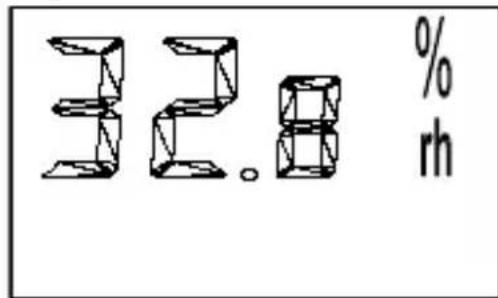
Fig. 1
The calibration for the "3x.x%" is now completed. Proceed with the 7x.x% calibration.
Remove the meter from the 32.8% salt bottle and place it into a 75.3% salt bottle.3.
Press Min Max Reset pushbutton for more than one second to enter the 7x.x% calibration mode. "7x.x%" will be flashing on LCD. After 30 minutes the "7x.x%" will stop flashing.
The calibration process is now complete.
Note:
Auto power off is automatically disabled during calibration procedure.
- In order to get high accuracy, you must do the calibration at a 23 ± 2^ C ( 73 ± 2^ F ) and steady airflow in the room.
If the value differs from 7x.x% or 3x.x% for more than 0.3% , the calibration fails. (see trouble-shooting)
TROUBLESHOOTING
Power on but no display
Make sure the time of pressing the On/Off pushbutton is more than 100 ms.
Check the batteries are in place, good contact and correct polarity.
Replace the batteries and try again.
Flickering display and then disappears
Check whether the low battery indicator displayed before display disappeared. If yes, replace the batteries.
- Turn on the meter by pressing "On/Off + Hold" key to disable auto power off.
Calibration failure
Check whether the low battery indicator displayed before calibration. If yes, replace the batteries and try again.
Make sure the meter probe is well sealed when plugging into the salt bottle.
- Make sure the free air temperature is within 23 ± 2^ C and the airflow is stable.
E11
RH calibration error. Re-calibrate again.
E33
Circuit error in RH measurement. Return the meter for repair.
E 34
Circuit error in Temperature measurement channel. Return the meter for repair.
Note: When the meter is on, plug with a probe will also result in "E 33i or E 34in Max. and Min. mode.
SPECIFICATIONS
Range:
RH measurement: 0 100%
Temperature: -10~60°C (14 to 140°F)
DP:-73.4 to 59.9 ^ C (-100.0 to139.8F)
WBT: -13.4 to 59.9^ (7.88 to 139.8^)
Accuracy:
RH: +/-3% from 10-90% (at calibration temperature); +/-5% for others.
Temperature: +/-0.6 °C (+/-1^)
Storage Temperature: -20^ to 60^ (-4°F to 140°F)
Operating Temperature: 0^ to 50^ (32^ to 122^)
Standard accessories
1 ea THWD-5 meter
- 1 ea probe on extension cable
1ea Users Manual
1ea Hard carrying case
4 ea Batteries (AAA)

AMPROBE
THWD-5
© 2008 Amprobe Test Tools.
Amprobe Test Tools Amprobe Test Tools
Everett, WA 98203 Mississauga, Ontario L4Z 1X9 Canada
Tél.: 877-993-5853 Tél.: 905-890-7600
Fax:425-446-6390 Fax:905-890-6866
Amprobe Test Tools Europe
Beha-Amprobe GmbH
In den Engematten 14
© 2008 Amprobe Test Tools.
Amprobe Test Tools Amprobe Test Tools
Everett, WA 98203 Mississauga, ON L4Z 1X9 Kanada
Tel.: 877-993-5853 Tel.: 905-890-7600
Fax: 425-446-6390 Fax: 905-890-6866
Amprobe Test Tools Europe
Beha-Amprobe GmbH
In den Engematten 14
© 2008 Amprobe Test Tools.
Amprobe Test Tools Amprobe Test Tools
Everett, WA 98203 Mississauga, ON L4Z 1X9 Kanada
Tel.: 877-993-5853 Tel.: 905-890-7600
Fax: 425-446-6390 Fax: 905-890-6866
Amprobe Test Tools Europe
Beha-Amprobe GmbH
In den Engematten 14
©2008 Amprobe Test Tools.
Amprobe Test Tools Amprobe Test Tools
Everett, WA 98203, U.S.A. Mississauga, ON L4Z 1X9 Canada
Tel.: 877-993-5853 Tel.: 905-890-7600
Fax: 425-446-6390 Fax: 905-890-6866
Amprobe Test Tools Europe
Beha-Amprobe GmbH
In den Engematten 14
79286 Glottertal, Germania
Tel.: +49 (0) 7684 8009 - 0
©2008 Amprobe Test Tools.
Amprobe Test Tools Amprobe Test Tools
Everett, WA 98203 Mississauga, Ontario L4Z 1X9 Canada
Tel.: 877-993-5853 Tel.: 905-890-7600
Fax: 425-446-6390 Fax: 905-890-6866
Amprobe Test Tools Europe
Beha-Amprobe GmbH
In den Engematten 14
79286 Glottertal, Germany
Tel.: +49 (0) 7684 8009 - 0
© 2008 Amprobe Test Tools.
Amprobe Test Tools Amprobe Test Tools
Everett, WA 98203 Mississauga, ON L4Z 1X9 Canada
Tel: 877-AMPROBE (267-7623) Tel: 905-890-7600
Fax: 425-446-6390 Fax: 905-890-6866
Amprobe Test Tools Europe
In den Engematten 14
79286 Glottertal, Germany
Tel.: +49 (0) 7684 8009 - 0
* (Endast korrespondens - inga reparationer ullbyten ar tillganglia franenna adress. Kunder i Europa sca kontakta respektive distributor.)
visit www.Amprobe.com for
Catalog
Application notes
Product specifications
User manuals
- Limited Warranty and Limitation of Liability
- Repair
- In-Warranty Repairs and Replacement – All Countries
- Non-Warranty Repairs and Replacement - US and Canada
- Non-Warranty Repairs and Replacement - Europe
- CONTENTS
- INTRODUCTION
- OPERATIONS
- Power On/off
- Backlight
- Temperature unit selection
- Hold Reading
- Air/Dew Point/Wet Bulb measurement
- Reset/Min/Max value reading
- Disable the Auto Sleep mode
- CALIBRATION
- Note:
- TROUBLESHOOTING
- Power on but no display
- Flickering display and then disappears
- Calibration failure
- E11
- E33
- E 34
- SPECIFICATIONS
- Standard accessories
- AMPROBE
- THWD-5
Brand : Amprobe
Model : THWD5
Category : Thermometer Hygrometer