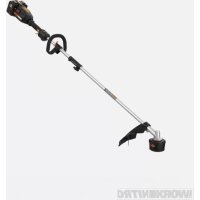
WG186 - Grass trimmer WORX - Free user manual and instructions
Find the device manual for free WG186 WORX in PDF.


| Product Type | Cordless String Trimmer |
| Brand | Worx |
| Model | WG186 |
| Rated Voltage | 40 V MAX (2 x 20 V) |
| No-load Speed | 6000/min |
| Cutting Diameter | 38 cm |
| Line Diameter | 0.24 cm (dual line) |
| Line Length | 2 x 3 m |
| Battery Type | Lithium-ion |
| Compatible Battery Model | WA3012 (4.0 Ah) |
| Charger Model | WA3884 |
| Charging Time (4.0 Ah) | Approximately 1 hour |
| Weight (with battery) | 5.4 kg |
| ECO Function | Yes (reduced speed for extended runtime) |
| Bump Feed | Yes |
| Safety Guard | Included |
| Auxiliary Handle | Yes |
| Wall Storage | Integrated hanging slot |
| Assembly Tooling | Hex key included |
| Maintenance | Clean with dry cloth; no lubrication required |
| Battery Indicator | 5 LED lights (charge status and faults) |
| Safety Protections | Safety stop, overload and overheat protection |
| Optional Accessories | Hedge trimmer, brush cutter, pole saw, edger |
Frequently Asked Questions - WG186 WORX
User questions about WG186 WORX
0 question about this device. Answer the ones you know or ask your own.
Ask a new question about this device
Download the instructions for your Grass trimmer in PDF format for free! Find your manual WG186 - WORX and take your electronic device back in hand. On this page are published all the documents necessary for the use of your device. WG186 by WORX.
USER MANUAL WG186 WORX
natural_image
Technical line drawing of a handheld device with lever and sensor components (no text or symbols)| Cordless DRIVESHARE String Trimmer EN | P02 |
| Taille-bordures sans fil DRIVESHARE F | P12 |
| Desmalezadora inalámbrica DRIVESHARE ES | P20 |
PRODUCT SAFETY

WARNING: This product can expose you to chemicals including lead and Di(2-ethylhexyl)phthalate (DEHP) which are known to the State of California to cause cancer and birth defects or other reproductive harm. For more information go to www.P65Warnings.ca.gov.
IMPORTANT SAFETY INSTRUCTIONS

WARNING: Read all safety warnings and instructions. Failure to follow the warnings and instructions may result in electric shock, fire and/or serious injury.
FOR ALL APPLIANCES:
1) Avoid Dangerous Environment - Don't use appliances in damp or wet locations.
2) Don't Use In Rain.
3) Keep Children Away - All visitors should be kept at a distance from work area.
4) Dress Properly - Do not wear loose clothing or jewelry. They can be caught in moving parts. Use of rubber gloves and substantial footwear is recommended when working outdoors. Wear protective hair covering to contain long hair.
5) Use Safety Glasses - Always use face or dust mask if operation is dusty.
6) Use Right Appliance - Do not use appliance for any job except that for which it is intended.
7) Don't Force Appliance - It will do the job better and with less likelihood of a risk of injury at the rate for which it was designed.
8) Don't Overreach - Keep proper footing and balance at all times.
9) Stay Alert - Watch what you are doing. Use common sense. Do not operate appliance when you are tired.
10) Store Idle Appliances Indoors - When not in use, appliances should be stored indoors in dry, and high or locked-up place - out of reach of children.
11) Maintain Appliance With Care - Keep cutting edge sharp and clean for best performance and to reduce the risk of injury. Follow instructions for lubricating and changing accessories. Keep handles dry, clean, and free from oil and grease.
12) Check Damaged Parts - Before further use of the appliance, a guard or other part that is damaged should be carefully checked to determine that it will operate properly and perform its intended function. Check for alignment of moving parts, binding of moving parts, breakage of parts, mounting, and any other condition that may affect its operation. A guard or other part that is damaged should be properly repaired or replaced by an authorized service center unless indicated elsewhere in this manual.
FOR ALL BATTERY - OPERATED GARDENING APPLIANCES:
- Prevent unintentional starting. Ensure the switch
is in the off-position before connecting to battery pack, picking up or carrying the appliance. Carrying the appliance with your finger on the switch or energizing appliance that have the switch on invites accidents.
- Disconnect the battery pack from the appliance before making any adjustments, changing accessories, or storing appliance. Such preventive safety measures reduce the risk of starting the appliance accidentally.
- Recharge only with the charger specified by the manufacturer. A charger that is suitable for one type of battery pack may create a risk of fire when used with another battery pack.
- Use appliances only with specifically designated battery packs. Use of any other battery packs may create a risk of injury and fire.
- When battery pack is not in use, keep it away from other metal objects, like paper clips, coins, keys, nails, screws or other small metal objects, that can make a connection from one terminal to another. Shorting the battery terminals together may cause burns or a fire.
- Under abusive conditions, liquid may be ejected from the battery; avoid contact. If contact accidentally occurs, flush with water. If liquid contacts eyes, additionally seek medical help. Liquid ejected from the battery may cause irritation or burns.
- Do not use a battery pack or appliance that is damaged or modified. Damaged or modified batteries may exhibit unpredictable behavior resulting in fire, explosion or risk of injury.
- Do not expose a battery pack or appliance to fire or excessive temperature. Exposure to fire or temperature above 130^ C may cause explosion.
- Follow all charging instructions and do not charge the battery pack or appliance outside of the temperature range specified in the instructions. Charging improperly or at temperatures outside of the specified range may damage the battery and increase the risk of fire.
- Have servicing performed by a qualified repair person using only identical replacement parts. This will ensure that the safety of the product is maintained.
- Do not modify or attempt to repair the appliance or the battery pack (as applicable) except as indicated in the instructions for use and care.
ADDITIONAL SAFETY RULES FOR LAWN TRIMMER AND EDGE TRIMMER
- Keep guards in place and in good working order.
- Keep hands and feet away from cutting area.
- Do not use heavier lines than recommended in this manual.
- Do not use line materials of other types – for example, metal wire, rope, and the like.
SAFETY WARNINGS FOR BATTERY PACK
a) Do not dismantle, open or shred battery pack.
b) Do not expose battery pack to heat or fire. Avoid storage in direct sunlight.
c) Do not short-circuit a battery pack. Do not store battery packs haphazardly in a box or drawer where they may short-circuit each other or be short-circuited by other metal objects. When battery pack is not in use, keep it away from other metal objects, like paper clips, coins, keys, nails, screws or other small metal objects, that can make a connection from one terminal to another. Shorting the battery terminals together may cause burns or fire.
d) Do not remove battery pack from its original packaging until required for use.
e) Do not subject battery pack to mechanical shock.
f) In the event of battery leaking, do not allow the liquid to come in contact with the skin or eyes. If contact has been made, wash the affected area with copious amounts of water and seek medical advice.
g) Observe the plus (+) and minus (-) marks on the battery back and equipment and ensure correct use.
h) Do not use any battery pack which is not designed for use with the equipment.
i) Keep battery pack out of the reach of children.
j) Seek medical advice immediately if a cell or battery has been swallowed.
k) Always purchase the battery pack recommended by the device manufacturer for the equipment.
I) Keep battery pack clean and dry.
m) Wipe the battery pack terminals with a clean dry cloth if they become dirty.
n) Battery pack needs to be charged before use. Always use the correct charger and refer to the manufacturer's instructions or equipment manual for proper charging instructions.
o) Do not leave battery pack on prolonged charge when not in use.
p) After extended periods of storage, it may be necessary to charge and discharge the battery pack several times to obtain maximum performance.
q) Battery pack gives its best performance when it is operated at normal room temperature (20 °C ± 5 °C).
r) When disposing of battery packs, keep battery packs of different electrochemical systems separate from each other.
s) Recharge only with the charger specified by WorxNITRO. Do not use any charger other than that specifically provided for use with the equipment. A charger that is suitable for one
type of battery pack may create a risk of fire when used with another battery pack.
t) Retain the original product literature for future reference.
u) Use only the battery pack in the application for which it was intended.
v) Remove the battery pack from the equipment when not in use.
w) Dispose of properly.
SAVE THESE INSTRUCTIONS
SYMBOLS
 | To reduce the risk of injury, user must read instruction manual |
 | Wear ear protection |
 Li-Ion Li-Ion | Li-Ion battery, battery must be recycled |
 | Make sure the battery is removed prior to changing accessories. |
 | Trimming |
 | Do not burn |
 | Batteries may enter water cycle if disposed improperly, which can be hazardous for ecosystem. Do not dispose of waste batteries as unsorted municipal waste. |
 | call ^2 recyclePOSITEC Inc. has established a partnership with the RBRC Corporation to recycle any Positec batteries with the RBRC-call2recycle seal. For environmental protection, please do not discard batteries in the trash. After the batteries' life cycle is ended, then please call 1-800-822-8837 for a free service that will properly dispose of the battery. |
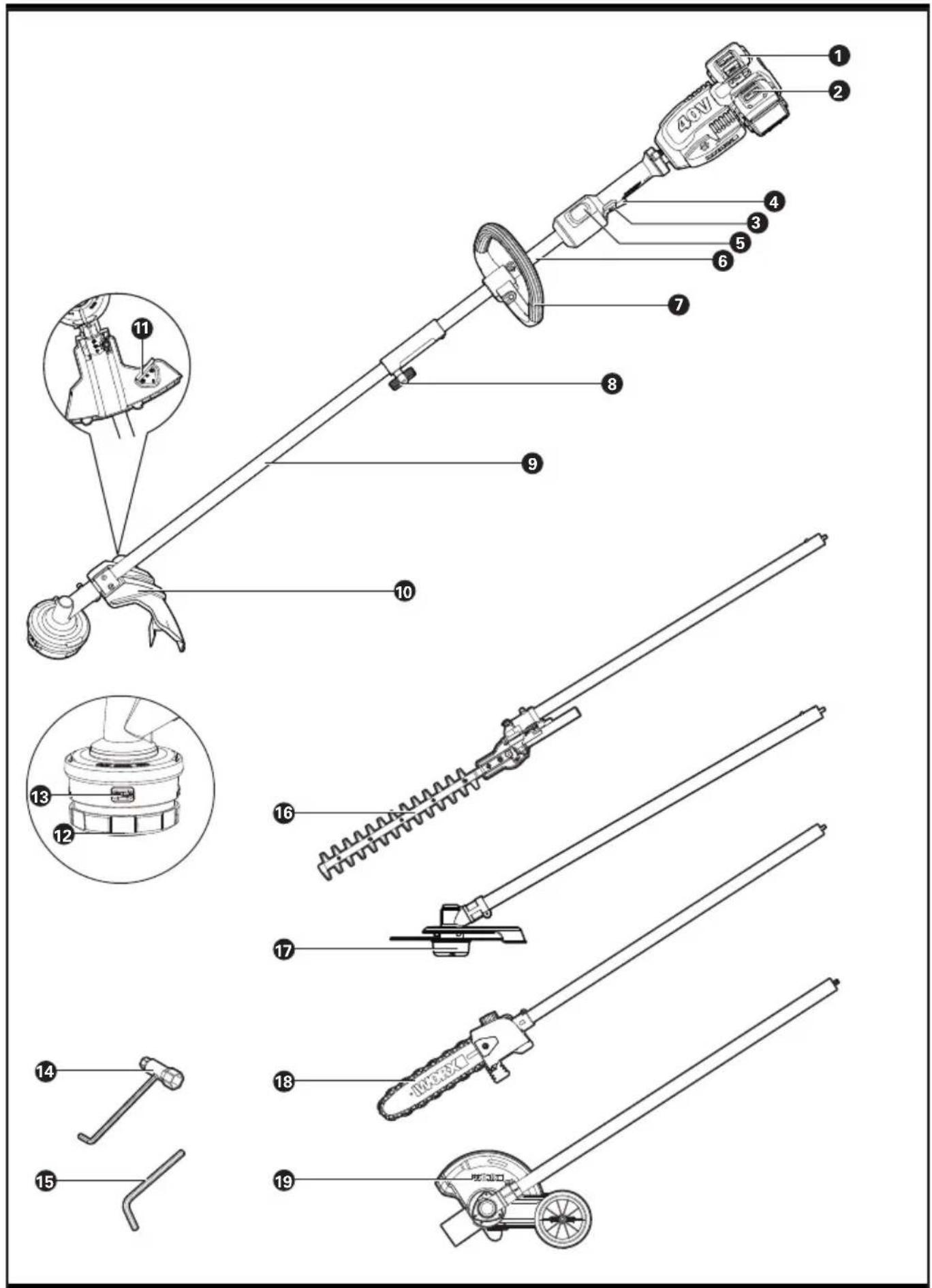
COMPONENT LIST
-
BATTERY PACK *
-
BATTERY INDICATOR LIGHT
-
LOCK-OFF BUTTON
-
SWITCH TRIGGER
-
ECO BUTTON
-
UPPER SHAFT
-
AUXILIARY HANDLE
-
LOCKING COLLAR
-
LOWER SHAFT
-
SAFETY GUARD
-
LINE CUTTER
-
TRIMMER HEAD (BUMP HEAD)
-
RELEASE TAB
-
WRENCH
-
HEX KEY
-
POLE HEDGE TRIMMER ATTACHMENT*
-
BRUSH CUTTER ATTACHMENT*
-
POLE SAW ATTACHMENT*
-
EDGER ATTACHMENT*
* Not all the accessories illustrated or described are included in standard delivery.
TECHNICAL DATA
| WG186 WG186.9 | ||
| Voltage 40 V MAX (2x20V-MAX) ** | ||
| No-load speed 6000/min | ||
| Cutting Diameter for grass trimmer | 15" (38cm) | |
| Line Diameter 2 x 0.095" (2 x2.4mm) | ||
| Line Length 2x10ft (2x3m) | ||
| Battery type Lithium-ion / | ||
| Battery Model WA3012 (4.0Ah) / | ||
| Charger Model | WA3884 | / |
| Charging time (approx.) | / | |
| Battery pack: 4.0Ah (1pc) | 1 hr | |
| 4.0Ah (2pcs) | 2 hrs | |
| Machine Weight | 11.9lbs (5.4kg) | 8.8lbs (4.0kg) |
**Voltage measured without workload. Initial battery voltage reaches maximum of 20 volts. Nominal voltage is 18 volts.
ACCESSORIES
| WG186 | WG186.9 | |
| 4.0Ah Battery pack (WA3012) | 2 | / |
| Charger (WA3884) | 1 | / |
| Spool | 1 | 1 |
| Safety guard | 1 | 1 |
| Hex key | 1 | / |
| Wrench | 1 | / |
Only use the appropriate accessories intended for this tool. Accessory information can be found on the product packaging, at a WorxNITRO dealer or on our website at www.worx.com.
natural_image
Illustration of a robotic hand gripping a cable, no text or symbols present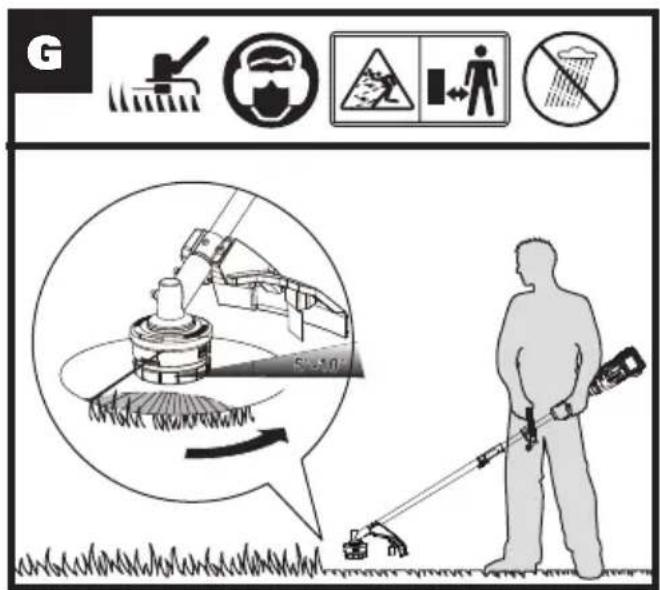
natural_image
Illustration of hands holding a circular device with a rotating arrow indicating rotation (no text or symbols)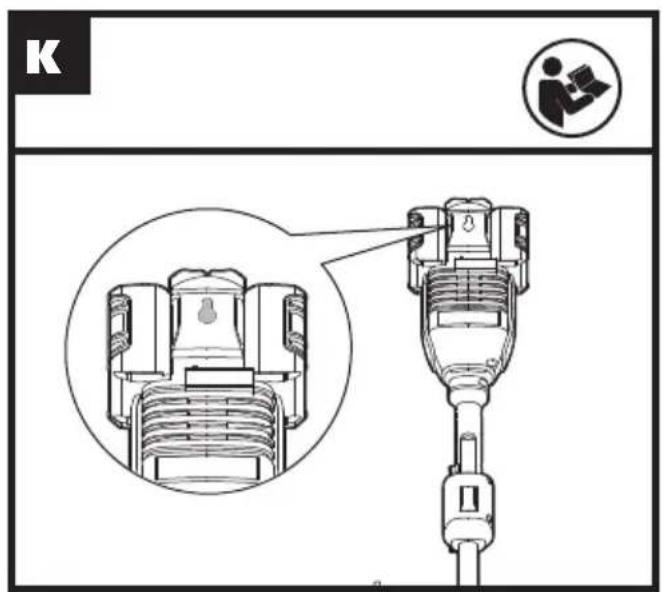
| Action Figure | |
| Assembly | |
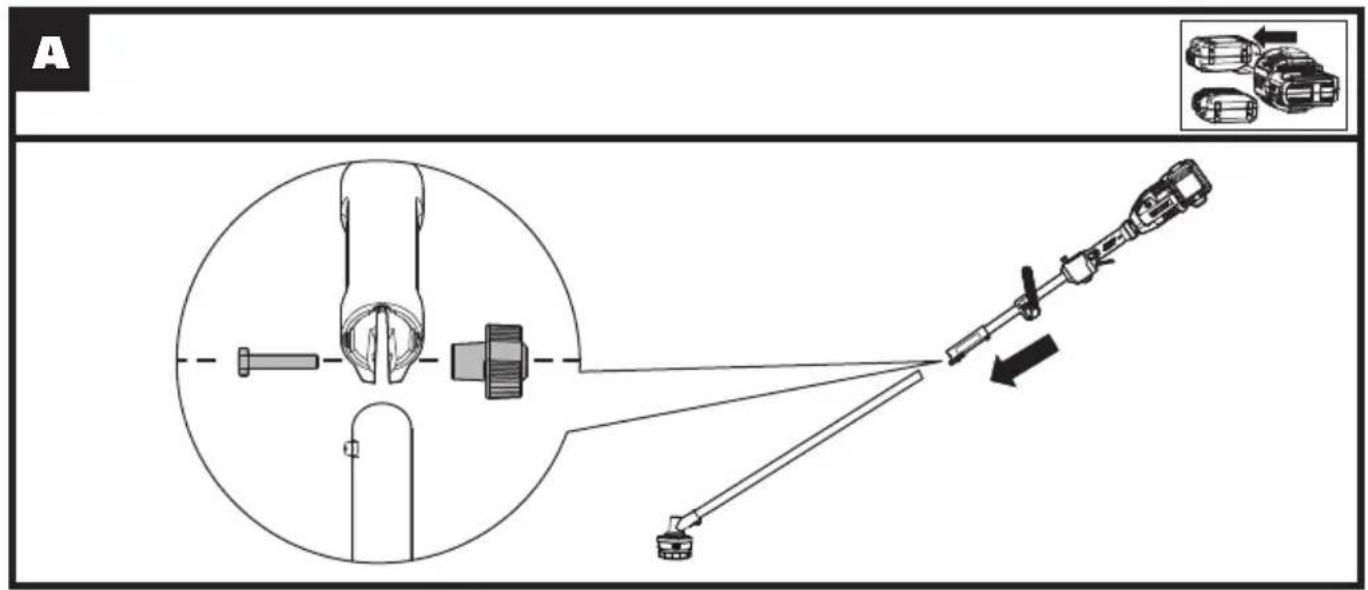
| Assembling the Trimmer Shaft Insert the screw into the hole, then tighten the locking collar. | See Fig. A |
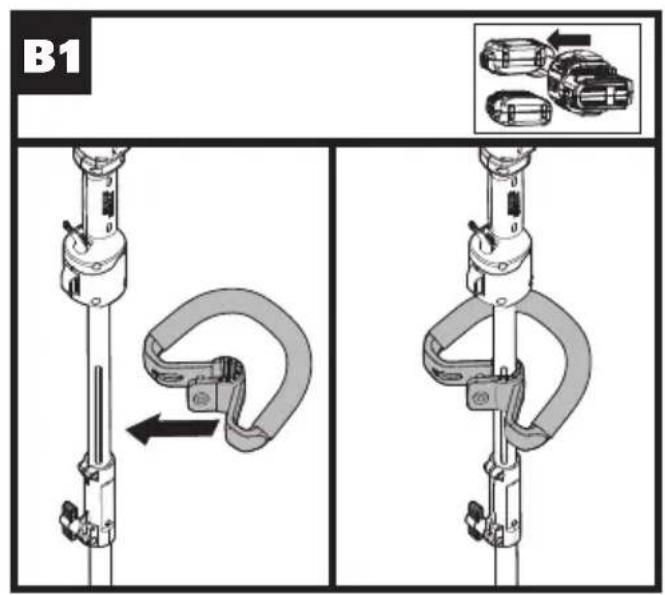
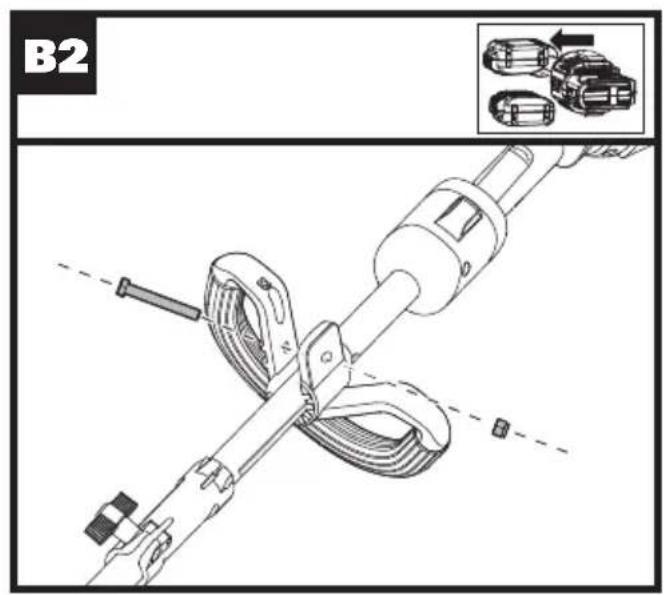
| Assembling the Auxiliary Handle See Fig. B1, B2 | |
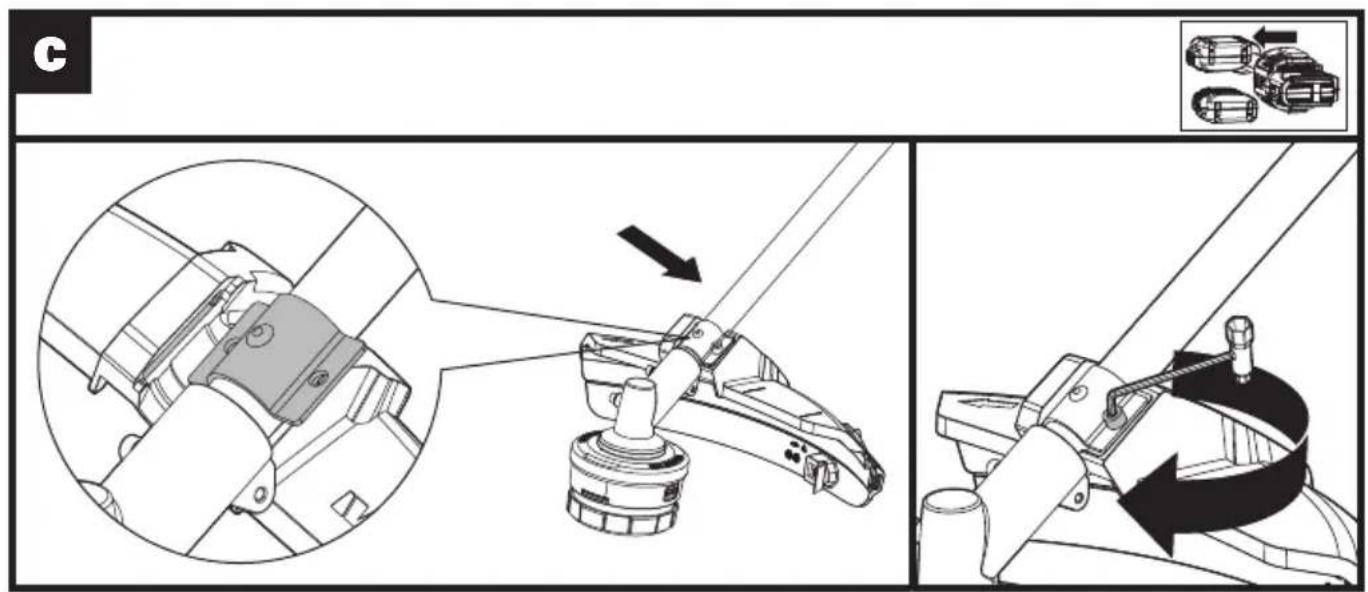
| Assembling the Safety Guard Insert the metal bracket into the slot on the safety guard, then secure the guard in place using the screw and hex key. | See Fig. C |
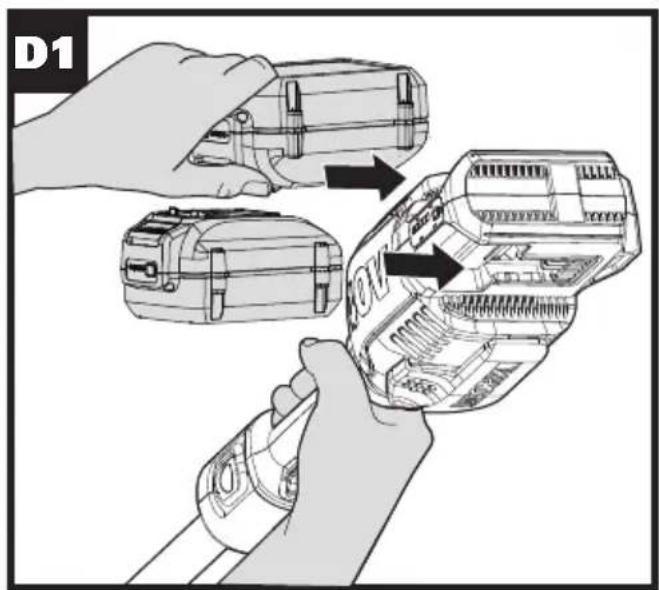
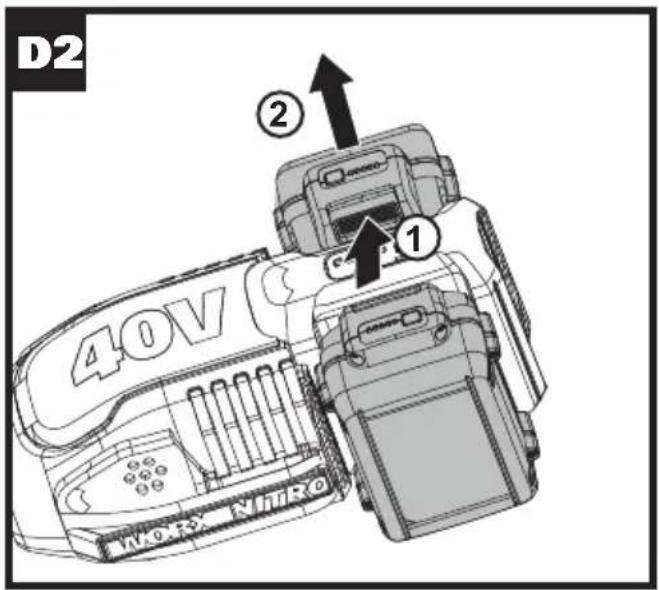
| Installing and Removing the Battery PackNOTE:This machine will only run when 2 batteries are installed.It is recommended to use the same two batteries and charge the two batteries at the same time.When two batteries are used with different amp hours or charge level, the machine will run to the lowest common denominator.It is recommended that using 4.0Ah or above battery pack for better performance and longer run time. | See Fig. D1, D2 |
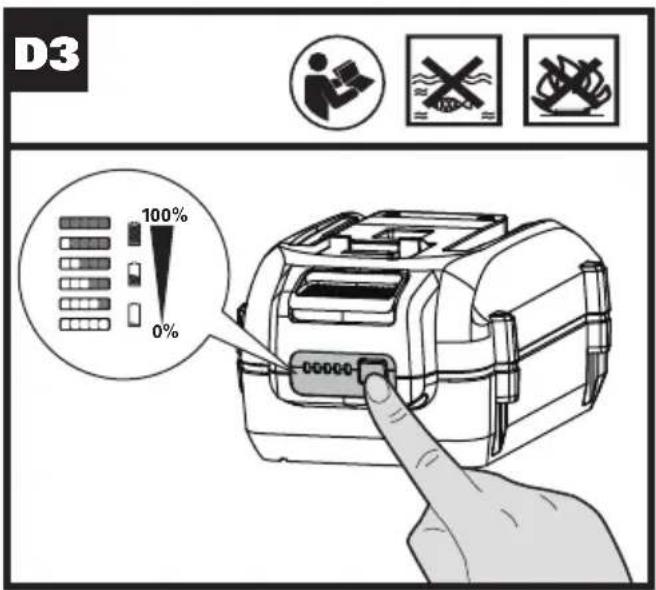
| Checking the battery charge conditionNOTE:Fig. D3 only applies for the battery pack with battery indicator light. | See Fig. D3 |
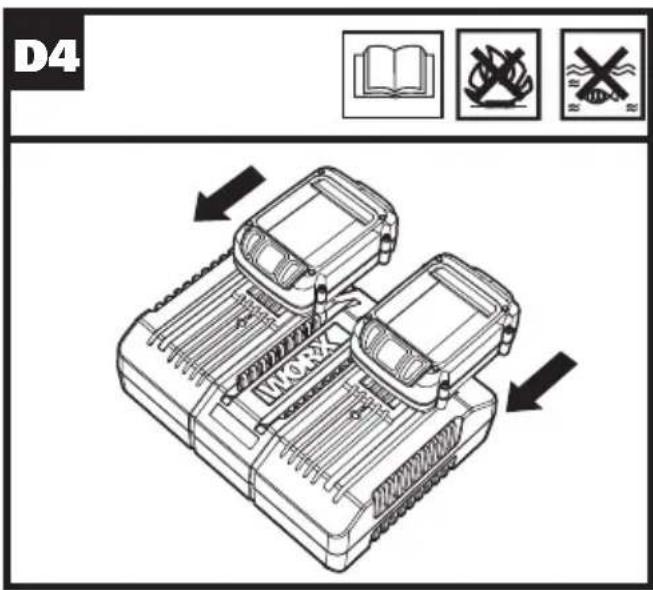
| Charging the battery packNOTE:The batteries are shipped uncharged. Each battery must be fully charged before the first use.Always fully charge the two batteries at same time. More details can be found in charger's manual. | See Fig. D4 |
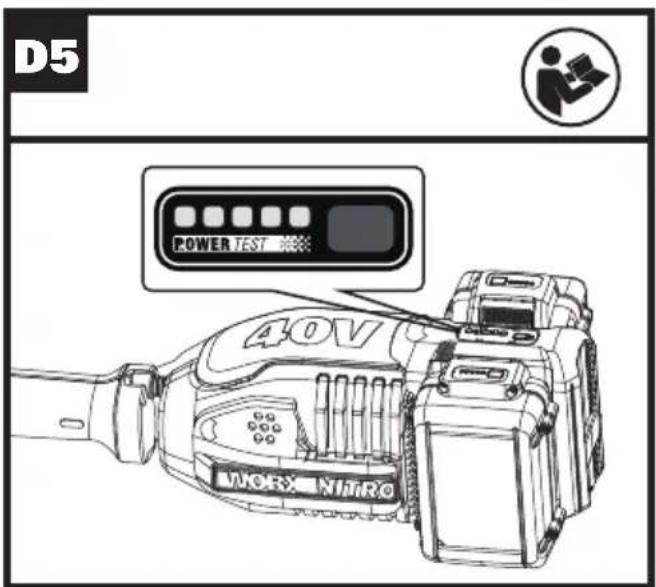
| Battery power indicator on the machineSee details in BATTERY STATUS section | See Fig. D5 |
| Operation | |
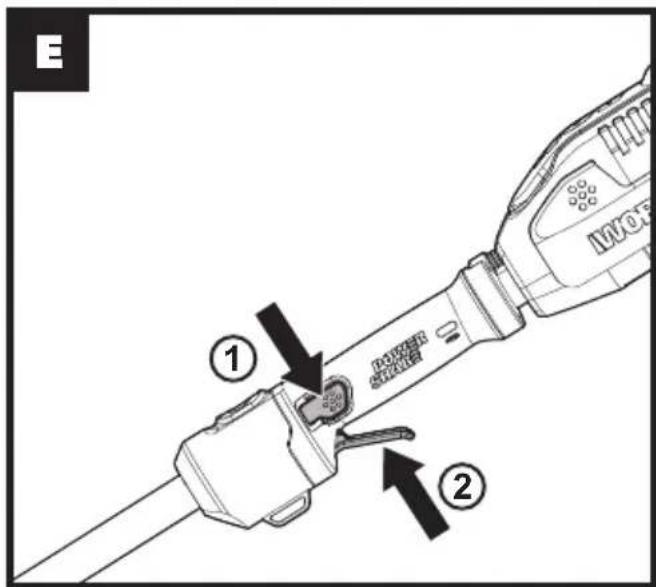
| To startWARNING! The cutting head continues to rotate after the trimmer has been switched off; wait until it has completely stopped then lay down the tool.Press the lock-off button first, then press the switch trigger to start the machine. | See Fig. E |
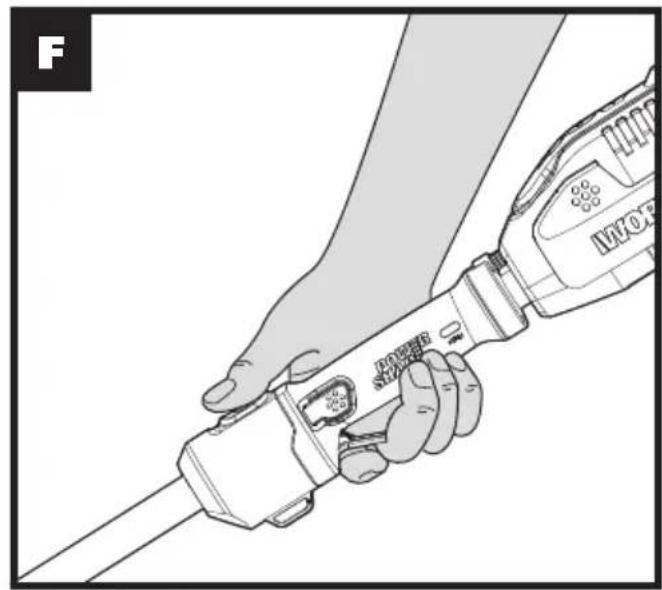
| ECO SpeedFor longer run time, press the ECO button and switch trigger, then your machine will operate at a low speed. | See Fig. F |
| Trimming See Fig. G | |
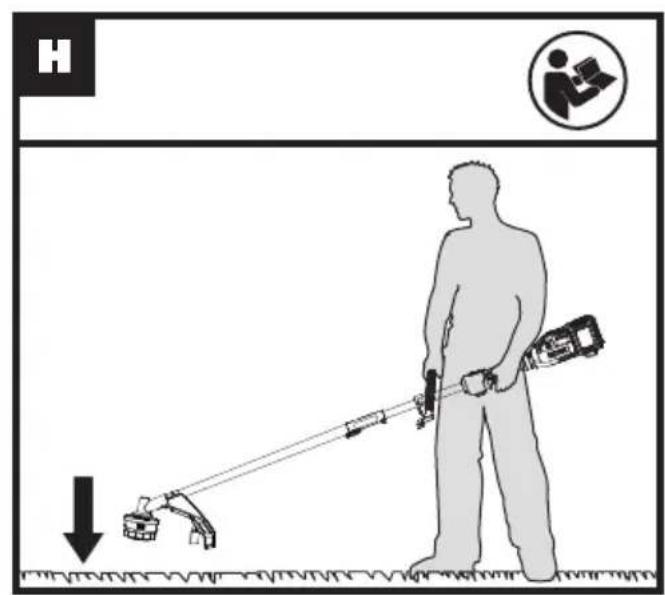
| Bump feed See Fig. H | |
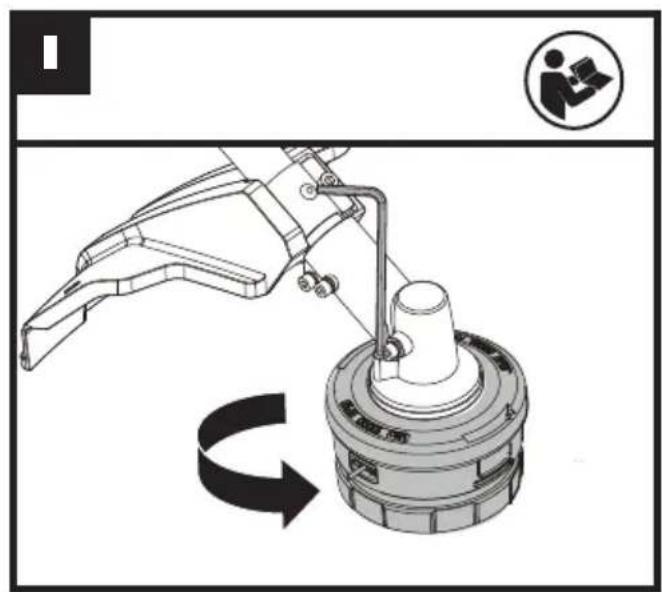
| Assembling and removing the trimmer headInsert the hex key into the hole and rotate the trimmer head until it stops in a locked position.Then, rotate counterclockwise to remove it, and clockwise to assemble it. | See Fig. I |
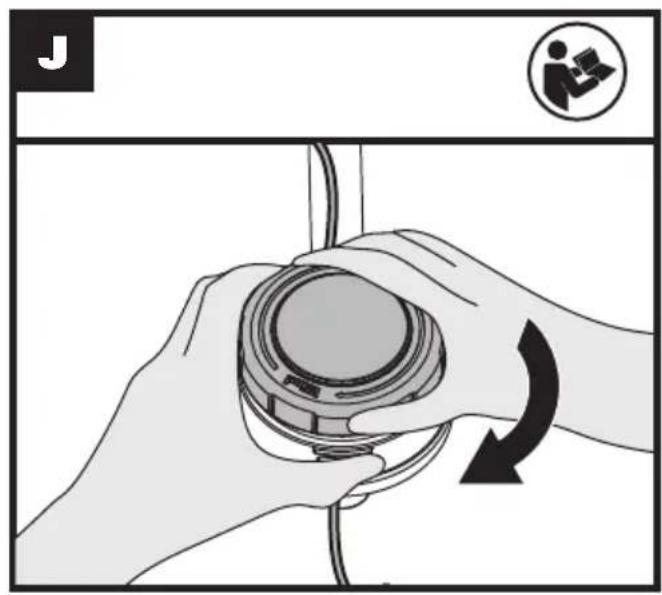
| Winding the trimmer lineNOTE: The spool must be wound while inside the trimmer head.The spool cannot be wound with line, then installed into the trimmer head. | See Fig. J |
ATTACHMENT-CAPABLE ACCESSORIES
The below attachment accessories are sold separately to convert the grass trimmer into a tool for various applications.
- Pole hedge trimmer attachment (WA0220)
This attachment is intended for cutting and trimming hedges and bushes in domestic use. - Brush cutter attachment (WA0221)
This attachment is intended for cutting thick brush. -
Pole saw attachment (WA0222)
This attachment is intended for sawing of trees, tree trunks, branches, limbs, etc. Cuts can be sawed with or across the grain. This product is not suitable for sawing mineral materials. -
Edger attachment (WA0223)
This attachment is intended for edging around walkways, driveways, flower beds, etc.
BATTERY STATUS (See Fig. D5)
Before starting or after use, press the button beside the power indicator light on the machine to check the battery capacity. During operation, the battery capacity will be indicated automatically by the battery power indicator.
The indicator constantly senses and displays the battery condition as follows.
For the machine with 2 battery packs with different power, the power indicator light displays the battery condition with the lower one of the two batteries.
| Battery power indicator status | Battery condition |
| Five green lights (■) are illuminated. | The two batteries are in a highly charged condition. |
| Two, three or four green lights are illuminated. | The two batteries have a remaining charge. The more lights are illuminated, the more battery capacity. |
| Only one green light (■□□□□) is illuminated. | At least one battery is almost depleted and needs to be charged. |
| No light is illuminated. | At least one battery is not fully installed or battery may be defective. |
| Only one light is flashing twice per cycle. | At least one battery is over discharged (please refer to the battery charge condition), please recharge the two batteries at once before use again or storage. |
| Only one light is flashing three times per cycle. | At least one battery is hot, wait for them cool down before start again. |
| Only one light is flashing four times per cycle. | The machine is over load. Raise the cutting height or push slowly. |
the line are even on each end of the trimmer head (max 10') and cut the line. Turn the dial clockwise to wind the line around the spool until about 7.5" remains on either side.
STORING YOUR GRASS TRIMMER

Always remove the battery pack from your trimmer after use.
To store your GRASS trimmer
The trimmer is provided with a hanging slot for storing the trimmer on the wall. (See Fig. K) Store in a dry place where the trimmer and battery can be protected from damage.
MAINTENANCE

Always remove the battery pack from your trimmer after use.
Always check the product prior to being used for any damage.
After use, disconnect the battery from the tool and check for damage.
Your power tool requires no additional lubrication or maintenance. There are no user serviceable parts in your power tool. Never use water or chemical cleaners to clean your power tool. Wipe clean with a dry cloth. Always store your power tool in a dry room temperature location. Keep the motor ventilation slots clean. Keep all working controls free of dust.
For Battery tools
The ambient temperature range for the use and storage of tool and battery is 0^ C- 45^ C. The recommended ambient temperature range for the charging system during charging is 0^ C- 40^ C.
OPERATION INSTRUCTIONS

WARNING! The charger and battery pack are specially designed to work together so do not
attempt to use any other devices. Never insert or allow metallic objects into your charger or battery pack connections because of an electrical failure and hazard will occur.
1. Bump-line feed system (See Fig. H)
The trimmer is equipped with a bump-line system. Just bump the trimmer head while the machine is running, new line will feed out.
2. Winding the trimmer line (See Fig. J)
Insert the replacement line through the eyelet and feed it through the other side. Ensure both ends of
TROUBLESHOOTING
The following table gives problems and actions that you can perform if your machine does not operate correctly. If these do not identify and correct the problem, contact your WorxNITRO Customer Service at 1-866-354-Worx.

WARNING: Switch the machine off and remove the battery prior to any troubleshooting.
| Problems Possible Causes Corrective Action | ||
| Trimmer fails to operate. | Battery discharged.Battery too hot/cold.Motor is broken.Internal wiring of machine damaged. | Recharge battery; also see the content in charger manual.Allow to cool/warm.Contact Service Agent.Contact Service Agent. |
| Trimmer runs intermittently. | Motor is broken.Battery not fully charged.On/Off switch defective. | Contact Service Agent.Recharge battery.Contact Service Agent. |
| Excessive vibrations/noise. | Machine defective.Line spool is not wound well. | Contact Service Agent.Rewind the line. See “To fit spool and line assembly.” |
| Cutting time per battery charge too short. | Battery has not been used for long period or only charged for short term.Grass too high.Battery defective. | Fully charge battery; also see the content in charger manual.Cut in stages.Replace the battery. |
| Machine does not cut. | Line broken.Battery not fully charged.Motor is broken (speed is too low).Grass entangled around cutting head. | Replace the line.Recharge battery; also see the content in charger manualContact Service Agent.Remove grass. |
| Continuous lighting of the battery charge indicator.No charging procedure possible. | Battery not (properly) inserted.Battery contacts contaminated.Battery defective. | Properly insert battery into battery charger.Clean the battery contacts or replace the battery.Replace the battery. |
| Battery charge indicator does not light up. | Plug of battery charger not plugged in (properly).Socket outlet, mains cable or battery charger defective. | Insert mains plug (fully) into the socket outlet.Check the mains voltage; have the battery charger checked by an authorized after-sales service agent. |
Positec Technology (China) Co., Ltd.
18, Dongwang Road, Suzhou Industrial Park, Jiangsu 215123, P.R.China
SÉCURITÉ DU PRODUIT

Taille-bordures sans fil DRIVESHARE F
LISTE DES ÉLÉMENTS
- BLOCS-PILES
- VOYANT DE LA BATTERIE*
- BOUTON DE VERROUILLAGE
- INTERRUPTEUR DE DÉCLENCHEMENT
- TOUCHE ECO
- PARTIE SUPÉRIEURE DU MANCHE
- POIGNÉE AUXILIAIRE
- COLLIER DE BLOQUAGE
- PARTIE INFÉRIEURE DU MANCHE
- GARDE DE SÉCURITÉ
- COUPEUR DE CORDON DE COUPE
- TÊTE DE COUPE (TÊTE DE BOSSE)
- ONGLET RELÂCHE
- CLÉ
- CLÉ HEXAGONALE
- ACCESSOIRE POUR LE TAILLE-HAIE *
- ACCESSOIRE POUR DÉBROUSSAILLEUSE*
- ACCESSOIRE POUR SCIE À PERCHE *
- ACCESSOIRE POUR COUPE BORDURE *
ACCESSOIRES FIXATION POSSIBLE
Desmalezadora inalámbrica DRIVESHARE
LISTA DE PARTES
Copyright © 2020, Positec. All Rights Reserved.