USER MANUAL M18 RCF
NOTE: This equipment has been tested and found to comply with the limits for a Class A digital device, pursuant to part 15 of the FCC Rules. These limits are designed to provide reasonable protection against harmful interference when the equipment is operated in a commercial environment. This equipment generates, uses, and can radiate radio frequency energy and, if not installed and used in accordance with the instruction manual, may cause harmful interference to radio communications. Operation of this equipment in a residential area is likely to cause harmful interference in which case the user will be required to correct the interference at his own expense.
FRANÇAIS
FCC & IC DIRECTIVES
FCC ID:2AHDK-M18DIGI
IC:21113-M18DIGI
- Read all precautions, in particular those related to safety, very carefully as they provide important information. Keep these instructions in a safe place.

WARNING: to prevent the risk of fire or electric shock, never expose this product to rain or humidity.
2. POWER SUPPLY FROM MAINS
a. The mains voltage is sufficiently high to cause electrocution; install and connect the device before plugging it in.
b. Before powering up, make sure that all the connections have been made correctly.
c. The metallic parts of the unit are earthed through the power cable. The device is a CLASS I apparatus and must be plugged into an earthed socket.
d. Protect the power cable from damage; make sure it is positioned in a way that it cannot be stepped on or crushed by objects.
e. To prevent the risk of electric shock, never open this product: there are no parts inside that the user needs to access.
3. Make sure that no objects or liquids get into the device, as this may cause a short circuit.
The device must not be exposed to drips or splashes. Do not place objects filled with liquid, such as vases, on the device. Do not place naked flames (such as lighted candles) on the device.
- Never attempt to carry out any operations, modifications or repairs that are not expressly described in this manual.
Contact your authorized service center or qualified personnel should any of the following occur:
The equipment should be only used accessories of the type recommended by the manufacturer.
- Hearing loss
Exposure to high sound levels can cause permanent hearing loss. The sound pressure level which causes hearing loss is different from person to person and depends on the exposure time. Adequate protection devices must be used to prevent potentially dangerous exposure to high sound pressure levels. Ear plugs or protective ear muffs must be worn when a transducer capable of producing high sound levels is used.
- Correct disposal of this product. This symbol indicates that this product must not be disposed of with household waste, according to the WEEE Directive (2012/19/EU) and your national law. This product should be taken to a collection center licensed for the recycling of waste electrical and electronic equipment (EEE).
The mishandling of this type of waste could have a possible negative impact on the environment and human health due to potential hazardous substances that are generally associated with EEE. At the same time, your cooperation in the correct disposal of this product will contribute to the efficient use of natural resources. For more information about where you can take your waste equipment for recycling, please contact your local city office, or your household waste collection service.

IMPORTANT NOTES
To prevent the occurrence of noise on line signal cables, use screened cables only and avoid putting them close to:
- Equipment generating high-intensity electromagnetic fields
- Power cables
- Speaker lines
- Place the device away from sources of heat and always ensure an adequate air circulation around it.
- Do not overload this product for a long time.
- Never force the controls (buttons, knobs etc.).
- Do not use solvents, alcohol, benzene or other volatile substances for cleaning the external parts of the device.

IMPORTANT NOTES
Please read this owner's manual carefully and keep it on hand for future reference before connecting and using the device. The owner's manual is an integral part of the device and must accompany it when it changes ownership as a reference for correct installation and use as well as for the safety precautions. RCF S.p.A. will not assume any responsibility for the incorrect installation and/or use of the device.

LEGAL DISCLAIMER
RCF S.p.A. accepts no liability for any loss which may be suffered by any person who relies either wholly or in part upon any description, photograph, or statement contained herein. Technical specifications, appearances, and other information are subject to change without notice. All trademarks are the property of their respective owners.
RCF M 18 DIGITAL MIXER
DESIGNED FOR MUSICIANS
Owner's manual
This manual is intended to give the user the necessary information for the first use of RCF M 18 digital mixer. Follow carefully this manual for a correct use of the device.
Visit the SUPPORT page on the M SERIES section of our website http://mixer.rcf.it to download the full owner's manual.
WHAT'S IN THE BOX:
1. This manual
Read carefully this manual before start using you RCF M 18 Digital Mixer
2. Warranty Certificate
Read Carefully the Warranty Certificate. It allows you to extend the Warranty time to 3 years only registering your product on the web site www.rcf.it/product-registration
3. Warning sheet
Read carefully the Warning Sheet to avoid any possible injury to the user or damage of the product during use.
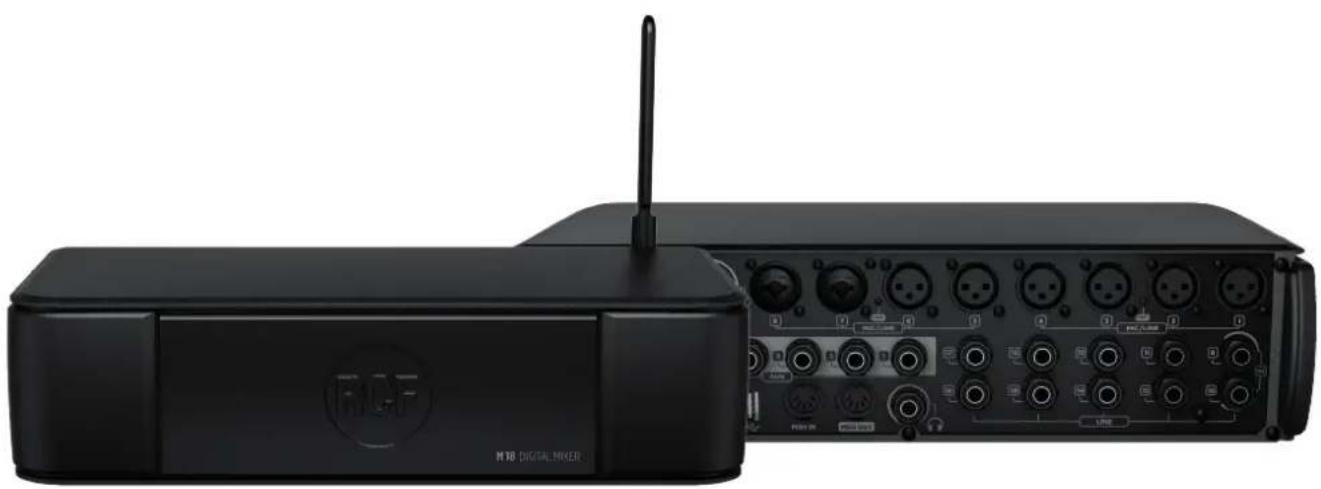
4. M 18 Digital Mixer
5. Power Cord
Each M 18 is provided with the power cord necessary in the region of delivery.
6. External antenna
Connect the external antenna for optimal communication over Wi-Fi, to complement the internal antenna.
RCF M 18 DIGITAL MIXER
REAR PANEL
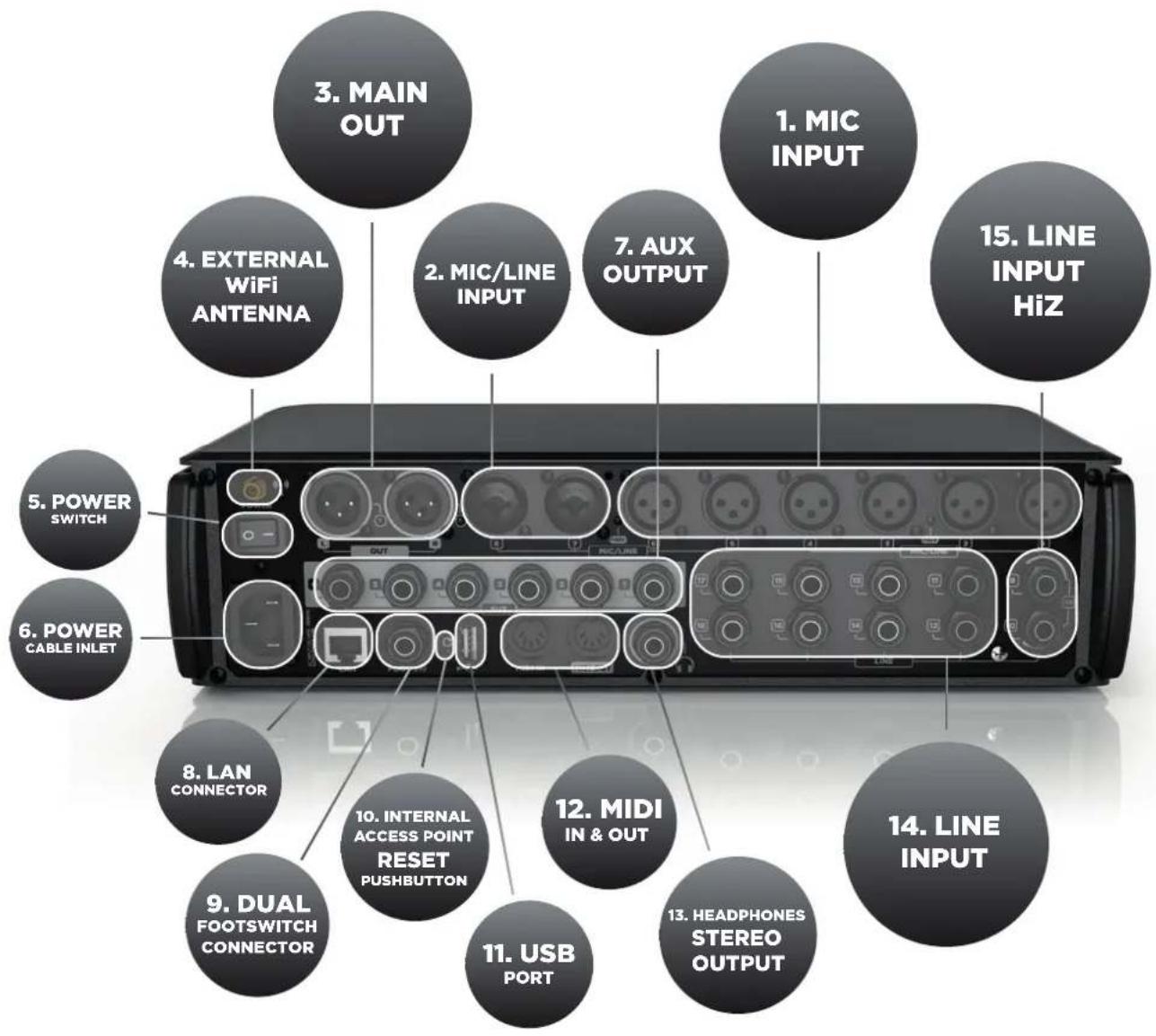
Connect your microphones to these remotely controlled 60 dB gain-range inputs. Red LEDs indicate the Phantom power status ON or OFF for MIC input groups 1 to 4 and 5 to 8. To obtain best performances from your microphones use balanced XLR cables.
Input 7 & 8 provide Mic input on the XLR connection and Line input on the TRS jack connection.
3. MAIN OUTPUT L&R
Connect your active speaker or your amplifier to these +21dBu balanced Output. The green LEDs show the signal presence on MAIN MIX channels.
4. External Wi-Fi Antenna connector
M 18 includes an internal antenna and provisions for an external antenna. Attach the provided external antenna to this connector for optimal performance of the MixRemote app.
5. Power switch
Turn On and Off your M 18 device.
6. Power cable inlet.
Connect here the provided power cord.
7. AUX Output 1-6 Balanced jacks
Connect to these +21dBu balanced output your stage monitors or external effects.
8. LAN connector
It is possible to connect here an external Wi-Fi Access Point for advanced communication configurations. This port is intended also for future applications.
Connect here a single or dual footswitch. Assigned switching functions are completely programmable.
Press this button during normal operation to restore the default settings for both the internal Wi-Fi Access Point and the LAN port, as follows:
LAN PORT
DHCP Client | no
IP Address | 192.168.0.18
Gateway | 0.0.0.0
Mask | 255.255.255.0
DNS Server | 0.0.0.0
WiFi AP
Frequency | 2,4 GHz
Channel 3
Nation | Not assigned
Password | No password
Security | Disabled
SSID | M 18-xxxxxx
Ext.Antenna enabled
You can modify these settings from the MixRemote app in the SETTINGS > NETWORK page.
11. USB Type A port
Insert here a USB stick to play high quality audio files. .WAV, .AIFF and MP3 file allowed for reproduction.
12. MIDI connectors
Connect here your MIDI controller. See the dedicated page on MixRemote ( SETTINGS > MIDI) to view the available function assignable to MIDI ports.
13. Headphones stereo output
Connect your headphones here either for PFL, Personal Monitoring or the Main Mix listening.
Connect here your line level sources like keyboard, external audio device or other small analog consoles used for submix. Input level can be set to +4dBu or -10dBV .
Connect to these inputs your line-level sources, at +4 dBu or -10 dBV, or high-impedance passive instruments, like electric guitars, electric basses or piezo pickups.
FEATURES
18 input channel, 13 mix busses.
In detail:
8 x MIC input
10 x Line input including 2 x switchable HiZ input
6 x AUX send
3 x Internal FX send
16 x FX insert points
1 x Stereo Main Mix
1 x Stereo Headphones
Gate, Dynamic Compressor, three types of 4-band parametric EQ (Standard, Vintage, Smooth) present on every input channel.
Standard 4-band parametric EQ for all AUX outputs.
Master Output Processor on Main Mix output, including Valve Warmer, Xciter, Maximizer.
Stereo Graphic EQ on the Main Mix output.
Four MultiFX processing sections on channels 5 to 10, including Overdrive, Modulation, Delay, Amp Simulation, and others. Amp Simulations include Guitar and Bass Amplifier simulations developed by Overloud.
RCF M 18 DIGITAL MIXER
Switch on the M 18 through the Power Switch (n^5. In the back panel view). A white light on the front panel, just under the RCF logo will confirm that the M 18 is on.
Connect your M 18 Digital Mixer to your iPad for the first time
- On your iPad open the Configuration > Wi-Fi page.
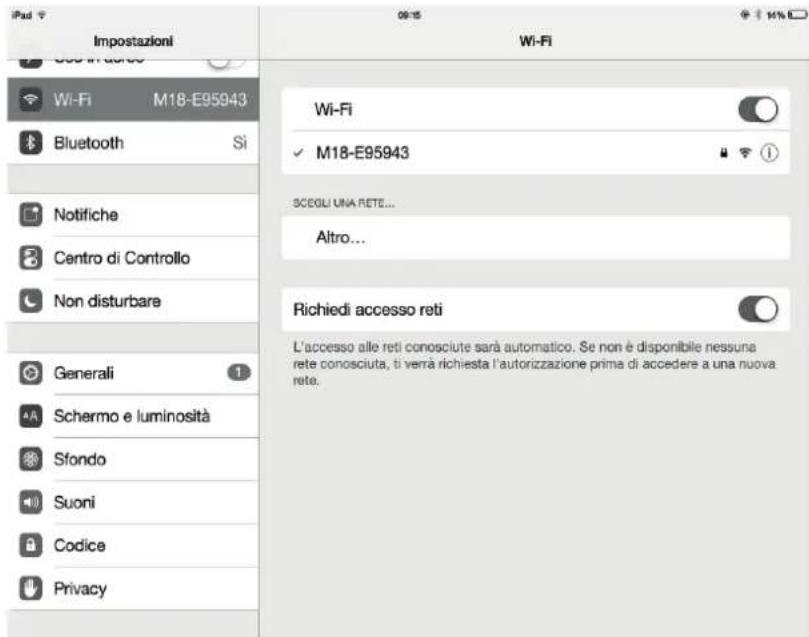
- A Wi-Fi network with SSID called M 18-xxxxxx will appear in the available network list (xxxxxx is an alphanumeric string related to the internal MAC address).
- Select the M 18 Wi-Fi network.
- No password is requested by default.
- Wait for the connection (typically five to ten seconds).
- Now, launch the MixRemote application.
- If MixRemote app. is already open in background, M 18 will be connected as soon as the application is moved to foreground.
Please notice that if you have modified the Wi-Fi settings (SSID name, password, etc.) the connection procedure may vary.
IMPORTANT: to obtain best connection performances avoid to place anything over the M 18's top cover. Do this will interfere with the internal antenna reducing Wi-Fi connection range and reliability. For best Wi-Fi connection performances please always connect the provided external antenna and select your country on MixRemote App. SETTINGS > NETWORK section.
AVVERTENZE PER LA SICUREZZA
IP Address | 192.168.0.18
Gateway 0.0.0.0
Mask | 255.255.255.0
DNS Server | 0.0.0.0
WiFi AP
Frequency | 2,4 GHz
Channel 3
Nation | Not assigned
Password | No password
Security | Disabled
SSID | M 18-xxxxxx
Ext.Antenna enabled
IP Address | 192.168.0.18
Gateway | 0.0.0.0
Mask | 255.255.255.0
DNS Server | 0.0.0.0
WiFi AP
Frequency | 2,4 GHz
Channel 3
Nation | Not assigned
Password | No password
Security | Disabled
SSID | M 18-xxxxxx
Ext.Antenna enabled
Voupuez modifier ces reglages a partir de l'application MixRemote a la page SETTINGS > NETWORK.
11. Port USB de type A
IP Address | 192.168.0.18
Gateway | 0.0.0.0
Mask | 255.255.255.0
DNS Server | 0.0.0.0
WiFi AP
Frequency | 2,4 GHz
Channel 3
Nation | Not assigned
Password | No password
Security | Disabled
SSID | M 18-xxxxxx
Ext.Antenna enabled
SCHALTEN SIE IHR DIGITALMISCHPULT RCF M 18 EIN
IP Address | 192.168.0.18
Gateway | 0.0.0.0
Mask | 255.255.255.0
DNS Server | 0.0.0.0
WiFi AP
Frequency | 2,4 GHz
Channel 3
Nation | Not assigned
Password | No password
Security | Disabled
SSID | M 18-xxxxxx
Ext.Antenna enabled
Self-contained digital mixer with integrated effects
Mic preamp inputs
Mic pre inputs: gain range (^*)
Mic pre inputs: +48V phantom
Hi-Z/Line inputs,unbalanced
Line inputs, unbalanced
All line inputs: sensitivity (^*)
OUTPUTS
MAIN OUT (L,R) balanced +4 dBu
AUX OUT, balanced +4 dBu
PHONES OUT, stereo
INTERNAL FX
FX1
FX2
FX3
INSERT FX
Amp Modeling
Chorus/Flanger/Tremolo
Delay
Overdrive
Pitch Shifter
PLAYER
Number of playback tracks
Playback file format
CONTROL
Internal Wi-Fi Access Point
Internal Wi-Fi antenna
External Wi-Fi antenna
MIDI ports
Dual Footswitch
USB 2.0 host port
LAN port
18
8
60 dB
Ch 1-4,5-8 ON/OFF
2
8
+4 dBu/-10 dBV
10
2
6
1
3
Stereo Reverb
Stereo Delay
Assignable ( )
16
2
4
4
2
4
2
MP3, WAV16, WAV24, AIFF
Yes
Dual
1
IN,OUT
Yes
Yes
Yes
- remote control from the app
** Stereo Chorus, Stereo Flanger, Stereo Tremolo,
Stereo Delay, or Stereo Pitch Shifter
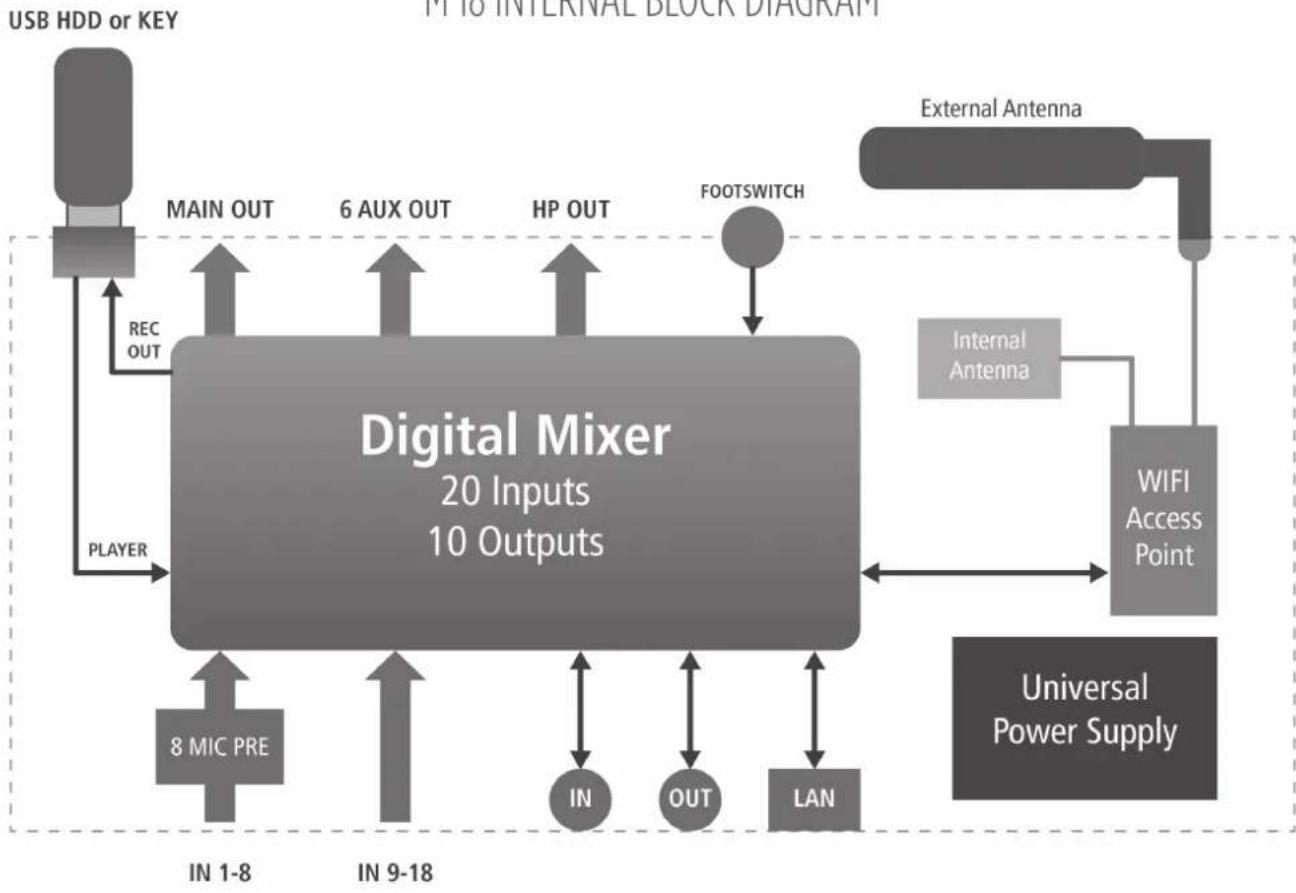
M 18 INTERNAL BLOCK DIAGRAM
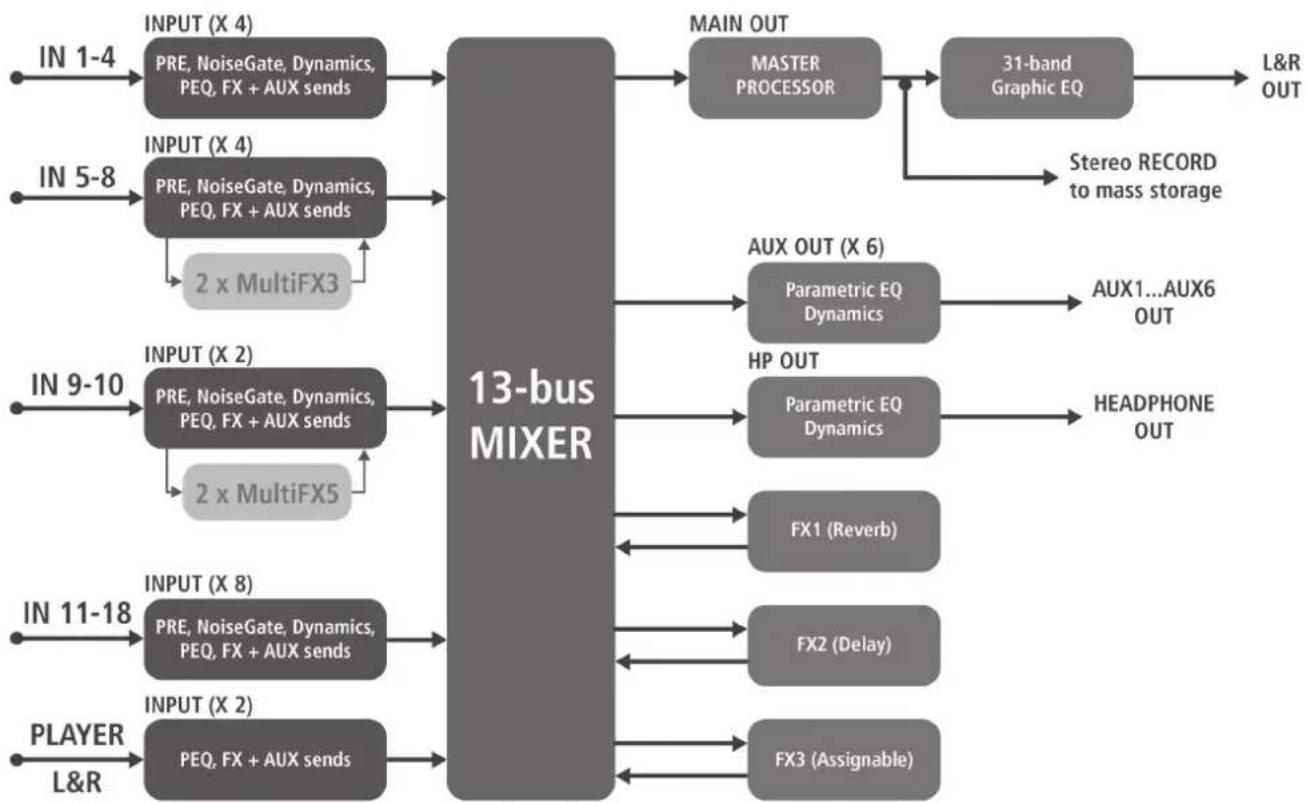
M 18 SIGNAL FLOW DIAGRAM

www.rcf.it