
DDR30B3WDB - Humidifier DANBY - Free user manual and instructions
Find the device manual for free DDR30B3WDB DANBY in PDF.
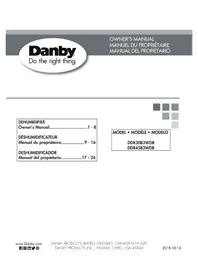


| Product Type | Dehumidifier |
| Brand | Danby |
| Model | DDR30B3WDB |
| Use | Indoor Residential |
| Tank Capacity | Not Specified |
| Drainage Options | Removable bucket and continuous drain (hose not included) |
| Air Filter | Washable, clean every 2 weeks |
| Display | Ambient humidity (30% to 90% RH) |
| Adjustable Humidity Range | 35% to 85% RH in 5% increments |
| Timer | On/Off from 0.5 to 24 hours |
| Fan Speed | High and Normal |
| Special Features | Smart Dehumidify, automatic restart, auto defrost |
| Safety | Automatic shut-off when bucket full, frost protection |
| Operating Temperature | 5°C to 35°C |
| Required Clearances | 20 cm on sides and back, 40 cm above |
| Power Supply | Not Specified |
| Weight | Not Specified |
| Dimensions | Not Specified |
Frequently Asked Questions - DDR30B3WDB DANBY
User questions about DDR30B3WDB DANBY
0 question about this device. Answer the ones you know or ask your own.
Ask a new question about this device
Download the instructions for your Humidifier in PDF format for free! Find your manual DDR30B3WDB - DANBY and take your electronic device back in hand. On this page are published all the documents necessary for the use of your device. DDR30B3WDB by DANBY.
USER MANUAL DDR30B3WDB DANBY
Owner's Manual. 1 - 8
DEHUMIDIFIER
Welcome to the Danby family. We are proud of our quality products and we believe in dependable service. We suggest that you read this owner's manual before plugging in your new appliance as it contains important operation information, safety information, troubleshooting and maintenance tips to ensure the reliability and longevity of your appliance.
Visit www.Danby.com to access self service tools, FAQs and much more. For additional assistance call 1-800-263-2629.
Note the information below; you will need this information to obtain service under warranty.
You must provide the original purchase receipt to validate your warranty and receive service.
Model Number:
Serial Number:
Date of Purchase:
Need Help?
Before you call for service, here are a few things you can do to help us serve you better.
Read this owner's manual:
It contains instructions to help you use and maintain your appliance properly.
If you receive a damaged appliance:
Immediately contact the retailer or builder that sold you the appliance.
Save time and money:
Check the troubleshooting section at the end of this manual before calling. This section will help you solve common problems that may occur.

1-800-26-Danby (1-800-263-2629)

Important Safety Information READ AND FOLLOW ALL SAFETY INSTRUCTIONS
SAFETY REQUIREMENTS
This appliance is not intended for use by persons (including children) whose physical, sensory or mental capabilities may be different or reduced, or who lack experience or knowledge, unless such persons receive supervision or training to operate the appliance by a person responsible for their safety.
Children should be supervised to ensure that they do not play with the appliance.
To avoid risk of electric shock, do not operate this dehumidifier in an area that is likely to accumulate standing water. If this condition develops, disconnect the power supply before stepping into the water.
Do not store or use combustible materials such as gasoline or other flammable vapors or liquids in the vicinity of this or any other appliance.
Do not insert fingers or other objects into grills or openings in the appliance.
Do not cover or block the intake and exhaust openings.
Do not operate the appliance without the filter installed.
Do not operate the appliance near heat sources.
This appliance is intended for indoor, residential applications only. Do not use this dehumidifier outdoors. Do not use this dehumidifier for commercial or industrial applications.
GROUNDING INSTRUCTIONS
This appliance must be grounded. Grounding reduces the risk of electrical shock by providing an escape wire for the electrical current.
This appliance has a cord that has a grounding wire with a 3-prong plug. The power cord must be plugged into an outlet that is properly grounded. If the outlet is a 2-prong wall outlet, it must be replaced with a properly grounded 3-prong wall outlet. The serial rating plate indicates the voltage and frequency the appliance is designed for.
WARNING - Improper use of the grounding plug can result in a risk of electric shock. Consult a qualified electrician or service agent if the grounding instructions are not completely understood, or if doubt exists as to whether the appliance is properly grounded.
Do not connect the appliance to extension cords, adapters or together with another appliance in the same wall outlet.
Do not splice the power cord. Do not under any circumstances cut or remove the third ground prong from the power cord.
If the power supply cord is damaged, it must be replaced by the manufacturer, its service agent or similar qualified person in order to avoid hazard.
OPERATING INSTRUCTIONS
OPERATION
- Place the dehumidifier on a smooth, level floor that is strong enough to support the appliance with a full bucket of water.
- Do not place the dehumidifier on carpeting as this can block air flow around the appliance.
- Do not force casters to move over carpeting as the appliance can become unbalanced and spill water.
- To maintain efficiency, operate the appliance in an enclosed area. Keep nearby doors and windows closed.
- Maintain a minimum clearance of 20 cm (8 inches) on all sides of the appliance to allow for proper air circulation. The recommended ambient operating temperature is between 5°C (41°F) and 35°C (95°F).
- Any time the appliance is placed on its back or side, it must be allowed to stand upright for 6 hours before plugging in to avoid damage to internal components.
- The default humidity setting is 40% and low fan speed. Depending on humidity conditions the dehumidifier may not start automatically under the default setting. This means the humidity in the surrounding air is less than 40%. Press the down button to lower the set humidity until the set humidity is lower than the ambient humidity.
- For optimal performance, ensure that the humidity setting is 10% lower than the ambient humidity. It is normal for the ambient humidity to vary up to 5% above or below the set humidity. It is recommended in normal conditions to set the humidity between 40 - 45%. It is normal for the dehumidifier to exhaust warm air from the top.
FEATURES
- Control Panel
- Handles (both sides)
- Water Bucket
- Water Level Indicator
- Air Outlet
- Air Filter
- Continuous Drain Outlet
- Power Cord Storage Band
- Power Cord
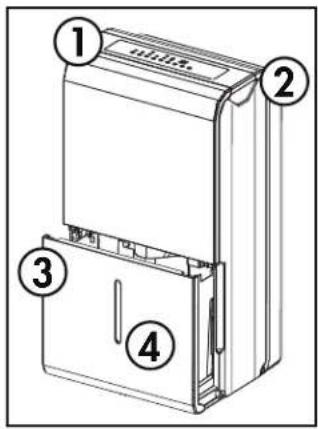
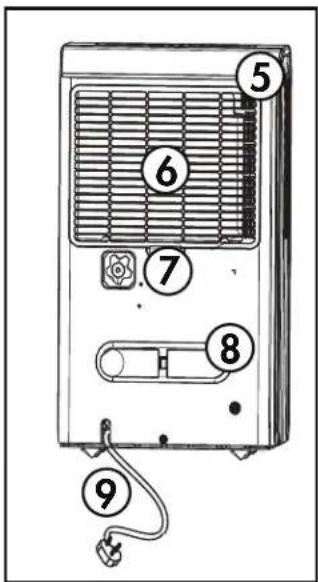
CASTER INSTALLATION
- Remove the casters from the bucket of the dehumidifier.
- Locate the arrow on the bottom of the dehumidifier and insert the caster according to the arrow direction.
- Slide the caster in as far as it will go, until it snaps into place.
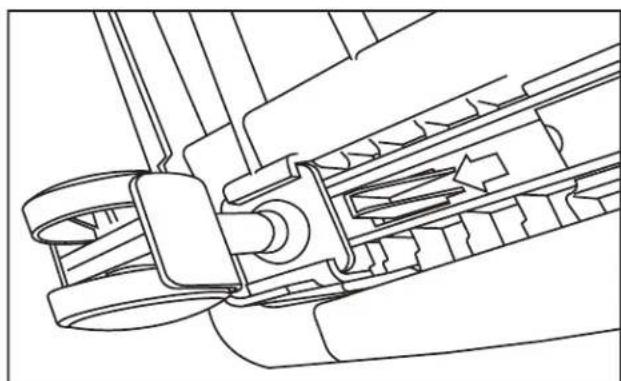
OPERATING INSTRUCTIONS
CONTROL PANEL
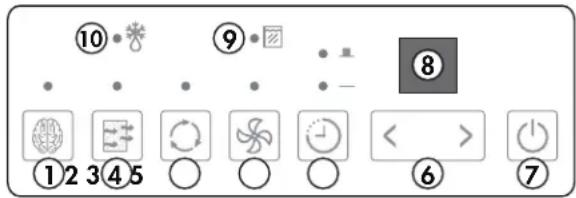
- Smart Dehumidify: This function will automatically adjust the humidity level with the fluctuating room temperatures. The humidity level cannot be adjusted in this setting; it will stabilize between 45% and 55%.
- Filter Button: The check filter light will illuminate after 250 hours of operation. After cleaning the filter, press the filter button to resume normal operation.
- Continuous Button: Press to activate the continuous dehumidifying operation.
- Fan button: Press to select normal or high fan speed. The light will illuminate when set to high fan speed.
- Timer Button: Press to initiate the auto-start and auto-stop feature. Set a start or stop time from 0.0 to 24 hours using the ( ) and ( ) keys.
- Buttons: The humidity level can be set within a range of 35% to 85% relative humidity in 5% increments. For drier air, press the button and set to a lower percentage value. For more damp air, press the button and set a higher percentage value.
- Power Button: Press to turn the dehumidifier on or off.
- Display: Shows the actual (±5%) accuracy room humidity level in a range of 30% RH to 90% RH. Otherwise, displays selection when programming humidity or timer.
- Bucket Full Light: The light will illuminate when the bucket is full or incorrectly positioned inside the cabinet. The compressor and fan operation are terminated as a safety feature. When the bucket is emptied or correctly re-positioned, the dehumidifier will resume operation automatically.
- Auto Defrost Light: The light will illuminate when frost builds up on the evaporator coils. The compressor will cycle off and the fan will continue to run until the frost melts.
TIMER FUNCTION
Auto Off Function
- When the appliance is turned on, press the timer button to activate the auto-stop timer. The auto-stop light will illuminate.
- Press the up and down buttons to change the set time in 0.5 hour increments up to 10 hours and then in 1 hour increments up to 24 hours.
- Press the timer button to confirm programming.
Auto On Function
- When the appliance is turned off, press the timer button to activate the auto-start timer. Set the time as per the instructions above. Press the timer button again to confirm programming.
The auto on and auto off functions can be used at the same time by first setting one and then the other. Both indicator lights will illuminate and the display will count down to the appliance either turning off or on, whichever function was set first.
Note: The timer will not cycle the appliance on and off indefinitely. The auto on and auto off timers will function one time and then the appliance will return to regular functioning.
Turning the appliance on or off at any time or changing the timer setting to 0.0 will cancel the timer settings.
MEMORY AND AUTO RESTART SETTINGS
Each time the appliance is disconnected or reconnected or in the event of a power failure, the appliance will default to the last program setting that was used.
If the appliance shuts off unexpectedly due to a power failure, it will restart with the previous settings automatically once power resumes.
OPERATING INSTRUCTIONS
WATER REMOVAL
There are two ways to remove collected water from the appliance.
1. Water Bucket
The dehumidifier will automatically collect condensed water in the water bucket. When the bucket is full, the compressor and fan will turn off and the full bucket indicator light will turn on.
To empty the bucket, gently remove it from the appliance by gripping both sides and pulling outward. Be cautious when removing the bucket, it will be full and can be heavy.
Do not place the water bucket directly on the floor. The bottom of the bucket is uneven and it will fall over and spill water.
Empty the bucket and replace it in the appliance. The dehumidifier will not function without the bucket installed.
Never tamper with or attempt to defeat the water level float system. Proper installation of the water bucket is crucial in maintaining reliable operation.
2. Continuous Drain
Water can be removed from the appliance using the continuous drain and a standard garden hose (not provided).
Before using any automatic drain functions, check that all drain ports are clean and free of debris. There is one drain port inside the bucket compartment of the appliance, remove the bucket to see it. There is one drain port on the back of the appliance where the drain hose attaches. All drain ports should be cleaned with a pipe cleaner prior to use.
Note: Do not clean the drain ports with anything more rigid than a pipe cleaner as this can damage the appliance.
Note: If the drain ports are clogged or dirty it can cause water to leak from the bottom of the appliance.
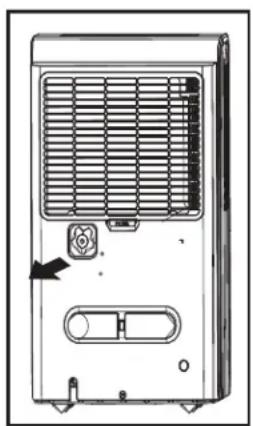
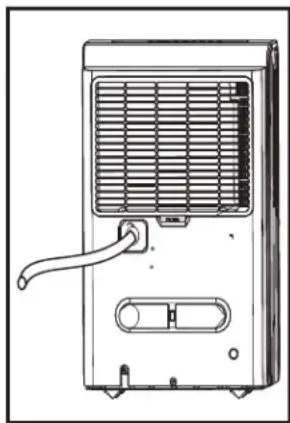
Remove the cover from the continuous drain outlet and attach the female threaded end of the garden hose to the back of the appliance. Direct the other end of the garden hose to a bucket or floor drain.
Ensure that the garden hose is not bent and goes straight down from the back of the appliance. The continuous drain is only activated by gravity so any bends or upward motion in the hose will stop the water from draining.
The garden hose should be cut so that it is no more than 1.8 m (6 feet) long. If the drain hose is too long water may not drain completely which can lead to stagnant water and mildew build up inside the hose.
Note: There is no drain pump in this appliance. The continuous drain is fed by gravity alone.
CARE & MAINTENANCE
AIR FILTER
The air filter should be cleaned approximately every 2 weeks. The air filter may require more frequent cleaning if there is significant dander or fur in the air.
Approximately every two weeks, the filter indicator light on the control panel will illuminate as a reminder to clean the filter. Follow the steps below to clean the filter and return the appliance to normal functioning.
- The air filter is located behind the rear intake grill. To remove the air filter, grasp the filter tab on the bottom of the grill and slide it downward.
- Use a vacuum cleaner with a soft brush attachment to remove any large debris or dust build up from the air filter.
- Wash the filter in lukewarm, soapy water, below 40°C (104°F), or use a neutral cleaning agent.
- Rinse the filter with clean water and dry thoroughly before reinstalling in the appliance.
- Press the filter button on the control panel to resume normal functioning.
Note: Do not operate the appliance without the air filter installed.
ERROR CODES
If the display panel shows any of the below error codes, unplug the appliance, let it stand for 5-10 minutes and then plug it back in. If the error persists, call for service.
AS - Humidity sensor error
ES - Temperature sensor error
EC - Can indicate that the appliance is either too hot or too cold to function properly. Ensure that the ambient room temperature is between 5°C (41°F) and 35°C (95°F).
CLEANING
To avoid possible electric shock, ensure that the appliance is unplugged before performing any cleaning or maintenance.
The outside of the appliance can be wiped clean with a soft cloth or with a lukewarm, damp cloth if necessary.
Do not use gasoline, benzene, thinner or any other chemicals to clean this appliance as these substances can cause damage to the finish and deformation of plastic parts.
Never pour water directly onto the appliance as this will cause deterioration of electrical components and wiring insulation.
Ensure that the drain ports on the interior of the appliance and the drain ports on the back of the appliance are free of dirt and calcium build up.
END OF SEASON CARE
Before removing the appliance from service for the year, operate the appliance on high fan mode for half a day to ensure that the inside of the appliance is dry. This will help avoid the growth of mold or mildew inside the appliance. Ensure the filter is clean and dry. Store the appliance covered in a dry location.
DISPOSAL
This appliance may not be treated as regular household waste, it should be taken to the appropriate waste collection point for recycling of electrical components. Check for local regulatory compliance regarding approved and safe disposal of this appliance.
TROUBLESHOOTING
Danby Consumer Care: 1-800-263-2629
Hours of operation:
Monday to Thursday 8:30 am - 6:00 pm Eastern Standard Time
Friday 8:30 am - 4:00 pm Eastern Standard Time
Information in this manual is subject to change without notice.
| PROBLEM POSSIBLE CAUSE | |
| Appliance will not operate • Plug | not fully inserted into the wall outlet • Blown fuse or circuit breaker • Ambient humidity is lower than the set humidity • Bucket is full or is not in the proper position |
| Insufficient dehumidifying | Air filter is dirty • blocked air flow • Appliance size is too small for application • Ambient humidity is lower than the set humidity |
| Noise • Air fi liter is dirty | Bucket is not in proper position • Floor surface is not level |
| Odors • Formation of mold or mildew on internal wet surfaces • Place an algaecide tablet in the water bucket | ew on internal wet surfaces • Place an algaecide tablet in the water bucket |
| Water on floor • Hose connection | is loose • Drain cover has been removed |
| Frost build up | When ambient temperature is below 5°C (41°F) frost may form • Switch the appliance to fan only mode until the frost melts |
LIMITED "CARRY IN" WARRANTY
This quality product is warranted to be free from manufacturer's defects in material and workmanship, provided that the unit is used under the normal operating conditions intended by the manufacturer.
This warranty is available only to the person to whom the unit was originally sold by Danby Products Limited (Canada) or Danby Products Inc. (U.S.A.) (hereafter "Danby") or by an authorized distributor of Danby, and is non-transferable.
TERMS OF WARRANTY
Plastic parts are warranted for thirty (30) days from the date of purchase, with no extensions provided.
First 24 months: During the first twenty-four (24) months, any functional parts of this product found to be defective will be repaired or replaced, at warrantor's option, at no charge to the original purchaser.
To obtain service: Contact the dealer where the unit was purchased, or contact the nearest authorized Danby service depot, where service must be performed by a qualified service technician. If service is performed on the unit by anyone other than an authorized service depot, all obligations of Danby under this warranty shall be void.
It is the responsibility of the purchaser to transport the appliance to the nearest authorized service depot.
Transportation charges to and from the service location are not covered by this warranty and are the responsibility of the purchaser.
Nothing within this warranty shall imply that Danby will be responsible or liable for any spoilage or damage to food or other contents of this appliance, whether due to any defect of the appliance, or its use, whether proper or improper.
EXCLUSIONS
Save as herein provided, by Danby, there are no other warranties, conditions, representations or guarantees, express or implied, made or intended by Danby or its authorized distributors and all other warranties, conditions, representations or guarantees, including any warranties, conditions, representations or guarantees under any Sale of Goods Act or like legislation or statute is hereby expressly excluded. Save as herein provided, Danby shall not be responsible for any damages to persons or property, including the unit itself, howsoever caused or any consequential damages arising from the malfunction of the unit and by the purchase of the unit, the purchaser does hereby agree to indemnify and hold harmless Danby from any claim for damages to persons or property caused by the unit.
GENERAL PROVISIONS
No warranty or insurance herein contained or set out shall apply when damage or repair is caused by any of the following:
1) Power failure. 2) Damage in transit or when moving the appliance. 3) Improper power supply such as low voltage, defective house wiring or inadequate fuses. 4) Accident, alteration, abuse or misuse of the appliance such as inadequate air circulation in the room or abnormal operating conditions (i.e., extremely high or low room temperature). 5) Use for commercial or industrial purposes (i.e., if the appliance is not installed in a domestic residence). 6) Fire, water damage, theft, war, riot, hostility, acts of God such as hurricanes, floods, etc. 7) Service calls resulting in customer education. 8) Improper installation (i.e., building-in of a free standing appliance or using an appliance outdoors that is not approved for outdoor application, including but not limited to: garages, patios, porches or anywhere that is not properly insulated or climate controlled).
Proof of purchase date will be required for warranty claims; retain bills of sale. In the event that warranty service is required, present the proof of purchase to our authorized service depot.
Warranty Service
Carry In
Danby Products Limited
PO Box 1778, Guelph, Ontario, Canada N1H 6Z9
Telephone: [519] 837-0920 FAX: [519] 837-0449
1-800-263-2629
04/17
Danby Products Inc.
PO Box 669, Findlay, Ohio, U.S.A. 45840
Telephone: (419) 425-8627 FAX: (419) 425-8629
Welcome
PROBLEM POSSIBLE CAUSE
Danby Products Limited
PO Box 1778, Guelph, Ontario, Canada N1H 6Z9
Telephone: (519) 837-0920 Fax: (519) 837-0449
1-800-263-2629
02/18
Danby Products Inc.
PO Box 669, Findlay, Ohio, U.S.A. 45840
Telephone: (419) 425-8627 Fax: (419) 425-8629
Welcome
PROBLEM POSSIBLE CAUSE
Danby Products Limited
PO Box 1778, Guelph, Ontario, Canada N1H 6Z9
Telephone: (519) 837-0920 Fax: (519) 837-0449
1-800-263-2629
04/17
Danby Products Inc.
PO Box 669, Findlay, Ohio, U.S.A. 45840
Telephone: (419) 425-8627 FAX: (419) 425-8629
NOTES / REMARKS / NOTES:
NOTES / REMARKS / NOTES:
MODEL • MODEL • MODEL
DDR30B3WDB
DDR45B3WDB



- NEED HELP
- IMPORTANT SAFETY INFORMATION READ AND FOLLOW ALL SAFETY INSTRUCTIONS
- SAFETY REQUIREMENTS
- GROUNDING INSTRUCTIONS
- OPERATING INSTRUCTIONS
- OPERATION
- FEATURES
- CASTER INSTALLATION
- CONTROL PANEL
- TIMER FUNCTION
- AUTO OFF FUNCTION
- AUTO ON FUNCTION
- MEMORY AND AUTO RESTART SETTINGS
- WATER REMOVAL
- WATER BUCKET
- CONTINUOUS DRAIN
- CARE & MAINTENANCE
- AIR FILTER
- ERROR CODES
- CLEANING
- END OF SEASON CARE
- DISPOSAL
- TROUBLESHOOTING
- DANBY CONSUMER CARE
- HOURS OF OPERATION
- LIMITED "CARRY IN" WARRANTY
- TERMS OF WARRANTY
- EXCLUSIONS
- GENERAL PROVISIONS
- WARRANTY SERVICE
- WELCOME
Brand : DANBY
Model : DDR30B3WDB
Category : Humidifier