ManualGo.com
TYWK42PV1U - TV PANASONIC - Free user manual and instructions
Find the device manual for free TYWK42PV1U PANASONIC in PDF.



Download the instructions for your TV in PDF format for free! Find your manual TYWK42PV1U - PANASONIC and take your electronic device back in hand. On this page are published all the documents necessary for the use of your device. TYWK42PV1U by PANASONIC.
USER MANUAL TYWK42PV1U PANASONIC
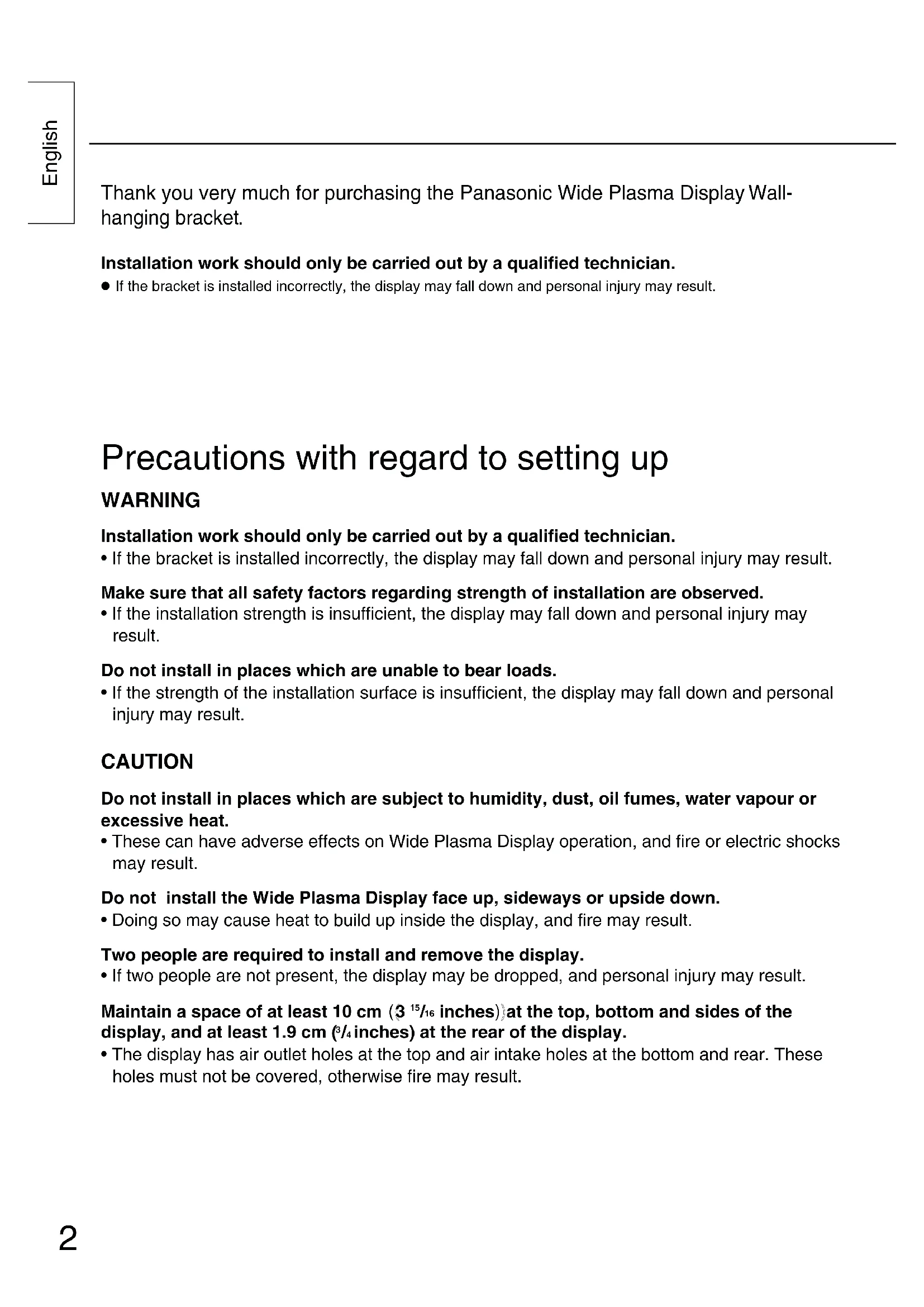
Installation work should only be carried out by a qualified technician.
If the bracket is installed incorrectly, the display may fall down and personal injury may result. Precautions with regard to setting up WARNING Installation work should only be carried out by a qualified technician.
- If the bracket is installed incorrectly, the display may fall down and personal injury may result. Make sure that all safety factors regarding strength of installation are observed.
- If the installation strength is insufficient, the display may fall down and personal injury may result. Do not install in places which are unable to bear loads.
- If the strength of the installation surface is insufficient, the display may fall down and personal injury may result. CAUTION Do not install in places which are subject to humidity, dust, oil fumes, water vapour or excessive heat.
- These can have adverse effects on Wide Plasma Display operation, and fire or electric shocks may result. Do not install the Wide Plasma Display face up, sideways or upside down.
- Doing so may cause heat to build up inside the display, and fire may result. Two people are required to install and remove the display.
- If two people are not present, the display may be dropped, and personal injury may result. Maintain a space of at least 10 cm
at the top, bottom and sides of the display, and at least 1.9 cm (
/4 inches) at the rear of the display.
- The display has air outlet holes at the top and air intake holes at the bottom and rear. These holes must not be covered, otherwise fire may result.3 English Components Points to note during installation
The wall-hanging bracket is for use in installing the Wide Plasma Display to a vertical wall for viewing purposes. Do not use it for any type of installation other than vertical wall installation.
In order to ensure correct, problem-free operation of the Wide Plasma Display, do not install the Display in any of the following places.
- Places which are next to sprinklers or sensors
- Places which are subject to vibration or shocks
- Places which are close to high-voltage wires or electric motors
- Places in direct contact with air from heaters
When installing this wall-hanging bracket unit, use a fixing method appropriate to the type of wall.
Use an M6 bolt (sold separately) appropriate for the type of wall material (wood, steel frame, concrete, etc.) the bracket is to be mounted on.
Keep retention screws and power cord away from any metallic parts or structures within the wall.
Insert the power cord plug for the Wide Plasma Display into a wall outlet which is close and easily accessible.
Provide adequate ventilation so that the temperature around the display does not rise above 40°C (104 F°). If there is insufficient movement of the air inside display, heat may build up inside the display, and fire may result. Wall-hanging bracket unit..................................................1 Allen key (accessory) ......1 M5 screw .........................2 Insulating spacer
Pan head bolt with hex socket (M8-45) .........4 (Fixing screw)4 English Installation procedure The wall-hanging bracket weighs approximately 6 kg (13.23 lbs.), and the Wide Plasma Display unit weightsapproximately 33 kg (72.8 lbs.) to 45 kg (99.2 lbs.).While referring to the wall-hanging bracket installation dimensions in the diagram below, check the strength ofthe wall in six installation locations, and add reinforcing if any of these locations are not strong enough.• The wall-hanging bracket has installation holes provided in 24 locations. if the wall material will not allow sufficient strength to be obtained from using six installation holes, use some of the spare holes. However, depending on the construction material used at the place of installation, cracks may develop if the screws areinserted too close to each other. Note Note Note Note Installation procedure First screw a bolt into the center-top hole. Use a level gauge to correct the alignment of the wall-hanging bracket, and then screw bolts into the remaining five holes. Provisionally tighten the fixing screws. If the screws are inserted more than 5 mm (
inches), it will not be possible to install the Wide Plasma Display in the correct position.
1. Check the strength of the installation location.
2. Install the wall-hanging bracket to the wall.
Fixing screwFixing screw
- Install the Wall-hanging bracket so that the arrow shown on the bracket is pointing upwards.
- If it is necessary to embed bolts or nuts beforehand because the wall is made from concrete, use the bracket itself to determine the correct installation hole positions, or use the dimension diagram to calculate the holepositions. Then embed the M6 bolts or nuts into the holes. Furthermore, when embedding the bolts, allow thebolts to protrude from the wall by 10 mm ( /32 inches) to 15 mm ( /32 inches). 930 (36
/16) Wall installation holes (6 locations) 50 (1
- Use commercially-available M6 bolts which suit the wall materials for installation to the wall.5 English
- Place the display face down on top of a cloth which is clean and free from other foreign particles, and then carry out the procedure above. Note Note
- Do not Lift the display too high, otherwise it may become unhooked. Note Note Installation procedure Push the upper insulating spacers on the display into the notches at the top of the wall-hanging bracket until they are hooked in, and then lower the display into place. While lifting the display slightly, insert the lower insulating spacers on the display into the lower horizontal hanging holes in the wall- hanging bracket, and then lower the display.
3. Prepare the Wide Plasma Display.
4. Install the display to the wall-hanging bracket.
Remove the four bolts. Pan head bolt with hex socketToothed pan washerInsulating spacer
1. Remove the four bolts from the display.
2. Use the accessory tool (Allen key) to
install the four accessory pan head bolts with hex socket, toothed pan washers and insulating spacers into the holes where the four bolts used to be as shown in the illustration.
- Attach the insulating spacers to the display. Insulating spacerNotches (for hanging horizontally)Lower horizontal hanging holes6 English Installation procedure
1. Remove the two fixing screws which
are screwed into the wall-hanging bracket.
2. While lifting up the bottom of the
display Pull it forward to detach the insulating spacers at the bottom Then lift up the display.
- Tighten the fixing screws at left and right. Fixing screw mounts (left and right)Wall-hanging bracket
- Be sure to tighten the left and right fixing screws to prevent the display from detaching from the wall-hanging bracket. Note Note Fixing screws(left and right)Insulating spacer7 English (For U.S.A) Panasonic Consumer Electronics CompanyDivision of Matsushita Electric Corporationof AmericaOne Panasonic WaySecaucaus, NJ07094
Panasonic Consumer Electronics Company or Panasonic Sales Company (collectively referred to as “the warrantor” ), will replace parts in case of defects in materials or workmanship, free of change, in the USA or Puerto Rico, for ten (10) days from the date of the original purchase. In-warranty parts in the USA can be obtained during the warranty period be contacting: Panasonic Services Company (PASC)20421 84th Avenue SouthKent, Washington 98032Tel.:1-800-833-9626Fax.:1-800-237-9080(6 am to 5 pm Monday-Friday; 6 am to 10:30 am Saturday; PST)Service in Puerto Rico can be obtained during the warranty period by calling the telephone number listed above.This warranty is extended only to the original purchaser. A purchase receipt or other proof of the originalpurchase is required for replacement parts under the warranty.This warranty only covers failures due to materials and workmanship and does not cover normal wear. Thewarranty does not cover damages which occurred in shipment or failures which result from accidents, misuse,abuse, neglect, mishandling, misapplication, faulty installation, set-up adjustments, improper maintenance,alteration, line power surge, lightning damage, modification,or commercial use, such as hotel, office,restaurant, or other business or rental use of the product, or damage that is attributable to acts of God.
LIMITS AND EXCLUSIONS
There are no express warranties except as listed above.PANASONIC SHALL NOT BE LIABLE FOR INCIDENTAL OR CONSEQUENTIAL DAMAGE RESULTINGFROM THE USE OF THIS PRODUCT, OR ARISING OUT OF ANY BREACH OF THIS WARRANTY. ALLEXPRESS AND IMPLIED WARRANTIES. INCLUDING THE WARRANTIES OF MERCHANTABILITY, ARELIMITED TO THE APPLICABLE WARRANTY PERIOD SET FORTH ABOVE. Some states do not allow the exclusion or limitation of incidental or consequential damages, or limitations onhow long an implied warranty lasts, so the above exclusions or limitations may not apply to you. This warranty gives you specific legal rights and you may also have other rights which vary from state to state.If a problem with this product develops during or after the warranty period, you may contact your dealer or callthe number listed above.If the problem is not handled to your satisfaction, then write to the Customer Satisfaction Center at thePanasonic Consumer Electronics Company address indicated above.Panasonic Sales Company, Division ofMatsushita Electric of Puerto Rico, Inc.AVE. 65 de Infanteria, Km 9.5San Gabriel Industrial ParkCarolina, Puerto Rico 00985 Warranty8 Deutsch Vielen Dank für den Kauf des Wandständers für das Plasmadisplay von Panasonic.