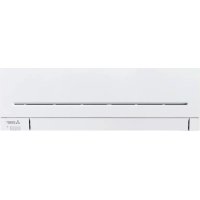
MSZAP25VGE1 - Air Conditioning MITSUBISHI - Free user manual and instructions
Find the device manual for free MSZAP25VGE1 MITSUBISHI in PDF.


| Product type | Reversible air conditioning (cooling and heating) |
| Brand | Mitsubishi Electric |
| Model | MSZ-AP25VG(K) (indoor) / MUZ-AP25VG(H) (outdoor) |
| Cooling capacity | 2.5 kW |
| Heating capacity | 3.2 kW |
| Power consumption (cooling) | 0.60 kW |
| Power consumption (heating) | 0.78 kW |
| Power supply | ~230 V, 50 Hz |
| Indoor unit weight | 10.5 kg |
| Outdoor unit weight | 31 kg |
| Refrigerant | R32, charge 0.55 kg |
| Protection rating (indoor) | IP20 |
| Protection rating (outdoor) | IP24 |
| Indoor sound level (max) | 42 dB(A) (very high) |
| Outdoor sound level (max) | 47 dB(A) |
| Operating modes | Auto, Cooling, Dehumidification, Heating, Ventilation |
| Special functions | i-Save, ECONO COOL, Night Mode, Weekly Timer, Auto Restart |
| Wi-Fi interface | Optional (type VGK) – allows control via MELCloud |
| Maintenance and cleaning | Clean filters every 2 weeks with water or vacuum cleaner |
| Safety instructions | Fire risk (flammable refrigerant), do not use extension cord, disconnect before cleaning |
| Remote control batteries | 2 AAA batteries, lifespan about 1 year |
| Spare parts and repairability | Air purifying filter (ref. MAC-2370FT-E), recommended annual replacement |
Frequently Asked Questions - MSZAP25VGE1 MITSUBISHI
User questions about MSZAP25VGE1 MITSUBISHI
0 question about this device. Answer the ones you know or ask your own.
Ask a new question about this device
Download the instructions for your Air Conditioning in PDF format for free! Find your manual MSZAP25VGE1 - MITSUBISHI and take your electronic device back in hand. On this page are published all the documents necessary for the use of your device. MSZAP25VGE1 by MITSUBISHI.
USER MANUAL MSZAP25VGE1 MITSUBISHI
SPLIT-TYPE AIR CONDITIONERS
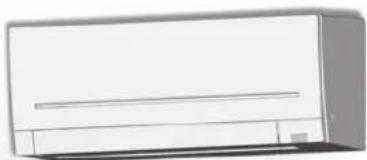
INDOOR UNIT
MSZ-AP25VG MSZ-AP35VG MSZ-AP42VG MSZ-AP50VG
C E
English is original.
- To use this unit correctly and safely, be sure to read these operating instructions before use.
FAN SPEED AND AIRFLOW DIRECTION ADJUSTMENT
■SAVE OPERATION
Wi-Fi INTERFACESHETTINGUP(VGKtypeonly)
WHEN YOU THINK THAT TROUBLE HAS OCCURRED
■ WHEN THE AIR CONDITIONER IS NOT GOING TO BE USED FOR A LONG TIME
■ INSTALLATION PLACE AND ELECTRICAL WORK
■SPECIFICATIONS 17
SAFETYPRECAUTIONS
Meanings of symbols displayed on indoor unit and/or outdoor unit
| WARNING (Risk of fire) | This unit uses a flammable refrigerant. If refrigerant leaks and comes in contact with fire or heating part, it will create harmful gas and there is risk of fire. |
| Read the OPERATING INSTRUCTIONS carefully before operation. | |
| Service personnel are required to carefully read the OPERATING INSTRUCTIONS and INSTALLATION MANUAL before operation. | |
| Further information is available in the OPERATING INSTRUCTIONS, INSTALLATION MANUAL, and the like. | |
- Since rotating parts and parts which could cause an electric shock are used in this product, be sure to read these "Safety Precautions" before use.
- Since the cautionary items shown here are important for safety, be sure to observe them.
- After reading this manual, keep it together with the installation manual in a handy place for easy reference.
Marks and their meanings
WARNING: Incorrect handling could cause serious hazard, such as death, serious injury, etc. with a high probability.
CAUTION: Incorrect handling could cause serious hazard depending on the conditions.
WARNING

Do not connect the power cord to an intermediate point, use an extension cord, or connect multiple devices to a single AC outlet. This may cause overheating, fire, or electric shock.
Make sure the power plug is free of dirt and insert it securely into the outlet.
- A dirty plug may cause fire or electric shock.
Do not bundle, pull, damage, or modify the power cord, and do not apply heat or place heavy objects on it.
This may cause fire or electric shock.
Meanings of symbols used in this manual

: Be sure not to do.

: Be sure to follow the instruction.

: Never insert your finger or stick, etc.

: Never step onto the indoor/outdoor unit and do not put anything on them.

: Danger of electric shock. Be careful.

: Be sure to disconnect the power supply plug from the power outlet.

: Be sure to shut off the power.

:Riskof fire.

: Never touch with wet hand.

: Never splash water on the unit.
| Do not turn the breaker OFF/ON or disconnect/connect the power plug during operation. ·This may create sparks, which can cause fire. ·After the indoor unit is switched OFF with the remote controller, make sure to turn the breaker OFF or disconnect the power plug. |
| Do not expose your body directly to cool air for a prolonged length of time. ·This could be detrimental to your health. |
SAFETYPRECAUTIONS
| The unit should not be installed, relocated, disassembled, altered, or repaired by the user. · An improperly handled air conditioner may cause fire, electric shock, injury, or water leakage, etc. Consult your dealer. · If the power supply cord is damaged, it must be replaced by the manufacturer or its service agent in order to avoid a hazard. | |
| When installing, relocating, or servicing the unit, make sure that no substance other than the specified refrigerant (R32) enters the refrigerant circuit. · Any presence of foreign substance such as air can cause abnormal pressure rise and may result in explosion or injury. · The use of any refrigerant other than that specified for the system will cause mechanical failure, system malfunction, or unit breakdown. In the worst case, this could lead to a serious impediment to securing product safety. | |
| This appliance is not intended for use by persons (including children with reduced physical, sensory or mental capabilities, or lack of experience and knowledge, unless they have been given supervision or instruction concerning use of the appliance by a person responsible for their safety. | |
| Children should be supervised to ensure that they do not play with the appliance. | |
| Do not insert your finger, a stick, or other objects into the air inlet or outlet. · This may cause injury, since the fan inside rotates at high speeds during operation. | |
| In case of an abnormal condition (such as a burning smell), stop the air conditioner and disconnect the power plug or turn the breaker OFF. · A continued operation in the abnormal state may cause a malfunction, fire, or electric shock. In this case, consult your dealer. | |
| When the air conditioner does not cool or heat, there is a possibility of refrigerant leakage. If any refrigerant leakage is found, stop operations and ventilate the room well and consult your dealer immediately. If a repair involves recharging the unit with refrigerant, ask the service technician for details. · The refrigerant used in the air conditioner is not harmful. Normally, it does not leak. However, if refrigerant leaks and comes in contact with fire or heating part of such a fan heater, kerosene heater, or cooking stove, it will create harmful gas and there is risk of fire. | |
| The user should never attempt to wash the inside of the indoor unit. Should the inside of the unit require cleaning, contact your dealer. · Unsuitable detergent may cause damage to plastic material inside the unit, which may result in water leakage. Should detergent come in contact with electrical parts or the motor, it will result in a malfunction, smoke, or fire. · The appliance shall be stored in a room without continuously operating ignition sources (for example: open fire, an operating gas appliance or an operating electric heater). · Be aware that refrigerants may not contain an odour. · Do not use means to accelerate the defrosting process or to clean the appliance, other than those recommended by the manufacturer. · Do not pierce or burn. | |
| The indoor unit must be installed in rooms which exceed the floor space specified. Please consult your dealer. · AP50: 1.7 m³ | |
| This appliance is intended to be used by expert or trained users in shops, in light industry and on farms, or for commercial use by lay persons. | |
| CAUTION | |
| Do not touch the air inlet or the aluminum fins of the indoor/outdoor unit. · This may cause injury. | |
| Do not use insecticides or flammable sprays on the unit. · This may cause a fire or deformation of the unit. | |
| Do not expose pets or houseplants to direct airflow. · This may cause injury to the pets or plants. | |
| Do not place other electric appliances or furniture under the indoor/outdoor unit. · Water may drip down from the unit, which may cause damage or malfunction. | |
| Do not leave the unit on a damaged Installation stand. · The unit may fall and cause injury. | |
| Do not step on an unstable bench to operate or clean the unit. · This may cause injury if you fall down. | |
| Do not pull the power cord. · This may cause a portion of the core wire to break, which may cause overheating or fire. | |
| Do not charge or disassemble the batteries, and do not throw them into a fire. · This may cause the batteries to leak, or cause a fire or explosion. |
| Do not operate the unit for more than 4 hours at high humidity (80% RH or more) and/or with windows or outside door left open. ·This may cause the water condensation in the air conditioner, which may drip down, wetting or damaging the furniture. ·The water condensation in the air conditioner may contribute to growth of fungi, such as mold. | |
| Do not use the unit for special purposes, such as storing food, raising animals, growing plants, or preserving precision devices or art objects. ·This may cause deterioration of quality, or harm to animals and plants. | |
| Do not expose combustion appliances to direct airflow. ·This may cause incomplete combustion. | |
| Never put batteries in your mouth for any reason to avoid accidental ingestion. ·Battery ingestion may cause choking and/or poisoning. | |
| Before cleaning the unit, switch it OFF and disconnect the power plug or turn the breaker OFF. ·This may cause injury, since the fan inside rotates at high speeds during operation. | |
| When the unit will be unused for a long time, disconnect the power plug or turn the breaker OFF. ·The unit may accumulate dirt, which may cause overheating or fire. | |
| Replace all batteries of the remote controller with new ones of the same type. ·Using an old battery together with a new one may cause overheating, leakage, or explosion. | |
| If the battery fluid comes in contact with your skin or clothes, wash them thoroughly with clean water. ·If the battery fluid comes in contact with your eyes, wash them thoroughly with clean water and immediately seek medical attention. | |
| Ensure that the area is well-ventilated when the unit is operated together with a combustion appliance. ·Inadequate ventilation may cause oxygen starvation. | |
| Turn the breaker OFF when you hear thunder and there is a possibility of a lightning strike. ·The unit may be damaged if lightning strikes. | |
| After the air conditioner is used for several seasons, perform inspection and maintenance in addition to normal cleaning. ·Dirt or dust in the unit may create an unpleasant odor, contribute to growth of fungi, such as mold, or clog the drain passage, and cause water to leak from the indoor unit. Consult your dealer for inspection and maintenance, which require specialized knowledge and skills. | |
| Do not operate switches with wet hands. ·This may cause electric shock. | |
| Do not clean the air conditioner with water or place an object that contains water, such as a flower vase, on it. ·This may cause fire or electric shock. | |
| Do not step on or place any object on the outdoor unit. ·This may cause injury if you or the object falls down. |

IMPORTANT
Dirty fi liters cause condensation in the air conditioner which will contribute to the growth of fungi such as mold. It is therefore recommended to clean air fi liters every 2 weeks.
Before starting the operation, ensure that the horizontal vanes are in the closed position. If operation starts when the horizontal vanes are in the open position, they may not return to the correct position.
SAFETYPRECAUTIONS
For installation
| WARNING | |
| Consult your dealer for installing the air conditioner. ·It should not be installed by the user since installation requires specialized knowledge and skills. An improperly installed air conditioner may cause water leakage, fl re, or electric shock. | |
| Provide a dedicated power supply for the air conditioner. ·A non-dedicated power supply may cause overheating or fire. | |
| Do not install the unit where fl ammable gas could leak. ·If gas leaks and accumulates around the outdoor unit, it may cause an explosion. | |
| Earth the unit correctly. ·Do not connect the earth wire to a gas pipe, water pipe, lightning rod, or a telephone earth wire. Improper earthing may cause electric shock. | |
| CAUTION | |
| Install an earth leakage breaker depending on the installation location of the air conditioner (such as highly humid areas). ·If an earth leakage breaker is not installed, it may cause electric shock. | |
| Ensure that the drain water is properly drained. ·If the drain passage is Improper, water may drip down from the Indoor/outdoor unit, wetting and damaging the furniture. | |
| In case of an abnormal condition Immediately stop operating the air conditioner and consult your dealer. | |
For Wi-Fi interface
| WARNING (Improper handling may have serious consequences, including serious injury or death.) | |
| This appliance can be used by children aged from 8 years and above and persons with reduced physical, sensory or mental capabilities or lack of experience and knowledge if they have been given supervi-sion or Instruction concerning use of the appliance in a safe way and understand the hazards involved. | |
| Children shall not play with the appliance. Cleaning and user mainte-nance shall not be made by children without supervision. | |
| Do not use the Wi-Fi Interface nearby the medical electrical equipment or people who have a medical device such as a cardiac pacemaker or an implantable cardioverter-defl brillator. • It can cause an accident due to malfunctions of the medical equipment or device. | |
| Do not install the Wi-Fi interface nearby the automatic control devices such as automatic doors or fire alarms. • It can cause accidents due to malfunctions. | |
| Do not touch the Wi-Fi interface with wet hands. • It can cause damage to the device, electric shock, or fire. | |
| Do not splash water on the Wi-Fi interface or use it in a bathroom. • It can cause damage to the device, electric shock, or fire. | |
| When the Wi-Fi interface is dropped, or the holder or cable is damaged, disconnect the power supply plug or turn the breaker OFF. • It may cause fire or electric shock. In this case, consult your dealer. | |
| CAUTION (Improper handling may have consequences, including injury or damage to building.) | |
| Do not step on unstable stepp stool to set up or clean the Wi-Fi interface. • It may cause injury if you fall down. | |
| Do not use the Wi-Fi interface nearby other wireless devices, microwaves, cordless phones, or facsimiles. • It can cause malfunctions. |
DISPOSAL
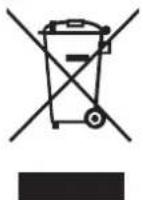
Fig. 1
To dispose of this product, consult your dealer.
Note:
This symbol mark is for EU countries only. This symbol mark is according to the directive 2012/19/ EU Article 14 Information for users and Annex IX, and/or to the directive 2006/66/EC Article 20 Information for end-users and Annex II.
Your MITSUBISHI ELECTRIC product is designed and manufactured with high quality materials and components which can be recycled and/or reused. This symbol means that electrical and electronic equipment, batteries and accumulators, at their end-of-life, should be disposed of separately from your household waste. If a chemical symbol is printed beneath the symbol (Fig. 1), this chemical symbol means that the battery or accumulator contains a heavy metal at a certain concentration. This will be indicated as follows: Hg: mercury (0.0005%) Cd:cadmium (0.002%) Pb:lead (0.004%) In the European Union there are separate collection systems for used electrical and electronic products, batteries and accumulators. Please, dispose of this equipment, batteries and accumulators correctly at your local community waste collection/recycling centre. Please, help us to conserve the environment we live in!
Indoor unit Remote controller
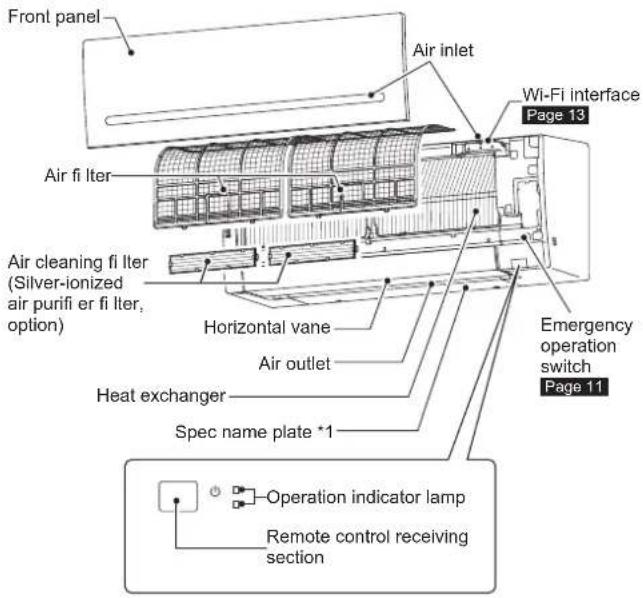
Outdoor unit
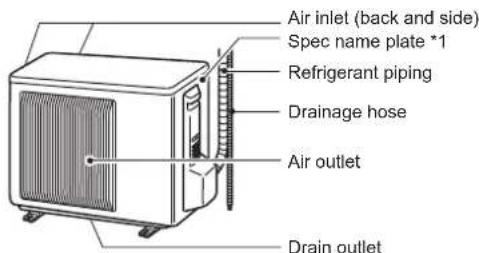
Outdoor units may be different in appearance.
*1 The manufacturing year and month are indicated on the spec name plate.
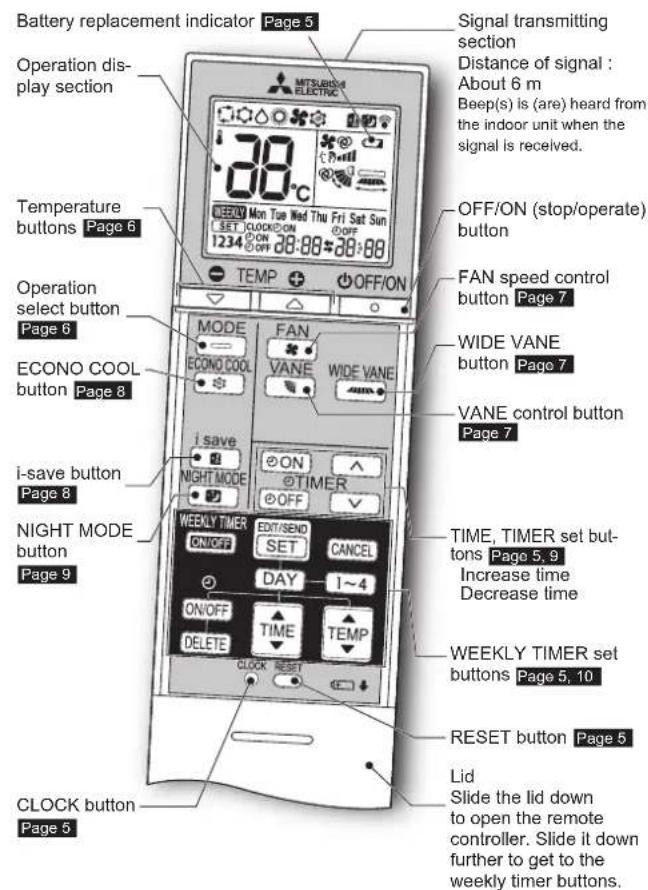
Remote controller
When the remote controller is not used, place it near this unit.
Only use the remote controller provided with the unit.
Do not use other remote controllers. If 2 or more indoor units are installed in proximity to one another, an indoor unit that is not intended to be operated may respond to the remote controller.
PREPARATIONBEFOREOPERATION
Before operation: Insert the power supply plug into the power outlet and/or turn the breaker on.
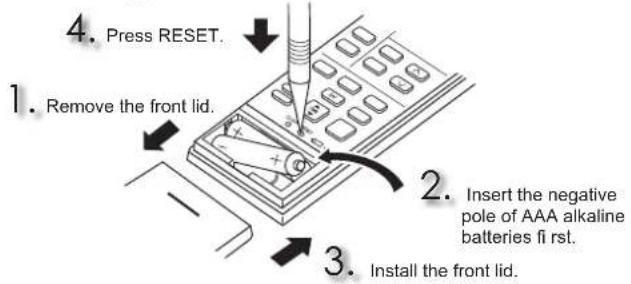
Installing the remote controller batteries
Note:
- Make sure the polarity of the batteries is correct.
- Do not use manganese batteries and leaking batteries. The remote controller could malfunction.
- Do not use rechargeable batteries.
- The battery replacement indicator lights up when the battery is running low. In about 7 days after the indicator starts lights up, the remote controller stops working.
- Replace all batteries with new ones of the same type.
- Batteries can be used for approximately 1 year. However, batteries with expired shelf lives last shorter.
- Press RESET gently using a thin instrument. If the RESET button is not pressed, the remote controller may not operate correctly.
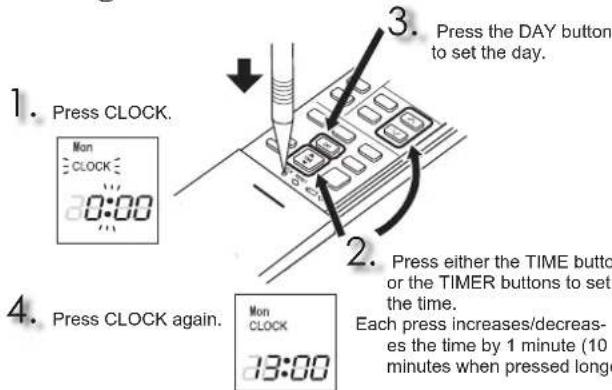
Setting current time
Note:
- Press CLOCK gently using a thin instrument.
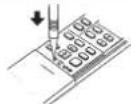
Note:
How to set remote controller exclusively for a particular indoor unit A maximum of 4 indoor units with wireless remote controllers can be used in a room.
To operate the indoor units individually with each remote controller, assign a number to each remote controller according to the number of the indoor unit. This setting can be set only when all the following conditions are met:
The remote controller is powered OFF.
(1) Hold down 1-4 button on the remote controller for 2 seconds to enter the pairing mode.
(2) Press 1-4 button again and assign a number to each remote controller. Each press of 1-4 button advances the number in the following order: 1 → 2 → 3 → 4.
(3) Press SET button to complete the pairing setting.
After you turn the breaker ON, the remote controller that first sends a signal to an indoor unit will be regarded as the remote controller for the indoor unit. Once they are set, the indoor unit will only receive the signal from the assigned remote controller afterwards.
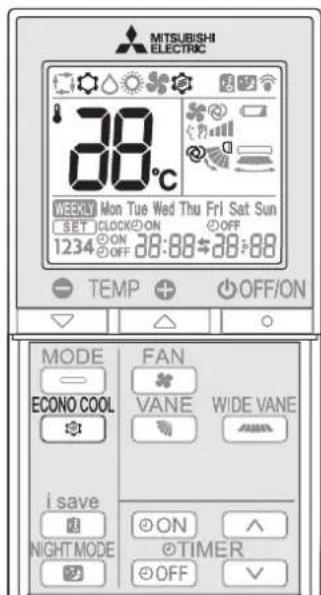
Press OFFIO to start the operation.

Press MODE to select operation mode. Each press changes mode in the following order:


Press or to set the temperature. Each press raises or lowers the temperature by 1^

OFFON Press to stop the operation.

AUTO mode (Auto change over)
The unit selects the operation mode according to the difference between the room temperature and the set temperature. During AUTO mode, the unit changes mode (COOL HEAT) when the room temperature is about 2^ away from the set temperature for more than 15 minutes.
Note:
Auto Mode is not recommended if this indoor unit is connected to a MXZ type outdoor unit. When several indoor units are operated simultaneously, the unit may not be able to switch operation mode between COOL and HEAT. In this case, the indoor unit becomes standby mode (Refer to table of Operation indicator lamp).

COOLmode
Enjoy cool air at your desired temperature.
Note:
Do not operate COOL mode at very low outside temperatures (less than -10^ ). Water condensed in the unit may drip and wet or damage furniture, etc.

DRY mode
Dehumidify your room. The room may be cooled slightly. Temperature cannot be set during DRY mode.

HEATmode
Enjoy warm air at your desired temperature.

FAN model
Circulate the air in your room.
Note:
After COOL/DRY mode operation, it is recommended to operate in the FAN mode to dry inside the indoor unit.
Note:
Multi system operation
Two or more indoor units can be operated by one outdoor unit. When several indoor units are operated simultaneously, cooling/dry/fan and heating operations cannot be done at the same time. When COOL/DRY/FAN is selected with one unit and HEAT with another or vice versa, the unit selected last goes into standby mode.
Operation indicator lamp
The operation indicator lamp shows the operation state of the unit.
| Indication | Operation state Room temperature | |
| The unit is operating to reach the set temperature | About 2°C or more away from set temperature | |
| The room temperature is approaching the set temperature | About 1 to 2°C from set temperature | |
| Standby mode (only during multi system operation) | - |

Lit Blinking
FANSPEED AND AIRFLOW DIRECTION ADJUSTMENT
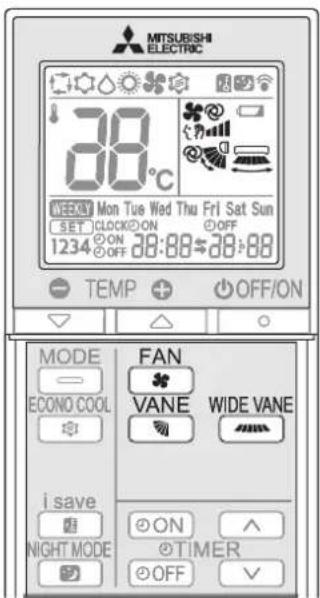
Fan speed
Press FAN Select fan speed. Each press changes fan speed in the following order:

- Two short beeps are heard from the indoor unit when set to AUTO.
- Use higher fan speed to cool/heat the room quicker. It is recommended to lower the fan speed once the room is cool/warm.
- Use lower fan speed for quiet operation.
Note:
Multi system operation
When several indoor units are operated simultaneously by one outdoor unit for heating operation, the temperature of the airflow may be low. In this case, it is recommended to set the fan speed to AUTO.
Up-down Airflow direction
VANE
Press to select airflow direction. Each press changes airflow direction in the following order:

(AUTO) ....The vane is set to the most effcient airflow direction. COOL/ DRY/FAN: horizontal position. HEAT: position (4).

(Manual)....For efficient air conditioning, select the upper position for COOL/DRY, and the lower position for HEAT. If the lower position is selected during COOL/DRY, the vane automatically moves to the upward position after 0.5 to 1 hour to prevent any condensation from dripping.

(Swing) ...The vane moves up and down intermittently.
- Two short beeps are heard from the indoor unit when set to AUTO.
- Always use the remote controller when changing the direction of airflow. Moving the horizontal vanes with your hands causes them to malfunction.
- When the breaker is turned on, the horizontal vanes' position will be reset in about a minute, then the operation will start. The same is true in the emergency cooling operation.
- When the horizontal vanes seem to be in an abnormal position, see page 14.
Left-right Airflow direction
WIDE VANE
Press to select airflow direction. Each press changes airflow direction in the following order:

I-SAVE OPERATION
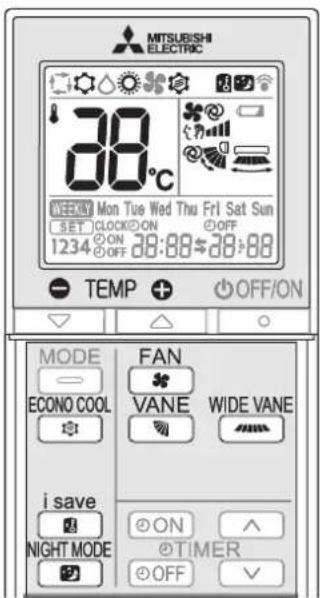
A simplified set back function enables to recall the preferred (preset) setting with a single push of the button. Press the button again and you can go back to the previous setting in an instance.

i save Press during COOL, ECONO COOL, or HEAT mode to select i save mode.

Set the temperature, fan speed, and airflow direction.
The same setting is selected from the next time by simply pressing save
- Two settings can be saved. (One for COOL/ECONO COOL, one for HEAT)
- Select the appropriate temperature, fan speed, and airflow direction according to your room.

i save Press again to cancel i save operation.
- i save operation also is cancelled when the MODE button is pressed.
Note:
Example of use:
- Low energy mode Set the temperature 2^ to 3^ warmer in COOL and cooler in HEAT mode. This setting is suitable for unoccupied room, and while you are sleeping.
- Saving frequently used settings
Save your preferred setting for COOL/ECONO COOL and HEAT. This enables you to select your preferred setting with a single push of the button.
ECONOCOOL OPERATION
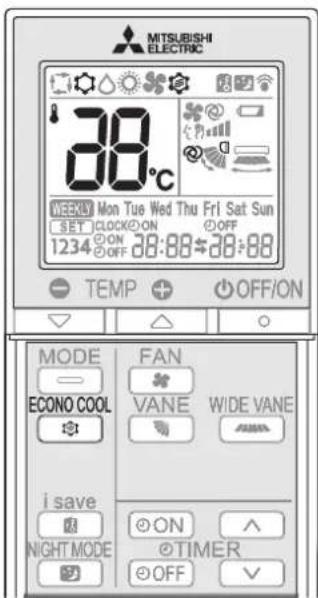
Swing airflow (change of airflow) makes you feel cooler than stationary airflow.
The set temperature and the airflow direction are automatically changed by the microprocessor. It is possible to perform cooling operation with keeping comfort. As a result energy can be saved.

ECONO COOL
Press during COOL mode
ECONO COOL operation.
The unit performs swing operation vertically in various cycles according to the temperature airflow.

ECONO COOL
Press again to cancel ECONO COOL operation.
- ECONO COOL operation is also cancelled when the VANE button is pressed.
NIGHT mode changes the brightness of the operation indicator, disables the beep sound and limits the noise level of the outdoor unit.

PRESS operation to activate NIGHT mode.
The operation indicator lamp dims.
- The beep sound will be disabled except that emitted when the operation is started or stopped.
- Noise level of the outdoor unit will be lower than that mentioned in SPECIFICATIONS.

NIGHT MODE Press to cancel NIGHT mode.
Note:
The cooling/heating capacity may drop.
- Noise level of the outdoor unit may not change after start-up of the unit, during the protection operation, or depending on other operating conditions.
The fan speed of the indoor unit will not change.
The operation indicator lamp will be hard to be seen in a bright room.
- Noise level of the outdoor unit will not decrease during Multi system operation.
Press ODN during operation to set the timer.
ON (ON timer): The unit turns ON at the set time.
OFF (OFF timer): The unit turns OFF at the set time.
Gonblifko
* Make sure that the current time and day are set correctly. Page 5
Press (Increase) and (Decrease) to set the time of timer.
Each press increases or decreases the set time by 10 minutes.
- Set the timer while ON or OFF, linking.
Press ON or OFF again to cancel timer.
Note:
- ON and OFF timers can be set together. Mark indicates the order of timer operations.
If power failure occurs while ON/OFF timer is set, see page 11 "Auto restart function".
- A maximum of 4 ON or OFF timers can be set for individual days of the week.
- A maximum of 28 ON or OFF timers can be set for a week.
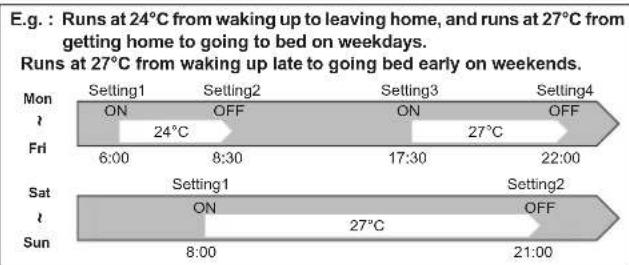
Note:
The simple ON/OFF timer setting is available while the weekly timer is on. In this case, the ON/OFF timer has priority over the weekly timer; the weekly timer operation will start again after the simple ON/OFF timer is complete.
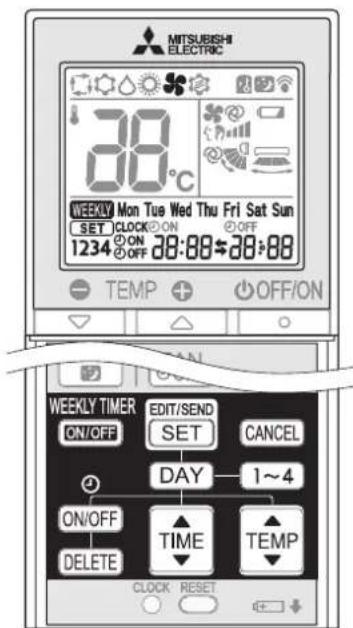
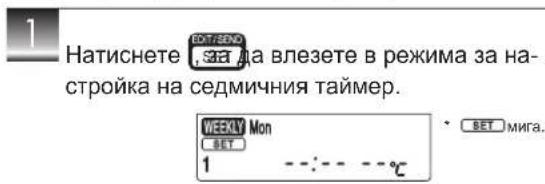
Setting the weekly timer
- Make sure that the current time and day are set correctly.
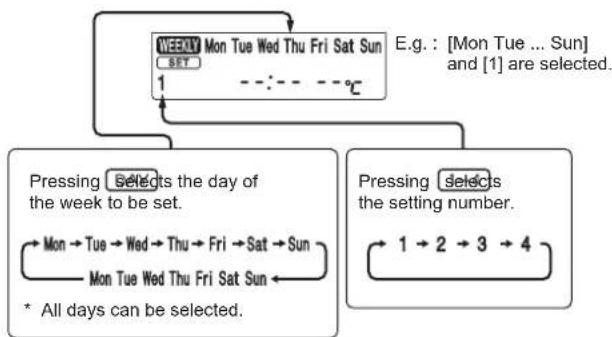
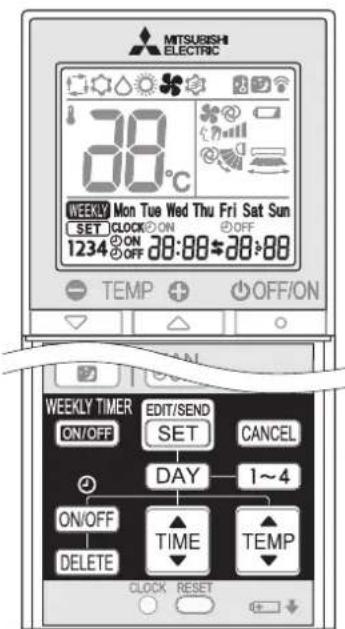
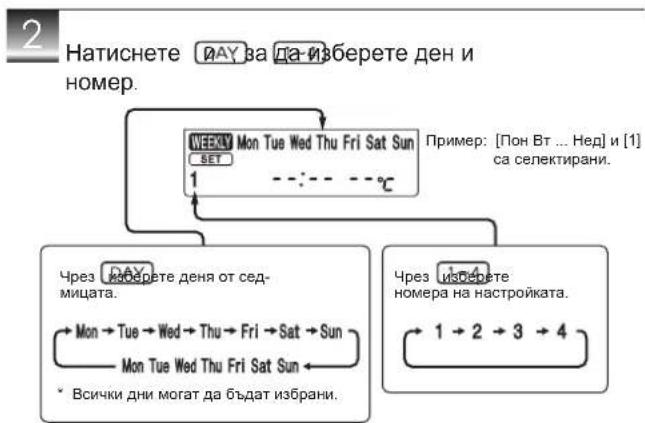
2 Press DAY and 1-4 to select setting day and number.

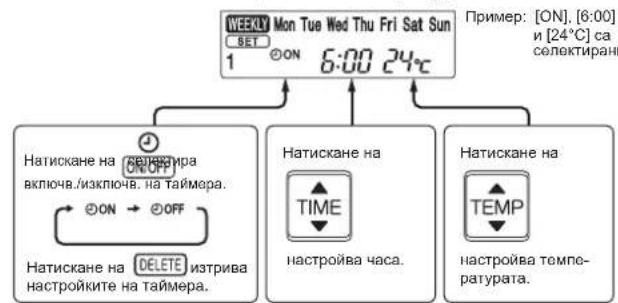
Press ON/OFF and time to set ON/OFF, time, and temperature.
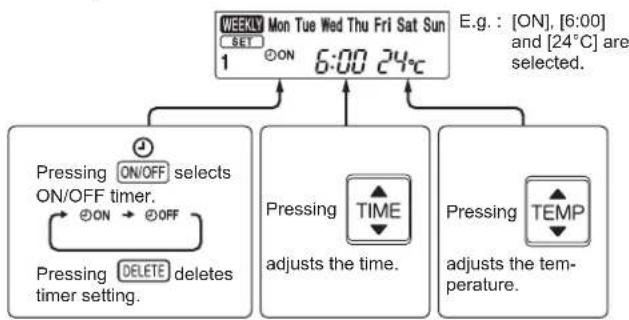
- Hold down the button to change the time quickly.

Press and to continue setting the timer for other days and/or numbers.

Press to Complete and transmit the weekly timer setting. Mon
Note:
Press to transmit the setting information of weekly timer to the indoor unit. Point the remote controller toward the indoor unit for 3 seconds.
When setting the timer for more than one day of the week or one number, SET does not have to be pressed per each setting. Press on SET after all the settings are complete. All the weekly timer settings will be saved.
- Press to enter the weekly timer setting mode, and press and hold DELETE for 5 seconds to erase all weekly timer settings. Point the remote controller toward the indoor unit.

PRESS RETURN the weekly timer ON. (ligh 13)
- When the weekly timer is ON, the day of the week whose timer setting is complete, will light.

WEEKLY Press to turn the weekly timer OFF. ( WEEKLY goes out.)
Note:
The saved settings will not be cleared when the weekly timer is turned OFF.
Checking weekly timer setting

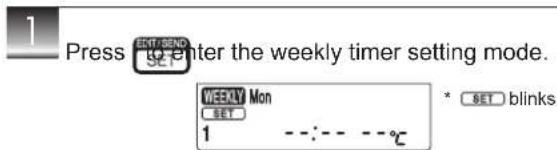
Press Enter the weekly timer setting mode.

Press OK to view the setting of the particular day or number.

Press the weekly timer setting.
Note:
When all days of the week are selected to view the settings and a different setting is included among them, - - - - - - - - - - - - - - - - - - - - - - - - - - - - - - - - - - - - - - - - - - - - - - - - - - - - - - - - - - - - - -
EMERGENCYOPERATION
When the remote controller cannot be used...
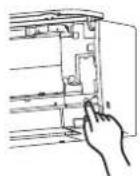
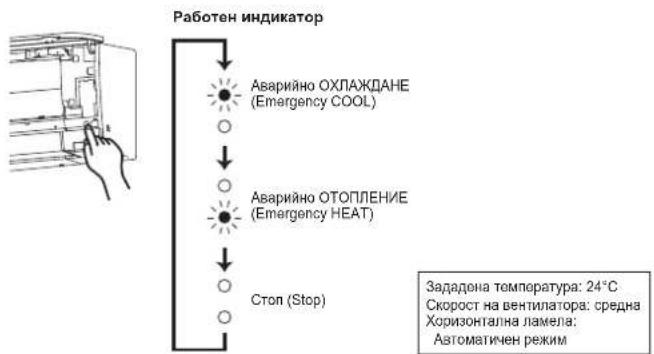
Emergency operation can be activated by pressing the emergency operation switch (E.O.SW) on the indoor unit.
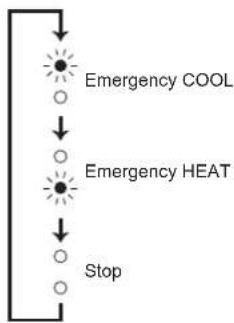
Each time the E.O.SW is pressed, the operation changes in the following order:
Operation indicator lamp
Set temperature : 24°C Fan speed : Medium Horizontal vane : Auto
Note:
The first 30 minutes of operation is test run. Temperature control does not work, and fan speed is set to High.
- In the emergency heating operation, the fan speed gradually rises to blow out warm air.
- In the emergency cooling operation, the horizontal vanes' position will be reset in about a minute, then the operation will start.
AUTORESTARTFUNCTION
If a power failure occurs or the main power is turned off during operation, "Auto restart function" automatically starts operation in the same mode as the one set with the remote controller just before the shutoff of the main power. When timer is set, timer setting is cancelled and the unit starts operation when power is resumed.
If you do not want to use this function, please consult the service representative because the setting of the unit needs to be changed.
CLEANING
Instructions:
- Switch off the power supply or turn off the breaker before cleaning.
- Be careful not to touch the metal parts with your hands.
- Do not use benzine, thinner, polishing powder, or insecticide.
- Use only diluted mild detergents.
-
Do not use a scrubbing brush, a hard sponge, or the like.
-
Do not soak or rinse the horizontal vane.
- Do not use water hotter than 50^ .
- Do not expose parts to direct sunlight, heat, or fire to dry.
- Do not apply excessive force on the fan as it may cause cracks or breakage.
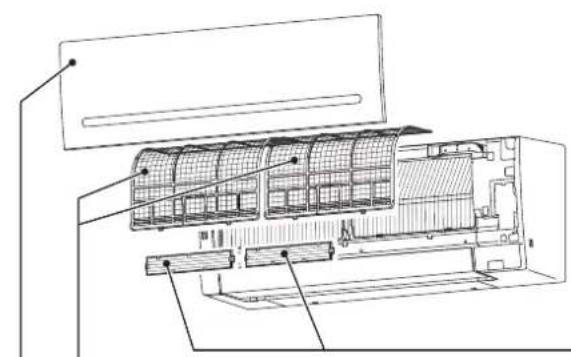
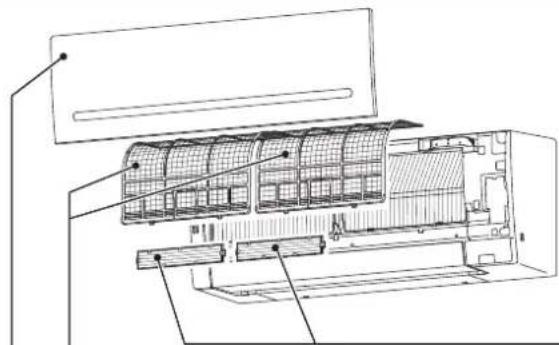
Air fi lter (Air purifying fi lter)
Clean every 2 weeks
- Remove dirt by a vacuum cleaner, or rinse with water.
After washing with water, dry it well in shade.
Front panel
-Air cleaning fi lter (Silver-ionized air purifi er fi lter, option)
Every 3 months:
- Remove dirt by a vacuum cleaner.
When dirt cannot be removed by vacuum cleaning:
Soak the filter and its frame in lukewarm water before rinsing it.
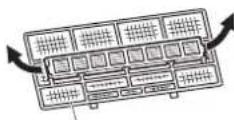
After washing, dry it well in shade. Install all tabs of the air filter.
Every year:
- Replace it with a new air cleaning filter for best performance.
- Parts Number MAC-2370FT-E
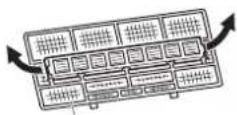
Pull to remove from the air filter

Important
Clean the filters regularly for best performance and to reduce power consumption.
- Dirty filters cause condensation in the air conditioner which will contribute to the growth of fungi such as mold. It is therefore recommended to clean air filters every 2 weeks.
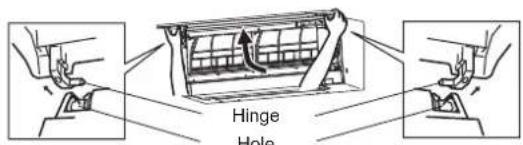
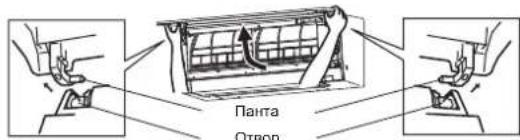
- Lift the front panel until a "click" is heard.
-
Hold the hinges and pull to remove as shown in the illustration above.
-
Wipe with a soft dry cloth or rinse it with water.
- Do not soak it in water for more than two hours.
-
Dry it well in shade before installing it.
-
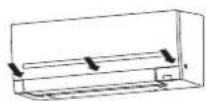
Install the front panel by following the removal procedure in reverse. Close the front panel securely and press the positions indicated by the arrows.
This information is based on REGULATION (EU) No 528/2012
| MODEL NAME | Treated Article (Parts name) | Active Substances (CAS No.) | Property | Instruction for Use (Safe handling information) |
| MSZ-AP25/35/42/50VG FILTER | Silver sodium hydrogen zirconium phosphate (265647-11-8) 2-octyl-2H-isothiazol-3-one (OIT) (26530-20-1) | Antibacterial Antimold | • Use this product in line with the instruction manual indications and for the intended purpose only. • Do not put into mouth. Keep away from children. | |
| MAC-2370FT-E FILTER | Silver zinc zeolite (130328-20-0) | Antibacterial | • Use this product in line with the instruction manual indications and for the intended purpose only. • Do not put into mouth. Keep away from children. |
Wi-Fi INTERFACE SETTING UP (VGK type only)
This Wi-Fi interface, communicates the status information and controls the commands from the MELCloud by connecting to the indoor unit.
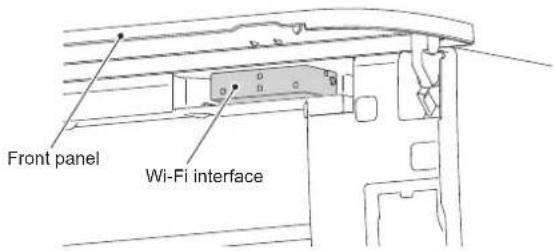
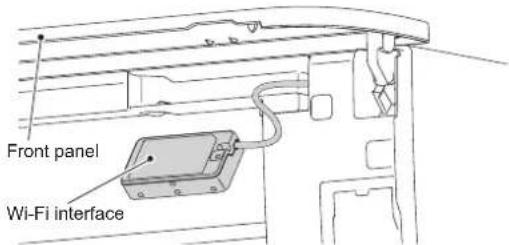
Wi-Fi interface introduction
| No. Item Description | |
| 1 MODE switch It selects modes. | |
| 2 RESET switch It resets the system and ALL settings. | |
| 3 ERR LED (Orange) It shows the network error state. | |
| 4 NET LED (Green) It shows the network state. | |
| 5 MODE LED (Orange) It shows the Access point mode state. | |
| 6 UNIT LED (Green) It shows the indoor unit state. |
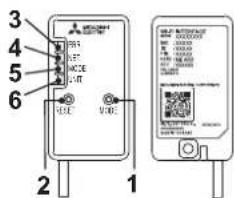
(1) MODE switch
The MODE switch is used for selecting modes in configurations.
(2) RESET switch
- Hold down the RESET switch for 2 seconds to reboot the system.
- Hold down the RESET switch for 14 seconds to initialize the Wi-Fi interface to the factory default.
When the Wi-Fi interface is reset to the factory default, ALL the configuration information will be lost. Take great care in implementing this operation.

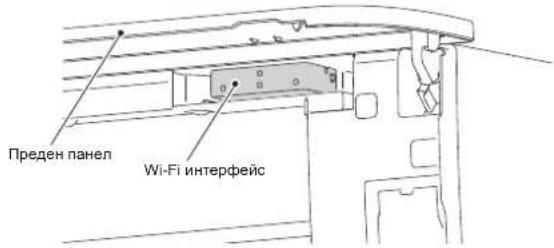
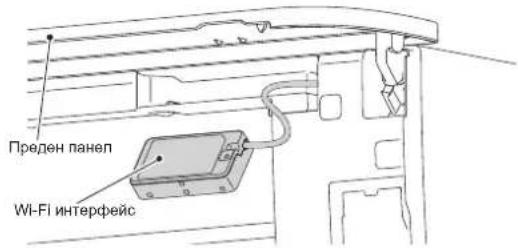
Open the front panel and remove the Wi-Fi interface.

Set up a connection between the Wi-Fi interface and the Router. Refer to the SETUP MANUAL and SETUP QUICK REFERENCE GUIDE provided with the unit.
For SETUP MANUAL, please go to the website below. http://www.melcloud.com/Support

Put the Wi-Fi interface back and close the front panel after the setup is completed.

For MELCloud User Manual, please go to the website below.
http://www.melcloud.com/Support
Note:
- Ensure that the Router supports the WPA2-AES encryption setting before starting the Wi-Fi interface setup.
- The End user should read and accept the terms and conditions of the Wi-Fi service before using this Wi-Fi interface.
To complete connection of this Wi-Fi interface to the Wi-Fi service, the Router may be required. - This Wi-Fi interface will not commence transmission of any operational data from the system until the End user registers and accepts the terms and conditions of the Wi-Fi service.
- This Wi-Fi interface should not be installed and connected to any Mitsubishi Electric system which is to provide application critical cooling or heating.
- Please write down the information regarding the Wi-Fi interface setting on the last page of this manual, when you set up this Wi-Fi interface.
- At the time of relocation or disposal, reset the Wi-Fi interface to the factory default.
Mitsubishi Electric's Wi-Fi interface is designed for communication to Mitsubishi Electric's MELCloud Wi-Fi service.
Third party Wi-Fi interfaces cannot be connected to MELCloud. Mitsubishi Electric is not responsible for any (i) underperformance of a system or any product;
(ii) system or product fault; or (iii) loss or damage to any system or product; which is caused by or arises from connection to and/or use of any third party Wi-Fi interface or any third party Wi-Fi service with Mitsubishi Electric equipment.
For the latest information regarding MELCloud from Mitsubishi Electric Corporation, please visit www.melcloud.com.
Even if these items are checked, when the unit does not recover from the trouble, stop using the air conditioner and consult your dealer.
Symptom Explanation & Check points
| Indoor Unit | |
| The unit cannot be operated. · Is the breaker turned on? · Is the power supply plug connected? · Is the ON timer set? Page 9 | |
| The horizontal vane does not move. | · Are the horizontal vane and the vertical vane installed correctly? · Is the fan guard deformed? · When the breaker is turned on, the horizontal vanes' position will be reset in about a minute. After the reset has completed, the normal horizontal vanes' operation resumes. The same is true in the emergency cooling operation. |
| The unit cannot be operated for about 3 minutes when restarted. | · This protects the unit according to instructions from the microprocessor. Please wait. |
| Mist is discharged from the air outlet of the indoor unit. | · The cool air from the unit rapidly cools moisture in the air inside the room, and it turns into mist. |
| The swing operation of the HORI-ZONTAL VANE is suspended for a while, then restarted. | · This is for the swing operation of the HORI-ZONTAL VANE to be performed normally. |
| When SWING is selected in COOL/DRY/FAN mode, the lower horizontal vane does not move. | · It is normal that the lower horizontal vane does not move when SWING is selected in COOL/DRY/FAN mode. |
| The airflow direction changes during operation. The direction of the horizontal vane cannot be adjusted with the remote controller. | · When the unit is operated in COOL or DR mode, if the operation continues with air blowing down for 0.5 to 1 hour, the direction of the airflow is automatically set to upward position to prevent water from condensing and dripping. · In the heating operation, if the airflow temperature is too low or when defrosting is being done, the horizontal vane is automatically set to horizontal position. |
| The operation stops for about 10 minutes in the heating operation. | · Outdoor unit is in defrost. Since this is completed in max. 10 minutes please wait. (When the outside temperature is too low and humidity is too high, frost is formed.) |
| The unit starts operation by itself when the main power is turned on, but hasn't received sign from the remote controller. | · These models are equipped with an auto restart function. When the main power is turned off without stopping the unit with the remote controller and is turned on again, the unit starts operation automatically in the same mode as the one set with the remote controller just before the shutoff of the main power. Refer to "Auto restart function". Page 11 |
| The two horizontal vanes touch each other. The horizontal vanes are in an abnormal position. The horizontal vanes do not return to the correct "close position". | Perform one of the following: · Turn off and on the breaker. Make sure the horizontal vanes move to the correct "close position". · Start and stop the emergency cooling operation and make sure the horizontal vanes move to the correct "close position". |
| In COOL/DRY mode, when the room temperature reaches near the set temperature, the outdoor unit stops, then the indoor unit operates at low speed. | · When the room temperature deviates from the set temperature, the indoor fan starts running according to the settings on the remote controller. |
| The indoor unit discolors over time. | · Although plastic turns yellow due to the influence of some factors such as ultraviolet light and temperature, this has no effect on the product functions. |
| The operation indicator lamp is dim. The unit does not beep. | · Is the NIGHT mode set? Page 9 |
| Multi system | |
| The indoor unit which is not operating becomes warm and a sound, similar to water fl owing, is heard from the unit. | · A small amount of refrigerant continues to flow into the indoor unit even though it is not operating. |
| When heating operation is selected, operation does not start right away. | · When operation is started during defrosting of outdoor unit is done, it takes a few minutes (max. 10 minutes) to blow out warm air. |
| Outdoor Unit | |
| The fan of the outdoor unit does not rotate even though the compressor is running. Even if the fan starts to rotate, it stops soon. | · When the outside temperature is low during cooling operation, the fan operates intermittently to maintain suffi client cooling capacity. |
| Water leaks from the outdoor unit. | · During COOL and DRY operations, pipe or pipe connecting sections are cooled and this causes water to condense. · In the heating operation, water condensed on the heat exchanger drips down. · In the heating operation, the defrosting operation makes ice forming on the outdoor unit melt and drip down. |
| White smoke is discharged from the outdoor unit. | · In the heating operation, vapor generated by the defrosting operation looks like white smoke. |
Symptom Explanation & Check points
| Remote controller | |
| The display on the remote controller does not appear or it is dim. The indoor unit does not respond to the remote control signal. | ·Are the batteries exhausted? Page 5 ·Is the polarity (+,-) of the batteries correct? Page 5 ·Are any buttons on the remote controller of other electric appliances being pressed? |
| Does not cool or heat | |
| The room cannot be cooled or heated suffi cientsly. | ·Is the temperature setting appropriate? Page 6 ·Is the fan setting appropriate? Please change fan speed to High or Super High. Page 7 ·Are the filters clean? Page 12 ·Is the fan or heat exchanger of the indoor unit clean? Page 12 ·Are there any obstacles blocking the air inlet or outlet of the indoor or outdoor unit? ·Is a window or door open? ·It may take a certain time to reach the setting temperature or may not reach that depending on the size of the room, the ambient temperature, and the like. ·Is the NIGHT mode set? Page 9 |
| The room cannot be cooled suffi cientsly. | ·When a ventilation fan or a gas cooker is used in a room, the cooling load increases, resulting in an insufficient cooling effect. ·When the outside temperature is high, the cooling effect may not be suffiient. |
| The room cannot be heated suffi cientsly. | ·When the outside temperature is low, the heating effect may not be suffiient. |
| Air does not blow out soon in the heating operation. | ·Please wait as the unit is preparing to blow out warm air. |
| Airflow | |
| The air from the indoor unit smells strange. | ·Are the filters clean? Page 12 ·Is the fan or heat exchanger of the indoor unit clean? Page 12 ·The unit may suck in an odor adhering to the wall, carpet, furniture, cloth, etc. and blow it out with the air. |
| Sound | |
| Cracking sound is heard. · This | sound is generated by the expansion/contraction of the front panel, etc. due to change in temperature. |
| "Burbling" sound is heard. · This | sound is heard when the outside air is absorbed from the drain hose by turning on the range hood or the ventilation fan, making water fi owing in the drain hose to spout out. This sound is also heard when the outside air blows into the drain hose in case the outside wind is strong. |
| Mechanical sound is heard from the indoor unit. | ·This is the switching sound in turning on/off the fan or the compressor. |
| The sound of water fl owing is heard. | ·This is the sound of refrigerant or condensed water fl owing in the unit. |
| Hissing sound is sometimes heard. | ·This is the sound when the fl ow of refrigerant inside the unit is changed. |
| Timer | |
| Weekly timer does not operate according to settings. | ·Is the ON/OFF timer set? Page 9 ·Transmit the setting information of the weekly timer to the indoor unit again. When the information is successfully received, a long beep will sound from the indoor unit. If information fails to be received, 3 short beeps will be heard. Ensure information is successfully received. Page 10 ·When a power failure occurs and the main power turns off, the indoor unit built-in clock will be incorrect. As a result, the weekly timer may not work normally. Be sure to place the remote controller where the signal can be received by the indoor unit. Page 5 |
| The unit starts/stops the operation by itself. | ·Is the weekly timer set? Page 10 |
| Wi-Fi interface | |
| When error occurs during con- nection setup or operation. | Refer to the SETUP MANUAL. For SETUP MANUAL, please go to the website below. http://www.melcloud.com/Support |
WHEN YOU THINK THAT TROUBLE HAS OCCURRED
In the following cases, stop using the air conditioner and consult your dealer.
- When water leaks or drips from the indoor unit.
- When the operation indicator lamp blinks.
- When the breaker trips frequently.
The remote control signal is not received in a room where an electronic ON/OFF type fluorescent lamp (inverter-type fluorescent lamp, etc.) is used.
Operation of the air conditioner interferes with radio or TV reception. An amplifier may be required for the affected device. - When an abnormal sound is heard.
- When any refrigerant leakage is found.
WHEN THE AIR CONDITIONER IS NOT GOING TO BE USED FOR A LONG TIME

Operate by COOL mode with the highest temperature set or FAN mode for 3 to 4 hours. Page 6
This dries the inside of the unit.
- Moisture in the air conditioner contributes to favorable conditions for growth of fungi, such as mold.

Press OFFIO to stop the operation.

Turn off the breaker and/or disconnect the power supply plug.

Remove all batteries from the remote controller.
When using the air conditioner again:

Clean the air filter. Page 12

Check that the air inlet and outlet of the indoor and outdoor units are not blocked.

Check that the earth is connected correctly.

Refer to the "PREPARATION BEFORE OPERATION", and follow the instructions. Page 5
INSTALLATION PLACE AND ELECTRICAL WORK
Installation place
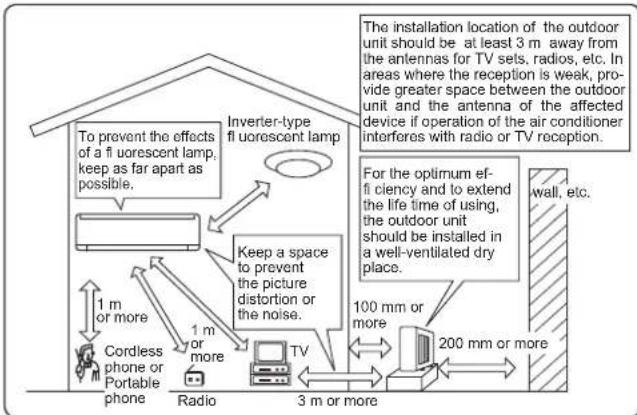
Avoid installing the air conditioner in the following places.
- Where there is much machine oil.
- Salty places such as the seaside
- Where sulfide gas is generated such as hot spring, sewage, waste water.
- Where oil is splashed or where the area is filled with oily smoke (such as cooking areas and factories, in which the properties of plastic could be changed and damaged).
- Where there is high-frequency or wireless equipment.
- Where the air from the outdoor unit air outlet is blocked.
- Where the operation sound or air from the outdoor unit bothers the house next door.
- The mounting height of indoor unit 1.8m to 2.3m is recommended. If it is impossible, please consult your dealer.
- Do not operate the air conditioner during interior construction and fi nishing work, or while waxing the floor. Before operating the air conditioner, ventilate the room well after such work is performed. Otherwise, it may cause volatile elements to adhere inside the air conditioner, resulting in water leakage or scattering of dew.
- Do not use the Wi-Fi interface nearby the medical electrical equipment or people who have a medical device such as a cardiac pacemaker or an implantable cardioverter-defi brilator.
It can cause an accident due to malfunctions of the medical equipment or device.
- This equipment should be installed and operated with a minimum distance of 20cm between the device and the user or bystanders.
- Do not use the Wi-Fi interface nearby other wireless devices, microwaves, cordless phones, or facsimiles.
It can cause malfunctions.
Electrical work
- Provide an exclusive circuit for the power supply of the air conditioner.
- Be sure to observe the breaker capacity.
If you have any questions, consult your dealer.
SPECIFICATIONS
| Model | Indoor | MSZ-AP25VG(K) | MSZ-AP35VG(K) | MSZ-AP42VG(K) | MSZ-AP50VG(K) | |||||
| Outdoor | MUZ-AP25VG(H) | MUZ-AP35VG(H) | MUZ-AP42VG(H) | MUZ-AP50VG(H) | ||||||
| Function | Cooling | Heating | Cooling | Heating | Cooling | Heating | Cooling | Heating | ||
| Power supply | ~/N, 230 V, 50 Hz | |||||||||
| Capacity | kW | 2.5 | 3.2 | 3.5 | 4.0 | 4.2 | 5.4 | 5.0 | 5.8 | |
| Input | kW | 0.60 | 0.78 | 0.99 | 1.03 | 1.30 | 1.49 | 1.55 | 1.60 | |
| Weight | Indoor | kg | 10.5 | |||||||
| Outdoor | kg | 31 | 31 | 35 | 40 | |||||
| Refrigerant filling capacity (R32) | kg | 0.55 | 0.55 | 0.70 | 1.00 | |||||
| IP code | Indoor | IP 20 | ||||||||
| Outdoor | IP 24 | |||||||||
| Permissible excessive operating pressure | LP ps | MPa | 2.77 | |||||||
| HP ps | MPa | 4.17 | ||||||||
| Noise level | Indoor (Super High/High/Med./Low/Silent) | dB(A) | 42/36/30/24/19 | 45/39/34/24/19 | 42/36/30/24/19 | 45/38/31/24/19 | 42/38/34/29/21 | 45/40/35/29/21 | 44/40/36/33/28 | 48/43/38/33/28 |
| Outdoor | dB(A) | 47 | 48 | 49 | 50 | 50 | 51 | 52 | 52 | |
Guaranteed operating range
| Indoor | Outdoor | |||
| MUZ-AP25/35/42/50VG | MUZ-AP25/35/42/50VGH | |||
| Cooling | Upper limit | 32°C DB | 46°C DB | 46°C DB |
| 23°C WB | — | — | ||
| Lower limit | 21°C DB | -10°C DB | -10°C DB | |
| 15°C WB | — | — | ||
| Heating | Upper limit | 27°C DB | 24°C DB | 24°C DB |
| — | 18°C WB | 18°C WB | ||
| Lower limit | 20°C DB | -15°C DB | -20°C DB | |
| — | -16°C WB | -21°C WB | ||
Note:
Rating condition
Cooling - Indoor: 27^ DB, 19^ WB
Outdoor: 35^ DB
Heating - Indoor: 20^ DB
Outdoor: 7^ DB, 6^ WB
DB: Dry Bulb
WB: Wet Bulb
Wi-Fi interface
| Model MAC-566IFB-E | |
| Input Voltage DC12.7 V (from indoor unit) | |
| Power consumption MAX 2 W | |
| Size H×W×D (mm) 79×44×18.5 | |
| Weight (g) 60 (including cable) | |
| Transmitter power level (MAX) 17.5 dBm | @IEEE 802.11b |
| RF channel 1ch ~ 13ch (2412~2472 MHz) | |
| Radio protocol IEEE 802.11b/g/n (20) | |
| Encryption AES | |
| Authentication | WPA2-PSK |
| Software Version | XX.00 |
For Declaration of Conformity, please go to the website below.
http://www.melcloud.com/Support
INHALT
■VORSICHTSMASSNAHMSN
ENTSORGUNG
http://www.melcloud.com/Support
TABLE DES MATIERES
CONSIGNES DE SECURITE 1
■MISE AU REBUT 3
■NOMENCLATURE 4
PREPARATIF D'UTILISATION 5
■SELECTION DES MODES DE FONCTIONNEMENT 6
■ REGLAGE DE LA VITESSE DU VENTILATEUR ET DE LA DIRECTION DU FLUX D'AIR 7
■FONCTIONNEMENT I-SAVE 8
■FONCTIONNEMENT EN MODE ECONO COOL 8
■FONCTIONNEMENT EN MODE NOCTURNE 9
■ FONCTIONNEMENT DE LA MINUTERIE (MARCHE/ARRÉT) 9
MODE DE FONCTIONNEMENT MINUTERIE HEBDOMADAIRE (WEEKLY TIMER) 10
■FONCTIONNEMENT D'URGENCE 11
■FONCTION DE REDÉMARRAGE AUTOMATIQUE 11
NETTOYAGE 12
■ CONFIGURATION DE L'INTERFACE Wi-Fi (type VGK uniquement) 13
EN PRESENCE D'UNE PANNE POTENTIELLE 14
SI LE CLIMATISEUR DOIT RESTER LONGTEMPS INUTILISE 16
LIEU D'INSTALLATION ET TRAVAUX ELECTRIQUES 16
■FICHE TECHNIQUE 17
CONSIGNES DE SECURITE
FONCTIONNEMENT D'URGENCE
Lieud'st installation
http://www.melcloud.com/Support
INHOUDSOPGAVE
VEILIGHEIDSVOORSCHRIFTEN 1
WEGGOIOEN 3
NAAM VAN ELK ONDERDEEL 4
UIT TE VOEREN HANDELINGEN VOOR INGEBRUIKNAME 5
WERKINGSSTANDEN SELECTEREN 6
VENTILATORSNELHEID EN LUCHTSTROOMRICHING INSTellen 7
I-SAVE-BEDIENING 8
ECONO COOL-BEDIENING 8
NACHTSTANDWERKING 9
■TIMERWERKING (ON/OFF-TIMER) 9
■ WEEKLY TIMER-BEDIENING 10
■NOODBEDIENING 11
AUTOMATISCHE HERSTARTFUNCTIE 11
■REINIGEN 12
DE Wi-Fi INTERFACE CONFIGUREREN (alleen type VGK) 13
OPLOSSEN VAN PROBLEMEN 14
ALS U DE AIRCONDITIONER VOOR LANGERE TIOD NIET GEBRUIKT 16
INSTALLATIEPLAATS EN ELEKTRISCHE VOORZIENINGEN 16
TECHNISCHE GEGEVENS 17
VEILIGHEIDSVOORSCHRIFTEN
(2) RESET-schakelaar
http://www.melcloud.com/Support
INDICE
Pulse 📁 📁 📁 📁 📁 📁 📁 📁 📁 📁 📁 📁 📁 📁 📁 📁 📁 📁 📁 📁 📁 📁 📁 📁 📁 📁 📁 📁 📁 📁 📁 📁 📁 📁 → 🐤 → → → → → → → → → → → → → → → → → → → → → → → → → → → → → → → → → → → → → → → → → → → → → → → → → → → → → → → → → → → → → → → → → → → → → → → → → → → → → → → → → → → → → → → → → → → → → → → → → → → →


(1) Interruptor MODE (Modo)
http://www.melcloud.com/Support
SOMMARIO
http://www.melcloud.com/Support
Nota:
PuroiTe XpvOdiakottn otav aaooBnvei to 0NO

Pnnte gava to yia vOAKUPoTe To XpovodiaKoTTn.
Σημειωη:
http://www.melcloud.com/Support

EtnavatnoeTne Tdiapn Wi-Fi kai Kaeioe To mtpoov oatwma e Ta nV ooknpwn nC puOu ons.

Tia To Exyeipio xphnCS MELCloud, eTaBeTe OToV TApakatwIOTOTTO.
http://www.melcloud.com/Support
Σημειωη:
Bεβaωθeite οι σρολογηntις Αντοπηρίει τι ρθμισκ κρυτόνραφησς WPA2-AES πρι ατο την εναρήσις ρθμισκ τις δειταφής Wi-Fi.
O TEIAKOC xPnATNS 8a TIPETEVA DIAIaei KAI VA ATIOEeXei TOUC SPouC KAI TSPoUToNtEOeIC mS UNTpeiaG Wi-Fi TPIV XPNaIOMIoNaeAutiv M DIETAPNI Wi-Fi.
Tia va oloknpoete T ouvean autns tsdiapic Wi-Fi atny utnpoeia Wi-Fi, evexetai va aattnthe 0 dpouoloyntis.
Autn n Dieaepn Wi- Fi 6e 6eKivnei Tm taeoOn otaiovnTote aeioupyikw 6e0evw an to ouatma, ews otou a teikoc xpnntkataxnpnBki kai atoeeyteou opuc kai tic TpouotBeec ts umptpedci Wi-Fa
Autn n tiatn Wi-Fi deva trpenei va eyaBiaTatai kai va ouvEetai o KaVeva ooutna Mitsubishi Electric TnupoopIeTai ia tvnpaox kniapnc iya tv npepaoyu unc h eppuavcn.
EnneWote TnAnpopoepie Tou apopovu Tn puoiun nTc diTaqns Wi-Fi 0euteia aeliba Tou npovtoc Exyeiipidou kara n puoiun autnc nTc dietaqns Wi-Fi.
Kata n t aikn n thn atoppi, enavaepete n diatn Wi-Fi otis npoetieyvec epootaiakecpuoiieic.
H dieaepn Wi-Fi nC Mitsubishi Electric exi oxeiaotel ia etikoivvia me nV utnpogia Wi-Fi MELCloud nC Mitsubishi Electric.
Aetapc Wi-Fi tptuw npwew dev mtopovva uuv6eouv sto MELCloud, H Michi Electric w euohveta iayu xov (i) aevtapn antdoan ouaunmuat n paoivotoc.
Otau ypnouoioe eav to kuaotko:

PsEg—EoWTePIK:27°C DB,19°C WB
EeWTePikn:35°CDB
Eepavan-EoWtepikn:20°C DB
Egwtepik:7CDB,6CWB
DB:DryBulb-3npoCβoAβoC
WB:Wet Bulb -Yypoç βoλβoç
△παφNiWi-Fi
http://www.melcloud.com/Support
INDICE
PRECAUÇÖES DE SEGURANÇA 1
■ELIMINAÇÃO 3
DESIGNACAO DAS PECAS 4
PREPARACAO ANTES DA OPERACAO 5
SELECCAO DOS MODOS DE OPERACAO 6
AJUSTE DA VECIDADE DA VENTOINHA E DA DIRECCAO DO FLUXO DE AR 7
OPERACAOI-SAVE8
OPERACAO ECONOCOOL8
OPERACAO NIGHT MODE (MODO NOCTURNO) 9
- OPERACAO DO TEMPORIZADOR (TEMPORIZADOR DE LIGAR/DESLIGAR) 9
■FUNCTIONAMENTO DO TEMPORIZADOR SEMANAL (WEEKLY TIMER) 10
OPERACAO DE EMERGENCIA 11
■FUNCAO DE REINICIO AUTOMÁTICO 11
■LIMPEZA 12
■CONFIGURAÇÃO DA INTERFACE Wi-Fi (apenas tipo VGK) 13
QUANDO ACHAR QUE OCORREU UM PROBLEMA 14
QUANDO NÃO FOR UTILizar O APARELHO DURANTE UM LONGO PERIODO DE TEMPO 16
LOCAL DE INSTALLAÇÃO E INSTALAÇÃO ELECTRICA 16
■ESPECIFICACOES 17
PRECAUÇOES DE SEGURANÇA
Significado dos síbolos presentados naunities interior e/ouunities exterior
DESIGNACAO DAS PEÇAS
OKONOMIAFKOLINGSDRIFT (ECONO COOL) 8
NIGHT MODE (NATTILSTAND) 9
■TIMERDRIFT (ON/OFF-TIMER) 9
DRIFT MED UGETIMER (WEEKLY TIMER) 10
NODRRIFT
AUTOMATISK GENSTARTSFUNKTION 11
■RENGØRING
■TILSLUTNING AF Wi-Fi-INTERFACET (kun VGK-typen) 13
■HVIS DER ER TEGN PA, AT DER ER OPSTAET PROBLEMER 14
■ HVIS KLIMAANL/EGGET IKKE SKAL ANVENDES I LAENGERE TID 16
INSTALLATIONSSTEDOGELEKTRISKARBEJDE 16
■SPECIFICATIONER 17
SIKKERHEDSFORSKRIFTER
Tryk pã oOFFON for at starte driften.

Brug违法犯罪 (e.g., the use of drugs, alcohol, and tobacco) is a major target for terrorism. In 1994, the US government enacted Section 30 of Title 10 of the U.S. Census to identify people who are likely to commit terrorist acts.

Tørningstilstand (DRY)
KONOMIAFKOLINGSDRIFT
(ECONO COOL)
Garanteret operationsomrade
| Indendors | Udendors | |||
| MUZ-AP25/35/42/50VG | MUZ-AP25/35/42/50VGH | |||
| Afkøling | Øvre grænsè | 32°C DB23°C WB | 46°C DB— | 46°C DB— |
| Nedre grænsè | 21°C DB15°C WB | -10°C DB— | -10°C DB— | |
| Op-var- ning | Øvre grænsè | 27°C DB— | 24°C DB18°C WB | 24°C DB18°C WB |
| Nedre grænsè | 20°C DB— | -15°C DB-16°C WB | -20°C DB-21°C WB | |
Bemerk:
Nominal effekt
http://www.melcloud.com/Support

INNEHÄLL
SAKERHETSFORESKRIFTER 1
■KASSERING 3
DELARNAS NAMN 4
FORBERDELSER FORE ANVANDNING 5
VAL AV DRIFTLAGEN 6
FLAKTHASTIGHET OCH JUSTERING AV LUFTFLODETS RIKTNING 7
I-SAVE-DRIFT 8
■EKONOMIKYLFUNKTIONENS (ECONO COOL) 8
DRIFTLAGE NIGHT MODE 9
■ENVANDATIMERN 9
ANVANDA VECKOTIMERN 10
NODDRIFT 11
AUTOMATISK OMSTARTNINGSFUNKTION 11
■RENGÖRING 12
INSTALLATION AV Wi-Fi-GRANSSNITT (endast typen VGK) 13
NAR DU TROR ATT DET HAR UPPSTATT PROBLEMV 14
NAR LUFTKONDITIONERINGEN INTE SKA ANVANDAS UNDER LAngre TID 16
■INSTALLATIONSPLATS OCH ELARBETE 16
■SPECIFICATIONER 17
SÄKERHETSFÖRESKRIFTER
http://www.melcloud.com/Support

http://www.melcloud.com/Support
Obs:
NÄR DUTROR ATT DET HAR UPPSTÄTT PROBLEMV
INSTALLATIONSPLATS OCH ELARBETE
Installationsplats
http://www.melcloud.com/Support
ICINDEKILER
GUVENLIK ONLEMLERI 1
ELDEN CIKARMA 3
HER BIR PARCANIN ADI 4
CALISTIRMADAN ONCE HAZIRLIK 5
CALISMA MODLARINI SECME
FAN HIZI VE HAVA AKIMI YONU AYARLAMASI
SAVE KULLANIMI
EKONOMIK SOGUTMA CALISTIRMASI
GCE MODU KULLANIMI
ZAMANLAYICI CALISMASI (ACIK/KAPALI ZAMANLAYICI)
HAFTALIK ZAMANLAYICI ISLEMI
ACIL CALISTIRMA
OTOMATIK YENIDEN CALISTIRMA FONKSITYONU
TEMIZLEME
Wi-Fi ARAYUZU AYARI (yalnizca VGK tiipi)
BIR ARIZA OLDUGUNU DUSUNDUGUNUZDE
KLIMA UZUN SURE KULLANILMAYACAK ISE
KURULUM YERIVE ELEKTRIKLI CALISMA
ÖZELLIKLER
GÜVENLIK ÖNLEMLERİ
Calisma Gosterge Lambasi
Calistma goslerge lambasi unilenin calisma durumunu gosterir.
Isitma - ic: 20^ DB
DIS: 7^ DB, 6^ WB
DB:Kuru Ternometre
WB:YaS Termometre
Wi-Fi arayüzü
http://www.melcloud.com/Support

Mitsubishi Electric Corporation (Head Office)
Tokyo Building, 2-7-3, Marunouchi, Chiyoda-ku, Tokyo 100-8310, Japan
Tel: +81 (3) 3218-2111
www.mitsubishihielectric.com
CbDbPjKAHNE
HCTPYKUN3A B63OPACHOCT 1
N3XBbPJIaHE 3
ONICAHNE HA YACTNTE 4
IIOITOTOBKA HA YPEDA 3A EKCNIOATAUHA 5
N36OP HA PABOTEH PEXIM 6
CKOPOCT HA BEHTNATOPA IN PERGYINPAHE HA IOCOKATA HA Bb3dUWHNIA NOTOK 7
ФУнкл.I-SAVE 8
PABOTA B INKO HOMUH PEXKUM ECONO COOL 8
PABOTABHOUENPEKIM 9
TAYMEP 3A BKJI./M3KJI. (ON/OFF) 9
CEIMNUEH TAIMEP 10
■ABAPNEH PEXKIM 11
ФУнКЛЯ 3A ABTomATNUH O PECTAPTIPAHE 11
IIOUHCTBAHE 12
HACTPOIBAHE HA Wi-Fi INHTEPΦECA (camo ot TIN VGK) 13
ПИВБ3нКHД ПОБЛEM 14
KOTATO KJIIMATIKbT HMA DA bDE I3NOJ3BAH IPOdbJIXTEJIHO BPEME 16
IMACTO 3A MOHTAXI ENEKTPNUECKIN PABOTI 16
STEXHUNECKHXAPAKTEPNCIK 17
HCTPYKIIIM 3A BE3OJIACHOCT
3NaueHHa cHMBOJIHTe, NOKa3aHH Ha BbTpEHHOT TJAIO HJH Ha BBHHOTO TJAIO
3a6paHBA ce nHaHTe c npbCTn, BmKbaHTo Ha npOblTROBATn npdMeTHnDp

3aBpaHBe Cte CbIbHETO BbPxy BtpeHHTO/BhHHTO TnO, KAKTO INocTBAHETHO HAKBOTIO HAnBIO pnpMeDmN BbPX TRX.

:OnachocOT TOKOB ynap. BbdeTe BHIMAtenHn.

:YBepete Ce,Ye CTe H3KNIOHINI UENCeHa HA 3axpaHbAHeTO OKTaKaTa.

:Ybepete Ce,Ye CTe N3KNIOUINI 3axpaHBAHeTO.

:OnachocTOTnokap.

:Hnkora He dokocbaIte c mOKpn pIe.

Hikora He npbckaTe c Boda yctpoiCTBOTo.
ABTomatueh pexum (Auto change over)
Tanoto cmo h6npa pao hma pexkmb 3aBcHcMoCT o paanikata mexy dtahata Temepatypa n kenaHATA temepatypa. No bpeme ha pekkm AUTO TnnoTO npomeh pekma (COOL HEAT). KOIto paanikata meky 3adaeHATA n CTAHATA TEMEPATypape o kOIO 2^ a nopeo er 15 MHN.
3a6eJekka:
ABTomaTHHHT pexMM He ce npenopbBa, KORATo BbTpeshoTTO TnO e CbBp3aHO KbM BbHNO TnO TnM XZ. Korato HkONKO BbTpeshuTena pa60TAt EHOBPemHe, TnOTo MOKe Da He ycnee Da npeBknHOn MeKdy pexMM Ha OTONHE M OXNAkDaHe. B Toa ciuyaBbTpeshoTTO TnP emHABA B pexMM Ha NcAkbae (BvKte TaBnUcaTa 3a pa60THmHnKATOpu).

PexmHa oxlaaKaande (COOL)
HacnaxkdaabaTe ce Ha npoxlaen Bb3dyx cn3paHa ot Bac TemnepaTypa.
3a6eIekka:
He 3nol3aBtepeXMM COOL npH MHO r HcKa BbHua TEmnpaTpy (noi -10^) .BoDa, KOHN3npaCa CE B TaNTo, MoKe da nokane HAMOKp nn HAeene qetn HnTEPepoA n. H.

PexnHa n3CyMaBaHe Ha Bb3dyxa (DRY)
ENMMNHPAIE BIBATAE B CBOI DOM.CsIHANA TEMHPTAPyMA KOJE KAO DE CE IOHNKIN. PO BPEME HApEKIM DRHY OE MOKA De ACHeTPOBA TEmHPTAPy.

PexmHa oToJIeHne (HEAT)
HacnaxdaabaTe cHa npraTeH tonbn B3dyx C xenahata ot Bac temnepaTpa.

PekmHaBeHTnlaTop(FAN)
TapaHTnpa nepfkeTHa npkynauHa Ha Bb-3dyxa.
3a6eIeKka:
Cnepa6oTaBpeKMM HAOXIAJKAHE/H3CYUJABAHE HA Bb3DyXA Ce npenpObaBa p6oTaBpeKMM BEHTUNATOP,3a da ce n3cuu BB- TpeuHOTTO TAnO.
3a6eJekka:
PekmHa pa6oTa npu MyTncnnt cctemN
Ie nn noBee BbTpeHn Tea MoTa da paBoToT c eHIO BbHNO TAno. Korato HnKoNk BoBtpeuHn Tea paBoToT eHOBpEmHo, paBOTHne peKIMn Ha oxJAAHe/3cUyBaHa/BeHTnAtop n OTONNeHne He Morat da paBoTn no eHNo n CbTo 0BpecoCooLDRY/FAN c eHN yPeN n HEAT Cdpyr nn ObpatHO,ypeBt,na6paHn nocJeHn, npemHnaba B pexmHa n3- qakBaHe (standby).
Pa6oTeH nHmKaTOp
Pa60THMHTHNNKATOP NOKa3Ba pa60THOTcBCTOHRHe Ha TnIto.
TAYMEP 3A BKJI./I3KJI. (ON/OFF)


HaTnCHete no BpMe Ha pa6ota,3a Da HAcTpOte TaMepa.

(ON Taɪmep):
TANOTO CE BKNIOUBA B 3aIaIeHOTOBPeme.

(OFF TaMep):
TAROTOCeN3KNIOUvBaB3aDAnEOHOTOBpeMe.
Mn
YBepete ce,ye HactoIaHIT Yac H DeH ca 3aIaEHH KopeKTHO. Ctp.5

HaTnCHETe (yBENuBaHe) n (HAMnBa- he), 3a da HAcTpONTE BpeMeTo Ha TaImepa.
BckoHaTnckaHe yBeHnUaBa/HamlanBa 3aJaDeHoTo BpeMe c 10 MNH.
HactpoTe TaMepa,OKATOONNIN

HaTnCHeTe ON INIIN OTOHOBO, 3a Da N3KJIIOHTe TaIMepa.
3a6eJekka:
TaimepHTe 3a BKN./H3Kn. (ON/OFF) Moar da 6bdaT HactpoeHH 3aeHNO. 06o3hauaba peHa Ha JeHCTBnHa Taimepa.
AkoBb3HnKHePneKcBaHe BeneKtpo3aXpaHaBeHo,doKaTo ON/OFF TaMepeTHe HactpoeH, BIXTe cTp.11,dyHKuza 3a ABtOMaTHO pectaptnape"

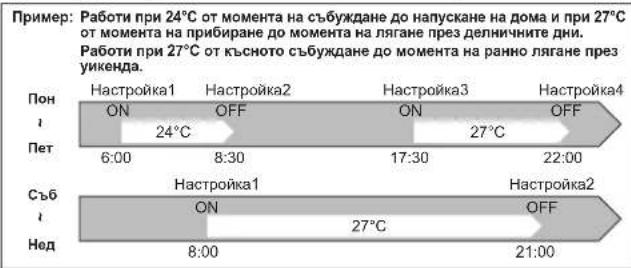
CEdMMUeHTaIMEP
KAMCMY4 T4IaMe3a KIOHOBaHE N3KIOHOBAHE MOrA DA 6bDat HAcTPOEH 3a Pa3JIHN-HHTE Dn OT cEDMLUATA.
Maxchym 28 TaImepa 3a BkIOHbAe/HKIOHbAe MoRat da 6bPaT HAcTePoEH 3a EaHa CeMHua.
3a6eTeXka:
O6KnHOBeHaTnA HcTpoKa ON/OFF e HaHmHa, KOraTo E BkHIOeH C6dMHNHRT TaHMeP. B To3nCnyA TaimetaBt 3A BkHNO./N3Kn. (ON/OFF) mHa npOnpNET B cpaBHeHc CbC c6dMHNHRT TaHMeP. DeIcTBnEO Ha C6dMHNHRT TaHMeP ige CTApTnp OTOHO, CneKATO O6KnHOBeHnRT TaHMeP 3A BkHNO./N3Kn. (ON/OFF) 3abpuu DcEHTBnEO cn.
HactpoKaHa ceMnHnTaIMeP
YBepete ce,te TKyunHdHn Hac Ca BbBeHN KopeKTHO.
3 HATINCHETe ONORF, 3aHaHCTPONTe BKNIOUBaHe/N3KNIIOVAHe, Yac N TEMNEpatypa.
3aipb8xTo 6yToHa, 3a da CmHnTe yac a no-6bp30.
HATNCHETe WAY 3a Dn-HeCTpOte Yaca 3a DpyTN DN N/NNN HOMepa.
4 HATnCHete 3a 3aBbPHTe n 3npaTne Ha- cTpoKNTe Ha ceMnHn TaMep.
Mon KOETO DO MOMENTA CCK 13:00 MMATAE, H3ACBA, H HA EKPDAH C6 N3NCBA TOKY-
3a6eIeKka:
HATNCHE T aTnTnTnTnTnTnTnTnTnTnTnTnTnTnTnTnTnTnTnTnTnTnTnTnTnTnTnTnTnTnTnTnTnTnTnTnTnTnTnTnTnTnTnTnTnTnTnTnTnTnT
Korato HacptpoBate TaHmepa 3a NOBEe OT eHN DeH OT cEmmuata mH eHIN HOMep, He Tp8Ba Da HaTnCKATE SET 3a BCKa HAcTPOHa. HATNCHeTe SET BeHbX, Cne KaTO 3aBbPwTE BcNk HAcTPOKn. BcNk HAcTPOKn HA CeMMHnRA TaHmepue 6bDat 3ana3EH.
HATNCHETE 3aJa 3ne3eB pexima 3a HAcTPOKA HA cEmMnHNA Taimep, HATNCHETE H3aDpXbXe T85KcYHIN, 3a Da H3TpneTe BCNKNHEROBHa-CTPOKNI.HacOHe TE NCTAHIOHOHOTU npAbaNEHMe KbM BtpeHHTO TaIO.
5 HAATNCHETe WEEKLY TImER Da BKNIOHHTe ceDMNCHn TaIMeP. (WSSTBA.)
Korato CEDMNHTRTAMER E BKNIOHEnDEHRTOTCEDMNATa,CHIHTO TAHMER HACTPOKAe 3ABBpHEAUECSECTBE
WEEKLY HAtncHeTe TINER HOBO,3a da n3KlnHOTe TaMepa. ( WEEKLY ce n3KnIOUvBa.)
3a6eJekka:
3aaneHHe HAcTPOKIN HAma Da 6bDaT NtPTN, KORA TO CeMNHHRT TaIMep 6bJe INKIOHN.
IpoBepKa HacTPOINKITE Ha ceMnHmTaMep
HaTnCHete 3a Bne3eTeB pexIma 3a HactpoiKa Ha CeMnHnTaMep. SET MIRa.
2 HATNCHETe 3a Da-RpeIeIate Ha-CTPOKKITE Ha onpeIeH DeH NnHOMep.
HaTnCHeTe CANCE, 3a da n3ne3eTe OT HacTpOKnTe Ha ceMnUHnra TaIMeP.
3a6eJekka:
Korato BCHNHNOTcEMNtataCa cteKeTnpaHm.3a da nperneate Hacptpon KNTe,NCpE TAX NMA pa3MNHa HacptponKa,ue Ce nokae
ABAPINEH PEXKIM
Korato nctaannohno ynpabJeHne He moke da
CC H3H0J3Ba...
Функштета 3a Аарпин Бөрм Рожд Дбдг Актуларна На Бутог EMERGENCY OPERATION (E.O.SW) Hb btpeHOTO TANO.
ПИСВЕКО HATNICKAне EA.SW 6byToHa peKIMbT haPobota ce PnOpeHЯ bCnEJIHnDpI;
3a6enexka:
Tbpbnte 30 MNHyTN oT pa6oTaHa TAnTo c TaTeCTOB nepNo.TempeaTpyHnRT KOHTPOn He pa6Otn, a ckopocTTHa BeHTnAtOp e HAcTPOeHa KbM BNCoka.
BpejMHaabapuHNOOTONNEHHeCKOPoCTTaHaBeHTnAtopaNoCTeHHO ce NOBmUaBA,3a Da pa3npocTpaHN TOnNMa Bb3dyX.
BpeKMMHa aabapnH0 oxlaJdahe nO3nIaTHa Hxopm3oHTaIIHITe IaMeIIN 费ceIpOMeHN CneI OKNO MNHYTa, CneI KOETRTOIe 3anoHHe pa6oTa.
ФУнкия 3A ABTOMATNUHOPECTAPTPPAHE
B Cnayu Ha npeKcBaHHe H eneKTPnuCKoTo aaxpaHaBeNo apMe Ha paBoTa, c yhNkUaTa 3a ABTOMATNUO PCeTAPTHARe TAnTO DnepKTHO BbCTaONHBOI OpeaUNHOPEXIM, Ha KOIO E BinH NactPoeH KINMATMKnB1 PezDnCTAUHNOHTO YpauBIAHNE IpiEi PnKbCBAHTo. KoIATO NIma HAcTePOH TaImeP, HAcTPOKIne CeOTMHIT N TJOIO BbCTaONHBOBPeXIMHa PAbaOTA UOM eneKTPnuCKoTo aaxpaHaBeBdE Bo3bOHeBOHe.
Ako He xenaete da ce b3non3Bate OT Taun yHKnur, MoNA KOHCyTNpaIte ce cTc. cepBNen npctabnten, n3bpuBaMOnTaXa Ha Baata CnTeMa, 3a npomHa ha NaCTpOKeNa TnTNO.

IOUHCTBAHE
Hctpkun:
- Ppei noocTbaHe n3knIOueTe 3axpaHbHaHeTo nIIN ppeKbcBaHa.
BHHMaBaIe Da He DoKOCBaTe MetaHHTe Yactn Cp bue.
He n3non3BaTe 6eH3nH, pa3peDHTen, nonnpaun npaxnnHnCEKTHnND. - 3a nouHCTBaHe H3non3BaIte cAmO cna6n, pa3peHn npenapatn.
He n3no3BaIte a6pa3nBHa yetKa, TBbpda r6ba nn noo6eH npedMeT.
He HAKNCBaIte N He H3nPaKBaIe XOpN3OHTaHHaTaNameNa.
He n3noJI3BaIe Boga no-Tonna ot 50^
PnI n3cUwabaHene HmNarAne TaCTHe Na Bb3deJCTBHeTO Ha npKa CnBn- YeBa CBeTnHa, TOnJIHa NIN NnAmBk.
He npjarkhaahe Tbpe gofarn HATNk BpXy BEHTINATOp, Tb kato TOBa MOKe da doBede DO hanykaBeHnnCByNAe.
Bb3nyiuehΦHJTbp (ΦHJTbp 3a HpeuHCTBaHe Ha Bb3dyxa)
- TocntBaTe Ha BceKn 2 ceMnUe
- OTeTpaHete 3aMbpcBaHaTeO C npaxocMykaKa HIN N3MMnTe C B0da.
CneiH3MBAHe c B0da noDcywTe do6pe Ha cRHa
ΦHJTbp 3a IIpeuHcTbaHe Ha Bb3dYxa (ΦHJTbp cbc cpe6bphN HoHN 3a IIpeuHcTbaHe Ha Bb3dYxa, IIO JeJIaHHe Ha KJIHeNTa)
Ha BceKn 3 Meceua:
-OTCTpaHeTe 3aMbpcBaHeTO C npdxOCMVkaKa
Korato 3ambpcbaheTo He moKe da 6bde oTcpanHeo C npaxocMy-kaKa:
HaKHeTe Fntbpa n pamka My B XnaKa Boda, npedn da ro n3nnakheTe.
Cneu 3MnBaHe ro noCyweTe doBpe Ha cRHa. MoHTpaIte BCNUK TaBENK
Ha qinnbpa.
BcKaToHnHa:
- 3aMeHeTe C HOB qnntbP 3a nppeuNTBa
He Ha Bb3dyxa 3a no-dobpa pa60ta.
HomepHaact MAC-2370FT-E
N3bPnAte.3a Da npEmaxHete OT
Bb3dyuHHM qHITbP
BaXHo
Ipeen naneJ
- NOBDNHETe npednnaHEn,doKaTo ce yye upaKaBaHe.
2.3aPbXkTe naHTnte H3TcnerneTe,3a da fo CBAHTE,KAKTO e NOKa3aHO Ha nIOCTpa
CnraTano-rope
- N36bpeTe C MeKa, cyxa Kbpna Hnro u3nnakHeTo C Boda.
He HAKCBAHTe BBB BODa 3a NOBeye OT Dba Yaca.
- N3cywete do6pe Ha cHkna nped MoHTnpaHe.
3.Инстуарыпedingи панen.KATO mabnHHTe B
O6pATEH pED npoueypata 3a HEROBOTo DEMOHTPaHe.
3aTbOpTe NpeHnnaHn HaTnCHeHa MeCaTa.
0603aehn CbC CTpeKN.

TaaHnHopmaaCe oCHOBaba H PEPNAMEHT (EC) No 528/2012
| ИМЕ HA MODEЛ | Трешианиnapгимки (Име на части) | Актуни субстен (CAS №) | Свобъю | Инстуризma за щениcopeа (Информацяma за бezonaноSBOPавене) |
| MSZ-AP25/35/42/50VG | ФИПьр | Воворождатриев сөб- рөн төрлүйсөр (265647-11-8) 2-хл-2н-н-хлэлл-3-о-(OIT) (26530-20-1) | Аншakтөрларен Проть в мухьл | ·Изпоглайтse ТОЗ П proodyкт само в сөытөтCTВе С уkaанятб в рьковдстотьои о за п徴дөндацел. ·Да не се постая в устая. Да сөханява на мосто, неостылно о за.Deca |
| MAC-2370FT-E ΦИЛТьр | Сөрьно-цинков ЗeoлNT (130328-20-0) | Аншakтөрларен | ·Изпоглайтse ТОЗ П proodyкт само в сөытөтCTВе С уkaанятб в рьковдстотьои о за п徴дөндацел. ·Да не се постая в устая. Да сөханява на мосто, неостылно о за.Deca | |
HACTPOIBAHE HA Wi-Fi INHTEPDEICA (camo OT TNI VGK)
To3n Wi-Fi nHTeppeic npedaba nHΦopmaun 3a cbCToHneTO ynpabnaBA KOMaHNTe OT MELCloud ue3 cBbP3BaHe KbM BbTpeHOTO TANO.
IpeCTaBHe Na Wi-Fi mHTepfeyca
(2) ByToH RESET (HYUNPAHE)
- AdpIbXte HATNCHAT 6yToHA RESET (HYINPAHE) 3a 2 cekyn, 3a da pectaprtipate CNTEMTA
3aDpaBkTe HATNCHAT 6yTOHa RESET (HYIIMPAHE) 3A 14 cekHydn, 3a da INHcIMIN-mpate daphpHnHTe HACTPOHN noPpdaBnHpeNa Hi-Fi NtpeFchae.
PnBb3ctaHOBBaHe Ha pa6pnHHTe HAcTPOKn NO noOpda3bnpaHe Na WI-FI hntepceHa LJIATA HNΦopMaJra 3a KOHNpyaunrTa ue 6bIe 3aryBeHa.5bTe Me HMOBO BHMMaTeHn, KORATO N3NONBaTe Ta3n onepaunr.

OTbOpTe npednnaheJ n3BaTe Wi-Fi nHTep- ceica.

HactpoTe Bpb3ka MeJy Wi-Fi nHTeppeca npye pa.BnKTe PbKOBOCTBOTO 3A HACTPOIKA u SETUP QUICK REFERENCE GUIDE (KPATbk CnPABOUHK 3A HACTPOIKA),npedocTabeHn 3aeENo c yctpoCTBOTO.
3a PbKOBOCTBOTO 3A HACTPOIKA nocetete ye6caeta no-dony. http://www.melcloud.com/Support

Cnei npknIOBaHe Ha HAcTpoKaTa BbPheTe Wi-Fi INHTepFeIca Ha MrcTOTO My n 3aTbOpTe npednnaHEn.

3a pkoBocTBOTa 3a noTpeBteHa MELCloud nocTeTe ye6caIra no-dony. http://www.melcloud.com/Support
3a6eJexka:
- Ппдддддддддддддддддддддддддддддддддддддддддддддддддддддддддддддддддддддддддддддддддддддддддддддддддддд徳а
- pyTeptнлбьркнсгpoKaнсгpoKa3aифpoBaHc WPA2-AES.
KpaHnHrnt nTope6bten Tp6BaJa npOoTe HnpMe npAbnata HycNobHa Ta Hi-Fi cnYrata, npDei Ha3noIbTa 0to Hi-Fi nItePefcE.
YptbTeMOKeJa e Heo6xoDMa 3a 3abpUbaHa Ne CbpuBaHeto Na To3N Wi-Fi Hntepfnc Km Wi-Fi cyyrtara.
To3n Wi-Fi INTEppeHc HMa Da 3aIOnue He da npedaba pa6oTHn daHHN ot cncTemata,doKato KpaHnHTnNotpe6bntHe He ce peHCTPnpa Hne pHMe nPabnIATA hCynOBNA Hi-Wi FycyNrata.
Wi-Fi INHTpepeBcT He TpRbBA da Ce MOHTHpA n CbP3Ba KbM cHCTema Ha Mitsubishi Electric, kToT e npedHa3aHe d oocnpyBa BaxHo 3a npino-KEHNETOxNAAkDaHe NIM OTONNEHNE.
MOnJIa,3aIiHMeTtHbHcHbHbHbHbHbHbHbHbHbHbHbHbHbHbHbHbHbHbHbHbHbHbHbHbHbHbHbHbHbHbHbHbHbHbHbHbHbHbHbHbHbHbHbHbHbHbHbHbHbHbHcHa HcHa HcHa HcHa HcHa HcHa HcHa HcHa HcHa HcHa HcHa HcHa HcHa HcHa HcHa HcHa HcHa HcHa HcHa HcHa HcHa HcHa HcHa HcHa HcHa HcHa HcHa HcHa HcHa HcHa HcHa HcHa HcHa HcHa HCHeBaTe ToaHiFtHiHTpeFe. - Pn npemecBahe mnn n3xBpnahe Ha Wi-Fi nHTeppeca HynpaTe HcTPOHKTE My do fa6pnHnTe cToHocTn no nopda3bpaHe.
Wi-Fi nHTepfemcbTaH Mitsubishi Electric e npedHa3HaueH Da KOMyHKmpa c Wi-Fi ycnyrata MELCloud ha Mitsubishi Electric.
Wi-Fi nHTeppeHc H Ta TpeTn CTpaHn He MoT a Ce Cbbp3BaT KbM MELCloud.
Mitsubishi Electric He Hocn OTROBOPHOCT 3a (i) eBeHTyAHa HAmaIeHa npOn3-BOIDTEHIOCT Ha CNTEMA INN PNOyKT;
(ii) HEm3npABHOCHT Ha cHCTema nn npOyKT; nn (iii) 3aY6ba nn eTa no CcTema nn npOyKT, pnnnHEn nn npOn3Tuau nn O CbP3BaHe Km nn nn npOn3BaHe Na Wi-Fi nItepFeic nn Wi-Fi ycnyra Ha TpeT a cTpaHa c o6OpdyBaHe Ha Mitsubishi Electric.
3a aktyanha mnpopmaqur oTHOCMOELCloud ot Mitsubishi Electric Corporation nocetete www.melcloud.com.

PnBb3HnKHaI IPOEAM
DopKoratoTeaENEMeHTnCa npOBepHn,AKoTANOTHe CeBbCTAHOBNOTnpO6nema,CpPete Da HANO3BATEKNMAtuHa CcCBpXeTe CbCBOAINbP.
TpoHCTe Te Bb3dyuHHa qHnTp. Ctp.12

IpoBepete daJIN BXOdbT n3XoDbT 3a Bb3dyx Ha BbTpewHOTn BBHhHOTo TAno He ca 6IoKpAHH.

PpOBepTe npabINHOTo 3a3EmBaHe.

BnKTe ,NOIFTOBOKA HA YPEDA 3A EKCIIIOATAUIN" n CneBaIte INCTpykUnTe. Ctp.5
IMRACTO 3AMOHTAKI EZEKTPNUECKN PABOTU
MЯсто за монтуж
H36raBaiTe HcTanaaHa KaNMaTuKa Ha CneHNHe MeCTa.
- MecTa C HAnuYHe Ha TBbPDe MHOro MaunHHO MacNo.
- MecTa cbc coJeHa pa6oTHa cpeda, HApPmep MOpckn6pI.
Ha Mehta, KbTeOe To cTeJe n3a3, HnPmep ropeu n3BOpN, KaHApna3auo, OTNaHn BODi.
MeCTa C npbckn MaNIO HIN HACHTEN C MaCNEH N3napEHn (HAnPIMep 3OHN 3a roTBEHe INΦABPMK, B KOUTO CBOIcTBaHa H NtAcTmAcTa MOrTa da Ce nPOMeHn IINy YBpeJr). - MecTa C BnCOKOueCToTH Onn 6e3KmHNO KOMyHnKaUHOHOOBpyDbaHe.
- MecTa c 6noknapdocTbHa Bb3dyx OT n3XoJa Ha BbHwHOTo TAnO.
Ha Mehta, KbTeTo UyMbT Of yHKuHIOHpaHETO mN B3dUxB T O BbHHTO TaNo 63eONK cSeDnate - PpenOpByaCe BWCOuHa Na MoHTaK Ha BtpeHtOTo TAno 1,8 m Do 2,3 m. Ako TOBa E HeBB3MOxHO, MOJI, KOHCyTnIpaRte Ce BsaWNaIbPb
He BkIOHVAIe KNIMATnKa NO BPMe HA NIBbPuaHE Na BbTpueHa cTPOENHa HNOBbPHTENpaBOta, HN NO BPMe HA NoIIPAHe HaNoDA. PpEn Da BKNIOUHTe KNIMATNa, IPOBETpe NOMEUHEMTO O6pe CNEHbPuaHETO HA Takaka paBOta. B IpOTMHEN cyuai NetINBn BEueCTBa MOKe Da NOnenHtA Ho BbTPeHOCCTTa H KIMATNa B pe3yNTaH TOBA Da Bb3NHKHE TcH Ho BOda pAnpScBAHae H KAKNi.
He 3n0n3BaIe Wi-Fi HInTepeFce6 5n3o Do MeiHnHCKo eNKeTPhEckO
6OpbyDaBe Nn Do xopa C nocTaBHe MoHnHcKo H3NeJe, KaTo HanPmep
cbpueHen NeCMeKbKn MMnHaTnPyEm KApIOBnEpTe-DeFeNbPAIaTOp.
Toba Moxe da Bope de 3 noIOnyka nopaoi HnEbnpabHa pa6oTa Ha MedInCHKOTO 06OpDByAne HnEInDeJe.
MONTAKbT uynpABHeHMeTo HA yCTPOINCTBOTO TPR6Ba Da CE 13BbPUBAT O pTaOCTHOHe HAM-MaNIO 20 cm MEXy yCTPOINCTBOTo NOTpe6uTeN INHAMPAUIne Ce H6n3o 3Iua.
HeH3noI3baIte Wi-FinHTepFeica6n3o Do npytn 6e3KuHH yctpoiCTBa, MKNPOBbJIOHO BpHn,6e3KuHH TepeOHn HnΦaKc MaunHn.
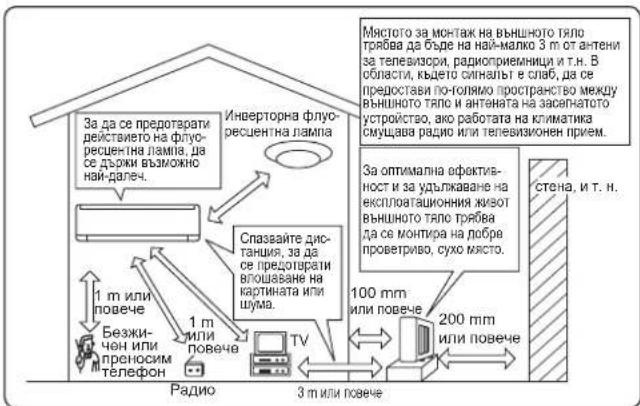
EJIeKtpnueckn pa60TH
- OcnrypeTe 3axpaHbAa Bepnra, cneuHaHNo npedHa3HaYeHa 3a KInMaTnKa.
PpOBepTe daHcTcna3nJN KanauTeta Ha enkTponpeKbCbya.
Ako mATE Bbnpocn, KOHCyTNpaTne ce cbc CBOB dNtbp.
STEXHINUECKHXAPAKTEPNCI
| Mоden | Вътrewино тяло | MSZ-AP25VG(K) | MSZ-AP35VG(K) | MSZ-AP42VG(K) | MSZ-AP50VG(K) | |||||
| Въшно тяло | MUZ-AP25VG(H) | MUZ-AP35VG(H) | MUZ-AP42VG(H) | MUZ-AP50VG(H) | ||||||
| Фунckция | Охлaxдане | Отолениe | Охлaxданe | Отолениe | Охлaxданe | Отолениe | Охлaxданe | Отолениe | ||
| Зхароване | ~ /N, 230 V, 50 Hz | |||||||||
| Мошист | kW | 2,5 | 3,2 | 3,5 | 4,0 | 4,2 | 5,4 | 5,0 | 5,8 | |
| Бхорада мошист | kW | 0,60 | 0,78 | 0,99 | 1,03 | 1,30 | 1,49 | 1,55 | 1,60 | |
| Терno | Вътrewиho | kg | 10,5 | |||||||
| Въшно | kg | 31 | 31 | 35 | 40 | |||||
| Колочевхладинаген arent (R32) | kg | 0,55 | 0,55 | 0,70 | 1,00 | |||||
| IP кoД | Вътrewиho | IP 20 | ||||||||
| Въшно | IP 24 | |||||||||
| Донустимо павOTиюпаген | LP ps | MPa | 2,77 | |||||||
| HP ps | MPa | 4,17 | ||||||||
| Шум | Вър. (MH. Виск/Виск/Cр./Ниск/Tиx) | dB(A) | 42/36/30/24/19 | 45/39/34/24/19 | 42/36/30/24/19 | 45/38/31/24/19 | 42/38/34/29/21 | 45/40/35/29/21 | 44/40/36/33/28 | 48/43/38/33/28 |
| Въшно | dB(A) | 47 | 48 | 49 | 50 | 50 | 51 | 52 | 52 | |
TapaHTnpaH pa6oTeH dnaana3OH
http://www.melcloud.com/Support

SPISTRESCI
ZALECENIA BEZPIECZENSTWA 1
UTYLIZACJA 3
NAZWY POSZCZEGOLNYCH CZESCI 4
■PRZYGOTOWANIE DO PRACY 5
■WYBOR TRYBU PRACY 6
■ REGULACJA OBROTOW WENTYLATORI KIERUNKU NAWIEWU 7
http://www.melcloud.com/Support
Wi-Fi interface setting information
| Indoor unit model name | |
| Indoor unit serial number | |
| Outdoor unit model name | |
| Outdoor unit serial number | |
| Wi-Fi interface MAC address (MAC) | |
| Wi-Fi interface serial number (ID) | |
| Wi-Fi interface PIN (PIN) | |
| Wi-Fi interface SSID (SSID) | |
| Wi-Fi interface KEY (KEY) | |
| System commissioning date | |
| Wi-Fi interface installation date |
Installer contact details
| Name | |
| Telephone number |
MEMO
Name of Importer:
Mitsubishi Electric Europe B.V.
Capronilaan 46, 1119 NS, Schiphol Rijk, The Netherlands
French Branch
25, Boulevard des Bouvets, 92741 Nanterre Cedex, France
German Branch
Mitsubishi-Electric-Platz 1, 40882 Ratingen, Germany
Belgian Branch
Autobaan 2, 8210 Loppe, Belgium
Irish Branch
Westgate Business Park, Ballymount, Dublin 24, Ireland
Italian Branch
Travellers Lane, Hatfield, Herts., AL10 8XB, England, U.K.
Polish Branch
K Krakowska 50, PL-32-083 Balice, Poland
MITSUBISHI ELECTRIC TURKEY ELEKTRIK ÜRUNLERI A.S
Serifali Mah. Kale Sok. No:41 34775 Ümraniye, Istanbul/Turkey
EC DECLARATION OF CONFORMITY
DEKLARACJA ZGODNOSCI WE
MITSUBISHI ELECTRIC AIR CONDITIONING SYSTEMS MANUFACTURING TURKEY JOINT STOCK COMPANY.
Manisa OSB 4.Kisim Kecilikoyosb Mah.
Ahmet Nazif Zorlu Bulvarl No:19 Yunusemre - Manisa.
MSZ-AP50VG/MUZ-AP50VG, MSZ-AP50VG/MUZ-AP50VGH
Note: Its serial number is on the nameplate of the product.
2006/42/EC: Machinery Directive
2014/30/EU: Electromagnetic Compatibility Directive
2009/125/EC: Energy-related Products Directive and Regulation (EU) No 206/2012
2011/65/EU: RoHS
EC DECLARATION OF CONFORMITY
DEKLARACJA ZGODNOSCI WE
MITSUBISHI ELECTRIC AIR CONDITIONING SYSTEMS MANUFACTURING TURKEY JOINT STOCK COMPANY.
Manisa OSB 4.Kisim Kecilikoyosb Mah.
Ahmet Nazif Zorlu Bulvari No:19 Yunusemre - Manisa.
MSZ-AP42VGK/MUZ-AP42VG, MSZ-AP42VGK/MUZ-AP42VGH
MSZ-AP50VGK/MUZ-AP50VG, MSZ-AP50VGK/MUZ-AP50VGH
Note: Its serial number is on the nameplate of the product.
Directivas Directive
O8nyie
Directivas
Direktiver
Direktiv Direktif
Direktfiter
DnpeKTHBn
Direktiver
Direktivit
Dypekmbb
Dyrektyw
2014/53/EU: Radio Equipment Directive
2006/42/EC: Machinery Directive
2009/125/EC: Energy-related Products Directive and Regulation (EU) No 206/2012
2011/65/EU: RoHS
Issued: 1 November, 2017 Selin Domekeli
TURKEY Quality Assurance Department
MITSUBISHI ELECTRIC CORPORATION
- SPLIT-TYPE AIR CONDITIONERS
- INDOOR UNIT
- MSZ-AP25VG MSZ-AP35VG MSZ-AP42VG MSZ-AP50VG
- C E
- SAFETYPRECAUTIONS
- Meanings of symbols displayed on indoor unit and/or outdoor unit
- Marks and their meanings
- WARNING
- Meanings of symbols used in this manual
- IMPORTANT
- DISPOSAL
- Note:
- Indoor unit Remote controller
- Outdoor unit
- Remote controller
- PREPARATIONBEFOREOPERATION
- AUTO mode (Auto change over)
- COOLmode
- DRY mode
- HEATmode
- FAN model
- Multi system operation
- Operation indicator lamp
- FANSPEED AND AIRFLOW DIRECTION ADJUSTMENT
- Fan speed
- Up-down Airflow direction
- Left-right Airflow direction
- I-SAVE OPERATION
- ECONOCOOL OPERATION
- Setting the weekly timer
- Checking weekly timer setting
- EMERGENCYOPERATION
- When the remote controller cannot be used...
- AUTORESTARTFUNCTION
- CLEANING
- Instructions:
- Air fi lter (Air purifying fi lter)
- Front panel
- -Air cleaning fi lter (Silver-ionized air purifi er fi lter, option)
- Wi-Fi INTERFACE SETTING UP (VGK type only)
- Wi-Fi interface introduction
- WHEN YOU THINK THAT TROUBLE HAS OCCURRED
- WHEN THE AIR CONDITIONER IS NOT GOING TO BE USED FOR A LONG TIME
- When using the air conditioner again:
- INSTALLATION PLACE AND ELECTRICAL WORK
- Installation place
- Electrical work
- SPECIFICATIONS
- INHALT
- ■VORSICHTSMASSNAHMSN
- ENTSORGUNG
- TABLE DES MATIERES
- CONSIGNES DE SECURITE
- FONCTIONNEMENT D'URGENCE
- Lieud'st installation
- INHOUDSOPGAVE
- VEILIGHEIDSVOORSCHRIFTEN
- RESET-schakelaar
- INDICE
- Interruptor MODE (Modo)
- SOMMARIO
- Nota:
- Σημειωη:
- Otau ypnouoioe eav to kuaotko:
- PRECAUÇOES DE SEGURANÇA
- Significado dos síbolos presentados naunities interior e/ouunities exterior
- DESIGNACAO DAS PEÇAS
- SIKKERHEDSFORSKRIFTER
- Tørningstilstand (DRY)
- KONOMIAFKOLINGSDRIFT
- (ECONO COOL)
- Bemerk:
- INNEHÄLL
- SÄKERHETSFÖRESKRIFTER
- Obs:
- NÄR DUTROR ATT DET HAR UPPSTÄTT PROBLEMV
- INSTALLATIONSPLATS OCH ELARBETE
- Installationsplats
- ICINDEKILER
- GÜVENLIK ÖNLEMLERİ
- Calisma Gosterge Lambasi
- Mitsubishi Electric Corporation (Head Office)
- CbDbPjKAHNE
- HCTPYKIIIM 3A BE3OJIACHOCT
- 3NaueHHa cHMBOJIHTe, NOKa3aHH Ha BbTpEHHOT TJAIO HJH Ha BBHHOTO TJAIO
- ABTomatueh pexum (Auto change over)
- 3a6eJekka:
- PexmHa oxlaaKaande (COOL)
- 3a6eIekka:
- PexnHa n3CyMaBaHe Ha Bb3dyxa (DRY)
- PexmHa oToJIeHne (HEAT)
- PekmHaBeHTnlaTop(FAN)
- PekmHa pa6oTa npu MyTncnnt cctemN
- Pa6oTeH nHmKaTOp
- TAYMEP 3A BKJI./I3KJI. (ON/OFF)
- CEdMMUeHTaIMEP
- 3a6eTeXka:
- HactpoKaHa ceMnHnTaIMeP
- IpoBepKa HacTPOINKITE Ha ceMnHmTaMep
- ABAPINEH PEXKIM
- Korato nctaannohno ynpabJeHne He moke da
- CC H3H0J3Ba...
- 3a6enexka:
- ФУнкия 3A ABTOMATNUHOPECTAPTPPAHE
- IOUHCTBAHE
- Hctpkun:
- Bb3nyiuehΦHJTbp (ΦHJTbp 3a HpeuHCTBaHe Ha Bb3dyxa)
- ΦHJTbp 3a IIpeuHcTbaHe Ha Bb3dYxa (ΦHJTbp cbc cpe6bphN HoHN 3a IIpeuHcTbaHe Ha Bb3dYxa, IIO JeJIaHHe Ha KJIHeNTa)
- BaXHo
- Ipeen naneJ
- HACTPOIBAHE HA Wi-Fi INHTEPDEICA (camo OT TNI VGK)
- ByToH RESET (HYUNPAHE)
- 3a6eJexka:
- PnBb3HnKHaI IPOEAM
- IMRACTO 3AMOHTAKI EZEKTPNUECKN PABOTU
- MЯсто за монтуж
- EJIeKtpnueckn pa60TH
- STEXHINUECKHXAPAKTEPNCI
- SPISTRESCI
- MITSUBISHI ELECTRIC CORPORATION
Brand : MITSUBISHI
Model : MSZAP25VGE1
Category : Air Conditioning