ManualGo.com
WHUH09FE5 - Air Conditioning PANASONIC - Free user manual and instructions
Find the device manual for free WHUH09FE5 PANASONIC in PDF.



Download the instructions for your Air Conditioning in PDF format for free! Find your manual WHUH09FE5 - PANASONIC and take your electronic device back in hand. On this page are published all the documents necessary for the use of your device. WHUH09FE5 by PANASONIC.
USER MANUAL WHUH09FE5 PANASONIC
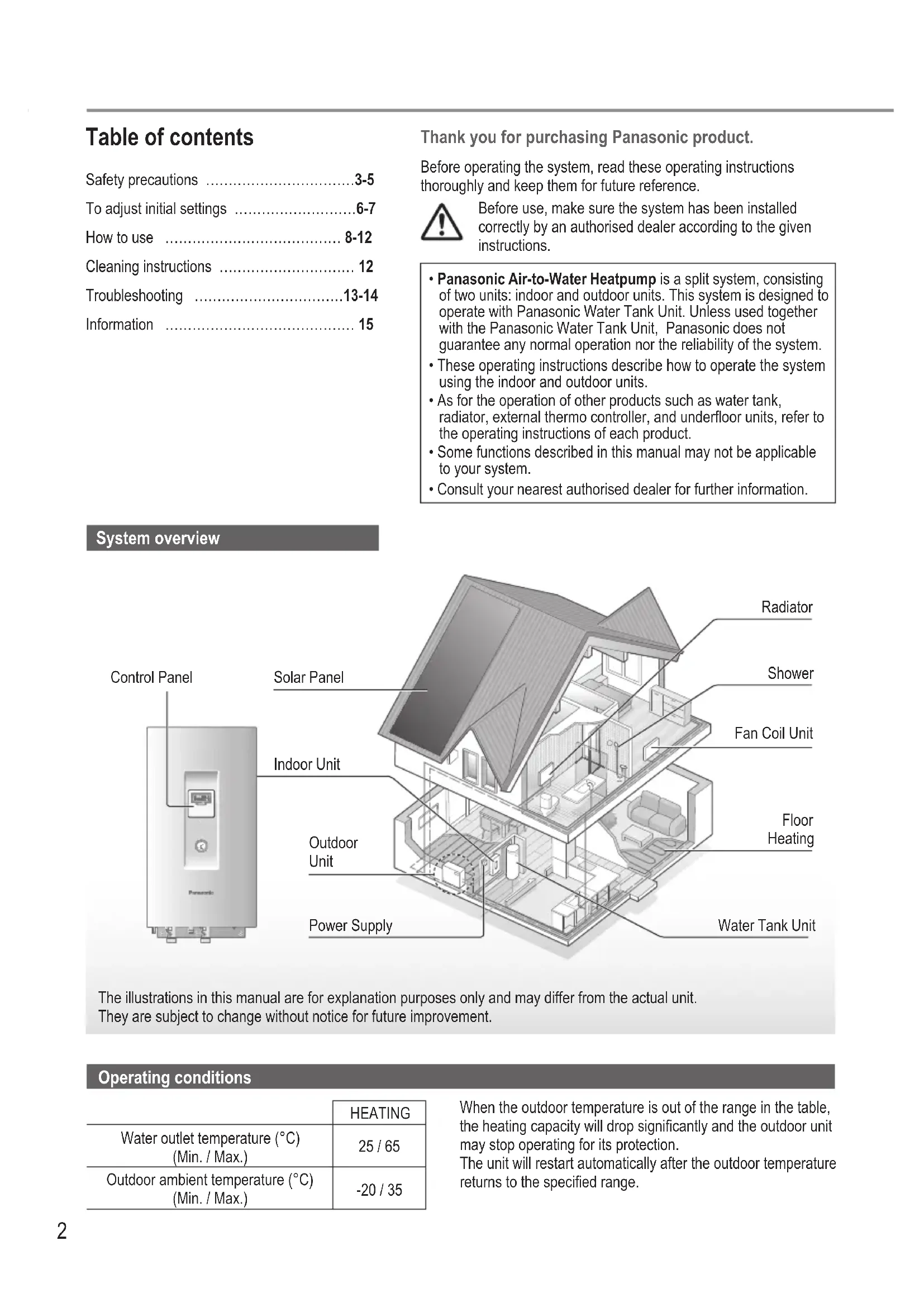
- Panasonic Air-to-Water Heatpump is a split system, consisting of two units: indoor and outdoor units. This system is designed to operate with Panasonic Water Tank Unit. Unless used together with the Panasonic Water Tank Unit, Panasonic does not guarantee any normal operation nor the reliability of the system.
- These operating instructions describe how to operate the system using the indoor and outdoor units.
- As for the operation of other products such as water tank, radiator, external thermo controller, and underfloor units, refer to the operating instructions of each product.
- Some functions described in this manual may not be applicable to your system.
- Consult your nearest authorised dealer for further information. The illustrations in this manual are for explanation purposes only and may differ from the actual unit. They are subject to change without notice for future improvement. Operating conditions HEATING Water outlet temperature (°C) (Min. / Max.) 25 / 65 Outdoor ambient temperature (°C) (Min. / Max.) -20 / 35 When the outdoor temperature is out of the range in the table, the heating capacity will drop significantly and the outdoor unit may stop operating for its protection. The unit will restart automatically after the outdoor temperature returns to the specified range. System overview3 English To prevent personal injury, injury to others or property damage, please comply with the following: Incorrect operation due to failure to follow instructions below may cause harm or damage, the seriousness of which is classified as below: WARNING This sign warns of death or serious injury. CAUTION This sign warns of injury or damage to property. The instructions to be followed are classified by the following symbols: This symbol denotes an action that is PROHIBITED. These symbols denote actions COMPULSORY. WARNING Indoor unit and outdoor unit This appliance may be used by children aged from 8 years and above and persons with reduced physical, sensory or mental capabilities or lack of experience and knowledge if they have been given supervision or instruction concerning use of the appliance in a safe way and understand the hazards involved. Children shall not play with the appliance. Cleaning and user maintenance shall not be made by children without supervision. Please consult an authorised dealer or specialist to clean the internal parts, repair, install, remove and reinstall the unit. Improper installation and handling will cause leakage, electric shock or fire. Confirm with an authorised dealer or specialist on usage of any specified refrigerant type. Using refrigerant type other than the specified may cause product damage, burst and injury etc. Do not install the unit in a potentially explosive or flammable atmosphere. Failure to do so could result in fire. Do not insert your fingers or other objects into the indoor or outdoor unit; the rotating parts may cause injury. Safety precautions Safety precautions4 Do not touch the outdoor unit during lightning, it may cause an electric shock. Do not sit or step on the unit, you may fall down accidentally. Do not install the indoor unit outdoors. This is designed for indoor installation only. Power supply Do not use a modified cord, joint cord, extension cord or unspecified cord to prevent overheating and fire. To prevent overheating, fire or electric shock:
- Do not share the same power outlet with other equipment.
- Do not operate with wet hands.
- Do not bend or twist power supply cord. If the supply cord is damaged, it must be replaced by the manufacturer, service agent or similarly qualified persons in order to avoid a hazard. This unit is equipped with Residue Current Circuit Breaker (RCCB). Ask an authorised dealer to check RCCB operation regularly, especially after installation, inspection, and maintenance. RCCB malfunction may result in electric shock and/ or fire. It is strongly recommended that Install Residual Current Device (RCD) on-site to prevent electric shock and/or fire. Before obtaining access to terminals, all supply circuits must be disconnected. Stop using the product if any abnormality/failure occurs and disconnect the power supply. (Risk of smoke/fire/electric shock) Examples of abnormality/failure
- RCCB trips frequently.
- Burning smell is observed.
- Abnormal noise or vibration of the unit is observed.
- Hot water leaks from the indoor unit. Contact your local dealer immediately for maintenance/ repair. Wear gloves during inspection and maintenance. This equipment must be earthed to prevent electrical shock or fire. Prevent electric shock by disconnecting the power supply - Before cleaning or servicing. - When extended non-use. This appliance is for multiple uses. To avoid electric shock, burn and/or fatal injury, make sure to disconnect all power supplies before accessing any terminal in the indoor unit. Safety precautions5 English CAUTION Indoor unit and outdoor unit Do not wash the indoor unit with water, benzine, thinner or scouring powder to avoid damage or corrosion on the unit. Do not install the unit close to any combustibles or at bathroom. Otherwise, it may cause electric shock and/or fire. Do not touch the water discharge pipe of the indoor unit during operation. Do not place any material on the unit or under it. Do not touch the sharp aluminium fin; sharp parts may cause injury. Do not use the system during sterilisation in order to prevent scalding with hot water, or overheating of shower. Prevent water leakage by ensuring that the drainage pipe is connected properly. After a long period of use, make sure the installation rack is not deteriorated. The deteriorated rack may cause the unit to fall down. Ask an authorised dealer to determine the level of sterilisation function field settings according to the local laws and regulations. Control panel Do not wet the control panel. Failure to do so may result in electric shock and/or fire. Do not press the buttons on the control panel using hard and sharp objects. Failure to do so may cause damage to the unit. Do not wash the control panel using water, benzine, thinner or scouring powder. Do not inspect or maintain the control panel by yourself. Consult an authorised dealer in order to prevent personal injury caused by incorrect operation. Safety precautions6 To adjust initial settings Dealer Select menus and determine settings according to the system available in the household. It is recommended that all alterations of settings are done by an authorised dealer or specialist.
- After initial installation, you may manually adjust the settings. The initial setting remains active until the user changes it.
- The control panel can be used for multiple installations.
- Ensure the operation LED is OFF before setting.
- The system may not work properly if set wrongly. Please consult an authorised dealer.
Press and simultaneously and hold for 5 seconds until the display shows SETTING STATUS.
Press or to select Yes/No, or other options. YES: to enable the menu No: to disable the menu
Press to confirm. Control Panel DisplayOperation LED Menu (1 ~ 20) Setting Display
Indoor Backup Heater Selection To reduce the heater power if unnecessary. *Options of kW vary depending on the model. *3 kW / 6 kW / 9 kW
Water System Freeze Prevention To activate or deactivate the water freeze prevention when the system is OFF. YES NO
Tank Connection To select whether or not to connect to the optional water tank unit. Note: If NO is selected, menus 5 to 14 are skipped. YES NO
Solar Priority To select the use of solar panel for heating up the water tank. YES NO
Heating Priority To select the room heating as priority during HEAT + TANK mode. Note: If YES is selected, menus 7 and 8 are skipped for HEAT + TANK mode. YES NO
Heating Operation Interval To set the interval for HEAT mode during HEAT + TANK mode. Note: If YES is selected in menu 6, this menu is skipped.
Tank Heat-up Interval To set the interval for the water tank during HEAT + TANK mode. Note: If YES is selected in menu 6, this menu is skipped. 5 minutes ~ 1 hour 35 minutes7 English
Booster Heater To activate or deactivate the water tank’s booster heater. Note: If NO is selected, menu 10 is skipped. YES NO
Booster Heater Delay Timer To delay time for the booster heater to activate while the system is heating up the water tank. 20 minutes ~ 1 hour 35 minutes
- Do not use the system during sterilisation in order to prevent scalding with hot water, or overheating of shower.
- Ask an authorised dealer to determine the level of sterilisation function field settings according to the local laws and regulations.
Sterilisation To sterilise the water tank, if required. Note: If NO is selected, menus 12 to 14 are skipped. YES NO
Sterilisation Day & Time To set timer for sterilisation. (Only once a week. Operates even under a standby condition) Monday ~ Sunday 0:00 ~ 23:50
Continuation of Sterilisation To maintain heating temperature in order to complete the sterilisation. 5 minutes ~ 1 hour
Base Pan Heater To select whether or not to connect to the optional base pan heater. Note: If NO is selected, menu 16 is skipped. YES NO
Base Pan Heater type Type A - The base pan heater activates only during deice operation. Type B - The base pan heater activates when outdoor ambient temperature is 5 °C or lower.
Dry Concrete During construction to dry the concrete under a preset temperature. Do not use this menu for any other purposes and in period other than during construction (Refer to Information page). 1 day ~ 99 days User Control panel preparation
Press or to set the current day.
to set the current time. ■ Note:
- The current day and time need to be set in cases below: - When the power is turned on for the first time. - A long time has elapsed since the power was turned on the last time.
- The current time that has been set will be the standard time for all the timer operations. Caution Indicator (Tank Temperature above 60 °C) Dealer Operation/settings to be done only by the authorised dealer/specialist. User Operation/settings to be done by the authorised dealer/specialist or user. To adjust initial settings8 How to use User Enjoy quiet operation Press .• This operation reduces the noise of outdoor unit.The operation may cause heating ability to decrease. User System status check mode
Press (The display shows STATUS.) Press or to check the selected mode.• Dry concrete (does not show during normal operation)• The Water Inlet Temperature• Tank Temperature• Compressor Running Frequency• Error History• Heat mode total power consumption (Up to 999 days)• Tank mode total power consumption (Up to 999 days)• Press to exit the STATUS mode. ■ Note:
- Once the STATUS mode is entered, the display shows STATUS.• The STATUS mode cannot be activated when the display shows SETTING.• The total power consumption is an estimated value based on AC 230 V and may differ from value measured by precise equipment. ■ Note: In normal operation, the , and buttons are not in use. User Turn on or off the system Press .When the system is ON, the operation LED is lit and the actual water outlet temperature and outdoor ambient temperature are shown on the display. User Select operation mode Press to select operation mode.HEAT • The panel/floor HEAT operation is either turned ON or OFF.• The outdoor unit provides heat to the indoor unit. HEAT+ TANK• The outdoor unit provides heat to the sanitary tank and indoor unit.• This mode cannot be selected when the sanitary water tank is not installed.TANK • The sanitary water tank is either turned ON or OFF.• The outdoor unit provides heat to the sanitary water tank. User Initiate the backup heater Press
- The backup heater provides extra heat at low outdoor temperature. The backup heater is possible only in the heat mode.• Once the backup heater is set, it is automatically operated when conditions are fulfilled.• To disable the backup heater, press again.The system is turned off by an external switch.9 English Dealer Operation/settings to be done only by the authorised dealer/specialist. User Operation/settings to be done by the authorised dealer/specialist or user. Dealer System temperature setting Temperature setting Display The system controls the temperature for each menu based on the outdoor ambient temperature.
- To set or change the temperatures, make sure to contact your nearest authorised dealer.
Press and hold for 5 seconds to enter the temperature range setting mode. (The display shows SETTING.)
Press or to set the desired temperature.
Press to confirm the setting.
to set other menus. User Checking the temperature range
Press and hold for 5 seconds to enter the temperature range setting mode.
- Press to exit. Menu Temperature setting Display Setting of low outdoor ambient temperature. -15 °C ~ 15 °C HEAT Setting of high outdoor ambient temperature. -15 °C ~ 15 °C Setting of water outlet temperature at low outdoor ambient temperature. 25 °C ~ 65 °C Setting of water outlet temperature at high outdoor ambient temperature. 25 °C ~ 65 °C During HEAT mode, the water outlet temperature is adjusted as is shown the diagram on the right. It is performed within the preset temperature range. <Water outlet temperature> <Outdoor ambient temperature> max. water temp. min. water temp. Setting of outdoor ambient temperature to turn OFF heating operation during HEAT mode.
Setting of outdoor ambient temperature to turn ON the backup heater.
-15 °C ~ 20 °C HEATER
Setting of sanitary water tank temperature. 40 °C ~ 75 °C TANK How to use10 How to use User Shifting the water temperature Desired temperature settingThis easily shifts the water outlet temperature if the setting is undesirable. Press to enter the water temperature shifting mode. Press to change setting. Press or to set the desired temperature.(temperature range: -5 °C ~ 5 °C)Temperature setting
Shift value<Water outlet temperature><Outdoor ambient temperature> Press to confirm the setting. ■ Note:
- Press or wait for 30 seconds to exit the SETTING mode.• The set temperature will be saved in the system once confirmed.• The SETTING mode cannot be activated when the SERVICE and STATUS indicators are ON.• The system will shift the temperature within water outlet temperature range. User Holiday mode
- By setting the day (s) in holiday mode, it promotes energy saving while you are on holiday, and enables the system to resume at the preset temperature after your holiday.• Ensure that the system is OFF before setting.• The system will resume operation automatically at 00:00 am after the holiday.• The day the HOLIDAY mode was set is counted as day 1.Desired daysExample:Setting the holiday mode on June 21, 08:00 am. By setting 3 days, the system resumes operation on June 24, 00:00 am. Press to enter the HOLIDAY mode. Press or to set the desired days.(Setting range: 1 day ~ 999 days) Press to confirm the setting. ■ Note:
- Press or wait 30 seconds to exit the HOLIDAY mode.11 English User Weekly timer setting Promotes energy saving by allowing you to set up to 6 programmes in any given day. Indicates the next timer operation programme Day to be selected Indicates the next timer operation day Programme number in a day OFF Timer ON Timer Lights up if Timer operation is selected
Press to enter the timer setting mode.
Press or to select your desired day.
Press to confirm your selection.
“1” will be blinking, press to set programme 1.
Press or to select your desired time. You can set , , and the Water Temperature Thermo Shift setting.
Press to confirm programme 1. The selected day will be highlighted with ▼.
- After 2 seconds, the display will move to the next programme. Repeat steps 4 to 7 to set programmes 2 to 6.
- During timer setup, if no button is pressed within 30 seconds, or if the is pressed, the setting at that moment is confirmed and timer setup is ended. To check current timer programme
Press to enter timer mode and press to enter day setting.
Press or until your desired day is shown, press to confirm your selection.
Press or until your desired day is shown, press to enter programme setting.
Press or until your desired day is shown. Press to cancel the programme and ▼ will disappear. To disable/enable Weekly Timer
- To disable weekly timer setting, press , then press .
- To enable previous weekly timer setting, press , then press . Dealer Operation/settings to be done only by the authorised dealer/specialist. User Operation/settings to be done by the authorised dealer/specialist or user. How to use12 Indoor unit• Do not splash water directly.Wipe the unit gently with a soft dry cloth.To ensure optimal performance of the system, cleaning has to be carried out at regular intervals.Consult an authorised dealer.• Disconnect the power supply before cleaning.• Do not use benzine, thinner or scouring powder.• Use only soap ( pH7) or neutral household detergent.• Do not use water hotter than 40 °C.External filter• Clean the external filter at least once a year. Failure to do so may cause the filter to clog up, which may lead to system breakdown. Consult an authorised dealer.Outdoor unit• Do not obstruct the air inlet and outlet vents. Failure to do so may result in low performance or system breakdown. Remove any obstruction to assure the ventilation.• When it snows, clean and remove snow around the outdoor unit to prevent the air inlet and outlet vents from being covered with snow. Inspection
- In order to ensure optimal performance of the units, seasonal inspections on the units, external filter and field wiring have to be carried out at regular intervals. Consult an authorised dealer about maintenance.• Clear any obstruction on the air inlet and outlet vents of the outdoor unit. For extended non-use
- Disconnect the power supply. Non serviceable criteria Disconnect the power supply then please consult an authorised dealer under the following conditions:• Abnormal noise during operation.• Water/foreign particles have entered the control panel.• Water leaks from the indoor unit.• Circuit breaker switches off frequently.• Power cord becomes unnaturally warm. Cleaning instructions Weekly timer setting ■ Note:
- You may set the timer for each day of the week (Monday to Sunday) with 6 programmes per day.• When the system is switched on by the timer, it will use the previously set temperature to control the water outlet temperature.• The same timer programme cannot be set on the same day.• You may also select 2 or more days with the same timer setting. How to use Water pressure gauge• Do not press or hit the glass cover using hard and sharp objects. Failure to do so may cause damage to the unit.• Ensure that the water pressure is between 0.05 and 0.3 MPa (0.1 MPa = 1 bar).• In case the water pressure is out of the above range, consult an authorised dealer.13 English The following symptoms do not indicate malfunction. Symptom Cause Water flowing sound during operation. • Refrigerant flow inside the unit. Operation is delayed a few minutes after restarting.
- The delay is a protection for the compressor. Outdoor unit emits water/steam. • Condensation or evaporation occurring in the pipes. Steam comes out of the outdoor unit in the heating mode.
- It is caused by defrost operation in the heat exchanger. Outdoor unit does not operate. • It is caused by the protection control of the system when outdoor temperature is out of the operating range. System operation switches off. • It is caused by the protection control of the system. When the water inlet temperature is lower than 10 °C, the compressor stops and the backup heater power turns on. System is hard to heat up. • When the panel and the floor are heated simultaneously, warm water temperature may decrease, which may reduce the heating ability of the system.
- When the outdoor air temperature is low, the system may need longer time to heat up.
- Discharge outlet or intake inlet in the outdoor unit is blocked by some obstacle, such as a pile of snow.
- When the preset water outlet temperature is low, the system may need longer time to heat up. System does not heat up instantly. • System will take some time to heat up the water if it starts to operate at cold water temperature. Backup heater is automatically turned ON when it is disabled.
- It is caused by the protection control of the indoor unit heat exchanger. Operation starts automatically when the timer is not set.
- Sterilisation timer has been set. Display power consumption remains as previous value.
- Memory is saved on hourly basis. If a power failure occurs, the data kept from last hour will be displayed.
- Total power consumption has reached 999 days. press to reset the counter. HEAT indicator blinks on the display. • System is performing deice operation. Loud refrigerant noise continue for a few minutes.
- It is caused by protection control during deice operation at outdoor ambient temperature lower than -10 °C. Check the following before calling for servicing. Symptom Check Operation in HEAT mode is not working efficiently.
- Set the temperature correctly.
- Close the panel heater valve.
- Clear any obstruction in the air inlet and air outlet vents of the outdoor unit. Noisy during operation. • Outdoor unit or indoor unit has been installed at an incline.
- Close the cover properly. System does not work. • Circuit breaker has tripped/activated. Operation LED is not lit or nothing is displayed on the control panel.
- Check that the power supply is working correctly, or that a power failure has not occurred. Troubleshooting Force Heater Mode Button
- If a malfunction occurs in the system, the backup heater may be used to heat up the water. Press to switch on the backup heater.
- Press to switch off the backup heater.
- In the Force Heater mode, no other operation can be used. How to use / Cleaning instructions / Troubleshooting14 The operation LED blinks and error code appears on the display.
- Disconnect the power supply, and report the error code to an authorised dealer.
- The timer operation will be cancelled when an error code is displayed. Diagnostic display Abnormality or Protection control works H12 Capacity mismatch H15 Abnormal compressor temperature sensor H20 Abnormal water pump H23 Abnormal refrigerant 1 sensor H27 Abnormal service valve H42 Compressor low pressure protection H62 Abnormal water flow H64 Abnormal high pressure sensor H65 Abnormal deice water circulation H70 Abnormal back-up heater overload protector H72 Abnormal tank temperature sensor H76 Control panel communication error H90 Abnormal indoor / outdoor communication H91 Abnormal tank heater overload protector H95 Abnormal voltage connection H98 Outdoor high pressure protection H99 Indoor heat exchanger freeze prevention Diagnostic display Abnormality or Protection control works F12 Pressure switch activated F14 Poor compressor rotation F15 Abnormal outdoor fan motor lock F16 Comprehensive current protection F20 Compressor temperature overload protection F22 Transistor module temperature overload protection F23 DC peak abnormal of operation F24 Abnormal Refrigerant cycle F25 Abnormal in a cooling / heating charge F27 Abnormal pressure switch F30 Abnormal water outlet sensor 2 F36 Abnormal outdoor air temperature sensor F37 Abnormal water inlet sensor F40 Abnormal outdoor discharge sensor F41 Abnormal power factor correction F42 Abnormal outdoor heat exchanger sensor F43 Abnormal outdoor defrost sensor F45 Abnormal water outlet sensor F46 Abnormalities in outdoor current transformer disconnection F48 Abnormal evaporator outlet temperature sensor F49 Abnormal bypass outlet temperature sensor F95 Abnormal cooling high pressure Troubleshooting15 English Information for Users on Collection and Disposal of Old Equipment These symbols on the products, packaging, and/or accompanying documents mean that used electrical and electronic products should not be mixed with general household waste. For proper treatment, recovery and recycling of old products, please take them to applicable collection points, in accordance with your national legislation and the Directives 2002/96/EC and 2006/66/EC. By disposing of these products correctly, you will help to save valuable resources and prevent any potential negative effects on human health and the environment which could otherwise arise from inappropriate waste handling. For more information about collection and recycling of old products, please contact your local municipality, your waste disposal service or the point of sale where you purchased the items. Penalties may be applicable for incorrect disposal of this waste, in accordance with national legislation. For business users in the European Union If you wish to discard electrical and electronic equipment, please contact your dealer or supplier for further information. [Information on Disposal in other Countries outside the European Union] These symbols are only valid in the European Union. If you wish to discard these items, please contact your local authorities or dealer and ask for the correct method of disposal. Information Dry Concrete Function
- During construction to dry the concrete under a preset temperature.
Press and simultaneously and hold for 5 seconds until the display shows “ ”.
Press to select day. Press or to set the desired temperature.
Press to confirm the selection.
to set other days and temperature.