ManualGo.com
S22MG1E5N - Air Conditioning PANASONIC - Free user manual and instructions
Find the device manual for free S22MG1E5N PANASONIC in PDF.



Download the instructions for your Air Conditioning in PDF format for free! Find your manual S22MG1E5N - PANASONIC and take your electronic device back in hand. On this page are published all the documents necessary for the use of your device. S22MG1E5N by PANASONIC.
USER MANUAL S22MG1E5N PANASONIC
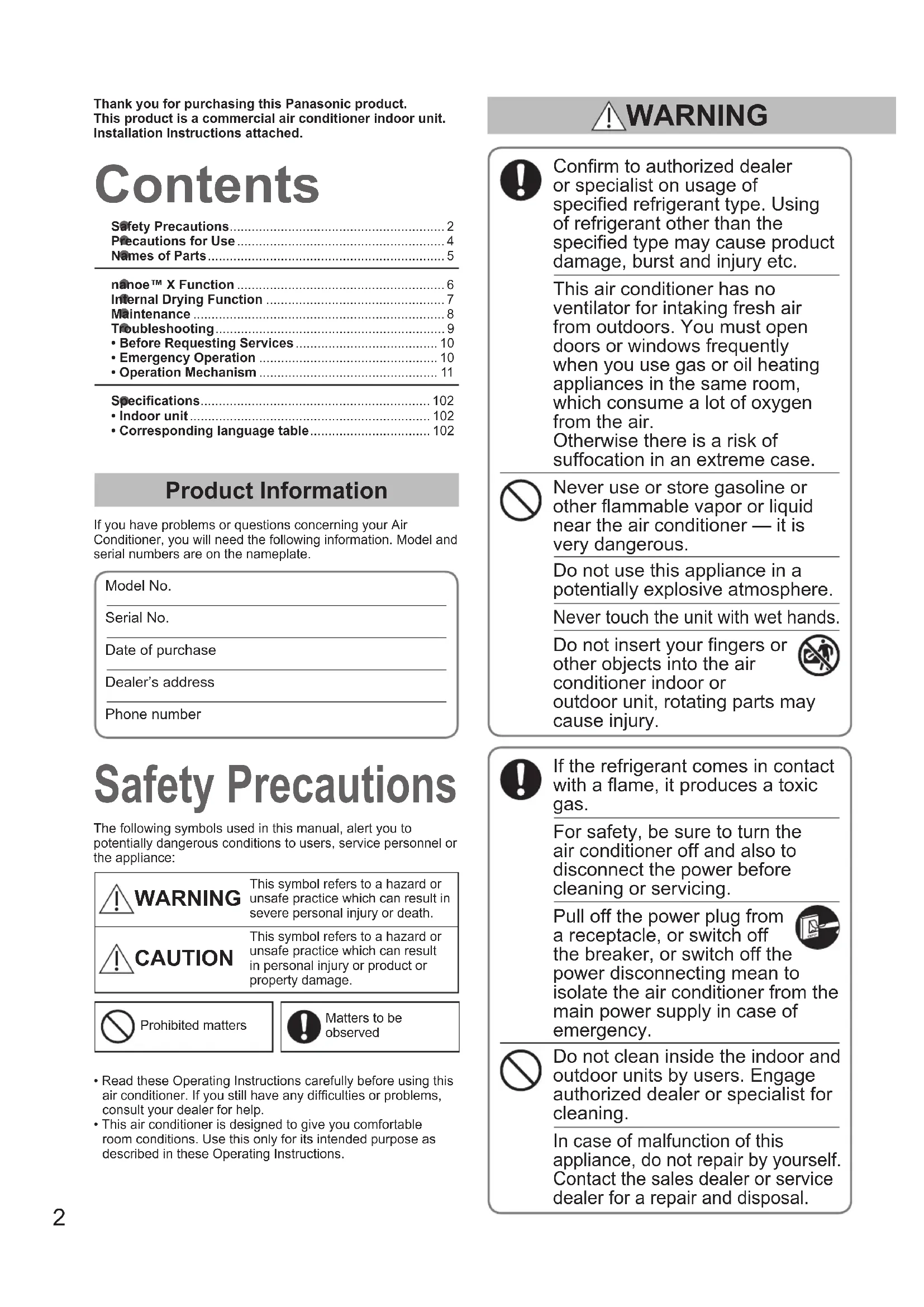
- Corresponding language table ................................. 102 Contents Thank you for purchasing this Panasonic product.This product is a commercial air conditioner indoor unit.Installation Instructions attached. Conrm to authorized dealer or specialist on usage of specied refrigerant type. Using of refrigerant other than the specied type may cause product damage, burst and injury etc. This air conditioner has no ventilator for intaking fresh air from outdoors. You must open doors or windows frequently when you use gas or oil heating appliances in the same room, which consume a lot of oxygen from the air. Otherwise there is a risk of suffocation in an extreme case. Never use or store gasoline or other ammable vapor or liquid near the air conditioner — it is very dangerous. Do not use this appliance in a potentially explosive atmosphere. Never touch the unit with wet hands. Do not insert your ngers or other objects into the air conditioner indoor or outdoor unit, rotating parts may cause injury. If the refrigerant comes in contact with a ame, it produces a toxic gas. For safety, be sure to turn the air conditioner off and also to disconnect the power before cleaning or servicing. Pull off the power plug from a receptacle, or switch off the breaker, or switch off the power disconnecting mean to isolate the air conditioner from the main power supply in case of emergency. Do not clean inside the indoor and outdoor units by users. Engage authorized dealer or specialist for cleaning. In case of malfunction of this appliance, do not repair by yourself. Contact the sales dealer or service dealer for a repair and disposal. Safety Precautions Product Information If you have problems or questions concerning your Air Conditioner, you will need the following information. Model and serial numbers are on the nameplate.Model No. Serial No. Date of purchaseDealer’s addressPhone numberThe following symbols used in this manual, alert you to potentially dangerous conditions to users, service personnel or the appliance: WARNING This symbol refers to a hazard or unsafe practice which can result in severe personal injury or death. CAUTION This symbol refers to a hazard or unsafe practice which can result in personal injury or product or property damage.Prohibited mattersMatters to be observed• Read these Operating Instructions carefully before using this air conditioner. If you still have any difculties or problems, consult your dealer for help.• This air conditioner is designed to give you comfortable room conditions. Use this only for its intended purpose as described in these Operating Instructions. WARNING OI_00_311238_EU.indb 2 2019/5/10 9:37:323 ENGLISH This appliance is intended to be used by expert or trained users in shops, in light industry and on farms, or for commercial use by lay persons. This appliance is not intended for use by persons (including children) with reduced physical, sensory or mental capabilities, or lack of experience and knowledge, unless they have been given supervision or instruction concerning use of the appliance by a person responsible for their safety. Children should be supervised to ensure that they do not play with the appliance. <for European market only> This appliance can be used by children aged from 8 years and above and persons with reduced physical, sensory or mental capabilities or lack of experience and knowledge if they have been given supervision or instruction concerning use of the appliance in a safe way and understand the hazards involved. Children shall not play with the appliance. Cleaning and user maintenance shall not be made by children without supervision. Keep the re alarm and the air outlet at least 1.5m away from the unit. Do not cool or heat the room too much if babies or invalids are present. Do not turn the air conditioner on and off from the power mains switch. Use the ON/OFF operation button. Do not stick anything into the air outlet of the outdoor unit. This is dangerous because the fan is rotating at high speed. Do not touch the air inlet or the sharp aluminum ns of the outdoor unit. You may get injured. Do not stick any object into the FAN CASE. You may be injured and the unit may be damaged. Provide a power outlet to be used exclusively for each unit, and a power supply disconnect, Earth Leakage Circuit Breaker (ELCB) or Residual Current Device (RCD) for overcurrent protection should be provided in the exclusive line. Provide a power outlet exclusively for each unit, and full disconnection means having a contact separation in all poles must be incorporated in the xed wiring in accordance with the wiring rules. To prevent possible hazards from insulation failure, the unit must be grounded. Do not use modied cord, joint cord, extension cord or unspecied cord to prevent overheating and re. Stop using the product when any abnormality/failure occurs and disconnect the power plug or turn off the power switch and breaker. (Risk of smoke/re/electric shock) Examples of abnormality/failure:
- The ELCB trips frequently.
- The product sometimes does not start when turned on.
- The power is sometimes disconnected when the cord is moved.
- Burnt odor or abnormal noise is detected during operation.
- The body is deformed or abnormally hot.
- Water leaks from the indoor unit.
- Power cord or plug becomes abnormally hot.
- Fan speed cannot be controlled.
- The unit stops running immediately even if it is switched on for operation.
- The fan does not stop even if the operation is stopped. Contact immediately your local dealer for maintenance/repair. WARNING CAUTION
- The compressor may occasionally stop during thunderstorms. The unit automatically recovers after a few minutes.• The English text is the original instructions. Other languages are translation of the original instructions. NOTICE Do not sit or step on the unit. You may fall down accidentally. OI_00_311238_EU.indb 3 2019/5/10 9:37:334 Precautions for Use Installation zThis air conditioner must be installed properly by qualied installation technicians in accordance with the Installation Instructions provided with the unit. zBefore installation, check that the voltage of the electric supply in your home or ofce is the same as the voltage shown on the nameplate. WARNING Avoid the following locations for installation. zLocations where smoke or combustible gas exists. Also locations of extremely high temperature such as a greenhouse. zLocations where excessively high heat-generating objects are placed. Attention: zAvoid installing the outdoor unit where salty sea water can splash directly onto it or in sulphurous air near a spa. (To protect the air conditioner from heavy corrosion) Operation Condition Use this air conditioner under the following temperature range. Outdoor Unit Indoor temperature range Outdoor temperature range mini VRF (Type LE1, LE2 )Cooling14°C ~ 25°C (*WBT)-10°C ~ 46°C (*DBT)-10°C ~ 43°C (*DBT)*1Heating16°C ~ 30°C (*DBT)-20°C ~ 18°C (*WBT)2WAY (Type ME2)Cooling14°C ~ 25°C (*WBT)-10°C ~ 52°C (*DBT)-10°C ~ 43°C (*DBT)*1Heating16°C ~ 30°C (*DBT)-25°C ~ 18°C (*WBT)3WAY (Type MF3)Cooling14°C ~ 25°C (*WBT)-10°C ~ 52°C (*DBT)-10°C ~ 43°C (*DBT)*1Heating15°C ~ 30°C (*DBT)-20°C ~ 18°C (*WBT)Cooling &Heating -10°C ~ 24°C (*DBT)*DBT: Dry bulb temperature*WBT: Wet bulb temperature
The maximum allowable temperature of this air conditioning system is reduced to 43°C when using the existing R22 pipe.Information for Users on Collection and Disposal of Old Equipment and Used Batteries hese symbols on the products, packaging, and/or accompanying documents mean that used electrical and electronic products and batteries should not be mixed with general household waste.For proper treatment, recovery and recycling of old products and used batteries, please take them to applicable collection points, in accordance with your national legislation and the Directives 2002/96/EC and 2006/66/EC.By disposing of these products and batteries correctly, you will help to save valuable resources and prevent any potential negative effects on human health and the environment which could otherwise arise from inappropriate waste handling.For more information about collection and recycling of old products and batteries, please contact your local municipality, your waste disposal service or the point of sale where you purchased the items.Penalties may be applicable for incorrect disposal of this waste, in accordance with national legislation.For business users in the European Union If you wish to discard electrical and electronic equipment, please contact your dealer or supplier for further information.[Information on Disposal in other Countries outside the European Union] These symbols are only valid in the European Union. If you wish to discard these items, please contact your local authorities or dealer and ask for the correct method of disposal. Wiring zAll wiring must conform to the local electrical codes. (Consult your dealer or a qualied electrician for details.) zEach unit must be properly grounded with a ground (or earth) wire or through the supply wiring. zWiring must be done by a qualied electrician. Operation Preparation Turn the power mains on 5 hours before the start of operation. (For warm-up) zLeave the power mains ON for continuous use.
NOTE Pull off the power plug from a receptacle, or switch off the breaker, or switch off the power disconnecting mean to isolate the air conditioner from the main power supply when not in use for a long time. Note for the battery symbol (bottom two symbol examples):This symbol might be used in combination with a chemical symbol. In this case it complies with the requirement set by the Directive for the chemical involved. OI_00_311238_EU.indb 4 2019/5/10 9:37:335 ENGLISH Names of Parts INDOOR UNIT
Operation&AdjustingAirowDirection Refer to the Operating Instructions attached to the Remote Controller. AirowDirection Airow direction display on remote controller Swing Airow direction of unit
- These drawings do not always match the actual ap angle.Model No.CZ-RTC5BFor all indoor units* It is necessary to use this remote controller when using the Internal Drying Function or setting ON/OFF nanoe™ X. Wireless Remote Controller
Model No.CZ-RTC4For all indoor units Timer Remote Controller Read the Operating Instructions included with the Remote Controller. High-spec Wired Remote Controller Optional Model No. CZ-RWS3(Infrared Remote Controller)• The ap can be stopped at the desired ap position by pressing or on the remote controller while the ap is operating. STOP NOTE
- In the case of installation as shown at right, there are cases where the setting of upward airow direction cannot be made. • The ap direction changes according to the operation mode (cooling or heating).Label (It is possible to conrm the label when the front panel is removed.)This air conditioner incorporates a biocidal product. Ionized air generated by a device incorporated in the air conditioner deactivates bacteria and viruses in the air, and on surfaces, and inhibits mould growth on surfaces. Active substances: free radicals generated in situ from ambient air or water Front panelAir intakeAir intakeEmergency button (P.10)Wireless remote controller receiverIndicatorVertical airow direction louver • Do not adjust by hand.Horizontal airow direction louver• Manually-operated adjustable louvers Adjust airow direction using two knobs (left & right).Knobs (×2)Air outlet OI_00_311238_EU.indb 5 2019/5/10 9:37:346 nanoe™ X Function Display during operation of nanoe™ X nanoe™ X For a freshness and cleaner environmentnanoe™ X generates negative ions using the air in the room to give a healthy air.It also reduces the smell in the room, and constrains propagations of mold and bacteria.When purchased, the nanoe™ X function is designed to automatically operate.
- If you wish to set to OFF, refer to the operating instructions for the remote controller adaptable to nanoe™ X function. Example: Initial screen of remote controller FAN SPEED SET TEMP.
Internal Drying Operation When cooling or drying operation stopped, the internally controlled drying process is activated in order to suppress the mold proliferation inside the unit (airow passage, fan, heat exchanger). According to the installation environment or operating hours, mold proliferation or inhibition of mold growth will be changed.
Operating conditions and operating hours Operates in cooling or dry mode for more than 5 minutes. When nished, the internal drying operation is started. Drives for about Max 90 minutes.
The gure at right shows the display during the internal drying operation.
If you wish to resume operating during internal drying, press
To stop the internal drying operation Press
When the internal drying operation nished and stopped, the remote control display shows at right. NOTES:
The internal drying operation is not activated when connecting other than the wired remote controller (CZ-RTC5B).
The internal drying function is not designed to automatically operate even if the wired remote controller (CZ-RTC5B) is connected when purchased. If you wish to set to ON, refer to the operating instructions for the wired remote controller (CZ-RTC5B).
In case that the cooling or drying operation is less than 5 minutes, the internal drying operation cannot be performed.
Humidity inside the room may sometimes increase during internal drying operation.
After the internal drying operation is stopped, the ap automatically opens and the drying operation is started. Internal Drying Function 20:30 (THU)START Performing internal dryingPress to finish. 20:30 (THU)START
OI_00_311238_EU.indb 7 2019/5/10 9:37:358 WARNING zFor safety, be sure to turn the air conditioner off and disconnect the power before cleaning. (Otherwise, electric shock or injury may result because the fan is rotating at high speed.) zDo not pour water on the indoor unit. (This may damage the internal components and cause an electric shock hazard.) CAUTION zNever use solvents or harsh chemicals. Also, do not wipe plastic parts using very hot water. (This may cause deformation or change in colour.) zSome metal edges and ns are sharp. Be careful when you clean those parts. (Injury may result.) zUse a rm stool or ladder when cleaning an indoor unit installed high locations. Maintenance zThe internal coil and other components of the indoor and outdoor units must be cleaned periodically.
- Consult your dealer or service center.
- It is recommended that the air lter be cleaned when the (Filter) appears on the display. Clean the lter frequently for best performance in the area of dusty or oil spots regardless of lter status.
- Replace the air lters if they are damaged.
Cleaning Instructions
- Do not use benzene, thinner or scouring powder. • Use only soap ( pH7) or neutral household detergent. • Do not use water hotter than 40°C. Indoor unit : Wipe the unit gently with a soft, dry cloth. Airlters:
- Air lters cleaning is needed every two weeks. • Wash/rinse the lters gently with water to avoid damage to the lter surface. • Dry the lters thoroughly under the shade, away from re or direct sunlight.
1) Remove the front panel.
2) Remove the air lter.
1) Attach the air lter.
2) Attach the front panel.
- Clean the lter regularly for best performance and to reduce power consumption. • Please consult your nearest dealer for seasonal inspection.
After Cleaning After the air lter is cleaned, reinstall it in its original position.Be sure to reinstall in reverse order. In the case of using Timer Remote Controller; Press the Filter reset button. The (Filter) indicator on the display goes out.In the case of using High-spec Wired Remote Controller; Refer to the Operating Instructions attached to the optional High-spec Wired Remote Controller.
How to remove the front panel (1) (4) (4) (3) (1) (2) (2) Front panelAir lters(1) Push in the tab on both sides of the front panel.(2) Open the front panel.(3) Unhook the string.(4) Lift up the front panel to remove it. • Wipe front appearance with a soft dry cloth.(5) To install the front panel, reverse the removal procedure except as noted in step (1) above. Timer Remote Controller High-spec Wired Remote Controller Filter indicatorFilter reset button
Filter indicator OI_00_311238_EU.indb 8 2019/5/10 9:37:359 ENGLISH Troubleshooting Symptom Cause / Action Indoor unit Noise Sound like streaming water is heard during operation or after operation.
- Sound of refrigerant liquid owing inside unit
- Sound of drainage water through drain pipe Cracking noise is heard during operation or when operation stops.
- Sound due to temperature changes of parts Discharged air smells during operation.
- Indoor odor components, cigarette odor and cosmetic odor accumulated in the air conditioner and its air is discharged.
- The unit inside is dirty. (Contact your dealer.) Dewdrops accumulate near the air outlet during cooling operation.
- Internal moisture is cooled by cool wind and accumulates as dewdrops. Fog occurs during cooling operation.
- If the air conditioner has been installed at places such as restaurants where large amounts of oil mist exist, cleaning is necessary because the unit inside (heat exchanger) is dirty. (Contact your dealer.) Fog occurs during heating operation.
- Defrost operation is in process. The fan is rotating for a while even though operation stops.
- Fan rotation makes operation smooth.
- The fan may rotate to dry the heat exchanger depending on the setting. Airow direction Airow direction changes while operating. Airow direction cannot be set. Airow direction cannot be changed.
- When air discharge temperature is low during heating operation, or defrost operation, ap position automatically moves downward. The ap moves several times after the direction is changed.
- The ap moves to the standard position once, and then turns to the set airow direction. Dust is discharged.
- Dust accumulated inside the indoor unit is discharged. Humming noise comes out.
- This is the sound of nanoe™ X being discharged. is not displayed on the remote controller.
- Has nanoe™ X been set to OFF?
- Set to ON. is displayed on the remote controller.
- nanoe™ X is considered abnormal. (Contact your dealer.) Outdoor unit No operation (When the power is turned on immediately / When operation is stopped and resumed immediately)
- Operation is not activated for the rst approx. 3 minutes because the compressor protection circuit is activated. Noise occurs during heating operation.
- Defrost operation is in process. Steam comes out during heating operation. The fan continues to rotate even after the operation is stopped using the remote controller.
- This is for smooth operation. Check before consulting or requesting services. OI_00_311238_EU.indb 9 2019/5/10 9:37:3510 Symptom Cause Action The air conditioner does not operate although the power is turned on. Power failure or after power failure Press the power ON/OFF button on the remote controller.The operation (power) button is turned off.• If the breaker is turned off, turn the power on.• If the breaker has been tripped, consult your dealer without turning it on.Fuse blow out. Contact your dealer. Poor cooling or heating performance The air intake or air outlet of indoor and outdoor units is clogged with dust.Remove the dust.The fan speed switch is set to “Low”.* Change to “Medium” or “High”.*Improper temperature settingsSee “Tips for Energy Saving”. (P.11)The room is exposed to direct sunlight in cooling mode.Doors or windows are open.The air lter is clogged. See “Maintenance”. (P.8)Too many heat sources in the room in cooling mode.Use minimum heat sources and in a short time.Too many people in the room in cooling mode.Lower the temperature setting or change the fan speed to “Medium” or “High”.*
- Regarding the remote control display, see the page 102. If your air conditioner does not work properly even after checking each item of “Before Requesting Services” and “Troubleshooting” Stop the operation immediately and turn the power off. Then contact your dealer and report the serial number and symptom. You also report if the inspection mark and the letters E, F, H, L, P in combination with numbers appear on the LCD of the remote controller. zNever repair the air conditioner by yourself since it is very dangerous for you to do so. Before Requesting Services Troubleshooting Emergency Operation
If any of the following events should occur, operate the unit temporarily by pressing the Emergency button of the Indicator.
Remote controller is out of order. Battery is dead (in the case of using optional wireless remote controller). Remote controller is lost (in the case of using optional wireless remote controller). Pressing the Emergency button will operate under the following conditions.• Operation mode : AUTO • Set temperature : 24
- Fan speed : High ( , )At this time, the OPERATION lamp of the indoor unit's Indicator lights up.When stopping the emergency operation, press the Emergency button. CAUTION Do not keep pressing the Emergency button. If accidentally kept pressing the button, the unit will go into service mode. When the Emergency button is pressed once again, the unit returns to stop mode. If not returned to stop mode, consult the sales dealer or service center. IndicatorEmergency button OI_00_311238_EU.indb 10 2019/5/10 9:37:3611 ENGLISH Tips for Energy Saving
Do not block the air intake and outlet of the unit. (If either is obstructed, the unit will not function well, causing malfunction.) During cooling operation, use sunshades, blinds or curtains to prevent direct sunlight from entering the room.
zAlways keep the air lter clean. (A clogged lter will impair the performance of the unit.) → “Maintenance” (P.8) zTo prevent conditioned air from escaping, keep windows, doors and any other openings closed. Operation Mechanism
Heating performance zSince this air conditioner utilizes outside air for heating, its heating performance deteriorates as outside temperature decreases. (Due to heat pump system) →In that case, use another heating appliance.
Defrosting zThis appliance may start defrosting operation to melt frost formed in the outdoor unit.
Defrosting starts: The indoor unit fan stops (or the speed becomes extremely slow). ” (STANDBY) appears.
Heating operation resumes after several minutes: The indoor unit fan remains stopped (or it will run at a very slow speed) until the indoor heat exchanger coil warms up sufciently. ” (STANDBY) appears.
Defrosting is complete: The indoor unit fan starts operation. ” (STANDBY) disappears.
‘‘DRY’’ operation zOnce the room temperature reaches the level that was set, the outdoor unit repeats the cycle of turning on and off automatically. zWhen the room temperature is more likely to reach the level that was set, the fan speed is set to ‘‘breeze’’ (light wind) automatically. (To prevent the humidity in the room from rising again)
Performing internal drying Press to finish.
Performing internal drying Press to finish.
Performing internal drying Press to finish.
Performing internal drying Press to finish.
Performing internal drying Press to finish.
Performing internal drying Press to finish.
Performing internal drying Press to finish.
Performing internal drying Press to finish.
Performing internal drying Press to finish.
Heating electric power input