FX8025 - Phone Fysic - Free user manual and instructions
Find the device manual for free FX8025 Fysic in PDF.


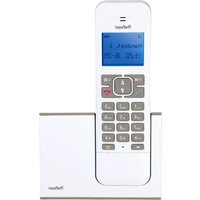
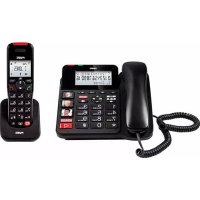
| Product type | DECT cordless telephone |
| Brand | Fysic |
| Model | FX8025 |
| Technology | DECT / GAP |
| Max number of handsets | 5 |
| Phonebook (base) | 50 names and numbers |
| Phonebook (handset) | 50 names and numbers |
| Caller ID | DTMF and FSK |
| Built-in answering machine | Yes, total capacity 15 min, outgoing message up to 60 s |
| Functions | Intercom, call transfer, mute, recall (flash), tone dialing |
| Hands-free | Yes |
| Display | Backlit LCD screen |
| Base power supply | 6 VDC, 450 mA |
| Handset power supply | 2 NiMH AAA 1.2 V rechargeable batteries |
| Standby time | > 100 hours |
| Talk time | > 10 hours |
| Indoor range | 50 m |
| Outdoor range | 300 m |
| Operating temperature | 15°C to 40°C |
| Storage temperature | -20°C to 60°C |
Frequently Asked Questions - FX8025 Fysic
User questions about FX8025 Fysic
0 question about this device. Answer the ones you know or ask your own.
Ask a new question about this device
Download the instructions for your Phone in PDF format for free! Find your manual FX8025 - Fysic and take your electronic device back in hand. On this page are published all the documents necessary for the use of your device. FX8025 by Fysic.
USER MANUAL FX8025 Fysic
To restore a known language:
In case you've set a strange language and don't know how to restore a known language, do the following:
- press 1x the OK button
- press 3x the ▼ button
- press 1x the OK button
- use the ▲ and ▼ buttons to select the desired language and press the OK button to save it
13.4 HANDSET SETTINGS RESET:
You can reset the phone settings to the default factory settings as follows:
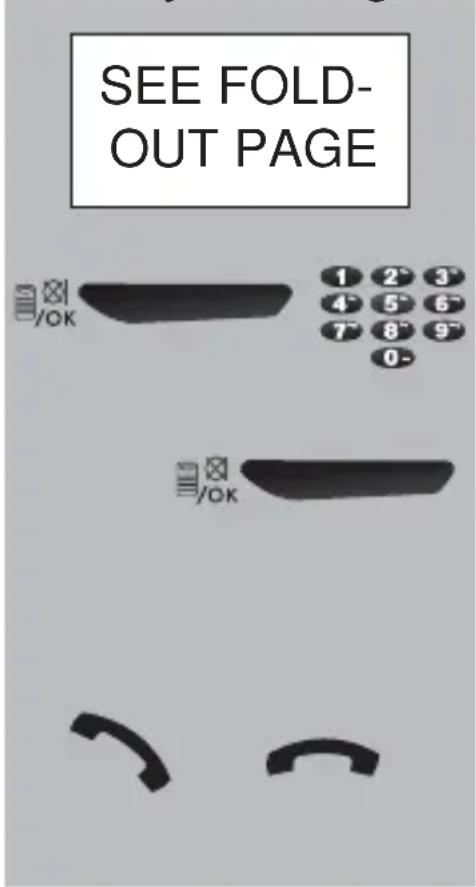
text_image
SEE FOLD- OUT PAGE 1 2 3 4 5 6 7 8 9 0 -select the option:
BS DEFAULT.
press the OK button and use the base to enter the PIN code
press the OK button; after a whistle tone, the handset settings will be reset
briefly pick up the receiver and put it down again to leave the reset mode
Factory settings of the phone:
* call volume internal: level 5
* call rhythm internal: melody 2
* call volume external: level 5
* call rhythm external: melody 1
* receiver volume: level 4
* speaker volume: level 4
* Flash interruption: 100mS
* PIN code: 0000
* language: Dutch
* key tone: on
* dialling: tone
* Caller-ID memory: empty
* last dialled number memory: empty
The phonebook memory will not be deleted and all answering machine settings remain the same
14 MULTIPLE HANDSETS
14.1 INTRODUCTION:
By default, your FX-8025 comes with one wireless handset. However, you can expand your telephone with additional wireless handsets. Your telephone is suitable for up the 5 wireless handsets.
Keep in mind that these phones must be ‘GAP COMPATIBLE’ handsets; GAP means that handsets and base stations of different types and/or brands can be used with each other.
Attention: the GAP protocol ensures that the hand-set can be used for making and receiving calls; other functions are not guaranteed.
14.2 REGISTERING ADDITIONAL HANDSETS:
on your telephone:
SEE FOLD- OUT PAGE
OK
select the option:
REGISTRATION
press the OK button
SEE WIRELESS HANDSET USER MANUAL
on the new wireless handset:
consult the user manual of the wireless handset for registration on a base station
As soon as the base and wireless handset have found each other, a beep tone will be emitted and the wireless handset is ready for use
14.3 DE-REGITERING WIRELESS HANDSETS:
Handsets that are faulty or lost should be de-registered.
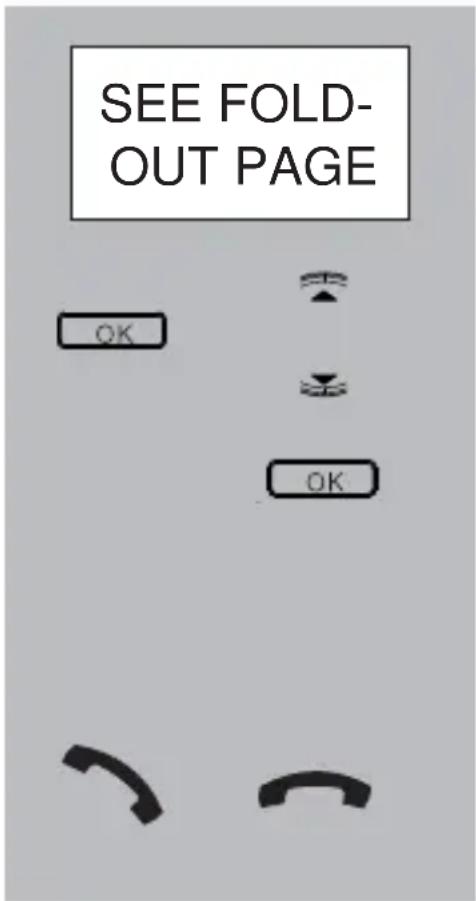
text_image
SEE FOLD- OUT PAGE OK OKselect the option:
DELETE HS
press the OK button and use the ▲ and ▼ buttons to select the handset that must be de-registered
press the OK button; after a whistle tone, the selected hand-set will be de-registered
press the End button to leave the de-registration mode
14.4 TIPS FOR USING MULTIPLE HANDSETS:
- Making and receiving calls using the FX-8025 type wireless handsets is done in the same way. For other types of wireless handsets, you might have to consult their related user manual.
- Intercom calls are free of charge.
- When you receive an outside call during an inter-com call, the handsets (only the FX-8025 type) will emit an alert signal. End the internal call, wait for the normal ringtone and then answer the outside call.
- When you receive an outside call, all wireless
handsets will start ringing. The handset that answers the call first will be connected with the outside line.
- When the outside line is being used by the telephone or by another handset, the busy tone will sound when pressing the Call button. Try again later.
- Internal calls to the telephone from FX-8025 wireless handsets are made by pressing the 0 button on the handset. For wireless handsets of other brands or types, a different internal number might be used. It might also be possible that certain types of wireless handsets cannot call the telephone
15 NAME ENTRY
Adding names to memory numbers and programming a handset name is done via the 0-9 buttons on the keypad. For this, the following characters are available:
button: character after pressing .. x
| 1 | 2 | 3 | 4 | 5 | 6 | 7 | 8 | 9 | 10 | 11 | 12 | 13 | 14 |
| 1 | sp | - | 1 | ||||||||||
| 2 | A | B | C | 2 | à | á | â | ã | ä | å | æ | ç | ć |
| 3 | D | E | F | 3 | đ | è | é | ê | ë | ě | ę | ě | |
| 4 | G | H | I | 4 | ĝ | ì | í | î | ï | ī | ī | ||
| 5 | J | K | L | 5 | Ł | L | L' | ||||||
| 6 | M | N | O | 6 | ñ | ń | ň | ó | ò | ô | ö | õ | ð |
| 7 | P | Q | R | S | 7 | rí | ř | ís | ş | š | ß | ||
| 8 | T | U | V | 8 | Ť | ù | ú | û | ü | ü | õ | õ | |
| 9 | W | X | Y | Z | 9 | ŵ | ý | ŷ | ź | ż | ž | ||
| 0 | 0 | ||||||||||||
| * | ? | / | \ | ( | ) | ||||||||
| # | # | , | , | . | & |
$$ (s p = s p a c e) $$
16 PROBLEMS AND SOLUTIONS
16.1 OUTGOING CALLS:
- There's no dialling tone.
- The outside line is being used by (one of) the wireless handset(s). Wait until that call is finished and try again.
- Check the connection between the base and your telephone connection (when in doubt, connect a different telephone to your telephone connection).
• The power supply is lost. - Check whether the adaptor is plugged into the back of the phone and make sure the power adaptor is plugged into a wall socket marked with 230V (you can check this by e.g. connecting a floor lamp to that wall socket).
16.2 INCOMING CALLS:
- No notification of incoming calls:
- The bell is disabled; enable it. (see paragraph 13.1)
- Check the connection between the phone and your telephone connection (when in doubt, connect another telephone to your telephone connection)
- You are continuously busy:
∅ - Check whether you have a 2nd phone with its receiver next to the phone. - Check whether (one of) the wireless handset(s) registered to your telephone is keeping the line busy.
- Connect another phone to your phone connection, and use this to check whether the malfunction originates from your connection or your carrier.
16.3 DURING CALLING:
- Beep tones during an intercom call:
- You are called from outside during an intercom call; end this call, wait until the phone rings normally and answer the call.
16.4 CALLER IDENTIFICATION:
- You do not receive Name or Caller Identification information on the display of your handset.
- Check whether your carrier transmits these signals (you shall subscribe to this service with some providers).
- You do receive the numbers on the display of your phone, but not the name.
- The carrier does not forward names; consult your carrier for this.
- The name has not been programmed in the memory of your handset; program it. (see paragraph 6.2)
- The name has been programmed in the memory, but the accompanying phone number has been programmed without area code; program the number including area code.
16.5 ANSWERING MACHINE:
- No incoming messages are (no longer) being registered:
- The answering function is disabled, please enable it (see paragraph 9.4)
- The recording capacity is full (the light is flashing rapidly). Listen to your messages and delete some of them (see paragraph 9.8)
- No Memo message can be recorded:
-
The recording capacity is full (the Light is flashing rapidly). Listen to your messages and delete some of them (see paragraph 9.8)
-
The answering machine cannot be operated remotely:
- You're entering an incorrect remote code. Check the remote code or program a new code (see paragraph 10.2)
- You're trying to listen to the answering machine using a pulse (rotary dial) phone. For operating the answering functions remotely, you can only use a DTMF phone (you'll hear key tones when pressing numeric buttons).
16.6 OTHER:
- The wired telephone emits a beep tone every 60 seconds:
- This is a notification to tell you that new messages are registered in the answering machine. After listening to these messages, the beep tone will stop.
• The display stays blank - The power adaptor is not connected or removed from the wall socket. Please connect again.
- The connection between the telephone and wireless handset is lost:
- The wireless handset is too far from the telephone; please move closer.
- The handset is switched off. Check and switch on.
- the handset is not (no longer) registered on the telephone; please register/re-register (see paragraph 14.2).
In case the failure has not been solved with aforementioned solutions:
- Remove the batteries from the handset, and unplug the power supply adapter and the phone connector from their sockets; connect everything again after several minutes.
17 SPECIFICATIONS
Protocol: DECT / GAP, 5
handsets
Call history: DTMF & FSK, 2
Dialling:
FLASH :
Phonebook:
memories
TONE
115, 250 & 600mS
50 names with numbers in the telephone
50 names with numbers in the wireless handset
Telephone power supply: 6VDC, 450mA,

Cradle/charger power supply: 6VDC, 450mA
Handset power supply: 2x 1.2V NiMH batteries, type AAA
Range: 50 m indoors, 300 m
outdoors
Wireless handset lifespan (with full batteries):
stand-by: > 100 hours
gebruik: > 10 hours
Operational temperature: 15°C to 40°C
Storage temperature: -20^ to 60^
Answering machine: max. length of each
notification text: 60 sec. total recording capacity: 15 min.
18 CONTENS
1 MENU STRUCTURE 160
2 GENERAL
2.1 ABOUT THE FX-8025 161
2.2 ABOUT THIS USER MANUAL 161
2.3 MAINS VOLTAGE & POWER OUTAGE ... 161
2.4 TIME AND DATE: 162
3 PHONE OVERVIEW 163
4 INSTALLATION
4.1 STAND 165
4.2 WALL-MOUNTING 166
4.3 CONNECTION 166
5 CALLING
5.1 WITH HANDSET OR HANDS-FREE ..... 168
5.2 RECEIVING CALLS 169
5.3 DIALLING NUMBERS 169
5.4 RE-DIALLING 170
5.5 INTERCOM TO THE HANDSET ..... 171
5.6 MUTE 171
5.7 R/FLASH FUNCTION 172
5.8 CALL DURATION 172
6 PHONE BOOK MEMORY
6.1 INTRODUCTION 173
6.2 PROGRAMMING 173
6.3 CORRECTING 174
6.4 DELETING SINGLE MEMORIES ...... 175
6.5 DELETE ALL 176
6.6 MEMORY STATUS 176
7 DIRECT MEMORIES
7.1 INTRODUCTION 177
7.2 PROGRAMMING 177
7.3 DIALLING 177
8 CALLER IDENTIFICATION
8.1 INTRODUCTION 178
8.2 NEW CALL INDICATION 178
8.3 CHECKING THE MEMORY 178
8.4 CALLING BACK 179
8.5 COPYING TO THE PHONEBOOK ...... 179
8.6 DELETING.... 180
8.7 ADDITIONAL INFORMATION ...... 181
9 ANSWERING MACHINE
9.1 INTRODUCTION 182
9.2 NOTIFICATION TEXT 182
9.3 NUMBER OF RINGTONES 185
9.4 SWITCHING ON/OFF 185
9.5 LISTENING IN & ANSWERING...... 186
9.6 MEMO RECORDING 186
9.7 MESSAGE INDICATION & COUNTER ..... 187
9.8 PLAY, PREVIOUS, NEXT AND DELETE... 187
9.9 RESET SETTINGS 188
9.10 MEMORY FULL 188
10 REMOTE FUNCTIONS
10.1 INTRODUCTION 189
10.2 REMOTE CODE 189
10.3 COST SAVING FUNCTION 190
10.4 REMOTE OPERATION 190
10.5 ENABLING TAM REMOTELY 192
11 INTERCOM / CALL TRANSFER
11.1 INTRODUCTION 193
11.2 INTERCOM 193
11.3 CALL TRANSFER 194
12 SYSTEM SETTINGS
12.1 INTRODUCTION 195
12.2 TIME AND DATE 195
12.3 FLASH INTERRUPTION DURATION ..... 196
12.4 PIN CODE 197
13 HANDSET SETTINGS
13.1 RINGTONES 198
13.2 KEY TONES 198
13.3 DISPLAY LANGUAGE 199
13.4 HANDSET SETTINGS RESET .... 200
14 MULTIPLE HANDSETS
14.1 INTRODUCTION 202
14.2 REGISTERING ADDITIONAL HANDSETS 202
14.3 DE-RESITERING HANDSETS 203
14.4 TIPS FOR USING MULTIPLE HANDSET 203
15 NAME ENTRY ......204
16 PROBLEMS AND SOLUTIONS
16.1 OUTGOING CALLS.... 205
16.2 INCOMING CALLS 205
16.3 DURING CALLING 206
16.4 CALLER IDENTIFICATION 206
16.5 ANSWERING MACHINE 206
16.6 OTHER 207
17 SPECIFICATIONS 208
18 CONTENTS 209
FYSIC®
Service Help




WWW.FYSIC.COM SERVICE@FYSIC.NL
NL 073 6411 355
(Lokaal tarief)

BE 03 238 5666
(Lokaal tarief)
(Tarif local)
DE 0180 503 0085