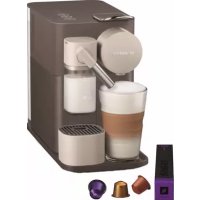
Nespresso Lattissima One - Coffee machine DELONGHI - Free user manual and instructions
Find the device manual for free Nespresso Lattissima One DELONGHI in PDF.



| Product type | Automatic coffee machine with Nespresso system and Rapid Cappuccino System |
| Brand | De'Longhi |
| Model | Nespresso Lattissima One |
| Dimensions (W x D x H) | 15.4 cm x 25.6 cm x 32.4 cm |
| Weight | ~4.3 kg |
| Power supply | 220-240 V~, 50-60 Hz, 1400 W |
| Pressure | Up to 19 bars |
| Water tank capacity | 1 L |
| Milk tank capacity | 125 ml |
| Beverage types | Espresso (40 ml), Lungo (110 ml), Cappuccino, Latte Macchiato |
| Coffee volume programming | Yes, from 25 to 150 ml |
| Automatic shut-off | After 9 minutes (adjustable) |
| Milk frothing system | Rapid Cappuccino System (connector, nozzle, reservoir) |
| Milk system maintenance | Manual or dishwasher cleaning (5 parts) |
| Descaling alert | Yes, with orange indicator |
| Milk cleaning alert | Yes, with orange indicator |
| Package contents | Machine, user guide, capsule set, welcome kit, water hardness test strip |
| Warranty | Limited 2 years |
| Repairability | Contact Nespresso Club or authorized dealer |
| Safety instructions | Detailed instructions: do not immerse, hot surface, grounded plug |
Frequently Asked Questions - Nespresso Lattissima One DELONGHI
User questions about Nespresso Lattissima One DELONGHI
0 question about this device. Answer the ones you know or ask your own.
Ask a new question about this device
Download the instructions for your Coffee machine in PDF format for free! Find your manual Nespresso Lattissima One - DELONGHI and take your electronic device back in hand. On this page are published all the documents necessary for the use of your device. Nespresso Lattissima One by DELONGHI.
USER MANUAL Nespresso Lattissima One DELONGHI
natural_image
Line drawing of a modern espresso machine with control panel and base mount (no text or symbols)
* Ma machine
LATTISSIMA ONE MY MACHINE\*

NESPRESSO
| EN | User manual | FR | Guide de l'utilisateur | 4 |
| DE | Bedienungsanleitung | IT | Istruzioni per l'uso | 32 |
| ES | Manual de usuario | PT | Manual do Utilizador | 60 |
| NL | Gebruiksaanwijzing | GR | Εγχειριδιο χρηστη | 88 |
| CZ | Návod k použití | SK | Návod na použitie | 116 |
| PL | Instrukcja obsługi | HU | Használati útmutató | 144 |
| RU | Инструкция по эксплуатации | 172 | ||
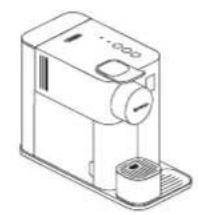
natural_image
Line drawing of a mechanical device with no visible text or symbolsA
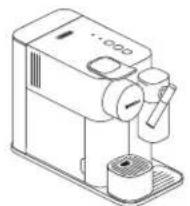
natural_image
Line drawing of a coffee maker with stand and side mount (no text or symbols)B
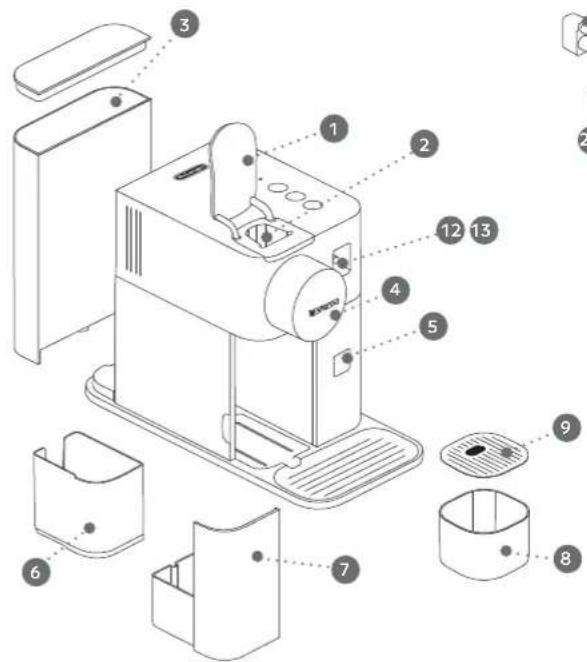
text_image
Exploded diagram of a sewing machine with numbered parts for identification and assembly reference.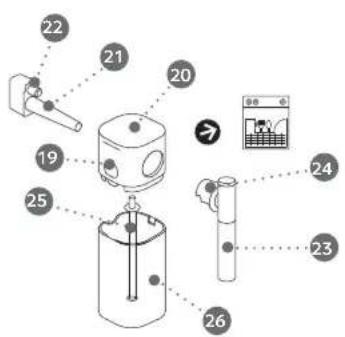
text_image
Diagram of a mechanical device with numbered components and a control panel showing measurement data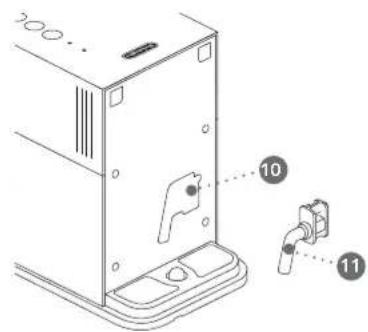
text_image
Technical diagram of a device rear panel with labeled components 10 and 11, showing mounting points and internal features.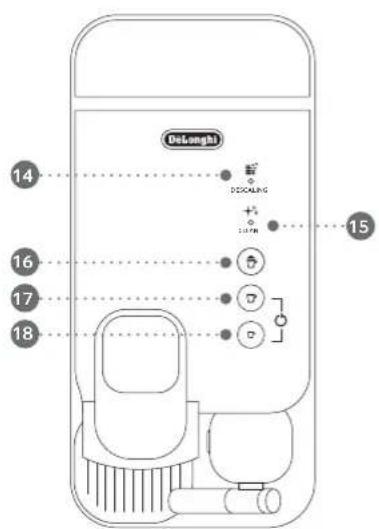
text_image
Delonghi 14 断 DCALING + - 15 16 7 7 7 18Specifications/Spécifications techniques 5
Assembling / Disassembling of Rapid Cappuccino System /
⚠️ CAUTION: when you see this sign, please refer to the safety precautions to avoid possible harm and damage.
i INFORMATION: when you see this sign, please take note of the advice for the correct and safe usage of your appliance.
⚠️ CAUTION: the safety precautions are part of the appliance. Read them carefully before using your new appliance for the first time. Keep them in a place where you can find and refer to them later on.
• The appliance is intended to prepare beverages according
to these instructions.
- Do not use the appliance for other than its intended use.
- This appliance has been designed for indoor and non-extreme temperature conditions use only.
- Protect the appliance from direct sunlight effect, prolonged water splash and humidity.
- This is a household appliance only. It is not intended to be used in: staff kitchen areas in shops, offices and other working environments; farm houses; by clients in hotels, motels and other residential type environments; bed and breakfast type environments.
- This appliance may be used by children of at least 8 years of age, as long as they are supervised and have been given instructions about using the
appliance safely and are fully aware of the dangers involved. Cleaning and user maintenance shall not be made by children unless they are older than 8 and they are supervised by an adult.
- Keep the appliance and its cord out of reach of children under 8 years of age.
- This appliance may be used by persons with reduced physical, sensory or mental capabilities, or whose experience or knowledge is not sufficient, provided they are supervised or have received instruction to use the device safely and understand the dangers.
• Children shall not use the device as a toy.
• The manufacturer accepts no responsibility and the guarantee will not apply for any commercial use, inappropriate handling or
use of the appliance, any damage resulting from use for other purposes, faulty operation, non-professionals' repair or failure to comply with the instructions.

Avoid risk of fatal electric shock fire.
- In case of an emergency: immediately remove the plug from the power socket.
- Only plug the appliance into suitable, easily accessible, earthed mains connections. Make sure that the voltage of the power source is the same as that specified on the rating plate. The use of an incorrect connection voids the guarantee.
The appliance must only be connected after installation.
- Do not pull the cord over
sharp edges, clamp it or allow it to hang down.
- Keep the cord away from heat and damp.
- If the supply cord or the plug are damaged, they must be replaced by the manufacturer, its service agent or similarly qualified persons, in order to avoid all risks.
- If the cord or the plug are damaged, do not operate the appliance. Return the appliance to the Nespresso Club or to a Nespresso authorized representative.
- If an extension cord is required, use only an earthed cord with a conductor cross-section of at least 1.5 ~mm^2 or matching input power.
• To avoid hazardous damage, never place the appliance on or beside hot surfaces such as radiators, stoves, ovens,
gas burners, open flame, or similar.
• Always place it on a horizontal, stable and even surface. The surface must be resistant to heat and fluids, like water, coffee, descaler or similar liquids.
- Disconnect the appliance from the mains when not in use for a long period. Disconnect by pulling out the plug and not by pulling the cord itself or the cord may become damaged.
- Before cleaning and servicing, remove the plug from the mains socket and let the appliance cool down.
- To disconnect the appliance, stop any preparation, then remove the plug from the power socket.
- Never touch the cord and the plug with wet hands.
- Never immerse the appliance or part of it in water or other
liquid.
- Never put the appliance or part of it in a dishwasher, except the Rapid Cappuccino System.
• Electricity and water together is dangerous and can lead to fatal electrical shocks. - Do not open the appliance. Hazardous voltage inside!
- Do not put anything into any openings. Doing so may cause fire or electrical shock!
• The use of accessory attachments not recommended by the manufacture may result in fire, electric shock or injury to persons.
Avoid possible harm when operating the appliance.
- Never leave the appliance unattended during operation.
- Do not use the appliance if it is damaged, has been
dropped or not operating perfectly. Immediately remove the plug from the power socket. Contact the Nespresso Club or Nespresso authorized representative for examination, repair or adjustment.
• A damaged appliance can cause electrical shocks, burns and fire.
• Always completely close the lever and never lift it during operation. Scalding may occur.
- Do not put fingers under coffee outlet, risk of scalding.
- Do not put fingers into capsule compartment or the capsule shaft. Danger of injury!
- Do not touch surfaces that become hot during and after operation and descaling: descaling pipe
EN Safety Precautions
and milk spout. Use handles or knobs.
- If coffee volumes higher than 150 ml are programmed: let the machine cool down for 5 minutes before making the next coffee.
Risk of overheating!
• Water could flow around a capsule when not perforated by the blades and damage the appliance. - Never use an already used, damaged or deformed capsule.
- If a capsule is blocked in the capsule compartment, turn the machine off and unplug it before any operation.
Call the Nespresso Club or Nespresso authorized representative.
• Always fill the water tank with cold, fresh drinking water.
• Empty water tank if the appliance will not be used for
an extended time (holidays, etc.).
- Replace water in water tank when the appliance is not operated for a weekend or a similar period of time.
- Do not use the appliance without the drip tray and drip grid to avoid spilling any liquid on surrounding surfaces.
- Do not use any strong cleaning agent or solvent cleaner. Use a damp cloth and mild cleaning agent to clean the surface of the appliance.
• To clean machine, use only clean cleaning tools. - When unpacking the machine, remove the plastic film and dispose.
- This appliance is designed for Nespresso coffee capsules available exclusively through the Nespresso Club or your Nespresso authorized
representative.
- All Nespresso appliances pass stringent controls. Reliability tests under practical conditions are performed randomly on selected units. This can show traces of any previous use.
- Nespresso reserves the right to change instructions without prior notice.
Descaling
- Nespresso descaling agent, when used correctly, helps ensure the proper functioning of your machine over its lifetime and that your coffee experience is as perfect as the first day.
- Descale according to user manual recommendations, or consult the descaling information by visiting the Nespresso website www.nespresso.com/
descaling
CAUTION: the descaling solution can be harmful. Avoid contact with eyes, skin and surfaces. The use of any unsuitable descaling agent may lead to machine component damage or an insufficient descaling process. For any additional questions you may have regarding descaling, please contact your Nespresso Club.
SAVE THESE INSTRUCTIONS Pass them on to any subsequent user.
This instruction manual is also available as a PDF at nespresso.com
Nespresso is an exclusive system creating the ultimate Espresso, time after time. All Nespresso machines are equipped with a unique extraction system that guarantees up to 19 bar pressure. Each parameter has been calculated with great precision to ensure that all the aromas from each capsule can be extracted, to give the coffee body and create an exceptionally thick and smooth crema.
First use or after a long period of non-use /
⚠️ CAUTION: first read the safety precautions to avoid risks of fatal electrical shock and fire.
When unpacking the machine, remove the plastic film, water tank, drip tray, and capsule container. Adjust the cable length and store the excess in the cable guide under the machine.
natural_image
Line drawing of a hand operating a small device with circular ports and a lid, no text or symbols present② Rinse the water tank before filling with potable water up to maximum level. Plug machine into mains.
3 Switch the machine on by pressing any of the three buttons:
- Blinking lights: heating-up (25 sec) - Steady lights: ready
natural_image
Illustration of a hand using a digital kitchen machine to press or install a cup, with three circular icons below indicating different devices (no text or symbols present)4 Rinsing: place a container under coffee outlet and press the Lungo button. Repeat three times.
text_image
Diagram showing a device with a lock and a 3x magnified view of a device with icons for touch, reset, and lock.5 Disassemble the Rapid Cappuccino System and clean all 5 components in the upper level of your dishwasher. In case a dishwater is not available, refer to the "Hand Washing of Rapid Cappuccino System" section.
② the coffee outlet.
3 4 Press the Espresso (40 ml) or the Lungo (110 ml) button. Preparation will stop automatically. To stop the coffee flow or top up your coffee, press again.
Lift and close the lever to eject the capsule into the used capsule container.
1 Remove the milk container by pressing the button on the side of the milk jug. Unplug the aspiration tube.
2 Position of milk spout side vertically to disassemble and to reassemble. Press the button on the side of milk jug to pull out the milk spout.
① Fill the milk container up to one of the two levels indicators: Cappuccino Matte Macchiato Close the milk container and connect the Rapid Cappuccino System to the machine. Machine heats up for approximately 15 seconds (blinking lights).
2 Lift the lever completely and insert the capsule. Close the lever.
natural_image
Line drawing of a coffee machine with a coffee cup and side arm (no text or symbols)3 Place a Cappuccino cup or a Latte Macchiato glass under the coffee outlet and adjust milk spout position by lifting it up to the right level.
5 At the end of the preparation, the clean alert ★ illuminates orange to indicate it is necessary to clean the Rapid Cappuccino System.
7 After a period of non use of maximum 30 minutes after your milk recipe preparation, disassemble the Rapid Cappuccino System, and clean all components in the upper side of your dishwasher. In case a dishwasher is not available, refer to section "Hand washing of Rapid Cappuccino System".
Refer to section "Assembling / Disassembling of Rapid Cappuccino System". The Rapid Cappuccino System is not intended to be stored in the fridge.
text_image
Diagram showing a mechanical device with labeled parts and a control panel interfaceFollow the step 1-2 of section "coffee preparation"
NOTE: please refer to factory settings section for min / max programmable quantities.
1 Touch and hold Espresso or Lungo button for at least 3 sec to enter the programming mode. Brewing starts and button blinks fast.
② Release button when desired volume is reached. Coffee volume is now stored for the next coffee preparations. Button blinks 3 times to confirm the new coffee volume.
1 Lift and close the lever to eject the capsule into the used capsule container. Remove drip tray, capsule container. Empty and rinse. Remove water tank. Empty, rinse it before filling with potable water.
natural_image
Three-step diagram showing a spray gun, a drop of small fragments, and a container with a lid labeled 'Max' (no text or symbols beyond label)natural_image
Technical line drawing of a pump unit with control panel and push button (no text or symbols)natural_image
Line drawing of a hand using a coffee machine to clean or wash coffee (no text or symbols)EN Hand washing of Rapid Cappuccino System / FR Nettoyage à la main du Rapid Cappuccino System
text_image
Illustration showing two-step bathroom fixture installation: one with a bucket, the other with a shower faucet and toilet.3 Clean the interior of the milk tank with mild / soft detergent and rinse with hot potable water (40°C / 104°F). Do not use abrasive material that might damage the surface of the equipment. * Ensure air inlet is clean.
text_image
Illustration showing three-step instructions for a person using a tool, with steps numbered ①, ②, and ③.4 Dry all parts with a fresh and clean towel, cloth or paper and reassemble.
natural_image
Illustration of a hand using a coffee machine to press or clean it, with a cup nearby (no text or symbols)2 Press the milk button for 3 seconds to enter Menu mode: descaling and clean alert start blinking.
text_image
DENSING + CLEVIEW / > 3 sec3 Press the milk button. The milk button blinks to indicate reset mode. Press it to confirm. All buttons blink 3 times: all volumes are reset. The menu exits automatically and machine returns to ready mode.
⚠️ CAUTION: if coffee volumes higher than 150 ml are programmed: let the machine cool down for 5 minutes before making the next coffee. Risk of overheating!
Coffee 40 ml/Milk drink: from 50 to 125 ml corresponding to level and on the milk container
Automatic power off: 9 min
NOTE: we recommend you to keep factory settings for Espresso and Lungo to ensure the best in cup results for each of our coffee varieties.
Coffee volume can be programmed from 25 to 150 ml.
www.nespresso.com/descaling
⚠️ CAUTION: refer to safety precautions. ATTENTION: consultez les consignes de sécurité.

1 Descale the machine when descaling alert shines orange in ready mode.
② Lift and close the lever to eject any capsules in the used capsule container.
③ Empty the drip tray and the used capsules container. Fill the water tank with 100 ml of Nespresso descaling agent and 500 ml water.
4 Take the descaling pipe situated at the back of the machine and plug the descaling pipe into steam connector of machine.
natural_image
Technical line drawing of a mechanical device with no visible text or symbols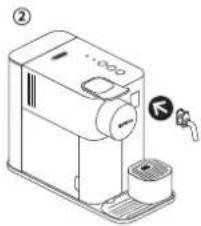
text_image
Diagram of a coffee maker with labeled parts and a valve indicator5 The machine enters the descaling mode. The descaling alert blinks orange during the entire descaling process. The Espresso button illuminates white.
www.nespresso.com/descaling
6 Place a container with a minimum 1 litre capacity under both the coffee outlet and under the descaling pipe nozzle.
7 Press the Espresso button. Descaling product flows alternately through the coffee outlet, descaling pipe and drip tray. When the descaling cycle is finished (water tank runs empty), the Espresso button shines.
8 Empty the used capsules container, drip tray recipient and container, rinse out and fill the water tank with fresh potable water up to level MAX.
natural_image
Illustration of various 3D object shapes including a cube, folded paper, and a rectangular container with a label 'Max' (no text or symbols on objects)9 Press the Espresso button again. The rinsing cycle continues through the coffee outlet, descaling pipe and drip tray until the water tank turns empty.
10 Once the rinsing process is finished, the machine switches off. Remove and store descaling pipe. Empty drip tray and used capsules container. Fill water tank with potable water.
natural_image
Exploded view diagram of a smart refrigerator with labeled components (no text or symbols)Clean the machine using a damp cloth. You have now finished descaling the machine.
natural_image
Line drawing of a hand washing a coffee maker with a cloth (no text or symbols)① Take water hardness sticker placed on the first page of the UM and place it under water for 1 second.
② The number of red squares indicates the water hardness level.
natural_image
Illustration of a hand using a portable device to clean or store items (no text or symbols visible)4 Press the milk button for 3 seconds to enter Menu mode: descaling and clean alerts start blinking.
5 Press the Espresso button. Now, within 15 sec, you can Appuyez sur la touche Espresso.

at the desired value by pressing the
corresponding button. They blink 3 times rapidly to confirm new value. The menu exits automatically and machine returns to ready mode.
1 Switch on machine. Remove the water tank. Lift and close the lever to eject any remaining
Allumez la machine.
text_image
and close the lever to eject any m② capsule. Place a container under the coffee outlet.
natural_image
Technical line drawing of a mechanical device with mounting base and control panel (no text or symbols)3 Press the milk buttons for 3 seconds to enter Menu mode: the descaling and clean alerts start blinking.
text_image
DESCALING CLEAN > 3 sec4 Press milk and Lungo buttons simultaneously.
5 The milk button blinks for confirmation. Once pressed, the emptying starts. The coffee buttons blink alternately: emptying mode in progress. When the process is finished, the machine switches off automatically.
NOTE: appliance will be blocked for approximately 10 minutes after emptying.
① Switch on machine. Press the milk button for 3 seconds to enter Menu mode: the ② scaling and
Allumez la machine.

natural_image
Line drawing of a coffee maker with a hand inserting a pencil into it, next to a cup and a mug (no text or symbols)clean alerts start blinking.
NOTE: the Menu mode exits automatically after 30 sec. If no actions are performed. It can be exit manually by pressing the milk button for 3 seconds.
3 Press Lungo button. Now, within 15 sec, you can set the desired value by pressing the
corresponding button. They blinks 3 times rapidly to confirm new value. The menu exits automatically and machine returns to ready mode.
| Milk/Lat | → 9 minutes / minutes |
| Lungo | → 30 minutes / minutes |
| Espresso | → 8 hours / heures |
Troubleshooting
| No light indicator. | - Check the mains, plug, voltage, and fuse. In case of problems, call the Nespresso Club. |
| No coffee, no water. | - Water tank is empty. Fill water tank.- Descale if necessary; see Descaling section. |
| Coffee comes out very slowly. | - Flow speed depends on the coffee variety.- Descale if necessary; see Descaling section. |
| No coffee, just water runs out (despite inserted capsule). | - In case of problems, send appliance to repair or call the Nespresso Club. |
| Coffee is not hot enough. | - Preheat cup.- Descale if necessary; see Descaling section. |
| Capsule area is leaking (water in capsule container). | - Position capsule correctly. If leakages occur, call the Nespresso Club. |
| Irregular blinking. | - Send appliance to repair or call the Nespresso Club. |
| All buttons blink simultaneously for 10 seconds and then machine switches off automatically. | - Error alarm, machine needs repair. Send appliance to repair or call the Nespresso Club. |
| All 3 buttons blinking fast 3 times and then machine goes back in ready mode. | - Water tank is empty. |
| Descaling and cleaning alert blink. | - Machine is in menu mode, press milk button for 3 seconds to exit menu mode or wait 30 seconds to exit automatically. |
| Descaling alert shines orange. | - Machine triggers descaling alert according beverages consumption usage. Descale machine. |
| Descaling alert blinks orange and Warm milk froth steady light. | - Machine is in Descaling mode. Press milk button to start descaling process. |
| Clean alert shine orange. | - Disassemble the Rapid Cappuccino System and clean all components in the upper side of your dishwasher. In case a dishwasher is not available, refer to section "Hand washing of Rapid Cappuccino System". |
| All coffee buttons and all milk recipe buttons flash alternatively. | - Machine overheat, wait until machine cools down.- Appliance will be blocked for approximately 10 minutes after emptying. |
| Lever cannot be closed completely. | - Empty capsule container. Make sure that no capsule is blocked inside the capsule container. |
| Quality of Milk froth is not up to standard. | - Use skimmed or semi-skimmed cow milk at refrigerator temperature (about 4°C).- Rinse after each milk preparations (see section "Hand Washing of Rapid Cappuccino System").- Descale the machine (see p.23).- Do not use frozen milk.- Ensure the air aspiration part is clean. Refer to the section "Hand washing of Rapid Cappuccino System". |
| I cannot enter Menu mode. | - Be sure to remove the milk jug.- Be sure to press milk button for 3 seconds.- Remove descaling pipe. |
| Milk system does not start. | - Fill up with minimum 30 ml of milk.- The milk system does not work when filled with water.- The milk system has not been designed to work with vegetale milk (rice, etc). |
| Milk jug cannot be dismantled. | - Press the button on the side of the milk jug to remove the parts.- Refer to section "Assembling / Disassembling of Rapid Cappuccino System". |
| Turn off the machine. | - Press Espresso and Lungo button for 2 seconds. |
| Sound when machine switches off. | - This sound indicates that the machine is now off. |
Dépannage
FR
For any additional information, in case of problems or simply to seek advise, call the Nespresso Club.
Contact details of the Nespresso Club can be found in the "Welcome to Nespresso" folder in your machine box or at nespresso.com
De'Longhi warrants this product against defects in materials and workmanship for a period of two years from the date of purchase. during this period, De'Longhi will either repair or replace, at its discretion, any defective product at no charge to the owner. Replacement products or repaired parts will be guaranteed for only the unexpired portion of the original warranty or six months, whichever is greater. This limited warranty does not apply to any defect resulting from accident, misuse, improper maintenance, or normal wear and tear. Except to the extent allowed by applicable law, the terms of this limited warranty do not exclude, restrict or modify, and are in addition to, the mandatory statutory rights applicable to the sale of the product to you. If you believe your product is defective, contact Nespresso for instructions on where to send or bring it for repair.
natural_image
Illustration of a hand using a coffee maker to press a cup (no text or symbols visible)natural_image
Line drawing of a hand using a machine to press or<|rotate_right|>, with three circular icons below indicating waste sorting (no text or symbols)natural_image
Line drawing of a coffee maker with a coffee cup and side arm (no text or symbols)natural_image
Three technical line drawings of a device with cutouts and a labeled 'Max' (no text or symbols beyond the label)natural_image
Technical line drawing of a mechanical device with a close-up view of its right-hand button (no text or symbols present)natural_image
Line drawing of a hand washing a coffee machine with a cloth (no text or symbols)DE Manuelle Reinigung des Rapid Cappuccino Systems (RCS) / Lavaggio a mano del Sistema Rapid Cappuccino
text_image
Illustration showing two-step bathroom fixture installation: one with a bucket, the other with a faucet and toilet.text_image
Illustration showing three-step instructions for baby care: holding a child, opening a faucet, and inserting a bottle with a circular arrow.natural_image
Illustration of a hand using a coffee machine to press or feed into a cup (no text or symbols visible)text_image
CNCAL RING CLEVEL > 3 secwww.nespresso.com/descaling
⚠ VORSICHT: Lesen Sie die Sicherheitshinweise. ATTENZIONE: consultare le precauzioni di sicurezza.

i HINWEIS: Die Entkalkung dauert etwa 20 Minuten.
IMPORTANTE: il tempo richiesto per la decalcificazione è di circa 20 minuti.
i HINWEIS: Befolgen Sie den nachfolgenden Prozess um die Funktionalität Ihrer Maschine über die gesamte Lebensdauer und Ihren Kaffeegenuss wie am ersten Tag zu gewährleisten.
IMPORTANTE: per garantire il corretto funzionamento della macchina durante il suo ciclo di vita e offrire l'esperienza di un caffè eccezionale ogni volta come il primo giorno, seguire la procedura di seguito.
natural_image
Technical line drawing of a device with labeled components (no readable text or symbols)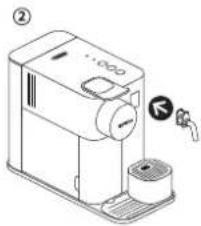
text_image
Diagram of a coffee maker with labeled parts and a valve indicatorwww.nespresso.com/descaling
natural_image
Diagram showing exploded view of a mechanical assembly with no visible text or symbolsnatural_image
Exploded view diagram of a smart refrigerator with labeled components (no text or symbols)natural_image
Line drawing of a hand washing a coffee maker with a cloth (no text or symbols)text_image
Diagram showing a hand using a sewing machine to clean or store items, with a magnifying glass and tool nearby.natural_image
Illustration of a coffee machine with a hand inserting a pencil into it, next to a cup and a glass (no text or symbols)natural_image
Technical line drawing of a mechanical device with mounting base and control panel (no text or symbols)text_image
DESCALING CLEAN > 3 secnatural_image
Line drawing of a kitchen machine with a hand placing a tool on top, next to a cup and brush (no text or symbols)natural_image
Illustration of a coffee machine with a hand inserting a cup into it (no text or symbols)natural_image
Line drawing of a hand using a machine to press or<|rotate_right|>, with three circular icons below indicating waste sorting (no text or symbols)text_image
Diagram showing a washing machine with a close-up of its 3x magnified view, alongside icons for cleaning and cleaning.natural_image
Line drawing of a coffee machine with no visible text or symbolstext_image
Diagram showing a mechanical device with labeled parts and a control panel interfaceProgramación de la cantidad de café / Programação da quantidade de café
natural_image
Three-step diagram showing a spray gun, a drop of small fragments, and a container labeled 'Max' (no text or symbols beyond the label)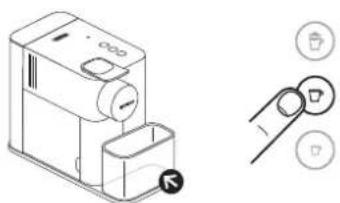
natural_image
Technical line drawing of a pump unit with control panel and push button (no text or symbols)natural_image
Line drawing of a hand using a coffee machine to clean coffee (no text or symbols)text_image
Illustration showing two-step bathroom cleaning process: first uses a piston and cylinder to handle a toilet, second uses a faucet and toilet to clean water.text_image
Illustration showing three-step instructions for a child using a tool, with steps numbered ①, ②, and ③.natural_image
Illustration of a hand using a coffee machine to press or clean it, with a cup and another cup nearby (no text or symbols)text_image
DENSING + CLEVEL / >3 secwww.nespresso.com/descaling
natural_image
Isometric line drawing of a device with labeled parts (no text or symbols)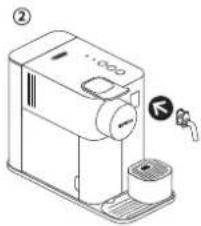
text_image
Diagram of a coffee maker with labeled parts and a valve indicatorwww.nespresso.com/descaling
natural_image
Illustration of various 3D object shapes including a cube, folded paper, and a transparent container with a label 'Max' (no text or symbols on objects)natural_image
Exploded view diagram of a smart refrigerator with labeled components (no text or symbols)natural_image
Line drawing of a hand washing a coffee maker with a cloth (no text or symbols)Configuración de la dureza del agua / Configuração da Dureza da Água

natural_image
Line drawing of a coffee maker with a hand placing it on the cup (no text or symbols)natural_image
Illustration of a coffee machine with a hand inserting a pencil into it, accompanied by a small cup and a bag (no text or symbols visible)natural_image
Technical line drawing of a mechanical device with mounting base and control panel (no text or symbols)text_image
DESCALING CLEAN > 3 secnatural_image
Line drawing of a coffee machine with a hand placing it, accompanied by a cup and a small container (no text or symbols)natural_image
Line drawing of a coffee maker with hands operating the cup (no text or symbols)natural_image
Line drawing of a coffee machine with a hand pointing to its lid, alongside three circular icons indicating coffee cup and coffee cup (no text or symbols on the machine itself)text_image
Diagram showing a device with a lock and a 3x x magnified view of a watch icon, likely illustrating a digital interface or sensor setup.natural_image
Line drawing of a coffee machine with no visible text or symbolsnatural_image
Three-step diagram showing a device with a handle, a drop of fragments, and a container labeled 'Max' (no text or symbols beyond the label)natural_image
Line drawing of a hand washing a coffee machine with a cloth (no text or symbols)text_image
Illustration showing two-step bathroom sinkware: one with a piston and handle, the other with a faucet and toilet.text_image
Illustration showing three-step child care procedure: walking, opening faucet, and using a baby with a magnified view.natural_image
Illustration of a hand using a self-service coffee machine to press or clean it, with a cup and another container nearby (no text or symbols)text_image
DENSING + CLEVEL / > 3 sec 1 2 3www.nespresso.com/descaling
natural_image
Technical line drawing of a mechanical device with no visible text or symbols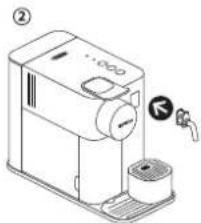
text_image
Technical diagram of a coffee maker with labeled parts and a valve indicatornatural_image
Diagram showing various 3D object shapes including a spray can, spray bottle, and a transparent container with 'Max' label (no text or symbols on objects)natural_image
Exploded view diagram of a smart refrigerator with labeled components (no text or symbols)natural_image
Line drawing of a hand using a espresso machine to clean coffee (no text or symbols)natural_image
Illustration of a hand using a portable coffee machine to clean food, with a small container nearby (no text or symbols)natural_image
Line drawing of a coffee machine with a hand inserting a pencil into it, next to a cup and a glass (no text or symbols)natural_image
Technical line drawing of a mechanical device with mounting base and control panel (no text or symbols)text_image
DESCALING CLEAN > 3 secnatural_image
Line drawing of a coffee maker with a hand inserting a pencil into it, accompanied by a small cup and a magnifying glass (no text or symbols)natural_image
Line drawing of a hand using a coffee maker to press a cup (no text or symbols present)natural_image
Line drawing of a coffee maker with a hand inserting a cup into the tray, accompanied by three circular icons (no text or symbols)natural_image
Line drawing of a coffee maker with a coffee cup and side arm (no text or symbols)natural_image
Illustration of three steps of a cleaning or packaging process: cutting a container, shaking cut fragments, and pouring into a container labeled 'Max' (no text or symbols beyond the label)natural_image
Technical line drawing of a pump unit with control panel and two circular buttons (no text or symbols)natural_image
Line drawing of a hand cleaning a coffee machine with a cloth (no text or symbols)text_image
Illustration showing two-step bathroom fixture installation: one with a bucket, the other with a shower faucet and toilet.text_image
Illustration showing three-step instructions for a child using a tool, with steps numbered ①, ②, and ③.natural_image
Illustration of a hand using a self-service coffee machine to press or clean it, with a cup and another cup nearby (no text or symbols)www.nespresso.com/descaling
natural_image
Technical line drawing of a mechanical device with no visible text or symbols
text_image
Diagram of a coffee maker with labeled parts and a valve indicatorwww.nespresso.com/descaling
natural_image
Illustration of various 3D object shapes including a cube, folded paper, and a rectangular container with a label 'Max' (no text or symbols on objects)natural_image
Exploded view diagram of a smart refrigerator with labeled components (no text or symbols beyond 'Max')natural_image
Line drawing of a hand using a espresso machine to clean or wash it (no text or symbols)natural_image
Illustration of a hand using a portable coffee machine to clean food, with a small container nearby (no text or symbols)text_image
DESCALING CLEAN > 3 sec5 Stiskněte tlačítko Espresso Stlačte tlačidlo Espresso.

natural_image
Technical line drawing of a mechanical device with mounting base and control panel (no text or symbols)text_image
DESCALING CLEAN > 3 secnatural_image
Line drawing of a coffee machine with a hand inserting a pencil into it, next to a cup and a mug (no text or symbols)natural_image
Line drawing of a hand pressing down on a machine with a small container nearby (no text or symbols)
text_image
Diagram showing a device with a lock and a 3x magnified view of a device with a lock icon and control buttons.natural_image
Line drawing of a coffee maker with a handle and spout (no text or symbols)text_image
Diagram showing a mechanical device with labeled parts and a control panel interfacenatural_image
Diagram showing three stages of a cleaning or packaging process: top view, cut-out fragments, and top-right container (no text or symbols)natural_image
Line drawing of a hand using a coffee machine to clean or wash coffee (no text or symbols)text_image
Illustration showing two-step bathroom cleaning process: first uses a piston and cylinder to handle, second uses a faucet and toilet to clean water.text_image
Illustration showing three-step instructions for a baby using a faucet, with steps numbered ①, ②, and ③.natural_image
Illustration of a hand using a coffee machine to press or feed a cup (no text or symbols visible)text_image
DESCALING CLEAN >3 secwww.nespresso.com/descaling
natural_image
Isometric line drawing of a device with labeled parts (no text or symbols)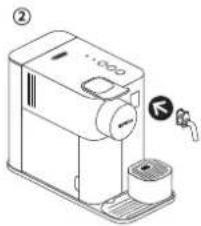
text_image
Diagram of a coffee maker with labeled parts and a valve indicatorwww.nespresso.com/descaling
natural_image
Illustration of various 3D object shapes including a cube, folded paper, and a rectangular container with a label 'Max' (no text or symbols on objects)natural_image
Exploded view diagram of a smart refrigerator with labeled components (no text or symbols)natural_image
Line drawing of a hand washing a coffee machine with a cloth (no text or symbols)natural_image
Illustration of a hand using a manual pump machine to clean or prepare it, with a small cup and glass nearby (no text or symbols)text_image
DESCALING CLEAN > 3 secnatural_image
Technical line drawing of a mechanical device with mounting base and control panel (no text or symbols)text_image
DESCALING CLEAN > 3 secnatural_image
Line drawing of a coffee machine with a hand inserting a pencil into it, next to a cup and a small container (no text or symbols)natural_image
Line drawing of a hand using a coffee machine to press or install a cup (no text or symbols present)natural_image
Line drawing of a hand using a machine to press or clean material, with three circular icons below indicating different components (no text or symbols present)text_image
Diagram showing a device with a lock and a 3x magnified view of its screen control interface.natural_image
Line drawing of a coffee maker with a handle, spout, and base (no text or symbols)natural_image
Line drawing of a coffee machine with a handle, coffee cup, and coffee maker (no text or symbols)
text_image
Diagram showing a mechanical device with labeled parts and a control panel interfacenatural_image
Three-step diagram showing a device with a brush, a cutout of small fragments, and a container labeled 'Max' (no text or symbols beyond the label)natural_image
Technical line drawing of a pump unit with control knob and two circular buttons (no text or symbols)natural_image
Line drawing of a hand washing a coffee machine with a lid and filter (no text or symbols)
text_image
Illustration showing two-step bathroom sink preparation: first with hand tools, second with toilet and faucet fixtures.text_image
Illustration showing three-step instructions for baby care: holding a child, opening a faucet, and opening a hand.natural_image
Line drawing of a hand using a self-service coffee machine to press or<|rotate_right|> (no text or symbols present)text_image
12.5 SC 4.8G >3 secwww.nespresso.com/descaling
natural_image
Technical line drawing of a mechanical device with labeled parts (no readable text or symbols)
text_image
Diagram of a coffee maker with labeled parts and a water tap indicatorwww.nespresso.com/descaling