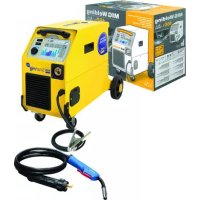
USER MANUAL Smartmig 162 GYS
FR P 2-8 / 53-68
EN P 9-15 / 53-68
DE P 16-22 / 53-68
ES P 23-29 / 53-68
RU P 30-37 / 53-68
NL P 38-45 / 53-68
IT P 46-52 / 53-68

www.gys.fr
AVERTISSEMENTS - RÈGLES DE SÉCURITÉ
CONSIGNE GÉNÉRALE

INSTALLATION – FONCTIONNEMENT PRODUIT
DESCRIPTION
MODE MMA (SMARTMIG 3P UNIQUEMENT):
ANOMALIES, CAUSES, REMÈDES
Read and understand the following safety recommendations before using or servicing the unit. Any change or servicing that is not specified in the instruction manual must not be undertaken.
The manufacturer is not liable for any injury or damage caused due to non-compliance with the instructions featured in this manual. In the event of problems or uncertainties, please consult a qualified person to handle the installation properly.
ENVIRONMENT
This equipment must only be used for welding operations in accordance with the limits indicated on the descriptive panel and/or in the user manual. The operator must respect the safety precautions that apply to this type of welding. In case of inadequate or unsafe use, the manufacturer cannot be held liable for damage or injury.
This equipment must be used and stored in a place protected from dust, acid or any other corrosive agent. Operate the machine in an open, or well-ventilated area.
Operating temperature:
Use between -10 and +40°C (+14 and +104°F).
Store between -20 and +55°C (-4 and 131°F).
Air humidity:
Lower or equal to 50% at 40°C (104°F).
Lower or equal to 90% at 20°C (68°F).
Altitude:
Up to 1000 meters above sea level (3280 feet).
INDIVIDUAL PROTECTIONS AND OTHERS
Arc welding can be dangerous and can cause serious and even fatal injuries.
Welding exposes the user to dangerous heat, arc rays, electromagnetic fields, noise, gas fumes, and electrical shocks. People wearing pacemakers are advised to consult with their doctor before using this device.
To protect oneself as well as the other, ensure the following safety precautions are taken:

In order to protect you from burns and radiations, wear clothing without cuffs. These clothes must be insulated, dry, fireproof and in good condition, and cover the whole body.

Wear protective gloves which guarantee electrical and thermal insulation.

Use sufficient welding protective gear for the whole body: hood, gloves, jacket, trousers... (varies depending on the application/operation). Protect the eyes during cleaning operations. Do not operate whilst wearing contact lenses.

It may be necessary to install fireproof welding curtains to protect the area against arc rays, weld spatters and sparks. Inform the people around the working area to never look at the arc nor the molten metal, and to wear protective clothes.
Ensure ear protection is worn by the operator if the work exceeds the authorised noise limit (the same applies to any person in the welding area).
Stay away from moving parts (e.g. engine, fan...) with hands, hair, clothes etc...
Never remove the safety covers from the cooling unit when the machine is plugged in - The manufacturer is not responsible for any accident or injury that happens as a result of not following these safety precautions.

The pieces that have just been welded are hot and may cause burns when manipulated. During maintenance work on the torch or the electrode holder, you should make sure it's cold enough and wait at least 10 minutes before any intervention. The cooling unit must be on when using a water cooled torch in order to ensure that the liquid does not cause any burns.
ALWAYS ensure the working area is left as safe and secure as possible to prevent damage or accidents.
WELDING FUMES AND GAS
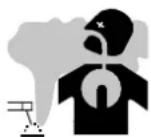
The fumes, gases and dust produced during welding are hazardous. It is mandatory to ensure adequate ventilation and/or extraction to keep fumes and gases away from the work area. An air fed helmet is recommended in cases of insufficient air supply in the workplace.
Check that the air intake is in compliance with safety standards.
Care must be taken when welding in small areas, and the operator will need supervision from a safe distance. Welding certain pieces of metal containing lead, cadmium, zinc, mercury or beryllium can be extremely toxic. The user will also need to degrease the workpiece before welding. Gas cylinders must be stored in an open or ventilated area. The cylinders must be in a vertical position secured to a support or trolley. Do not weld in areas where grease or paint are stored.
FIRE AND EXPLOSIONS RISKS

Protect the entire welding area. Compressed gas containers and other inflammable material must be moved to a minimum safe distance of 11 meters.
A fire extinguisher must be readily available.
Be careful of spatter and sparks, even through cracks. It can be the source of a fire or an explosion.
Keep people, flammable objects and containers under pressure at a safe distance.
Welding of sealed containers or closed pipes should not be undertaken, and if opened, the operator must remove any inflammable or explosive materials (oil, petrol, gas...).
Grinding operations should not be directed towards the device itself, the power supply or any flammable materials.
GAS BOTTLE

Gas leaking from the cylinder can lead to suffocation if present in high concentrations around the work area.
Transport must be done safely: Cylinders closed and product off. Always keep cylinders in an upright position securely chained to a fixed support or trolley.
Close the bottle after any welding operation. Be wary of temperature changes or exposure to sunlight.
Cylinders should be located away from areas where they may be struck or subjected to physical damage.
Always keep gas bottles at a safe distance from arc welding or cutting operations, and any source of heat, sparks or flames.
Be careful when opening the valve on the gas bottle, it is necessary to remove the tip of the valve and make sure the gas meets your welding requirements.
ELECTRIC SAFETY
The machine must be connected to an earthed electrical supply. Use the recommended fuse size.
An electrical discharge can directly or indirectly cause serious or deadly accidents.
Do not touch any live part of the machine (inside or outside) when it is plugged in (Torches, earth cable, cables, electrodes) because they are connected to the welding circuit.
Before opening the device, it is imperative to disconnect it from the mains and wait 2 minutes, so that all the capacitors are discharged.
Do not touch the torch or electrode holder and earth clamp at the same time.
Damaged cables and torches must be changed by a qualified and skilled professional. Make sure that the cable cross section is adequate with the usage (extensions and welding cables). Always wear dry clothes in good condition, in order to be insulated from the electrical circuit. Wear insulating shoes, regardless of the environment in which you work in.
CEM CLASSIFIED MATERIAL

These Class A devices are not intended to be used on a residential site where the electric current is supplied by the public network, with a low voltage power supply. There may be potential difficulties in ensuring electromagnetic compatibility on these sites, because of the interferences, as well as radio frequencies.

This equipment does not comply with IEC 61000-3-12 and is intended to be connected to private low-voltage systems interfacing with the public supply only at the medium- or high-voltage level. On a public low-voltage power grid, it is the responsibility of the installer or user of the device to ensure, by checking with the operator of the distribution network, which device can be connected.
ELECTROMAGNETIC INTERFERENCES

The electric currents flowing through a conductor cause electrical and magnetic fields (EMF). The welding current generates an EMF field around the welding circuit and the welding equipment.
The EMF fields may disrupt some medical implants, such as pacemakers. Protection measures should be taken for people wearing medical implants. For example, access restrictions for passers-by or an individual risk evaluation for the welders.
All welders should take the following precautions in order to minimise exposure to the electromagnetic fields (EMF) generated by the welding circuit::
- position the welding cables together – if possible, attach them;
- keep your head and torso as far as possible from the welding circuit;
- never enroll the cables around your body;
- never position your body between the welding cables. Hold both welding cables on the same side of your body;
- connect the earth clamp as close as possible to the area being welded;
- do not work too close to, do not lean and do not sit on the welding machine
- do not weld when you're carrying the welding machine or its wire feeder.

People wearing pacemakers are advised to consult their doctor before using this device.
Exposure to electromagnetic fields while welding may have other health effects which are not yet known.
RECOMMENDATIONS TO ASSESS THE WELDING AREA AND WELDING INSTALLATION
Overview
The user is responsible for installing and using the arc welding equipment in accordance with the manufacturer's instructions. If electromagnetic disturbances are detected, it is the responsibility of the user of the arc welding equipment to resolve the situation with the manufacturer's technical assistance. In some cases, this remedial action may be as simple as earthing the welding circuit. In other cases, it may be necessary to construct an electromagnetic shield around the welding power source and around the entire piece by fitting input filters. In all cases, electromagnetic interferences must be reduced until they are no longer bothersome.
Welding area assessment
Before installing the machine, the user must evaluate the possible electromagnetic problems that may arise in the area where the installation is planned.
. In particular, it should consider the following:
a) the presence of other power cables (power supply cables, telephone cables, command cable, etc...) above, below and on the sides of the arc welding machine.
b) television transmitters and receivers ;
c) computers and other hardware;
d) critical safety equipment such as industrial machine protections;
e) the health and safety of the people in the area such as people with pacemakers or hearing aids;
f) calibration and measuring equipment
g) The isolation of the equipment from other machinery.
The user will have to make sure that the devices and equipments that are in the same room are compatible with each other. This may require extra precautions;
h) make sure of the exact hour when the welding and/or other operations will take place.
The surface of the area to be considered around the device depends on the building's structure and other activities that take place there. The area taken in consideration can be larger than the limits determined by the companies.
Welding area assessment
Besides the welding area, the assessment of the arc welding systems installation itself can be used to identify and resolve cases of disturbances. The assessment of emissions must include in situ measurements as specified in Article 10 of CISPR 11: 2009. In situ measurements can also be used to confirm the effectiveness of mitigation measures.
RECOMMENDATION ON METHODS OF ELECTROMAGNETIC EMISSIONS REDUCTION
a. National power grid: The arc welding machine must be connected to the national power grid in accordance with the manufacturer's recommendation. If interferences occur, it may be necessary to take additional preventive measures such as the filtering of the power supply network. Consideration should be given to shielding the power supply cable in a metal conduit. It is necessary to ensure the shielding's electrical continuity along the cable's entire length. The shielding should be connected to the welding current's source to ensure good electrical contact between the conduct and the casing of the welding current source.
b. Maintenance of the arc welding equipment: The arc welding machine should be submitted to a routine maintenance check according to the manufacturer's recommendations. All accesses, service doors and covers should be closed and properly locked when the arc welding equipment is on.. The arc welding equipment must not be modified in any way, except for the changes and settings outlined in the manufacturer's instructions. The spark gap of the arc start and arc stabilization devices must be adjusted and maintained according to the manufacturer's recommendations.
c. Welding cables: Cables must be as short as possible, close to each other and close to the ground, if not on the ground.
d. Electrical bonding : consideration should be given to bonding all metal objects in the surrounding area. However, metal objects connected to the workpiece increase the riskof electric shock if the operator touches both these metal elements and the electrode. It is necessary to insulate the operator from such metal objects.
e. Earthing of the welded part: When the part is not earthed - due to electrical safety reasons or because of its size and its location (which is the case with ship hulls or metallic building structures), the earthing of the part can, in some cases but not systematically, reduce emissions. It is preferable to avoid the earthing of parts that could increase the risk of injury to the users or damage other electrical equipment. If necessary, it is appropriate that the earthing of the part is done directly, but in some countries that do not allow such a direct connection, it is appropriate that the connection is made with a capacitor selected according to national regulations.
f. Protection and plating : The selective protection and plating of other cables and devices in the area can reduce perturbation issues. The protection of the entire welding area can be considered for specific situations.
TRANSPORT AND TRANSIT OF THE WELDING MACHINE

The machine is fitted with handle(s) to facilitate transportation. Be careful not to underestimate the machine's weight. The handle(s) cannot be used for slinging.
Do not use the cables or torch to move the machine. The welding equipment must be moved in an upright position.
Do not place/carry the unit over people or objects.
Never lift the machine while there is a gas cylinder on the support shelf. A clear path is available when moving the item. The removal of the wire reel from the machine is recommended before undertaking any lifting operation.

Stray welding currents/voltages may destroy earth conductors, damage electrical equipment or cause components to warm up which may cause a fire.
- All welding connections must be firmly secured, check regularly!
- Check that the metal piece fixation is strong and without any electrical problems!
- Attach or hang all the electrically conductive elements, such as the trolley and slinging equipment, in order to insulate them
- Do not place any electrical equipment, such as drills or grinders, on top of the welding machine without insulating them!
- Always place welding torches or electrodes holders on an insulated surface when they're not in use!
EQUIPMENT INSTALLATION
- Put the machine on the floor (maximum incline of 10° ).
- Ensure the work area has sufficient ventilation for welding, and that there is easy access to the control panel.
- The machine must not be used in an area with conductive metal dusts.
- The machine must be placed in a sheltered area away from rain or direct sunlight.
• The machine protection level is IP21, which means :
- Protection against access to dangerous parts from solid bodies of a ≥12.5mm diameter and,
- Protection against vertically falling drops.
The power cables, extensions and welding cables must be fully uncoiled to prevent overheating.

The manufacturer does not incur any responsibility regarding damages to both objects and persons that result from an incorrect and/or dangerous use of the machine.
MAINTENANCE / RECOMMENDATIONS
- Maintenance should only be carried out by a qualified person. Annual maintenance is recommended.
- Ensure the machine is unplugged from the mains, and wait for two minutes before carrying out maintenance work. DANGER High Voltage and Currents inside the machine.
- Remove the casing 2 or 3 times a year to remove any excess dust. Take this opportunity to have the electrical connections checked by a qualified person, with an insulated tool.
- Regularly check the condition of the power supply cable. If the power cable is damaged, it must be replaced by the manufacturer, its after sales service or an equally qualified person.
- Ensure the ventilation holes of the device are not blocked to allow adequate air circulation.
- Do not use this equipment to thaw pipes, to charge batteries, or to start any engine.
INSTALLATION – PRODUCT OPERATION
DESCRIPTION
Thank you for choosing this machine. To get the best from your machine, please read the following carefully:
The SMARTMIG is a traditional machine for welding semi-automatic MIG/MAG (DC current), and MMA (SMARTMIG 3P Only). These machines can weld all types of wire: Steel, Stainless Steel, Aluminium, flux (no gas). The SMARTMIG 3P is capable of welding electrodes up to 3.2mm.
Adjustment and Setting of these machines is easy with their SMART feature.
ELECTRICITY SUPPLY
Smartmig 142/152/162/3P/182 :
This machine is fitted with a 16A socket type CEE7/7 which must be connected to a single-phase 230V (50 - 60 Hz) power supply fitted with three wires and one earthed neutral.
The absorbed effective current (I1eff) is displayed on the machine, for optimal use. Check that the power supply and its protection (fuse and/or circuit breaker) are compatible with the current needed by the machine. In some countries, it may be necessary to change the plug to allow the use at maximum settings.
Smartmig 183 :
The welders are fitted with a 1XX A socket type EN 60309-1 which must be connected to a three-phase 400V (50 - 60 Hz) power supply fitted with four wires and one earthed neutral.
The absorbed effective current (I1eff) is displayed on the machine, for optimal use. Check that the power supply and its protection (fuse and/or circuit breaker) are compatible with the current needed by the machine. In some countries, it may be necessary to change the plug to allow the use at maximum settings.
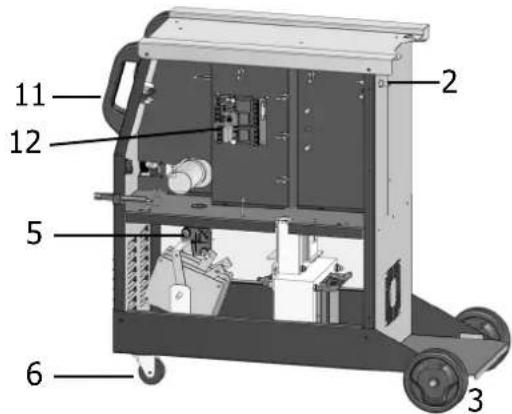
DEVICE PRESENTATION (FIG-I)
| 1- Power Switch Off/On | 9- Rear Wheels (162, 3P & 182 only) |
| 2- Power Cable | 10- EURO torch connector (152, 162, 3P & 182 only) |
| 3- Rear handle | 11- 200A Rapid Connector (3P only) |
| 4- Wire Reel Support | 12- Front Wheels (162, 3P & 182 only) |
| 5- Quick Gas Connector | 13- Fixed Power Cable (142, 162, & 182 only) |
| 6- Front Handle | 14- Case protected against polarity reversal (142, 152, 162 & 182 only) |
| 7- Control panel and table for SMART feature | 15- Fastening chain for bottles. Warning: fasten the bottles correctly. |
| 8- Drive Reel | |
SEMI-AUTOMATIC WELDING FOR STEEL / STAINLESS STEEL (MAG MODE) (FIG-II)
These machines can weld Steel and Stainless Steel wires of 0.6/0.8 or 1.0mm (except SMARTMIG 142/152) (Fig II - A)
The Smartmig 3P can weld steel and stainless steel wire (0.6/0.8 or 1.0 diameter), to do so please connect the earth cable on the negative terminal at the front of the machine (fig I). The machine is delivered equipped to function with ∅ 0.8mm Steel/Stainless steel wire, and the contact tip, roller throat and the sleeve of the torch supplied are suitable for this application.
Should you wish to use 0.6mm wire, you will need to change the contact tip. The wire reel is reversible (0.6 / 0.8mm) and will need to be inserted into the machine so that the figure 0.6 is visible. For welding with ∅ 1.0mm wire, you will need to use a specific roller and contact tip.
For welding with Steel or Stainless Steel it is necessary to use
For use with Steel/Stainless Steel, the gas requirement is Argon + CO2. (Ar+CO2). The proportion of CO2 required will vary depending on the use. For specific gas requirements, please contact your gas distributor. The gas flow in steel is between 12 and 18 Litres/minute depending on the environment and experience of the welder.
SEMI-AUTOMATIC WELDING FOR ALUMINIUM (MIG MODE) (FIG-II)
The SMARTMIG 152, 162, 3P, 182 & 183 are delivered equipped for welding with Aluminium wire ∅ 0.8 or 1.0mm (fig II-B)
The Smartmig 3P can weld aluminium wire (0.8 or 1.0 diameter), to do so please connect the earth cable on the negative terminal at the front of the machine (fig I). The SMARTMIG 142 is delivered equipped for welding Aluminium of ∅ 0.8mm (Occasional and non-intensive). In this case the wire used should be stiff to facilitate wire feeding.
For use with aluminium, the gas requirement is pure argon (Ar). For the specific gas requirements please contact your distributor. The gas flow in Aluminium is between 20 and 30 Litres/minute depending on the environment, and the experience of the welder.
Below are the differences between welding with Steel and Aluminium :
- Specific rollers are needed for welding with Aluminium.
- Adjust the pressure of the drive rolls to prevent the wire being crushed.
- Only use a capillary tube for welding with Steel or Stainless Steel.
- Use a special Aluminium Torch with a teflon sheath to reduce friction.
DO NOT cut the sheath close to the joint, it is used to guide the wire from the the rollers.
- Contact Tube : Use a special aluminium contact tube specific to the diameter of wire being used.
GASLESS WIRE WELDING (FIG. III)
These machines are capable of «Gasless» wire welding (cored wire) provided that the polarity is reversed.
To do this, turn the machine off, open up the machine (14) and make the electrical connections described in Figure C of the page below. The Machines are originally configured for Gas welding. The Smartmig 3P can weld «No Gas» flux cored wire, to do so please connect the earth cable on the positive terminal at the front of the machine (fig I).
ELECTRODE WELDING (FIG. III) SMARTMIG 3P (MMA MODE)
Connect the electrode holder and earth clamp as indicated on the electrode packaging.
- Respect the basic rules of welding.
Compatible electrodes :
| Electrode ∅ mm (Rutile) | Metal sheet thickness (mm) | Welding current (A) |
| 1.6 1.5 40 | | |
| 2.0 1.5 > 3 55 | | |
| 2.5 2.5 > 6 80 | | |
| 3.2 5 > 8 115 | | |
PROCESS OF REELS AND TORCHES ASSEMBLY (FIG-V)
Remove the Nozzle (fig V-E) from the torch by turning clockwise and then remove the contact tip, leaving the support and the spring on the torch (fig V-D).
- Open the door of the machine
FIG V-A : Position the reel on to the support.
- In case of 100mm (3P, 142, 152, 162) wire reel use, do not install the adapter (1).
- Adjust the reel break (2) to avoid reel movement tangling the wire when welding stops. Be careful not to tighten too much - the reel must rotate without straining the motor.
- Tighten the plastic screw (3).
FIG V-B : Installing the drive roller.
- Choose the correct diameter reel for the type of wire. The visible diameter indicated on the roller when fitted in place is the diameter currently in use (ie. 0.8mm is visible for use with 0.8mm wire).
FIG V-C : To select the adjustment of the drive rollers, proceed as follows :
- Loosen the drive roller knob as far as possible.
- Insert the wire until it exits the other side by about 2cm, tighten the knob again slightly.
- Start the motor by pressing the trigger of the torch.
- Tighten the knob (fig V-C) whilst pressing the trigger until the wire starts to move.
Nb : When welding with Aluminium, use the minimum possible pressure to avoid crushing the wire
- Pull the wire out of the end of the torch by approximately 5cm, then attach the contact tip suitable for the wire used and then the nozzle (fig V-E).
The SMARTMIG 142, 152, 162, 3P machines can accommodate coils of 100 or 200mm diameter.
The SMARTMIG 182 machines can accommodate coils of 200 or 300mm diameter. To place a 200mm wire reel, first install the adapter (ref. 042889) on the support.
The SMARTMIG 3P can also weld with rutile electrodes of 2.0/2.5/3.2 mm diameter.
Below are the different combinations possible :
| Smartmig 142/152 162 3P 182 183 gaz |
| steel/stainless steel | 0,6/0,8 0,6 | 0,8/1,0 | Argon + | CO2 |
| Alu* | - | 0,8/1,0 | Pure Argon |
| No Gas | 0,9 | 0,9/1,2 | - |
| Electrodes | - | - | 2/2,5/3,2 | - | - | - |
* We recommend a teflon sheath (ref. 041578) and special Aluminium contact tip (∅ 0.8 ref. 041059 - ∅ 1.0 ref. 041066)
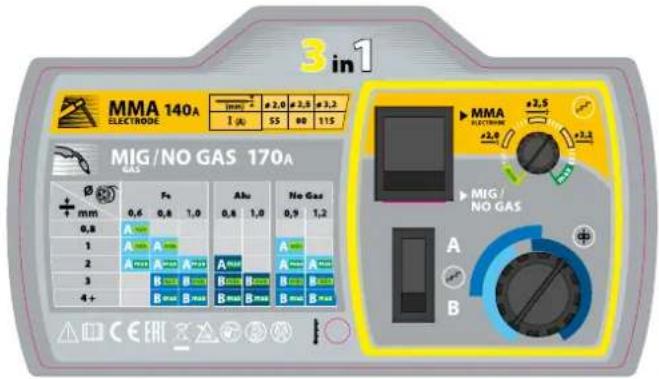
To help you select the diameter of wire suitable for the job you want to perform, refer to the table on page 4 (FIG IV).
GAS COUPLING
- Connect a pressure regulator to the gas bottle. Connect the welding machine using the pipes supplied, and place the two clamps to avoid leakages.
- Set the gas flow by adjusting the dial located on the pressure regulator.
NB : to help facilitate the adjustment of the gas flow, operate the drive rollers by pressing the trigger of the torch (ensure that the drive roller is completely loose so the wire is not fed through).
This procedure does not apply to «Gasless» welding mode.
CONTROL PANEL (FIG. VI)
| Smartmig 142/152/162/182/183 Smartmig 3P |
| 1- Voltage selection button A / B 1- Mode select button MIG/MMA. |
| 2- Voltage selection button min/max. 2- Power adjustment knob MMA or MIG. |
| 3- Wire speed regulator. 3- Wire speed regulator. | |
| 4- « SMART » settings table MIG/MAG 4- Voltage selection button A / B |
| 5- Thermal Protection light. 5- « SMART » settings table MIG/MAG & MMA. |
| 6- positions switch 6- Thermal Protection light. | |
DIRECTIONS OF USE (FIG VI)
MIG/MAG MODE:
SMARTMIG feature allows you to adjust the voltage and the wire speed.
Use the SMART table to find the correct settings based on the type of wire, and the thickness of the metal workpiece.
Then based on the recommendation indicated, simply select :
- The voltage (buttons A/ B & min/max for SMARTMIG 142, 152 & 162 ; button A/B for SMARTMIG 3P)
- Wire speed - adjust the regulator (3) to the colour zone indicated.
Examples :
To weld 0.8mm thick steel, use 0.6 mm diameter steel wire (SMARTMIG 142, 152 & 162):
- Move the regulator (3) to the zone of lightest colour and adjust « by sound » if required
To perform the same operation with SMARTMIG 3P :
- Move the regulator (3) to the zone of lightest colour, and adjust « by sound » if required.
Connect the electrode holder and earth clamp to the machine, respecting the polarity indicated on the electrode packaging. Then adjust the position.
Example :
For welding metal 4mm thick :
- Adjust the regulator (2) to the zone corresponding with electrode diameter 2.5mm.
ADVICE AND THERMAL PROTECTION
- Respect the normal rules of welding
- Leave the machine plugged in after welding to allow it to cool
• Thermal Protection : The LED will illuminate. Cooling will take between 10 and 15 minutes depending on the ambient temperature.
DUTY CYCLE & WELDING ENVIRONMENT IN USE
- The welding unit describes an output characteristic of «constant current» type. The duty cycles following the standard EN60974-1 (at 40°C on a 10mn cycle) are indicated in the table here below :
| x @40°C (Tcycle=10min) | 142 / 152 162 | 3P | 182 183 |
| MIG/MAG M&A |
| X%-max 20% | -90A | 25%-110A 15% | -115A | 15%-140A | 15%-140A | |
| 60% | 60A | 70A | 70A | 40A | 80A | 90A |
During intensive use (> duty cycle) the thermal protection can activate, if this event the arc switches off and the thermal protection indicator switches on. The welding machine has a constant current output in MIG/MAG. The welding machine has a constant voltage output in MMA.
Note: the running hot tests have been carried out at atmosphere temperature and duty cycle has been determined at 40° C by simulation.
These are A-class devices. They are designed to be used in an industrial or professional environment. In a different environment, it can be difficult to ensure electromagnetic compatibility, due to conducted disturbances as well as radiation. From 1st December 2010, the new standard EN 60974-10 will be applicable: Warning: these materials do not comply with IEC 61000-3-12. If they are to be connected to a low-voltage mains supply, it is the responsibility of the user to ensure they can be connected. If necessary consult the operator of your electrical distribution system.
RISK OF INJURY DUE TO MOVING PARTS

The wire feeders contain moving parts that may catch hand, hair, clothes or tools which can lead to injuries! Take extra care.
- Do not lay a hand to swivel or moving components or parts to the drive!
- Ensure that the housing covers or protective covers remain closed during operation!
MAINTENANCE
- Maintenance should only be carried out by a qualified person.
- Switch the machine off, ensure it is unplugged, and that the ventilator inside has stopped before carrying out maintenance work. (DANGER High Voltage and Currents).
- GYS recommends removing the steel cover 2 or 3 times a year to remove any excess dust. Take this opportunity to have the electrical connections checked by a qualified person with an insulated tool.
- Regularly check the condition of the power supply cord. If damaged, it will need to be replaced by the manufacturer, its' after sales service or a qualified person.
- Ensure the ventilation holes of the device are not blocked to allow adequate air circulation.
ANOMALIES, CAUSES, REMÈDES
| symptoms possible causes remedies |
| The welding wire speed is not constant. | Debris is blocking up the opening. | Clean out the contact batch or change it and replace the anti-adherence product. Ref.041806 |
| The wire skids in the rollers. | Control the roller pressure or replace it.Wire diameter non-compatible with roller Covering wire guide in the torch non-compatible. |
| The wire-feeder motor doesn't operate. | Reel or roller brake too tight. Release the brake and rollers. |
| Electrical supply problem. | Check that the power switch is in the "On" position. |
| Bad wire feeding. | Covering wire guide dirty or damaged. Clean or replace. |
| Reel brake too tight Release the brake. |
| No welding current. | Bad connection to the main supply. | Check the mains connection and look if the plug is fed by 400 V (3PH) power socket. |
| Bad earth connection. | Check the earth cable (connection and clamp condition). |
| Torch trigger inoperative. Check the torch trigger / replace torch. |
| The wire jams (after the rollers). | Guide wire sheath crushed. Check the sheath and torch body. |
| Wire jammed in the torch Clean or replace. |
| No capillary tube. Check the presence of capillary tube. |
| Wire speed too fast Reduce the wire speed. |
| The welding bead is porous. | The gas flow rate is not sufficient. | Adjust flow range 15 to 20 L / min. Clean the working metal. |
| Gas bottle empty. Replace it. | |
| Gas quality unsatisfactory. Replace it. | |
| Air flow or wind influence. | Prevent drafts, protect welding area. |
| Gas nozzle dirty. | Clean or replace the gas nozzle. |
| Poor quality wire. | Use suitable WIRE for MIG-MAG welding. |
| Surface to weld in bad condition. (rust, etc...) | Clean the metal before welding. |
| Very important flashing particules. | Arc voltage too low or too high. | See welding settings. |
| Bad earth connection. | Adjust the earth cable for a better connection. |
| Insufficient gas flow. | Adjust the gas flow. |
| No gas flow at the end of the torch. | Bad gas connection. | Check the gas connection at the welding machine. Check the flowmeter and the solenoid valves. |
SOLDADURA CON ELECTRODO REVESTIDO (FIG. III) SMARTMIG 3P (MODO MMA)
MODO MMA (SMARTMIG 3P UNICAMENTE):
WAARSCHUWING - VEILIGHEIDSINSTRUCTIES
ALGEMENE INSTRUCTIES

INSTALLATIE VAN HET APPARAAT
LASSEN MET BEKLEDE ELEKTRODE (FIG. III) SMARTMIG 3P (MMA MODUS)
SALDATURA CON ELETRODI RIVESTITI (FIG. III) SMARTMIG 3P (MODALITÀ MMA)
MODALITA' MMA (SMARTMIG 3P UNIQUEMENT):

DESCRIPTION


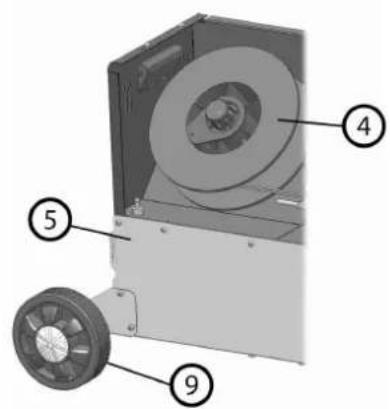
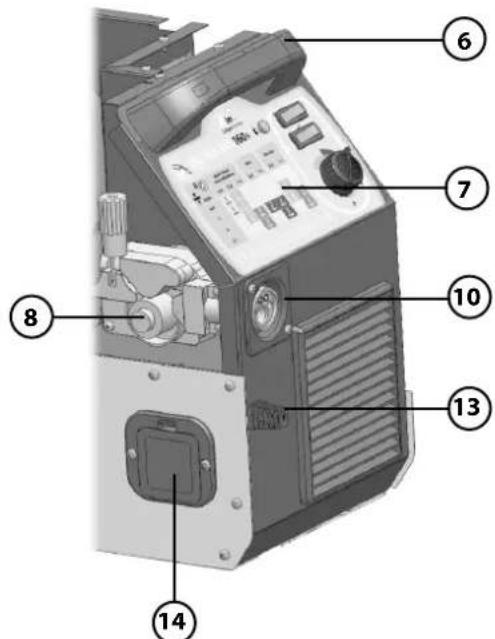
FIG-I
MONTAGE

DESCRIPTION

FIG-II
SMARTMIG 152-162-3P-182-183

B

III FIG-III
SMARTMIG 142-152-162-182-183 SMARTMIG 3P

SMARTMIG 3P
| MMA Polarity Guide | Rutile Basic |
| - | + |
| + | - |
FIG-IV


FIG-V

FIG-VI
Smartmig 142-152-162

Smartmig 3P
| N° | Désignation | 142 152 162 |
| 1 | Support bobine_ Reel stand_ Rollenhalter_ Soporte de bobina_ Подставка для катушки_Spoel houder_Supporto bobine | 71601 |
| 2 | Electrovanne_Solenoid valve_ Elektroventil_ Electro-válvula_ Электроклапан_Gasventiel_Elettromagnete | C51461 | C51461 715 | 40 |
| 3 | Roue arrière_Wheels_Durchmesser Rad_Rueda_ колесо_Achterwiel_Ruote posteriori | -- 71 | 370 | |
| 4 | Moto-dévidoir _ Wire feeder _ Drahtvorschub _ Devanadera _ Подающее устройство_Haspel_Traina filo | 51026 | 51026 51041 | |
| 5 | Boitier gaz/no gaz_Gas/No gas change box Deckelklappe für Polaritätsumkehrung_Caja de inversión de polaridad_Korobka инверсии полярности_Kastje gas/no gas_Alloggiamento gas/no gas | 51384 |
| 6 | Roue avant_Front wheels_Vorderrad_Rueda de atrás_Переднее колесо_Voorwiel_Ruote anteriori | -- 71 | 181 | |
| 7 | Voyant thermique _ Thermal light _ Wärmeschütz Kontrollicht _ Indicador térmico_ Индикатор температурной защиты_ Thermisch lampje_Spia termica | 51019 |
| 8 | Inverseur (x2)_Switch (x2)_Schalter (x2)_Botón (x2)_Переключатель (x2)_Omschakelaar (2x)_Invertitore (x2) | 52464 |
| 9 | Bouton potentiomètre_Potentiometer knob_Potentiometer_Potenciómetro botón_Потенциометр_Draaiknop_Pulsante potenziometro | 73009 |
| 10 | Raccord européen_Euro connector_Conector Euro_Разъем для горелки европейского стандарта_Europese aansluiting_Raccordo Europeo | -- 51 | 025 | |
| 11 | Grille de ventilateur_Fan grid_Ventilatorgrill_Rejilla de ventilador_Решетка вентилатора_Ventilatierooster_Griglia ventilatore | 51010 |
| 12 | Pince de masse_Earth clamp_Massekabel_Cable de masa_Кабель массы_Massa klem_Morsetto di massa | 71118 |
| 13 | Pieds d'angles gauche_Left Angle feet_Winkel-Füsse links_Pie izquierdo_Hожки слева_Voetjes linkerhoeken_Piedino angolo sinistro | 56021x2 | 56021x2 56 | 021x1 |
| 13 | Pieds d'angles droite_Right Angle feet_Winkel-Füsse rechts_Pie derecho_Hожки справа_Voetjes rechterhoeken_Piedino angolo destro | 56022x2 | 56022x2 56 | 022x1 |
| 14 | Torche_Torch_Brenner_Antorcha_Gorelka_Toorts_Torcia | 71392 | 71394 | 1 |
| 15 | Poignée avant_Front handle_Vorderer Griff_Puño delantero_Рукоятка_Handvat voor_Impugnatura anteriore | 72072 |
| 16 | Circuit_Board_Karte_Carta_Плата_Circuit_Scheda | 53183 | 53183 53258 | |
| 17 | Ventilateur_Fan_Ventilator_Ventilador_вентилятор_Ventilator_Ventilatore | 51023 |
| 18 | Pont de diodes_Rectifier_Gleichrichter_Puente de LED_Диодный мост_Diode brug_Ponte a diodi | 52180 | 52180 52178 | |
| 19 | Self de sortie_Choke_Drossel_Self_Дроссель_Uitgaande smoorklep_Self di uscita | 53179 | 53179 53180 | |
| 20 | Transformateur_Transformer_Transformator_Transformador_Транформатор_Transformator_Trasformatore | 53176 | 53176 53177 | |
| 21 | Poignée arrière_Rear handle_Hinterer Griff_Puño_Рукоятка_Handvat achter_Impugnatura posteriore | 71515 |
| 22 | Interrupteur I/O_I/O switch_Ein/Aus Schalter_Conmutador I/O_Interrupteur I/O_Выключатель I/O_Schakelaar I/O_Interruttore I/O | 52460 |
| 23 | Cordon secteur_Main cable_Netzstromkabel_Cable de alimentación_Питающий кабель_Elektrische snoer_Cavo di rete | C51109 | C51109 C51 | 110 |
SMARTMIG 3P

| No | Désignation | 3P |
| 1 | Support bobine _ Reel stand _ Rollenhalter_Soporte de bobina_ Подставка для катушки_Spoel houder_Supporto bobine | 71601 |
| 2 | Electrovanne_Solenoid valve_Elektroventil_Electro-válvula_Электроклапан_Gasventiel_Elettromagnete | 71540 |
| 3 | Roue arrière _ Rear wheel _ Durchmesser Rad _ Rueda _ колесо_Achterwiel_Ruote posteriori | 71370 |
| 4 | Moto-dévidoir _ Wire feeder _ Drahtvorschub _ Devanadera _ Подающее устройство_Haspel_Traina filo | 51041 |
| 5 | Sélecteur mode _ Mode switch _ Modus Schalter _ Botón de modo _ Выбор режима_Modus knop_Selettore di modalità | 52458 |
| 6 | Bouton potentiomètre _ Potentiometer knob _ Potentiometer _ Potenciómetro botón _ Потенциометр_Draaiknop_Pulsante potenziometro | 73099 |
| 7 | Bouton potentiomètre _ Potentiometer knob _ Potentiometer _ Potenciómetro botón _ Потенциометр_Draaiknop_Pulsante potenziometro | 73009 |
| 8 | Inverseur _ Switch _ Schalter _ Botón _ Переключатель_Omschakelaar_Invertitore | 52464 |
| 9 | Voyant thermique _ Thermal light _ Wärmeschütz Kontrollicht_ Indicador térmico _ Индикатор температурной защиты_ Thermisch lampje_Spia termica | 51019 |
| 10 | Raccord européen _ Euro connector_ _ Conector Euro_ Разъем для горелки европейского стандарта_Europese aansluiting_Raccordo Europeo | 51025 |
| 11 | Connecteur texas _ Dinze plug _ Texasbuchse _ Conectador _ Коннектор_Texas koppeling_Connettore | 51477 |
| 12 | Grille support de ventilateur _ Fan grid _ Ventilatorgrill _ Rejilla de ventilador _ Решетка вентилатора_Ondersteuningsrooster ventilator_Griglia di supporto del ventilatore | 51010 |
| 13 | Pieds d'angles (x4) _ Angle feet (x4) _ Füsse (x4) _ Pies (x4) _ Ножки (x4)_ Hoekvoetjes (x4)_ Piedino d'angolo (x4) | 51385 |
| 14 | Roue avant _ Front wheels _ Vorderrad _ Rueda de atrás _ Переднее колесо_Voorwiel_Ruote anteriori | 71181 |
| 15 | Poignée avant _ Front handle _ Vorderer Griff_ Puño_ Ручка_ Handvat voor_Impugnatura anteriore | 72072 |
| 16 | Circuit potentiomètres _ Potentiometer board _ Potentiometer Karte _ Carta de potenciómetros _ Плата потенциометра_Circuit draaiknoppen_Scheda potenziometro | 53189 |
| 17 | Ventilateur _ Fan _ Ventilator _ Ventilador _ вентилятор_Ventilator_Ventilatore | 51023 |
| 18 | Circuit contrôle moteur_Motor control board _ Motorkontrolle Karte _ Carta de control del motor _ Плата управления двигателя_Motor-besturingssysteem_Scheda controllo motore | 53184 |
| 19 | Pont de diodes _ Rectifier _ Gleichrichter_Puente de LED_ Диодный мост_Diode brug_Ponte a diodi | 52179 |
| 20 | Circuit CEM _ EMC Board _ Elektromagnetische Verträglichkeit Karte _ Carta de protección contra campos magnéticos_ Плата электромагнитной совместимости_Circuit CEM_Scheda CEM | 53182 |
| 21 | Self de sortie _ Choke _ Drossel _ Self _ Дроссель_Uitgaande smoorklep_Self di uscita | 53181 |
| 22 | Transformateur _ Transformer _ Tranformator _ Transformador _ Транформатор_Transformator_Trasformatore | 53178 |
| 23 | Poignée arrière _ Rear handle _ Hinterer Griff_ Puño_ Ручка_ Handvat achter_Impugnatura posteriore_Interrittore M/A | 71515 |
| 24 | Interrupteur M/A _ Main switch _ Ein/Aus – Schalter _ Interruptor On/Off_ Выключатель вкл/выкл_M/A schakelaar_Interrittore M/A | 52460 |
| 25 | Cordon secteur_Mains cable _ Netzstromkabel_Cable de alimentación _ Питающий кабель_Elektrische snoer_Cavo di rete | C51111 |
| 26 | Torche amovible _ Removable torch _ Brenner _ Antorcha _ Горелка_Afneembare toorts_Torcia removibile | 71394 |
| 27 | Pince de masse _ Earth clamp _ Masseklemme_Pinza de masa_ Кабель массы_Massa klem_Morsetto di massa | 71116 |
| 28 | Porte-électrodes _ Electrode holder _ Elektrodenhalter_Porta electrodos _ Електрододержатель_Elektrode-houder_Pinza porta elettrodo | 71053 |
| ACCESSOIRES/ACCESSORIES / ZUBEHÖR / ACCESORIOS / AKCECCYAPЫ / ACCESSOIRES / ACCESSORI |
| Kit complet câble de masse et porte électrode 150/200A_Complete kit with earth cable and electrode holder 150/200A_Komplettset Massekabel und Elektrodenhalter 150/200A_Kit completo cable de masa y portaelectrodos 150/200A_Polный набор кабель массы и электрододержатель 150/200A_Complete kit massakabel en elektrodehouder 150/200A_Kit completo di cavo di massa e pinza porta elettrodo 150/200A | 047372 |
| Porte électrode seul 200A_Electrode holder only 200A_Elektrodenhalter 200A_Portaelectrodos solo 200A_Только электрододержатель 200 A_Elektro-dehouder alleen 200A_Pinza porta elettrodo sola 200A | 043497 |
| Pince de masse seule 200A_Earth clamp only 200A_Massekabel 200A_Pinza de masa sola 200A_Только зажим массы 200 A_Massaklem alleen 200A_Morsetto di massa solo 200A | 043114 |
| Câble avec porte électrode 150/200A_Cable with electrode holder 150/200A_Kabel mit Elektrodenhalter 150/200A_Cable con portaelectrodos 150/200A_Kабель с электрододержателем 150/200 A_Kabel met elektrodehouder 150/200A_Cavo con pinza porta elettrodo 150/200A | 043848 |
| Câble de masse avec pince 150/200A_Earth cable with clamp 150/200A_Massekabel mit Zange 150/200A_Cable de masa con pinza 150/200A - Кабель массы с зажимом 150/200 A_Massakabel met klem 150/200A_Cavo con morsetto di massa 150/200A | 043770 |
SMARTMIG 182 / 183