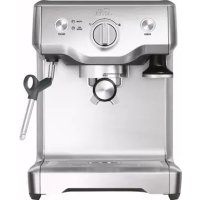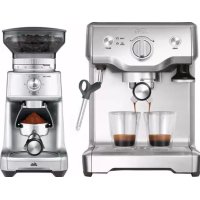
Baritsta Triple Heat 1011 - Coffee machine Solis - Free user manual and instructions
Find the device manual for free Baritsta Triple Heat 1011 Solis in PDF.



| Brand | Solis |
| Model | Barista Triple Heat 1011 |
| Product type | Espresso machine with double boiler |
| Dimensions (W × H × D) | Approx. 41 × 38 × 37 cm |
| Weight | Approx. 13.2 kg |
| Power supply | 220-240 V ~ / 50-60 Hz |
| Power | 1800-2200 W |
| Pump pressure | 15 bar (Italian pump) |
| Water tank capacity | 2.5 liters, removable |
| Boilers | Two stainless steel boilers (espresso and steam) |
| Brew group | 58 mm, heated with integrated thermal element |
| Steam wand | 360° swivel, 3-hole, rubber grip |
| Temperature control | Electronic PID, programmable from 86°C to 96°C |
| Extraction functions | Manual, 1 cup, 2 cups, low-pressure pre-infusion |
| Additional programs | Steam, hot water, auto start, cleaning cycle |
| Display | LCD screen with temperature, time, clock |
| Included accessories | Milk jug 480 ml, single/double wall filters, 58 mm tamper, Razor, Allen key, cleaning tool, water filter, test strip |
| Portafilter material | 58 mm stainless steel |
| Safety | Safety valve, thermal cut-off, auto shut-off |
| Maintenance | Descaling with SOLIPOL, cleaning cycle with SOLITABS |
| Energy saving program | Standby after 10 min, shut-off after 20 min |
Frequently Asked Questions - Baritsta Triple Heat 1011 Solis
User questions about Baritsta Triple Heat 1011 Solis
0 question about this device. Answer the ones you know or ask your own.
Ask a new question about this device
Download the instructions for your Coffee machine in PDF format for free! Find your manual Baritsta Triple Heat 1011 - Solis and take your electronic device back in hand. On this page are published all the documents necessary for the use of your device. Baritsta Triple Heat 1011 by Solis.
USER MANUAL Baritsta Triple Heat 1011 Solis
Solis of Switzerland AG
Solis of Switzerland SA
Solis-Haus CH-8152 Glattbrugg-Zurich Suisse
Telephone +41 44 874 64 54 • Télefax +41 44 874 64 99
info@solis.ch • www.solis.ch • www.solis.com
IMPORTANT SAFETY PRECAUTIONS
Please read through this user manual thoroughly before using your espresso machine Solis Barista Triple Heat, so that you become familiar with your appliance and can use it safely. We thoroughly recommend that you keep these instructions and, if you pass the appliance on, that you also hand these instructions to the new owner.
For your own safety, please observe the following safety measures when using electrical appliances:
- To prevent electric shock, neither the appliance nor the power cord and the power plug must come into contact with water or other liquids. Danger of electric shock! Should the appliance resp. the power cord or the power plug come into contact with liquid, use dry rubber gloves to immediately pull the power plug out of the socket. Do not use the appliance again until you have had it's ability to function safely checked by Solis or a Solis approved service centre.
- Do not operate or unplug the appliance with wet or moist hands or feet.
- Check if the voltage stated on the type plate of the appliance matches your mains voltage before using the appliance for the first time.
- Do not leave the power cable hanging over table edges so that it can be pulled. Make sure that it does not come into contact with hot surfaces, such as hotplates or a radiator, or that they come into contact with the appliance.
- Keep the appliance away from hot gas, hot ovens and other heat-emitting appliances or heat sources. Never use the appliance on a hot or wet surface. Never place the appliance near moisture, heat and naked flames. Keep the appliance away from moving parts or appliances.
-
Never carry the appliance by the power cord and do not place anything on the power cord. Never pull on the power cord to disconnect the appliance from the power mains. Only pull on the plug.
-
We recommend that you do not use an extension cable with this appliance. Do not place the appliance directly underneath a power socket.
- Please always make sure that the appliance is switched off before pulling the power plug of the appliance out of the power socket.
- While the appliance is in operation, it must sit on a stable, level and dry surface, like a table or a worktop. Do not place the Solis Barista Triple Heat near the edge of a worktop or table. Do not use the appliance outdoors or in moving vehicles or boats.
- Always switch off the appliance by pressing the POWER-button and unplug it if the appliance is not in use or left unattended, and before cleaning. We recommend the use of a residual current device (RCD safety switch) to provide additional protection during the use of electrical appliances. It is advisable to use a safety switch with a rated residual operating current of 30mA maximum. For professional advice consult an electrician.
- Do not make any adjustments to the appliance, cable, plug or accessories.
- Improper use creates the risk of injury! No liability is assumed in the case of potential damages or injuries.
- Never take hold of an appliance that has fallen into water or another liquid. Always pull the power plug before removing it. Do not use the appliance again until you have had it's ability to function safely checked by Solis or a Solis approved service centre.
- Never place the appliance in such a way that it might fall into water or come into contact with water or another liquid (e.g. in or next to a sink).
- Never submerge the appliance, power cable or plug in water, or bring it into contact with water or other liquids.
- Place the appliance so that it is never exposed to direct sunlight.
-
Never put sharp or pointed objects and tools into the appliance openings. The appliance may become damaged - danger of electric shock!
-
Do not shake or relocate the appliance while it is in operation.
- Only use the appliance as described in this manual. Only use with the provided accessories or accessories recommended by Solis, incorrect accessories can lead to damage of the appliance, resp. to fire, electric shock or personal damage.
- Never use the appliance with an external timer switch or remote control.
- This appliance is only for domestic use and is not suitable for commercial use.
- Remove and discard all packaging materials and potential stickers or labels before using the appliance for the first time.
- Check the appliance before each use and ensure that the appliance, power cord and plug are not damaged.
- In order to avoid electric shock, do not use the appliance if the power cord or plug are damaged or the appliance is otherwise faulty, dropped or damaged. Never attempt repairs yourself, except cleaning and descaling the appliance, but take your appliance to Solis or a Solis approved service centre in order to get it inspected or mechanically and electrically repaired.
- People with limited physical, sensorial or mental capabilities as well as unknowing or inexperienced people and children must not use the espresso machine except when supervised or thoroughly instructed on how to use the appliance by a person responsible for their safety. Additionally, they must be aware of the dangers arising from the appliance and know how to operate it safely. Cleaning and maintenance of the appliance must not be done by unsupervised children. Under no circumstances must the appliance be used or cleaned by children under the age of 8.
- Children must be supervised, so that they do not play with the appliance.
-
Use only cold tap water in the water tank. Do not use any other liquid. Never use highly filtered, distilled, carbonated or flavored water, as this would impair the espresso taste and the functionality of the appliance.
-
Never use the espresso machine with an empty water tank or without a water filter.
- Ensure the portafilter is firmly inserted and secured into the brewing group head before using the machine.
- Never remove the portafilter during the brewing operation as the appliance is under pressure.
- Do not leave the espresso machine unattended when in use.
- CAUTION: The appliance and especially the metal surfaces become hot during use! Always let the appliance cool down and pull the plug before moving, transporting or cleaning it.
- Do not place anything other than cups for warming on top of the cup warming plate. Do not place any other object on the espresso machine!
- Keep the appliance and accessories clean. Follow the cleaning instructions provided in this book.
- Be especially careful when descending the appliance as hot steam might be released which can cause scaldings. Before descending, always make sure that the drip tray is inserted. Please refer to the notes given in the "Dscaling" section on page 152.
- Unwind the power cord fully before plugging the plug into the socket.
- Pull the plug after every use. Only then, the appliance is fully switched off.
- Oils or lubricants must not be used with this appliance.
APPLIANCE DESCRIPTION
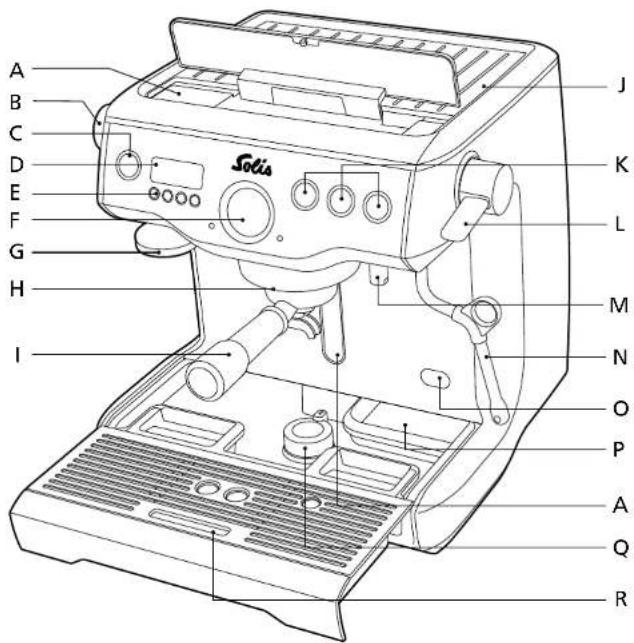
A Removable 2.5 liter water tank, on the appliance backside can be filled from the top through the open lid; with illuminated water level indicator on the appliance front
B HOT WATER dial
C POWER button
The button surround flashes when the appliance is switched on with this button
D LCD display
displays the current setting and settings for the possible programmmings
E Function buttons MENU,▼,▲ and EXIT
F Extraction pressure gauge
needle tells extraction pressure
G 58mm tamper
can be mounted in the appliance with a magnet or removed alternatively. For tamping the coffee powder in the filter insert.
H 58 mm heated brewing group with built-in thermo element for thermal stability during extraction
1 58 mm stainless steel portafilter with professional spout
J Heated cup warming plate for pre-heating cups
K Button for producing espresso: MANUAL for manual setting,
for 1 pre-programmed cup, pre-programmed cups
L Steam lever for immediate and consistent steam from the steam wand
M Hot water outlet for permanently available hot water, for making long blacks (Americano) or pre-heating cups
N 360^ pivotable steam wand with 3 hole tip for creamy steamed milk and rubber loop for adjusting the wand
O Access opening for descending the boilers with black silicone cover
P Accessory compartment by the rear right end of the drip tray
Under the drip tray: Rotary knob, extending a foot on the bottom of the appliance for simplified moving of the machine
R Removable drip tray with EMPTY ME display under the drip tray grill
NOT SHOWN:
-15 bar Italian espresso pump
- Two stainless steel boilers
Electronic PID temperature control
Overpressure valve
Low pressure pre-infusion function
Safety thermal-shutdown
APPLIANCE DESCRIPTION
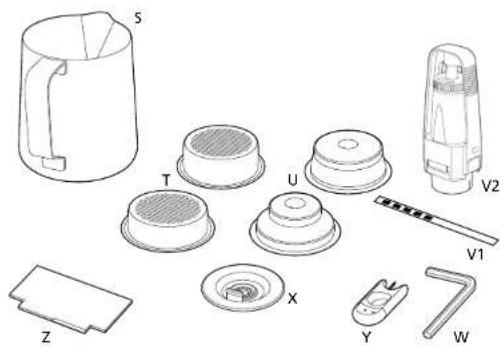
ACCESSIONS
Stainless steel milk jug for steaming milk, capacity 480 ml
T Single-wall filter inserts for freshly ground coffee powder (1 and 2 cups)
U Double-wall filter inserts for pre-ground coffee powder (1 and 2 cups)
V1 Water hardness testing strip
V2 Water filter with filter bracket
W Allen key
X Rubber cover for filter insert (for cleaning)
Y Cleaning tool
Z Dosing instrument "Razor"
LCD DISPLAY
Display readouts:
- ESPasso temperature
-Espresso extraction time
-Timer
Programmable function:
-Espresso amount (1 or 2 cups)
-Espresso temperature
Automatic start
- Time
THESE EQUIPMENT EXTRAS MAKE YOUR SOLIS BARISTA TRIPLE HEAT SO UNIQUE:
TRIPLE HEATING SYSTEM
Two stainless steel boilers
One boiler for espresso preparation and another one for making steam, allowing you to steam milk while simultaneously brewing espresso at the ideal temperature.
Heated brewing group
58 mm professional brewing group with built-in thermo element to guarantee ideal thermal stability while the espresso is made.
PRECISION CONTROL
Electronic PID temperature control
The electronic PID temperature control guarantees precise water temperature with variations of only + / - 1^ for prime espresso aroma. Programmable.
Regulated extraction pressure
The overpressure valve makes sure that the maximum pressure for prime espresso taste is kept at all times.
Low pressure pre-infusion function
At low pressure, the coffee powder is gently dampened so that it can swell up enough for the aroma to be evenly extracted afterwards. Programmable.
Two pumps
Each boiler is equipped with its own pump, guaranteeing even pressure during the extraction of espresso.
Programmable espresso extraction temperature
The water temperature can be individually adjusted to the particular coffee powder being used.
ADDITIONAL EXTRAS
LCD display
Displays current settings and simplifies programming.
Extra large steam boiler
The steam boiler with a capacity of 950ml ensures permanently available and evenly steamed milk.
Professional steam wand
The 360^ pivotable stainless steel steam wand with three outlets providing extra creamy steamed milk. Safe handling of the steam wand is ensured by the rubber loop.
Amount control
Pre-programmed or manually adjustable coffee amounts for 1 cup and 2 cups. The brewing time as well as the amount of coffee can be programmed.
Hot water function
Special outlet for hot water, for making long blacks (Americano) or pre-heating cups.
58 mm stainless steel portafilter
Increases evenness of extraction and is easy to clean.
Brewing time display
The display shows the time the espresso takes to brew resp. extract.
THINGS WORTH KNOWING ABOUT YOUR SOLIS BARISTA TRIPLE HEAT:
POWER SAVING FUNCTION:
To conserve energy, the appliance switches to standby mode 10 minutes after the last espresso has been made. After 20 more minutes without use, the appliance switches off completely.
EXTENDABLE FOOT:
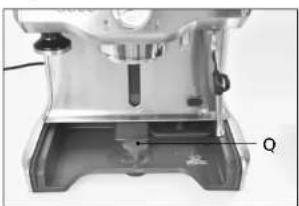
Your appliance is equipped with an extendable foot. When it is extended, the appliance can be pushed over the worktop more easily. To extend it, remove the drip tray from the appliance and turn the rotary knob (Q) clockwise to the position. If you want the appliance to stand slip safe again, turn the rotary knob (Q) counter clockwise back to the position, the foot will be retracted back into the appliance
OPENING THE TANK LID AND FILLING WATER ONCE FILL TANK LIGHTS UP IN THE DISPLAY:
Once the FILL TANK prompt lights up in the display, you have to fill the tank through the tank lid with fresh tap water. To open the lid, you have to briefly press the round bulge and the lid opens by itself.
Gently push the lid down after water has been filled.
BEFORE FIRST USE
Caution: The steam lever (L) as well as the hot water dial (B) both have to be set to the CLOSED position to allow the appliance to heat up and be used.
- Carefully take the appliance from the packaging and remove all stickers, labels, package inserts and packaging materials.
- Remove all accessories from the appliance and the water tank.
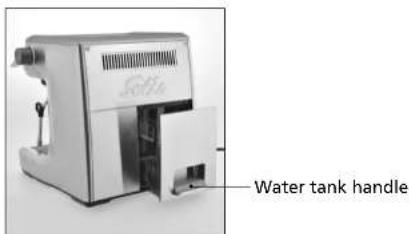
- Remove the water tank by folding out the handle, unlocking the tank. Clean the water tank and the filter inserts, the portalfilter and the milk jug with warm water and a bit of soft dish washing liquid. After that, rinse well and dry.
- Also, wipe clean the outer housing of the espresso machine and the drip tray with the drip tray grill as well as the accessory compartment with a soft, slightly wet towel and dry everything.
Warning: Do not immerse the outer housing, power cord or power plug in water or any other liquid and do not bring them into contact with water.
Note: The espresso machine parts and accessories are not dishwasher-safe.
INSTALLING THE WATER FILTER IN THE WATER TANK
Caution: The appliance must never be used without a water filter and the filter has to be replaced every three months or after 40 liters of water. Depending on water hardness, a replacement might be due even earlier, the prompt NEW FILTER will show up on the display. Replacement water filters are available from good specialist stores or from Solis of Switzerland Ltd.
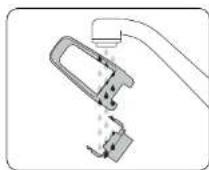
- Remove the water filter and the bracket from the plastic bag.
Rinse the bracket with clear, cold tap water.
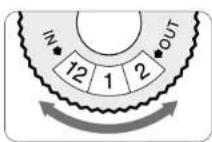
- Now, set the filter change reminder on the filter to the month for which the next water filter change is scheduled. We recommend a setting of three months at most.
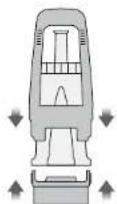
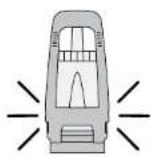
Now, place the filter in the bracket so that the upper part of the bracket locks into the bottom part of the bracket to the left and right.
- Place the assembled filter in the water tank. To do that, first align the base of the bracket with the adapter in the water tank, then push the filter into the adapter to firmly install it in the water tank.
Now, fill the water tank with the inlying filter with a maximum of 2,5 liters of cold tap water. Make sure not to exceed the MAX marking when filling the water tank.
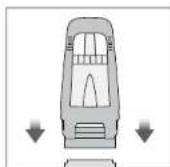
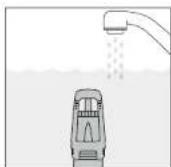
Dip the water hardness testing strip into the water tank for 1 second, then put it aside for at least 1 minute.
- Push the water tank all the way into the backside of the appliance. Lock the water tank by folding the handle up until it catches. Please wait at least 5 minutes until the water filter has soaked up the water.
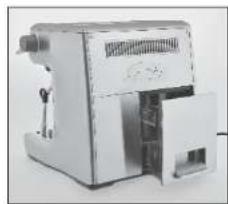
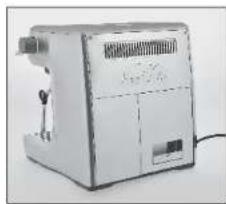
-
Check if the steam lever (L) and the hot water dial (B) are both set to the CLOSED position.
-
Plug the power plug into a suitable power outlet.
- Press the POWER button (C), the button surround flashes.
- A pumping sound can be heard, indicating that the empty boilers are filling with water for the first time.
- The display of the machine prompts you to adjust for water hardness. Read the ascertained water hardness off the testing strip. Use the or buttons to set any water hardness between 1 and 5. Press the MENU button to save the setting. The appliance beeps to confirm the input.
- Once the machine has reached the right operating temperature, it switches to standby mode. The button surrounds by POWER, MANUAL, and light up constantly.
RINSING THE MACHINE
We recommend letting the fully filled water tank run through the appliance to rinse its inside once before using the appliance for the first time. This is done without coffee powder.
Once the machine has reached standby mode (button surrounds by POWER, MANUAL, and up constantly), carry out the following three steps:
- Press the button and let water run through the brewing group.
- Set the HOT WATER dial (B) to OPEN and let hot water run through the hot water outlet (M) for 30 seconds. Then turn the dial back to CLOSED.
- Set the STEAM lever (L) to OPEN and let steam escape through the steam wand (N) for 10 seconds. Set the steam lever back to the CLOSED position. Always make sure that the steam wand is pointed towards the drip tray.
- Repeat these three steps until the water in the water tank is used up.
STARTING YOUR SOLIS BARISTA TRIPLE HEAT
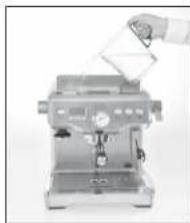
FILLING THE WATER TANK
Through the tank lid, fill the water tank up to the MAX marking with cold, fresh tap water. Never fill above the MAX marking.
Plug the power plug into a power outlet
Note: Check the water level in the water tank before every use. Renew the water daily. Fill the water tank with fresh, cold tap water before every use. Do not use any distilled, carbonated or flavored water or other liquids.
SWITCHING ON /HEATING UP THE ESPRESSO MACHINE
Press the POWER button to switch the machine on. The button surround of the POWER button flashes and the current temperature of the espresso boiler is shown in the display.
Once the machine has reached the right operation temperature, the button surrounds of the four buttons POWER, MANUAL, and right up constantly. The appliance is now in standby mode and ready for use.
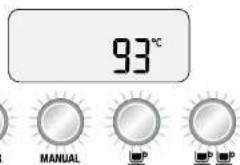
Notes: The , , and CLEAN CYCLE functions can not be used during the heating up phase.
The appliance switches off completely if it is not used or no buttons are pressed for more than 20 minutes (Automatic shutdown - power saving function).
LCD DISPLAY
The following 3 settings are shown on the display: Extraction temperature, extraction time or clock.
By pressing the or buttons, you can choose the settings extraction time and clock. Extraction time is displayed during the extraction phase. The extraction temperature is displayed in standby mode.
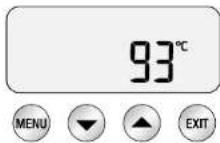
1. Extraction temperature (Shot Temp)
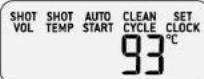
The shot temperature is shown in the display (standard setting: 93^ ), you can however change the setting and choose any temperature between 86^ and 96^ . You can find more detailed instructions on page 129 in the section "Programming the extraction temperature".
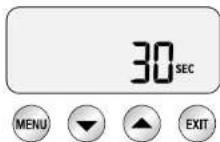
2. Extraction time (Shot Clock)
The duration of the most recent espresso extraction is briefly displayed in seconds.
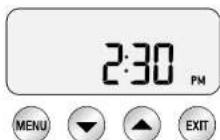
3. Clock
The current time is briefly displayed (if the current time has not been set by you, 12.00AM is displayed).
BASIC FUNCTIONS
1 SHOT OF ESPRESSO
Press the button to make one cup of espresso in the standard setting with an extraction time of 30 seconds. The extraction starts with the low pressure preinfusion function.
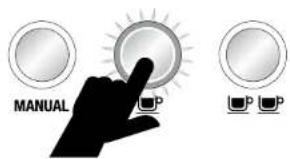
The machine stops automatically and returns to standby mode after the amount for one shot of espresso has been extracted.
2 SHOTS OF ESPRESSO
Press the button to make two cups of espresso in the standard setting with an extraction time of 30 seconds. The extraction starts with the low pressure preinfusion function.
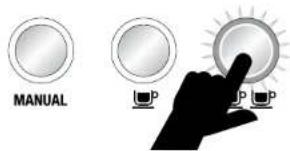
The machine stops automatically and returns to standby mode after the amount for two shots of espresso has been extracted.
MANUAL
You can decide yourself how much espresso should flow into the cup with the MANUAL button.
Press the MANUAL button once to start with the espresso extraction. Here, too, the extraction starts with the low pressure pre-infusion function.
If you want to stop espresso production, press the MANUAL button once more.
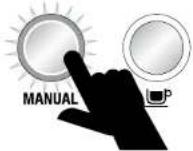
Note: You can stop the extraction at any time by pressing one of the following buttons: AP, ANUAL. The appliance then returns to standby mode.
STEAM FUNCTION
You can activate the steam function to steam milk at any time. To do that, you have to set the STEAM lever (L) to the OPEN position, the control light on the appliance front lights up and hot steam escapes through the pivotable steam wand (N).
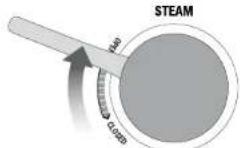
To switch the steam function back off, set the STEAM lever (L) back to the CLOSED position. The appliance returns to standby mode, the control light goes out.
Caution: Risk of burning!
Steam can escape even after you have switched the steam function off!
Always supervise children and keep them away from the appliance!
HOT WATER FUNCTION
You can activate the hot water function at any time, e.g. to make long blacks (Americano) or to pre-heat cups. To do that, you have to set the HOT WATER dial (B) to the OPEN position, the control light on the appliance front lights up and hot water flows out of the outlet (M).
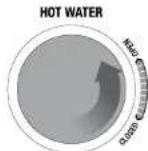
To switch the hot water function back off, set the HOT WATER dial (B) back to the CLOSED position. The appliance returns to standby mode and the control light goes out.
Note: Using the hot water function and making espresso at the same time is not possible.
PROGRAMMING SETTINGS
You can reprogram the standard settings with the LCD display and the four buttons beneath it. To do that, always press the MENU button first. All programmable functions are listed in the display. You can select the desired function by pressing the MENU button.
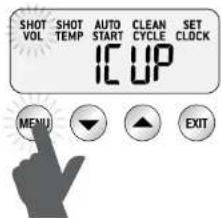
You can cancel settings at any time by pressing the EXIT button, returning to standby mode.
Note: The MENU button can not be pressed while espresso is made or the hot water function is activated.
PROGRAMMING THE EXTRACTION TIME (SHOT VOL)
Programming the extraction time for 1 cup
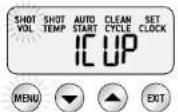
Press the MENU button until SHOT VOL flashes in the display and 1CUP is stated.
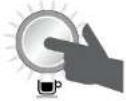
Press the button to make the water flow through the brewing group.
Press the button again once the desired time has been reached.
The appliance beeps twice to indicate that the new brewing time for 1 cup has been saved.
Programming the extraction time for 2 cups
Press the MENU button until SHOT VOL flashes in the display and 2CUP is stated.
Press the button to make the water flow through the brewing group.
Press the button again once the desired time has been reached.
The appliance beeps twice to indicate that the new brewing time for 2 cups has been saved.
Note: By default, the amounts for 1 and 2 cups are defined by the extraction time. Should you wish to determine the amount by precise volume data, please read the chapter "Fine tuning your settings in the advanced menu" on page 141.
PROGRAMMING THE EXTRACTION AMOUNT (SHOT VOL)
Programming the extraction amount for 1 cup
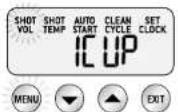
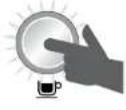
Press the MENU button until SHOT VOL flashes in the display and 1CUP is stated. Fill the filter insert in the portafilter with coffee powder and tamp it. Press the button again to start the espresso extraction. Press the button again once the desired amount of espresso has been extracted.
The machine beeps twice to indicate that the new amount for 1 cup has been saved.
Programming the extraction amount for 2 cups
Press the MENU button until SHOT VOL flashes in the display and 2CUPS is stated. Fill the filter insert in the portalfilter with coffee powder and tamp it. Press the button again to start the espresso extraction. Press the button again once the desired amount of espresso has been extracted.
The machine beeps twice to indicate that the new amount for 2 cups has been saved.
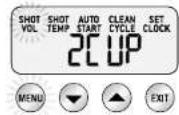

PROGRAMMING THE EXTRACTION TEMPERATURE (SHOT TEMP)
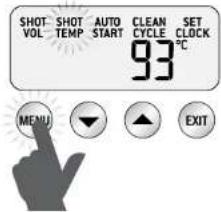
Press the MENU button until SHOT TEMP flashes in the display. The currently set extraction temperature is displayed (93 °C by default).
Press the or arrow buttons to set the desired temperature, ranging from 86^ to 96^ .
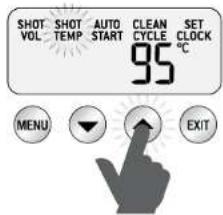
The new setting is shown in the display.
When the settings are completed, press the EXIT button. You can hear a single beep, the settings are saved.
Note: The origin of the coffee beans as well as their freshness and degree of roasting influence the optimal brewing temperature. We recommend a temperature setting between 90^ and 95^ to extract the optimal taste.
PROGRAMMING THE CURRENT TIME (SET CLOCK)
Press the MENU button until SET CLOCK flashes in the display. The default setting of 12.00AM is displayed (or the most recent time setting).
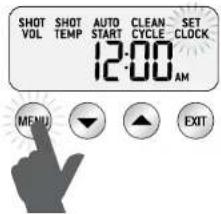
Press the arrow buttons or to set the current, correct time. Keeping the arrow buttons pressed will change the time setting in steps of 15 minutes.
(Caution: AM refers to a time between 00:00 and 12:00, PM refers to a time between 12:00 and 24:00)
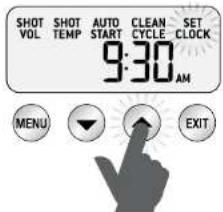
Press the EXIT button to save the input, a single beep will confirm your action.
PROGRAMMING THE AUTOMATIC-START FUNCTION (AUTO START)
Important: To activate the Auto-Start function, the current time has to be set.
Switching Auto-Start on or off
Press the MENU button until AUTO START flashes in the display and the current setting (ON or OFF) is shown in the display.
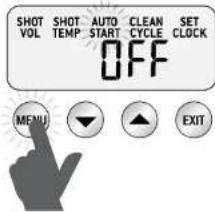
Switch between ON and OFF with the arrow buttons or
If the Auto-Start function is switched on, the display states ON.
Now, press the MENU button again to display the current Auto-Start time (7:00AM by default).
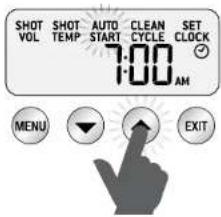
Using the arrow buttons or , you can set the desired Auto-Start time in steps of 15 minutes. (Caution: AM refers to a time between 00:00 and 12:00, PM refers to a time between 12:00 and 24:00)
Press the EXIT button to save the setting, a single beep sounds as a confirmation and the clock symbol is displayed. If the machine stays connected to the power, it will automatically switch on at the set time.
ACTIVATING THE CLEANING CYCLE (CLEAN CYCLE)
Press the MENU button until CLEAN CYCLE flashes in the display and PUSH is displayed.
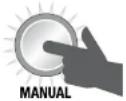
To start the cleaning cycle, press the illuminated MANUAL button.
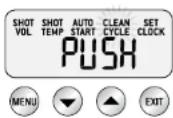
CLEAN CYCLE keeps flashing and a count down shows up in the display, counting down from 370 seconds.
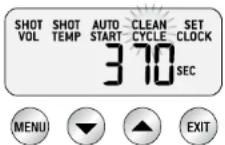
Once the cleaning cycle is completed, the machine returns to standby mode. You can find instructions for cleaning on page 148.
RINSING THE BREWING GROUP
You can rinse the brewing group with the pressure force of 9 bar. To do that, press and hold the button. Doing this skips the low pressure pre-infusion phase and water flows out of the brewing group at a pressure of 9 bar right away.
You can do the same with the button. Once you release the button, the rinsing function stops.
MANUALLY CONTROLLING LOW PRESSURE PRE-INFUSION PHASE DURATION
Press and hold the MANUAL button to make water for pre-infusion come out of the brewing head at low pressure. Once you release the MANUAL button, the water flows out of the brewing head with a pressure of 9 bar for brewing espresso. Pressing the MANUAL button another time stops the extraction. This function is helpful if you wish to control the duration of low pressure pre-infusion yourself.
You also have the option of fine tuning your settings in the advanced menu. Please refer to page 141 for more detailed information.
COFFEE PREPARATION
PRE-HEATING ALL UTENSILS
PRE-HEATING CUPS OR GLASSES
The espresso keeps its ideal temperature longer in a pre-heated cup. Use the hot water function to fill the cup with hot water, pour it out after a while and then use it to make your espresso.
PRE-HEATING THE PORTAFILTER AND THE FILTER INSERT
A cold portafilter or filter insert can decrease the extraction temperature and impair the espresso taste. Therefore, these two parts should be pre-heated as well. Use the hot water function to rinse them with hot water.
Caution: Please dry the portafilter and the filter insert in any case with a kitchen towel before filling it with coffee powder. Residual moisture might lead to the water being led around the coffe powder during extraction.
GRINDING COFFEE BEANS - SETTING THE GRIND SIZE
The coffee beans should be ground finely, but not too finely. The grind influences the speed at which the water passes through the coffee powder in the filter insert and is therefore crucial for the taste of the espresso.
If the grind is too fine (it looks powdery and feels like flour when rubbed between the fingers), the water can not pass through the coffee powder even at very high pressures. The result is an over extracted espresso, black and bitter.
If the grind is too coarse, however, the water passes through the coffee powder in the filter too quickly and the espresso is under extracted, weak in taste and watery. Note: When using the single wall filter for 1 cup, the grind should be finer and the amount of powder should be smaller to ensure a full taste.
FILLING THE FILTER INSERT WITH COFFEE POWDER
Choose the right filter insert:
Use the single wall filter insert for freshly ground coffee powder or the dual wall filter insert for pre-ground coffee powder.
With single wall filter inserts for freshly ground coffee powder, you can experiment with grind size, dosage and contact pressure to create the most balanced espresso. The single wall filter inserts have no marking on the bottom.
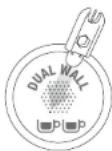
The dual wall filter inserts for pre-ground coffee powder optimize the extraction pressure and provide optimal espresso taste, independent of grind size, dosage and tamping pressure or coffee powder freshness. The dual wall filter inserts are marked with the DUAL WALL identifier and the symbol for one cup resp. two cups on the bottom.
Use the smaller filter for 1 cup and the larger filter for 2 cups. If you want to brew a large cup of coffee, always use the filter insert for two cups and let approx. 60ml of water run through.
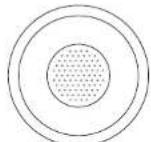
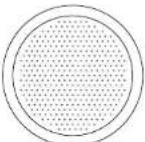


for 1 cup for 2 cups for 1 cup for 2 cups
Single wall filter inserts Dual wall filter inserts
for freshly ground coffee for pre-ground coffee
TAMPING THE COFFEE GROUNDS WITH THE TAMPER
Wipe the filter insert with a dry cloth.
- Insert the filter insert into the portafilter and fill the filter insert with coffee grounds.
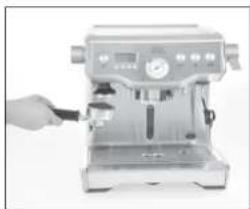
Gently knock the portafilter against the worktop to evenly spread the coffee powder in the filter insert. Use the tamper to tightly tamp down the coffee powder. You can either do this by mounting the tamper into the machine and pressing the portafilter against it from below or removing the tamper from the appliance and tamp the coffee powder in the portafilter by hand.
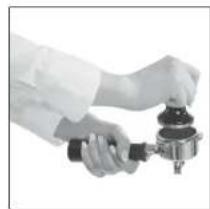
Press down with approx. 15 - 20kg of pressure and repeat the tamping several times. Applying consistent pressure is more vital than applying extremely high pressure. After tamping, you might need to add some more coffee grounds and tamp again to ensure there is enough coffee grounds in the filter insert for the coffee you desire. Tip: After tamping, the coffee powder should be just below the edge of the filter insert. When pressing the tamper onto the portafilter, the metal part of the tamper should just so disappear in the filter insert.
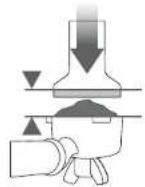
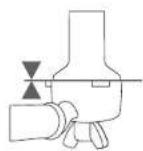
Note: When using finely ground coffee for the single wall filter insert, you might need to use less coffee than usual to achieve the right amount.
- After tamping, remove residual coffee from the edge of the portal filter as described below. This allows it to be correctly inserted in the brewing head.
In general:
A truly great espresso is a balance of sweet, bitter and sour. The flavour of your coffee will depend on many factors, such as the type of coffee beans, roasting temperature, freshness, coarseness or fineness of the grind, dose of coffee grounds and tamping pressure. Experiment by adjusting these factors to achieve the perfect flavour for you.
EXTRACTION GUIDE
GRIND GRIND DOSE TAMP PROCESSING
TIME
| OVER EXTRACTED bitter - astringend | too fine too | much too heavy over | 40 sec | |
| BALANCED | optimum | 10-12g (1 cup) 18-20g (2 cups) | 15-20 kg 25 | 35 sec |
| UNDER EXTRACTED underdeveloped - sour | too coarse | too little | too light | under 20 sec |
The specially designed measuring instrument "Razor" helps you remove excess coffee grounds and clean the portafilter edge at the flick of a wrist.
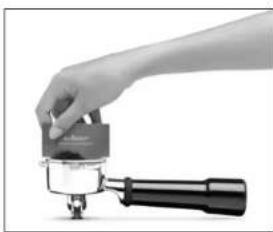
Place the "Razor" in the filter insert, the punched out corners of the instrument lie on the edge of the portafilter.
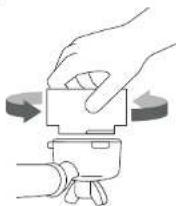
Turning the instrument to the left and right while holding the portafilter over the drip tray will remove excess ground coffee from the portafilter edge. The amount of ground coffee in the filter insert will be just right.
Wipe excess coffee powder off the edge of the portafilter to guarantee precise contact when inserting the portafilter into the brewing group.
Notes: In case the extraction is too fast, the grind size should be finer and the steps mentioned above should be repeated.
In case the extraction is too slow, the grind size should be coarser and the steps mentioned above should be repeated.
■ RINSING THE BREWING GROUP
Before inserting the portafilter in the brewing group, you should briefly run hot water through the brewing group to rinse it. To do that, press and hold the button. Like that, potential coffee powder leftovers are flushed out of the brewing head and the temperature is stabilized prior to the extraction.
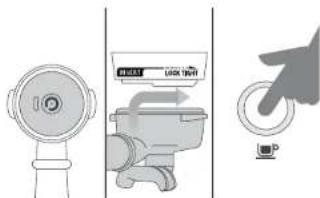
INSERTING THE PORTAFILTER
- Place the portafilter under the group head so that the handle is placed directly underneath the inscription INSERT.
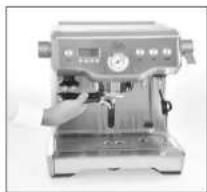
Push up the portafilter against the group head and turn the handle to the right until the handle is at the LOCK TIGHT position. The handle should now be at a 90^ angle to the machine.
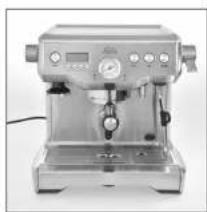
- When all four button surrounds light up constantly, the machine has reached its correct operation temperature and you can make a coffee.
MAKING ESPRESSO
- Place the pre-heated cup (or cups) on the drip tray under the portafilter outlets and press the or, depending on the desired amount of espresso.
- After approx. 8–10 seconds (the appliance needs this time to moisten and "pre-infuse" the coffee powder), espresso flows into the cup. The consistency should resemble dripping honey.
Should the espresso start flowing in 6 seconds or less, you have either filled the portafilter with not enough coffee, tamped too little or the grind size is too coarse. In this case, the espresso is under extracted. - Should the espresso only escape in drops or not flow after 15 seconds, the grind size was too fine or you have used too much coffee powder. In this case, the espresso is over extracted.
STEAMING MILK
The professional steam wand of your Solis Barista Triple Heat can be rotated in all directions and transforms fresh, cold milk into creamy and warm steamed milk. This is done in two steps: First, the milk is loosened with air, then it is thoroughly whisked to make it creamy and well-tempered.
Please proceed as follows:
- Move the steam wand above the drip tray.
Before submerging the steam wand in the milk, you should clean the steam wand with a moist towel and rinse its inside by letting some steam run through. Do this by setting the steam lever (L) to the OPEN position. Then, push the lever back to the CLOSED position. - Pour fresh, cold milk into the milk jug - there should only be so much milk filled in that it does not exceed the V of the spout.
- The tip of the steam wand should be around 1 - 2cm under the milk surface, near the side of the jug and in the 3 o'clock position.
- Set the steam lever to the OPEN position.
- Hold the tip of the wand directly under the milk surface until the milk is rotating in a clockwise direction like in a whirlpool.
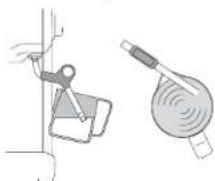
Once the milk is spinning, you can lower the jug so that the tip of the steam wand is just on the surface of the milk. This allows air to get into the milk. Keep the wand at the surface and repeatedly dip it into the milk just enough to keep the milk spinning.
Hold the tip of the steam wand at or slightly below the surface of the milk to keep the milk spinning until it has gained enough volume.
Dip the tip under the surface of the milk, the vortex should be maintained. When the milk jug becomes too hot to touch, the milk has reached the correct temperature of approx. 60 - 65^
- When the milk is heated up and steamed, set the steam lever (L) back to the CLOSED position and only then remove the milk jug.
Put the milk jug aside.
- Point the steam wand above the drip tray. Set the steam lever (L) to OPEN again and let some steam escape into the drip tray to flush milk leftovers out of the steam wand. Wipe the steam wand clean with a moist towel.
Gently knock the milk jug onto the worktop to release potential air bubbles and gently sway the jug to even out the consistency.
- Pour the steamed milk directly onto the espresso. The trick is working quickly to prevent the milk from separating and the "Crema" from dissolving.
Caution: Always grab the steam wand by the rubberized part, as the metal parts become very hot. You could burn yourself on them.
AFTER MAKING ESPRESSO
- Remove the portafilter from the group head. To do this, turn the handle of the portafilter to the left until it comes loose.
- Remove the coffee dregs from the portafilter by flipping it 180 degrees and gently tapping it down. Please discard the coffee dregs with your household waste instead of flushing them down the drain, as they might clog up the wastewater pipes.
Rinse the filter insert and the portafilter with hot water. Wipe the portafilter and the filter insert clean with a dry towel. - Press and hold the button. Let hot water run through the brewing group for 30 seconds to rinse the appliance. Then, release the button.
- Place the portafilter back in the brewing head.
TIPS AND TRICKS
- Use freshly roasted coffee beans (e.g. 100% arabica beans), with a "roasted on" date and use within 2 weeks.
- We recommend to grind beans immediately before brewing as coffee grounds quickly lose their flavour and aroma.
- Store coffee beans in a cool, dark, airtight and dry container. Vacuum seal is recommended.
Buy coffee beans in small batches to reduce the storage time and store no more than one weeks supply at any time.
FINE TUNING YOUR SETTINGS IN THE ADVANCED MENU
Please proceed as follows to get to the advanced menu:
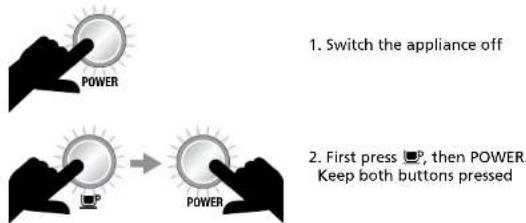
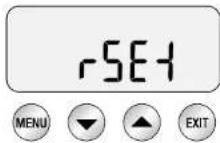
If the machine is plugged in but not switched on, first press and hold the button while also pressing the POWER button. The display states "rSEt".
RESTORING DEFAULT SETTINGS
The Solis Barista Triple Heat has the following default settings:
- Extraction temperature 93^ 5.Auto-Start OFF
2.Pre-infusion time Pr07 6. Audio LO
3.Pre-infusion power PP60 7.Water hardness 3 - Steam temperature 135°C 8. Extraction time 30/30 sec.
To restore these default settings, you first have to get to the advanced menu as described above. "rSEt" is stated in the display. Now, press the MENU button to restore the default settings. The machine beeps three times to indicate the restoration.
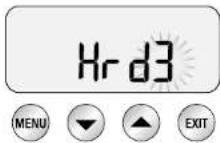
The machine now prompts you to set water hardness. "Hrd3" lights up. You can select your water hardness with the arrow buttons or and confirm by pressing the MENU button or press the EXIT button if the pre-set water hardness value 3 is correct to return to standby mode.
CHANGING TEMPERATURE UNITS (SET)
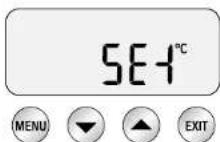
The temperature unit is displayed next to "SET". The standard setting is ^ C . Go to the advanced menu. "rSET" is displayed. Press the button multiple times to get to the "SET" setting. Then, press the MENU and arrow buttons or to set the desired temperature unit. You can choose between Fahrenheit " F " and Celsius " C " . Press the MENU button, the setting is saved. The machine beeps once to confirm the setting.
You can change the steam temperature to control the steam pressure.
Choose a lower steam temperature for steaming little amounts of milk or to have more control over the steaming process. If you want to steam large amounts of milk however, you should increase the steam temperature.
Proceed as follows:
Go to the advanced menu. "rSET" is displayed. Press the button multiple times to get to the "StEA" setting. Then, press the MENU button. Use the arrow buttons or to set the desired temperature.
Press the MENU button to save the setting. The machine beeps once to indicate that the setting has been made. The default steam temperature setting is 135^ .
ADJUST THE APPLIANCE SOUND (SND)
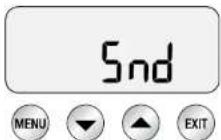
You can adjust the beep sound volume with the "Snd" setting.
HI for high volume
LO for low volume
OFF beep sound deactivated
Go to the advanced menu. "rSET" is displayed. Press the button multiple times to get to the "Snd" setting. Then, press the MENU button.
Use the arrow buttons or to set the desired volume (HI, LO or OFF). Press the MENU button to save the setting. The machine beeps once to indicate that the setting has been made. The default setting is LO.
VOLUME CONTROL (VOL)
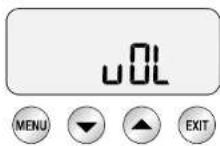
Choose this function to determine the duration or the amount (volume) of the obtained espresso.
Go to the advanced menu. "rSEt" is displayed. Press the button multiple times to get to the "vOL" setting.
Press the MENU button, "SEt" is displayed.
Use the arrow buttons to choose whether you want to adjust FLo (brewing time defined by amount) ▲ or SEc (brewing time defined by seconds) ▼. Press the MENU button to save the setting. The machine beeps once to indicate that the setting has been made.
Note:
In the SEc setting, the issued espresso amount can vary greatly, depending on the selected coffee powder grind size. The preparation time is set to a consistent amount of seconds.
In the FLo setting, the issued espresso amount is rather stable, no matter which grind size you selected. The preparation time is set to a mostly consistent amount.
PROGRAMMING THE LOW PRESSURE
PRE-INFUSION FUNCTION
You can program the duration or the power of the pre-infusion function. If the machine is in standby mode, you can get to the pre-infusion program by simultaneously pushing both arrow buttons . You can switch between pre-infusion duration and pre-infusion power with the MENU button.
Pre-infusion duration (Pr07)
The display shows the current pre-infusion duration. You can change the time with the arrow buttons or .
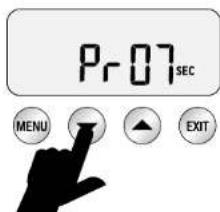
We recommend a setting between 5 and 15 seconds for optimal pre-infusion duration. The default setting is 7 seconds.
Press the EXIT button to confirm the setting and return to the standby mode.
Pre-infusion power (PP60)
The display shows the current pre-infusion power. You can change the power with the arrow buttons or .
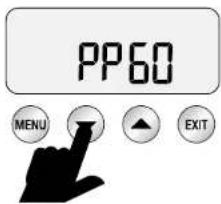
We recommend a range between 55 and 65 as optimal power. The default setting is 60. Press the EXIT button to confirm the setting and return to the standby mode.
ALARM DISPLAYS
When switching on, the steam control light flashes
The appliance can not be switched on if the STEAM lever (L) is set to OPEN and the control light is flashing.
First, set the STEAM lever to the CLOSED position to allow the machine to be switched on.
When switching on, the hot water control light flashes
The appliance can not be switched on if the dial for HOT WATER (B) is set to the OPEN position and the control light is flashing.
Turn the HOT WATER dial to the CLOSED position first to allow the machine to be switched on.
Hot water control light flashes
The hot water control light flashes if the function is activated for more than 1 minute. You should return the HOT WATER dial to the CLOSED position so that the appliance returns to standby mode.
FILL TANK lights up in the display
The appliance detects too low water levels in the water tank. FILL TANK is displayed.
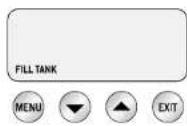
Should FILL TANK be displayed, fill the water tank with cold tap water through the upper lid until the notice disappears and the appliance returns to standby mode. Never exceed the MAX marking.
CLEAN ME! lights up in the display
The appliance detects if 200 espressos have been obtained since the last cleaning cycle.
When the appliance is switched on the next time, the text CLEAN ME! is displayed.

Please proceed as described in the section "Conducting a Cleaning Cycle" on page 148 to clean the appliance.
NEW FILTER lights up in the display
The appliance detects if the water filter in the water tank needs replacing. NEW FILTER is displayed. If that happens, please change the water filter as described on page 120.

The frequency of the filter changes depends on the water hardness setting (Hrd1 to Hrd5). The filter should be changed at least after 3 months or 40 liters of water. Please refer to page 121 of this manual for more information.
CLEANING AND MAINTENANCE
CLEANING AFTER EVERY ESPRESSO EXTRACTION
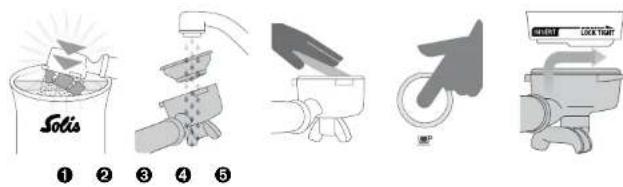
- Knock out the coffee powder.
- Rinse the filter insert and the portafilter with hot water.
- Wipe the filter insert and the portafilter clean with a dry towel.
- Press and hold the button. Let hot water run through the brewing group for 30 seconds to rinse the machine. Then release the button.
- After that, place the portafilter back in the brewing head.
DAILY CLEANING
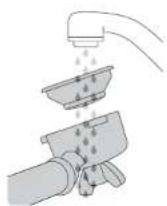
0
2
- Rinse and clean the portafilter and the used filter inserts thoroughly under running water. Empty the drip tray and fill the water container with fresh water. Make sure not to exceed the MAX marking.
- Place the rubber cover in the filter insert for 1 cup. Place the filter insert in the portalfilter and mount the portalfilter to the brewing group. Press the button to build up pressure in the filter insert. Repeat this process multiple times to remove all residual coffee oil in the appliance resp. the espresso water ducts from the filter insert and portalfilter.
CONDUCTING A CLEANING CYCLE
Through regular use, residues of coffee powder and coffee oil form in the appliance, impairing the brewing process. Therefore, you should conduct a cleaning cycle after obtaining 200 espressos, meaning every time "CLEAN ME!" is displayed.
Proceed as follows:
-
Empty the drip tray and return it to the appliance. Fill the water tank up to the MAX marking.
-
Place the rubber cover in the filter insert (for one or two cups) and the filter insert in the portafilter.
-
Place a SOLITABS cleaning tablet (without sponge) in the filter insert, on the rubber disk.
-
Twist and install the portafilter in the brewing head.
-
Press the MENU button until the CLEAN CYCLE text flashes and PUSH is displayed.
-
To start the cleaning cycle, press the MANUAL button.
-
The CLEAN CYCLE text flashes and 370 seconds are counted down in the display.
-
Once the count down has reached 0, switch the appliance off with the POWER button, remove the portafilter and check if the SOLITABS tablet has completely dissolved. Should this not be the case, repeat steps 3 to 6 until the tablet has completely dissolved. Should the SOLITABS tablet have dissolved, rinse the portafilter and the filter insert with warm water.
-
Should you encounter problems when making espresso the next time, please refer to the section "Troubleshooting" for ideas on how to solve the problem.
-
The Troubleshooting section can be found on page 156-158.
-
SOLITABS cleaning tablets are available from good specialist retailers or from Solis of Switzerland Ltd.
Telephone: 0848 804 884, Telefax: 0848 804 890
email: info.ch@solis.com or www.solis.ch
(Shipping only within Switzerland)
CLEANING THE STEAM WAND
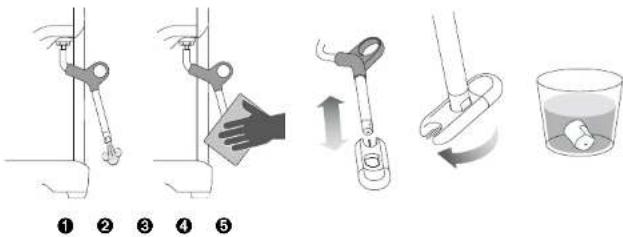
The steam wand should be cleaned every time after steaming milk.
Proceed as follows:
- Point the steam wand towards the drip tray and set the steam lever to the OPEN position. Like this, remove potential milk residues by letting some steam escape. Set the steam lever to the CLOSED position. Switch the appliance off with the POWER button and let the appliance cool down.
- Wipe the outside of the steam wand with a damp cloth.
- If the steam wand remains blocked, use the pin on the cleaning tool to clear the opening.
- If the steam wand remains blocked at all, the tip of the steam wand can be removed by using the spanner in the centre of the cleaning tool. Unscrew the tip.
- Soak the tip in hot water before using the pin on the cleaning tool to unblock. Replace the tip back onto the steam wand and secure with the spanner in the cleaning tool.
CLEANING THE FILTER INSERTS AND PORTAFILTER
The filter inserts and portafilter should be emptied out and rinsed under hot, running water after every use to remove all residues of coffee oil. Turn the portalfilter with an empty filter insert into the brewing head and let hot water run through it by keeping the button pressed for 30 seconds.
Should the holes in the filter inserts be clogged, dissolve a SOLITABS cleaning tablet in a glass of hot water and place the filter inserts and the portafilter in the solution for approx. 20 minutes. After that, carefully rinse the filter inserts and the portafilter under hot water and dry everything. The fine holes in the filter inserts can be punched out resp. cleaned with the fine needle under the protection cap on the cleaning tool.
CLEANING THE BREWING HEAD
The brewing head with the brewing head sieve should be cleaned daily with a damp cloth to wipe away all coffee powder residues. We recommend letting hot water run through the brewing group regularly with the portalfilter and an empty filter insert mounted into the brewing head. Best press the or for 30 seconds to let hot water run through at high pressure (see page 132, "Rinsing the brewing group").
BACK FLUSHING WITH CLEAR WATER
- Place the rubber cover in the filter insert for 1 cup. Place the filter insert in the portafilter and mount the portafilter to the brewing group.
- Press the button to build up pressure in the filter insert.
- Repeat this process multiple times to remove all coffee oil residues in the appliance resp. the espresso water ducts from the filter insert and the portafilter.
CLEANING THE OUTER HOUSING AND CUP WARMING PLATE
Before cleaning the outer housing, the appliance must be switched off and unplugged.
Wipe the outer housing and the cup warming plate clean with a soft, slightly wet cloth and then dry it with a dry cloth.
Do not use abrasive cleaners, pads or cloths which can scratch the surface.
CLEANING THE DRIP TRAY
Before cleaning the drip tray, the appliance must be switched off and unplugged.
The drip tray should be removed, emptied and cleaned at regular intervals, particularly when the drip tray full indicator is showing EMPTY ME!
Remove the drip tray grill from the tray. Clean the drip tray and the grill with warm dish water. Do not use any aggressive detergents or scratching sponges. Rinse the tray and the grill with clear water and dry everything carefully.
Caution: None of the espresso machine parts can be cleaned in the dish washer!
Place the drip tray back in the appliance and place the grill back on the drip tray.
CLEANING THE ACCESSORY COMPARTMENT
The accessory compartment located behind the drip tray can be removed when the drip tray has been removed. Clean the accessory compartment with warm dish water and do not use any aggressive cleaners or scouring sponges. After that, dry the accessory compartment thoroughly before replacing it.
Warning: Always when cleaning keep in mind that neither the power cord nor the power plug or the appliance itself must be submerged in water or other liquids.
Caution: None of the espresso machine parts can be cleaned in the dish washer!
STORING THE SOLIS BARISTA TRIPLE HEAT
Set the steam lever and the hot water dial to the CLOSED position and switch the appliance off with the POWER button. Disconnect the power plug from the power socket. Store all accessory parts away.
Store the cooled down, cleaned, emptied and completely dry machine in an upright position, best in the original packaging. Do not place any items on the appliance.
DESCALING
Hard water can cause limestone deposits to form in and on many functioning parts if the machine is used regularly. This reduces brewing flow and power of the machine and impairs the quality of the coffee. We therefore recommend descaling the machine with a mixture of water and SOLIPOL® special when the DE-SCALE! notice appears on the display, at least every 1–2 months, depending on water hardness. Please follow the descaling instructions. If the machine is descaled too little or too late, the coffee quality suffers and the machine could be permanently damaged. The removal of defects that are caused by delayed descaling is not covered by warranty and has to be charged for.
Note: We recommend using exclusively SOLIPOL® special as a descending agent and refuse to take any responsibility for damages caused by the use of other descending agents.
Caution: Should the descending agent - even in a diluted form - splash or drip onto the appliance, please wipe it off immediately to prevent damage to the surface of the appliance.
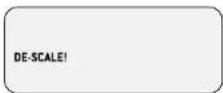
If this notice is displayed, descaling has to be conducted!
Note: Calculate approx. 1,5 hours for the full descaling process and follow these instructions.
Should you have just used your machine, you have to switch your appliance off and let it cool down for at least one hour before descaling it in any case.
Warning: Never submerge the power cord, the power plug or the appliance in water or any other liquid.
- Preparations for descending
a) Remove the drip tray, empty it and place it back in the appliance.
b) Switch the machine off and let it cool down for at least 1 hour. Press and hold the button and then also press the POWER button for 3 seconds with the appliance turned off. "rSET" is displayed.
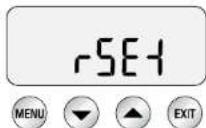
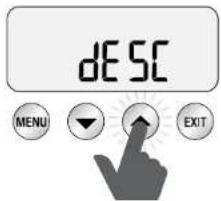
c) Press the arrow button until "dESC" (for descending) is displayed. Then, press the MENU button to get to descending mode.
- Emptying the boilers
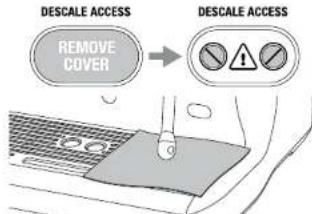
a) Remove the black silicone cover marked with DESCALE ACCESS to the bottom right of the appliance front. Place a towel over the drip tray so that no steam can escape.
b) Use a flathead screwdriver to counter clock wisely open the right screw until the valve is completely open. If the valve is open, steam can escape. Water should now run into the drip tray.
Note: Should no water run into the drip tray, keep the button pressed for 3 seconds so that water escapes from the boiler.
Once the water has been emptied out completely, faster the screw by turning it clock wisely. The screw should not be overdone to prevent damages to the valve.
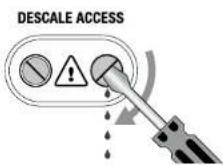
c) Now repeat the b) process with the left screw.
d) Remove and empty the drip tray. Be careful, the drip tray resp. the water in it can be hot. Place the drip tray back in the appliance.
e) Remove the water tank, empty it out and remove the water filter.
f) Fill the water tank up to the MAX marking with a mixture of SOLIPOL® special liquid descending agent and water (dilute SOLIPOL® special with water at a ratio of 1:1). Then, place the water tank back in the appliance and lock it.
Caution: Should the descending agent - even in a diluted form - splash or drip onto the appliance, please wipe it off immediately to prevent damage to the surface of the appliance.
3. Starting descending
Press the button to start descending.
The appliance fills the boilers with descending solution and heats up. During this time, water can flow through the brewing group. Wait for the count down in the display to reach 0, this takes 20 minutes. In this time, the descending solution can affect and remove the limestone deposits. However, you can proceed to the next step before that by pressing the button.
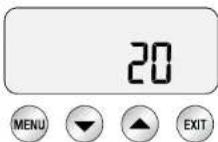
a) Place a towel over the drip tray so that no steam can escape.
b) Empty the boilers as described in steps 2b and 2c.
c) Remove and empty the drip tray and place it back in the appliance.
d) Remove and empty the water tank. Rinse the water tank with clear tap water, reinstall the water filter and refill the water tank up to the MAX marking with fresh tap water. Place the water tank back in the appliance and lock it. If you have installed a new water filter, wait at least 5 minutes until it has soaked up the water.
Note: Please wipe off potential splashes of descending solution on the outer housing of the machine immediately, as the substance could damage the surface.
4. Rinsing the boilers
Press the button to proceed.
During the process, the count down reappears in the display (20 minutes).
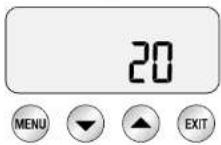
During this time, the boilers fill with fresh, clean water and are heated up. You can proceed to the next step at any time by pressing the button.
a) Place a towel over the drip tray so that no steam can escape.
b) Empty the boilers as described in steps 2b and 2c.
c) Remove and empty the drip tray and place it back in the appliance.
d) Remove and empty the water tank. Rinse it with clear tap water and refill it up to the MAX marking with fresh tap water. Place the water tank back in the appliance and lock it.
5. Repeat step 4 to rinse the boilers again
We recommend rinsing the boilers again to remove potential residues of the descaling solution.
When you have completed the descending phase, press the POWER button to quit descending mode. Descaling has been completed and your appliance is ready for use once again. Refill the water tank with fresh tap water.
TROUBLESHOOTING
| Problem Potential | cause Solution | |
| The hot water control light flashes when the appliance is switched on. | The hot water dial is set to the OPEN position. | Turn the dial to the CLOSED position. |
| The steam control light flashes when the appliance is switched on. | The steam lever is set to the OPEN position. | Set the steam lever to the CLOSED position. |
| Water does not flow out of the brewing head. | The machine has not yet reached its operating temperature.The water tank is empty.The water tank is not correctly mounted and locked in all the way. | Wait until the brewing temperature is reached. You can tell from the POWER button surround lighting up constantly instead of flashing.Fill the water tank with fresh, clean tap water.Push the water tank in all the way and fold the handle down. |
| FILL TANK is displayed even though the tank is full. | The water tank is not correctly mounted and locked in all the way. | Push the water tank in all the way and fold the handle down. |
| No water or hot steam is being generated. | Machine is not switched on. | Check if the power plug is connected and the POWER button is pressed. |
| No hot water is being generated. | The water tank is empty. | Fill the water tank with fresh, cold tap water. |
| No steam is being generated. | The steam wand is blocked resp. clogged. | Use the needle in the cleaning tool to punch through the holes. Should the steam wand still be clogged, unscrew the tip using the middle bore of the cleaning tool and place the tip in hot water. |
| The machine is switched on but can not be operated. | Switch the machine off. Wait 60 minutes and switch the machine back on. Should the problem persist, contact the Solis service center. |
| Problem Potential | cause Solution | |
| Steam escapes from the brewing-head. | Switch the machine off. Wait 60 minutes and switch the machine back on. Should the problem persist, contact the Solis service center. | |
| The coffee only comes in drops from the portafilter. | Coffee powder is ground too finely. Too much coffee powder in the filter insert. Filter insert is clogged. | Grind the coffee beans at a coarser grind size. Decrease the dosage and use the RAZOR dosing instrument.Use the fine needle in the cleaning tool to clean the holes. Should the problem persist, dissolve a SOLITAB5 cleaning tablet in a glass of hot water and place the filter insert and the portafilter in the cleaning solution for approx. 20 minutes. After that, rinse and dry carefully. |
| Coffee flows too quickly and /or the pressure gauge does not reach the 9 bar marking. | Coffee powder is ground too coarse. Too little coffee powder in the filter insert. Coffee powder has not been tamped strongly enough. | Grind the coffee beans at a finer grind size.Increase the dosage and use the RAZOR dosing instrument to wipe away excess coffee powder after tamping.Press with an even force of 15-20 kg.Should the above-mentioned solutions not help, check your machine. Place an empty DUAL WALL filter insert in the portafilter (either for 1 or 2 cups), Press the MANUAL button. Should the pressure gauge needle go above 5 bar, the machine is in order. Always make sure that the amount of coffee powder is right, the dosing instrument RAZOR can help you with that. Should the dosage not be responsible, try a finer grind size. Should the pressure gauge needle be below 5 bar, contact the Solis service centre. |
| The coffee is not hot enough. | The cups have not been pre-heated. The milk is not hot enough (when making Cappuccino or Latte). | Rinse the cups with hot water under the hot water outlet and warm the cups on the cup warming plate.Hold the milk under the steam wand until the jug bottom becomes too hot to touch. |
| No Creme. Coffee beans | ants are stale.You have used single wall filters with pre-ground coffee. | Buy freshly roasted coffee beans and grind them just before preparation.Always use DUAL WALL filters when using pre-ground coffee powder. |
| Coffee runs down theportafilter and / or portafilter comes out of the brewing head while brewing espresso. | Portafilter not correctly mounted to brewing group.Coffee residues on the edge of the filter insert.Edge of the filter insert is wet or the bottom of the portafilter bracket is wet. Wet surfaces decrease friction necessary for holding the portafilter in place, which is under pressure during the extraction. Too much coffee powder in the filter insert. | Make sure that the portafilter has been turned in all the way to the right, until the handle stands in the center. If the handle be turned over the center, the silicone sealing is not damaged.Remove coffee remains from the edge of the filter insert to ensure proper mounting in the brewing head.Always make sure that the filter insert and portafilter are dry before they are filled with coffee powder and inserted into the brewing head.Use the dosing instrument RAZOR after having tamped the coffee powder. |
| The automatic starting time cannot be set. | The current time has not been set. | Always set the current time first. |
| The error messages E1, E2 or E3 are displayed. | An error that can not be solved by the user has occurred. | Please contact a Solis service center. |
| Coffee powder is sticking to the brewing head sieve. | This is normal and happens from time to time. The function "Dry coffeeregrets" generates a small vacuum in the upper end of the coffee dregs, causing the coffee dregs to stick to the brewing head sieve instead of remaining in the filter insert. | |
| The pump keeps running / The steam is very wet / The hot water outlet has a leak. | You have used semi-neralized or distilled water, which impairs the functionality of the machine. | We recommend always using cold, slightly filtered water. It is not recommendable using water with little or no minerals as e.g. distilled water. Should the problem persist even though you use tap water, please contact the Solis service center. |
COFFEE VARIATIONS

CAPPUCCINO
An espresso, infused with steamed milk and topped with a little bit of drinking chocolate.

ESPRESSO
Intense and aromatic, it is also known as a "short black". Served in a small cup or small glass.

LATTE
A Latte is made of an espresso, infused with steamed milk and approx. 1 cm of foam as a crown.

ESPRESSOMACCHIATO
An espresso topped with a crown of steamed milk.

LONG BLACK OR AMERICANO
First, pour hot water into the cup and then add an espresso so that the Crema stays intact.

RISTRETTO
A very short espresso (approx. 15ml) with a great deal of aroma and aftertaste.
COFFEE AND SUPPLIES
The following accessories, kinds of coffee and consumables are available for your Solis Barista Triple Heat machine:
Art.-no.700.81 Water filter
Art.-no. 993.02 SOLITABS cleaning tablets (10 tablets)
Art.-no. 703.02 SOLIPOL® special descaling agent (1,0 liter)
Art.-no. 978.40 Solis knocking tray
Art.-no. 960.89 Solis Caffissima coffee grinder (with Swiss plug)
Art.no.960.90 Solis Caffissima coffee grinder (with SCHUKO plug)
Art.-no. 960.91 Solis Caffissima IQ Digital coffee grinder (with Swiss plug)
Art.-no. 960.92 Solis Cafissima IQ Digital coffee grinder (with SCHUKO plug)
Art.-no. 992.00 Solis De Luxe coffee beans (500g package)
Art.-no. 992.04 Solis Exclusif coffee beans (500g package)
Art.-no. 992.60 Solis Crema coffee beans (500g package)
The accessories and consumables for your Solis Barista Triple Heat machine are available from good specialist stores or from Solis of Switzerland Ltd. Telephone: 0848 804 884, Telefax: 0848 804 890, email: info.ch@solis.com or www.solis.ch (shipping only within Switzerland)
TECHNICAL SPECIFICATIONS
Model-no.BES920,type 1011
Product description: Espresso machine
Voltage/frequency 220-240V/50/60Hz
Output 1.800-2.200 Watts
Dimensions approx. 41× 38× 37 cm (length × height × depth)
Weight approx. 13,2 kg
Technical changes reserved.
DISPOSAL

EU 2002/96/EC
Information for correct disposal of the product in accordance with the European Directive 2002/96/EC
At the end of its working life this equipment must not be disposed of as an household waste. It must be taken to special local community waste collection centres or to a dealer providing this service. Disposing of electrical and electronic equipment separately avoids possible negative effects on the environment and human health deriving from an inappropriate disposal and enables its components to be recovered and recycled to obtain significant savings in energy and resources. In order to underline the duty to dispose of this equipment separately, the product is marked with a crossed-out dustbin.
Solis of Switzerland Ltd reserves the right to carry out technical and visual changes and modifications to improve the product at any time.
HELPLINE:
091 802 90 10

is in Switzerland)
This item stands out due to its long-life cycle and reliability. Despite this though, if a malfunction ever occurs, simply give us a call. Often a breakdown can be easily and quickly remedied with the right tip or technique without having to straight away send off the device for repair. We will give you all the advice and practical support you require.
Keep the original packaging in a safe place so that you may use it in the event that transportation or shipping of the product becomes necessary.
Solis of Switzerland Ltd
Solis-House · CH-8152 Glattbrugg-Zurich · Switzerland
Phone +41 44 874 64 54 Fax +41 44 874 64 99
info@solis.ch · www.solis.ch · www.solis.com