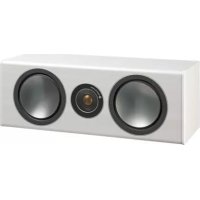
Bronze Centre - Speaker MONITOR AUDIO - Free user manual and instructions
Find the device manual for free Bronze Centre MONITOR AUDIO in PDF.



| Product type | Center speaker |
| Brand | Monitor Audio |
| Model | Bronze Centre |
| Category | Speaker |
| Speaker type | 2-way, sealed |
| Drivers | 1 x 5.5" C-CAM mid/bass, 1 x 25 mm C-CAM dome tweeter |
| Frequency response | 60 Hz - 30 kHz (estimated) |
| Sensitivity | 87 dB (estimated) |
| Nominal impedance | 8 ohms |
| Power handling | 100 W RMS (estimated) |
| Dimensions (W x H x D) | 460 x 165 x 215 mm (estimated) |
| Weight | 6 kg (estimated) |
| Finish | White ash, black oak, rosemah, walnut |
| Grille | Removable magnetic grille |
| Connectors | Binding posts compatible with banana plugs |
| Maintenance | Clean with a soft, dry cloth |
| Safety | Do not expose to moisture; do not block vents; use on a stable surface |
| Included accessories | Rubber feet, user manual |
| Warranty | 5 years (subject to online registration) |
Frequently Asked Questions - Bronze Centre MONITOR AUDIO
User questions about Bronze Centre MONITOR AUDIO
0 question about this device. Answer the ones you know or ask your own.
Ask a new question about this device
Download the instructions for your Speaker in PDF format for free! Find your manual Bronze Centre - MONITOR AUDIO and take your electronic device back in hand. On this page are published all the documents necessary for the use of your device. Bronze Centre by MONITOR AUDIO.
USER MANUAL Bronze Centre MONITOR AUDIO
2 Channel Positioning 4
AV Positioning 4
Setting up the Bronze FX 5
Fixing the Bronze FX to a wall 7
Connecting Speaker Cables 7
Bare Wire Connection 7
Banana Plugs 7
Wiring 8
Single Wiring 8
Bi-Wiring 8
Bi-Amping 8
Grilles 9
Port bungs 9
Specifications 10
Owner Information 11
Introduction
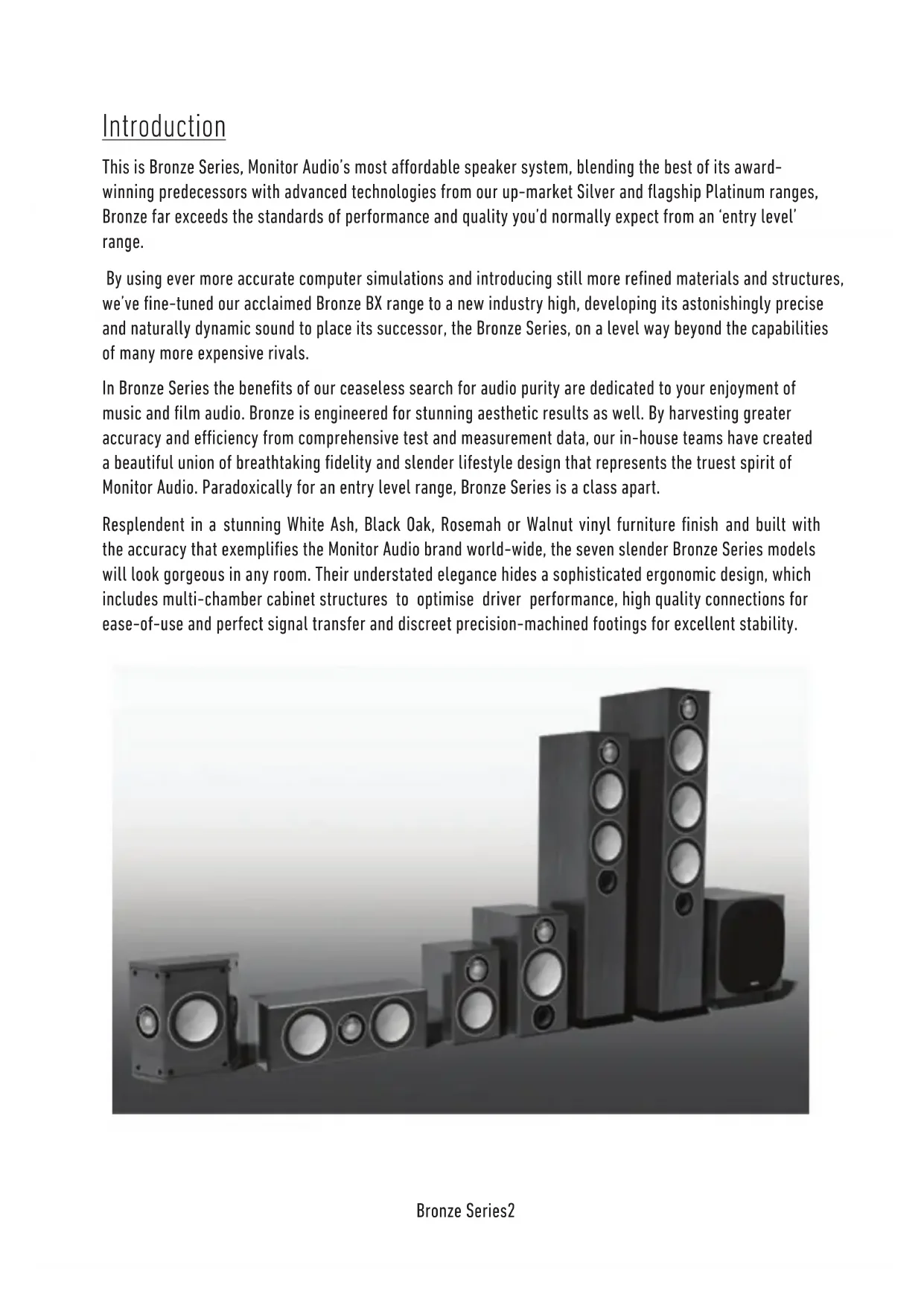
This is Bronze Series, Monitor Audio's most affordable speaker system, blending the best of its award-winning predecessors with advanced technologies from our up-market Silver and flagship Platinum ranges, Bronze far exceeds the standards of performance and quality you'd normally expect from an 'entry level' range.
By using ever more accurate computer simulations and introducing still more refined materials and structures, we've fine-tuned our acclaimed Bronze BX range to a new industry high, developing its astonishingly precise and naturally dynamic sound to place its successor, the Bronze Series, on a level way beyond the capabilities of many more expensive rivals.
In Bronze Series the benefits of our ceaseless search for audio purity are dedicated to your enjoyment of music and film audio. Bronze is engineered for stunning aesthetic results as well. By harvesting greater accuracy and efficiency from comprehensive test and measurement data, our in-house teams have created a beautiful union of breathtaking fidelity and slender lifestyle design that represents the truest spirit of Monitor Audio. Paradoxically for an entry level range, Bronze Series is a class apart.
Resplendent in a stunning White Ash, Black Oak, Rosemah or Walnut vinyl furniture finish and built with the accuracy that exemplifies the Monitor Audio brand world-wide, the seven slender Bronze Series models will look gorgeous in any room. Their understated elegance hides a sophisticated ergonomic design, which includes multi-chamber cabinet structures to optimise driver performance, high quality connections for ease-of-use and perfect signal transfer and discreet precision-machined footings for excellent stability.

natural_image
Exterior view of a modern multi-tiered audio amplifier with multiple speakers (no text or symbols visible)Plinth Fixing
(Bronze 5 & 6 only)
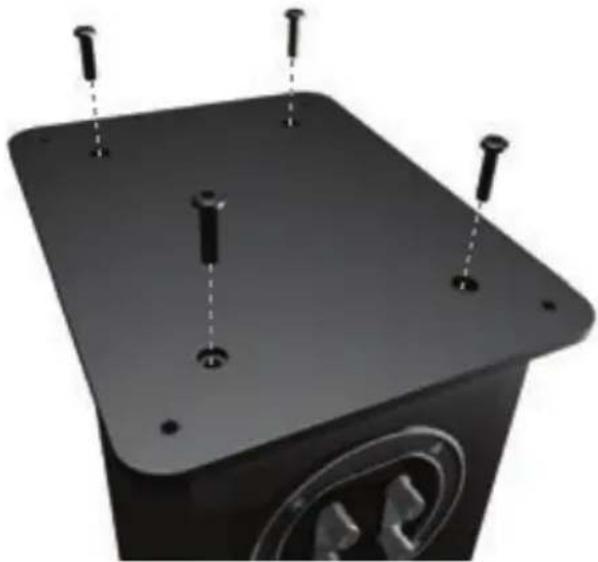
The Bronze 5 & 6's are provided with plinths to improve stability and acoustic response. The plinths are secured in place by using the supplied bolts.
Before you fit the plinth ensure the floor area is clear of any hard/sharp objects. To fit the plinth turn the cabinet over so that the bottom is facing upwards. Place the plinth onto the cabinet and line up the bolt holes in the plinth with the inserts in the cabinet. Using the bolts, secure the plinth to the cabinet. Tighten them up gradually at first and ensure the plinth is fitted securely to the cabinet. Fit the feet/spikes to the plinth before turning the loudspeaker back over.
natural_image
Close-up of a black rectangular electronic device with four metallic pins and a circular logo on the base (no visible text or symbols)Spikes and Feet
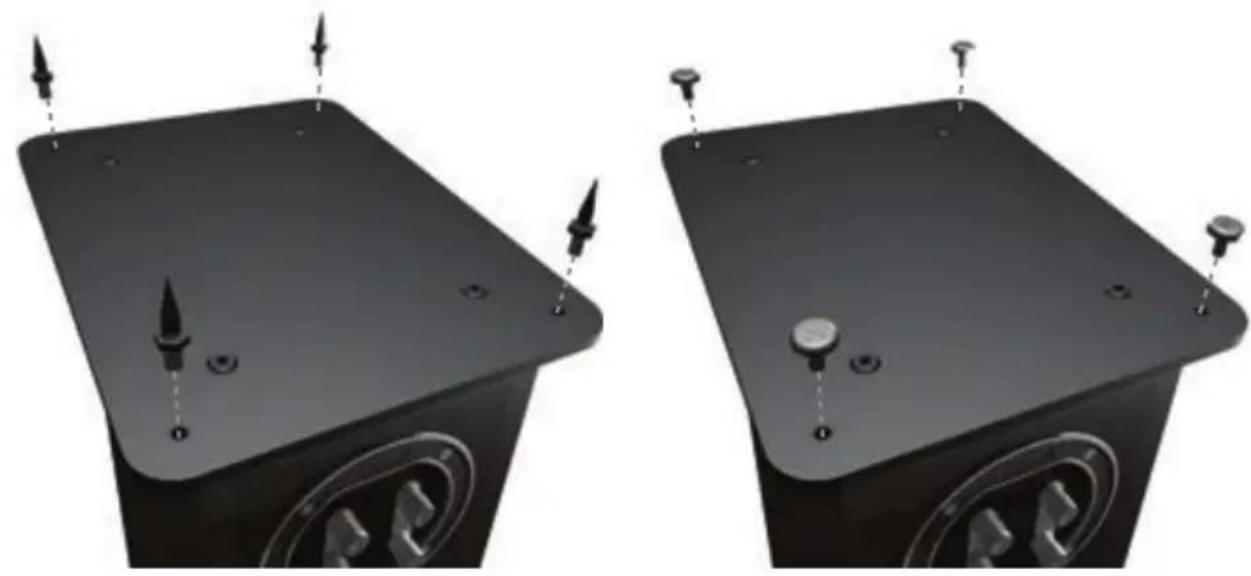
The floorstanders from the Bronze Series come with spikes and separate rubber feet. The spikes are to be used on carpeted floors and the rubber feet for use on hard floors where spikes are not appropriate.
The spikes screw into the threaded inserts on the underside of the plinth. If you do not wish to use the plinth, spikes can be fixed directly into the bottom of the cabinet. Ensure there are no trailing cables where the speakers will be sited.
NOTE: When used without the plinth the stability of the cabinet will be reduced.
When used on hard floor, the rubber feet simply push into the same inserts that would usually be occupied by the spikes.
natural_image
Two identical black rectangular electronic devices with mounting holes and indicator lights, shown from different angles (no text or symbols visible)Setting Up
2 Channel Positioning
When used in a 2 channel system, the listening position and the loudspeakers should form an equilateral triangle. The speakers should be positioned approximately 6 - 10 feet (1.8 - 3m) apart. They ideally need to be between 8 - 18 inches (20 - 45cm) away from the rear and 3 feet (\~1m) from the side walls.
Experimentation is strongly advised when initially setting up your speakers, as environments and personal preference differ with each installation. If there is not enough bass, for example, try moving your speakers closer to a wall. The opposite, if there is too much bass. Also see the information on page 9 referring to Port Bungs. If you are losing stereo imaging, try 'toeing' them in slightly. The sound should appear to originate from the centre point between the speakers, not the actual speakers themselves.
AV Positioning
In the following pages, there are illustrations showing optimal positioning and some suggested room layouts for AV applications.
The front, and in some cases rear, floor standing and stand mount speakers should be positioned approx 6 - 9 feet apart (1.8m - 2.5m) and start with them about 10 inches (25cm) from the wall.
If the sound is too bass heavy or there is bass boom from the room when playing music (without a subwoofer), try moving the loudspeakers slightly further away from the wall(s) or adjusting the crossover frequency settings for the speakers and/or sub. Also try changing the sub's position. If this is not possible, then try the supplied port bungs (not included in the Bronze-FX or Centre). Refer to Page 9.
The Bronze Centre should be positioned so that it is pointing at the viewing position and at approximate ear height. If it is below or above ear height, use some rubber feet (small feet supplied) to angle it slightly.
The Bronze FX's should be positioned in accordance with the below illustrations and instructions, and approx 2 feet (60cm) to the bottom of the speaker above ear height when in your listening position.

NOTE: When using 2 pairs of Bronze FX in a 7.1 system, you need to use the RIGHT hand speaker for the rear surround right and the LEFT hand speaker for the rear surround left. Your side surround speakers will then be set with the RIGHT speaker on the left wall and LEFT speaker on the right wall. This is because of the tweeter phasing.
Setting up the Bronze FX
The Bronze FX's are paired, but specifically, right hand and left hand units. Of which both can be configured to bi-pole (normal operation) or di-pole modes. The factory setting is bi-pole.
In bi-pole mode, all speaker units (mid/ bass unit and tweeters) are in phase. This feature is designed for when the Bronze FX is set up as a rear/surround speaker in a typical 5.1 channel system, or alternatively in a 7.1 channel system without a second pair of FX's for rear/ surround duties.
In di-pole mode, the front firing tweeters are out of phase with the other tweeter and mid/bass unit. It is best to implement this configuration when using two pairs of FX's as part of a 7.1 channel system, with the FX's taking up positions on the side and rear walls. Please note that they are left and right handed. This is not an issue when used in bi-pole mode. It is essential that they are positioned correctly if used in a 7.1 channel system. Please refer to the positioning section on page 4 and the following images. In all cases experimentation is advised to get the best set up for you.

NOTE: Before changing your Bronze FX's from bi-pole mode to di-pole mode, please ensure that the amplifier is turned off. This protects the amplifier and speakers.
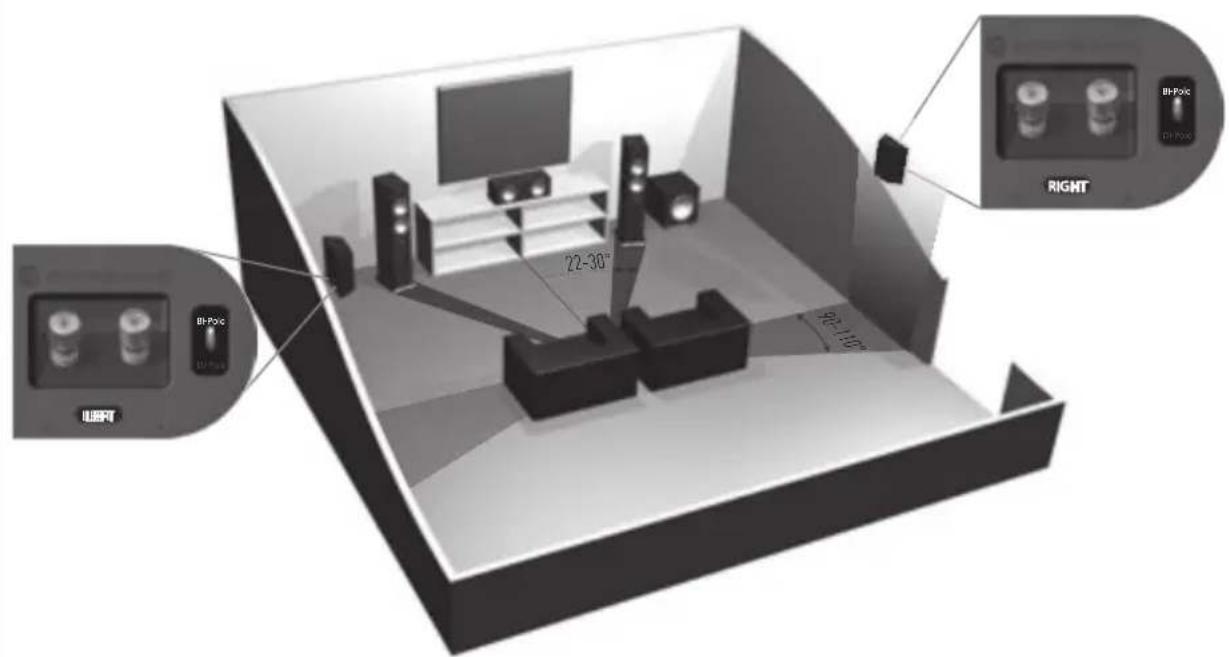
5.1 system with surround speakers on the side wall (floorstanding/ stand mounters can also be used).
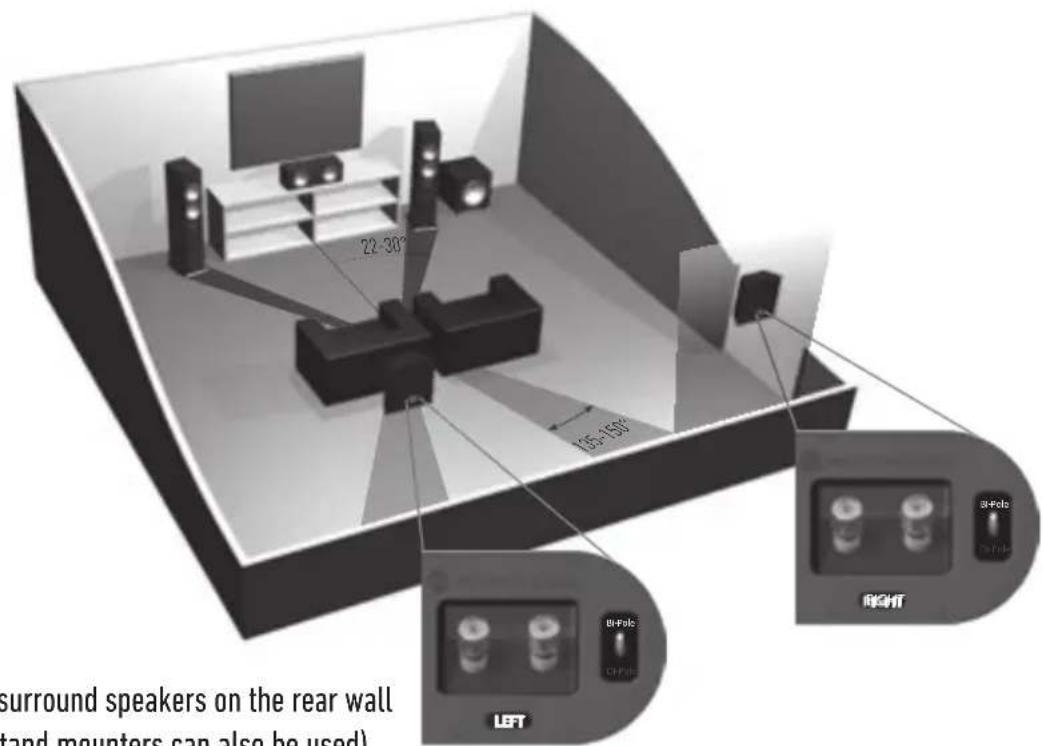
5.1 system with surround speakers on the rear wall (floorstanding/ stand mounters can also be used).
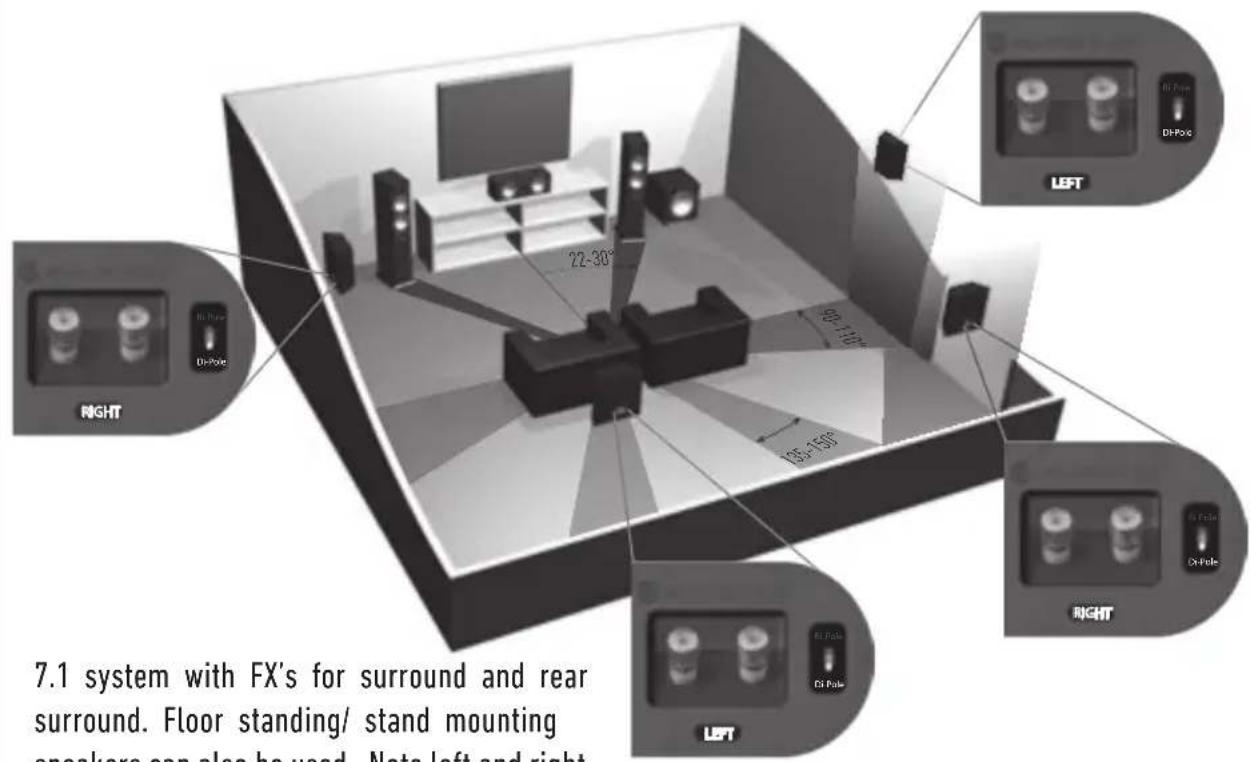
7.1 system with FX's for surround and rear surround. Floor standing/ stand mounting speakers can also be used. Note left and right speaker positioning.
Fixing the Bronze FX to a wall

CAUTION: You will need to determine where the Bronze FX's will be fixed and the structure of the wall. For safety reasons, if you are unsure of your ability to provide a secure and safe fixing, do not attempt to fix these speakers to your wall, please obtain the services of a competent and qualified trades person.

CAUTION: Ensure that there are no water pipes or electricity cables running behind where the wall brackets are going to be secured. Work from secure steps and avoid trailing wires.

We do not supply wall fixing screws and plugs with the Bronze FX. Please use suitable fixings for the type of wall construction the Bronze FX's will be fixed to.
To assist in fixing the Bronze FX's to the wall, we would recommend using the wall fixing template enclosed within the packaging carton.
Connecting Speaker Cables
Bare Wire Connection
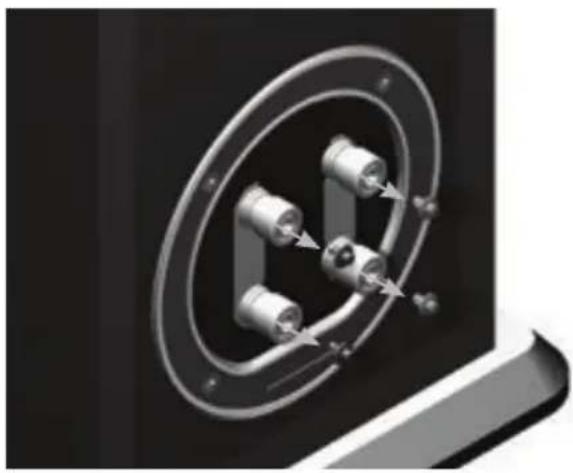
Unscrew the binding posts and pass the bare wire through the through-hole. Tighten the binding post to clamp the wire in place.
Banana Plugs
Remove the red and black plastic plugs from the terminals and insert the banana plugs into the standard 4mm holes that are revealed. Pliers may be required to gain purchase on the plugs.
natural_image
Close-up of a mechanical component with metallic parts and a circular housing (no visible text or symbols)Wiring
Single Wiring
Connect a single set of cables to the terminals on the back of your speaker. It is perfectly acceptable to connect to the top, bottom terminals or even diagonally (experimentation is advisable to achieve the preferred results).

NOTE: When using this method you must KEEP the terminal links in place.
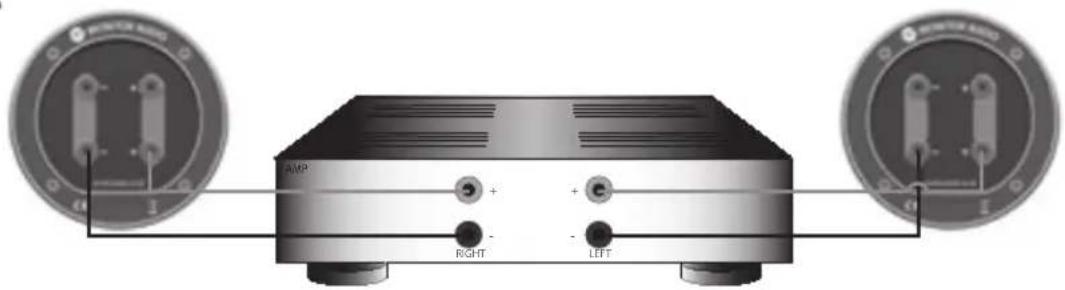
Bi-Wiring
This method can be carried out with the Bronze 2, 5 and 6 speakers. Connect two sets of cables to the top and bottom terminals (positive to positive and negative to negative) from single output of your amplifier.

NOTE: When using this method the terminal links MUST be REMOVED.
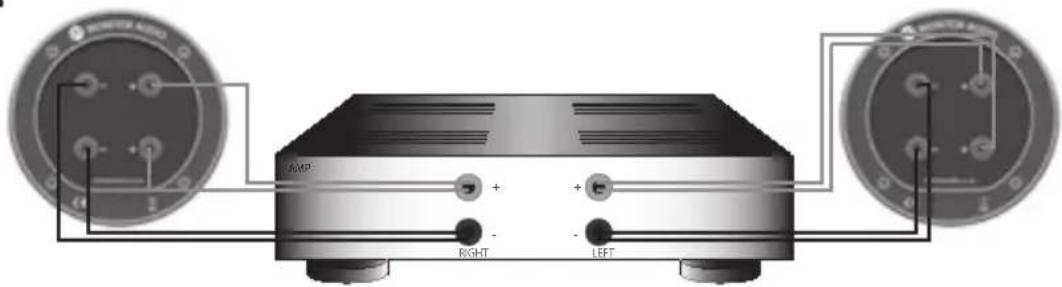
Bi-Amping
This method can be carried out with the Bronze Series 2, 5 and 6 speakers. Connect a set of cables to the top terminals from one amplifier and the bottom set on the second amplifier.

NOTE: When wiring this method the terminal links MUST be REMOVED.
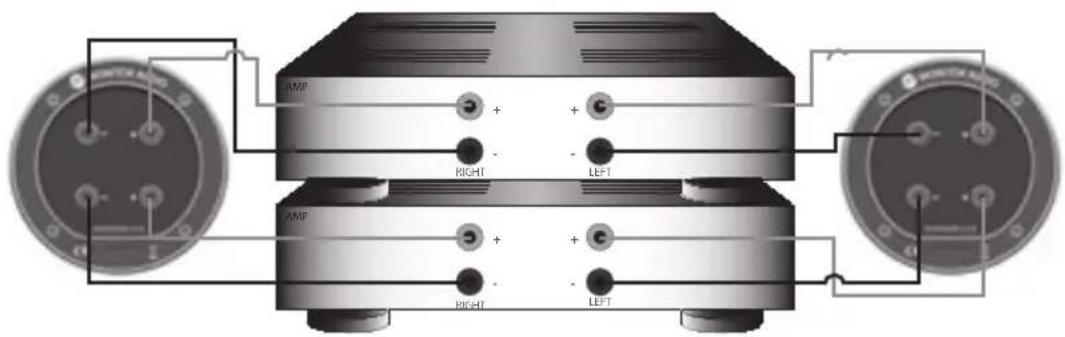
Grilles
All the Bronze Series speakers are supplied with grilles, covered in acoustically transparent cloth. They are contained within the separate card packaging. Grilles are held invisibly in place using magnets built into both the grille and the cabinet (Bronze FX grilles attach using pegs and sockets).
When fitting, ensure they are correctly orientated with the badge at the bottom, and offer up to the cabinet. The magnet should pull the grille into position.
Each FX speaker is supplied with 3 separate factory fitted grilles. To remove them, carefully prize them away from the cabinet with the tips of your fingers.

CAUTION: Remove all fitted grilles before attempting to lift or move the loudspeaker.
Port bungs

WARNING: Care must be taken not to insert the port bungs too far into the port, as this may result in the foam bung being lost inside the cabinet.
If the loudspeaker is to be installed in a small room, typically 9 sqM (80 sqFT), or a room known to reproduce accentuated bass response, it may be desirable to fit port bungs. However, experimentation is recommended with positioning of the loudspeaker in the room prior to fitting. To optimise a loudspeakers performance, ensure it is not positioned too close to a wall or near the corners of a room (refer to the suggestions on page 4). If room aesthetics or layout predetermine speaker positioning, or experiencing the presence of accentuated bass, please move on and read point 1 for the Bronze 1 and 2 and point 2 for the Bronze 5 and 6.
- Where bookshelf/ stand-mount speakers (Bronze 1 & 2) are to be sited in close proximity of less than 8 inches/ 20cm to a rear wall (such as on a bookshelf, positioned in a cabinet or on a stand close to a wall), we recommend fitting port bungs to the ports. This will reduce the bass 'boom' and assist the loudspeakers to reproduce their best performance under these environmental conditions.
- Where floor-standing loudspeakers (Bronze 5 and 6) are to be sited in close proximity of less than 18 inches/45cm to a rear wall, we recommend fitting the port bungs. This will reduce the bass 'boom' and assist the loudspeakers to reproduce their best performance under these environmental conditions.
What is Bass Boom?
Bass 'Boom' (sometimes termed as overhang) is generally caused when bass energy from the loudspeaker 'excites' room modes and causes an accentuation at a particular frequency, or number of frequencies. When fitting port bungs the overall bass extension will not be reduced, however bass energy/ output around the port tuning frequency will be reduced. This has the effect of reducing bass 'boom' while increasing bass clarity and apparent agility. Experimentation is highly recommended.
| Finishes | Black Oak, White Ash, Walnut, Rosemary | ||||||
| 3.5Kg (7lb 12oz) | 5.3Kg (11lb 10oz) | 11.Kg (24lb 6oz) | 16.6Kg (36lb 8oz) | 5.6Kg (12lb 6oz) | 3.2Kg (7lb) | ||
| Weight (each) | N/A | N/A | 898 x 215 x 282 mm35 3/8 x 8 7/16 x 11 1/18 inch40 11/16 x 9 1/4 x 13 3/4 inch | 1033 x 235 x 350mm40 11/16 x 9 1/4 x 13 3/4 inch | N/A | N/A | |
| External dimensions (including pinth & teet) (H x W x D) | 260 x 165 x 205mm10 7/4 x 6 1/2 x 8 1/16 inch | 350 x 185 x 281 mm13 24 x 37/16 x 11 1/16 inch | 850 x 165 x 273 mm33 7/16 x 6 1/2 x 10 3/4 inch | 985 x 185 x 341 mm38 3/4 x 7 5/16 x 13 7/16 inch | 165 x 460 x 193 mm6 1/2 x 18 1/8 x 7 5/8 inch | 287 x 280 x 118 mm11 5/16 x 11 x 4/8 inch | |
| External dimensions (inc grille & terminals) (H x W x D) | 260 x 165 x 194 mm10 7/4 x 6 1/2 x 7 5/8 inch | 350 x 185 x 269 mm13 24 x 7 5/16 x 10 9/16 inch | 850 x 165 x 262 mm33 7/16 x 6 1/2 x 10 5/16 inch | 985 x 185 x 330 mm38 3/4 x 7 5/16 x 13 inch | 165 x 460 x 183 mm6 1/2 x 18 1/8 x 7 3/16 inch | N/A | |
| External dimensions (Inc grille & terminals) | 260 x 165 x 180 mm10 7/4 x 6 1/2 x 7 1/16 inch | 350 x 185 x 255 mm13 24 x 7 5/16 x 10 7/16 inch | 850 x 165 x 248 mm33 7/16 x 6 1/2 x 9 9/4 inch | 985 x 185 x 315 mm38 3/4 x 7 5/16 x 12 3/8 inch | 165 x 460 x 165 mm6 1/2 x 18 1/8 x 6/12 inch | 287 x 277 x 108 mm11 5/16 x 10 7/8 x 4/4 inch | |
| External dimensions (Inc terminals) | 2.7KHZ 3.1KHZ | 3.0DKHZ | LF: -6dB@600HZMF/HF: 2.8KHZ | 985 x 185 x 315 mm38 3/4 x 7 5/16 x 12 3/8 inch | 165 x 460 x 165 mm6 1/2 x 18 1/8 x 6/12 inch | 2.8KHZ | |
| Cabinet dimensions (Exc grille, terminals & pintth) (H x W x D) | 260 x 165 x 180 mm10 7/4 x 6 1/2 x 7 1/16 inch | 350 x 185 x 255 mm13 24 x 7 5/16 x 10 7/16 inch | 850 x 165 x 248 mm33 7/16 x6 1/2 x 9 9/4 inch | 985 x 185 x 315 mm38 3/4 x 7 5/16 x 12 3/8 inch | 165 x 460 x 165 mm6 1/2 x 18 1/8 x 6/12 inch | 287 x 277 x 10B mm11 5/16 x 10 7/8 x 4/4 inch | |
| Crossover Frequency | 2.7KHZ 3.1KHZ | 3.0DKHZ | LF: -6dB@600HZMF/HF: 2.8KHZ | 985 x 185 x 315 mm38 3/4 x 7 5/16 x 12 3/8 inch | 165 x 460 x 165 mm6 1/2 x 18 1/8 x 6/12 inch | 287 x 277 x 10B mm11 5/16 x 10 7/8 x 4/4 inch | |
| Drive Unit Completion | 1 x 5.5" C-CAM® Bassmid-range,1 x 25mm Bold DomeC-CAM® tweeter | 1 x 6.5" C-CAM® Bassmid-range,1 x 25mm Bold DomeC-CAM® tweeter | 1 x 5.5" C-CAM® Bassmid-range,mid-range,1 x 25mm Bold DomeC-CAM® tweeter | 2 x 6.5" C-CAM® Bassmid-range,1 x 25mm Bold DomeC-CAM® tweeter | 1 x 5.5" C-CAM® Bassmid-range,1 x 25mm Bold DomeC-CAM® tweeter | 1 x 5.5" C-CAM® Bassmid-range,2 x 25mm Bold DomeC-CAM® tweeter | |
| Cabinet Design | 15-70 30-100 | 30-120 | Dual chamber bass reflex with Hive Port technology | Bass reflex - front and rear bass reflex with HivePort technology | Sealed Cabinet | Sealed Cabinet | |
| Recommended Amplifier Requirements R.M.S (W) | Rear ported Bass reflex with Hive Porttechnology | Front ported Bass reflex with Hive Porttechnology | Dual chamber bass reflex - front and rear bass reflex with HivePort technology | 2 x 6.5" C-CAM® Bassmid-range,1 x 25mm Bold DomeC-CAM® tweeter | Sealed Cabinet | Sealed Cabinet | |
| Power Handling R.M.S (W) | 70 | 100 | 100 | 120 | 150 | 120 | 80 |
| Sensitivity (1W@TM) | 88dB | 90dB | 90dB | 90dB | 90dB | 88dB | |
| Horizontal Impedance (Ohms) | 8 | 8 | 8 | 8 | 8 | 8 | |
| Maximum SPL (Par) | 109 DBA | 113 DBA | 113.8 DBA | 114.8 DBA | 113 DBA | 110 DBA | |
| Reconfirmed Amplifier Requirements R.M.S (W) | 55 HZ - 30 KHZ | 42 HZ - 30 KHZ | 37 HZ - 30 KHZ | 34 HZ - 30 KHZ | 60 HZ - 30 KHZ | 65 HZ - 30 KHZ | |
| Frequency Response | 55 HZ - 30 KHZ | 42 HZ - 30 KHZ | 37 HZ - 30 KHZ | 60 HZ - 30 KHZ | 65 HZ - 30 KHZ | ||
| System Format 2 Way 2 Way 2 Way | 5 Bronze 6 Bronze Center Bronze FX | ||||||
| Model Bronze 1 Bronze 2 Bronze Systems Format 2 Way 2 Way 2 Way | 5 Bronze 6 Bronze Center Bronze FX | ||||||
Owner Information
Product Details
Model
Product Serial No ____
Date of Purchase ____
Dealer Details
Dealer Name ____
Address
e-mail address ____
Telephone Number ____
Monitor Audio reserves the right to alter specifications without notice.
For the 5 years manufacturer's warranty please visit the online registration form at: www.monitoraudio.com
BRONZE SERIES
manuel utilisateur
Table des matières
Introduction 14
natural_image
Black-and-white photo of a multi-tiered outdoor audio amplifier with multiple speakers and a speaker (no text or symbols visible)Bronze Series14
Fixation du socle
(Bronze 5 & 6 uniquement)
natural_image
Close-up of a black rectangular electronic device with four metallic pins and a circular button (no visible text or symbols)Pointes et pieds
natural_image
Two black electronic device components with mounting holes and indicator lights, shown from different angles (no text or symbols visible)Installation
natural_image
Close-up of a mechanical component with metallic parts and a circular housing (no visible text or symbols)Câblage
Câblage unique
Bi-amplification
www.monitoraudio.com
Monitor Audio Ltd.
24 Brook Road
Rayleigh, Essex
SS6 7XJ
Angleterre
Tél : +44 (0)1268 740580
Fax : +44 (0)1268 740589
E-mail : info@monitoraudio.co.uk
natural_image
Exterior view of a modern multi-tiered audio amplifier with multiple speakers (no text or symbols visible)natural_image
Close-up of a black square electronic device with three screws and a circular button, no visible text or symbols.Punte e piedini
natural_image
Two identical black rectangular electronic components with mounting holes and screw holes, shown from different angles (no text or symbols visible)Installazione
natural_image
Close-up of a mechanical component with metallic parts and a circular housing (no visible text or symbols)Cablaggio
Single wiring
natural_image
Black-and-white photo of a multi-tiered audio amplifier with multiple speakers and a speaker tower (no text or symbols visible)Bronze Series38
Sockelbefestigung
(nur Bronze 5 & 6)
natural_image
Close-up of a black electronic device with three mounting screws and a circular button (no visible text or symbols)Stifte und Füße
natural_image
Two black electronic device components with mounting holes and indicator lights, shown from different angles (no text or symbols visible)Einstellung
natural_image
Close-up of a mechanical component with metallic rings and connectors (no visible text or symbols)Verkabelung
Einzelader
natural_image
Black-and-white photo of a multi-tiered audio amplifier with multiple speakers and a speaker tower (no text or symbols visible)Bronze Series50
natural_image
Close-up of a black square electronic device with three screws and a circular button, no visible text or symbols.Puntas y pies
natural_image
Two black rectangular electronic devices with mounting holes and indicator lights, shown from different angles (no text or symbols visible)Colocación
natural_image
Close-up of a mechanical component with metallic rings and connectors, no visible text or symbolsCableado
Cableado sencillo
natural_image
Front view of a black audio amplifier with two circular buttons labeled 'RIGHT' and 'LEFT' pointing to the ports (no text or symbols on the device body)Cableado doble
www.monitoraudio.com
Monitor Audio Ltd.
24 Brook Road
Rayleigh, Essex
SS6 7XJ
Inglaterra
Tel.: +44 (0)1268 740580
Fax: +44 (0)1268 740589
Correo electrónico: info@monitoraudio.co.uk
Web: www.monitoraudio.com
natural_image
Black-and-white photo of a multi-tiered audio amplifier with multiple speakers and a speaker (no text or symbols visible)Bronze Series62
Fixação do rodapé
(apenas Bronze 5 e 6)
natural_image
Close-up of a black rectangular electronic device with three mounting screws and a circular button (no visible text or symbols)Espigões e pés
natural_image
Two identical black rectangular electronic devices with mounting holes and indicator lights, shown from different angles (no text or symbols visible)Configuração
Posicionamento de 2 canais
natural_image
Close-up of a mechanical component with metallic parts and a circular housing (no visible text or symbols)Cablagem
Cablagem simples
Biamplificação
natural_image
Exterior view of a modern multi-tiered audio amplifier with multiple speakers (no text or symbols visible)De plint bevestigen
(alleen Bronze 5 en 6)
natural_image
Close-up of a black square electronic device with four metallic pins and a circular button (no text or symbols visible)Spijkers en voetjes
natural_image
Two identical black rectangular electronic components with mounting holes and a central knob, shown from different angles (no text or symbols visible)Installatie
Tweekanaals positionering
natural_image
Close-up of a mechanical component with metallic rings and connectors, no visible text or symbolsBedrading
Enkele draad
Web: www.monitoraudio.com
natural_image
Exterior view of a modern multi-tiered audio amplifier with multiple speakers (no text or symbols visible)底座固定
(仅适用 Bronze 5 和 6)
natural_image
Close-up of a black rectangular electronic device with three mounting holes and a circular logo on the base (no visible text or symbols)脚钉和垫脚
natural_image
Two identical black rectangular electronic devices with mounting holes and indicator lights, shown from different angles (no text or symbols visible)设置
双声道定位
natural_image
Close-up of a mechanical component with three cylindrical components and a circular housing, no visible text or symbols.布线
单布线
电邮:info@monitoraudio.co.uk
网址:www.monitoraudio.com
英国设计 中国制造
BRONZE SERIES
natural_image
Exterior view of a modern black multi-tiered speaker system with multiple speakers (no text or symbols visible)Установка оснований
natural_image
Close-up of a black square electronic device with four metallic pins and a circular logo on the base (no visible text or symbols)Шипы и ножки
natural_image
Two identical black rectangular electronic devices with mounting holes and indicator lights, shown from different angles (no text or symbols visible)Настройка
natural_image
Close-up of a mechanical component with metallic parts and directional arrows indicating motion (no text or symbols)Cxema Bi-Amping
natural_image
Black-and-white photo of a multi-tiered audio amplifier with multiple speakers and a speaker (no text or symbols visible)Bronze Series110
natural_image
Close-up of a black square electronic device with three metal pins and a circular button (no text or symbols visible)Шыпы і апоры
natural_image
Two black electronic device components with mounting holes and indicator lights, shown from different angles (no text or symbols visible)Усталяванне
natural_image
Close-up of a mechanical component with metallic rings and bolted joints, no visible text or symbolsnatural_image
Exterior view of a modern multi-tiered audio amplifier with multiple speakers (no text or symbols visible)Bronze Series122
Туғырды бекіту
natural_image
Close-up of a black square electronic device with three screws and a circular button, no visible text or symbols.natural_image
Two black rectangular electronic devices with mounting holes and indicator lights, shown from different angles (no text or symbols visible)Орнату
2 арнаны орналастыру
natural_image
Close-up of a mechanical component with metallic rings and bolts, no visible text or symbolsСымдар
Жалғыз сымдар
Email: info@monitoraudio.co.uk
Web: www.monitoraudio.com
Designed and Engineered
in the United Kingdom
Made in China
© 2015. Version 3
- Introduction
- Plinth Fixing
- Spikes and Feet
- NOTE: When used without the plinth the stability of the cabinet will be reduced.
- Setting Up
- Channel Positioning
- AV Positioning
- Setting up the Bronze FX
- Fixing the Bronze FX to a wall
- Connecting Speaker Cables
- Bare Wire Connection
- Banana Plugs
- Wiring
- Single Wiring
- Bi-Wiring
- Bi-Amping
- Grilles
- Port bungs
- What is Bass Boom?
- Owner Information
- Product Details
- Dealer Details
- BRONZE SERIES
- Table des matières
- Fixation du socle
- Pointes et pieds
- Installation
- Câblage
- Câblage unique
- Bi-amplification
- Punte e piedini
- Installazione
- Cablaggio
- Sockelbefestigung
- Stifte und Füße
- Einstellung
- Verkabelung
- Einzelader
- Puntas y pies
- Colocación
- Cableado
- Cableado sencillo
- Cableado doble
- www.monitoraudio.com
- Fixação do rodapé
- Espigões e pés
- Configuração
- Posicionamento de 2 canais
- Cablagem
- Cablagem simples
- Biamplificação
- De plint bevestigen
- Spijkers en voetjes
- Installatie
- Tweekanaals positionering
- Bedrading
- Enkele draad
- 底座固定
- 脚钉和垫脚
- 设置
- 双声道定位
- 布线
- 单布线
- Установка оснований
- Шипы и ножки
- Настройка
- Cxema Bi-Amping
- Шыпы і апоры
- Усталяванне
- Туғырды бекіту
- Орнату
- арнаны орналастыру
- Сымдар
- Жалғыз сымдар
Brand : MONITOR AUDIO
Model : Bronze Centre
Category : Speaker