TWS125 - Grinder Toolcraft - Free user manual and instructions
Find the device manual for free TWS125 Toolcraft in PDF.



| Product type | Angle grinder |
| Brand | Toolcraft |
| Model | TWS125 |
| Intended use | Dry grinding and cutting of metal and stone materials (non-professional use) |
| Power supply | 230-240 V AC, 50 Hz |
| Rated power | 900 W |
| Maximum disc diameter | 125 mm |
| Sound pressure level (LpA) | 88.6 dB(A) (KpA=3 dB(A)) |
| Sound power level (LwA) | 99.6 dB(A) (KwA=3 dB(A)) |
| Vibration level (main handle) | 5.734 m/s² (K=1.5 m/s²) |
| Vibration level (auxiliary handle) | 6.315 m/s² (K=1.5 m/s²) |
| Protection class | II (double insulation) |
| Package contents | Angle grinder, auxiliary handle, hex key wrench, protection guard, cutting guard, instruction manual |
| Main functions | On/off with lock, spindle lock for disc change, protection guard adjustment |
| Safety | Adjustable protection guard, auxiliary handle, safety brake (undervoltage relay), automatic stop in case of power failure |
| Maintenance and cleaning | Clean with a clean cloth, avoid solvents; permanent lubrication of bearings |
| Cooling periods | Allow disc and workpiece to cool before touching |
| Recycling | Electronic device to be recycled according to legal regulations |
| Included accessories | Auxiliary handle, protection guard, tightening key, cutting guard |
| Warranty and support | Conrad Electronic SE (Switzerland: www.conrad.ch) |
Frequently Asked Questions - TWS125 Toolcraft
User questions about TWS125 Toolcraft
0 question about this device. Answer the ones you know or ask your own.
Ask a new question about this device
Download the instructions for your Grinder in PDF format for free! Find your manual TWS125 - Toolcraft and take your electronic device back in hand. On this page are published all the documents necessary for the use of your device. TWS125 by Toolcraft.
USER MANUAL TWS125 Toolcraft
GB Operating Instructions
Angle grinder T-WS125 900W
Item No. 1582581 Page 16 - 29
F Notice d'emploi
www.business.conrad.at
www.conrad.com/downloads
- Introduction......17
- Explanation of symbols....18
- Intended use....19
- Delivery content....19
- Safety instructions ....20
a) Work area safety 20
b) Electrical safety 20
c) Personal safety....21
d) Power tool use and care....21
e) Service....22
f) Safety warning for angle grinder....22
- Operating elements ......23
- Operation....24
a) Fitting....24
b) Commissioning....25
c) Operation....25
- Troubleshooting....26
- Care and cleaning....27
a) Cleaning 27
b) Lubrication....27
-
Disposal 27
-
Declaration of Conformity (DOC)....28
- Technical data....29
a) Note....29
b) Warning 29
1. Introduction
Dear customer,
Thank you for purchasing this product.
This product complies with the statutory national and European requirements.
To maintain this status and to ensure safe operation, you as the user must observe these operating instructions!

These operating instructions are part of this product. They contain important notes on commissioning and handling. Also consider this if you pass on the product to any third party. Therefore, retain these operating instructions for reference!
If there are any technical questions, please contact:
International: www.conrad.com/contact
United Kingdom: www.conrad-electronic.co.uk/contact
2. Explanation of symbols
In this manual and/or on the machine the following symbols are may used:

The symbol with the lightning in the triangle is used if there is a risk to your health, e.g. due to an electric shock.

The symbol with the exclamation mark in the triangle is used to indicate important information in these operating instructions. Always read this information carefully.

Read instructions carefully.

In accordance with essential applicable safety standards of European directives.

Class II machine – Double insulation – You don't need any earthed plug.
Faulty and/or discarded electrical or electronic apparatus have to be collected at the appropriate recycling locations.

Immediately unplug the plug from the mains electricity in the case that the cord gets damaged and during maintenance.

Wear eye protection.

Wear dust mask.

The arrow symbol indicates special information and advice on operation.
3. Intended use
When used for its intended purpose, this device corresponds to the state of the art, as well as to the current safety requirements at the time of its introduction.
The appliance is intended exclusively for non-professional use for dry sanding and cutting of metal and stone materials.
The machine must be operated in accordance with the specifications provided in these instructions.
The device is not suitable for commercial or industrial use.
Any other type of use is inappropriate.
Improper use or modifications to the device or the use of components that are not tested and approved by the manufacturer may result in unforeseen damage!
Any use that deviates from its intended use and is not included in these instructions is considered unauthorized use and relieves the manufacturer from his or her legal liability
4. Delivery content
- Angle grinder: 1pc
• Additional hand grip: 1pc
- Hex Key: 1pc
- Grinding guard: 1pc
- Cutting guard: 1pc
- Instruction manual: 1pc
After unpacking, check the tool and accessories for damages and do not use the tool in case something is defective.
Up-to-date Operating Instructions
Download the latest operating instructions at www.conrad.com/downloads or scan the QR code shown. Follow the instructions on the website.

5. Safety instructions

WARNING Read all safety warnings and instructions. Failure to follow all the warnings and instructions may result in electric shock, fire and/or serious injury.
SAVE ALL THE WARNINGS AND INSTRUCTIONS FOR FUTURE REFERENCE.
The term “power tool” in the warnings refers to your mains operated (corded) power tool or battery operated (cordless) power tool.
a) Work area safety
- Keep work area clean and well lit. Cluttered and dark areas invite accidents.
- Do not operate power tools in explosive atmospheres, such as in the presence of flammable liquids, gases or dust. Power tools create sparks which may ignite the dust or fumes.
- Keep children and bystanders away while operating a power tool. Distractions can cause you to lose control.
b) Electrical safety
- Power tool plugs must match the outlet. Never modify the plug in any way. Do not use any adapter plugs with earthed (grounded) power tools. Unmodified plugs and matching outlets will reduce risk of electric shock.
- Avoid body contact with earthed or grounded surfaces such as pipes, radiators, ranges and refrigerators. There is an increased risk of electric shock if your body is earthed or grounded.
- Do not expose power tools to rain or wet conditions. Water entering a power tool will increase the risk of electric shock.
- Do not abuse the cord. Never use the cord for carrying, pulling or unplugging the power tool. Keep cord away from heat, oil, sharp edges or moving parts. Damaged or entangled cords increase the risk of electric shock.
- When operating a power tool outdoors, use an extension cord suitable for outdoor use. Use of a cord suitable for outdoor use reduces the risk of electric shock.
- If operating a power tool in a damp location is unavoidable, use a residual current device (RCD) protected supply. Use of an RCD reduces the risk of electric shock.
c) Personal safety
- Stay alert, watch what you are doing and use common sense when operating a power tool. Do not use a power tool while you are tired or under the influence of drugs, alcohol or medication. A moment of inattention while operating power tools may result in serious personal injury.
- Use personal protective equipment. Always wear eye protection. Protective equipment such as dust mask, non-skid safety shoes, hard hat, or hearing protection used for appropriate conditions will reduce personal injuries.
- Prevent unintentional starting. Ensure the switch is in the off-position before connecting to power source and /or battery pack, picking up or carrying the tool. Carrying power tools with your finger on the switch or energising power tools that have the switch on invites accidents.
- Remove any adjusting key or wrench before turning the power tool on. A wrench or a key left attached to a rotating part of the power tool may result in personal injury.
- Do not overreach. Keep proper footing and balance at all times. This enables better control of the power tool in unexpected situations.
- Dress properly. Do not wear loose clothing or jewellery. Keep your hair, clothing and gloves away from moving parts. Loose clothes, jewellery or long hair can be caught in moving parts.
- If devices are provided for the connection of dust extraction and collection facilities, ensure these are connected and properly used. Use of dust collection can reduce dust related hazards.
d) Power tool use and care
- Do not force the power tool. Use the correct power tool for your application. The correct power tool will do the job better and safer at the rate for which it was designed.
- Do not use the power tool if the switch does not turn it on and off. Any power tool that cannot be controlled with the switch is dangerous and must be repaired.
- Disconnect the plug from the power source and/or the battery pack from the power tool before marking any adjustments, changing accessories, or storing power tools. Such preventive safety measures reduce the risk of starting the power tool accidentally.
- Store idle power tools out of the reach of children and do not allow persons unfamiliar with the power tool or these instructions to operate the power tool. Power tools are dangerous in the hands of untrained users.
- Maintain power tools. Check for misalignment or binding of moving parts, breakage of parts and any other condition that may affect the power tool's operation. If damaged, have the power tool repaired before use. Many accidents are caused by poorly maintained power tools.
- Keep cutting tools sharp and clean. Properly maintained cutting tools with sharp cutting edges are less likely to bind and are easier to control.
- Use the power tool, accessories and tool bits etc. in accordance with these instructions, taking into account the working conditions and the work to be performed. Use of the power tool for operations different from those intended could result in a hazardous situation.
e) Service
- Have your power tool serviced by a qualified repair person using only identical replacement parts. This will ensure that the safety of the power tool is maintained.
f) Safety warning for angle grinder
- Check that the ventilation slots are not blocked.
• Always secure the item to be worked with cramps or the like. Never hold the item to be worked by hand.
• Always use the correct type of grinding disc for the type of work to be performed. - Never use discs with a Maximum RPM less than that of the tool.
- Never use oversized discs.
- Never use damaged or worn discs, or discs that cannot be easily fitted to the grinder spindle. Never use an adapter ring or the like to fit discs with holes that are too large for the grinder spindle.
- Never place your hand or fingers near the disc while the grinder is running.
- Keep the power cable well clear of the working area.
- Keep the handles and the grinder as a whole free of oil, grease, water and other liquids.
- Never put the grinder down until the disc has completely stopped rotating.
- Do not touch the item to be worked or metal filings until they have cooled.
- Do not use the grinder to work items made of magnesium.
6. Operating elements
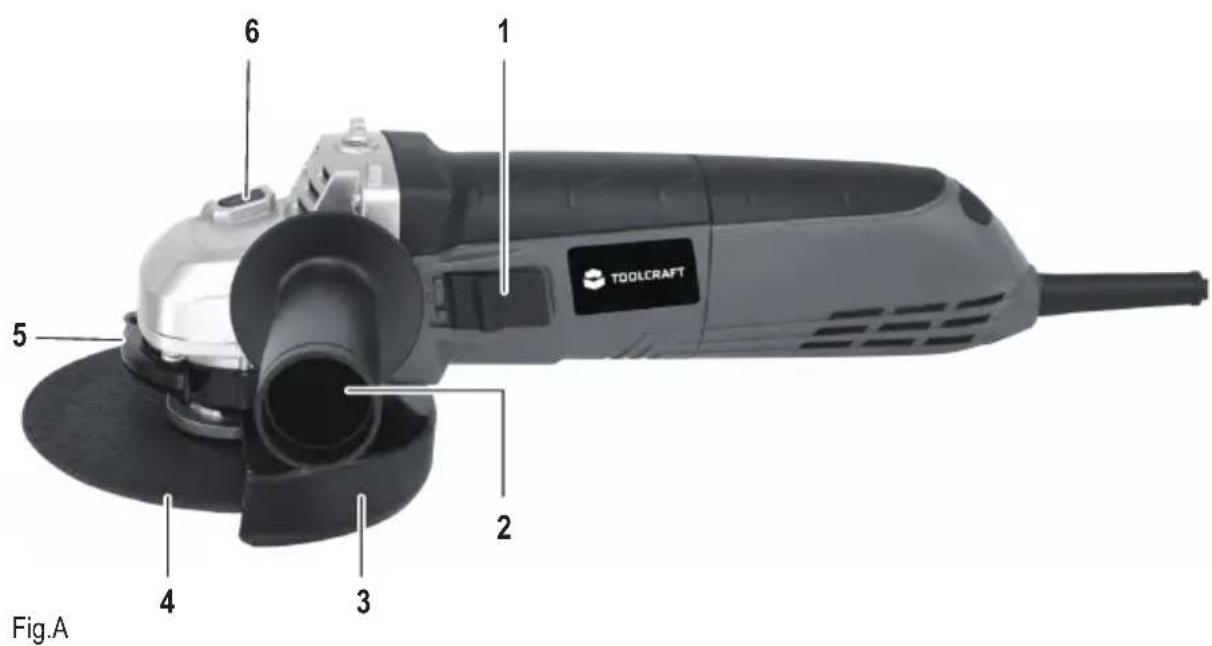
text_image
1 6 1 5 2 4 3 TOOLCRAFT Fig.A1 ON/OFF switch
2 Additional hand grip
3 Protective hood for grinding
4 Abrading disc
5 Clamping screw for protective hood
6 Locking button for spindle
7. Operation
a) Fitting
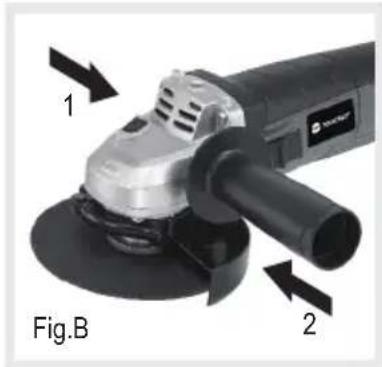
Fit the additional hand grip
• See figure B.
- The additional handle can be attached on the left [1] or on the right [2] of the product.
- Screw the additional hand grip firmly into the threaded hole on the appliance.
natural_image
Close-up of a black and white industrial power tool with labeled parts (1 and 2), no readable text or symbols beyond labels.Permissible grinding tools
- The permissible maximum rpm or cutting speed of the abrasive bodies used must comply with the details in the table below.
- Therefore please observe the permissible rpm or peripheral speed on the label of the abrasive body.
• Always use the intermediate layers enclosed with the abrasive bodies: they are positioned between the abrasive body and the clamping flange and must be at least the same size as the contact surfaces of the flanges. - When using abrasive bodies with threaded inserts, it must be ensured that the end of the spindle never touches the perforated plate of the grinding tool.
- Abrasive bodies with threaded insert must be able to be screwed onto the grinding spindle far enough that they firmly fit the grinding spindle flange at the end of the grinding spindle thread.
Fitting the abrading disc

Risk of injury! Never use damaged abrading discs. Always check the abrading disc for cracks or other damage before fitting it. Use only abrading discs whose permitted rotational speed is at least as high as the idling speed of the appliance.

Risk of injury! The permitted diameter for the abrading disc must always be complied with. Risk of injury! Use only abrading discs which are permitted for the material being worked with.
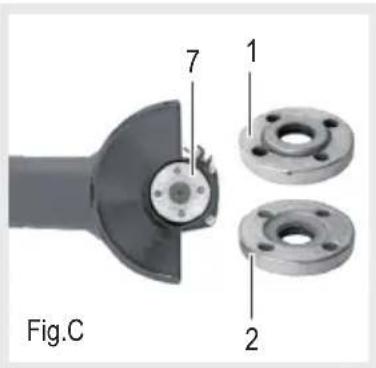
• See figure C.
- Press the spindle locking button on the top of the tool and keep it pressed.
- Unscrew flange nut (7).
- Place the abrading disc onto the spindle. Comply with the required installation position of the abrading disc.
- Place the flange nut onto the spindle.
• Note the installation position of the flange nut:
- Flange pointing away from abrading disc: for thin discs such as cutting discs.
- Flange pointing towards abrading disc: for thicker discs such as abrading discs.
- Tighten the flange nut using the face pin wrench provided while pressing the spindle locking button.
text_image
Fig.C 7 1 2b) Commissioning
• See figure A.
Adjusting the protective bonnet
The protective hood must be adjusted so that it prevents sparks and particles from being thrown in the direction of the user.
- Loosen bolt (5).
- Adjusting the protective hood
- Retighten bolt (5)
c) Operation

Risk of injury! Let the appliance idle for a few seconds before use. When vibrations start to occur, replace the abrading disc immediately.
Risk of injury! The appliance must be used only with the additional hand grip fitted and the protective hood correctly adjusted.
Check before switching on
Check the safe condition of the appliance:
- Check it for visual defects.
- Check that all parts of the machine have been securely fitted.
Switching on/off

Risk of injury! After switching off, the appliance continues to run on for a few seconds. Waiting until the abrading disc has come to a stop before laying the appliance down.
In case of a loss of power, an under-voltage relay triggered. This prevents the product from restarting by itself as soon as the power is restored.
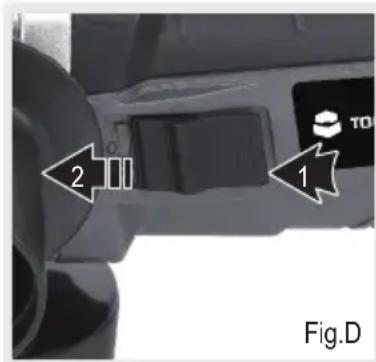
• See figure D.
- To switch on again the product must be turned off at the main switch and then turned back on.
- Switching on: Press the On-Off switch (1), at the same time, slide forwards and allow it to engage in position [1].
- Switching off: Press the On-Off switch (1) briefly and allow it to glide back to position [0].
text_image
2 1 TO Fig.DTips on use

Risk of injury! Never use cutting discs for abrading.
injury! The abrading disc and work piece become very hot during use. Let the abrading disc and work piece cool down completely before touching them.
Risk of injury! Always grind with the specified surfaces:
Cutting discs: Peripheral surface; Grinding disc, grinding wheel: Side surface.
• Always clamp the work piece firmly.
- Never tilt the appliance when cutting materials.
- Never apply excess pressure to the appliance.
8. Troubleshooting
By purchasing this angle grinder, you have acquired a product design to the state of the art and operationally reliable. Nevertheless, problems or errors may occur.
The following contains description for the removal of possible interference.
Always observe all safety information in these operating instructions.
| Problem Solution aid | |
| Appliance is not running. | Check the cable, plug, socket and the fuse.Contact your local market. |
| Insufficient performance. | Fit a suitable abrading disc.Fitting the abrading disc. |
9. Care and cleaning

Always disconnect the device before performing any adjustment or maintenance operation. If the supply cord is damaged, it must be replaced by the manufacturer or its service agent in order to avoid a hazard.
a) Cleaning

Avoid using solvents when cleaning plastic parts. Most plastic parts are susceptible to damage from various types of commercial solvents and may be damaged by their use.
- Use clean cloths to remove dirt, carbon dust, etc.
- Disconnect from the power supply immediately if the supply cord is damaged.
• Take care not to expose this tool to the rain.
b) Lubrication
All the bearings in this tool are lubricated with a sufficient amount of high grade lubricant for the life of the unit under normal operating conditions, therefore no further lubrication is required.
10. Disposal

Electronic devices are recyclable waste and must not be disposed of in the household waste. At the end of its service life, dispose of the product in accordance with applicable regulatory guidelines.
You thus fulfill your statutory obligations and contribute to the protection of the environment.
11. Declaration of Conformity (DOC)
Conrad Electronic SE, Klaus-Conrad-Str. 1, D-92240 Hirschau hereby declares that the product is in conformity with following directives, norms and/or regulations.
EMCD directive 2014/30/EU
EN 55014-1:2006+A1:2009+A2:2011
EN 55014-2:1997+A1:2001+A2:2008
EN 61000-3-2:2014
EN 61000-3-3:2013
MD directive 2006/42/EC
EN 60745-1:2009+A11:2010
EN 60745-2-4:2009+A11:2011
RoHS directive 2011/42/EC
CE marking on product

→ Click on the following link to read the full text of the EU declaration of conformity:
www.conrad.com/downloads
Select a language by clicking on a flag symbol and enter the product order number in the search box. You can then download the EU declaration of conformity in PDF format.
12. Technical data
Rated voltage 230-240 V/AC, 50 Hz
Rated power input 900 W
Speed, n0 12000 /min
Disc diameter....max. ∅ 125 mm
Level of acoustic pressure LpA....88.6 dB(A); KpA=3 dB(A)
Level of acoustic power LwA....99.6 dB(A); KwA=3 dB(A)
Level of vibration (K=1.5 m/s²) Main handle: h, AG=5,734m/s^2
Auxiliary handle: h, AG = 6,315m/s^2
a) Note
- The declared vibration total value has been measured in accordance with a standard test method and may be used for comparing one tool with another.
- The declared vibration total value may also be used in a preliminary assessment of exposure.
b) Warning
- The vibration emission during actual use of the power tool can differ from the declared total value depending on the ways in which the tool is used.
- Avoid vibration risk.
→ Wear glove during operation.
→ Limit operating time and shorten trigger time.
Page
France (email) : technique@conrad-france.fr
text_image
1 6 1 5 2 4 3 TOOLCRAFTFig. A
natural_image
Close-up of a black and white industrial grinding tool with labeled parts (1 and 2), no readable text or symbols beyond labels.Directive Machines 2006/42/CE
EN 60745-1:2009+A11:2010
EN 60745-2-4:2009+A11:2011
Directive RoHS 2011/42/CE
www.conrad.com/downloads
Vitesse, n0....12000 /min
BEWAAR ALLE WAARSCHUWINGEN EN INSTRUCTIES VOOR LATERE RAADPLEGING.
www.conrad.com/downloads
GB This is a publication by Conrad Electronic SE, Klaus-Conrad-Str. 1, D-92240 Hirschau (www.conrad.com).
All rights including translation reserved. Reproduction by any method, e.g. photocopy, microfilming, or the capture in electronic data processing systems require the prior written approval by the editor. Reprinting, also in part, is prohibited. This publication represent the technical status at the time of printing. Copyright 2018 by Conrad Electronic SE.