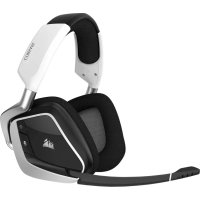
Void Pro RGB Wireless - Headphones CORSAIR - Free user manual and instructions
Find the device manual for free Void Pro RGB Wireless CORSAIR in PDF.


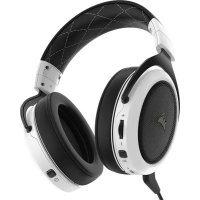
| Product type | Wireless gaming headset |
| Brand | Corsair |
| Model | Void Pro RGB Wireless |
| Dimensions (approximate) | 200 x 170 x 80 mm |
| Weight | Approximately 400 g |
| Power source | Rechargeable lithium-ion battery via USB |
| Battery life | Up to 16 hours (with RGB) |
| Connectivity | 2.4 GHz wireless via USB transmitter |
| Wireless range | Approximately 12 meters (40 feet) |
| Speakers | 50 mm dynamic with neodymium magnet |
| Speaker frequency response | 20 Hz - 20 kHz |
| Microphone | Unidirectional, flexible boom, automatic mute when raised |
| Microphone type | Condenser, noise reduction |
| Software compatibility | Corsair Utility Engine (CUE) for Windows 7/8/10 |
| Main features | Dolby Headphone 7.1 surround sound, customizable equalizer, RGB lighting, volume and EQ control via scroll wheel |
| Ear cushions | Microfiber, padded |
| Care and cleaning | Wipe with a soft, dry cloth. Do not use chemicals. |
| Warranty | 2 years (according to local legislation) |
| Box contents | Headset, USB transmitter, base station (special edition), USB cable, microphone windscreen, quick start guide |
Frequently Asked Questions - Void Pro RGB Wireless CORSAIR
User questions about Void Pro RGB Wireless CORSAIR
0 question about this device. Answer the ones you know or ask your own.
Ask a new question about this device
Download the instructions for your Headphones in PDF format for free! Find your manual Void Pro RGB Wireless - CORSAIR and take your electronic device back in hand. On this page are published all the documents necessary for the use of your device. Void Pro RGB Wireless by CORSAIR.
USER MANUAL Void Pro RGB Wireless CORSAIR
PREMIUM GAMING HEADSET WITH DOLBY HEADPHONE 7.1
CORSAIR COMPONENTS, INC.
47100 BAYSIDE PARKWAY • FREMONT • CALIFORNIA • 94538 • USA


TABLE OF CONTENTS

ENGLISH 1
FRANCAIS 15
DEUTsCH 29
PORTUGUES 43
ESPANOL 57
PYCCKM 71

PACKAGE CONTENTS
CORSAIR Void PRO RGB Wireless headset
B Wireless Transmitter (USB)
C Base station for wireless transmitter (Special Edition models only)
D Charging cable (USB, 2.0m)
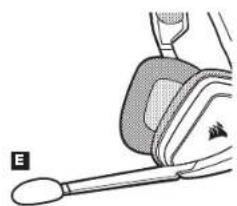
Microphone foam windscreen (removable)
Quick start guide
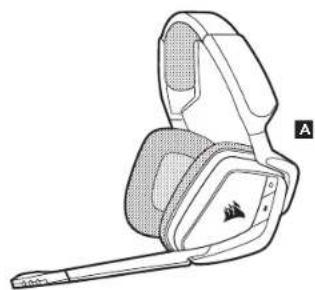
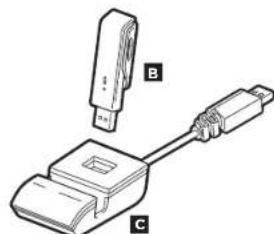
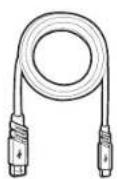
D
F

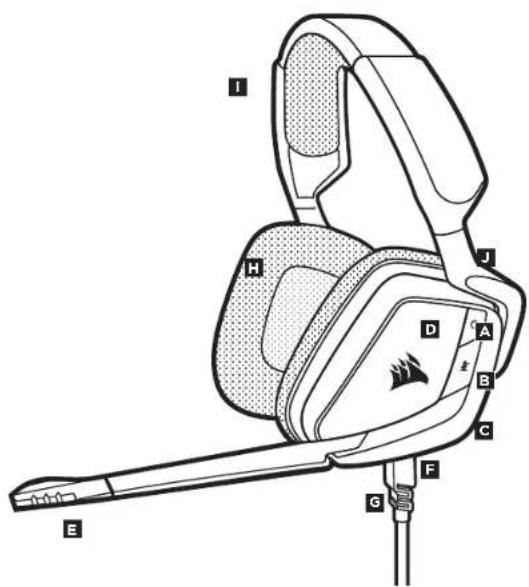
CONTROLS AND FEATURES
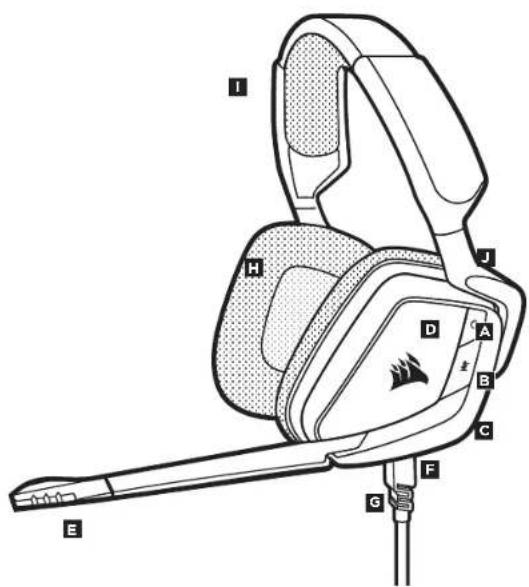
A Power button
B Mute button
Jog Dial (volume + EQ/Dolby)
RGB light (user programmable)
E Mic LED (mute)
F Status LED (RF, Battery)
Charging port
Microfiber covered ear pads
1 Headband adjustment
Cantilevered arm + hinge


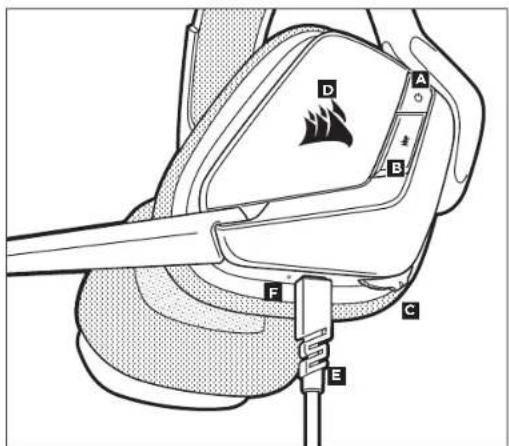
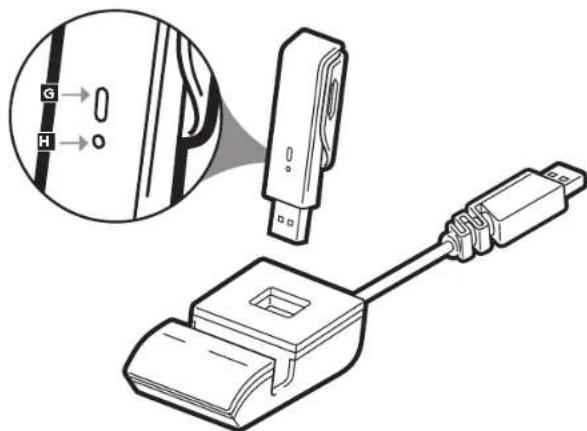
PRODUCT DETAIL (Controls and Wireless Transmitter)
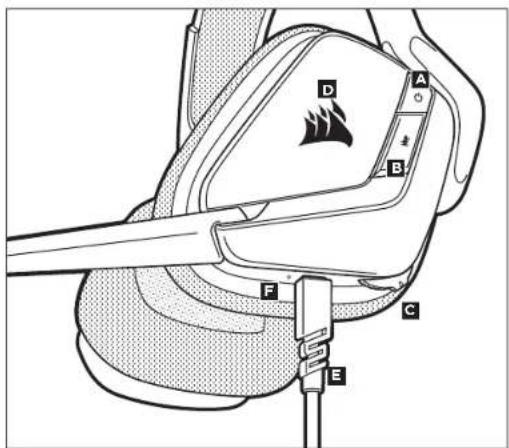
A Power button RGB light (user programmable)
Mute button Charging port
C
6 Wireless sync LED indicator
P Airing button (transmitter paired by default)
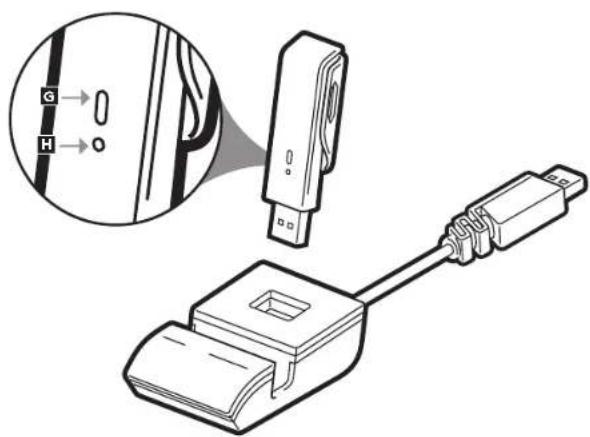
| Connect the wireless USB transmitter to any working USB port on your PC or connect the base station (included with the Special Edition models), and then attach the wireless transmitter to the base station. Using the USB extension base station may extend the wireless range of your CORSAIR VOID PRO RGB Wireless Headset, by enabling you to position the antenna for best reception. The headset is designed to operate at a range of up to 40 feet (12m) from the wireless transmitter, but other wireless devices, electronics, and obstructions such as walls may reduce wireless range. IMPORTANT: The first time you use the CORSAIR VOID PRO RGB Wireless Headset transmitter on a PC, the operating system will automatically install the device driver. After the device driver loads, we recommend you reboot your PC before use. | CHARGING 1GETTING STARTED |
| Status LED indications: Single Blink Red = Connected, Battery Low Single Blink Green = Connected, Battery Normal Rapid Blink Red = Disconnected, Battery Low Rapid Blink Green = Disconnected, Battery Normal Solid Amber = Battery Charging Solid Green = Battery Charged Rapid Blink Amber = Pairing Mode | IMPORTANT: The CORSAIR VOID PRO RGB Wireless Headset must be fully charged before its first use. • Connect the USB charging cable to any working USB port on your PC • Connect the USB charging cable to the CORSAIR VOID PRO RGB Wireless Headset |
| The CORSAIR VOID PRO RGB Wireless Headset battery has no "memory effect", so there is no need to completely discharge it before recharging. | |
| Remember that the USB charging cable requires a high power (USB 2.0 or better) port. Some USB ports found on older devices do not support USB 2.0. | |
| CHARGING WHILE POWER IS OFF: When the Void PRO Headset is OFF, and CHARGING with a connected USB cable. | |
| CHARGING WHILE POWER IS ON - "Play and Charge Mode":When the Void PRO Headset is ON, and CHARGING with a connected USB cable | · Go to corsair.com/support/downloads to download the CORSAIR Utility Engine ('CUE') Software |
| Using the CUE software will enable the full feature set of the CORSAIR Void PRO RGB Wireless Headset. Note: if the headset is used without software, some features will be disabled. · Install the software on a PC running Windows 10, Windows 8, or Windows 7. · After installation is complete, reboot your PC, and launch CUE. | |
| You can use it to: · Choose your RGB color preference and light intensity · Select and customize audio equalizer (EQ) settings · Adjust headset volume, microphone input volume, and microphone sidetone · Set Dolby Headphone 7.1 surround sound on or off | |
| The software's built-in documentation explains how to use the headset's features in greater detail. |

GENERAL TIPS

ADJUSTMENT
For optimal wireless performance:
- Place the wireless adapter in an open, unobstructed area. Special Edition models include a base station for the wireless transmitter, which can be used to optimize placement.
The wireless adapter requires a powered USB port (100mA).
For optimal battery life:
Make sure the battery is fully charged before initial use.
- Do not leave the battery fully discharged for long periods. Battery life is maximized by keeping the battery in a partially charged state.
If RGB lighting effects are unimportant to you, they can be disabled with CUE. This greatly extends battery life.
- Remove the USB charging cable promptly after the headset has been fully charged.
- Keep the headset at room temperature (20-30°C or 68-86°F).
For the best audio performance:
Download the CORSAIR Utility Engine software from
corsair.com/support/downloads
- Don't be afraid to use the software equalizer to adjust the audio quality to your liking. We've provided EQ presets for popular gaming and media types.
Prolonged listening at high volumes may adversely affect your hearing. Take breaks between sessions and always begin with the volume at the lowest possible level before increasing.
Place the headset on your head and adjust the headband for a comfortable fit. The extra-large ear pads and deep earcups enable the CORSAIR Void PRO RGB headset to fit comfortably so you can play for hours without fatigue.
As with any audio product, reduce the volume before trying it with an audio source the first time.
You can adjust the volume with:
- The "CUE Control" is the digital volume controller on the headset at the bottom corner of your left earcup: hold or repeatedly toggle it downwards to reduce volume, and upwards in short increments to increase volume.
The standard Windows audio controller can also be used to adjust volume. - Once an audio source is playing, set the volume to a comfortable level.
Headset audio settings
Short key press (1-5 seconds) on JOG DIAL toggles EQ Medium key press (.6-2 seconds) on JOG DIAL toggles Dolby Headphone 7.1 surround sound
Headset mic control
Short key press (.1-5 seconds) on mic mute button toggles mute on and off Long key press (2-4 seconds) on mic mute button toggles sidetone on and off
Note: CUE software can also be used to control these features

MICROPHONE ADJUSTMENT
Your new VOID PRO RGB Wireless Headset features a high performance "unidirectional" microphone designed to reject noise other than your voice, but it must be pointed directly at your mouth to function correctly.
- Bend the flexible microphone boom to best fit near to the left corner of your mouth. Mic automatically mutes when boom is up Mic automatically un-mutes when boom is down
- For improved voice quality, the included microphone foam windscreen may be applied over the microphone head.
We've found that about a 30 degree bend is a good place to start, but feel free to increase or decrease this if your mic is too loud or too soft.
Enjoy your CORSAIR Void PRO RGB Wireless Headset! If you have any questions or comments, see the back panel of this guide for contact information.

CHARGE HORS TENSION:
CPECTBA YNPABJIEHN I XAPAKTEPNUCTIKI
A KhoHnKa mTaHnn
B Khonka
C NobopoTbH nepeKIOuATenB (rpoMkoCTb+3kBaIaIep/Dolby)
D Nopcbetka RGB (nporpammpnyetycnnonbaaTeenm)
E CBeToHOHbI HINHkATOp MMKPOPOHa (3yK OTKnIOeH)
F CBeToaHIOaHbI INHIMKaTOp cOToTHnA (PH, aKMynAToTaP)
G Iopr3apdKn
H MmKpOBOONKHNCTbe am6yIooPi
Perynipobka pamaepa oronobba
KoHcOnbHbMybH+neTn

3JEMEHT PPOyKTA (Cpectaa ynpabHeHn 6ecnpobDhoi nepeaTHNK)
A Khonka nHTAHNA
KhoNkaIopr3apjikn
CobopotnHnpeKnOHTaeP (pRMOKcE+KbNAa3Aep/Dolby)
D Iopcbetka RGB (nporpaMMpyeTcna nbo3oBaTeMe)
E
CBeToHnOHDHHNkATOp COCTOHN
6 BeCnpoBODHOH HINikKaTOp CnHXpOHN3aUN
Khonka conpkeHn (nepeaunck conpkeH no ymonuHNO).

HAYAJO PA60Tbi

3APRDAKA1
PnKnHHTe 6ecnpoBHOI USB-epedatmK paboemy paBemy USB Ha PIKnnnnoknHKe
63aB8yO CTaHnKU (NocTAbAeMBy K BOMLAKETE MOeJIHM CneIaHbHcE PCHN). NpOKHbVHTc 6cePPOBOHd HpeNTaHKnK G KaobAO TcHAnu.
HcnoB3y yadHHnHb USB-Kab6eB 6a08oB CTAHIN, MOHO 3HaHTeHb POACCPTB 6ecPiobOHOH dhaa3OH RAPHTYPBCORSAIR VOID PRO RGB Wireless Headset BmMOKETpe pachonoxhht AHTEHNY TAK 0t6b bPmE bMkMaHb HooekTBAH. TaepHtpy PaccHTAHa ha paoTy B npTeaNax 12 MetPo (40 fYTOB) O6ecPiobOHOrnepeDATNa, ODAHKO HA ee paoTy Mory TPOBNIb TYC0XaIK EOPKAAIe CpeBIMN DpyTHe 6ecPiobOHOHte YpOCTBa, paoTAtoue B HENOCPECTBHNOH 6b3OToH
BAKHO:ПИпьбOMIICNIOB3OBaHIMRapHHTpyCORSAIRVOIDPRORGBWiReessHaIKonepaOHHAR CACTEMABITOMMTHeCKYCTAHOBHTpDAJIbepYCTPOBCTBA.103aBcpeHMeH3aRpy3KdPAJIbepCaPcOKmchDyETCR NEpe3aTyrPSHTbIK.
CBeToaHnHa HnHnKaunu CocToHHN
OIMHOHHe MURAHMe KpaCHbMa = NOKMIPOeH, H3Km ypoBeH 3apda AKKMyrAToP
OINHOHcMURAHHe3eHbIM=nQKHOUcHo,HOPMaHBbIyypOBcHb3apraDaAkkMyrToppa
b6tpoe mHaHnKpachBIM =0TKIOueHO, HmKmIyPoBcH 3apaDa aKKMyIaTopa
BbIcTpoMmHnHe3eHbM=OTKnHoyEHO,HOpMaHbHypoBeHsapAaAkyMyTToPa
HenpepbbsbHkentb=bbnonnrrcaapkaakkymnytopa
HenpepbnaBn3eneHbN =akkymytnrTop 3apxke
bictoe marrnne kentbim = pekmn conpaekehna
BAXHO:
TAPHTyPc CORSAIR VOID PRO RGB Wireless Headset D0nKHe 6bHb NnHOCTbApAKeHa Tpeep nBpBm HtNtB308AHmEe
-Похлоче USB-кабелзаркнлббумpaobemyUSB-noprykomblotepe
-ПожнйчгE USB-KabeIbЗapKnKrappHnypeCORSAIR VOID PRO RGB Wireless Headset
Batape npnntpyb CORSAIR VOID PRO RGB Wireless Headset He Mmert 30000000000000000000000000000000000000000000000000000000000000000
POMNHIE,4HDAIUS-8K6eB3AepnK3TpebcyerNoprBcKOKmoHIOHOCIN(BS2.0HNNBbUe).HeKoTOpE USB-NOPbHa yCtapeBuaaXyCtpOcTBx He IIODeepKBAKUT USB 2.0.
3APRAKA PPN BbIKIOEHHOM NITAHIN
Korpa raphnhypOVID PRO RGB BbiknoeHa, Ho 3APRAJAETCRpeepoNDknoeHbI USB-Ka6enb.
| 3APYDA KPII BKJIQUEHOM PINTAHIN - "Рек immиральзовлии зарддд" Кorda rapнлгура Void PRO RGB BKVIIQUEHЯ 3APYKAETCRAчес радлquен�н USB-кабел. | - Поредочite na corsair.com/support/downloads, уrostу загуztып CORSAIR Utility Engine ('CUE') Сюмоцьno ПО CUE bbl мокете настравь вислботаь рide Фуншим rapнлгурь VOID PRO RGB Wireless Headset. Д��ейсанes: 06ратite ВIMANAMHE: сад rapнлгурь пллуетаь бezл оно ПО, нековорь фуншим bdyt otknolyн. -Установite ПО на komлготер сорецонн的眼temь Windows 10, Windows 8, ип Windows 7. -Посе установки посятгуитe комлгotер и заuntite prorpaMMY CUE. |
| ПО можно Ирллььогудя: -БыбogaPrepond�гий no podscetke RGB и рякости. -Быбoga n hastrpoikii napametrpoь audno Квалайега. -Настода Гамковitch rapнлгурь, рогмости МИКрФОнHoro BXODA n MeCTHoro 3ФФЕКТа MИКрФОнa -Бынчении n bkvlnchenerpekIMa obelMHoro 3byka Dolby Headphone 7.1. | Балег радоб��у lnфорmaцhiо ob scntльзовлии phunшим rapнлгурь сM. BO BCtropeHHOB n prorpaMMHoe obecspcehenie dokumentauim. |

OBUHEPEKOMEHDAUH

PERYIINPOBKA
IaONIMAbHoB6ecnpoBOHOH npOH3BOHnTeNbHOCTH:
TOMeCTHE 66cnpoBdoHd anapTeB C6bOBDHOE OF npePNTCBM MEOCT. B KOMNKT NocTABKHN MOeJIEN CNEUKAHOI cepnBXOHT GaoBaOH CTANHIN DnB 66CNPoBDOHOro IpePeATWkA, KOtAPAN HOBNOEROTONMAHBO paoMeCTHBY CPTPOCTHO.
JaPaaobtoBbceepoBDOHoro aadTepa TpebyeTaMOuHbI USB-nopt (100MA).
YTo6bMaKcHMaJIbHo npOaIHTb cpoK cyIyK6bI 6aTapeH:
IpeepnepbIMuONbOBAHmYbEHTeB,UToBaTapeonHOCTb3apXeHa.
He OatBnBnBt BatePoe 6e3 aepnHa da anpoire Bpme. Cpok cnKb6B 6a batapen 6ydt MAKCNMAHbM, cna octabnBte qactnnH2oRzHHN.
EINBAMHeHcyKHeAeKbIbNOcBeTKRGRB,HXMOKHOOTKNOHTBCnOMOUbIOpOpaMMBUUE.3TOHAMHOro yBENHtCPOKcNkykbBatapeh.
-5b6TPOOTKINHHTeUSB-KabEnb3apRkN, KaK TOnbKa raphHtpya nnHOCTbB 3apRnTHc.
XpaHHTe raphHTpy npKOMHaTHOH TemnepaType (20-30°C mnn 68-86°F).
Yro6bI nonyHTb OT raphHtpybIMAKCMMANbMyO aydno npOn3BOuNTenbHOCTb:
CKaaiHIO CORSAIR Utility Engine ccaira corsair.com/support/downloads
He 3abbaHre 06 KbalaIepe nporpaMMb; HcnoMb3yHr cro dno perynpoBaHa KaeeTBA 3Byka. Ira nonyapbHex mP MeDaPiyeuMoTeBPiPeBapntelBHe HaCtoPnKkBaIa3epa.
Pomnme, ymo npodoxumenbho Bosdceimtse zpomux 3yno mokem nazybno opasumcbn ha boeem cye.
Aenaiue naey Mekdy ceancou u BCEOa HauHoume C Muunuaonbno zpimko, ybenuuae enocmenno no mepe Heoohdoomoo.
Hadehe Tepnhya Hnooby Hopery Pnye pamepe Ooroboe.Amyoepb obofooro pa3meep a npokkna HuyuHKOB denanr Tepnhyo VIOID PRO RGB Headset ouhnyyduho - MOKHO uparb hckonko kaoocbe ycbtba acyano.
KaH npabopote cKb6bM yDyHM ayDyHO-yTpOCTBOM, He 3a6yIbTe yBaBHT bpOMKOCTb, npEeJe CEM B nepbB pa3 HaeBaTb TaHPHTpyC BKNIOHBM BOCPONBEHEM.
OtperynpoBaTbpomKoCTbMoXHOcnoMouBHO:
"CeDcTbpynabHEna CUE” 30toXpOpoBoiKoHponPnpE PrrMOKoTH npRnHTpyB HxNHeH yTu neBoi qHnn, DnA yBaHENmI pRTOKoHnIy IeepuBaeHte PPOHNPep, HIOHO MOrKoPATHOpeKNouAte ETo BHN; nHObSHeHn eepoDBtBRE BvCEP C HebOJIHHM HapauHbaHHeM YCNHJ.
-ine perynpobAHn rpoMxOCTMH OMO TAKKc HcNnonb3OBaTcTaHdpTbMy ayno-KOTpnnpew Wincows.
- PerynpobKa rpoMkoTm npB 8ocnpn3BeDHeH 38yKa caymoHCTOHHka.
HactpoKm 3Byka rapHmTypbI
Haxatne KnaBua Hn BOPOTHOM INPEKTKOATENE CmmmaIbHOINPODIXATEbHOCTBO yepKaHAA(O,1-0,5cekyMD) BKKMAaETKBAAN3ep.
Hakatne KABKANU HOBOPOTOM IEPENKIOPAIE JO CPOEHNI PPDOONKATHEBIOY UDEPKAHIAO (O,6-2 cekyND) BKAHOAET OBEHMNBI BYQ Dobly Headphone 7.1.
CpeCTBaynpablennraPmIpyoN
Hakatme THKNOKH OTKNHOHN HBNY3KA HA MKNPOPOHO CH NMMHMAHBOH NPODQNOKHTENHOCTBbUyEPKXAAN (O,1- 0.5 ceknN) BMOHOTA E bHKNOHOATBcN.
HAKATHE KHOKNK OTKHNKO BNYA HA MKNPOFOHE C BOBIOI PNOOONKHTBOHOCHTY UDEEPKHA (2-4 cekyndb) BKNKOHAE N BKBKHOAE IeCNTHN OEKFk.
PmmeaHHe. nIy npabnene 3TNMM FyHXsAMMA TAKHE MOKHO McnoB308b nporpammy CUE.
PERYUNPOBKA MUKPOOHA
Oc6eHnOCTbIO HOBn raphNtpyb BecnpoBOnHa raphNtypa VOID PRO
RGBaBnTcBAbCOKOpOnu3BODntEnbHbOdHOHaPabNeHHbMKNpOoH, npedHa3NaueHHbIyN30JIaUN
WyMa O T Bawero rONoCa, Ho Ira npabnIbHoro fYHKcnoHnpobAnr OH dOnKeH 6bITb HapBaJIeH HenocpeCTBeHHo K Bawemy pTy.
- Ⅲorhytbl depkataeb Mnkpofoha nna Hauyueero npnbkeHn Knebomy yrrny Bawero pta.
3Byk MInKpOfoHa aBtOMaTnueckn OTKIOucaTc npn noDbce Me dpeKaTeIa.
3ByK MUNkofoHc CHOBA ABTOMaTmueckn BkIOuOaTeC npn OnyckaHm JepKaTeJ.
IyuyuueHnKaueCTBa3BykaHa roIOLBky MmKpOfoHA MoXHO HaTeB BTePO3aunTHbI kPAn H3 NeHOMatePnana.
Mbl onpeJenH,TOO tOKlnoHeHc OKO 30 rpaDycoB ABnRETCX oPOUIM MecTOM nA hauana pa60tB,HO Bb MoKTe yBeIuHHTB NIN yMeHbWHT b eO,ecn 38yK MKNpOFO hCNIKOM pEKHI NIN cNIIKOM cNAb6.
Baua raphnitypora CORSAIR Void PRO RGB Wireless Headset rotoba Ka pabotel Ppi Bo3NHOHOBENI NIOb6x BONPOPOC IIN KOMMehTAPeB CBAKJTEc b HAM. KoTHAKTHA INΦOPaUMaY k4a3AHa Ta TblbNo NaHEny pyKOBoDCTBa.

Note on environmental protection
After the Implemenstration of the European Directive 2002/95/EU in the national legal system, the following applies:
- Electronic and electronic devices May not be disposed of with domestic waste
Consumers are obligated by law to return electrical and electronic devices at the end of their service lives to the public collecting points set up for this purpose of point of sale. Details to this are defined by the national law of the respective country. This symbol on this product, the instruction manual or the package indicates that a product is subject to these regulations. By recycling, reselling the materials or other forms of utilizing old devices, you are making an important contribution to protecting our environment.

Umweltschutzhinweis
This modification is not applicable for any federal or state regulations. The following sections may be used to modify the requirements. Such modifications could not void the user authority to operate the equipment.
ECC STATEMENT
This equipment has been tested and found to comply with the limits. For a Class B digital device, pursuant to part 15 of the FCC Rules. These limits are designed to provide reasonable protection against harmful interference in a residential installation. This equipment generalizes, uses, and can radiate radio frequency energy and, if not installed, are used in accordance with the instructions, may cause harmful interference to radio communications. The use of this equipment will not occur in a particular installation. If this equipment does cause harmful interference to radio or television reception, which can be determined by turning the equipment off and on, the user is encouraged to try to correct the interference by one or more of the following measures:
- Recipient or relocate the receiving antenna.
- Increase the separation between the equipment and receiver.
- Connect this equipment into a pullout on a circuit different from that to which the receiver is connected.
- Consult the dealer or an experienced radio/TV technician for help.
This device must not be co-located or operating in conjunction with any other antenna or transmitter.
Operation is subject to the following two conditions:
2. This service must accept any interference received, including interference that may cause undesired operation.

supparlcorser.com
WEB
corair.com
BLOG
corair.com/bog
FORUM
forum.corsair.com
EACEROBK
Paeepbank.com/Securit
一
witten.com/copy
YOUTUBE
youtubc.com/Cersia
2017 CORSAIR Components, Inc. All rights reserved.
CORSAIR and the sail logo are registered trademarks, and CORSAIR Gaming and the CORSAIR Gaming logo are trademarks of CORSAIR in the United States and/or other countries. All other trademarks are the property of CORSAIR.
Product may vary slightly from those pictured.
49-001558AB

- TABLE OF CONTENTS
- PACKAGE CONTENTS
- CONTROLS AND FEATURES
- PRODUCT DETAIL (Controls and Wireless Transmitter)
- GENERAL TIPS
- ADJUSTMENT
- For optimal wireless performance:
- For optimal battery life:
- For the best audio performance:
- You can adjust the volume with:
- Headset audio settings
- Headset mic control
- MICROPHONE ADJUSTMENT
- CHARGE HORS TENSION:
- CPECTBA YNPABJIEHN I XAPAKTEPNUCTIKI
- 3JEMEHT PPOyKTA (Cpectaa ynpabHeHn 6ecnpobDhoi nepeaTHNK)
- HAYAJO PA60Tbi
- 3APRDAKA1
- CBeToaHnHa HnHnKaunu CocToHHN
- BAXHO:
- 3APRAKA PPN BbIKIOEHHOM NITAHIN
- OBUHEPEKOMEHDAUH
- PERYIINPOBKA
- IaONIMAbHoB6ecnpoBOHOH npOH3BOHnTeNbHOCTH:
- YTo6bMaKcHMaJIbHo npOaIHTb cpoK cyIyK6bI 6aTapeH:
- Yro6bI nonyHTb OT raphHtpybIMAKCMMANbMyO aydno npOn3BOuNTenbHOCTb:
- OtperynpoBaTbpomKoCTbMoXHOcnoMouBHO:
- HactpoKm 3Byka rapHmTypbI
- CpeCTBaynpablennraPmIpyoN
- PERYUNPOBKA MUKPOOHA
- Note on environmental protection
- Umweltschutzhinweis
- ECC STATEMENT
- WEB
- BLOG
- FORUM
- EACEROBK
- 一
- YOUTUBE
Brand : CORSAIR
Model : Void Pro RGB Wireless
Category : Headphones