EasyManual
TE 1000AVR - Drill HILTI - Free user manual and instructions
Find the device manual for free TE 1000AVR HILTI in PDF.



| Technical specifications | Hilti TE 1000AVR rotary hammer drill, 1,500 W power, 25 J impact energy, 2,700 blows/min impact frequency. |
|---|---|
| Usage | Designed for drilling large diameters in concrete, stone, and other building materials. |
| Maintenance and repair | Regularly check the lubrication system, clean the filters, and have the device inspected by a professional every 12 months. |
| Safety | Use safety glasses, gloves, and ear protection. Do not use the tool in wet environments. |
| General information | Weight: 10.6 kg, dimensions: 61 x 22 x 30 cm, 2-year warranty, compatible accessories available. |
Frequently Asked Questions - TE 1000AVR HILTI
Questions des utilisateurs sur TE 1000AVR HILTI
0 question sur cet appareil. Repondez a celles que vous connaissez ou posez la votre.
Poser une nouvelle question sur cet appareil
Download the instructions for your Drill in PDF format for free! Find your manual TE 1000AVR - HILTI and take your electronic device back in hand. On this page are published all the documents necessary for the use of your device. TE 1000AVR by HILTI.
USER MANUAL TE 1000AVR HILTI
Original operating instructions
1 Information about the documentation
1.1 About this documentation
- Read this documentation before initial operation or use. This is a prerequisite for safe, trouble-free handling and use of the product.
- Observe the safety instructions and warnings in this documentation and on the product.
- Always keep the operating instructions with the product and make sure that the operating instructions are with the product when it is given to other persons.
1.2 Explanation of symbols
1.2.1 Warnings
Warnings alert persons to hazards that occur when handling or using the product. The following signal words are used:

DANGER
DANGER!
Draws attention to imminent danger that will lead to serious personal injury or fatality.

WARNING
WARNING!
Draws attention to a potential threat of danger that can lead to serious injury or fatality.

CAUTION
CAUTION!
Draws attention to a potentially dangerous situation that could lead to personal injury or damage to the equipment or other property.
1.2.2 Symbols in the operating instructions
The following symbols are used in these operating instructions:

Comply with the operating instructions

Instructions for use and other useful information

Dealing with recyclable materials

Do not dispose of electric equipment and batteries as household waste

Hilti Li-ion battery

Hilti charger
1.2.3 Symbols in illustrations
The following symbols are used in illustrations:
| 2 | These numbers refer to the illustrations at the beginning of these operating instructions. |
| 3 | The numbering reflects the sequence of operations shown in the illustrations and may deviate from the steps described in the text. |
| 11 | Item reference numbers are used in the overview illustration and refer to the numbers used in the key in the product overview section. |
| ®! | These characters are intended to specifically draw your attention to certain points when handling the product. |
1.3 Product-dependent symbols
1.3.1 Symbols on the product
The following symbols can be used on the product:
| Protection class II (double-insulated) |
| Only use in enclosed spaces |
| The power tool supports near-field communication (NFC) technology, which is compatible with iOS and Android platforms. |
| Hilti Li-ion battery type series used. Observe the information given in the section headed Intended use. |
| Li-ion battery |
| If applied on the product, the product has been certified by this certification body for the US and Canadian markets according to the applicable standards. |
1.4 Product information
products are designed for professional users and only trained, authorized personnel are permitted to operate, service and maintain the products. This personnel must be specifically informed about the possible hazards. The product and its ancillary equipment can present hazards if used incorrectly by untrained personnel or if used not in accordance with the intended use.
The type designation and serial number are printed on the rating plate.
Write down the serial number in the table below. You will be required to state the product details when contacting Hilti Service or your local Hilti organization to inquire about the product.
Product information
| Radio R 6-22 | |
| Generation 01 | |
| Serial no. |
2 Safety
2.1 General safety instructions
ATTENTION! Read all instructions. Failure to follow all instructions listed below may result in electric shock, fire and/or serious injury.
Keep these instructions in a handy yet secure place.
Workplace
- Ensure that the workplace is well lit.
- Do not tamper with or attempt to make alterations to the appliance.
The appliance is not intended for wall mounting. - Keep your work area clean and well lit. Cluttered or poorly lit work areas invite accidents.
Personal safety
This product is not intended for use by persons (including children) with physical, sensory or mental disabilities or persons lacking the appropriate experience and/or knowledge. These persons must receive instruction in safe handling of the appliance and must be supervised throughout their use of the appliance by a responsible person.
- Explain to children that they are not allowed to play with the appliance.
Children over 8 years of age must receive instruction in safe handling of the appliance and must be supervised throughout their use of the appliance by a responsible person.
- Do not wear jewelry such as rings or chains. Jewelry could cause a short circuit resulting in personal injury in the form of burns.
- Avoid touching the contacts.
Battery use and care
Observe the special guidelines applicable to the transport, storage and use of Li-ion batteries.
Do not expose batteries to high temperatures, direct sunlight or fire.
Do not disassemble, crush or incinerate batteries and do not subject them to temperatures over 80^
- Do not use or charge batteries that have suffered mechanical impact, have been dropped from a height or show signs of damage. In this case, always contact your Hilti Service.
- If the battery is too hot to touch it may be defective. Put the battery in a place where it is clearly visible and where there is no risk of fire, at an adequate distance from flammable materials. Allow the battery to cool down. If it is still too hot to touch after an hour, the battery is faulty. Contact Hitti Service.
Service
- Have the appliance serviced by a qualified repair person using only genuine Hilti spare parts. The safety of the appliance can thus be maintained.
2.2 Battery use and care
Comply with the following safety instructions for the safe handling and use of Li-ion batteries.
Failure to comply can lead to skin irritation, severe corrosive injury, chemical burns, fire and/or explosion.
- Use only batteries that are in perfect working order.
- Treat batteries with care in order to avoid damage and prevent leakage of fluids that are extremely harmful to health!
- Do not under any circumstances modify or tamper with batteries!
Do not disassemble, crush or incinerate batteries and do not subject them to temperatures over 80^ (176 F).
- Never use or charge a battery that has suffered an impact or been damaged in any other way. Check your batteries regularly for signs of damage.
- Never use recycled or repaired batteries.
- Never use the battery or a battery-operated power tool as a striking tool.
- Never expose batteries to the direct rays of the sun, elevated temperature, sparking, or open flame. This can lead to explosions.
- Do not touch the battery poles with your fingers, tools, jewelry, or other electrically conductive objects. This can damage the battery and also cause material damage and personal injury.
- Keep batteries away from rain, moisture and liquids. Penetrating moisture can cause short circuits, electric shock, burns, fire and explosions.
- Use only chargers and power tools approved for the specific battery type. Read and follow the relevant operating instructions.
- Do not use or store the battery in explosive environments.
If the battery is too hot to touch, it may be defective. Put the battery in a place where it is clearly visible and where there is no risk of fire, at an adequate distance from flammable materials. Allow the battery to cool down. If it is still too hot to touch after an hour, the battery is faulty. Consult Hilti Service or read the document entitled "Instructions on safety and use for Hilti Li-ion batteries".

Observe the special guidelines applicable to the transport, storage and use of lithium-ion batteries. page 10
Read the instructions on safety and use of Hitti Li-ion batteries that you can access by scanning the QR code at the end of these operating instructions.
3 Description
3.1 Overview
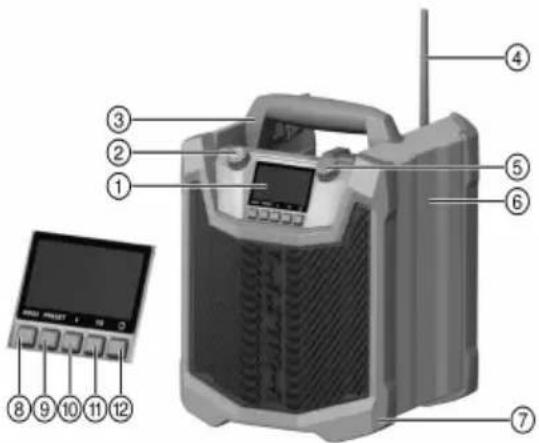
① Display
② Power button
③ Carrying handle
Antenna
⑤ Knob
Casing
⑦ Rubber armoring
⑧ Mode button
9 Preset button
⑩ Bluetooth button
⑪ Equalizer button
Time settings
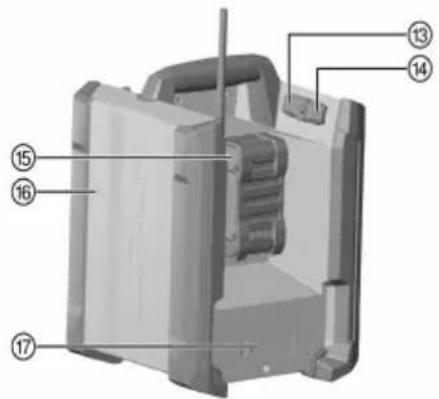
⑬ USB port
14 AUX port
15 Battery
16 NFC interface
⑦ Battery compartment
3.2 Intended use
The product described is a cordless jobsite radio. It is designed for playing music as a radio receiver or from various other devices that can be either paired with the product via Bluetooth or connected to it by an AUX cable.
- The product is designed for a jobsite environment. Do not expose the product to moisture such as running water, for example.
- Use the product only indoors.
- For this product, use only Hilti lithium-ion batteries of the B 22 series. For this product, Hilti recommends the use of the batteries stated in the table at the end of these operating instructions.
- For these batteries, use only Hilti chargers of the type series listed at the end of these operating instructions.
3.3 Items supplied
Jobsite radio, AAA batteries (2 of), operating instructions

Other system products approved for use with this product can be found at your local Hilti Store or at: www.hilti.group
3.4 Bluetooth
This product is equipped with Bluetooth (optional).
Bluetooth is a wireless data transfer system by which the two Bluetooth-enabled products can communicate with each other over a short distance.
3.5 Status indicators of the Li-ion battery
Hilti Nuron Li-ion batteries can indicate state of charge, fault messages and the battery's state of health.
3.5.1 Indicators for state of charge and fault messages

WARNING
Risk of injury by a falling battery!
- If the release button is pressed with a battery inserted in the product, subsequently check that the battery is correctly re-engaged and secure.
Short-press the release button of the battery to get whichever of the following status indications is applicable at the time.
State of charge and, if applicable, faults are indicated constantly as long as the connected product is switched on.
| Status Meaning | |
| Four (4) LEDs show constantly green State of charge: 100 % to 71 % | |
| Three (3) LEDs show constantly green State of charge: 70 % to 51 % | |
| Two (2) LEDs show constantly green State of charge: 50 % to 26 % | |
| One (1) LED shows constantly green State of charge: 25 % to 10 % | |
| One (1) LED slow-flashes green State of charge: < 10 % | |
| One (1) LED quick-flashes green | The Li-ion battery is completely discharged. Recharge the battery. If the LED again starts quick-flashing after the battery has been charged, consult Hilti Service. |
| One (1) LED quick-flashes yellow | The Li-ion battery or the product in which it is serted is overloaded, too hot or too cold, or experiencing some other fault. Bring the product and the battery to the recommended working temperature and do not overload the product when it is in use. If the message persists, consult Hilti Service. |
| One (1) LED shows yellow | The Li-ion battery and the product in which it is inserted are not compatible. Consult Hilti Service. |
| One (1) LED quick-flashes red | The Li-ion battery is locked and cannot be used. Consult Hilti Service. |
3.5.2 Indicators showing the battery's state of health
To check the battery's state of health, press the release button and hold it down for longer than three seconds. The system does not detect a potential malfunction of the battery due to misuse, for example battery dropped or pierced, external heat damage, etc.
| Status Meaning | |
| All LEDs show in sequence, followed by one (1) LED showing constantly green. | The battery can remain in use. |
| All LEDs show in sequence, followed by one (1) LED quick-flashing yellow. | The check to ascertain the battery's state of health did not complete. Repeat the procedure, or consult Hilti Service. |
| All LEDs show in sequence, followed by one (1) LED showing constantly red. | If a connected product can still be used, the remaining battery capacity is below 50 %. If a connected product can no longer be used, the battery has reached the end of its useful life and has to be replaced. Consult Hilti Service. |
3.6 Information shown in the display
Information shown in the display page 6
Information shown in the display
| AM | The AM frequency band has been selected as the audio source. |
| FM | The FM frequency band has been selected as the audio source. |
| AUX | AUX has been selected as the audio source. |
| III | Indicates the battery state of charge. A bar stands for 25 %. |
| * | The Bluetooth symbol indicates whether the appliance is connected to a player. If the Bluetooth symbol lights continuously, a player is connected. If the Bluetooth symbol flashes, the appliance is searching for a player which it can connect. |
| ○ | The pairing symbol indicates that the appliance is searching for a Bluetooth device with which it has already been paired. The pairing symbol flashes while searching is in progress. |
| VOLUME | Indicates the volume settings. |
| BASS | Indicates the bass settings. |
| TREBLE | Indicates the treble settings. |
| STEREO | Indicates stereo playback. Stereo playback is activated automatically when signal reception is good enough. |
| PRESET | Indicates the memory slot of the station. |
| 08:00 | Indicates the time. Symbols flash in setup mode. |
3.7 Cradle for mobile devices 13
Via Bluetooth or AUX, the radio can play audio from external mobile devices (such as smartphones or tablet computers). The mobile devices can be cradled securely on the radio.
4 Technical data
4.1 Product properties
| Power input | 160 W |
| Battery operating voltage | 22 V |
| Battery pack | Li-Ion |
| Weight (Without battery) | 5.1 kg |
| AM frequency range | 526.5 kHz ... 1,606.5 kHz |
| FM frequency range | 87.5 MHz ... 108 MHz |
| DAB / DAB+ | 174 MHz ... 240 MHz |
| USB output voltage | 5.0 V / 2.1 A |
| Ambient temperature | -17 °C ... 40 °C |
4.2 Battery
| Battery operating voltage | 21.6 V |
| Weight, battery | See the end of these operating instructions |
| Ambient temperature for operation | -17 °C ... 60 °C (1 °F ... 140 °F) |
| Storage temperature | -20 °C ... 40 °C (-4 °F ... 104 °F) |
| Battery charging starting temperature | -10 °C ... 45 °C (14 °F ... 113 °F) |
5 Preparations at the workplace

WARNING
Risk of injury by inadvertent starting!
Before inserting the battery, make sure that the product is switched off.
- Remove the battery before making any adjustments to the power tool or before changing accessories.
Observe the safety instructions and warnings in this documentation and on the product.
5.1 Charging the battery
- Before charging the battery, read the operating instructions for the charger.
- Make sure that the contacts on the battery and the contacts on the charger are clean and dry.
- Use an approved charger to charge the battery. page 4
5.2 Inserting the battery

WARNING
Risk of injury by short circuit or falling battery!
-
Before inserting the battery, make sure that the contacts on the battery and the contacts on the product are free of foreign matter.
Make sure that the battery always engages correctly. -
Charge the battery fully before using it for the first time.
- Push the battery into the product until it engages with an audible click.
- Check that the battery is seated securely.
5.3 Removing the battery
- Press the battery release button.
- Remove the battery from the product.
5.4 Inserting the back-up batteries 2

It is not possible to save settings unless the batteries are correctly installed.
Make sure that battery polarity is correct.
- Remove the cover from the battery compartment.
- Insert the 2 AAA batteries supplied with the appliance into the battery compartment.
- Install the cover on the battery compartment.
5.5 Switching the appliance on/offE
Press the Power button.
6 Operation
Observe the safety instructions and warnings in this documentation and on the product.
6.1 Establishing a Bluetooth connection 4

If you are prompted for a code, enter the code 0000.
HILTI
-
Press the Bluetooth button.
-
To initially pair the radio manually, press the Bluetooth button and hold it down for 2 seconds.
The Bluetooth symbol flashes.
- Select the Hilti radio on the mobile device.
- The devices have been successfully paired when the Bluetooth and pairing symbols both show continuously in the display.
-
If the radio has already been paired to the mobile device, press the Bluetooth button.
-
Pairing starts automatically and the pairing symbol on the screen starts to flash.
The radio searches for a signal for a maximum of 3 minutes.
The pairing symbol appears on the display to indicate that the devices are paired. -
The Bluetooth symbol appears in the display to indicate that the radio has found a paired mobile device.
-
If you have a second radio, you can synchronize the two radios and listen to music in stereo.
-
Radio (A) is connected to your mobile device. This radio is the master.
Switch radio (B) on.
On radio (B), press the Bluetooth button. - On master radio (A), press the Preset button (an acoustic signal sounds to confirm that the connection has been established).
- Shortly after, music will start playing in stereo on the two radios.
6.2 Making an NFC connection 3
- Activate the NFC function on your mobile device (if it supports NFC).
- Hold you mobile device close to the NFC interface of the radio. This is on the right-hand side and is indicated by the NFC symbol.

You must accept the NFC connection on your mobile device when the connection is established for the first time.
6.3 Setting the audio source 3

Press the mode button to select the audio source: AM, FM, AUX or Bluetooth.
- Press the mode button.
- Select the desired audio source. You can choose between AM, FM, AUX and Bluetooth.
6.4 Searching for and saving stations 7

Quickly turn the knob a short distance to start the automatic station search.
- Use the knob to select a frequency.
- Press the 'Preset' button.
- Press the knob to save this frequency.
6.5 Positioning the antenna 8
- Swivel the antenna to the position at which reception is clearest.
6.6 Adjusting the volume
- Turn the power button clockwise to increase the volume.
- Turn the power button counterclockwise to reduce the volume.
6.7 Equalizer settings 10

This allows you to make adjustments to the bass and treble settings.
- Press the equalizer button (EQ).
- Use the knob to select either bass or treble for adjustment.
- Use the knob to change your settings.
6.8 Audio playback from a mobile device via Bluetooth

For good audio quality, set the volume of the external device to very high. Further adjustment of the volume should then be made using the controls on the appliance.
- Establish a Bluetooth connection between the mobile device and the radio.
- Select the play mode (Bluetooth).
- Press the Start/Pause button on your mobile device or press the knob to start or pause audio playback.
- Use the arrow buttons on the mobile device or turn the knob to change tracks and to start.
6.9 Audio playback from an external device via AUX

For good audio quality, set the volume of the external device to very high. Further adjustment of the volume should then be made using the controls on the appliance.
- Select the play mode (AUX or Bluetooth).
- Press the start/pause button on your mobile device to start or pause audio playback.
- Use the arrow buttons on the external device to change tracks and to start.
6.10 USB charging function

The USB connector provides charging power only. Data transfer is not possible.
- Use a USB cable to connect your mobile device to the USB port of the radio.
7 Care and maintenance

WARNING
Risk of injury with battery inserted!
Always remove the battery before carrying out care and maintenance tasks!
Care of the product
- Carefully remove stubborn dirt.
- Carefully clean the air vents, if present, with a dry, soft brush.
- Use only a slightly damp cloth to clean the housing. Do not use cleaning agents containing silicone as these can attack the plastic parts.
- Use a dry, clean cloth to clean the contacts of the product.
Care of the Li-ion batteries
- Never use a battery with clogged air vents. Clean the air vents carefully using a dry, soft brush.
- Avoid unnecessary exposure of the battery to dust and dirt. Never expose the battery to high levels of moisture (e.g. by being dipped in water or left in the rain).
If a battery has been soaked by moisture, treat it as a damaged battery. Isolate it in a non-flammable container and consult Hilti Service.
- Keep the battery free of extraneous oil and grease. Do not permit dust or dirt to accumulate unnecessarily on the battery. Clean the battery with a dry, soft brush or a clean, dry cloth. Do not use cleaning agents containing silicone as these can attack the plastic parts.
Do not touch the contacts of the battery and do not remove the factory-applied grease from the contact
- Use only a slightly damp cloth to clean the housing. Do not use cleaning agents containing silicone as these can attack the plastic parts.
Maintenance
- Check all visible parts and controls for signs of damage at regular intervals and make sure that they all function correctly.
HILTI
- Do not use the product if signs of damage are found or if parts malfunction. Immediately have the product repaired by Hilti Service.
After cleaning and maintenance, install all guards and protective devices and check that they are in full working order.

To help ensure safe and reliable operation, use only genuine Hilti spare parts and consumables. Spare parts, consumables and accessories approved by Hilti for use with your product can be found at your Hilti Store or online at: www.hilti.group
8 Transport and storage of cordless tools and batteries
Transport

CAUTION
Accidental starting during transport!
Always transport your products with the batteries removed!
- Remove the battery/batteries.
- Never transport batteries loose and unprotected. During transport, batteries should be protected from excessive shock and vibration and isolated from any conductive materials or other batteries that may come in contact with the terminals and cause a short circuit. Comply with the locally applicable regulations for transporting batteries.
- Do not send batteries through the mail. Consult your shipper for instructions on how to ship undamaged batteries.
Prior to each use and before and after prolonged transport, check the product and the batteries for damage.
Storage

WARNING
Accidental damage caused by defective or leaking batteries!
Always store your products with the batteries removed!
- Store the product and the batteries in a cool and dry place. Comply with the temperature limits stated in the technical data.
- Do not store batteries on the charger. Always remove the battery from the charger when the charging operation has completed.
- Never leave batteries in direct sunlight, on sources of heat, or behind glass.
- Store the product and batteries where they cannot be accessed by children or unauthorized persons.
Prior to each use and before and after prolonged storage, check the product and the batteries for damage.
9 Troubleshooting
If the trouble you are experiencing is not listed in this table or you are unable to remedy the problem by yourself, contact Hilti Service.
| Malfunction | Possible cause | Action to be taken |
| Radio does not switch on. | Battery discharged | Charge the battery or insert a new battery. |
| Battery defective | Check the battery by pressing the two buttons at the sides. If the LEDs light up the radio might be defective. If the LED do not light up the battery is defective. Contact Hilti Service. | |
| Radio defective | Contact Hilti Service. | |
| Border of the battery symbol flashes, no segment of the state of charge indicator filled (the indicator assumes this state for a short time before the appliance switches itself off). | Battery too hot ➔ Wait until the Battery too cold ➔ Wait until the Battery defective ➔ Check the battery by pressing the two buttons at the sides. If the LEDs light up the radio might be defective. If the LEDs do not light up the battery is defective. ➔ Contact Hilti Service. | battery cools down. |
| Battery defective ➔ Check the battery by pressing the two buttons at the sides. If the LEDs light up the radio might be defective. If the LEDs do not light up the battery is defective. ➔ Contact Hilti Service. | ||
| Settings such as clock time are no longer saved in memory. | Batteries discharged ➔ Replace the back-up batteries. |
10 Disposal

WARNING
Risk of injury due to incorrect disposal! Health hazards due to escaping gases or liquids.
DO NOT send batteries through the mail!
- Cover the terminals with a non-conductive material (such as electrical tape) to prevent short circuiting.
- Dispose of your battery out of the reach of children.
- Dispos of the battery at your Hilti Store, or consult your local governmental garbage disposal or public health and safety resources for disposal instructions.

Most of the materials from which Hilti products are manufactured can be recycled. The materials must be
correctly separated before they can be recycled. In many countries, your old tools, machines or appliances can be returned to Hilti for recycling. Ask Hilti Service or your Hilti sales representative for further information.

Do not dispose of power tools, electronic equipment or batteries as household waste!
11 Manufacturer's warranty
- Please contact your local Hilti representative if you have questions about the warranty conditions.
12 FCC statement (applicable in US) / IC statement (applicable in Canada)

This device has been tested and found to comply with the limits for a class A digital device, pursuant to part 15 of the FCC rules. These limits are intended to ensure adequate protection against electromagnetic interference when the device is operated in areas used for commercial purposes.
This equipment generates, uses, and can radiate radio frequency energy and, if not installed and used in accordance with the instructions, may cause interference to radio communications. The user must bear costs incurred due to interference that operation of this device in residential areas can cause.
This device is in compliance with paragraph 15 of the FCC rules and the RSS-210 specifications of ISED. Operation is subject to the following two conditions:
- This device shall cause no harmful interference.
This device must accept any interference received, including interference that may cause undesired operation.

Changes or modifications not expressly approved by Hilti may restrict the user's authorization to operate the equipment.
13 Further information
For more information on operation, technology, environment and recycling, follow this link: qr.hilti.com/manual?id=2309425
This link is also to be found at the end of the operating instructions, in the form of a QR code.