EasyManual
TE 700AVR - Drill HILTI - Free user manual and instructions
Find the device manual for free TE 700AVR HILTI in PDF.



| Technical features | HILTI TE 700AVR hammer drill, 1500 W power, impact energy of 7.0 J, impact frequency of 2900 bpm. |
|---|---|
| Usage | Ideal for drilling into concrete, masonry, and hard materials. |
| Maintenance and repair | Regularly check the carbon brushes, clean the filters, and lubricate moving parts according to the user manual. |
| Safety | Use safety glasses and gloves. Do not use the device in wet environments. |
| General information | Weight: 8.5 kg, dimensions: 500 x 400 x 150 mm, 2-year warranty. |
Frequently Asked Questions - TE 700AVR HILTI
Questions des utilisateurs sur TE 700AVR HILTI
0 question sur cet appareil. Repondez a celles que vous connaissez ou posez la votre.
Poser une nouvelle question sur cet appareil
Download the instructions for your Drill in PDF format for free! Find your manual TE 700AVR - HILTI and take your electronic device back in hand. On this page are published all the documents necessary for the use of your device. TE 700AVR by HILTI.
USER MANUAL TE 700AVR HILTI
text_image
Diagram showing the working principle of a power tool with four labeled components and directional arrows indicating rotation.3
text_image
Safety warning diagram showing electrical plug, screwdriver, and safety symbols including warning sign, hand icon, and hazard symbol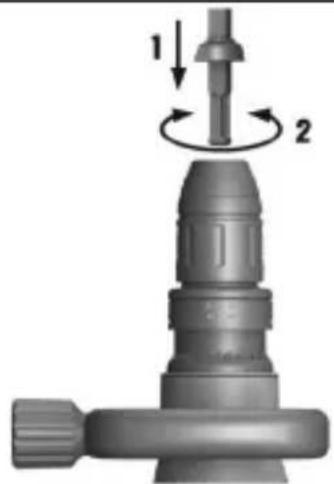
natural_image
Mechanical component diagram showing a shaft and threaded shaft assembly with two rotational arrows indicating motion (no text or symbols)4
text_image
4 !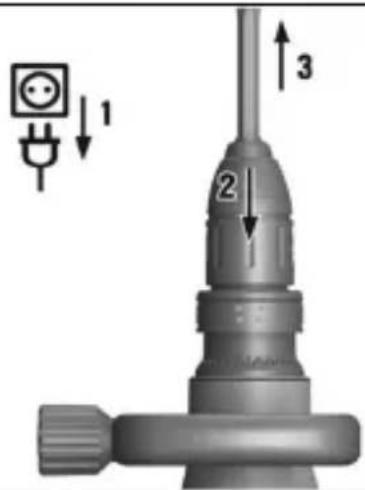
text_image
Diagram of a mechanical component with labeled parts and directional arrows indicating assembly or positioning.5
natural_image
3D rendering of a handheld electric drill with a tool, showing the blade and rotary knob (no text or symbols)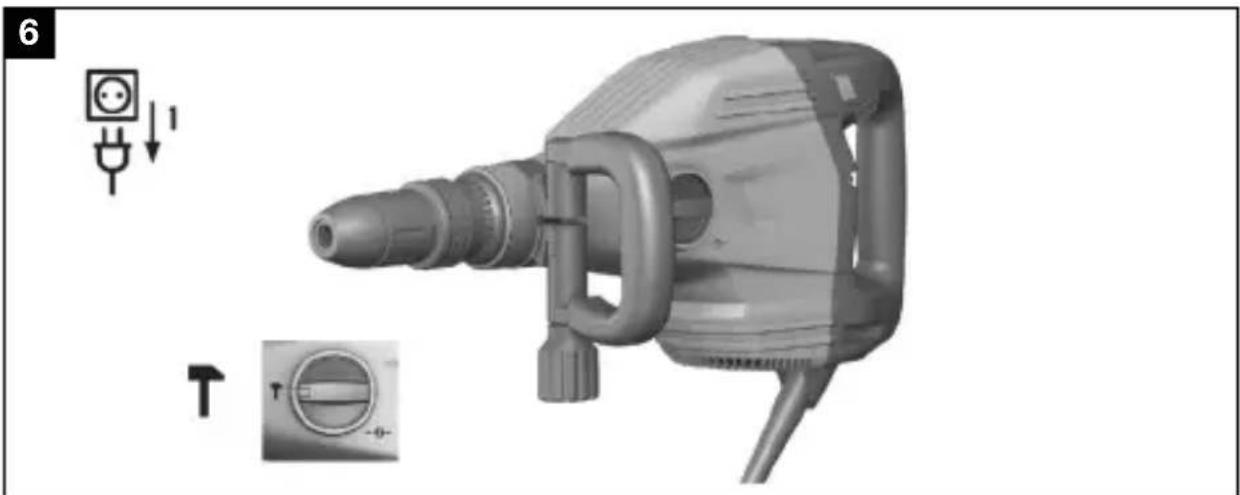
natural_image
3D rendering of a mechanical power drill with adjustment knobs and a dial (no text or symbols)TE 700-AVR
en Original operating instructions . . . . . . . . . . . . . . .
fr Mode d'emploi original . . . . . . . . . . . . . . . . . . . .
es Manual de instrucciones original . . . . . . . . . . . . . . .
pt Manual de instruções original . . . . . . . . . . . . . . . . .
Original operating instructions
1 Information about the operating instructions
1.1 About these operating instructions
- Read these operating instructions before the product is used or operated for the first time. This is a prerequisite for safe, trouble-free handling and use of the product.
- Observe the safety instructions and warnings in these operating instructions and on the product.
- Always keep the operating instructions with the product and make sure that the product is accompanied by these operating instructions only, when the product is given to other persons.
1.2 Explanation of symbols
1.2.1 Warnings
Warnings alert persons to hazards that occur when handling or using the product. The following signal words are used:

DANGER
DANGER !
- Draws attention to imminent danger that will lead to serious personal injury or fatality.

WARNING
WARNING !
- Draws attention to a potential threat of danger that can lead to serious injury or fatality.

CAUTION
CAUTION !
- Draws attention to a potentially dangerous situation that could lead to personal injury or damage to the equipment or other property.
1.2.2 Symbols in the operating instructions
The following symbols are used in these operating instructions:

Comply with the operating instructions

Instructions for use and other useful information

Dealing with recyclable materials

Do not dispose of electric equipment and batteries as household waste
1.2.3 Symbols in illustrations
The following symbols are used in illustrations:
| 2 | These numbers refer to the illustrations at the beginning of these operating instructions. |
| 3 | The numbers in illustrations refer to important work steps or to components important for the work steps. In the text, the corresponding numbers draw attention to these work steps or components, e.g. (3). |
| 11 | Item reference numbers are used in the overview illustration and refer to the numbers used in the key in the product overview section. |
| ●! | This symbol is intended to draw your special attention to certain points for handling the product. |
1.3 Symbols on the product
1.3.1 Symbols on the product
The following symbols are used on the product:
| T | Chiseling |
| Chisel positioning | |
| Protection class II (double-insulated) | |
| Wear protective gloves |
1.4 Product information
Hilti products are designed for professional use and may be operated, serviced and maintained only by trained, authorized personnel. This personnel must be specifically informed about the possible hazards. The product and its ancillary equipment can present hazards if used incorrectly by untrained personnel or if used not in accordance with the intended use. The type designation and serial number are printed on the rating plate.
- Write down the serial number in the table below. You will be required to state the product details when contacting Hilti Service or your local Hilti organization to inquire about the product.
Product information
| Breaker TE 700-AVR | |
| Generation 01 | |
| Serial no. | |
2.1 General power tool safety warnings
WARNING Read all safety warnings, instructions, illustrations and specifications provided with this power tool. Failure to follow all instructions listed below may result in electric shock, fire and/or serious injury.
Save all warnings and instructions for future reference.
The term "power tool" in the warnings refers to your mains-operated (corded) power tool or battery-operated (cordless) power tool.
Work area safety
- Keep work area clean and well lit. Cluttered or dark areas invite accidents.
- Do not operate power tools in explosive atmospheres, such as the presence of flammable liquids, gases or dust. Power tools create sparks which may ignite the dust or fumes.
- Keep children and bystanders away while operating a power too. Distractions can cause you to lose control.
Electrical safety
- Power tool plugs must match the outlet. Never modify the plug any way. Do not use any adapter plugs with earthed (grounded power tools. Unmodified plugs and matching outlets will reduce risk of electric shock.
- Avoid body contact with earthed or grounded surfaces, such as pipes, radiators, ranges and refrigerators. There is an increased risk of electric shock if your body is earthed or grounded.
- Do not expose power tools to rain or wet conditions. Water entering a power tool will increase the risk of electric shock.
- Do not abuse the cord. Never use the cord for carrying, pulling unplugging the power tool. Keep cord away from heat, oil, shared edges or moving parts. Damaged or entangled cords increase the risk of electric shock.
- When operating a power tool outdoors, use an extension cord suitable for outdoor use. Use of a cord suitable for outdoor use reduces the risk of electric shock.
- If operating a power tool in a damp location is unavoidable, use a residual current device (RCD) protected supply. Use of an RCD reduces the risk of electric shock.
Personal safety
- Stay alert, watch what you are doing and use common sense operating a power tool. Do not use a power tool while you are or under the influence of drugs, alcohol or medication. A momer of inattention while operating power tools may result in serious personal injury.
HILTI
- Use personal protective equipment. Always wear eye protection. Protective equipment such as a dust mask, non-skid safety shoes, hard hat or hearing protection used for appropriate conditions will reduce personal injuries.
- Prevent unintentional starting. Ensure the switch is in the off-position before connecting to power source and/or battery pack, picking up or carrying the tool. Carrying power tools with your finger on the switch or energising power tools that have the switch on invites accidents.
- Remove any adjusting key or wrench before turning the power to on. A wrench or a key left attached to a rotating part of the power tool may result in personal injury.
- Do not overreach. Keep proper footing and balance at all times. This enables better control of the power tool in unexpected situations.
- Dress properly. Do not wear loose clothing or jewellery. Keep you hair and clothing away from moving parts. Loose clothes, jewellery or long hair can be caught in moving parts.
- If devices are provided for the connection of dust extraction and collection facilities, ensure these are connected and properly used. Use of dust collection can reduce dust-related hazards.
- Do not let familiarity gained from frequent use of tools allow you to become complacent and ignore tool safety principles. A careless action can cause severe injury within a fraction of a second.
Power tool use and care
- Do not force the power tool. Use the correct power tool for your application. The correct power tool will do the job better and safer at the rate for which it was designed.
- Do not use the power tool if the switch does not turn it on an Any power tool that cannot be controlled with the switch is dangerous and must be repaired.
- Disconnect the plug from the power source and/or remove the battery pack, if detachable, from the power tool before making an adjustments, changing accessories, or storing power tools. Such preventive safety measures reduce the risk of starting the power tool accidentally.
- Store idle power tools out of the reach of children and do not allow persons unfamiliar with the power tool or these instructions to operate the power tool. Power tools are dangerous in the hands of untrained users.
- Maintain power tools and accessories. Check for misalignment or binding of moving parts, breakage of parts and any other condition that may affect the power tool's operation. If damaged, have the power tool repaired before use. Many accidents are caused by poorly maintained power tools.
- Keep cutting tools sharp and clean. Properly maintained cutting tools with sharp cutting edges are less likely to bind and are easier to control.
- Use the power tool, accessories and tool bits etc. in accordance with these instructions, taking into account the working condition and the work to be performed. Use of the power tool for operations different from those intended could result in a hazardous situation.
- Keep handles and grasping surfaces dry, clean and free from o grease. Slippery handles and grasping surfaces do not allow for safe handling and control of the tool in unexpected situations.
Service
- Have your power tool serviced by a qualified repair person using only identical replacement parts. This will ensure that the safety of the power tool is maintained.
2.2 Hammer safety warnings
Safety instructions for all operations
▶ Wear ear protectors. Exposure to noise can cause hearing loss.
▶ Use auxiliary handle(s), if supplied with the tool. Loss of control can cause personal injury.
- Hold the power tool by insulated gripping surfaces, when perform an operation where the cutting accessory may contact hidden with or its own cord. Cutting accessory contacting a "live" wire may make exposed metal parts of the power tool "live" and could give the operator an electric shock.
2.3 Additional safety instructions for breakers
Personal safety
- Use the product and accessories only when they are in perfect working order.
▶ Never tamper with or modify the product or accessories in any way. - When chiseling into ceilings, walls and floors, always make sure that you have a safe and firm stance. A sudden break-through can affect your balance!
- Apply appropriate safety measures at the opposite side of the workpiece in work that involves breaking through. Parts breaking away could fall out and / or fall down causing injury to other persons.
- You and the other persons in the vicinity must wear suitable eye protection, a hard hat, ear protection, protective gloves and light respiratory protection while the product is in use.
- Wear protective gloves when changing the accessory tool. Touching the accessory tool can result in cuts and burns.
▶ Wear eye protection. Flying fragments can injure the body and eyes.
HILTI
- Dust produced by grinding, sanding, cutting and drilling can contain dangerous chemicals. Some examples are: lead or lead-based paints; brick, concrete and other masonry products, natural stone and other products containing silicates; certain types of wood, such as oak, beech and chemically treated wood; asbestos or materials that contain asbestos. Determine the exposure of the operator and bystanders by means of the hazard classification of the materials to be worked. Implement the necessary measures to restrict exposure to a safe level, for example by the use of a dust collection system or by the wearing of suitable respiratory protection. The general measures for reducing exposure include:
▶ working in an area that is well ventilated,
- avoidance of prolonged contact with dust,
- directing dust away from the face and body,
- wearing protective clothing and washing exposed areas of the skin with water and soap.
- Take frequent breaks and do physical exercises to improve the blood circulation in your fingers. High vibration during long periods of work can lead to disorders of the blood vessels and nervous system in the fingers, hands and wrists.
Electrical safety
Before beginning work, check the working area for concealed electric cables or gas and water pipes. External metal parts of the product could give you an electric shock or cause an explosion if you accidentally damage an electric cable or a gas or water pipe.
Power tool use and care
- Wait until the product has come to a complete stop before you lay it down.
3 Description
3.1 Overview of the product
① Chuck
② Function selector switch
③ Power level selection switch
④ On/off switch
⑤ Grip
⑥ Indicators
⑦ Supply cord
⑧ Air vents
⑨ Knob
⑩ Side handle
⑪ Theft protection indicator (optional)
⑫ Service indicator
⑬ Power level indicator
3.2 Intended use
The product described is an electrically powered breaker for medium-duty chiseling work. It is designed for removing and breaking up concrete, masonry and stone.
▶ Operation is permissible only when connected to a power source providing a voltage and frequency in compliance with the information given on the type identification plate.
3.3 Active Vibration Reduction (AVR)
The breaker is equipped with an Active Vibration Reduction (AVR) system, which reduces vibration significantly.
3.4 Service indicator
The breaker is equipped with a service indicator LED.
| Status Meaning | |
| The service indicator lights red. End of service interval - servicing is due.A fault has occurred in the tool. | |
| The service indicator blinks red. The overheating prevention cut-out has been activated.The voltage provided by the electric supply is too high. | |

Bring the product to Hilti Service in good time. This will help to ensure that it's always ready for use.
3.5 Power level indicator
The breaker is equipped with a power level indicator LED.
Chiseling power can be reduced to approx. 70% by pressing the power level selector switch. The power level LED then lights up, indicating reduced power.
3.6 Restart interlock
The tool doesn't restart automatically when the power returns after an interruption in the supply. The on/off switch must first be released and then pressed again to restart.
3.7 Items supplied
Breaker, side handle, operating instructions.

You can find other system products approved for your product at your local Hilti Center or online at: www.hilti.com
4 Technical data
4.1 Breaker

For details of the rated voltage, frequency, current and input power, please refer to the power tool's country-specific type identification plate.
When powered by a generator or transformer, the generator or transformer's power output must be at least twice the rated input power shown on the rating plate of the power tool. The operating voltage of the transformer or generator must always be within +5% and -15% of the rated voltage of the power tool.
| Single impact energy | 11.5 J |
| Weight | 17.4 lb(7.9 kg) |
5 Operation
5.1 Preparations at the workplace

CAUTION
Risk of injury! Inadvertent starting of the product.
- Unplug the supply cord before making adjustments to the power tool or before changing accessories.
Observe the safety instructions and warnings in this documentation and on the product.
5.2 Fitting the side handle 2

CAUTION
Risk of injury! Loss of control over the breaker.
▶ Check that the side handle is fitted correctly and tightened securely.
- Slide the side handle clamping band over the tool holder from the front and into the recess provided.
- Bring the side handle into the desired position.
- Secure the side handle by turning the knob until the clamping band is tight.
5.3 Fitting the accessory tool 3

WARNING
Risk of injury! The accessory tool gets hot during use and may also have sharp edges.
▶ Wear protective gloves when changing the tool.

DANGER
Risk of fire! Risk of contact between the hot accessory tool and highly inflammable materials.
▶ Do not lay the hot accessory tool down on highly inflammable materials.

Check the accessory tool for damage or uneven wear each time before use and replace it if necessary.

Use only the recommended grease supplied by Hilti. Use of unsuitable grease may cause damage to the product.
-
Apply a little grease to the connection end of the accessory tool.
-
Push the accessory tool into the chuck as far as it will go, turning it and applying light pressure until it engages with an audible click.
▶ The product is ready for use.

Use only the recommended grease supplied by Hilti. Use of unsuitable grease may cause damage to the product.
5.4 Removing the accessory tool 4

DANGER
Risk of fire! Risk of contact between the hot accessory tool and highly inflammable materials.
▶ Do not lay the hot accessory tool down on highly inflammable materials.

WARNING
Risk of injury! The tool becomes hot as a result of use.
▶ Wear protective gloves when changing the tool.
-
Pull the chuck back.
-
Remove the accessory tool.

Use only the recommended grease supplied by Hilti. Use of unsuitable grease may cause damage to the product.
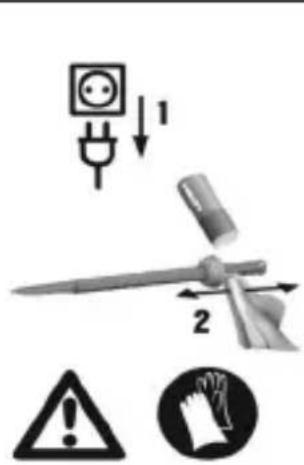
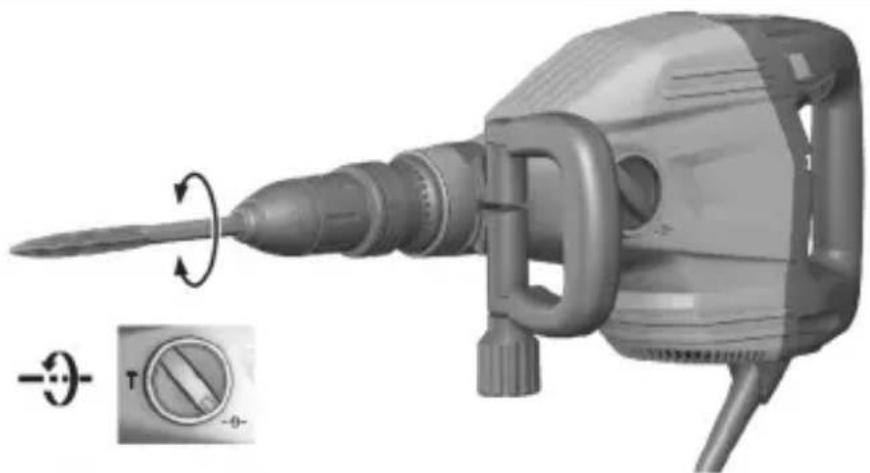
5.5 Positioning the chisll 5

The chisel can be adjusted to 24 different positions (in 15^ increments). This ensures that flat chisels and shaped chisels can always be set to the optimum working position.
▶ Set the function selector switch to and position the chisel as desired.
5.6 Locking the chisel
- Set the function selector switch to T and rotate the chisel until it engages.
5.7 Setting the chiseling power

Chiseling power can be reduced to approx. 70% by pressing the power level selector switch. The power level LED then lights up, indicating reduced power.
Chiseling power can be adjusted only when the power tool is switched on and ready for use. To reselect full chiseling power, press the chiseling power level selector switch again. Switching off and then on again also causes the power tool to return to full chiseling power.
▶ Press the power level selector switch.
6 Types of work

WARNING
Risk of electric shock! Severe injury and burns can result if any attempt is made to operate the tool without an earth/ground conductor and ground fault circuit interrupter correctly connected.
- Irrespective of whether mains power or generator power is used, always make sure that an earth/ground conductor and ground fault circuit interrupter are present in the power supply and that these are correctly connected.
- Do not use the product unless these safety measures are in place and fully operational.

WARNING
A damaged supply cord presents a hazard! Do not touch the supply cord or extension cord if damaged while working. Disconnect the supply cord plug from the power outlet.
- Check the appliance's supply cord at regular intervals and have it replaced by a qualified specialist if found to be damaged.
Full approval must be obtained from the site engineer or architect prior to beginning the work.
6.1 Chiseling
▶ Set the function selector switch to the position.
7 Care and maintenance
WARNING
Electric shock hazard! Attempting care and maintenance with the supply cord connected to a power outlet can lead to severe injury and burns.
▶ Always unplug the supply cord before carrying out care and maintenance tasks.
Care
- Carefully remove stubborn dirt.
- Carefully clean the air vents, if present, with a dry, soft brush.
- Use only a slightly damp cloth to clean the housing. Do not use cleaning agents containing silicone as these can attack the plastic parts.
Maintenance
WARNING
Danger of electric shock! Improper repairs to electrical components may lead to serious injuries including burns.
- Repairs to the electrical section of the tool or appliance may be carried out only by trained electrical specialists.
- Check all visible parts and controls for signs of damage at regular intervals and make sure that they all function correctly.
- Do not use the product if signs of damage are found or if parts malfunction. Immediately have the product repaired by Hilti Service.
- After cleaning and maintenance, install all guards and protective devices and check that they are in full working order.

To help ensure safe and reliable operation, use only genuine Hilti spare parts, consumables and accessories. Spare parts, consumables and accessories approved by Hilti for use with your product can be found at your Hilti Store or online at: www.hilti.group
7.1 Cleaning the dust shield
- Clean the dust shield on the chuck with a dry, clean cloth at regular intervals.
- Clean the sealing lip by wiping it carefully and then grease it again lightly with Hilti grease.
It is essential that the dust shield is replaced if the sealing lip is damaged.
8 Transport and storage
Transport
- Do not transport this product with an accessory tool installed.
- Make sure that the equipment is held securely throughout all transport operations.
HILTI
▶ After transporting, always check all visible parts and controls for signs of damage and make sure that they all function correctly.
Storage
- Always store this product with the electric supply cable unplugged from the electricity supply.
- Store this product in a dry place, where it cannot be accessed by children or unauthorized persons.
▶ After a long period of storage, always check all visible parts and controls for signs of damage and make sure that they all function correctly.
9 Troubleshooting
If the trouble you are experiencing is not listed in this table or you are unable to remedy the problem by yourself, please contact Hilti Service.
9.1 Troubleshooting
| Trouble or fault | Possible cause Action | to be taken |
| The breaker doesn’t start. | Electronics initialization in progress (takes up to 4 seconds after plugging in). | Switch the power tool off and then on again. |
| The electronic restart interlock is activated after an interruption in the electric supply. | Switch the power tool off and then on again. | |
| Interruption in the elec-tric supply. | Plug in another electric tool or appliance and check whether it works. | |
| The generator is in sleep mode. | Apply a load to the generator by connecting a second power consumer (e.g. worklight). Switch the tool off and then on again. | |
| The tool is faulty or ser-vicing is due. | Have the product repaired only by Hilti Service. | |
| No hammering action. | The power tool is too cold. | ▶ Bring the tip of the accessory tool into contact with the working surface, switch the power tool on and allow it to run. If necessary, repeat the procedure until the hammering mechanism begins to operate. |
| Chuck not sufficiently greased. | ▶ Inject 1-2 strokes of grease from the dispenser into the chuck. Use genuine Hilti grease. Then fit the accessory tool and distribute the grease in the chuck by pulling the accessory tool in and out several times. | |
| The service indicator lights red. | The tool is faulty or servicing is due. | ▶ Have the product repaired only by Hilti Service. |
| The service indicator blinks red. | The overheating prevention cut-out has been activated. | ▶ Allow the tool to cool down. Clean the air vents. Running under no load is still possible. |
| The voltage provided by the electric supply is too high. | ▶ Use a different power outlet. Check the electric supply. | |
| The breaker switches itself off while running. | The overheating prevention cut-out has been activated. | ▶ Allow the tool to cool down. Clean the air vents. Running under no load is still possible. |
| The breaker doesn’t achieve full power. | Power reduction is active. | Press the power level selector switch (observe the power level indicator). Unplug the power tool from the electric supply and then plug it back in. |
| The extension cord is too long or its gauge is inadequate. | Use an extension cord of an approved length and / or of adequate gauge. | |
| The voltage provided by the electric supply is too low. | Connect the power tool to a different power source. | |
| The chisel cannot be released from the chuck. | The chuck is not pulled back fully. | Pull the tool lock back as far as it will go and remove the insert tool. |
10 Disposal
Most of the materials from which Hilti tools and appliances are manufactured can be recycled. The materials must be correctly separated before they can be recycled. In many countries, your old tools, machines or appliances can be returned to Hilti for recycling. Ask Hilti Service or your Hilti representative for further information.

- Do not dispose of power tools, electronic equipment or batteries as household waste!
11 Manufacturer's warranty
- Please contact your local Hilti representative if you have questions about the warranty conditions.