S3100 - Rangefinder Tacklife - Free user manual and instructions
Find the device manual for free S3100 Tacklife in PDF.



| Product Type | Laser Rangefinder |
| Brand | Tacklife |
| Model | S3100 |
| Dimensions | 118 x 52 x 27 mm |
| Weight | Approx. 150 g (with batteries) |
| Power Supply | 3 AAA 1.5 V (alkaline) batteries |
| Battery Life | Up to 8000 measurements |
| Measuring Range | 0.05 to 100 m |
| Accuracy | ± 2 mm* |
| Units | m, ft, in, etc. (6 units) |
| Main Functions | Distance, area, volume, Pythagoras, angle measurement, addition/subtraction, continuous measurement, min/max value |
| Laser Type | Class II laser, 635 nm, < 1 mW |
| Memory | 30 measurements |
| Other Functions | Auto-calibration, backlight, sound on/off, auto-off (150 s) |
| Operating Temperature | 0°C to 40°C |
| Storage Temperature | -20°C to 60°C |
| Storage Humidity | 20% to 85% RH |
| Maintenance | Clean with a damp cloth, avoid solvents; store in a cool, dry place |
| Safety | Do not look directly into the laser beam; Class II |
| Package Contents | Rangefinder, batteries, case, user manual |
Frequently Asked Questions - S3100 Tacklife
User questions about S3100 Tacklife
0 question about this device. Answer the ones you know or ask your own.
Ask a new question about this device
Download the instructions for your Rangefinder in PDF format for free! Find your manual S3100 - Tacklife and take your electronic device back in hand. On this page are published all the documents necessary for the use of your device. S3100 by Tacklife.
USER MANUAL S3100 Tacklife
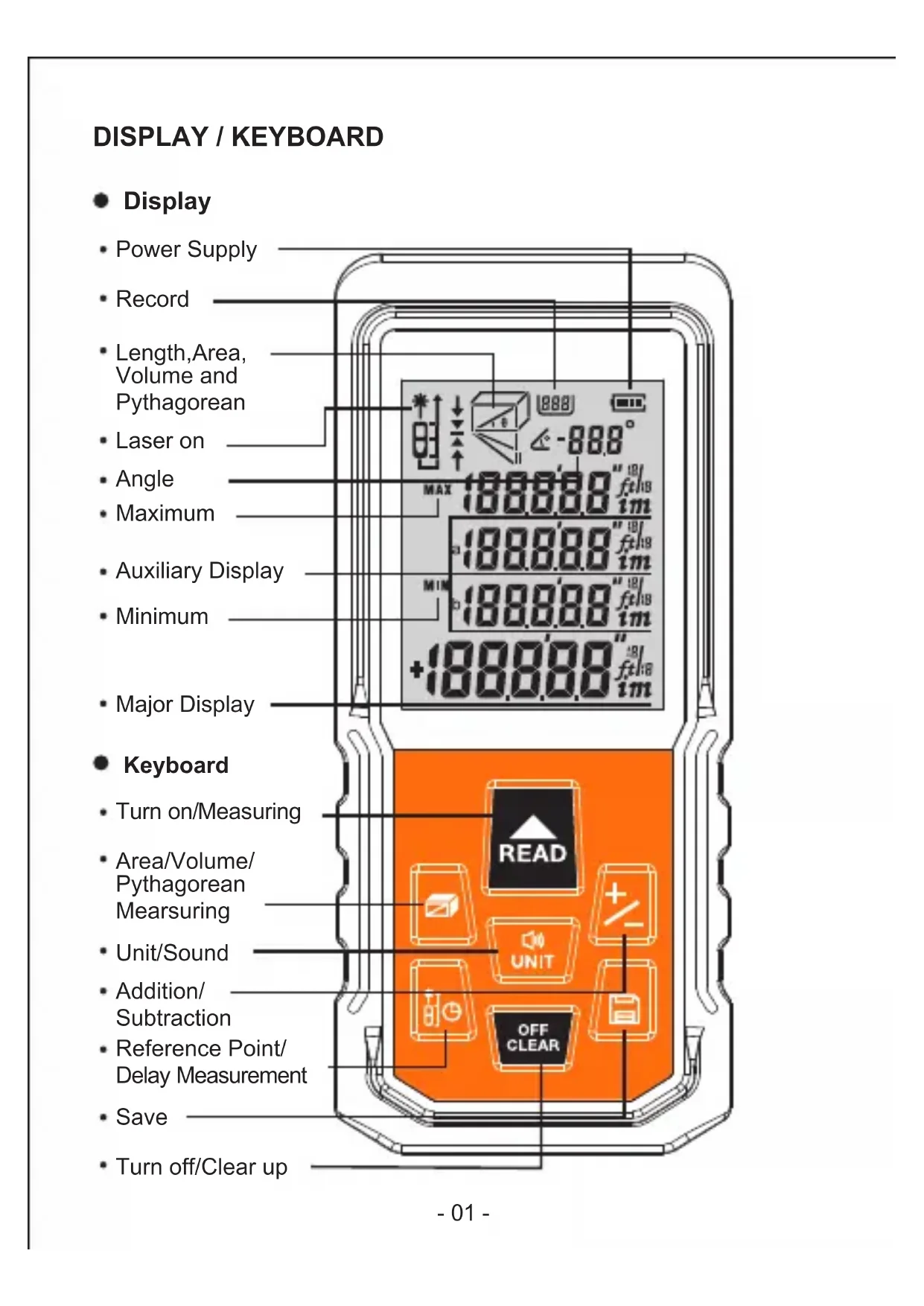
Power Supply
Record
Length,Area, Volume and Pythagorean
Laser on
Angle
Maximum
- Auxiliary Display
Minimum
Major Display
- Keyboard
- Turn on/Measuring
Area/Volume/ Pythagorean Mearsuring
Unit/Sound - Addition/Subtraction
Reference Point/ Delay Measurement
Save - Turn off/Clear up
Battery Installation


- Discharge the battery door on the back of device, and place battery according to correct polarity, then cover the battery door.
- Only 1.5 V AAA alkaline battery is applied to the meter.
- If the meter is not used frequently, please take out the battery to avoid battery corrosion to meter body.
Start and Settings
- Turn on / off the Instrument
Under off status, press button instantly and start to work.

, device and laser get starting
Under on status, long press button

for 3 seconds to turn off the
device. The device can also be off without any operation for 150 seconds.
Unit setting
Under the measuring mode, long press button reset measurement unit, the default unit is: 0.000m
There are 6 units for selection.
Units:
- Changing Reference Point
Short press key to change the reference point. System default reference point is under its bottom.
- Delaying Measurement
Long press , values shows in the screen. User can press or to adjust the time of measurement between 3s to 60s.
Press to start, the measure starts when the time turns to 0.
Back Light On / Off
The back light is set to turn on and off automatically. The back light can be on for 15s while operating, and it will be shut off automatically in 15s when there is no operation to the device.
Sound on/off
Short press button to turn on or off the buzzer.
Self-Calibration
This function can keep the precision of the device automatically. Instruction: Power off, press button and till "CAL" and a figure under it displays on the screen. User can adjust the figure with bton according to the accuracy of the meter. Adjusting range: -9 to 9mm, then press bCAD to save the calibration result.
Length Measurement & Calculation
- Single Distance Measuring:
Short press to turn on the laser beam under measuring mode. Press the button again for single measurement of length, then the measured results will display on the major display area.
Continuous Measurement:
Long press button under measuring mode and enter into continuous measuring mode. Maximum and Minimum measuring result will display in auxiliary display area, current result will show in major display area. Short press button or to withdraw continuous measuring mode.
Area Measurement
Press button once, shows on the screen. One of the side of rectangle blinking on the display, please follow the below instructions for area measuring:
Press once for length measurement
Press again for width measurement
The device calculates and shows the result in the major display area.
The resent measuring result of length is showed in the auxiliary display area .
Press , clear off the result and measuring again if necessary.
Press again to exit the mode.
Volume Measurement
Press button twice to enter volume measurement mode. A will shows on the top of screen. Please follow the below instruction for volume measuring:
Press for Length measurement
Press again for Width measurement
Press thirdly for height measurement
The device calculates and shows the result in the major display area.
The resent measuring result of length is showed in the auxiliary display area.
Press clear off the result and measuring again if necessary.
Press again to exit the mode.
- Painter Function
When the meter is in area mode, you can use the add / subtract function to total up the area of several surfaces.
Press button three times till showing in the display.
Press to measure the height of the wall first;
Press to measure the bottom edge of the first wall, get the first area in the major display area;
Press to measure the bottom edge of another wall, get the sum of these two walls.
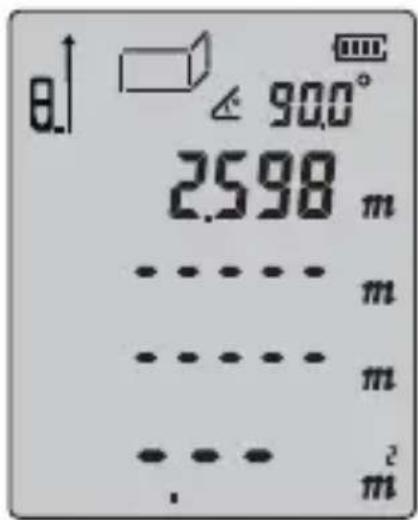


Repeat these operations for more walls. Press button to previous measuring result and start new measurement.

When there is no data in the Auxiliary Display area, press to exit the mode.
Pythagoras

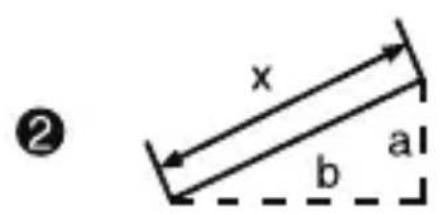
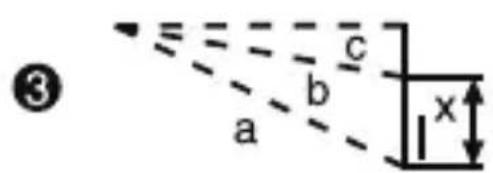
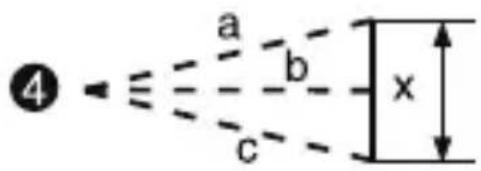
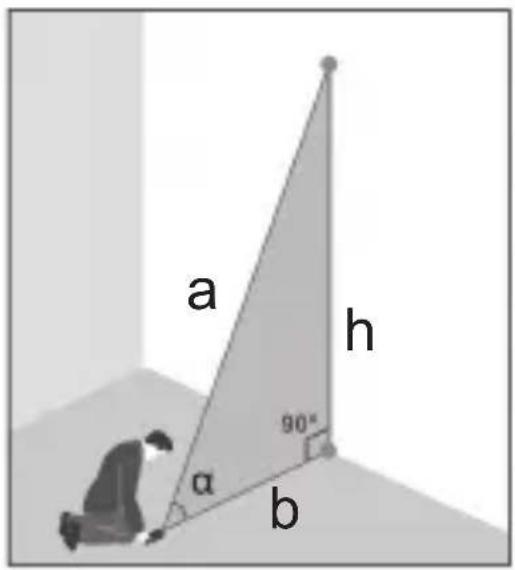
There are four Pythagoras modes in case that user gets difficulties to measure directly.
- Calculate the length of two legs by measuring the hypotenuse and the angle.
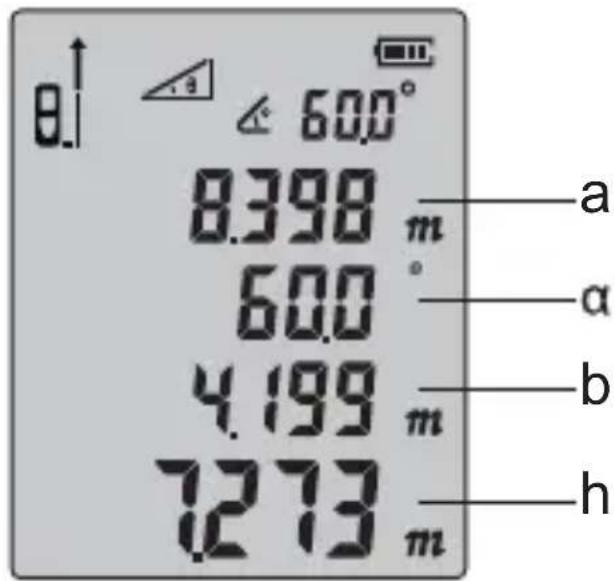
Short press four times, when the hypotenuse of blinking, Press , measure the length of hypotenuse (a), and calculates the angle () between the bevel and the bottom at the same time.
Device calculates the horizontal distance (b) and vertical height (h).
- Calculate the hypotenuse by measuring the length of two legs. Short press five times, when one leg of blinking,
Press, measure the length of one leg (a) Press, measure the length of another leg (b) Device calculates the length of hypotenuse (x)
- Press six times till the one side of blinking on the screen. Press, measure the length of one side (a)
Press, measure the length of the median line (b) Press, measure the length of another side (c) Device calculates the length of the leg in full line (x)
- Press seven times till the hypotenuse of blinking on the screen.
Press, measure the length of one hypotenuse (a) Press, measure the length of another hypotenuse
Press , measure the length of one leg (c) Device calculates the length of the leg in full li
Legs must short than hypotenuse, or there will be "err" shows on screen. In order to guarantee the accuracy, please make sure all measurements are start from the same point.
- Addition / subtraction
The device can be used for length addition and subtraction. Press to select the function once get the length measuring result.
Press 2 , "+" shows in the major display area, entering cumulation mode. Value of last measurement and the result of cumulation will be showed on the screen.
Press again, "-" shows in the major display area, entering regressive mode. Value of last measurement and the result of cumulation will be showed on the screen.
Can choose the addition or subtraction mode by pressing the button
Not only length can be calculated in addition and subtraction, but area and volume can do the calculation as well. Take area as example:
Area cumulative function: Measure the first area as showing in PIC1. Then press button 2 , and measure the second area as showing in PIC2, there is a "+" in the left bottom. At last, press button to get the summation result of these two areas which is showing in PIC3.
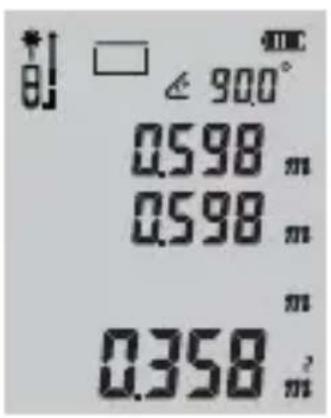

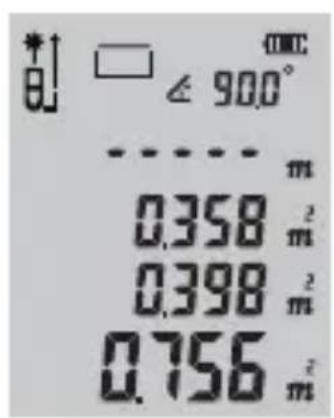
PIC1 PIC2 PIC3
Memory Function
Long press button for 3s to record your measuring result under measuring mode.
It can also record the result under Area, Volume and Pythagoras mode. All the calculating records can be saved by the device.
- Read / Delete the Record:
Short press button , read the records by press button and Short press to delete recent record and long press to clear up all the records. Press or to exit rec ord mode.
When the storage is full, the screen will display the mark.
Angle measurement
The angle information is displayed at the top of the screen, and the angle measurement range is -90.0° to 90.0°.
Tips
You may get some warning information as below:
| Info message | Cause Solution | |
| Err | Out of distance measurement range | Use the device within the range |
| Err1 | Signal is too weak | Chose the surface with stronger reflectance. Use the reflecting plate. |
| Err2 | Signal is too strong | Chose the surface with weaker reflectance. Use the reflecting plate. |
| Err3 | Low battery voltage | Change the power supply. |
| Err4 | The working temperature is out of working range | Use the device in the specified temperature. |
| Err5 | Pythagoras measuring error. | Re-measure and ensure that Hypotenuse is bigger than Cathetus. |
| Err6 | Angle sensor error | Depot Repair |
Technology specifications:
| ITEM S3-50 S 3-100 | ||
| Working Range | 0.05 ~ 50m | 0.05 ~ 100m |
| Distance measurement precision | ±2mm * | |
| Continuous measurement function | yes | |
| Area measuremen function | yes | |
| Volume measurement function | yes | |
| Pythagorean proposition measurement function | Full mode | |
| Painter function | yes | |
| Angel function | yes | |
| Add and subtract measurement function | yes | |
| Min/Max value yes | ||
| Self-Calibration | yes | |
| Laser level II | ||
| Laser type 635nm,<1mW | ||
| Max storage 30 units | ||
| Automatically cut off laser | 20s | |
| Automatic shutdown | 150s | |
| Battery life | 8000 times for single measurement | |
| Laser level | II | |
| Storage temperature | -20°C~60°C | |
| Working temperature | 0°C~40°C | |
| Storage humidity | RH 20%~85% | |
| Battery | 3x1.5V AAA | |
| angle Range | ±90° | |
| Dimension 118*52*27mm | ||
Note: Use a target plate to increase the measurement range during daylight or if the target has poor reflection properties.
Typical Tolerance: ± 2mm , when reflectivity 100% (white surface), environment light < 2000 LUX. 25^ Tolerance is usually affected by the distance, reflectivity, and environment light etc. It probably gets tolerance around ± (2mm + 0.2mm / m) .
Instrument Maintenance:
-
The meter should not be stored in high temperature and strong humidity environment for long time; if it is not used very often, please take out the battery and place the meter in the allocated potable bag and store in cool and dry place.
-
Please keep the device surface cleaning. Wet soft cloth is applied to dean dust, but erosion liquid is never allowed to use for the meter maintenance. Laser output window and its focus lens can be maintained according to maintenance procedures for optical device.
ANZEIGE / TASTATUR
Bildschirmanzeige
Tastatur
- Addition /Soustration
ADD: No.B714,Niulanqian Building, Minzhi Road,
Longhua District, Shenzhen, Guangdong, China 518000
Made in China
RoHSC EFC FDA




- - Keyboard
- Battery Installation
- Start and Settings
- - Turn on / off the Instrument
- Unit setting
- - Changing Reference Point
- - Delaying Measurement
- Back Light On / Off
- Sound on/off
- Self-Calibration
- Length Measurement & Calculation
- - Single Distance Measuring:
- Continuous Measurement:
- Area Measurement
- Volume Measurement
- - Painter Function
- Pythagoras
- - Addition / subtraction
- Memory Function
- - Read / Delete the Record:
- Angle measurement
- Tips
- Instrument Maintenance:
- ANZEIGE / TASTATUR
- Bildschirmanzeige
- Tastatur
- - Addition /Soustration
Brand : Tacklife
Model : S3100
Category : Rangefinder