TKG MG 35 DGC - Microwave Oven KALORIK - Free user manual and instructions
Find the device manual for free TKG MG 35 DGC KALORIK in PDF.



| Brand | Kalorik |
| Model | TKG MG 35 DGC |
| Product type | Microwave oven combined (grill and convection) |
| Microwave power | 900 W |
| Grill power | 1400 W |
| Convection power | 2400 W |
| Capacity | 25 litres |
| Turntable diameter | 315 mm |
| Net weight | 16.5 kg |
| Voltage / Frequency | 230 V ~ 50 Hz |
| Wave frequency | 2450 MHz |
| Cooking modes | Microwave, Grill, Convection, Combined (C-1 to C-4) |
| Defrosting | By weight (100-2000 g) or by time |
| Delayed programming | Yes (clock and pre-set) |
| Multi-sequence cooking | Up to 3 stages |
| Child lock | Yes |
| Control type | Electronic with display and rotary knob |
| Interior lighting | Yes |
| Included accessories | Glass plate, slip ring, metal rack |
| Repairability | Call a qualified service |
Frequently Asked Questions - TKG MG 35 DGC KALORIK
User questions about TKG MG 35 DGC KALORIK
0 question about this device. Answer the ones you know or ask your own.
Ask a new question about this device
Download the instructions for your Microwave Oven in PDF format for free! Find your manual TKG MG 35 DGC - KALORIK and take your electronic device back in hand. On this page are published all the documents necessary for the use of your device. TKG MG 35 DGC by KALORIK.
USER MANUAL TKG MG 35 DGC KALORIK
Copies of the I/B. Please reproduce them without any changes except under special instruction from Team International BELGIUM. The pages must be reproduced and folded in order to obtain a booklet A5 (+/- 148.5 mm width x 210 mm height). When folding, make sure you keep the good numbering when you turn the pages of the I/B. Don't change the page numbering. Keep the language integrity.

Mikrowelle
Microwave oven
Four à micro-ondes
Microgolfoven
Microondas
Microondas
Forno a microonde
Generated by Unregistered Batch DOC TO PDF Converter 2011.3.804.1511, please register!

Fax +32 2 359 95 50
Copies of the I/B. Please reproduce them without any changes except under special instruction from Team International BELGIUM. The pages must be reproduced and folded in order to obtain a booklet A5 (+/- 148.5 mm width x 210 mm height). When folding, make sure you keep the good numbering when you turn the pages of the I/B. Don't change the page numbering. Keep the language integrity.
2
TKG MG 35 DGC - 080613

Fax +32 2 359 95 50
Copies of the I/B. Please reproduce them without any changes except under special instruction from Team International BELGIUM. The pages must be reproduced and folded in order to obtain a booklet A5 (+/- 148.5 mm width x 210 mm height). When folding, make sure you keep the good numbering when you turn the pages of the I/B. Don't change the page numbering. Keep the language integrity.
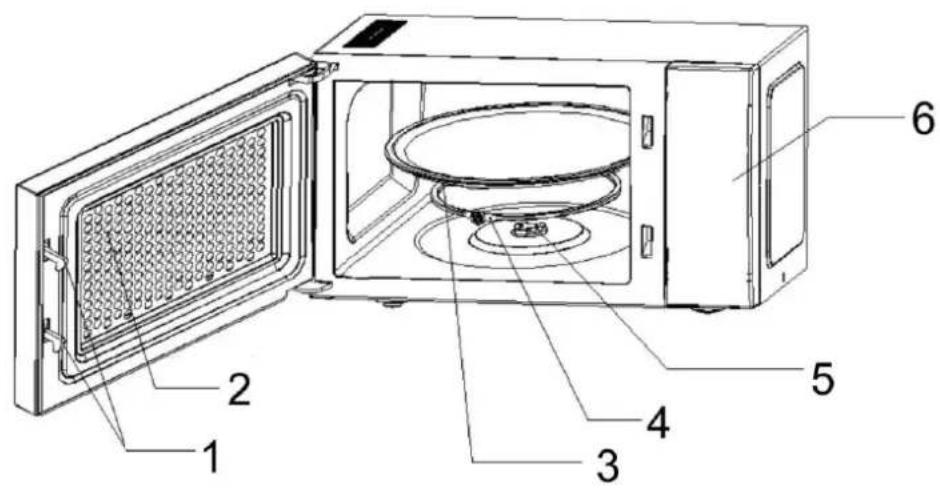
D
- Door safety lock system
- Oven window
- Glass tray
- Roller ring
- Shaft
- Control panel
F
Copies of the I/B. Please reproduce them without any changes except under special instruction from Team International BELGIUM. The pages must be reproduced and folded in order to obtain a booklet A5 (+/- 148.5 mm width x 210 mm height). When folding, make sure you keep the good numbering when you turn the pages of the I/B. Don't change the page numbering. Keep the language integrity.
Copies of the I/B. Please reproduce them without any changes except under special instruction from Team International BELGIUM. The pages must be reproduced and folded in order to obtain a booklet A5 (+/- 148.5 mm width x 210 mm height). When folding, make sure you keep the good numbering when you turn the pages of the I/B. Don't change the page numbering. Keep the language integrity.
Copies of the I/B. Please reproduce them without any changes except under special instruction from Team International BELGIUM. The pages must be reproduced and folded in order to obtain a booklet A5 (+/- 148.5 mm width x 210 mm height). When folding, make sure you keep the good numbering when you turn the pages of the I/B. Don't change the page numbering. Keep the language integrity.
Copies of the I/B. Please reproduce them without any changes except under special instruction from Team International BELGIUM. The pages must be reproduced and folded in order to obtain a booklet A5 (+/- 148.5 mm width x 210 mm height). When folding, make sure you keep the good numbering when you turn the pages of the I/B. Don't change the page numbering. Keep the language integrity.
Copies of the I/B. Please reproduce them without any changes except under special instruction from Team International BELGIUM. The pages must be reproduced and folded in order to obtain a booklet A5 (+/- 148.5 mm width x 210 mm height). When folding, make sure you keep the good numbering when you turn the pages of the I/B. Don't change the page numbering. Keep the language integrity.
Copies of the I/B. Please reproduce them without any changes except under special instruction from Team International BELGIUM. The pages must be reproduced and folded in order to obtain a booklet A5 (+/- 148.5 mm width x 210 mm height). When folding, make sure you keep the good numbering when you turn the pages of the I/B. Don't change the page numbering. Keep the language integrity.
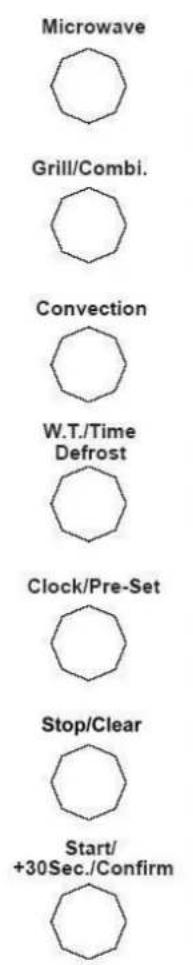
BEDIENELEMENT
Microwave

Grill/Combi.

Convection

W.T./Time Defrost

Clock/Pre-Set

Stop/Clear

Start/ +30Sec./Confirm

Copies of the I/B. Please reproduce them without any changes except under special instruction from Team International BELGIUM. The pages must be reproduced and folded in order to obtain a booklet A5 (+/- 148.5 mm width x 210 mm height). When folding, make sure you keep the good numbering when you turn the pages of the I/B. Don't change the page numbering. Keep the language integrity.
GEBRAUCH
WICHTIGE HINWEISE:
Copies of the I/B. Please reproduce them without any changes except under special instruction from Team International BELGIUM. The pages must be reproduced and folded in order to obtain a booklet A5 (+/- 148.5 mm width x 210 mm height). When folding, make sure you keep the good numbering when you turn the pages of the I/B. Don't change the page numbering. Keep the language integrity.
Copies of the I/B. Please reproduce them without any changes except under special instruction from Team International BELGIUM. The pages must be reproduced and folded in order to obtain a booklet A5 (+/- 148.5 mm width x 210 mm height). When folding, make sure you keep the good numbering when you turn the pages of the I/B. Don't change the page numbering. Keep the language integrity.
Copies of the I/B. Please reproduce them without any changes except under special instruction from Team International BELGIUM. The pages must be reproduced and folded in order to obtain a booklet A5 (+/- 148.5 mm width x 210 mm height). When folding, make sure you keep the good numbering when you turn the pages of the I/B. Don't change the page numbering. Keep the language integrity.
Copies of the I/B. Please reproduce them without any changes except under special instruction from Team International BELGIUM. The pages must be reproduced and folded in order to obtain a booklet A5 (+/- 148.5 mm width x 210 mm height). When folding, make sure you keep the good numbering when you turn the pages of the I/B. Don't change the page numbering. Keep the language integrity.
Copies of the I/B. Please reproduce them without any changes except under special instruction from Team International BELGIUM. The pages must be reproduced and folded in order to obtain a booklet A5 (+/- 148.5 mm width x 210 mm height). When folding, make sure you keep the good numbering when you turn the pages of the I/B. Don't change the page numbering. Keep the language integrity.
Copies of the I/B. Please reproduce them without any changes except under special instruction from Team International BELGIUM. The pages must be reproduced and folded in order to obtain a booklet A5 (+/- 148.5 mm width x 210 mm height). When folding, make sure you keep the good numbering when you turn the pages of the I/B. Don't change the page numbering. Keep the language integrity.
Copies of the I/B. Please reproduce them without any changes except under special instruction from Team International BELGIUM. The pages must be reproduced and folded in order to obtain a booklet A5 (+/- 148.5 mm width x 210 mm height). When folding, make sure you keep the good numbering when you turn the pages of the I/B. Don't change the page numbering. Keep the language integrity.
Copies of the I/B. Please reproduce them without any changes except under special instruction from Team International BELGIUM. The pages must be reproduced and folded in order to obtain a booklet A5 (+/- 148.5 mm width x 210 mm height). When folding, make sure you keep the good numbering when you turn the pages of the I/B. Don't change the page numbering. Keep the language integrity.

OPERATING INSTRUCTIONS
IMPORTANT SAFETY INSTRUCTIONS
The safety instructions in your manual are important and should be read carefully. Keep your manual for future reference.
MAINTENANCE:
If your appliance is not maintained in a good condition, its surface could be damaged and diminish inexorably the lifespan of the appliance and lead to a dangerous situation.
SPECIFICATIONS
Output: 900W
Grill: 1400W
Convection: 2400W
Voltage - frequency: 230V\~50Hz
Operation frequency: 2450MHz
Capacity: 25Liters
Turntable system: {Φ315mm}
Net weight: Approx. 16.5 kg
IMPORTANT SAFETY INSTRUCTIONS
Please read these instructions carefully before using the appliance.
Important: People (including children) who are not able to use the appliance in a safe way, due to their physical, sensorial or mental capacity or their lack of experience or knowledge, must never use the appliance except if they are supervised by a person responsible for their safety or if they previously received instructions concerning the safe use of the appliance. Close supervision is necessary to prevent children from using the appliance as a toy.
WARNING: To reduce the risk of burns, electric shock, fire, injury to persons or exposure to excessive microwave energy, please read all instructions carefully before using the appliance:
-
Use this appliance only domestic use as described in this manual. This appliance is not suitable for professional use. Do not use corrosive chemicals or vapours in this appliance. This type of oven is specifically designed to heat, cook or dry food. It is not designed for industrial or laboratory use.
-
Do not operate the oven when empty.
-
Do not attempt to operate this oven with the door open since open-door operation can result in harmful exposure to microwave energy. It is important not to defeat or tamper with the safety interlocks.
-
Do not place any object between the oven front face and the door or allow soil or cleaner residue to accumulate on sealing surfaces.
-
WARNING: △ Do not operate the oven if it is damaged. It is particularly important that the oven door closes properly and that there is no damage to the:
-
Door (bent),
- Hinges and latches (broken or loosened),
- Door seals and sealing surfaces.
- (Inner or outer) windows of the door.
Do not use the oven until the repairs have been made by a competent qualified service(*).
18
TKG MG 35 DGC - 080613

Fax +32 2 359 95 50
Copies of the I/B. Please reproduce them without any changes except under special instruction from Team International BELGIUM. The pages must be reproduced and folded in order to obtain a booklet A5 (+/- 148.5 mm width x 210 mm height). When folding, make sure you keep the good numbering when you turn the pages of the I/B. Don't change the page numbering. Keep the language integrity.
-
If steam appears between the inner and outer window when cooking, immediately stop the oven, unplug it, and contact the nearest customer service. Otherwise, you might be exposed to microwave energy.
-
WARNING ⚠It is hazardous for anyone other than a trained person to carry out any service or repair operation that involves the removal of any cover that gives protection against exposure to microwave energy. Should the appliance or its power cord be damaged, do not use this appliance. All repairs should be made by a competent qualified service (*).
-
Do not attempt to disassemble the appliance or to remove feet, seals, screws etc.
-
WARNING : Children should not use this appliance without supervision except if they were previously given proper instructions so that they can use it correctly and understand the risks linked to improper use.
-
To reduce the risk of fire in the oven cavity:
a. When heating food in plastic or paper container, check the oven frequency to avoid any risk of fire.
b. Remove wire twist-ties from paper or plastic bags before placing bag in oven.
c. If smoke is observed, switch off or unplug the appliance and keep the door closed in order to stifle any flames.
d. Do not use the cavity for storage purposes. Do not leave paper products, cooking utensils or food in the cavity when not in use.
- IMPORTANT: UTENSILS THAT ARE NOT SUITABLE FOR MICROWAVE COOKING.
Always check if your utensils are microwave resistant before using them in the appliance.
- Never use utensils with a metal handle.
- Never use utensils with metal decorations.
- Never use iron locking clips (not even covered with paper)
- Never use melamine receptacles as these contain a substance that absorbs microwave energy. The receptacle might break or carbonise and the cooking process would be slower.
- The use of traditional thermometers is prohibited, use microwave resistant thermometers.
- In case of doubt, please contact the supplier of the utensil to know whether it is microwave resistant or not.
-
Do not prepare food in receptacles with too narrow an opening, as this might cause these receptacles to explode.
-
WARNING : CAUTION, ▲ Liquid or other food must not be heated in sealed containers (such as receptacles with lid or feeding bottle with dummy) since they are liable to explode.
-
Should the symbol be indicated on a certain surface, you need to be careful when handling the product. This symbol means "CAUTION, this surface may get very hot during use".
-
Eggs in their shell or whole hard-boiled eggs must not be heated in the microwave oven as they might explode.
-
Microwave heating of beverage can result in delayed eruptive boiling, therefore care has to be taken when you handle the container.
-
CAUTION: Do not fry food in the oven. Hot oil can damage oven parts and utensils and even result in skin burns. Do not warm up greasy foods in the microwave oven, as it might catch fire.
-
Pierce foods with heavy skins such as potatoes, whole squash, apples and chestnuts before cooking. Otherwise they might explode.
19
TKG MG 35 DGC - 080613

Fax +32 2 359 95 50
Copies of the I/B. Please reproduce them without any changes except under special instruction from Team International BELGIUM. The pages must be reproduced and folded in order to obtain a booklet A5 (+/- 148.5 mm width x 210 mm height). When folding, make sure you keep the good numbering when you turn the pages of the I/B. Don't change the page numbering. Keep the language integrity.
- The contents of feeding bottles and baby jars should be stirred or shaken and the temperature should be checked before serving in order to avoid burns.
- Cooking utensils may become hot because of heat transferred from the heated food. Potholders may be needed to handle the utensil.
- Before operating the oven, make sure the glass tray, the motor shaft and the roller ring are in correct position inside the oven.
- Make sure the openings of microwave resistant receptacles are neither obstructed nor covered in order to avoid that they explode during operation.
- Do not place the preparation directly on the glass tray, but put them in a microwave resistant receptacle.
- Food containing a mixture of water and grease should be left 30 to 60 seconds in the oven when switched off to allow the mixture to come down to avoid bubbling, especially when a beef cube is added.
- It is necessary to clean regularly the cavity of your oven and to remove any rests of food. Food remains on the heating elements of the oven will produce smoke and bad smells.
1) Competent qualified service: after sales department of the producer or importer or any person who is qualified, approved and competent to perform this kind of repairs in order to avoid all danger. In any case you should return the appliance to this electrician.
INSTALLATION
- Make sure that all the packing materials are removed from the inside of the door.
- Check the oven for any damage, such as misaligned or bent door, damaged door seals and sealing surface, broken or loose door hinges and latches and dents inside the cavity or on the door. If there is any damage, do not operate the oven and contact a competent qualified service.
- This microwave oven must be placed on a flat, stable surface to hold its weight (10.5 kg) and the heaviest food likely to be cooked in the oven.
- Do not place the oven where heat, moisture or high humidity are generated, or near combustible materials.
- Do not cover or block any openings on the appliance. Do not remove the feet.
- For correct operation, the oven must have sufficient airflow. Allow 20cm of space above the oven, 10cm at back and 8cm at both sides.
- The socket must be readily accessible so that it can be easily unplugged in case of emergency.
- Do not use the oven outdoors.
WARNING: THIS APPLIANCE MUST BE GROUNDED.
Avoid using extension cords or make sure they are compatible with the power of your appliance.
We advise you to call for an electrician if you have any questions concerning the technical installation of your appliance.
This appliance is protected by a safety fuse. Should this fuse be replaced, please contact a competent qualified electrician (*).
RADIO INTERFERENCE
Operation of the microwave oven can cause interference to your radio, TV or similar equipment. When there is interference, it may be reduced or eliminated by taking the
20
TKG MG 35 DGC - 080613

Fax +32 2 359 95 50
Copies of the I/B. Please reproduce them without any changes except under special instruction from Team International BELGIUM. The pages must be reproduced and folded in order to obtain a booklet A5 (+/- 148.5 mm width x 210 mm height). When folding, make sure you keep the good numbering when you turn the pages of the I/B. Don't change the page numbering. Keep the language integrity.
following measures:
- Clean door and sealing surface of the oven.
- Reorient the receiving antenna of radio or television.
- Move the microwave oven away from the receiver.
- Plug the microwave oven into a different outlet so that microwave oven and receiver are on different branch circuits.
MICROWAVE COOKING PRINCIPLES
- Arrange food carefully. Place thickest areas towards outside of dish.
- Watch cooking time. Cook for the shortest amount of time indicated and add more as needed. Food severely overcooked can smoke or ignite.
- Cover foods while cooking. Covers prevent spattering and help foods to cook evenly.
- Turn foods over once during microwaving to speed cooking of such foods as chicken and hamburgers. Large items like roasts must be turned over at least once.
- Rearrange foods such as meatballs halfway through cooking both from top to bottom and from the centre of the dish to the outside.
UTENSILS GUIDE
- We advise you to use utensils that are specially conceived for microwave cooking as they allow energy to pass through the container and heat the food.
- Microwave cannot penetrate metal, so metal utensils or dishes with metallic trim should not be used.
- Do not use recycled paper products when microwave cooking, as they may contain small metal fragments which may cause sparks and/or fire.
- Round/oval dishes rather than square/oblong ones are recommended, as food in corners tends to overcook.
The table below is a general guide to help you select the correct utensils.
| Cookware | Microwave Cooking | Grill | Combination | Convection |
| Heat-Resistant Glass | Yes | Yes | Yes | Yes |
| Non Heat-Resistant Glass | No | No | No | No |
| Heat-Resistant Ceramics | Yes | Yes | Yes | Yes |
| Microwave-Safe Plastic Dish | Yes | No | No | No |
| Kitchen Paper | Yes | No | No | No |
| Metal Tray | No | Yes | Yes | Yes |
| Metal Rack | No | Yes | Yes | Yes |
| Aluminium Foil & Foil Containers | No | Yes | No | No |
21
TKG MG 35 DGC - 080613

Fax +32 2 359 95 50
Copies of the I/B. Please reproduce them without any changes except under special instruction from Team International BELGIUM. The pages must be reproduced and folded in order to obtain a booklet A5 (+/- 148.5 mm width x 210 mm height). When folding, make sure you keep the good numbering when you turn the pages of the I/B. Don't change the page numbering. Keep the language integrity.
CONTROL PANEL
For each pad, please refer to the paragraph "USE" to know their functions.
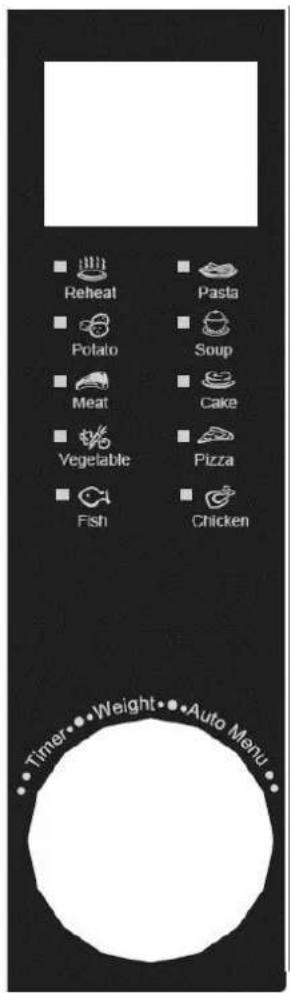
Display: Indicates the cooking time, the power, the present time and the state of the different settings or other adjustments.
Microwave: Use to set microwave cooking function and to regulate the microwave power level (5 settings).
Grill/Combi.: Use to set the grill cooking function or a combination cooking function.
Convection: Use to set the convection function and to regulate the temperature for convection.
W.T./Time Defrost: Use to defrost frozen meat, poultry, and seafood by weight or by time. Power levels are automatically set.
Clock/Pre-Set: allows to set the clock or to programme the switch-on time of the appliance.
Stop/Clear: Use to stop the oven or to cancel current settings (switches off the oven) or to change settings.
Start/+30Sec./Confirm: Use to confirm a setting and to start the oven once a function is set or to resume cooking when stopped.
Rotary knob: allows regulating the cooking times, power, weights or current time.

Fax +32 2 359 95 50
Copies of the I/B. Please reproduce them without any changes except under special instruction from Team International BELGIUM. The pages must be reproduced and folded in order to obtain a booklet A5 (+/- 148.5 mm width x 210 mm height). When folding, make sure you keep the good numbering when you turn the pages of the I/B. Don't change the page numbering. Keep the language integrity.
USE
IMPORTANT REMARKS:
1) There must be a food preparation in the oven cavity before starting the microwave oven.
2) Make sure the receptacle does not touch the walls of the cavity in order not to disturb the rotation of the glass tray.
3) The metal rack supplied is microwave resistant and can be used without any risk, both in grill or microwave function (or combination). It can be used to put the food nearer to the heating element or to put several receptacles in the oven.
Each time a pad is pressed, a short beep will sound to acknowledge the press. When you start turning the rotary knob, a short beep will sound as well.
When the appliance starts, the light switches on in order to check the cooking. The cooking time countdown begins.
At the end of the cooking time, five beeps will sound and the light switches off.
If you open the door during the cooking process, the oven stops. To continue cooking, close the door and press "Start/+30Sec./Confirm".
Anytime, if you press the "Stop/Clear" pad once, the setting or the cooking process will be interrupted. If you press again, the appliance will return to its initial state (display of the hour).
SETTING THE CLOCK
When the microwave oven is plugged into a wall outlet, the oven will display "0:00" and one beep will sound.
- Press "Clock/Pre-Set" to choose a 12-hour or 24-hour setting.
- Push the push-button to open the door and turn the rotary knob to set the hours (1-12 or 0-23).
- Press "Clock/Pre-Set" again, the last digits, indicating the minutes, will start flashing.
- Turn the rotary knob to set the minutes (0-59).
- Press "Clock/Pre-Set" again to finish the setting. ":" will flash.
Note: If the clock has not been set, the appliance will not function.
If you press "Stop/Clear" during the process of clock setting, the oven will go back to the previous status automatically.
If time resetting is needed afterwards, press "Clock/Pre-Set" and proceed as described above.
SETTING THE COOKING TIME, POWER AND COOKING FUNCTION
Important remark: if you have set a programme and do not press "Start/+30Sec./Confirm" within five minutes, the setting is cancelled and the appliance will return to its initial state (display of the hour). Make sure the door of the oven is closed before you press "Start/+30Sec./Confirm", otherwise the oven will not function.
a) Microwave cooking
- Select the desired power by pressing "Microwave" once or a number of times (for the power level regulation, see table below), or turn the rotary knob after having pressed the "Microwave" key once.
| Power | 100% | 80% | 50% | 30% | 10% |
23
TKG MG 35 DGC - 080613

Fax +32 2 359 95 50
Copies of the I/B. Please reproduce them without any changes except under special instruction from Team International BELGIUM. The pages must be reproduced and folded in order to obtain a booklet A5 (+/- 148.5 mm width x 210 mm height). When folding, make sure you keep the good numbering when you turn the pages of the I/B. Don't change the page numbering. Keep the language integrity.
| Display | P100 | P80 | P50 | P30 | P10 |
- Press "Start/+30Sec./Confirm" to confirm the power setting.
- Turn the rotary knob to set the cooking time (minimum 5 seconds, maximum 95 minutes).
- Press "Start/+30Sec./Confirm" to start the oven. The countdown begins.
b) Grill cooking
The grill cooking is particularly useful for thin slices of meat, steaks, chops, kebabs, sausages or pieces of chicken. It is also suitable for hot sandwiches and au gratin dishes.
- Press "Grill/Combi." once. "G-1" will be displayed.
- Press "Start/+30Sec./Confirm" to confirm.
- Turn the rotary knob to set the cooking time (minimum 5 seconds, maximum 95 minutes).
- Press "Start/+30Sec./Confirm" to start the oven. The countdown begins.
Caution: when cooking with the grill function, two beeps will sound when half of the cooking time has elapsed in order to warn you to turn the food if necessary. Turn over the food, close the door and press "Start/+30Sec./Confirm" to continue the cooking process. However, if you do nothing after the beeps, the oven will continue cooking.
c) Combination cooking
- Press "Grill/Combi." once. Grill programme "G-1" will be displayed.
- Keep pressing "Grill/Combi." or turn the rotary knob to select combination cooking programme "C-1", "C-2", "C-3" or "C-4" (see below).
- Press "Start/+30Sec./Confirm" to confirm.
- Turn the rotary knob to set the cooking time (minimum 5 seconds, maximum 95 minutes).
- Press "Start/+30Sec./Confirm" to start the oven. The countdown begins.
Note: you can choose between 4 combination cooking programmes:
- combination cooking programme C-1 : Microwave + Convection
- combination cooking programme C-2 : Microwave + Grill
- combination cooking programme C-3 : Grill + Convection
- combination cooking programme C-4: Microwave + Grill + Convection.
d) Convection cooking (with preheating function)
The convection function can be used to cook the food as a traditional oven. No microwaves are used. It is recommended to preheat the oven to a certain temperature before placing the food in the oven.
To preheat the oven:
- Press the "Convection" key once. "150" flashes on the display.
- Keep pressing "Convection" or turn the rotary knob to set the temperature. You can select a temperature from 150 to 240 degrees Celsius.
- Press "Start/+30Sec./Confirm" to confirm the temperature setting.
- Press "Start/+30Sec./Confirm" to start the oven.
When the preheating has finished, two beeps will sound in order to remind you to place the food in the oven. The preheating temperature flashes on the display.
When you have put the food in the oven and closed the door, you can set the cooking time:
24
TKG MG 35 DGC - 080613

Fax +32 2 359 95 50
Copies of the I/B. Please reproduce them without any changes except under special instruction from Team International BELGIUM. The pages must be reproduced and folded in order to obtain a booklet A5 (+/- 148.5 mm width x 210 mm height). When folding, make sure you keep the good numbering when you turn the pages of the I/B. Don't change the page numbering. Keep the language integrity.
- Turn the rotary knob to set the cooking time (maximum 95 minutes).
- Press "Start/+30Sec./Confirm" to start the oven.
Note: The cooking time cannot be set before the preheating temperature has been reached and the door has been opened. However, if the preheating time is more than 30 minutes and the preheating temperature has not been reached by then, two beeps will sound to tell you that you can set the cooking time. If the cooking time has not been set within 5 minutes, 5 beeps will sound. The appliance will stop preheating and return to its waiting state.
e) Convection cooking (without preheating function)
- Press the "Convection" key once. "150" flashes on the display.
- Keep pressing "Convection" or turn the rotary knob to set the temperature. You can select a temperature from 150 to 240 degrees Celsius.
- Press "Start/+30Sec./Confirm" to confirm the temperature setting.
- Turn the rotary knob to set the cooking time (maximum 95 minutes).
- Press "Start/+30Sec./Confirm" to start cooking.
f) Express cooking
This function allows setting the microwave cooking time quickly. The oven will operate at full power (100% power output).
In waiting state: press "Start/+30Sec./Confirm" to start the oven for 30 seconds at full microwave power (100%). Each time you press this key again, 30 seconds will be added to the cooking time (maximum 95 minutes).
In microwave cooking function, grill function, convection function or combination cooking function: each press of "Start/+30Sec./Confirm" will add 30 seconds to the cooking time (maximum 95 minutes).
Note: This function is not valid for the defrost functions, the AUTO-menu function and the multi-stage cooking function.
g) Express microwave cooking
In waiting state: turn the rotary knob to the left to set the cooking time, then press "Start/+30Sec./Confirm" to start cooking with 100% microwave power. This programme can be set as a stage in the multi-stage cooking function.
h) Defrost by weight
With this function, the power is set automatically in order to defrost your preparation progressively without cooking it.
- Press "W.T./Time Defrost" once, "dEF1" will be displayed.
- Turn the rotary knob to select the weight that has to be defrosted (from 100 to 2000 g).
- Press "Start/+30Sec./Confirm" to start the defrost process.
i) Defrost by time
- Press "W.T./Time Defrost" twice. "dEF2" will be displayed.
- Turn the rotary knob to select the time (minimum 5 seconds, maximum 95 minutes).
25
TKG MG 35 DGC - 080613

Fax +32 2 359 95 50
Copies of the I/B. Please reproduce them without any changes except under special instruction from Team International BELGIUM. The pages must be reproduced and folded in order to obtain a booklet A5 (+/- 148.5 mm width x 210 mm height). When folding, make sure you keep the good numbering when you turn the pages of the I/B. Don't change the page numbering. Keep the language integrity.
- Press "Start/+30Sec./Confirm" to start the defrost process.
Note: If the weight is no more than 200 g, place the food at the edge of the glass turntable rather than in the centre.
j) AUTO-menu
The auto-functions select the appropriate cooking programme according to the food you want to prepare.
AUTO code table
| AUTO Code | Food | Possible quantity setting | Display | Power |
| A-1 | Reheat | 150g | 150 | 100% |
| 250g | 250 | |||
| 350g | 350 | |||
| 450g | 450 | |||
| 600g | 600 | |||
| A-2 | Potatoes | 1 (about 230g) | 1 | 100% |
| 2 (about 460g) | 2 | |||
| 3 (about 690g) | 3 | |||
| A-3 | Meat | 150g | 150 | 100% |
| 300g | 300 | |||
| 450g | 450 | |||
| 600g | 600 | |||
| A-4 | Vegetables | 150g | 150 | 100% |
| 350g | 350 | |||
| 500g | 500 | |||
| A-5 | Fish | 150g | 150 | 80% |
| 250g | 250 | |||
| 350g | 350 | |||
| 450g | 450 | |||
| 650g | 650 | |||
| A-6 | Pasta | 50g (with cold water 450g) | 50 | 80% |
| 100g (with cold water 800g) | 100 | |||
| 150g (with cold water 1200g) | 150 | |||
| A-7 | Soup | 200g | 200 | 100% |
| 400g | 400 | |||
| 600g | 600 | |||
| A-8 | Cake | 475g | 475 | Preheat at 180 degrees |
| A-9 | Pizza | 200g | 200 | C-4 |
| 300g | 300 | |||
| 400g | 400 | |||
| A-10 | Chicken | 500g | 500 | C-4 |
| 750g | 750 | |||
| 1000g | 1000 | |||
| 1200g | 1200 |
26
TKG MG 35 DGC - 080613

Fax +32 2 359 95 50
Copies of the I/B. Please reproduce them without any changes except under special instruction from Team International BELGIUM. The pages must be reproduced and folded in order to obtain a booklet A5 (+/- 148.5 mm width x 210 mm height). When folding, make sure you keep the good numbering when you turn the pages of the I/B. Don't change the page numbering. Keep the language integrity.
- Turn the rotary knob to the right to select the desired auto code corresponding to the food you want to cook. The corresponding indicator will light up on the display.
- Press "Start/+30Sec./Confirm" to confirm the selected code.
- Turn the rotary knob to set the desired quantity (see table).
- Press "Start/+30Sec./Confirm" to start cooking.
Note: The cake function preheats the oven to 180°C with convection. When the oven has reached this temperature, it will stop working and a beep will sound to warn you that it is time to put the cake in the oven. Then press "Start/+30Sec./Confirm" to start cooking.
PRE-SET FUNCTION
It is possible to delay the start up time of the appliance by pre-setting it. To do so:
- Set the clock (see section "Setting the clock").
- Set a cooking programme without pressing "Start/+30Sec./Confirm" at the end of the setting. Caution: Three stages can be set at most. The defrost functions should not be preset. The AUTO-menu can only be set as a single stage.
- Press "Clock/Pre-Set". The hours will start flashing.
- Turn the rotary button to set the hours (0-23 or 1-12).
- Press "Clock/Pre-Set" again; the last figures indicating the minutes will start flashing.
- Turn the rotary knob to set the minutes (0-59).
- Press "Start/+30Sec./Confirm" to confirm the setting.
- As soon as the pre-set time is reached, “:” will light up, you'll hear two beeps and the appliance will be switched on according to the chosen cooking setting.
Note: If the clock has not been set beforehand, the pre-set function will not work.
MULTI-STAGE COOKING
Three stages can be set at most. If one of the stages involves defrosting, this stage has to come first. One beep will sound after each stage and the next stage will begin.
- Set a cooking programme without pressing "Start/+30Sec./Confirm" at the end of the setting.
- Set a second cooking programme (and if desired also a third) and press "Start/+30Sec./Confirm" at the end of the last setting.
- One beep will sound and the appliance will be switched on according to the first cooking setting. The time counts down for the first setting.
- One beep will sound again when the oven starts according to the second cooking setting. If you have set a third programme, one beep will sound at the beginning of this programme as well.
- At the end of the cooking time, five beeps will sound.
Note: the AUTO-menu and preheating cannot be set as one of the stages.
STATE INQUIRING
- Power inquiring: During the cooking process, press "Microwave" or "Grill/Combi." or "Convection" depending on the programme and the current power will be displayed. 3 seconds later the oven will turn back to the former state.
27
TKG MG 35 DGC - 080613

Fax +32 2 359 95 50
Copies of the I/B. Please reproduce them without any changes except under special instruction from Team International BELGIUM. The pages must be reproduced and folded in order to obtain a booklet A5 (+/- 148.5 mm width x 210 mm height). When folding, make sure you keep the good numbering when you turn the pages of the I/B. Don't change the page numbering. Keep the language integrity.
- Time inquiring: During the cooking process, press "Clock/Pre-Set" and the current time will be displayed. 3 seconds later the oven will turn back to the former state.
- Preset time inquiring: In the preset state, press "Clock/Pre-Set" and the preset time will be displayed. 3 seconds later the oven will turn back to the former state.

Fax +32 2 359 95 50
Copies of the I/B. Please reproduce them without any changes except under special instruction from Team International BELGIUM. The pages must be reproduced and folded in order to obtain a booklet A5 (+/- 148.5 mm width x 210 mm height). When folding, make sure you keep the good numbering when you turn the pages of the I/B. Don't change the page numbering. Keep the language integrity.
CHILDREN LOCKOUT FUNCTION
This oven has a safety device that locks the keys so that the oven cannot be used when it is unsupervised.
To lock the control panel, press "Stop/Clear" for 3 seconds, a long beep will be heard denoting the entering into the children lockout state and the lock symbol will light. The current time or "0:00" will be displayed.
To unlock, press "Stop/Clear" for 3 seconds. A long beep will be heard denoting that the lock is released and the lock symbol will disappear.
BEFORE YOU CALL FOR SERVICE
If the oven fails to operate:
a) Check to ensure that the oven is plugged in securely. If it is not, remove the plug from the outlet, wait 10 seconds and plug it in again securely.
b) Check for a blown circuit fuse or a tripped main circuit breaker. If these seem to be operating properly, test the outlet with another appliance.
c) Check to ensure that the control panel is programmed correctly and the timer is set.
d) Check to ensure that the door is securely closed. Otherwise, the microwave energy will not flow into the oven.
IF NONE OF THE ABOVE RECTIFIES THE SITUATION, THEN CONTACT A COMPETENT QUALIFIED ELECTRICIAN. DO NOT TRY TO ADJUST OR REPAIR THE OVEN YOURSELF.
CLEANING AND CARE
- Turn off the oven and remove the power plug from the wall socket before cleaning.
- It is very important to clean the oven door, as it is responsible for the impenetrability of the oven. Therefore, make sure it is always clean and make sure no object hinders the door from being properly closed.
- Keep the inside of the oven clean. When food splatters or spilled liquids adhere to oven walls, wipe with a damp cloth. Mild detergent may be used if the oven gets very dirty. Avoid the use of spray and other harsh cleaners as they may stain, streak or dull the door surface.
- The outside surfaces should be cleaned with a damp cloth. To prevent damage to the operating parts inside the oven, water should not be allowed to seep into the ventilation openings.
- Do not allow the control panel to become wet. Clean with a soft, damp cloth. When cleaning the control panel, leave oven door open to prevent oven from accidentally turning on.
- If steam accumulates inside or around the outside of the oven door, wipe with a soft cloth. This may occur when the microwave oven is operated under high humidity conditions, this is normal.
- It is occasionally necessary to remove the glass tray for cleaning. Wash the tray in warm sudsy water or in a dishwasher.
- The roller ring and oven floor should be cleaned regularly to avoid excessive noise. Simply wipe the bottom surface of the oven with mild detergent. The roller ring may be washed in mild sudsy water or dishwasher. When removing the roller ring from cavity floor for cleaning, be sure to replace in the proper position.
- Remove odours from your oven by combining a cup of water with the juice and skin of one lemon in a deep microwaveable bowl, microwave for 5 minutes. Wipe thoroughly and dry with a soft cloth.

Fax +32 2 359 95 50
Copies of the I/B. Please reproduce them without any changes except under special instruction from Team International BELGIUM. The pages must be reproduced and folded in order to obtain a booklet A5 (+/- 148.5 mm width x 210 mm height). When folding, make sure you keep the good numbering when you turn the pages of the I/B. Don't change the page numbering. Keep the language integrity.
- When it becomes necessary to replace the oven light, please consult the customer service to have it replaced.
PROTECTION OF THE ENVIRONMENT- DIRECTIVE 2002/96/EC
In order to preserve our environment and protect human health, the waste electrical and electronic equipment should be disposed of in accordance with specific rules with the
implication of both suppliers and users. For this reason, as indicated by the symbol on the rating label or on the packaging, your appliance should not be disposed of as unsorted municipal waste. The user has the right to bring it to a municipal collection point performing waste recovery by means of reuse, recycling or use for other applications in accordance with the directive.

Fax +32 2 359 95 50
Copies of the I/B. Please reproduce them without any changes except under special instruction from Team International BELGIUM. The pages must be reproduced and folded in order to obtain a booklet A5 (+/- 148.5 mm width x 210 mm height). When folding, make sure you keep the good numbering when you turn the pages of the I/B. Don't change the page numbering. Keep the language integrity.
FR MODE D'EMPLOI
INSTRUCTIONS IMPORTANTES DE SECURITE
Copies of the I/B. Please reproduce them without any changes except under special instruction from Team International BELGIUM. The pages must be reproduced and folded in order to obtain a booklet A5 (+/- 148.5 mm width x 210 mm height). When folding, make sure you keep the good numbering when you turn the pages of the I/B. Don't change the page numbering. Keep the language integrity.
Copies of the I/B. Please reproduce them without any changes except under special instruction from Team International BELGIUM. The pages must be reproduced and folded in order to obtain a booklet A5 (+/- 148.5 mm width x 210 mm height). When folding, make sure you keep the good numbering when you turn the pages of the I/B. Don't change the page numbering. Keep the language integrity.
Copies of the I/B. Please reproduce them without any changes except under special instruction from Team International BELGIUM. The pages must be reproduced and folded in order to obtain a booklet A5 (+/- 148.5 mm width x 210 mm height). When folding, make sure you keep the good numbering when you turn the pages of the I/B. Don't change the page numbering. Keep the language integrity.
AVERTISSEMENT: CET APPAREIL DOIT ETRE MIS A LA TERRE
Generated by Unregistered Batch DOC TO PDF Converter 2011.3.804.1511, please register!

Fax +32 2 359 95 50
Copies of the I/B. Please reproduce them without any changes except under special instruction from Team International BELGIUM. The pages must be reproduced and folded in order to obtain a booklet A5 (+/- 148.5 mm width x 210 mm height). When folding, make sure you keep the good numbering when you turn the pages of the I/B. Don't change the page numbering. Keep the language integrity.
Microwave

Grill/Combi.

Convection

W.T./Time Defrost

Clock/Pre-Set

Stop/Clear

Start/
+30Sec./Confirm

Copies of the I/B. Please reproduce them without any changes except under special instruction from Team International BELGIUM. The pages must be reproduced and folded in order to obtain a booklet A5 (+/- 148.5 mm width x 210 mm height). When folding, make sure you keep the good numbering when you turn the pages of the I/B. Don't change the page numbering. Keep the language integrity.
UTILISATION
REMARQUES IMPORTANTES:
Copies of the I/B. Please reproduce them without any changes except under special instruction from Team International BELGIUM. The pages must be reproduced and folded in order to obtain a booklet A5 (+/- 148.5 mm width x 210 mm height). When folding, make sure you keep the good numbering when you turn the pages of the I/B. Don't change the page numbering. Keep the language integrity.
| Puissance | 100% | 80% | 50% | 30% | 10% |
| Ecran | P100 | P80 | P50 | P30 | P10 |
Copies of the I/B. Please reproduce them without any changes except under special instruction from Team International BELGIUM. The pages must be reproduced and folded in order to obtain a booklet A5 (+/- 148.5 mm width x 210 mm height). When folding, make sure you keep the good numbering when you turn the pages of the I/B. Don't change the page numbering. Keep the language integrity.
Copies of the I/B. Please reproduce them without any changes except under special instruction from Team International BELGIUM. The pages must be reproduced and folded in order to obtain a booklet A5 (+/- 148.5 mm width x 210 mm height). When folding, make sure you keep the good numbering when you turn the pages of the I/B. Don't change the page numbering. Keep the language integrity.
Copies of the I/B. Please reproduce them without any changes except under special instruction from Team International BELGIUM. The pages must be reproduced and folded in order to obtain a booklet A5 (+/- 148.5 mm width x 210 mm height). When folding, make sure you keep the good numbering when you turn the pages of the I/B. Don't change the page numbering. Keep the language integrity.
Copies of the I/B. Please reproduce them without any changes except under special instruction from Team International BELGIUM. The pages must be reproduced and folded in order to obtain a booklet A5 (+/- 148.5 mm width x 210 mm height). When folding, make sure you keep the good numbering when you turn the pages of the I/B. Don't change the page numbering. Keep the language integrity.
Copies of the I/B. Please reproduce them without any changes except under special instruction from Team International BELGIUM. The pages must be reproduced and folded in order to obtain a booklet A5 (+/- 148.5 mm width x 210 mm height). When folding, make sure you keep the good numbering when you turn the pages of the I/B. Don't change the page numbering. Keep the language integrity.
NETTOYAGE ET ENTRETIEN
Copies of the I/B. Please reproduce them without any changes except under special instruction from Team International BELGIUM. The pages must be reproduced and folded in order to obtain a booklet A5 (+/- 148.5 mm width x 210 mm height). When folding, make sure you keep the good numbering when you turn the pages of the I/B. Don't change the page numbering. Keep the language integrity.

GEBRUIKSAANWIJZING
BELANGRIJKE VEILIGHEIDSVOORSCHRIFTEN
Copies of the I/B. Please reproduce them without any changes except under special instruction from Team International BELGIUM. The pages must be reproduced and folded in order to obtain a booklet A5 (+/- 148.5 mm width x 210 mm height). When folding, make sure you keep the good numbering when you turn the pages of the I/B. Don't change the page numbering. Keep the language integrity.
Copies of the I/B. Please reproduce them without any changes except under special instruction from Team International BELGIUM. The pages must be reproduced and folded in order to obtain a booklet A5 (+/- 148.5 mm width x 210 mm height). When folding, make sure you keep the good numbering when you turn the pages of the I/B. Don't change the page numbering. Keep the language integrity.
Copies of the I/B. Please reproduce them without any changes except under special instruction from Team International BELGIUM. The pages must be reproduced and folded in order to obtain a booklet A5 (+/- 148.5 mm width x 210 mm height). When folding, make sure you keep the good numbering when you turn the pages of the I/B. Don't change the page numbering. Keep the language integrity.
OPGELET: DIT APPARAAT MOET GEAARD WORDEN.
Generated by Unregistered Batch DOC TO PDF Converter 2011.3.804.1511, please register!

Fax +32 2 359 95 50
Copies of the I/B. Please reproduce them without any changes except under special instruction from Team International BELGIUM. The pages must be reproduced and folded in order to obtain a booklet A5 (+/- 148.5 mm width x 210 mm height). When folding, make sure you keep the good numbering when you turn the pages of the I/B. Don't change the page numbering. Keep the language integrity.
Generated by Unregistered Batch DOC TO PDF Converter 2011.3.804.1511, please register!

Fax +32 2 359 95 50
Copies of the I/B. Please reproduce them without any changes except under special instruction from Team International BELGIUM. The pages must be reproduced and folded in order to obtain a booklet A5 (+/- 148.5 mm width x 210 mm height). When folding, make sure you keep the good numbering when you turn the pages of the I/B. Don't change the page numbering. Keep the language integrity.

Fax +32 2 359 95 50
Copies of the I/B. Please reproduce them without any changes except under special instruction from Team International BELGIUM. The pages must be reproduced and folded in order to obtain a booklet A5 (+/- 148.5 mm width x 210 mm height). When folding, make sure you keep the good numbering when you turn the pages of the I/B. Don't change the page numbering. Keep the language integrity.
GEBRUIK
BELANGRIJKE OPMERKINGEN:
Copies of the I/B. Please reproduce them without any changes except under special instruction from Team International BELGIUM. The pages must be reproduced and folded in order to obtain a booklet A5 (+/- 148.5 mm width x 210 mm height). When folding, make sure you keep the good numbering when you turn the pages of the I/B. Don't change the page numbering. Keep the language integrity.
a) Microgolffunctie
Copies of the I/B. Please reproduce them without any changes except under special instruction from Team International BELGIUM. The pages must be reproduced and folded in order to obtain a booklet A5 (+/- 148.5 mm width x 210 mm height). When folding, make sure you keep the good numbering when you turn the pages of the I/B. Don't change the page numbering. Keep the language integrity.
Copies of the I/B. Please reproduce them without any changes except under special instruction from Team International BELGIUM. The pages must be reproduced and folded in order to obtain a booklet A5 (+/- 148.5 mm width x 210 mm height). When folding, make sure you keep the good numbering when you turn the pages of the I/B. Don't change the page numbering. Keep the language integrity.
Generated by Unregistered Batch DOC TO PDF Converter 2011.3.804.1511, please register!

Fax +32 2 359 95 50
Copies of the I/B. Please reproduce them without any changes except under special instruction from Team International BELGIUM. The pages must be reproduced and folded in order to obtain a booklet A5 (+/- 148.5 mm width x 210 mm height). When folding, make sure you keep the good numbering when you turn the pages of the I/B. Don't change the page numbering. Keep the language integrity.
| 650g | 650 | |||
| A-6 | Pasta | 50g (met koud water 450g) | 50 | 80% |
| 100g (met koud water 800g) | 100 | |||
| 150g (met koud water 1200g) | 150 | |||
| A-7 | Soep | 200g | 200 | 100% |
| 400g | 400 | |||
| 600g | 600 | |||
| A-8 | Cake | 475g | 475 | Voorverwarmen tot 180 graden |
| A-9 | Pizza | 200g | 200 | C-4 |
| 300g | 300 | |||
| 400g | 400 | |||
| A-10 | Kip | 500g | 500 | C-4 |
| 750g | 750 | |||
| 1000g | 1000 | |||
| 1200g | 1200 |
Copies of the I/B. Please reproduce them without any changes except under special instruction from Team International BELGIUM. The pages must be reproduced and folded in order to obtain a booklet A5 (+/- 148.5 mm width x 210 mm height). When folding, make sure you keep the good numbering when you turn the pages of the I/B. Don't change the page numbering. Keep the language integrity.
Copies of the I/B. Please reproduce them without any changes except under special instruction from Team International BELGIUM. The pages must be reproduced and folded in order to obtain a booklet A5 (+/- 148.5 mm width x 210 mm height). When folding, make sure you keep the good numbering when you turn the pages of the I/B. Don't change the page numbering. Keep the language integrity.
Copies of the I/B. Please reproduce them without any changes except under special instruction from Team International BELGIUM. The pages must be reproduced and folded in order to obtain a booklet A5 (+/- 148.5 mm width x 210 mm height). When folding, make sure you keep the good numbering when you turn the pages of the I/B. Don't change the page numbering. Keep the language integrity.
Generated by Unregistered Batch DOC TO PDF Converter 2011.3.804.1511, please register!
Copies of the I/B. Please reproduce them without any changes except under special instruction from Team International BELGIUM. The pages must be reproduced and folded in order to obtain a booklet A5 (+/- 148.5 mm width x 210 mm height). When folding, make sure you keep the good numbering when you turn the pages of the I/B. Don't change the page numbering. Keep the language integrity.

Copies of the I/B. Please reproduce them without any changes except under special instruction from Team International BELGIUM. The pages must be reproduced and folded in order to obtain a booklet A5 (+/- 148.5 mm width x 210 mm height). When folding, make sure you keep the good numbering when you turn the pages of the I/B. Don't change the page numbering. Keep the language integrity.
Copies of the I/B. Please reproduce them without any changes except under special instruction from Team International BELGIUM. The pages must be reproduced and folded in order to obtain a booklet A5 (+/- 148.5 mm width x 210 mm height). When folding, make sure you keep the good numbering when you turn the pages of the I/B. Don't change the page numbering. Keep the language integrity.
Copies of the I/B. Please reproduce them without any changes except under special instruction from Team International BELGIUM. The pages must be reproduced and folded in order to obtain a booklet A5 (+/- 148.5 mm width x 210 mm height). When folding, make sure you keep the good numbering when you turn the pages of the I/B. Don't change the page numbering. Keep the language integrity.
Copies of the I/B. Please reproduce them without any changes except under special instruction from Team International BELGIUM. The pages must be reproduced and folded in order to obtain a booklet A5 (+/- 148.5 mm width x 210 mm height). When folding, make sure you keep the good numbering when you turn the pages of the I/B. Don't change the page numbering. Keep the language integrity.
Microwave

Grill/Combi.

Convection

W.T./Time

Clock/Pre-Set

Stop/Clear

Start/
+30Sec./Confirm

Copies of the I/B. Please reproduce them without any changes except under special instruction from Team International BELGIUM. The pages must be reproduced and folded in order to obtain a booklet A5 (+/- 148.5 mm width x 210 mm height). When folding, make sure you keep the good numbering when you turn the pages of the I/B. Don't change the page numbering. Keep the language integrity.
FUNCIONAMIENTO
NOTA IMPORTANTE
Copies of the I/B. Please reproduce them without any changes except under special instruction from Team International BELGIUM. The pages must be reproduced and folded in order to obtain a booklet A5 (+/- 148.5 mm width x 210 mm height). When folding, make sure you keep the good numbering when you turn the pages of the I/B. Don't change the page numbering. Keep the language integrity.
| Potencia | 100% | 80% | 50% | 30% | 10% |
| Pantalla | P100 | P80 | P50 | P30 | P10 |
Copies of the I/B. Please reproduce them without any changes except under special instruction from Team International BELGIUM. The pages must be reproduced and folded in order to obtain a booklet A5 (+/- 148.5 mm width x 210 mm height). When folding, make sure you keep the good numbering when you turn the pages of the I/B. Don't change the page numbering. Keep the language integrity.
Copies of the I/B. Please reproduce them without any changes except under special instruction from Team International BELGIUM. The pages must be reproduced and folded in order to obtain a booklet A5 (+/- 148.5 mm width x 210 mm height). When folding, make sure you keep the good numbering when you turn the pages of the I/B. Don't change the page numbering. Keep the language integrity.
Copies of the I/B. Please reproduce them without any changes except under special instruction from Team International BELGIUM. The pages must be reproduced and folded in order to obtain a booklet A5 (+/- 148.5 mm width x 210 mm height). When folding, make sure you keep the good numbering when you turn the pages of the I/B. Don't change the page numbering. Keep the language integrity.
| 150g (con agua fresca 1200g) | 150 | |||
| A-7 | Sopa | 200g | 200 | 100% |
| 400g | 400 | |||
| 600g | 600 | |||
| A-8 | Pastel | 475g | 475 | Precalenta a 180 grados |
| A-9 | Pizza | 200g | 200 | C-4 |
| 300g | 300 | |||
| 400g | 400 | |||
| A-10 | Pollo | 500g | 500 | C-4 |
| 750g | 750 | |||
| 1000g | 1000 | |||
| 1200g | 1200 |
Copies of the I/B. Please reproduce them without any changes except under special instruction from Team International BELGIUM. The pages must be reproduced and folded in order to obtain a booklet A5 (+/- 148.5 mm width x 210 mm height). When folding, make sure you keep the good numbering when you turn the pages of the I/B. Don't change the page numbering. Keep the language integrity.
Copies of the I/B. Please reproduce them without any changes except under special instruction from Team International BELGIUM. The pages must be reproduced and folded in order to obtain a booklet A5 (+/- 148.5 mm width x 210 mm height). When folding, make sure you keep the good numbering when you turn the pages of the I/B. Don't change the page numbering. Keep the language integrity.
Copies of the I/B. Please reproduce them without any changes except under special instruction from Team International BELGIUM. The pages must be reproduced and folded in order to obtain a booklet A5 (+/- 148.5 mm width x 210 mm height). When folding, make sure you keep the good numbering when you turn the pages of the I/B. Don't change the page numbering. Keep the language integrity.
P MODO DE EMPREGO
INSTRUÇÕES IMPORTANTES DE SEGURANÇA
Copies of the I/B. Please reproduce them without any changes except under special instruction from Team International BELGIUM. The pages must be reproduced and folded in order to obtain a booklet A5 (+/- 148.5 mm width x 210 mm height). When folding, make sure you keep the good numbering when you turn the pages of the I/B. Don't change the page numbering. Keep the language integrity.
Copies of the I/B. Please reproduce them without any changes except under special instruction from Team International BELGIUM. The pages must be reproduced and folded in order to obtain a booklet A5 (+/- 148.5 mm width x 210 mm height). When folding, make sure you keep the good numbering when you turn the pages of the I/B. Don't change the page numbering. Keep the language integrity.
Copies of the I/B. Please reproduce them without any changes except under special instruction from Team International BELGIUM. The pages must be reproduced and folded in order to obtain a booklet A5 (+/- 148.5 mm width x 210 mm height). When folding, make sure you keep the good numbering when you turn the pages of the I/B. Don't change the page numbering. Keep the language integrity.
Copies of the I/B. Please reproduce them without any changes except under special instruction from Team International BELGIUM. The pages must be reproduced and folded in order to obtain a booklet A5 (+/- 148.5 mm width x 210 mm height). When folding, make sure you keep the good numbering when you turn the pages of the I/B. Don't change the page numbering. Keep the language integrity.
Copies of the I/B. Please reproduce them without any changes except under special instruction from Team International BELGIUM. The pages must be reproduced and folded in order to obtain a booklet A5 (+/- 148.5 mm width x 210 mm height). When folding, make sure you keep the good numbering when you turn the pages of the I/B. Don't change the page numbering. Keep the language integrity.

Generated by Unregistered Batch DOC TO PDF Converter 2011.3.804.1511, please register!

Fax +32 2 359 95 50
Copies of the I/B. Please reproduce them without any changes except under special instruction from Team International BELGIUM. The pages must be reproduced and folded in order to obtain a booklet A5 (+/- 148.5 mm width x 210 mm height). When folding, make sure you keep the good numbering when you turn the pages of the I/B. Don't change the page numbering. Keep the language integrity.
Copies of the I/B. Please reproduce them without any changes except under special instruction from Team International BELGIUM. The pages must be reproduced and folded in order to obtain a booklet A5 (+/- 148.5 mm width x 210 mm height). When folding, make sure you keep the good numbering when you turn the pages of the I/B. Don't change the page numbering. Keep the language integrity.
FUNCIONAMENTO
ANOTAÇÕES IMPORTANTES:
Copies of the I/B. Please reproduce them without any changes except under special instruction from Team International BELGIUM. The pages must be reproduced and folded in order to obtain a booklet A5 (+/- 148.5 mm width x 210 mm height). When folding, make sure you keep the good numbering when you turn the pages of the I/B. Don't change the page numbering. Keep the language integrity.
Copies of the I/B. Please reproduce them without any changes except under special instruction from Team International BELGIUM. The pages must be reproduced and folded in order to obtain a booklet A5 (+/- 148.5 mm width x 210 mm height). When folding, make sure you keep the good numbering when you turn the pages of the I/B. Don't change the page numbering. Keep the language integrity.
Copies of the I/B. Please reproduce them without any changes except under special instruction from Team International BELGIUM. The pages must be reproduced and folded in order to obtain a booklet A5 (+/- 148.5 mm width x 210 mm height). When folding, make sure you keep the good numbering when you turn the pages of the I/B. Don't change the page numbering. Keep the language integrity.
Copies of the I/B. Please reproduce them without any changes except under special instruction from Team International BELGIUM. The pages must be reproduced and folded in order to obtain a booklet A5 (+/- 148.5 mm width x 210 mm height). When folding, make sure you keep the good numbering when you turn the pages of the I/B. Don't change the page numbering. Keep the language integrity.
AUTO códigos
| AUTOCodigo | Alimento | Quantidade que se pode registar | Ecrã | Potência |
| A-1 | Reaquecimento | 150g | 150 | 100% |
| 250g | 250 | |||
| 350g | 350 | |||
| 450g | 450 | |||
| 600g | 600 | |||
| A-2 | Batatas | 1 (cerca de 230g) | 1 | 100% |
| 2 (cerca de 460g) | 2 | |||
| 3 (cerca de 690g) | 3 | |||
| A-3 | Carne | 150g | 150 | 100% |
| 300g | 300 | |||
| 450g | 450 | |||
| 600g | 600 | |||
| A-4 | Vegetais | 150g | 150 | 100% |
| 350g | 350 | |||
| 500g | 500 | |||
| A-5 | Peixe | 150g | 150 | 80% |
| 250g | 250 | |||
| 350g | 350 | |||
| 450g | 450 | |||
| 650g | 650 | |||
| A-6 | Massas/Pasta | 50g (com água fria 450g) | 50 | 80% |
| 100g (com água fria 800g) | 100 | |||
| 150g (com água fria 1200g) | 150 | |||
| A-7 | Soupa | 200g | 200 | 100% |
| 400g | 400 | |||
| 600g | 600 | |||
| A-8 | Biscoitos | 475g | 475 | Reaquecimento a 180°C |
| A-9 | Pizza | 200g | 200 | C-4 |
| 300g | 300 | |||
| 400g | 400 | |||
| A-10 | Galinha | 500g | 500 | C-4 |
| 750g | 750 | |||
| 1000g | 1000 | |||
| 1200g | 1200 |
Copies of the I/B. Please reproduce them without any changes except under special instruction from Team International BELGIUM. The pages must be reproduced and folded in order to obtain a booklet A5 (+/- 148.5 mm width x 210 mm height). When folding, make sure you keep the good numbering when you turn the pages of the I/B. Don't change the page numbering. Keep the language integrity.
FUNÇÃO DE PRE-REGISTO
Copies of the I/B. Please reproduce them without any changes except under special instruction from Team International BELGIUM. The pages must be reproduced and folded in order to obtain a booklet A5 (+/- 148.5 mm width x 210 mm height). When folding, make sure you keep the good numbering when you turn the pages of the I/B. Don't change the page numbering. Keep the language integrity.
Copies of the I/B. Please reproduce them without any changes except under special instruction from Team International BELGIUM. The pages must be reproduced and folded in order to obtain a booklet A5 (+/- 148.5 mm width x 210 mm height). When folding, make sure you keep the good numbering when you turn the pages of the I/B. Don't change the page numbering. Keep the language integrity.
Copies of the I/B. Please reproduce them without any changes except under special instruction from Team International BELGIUM. The pages must be reproduced and folded in order to obtain a booklet A5 (+/- 148.5 mm width x 210 mm height). When folding, make sure you keep the good numbering when you turn the pages of the I/B. Don't change the page numbering. Keep the language integrity.
① ISTRUZIONI PER L'USO
AVVERTENZE
Copies of the I/B. Please reproduce them without any changes except under special instruction from Team International BELGIUM. The pages must be reproduced and folded in order to obtain a booklet A5 (+/- 148.5 mm width x 210 mm height). When folding, make sure you keep the good numbering when you turn the pages of the I/B. Don't change the page numbering. Keep the language integrity.
Copies of the I/B. Please reproduce them without any changes except under special instruction from Team International BELGIUM. The pages must be reproduced and folded in order to obtain a booklet A5 (+/- 148.5 mm width x 210 mm height). When folding, make sure you keep the good numbering when you turn the pages of the I/B. Don't change the page numbering. Keep the language integrity.
Copies of the I/B. Please reproduce them without any changes except under special instruction from Team International BELGIUM. The pages must be reproduced and folded in order to obtain a booklet A5 (+/- 148.5 mm width x 210 mm height). When folding, make sure you keep the good numbering when you turn the pages of the I/B. Don't change the page numbering. Keep the language integrity.
Copies of the I/B. Please reproduce them without any changes except under special instruction from Team International BELGIUM. The pages must be reproduced and folded in order to obtain a booklet A5 (+/- 148.5 mm width x 210 mm height). When folding, make sure you keep the good numbering when you turn the pages of the I/B. Don't change the page numbering. Keep the language integrity.
PRINCIPI DELLA COTTURA A MICROONDE
Copies of the I/B. Please reproduce them without any changes except under special instruction from Team International BELGIUM. The pages must be reproduced and folded in order to obtain a booklet A5 (+/- 148.5 mm width x 210 mm height). When folding, make sure you keep the good numbering when you turn the pages of the I/B. Don't change the page numbering. Keep the language integrity.
PANNELLO DEI COMANDI

Copies of the I/B. Please reproduce them without any changes except under special instruction from Team International BELGIUM. The pages must be reproduced and folded in order to obtain a booklet A5 (+/- 148.5 mm width x 210 mm height). When folding, make sure you keep the good numbering when you turn the pages of the I/B. Don't change the page numbering. Keep the language integrity.
FUNZIONAMENTO
AVVERTENZE PARTICOLARI
Copies of the I/B. Please reproduce them without any changes except under special instruction from Team International BELGIUM. The pages must be reproduced and folded in order to obtain a booklet A5 (+/- 148.5 mm width x 210 mm height). When folding, make sure you keep the good numbering when you turn the pages of the I/B. Don't change the page numbering. Keep the language integrity.
Copies of the I/B. Please reproduce them without any changes except under special instruction from Team International BELGIUM. The pages must be reproduced and folded in order to obtain a booklet A5 (+/- 148.5 mm width x 210 mm height). When folding, make sure you keep the good numbering when you turn the pages of the I/B. Don't change the page numbering. Keep the language integrity.
Copies of the I/B. Please reproduce them without any changes except under special instruction from Team International BELGIUM. The pages must be reproduced and folded in order to obtain a booklet A5 (+/- 148.5 mm width x 210 mm height). When folding, make sure you keep the good numbering when you turn the pages of the I/B. Don't change the page numbering. Keep the language integrity.
Copies of the I/B. Please reproduce them without any changes except under special instruction from Team International BELGIUM. The pages must be reproduced and folded in order to obtain a booklet A5 (+/- 148.5 mm width x 210 mm height). When folding, make sure you keep the good numbering when you turn the pages of the I/B. Don't change the page numbering. Keep the language integrity.
| A-7 | Zuppe | 200g | 200 | 100% |
| 400g | 400 | |||
| 600g | 600 | |||
| A-8 | Torta-Dolci | 475g | 475 | Preriscaldamento a 180° |
| A-9 | Pizza | 200g | 200 | C-4 |
| 300g | 300 | |||
| 400g | 400 | |||
| A-10 | Pollo | 500g | 500 | C-4 |
| 750g | 750 | |||
| 1000g | 1000 | |||
| 1200g | 1200 |
Copies of the I/B. Please reproduce them without any changes except under special instruction from Team International BELGIUM. The pages must be reproduced and folded in order to obtain a booklet A5 (+/- 148.5 mm width x 210 mm height). When folding, make sure you keep the good numbering when you turn the pages of the I/B. Don't change the page numbering. Keep the language integrity.
Copies of the I/B. Please reproduce them without any changes except under special instruction from Team International BELGIUM. The pages must be reproduced and folded in order to obtain a booklet A5 (+/- 148.5 mm width x 210 mm height). When folding, make sure you keep the good numbering when you turn the pages of the I/B. Don't change the page numbering. Keep the language integrity.
Copies of the I/B. Please reproduce them without any changes except under special instruction from Team International BELGIUM. The pages must be reproduced and folded in order to obtain a booklet A5 (+/- 148.5 mm width x 210 mm height). When folding, make sure you keep the good numbering when you turn the pages of the I/B. Don't change the page numbering. Keep the language integrity.

INSTRUKCJA OBSŁUGI
WAŻNE UWAGI DOTYCZĄCE BEZPIECZEŃSTWA
Copies of the I/B. Please reproduce them without any changes except under special instruction from Team International BELGIUM. The pages must be reproduced and folded in order to obtain a booklet A5 (+/- 148.5 mm width x 210 mm height). When folding, make sure you keep the good numbering when you turn the pages of the I/B. Don't change the page numbering. Keep the language integrity.
Copies of the I/B. Please reproduce them without any changes except under special instruction from Team International BELGIUM. The pages must be reproduced and folded in order to obtain a booklet A5 (+/- 148.5 mm width x 210 mm height). When folding, make sure you keep the good numbering when you turn the pages of the I/B. Don't change the page numbering. Keep the language integrity.
Generated by Unregistered Batch DOC TO PDF Converter 2011.3.804.1511, please register!

Fax +32 2 359 95 50
Copies of the I/B. Please reproduce them without any changes except under special instruction from Team International BELGIUM. The pages must be reproduced and folded in order to obtain a booklet A5 (+/- 148.5 mm width x 210 mm height). When folding, make sure you keep the good numbering when you turn the pages of the I/B. Don't change the page numbering. Keep the language integrity.
Copies of the I/B. Please reproduce them without any changes except under special instruction from Team International BELGIUM. The pages must be reproduced and folded in order to obtain a booklet A5 (+/- 148.5 mm width x 210 mm height). When folding, make sure you keep the good numbering when you turn the pages of the I/B. Don't change the page numbering. Keep the language integrity.
INTERFERENCJA Z INNYMI URZĄDZENIAMI
Copies of the I/B. Please reproduce them without any changes except under special instruction from Team International BELGIUM. The pages must be reproduced and folded in order to obtain a booklet A5 (+/- 148.5 mm width x 210 mm height). When folding, make sure you keep the good numbering when you turn the pages of the I/B. Don't change the page numbering. Keep the language integrity.
foliowe
PANEL STEROWANIA
Copies of the I/B. Please reproduce them without any changes except under special instruction from Team International BELGIUM. The pages must be reproduced and folded in order to obtain a booklet A5 (+/- 148.5 mm width x 210 mm height). When folding, make sure you keep the good numbering when you turn the pages of the I/B. Don't change the page numbering. Keep the language integrity.
UŻYTKOWANIE
WAŻNE WSKAZÓWKI:
| Moc | 100% | 80% | 50% | 30% | 10% |
103
TKG MG 35 DGC - 080613

Fax +32 2 359 95 50
Copies of the I/B. Please reproduce them without any changes except under special instruction from Team International BELGIUM. The pages must be reproduced and folded in order to obtain a booklet A5 (+/- 148.5 mm width x 210 mm height). When folding, make sure you keep the good numbering when you turn the pages of the I/B. Don't change the page numbering. Keep the language integrity.
Copies of the I/B. Please reproduce them without any changes except under special instruction from Team International BELGIUM. The pages must be reproduced and folded in order to obtain a booklet A5 (+/- 148.5 mm width x 210 mm height). When folding, make sure you keep the good numbering when you turn the pages of the I/B. Don't change the page numbering. Keep the language integrity.
Copies of the I/B. Please reproduce them without any changes except under special instruction from Team International BELGIUM. The pages must be reproduced and folded in order to obtain a booklet A5 (+/- 148.5 mm width x 210 mm height). When folding, make sure you keep the good numbering when you turn the pages of the I/B. Don't change the page numbering. Keep the language integrity.
Copies of the I/B. Please reproduce them without any changes except under special instruction from Team International BELGIUM. The pages must be reproduced and folded in order to obtain a booklet A5 (+/- 148.5 mm width x 210 mm height). When folding, make sure you keep the good numbering when you turn the pages of the I/B. Don't change the page numbering. Keep the language integrity.
Copies of the I/B. Please reproduce them without any changes except under special instruction from Team International BELGIUM. The pages must be reproduced and folded in order to obtain a booklet A5 (+/- 148.5 mm width x 210 mm height). When folding, make sure you keep the good numbering when you turn the pages of the I/B. Don't change the page numbering. Keep the language integrity.
| 400g | 400 | |||
| A-10 | Kurczak | 500g | 500 | C-4 |
| 750g | 750 | |||
| 1000g | 1000 | |||
| 1200g | 1200 |
Generated by Unregistered Batch DOC TO PDF Converter 2011.3.804.1511, please register!

Fax +32 2 359 95 50
Copies of the I/B. Please reproduce them without any changes except under special instruction from Team International BELGIUM. The pages must be reproduced and folded in order to obtain a booklet A5 (+/- 148.5 mm width x 210 mm height). When folding, make sure you keep the good numbering when you turn the pages of the I/B. Don't change the page numbering. Keep the language integrity.
Copies of the I/B. Please reproduce them without any changes except under special instruction from Team International BELGIUM. The pages must be reproduced and folded in order to obtain a booklet A5 (+/- 148.5 mm width x 210 mm height). When folding, make sure you keep the good numbering when you turn the pages of the I/B. Don't change the page numbering. Keep the language integrity.
SPRAWDZANIE USTAWIEN
Copies of the I/B. Please reproduce them without any changes except under special instruction from Team International BELGIUM. The pages must be reproduced and folded in order to obtain a booklet A5 (+/- 148.5 mm width x 210 mm height). When folding, make sure you keep the good numbering when you turn the pages of the I/B. Don't change the page numbering. Keep the language integrity.
Generated by Unregistered Batch DOC TO PDF Converter 2011.3.804.1511, please register!

Fax +32 2 359 95 50
Copies of the I/B. Please reproduce them without any changes except under special instruction from Team International BELGIUM. The pages must be reproduced and folded in order to obtain a booklet A5 (+/- 148.5 mm width x 210 mm height). When folding, make sure you keep the good numbering when you turn the pages of the I/B. Don't change the page numbering. Keep the language integrity.
Generated by Unregistered Batch DOC TO PDF Converter 2011.3.804.1511, please register!

Fax +32 2 359 95 50
Copies of the I/B. Please reproduce them without any changes except under special instruction from Team International BELGIUM. The pages must be reproduced and folded in order to obtain a booklet A5 (+/- 148.5 mm width x 210 mm height). When folding, make sure you keep the good numbering when you turn the pages of the I/B. Don't change the page numbering. Keep the language integrity.
Generated by Unregistered Batch DOC TO PDF Converter 2011.3.804.1511, please register!

Fax +32 2 359 95 50
Copies of the I/B. Please reproduce them without any changes except under special instruction from Team International BELGIUM. The pages must be reproduced and folded in order to obtain a booklet A5 (+/- 148.5 mm width x 210 mm height). When folding, make sure you keep the good numbering when you turn the pages of the I/B. Don't change the page numbering. Keep the language integrity.

Fax +32 2 359 95 50
Copies of the I/B. Please reproduce them without any changes except under special instruction from Team International BELGIUM. The pages must be reproduced and folded in order to obtain a booklet A5 (+/- 148.5 mm width x 210 mm height). When folding, make sure you keep the good numbering when you turn the pages of the I/B. Don't change the page numbering. Keep the language integrity.
TKG MG 35 DGC
| Deutsch | 4 |
| English | 16 |
| Français | 28 |
| Nederlands | 40 |
| Español | 52 |
| Português | 64 |
| Italiano | 77 |
| Polska | 89 |

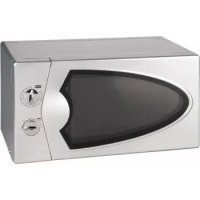
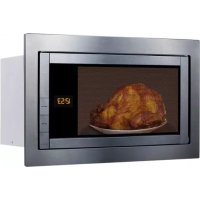
- D
- F
- BEDIENELEMENT
- GEBRAUCH
- WICHTIGE HINWEISE
- OPERATING INSTRUCTIONS
- IMPORTANT SAFETY INSTRUCTIONS
- MAINTENANCE
- SPECIFICATIONS
- INSTALLATION
- RADIO INTERFERENCE
- FOLLOWING MEASURES
- MICROWAVE COOKING PRINCIPLES
- UTENSILS GUIDE
- CONTROL PANEL
- USE
- IMPORTANT REMARKS
- SETTING THE CLOCK
- SETTING THE COOKING TIME, POWER AND COOKING FUNCTION
- MICROWAVE COOKING
- GRILL COOKING
- COMBINATION COOKING
- CONVECTION COOKING (WITH PREHEATING FUNCTION)
- CONVECTION COOKING (WITHOUT PREHEATING FUNCTION)
- EXPRESS COOKING
- EXPRESS MICROWAVE COOKING
- DEFROST BY WEIGHT
- DEFROST BY TIME
- AUTO-MENU
- PRE-SET FUNCTION
- MULTI-STAGE COOKING
- STATE INQUIRING
- CHILDREN LOCKOUT FUNCTION
- BEFORE YOU CALL FOR SERVICE
- IF NONE OF THE ABOVE RECTIFIES THE SITUATION, THEN CONTACT A COMPETENT QUALIFIED ELECTRICIAN. DO NOT TRY TO ADJUST OR REPAIR THE OVEN YOURSELF
- CLEANING AND CARE
- PROTECTION OF THE ENVIRONMENT- DIRECTIVE 2002/96/EC
- FR MODE D'EMPLOI
- INSTRUCTIONS IMPORTANTES DE SECURITE
- AVERTISSEMENT: CET APPAREIL DOIT ETRE MIS A LA TERRE
- GENERATED BY UNREGISTERED BATCH DOC TO PDF CONVERTER 2011.3.804.1511, PLEASE REGISTER
- UTILISATION
- REMARQUES IMPORTANTES
- NETTOYAGE ET ENTRETIEN
- GEBRUIKSAANWIJZING
- BELANGRIJKE VEILIGHEIDSVOORSCHRIFTEN
- OPGELET: DIT APPARAAT MOET GEAARD WORDEN
- GEBRUIK
- BELANGRIJKE OPMERKINGEN
- MICROGOLFFUNCTIE
- FUNCIONAMIENTO
- NOTA IMPORTANTE
- P MODO DE EMPREGO
- INSTRUÇÕES IMPORTANTES DE SEGURANÇA
- FUNCIONAMENTO
- ANOTAÇÕES IMPORTANTES
- FUNÇÃO DE PRE-REGISTO
- ① ISTRUZIONI PER L'USO
- AVVERTENZE
- PRINCIPI DELLA COTTURA A MICROONDE
- PANNELLO DEI COMANDI
- FUNZIONAMENTO
- AVVERTENZE PARTICOLARI
- INSTRUKCJA OBSŁUGI
- WAŻNE UWAGI DOTYCZĄCE BEZPIECZEŃSTWA
- INTERFERENCJA Z INNYMI URZĄDZENIAMI
- PANEL STEROWANIA
- UŻYTKOWANIE
- WAŻNE WSKAZÓWKI
- SPRAWDZANIE USTAWIEN
Brand : KALORIK
Model : TKG MG 35 DGC
Category : Microwave Oven