EKK603504 - Cooker ELECTROLUX - Free user manual and instructions
Find the device manual for free EKK603504 ELECTROLUX in PDF.



| Brand | Electrolux |
| Model | EKK603504 |
| Product type | Mixed cooker (gas hob, electric oven) |
| Dimensions (H x W x D) | 850 x 600 x 600 mm |
| Oven capacity | 53 L |
| Number of burners | 4 (gas) |
| Rapid burner | 3,0 kW (natural gas) / 2,8 kW (LPG) |
| Semi-rapid burner (x2) | 2,0 kW each |
| Auxiliary burner | 1,0 kW |
| Gas supply | G20 (2H) 20 mbar / G30/G31 30 mbar |
| Gas category | II2H3B/P |
| Oven functions | Traditional cooking, Convection, Inner grill, Full grill, Pizza, Defrost, Lighting |
| Included accessories | Oven grid, Drip tray, Storage drawer |
| Oven lighting | Replaceable bulb resistant to 300°C |
| Safety thermostat | Yes |
| Oven cleaning | Manual (soapy water), no pyrolysis |
| Removable oven door | Yes, for cleaning |
| Repairability | Manufacturer-certified parts available via after-sales service |
| Installation | Certified professional required for gas and electricity |
| Appliance class | Class 2, subclass 1 and class 1 |
Frequently Asked Questions - EKK603504 ELECTROLUX
User questions about EKK603504 ELECTROLUX
0 question about this device. Answer the ones you know or ask your own.
Ask a new question about this device
Download the instructions for your Cooker in PDF format for free! Find your manual EKK603504 - ELECTROLUX and take your electronic device back in hand. On this page are published all the documents necessary for the use of your device. EKK603504 by ELECTROLUX.
USER MANUAL EKK603504 ELECTROLUX
Electrolux. Thinking of you.
BESCHRIJVING VAN HET PRODUCT
Algemeen overzicht
natural_image
Line drawing of hands using a tool to adjust or install a rack frame, with a circular arrow indicating rotation (no text or symbols)natural_image
Diagram showing hands operating a mechanical device with a magnified inset of a coil (no text or symbols)natural_image
Technical line drawing of a mechanical bracket assembly with an inset circular detail showing a close-up of the component (no text or symbols)natural_image
Line drawing of a mechanical clamp or bracket assembly with an arrow indicating rotation (no text or symbols)natural_image
Line drawing of a hand inserting a tablet into a car seat panel (no text or symbols)natural_image
Technical line drawing of a device with a screwdriver and directional arrows indicating motion (no text or symbols)flowchart
graph TD
    A["Stage 1"] --> B["Stage 2"]
    B --> C["Stage 3"]
natural_image
Line drawing of a kitchen appliance next to a magnified view of the interior fixture (no text or symbols)Electrolux. Thinking of you.
Share more of our thinking at www.electrolux.com
CONTENTS
Safety information 20
Product description 23
Before first use 23
Hob - Daily Use 24
Hob - Helpful hints and tips 25
Hob - Care and Cleaning 25
Oven - Daily Use 25
Oven - Helpful hints and tips 27
Cooking tables 28
Oven - Care and Cleaning 31
What to do if... 34
Installation 34
Environment concerns 37
Subject to change without notice

SAFETY INFORMATION
For your safety and correct operation of the appliance, read this manual carefully before installation and use. Always keep these instructions with the appliance even if you move or sell it. Users must fully know the operation and safety features of the appliance. The manufacturer is not responsible for damages caused by incorrect installation and use.
Children and vulnerable people safety
- This appliance can be used by children aged from 8 years and above and persons with reduced physical, sensory or mental capabilities or lack of experience and knowledge if they have been given supervision or instruction concerning use of the appliance in a safe way and understand the hazards involved. Children shall not play with the appliance.
- Keep all packaging well away from children. There is risk of suffocation.
- Keep children away from the appliance. There is risk of injury or other permanent disability.
- If the appliance has Switch On Lock or Key Lock, use it. It prevents children and small pets from accidental use of the appliance.
General safety
- Do not change the specifications or modify this product. There is risk of injury and damage to the appliance.
- Remove all packaging, stickers and layers from the appliance before first use.
- Set the cooking zones to "off" after each use.
Use
- The appliance is designed exclusively for domestic cooking tasks.
- Do not use the appliance as a work surface or storage surface.
- Do not leave the appliance unattended during operation. In the event of fire, switch off the appliance. Extinguish the fire with a pot lid, never use water.
- Risk of burns! Do not put metallic objects, for example cutlery or saucepan lids, on the cooking surface, as they can become hot.
- If the objects or cookware fall on the hob surface, the surface can be damaged.
- Cookware made of cast iron, cast aluminium or with damaged bottoms can scratch the hob surface if you move them on the surface.
- If there is a crack on the surface, disconnect power supply to prevent the electric shock.
- Do not let cookware boil dry to prevent the damage to cookware and hob surface.
- Do not use the cooking zones with empty cookware or without cookware.
- Discoloration of the enamel does not affect the performance of the appliance. The guarantee does not become invalid.
- Do not apply pressure on the appliance door.
- The interior of the appliance becomes hot during use. There is risk of burns. Use gloves when you insert or remove the accessories and pots.
- Users with an implanted pacemakers must keep their upper body min. 30 cm
from induction cooking zones that are switched on.
- Always stand back from the appliance when you open the appliance door during operation (especially with Steam Cooking). It allows any build up of steam or heat to release.
-
To prevent damage or discoloration to the enamel:
-
do not put any objects directly on the appliance floor and do not cover it with aluminium foil
– do not put hot water directly into the appliance -
do not keep moist dishes and food in the appliance after you finish the cooking
-
Do not use this appliance if it is in contact with water. Do not operate the appliance with wet hands.
- Do not keep moist dishes and food in the appliance after you finish the cooking as the moist can damage the enamel or get into the units.
- Do not put or keep the flammable liquids and materials or fusible objects (made of plastic or aluminium), on or near the appliance.
- Only heat-resistant accessories can be placed in the compartment situated below the oven. Do not put combustible materials there.
- Always ensure that the oven vent located at the centre back of the hob is left unobstructed to ensure ventilation of the oven cavity.
Caution! Glass lids may shatter when heated. Turn off all burners before shutting the lid.
Care and cleaning
- Before maintenance, switch off the appliance and disconnect the mains plug from the mains socket. Make sure that the appliance is cold.
- Keep the appliance clean at all times. A buid-up of fats or other foodstuff can result in a fire.
- Regular cleaning prevents the surface material from deteriorating.
- Only clean the appliance with water and soap. Sharp objects, abrasive cleaning
agents, abrasive sponges and stain removers can cause damage to the appliance.
- Do not clean the appliance with steam cleaners or high-pressure cleaners.
- Do not clean the glass door with abrasive cleaning agents or metal scraper. Heat resistant surface of the inner glass can break and shatter.
- Make sure that the glass panels are cold, before you clean them. There is risk that the glass breaks.
- Be careful when you remove the door from the appliance. The door is heavy!
- When the door glass panels are damaged they become weak and can break. You must replace them. For more instructions, contact the Service Centre.
- If you use an oven spray, follow the instructions from the manufacturer. Never spray anything onto the fat filter (if present), the heating elements and the thermostat sensor.
- During pyrolytic cleaning (if present), stubborn dirt can damage the colour of the surface.
- Do not clean catalytic enamel (if present).
- Be careful when you change the oven lamp. There is risk of electrical shock!
Installation
- Only an authorized service technician can install, connect or repair the appliance.
- Fully obey the laws, ordinances, directives and standards in force in the country where you use the appliance (safety regulations, recycling regulations, electrical and/or gas safety rules etc.)!
- If you do not comply with Installation instructions, the guarantee becomes invalid in case any damage.
- Make sure that the appliance is not damaged because of transport. Do not connect a damaged appliance. If necessary, contact the supplier.
- Avoid installation of the appliance near easy inflammable material (e.g. curtains, tea towels, etc.)
- Remove all packaging before first use.
-
This appliance is heavy. Take care when you move it. Always use safety gloves. Never pull the appliance by the handle or by the hob.
-
Keep the minimum distances to other appliances and units!
- Important! Do not place the cooker on an extra plinth or other height increasing unit. This means more risk that the appliance tips over!
Electrical connection
• 12 The appliance must be earthed.
- Make sure that the electrical information on the rating plate agree with your domestic power supply.
- Always use a correctly installed shock-proof socket.
- Do not use multi-way plugs, connectors and extension cables. There is a risk of fire.
- Do not replace or modify the mains cable yourself. Contact the Service Centre.
- The appliance must have the electrical installation which lets you disconnect the appliance from the mains at all poles with a contact opening width of minimum 3 mm.
- Make sure that the mains plug and cable is not squashed or damaged by the back of the appliance (if present).
- Make sure that the mains plug is accessible after installation.
- Do not pull the mains cable to disconnect the appliance. Always pull the mains plug.
- You must have correct isolation devices: line protecting cut-outs, fuses (screw type fuses removed from the holder), earth leakage trips and contactors.
• Information on the voltage is on the rating plate.
Gas connection
- Make sure that ventilation around the appliance is good. A defective air supply could cause lack of oxygen.
- Make sure that the gas supply is correct with the gas type on the rating plate, refer to "Product Description" chapter.
- This appliance is not connected to a combustion products evacuation device. It must be installed and connected in accordance with current installation regulations. Particular attention shall be given to the relevant requirements regarding ventilation.
- The use of a gas cooking appliance cause heat and moisture in the room in which it is installed. Make sure that the ventilation in kitchen is good: keep natural ventilation holes open or install a mechanical ventilation device (mechanical extractor hood).
- More ventilation (for example opening of a window or increasing the level of mechanical ventilation where present) is necessary when you intensive operate the appliance for a long time.
Service
- Only an authorised service engineer can repair this appliance. Use only original spare parts. Contact an authorized Service Centre.
PRODUCT DESCRIPTION
General overview
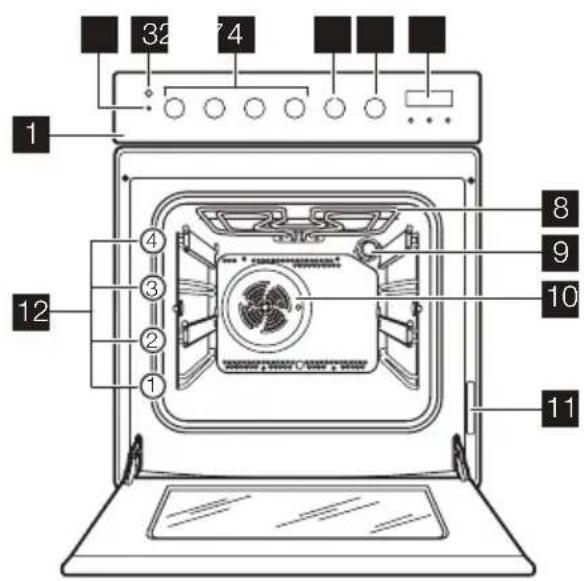
1 Control panel
2 Temperature control light
3 Spark generator button
4 Hob control knobs
5 Oven function control knob
6 Oven temperature control knob
7 Digital display
8 Grill
9 Oven lamp
10 Fan
11 Rating plate
12 Shelf runner
Cooking surface layout
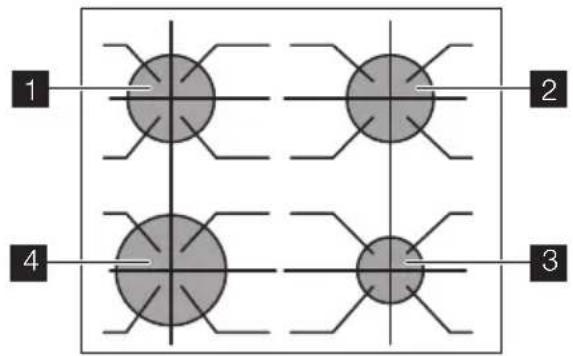
1 Semi-rapid burner
2 Semi-rapid burner
3 Auxiliary burner
4 Rapid burner
Accessories
- Oven shelf
For cookware, cake tins, roasts. - Flat baking tray
For cakes and biscuits. - Deep roasting pan
To bake and roast or as pan to collect fat.
- Storage drawer
Below the oven cavity is the storage drawer.
Warning! The storage drawer can become hot when the appliance operates.
BEFORE FIRST USE
i Remove all packaging, both inside and outside the oven, before using the appliance. Do not remove the rating plate.
Caution! To open the oven door, always hold the handle in the centre.
Setting the time
i The oven only operates after time set.
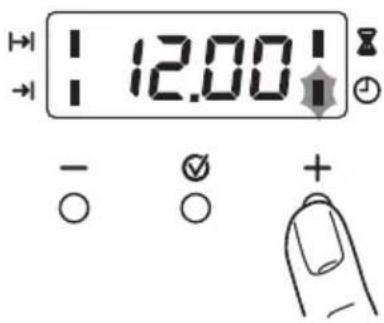
When you connect the appliance to the electrical supply or in case of a power cut, the Time function indicator flashes automatically. To set the current time use " + " or " - " button.
After approximately 5 seconds, the flashing stops and the display shows the time of day set.
For time change you must not set an automatic function (Duration or End ) at the same time.
HOB - DAILY USE
Ignition of the burner
Warning! Be very careful when you use open fire in kitchen environment. Manufacturer decline any responsibility in case misuse of the flame
i Always light the burner before you put cookware.
To light the burner:
- Push and hold the spark generator button ✝.
- Turn the control knob counterclockwise to the maximum position 🔒.
-
Release the spark generator button but keep the control knob on this position for approximately 5 seconds; this will let thermocouple to warm up. If not, the gas supply will be interrupted.
-
Adjust the flame after it is regular.
If after some tries the burner does not light, check if the crown and its cap are in correct positions.
Initial Cleaning
- Remove all parts from the appliance.
- Clean the appliance before first use.
Important! Refer to chapter "Care and Cleaning".
Preheating
Set and maximum temperature and run an empty oven for 45 minutes, to burn off any residue from the cavity surface. Accessories can become hotter than in normal use. During this period an odour can be emitted. This is normal. Make sure the room is well ventilated.
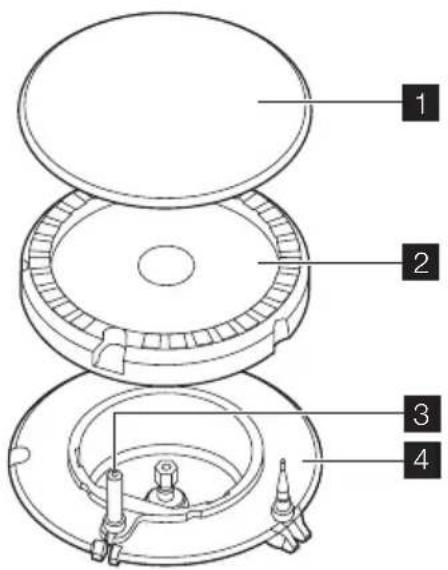
1 Burner cap
2 Burner crown
3 Ignition candle
4 Thermocouple
Warning! Do not keep the control knob pushed for more than 15 seconds. If the burner does not light after 15 seconds, release the control knob, turn it into off position and try to light the burner again after minimum 1 minute.
Important! You can light the burner without electrical device (e.g. when there is no electricity in the kitchen). To do so, put the flame near the burner, push the related control knob down and turn it counterclockwise to the maximum gas release position.
If the burner accidentally goes out, turn the control knob to the off position and try to light the burner again after minimum 1 minute.
The spark generator can start automatically when you switch on the mains, af-
HOB - HELPFUL HINTS AND TIPS
Energy savings
- If possible, always put the lids on the pans.
- When the liquid starts to boil, turn down the flame to barely simmer the liquid.
Use pots and pans with bottom applicable to the dimension of burner.
Burner Diameters of cookware
Rapid 180 mm - 260 mm
ter installation or a power cut. It is normal.
Turning the burner off
To put the flame out, turn the knob to the symbol ●.
Warning! Always turn the flame down or switch it off before you remove the pans of the burner.
Glass lids may shatter when heated. Turn off all burners before shutting the lid.
Burner Diameters of cookware
Semi-rapid 120 mm - 220 mm
Auxiliary 80 mm - 160 mm
Use cookware with the bottom as thick and flat as possible.
HOB - CARE AND CLEANING
Warning! Switch the appliance off and let it cool down before you clean it.
Warning! For safety reasons, do not clean the appliance with steam cleaners or high-pressure cleaners.
Warning! Do not use abrasive cleaners, steel wool pads or acids, they can cause damage to the appliance.
- To clean the enamelled parts, cap and crown, wash it with warm soapy water.
- Stainless steel parts wash with water, and then dry with a soft cloth.
- The pan supports are not dishwasher proof; they must be washed by hand.
- Make sure you position the pan supports correctly after cleaning.
- To make burners work correctly, make sure that the arms of the pan supports are in the centre of the burner.
- Be very careful when you replace the pan supports to prevent the hob top from damage.
After cleaning, dry the appliance with a soft cloth.
OVEN - DAILY USE
Switching the Oven On and Off
- Turn the oven functions control knob to an oven function.
- Turn the temperature control knob to a temperature.
The temperature indicator comes on while the oven temperature increases.
- To switch off the oven, turn the oven functions control knob and the temperature control knob to the Off position.
Safety thermostat
To prevent dangerous overheating (due to incorrect use of the appliance or defective components), the oven has a safety thermo-
stat, which interrupts the power supply. The oven switches back on again automatically, when the temperature drops.
Oven functions
| Oven function Application | |
| 0 | OFF position The appliance is off. |
| Oven lamp Lights up without any cooking function. | |
| Conventional cooking Heats both from the top and bottom element. To bake and roast on one oven level. | |
| Bottom heating element Heats only from the bottom of the oven. To bake cakes with crispy or crusty bases. | |
| Inner grill To grill flat food items in small quantities in the middle of the shelf. To make toasts. | |
| Full grill The full grill element is on. To grill flat food items in large quantities. To make toasts. | |
| Pizza To bake on one oven level food with a more intensive browning and a crispy base. Decrease the oven temperatures (20-40 °C) compared with Conventional | |
| Fan cooking To roast or roast and bake the food that requires the same cooking temperature, using more than one shelf, without flavour transference. | |
| Defrost Thaws frozen food. The temperature control knob must be on off position. | |
Display
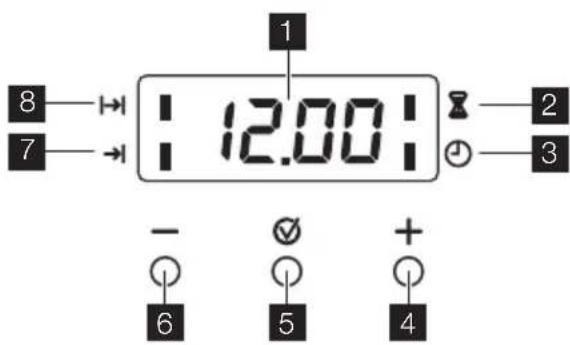
Setting the clock functions
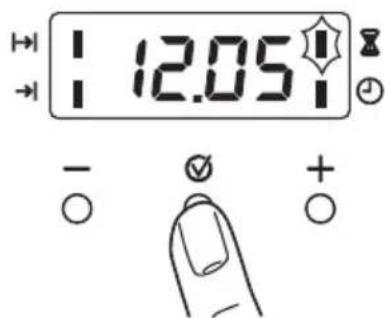
1 Function Indicators
2 Time display
3 Function Indicators
4 Button "+"
5 Selector Button
6 Button "-"
- Push the Selection button again and again until necessary function indicator flashes.
- To set the time for Minute minder ☒, Duration I→I or End →I, use " + " or " - " button. The related function indicator comes on. When the time period is completed, the function indicator flashes and an acoustic signal sounds for 2 minutes.
With the functions Duration I and End → the oven switches off automatically.
- Push any button to stop the signal.
| Clock function Application | |
| 💡 | Time of day Shows the time. To set, change or check the time. |
| 💡 | Minute minder To set a countdown time.A signal sounds, after the time period is completed.This function has no effect on the operation of the oven. |
| |→| | Duration To set how long the oven has to be in operation. |
| →| | End To set the switch-off time for an oven function. |
i Duration 1→ and End can be used at the same time, if the oven is to be switched on and off automatically later. In this case first set Duration 1→, then End →1.
Cancelling the clock functions
-
Push the Selection button again and again until necessary function indicator flashes.
-
Push and hold button " - ". After some seconds the clock function goes out.
OVEN - HELPFUL HINTS AND TIPS
Warning! Always close the oven door when you cook, even while grilling.
Do not put baking trays, pots, etc. on the oven floor to prevent damage to the oven enamel.
i Be careful when you remove or install the accessories to prevent damage to the oven enamel.
- The oven has four shelf levels. Count the shelf levels from the bottom of the oven floor.
- You can cook different dishes on two levels at the same time. Place the shelves on level 1 and 3.
- The oven is supplied with a special system which circulates the air and constantly recycles the steam. This system allows to cook in a steamy environment and keep the food soft inside and crusty outside. It reduces the cooking time and energy consumption to a minimum.
- Moisture can condense in the appliance or on the glass doors. This is normal. Always stand back from the appliance when you open the oven door while cooking. To reduce condensation, run the oven for 10 minutes before cooking.
- Wipe away moisture after every use of the appliance.
Baking cakes
- The best temperature for baking cakes is between 150°C and 200°C.
- Preheat the oven for approximately 10 minutes before baking.
- Do not open the oven door before 3/4 of the set cooking time is up.
- If you use two baking trays at the same time, keep one level empty between them.
Cooking meat and fish
- Do not cook meat with weight below 1 kg. Cooking too small quantities makes the meat too dry.
- To keep the red meat well cooked outside and juicy inside set the temperature between 200°C-250°C.
- For white meat, poultry and fish set the temperature between 150°C-175°C.
- Use a dripping pan for very fatty food to prevent the oven from stains that can be permanent.
- Leave the meat for approximately 15 minutes before carving so that the juice does not seep out.
- To prevent too much smoke in the oven during roasting, add some water into the dripping pan. To prevent the smoke condensation, add water each time after it dries up.
Cooking times
Cooking times depend on the type of food, its consistency, and volume. Initially, monitor the performance when you cook. Find the best settings (heat setting,
cooking time, etc.) for your cookware, recipes and quantities when you use this appliance.
COOKING TABLES
Baking and roasting table
CAKES
| TYPE OF DISH | Conventional cooking | Fan cooking | Cooking time [min] | Notes | ||
| Lev-el [IMAGE] | Temp [°C] | Lev-el [IMAGE] | Temp [°C] | |||
| Whisked reci-p-ies | 2 170 | 2 (1and 3) | 160 45-60 In cake mould | |||
| Shortbread dough | 2 170 | 2 (1and 3) | 160 24-34 In cake mould | |||
| Butter-milk cheese cake | 1 170 | 2 160 60-80 In cake mould 26 cm | ||||
| Apple cake (Ap-ple pie) | 1 170 | 2 left +right | 160 100-120 2 cake moulds of 20 cmon the oven shelf | |||
| Strudel | 2 | 175 | 2 | 150 | 60-80 | On baking tray |
| Jam- tart | 2 | 170 | 2 | 160 | 30-40 | In cake mould 26 cm |
| Fruit cake | 2 | 170 | 2 | 155 | 60-70 | In cake mould 26 cm |
| Sponge cake (Fatless sponge cake) | 2 170 | 2 160 35-45 In cake mould 26 cm | ||||
| Christmas cake/ Rich fruit cake | 2 170 | 2 160 50-60 In cake mould 20 cm | ||||
| Plum cake 2 170 | 2 160 50-60 | In bread tin1) | ||||
| Small cakes | 3 | 170 | 3 (1 and 3) | 160 20-30 | On flat baking tray | |
| Biscuits | 3 | 150 | 3 | 150 | 20-30 | On flat baking tray1) |
| Meringues | 3 | 100 | 3 | 100 | 90-120 | On flat baking tray |
| Buns | 3 | 190 | 3 | 180 | 15-20 | On flat baking tray1) |
| Choux | 3 | 190 | 3 | 180 | 25-35 | On flat baking tray1) |
| Plate tarts | 3 | 180 | 2 | 170 | 45-70 | In cake mould 20 cm |
| Victoria sand-wich | 1 or 2 | 180 | 2 | 170 | 40-55 | Left + right in cake mould 20 cm |
1) Preheat for 10 minutes.
BREAD AND PIZZA
| TYPE OF DISH | Conventional cooking | Fan cooking | Cooking time [min] | Notes | ||
| Lev-el [IMAGE] | Temp [°C] | Lev-el [IMAGE] | Temp [°C] | |||
| White bread | 1 | 190 | 1 | 190 | 60-70 | 1-2 pieces, 500 gr one piece ^1) |
| Rye bread | 1 | 190 | 1 | 180 | 30-45 | In bread tin |
| Bread rolls 2 190 2 (1 | and 3) | 180 25-40 6-8 rolls on flat baking tray ^1) | ||||
| Pizza 1 190 1 190 20-30 | On deep roasting pan ^1) | |||||
| Scones | 3 | 200 | 2 | 190 | 10~20 | On flat baking tray ^1) |
1) Preheat for 10 minutes.
FLANS
| TYPE OF DISH | Conventional cooking | Fan cooking | Cooking time [min] | Notes | ||
| Level | Temp [°C] | Level | Temp [°C] | |||
| Pasta flan | 2 | 180 | 2 | 180 | 40-50 | In mould |
| Vegetable flan | 2 | 200 | 2 | 175 | 45-60 | In mould |
| Quiches | 1 | 190 | 1 | 190 | 40-50 | In mould |
| Lasagne | 2 | 200 | 2 | 200 | 25-40 | In mould |
| Cannelloni | 2 | 200 | 2 | 190 | 25-40 | In mould |
| Yorkshire pudding | 2 220 | 2 210 20-30 | 6 pudding mould 1) | |||
1) Preheat for 10 minutes.
MEAT
| TYPE OF DISH | Conventional cooking | Fan cooking | Cooking time [min] | Notes | ||
| Lev-el [IMAGE] | Temp [°C] | Lev-el [IMAGE] | Temp [°C] | |||
| Beef | 2 | 200 | 2 | 190 | 50-70 | On oven shelf and deep roasting pan |
| Pork | 2 | 180 | 2 | 180 | 90-120 | On oven shelf and deep roasting pan |
| Veal | 2 | 190 | 2 | 175 | 90-120 | On oven shelf and deep roasting pan |
| English roast beef rare | 2 | 210 | 2 | 200 | 44-50 | On oven shelf and deep roasting pan |
| English roast beef medium | 2 | 210 | 2 | 200 | 51-55 | On oven shelf and deep roasting pan |
| English roast beef well done | 2 | 210 | 2 | 200 | 55-60 | On oven shelf and deep roasting pan |
| Shoulder of pork | 2 | 180 | 2 | 170 | 120-150 | On deep roasting pan |
| Lev-el [°C] | Temp [°C] | Lev-el [°C] | Temp [°C] | |||
| Shin of pork | 2 | 180 | 2 | 160 | 100-120 | 2 pieces on deep roasting pan |
| Lamb 2 190 2 190 110-130 Leg | ||||||
| Chicken | 2 | 200 | 2 | 200 | 70-85 | Whole on deep roasting pan |
| Turkey | 1 | 180 | 1 | 160 | 210-240 | Whole on deep roasting pan |
| Duck | 2 | 175 | 2 | 160 | 120-150 | Whole on deep roasting pan |
| Goose | 1 | 175 | 1 | 160 | 150-200 | Whole on deep roasting pan |
| Rabbit | 2 | 190 | 2 | 175 | 60-80 | Cut in pieces |
| Hare | 2 | 190 | 2 | 175 | 150-200 | Cut in pieces |
| Pheasant | 2 | 190 | 2 | 175 | 90-120 | Whole on deep roasting pan |
FISH
| TYPE OF DISH | Conventional cooking | Fan cooking | Cooking time [min] | Notes | ||
| Level | Temp [°C] | Level | Temp [°C] | |||
| Trout/Sea bream | 2 | 190 | 2 (1 and 3) | 175 40-55 3-4 fishes | ||
| Tuna fish/Sal-mon | 2 | 190 | 2 (1 and 3) | 175 35-60 | 4-6 fillets | |
Grilling
i Preheat the empty oven for 10 minutes, before cooking.
| TYPE OF DISH | Quantity | Grilling | Cooking time in minutes | |||
| Pieces g | level | Temp. (°C) | 1st side | 2nd side | ||
| Fillet steaks | 4 | 800 | 3 | 250 | 12-15 | 12-14 |
| Beef steaks | 4 | 600 | 3 | 250 | 10-12 | 6-8 |
| Sausages | 8 | / | 3 | 250 | 12-15 | 10-12 |
| Pork chops | 4 | 600 | 3 | 250 | 12-16 | 12-14 |
| Chicken (cut in 2) | 2 | 1000 | 3 | 250 | 30-35 | 25-30 |
| Kebabs | 4 | / | 3 | 250 | 10-15 | 10-12 |
| Breast of chicken | 4 | 400 | 3 | 250 | 12-15 | 12-14 |
| Hamburger | 6 | 600 | 3 | 250 | 20-30 | |
| Fish Fillet | 4 | 400 | 3 | 250 | 12-14 | 10-12 |
| Quantity Grilling Cooking time in mi- | ||||
| TYPE OF DISH Pieces g | level | Temp. (°C) | nutes 1st side 2nd side | |
| Toasted sandwiches | 4-6 / 3 250 5-7 / | |||
| Toast 4-6 / 3 250 2-4 2-3 | ||||
Pizza
i Preheat the empty oven for 10 minutes, before cooking.
| TYPE OF DISH | Pizza FunctionLevel temp.°C | Cooking time in minutes | NOTES | |
| Pizza, large | 1 | 200 | 15~25 | on flat baking tray |
| Pizza, small | 1 | 200 | 10~20 | on flat baking tray or on oven shelf |
| Bread rolls | 1 | 200 | 15~25 | on flat baking tray |
OVEN - CARE AND CLEANING
- Clean the front of the appliance with a soft cloth with warm water and cleaning agent.
- To clean metal surfaces use a usual cleaning agent
- Clean the oven interior after each use. Thus you can remove dirt more easily and it does not burn on.
- Clean stubborn dirt with a special oven cleaner.
- Clean all oven accessories (with a soft cloth with warm water and cleaning agent) after each use and let them dry.
- If you have nonstick accessories, do not clean them using an aggressive agents, sharp edged objects or dishwasher. It can destroy nonstick coating!
Oven shelf rails
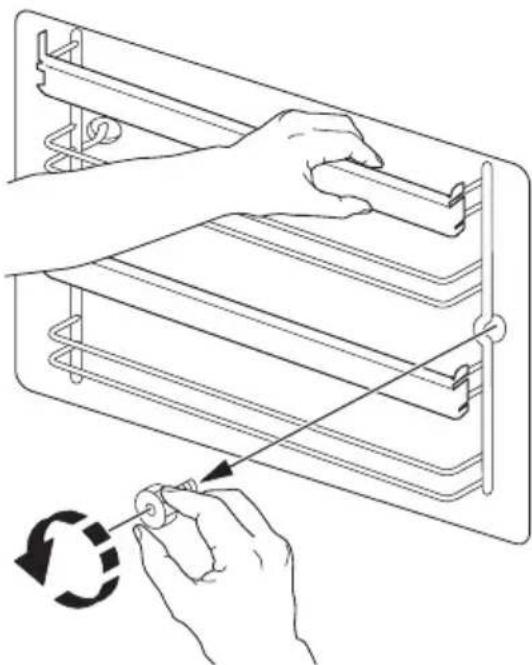
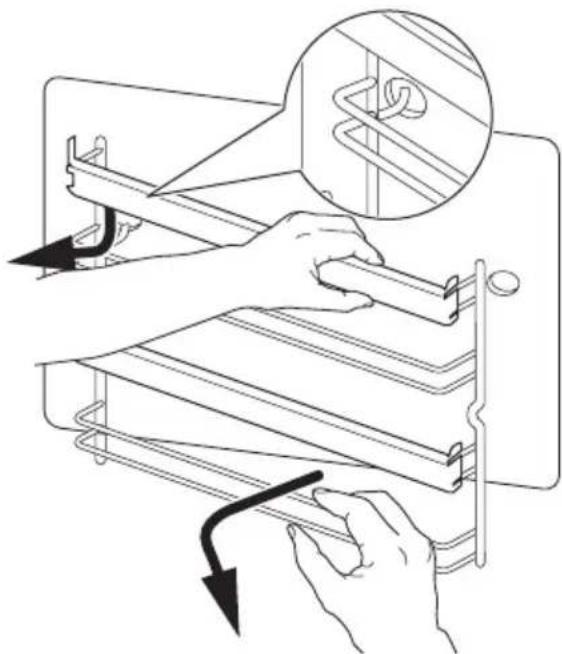
The shelf supports can be removed for easy cleaning:
- Remove the front screw while keeping the shelf rails in position with the other hand
natural_image
Line drawing of hands using a tool to adjust or install a rack frame, with a circular arrow indicating rotation (no text or symbols present)- Pull the shelf rails from the rear of the side wall to remove the shelf rails.
natural_image
Diagram showing hands operating a rack-mounted device with a magnified inset highlighting the rack structure (no text or symbols present)Installing the shelf support rails
Install the shelf support rails in opposite sequence.
Important! Make sure that the retaining pins on the telescopic shelf runners point to the front.
Cleaning the oven door
The oven door has two panels of glass installed one behind the other. To make the cleaning easier remove the oven door and the internal panel of glass.
Warning! The oven door can close if you try to remove the internal panel of glass when the door is still assembled.
Warning! Make sure that the glass panels are cool, before you clean the glass door. There is risk that the glass breaks.
Warning! When the door glass panels are damaged or have scratches, the glass becomes weak and can break. To prevent this you must replace them. For more instructions, contact your local Service Centre.
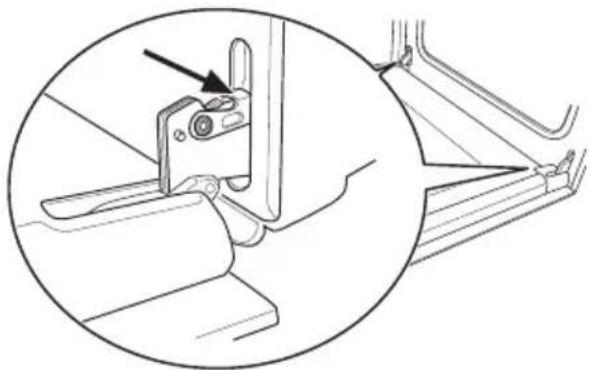
Removing the oven door and the glass panel
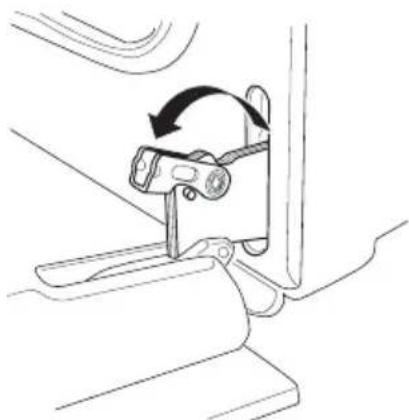
- Open the door fully and hold the two door hinges.
natural_image
Technical line drawing of a mechanical bracket assembly with an arrow indicating a component (no text or symbols present)- Lift and turn the levers on the two hinges.
natural_image
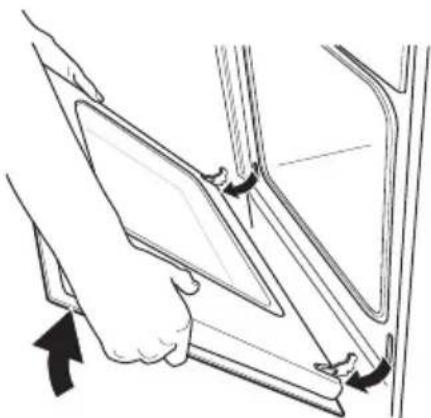
Line drawing of a mechanical clamp or bracket assembly with an arrow indicating rotational motion (no text or symbols)- Close the oven door to the first opening position (halfway). Then pull forward and remove it from its seat.
natural_image
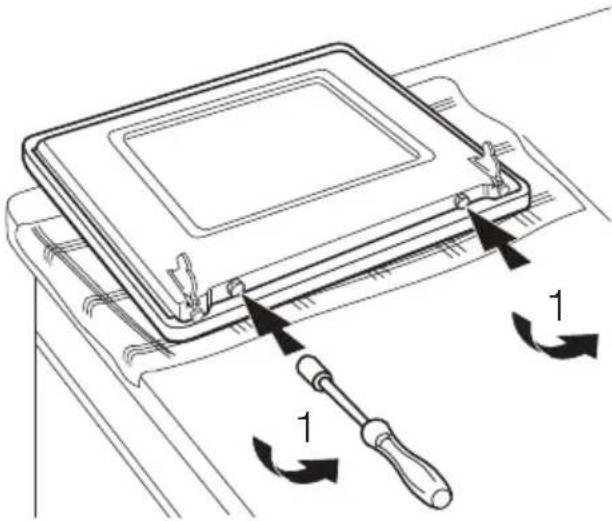
Line drawing of a person inserting a tablet into a vehicle door panel (no text or symbols)- Place the door on a stable surface protected by a soft cloth.
Use a screwdriver to remove 2 screws from bottom edge of door
natural_image
Technical line drawing of a device with a screwdriver and directional arrows indicating movement (no text or symbols)Important! Do not loose the screws
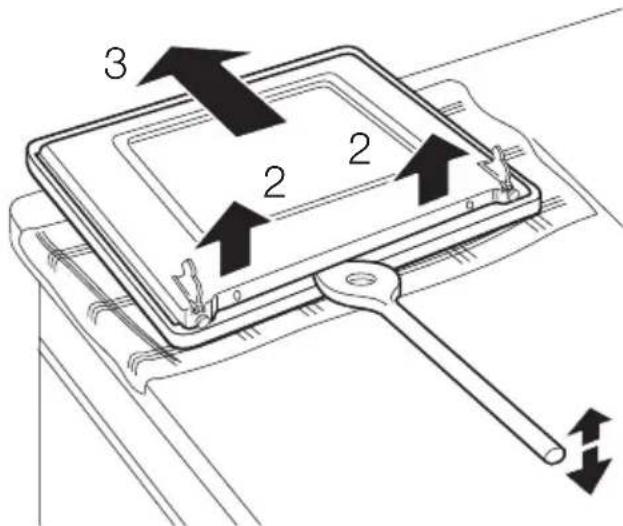
- Use a spatula made of wood or plastic or equivalent to open the inner door Hold the outer door, and push the inner door against the top edge of the door
-
Lift the inner door
-
Clean inner side of the door Clean the glass panel with water and soap. Dry it carefully.
Warning! Only clean the glass panel with water and a soap. Abrasive cleaning agents, stain removers and sharp objects (e.g. knives or scrapers) can cause damage to the glass.
Inserting the door and the glass panel
When the cleaning procedure is completed, insert the oven door. To do so, do the steps in opposite way.
i Stainless steel or aluminium appliances:
Clean the oven door with a wet sponge only. Dry it with a soft cloth.
Do not use steel wool, acids or abrasive materials as they can damage the oven surface. Clean the oven control panel with the same precautions
Oven lamp
Warning! There is a danger of electrical shock!
Before you change the oven lamp:
- Switch off the oven.
- Remove the fuses in the fuse box or switch off the circuit breaker.
Put a cloth on the bottom of the oven for protection of the oven light and glass cover.
Replacing the oven light bulb/cleaning the glass cover
-
Turn the glass cover anti-clockwise to remove it.
-
Clean the glass cover.
-
Replace the oven light bulb with applicable 300°C heat-resistant oven light bulb.
-
Install the glass cover.
WHAT TO DO IF...
| Problem Possible cause Remedy | ||
| There is no spark when lighting the gas | There is no electrical supply Make | sure that the unit is connected and the electrical supply is switched on. |
| There is no spark when lighting the gas | There is no electrical supply Examine | the house electrical installation fuse. |
| There is no spark when lighting the gas | Burner cap and crown are placed uneven | Make sure that the burner cap and crown are in correct positions. |
| The flame is blow out immediately after ignition | Thermocouple is not heated sufficient | After lightning the flame, keep the knob pushed for approximately 5 seconds. |
| The gas ring burns unevenly Burner crown is blocked with food residues | Make sure that the injector is not blocked and the burner crown is clear of food particles. | |
| The appliance does not operate The fuse in the fuse box is released | Control the fuse. If the fuse is released more than one time, refer to a qualified electrician. | |
| The oven does not heat up | The oven is not switched on | Switch on the oven |
| The oven does not heat up The necessary settings are not set | Control the settings | |
| The oven lamp does not operate | The oven lamp is defective | Replace the oven lamp |
| The display shows “12.00” and "LED" | A power cut Reset the clock | |
| Steam and condensation settle on the food and in the oven cavity | You left the dish in the oven for too long | Do not leave the dishes in the oven for longer than 15-20 minutes after the cooking process ends |
If you can not find a solution to the problem, refer to your dealer or the Service Force Centre.

Warning! Let a qualified electrician or competent person do repairs to the appliance.
Important! If you do not operate the appliance correctly, the visit from the Service Force Centre or dealer will not be free of charge, even during the warranty period.
If you can not find a solution to the problem, speak to your dealer or the Service Force Centre.
INSTALLATION
Important! First read "Safety information" chapter carefully.
These data are necessary to help you quickly and correctly. These data are available on the rating plate (refer to "Product description")
- Model description ......
- Product number (PNC) ......
- Serial number (S.N.) ....
i Hints for appliances with metal fronts:
If you open the door during or immediately after the baking or roasting procedure, steam can show on the glass.
Technical Data
Appliance class 2, sub class 1 and class 1.
| Dimensions | |
| Height 850 mm | |
| Width 600 mm | |
| Depth 600 mm | |
| Oven capacity 53 l | |
| Gas Category II2H3B/P | |
| Gas Supply G20(2H) 20 mbar | |
By-pass diameters
| Burner ∅ By-pass in 1/100 mm. | |
| Auxiliary 28 | |
| Semi-rapid 32 | |
| Rapid 42 | |
Gas burners
| BURNER | NORMAL POWERkW kW | REDUCED POWER | NORMAL POWER | ||||
| NATURAL GAS G20 (2H) - 20 mbar | LPG(Butane/Propane) G30/31-30 mbar | ||||||
| inj. 1/100 mm | m^3/h | inj. 1/100 mm | g/hG30 G31 | ||||
| Auxiliary burner | 1,0 0,33 | 70 0,095 | 50 72 71 | ||||
| Semi-rapid burner | 2,0 | 0,45 | 96 | 0,190 | 71 | 145 | 143 |
| Rapid burner | 3,0 (nat. gas)2,8 (LPG) | 0,75 | 119 | 0,286 | 86 | 204 | 200 |
Gas burners G20 13 mbar - only Russia
| BURNER | NORMAL POWER | REDUCED POWER | NORMAL POWER NATURAL GAS G20 13 mbar | |
| kW | kW | inj. 1/100 mm | m^3/h | |
| Auxiliary burner | 0,9 | 0,33 | 80 | 0,095 |
| Semi-rapid burner | 1,4 | 0,45 | 105 | 0,148 |
| Rapid burner | 1,9 | 0,75 | 120 | 0,201 |
Gas Connection
Choose fixed connections or use a flexible pipe in stainless steel in compliance with the regulation in force. If you use flexible metallic pipes, be careful they do not come in touch with mobile parts or they are not squeezed.
Flexible nonmetal pipes connection
If it is possible to easily control the connection in its full area, you can use a flexible pipe. The flexible pipe must be tightly attached by clamps.
Installation: use the rubber pipe holder. Always engage the gasket. Then continue
with the gas connection. The flexible pipe is prepared for apply when:
- it can not get hot more than room temperature, higher than 30°C;
- it is no longer than 1500 mm;
- it shows no throttles;
- it is not subject to traction or torsion;
- it does not get in touch with cutting edges or corners;
- it can be easily examined in order to check its condition.
The control of preservation of the flexible pipe consists in checking that:
- it does not show cracks, cuts, marks of burnings on the two ends and on its full length;
– the material is not hardened, but shows its correct elasticity;
- the fastening clamps are not rusted:
-expired term is not due.
If one or more defects are visible, do not repair the pipe, but replace it.
Important! When installation is complete, make sure that the seal of each pipe fitting is correct. Use a soapy solution, not a flame!
The gas supply ramp is on the rear side of the control panel.

Warning! Before gas connection disconnect the mains plug from the mains socket or switch off the fuse in the fuse box. Close the primary valve of the gas supply.
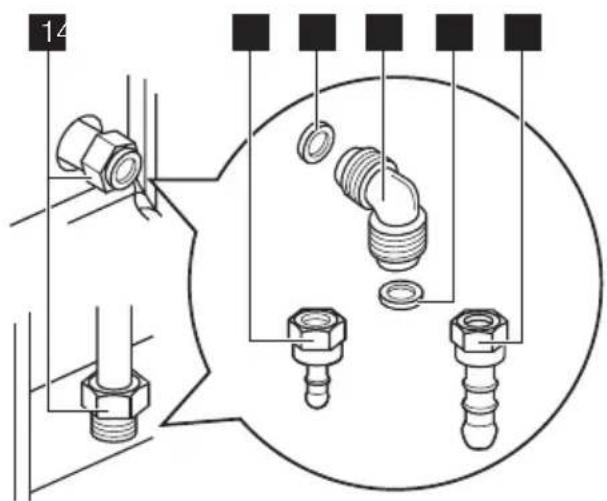
1 Gas connection point (only one point is applicable for appliance)
2 Gasket
3 Adjustable connection
4 LPG rubber pipe holder
5 Natural Gas pipe holder
The appliance is set to default gas, to change the setting choose pipe holder from the list. Always use the gasket sealing
Injectors replacement
- Remove the pan supports.
- Remove the caps and crowns of the burner.
-
With a socket spanner 7 remove the injectors and replace them with the ones which are necessary for the type of gas you use.
-
Assemble the parts, follow the same procedure backwards.
- Replace the rating label (it is near the gas supply pipe) with the one for the new type of gas supply. You can find this label in the package of the injectors supplied with the appliance.
If the supply gas pressure is changeable or different from the necessary pressure, you must fit an applicable pressure adjuster on the gas supply pipe.
Adjustment of minimum level
To adjust the minimum level of the burners:
- Light the burner.
- Turn the knob on the minimum position.
- Remove the control knob.
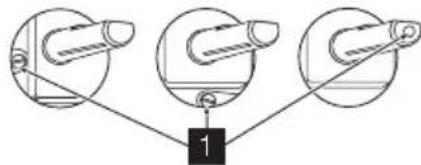
- With a thin screwdriver, adjust the bypass screw position. If you change from natural gas 20 mbar to liquid gas, fully tighten the adjustment screw in. If you change from liquid gas to natural gas 20 mbar, undo the by-pass screw approximately 1/4 of a turn.
flowchart
graph TD
    A["Stage 1"] --> B["Component 2"]
    B --> C["Component 3"]
1 Minimum adjustment screw
- Make sure the flame does not go out when you quickly turn the knob from the maximum position to the minimum position.
Warning! Do not set the appliance on a base
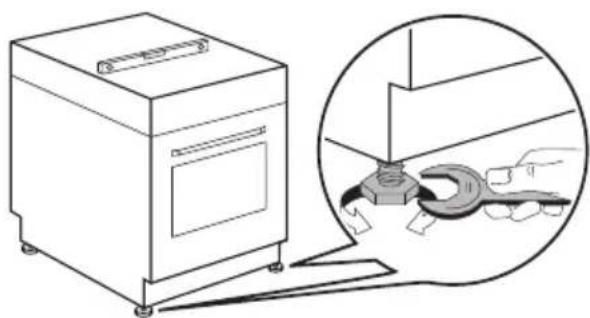
Levelling
Use small feet on the bottom of appliance to set same level of cooker top surface with other surfaces
natural_image
Line drawing of a kitchen appliance next to a magnified view of the tool interacting with a mechanical component (no text or symbols present)Electrical installation
Warning! Only a qualified and competent person must do the electrical installation.
The manufacturer is not responsible if you do not follow safety precautions from chapter "Safety Information".
ENVIRONMENT CONCERNS
The symbol ☒ on the product or on its packaging indicates that this product may not be treated as household waste. Instead it should be taken to the appropriate collection point for the recycling of electrical and electronic equipment. By ensuring this product is disposed of correctly, you will help prevent potential negative consequences for the environment and human health, which could otherwise be caused by inappropriate waste handling of this product. For more detailed information about recycling of this product, please contact your local council, your household waste disposal service or the shop where you purchased the product.
This appliance is only supplied with a main cable.
MANUFACTURER:
C.so Lino Zanussi, 26-33080 Porcia (PN), Italy.
Packaging material
The packaging material is environmentally-friendly and recyclable. Plastic parts are marked with international abbreviations such as PE, PS, etc. Dispose of the packaging material in the containers provided for this purpose at your local waste management facility.
Warning! Your appliance should be made inoperable before it is disposed of, so that it does not constitute a danger.
To do this, take the mains plug from the socket and remove the mains cable from the appliance.
Electrolux. Thinking of you.
- Plateau multi-usages
natural_image
Line drawing of hands using a tool to adjust or install a rack frame, with a circular arrow indicating rotation (no text or symbols)natural_image
Illustration of a hand using a tool to adjust or install a rack frame, with no visible text or symbols.natural_image
Technical line drawing of a mechanical bracket assembly with an arrow indicating a component (no text or symbols present)natural_image
Line drawing of a mechanical clamp or bracket assembly with an arrow indicating rotation (no text or symbols)natural_image
Illustration of a hand holding a tablet device inside a vehicle (no text or symbols visible)natural_image
Technical line drawing of a device with a screwdriver and directional arrows indicating movement (no text or symbols)flowchart
graph TD
    A["Stage 1"] --> B["Stage 2"]
    B --> C["Stage 3"]
natural_image
Line drawing of a washing machine next to a magnified view of a hand using a wrench tool (no text or symbols present)Electrolux. Thinking of you.
natural_image
Line drawing of hands using a tool to adjust or install a rack frame, with a circular arrow indicating rotation (no text or symbols)natural_image
Illustration of hands using a tool to adjust or install a mechanical component, showing a magnified inset (no text or symbols)natural_image
Technical line drawing of a mechanical bracket assembly with an arrow indicating a component (no text or symbols present)natural_image
Line drawing of a mechanical clamp or bracket assembly with an arrow indicating rotational motion (no text or symbols)natural_image
Illustration of a person inserting a tablet into a vehicle door panel (no text or symbols)flowchart
graph TD
    A["Stage 1"] --> B["Stage 2"]
    B --> C["Stage 3"]
natural_image
Line drawing of a kitchen appliance next to a magnified inset showing hand cleaning the door (no text or symbols)Electrolux. Thinking of you.
natural_image
Line drawing of hands using a tool to adjust or install a rack frame, with a circular arrow indicating rotation (no text or symbols)natural_image
Diagram showing hands operating a rack-mounted device with a magnified inset highlighting a coil structure (no text or symbols)natural_image
Technical line drawing of a mechanical bracket assembly with an arrow indicating a component (no text or symbols present)natural_image
Line drawing of a mechanical clamp or bracket assembly with an arrow indicating rotation (no text or symbols)natural_image
Line drawing of a hand holding a tablet device, with arrows indicating movement (no text or symbols)natural_image
Technical line drawing of a device with a screwdriver and directional arrows indicating motion (no text or symbols)flowchart
graph TD
    A["Stage 1"] --> B["Stage 2"]
    B --> C["Stage 3"]