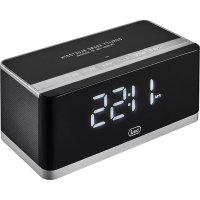
HY 870 BT - Radio Trevi - Free user manual and instructions
Find the device manual for free HY 870 BT Trevi in PDF.


| Product type | Bluetooth alarm clock radio |
| Brand | Trevi |
| Model | HY 870 BT |
| Dimensions | 160 x 76 x 80 mm |
| Power supply | 5V mains adapter, 220V ~ 50Hz, rechargeable lithium battery |
| FM range | 87.5 - 108 MHz |
| Bluetooth | Version not specified, 2.4 GHz transmission, power 2.5 mW |
| Main functions | Bluetooth, FM radio, USB/MicroSD MP3 player, AUX input, clock, alarm, hands-free, sleep mode |
| Display | LED |
| Modes | Clock, calendar, alarm, Bluetooth, MP3, LINE-IN, FM radio, sleep |
| Maintenance | Soft slightly damp cloth; do not use solvents or abrasive substances |
| Safety | Do not expose to water or heat sources; ensure at least 5 cm ventilation; do not block air inlets |
| Battery | Rechargeable lithium; charge between 5°C and 35°C; do not leave charging overnight |
| Recycling | WEEE compliant; do not dispose with household waste; drop off at a collection center |
| General information | User manual available in multiple languages; after-sales support via TREVI authorized center |
Frequently Asked Questions - HY 870 BT Trevi
User questions about HY 870 BT Trevi
0 question about this device. Answer the ones you know or ask your own.
Ask a new question about this device
Download the instructions for your Radio in PDF format for free! Find your manual HY 870 BT - Trevi and take your electronic device back in hand. On this page are published all the documents necessary for the use of your device. HY 870 BT by Trevi.
USER MANUAL HY 870 BT Trevi
ALARM CLOCK WITH BLUETOOTH®
CONNECTION
User Manual
MICROSD/ USB
CARD READER
AUX IN
10W MAX
BLUETOOTH CONNECTION
This is a precision electronic appliance; avoid using it in the following cases:
- Near strong heat sources, such as central heating plants or stoves.
- In very humid places such as bathrooms, swimming pools, etc.
- In very dusty places.
- In places subject to strong vibrations.
- Position the appliance in such a way that there is always enough room for free air circulation (at least 5 cm).
- Do not block the air inlets.
- If any liquid enters the appliance, unplug it immediately from the socket and take it to the nearest TREVI authorised service centre.
- Before switching on the appliance, always check that the power cable and the connection cable are properly installed.
- No naked flame sources, such as lighted candles, should be placed on this.
- The apparatus shall not be exposed to dripping or splashing water and no object filled with water, such as vases, should be placed on the unit.
- Keep this manual for future reference.
CARE AND MAINTENANCE
Use a slightly damp soft cloth for cleaning. Do not use solvents and abrasive substances.
IMPORTANT
This appliance has been carefully built to ensure long-lasting perfect performance. However, should any inconvenience occur, please contact your local authorised TREVI Service Centre.
TREVI follows a policy of ongoing research and development. Therefore products may have different features from those described.

- “” key: long press to turn on or turn off speaker. In music mode, short press to let music play or pause. In hands free mode, short press to hang on/ hang off calling.
- “MODE” key: short press to choose mode; In FM radio mode, long press to search channels; in clock and calendar mode, long press to set time.
- “ ” key: short press to last song; long press to fast backward; Change 12/24 hours mode when in clock mode
- “▶” key: short press to next song; long press to fast forward; Change 12/24 hours mode when in clock mode
- "V-" key: decline voice
- "V+" key: increase voice
- "switch" key: ON/OFF
BATTERY RECHARGE
- Using the supplied USB cable, connect the side of the jack Micro USB to DC USB port and the other end to the power supply provided.
- The red LED indicator will light up to indicate the state of charge, at the end of charge indicator LEDs will turn off.
FUNCTIONAL USAGE
Turn on/off switch to ON, LED display show HI - Modes: Clock mode- Calendar mode- Alarm mode-Bluetooth mode-MP3 mode-LINE IN mode-FM radio mode-Sleep mode It enters Clock mode after you turn on.
Clock mode
- Short press"Mode" key, it enters clock mode from Bluetooth Mode.
- Long press "Mode" key, hour / minute shines on display.
- Then, short press “←” or “→” to set hour/minute.
- After you set hour and minute, short press" MODE" key, you can set year/ month/date.
Alarm Mode
- Long press"MODE" key in alarm mode, it enters to alarm setting. The display shines an alarm icon, you can set alarm time as you need.
-
Press "MODE" key to turn on/ off alarm, repeat this key again to let it work. It supports to other songs from external U-disk or TF card. Pay attention to two steps:
-
Build a folder, named as Alarm; Put one music file to this folder. Only first song will be alarm music, if there are many songs in the folder.
- Keep external U-disk or TF card connect with speaker, which has alarm song file.
Bluetooth Mode
- Short press "MODE" key to enter to Bluetooth Mode
- You can see "BLUE" on LED display and hear a voice
- Turn on Bluetooth device, such as cell phone/ MID/computer, connect it with a device named as "HY 870 BT". You will hear a voice after succeed.
Multimedia speaker on Bluetooth mode
In Music playing mode
Press " 喜 " key to select previous music.
Press "▶" key to select next music.
Press "..." key to play / pause the music.
Press "V+" key to increase the volume.
Press "V-" key to decrease the volume.
Handset and Hands-free mode
The Bluetooth device has handset and Hands-free function.
Press " 一 " key to answer a call. Press " 一 " key to hang up the call. When return Bluetooth mode, Bluetooth device and Mobile phone will paired automatically
Usb/microSD player mp3 Mode
When you insert a USB or TF card the mode will automatically turn to USB or TF card mode otherwise press "MODE" key until you can see on display SCH.
Press " 喜 " key to select previous music.
Press "▶" key to select next music.
Press "..." key to play / pause the music.
Press "V+" key to increase the volume.
Press "V-" key to decrease the volume.
LED display show NO D, without external U-disk or TF card
Line-In mode
- Press "MODE" key to select Audio Input Line In Mode. LINE-IN cable is inserted in the "AUX" socket to connect external player device or computer audio out.
- Press “V+” key to increase the volume. Press “V-” key to decrease the volume

FM Radio mode
- Short press "MODE" key to enter FM Mode from Line in Mode
- Short press"▶" key to search station manually forward
-
Short press "K" key to search station manually backward
-
Press and hold "MODE" key to search and store the FM station automatically
- Press "Ctrl" key to select the stored programmed FM station
- Adjust the position of the device to get best quality receiving
Sleep Mode
- Short press "Mode" key, it changes to Sleep Mode from FM mod. (SOFF on display).
- Short press to set the time when the device will be turn off. Time can be turn off directly/ in 15 minutes/ in 30 minutes/in 60 minutes/in 120 minutes, just work for once. It needs to be set again after you turn on speaker next time.
TECHNICAL SPECIFICATIONS
Battery: Rechargeable Lithium
Power: 5V --- with external power adaptor 220V 50Hz
FM Range: 87.5 - 108MHz
Bluetooth transmission power: 2.5mW
Bluetooth transmission: 2,4GHz
Dimension: 160 x 76 x 80 mm gr.
WARNING FOR THE PROPER USE OF RECHARGEABLE BATTERY
- Charge the battery at a temperature between 5^ and 35^ .
- Do not extend the recharge over the indicated time to avoid the risk of overheating and explosion.
- The charging of the battery over the indicated time period or a prolonged period of inactivity can shorten battery life.
- The rechargeable battery is subject to wear and its capacity gradually decreases.
- To prolong battery life, use it when it is fully charged to fully discharge and then fully charge it again before using it again.
- Putting in a battery is not depleted, its lifetime will be reduced. In this case, repeat the cycle charge / discharge fully again.
- Avoid keeping the battery undercharge all night.
INFORMATION NOTE ON THE REMOVAL AND DISPOSAL OF BATTERIES
Warning: Only high-qualified personnel should perform this operation!
Battery Removal
The appliance should not be plugged to the mains socket when performing this operation! Used batteries should not be disposed of with household waste or thrown into fire or water.
Used batteries should be recycled or disposed of in separate waste collection centres. To remove the battery:
- Remove the rubber feet underneath the product and remove the 4 screws.
- Locate the battery and remove it by unplugging it from the power cables present.
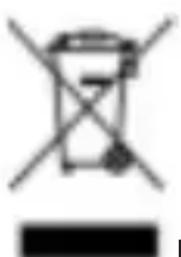
USERS INFORMATION pursuant to Legislative Decree No. 49 of March 14, 2014
"Implementation of Directive 2012/19 / EU on Waste Electrical and Electronic Equipment (WEEE
This wheeled bin symbol on the product indicates that at the end of its life must be collected separately from other waste. The user must, therefore, take the remote control integrates the essential components that got to its life to the appropriate differentiated collection centers for electronic and electro-technical waste, or return it to the dealer when purchasing a new appliance of equivalent type, in terms of one to one, or one to zero for equipment having longer side of less than 25~cm . Appropriate separate collection for the decommissioned equipment for recycling, processing and environmentally compatible disposal helps prevent negative impact on the environment and human health and promotes recycling of the materials making up the product. Illegal dumping of the product by the user entails the application of administrative sanctions stated in Legislative Decree n. Legislative Decree No. 49 of March 14, 2014.
NOTES D'UTILISATION
SIMPLIFIED EU DECLARATION OF CONFORMITY
Hereby TREVI Spa declares that the radio equipment type HY 870 BT is in compliance with directive 2014 / 53 / EU.
The full text of the EU declaration of conformity is available at the following internet address www.trevi.it

Made in CHINA
Trevi S.p.A.
Strada Consolare Rimini-San Marino, 62 47924 Rimini (RN) Italy
Tel. 0541/756420 - Fax 0541/756430 - www.trevi.it - e-mail: info@trevi.it


- ALARM CLOCK WITH BLUETOOTH®
- CONNECTION
- CARE AND MAINTENANCE
- IMPORTANT
- BATTERY RECHARGE
- FUNCTIONAL USAGE
- Clock mode
- Alarm Mode
- Bluetooth Mode
- Multimedia speaker on Bluetooth mode
- Handset and Hands-free mode
- Usb/microSD player mp3 Mode
- Line-In mode
- FM Radio mode
- Sleep Mode
- TECHNICAL SPECIFICATIONS
- WARNING FOR THE PROPER USE OF RECHARGEABLE BATTERY
- INFORMATION NOTE ON THE REMOVAL AND DISPOSAL OF BATTERIES
- Battery Removal
- USERS INFORMATION pursuant to Legislative Decree No. 49 of March 14, 2014
- "Implementation of Directive 2012/19 / EU on Waste Electrical and Electronic Equipment (WEEE
- NOTES D'UTILISATION
- SIMPLIFIED EU DECLARATION OF CONFORMITY
- Trevi S.p.A.
Brand : Trevi
Model : HY 870 BT
Category : Radio