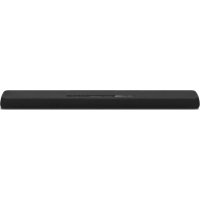
USER MANUAL YAS107 YAMAHA
Front Surround System
PykoBoOCTBO nOJIb3OBaTeJIa
使用说明书

PRECAUTIONS
PLEASE READ CAREFULLY BEFORE USE. BE SURE TO FOLLOW THESE INSTRUCTIONS.
The precautions listed below are to prevent risk of harm to the user and others, as well as to prevent property damage, and to help the user use this unit properly and safely. Be sure to follow these instructions.
After reading this manual, be sure to keep it in a safe place where it can be referenced at any time.
- Be sure to request inspections or repairs from the dealer where you purchased the unit or from qualified Yamaha service personnel.
- Yamaha cannot be held responsible for injury to you or damage of the products caused by improper use or modifications to the unit.
- This product is for ordinary homes. Do not use for applications requiring high reliability, such as managing lives, health care or high-value assets.

WARNING
This content indicates "risk of serious injury or death."
Power supply/power cord
Using the power cord with the core of the cord exposed could cause electric shocks or a fire.
- Do not touch the power plug or cord if there is a chance of lightning. Failure to observe this may cause electric shocks.
- Use this unit with the power supply voltage printed on it. Failure to connect to an appropriate AC outlet may cause a fire, electric shocks, or malfunctions.
- Be sure to use the supplied AC power cord. Also, do not use the supplied power cord for other units. Failure to observe the above may cause a fire, burns, or malfunctions.
- Check the electric plug periodically and remove any dirt or dust which may have accumulated on it. Failure to observe this may cause a fire or electric shocks.
- When setting up the unit, make sure that the AC outlet you are using is easily accessible. If some trouble or malfunction occurs, immediately turn off the power switch and disconnect the plug from the AC outlet. Even when the power switch is turned off, as long as the power cord is not unplugged from the wall AC outlet, the unit will not be disconnected from the power source.
- If you hear thunder or suspect approaching lightning, quickly turn off the power switch and pull the power plug from the AC outlet. Failure to observe this may cause a fire or malfunctions.
- If not using the unit for long periods of time, be sure to pull the power plug from the AC outlet. Failure to observe this may cause a fire or malfunctions.
Do not disassemble
- Do not disassemble or modify this unit. Failure to observe this may cause a fire, electric shocks, injury, or malfunctions. If you notice any irregularities, be sure to request an inspection or repair from the dealer where you purchased the unit or from qualified Yamaha service personnel.
Water warning
- Do not expose the unit to rain, use it near water or in damp or wet conditions, or place on it any containers (such as vases, bottles or glasses) containing liquids which might spill into any openings or places where water may drop. A liquid such as water getting into the unit may cause a fire, electric shocks, or malfunctions. If any liquid such as water seeps into the device, turn off the power immediately and unplug the power cord from the AC outlet. Then, request an inspection from the dealer where you purchased the unit or from qualified Yamaha service personnel.
- Never insert or remove an electric plug with wet hands. Do not handle this unit with wet hands. Failure to observe this may cause electric shocks or malfunctions.
Fire warning
- Do not place any burning items or open flames near the unit, since they may cause a fire.
Installation
- Install in the manner instructed in the manual. Falling or toppling may result in injury or damage.
- Once the unit is installed, the security of the installation should be checked on a regular basis. Failure to do so may cause the unit to fall or topple, resulting in injury or damage.
Battery use

WARNING
DO NOT INGEST BATTERY, CHEMICAL BURN HAZARD The remote control supplied with this product contains a coin/ button cell battery. If the coin/button cell battery is swallowed, it can cause severe internal bums in just 2 hours and can lead to death.
Keep new and used batteries away from children. If the battery compartment does not close securely, stop using the product and keep it away from children.
If you think batteries might have been swallowed or placed inside any part of the body, seek immediate medical attention.
- Do not disassemble a battery. If the contents of the battery get on your hands or in your eyes, it can cause blindness or chemical burns.
- Do not dispose of batteries in fire. Doing so may result in the battery bursting, causing a fire or injury.
- Do not expose a battery to high temperatures, such as direct sunlight or a fire. The battery may burst, causing a fire or injury.
- Do not attempt to recharge batteries that are not intended to be charged. Charging could cause the battery to burst or leak, which can cause blindness, chemical burns, or injury.
- If the batteries do leak, avoid contact with the leaked fluid. If the battery fluid should come in contact with your eyes, mouth, or skin, wash immediately with water and consult a doctor. Battery fluid is corrosive and may possibly cause loss of sight or chemical burns.
Wireless unit
- Do not use this unit near medical devices or inside medical facilities. Radio waves from this unit may affect electro-medical devices.
- Do not use this unit within 15cm (6 in) of persons with a heart pacemaker implant or a defibrillator implant. Radio waves from this unit may affect electro-medical devices, such as a heart pacemaker implant or defibrillator implant.
If you notice any abnormality
-
If any of the following abnormalities occur, immediately turn off the power and disconnect the power plug.
-
The power cord/plug is damaged.
- An unusual smell or smoke is emitted from the unit.
- Foreign material gets into the interior of the unit.
- There is a loss of sound during use.
- There is a crack or damage in the unit.
Continued use could cause electric shocks, a fire, or malfunctions. Immediately request an inspection or repair from the dealer where you purchased the unit or from qualified Yamaha service personnel.
- Be careful not to drop or apply strong impact to this unit. If you suspect the unit may have been damaged due to dropping or impact, immediately turn off the power and pull the power plug from the AC outlet. Failure to observe this may cause electric shocks, a fire, or malfunctions. Immediately request an inspection from the dealer where you purchased the unit or from qualified Yamaha service personnel.

CAUTION
This content indicates "risk of injury."
Power supply/power cord
- Do not use an AC outlet where the power plug fits loosely when inserted. Failure to observe this may cause a fire, electric shocks, or bums.
- When removing the electric plug from the unit or an AC outlet, always hold the plug itself and not the cord. Pulling by the cord can damage it and cause electric shocks or a fire.
- Insert the power plug firmly all the way into the AC outlet. Using the unit when it is not plugged in sufficiently can cause dust to accumulate on the plug, causing a fire or burns.
Installation
- Do not place the unit in an unstable position where it might accidentally drop or fall over and cause injuries.
- Do not block this unit's ventilation holes (cooling slits). This unit has ventilation holes on the bottom to prevent the internal temperature from becoming too high. Failure to observe this may trap heat inside the unit, causing a fire or malfunctions.
-
When installing this unit:
-
Do not cover it with any cloth.
-
Do not install it on a carpet or rug.
-
Make sure the top surface faces up; do not install on its sides or upside down.
-
Do not use the device in a confined, poorly-ventilated location.
Failure to observe the above may trap heat inside the unit, causing a fire or malfunctions. Ensure that there is adequate space around the unit: at least 10cm (4 in) on top, 10cm (4 in) on the sides, and 10cm (4 in) on the rear.
- Do not place the unit in a location where it may come into contact with corrosive gases or salt air or places that have excessive smoke or steam. Doing so may result in malfunction.
- Avoid being near the unit during a disaster, such as an earthquake. Since the unit may turn over or fall and cause injury, quickly move away from the unit and go to a safe place.
- Before moving this unit, be sure to turn off the power switch and disconnect all connection cables. Failure to observe this may damage the cables or cause you or someone else to trip and fall.
- Be sure to request that the dealer where you purchased the unit or qualified service
personnel mounts the unit on a wall. The unit could fall and cause injury. Installation requires special skills and experience.
Hearing loss
- Do not use the unit for a long period of time at a high or uncomfortable volume level, since this can cause permanent hearing loss. If you experience any hearing loss or ringing in the ears, consult a physician.
- Before connecting the unit to other devices, turn off the power for all devices. Also, before turning the power of all devices on or off, make sure that all volume levels are set to the minimum. Failing to do so may result in hearing loss, electric shock, or device damage.
- When turning on the AC power in your audio system, always turn on the unit LAST, to avoid hearing loss and speaker damage. When turning the power off, the unit should be turned off FIRST for the same reason. Failure to observe the above may cause hearing impairment or speaker damage.
Maintenance
- Remove the power plug from the AC outlet before cleaning the unit. Failure to observe this may cause electric shocks.
Handling caution
- Do not insert your hand or fingers into the bass reflex port (hole on the sides) of this unit. Failure to observe this may cause injury.
- Do not insert foreign materials such as metal or paper into the ventilation holes/ bass reflex port (hole on the sides) of this unit. Failure to observe this may cause a fire, electric shocks, or malfunctions. If foreign material gets into the unit, immediately shut off the power and pull the power plug from the AC outlet and request an inspection from the dealer where you purchased the unit or from qualified Yamaha service personnel.
-
Keep small parts out of the reach of infants. Your children may accidentally swallow them.
-
Do not do the following:
-
stand on or sit on the equipment.
- put heavy items on top of the equipment.
- place the equipment in a stack.
- apply unreasonable force to buttons, switches, input/output terminals, etc.
-
hang on the equipment.
-
lean against the equipment.
-
Avoid pulling the connected cables to prevent injuries or damage to the unit by causing it to fall.
- Do not operate the unit if the sound is distorting. Prolonged use in this condition could cause overheating and result in fire.
Battery use
- Risk of explosion if battery is incorrectly replaced. Replace only with the same equivalent type.
- Do not use batteries other than specified batteries. Doing so cause fire, burns, or inflammation due to leakage.
- Do not put in a pocket or bag, carry, or store batteries together with pieces of metal. The battery could short, burst, or leak, causing a fire or injury.
Always make sure all batteries are inserted in conformity with the + / - polarity markings. Failure to do so might result in a fire, burns, or inflammation due to fluid leaks.
- When the batteries run out, or if the unit is not to be used for a long time remove the batteries from the remote control to prevent possible leakage of the battery fluid.
- When storing or discarding batteries, insulate the terminal area by applying tape, or some other protection. Mixing them with other batteries or metal objects can cause a fire, burns, or inflammation due to fluid.
Notice
Indicates points that you must observe in order to prevent product failure, damage or malfunction and data loss, as well as to protect the environment.
Power / power cord
- If not using the unit for a long period of time, be sure to pull the power plug from the outlet. Even if the (Power) has been turned off (indicators are turned off), a minute current is still flowing.
Installation
- Do not use this unit in the vicinity of other electronic equipment, such as a TV, radio, AV unit, or mobile phone. Failure to observe this may cause this unit or the TV or radio to produce noise.
- Do not use this unit in a location that is exposed to direct sunlight, that becomes extremely hot, such as near a heater, or extremely cold, or that is subject to excessive dust or vibration. Failure to observe this may cause the unit's panel to become deformed, the internal components to malfunction, or for operation to become unstable.
- Install this unit as far away from other electronic equipment as possible. Digital signals from this unit may interfere with other electronic equipment.
- If using a wireless network, avoid installing this unit near metal walls or desks, microwave ovens, or other wireless network devices. Obstructions could shorten the transmission distance.
Connections
- If connecting external units, be sure to thoroughly read the manual for each unit and connect them in accordance with the instructions. Failure to properly handle a unit in accordance with the instructions could cause malfunctions.
- Do not connect this unit to industrial units. Digital audio interface standards for consumer use and industrial use are different. This unit has been designed to connect to a consumer-use digital audio interface. Connections to an industrial-use digital audio interface could not only cause this unit to malfunction, but could also damage the speakers.
Handling
- Do not place vinyl, plastic, or rubber products on this unit. Failure to observe this may cause discoloration or deformation in the panel of this unit.
- If the ambient temperature changes drastically (such as during unit transportation or under rapid heating or cooling) and there is a chance condensation may have formed in the unit, leave the unit for several hours without turning on the power until it is completely dry before use. Using the unit while there is condensation can cause malfunctions.
Maintenance
- When cleaning the unit, use a dry, soft cloth. Using chemicals such as benzine or thinner, cleaning agents, or chemical scrubbing cloths can cause discoloration or deformation.
About disposal
- Be sure to discard used batteries in accordance with local regulations.
Information for users on collection and disposal of old equipment and used batteries:
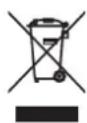
These symbols on the products, packaging, and/or accompanying documents mean that used electrical and electronic products and batteries should not be mixed with general household waste. For proper treatment, recovery and recycling of old products and used batteries, please take them to applicable collection points, in accordance with your national legislation.

By disposing of these products and batteries correctly, you will help to save valuable resources and prevent any potential negative effects on human health and the environment which could otherwise arise from inappropriate waste handling.

For more information about collection and recycling of old products and batteries, please contact your local municipality, your waste disposal service or the point of sale where you purchased the items.
Pb
For business users in the European Union:
If you wish to discard electrical and electronic equipment, please contact your dealer or supplier for further information.
Information on Disposal In other Countries outside the European Union:
These symbols are only valid in the European Union. If you wish to discard these items, please contact your local authorities or dealer and ask for the correct method of disposal.
Note for the battery symbol (bottom two symbol examples):
This symbol might be used in combination with a chemical symbol. In this case it complies with the requirement set by the EU Battery Directive for the chemical involved.
Functions and data included in the unit
- Air may be blown out from the bass reflex port. This is not a malfunction. This occurs particularly often when outputting music with heavy bass.
About the name plate of the unit
The model number, serial number, power requirements, etc., may be found on or near the name plate, which is at the bottom of the unit.
You should note this serial number in the space provided below and retain this manual as a permanent record of your purchase to aid identification in the event of theft.
Model No.
Serial No.
(bottom_en_01)
Trademarks
Bluetooth
The Bluetooth® word mark and logos are registered trademarks owned by Bluetooth SIG, Inc. and any use of such marks by Yamaha Corporation is under license.
DOLBY AUDIO
Manufactured under license from Dolby Laboratories. Dolby, Dolby Audio, Pro Logic, and the double-D symbol are trademarks of Dolby Laboratories.


Digital Surround

For DTS patents, see http://patents.dts.com. Manufactured under license from DTS, Inc. DTS, the Symbol, DTS and the Symbol together, DTS Digital Surround, and DTS Virtual:X are registered trademarks or trademarks of DTS, Inc. in the United States and/or other countries. © DTS, Inc. All Rights Reserved.
HOMI
The terms HDMI, the HDMI Logo, and High-Definition Multimedia Interface are trademarks or registered trademarks of HDMI Licensing LLC in the United States and other countries.
Blu-ray
"Blu-ray Disc^TM ", "Blu-rayTM", and the logos are trademarks of the Blu-ray Disc Association.

"Made for iPod," "Made for iPhone," and "Made for iPad" mean that an electronic accessory has been designed to connect specifically to iPod, iPhone, or iPad, respectively, and has been certified by the developer to meet Apple performance standards. Apple is not responsible for the operation of this device or its compliance with safety and regulatory standards. Please note that the use of this accessory with iPod, iPhone, or iPad may affect wireless performance.
About content in this manual
This manual is for the following readers:
the users of the unit
the constructor, builder and dealer that mount the unit on the wall
This manual uses the following signal words for the important information:
WARNING
This content indicates "risk of serious injury or death."
CAUTION
This content indicates "risk of injury."
NOTICE
Indicates points that you must observe in order to prevent product failure, damage or malfunction and data loss, as well as to protect the environment.
NOTE
Indicates notes on instructions, restrictions on functions, and additional information that may be helpful.
The illustrations and screens in this manual are for instructional purposes only.
- The company names and product names in this manual are the trademarks or registered trademarks of their respective companies.
Contents
PRECAUTIONS 2
Supplied items 10
Features 13
Frequently asked questions. 14
Part names and functions 15
The unit (front panel/top panel) 15
The unit (rear panel) 16
Installation 17
Installing the unit on a TV stand, etc. 17
Mounting the unit on a wall. 17
Connections 20
Operations 23
Operating the unit by TV's remote control (HDMI control). 27
Listening to the sound from a
Bluetooth device 28
Settings 31
Configuring the HDMI control function. 31
Configuring HDMI audio output 31
Enabling/disabling the auto power standby function 32
Initializing the unit. 32
Troubleshooting 33
Specifications 38
Supplied items
Make sure you have received all of the following items.

The unit
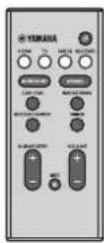
Remote control
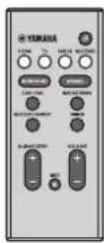
A CR2025 Lithium battery has already been inserted into the remote control.
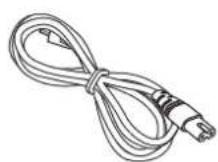
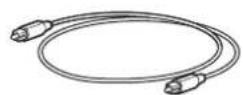
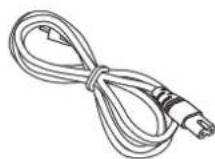
Optical digital audio cablePower cable
Spacers × 2
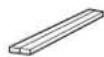
Use when mounting the unit on a wall
Mounting template

Use when mounting the unit on a wall

Owner's Manual (this booklet)
Preparing the remote control
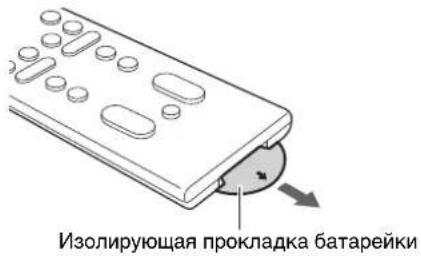
Remove the battery's insulating strip before attempting to use the remote control.
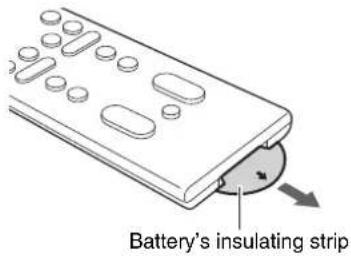
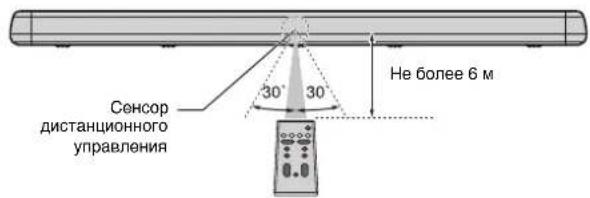
Operating range of the remote control
Operate the remote control within the range as shown below. When the unit is mounted on a wall, point the remote control at the remote control sensor on the top panel (p. 15, 17).
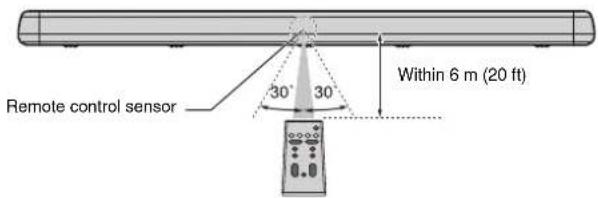
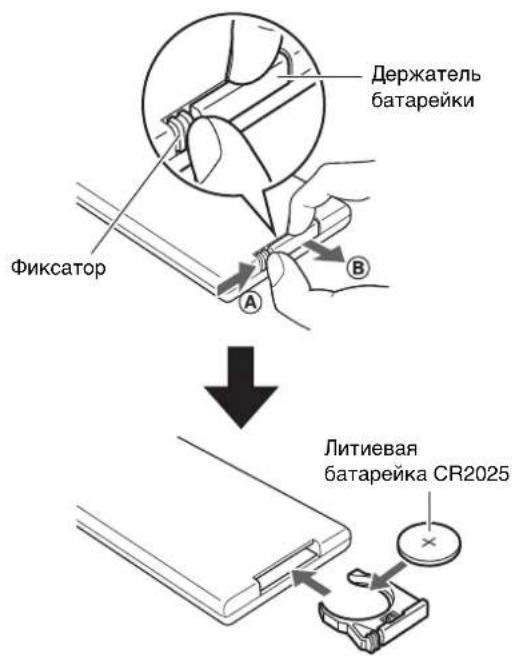
Replacing the battery in the remote control
Press and hold the release tab in the direction indicated by A and slide the battery holder out in the direction indicated by B
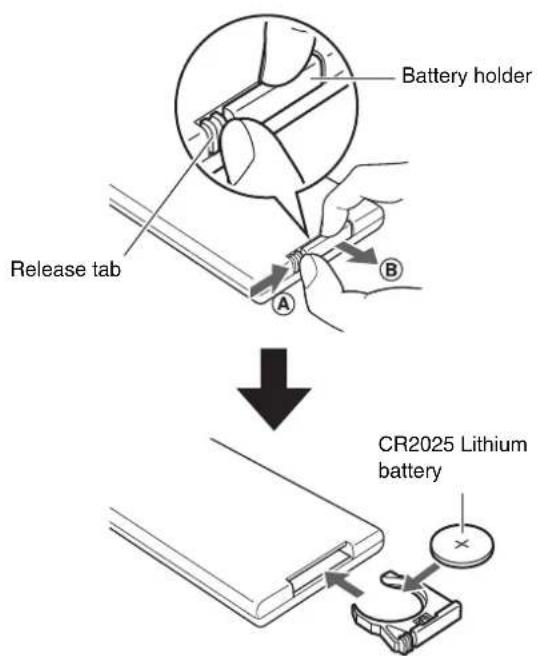
Features
This front surround system allows you to enjoy dynamic sound with videos played on your home TV.
- 3D surround playback
Surround sound can be heard not only from horizontal directions, but also from varying heights when DTS Virtual:X is used (p. 24).
Transmission of 4K high dynamic range (HDR) video supported
Enjoy high-resolution video from a cable or satellite set top box, or a BD/DVD player. When a TV that supports Audio Return Channel (ARC) is used, this ARC-compatible unit can be connected to the TV via a single HDMI cable (p. 20).
HDMI control function
Link TV and unit functions using the TV's remote control (p. 27).
- Bluetooth connection Bluetooth
Easily play content from a Bluetooth-compatible smartphone, tablet, or computer (p. 28).
Our exclusive Compressed Music Enhancer technology improves sound quality and characteristics, and can be used to enjoy realistic and impressive sound.
- HOME THEATER CONTROLLER app

HOME THEATER CONTROLLER, a free app for smartphones, allows you to easily operate the unit using a smartphone (p. 30).
- Bass extension
Boost low bass levels to enjoy more powerful sound (p. 25).
Clear voice
This feature makes speech, such as dialog and narration, clearer (p. 25).
Frequently asked questions
The following section covers popular functions and frequently asked questions about the unit.
Q1 Can I use the TV's remote control to operate the unit?
A1 Yes. When the unit is connected to a TV via HDMI cable, the TV's remote control can be used to operate both the TV and the unit (p. 27).
Q2 Can I improve the clarity of dialogue?
A2 Yes. Dialogue in movies, TV news, sports programs, etc., can be made clearer using the "clear voice" function (p. 25).
Q3 Can I use a smartphone to operate the unit? Can I use a smartphone to turn the unit on or off?
A3 Yes. The unit can be operated with a smartphone using the free app, HOME THEATER CONTROLLER, installed on the smartphone (p. 30). In addition, the Bluetooth standby function can be used to turn on the unit when a Bluetooth connection between the unit and the smartphone is established, and to turn off the unit when that connection is terminated (p. 30).
Q4 Can the brightness of the indicators be adjusted?
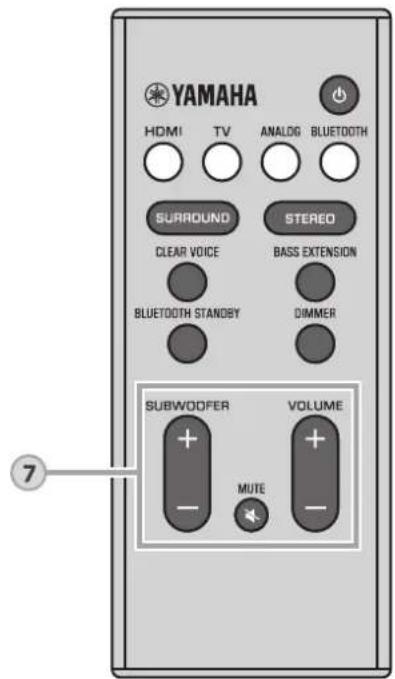
A4 Yes. Use the DIMMER key on the remote control (p. 25).
Q5 How can surround playback be enabled?
A5 Use the SURROUND key on the remote control to select 3D or surround playback (p. 24).
Q6 Can the subwoofer's volume be adjusted?
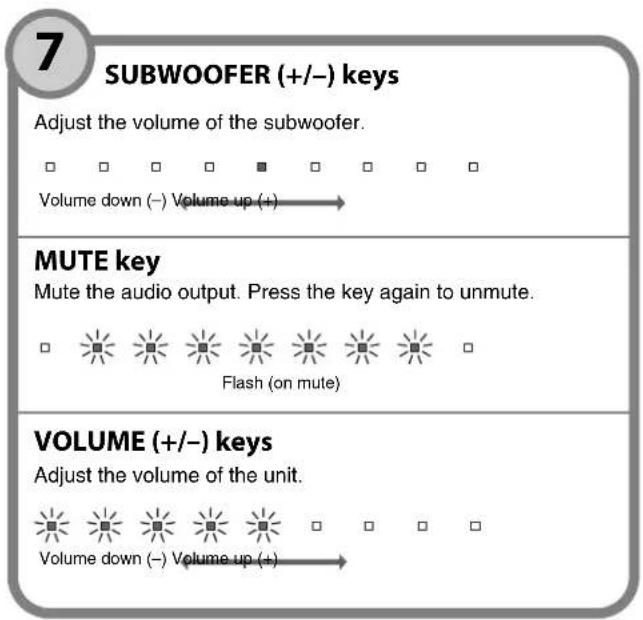
A6 Yes. Use the SUBWOOFER (+ / - ) keys on the remote control (p. 26).
Part names and functions
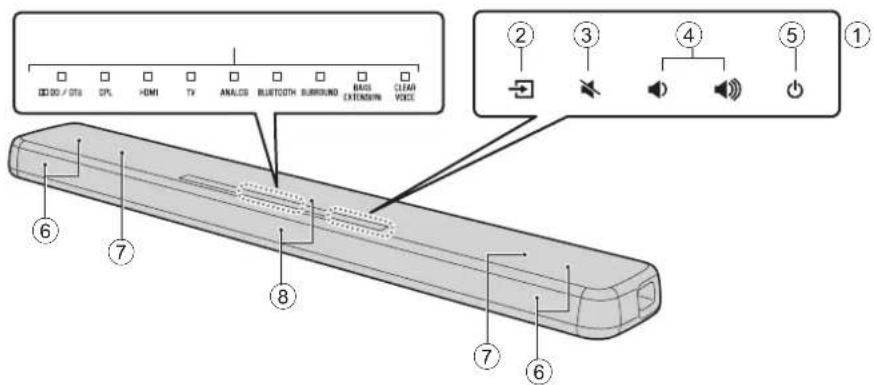
The unit (front panel/top panel)
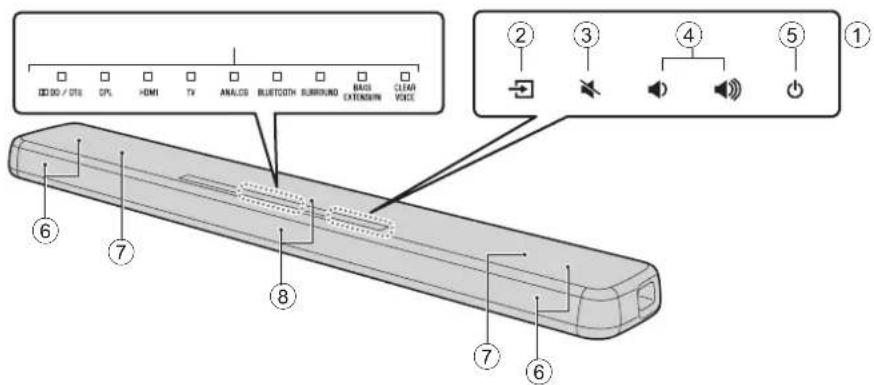
① Indicators
The indicators on the top panel flash or glow, to show the operation and setting status. In this manual, illustrations of the nine in-line indicators are used for explanation as necessary.
Off:Glows:Flashes

Example: When the DPL and SURROUND indicators glow, and the HDMI indicator flashes

Select an input source to be played back (p. 23).
③ mute)
Mute the audio output. Touch again to unmute (p. 26).
④ (volume +/-)
Adjust the volume (p. 26).

(power)
Turn on or off the unit (p. 23).
NOTE
The unit may automatically turn off when the auto power standby function is enabled (p. 32).
⑥ Speakers
⑦ Dual built-in subwoofoers
The built-in subwoofoers are located in the top part of the unit.
Remote control sensors
Receive infrared signals from the remote control of the unit (p. 11).
- ②, ③, ④, and ⑤ are touch sensors. Touch icons with your finger to control functions.
- Do not place any objects on the touch panel as doing so may result in unintended operations.
The unit (rear panel)
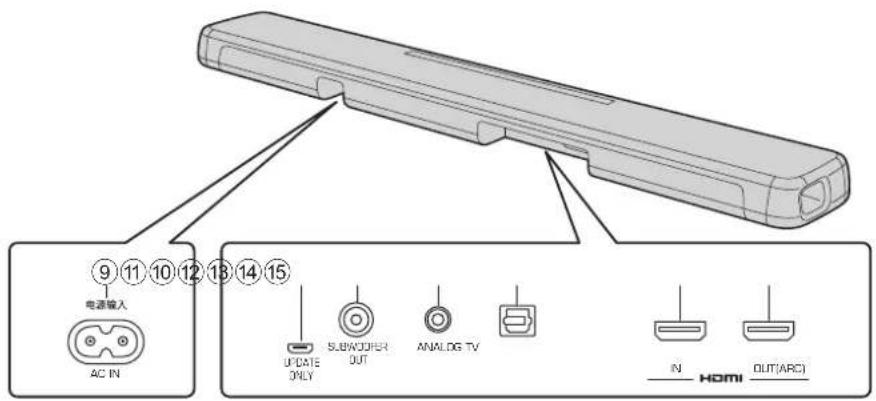
⑨ AC IN jack
Connect the power cable of this unit (p. 22).
10 UPDATE ONLY jack
Use to update this unit's firmware.
Refer to the instructions supplied with the firmware for details.
SUBWOOFER OUT jack
For connecting to an external subwoofer with an RCA mono cable (p. 22).
⑫ ANALOG input jack
For connecting to an external device with a 3.5mm stereo mini plug cable (p. 21).
13 TV input jack
For connecting to a TV with an optical digital audio cable (p. 20).
14 HDMI IN jack
For connecting an HDMI-compatible playback device such as a BD/DVD player, a satellite and cable TV tuner, and a game console (p. 20).
HDMI OUT (ARC) jack
For connecting to an HDMI-compatible TV (p. 20).
Installation
The unit can be installed on a TV stand or mounted on a wall.
Installing the unit on a TV stand, etc.
Position the unit with the touch panel facing up.
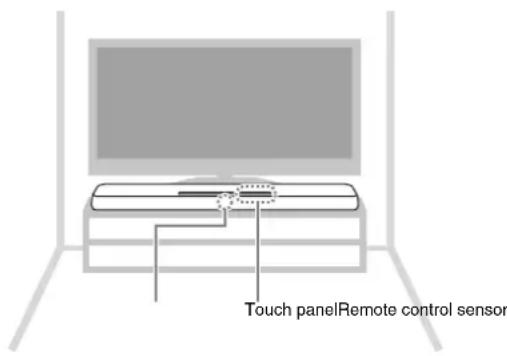
NOTICE
- Do not stack the unit and a BD player or other device directly on each other. Doing so may cause a malfunction due to vibrations.
- Avoid touching, and never place any weight or pressure on, the speakers (portion covered with fabric) on the top of the unit. Doing so may damage the speakers.
- The unit contains non-magnetic shielding speakers. Do not place magnetically sensitive items (hard disk drive, etc.) near the unit.
Mounting the unit on a wall
Refer to "Mount the unit on a wall" (p. 18) for instructions on mounting the unit on a wall so that the touch panel faces forward.
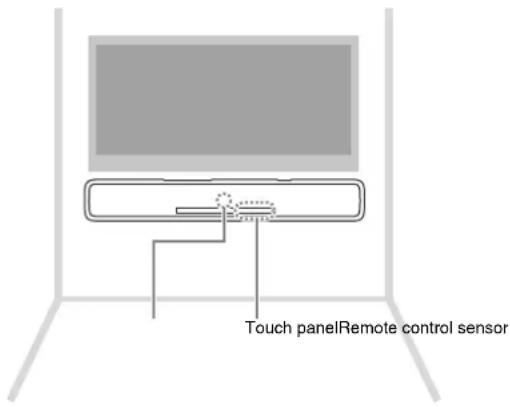
Mount the unit on a wall

CAUTION
- When mounting the unit on a wall, all installation work must be performed by a qualified contractor or dealer. The customer must never attempt to perform this installation work. Improper or inadequate installation could cause the unit to fall, resulting in personal injury.
- To prevent the unit from falling, attach it to a wall constructed of drywall (plasterboard).
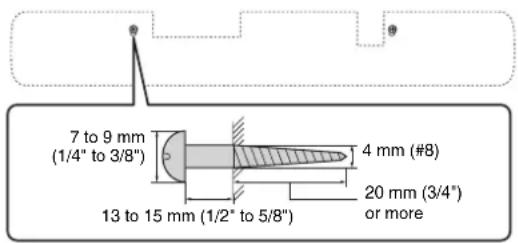
- Make sure you use commercially available screws that can support the weight of the installation (specified in Step 2 on the right). Using clamps other than specified screws, such as short screws, nails, and two-sided tape, may cause the unit to fall.
Fix the cables in place where they will not become loose. If your foot or hand accidentally gets caught on a loose cable, the unit may fall.
- Do not lean on the unit or apply excessive force to the top of the unit. Doing so may cause the unit to fall.
- Check that the unit is fixed securely after the installation.
Yamaha will bear no responsibility for any accidents caused by improper installations.
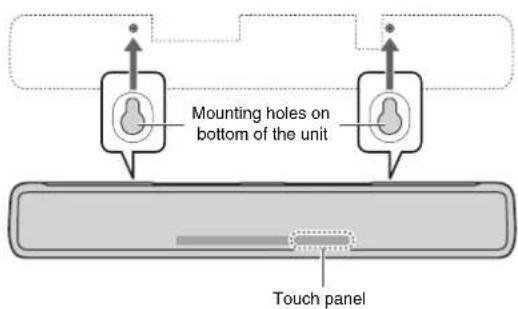
1 Attach the mounting template on a wall and mark for the screw holes.
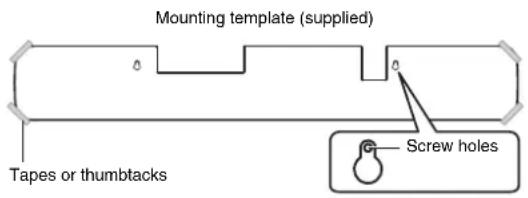
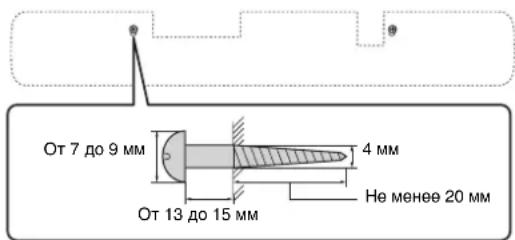
2 Remove the mounting template from the wall, then install commercially available screws (as illustrated below) at the points marked on the wall.
3 Peel off the backing paper from the spacers and attach the adhesive face to the unit as illustrated below.
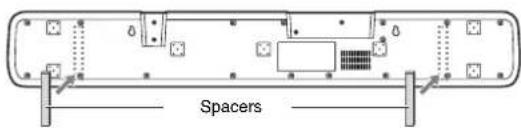
4 Hang the unit on the screws.
Connections
1 Connecting a TV and set-top box
For the cable connection, follow the procedure below.
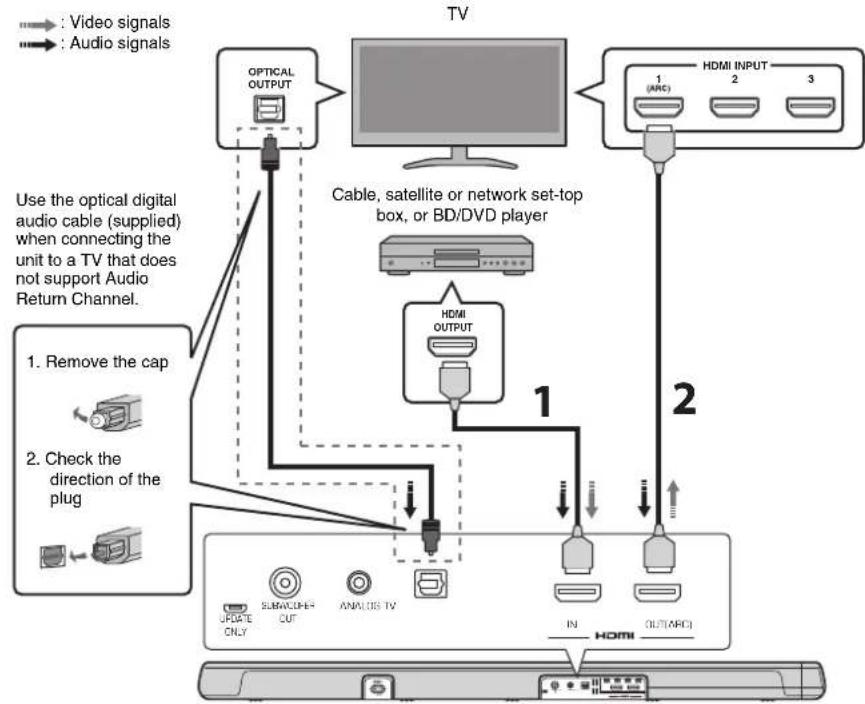
1 HDMI cable (optional)
The digital audio/video signals from the settop box or BD/DVD player are input to this unit.
2 HDMI cable (optional)
Digital video from the set-top box or BD/DVD player is displayed on the TV.
NOTE
- Use a 19-pin HDMI cable with the HDMI logo printed on it. A cable with a maximum length of 5m (16 ft) is recommended to prevent degradation of signal quality.
This unit supports HDCP version 2.2, a copy protection technology. For playback of 4K video, connect the unit to the HDMI input jack (one compatible with HDCP 2.2) on an HDCP 2.2-compliant TV, and to the HDMI output jack on a HDCP 2.2-compliant BD/DVD player.
- Use a high-speed HDMI cable for playback of 3D video content.
- Use a premium HDMI cable for playback of 4K video content.
NOTE
Audio Return Channel (ARC) supported TV
- Connect an HDMI cable to the audio return channel supported jack (the jack with "ARC" indicated) on TV.
- Once the HDMI control function has been activated, video and audio content from playback devices can be output from the TV even when this unit is off (HDMI signal pass-through).
- Enable the HDMI control function of this unit to activate the Audio Return Channel (ARC) (p. 31).
What is Audio Return Channel (ARC)?
In order for the unit to play audio from a TV, the TV must usually be connected to the unit via an audio cable as well as an HDMI cable. If, however, the TV supports Audio Return Channel (ARC), TV audio signals can be input to the unit via the HDMI cable that outputs video signals from the unit to the TV.
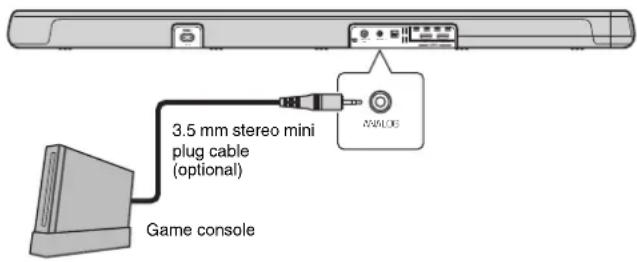
2 Connecting a game console via the analog jack
Connect an external device, such as a game console or TV that does not have an optical digital audio output, to the ANALOG input jack of the unit.

CAUTION
- If volume can be adjusted on the device connected to the unit's ANALOG input jack, set that device's volume to the same level as that of other devices connected to the unit's HDMI jacks to prevent volume from being louder than expected.
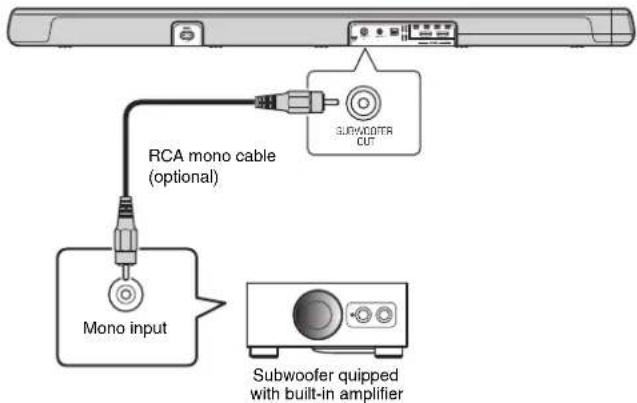
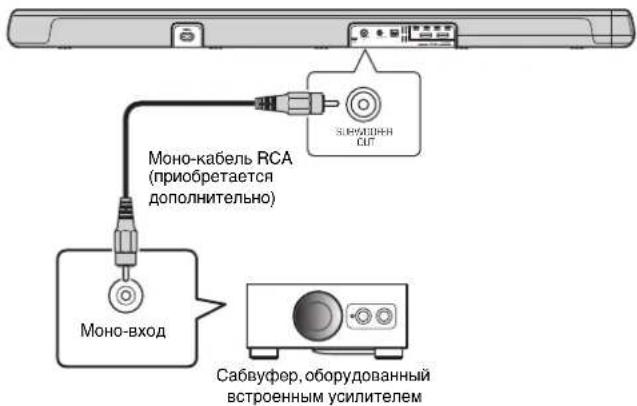
3Using an external subwoofer
The unit has dual built-in subwoofer; however you can connect an external subwoofer when you want to enhance low frequency sound. Connect a subwoofer quipped with built-in amplifier to the SUBWOOFER OUT jack of the unit. Sound is output from both the built-in subwooers and external subwoofer.
4 Connecting the power cable
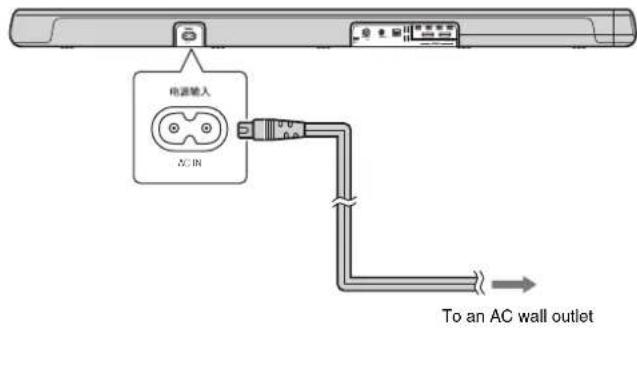
After all connections are complete, connect the supplied power cable to the AC IN jack on the unit and plug the power cable into an AC wall outlet.
Operations
Remote control signal transmitter Transmits infrared signals.
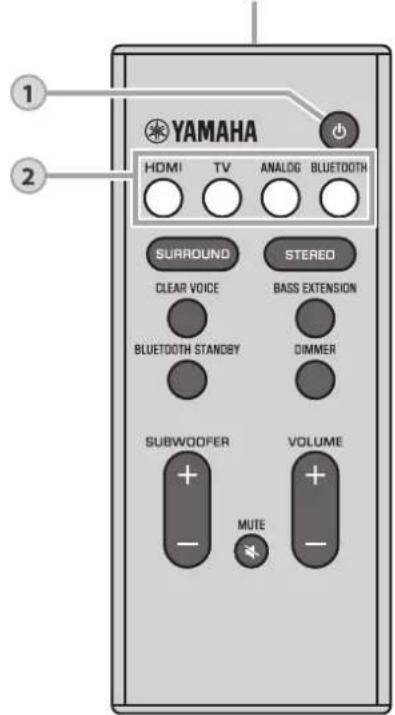
1
(power) key
Turns on or off the unit.
Turned on

Turned off (Bluetooth standby function enabled, p. 30)

2
Input keys
Select an input source to be played back.
HDMI Sound from a device connected to the HDMI IN jack
TV. TV audio or sound from a device connected to the unit's TV input jack
ANALOG ....Sound from a device connected to the ANALOG input jack
BLUETOOTH....Sound from a Bluetooth connected device (p. 28)
The indicator for the selected input source glows.
(Example: when TV is selected)

NOTE
To play sound from the device connected to the TV or to watch video from the device, set the TV's input source to the device.
3
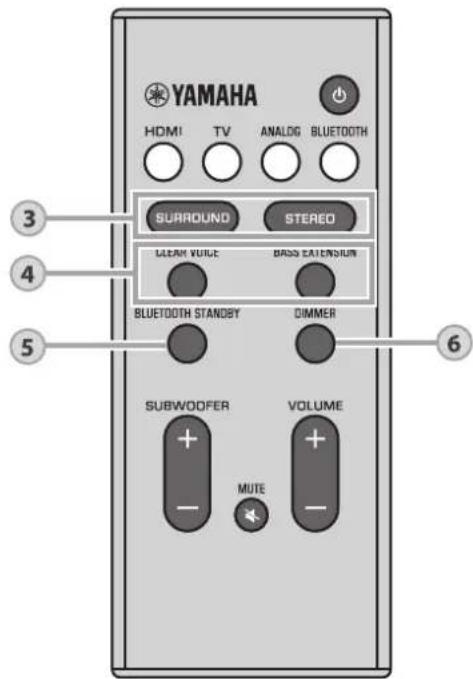
SURROUND and STEREO keys
Switch between surround and stereo (2-channel) playback.
SURROUND key
The unit switches between 3D surround playback and surround playback each time the SURROUND key is pressed. When 3D surround is selected, DTS Virtual:X makes it possible to hear sound not only from horizontal directions, but also from varying heights.
SURROUND
Glows blue (3D surround playback)
SUBCASE
Glows green (surround playback)
STEREO key
Switch to stereo (2-channel) playback.
□SURFUND
Off
NOTE
- The DPL indicator glows when 2-channel stereo signal is played in surround.
DPL
Glows
(Dolby ProLogic II)
- The TV Program, Movie, Music, Sports, or Game surround mode can be selected using the HOME THEATER CONTROLLER app (p. 30) installed on a smartphone that supports the Bluetooth function.
4
CLEAR VOICE key
Enable/disable the clear voice function.
When this function is enabled, human voices such as lines in movies and TV shows, or news and sport commentary, are played clearly.

Glows (enabled) Off (disabled) VOICE
BASS EXTENSION key
Enable/disable the bass extension function. When this function is enabled, you can enjoy more powerful sound.

Glows (enabled) Off (disabled) EXTENSION
5
BLUETOOTH STANDBY key
Hold down the key for more than 3 seconds to enable/disable the Bluetooth standby function (p. 30).
6
DIMMER key
Change the brightness of the indicators. Each time the key is pressed, the brightness of the indicators changes as follows. Dim (default setting) Off Bright
Indicators glow brightly just after operation and change to the specified brightness after a few seconds.
Decoder indicator
The unit supports the following audio signals. The color of the indicator identifies the type of audio input signal.
00/01S
Green (Dolby Digital), Red (DTS)
□
000/015
Off (PCM/analog signal/no input signal)
Operating the unit by TV's remote control (HDMI control)
The HDMI control function (link function) coordinates operation of a TV and the unit so that the unit can be operated using the TV's remote control.
When a TV is connected to the unit with an HDMI cable (p. 20), the TV's remote control can be used to perform the following operations.
Coordinated functions via the TV remote control
Remote control of TV (Example)
1. Turn on/off
Both the TV and this unit turn on/off at the same time.
The unit's input source switches accordingly when the TV's input source is switched. Examples
- When a TV program is selected on the TV, the unit's audio input source is switched to the HDMI OUT (ARC) jack using the ARC function or TV jack.
- When a BD/DVD player is connected to the HDMI IN jack on the unit, the unit's input source switches to HDMI when the BD/DVD player is selected with the TV's remote control.
- The input source can be switched while the unit is off.
3. Switch the audio output device (TV or this unit (amplifier))
4. Adjust volume
This unit's volume can be adjusted when the TV's audio output is set to this unit (amplifier).
NOTE
- If you are unable to operate the unit with your TV's remote control, configure the HDMI control function of your TV and the unit. See page 31 for more information.
- Even if your TV supports the HDMI control function, some functions may not be available. For details, refer to documentation supplied with your TV.
We suggest using devices (TV, BD/DVD player, etc.) from the same manufacturer.
Listening to the sound from a Bluetooth device
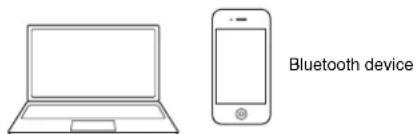
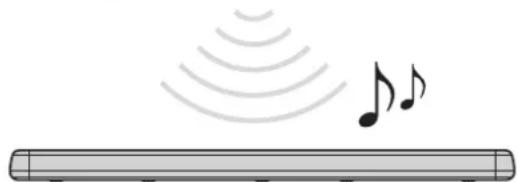
Audio from a Bluetooth device, such as a smartphone or a digital music player, can be played over a wireless connection.
NOTE
- Adjust the volume level of the Bluetooth device as required.
- Perform Bluetooth connection with the device and unit within 10m (33 ft) of each other.
- See documentation supplied with your Bluetooth device for more information.
1 Press the BLUETOOTH key on the unit's remote control to select Bluetooth as the input source.
The BLUETOOTH indicator on the unit flashes.


Flashes
If a Bluetooth device has been connected before, the unit will connect to the last connected device when the BLUETOOTH key is pressed. Terminate this connection to connect a new device.
2 Enable the Bluetooth function on the Bluetooth device.
3 Select "YAS-107 Yamaha" in the Bluetooth device list on the device.
If a passkey (PIN) is required, enter the number "0000".
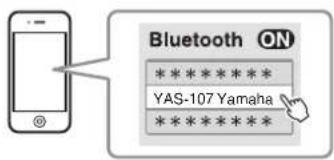
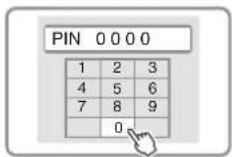
When the connection is established, the indicator or a completion message is displayed on the Bluetooth device, and the BLUETOOTH indicator on the unit glows.

4 Play back a song on the Bluetooth device.
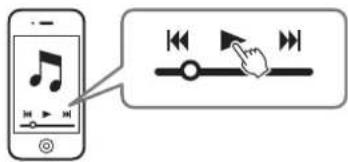
Terminating Bluetooth connection
Bluetooth connection is terminated in the following cases.
The unit is turned off.
When the Bluetooth connection is terminated with the unit turned on, the BLUETOOTH indicator flashes and the unit enters the connection wait status.
Using the Bluetooth standby function
The Bluetooth standby function allows you to turn on or off the unit automatically, linked with the operation of the Bluetooth device.
1 With the unit turned on, hold down the BLUETOOTH STANDBY key on the unit's remote control for more than 3 seconds.
Holding down the BLUETOOTH STANDBY key for 3 seconds switches function status between enabled and disabled.


Flash 3 times (enabled), flash once (disabled; default)
Enabling the Bluetooth standby function allows the unit to be turned on or off using a Bluetooth device.
Power on interlock function (when the unit is turned off) When Bluetooth connection is made on the device, the unit will turn on and will be ready to play back sound from the device.
Power off interlock function (when the unit is turned on) The unit will be turned off when Bluetooth connection is terminated on a Bluetooth device. (Only when BLUETOOTH is selected as the input source.)
Using the HOME THEATER CONTROLLER app
When the free HOME THEATER CONTROLLER app is installed on a Bluetooth-compatible smartphone or other device, various operations (basic operation of the unit, selection of a surround mode, adjustment of sound settings, etc.) can be easily performed using the Bluetooth device.
NOTE
- To use the app, connect the unit and a Bluetooth device via Bluetooth connection.
- If the Bluetooth standby function is enabled, the unit will be turned on with the Bluetooth device.
For details on the "HOME THEATER CONTROLLER" app, see the product information on our website.
Settings
Configuring the HDMI control function
Follow the procedure below to enable or disable the unit's HDMI control function. This function is enabled by default.
1 Turn off the unit.
2 Hold down the HDMI key on the unit's remote control for more than 3 seconds.
The HDMI control function is enabled or disabled, and the unit turns on. The indicator shows HDMI control function status for several seconds immediately after the unit is turned on.


Glows (enabled; default) Off (disabled)
NOTE
- Enable the HDMI control function when connecting a TV that supports Audio Return Channel (ARC) (p. 21), or when using HDMI signal pass-through (p. 21).
If the unit cannot be operated with the TV's remote control
Confirm the settings are properly configured as described below.
Examples of TV settings
From the setup menu on your TV, select "Link setting" "HDMI control
setting", then set a setting such as "HDMI control function" to "ON".
- Set audio output to any option other than TV.
If the unit cannot be operated with the TV's remote control even after the settings described above have been applied correctly:
- Turn off this unit and the TV, and then turn them back on again.
- Disconnect the power cable of the unit and external devices connected to the unit via HDMI cable. Plug them in again after about 30 seconds.
Configuring HDMI audio output
Specify whether HDMI audio input signal will be played from the unit or the TV. This setting can only be configured when the HDMI control function is disabled.
The unit (default) Play HDMI audio input signal from the unit.
TV Play HDMI audio input signal from the TV
connected to the HDMI OUT (ARC) jack on
the unit. The unit cannot be used to adjust
volume. Use TV controls to adjust volume.
1 Turn off the unit.
2 Hold down the SURROUND key on the remote control for more than 3 seconds.
HDMI audio output switches between this unit and the TV, or vice versa, and the unit turns on. The indicator shows HDMI audio output status for several seconds immediately after the unit is turned on.

Glows (audio is played from the unit; default)
Off (audio is played from the TV)
NOTE
- To configure HDMI audio output with the HDMI control function enabled, select the audio output device configured for the TV connected to this unit.
- HDMI video signals input to the HDMI IN jack of this unit are always output from the HDMI OUT (ARC) jack of this unit.
Enabling/disabling the auto power standby function
Enabling the auto power standby function prevents the unit from remaining on when not in use. When the auto power standby function is enabled, the unit automatically turns off in any of the following situations.
- No operations for 8 hours
- No audio input and no operations for 20 minutes when
BLUETOOTH or HDMI is selected as the input source.
1 Turn off the unit.
2 Touch and hold and touch on the unit.
The auto power standby function is enabled or disabled, and the unit turns on. The indicator shows auto power standby function status for several seconds immediately after the unit is turned on.
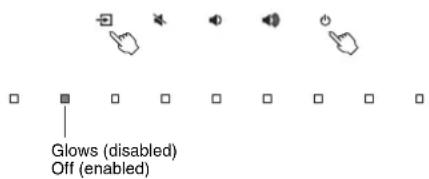
NOTE
The default setting for the auto power function varies by country or region.
- U.K., Europe, Central and South America, and Asia models: enabled
- Other models: disabled
Initializing the unit
Follow the procedure below to initialize the unit.
1 Turn off the unit.
2 Touch and hold and on the unit until all indicators flash.
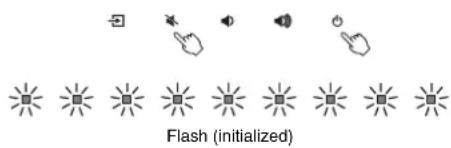
Troubleshooting
Refer to the table below when the unit does not function properly. If the problem you are experiencing is not listed below or if the instructions below do not help, turn off the unit, disconnect the power cable, and contact the nearest authorized Yamaha dealer or service center.
First, check the following:
① The power cables of the unit, TV and playback devices (such as BD/DVD players) are connected to AC wall outlets securely.
② The unit, TV and playback devices (such as BD/DVD players) are turned on.
③ The connectors of each cable are securely inserted into jacks on each device.
Power and system
| Problem Cause Remedy | |
| The power turns off suddenly. | When the auto power standby function is enabled, the unit automatically turns off in any of the following situations:- No operations have been performed for 8 hours- BLUETOOTH or HDMI is selected as the input source, but no audio has been input to the unit or no operations have been performed with the unit for more than 20 minutes. | Turn on the unit again. If the auto power standby function is not used, disable the function (p. 32). |
| The protection circuitry has been activated.(The DD / DTS indicator flashes.) | After confirming that all connections are made properly, turn on the unit again. If the power still turns off frequently, unplug the power cable from the AC wall outlet and contact the nearest authorized Yamaha dealer or service center. |
| The Bluetooth connection was terminated by a Bluetooth device with the unit's Bluetooth standby function enabled. | Disable the Bluetooth standby function (p. 30). |
| The power cannot be turned on. | The protection circuitry has been activated three times consecutively. (If you try to turn on the power in this condition, the DD / DTS indicator will flash.) | To protect the product, the power cannot be turned on. Unplug the power cable from the AC wall outlet and contact the nearest authorized Yamaha dealer or service center. |
| All indicators go out although the unit is turned on (it may seem that the unit is turned off). | The unit is configured so that indicators do not glow or flash unless the unit is being operated. | Use the DIMMER key to select the desired brightness (p. 25). |
| Problem Cause Remedy | |
| The unit does not function correctly. | The internal microcomputer is frozen, due to an external electric shock (such as lightning or excessive static electricity) or to a drop in the power supply voltage. |
| The unit turns on by itself. | Another Bluetooth device is being operated nearby. |
| The TV's 3D glasses do not work. | The unit is blocking the TV's 3D glasses transmitter. |
| The unit cannot be operated with the HOME THEATER CONTROLLER app. (The screen on the Bluetooth device will not exit the app's demo mode.) | The Bluetooth device on which the app has been installed is not connected to the unit. |
| Establish a Bluetooth connection between the Bluetooth device and the unit to use the app (p. 28). |
Audio
| Problem Cause Remedy | |
| No sound. | Another input source is selected. Select an appropriate input | source (p. 23). |
| The mute function is activated. Cancel the mute function (p. 26). | |
| The volume is too low. Turn up the volume (p. 26). | |
| The power cable of the unit is not connected properly. | Make sure that the power cable of the unit is connected to an AC wall outlet securely (p. 22). |
| Input jacks on a playback device are connected. | Connect the input jack on the unit and the output jack on the playback device. |
| Signals that the unit cannot play back are being input. | Change the digital audio output setting on the playback device to PCM, Dolby Digital or DTS. |
| The unit is configured so that HDMI audio input signals are output from the TV. | Configure the unit so that HDMI audio input signals are output from the unit (p. 31) |
| The HDMI control function is disabled. | When connecting a TV that supports ARC (Audio Return Channel) to the unit using an HDMI cable only, enable the HDMI control function (p. 31). |
| To output audio signals from this unit with the HDMI control function disabled, connect the TV's audio output jack to this unit's TV input jack (optical digital) via the optical digital audio cable (p. 20). |
| Sound from an HDMI control-enabled TV is set for output from the TV's built-in speakers. | Use the TV's HDMI settings to set audio output to any option other than the TV's built-in speakers. |
| No sound is coming from the subwoofer. | The volume of the subwoofer is too low. Turn up the volume of the subwoofer (p. 26). | |
| The playback source does not contain low-frequency signals. | Play back a sound source containing low-frequency signals, and confirm that the sound is output from the subwoofer. |
| The volume decreases when the unit is turned on. | The automatic volume adjustment function is activated. To prevent excessive loudness, the unit automatically controls its volume within a certain level when the unit is turned on. | Turn up the volume as required (p. 26). |
| No surround effect. | Stereo playback is selected. Select surround playback or 3D surround playback (p. 24). |
| The volume is too low. Turn up the volume (p. 26). | |
| The TV or playback device is set to output 2 channel audio (such as PCM) only. | Change the digital audio output setting on the TV or playback device to BitStream. |
| Sound is also heard from the TV built-in speakers. Set the TV volume to minimum (p. 27). |
| The listening position is too close to the unit. | The listening position should be at some distance from the unit. |
| Noise is heard. | The unit is too close to another digital or high-frequency device. | Move those devices away from the unit. |
| Video is not displayed on TV screen. | The HDMI cable is not securely connected. Connect the HDMI cable properly (p. 20). |
| When the unit is turned off, video and/or audio from a playback device are not output to the TV. | The HDMI control function is disabled. Enable the HDMI control function (p. 31). |
Remote control
| Problem Cause Remedy | |
| The unit cannot be operated using the remote control. | The unit is out of the operating range. Use the remote control within the operating range (p. 11). |
| The batteries are weak. Replace with new batteries (p. 12) | |
| The remote control sensor of the unit is exposed to direct sunlight or strong lighting. | Adjust the lighting angle, or reposition the unit. |
| The TV cannot be operated using the TV's remote control. | The unit is blocking the TV's remote control sensor. | Position the unit so that it does not obstruct the TV's remote control sensor. |
Bluetooth
| Problem Cause Remedy | |
| The unit cannot be connected to a Bluetooth device. | Bluetooth is not selected as the input source. Select Bluetooth device. | Unpair the Bluetooth device that is currently connected, and pair with the desired Bluetooth device. |
| The unit is connected to a different Bluetooth device. |
| The unit is too far away from the Bluetooth device. | Move the Bluetooth device closer to this unit. |
| A device emitting electromagnetic waves (such as a microwave oven, a wireless device and so on) may be located nearby. | Do not use this unit near devices that emit electromagnetic waves. |
| The Bluetooth device you are using may not support the A2DP protocol. | Use a Bluetooth device that supports the A2DP protocol. |
| The connection profile registered in the Bluetooth device may not be functioning correctly for some reason. | Delete the connection profile in the Bluetooth device, and then connect the Bluetooth device to this unit. |
| The passkey on the Bluetooth adapter or other device may be set to a code besides "0000". | Use a Bluetooth device on which the passkey is set to "0000". |
| No sound can be heard, or the sound cuts off intermittently. | The volume on the Bluetooth device may be too low. Raise the volume on the Bluetooth device. |
| Bluetooth is not selected as the input source. Select Bluetooth device as the input source (p. 28). |
| Playback on the device has not been performed. Perform playback on the device. |
| The sound output on the Bluetooth device may not be set to this unit. | Select this unit as the output destination on the Bluetooth device. |
| The connection to the Bluetooth device was cut off. Connect with the Bluetooth device one more time. |
| The unit may be too far away from the Bluetooth device. | Move the Bluetooth device near this unit. |
| A device emitting electromagnetic waves (such as a microwave oven, a wireless device and so on) may be located nearby. | Do not use this unit near devices that emit electromagnetic waves. |
Specifications
| Item Specifications | |
| Ampilfler Section | Maximum Rated Output Power | Front L/R 30 W x 2 ch |
| Subwoofer 60 W |
| Front L/R Section | Type Acoustic suspension type |
| Driver 5.5 cm (2-1/8") cone non-magnetic shielding type x 2 |
| Frequency Response 160 Hz to 23 kHz |
| Impedance 6Ω | |
| Tweeter Section | Type — |
| Driver 25 mm (1") dome | magnetic shielding type x 2 |
| Frequency Response 4 kHz to 23 kHz |
| Impedance 6Ω | |
| Subwoofer Section | Type Bass reflex type |
| Driver 7.5 cm (3") cone | non-magnetic shielding type x 2 |
| Frequency Response 60 Hz to 160 Hz |
| Impedance 3Ω (6Ω x 2) | |
| Decoder | Supported audio signal | PCM (up to 5.1ch) Dolby Digital (up to 5.1ch) DTS Digital Surround (up to 5.1ch) |
| Input Jacks | HDMI 1 (HDMI IN) |
| Digital (Optical) 1 (TV) |
| Analog (3.5 mm stereo mini) | 1 (ANALOG) |
| Output Jacks | HDMI 1 (HDMI OUT (ARC)) |
| Analog (RCA/ monaural) | 1 (SUBWOOFER OUT) |
| Other Jacks | UPDATE ONLY 1 | |
| Bluetooth | Bluetooth version Ver. 4.1 |
| Supported profiles A2DP, SPP |
| Supported codesc SBC, MPEG-4 AAC |
| Radio frequency (Operational frequency) | 2402 MHz to 2480 MHz |
| Item Specifications | |
| Bluetooth | Maximum Output Power (EIRP) | 20 dBm (100 mW) |
| Bluetooth class Bluetooth Class 2 |
| Range (line-of-slight) Approx. 10 m (33 ft) |
| Supported content protection method | SCMS-T |
| General | Power Supply U.S.A. and Canada models: AC 120 V, 60HzAustralia model: AC 240 V, 50 HzEurope, Central and South America, and Asia models: AC110 - 240 V, 50/60HzU.K. model: AC 230 V, 50 HzTaiwan model: AC 110 V, 60HzChina model: AC 220V, 50HzKorea models: AC 220 V, 60Hz |
| Power Consumption 27 W |
| Standby Power Consumption | U.S.A., Canada and Taiwan modelsHDMI Control Off, Bluetooth Standby Off:0.3WHDMI Control Off, Bluetooth Standby On:0.3WHDMI Control On: 0.7WHU.K. and Europe models, and other modelsHDMI Control Off, Bluetooth Standby Off:0.4WHDMI Control Off, Bluetooth Standby On:0.5WHDMI Control On: 0.8 W |
| Dimensions(W x H x D) | 890 x 53 x 131 mm (35" x 2-1/8" x 5-1/8") (installing the unit in front of a TV, etc.) |
| 890 x 131 x 62 mm (35" x 5-1/8" x 2-1/2") (mounting the unit on a wall, with spacers) |
| Weight | 3.4 kg (7.5 lbs) |
HDMI signal
| Audio signal types Audio signal formats Compatible media |
| 2ch Linear PCM | 2ch, 32-192 kHz, 16/20/24 bit | CD, DVD-Video, DVD-Audio, etc. |
| Multi-ch Linear PCM | 6ch, 32-192 kHz, 16/20/24 bit | DVD-Audio, Blu-ray disc, HD DVD, etc. |
| Bitstream Dolby Digital, D'S DVD-Video, etc. | |
NOTE
Refer to documentation supplied with the playback device, and set the device appropriately.
- When CPPM copy-protected DVD-Audio is played back, video and audio signals may not be output depending on the type of the DVD player.
This unit is not compatible with HDCP-incompatible HDMI or DVI devices. Refer to documentation supplied with the HDMI or DVI device for HDCP compatibility.
- To decode audio bitstream signals on this unit, set the input source device appropriately so that the device outputs the bitstream audio signals directly (does not decode the bitstream signals on the device). Refer to documentation supplied with the device for details.
Video signals
This unit is compatible with the following video signals.
Deep Color
x.v.Color
3D video signal
High Dynamic Range (HDR) video
This unit is compatible with the following resolutions.
VGA
- 720p/60 Hz, 50 Hz
- 480i/60 Hz
- 1080i/60 Hz, 50 Hz
- 480p/60 Hz
1080p/60 Hz, 50 Hz, 30 Hz, 25 Hz, 24 Hz
- 576i/50 Hz
- 4K/60 Hz, 50 Hz, 30 Hz, 25 Hz, 24 Hz
- 576p/50 Hz
NOTE
The resolution of transmitted video signal varies according to specifications of the TV connected to this unit.
Digital audio signal
Optical
| Audio signal types Audio signal formats Compatible media |
| 2ch Linear PCM | 2ch, 32-96 kHz, 16/20/24 bit | CD, DVD-Video, DVD-Audio, etc. |
| Bitsstream Dolby Digital, DTSS DVD-Video, etc. | |
HDMI (ARC)
| Audio signal types Audio signal formats Compatible media |
| 2ch Linear PCM | 2ch, 32-96 kHz, 16/20/24 bit | TV |
| Bitstream Dolby Digital, DTIS TV | |
The contents of this manual apply to the latest specifications as of the publishing date.
To obtain the latest manual, access the Yamaha website then download the manual file.
PRECAUTIONS D'USAGE
LISEZ ATTENTIVEMENT AVANT DE PROCEDER À TOUTE UTILISATION. VEILLEZ À SUIVRE CES INSTRUCTIONS.
- Lecture Surround 3D
1 Prise SUBWOOFER OUT
Touche BASS EXTENSION
Allumé (actived) Éteint (detéctive) EXTENSION
6
Touche DIMMER
Buchse SUBWOOFER OUT
Enheten(frontpanel/toppanel) 15
Enheten (bakpanel) 16
Installering 17
Enheten(frontpanel/toppanel)
① Indikatorer
BASS EXTENSION-knapp
① Toma SUBWOOFER OUT

m = 311 ;
Wata is Audio Return Channel (ARC)?
IcnoJb3ObaHne 6aTapeek

NPEdynPExkDEHNE.
HEIOTAITE BATAPEKV:ONACHOCTb XMMHCKOFOOXORA
BnybTe DY 3Toro nndenHnncnohbyetcBsaapeKBA B BnDE MOHTBI (TabneTKN).B Cnyae nporNaTbAHNA BbaTaeKNB BnDE MOHTBI (TabneTKN) B TeHeneBCero 2 YacOB MORYT PnpO30THCepBe3HbE OOKOr BHyTpEHHXOPraHOB, BnOTb DO CMeptEnbHoro NCXOA.
DpKHTe HOBbI NcNObIb3ObaHbIbe 6aTapeKNB HeDOCTYNHOM dnnTe DETe MCEt. EcnOTcE KbATapeKn HAdENHO He 3aKpbIaBcTa, npekpatNEcNOb3oBaTn 3dEneHn He DOnyckAaTe K HEMy DETe.
EcnBbnoo3peBaTe,TO bataeKy moNn npornotntbnn OHa MoNa OKa3TaBC BHTpn JIO60 JaCTn Tena,
HEMeIeHHO 06paTnTEcB 3a MEuINHCKO NOMOIO.
He pa36mpaie 6atapeky. Ponaadnme codepkmoro 6atapeyn B rnaHa pyKMOXET pINBecT K NOTEPE 3peHn INN XMMHECKOMY OXORY.
He6pocaHTe 6atapeKn B OROHb.3To MoXeT npNBcTn K B3pbBy 6atapeKn n CTAb npMHNHO NOxapa Nm TpaMbbl.
He noDBePrAte BatapeKy BO3EJCTBHO BUCOKX TEMEPATyp, HANIMep PnPMORO COHNEHORO CBETa INI ORH. GaTapeKHa MOxET B3OPBaTbCR n CTaTB pNHHOH NOXAPA INI TPABMU.
He nbltaTcB 3apKa7b 6aTaepKeH. He npEHa3HaeHHbI IJIpeep3apKeH. 3apKaMOKET pNBeCtK B3pBlBy IJI pNOTeKAHO6BaTaepKeH, YTO, C BEOO OuepeB, MOKET BblBcBbT bNOTEPo 3PENH, XIMNUCKHOK OKOR IIN TPAEBM.
- Ecnb 6aTapeKKnBceKe npoteKn, n36eAte KOHTAKTa C BbTEKUnm 3NeKTPONTOM. B CNYae NonaadHnn 3NeKTPONTBa Rna3a, pot HnHa Kooxy HEmeJeHNO CMoHTe 3NeKTPONT BOOIN 6OBaPTeTcB KpaHy, 3NeKTPONT -3To eKOE BEECTBO, CNOC6HO Bb3aTb NOTEP0 3Pehn INX MMNHECKNE OKMn.
Modynb6ecnpoBOHOBcBA3N
HeCNb3yIe annapat OKOmeMHNHCKHXPn60pOBuB MEHNCHKHX yuepeHHNAX.PaHOm3nyeHne daHNOrOYcTPOHCTBA MOKET NOBnHTbHa paBOTy 3NEKTPnHECKHX MEHNHCHKHX pN60pOB.
He HcnoNb3yIe annapat 6nke, cem B 15 cm OT NIOe C mnnnAHTPOBaHHbIM KApNOCTHMYPATOPOM INN DEpOPIINATOPOM.PaIOBOHbI, REHPepyEMble daHHbIM annapatom, MoryT NobIaTH Ba POABOTy ENeKTPWCKX MEdMHNCKHX YCTPOCTB, HanPmpe BxKABNEHbX KApNOCTMYPATOPOB INN DEpOPIINATOPOB.
HeWtTaHbIe CnTyaUIn
- PpB03HKNHOHbENmIyOoBmI yKAAaHbUHX MKe IPObEM HEmeJIoHHeO TIKIOHHTe NtIaHHeN 1NTOcOeHNHTe KAb9E bNITAHnOT 3NkTOPCOTcEn.
-OBpeXdeHnKabenaNTaHmUHHTencenB.
-ИЗannapataнCXOДН Heo6bIHyB3anax IINIbIM.
-BHtpb annapata nonan noctopOHnn npedmet.
-BoBpempa60tbpponadae3Byk.
- Ha annapate MeHOTc TpeunHbI NIOBpeKDeHnA.
PpOJIOKHeHIE NcONb3oBaHnMoKTe Bbl3BaTbNopaxHeHNE JNeKTPnuecknM TOKOM, noXAP KIN npBecTeKN HcncnPabHocTe. HezameiInteNo 6paTntecb DnA OcMTpa annapata B MeCto Ero npNoBpeTeHn IN B cepBnchIy ceHTp YamaHa.
He pohnate H ne noBeprae annapat cnHbomny fN3HecKOMy B03dctBIO. ECnn cyueCTByet BeporHToB toro, To annapat 6bln nobpeDen He pe3ynbTaTe naedhen nHm fN3HecKORO B03dctBTHN, HEMDNEHO TOKHINu NTIOKNHTU H NOTOCENHt Wtencenb ot po3eKn npemehHoro TOKA. HecobndJeHcT OTOY kazAHHo Moket npBeCTN KnpaeeHNIO 3NEKTPNHEKIM TOKOM, NOXAPY NNI HEMCnPABHOCTM. HesAmtdInTeNo 6bpaHteC bIg ocmTo paannapata B MeTO npno6peTeHHI IN B cepBncHBI cHTp YamaHa.

BHIMAHNE
Daanha HhOpmaun npedynpekdaet o pncke nolyuhen TpaBmbl.
IcToUHnK nHTaHnR n Ka6eJb nHTaHnR
HeIcNpIb3yIte pOe3TKn nepemehHOro Toka, B KOTOpBx WTENTcNb DEpKHTcR HeNAEXJXHO.HeC6JIIOdHEMe 3TOrO yKa3aHINMOXET npINBeCTN K NOkApY, nopaKeHHO 3NEKTPUeCKM TOKOM IHI OXGMAR.
BbHIMaA CeTeByIO UntencIb N3 yCTpOcTb AINn po3eTK npeMeHHOro ToKa, deKxTecb 3a cAm UntencB. HmKorDa He TAnHe 3a Unyp. 3To MOkET npNBeCTK NOBpExDeHIO KaBENr N CTb PnHNO NOPaKeHr AnEKeTpuCeKHM TokOM INn noKapa.
BctabnIte wTencelb B po3eKny nepemehHoro TOKA nIOTH noynopa. IcNOns3oBaHne yCTPOYCTBA, WTEncelb KOTOPOR HeNOCTAOHO NNTHO BCTaBNEHa B po3eTKy, MOxET bbl3BaTb HAKONJIHe NAcTHu Nbln Ha WTENCe N CTaTb npHHOH NOXAPA ININ OKORA.
YctaHOBka
He octabnne annapat B HeycToHbOM NonoXeHH. Annapat MoKet CnyaHoynaCTb NpMHHTb TpaBMy.
He 3akpbBaIte BEHTINHIOHNHbE OTBepCTN (OxnaXdaIOUne npope3n) annapata.
IJa npdeoTbpauHEny CyaueCTBEHORO NOBIIuHEny TempeATpyb HA HIXHEN NAHEN annapata IMEOTCB EHTINHIOHNHbE OTBepCTN. HecobIoJeHme 3TOr Oyka3HHa MOKET npMBcTeK HApuyHEnIO OTbOa OT annapata. 3To MOKET cTb TnpHCHNO XoXAPA INN HECNPABHOCTeN.
- Bo Bpemy yctaHOBKn annapata:
-HeHaKpbBaIe annapaTTKaHbIO;
-He cTabbTe annapaT Ha KOBpNK NIM KOBpbI;
-y6BdIeTbC, YEOBEXHARNAHEJI HANPAJIHBA BEEPX NTO ANPAPAT HE YCTAHOBN H IEPBEBHYTON NIOLOXEHIN NI H 6OKY;
- He nolbyyteb annapatom B tecbix, IIOXO npoBeTpnaeMbIX NOMueHIX. HecobioHe NpmbedeHHbIX BIIwe ykaaAHMOxet npbeCTN K hapyeHNO tBOda TepNa OTyctpoiCTBa. 3TO MOxET CTaTB pnuHNOI HOXAAPu INHcnpabHOCTeYbdeNTC. 10 TOBOKpyr annapata eTb DoCTATOHOpe npoctpaHCTBO: He MeHee 10 CM cBepxv, 10 CM no CTopoHa 10 CM cAaM.
He yctahabnBaIe annapat B MeCTax, rge Ha Hero Moryt BO3dNCTBOBAtb arpeccmbHbe ra3bl NIN COnEnHb BO3dyx, a TAKKcBe MeCTax CmblHOH
3aIbIMHeHOCtBIOIINIOBbIeHHbIMCoepxHaHnA napa.3TOMOXETcTaB npuHHOHENCpabHOCTN.
He pekomehnyetcnaHXoNTbCnB HENOCpeDCTBeHHO bH30ctn ot annapata BO BpEM CTXINHbIX 6eDCTMB.HanPIMep 3emNtPc6EHm.TaK KAK annapat MOxET nepeBepHyTcBn NynactbN npuNNHTb TpaBMy, HeMeJeHHO OToiMTe OT Hero B beOnaHoe MECTO.
- Pénép nepeméeHem ennpapa oTKIouHe bIKIOuateIb NITAHN IOTCOEINHTE BCE noKIIIOUeHNHe Ka6Bn. HecobIoIOeHne 3T0rO YKazAAHNA MOKET npMBCTN K nobpeJKeHIO KaBeNe. TaKke BbI INI KTO-TO dpyTo MoKTe CNOTKHytCBa N ynaactb.
-NonpocHe npedctabentn, y kToTporo Bbl npnoBpe annapat, nnn KBAJIHmIOHApBOHHORO CEPBIHCHORO cneMnIaCTaYTAHOBNt bINHAMNK INN HApXHyO ANHTHHy. Annapat MOcky TnaCTb NpNHINTb TpaBMy. INR yCTAHOBKN TP6bETc HANHMe CneMnAAbHBx HABbIKOB N OfblTa.
Iopetra cnyxa
He cnyetdo nno b3o8ab7cra annapatom pnn BbICOKOMnHekOMpOHTOM ypoBHE rpoMKoKtnc, nockoBky 30 moKeT npMBeCTN Knotepe cnyxa. PnyxuyduHN CNYxa Hm 3BOE Hywx oopAtTeBc BpaHy
- Ppeed noKIOHHeHem amnapata KpyIM yCTpoHCTBAM OTKIOHHTe INI NITAHne. TaKcepepeD BKOIOHHeHm INI BkIKIOHHeHm NITAHn IIObIX yCTPOHCTB yeIDntecB,TOE BCE peryIATopbl rPOMKcOtn YCTAOHBeHb HA MHNHMAbHOe 3HAueHHe. B pOHTNBOH CMyae TO MOKET pINOTe R n TopeE cNYa, NOpAXEHNOEcknTOKOM INI NOApEXDeHHoY cTOpCTBa.
- PnB KblIOeHm NITAHm ayDIOOCCTMeBb BCerDa BkIIOaHte annapat B IOCJIEDHIIO OHEPEd, T06bM 36EkaTb Notepn CNYx n NOpeKDeHn DnAMIKOB. Pnp BkIOHcHm NITAHm no 3ToJ xe npuHne B IEPBYO OCHEPd He6oXoDM BblIOHcTb annapat. HecoNIODeHme 3TOr oYkazHaMH MoKet npInBeCTN K NOTe CNYx Hn NOBpeKDeHNO DnHAMIKOB.
TexHnueckoe o6cnyKuBaHne
Bo Bpemn CTKN OTcoeHnIte annapat OT 3NeKtpocTe. HecobIOJeHne 3TOrO yka3aHHMOKET npBcCTN KnpaxKeHHN 3NeKTPuYeCKM TOKOM.
Mepbl6e3onacnoctn npn 3Kcnnyataun
He BCTaBnIe pyKu nIaIbI b OTBepCtna fao3OHBeptopa (no 6okam annapata). HecobIOENHe 3TOrO yKa3AHnMoKET pNBEcTN K TpaBMe.
He BCTABNHTe NOCTOPONHHE npedMTb, HANPMEg MTaJIINn bmyaB, BbeHTNAHIOHNbIe OTBepCTNa NTbEPCTNa 030HBePopto (no 6OKaM anapata).HecBoNDJeHcT 3rO To kAazAHN MoKET pNpBeCTN K npopaeHHIO 3NEKTPMeCKIM
TOKOMIHNHHeCNpAaBHOCTM.PINONANAHINNOCTOPOHHXNPEDMeTOB aannapAT HEMODNEHO BbIKNIOHTTE NITAHINE OTCOQDHNTWOTNCENb OTPO3ETK INEPeMHnHO TOKA bOpaTHTeCBdPNOMTa annapata B MecTo pNHOpeTeHHIIN BcBepCHBc CEHTP YamaHa.
XpaHIneMeKmE DetanBHe DoCRAaMocTn Deten. Detn Moryt cnuyauHo npornotitb ux.
-3anpeuaetca:
CTAHOBITbCn Ha 06DObDAHMe n CnDEtB HA HEM; CTABHTb Ha OOBOPDAHBe TRAKeHNe PNDMTb
CTaBnTb 3K3eMnIpaIbObOpyDobAHn dpyra;
-ПИМЕНТВИЗБЛЮЧИОСИЙККНПКAM,NEPOKKIOCHAteIAM,pa3bEOMAMBBODA-BBBOIDAИТ.Д.;
-BNCHyTb Ha OobopyoBaHn;
-06nOKaHbTaBcHa 06OpyDObaHne.
He TAHHTe 3a noKJIouHcHbIe KaBEn. 3To MOKeT npNBecTn K TpaBMam HIN NOBpeJdeHIO annapaT a BCNECTBne erO naHnR.
He MCNoJIb3yIe annapaT,ecn 3Bky NcKaXeH. IpOdoJIKITeJIbHOe MCNoJIb3ObaHne annapata B TAKOM COCTORHH MOKeT pNBECTN Kero nepePebY nNoXApY.
IcnoJb3ObaHne 6aTapeek
-ПиНнравиьн Даме БатAPEКИ BOSTMOKEВ 3БРБ.ДИЗАмЕБИ NСПОЛБ3YITE TOLбКБаТApEуTakORO KE ИМ KBMBAeHENTHO TINa.
IcnoB3yTe 6aTapeKm TOnko Yka3aHHOro Tnla. Hec6NoJeHne 3TOr TepeBaHnMoKet CTb npuHNO NoXapa, OxOroB INB BocnNaMeHeHn M-3a nPoTeKaHNb 6aTapeKn.
He nomeuainbeatapeky B KapMaH mNn NaKeT, He HocHTe HxpaHIne 6atapeky pRDM C MTeaJIHNECKMM PnpEIMAM. PpK OPOTKOM 3aMbIKAHNb 6atapEiKa MoKET B3OPBaTcBnIO Hn Hee MOKET npTeYb 3NeKTponIT, CTab npMHNOI NOJapa nn TPAmbI.
O63aTeBnHOyCTAHABINBAte 6aTapeiKn B COOTBEcTBm C OTMeTKAMN +/- yka3bIaOHMMNoPAHOCht. 1070rYkazAAHMAOXETPNBECTN K OXoRAM INB03OPAHNO BCNECTBne yTEKHA3NEKTPOPTNA.
- Ecn 6batapeKa papaKHe bnnn annapat JnttnBoe Bpema He ydeTe nCNOIb3oBaTcR, TO BO IN6EkaHae BO3MOKHOY tyeKNIJIETPOINrA INBNEKITE 6batapeKn 3N npTa IINCTAHUHNOHORO ynpaBNeHn.
- PnI xpaHEHn IIN yTIN3aHm Batapeek H3OInpyTe oBnactb NIOHOC b NOMoBb KneKoN MeTbIy INn DpyrTO MATEpINA. KOHTAKC DpyrIMM BatapeKAMM INn METaJIINeCKHMn PnpEIMAMM MOKET pINBcETN K NOXAPy, OOKoram INN BO3rOpAHNO 13-3a nPOTEKAHN 3NEKTPONITA.
YbeodomJeHue
Yka3bIbaeT nyHKTbl, KOTopbIX Heo6xOdImo npndepKINBaTbcra, TTo6bl npeDoTbpaTb OTka3, NOBpeXdHne HnHnPaBnIbHyIO pa60Ty N3dJIaN I NOTepIO daHHbIX, a TaKKe 3aunTb OkpyKaIOUyIO cpey.
IcToUHnK nHTaHnY n Ka6eJb nTuHaN
- Ecnn annapat He 6ydt NcnoIb30BaTcB TceHHe IINTeNbHO BpemEH, OTOeOHNITe WtENCeJIb OT PO3ETKNI NEpEMEHORo TOKa. JAnKe NOcNe BIKNIOUeHn HNTAHn (IHnDKaTOpbI He ropAT), B eue TeCHHe MInHyTbI B annapate npCycTCTByet TOK.
YctaHOBka
He nCnoB3yIe 3OT annapaB HENOCpeDCTBeHHO 6N130CTn OT pyrTORENEKPOHHOOBpyoBAHRA, TAKORA KAK TEENEbOP, padonnpMeMHNK, ayINOBnDEoo6OpoyoBaHnne ININ MOHNbHnT TepeOHc. HecoNIOHeHnE 3TOR ykaAahmOKeSTcTaB pnnuHnHt WJMOB, CO2dAbaeMbIX TENEbO3OpM ININ PADONNPMEHMNKOM.
HeNCNoB3yTe 3OT annapaB MceTe, KOTOpoe NoDBepKeHbO3dEChTBIO pAmORo COJHEHO CBeTa, KOTOpoe MOXeT CNIuKOM CNIbHO HAPetbCnHpIMeP, PRDMOC O6OrpeBaTeNEM) INN OXnAInbCBnIbKO KOTOpoe NoDBepKeHcNlukOM CNIbHOMO B03dECTBnIO bININ BNbpaun. 3To MoKET pINBecT N DEΦOpMaUN nAneHN annapata. B1B3BaTb HEnCpABHOCTn BHYtpEHNN KCMNOHETOB INN CTaB pINHnHO HeCTaBnBho PAoTbI.
- YctahabnBaaTee annapat KAK MOXHO danue OT dpyoro 3neKTPOHORO oboyobDANu. LncpObbe CnHbJI CT annapata Moryt CCdABaTB nOMEXn Dn dpyrOro 3neKTPOHORO oboyobDANu.
- PnHcNpO3OBaHHmBecnpoBOHOH CTe TcApaiTeCb HyeCTAHABINBaTb 3OTANAPAT PRDM C METALIHCHECKMM CTHEAMM INI CTONAMM, MINKPOBOHOBBIM NNEAMMNpyDMMY CTOPIOCTBAHM, cNPOB3yOuIMM BECnpoBOHOHy CBA3b. PpenrTCTBNI MORYCOKPAITHTPacCTOHRNEpepeAAH.
IopKJIIOUeHnA
PnnoKIOHcHIN BHeuHINx yCTPOIHCTB O83aTeHbHO BHMMATEHbNO pOHTaTEpykoBDCTBO DnA KAKDORo YCTPOICTBA N oNkIOHcHTe IN X B COOTBTCTBHN C HCHPTKUNMn. HenpabInhNo kIOKnIOHcHne Annapata, HApyuaOooee HnCTpyKunm, MOKET npINBECTN K erO hENpaHbHO hn paOte.
He noKJIOHAYeT OTN annapaT k npOMBUIENHHbIM yCTPOIcTBAM.ДЯ 6bIyTOBO I nPOMBIENHOI cONIb3OBAHn pINMEnHOHTCp a3hIe UcFpoBBle ayDNOMHTpepyCbI.3OT annapaT ppeDnHa3HaeHEN DnoKJIOHENHI K 6bIyTOBOY IuDPoBOMY ayDNIOHNTEPeCy. POnKJIOHEnHE K npOMBUIENHHOMU uDPoBOMy ayDNOMHTpeCy MOKET He TOLbKO pINBcETN K HENCIpaBHOCTN annapaTa, HO INOBPeDnTb DnHAMMKN.
06paueHne c annapaTOM
He CTABbTe Ha 3OT annapaBnHIOBbI, pNactMaccOBBe I ne3HOBbI npEIMeTbI. 3To MoKcET cTaBnPnHNOIeOpMaUN NIN BILCBeta NaHEJn annapata.
Ecn npn preeKOM 3MMEHNI BHEHNE TMNEPATy (HAPPMEP, pRn TpAHCNOPTOBKE Annapata INI pRn 6bICTpOM HARpeBE NIO6OxAJIckDEHN) ECTB BEPOHTHOCTb OBpa3OBAHNA KOHNEDCATA BAnapate, nepeD cNIOJbOBOAHEM OCTABTE rHO HA HECKONbKO YAcOB, HE BKIOUaH PAHTAHIN, NOKA OH He BILCOXHET NOHOCTbIO. NcIOBBAHNE Annapata npn HAIuH N B HEM KOHNDeHCATA MOKET nPMBECTN K ero NobpeXeHINO.
TexHnueckoe o6cnyKuBaHne
ДнчСТКИANAPATAI NOJIb3yIeBc MANKO CYKOH TKAHbIO. IcNpN3b0aHHeMH XMMKATOB, TAKIX KAK BeH3NH INI pAsBaBHTeB, MOIOUx CpeCTB INI TKAHEIN XMMHECKO YMCTKN MOKET PnPBECTN K DECPOMAHN INI OBeCbeBuHABINO.
CBeHnO6yTNJN3aun
-ИнользоваимьibeбатарейксдуетунлмрobatbBCOOTBETCTBMMCMeCThIM 3aKOHDAteIbCTBOM.
Hhopmaua
Ioka3bIbaet npImeuaHne OTHOCHTbHO 3TOro npOdykta.
Функции И даньie, NOCTaBJIЯemblc cannapaTOM
I3 OTBepCTHnfa30mHBepToPA MoKET bByXoDnTbB03dyx.3TO He CBNTeNtCByTeO HENoJAdKe.TakoE qacto npOcXoDnT pnp BocPon3BeDeHN My3blkC CInbHBM6 BacAMn
Ta6nUka c Ha3BaHem annapaTa
Homep Moen, cepinHbHn Homep, TpeboaHn K nctOHNky
NHTAHn I np. yka3aHb Ha TaBnUcE C hazBaHmE MnDEnnB
HnKHe qactnyycTroPcTBa Nn pAdom C HeN. 3aNNiHTe cepinHbHn
Homep B paacnoJIOKeHHOM HnKe POnE NcoxpaHt EaHHOe
pykoBOCTBO Ka NKoTbEpXdEHne NOKyn; 3TO NOMoKET
NDHTnΦuINpoBaTb PnHaadNeKHOCTy cTpoIcTB a Cnyae
kpaKn.
HOMep MoedJI.
CepinHbI Homep.
(bottom ru_02)
ToBapHbIe 3HaKn
Bluetooth
TekToBbM 3hak n Jorotnblu Bluetooth" RAJIOCTO XpaHREMbIMTOBaPbIMM 3HaKaAMKOMNaHmblu Bluetooth SIG,Inc.JIIO6eNCNb3oBAHMe 3THX 3HaKOB Yamaha Corporation ocyueCTaRnE no HuaHs3n
DOLBY AUDIO
N3rTOBnHNO NJIeHcHmKOMNaHmN Dolby Laboratories. Dolby, Dolby Audio, Pro Logic nCMBON B BnDE DByx 6yKB D ABnHO TCBaHPbMn 3hAkammy Dolby Laboratories.

dt
Digital Surround

O natoHtax DTS cm. http://patents.dts.com. N3roToBneHo no IuueH3nn DTS, Inc. DTS, CMMON, DTS B coTuHnC c CMMONOM, DTS Digital Surround n DTS VirtualX ABRIOTc OxpAHREbIMN TOBAPbHMN 3HAkAMn INI TOBAPbHMN 3HAkAMn DTS, Inc. B CUSA n dpynx ctpaHAn. DTS, Inc. Bce npBa aauuHb.
HBM
TeMpHbHdHMI, High-Definition Multimedia Interface n norotin HDMI ABnIOTc ToabpHbIMN 3hakAMn INOxpaHemMbIM ToBapHbIMN 3hakAMn HDMI Licensing LLC B CUSA n aDpyrN cTpaHax.
Blu-ray
"Blu-ray DiscTM, "Blu-rayTM" COOTBETCTBYOUHNE IOROTINbI BBNHOTCR TOBAPHMIM 3NAKAMACOONAUMBIuRyDisc Association

"Made for iPod", "Made for iPhone" u "Made for iPad" o3hauaiot, 70
3nektPOHOHoe yCTPOCTBcNEUmaNsHo paaPbOtaHNO IaONdKnHOeHn K iPod,
iPone INI iPAd nceTINIOpBOAHO pa3pa6oTHKOM HA COOTBETCTBE
CTAHdaptAm npO3BaODntENbHOCTN KOmAnHHn Apple, KOmAnHHn Apple He Hecet
OTBeCTBEHHOCTH 3a pa6oTy DAHHO rYCTPOCTBc INI erO COOTBETCTBE
CTAHdaptAm 6E3ONaCHOt IN peryNJATNBHM HopMAM. PIMMTte BO BHIMAHHe, 70
HCNOJb3OBAHHE 3TOrO yCTPOCTBc i POD, iPone INI iPAd MOKeT NOBNIHTb Ha
pa6oTy Ce6bpOBOHcnCtien
O codepkaHn 3Toro pyKOBoDCTBa
3To pykoBOCTBO npEHa3NaHcEHO nIIN CnEHyOuNX nONb3OBaTeN: -NOB3OBaTeN DaHHoro annapata;
- KOCHPTyKTOP, CTPOINTB N DINIEP, KOTOPbIe yCTaHABLIBAHOT AnnapaT ha CTHeO.
B 3TOM pyKOBOCTBE INCNLO3yIOCTC CNEIyoUe CNHbNble CNOBA dNn OTO6paKeHNBAKHOINHOPMaUN:
ANPDEyNPEXKDEHNE.
DaanHnHopMaun npedynpeXdaet O pncke rnbemnn noNpyeHn cepbe3hix TpaBM.
BHIMMAHNE
HaHHa HOpmaHnpeDynpExdaet O pncKe noLyHeHr TaBMb.
YBEDOMJIENHE
YKaBaBAAETNYHKTbI,KOTOpBXHE06XOJIMIOINPEADPJKNAATbCS,TOoBbnpoTeBTPAHTbOK3A,NOBpEaENHeHnHNepaBnHyIOpaBOyN3dennmNOTepEO DAHHbSA,TAKKE 3aUHTNTbOKpyKxAouUOcPOdy.
ПОНМЕЧАНС
Yka3bIaBaeT pNIMeuaHnK INCTpykUAM,OrpAHueHnM cyHKUIN DONONHTeBHyIO HOpMaHIO,KOTOPA MOKET bItb None3HO.
- INIIOCTPauMn CHIMKn 3KpaHOB B DaHHOM pyKOBOcTBe npBBeHebI ToNbKO B KaueCTBE pnpMEPOB.
Ha3baHnKOMIaHnI npOyKTOB B daHHom pyKOBOcTBBnRHOrTcTOabHpIMM 3HaKaAMm IIN 3apeNCTpnpoBAHHbIMn TOabHpIMM 3HaKaAMn COOTBeTcTBYIOxuX KOMAHNH.
Copepkae
MEPbI B630nACHOCTN. 2
KomnJIeKT noCTaBKn. 10
Oco6eHHoCTn 13
YacTo 3aDaBaemble Bonpocbl 14
Ha3BaHnKOMnOHeHToB nNX
Функци.. 15
AnnapaT (pepeHnI IN BepxHn I naHEn) .... 15
Annapat (3aHnaHnEh). 16
YcTaHOBka. 17
YcTaHOBka annapaTa Ha Tym6e TeJeBn3opa nT.Ⅱ. 17
MoHTaK annapata Ha cTeHe 17
PoiokJIIOUeHnI 20
Onepaun 23
YnpaBHeHne annapaTOM c nOmoIbIO nyIbTa DY TeLeBn3opa (ynpaBHeHne uepe3 HDMI) 27
IpcnyuBHaHne 3Byko3aNcEi c ycTpoiCtBa Bluetooth. 28
HacrpoKn 31
HacpoiKa yHKuN ynpaBHeHH
chepe3HDMI 31
HacptpoKa BbIXoJa 3Byka uepe3 HDMI..... 31
BkIIOUeHne IOTKIOUeHne FyHKcM
“ABTOpeKIMOxN.32
Hnuaa3aun annapata. 32
YcTpaHHeHne HenoJaIOK 33
Texnueckne xapaKTepeNCTuKn 38

KoMJIeKT NOCTaBKn
Y6eIntecb B HAIuHn BCex NepeuCneHHbx HIXe No3uNi.

Annapat
NyblDy
JIITnEBaB 6aTapeKa CR2025
yXe BCTaBneHa B nyIbT dy.
KabebnbntaHn
Ontnueckn ucpoboi
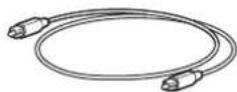
aynokabeb
PpOCTaBKn -2 1T.
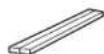
Hcnonb3yute npn kpenennn
annapata Ha cTeHe
MOHTaXHbI Waa6NoH

Icnonb3yTe npKpennneHn annapataHa cTeHe
PykoOCTBO NOb3oBaTeJIa

(DaHHa 6poHopa)
NoDrotOBka nyIbTa Dv
IpeepncnoB3oBaHem npbTa Dy ydaJIte n3OInpyuOyIO npoknky 6atapeKn.
Dnana3OH dIeCTBnIyNbTa D
NcnoB3yIe nyIbT y B npedeJax nokaahhbx HnJxE
dana3oHOB. PnM MoHTaxe annapata Ha cTeHe hAnpabJrTe nyIbT
DyHa ceHcop Dy Ha BePxHei naHei (Ctp.15,17).
3aMeHa 6aTapeKn B nyIbTe Dv
HaxmTe n ydepKnBaTe cnkCaTOp B HAnpaBHeHH, 0603HaueHHOM A BbIDBnHbTe depKaTeIb 6aTapeKn B HapbaBHeHH, 0603HaueHHOM B
Oco6eHHoCTn
C NOMOUBIO 3TOI φpOHTaJIbHOI CnCTeMoI OKpyXaIoUero 3ByaHn Bbl CMOKeTe HacJaKaTaBcHINHaMHeCKIM 3BYKOM CBnDEO, BOcPiOn3BODmMbIM Ha BaWem DomaWHeM TeJeBn3ope.
- Okpykaiooee 3D-3ByaHne
PnncnoB3oBAHmTexHOJorN DTS Virtual:X (cTp. 24) OkpykaIOUm 3ByK NOCTyNAeT He TOnbKO C rOpN3OHTaJIbHbIX HappaBHeH, HO TaKxE N OT nepEMEHbX BblCOTHbIX 30H.
-ПодерхиBaeTс BOCnpo3BeDHeBnDeOcHraHa 4K High Dynamic Range (HDR)
Bb CMOKeTe HacnaJdaTbCnPocMOTpOM BnDeo B BblcOKom pa3peuHmO T Ka6eHbHOI IN cyTHNKOB O TB-npncTabKn IIN npnIpbBaTeJI B/DVD-DnCKOB. EcnI nCnONb3yETc TeLEB3Op c noDaeKko fHyKm Audio Return Channel (ARC), daHHbI ARCCOBMeTmbl annapa MoXHo NoKnHouTb K TeLEB3Opy uee3 eHNb Ka6eHb HDMI (ctp. 20).
-Функцу npablenha uepeиntepeHc HDMI
06beinHte yHKnTTeBn3opa n annapata c nomooby nybTa dy TeBn3opa (cTp. 27).
- Повлкунешие чеша3 Bluetooth®Bluetooth
C JERKOCbIO BOCnpo3BODInTe CoepKIMoe C NOdEpeKNaBOUeOoBleuoth cMaprToHa, nnaHwTea INI KOMNbOtepa (cTp. 28). Haa 3ckKn03NBAH TeXHOJr Compressed Music Enhancer ynyuAet KaueCTBO n XapaKTepnCTNK 3ByKa n MoKeT nCNoB3OBaTcB dIra co3DaHnPeaJIcTnHOrO n BneHuTlHOUeero 3ByaHn.
- Пиюженье HOME THEATER CONTROLLER
C nomou 6ecnntno Cneuaalhoro npnoxehna Ira cmaprfoHOB, HOME THEATER CONTROLLER, moXho Jnerko ynpaBnTb annapatom co cmaprfoha (ctp. 30).
- Flny6okne Hn3Kne qactoTbI
YcNbTe 6acbl,HTo6bl HacnaXdaTbc8 eue 60one MoUHbIM 3ByKOM (CTp.25).
Clear Voice
3Ta 4yHKUa DeIaer 60eae Tcko peH, HapnMep Bo BpeMa dnaJorOB n NobecTBoBaHna (CTp. 25).
PnHMaET INHpaKpaChbIe CnHbIOT nybTa DY annapata (ctp. 11).
2,③,4n5-3TOceHCOPHbIE KHOKN.ДЯуnpaBNeHЯФУHKURAKACaITeCb 3HaNKOB nAusbem.
He cTaBbTe Ha ceHcOpHyIO nAhenb IIO6Ie pEMeTbI, TAK KAK 3TO MOKET npIBeCTN K HENPeDHaMepeHHOMy CpabaTBiAHINo.
AnnapaT (3aHna naHeIb)
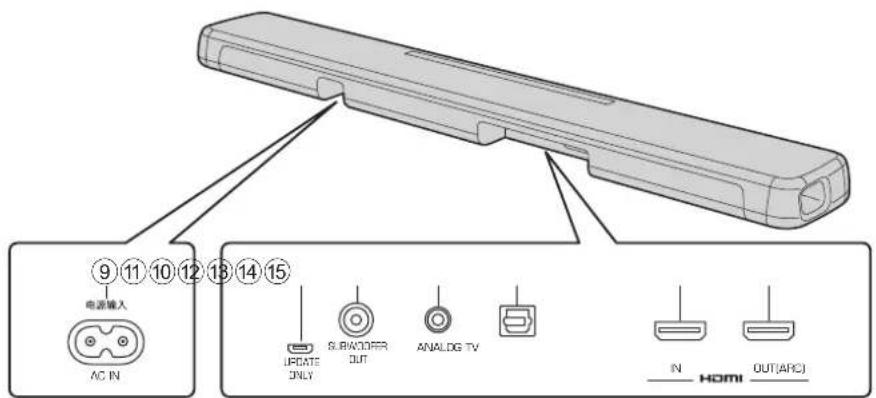
9 THe3do AC IN
IopKnIOHHe Nk6eNnTaNn3To0 annapata (ctp. 22).
10 The3DO UPDATE ONLY
VcnoB3yETcIgObHBeHHBCTpoEHHO nporpaMMHO OececHeHH 3Toro annapata.
DononHntenbHbIe CbeHeHcM. B DOKyMeHTaUN, npuHaerMOK BCPTPOEHOMy nporpaMMHOmy oecneueHIO.
11 The3do SUBWOOFER OUT
IoiKJIIOUeHHe N BHeuHEmy ca6Bypepy c nOmoBIO MOHO Ka6eRCA (ctp.22).
12 BxoJHoe rHe3do ANALOG
Дя NOДКПLOHENBA BHEWHERO yCTPONCTBa C NOMOUBIO CTpeoKa6eBnC 3,5-MM MmHn-WTeKePOM (CTp.21).
BxOAnoe rHe3do TV
IIN NOI KIOHHeH N TENEBn3Opy Hepe3 ONTNUeCKN UFOPOBOI ayIOKAbelb (cTp. 20).
14 THe3doHDMI IN
Дя noДкIoHEnI NOДeрKbIaIOUeRO HDMI yCTpoCTBa BOCPOn3BeDEHn, HApIpMep BD/DVD-npOirpBbATEJI, TIOHepa CNYTHIKOBOrO n Ka6eIbHO rTeEbnEHNr INrPOBOI npICTabKn (cTp.20).
15 THe3doHDMI OUT (ARC)
IINIOKIIIOHNEKTeJIeBUN3OpYcNOIDepKoHDMI (CTp.20).
YctaHOBka
Annapat MoXHO yCTaHOBnTb Ha Tym6e TeNeBn3opa Nn 3aKpeNtB Ha CTeHe.
1 PnpnoKHTe K cTeHe MoHTaXHbI Wa6LoH N HameTbTe OTBepCTnI NOD BnHTbl.
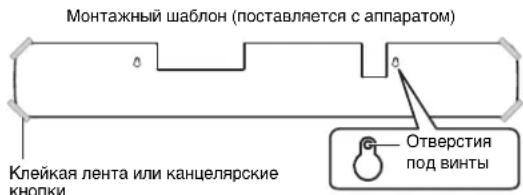
2 OTHMNTe MOHTaXHbI Wa6IOH OT CTeHbI 3aBepHnTe IpnO6peTeHHbI BnHTbI (NOKa3aHHbI HHXe) B MecTAX MeTOK Ha CTeHe.
3 CHIMITE 3aunTHyO 6ymary c npocTabOK n npcoeMHTe KneKoN CTopoHOk Kaapay, KaK poka3aHO HIXKe.
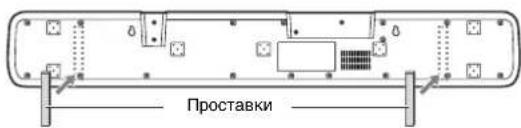
4 HabeCbTe annapat Ha BnHTbl.
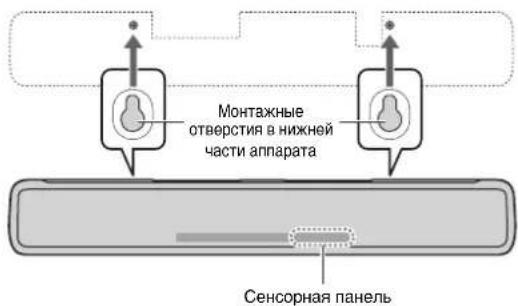
Повлоченя
1Поdkлioуене TeIeBn3opa n npncTaBKn
IINBbINHHeHHIOKJIIOeHHc IIMOoubIO Ka6eJe CJIeDyTe yKa3aHnM HIXe.
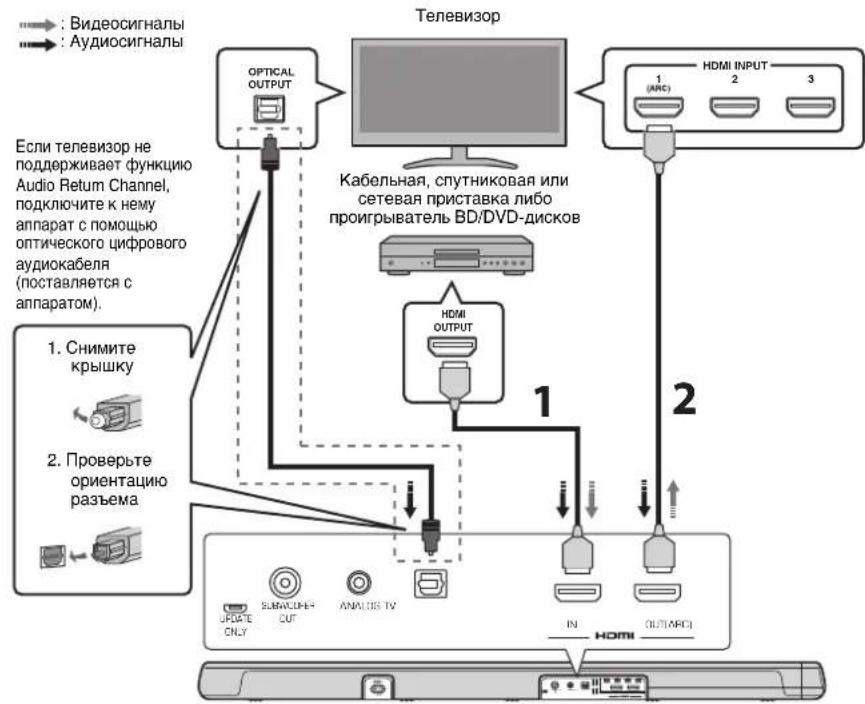
1 Ka6eIb HDMI (npno6peTaetcA dononHntelho)
LdpoBbIe ayDIO- n BnDeOcHnAbI nepeaIOCT Ha annapat C npICTabKn nn npoiRpbBaTeN BD/DVD-DmckOB.
2 Ka6enbHDMI (npno6peetaTcdoonHHTeJbHO)
LcnpbBle BnDeo3anCn Bocnpn3BOJTCn C npCTaBKn nn npOnpRpbBaTeNa BD/DVD-nckOB Ha TeneBn3ope.
ПИМЕЧАНЕ
NcnoB3yte19-KoTHaKThbKn Ka6bN HDMi C noTOnnMnHDM.HTO6bI N36ExKaTa yXyMeHHa KaueCTBa CNrHana,peKOMeHNyETcNcNoB30BaTb Ka6bN DInHO 05 M
3TOT annapat noDpeknaeT texHONIO 3aunIbOt KOniPobnA HDCP bceMn2.2.DNa Bocnpo3BeEHHBaeO bΦopmate 4K noKnIOUHTe annapat KO xOHDomy rHe3dy HDMi (coBmeCTHMOMy C HDCP 2.2)Ha TeneBn3ope c noDpejXKO HDCP 2.2 n K BbXoHOMy rHe3dy HDMi h npOHrpbaBate NE BD/DVD-DnCKOBc noDpeXKO HDCP 2.2.
Дагьборпдддддддддддддддддддддддддддддддддддддддддддддддддддддддддддддддддддддддддддддддддддддддддддддддддддд徳ытБувсКОСКОСТСНΚΑББн.HDMI.
ДиBOCpOIN3BcEHNBAInEOBbOpMaTe4K nONb3yIte BbICOKoKaueCTBeHHbKabEnbHDMl.
ПРИМЕЧАНЕ
TeNeBn3Op c noDaeppKoI yHKnMm Audio Return Channel (ARC)
- P0dknHOnHe Ka6eB HDMI K pa3bEmy C noDaePxxKoAudi Rorurn Channel (pa3bEm, o6o3NaueHHn a66peBnAtypo ARC) Ha TeneBnOpe.
PnB KINHOHNO FyHKUIN YNPAABHNIepe3 HDMI BNDEO-n ayINOcoOEKPIMOE C BOCIPNOBDOAUXY cTPOCTB MOKHO BBOIDNTbpe3 TeneBIOOPDAKeKOJrAnnapat BIKIOHOUe (CKB03HKnKANHDMI).
YTO6bIaKTHBnPoBaTb KaHAn Audio Return Channel (ARC), BkIOChIte Ha annapate yHKmUynpAbeHnuepe3 HDMl (ctp. 31).
4To Takoe Audio Return Channel (ARC)?
TTo6bl Bocpnn3Bectn 3Byko3anncb c TeNeBn30pa Ha annapaTe, TeNEBn3Op o6bHNO noKnIOuOaOT K annpaTaY uee3 3BykoBoi Ka6eb, a taKke Ka6ebHDMI. Ecnn, oHaKO, TeNEBn3Op nOdepXnBaETexHoIorIO Audio Return Channel (ARC), 3BykoBOi CnHAnC TneBn30pa MoKHO noDaTb Ha BXoD annapataYepe3 Ka6ebHDMI, KoTopbI BBODIT BInDeocirHaN ot annapata Ha TeNEBn3Op.
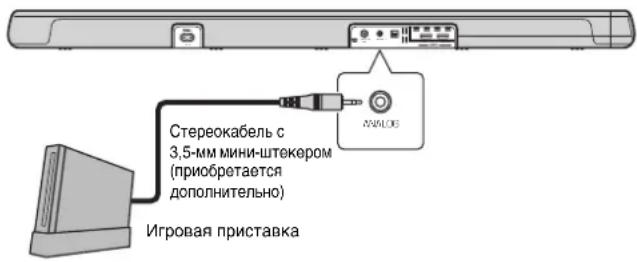
2Поdkлю悔нeИгрови ппсТаВКУчep3 aHaJorOBoe rHe3do
IoiKJIIOUHTe BHeUHHe yCTpOuCTBO, HApIMep INrpoBvI npucTabky IIN TEneBn3Op, B KOtOpOM HeT ONTuHecKO UΦpOBOra ayDnOBbIXoJa, K BXoHOMy rHe3dy ANALOG annapata.

BHIMAHNE
- EcnnrpoMKocTb MoKHO peryInpoBaTc NOMOuBIO yCTpOInCTBa, NOKIIIOueHHOR K BXODHOMY rHe3Ny ANALOG annapata, To, YTo6bl npdeOTbPaTnTb HeoxNdaHHoe Upe3MepHOe NOBIIeHne rPoMKocTn, YcTaHOBnTe Ha 3tOM yCTpOInCTBe TAKo Jx yPOBEh b rPoMKocTn, KaK Ha dpyInx yCTpOInCTbax, NOKIIIOueHHbIX K rHe3dAm HDMl annapata.
3 NcnoIb3OBAHne BHeuHero ca6Bypepa
B annapate HmeeTc IBa BCTpoeHHbIX c6bBypepa; OHaKo, YTo6bl yBeINHTb MOHOCt b H3KOaCTOTHO rO 3ByKa, MoXHO NOkNIOuHTb BHeHnI ca6bBypep.
POnKnIOUHTe ca6Bypep, 6OppyoBaHbHb BCTPOeHHbIM yCnIITeMeK rHe3dy SUBWOOFER OUT annapaTa.
3Byk 6yET BbIOBnTbcr n OT BCTpoEHbIX ca6BypeoB, n OT BHeuHero ca6Bypepa.
4ПоdkлioуенkeKaбелЯптань
Iocne 3aBepWeHn Bcex nOdkNoChEnn noCoeHNHTe KOMnKeTHbI Ka6eIb NtTaHnK rHe3y AC IN annapata n BCTaBte WTeNCelb B pOeTKy cTeN nepeMeHHoro TOka.
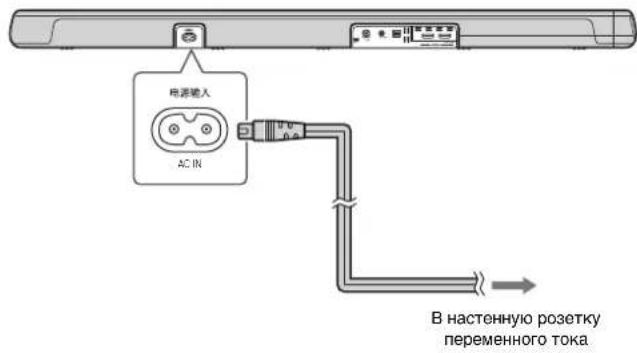
Операци
IpepaTnK cnHaJa Dy
IpeepaHppaKpaChbix CnHaNoB.
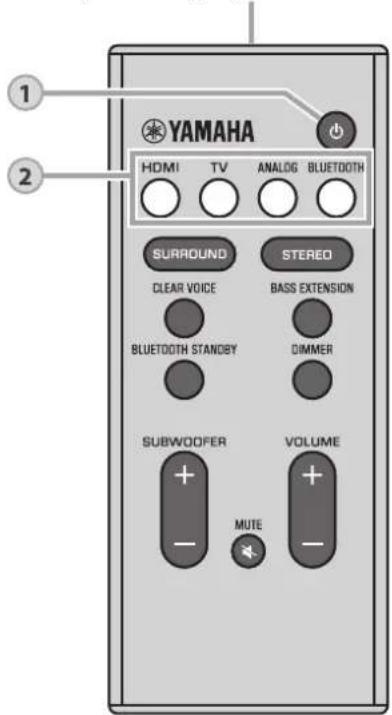
1
Khonka «nntaHne»
BkIIOUeHHe N BbIKIOUeHHe anInapata.
BkIIOyeHo

Topnt INDnKATOp NocneHrero BbIpaHOro IcToUHnKa BxOHDoro CmHa.
BbIKIOeHO (BKnIOeHa yHKunr OxNdaHn r Bluetooth, ctr. 30)

2
KhONKn BxOda
Bb6epnte dna Bocnpon3BeDEHn nCTOHTHK BXoHOro CnHaHa.
HDMI 3ByK OT yctpoiCTBa, noKnHoeHHoro K rHe3dy HDMIN
TV 3Byk OT TENEBn30pa NIM OT yCTpoCTBa, noDIOHIOeHHORO K BXoDHOMy rHe3dy TV annapata
ANALOG 3ByK OT yCTPOINCTBA, NOKNIQUEHHO K BXOHNOMY rHe3dy ANALOG
BLUETOOTH ....3Byk OT yCTpOiCTBa, NOdkIIOueHHOro Upe3 Bluetooth (CTp. 28)
TOpHT INHdkatop BbIbpaHORO nCTOHnKa BXoDHorO CnHaJa. (PpIMep:KOraBbIpaH TeneBn3Op.)

ПРМЕЧАНЕ
YTOBbO BTOCNPO3EETN 38yK ININ PNOCMOTPBt BINDEO OT YCTPOICTBA, NOKNIKIOENHO K TENEBO3OPY, BKAeCTBE TOCHNYKA BXODHORO CINHAI B TENEBB3OE BbIOBpNE DAHNHOE YCTPOICTBO.
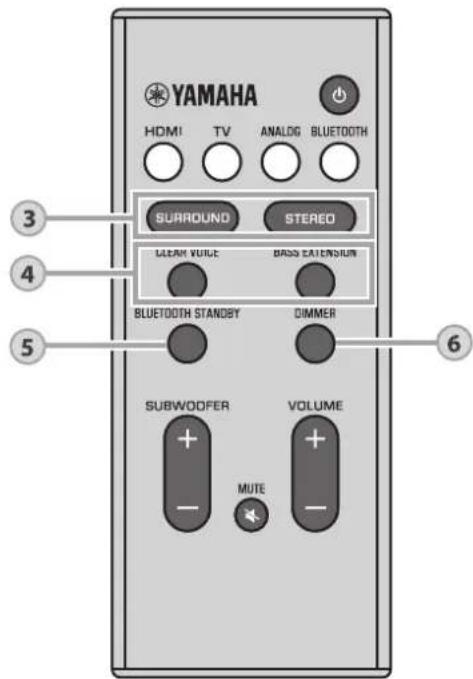
3
KhoNku SURROUND u STEREO
IpeeknIOeHne MeKdy BocnpOn3BeHeHnEM B pexkme OkpykaioeO 3ByaHnN n CtepeofoHueckm (2-KaHaNbHbIM) peKHMOM.
Khonka SURROUND
PnK KAnOM HaxaTm KNONK SURROUND annapaT nepeKIOUaETc MEXy BOCpOn3BeDeHHeM B pexKMe OKpyKaIOoero 3ByaHnN OkpyKaIOoero 3D-3ByaHn. Korda BBbpaHO OKpyKaIOoOe 3D-3ByaHnne, cyHKuIN DTS VirtuaI:X NO3BOJRE CbIaTaB 3ByK He ToJIbKO C rOpN3OHTaJIbHbIX HApabJIeHn, HO TaKKe N OT NepeMeHHbIX BbcOTbIX 3OH.

Topnt CnHMM ZbTeOM (OKpyxkaiooee 3D-3ByaHne)

Topnt 3eIeHbIM cBETOM (Okpykaiooe 3ByaHne)
Khonka STEREO
IpeekIOUeHHe Ha CTpeoOpOHueckoe (2-KaHaJIbHoe) BOCpOUN3BeJeHne.

BbKIOUeHO
ПРИМЕЧАНЕ
- INHdkatop DPL ropnt, KOrda 2-KaHaNbHbI CTpeocnHAn BOCpOn3BOOHTCBAOKpyKaIOUepeKIMe.

Topnt
(Dolby ProLogic II)
- Okpykaiou pexm TV Program, Movie, Music, Sports Game
MOHIO Bb6pTa c nOMOU bnpNOXeHnH OME THEATER CONTROLLER (CTP. 30), yctaHOBEnHOro Ha cMapTfoHe, KOtOpBn NOdEpxKBAeT FyHKUo Bluetooth.
4
Khonka CLEAR VOICE
BkIIOUeHne N BbIKIOUeHne FyHKuM Clear Voice.
KOrda 3Ta FyHKuMn BKIOUeHa, OChEB YETKO
BOcPOn13BOaTc TROLoCA HIOJe, HanpIMep penNIKKn B
ΦInbMax, Telenepedaay, HOBCTHbIX pOgrpAMmax n
CnOPTNBbIX KOMMEHTapINX.
CLEAR
VOICE
TopHT (BKNIOUeHo) He topHT (OTKNIOUeHo) VOICE
Khonka BASS EXTENSION
BkIIOUeHne N BbIKIOUeHne OyHKnN rny60Knx Hn3Knx
HaCTOT. Korda 3a OyHKnB KBIIOUeHa, Bbl MoKeTe
HacnaJdTaBCa 6Oone MOnhblm 3ByKom.
□
043
EXTENSION
Tognt (BKNIOUeHO) He rpo (OTKNIIOUeHO) EXTENSION
5
Khonka BLUETOOTH STANDBY
HaKMMTe n ydepKnBaIte KhoNky 6oJee 3 cekyHd, TTo6bBkHIOHTb NIN OTKIOHTb cyHKUIO OXnDaHn BluTooth (cTp. 30).
6
Khonka DIMMER
I3MeHeHHe RPKOCTn HnDnKaTOpOB. Ipn KaXdOM HaxaTmN KHOKN RPKOCTb N3MeHReTcB CNeDyUoSei NocJeDoBaTeNbHOCTn:
Tucknbl (HactpoKa no ymOJIaHaHIO) He roPnT JpKni
个
HdkaTopbI ropT rko cpa3y nocne onepaunn u3meHHOT rkoctb Ha yka3aHHyo Uepe3 HeckoJIbKO CEkyHd.
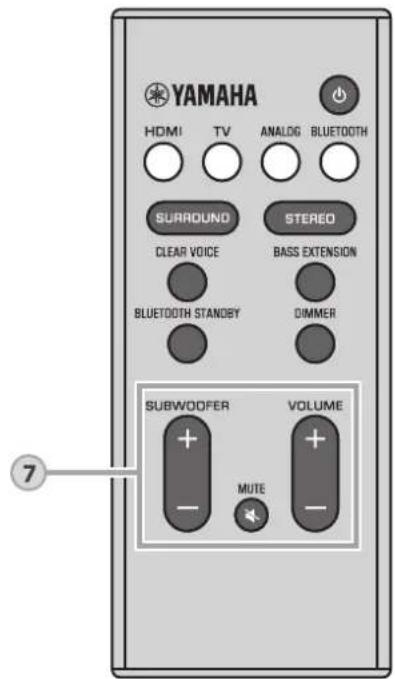
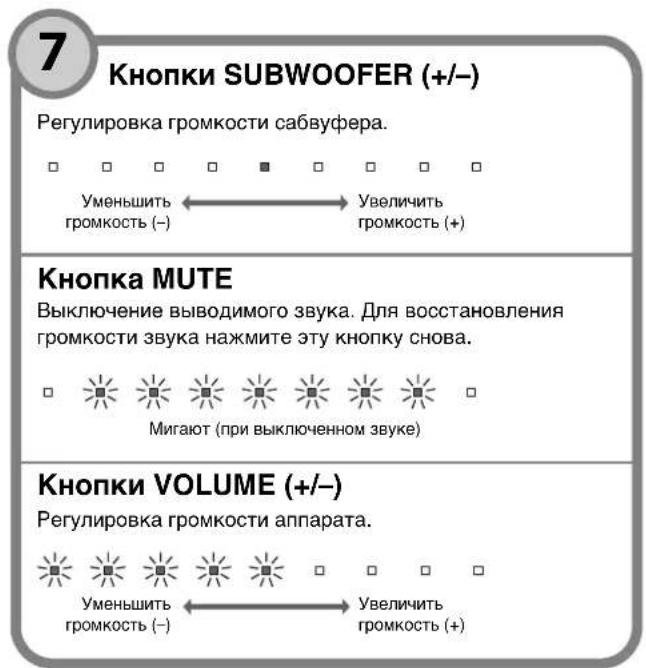
HnKaTOp eKoepa
Annapat noDpeKnBaet cneIyOuine ayNocHnJI. Lbet INdkaTopa onpeDenHET TIN CnHnAa ayNIOBXOJa.
00/015
3eEnbDolby Digital, KpacbD (DTS)
□
00/05
He roput (PCM/aHAnorobb cnHn/HeT BxOndoro CnHana)
Ynpablenne annapaTOM c nmoouy npbTa DY TeJeBn3opa (ynpaBnenue HDMI)
Функцу упраьнену чес HDMl (функцу CBH) ynpabJIeT pa6ToI TeNeBn3Opa I annapata TAKIM o6pa3OM, YTO annapatom MOKHO MaHInyIupOBaTb c nOmoIbIO nyIbTa DY TeNeBn3Opa.
Korda TeBn3op coeHHe c annapatom uepe3 Ka6enb HDMI (cTp. 20), nylt DY TeBn3opa MoXHO nCNoB3OBaTb dIy BblOnHeHHa cnedyuux onepaun.
ФункиynypablenHc nomoubIO nyIbTa DY TeNeBu3opa
TnybTVTeBn3opa (npMmep)
1.BKIOUeHneN BbIKIOUeHne
TeneBn3Op annnapaB KKnIOuAOTcN BbIKIOUaIOTc ONoHBpEmeHNO.
2.ИЗменингосточикOB BXODHORO CnHana
IIOOCHIK BDOHORC HNA annapata 3MMEHAETCA npN 3MMeHEHN IIOOHTHK BDOHORO CHRHANA TENEBBM00A.
Ppimepbl
Ha annapate 6ydt MraTb HndkaTop BLUETOOTH.


Ecnn yctpoicTBo Bluetooth paee noKIOHAnocb, npn haxatm KhoNk BLUETOOTH annapat noKIOHCTcK nocJeHemMy noKIOHcHOMy yctpoiCTby. IpepBnte 3TO noKIOHcHHe, YTo6bl NOKIOCHHTb HOOE yctpoiCTBO.
2 BkIIOHTe FyHKcHIO Bluetooth Ha yCTpOiCTBe Bluetooth.
3 BbIbePteB cncKe yctpoiCTb Bluetooth Ha yctpoiCTBe nyHKT «YAS-107 Yamaha».
Ecnn noBntc 3a npoc KIOUca doCTyna (PIN-KoJa), BBeDInTe KOd «0000».
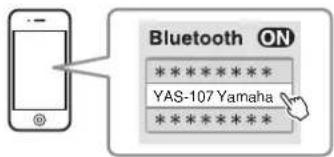
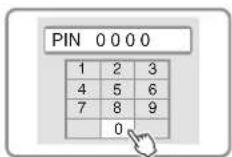
Korda nodknloehne 6ydt yctahOBHe,Ha yctpoCTBe Bluetooth 3aropntc HndkaTOp NIN NOBtC COo6ueHne 06 yctahOBKe nodknloehn, a Ha annapate 3aropntc HndkaTOp BLUETOOTH.

4 HaHnTe BocpOu3BeHeHne KOMNo3nHn Ha yctpoNCTbe Bluetooth.
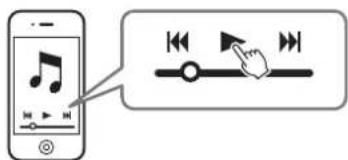
3aBepseHne noDkIoueHnBa Bluetooth
CeaHc noKJIOeHHa Bluteoth 3abepeaaetcB nepuecneneHHbIX Hnke cnyuaX.
- OTKJIIOUeHa cyHKuBa Bluteoth Ha COBMeCTHMOM yCTPOICTBE.
Ha npIbTe Dny annapata hakata n ydepknBaetc 60nee 3 cekynd KhoNka BLUETOOTH.
- AnnapaT BbIKIQUeH.
Ecni noKIOHHe BluTooth 3aBepaTeC np BkIOeHOM annapate, mraet INdkaTOp BLUETOOTH n annapat nepexoHT B COCTOHHOE OXnDaHNI NOKIOUeHn.
PnBkIOHHOfHKUOxuDAnH Bluteoth annapaT MoXHO BkIOHaTb N BbIKIOHaTb C NOMOuBo yCTpOCTBa Bluteoth.
BkJIOHTe yHKUHO B3aHMOcONpXeHHa (Korda annapaT BbIKIOueH)
Pn yctahOBKe noKIOUeHb Bluteoth Ha ycTpoIcTBe annapat BkIOHTCAH 6yDenrTOB BOcPON3BOIDITb 3ByK OT yCTPOIcTBA.
OTKIOUHTe FyHKuIO B3aIMOCOINpXeHn (KOrda annapat BKIOUey)
Pn3aBepueHm noKnHoueHn Bluteoth Ha yCtpoCTbe Bluteoth annapat BbIKIOHTc. (TolbKO eCN B KaecCTBE nCTOHNKa BXoDHorO CnHaB bIbpaH BapnaHT BLUETOOTH.)
Pa6ota c npinloxeknem HOME THEATER CONTROLLER
Ecnn cMaprfohe nIpyrom ycTpoicTbe, noIdepxnbauoem Bluetooth,yCTaHOBNeHO 6ecnNaTHoe npInIOXeHne HOME THEATER CONTROLLER, pa3NnHbIe onepaun (OCHOBhie onepaun c annapaTOM,Bbl6p OkpykaIoero pexmHa, perynipOBkA 3ByKOBbIX hAcTpoek N TaK danee) MoXHo JERKO BbINONHTb C NOMOuBIOy ycTpoicTba Bluetooth.
ПРIMЕЧАНЕ
-ДиИСпОЛьБОВАИnpINIOJOSEHnIcoeINHITeannapATyCTPoiCtBOBluetooth uepes noKIOUOHeNl e Bluetooth.
- EcnnyfhyKUOxNAdHnBluTeoth BkJIOHeHa, annapat 6yET BkIIOHaTbCn C yctpOCTBOM Bluteoth.
Плдбьгсбдени Oприлхжени «HOMETHEATER CONTROLLER"СM.ВИнфорmaци OпpoуктЕ HaHaшem Be6caite.
Hac tropon
HactpoJa KyHKcnn ynpabJeHHa Chepe3 HDMI
TtobkHIOHTbNINOTKIOHTb fyHKUO ynpabHeHnpe3 HDMI annapata, BbINOHNTE onucaHHy Hxke npoeDpy. 3Ta fyHKUINo yMOJauHHIO BKIOUeHa.
1 BbIKIOHnTe annapat.
2 Ha nyIbTe Dv annapaTa haXmTe n ydepxnBaIte 6OJIe 3 cekyHKnONky HDMI.
Функиу npableneyчep3HDMI BKIOuaeTcR nI IN OTKIOUaTeCn, n Annapat BkIOuaeTcR. B TeChHe N HeCKONbKnx CEkyHn Iocne BKIOueyehny Annpata HnIDkaTOp OTObpaXaet COCTOHNy FyHKUs nypableneychep3HDMI.

HOMI


TopNT (BKIOUHO; NO yMOIuaHNO) He topNT (OTKIOUHO)
ПРИМЕЧАНЕ
BknHHTe FyKuHIO ynpaBHeHnA Hepe3 HDMI npn noKnIOHnHn TnelEbn3oPA, KOptpor noIaePkBaet FyHKuHIO Audio Return Channel (ARC) (ctp. 21), mnn pnnncnsOBAHH cKBHOHNepedAA cnHnA HMI (ctp. 21).
Ecn annapat He pearnpyET Ha nyIbT Dy TeJeBn3Opa
YbTeBc, yTO npaMeTpbl npaBnIbHO HAcTpoEhbl KaK ONUcaHO HIXe.
-Функцу упавлени чез HDMI annapata BKluoyeha
-ФункиуynpaBneHnuepe3HDMI BKIOUeHaВTeJIeBn3ope.
PnMepbHaCTpoekTeNebu3opa
B MeHIO HACTPOE B TENEB3Ope Bb6epTe HAcTPOHa coeAnHEHn→ HAcTPOHa ynpabHeHnepe3 HDMI, a 3aTeM yctanobte nI npaAMetpa DyHKnn ynpabHeHnepe3 HDMI] 3naueHene BKn].
BbIbePte B KaueCTBe ayIOOBbIXOJa IIO6o BApHANT, KpOMe TeneBn3Opa.
Ecn annapat He pearpyet Ha nylbT IV TeneBn3Opa daKe nocne npabInbHC
BbHrHnHmCahHbIe HAcTpOKn.
- BHKINHHTA, a 3aTeM cBbA bKINHHTA annapat n TeneBn30p.
- OTKHIOHTe KaEBI HTHAON OF ANIHAPATI W BHEINHXCYPTOMCTB, POKKIOHENHHK HEMC NMOOHTe KaEBI HDMI. POKKIOHTe KaEBN CHOBA uepe3 30 cekyHd.
Hactpoika BbIXOda 3Byka Upez3 HDMI
YkaXnTe, rIe DoJnxH BOCPON3BODITCB XOJDHO ayDnOCHHan HDMI:Ha annpaTe mIN TEJIbNtOpe. 3Tu HAcTPOky MOxHO yctAHOBnTB ToIbKO KOrda fyuHKmU ynpabJeHH Yepe3 HDMI OTKIOHcHa.
Annapat (no ymoJuaHnIO)
Bocnpoun3BeDeHne BxOndoro ayuNocnHaHa HDMI ha annapate.
TeLeBn3Op Bocnpo3BeHeHne BXoHoro ayuDIOscRHaNa HDMI ha TeLeBn3Ope, noKnIOueHOM K rHe3dy HDMI OUT (ARC) Ha annapate. Ha annapate HeIb3e peYunpoBaTb rPOMKoCTb. Ia peryUnpOBKn rPOMKoCTn CneJeTcNoJb30BaTb TeLeBn3Op.
1 BbIKIOUHTe annapat.
2 Haxmte KhoNky SURROUND Ha npIbTe Dv u ydepXnBaIte ee 6oJIee 3 cekyHd.
AydnobbIXoH HDMI nepekIIOHaetc Mekdy annapaTOM n TebeN3Opom HnH aoBopot, n annpaT BKnIOHaetc. B TeeyHe HEckOJIbKxCekyHd Nocne BKIOeHry annapata nHnIKatop OTO6paKaET COCTOHNye aydnobbIXoHa HDMI.

Tropit (3byK Bocnpo3BODITcHa annapate; no ymonuHnO) He ropit (3byK Bocnpo3BODITcHa TeneBu3ope)
ПРIMЕЧАНЕ
YtObI HAcTPOINTbAynDboXIOH DMI pRn BkIOHOENH OyHKIMU npaBNEHAR yepe3 HDMI, bIb6eprte yCToPcIbTO AynDboXoDA, HAcTPOeHNoe Ira paOBoI c TeneBB3OpOM, NOKIIHcNHeMb K 3OTomy anpapaty.
BIDeocnHbIb HMDI, noctynaoiue chepe 3do h n3 rhe3d HDMl IN annapata, Bcdera bbyobatcrpe3re3doHDMl OUT(ARC).
BkIIOUeHne n OTKJIIOUeHne cyHKcNn «ABTOpeXIM OXnI.»
Пи ВКлоченho Функцm «АВTo pexKIM OXнд.» HeICNoIb3yEmbl annapat 6yET aBtOMaTnueckn BbIKNoHaTcR. KordaФункцm «АВTo pexKIM OXнд.» BKlOHeHa, annapat aBtOMaTnueckn BbIKNoHaetCnB IIOBoN Ⅲ nepeHNCJIeHbIX HnKe CnTuayu:
- Het HnkaKnx Opeaun B TeueHne 8 yacob
- Het Bxoda 3Byka n onepaunB TeueHne 20 MmhyT,ecnB KaueCTBe nctOuHnKa BxoDHoro CnHaIa BbIbpaHO BLUETOHT Hnn HDMI.
1 BbIKIOUHTe annapat.
2 HaXMMTe u ydepxkBaaiTe HaxMMTe ha annapate.
ФункцИ«ABTopeKIMOxNД.»BKJIIOUaETcI INN OTKIIIOuHaTeCn,IannapatBKNIOUaTeCn.B TeueHne HeckoIbKnX cekyHnNoCnE BKNIOUeHnAnnpaTa HnDnKATop OTObpaKaet COCTOHNHeФунКUIN «ABTopeKIMOxNД.
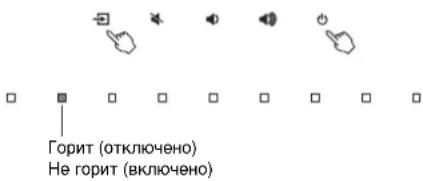
ПРИМЕЧАНЕ
Hactpoka no ymoJauHIOIINIaFyHKUIMN“ABTOpeXIMOXNID.N3MeHReTCB 3aBNCIMOCTNOTCTpaHbIINIPERHOHA.
-MoDJIENI BANIKO6PHTAHIN,EBPOHNI,UEHTPAIbHOH I OJXHOI AMeRINKI N A3H: BKIOHEHO
-Moennn dnn npynx cTpaH:OTKIOUeHO
HnncmaJIIN3aun annapaTa
BbINONHInTe npBBeEHHyIO HIXe IpOeDpy HnHuaN3aun annapata.
1 BbIKJIIOHTe annapat.
2 Haxmte u ydepXnBaTe Ha annapate KhoKn 1, NOKa Bce INHdkaTOPbI He NaHyT MraTb.
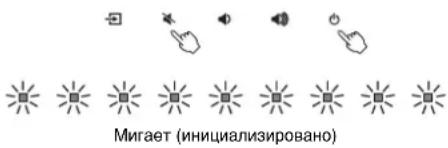
YcTpaHHe HeNoJaIaOK
Ecnn annapat cyHKnOHpyET HnnpaBnHc, cm. npBBeHHyIO Hxke TaBnUy. Ecnn BaW a np6bema He yka3aHa B TaBnue nnn npBBeHNbte Hxke INCTpyKuIN He NmOrrn, BbIKNoHTe annapat, OTCoeDnHte CnIOBoi Ka6eNb IObpaTInTe b K 6nXaIeMy ABTOIN3OBAHOMY Dnepy nB CepBnCHbI ueHtp YamaHa.
Chauana npoBepbTe cneyuooee:
① CnnoBbIe Ka6eHn annapaTa, TeJeBn3opa n BocnpOn3BodAunx yctpoiCTB (TaKnx, KaK BD/DVD-nponrpblBaTeH) HaeXHO NOkJIIOUeHbI K HAcTeHHbIM po3eTKam nepemehHoro TOka.
② AnnapaT, TeneBn3Op IN BOCpnOn3BOJaIe yCtpoiCTBa (TaKne, KaK BD/DVD-tpoNrpBbATEN) BKIOHeHbI.
③ Μιτεκρόβι κακδύτον Μακέηνη ἀπεχήον Βεγαλήνεβίνι Βαθυβετισγίνης τὴνης τὴνης τὴνης τὴνης τὴνης τὴνης τὴνης τὴνης τὴνης τὴνης τὴνης τὴνης τὴνης τὴνης τὴνης τὴνης τὴνης τὴνης τὴνης τὴνης τῷ.
Питанеци сстema
| Пироблим Возимпь визни Meю устриени | |
| Heokindanho Bviklouaetcny nittahne. | KoIGNДа Функшия «АВТо рекIM oxHID.» BkILOUeHa, annaparat abTOMATUeCKN BvIKlOuaETcR B JIO60 I3 nepeuCINHbIX HIXE CNTUaIy: -В ТЕчEHнe BOCbMn IINI B6ОLEe YacOB He BvIOLNHaLObc NIKAKINx DeIeCTBn. -В КачeSTBE IVSTOCHNKA BxODHORO CINHala BvIbpaHO BLUETOOTH IINI HDMI, HO B TteCHNe 6OJIe eM 20 MInHyT Na BxOD AnnapaTa He NOdABaONr NIKAKoI ayDIOCSIRHaN IINI C AnnapaTOM He BvIOLNARCb NIKAKINe DeIeCTBn. |
| СразOTanaхсma 3aushtby. (Miraet InHdNKaTOp D / DTS.) |
| ПдКЛЮЧЕНDEeBTOH 3aERpseHo yCtpoiCTBOM Bluetooth pri BvILOUeHHoФUnKUsm OZnDAnHg Bluetooth annapaTа. |
| ОТКЛЮЧЕНФeUHKUHIO OZnDANHg Bluetooth (ctp. 30). |
| Heob3MOxHNO BvILOUHTb nittahne. | Тri pa3a noPridc sprabotanaхсma 3aushtby. (При польтke B 3OTN CHTUaIz NIKLIOUHTb PHTAHne 3aGorpaTeCn INHdkaTOp D / DTS.) |
| Побълама Вьиможияяяршина Метор устранени | | |
| Хotingлар вькючен, Ндоин Иndикатор He ropit (Кak 6удт оллар вькючен). | Алларот Naстpoeh takimms obpaizom,Чтоы Иndикаторп He ropei n He mrigaln, ecn annapat He incnoJIb3yeteTc. | С пошью конь DIMMER blyберпг Heobxodmyu yapkoctb (стр. 25). |
| Annapat paobotaet He nprabinlho. | Завс Bvytrpenh'm MmKpokommbIoTeP n3-3a BO3dIeCTBnCmNBo rO lekTprUeCKoTo HapraJxehnry O T BheuHnx NcToHnKOB (HaprIMep, MOnHnI nIcIIbHOrO cTATNUeCKoTo 3NeKTPnueCTBa) IIN n3-3a NaDeHn HapraJxehnry 3NeKTPonNTAHnY. | Отоедиите kaБел nbitahnry OT po3etkn NepeMeHHoro TOKA n noCoedinHite ChOba. |
| Annapat camonpon3вовьно ВьлочаETсЯ. | Побл�эсту IncnoIb3yETcA dpyroe yctpoiCTBO Bluetooth. | Претовite поknioченie Bluetooth к appanaty (стр. 29). |
| He paobotaiot 3D-очkn TelebeHzopora. | Алларот SFokripyet nepeDAtHuK 3D-очКOB TelebeHzopora. | Простовite paocnoJoxhenie nepeDAtHuKa 3D-очКOB TelebeHzopora n pa3MeCTHne apnapat TaK, ChTo6bI OH He Meuapan pa6Ote nepeDAtHuKa. |
| He уdaetca ураляль'tb annapatomсnomoью прилwxgesnHOME THEATER CONTROLLER. (He зakрьlaeТСЯ Кран дeMo-ржima пriлwxgesnHa uystrojstve Bluetooth.) | УстpoiSTBO Bluetooth, на kotopom уstahOBNeNo npinnoxehne, He noKnIOUeHo K apnapaty. | Чтоы IncnoIb3OВаь пriлoxeHne, установite поknioченie Bluetooth мекdy устpoiCTBOM Bluetooth и appanatom (стр. 28). |
Ayno
CopekhaHne daHHoro pyKOBOCTBa COOTBETCTBYET TEXHueCKM
XapakTePcNTkAm, NocJeHMM Ha MOMeHT ny6nKaun.
IINONUYENHNOCEJHEBEPCMpyKOBOCTBA NOCETNEBe6-caNTKOpnpaYamaHaN3aRpy3NTePainc pyKOBOCTBOM.

注意事项
Manual Development Group © 2017 Yamaha Corporation
Published 10/2017改版KS-B0 Printed in China
AV16-0006