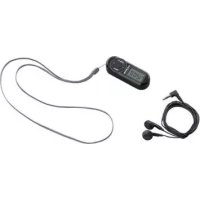
SSRM 10 A1 - Radio SILVERCREST - Free user manual and instructions
Find the device manual for free SSRM 10 A1 SILVERCREST in PDF.



| Product type | FM radio with alarm clock |
| Brand and model | SilverCrest SSRM 10 A1 |
| Dimensions (L x W x H) | Approx. 80 x 28 x 19.3 mm |
| Weight (without batteries) | 25 g |
| Power supply | 3 V, via 2 x 1.5 V AAA batteries (Micro LR3) |
| Battery life | Approx. 65 hours at 75% volume |
| FM frequency range | 87.5 – 108 MHz |
| Number of presets | 20 stations |
| Display | LCD screen with indicators (frequency, time, alarms, volume, battery) |
| Main functions | FM radio, alarm (2 alarms), snooze, sleep timer (10-90 min), automatic and manual search, station memory |
| Earphones | Included SSRM 10 A1 type, 3.5 mm jack plug, serve as antenna |
| Power consumption | 45 mW |
| Max. headphone output voltage | Approx. 91 mV |
| Max. sound pressure | Approx. 92 dB(A) with included earphones |
| Operating conditions | 5 °C to 35 °C, max. relative humidity 85% |
| Volume level | Adjustable from 00 (silent) to 15 (max) |
| Included accessories | Earphones, wrist strap, 2 AAA batteries, user manual |
| Care and cleaning | Clean with a dry, clean cloth; do not use corrosive liquids |
| Safety | Observe battery polarity, avoid exposure to water and heat, use only the included earphones, risk of prolonged listening at high volume |
| Warranty | 3 years (excluding consumables like batteries) |
| Manufacturer | TARGA GmbH, Coesterweg 45, DE-59494 Soest, Germany |
Frequently Asked Questions - SSRM 10 A1 SILVERCREST
User questions about SSRM 10 A1 SILVERCREST
0 question about this device. Answer the ones you know or ask your own.
Ask a new question about this device
Download the instructions for your Radio in PDF format for free! Find your manual SSRM 10 A1 - SILVERCREST and take your electronic device back in hand. On this page are published all the documents necessary for the use of your device. SSRM 10 A1 by SILVERCREST.
USER MANUAL SSRM 10 A1 SILVERCREST
Intended use. 31
Supplied items 32
Controls and button functions. 33
Visual display 34
Technical data. 35
Safety instructions 36
Prior to use. 42
Inserting the batteries. 42
Connecting the earphones 43
First use 43
Setting the time 43
Switching on / off 44
Setting the volume. 44
Automatic station scan with auto store function 45
Manual station scan 46
Manual station tuning. 47
Manually saving stations 47
Select saved stations. 48
SLEEP timer 48
Setting the alarm time (Alarm 1 / Alarm 2) 49
Activating/deactivating the alarm function 50
SNOOZE function 51
Storage when not in use. 51
Troubleshooting 51
Environmental and disposal information. 52
Conformity information. 53
Warranty information 53
Congratulations!
By purchasing a SilverCrest scan radio SSRM 10 A1, hereinafter referred to as scan radio, you have opted for a high-quality product.
Familiarise yourself with the scan radio before using it for the first time, and read these operating instructions carefully. Pay particular attention to the safety instructions and use the scan radio only as described in these operating instructions and for the specified range of applications.
Keep these operating instructions in a safe place. Include all documents when passing on the scan radio to someone else.
Intended use
This is a consumer electronics device which is used to receive radio stations and as an alarm. It is only designed for private use and not for industrial or commercial purposes. Furthermore, the device may not be used in tropical climates. Only connection cables and external devices that are designed for this product in terms of safety, electromagnetic compatibility and shielding quality may be used in conjunction with the device. This device complies with all standards and directives specified in the Declaration of Conformity. In the event of any modification to the device that was not approved by the manufacturer, compliance with these standards is no longer guaranteed. The manufacturer
does not accept any liability for any resulting damage or faults in such cases. Only use accessories specified by the manufacturer. Please observe the regulations and laws in the country of use.
Supplied items
Take the device and all accessories from the packaging. Remove all packaging material and check that all parts are complete and undamaged. In the event of an incomplete or damaged delivery, please contact the manufacturer.
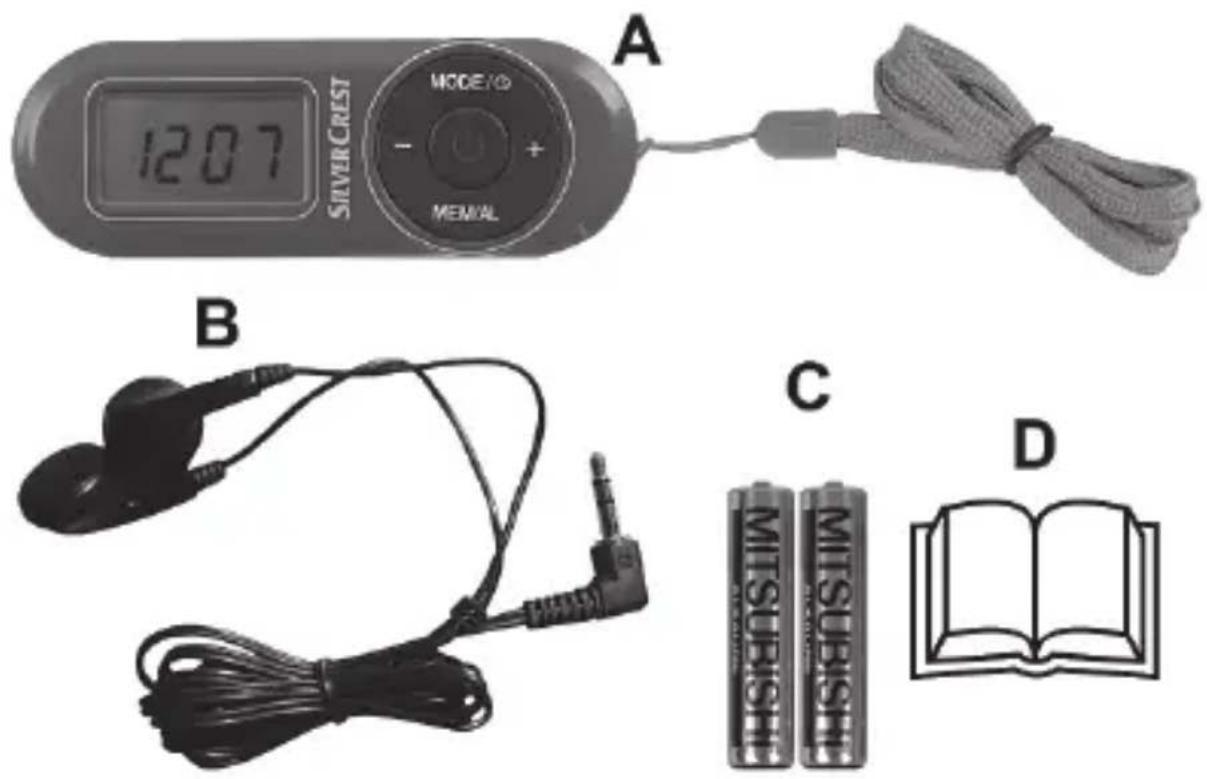
A Scan radio SSRM 10 A1 with strap
B Earphone type:SSRM 10 A1
C 2 batteries of type AAA, 1.5V (micro, LR3)
D These operating instructions (symbolic representation)
Controls and button functions
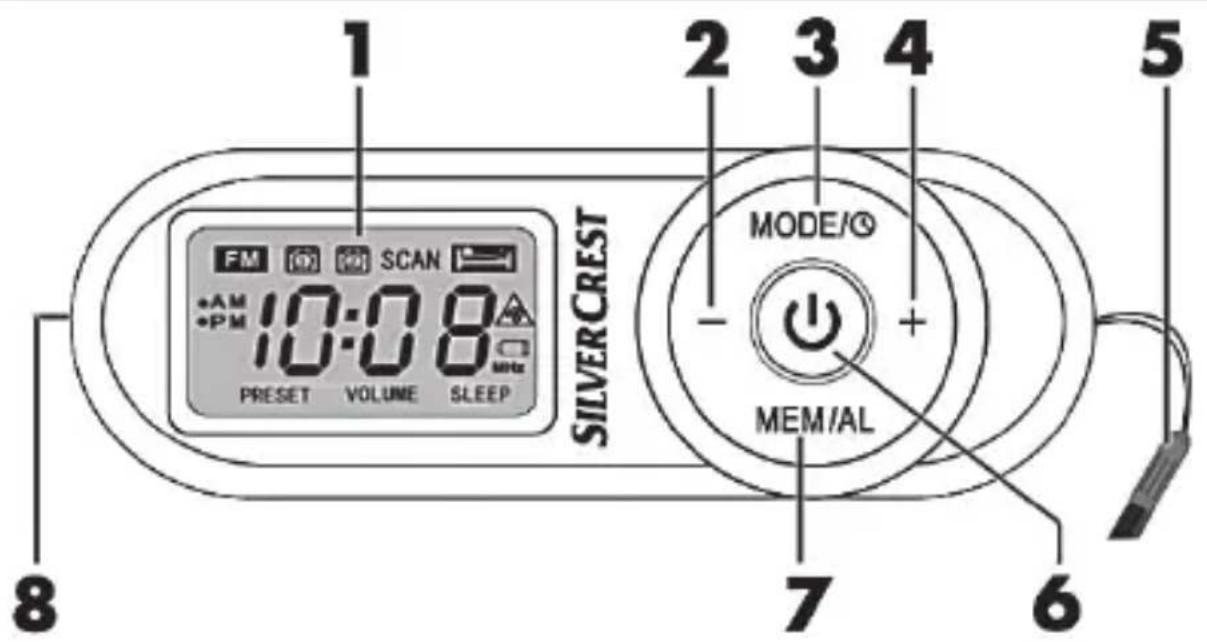
1 Display
2 "--" button
3 "MODE" button
4 " ^+ button
5 Strap
6 "On/Standby" button
7 "MEM/AL" button
8 Earphone jack (at the side)
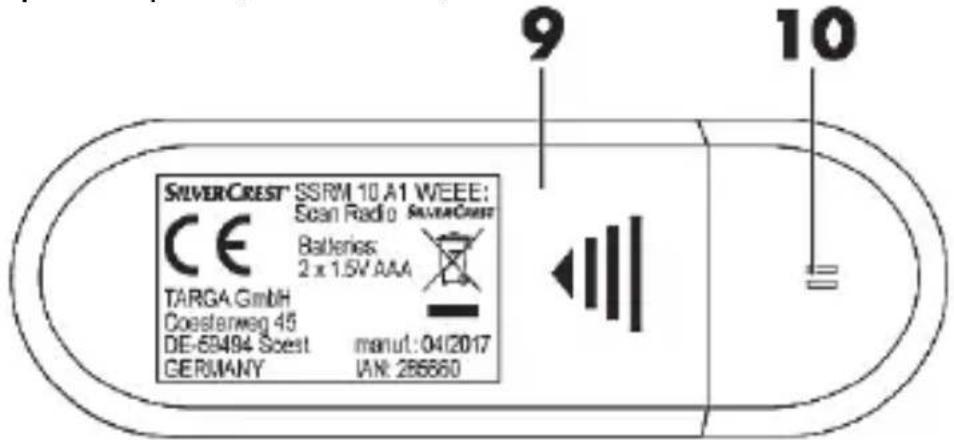
9 Battery compartment cover
10 Opening for buzzer
Visual display
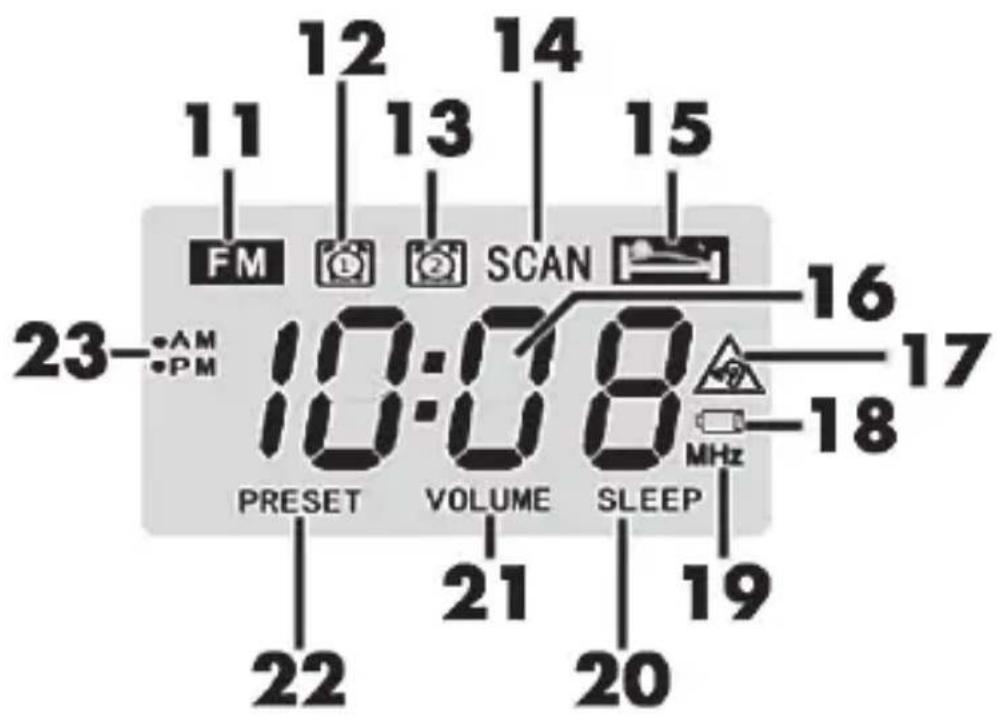
FM (radio mode)
12 Alarm 1
13 Alarm 2
14 SCAN
15 SNOOZE function
16 Frequency, time or alarm time
17 Volume warning symbol
18 Low battery power
19 Unit of frequency for radio mode
20 SLEEP timer
21 VOLUME
22 PRESET
23 AM / PM (only for 12-hour display)
34 - English
Technical data
| Operating environment | 5°C to 35°C, max. 85% rel. humidity |
| Permissible storage conditions | -10°C to 50°C, Note: The device must not be stored in hot places, for example, in a car in summer. |
| Operating voltage 3V | |
| Battery type AAA 1.5V (micro, LR3) | |
| Power consumption 45mW | |
| Operating time | approx. 65 hours at 75% volume |
| Frequency range of radio 87.5 to 108MHz | |
| Dimensions (W x H x D) | approx. 80 x 28 x 19.3mm |
| Weight 25g (without batteries) | |
| Earphones type SSRM 10 A1 | |
| Maximum output voltage at the headphone jack | approx. 91mV |
| Maximum sound pressure with supplied earphones (B) | approx. 92dB(A) |
| Broadband characteristic voltage of the supplied earphones (B) | approx. 99mV |
The technical data and design may be changed without notification.
The specifications for the frequency range describe only the technical features of the device.
Note that different legal regulations may apply in different countries to the free-to-air frequency range. Information received outside of the permitted frequency ranges must not be exploited nor its content or the fact of its reception forwarded to third parties.
Please note that reception outside of these regulations may then be illegal and subject to punishment.
Safety instructions
Before using this device for the first time, please read the following instructions carefully and take note of the safety warnings, even if you are familiar with the use of electronic devices. Please keep these instructions safe for future reference. Please ensure that you also hand over these instructions if you resell or pass on this device. They are an integral part of the product.
Symbols used and their meaning

DANGER! This symbol in conjunction
"DANGER" note indicates an imminent dangerous situation which, if not prevented, could result in serious injury or even death.

WARNING! This symbol in conjunction with the "WARNING" note indicates important information for safe operation of the device and the safety of the user.

This symbol indicates other important information on the topic.

DANGER! Batteries
Always ensure correct polarity of the batteries. Please note the markings on the batteries and in the battery compartment. Never try to recharge batteries and never throw them into an open fire. Never use different batteries (old and new, alkaline and carbon, etc.) at the same time. Remove the batteries if you will not be using the device for an extended period of time. In the event of improper use, there is a risk of explosion and leakage. Batteries are not toys. Consult a doctor immediately if someone swallows batteries. Batteries may not be deformed or opened as leaking chemicals can cause injuries. In the event of skin or eye contact with chemicals, they must be immediately rinsed with generous amounts of water and a doctor must be consulted.

WARNING! Ensure that
- no direct heat sources (e.g. heating) can affect the device
- no direct sunlight or bright artificial light reaches the device
- any contact with splashed and dripping water and corrosive liquids is avoided and the device is not operated in the vicinity of water. In particular, the device should never be submerged
in liquid (do not place any items filled with liquid, e.g. vases or drinks, on or near the device)
- the device is not in the immediate vicinity of magnetic fields (e.g. speakers)
- no fire sources (e.g. burning candles) are placed on or near the device
- no foreign objects penetrate the device
- the device is never subjected to extreme temperature fluctuations as this could result in condensation and electrical short circuits. If the device was subjected to extreme temperature fluctuations, however, wait (approx. 2 hours) until the device has reached ambient temperature before use
- the device is never subjected to excessive shocks and vibrations

DANGER! Children and persons with disabilities
Electrical devices do not belong in the hands of children. Children may not recognise potential risks. Persons with limited physical, mental or sensory abilities should also only use electrical devices appropriately. Never allow children to use electrical devices unsupervised unless they have been instructed accordingly or are supervised by a person responsible for their safety. Children should always be supervised to ensure that they
do not play with this device. Small parts can be fatal if swallowed.
Always keep plastic packaging out of reach also.

It poses a suffocation risk!

DANGER! Display
Do not exert any pressure on the display and keep sharp objects away from the display. There is a risk of injury if the display is broken. Wear gloves if you are gathering broken parts and contact the manufacturer if necessary. If the display becomes scratched or damaged in any way, take special care to ensure that no liquid leaks from the display.
If liquid has leaked, follow the instructions below:
- If the liquid comes into contact with your skin, wipe it off with a clean cloth and rinse the area of contact with a large amount of water. Consult a doctor if necessary.
If the liquid comes into contact with your eyes, rinse them with running water for at least 15 minutes. Then go to a doctor immediately.
If you swallow the liquid, first rinse your mouth with water and then drink a large amount of water. Consult a doctor immediately!
Operating environment
The device is not designed for use in environments with a high temperature or humidity (e.g. bathrooms) or in extremely dusty conditions. Operating temperatures and operating air humidity: 5^ to 35^ , max. 85% rel. humidity.
Health risks due to excessive volume levels
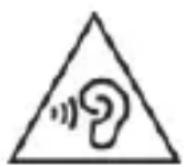
WARNING! Take care when using earth. Listening at high volume for prolonged periods of time can impair your hearing.

DANGER!
- Only use the earphones (B) that are supplied with the device, type: SSRM 10 A1. Other earphones may create harmful sound pressure.
- Do not use the supplied earphones (B), type: SSRM 10 A1, with other playback devices.
Do not use the earphones (B) at high volumes. This impairs your hearing and may disrupt your environment. Note that ambient noise may sound unusual if you are using earphones. Even if the device is designed to ensure that ambient noise can be heard, adjust the volume so that you can continue to hear the ambient noise.

WARNING!
In dangerous situations, for example, driving in traffic, working with machinery or other situations that require your full attention, the sound can distract you or cause you to fail to perceive what is happening around you. Thus do not use the device in such situations.
Maintenance / cleaning
It is necessary to repair or service the device if it has been damaged in any way, for example, if the housing is damaged, if liquid or objects have penetrated the device or if the product has been exposed to rain or moisture. Servicing is also required if the device is not working properly or has been dropped. If smoke is produced, or there are any unusual sounds or smells, turn the device off immediately and remove the batteries. In such cases, the device should not be used until it has been inspected by authorised service personnel. Only have qualified personnel carry out the servicing on the device. Never open the housing of the device. Only use a clean, dry cloth for cleaning and never use any corrosive liquids. Never try to open the housing of the device This would void your warranty.
Copyright
All information contained in these instructions is subject to copyright and is provided for information purposes only.
It is only permitted to copy or duplicate data and information with the express and written consent of the author. This also includes commercial use of the content and data.
The text and illustrations are based on the state of the art at the time of printing.
Prior to use
Inserting the batteries
First, insert the supplied batteries (C). To do this, open the battery compartment at the back of the device by sliding the battery compartment cover (9) to the side in the direction of the imprinted arrow and removing it. Insert the batteries (C) with the correct polarity (pay attention to the + and - marks). The polarity is illustrated on the batteries and in the battery compartment. Then slide the battery compartment cover (9) back on the device housing until it snaps into place.
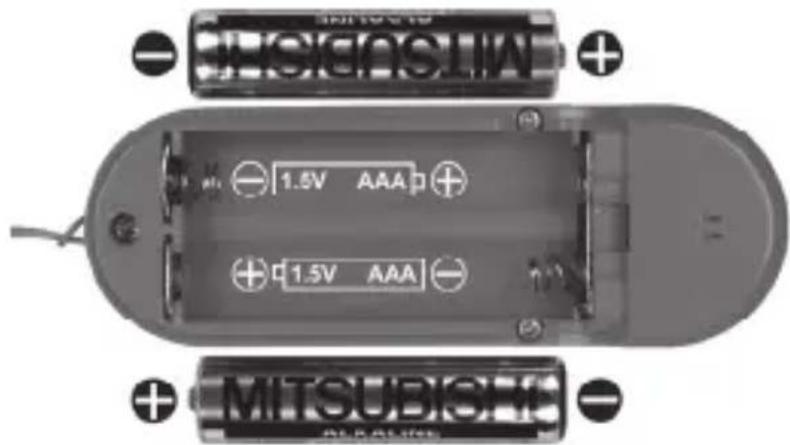
If the volume decreases or if the device is not working, replace the batteries (C) with new batteries of the same type. By flashing "Low battery power" (18) on the display (1), the device indicates
when the battery capacity is exhausted. Please note that all data (clock settings, alarm times and station presets) is lost when the batteries are changed.
Connecting the earphones
Insert the jack plug of the supplied earphones (B) as far as possible into the microphone jack (8) on the side of the device.
First use
Setting the time

If an alarm has already been programmed and is active, the time cannot be set.

If no button is pressed for approx. 5 seconds, the scan radio exits the setting mode. All previously made settings are saved.
Press the "MODE" button (3) when the device is switched off. The display (1) indicates the current hour format: "12HR" or "24HR". Set your desired hour format by pressing the "-" button (2) or "+" button (4). Press the "MODE" button (3) again. The hour display flashes and you can then set it by pressing the "-" button (2) or "+" button (4). Then press the "MODE" button (3) again. The minute display then flashes and you can set it by pressing the "-" button (2) or "+" button (4).

You can also keep the "-" button (2) or "+" button (4) pressed to fast forward or reverse the numbers.
Finally, press the "MODE" button (3) again. The set time is now indicated on the display (1).
If you have selected the 12-hour format, the hours before noon (AM) or hours after noon (PM) are indicated on the display (1).
Switching on / off
Briefly press the "On/Standby" button (6) to switch on the scan radio. "ON" is indicated briefly on the display (1), followed by the frequency currently set.
Briefly press the "On/Standby" button (6) again to switch off the scan radio. "OFF" is indicated briefly on the display (1), followed by the time currently set.
Setting the volume
You can set the device volume to a value between "00" (mute) and "15" (maximum volume). The setting upon delivery is "03".
Proceed as follows:
Press the "-" button (2) or "+" button (4) in radio mode to decrease or increase the volume. The "VOLUME" indicator (21) also appears on the display.
If the volume reaches level "04", the volume warning symbol (17) starts to flash on the display. Now you can continue to increase the volume only if you have confirmed the volume
warning in advance by briefly pressing the "MODE" button (3). The display indicates the volume level currently set. If no button is pressed for approx. 3 seconds, the currently tuned frequency appears on the display again. If the device is set to a value between "5" and "15" when it is switched off, the scan radio starts at volume "03" when it is switched on again.

The setting has no effect on the volume of the buzzer for the alarm clock function. The buzzer volume is always the same.
Automatic station scan with auto store function

To receive radio stations, it is necessary for the supplied earphones (B) to be connected to the telephone jack. The telephone cable serves as a receiving aerial.
The most convenient way to search for stations and save them is the automatic station scan with automatic saving of stations (auto store function).
- Switch on the scan radio with the "On/Standby" button (6).
- Press the "MODE" button (3) for approx. 2 seconds to start the automatic station scan. The automatic station scan always starts at the lowest frequency (87.5MHz).
- The scan radio now searches the entire frequency range for stations with strong signals. "SCAN" (14) flashes on the display (1). The "FM" symbol (11) lights up a briefly once a station has been found and the station preset
that was used is shown. "PRES permanently after the first station found has been saved.
- The first 20 stations found are stored directly in the presets 01 to 20 and saved. If all station presets are occupied, the scan is cancelled and the preset station "01" is played.
- The scan can be cancelled at any time by pressing any button.

Please note that already occupied presets are overwritten.
Manual station scan
- Switch on the scan radio with the "On/Standby" button (6).
- Press the "MODE" button (3). The "FM" symbol (11) flashes on the display.
- Press the "+" button (2) or "+" button (4) for approx. 2 seconds to start the manual station scan downwards or upwards. As soon as the device finds a station with a strong signal, the scan stops and the station is played.
- If you want to switch to another station, press the "+" button (2) or "+" button (4) again for approx. 2 seconds to restart the manual station scan downwards or upwards. The device searches for the next station with a strong signal.
- To exit scan mode, press the "MODE" button (3) again. The "FM" symbol (11) now lights up again permanently.
Manual station tuning
As an alternative to the automatic or manual station scan, you can also tune in stations manually. This enables you to find stations with weaker signals also. Proceed as follows:
- Switch on the scan radio with the "On/Standby" button (6).
- Press the "MODE" button (3). The "FM" symbol (11) flashes on the display.
- Briefly press the "-" button (2) or "+" button (4).
- You thus move 0.1MHz downwards or upwards in the frequency band each time you press the "+" button (2) or "+" button (4) respectively.
- Proceed in this manner until you find the desired station.
- Press the "MODE" button (3) to return to volume mode. The "FM" symbol (11) is displayed permanently on the display.
Manually saving stations
You have the option of saving 20 stations or frequencies. Proceed as follows:
- Press the "MODE" button (3). The "FM" symbol (11) flashes on the display.
- Search for a station which you want to save.
- Press the "MEM/AL" button (7) for approx. 1 second until "PRESENT" (22) flashes on the display (1).
-
Use the "-" button (2) or "+" button (4) to select a preset between 01 and 20.
-
Then briefly press the "MEM/AL" button (7). As soon as the display (1) reverts to the frequency display, the station is saved in the selected preset.

Please note that already occupied presets are overwritten.
- Press the "MODE" button (3) to return to volume mode. The "FM" symbol (11) is displayed permanently on the display.
Select saved stations
- To select a previously saved station, briefly press the "MEM/AL" button (7) and use the "-" button (2) or "+" button (4) to select a preset between 01 and 20.
- After approx. 3 seconds, the station that is saved in the selected preset is played automatically.

Preset stations are lost when batteries are changed.
SLEEP timer
With the SLEEP timer, you can set a time between 10 and 90 minutes after which your scan radio automatically switches off. The setting is made in intervals of 10 minutes. Proceed as follows:
- Switch off the scan radio with the "On/Standby" button (6).
- Keep the "On/Standby" button (6) pressed until the display (1) indicates the number 90 (for 90 minutes).
- Then press the "On/Standby" button (6) repeatedly until you reach the desired number of minutes (for example, 40). Each
time you press the "On/Standby" button (6), the number of minutes to switching off is reduced by 10 minutes.
- The scan radio then switches itself on and, after the previously selected minutes (for example, 40), it switches itself off automatically.
- The display (1) indicates "SLEEP" (20) when the SLEEP timer is activated.
- You can start the station scan or access saved stations even when the SLEEP timer is activated.
- You can delete the activated SLEEP timer by switching off the scan radio.
Setting the alarm time (Alarm 1 / Alarm 2)
You can set 2 alarm times. Make sure that the time is set correctly. You can set the alarm time only when the device is switched off. Switch off the device with the "On/Standby" button (6) if it is switched on.
- Briefly press the "MEM/AL" button (7). The display (1) indicates the "Alarm 1" symbol (12), and when you briefly press the "MEM/AL" button (7) again, the display (1) indicates the "Alarm 2" symbol (13).
- Select Alarm 1 or Alarm 2 and briefly press the "MODE" button (3).
-
The hour display flashes and you can then set it by pressing the "-" button (2) or "+" button (4). Then press the "MODE" button (3) again. The minute display then flashes and you can set it by pressing the "-" button (2) or "+" button (4).
-
Finally, press the "MODE" button (3) again. The display (1) then indicates the current time and the alarm you just set is active. This is indicated by the respective alarm symbol (12,13) on the display (1).
Proceed in the same manner to set the second alarm.
Activating/deactivating the alarm function
When you have set the desired alarm time, you can activate the alarm function as follows:
- Briefly press the "MEM/AL" button (7) repeatedly when the device is switched off until the desired alarm symbol (12,13) is indicated with the corresponding alarm time on the display (1). Both alarm times can also be activated together.
- To deactivate the alarm function, briefly press the "MEM/AL" button (7) until no alarm symbol (12,13) is indicated on the display (1). The alarm function is then deactivated.
- The device wakes you at the set alarm time with a signal tone. The alarm tone then sounds for approx. 60 seconds, followed by a snooze period of approx. 60 seconds. On the display (1), the corresponding alarm symbol (12,13) flashes during the snooze period. This sequence is repeated until the alarm tone is switched off. To switch off the alarm tone, briefly press the "On/Standby" button (6). The alarm is then deactivated until the next day.

Please note that the signal tone is played via the built-in buzzer of the scan radio and not via the earphones.
SNOOZE function
- To pause the alarm tone for approx. 5 minutes, briefly press the "MODE" button (3) during the signal tone. During these 5 minutes, the corresponding alarm symbol (12,13) flashes on the display (1) and the "SNOOZE" symbol (15) is indicated.
- After approx. 5 minutes, the alarm tone starts again. To switch off the alarm tone, briefly press the "On/Standby" button (6).
Storage when not in use

If you will not be using the scan radio for an extended period of time, remove the batteries to avoid leakage.
Store the clean device in a dry, cool location.
Troubleshooting
No sound / no reception
- Check whether the earphones (B) are inserted correctly into the microphone jack (8).
- Check whether the volume is set too low.
- Change your location to check whether the reception improves.
- Check the capacity of the batteries (C), and replace them if necessary with new batteries of the same type. Please pay particular attention to the section "Inserting the batteries".
Nothing indicated on the display
- Check whether the batteries are empty or inserted incorrectly. Insert the batteries correctly or replace them if necessary with new batteries of the same type. Please pay particular attention to the section "Inserting the batteries".
Environmental and disposal information
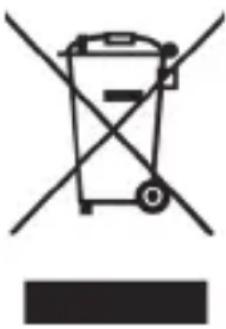
When the crossed out wheelie bin symbol appears on a product, this indicates that the product is subject to the European Directive 2012/19/EU. All old electrical and electronic devices must be separated from normal household waste and
disposed of at designated state facilities. The correct disposal of old devices in this manner will prevent environmental pollution and human health hazards. For further information about proper disposal, contact your local authorities, waste disposal office or the shop where you bought the device.
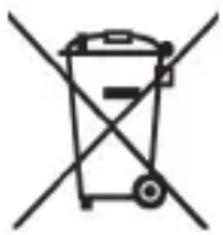
Remember to protect the environment. Used batteries should not be disposed of in household waste. They must be taken to a collection point for old batteries.
Dispose of the packaging in an environmentally compatible manner. Cardboard can be put out for municipal paper collections or brought to public collection points for recycling. Films and plastic used for packaging the device are collected by your local disposal services and disposed of in an environmentally compatible manner.
Conformity information
CE This device meets the basic requirements and other relevant regulations of the RE Directive 2014/53/EU as well as the RoHS Directive
2011/65/EU.
The complete EU Declaration of Conformity can be downloaded at:
www.targa.de/downloads/conformity/285660.pdf
Warranty information
Warranty of TARGA GmbH
This device is sold with three years warranty from the date of purchase. Please keep the original receipt in a safe place as proof of purchase. Before using your product for the first time, please read the enclosed documentation. Should any problems arise which cannot be solved in this way, please call our hotline. Please have the article number and, if available, the serial number to hand for all enquiries. If it is not possible to solve the problem on the phone, our hotline support staff will initiate further servicing procedures depending on the fault. Within the warranty period the product will be repaired or replaced free of charge as we deem appropriate. No new warranty period commences if the product is repaired or replaced. Consumables such as batteries, rechargeable batteries and lamps are not covered by the warranty.
Your statutory rights towards the seller are not affected or restricted by this warranty.
Service

Phone: 020-70490403
E-Mail: service.GB@targa-online.com

Phone: 01-4370121
E-Mail: service.IE@targa-online.com

Phone: 027 78 11 03
E-Mail: service.MT@targa-online.com

Phone: 02 - 20 09 025
E-Mail: service.CY@targa-online.com
IAN: 285660

Manufacturer
TARGA GmbH
Coesterweg 45
DE-59494 Soest
GERMANY
Sommaire
Characteristicas techniques
Se tiver saido liquido, observe as seguintes recomendaozes:

- Congratulations!
- Intended use
- Supplied items
- Controls and button functions
- Visual display
- - English
- Technical data
- Safety instructions
- Symbols used and their meaning
- DANGER! Batteries
- WARNING! Ensure that
- DANGER! Children and persons with disabilities
- Always keep plastic packaging out of reach also.
- It poses a suffocation risk!
- DANGER! Display
- Operating environment
- Health risks due to excessive volume levels
- DANGER!
- WARNING!
- Maintenance / cleaning
- Copyright
- Prior to use
- Inserting the batteries
- Connecting the earphones
- First use
- Setting the time
- Switching on / off
- Setting the volume
- Automatic station scan with auto store function
- Manual station scan
- Manual station tuning
- Manually saving stations
- Select saved stations
- SLEEP timer
- Setting the alarm time (Alarm 1 / Alarm 2)
- Activating/deactivating the alarm function
- SNOOZE function
- Storage when not in use
- Troubleshooting
- No sound / no reception
- Nothing indicated on the display
- Environmental and disposal information
- Conformity information
- Warranty information
- Warranty of TARGA GmbH
- Service
- Manufacturer
- Sommaire
- Characteristicas techniques
Brand : SILVERCREST
Model : SSRM 10 A1
Category : Radio