GW90881 - Detector Gewiss - Free user manual and instructions
Find the device manual for free GW90881 Gewiss in PDF.




| Product type | KNX rain detector |
| Brand | Gewiss |
| Model | GW90881 |
| Main power supply | 230 VAC, 50/60 Hz |
| Bus power supply | KNX bus voltage (30 VDC) |
| Max. consumption (230 V) | 20 mA (with 10% ripple) |
| KNX bus consumption | 8 mA |
| Integrated heater | 1.2 W |
| Protection rating | IP44 |
| Operating temperature | -30 °C to +50 °C |
| Housing material | Plastic, white color |
| Mounting | Surface or pole mounting, horizontal |
| Main functions | Rain/snow detection, ON/OFF output, 4 AND gates and 4 OR gates (max 4 inputs each) |
| Communication objects | 34 |
| Max. group addresses | 254 |
| Max. allocations | 255 |
| Package contents | 1 rain sensor, 2 hose clamps, 1 installation manual |
| Programming | Via ETS (physical address), push-button and programming LED |
| Maintenance and cleaning | Disconnect power, clean with a dry cloth twice a year |
| Safety | Installation by qualified personnel, compliance with IEC 64-8 standard |
| Spare parts and repairability | No detachable parts, repair only by an approved professional |
Frequently Asked Questions - GW90881 Gewiss
User questions about GW90881 Gewiss
0 question about this device. Answer the ones you know or ask your own.
Ask a new question about this device
Download the instructions for your Detector in PDF format for free! Find your manual GW90881 - Gewiss and take your electronic device back in hand. On this page are published all the documents necessary for the use of your device. GW90881 by Gewiss.
USER MANUAL GW90881 Gewiss
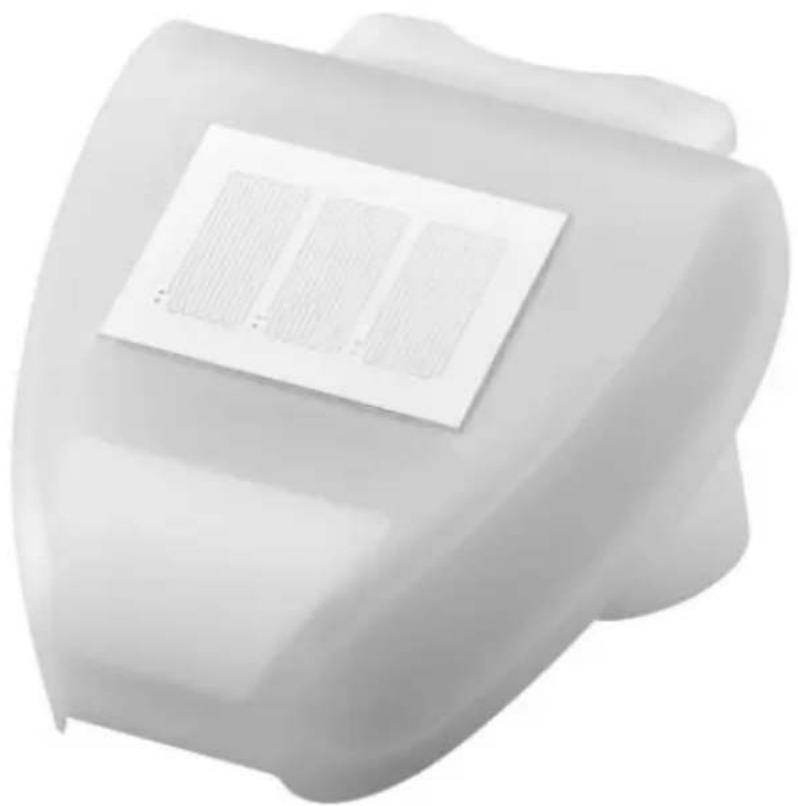
SENSORE PIOGGIA KNX KNX RAIN SENSOR CAPTEUR DE PLUIE KNX SENSOR DE LLUVIA KNX REGENSENSOR KNX
CE
KNX
GW90881
1 AVVERTENZE GENERALI
4.1Warnings for KNX/EIB installation
4.2 Warnings for installation
4.3 Positioning
4.4 Fixing the support
4.5 View of the rear part, and perforation layout
4.6 Pre-arrangement of the sensor
4.7 Assembling the sensor
5 PROGRAMMING
5.1 Application program
5.2 Programming the physical address
6 MAINTENANCE
7 TECHNICAL DATA
1 GENERAL WARNINGS
Attention!
The safety of the device is ensured only if the instructions given in this document are complied with. Read them and keep them at hand.
The product must be installed in compliance with standard CEI 64-8 for devices for domestic use and similar, in non-dusty environments and where special protection against water penetration is not necessary.
The GEWISS sales organisation is available for any clarifications and technical information. Gewiss S.p.A. reserves the right to make any necessary modifications to the product described in this manual, at any time and without forewarning.
2 PACK CONTENTS
The supply pack of the KNX rain sensor contains the following components:
1 KNX rain sensor device
2 metal hose clamps
1 installation manual
3 GENERAL DESCRIPTION
3.1 Briefly
The rain sensor detects atmospheric precipitation (rain or snow, but not fog or dew) and communicates the status to the KNX system.
It has 1 output communication element (ON/OFF type) and additional AND/OR logic ports. The device shell houses the sensor and the electronics for connecting the KNX BUS.
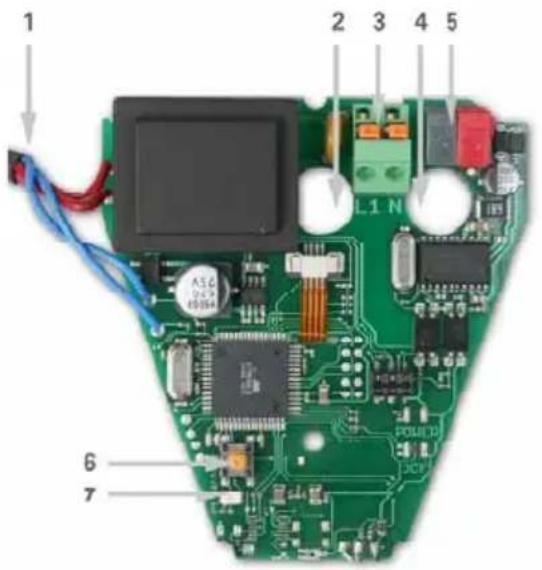
- Rain sensor connection cable assembled on the cover
- Opening for the 230V AC power supply cable
- Terminal for the 230V AC power supply; the terminals can be tightened for wires with a maximum section of 1.5sq.mm
- Opening for the KNX BUS cable
- KNX BUS terminal
- KNX push-button for programming
- KNX programming LED
3.2 Functions
- Rain detection:
via the relative sensor, the device analyses the conductivity of the rainwater and immediately detects when the rain stops, thanks to the built-in heater.
- Switchover outputs:
1 ON/OFF communication element.
- Logic operations:
there are 4 AND ports and 4 OR ports, each supporting up to four inputs. The switchover output value can be used directly as a logic input. The output of each logic port can generate the sending of one communication item of 1 bit, or two items of 1 byte.
4 INSTALLATION

ATTENTION: the device must only be installed by qualified personnel, observing the current regulations and the guidelines for KNX/EIB installations.
4.1Warnings for KNX/EIB installation
- The length of the BUS line between the KNX rain sensor and the power supply must not exceed 350 metres.
- The length of the BUS line between the KNX rain sensor and the furthest KNX/EIB device to be commanded must not exceed 700 metres.
- To avoid unwanted signals and overvoltages, do not create ring circuits.
- Keep a distance of at least 4mm between the individually insulated cables of the BUS line and those of the electricity line.
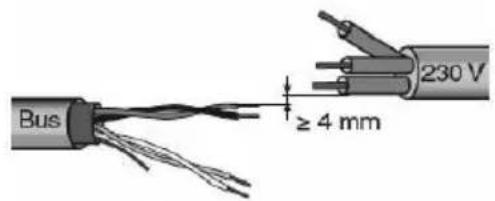
- Do not damage the electrical continuity conductor of the shielding.
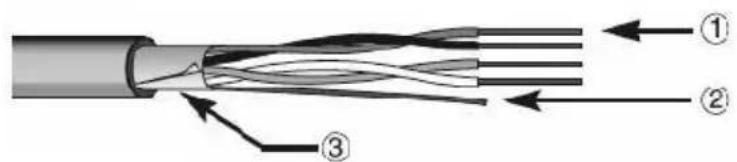
- BUS cable
- Electrical continuity conductor
- Shielding
ATTENTION: the unused BUS signal cables, and the electrical continuity conductor, must never touch live elements or the earth conductor!
4.2Warnings for installation
Installation, inspection, start-up, and troubleshooting operations on the rain sensor must only be carried out by qualified personnel.
The device is designed for a specific, appropriate use, and any inappropriate modification or failure to observe the user instructions will invalidate both the warranty and any claims.
The rain sensor must only be activated after being correctly assembled and after completing all the installation and start-up operations, and only within the sphere of its intended use.
Electric connections

ATTENTION: disconnect the mains supply before connecting the device to it!
For the electric connection layouts, refer to the examples below.
- Connect the red wire of the BUS cable to the red clamp (+) of the terminal, and the black wire to the black clamp (-).
Up to 4 BUS lines (wires of the same colour in the same clamp) can be connected to the BUS terminal.
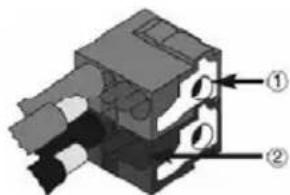
- Connection of the BUS device
-
Connection of the BUS cable
-
Insulate the shield, the electrical continuity conductor, and the remaining white and yellow wires of the BUS cable (when using a 4-conductor BUS cable), as these are not needed.
4.3 Positioning
For the assembly, choose a place where the rain sensor can detect atmospheric precipitation without any hindrance. The area above the sensor must be free of any objects that could produce drips even after the rain has ended.
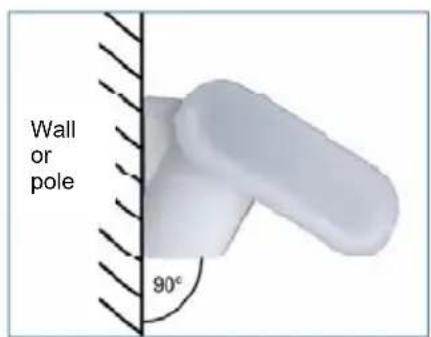
The rain sensor must be assembled vertically, on a wall or pole.
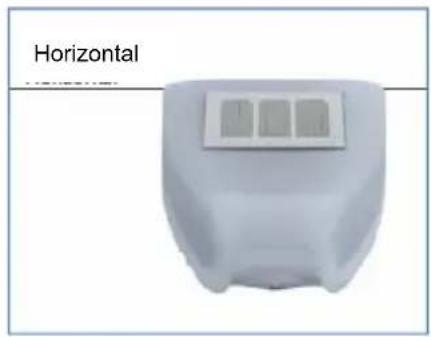
The rain sensor must be assembled horizontally.
4.4 Fixing the support
The rain sensor is supplied with a mounting support.
Fix the support vertically on a wall or pole.
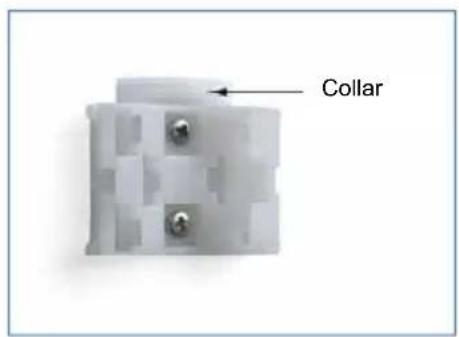
Surface-mounting: the flat part on the wall, and the part with the protruding collar facing upwards.
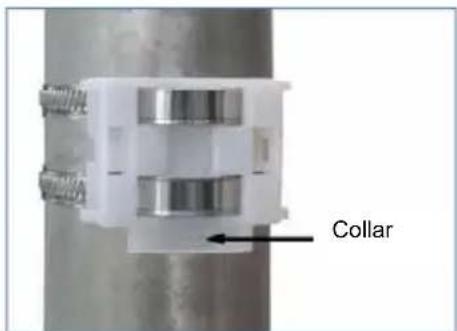
Pole-mounting: the curved part on the pole, and the collar facing downwards.
4.5 View of the rear part, and perforation layout
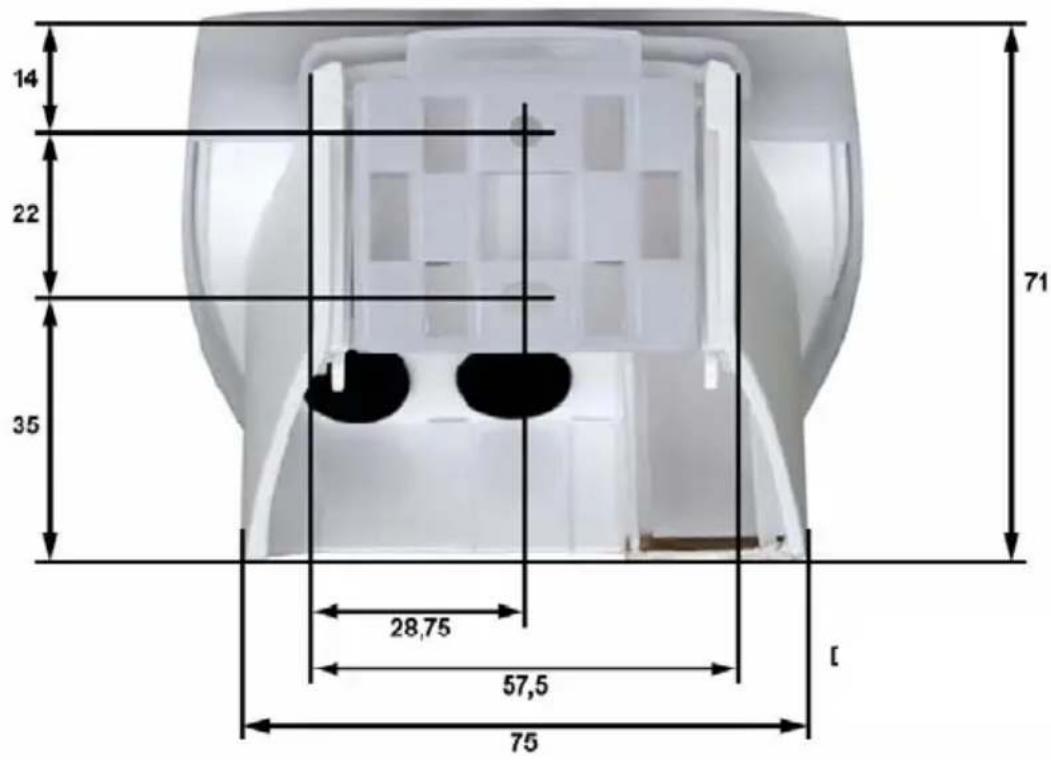
Dimensions in mm
Dimensions of the rear part of the housing with bracket.
Subject to improvement modifications.
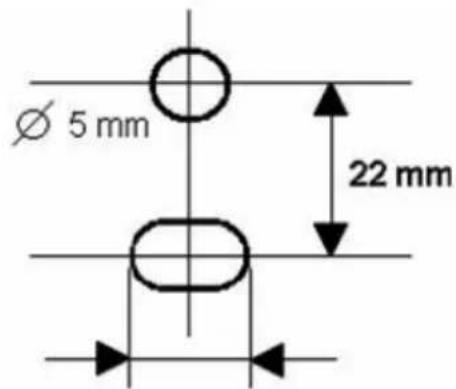
Perforation layout
Slot 7.5 × 5mm
4.6 Pre-arrangement of the sensor
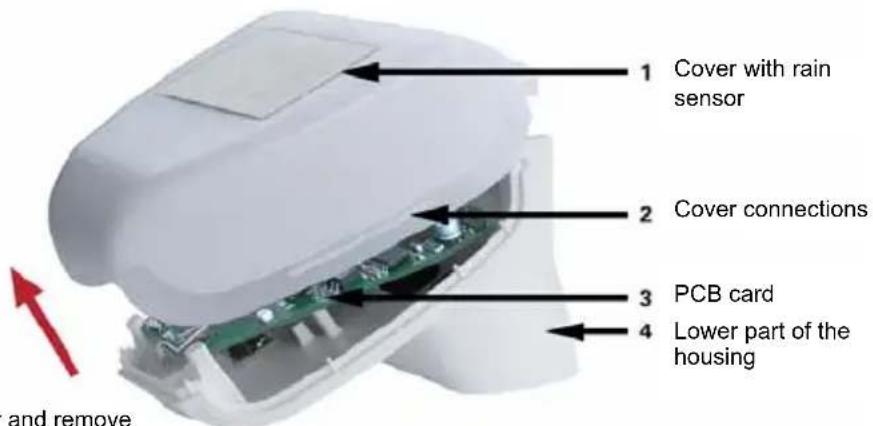
Unhook the cover and remove it by pulling upwards
The device cover has connections on the left and right, along the lower edge (see the figure).
Remove the cover carefully to avoid pulling the connection cable between the PCB card and the rain sensor assembled on the cover itself.
Push the power supply cable and the BUS connection through the rubber gasket on the sensor base, then connect the KNX BUS to the appropriate clamps.
4.7 Assembling the sensor
Close the housing by replacing the cover on the lower part.
The cover must be well inserted on both the right and the left (you should clearly hear a "click").
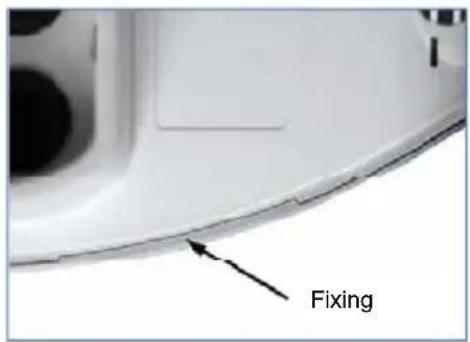
Check the cover and lower part are well locked together.
This figure shows the closed sensor from below.
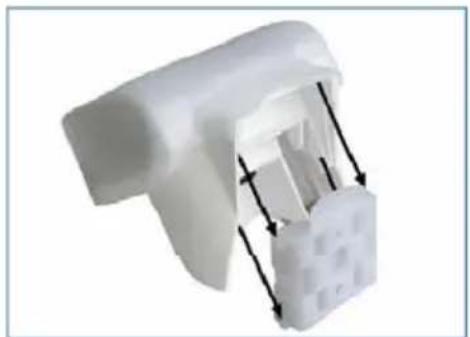
Push the housing down into the fixed support.
The protrusions on the support must clip into the housing guides.
5 PROGRAMMING
5.1 Application program
The application program can be downloaded from the website www.gewiss.com. Detailed information on the configuration parameters and their values is contained in the Technical Manual.
5.2 Programming the physical address
- Power the device via the BUS.
- Press the programming push-button to prepare the KNX rain sensor for the loading of the physical address from ETS.
To configure the device via ETS, both the main power supply and the KNX BUS power supply are needed.
6 MAINTENANCE
The sensor must be regularly checked (twice a year) for the presence of dirt, and cleaned if necessary. To remove the sensor, just pull it upwards (there will be some resistance from the fixing element). Do not open the sensor when it is raining, or in any case when water could get inside it: even just a few drops may damage the electronic system.

ATTENTION: for all maintenance and cleaning operations, disconnect the mains supply!
7 TECHNICAL DATA
Container: plastic material
Colour: white
Assembly: wall or pole
Degree of protection: IP44
Dimensions: 96 × 77 × 118 (L × H × D, mm)
Weight: 226g
Operating temperature: -30 ... +50°C
Power supply: 230V AC
Consumption: max. 20mA, with 10% ripple
BUS power supply: KNX BUS voltage
KNX BUS consumption: 8mA
Output data connector: KNX Standard
BCU type: included in the micro-controller
PEI type: 0
Group addresses: max. 254
Places: max. 255
Communication elements: 34
Heater: 1.2W
The following standards were taken into consideration when evaluating the electromagnetic compatibility of the product:
Transient emissions:
EN 60730-1:2000 Section EMC (23, 26, H23, H26) (threshold category: B)
EN 50090-2-2:1996-11 + A1:2002-01 (threshold category: B)
EN 61000-6-3:2001 (threshold category: B)
Resistance to interference:
EN 60730-1:2000 Section EMC (23, 26, H23, H26)
EN 50090-2-2:1996-11 + A1:2002-01
EN 61000-6-1:2004
The product has been tested on the basis of the above-mentioned standards, by an EMC-accredited laboratory.
FRANÇAIS
1 CONSIGNES GENÉRALES
2 CONTENU DE LA CONFECTION
3 DESCRIPTION GÉNÉRALE
Dimensions: 96 × 77 × 118 (L × H × P mm)
Poids:226g
Consumo bus KNX: 8mA
According to article 9 paragraph 2 of the European Directive 2004/108/EC and to article R2 paragraph 6 of the Decision 768/2008/EC, the responsible for placing the apparatus on the Community market is:
GEWISS S.p.A Via A. Volta, 1 - 24069 Cenate Sotto (BG) Italy Tel: +39 035 946 111 Fax: +39 035 945 270 E-mail: qualitymarks@gewiss.com
- PROGRAMMING
- MAINTENANCE
- TECHNICAL DATA
- GENERAL WARNINGS
- Attention!
- PACK CONTENTS
- GENERAL DESCRIPTION
- Briefly
- Functions
- INSTALLATION
- ATTENTION: the device must only be installed by qualified personnel, observing the current regulations and the guidelines for KNX/EIB installations.
- 4.1Warnings for KNX/EIB installation
- ATTENTION: the unused BUS signal cables, and the electrical continuity conductor, must never touch live elements or the earth conductor!
- 4.2Warnings for installation
- Electric connections
- ATTENTION: disconnect the mains supply before connecting the device to it!
- Positioning
- Fixing the support
- View of the rear part, and perforation layout
- Pre-arrangement of the sensor
- Assembling the sensor
- Application program
- Programming the physical address
- FRANÇAIS
- CONSIGNES GENÉRALES
- CONTENU DE LA CONFECTION
- DESCRIPTION GÉNÉRALE
Brand : Gewiss
Model : GW90881
Category : Detector