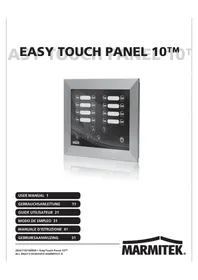
EasyTouch Panel 10 - Universal remote MARMITEK - Free user manual and instructions
Find the device manual for free EasyTouch Panel 10 MARMITEK in PDF.



| Product type | Universal touch remote control |
| Brand | Marmitek |
| Model | EasyTouch Panel 10 |
| Power supply | 2 AAA batteries (not included) |
| Dimensions | 260 x 205 x 20 mm |
| Weight | Approximately 400 g |
| Material | Brushed aluminum |
| Screen | Touch screen, resolution 255 x 255 dots |
| Communication protocol | Marmitek X-10 RF (powerline) |
| RF range | Up to 30 m in open field, 20 m through walls |
| Number of configurations | 2 (Memory 1 and Memory 2) |
| Maximum number of buttons per configuration | 30 |
| Button sizes | Small (15x15 mm), Medium (25x15 mm), Large (25x25 mm) |
| Programmable functions | On, Off, Toggle, Dim, All off, All on, Macros (4 actions) |
| Customization | Interchangeable wallpaper (personal photo) |
| Installation | Wall-mounted or tabletop |
| Operating temperature | -10°C to +60°C |
| Compliance | CE, WEEE directive 2002/96/EC |
| Cleaning | Soft cloth slightly damp (demineralized water), do not spray directly |
| Safety | Use only indoors, do not expose to moisture, keep batteries out of reach of children, observe polarity |
| Maintenance | Remove batteries when not in use for extended periods |
Frequently Asked Questions - EasyTouch Panel 10 MARMITEK
User questions about EasyTouch Panel 10 MARMITEK
0 question about this device. Answer the ones you know or ask your own.
Ask a new question about this device
Download the instructions for your Universal remote in PDF format for free! Find your manual EasyTouch Panel 10 - MARMITEK and take your electronic device back in hand. On this page are published all the documents necessary for the use of your device. EasyTouch Panel 10 by MARMITEK.
USER MANUAL EasyTouch Panel 10 MARMITEK
- To prevent short circuits, this product should only be used inside and only in dry spaces. Do not expose the components to rain or moisture. Do not use the product close to a bath, swimming pool etc.
- Do not expose the components of your systems to extremely high temperatures or bright light sources.
- In case of improper usage or if you have altered and repaired the product yourself, all guarantees expire. Marmitek does not accept responsibility in the case of improper usage of the product or when the product is used for purposes other than specified. Marmitek does not accept responsibility for additional damage other than covered by the legal product responsibility.
This product is not a toy. Keep out of reach of children. - The product should only be repaired or serviced by a qualified expert.
- Keep batteries out of the reach of children. Dispase of batteries as chemical waste. Never use old and new batteries or different types of batteries together. Remove the batteries when you are not using the system for a longer period of time. Check the polarity (+/-) of the batteries when inserting them in the product. Wrong positioning can cause an explosion.
- Automatic switching devices provide comfort, but can also be dangerous. They can surprise people or can ignite clothing hanging over an electric heat source. Please be careful and take appropriate measures to avoid accidents.
- In order to prevent damage (e.g. scratches) do not use any sharp objects for operating this product.
TABLE OF CONTENTS
| HOW DOES MARMITEK X-10 WORK? | 1 |
| ADRESSES | 1 |
| SIGNAL RANGE | 2 |
| INTRODUCTION | 2 |
| HOW DOES THE EASYTOUCH PANEL 10 WORK? | 3 |
| INSTALLATION (factory settings) | 3 |
| PERSONALISING YOUR EASYTOUCH PANEL 10 | 4 |
| BACKGROUND | 4 |
| EASYTOUCHPANEL10 AND SAFEGUARD OR TOTALGUARD ALARM SET | 6 |
| PROGRAMMING SUMMARY | 7 |
| FREQUENTLY ASKED QUESTIONS | 9 |
| TECHNICAL DATA | 10 |
HOW DOES MARMITEK X-10 WORK?
Marmitek X-10 components use the existing mains wiring to communicate (using Marmitek X-10 signals). You can build a complete system using the three different kind of components of the Marmitek X-10 System:
- Modules: These components will receive Marmitek X-10 signals and will switch or dim the attached lamp or appliance. Examples of these modules are lamp modules and appliance modules. These are available as build-in, micro, DIN rail and plug-in modules.
- Controllers: These components will transmit Marmitek X-10 signals and thus will control the Modules.
- Transmitters: Wireless components like remotes. The signals of these components will be received by a controller with transceiver functionality (IRRF 7243, TM13 or CM15Pro). The Transceiver will translate the signals into Marmitek X-10 signals on the power line.
ADRESSES
Up to a maximum of 256 different addresses can be preset. These are subdivided into a so-called HouseCode (A to P incl.) and a UnitCode (1 to 16 incl.). The HouseCode can also be set on the controllers, so that the controllers and modules become part of the same system. The address can be set either using code dials or by pressing buttons, depending on the type of module.
The Marmitek X-10 System uses standard commands, which control all units with the same HouseCode at the same time (e.g. all lights on, all off, etc.).
SIGNAL RANGE
Range of Marmitek X-10 signals over the Power Line and how to increase the range.
The Marmitek X-10 System is based on power line communication. The range of the Marmitek X-10 signals very much depends on the local circumstances. On average the range is a cable length of 80 meters.
If you have difficulties with the range of your Marmitek X-10 signals, please pay attention to the following facts:
-
When more than one phase is used for your electrical system, it is necessary to couple these phases for the Marmitek X-10 signals. For coupling you can use FD10 Phase Couplers/Filters. You only need to install a Phase Coupler/Filter when your wall outlets and light switches are divided over more than one phase (more than one group is no problem). For bigger buildings or longer distances we advice you to use an active repeater instead of passive FD10's.
-
It is possible that Marmitek X-10 signals are attenuated by devices and lights which are connected to the power line. In a normal home situation this effect is negligible (the Marmitek X-10 system is using active gain control to eliminate the effects). However, it is possible that a particular device in your house is attenuating the signals so much that the range of Marmitek X-10 signals is decreased significantly. When you have range problems, it is wise to try to locate the device which is attenuating the signals simply by unplugging devices from the power line, and testing the differences in range for your Marmitek system. When e.g. your conclusion is that e.g. your computer monitor is attenuating the signal, you can use a FM10 Plug-in Filter between the power line and the monitor to eliminate the effects.
Known devices which can cause attenuation are:
PC Monitors
PCs with heavy internal power supplies
Old Televisions
Copiers
Fluorescent Lights
Gas Discharge Lamps (Energy Saving Lamps)
- Some (old) devices are able to disturb the signal by transmitting noise on the power line. Because the Marmitek X-10 signals are transmitted on 120kHz , only noise on or near this frequency will have influence on the range. When you use a FM10 Filter to connect this device to the power line, the noise will be filtered.
- The Marmitek X-10 protocol has several mechanisms to avoid modules to be switched on or off by other sources than your Marmitek X-10 Controllers. However, it is possible that the Marmitek X-10 signals are disturbed by e.g. baby phones which are in TALK mode (continuous transmission). When these kind of signals are present on the power line it is possible that the Marmitek X-10 signals will not come through.
- The mains do not stop at the front door of your home. Everything that is attached to mains nearby your home can have influence on Marmitek X-10 signals (e.g. heavy machinery). If you think that your system is influenced by devices out of your house, it is advisable to install FD10 Phase Coupler/Filter on each phase entering the house. These filters will block signals coming into or going out of your house, but will also match the impedance for the mains. Hereby make your house Marmitek X-10 compatible for these units. The FD10's will not only filter but will also couple the phases (please see 1).
1. INTRODUCTION
Congratulations on the purchase of the Marmitek EasyTouch Panel 10! You can use this touch-screen control panel to easily operate all your Marmitek X-10 modules. You can use the background supplied to immediately try out the EasyTouch Panel 10's standard functions. If preferred, this background can be replaced by a photograph or image of your choice. You can then install the panel in or on the wall. In this way, the control panel becomes personalised and the Marmitek EasyTouch Panel 10 is suitable for every interior! You do not need a computer to programme the EasyTouch Panel 10.
Marmitek products are manufactured with great care and are of the highest quality. Please read this manual carefully and follow the instructions to ensure you make the most of the opportunities offered by this product.
2. HOW DOES THE EASYTOUCH PANEL 10 WORK?
The way the EasyTouch Panel 10 works can be compared to an X-10 remote control. With this product, however, instead of the fixed keys on a remote control, you can easily choose and define the position, size and role of each button yourself. The EasyTouch Panel 10 wirelessly sends the Marmitek X-10 commands (RF) to your Marmitek X-10 transceiver, which then places this on the power line. The installed Marmitek X-10 modules receive these commands and switch on or dim the connected lights and appliances.
3. INSTALLATION (FACTORY SETTINGS)
Remove the lip in the middle of the back of the panel, by the battery holder by pulling it, so that the EasyTouch Panel 10 can be connected to a power source. The factory settings are now immediately active and you can test the functions.
Ensure that you have placed the Marmitek X-10 transceiver within the range of the control panel and that this is set to the house code(s) to be used. This ensures that the RF signals from the EasyTouch Panel are converted into X-10 signals and are put onto the powerline. If you use a TM13 as transceiver, this will transfer all house codes if it is set to house code P.
Memory (factory settings)
The EasyTouch Panel 10 has a built in memory for 2 configurations (MEMORY 1 and MEMORY 2). The factory settings are saved in configuration 1. Configuration 2 is empty. You can programme both configurations 1 and 2 as you wish (see Chapter 4. PERSONALISING YOUR EASYTOUCH PANEL 10).
Operating (factory settings)
The following diagram shows the commands that are pre-programmed as factory settings in EasyTouch Panel 10's MEMORY 1:
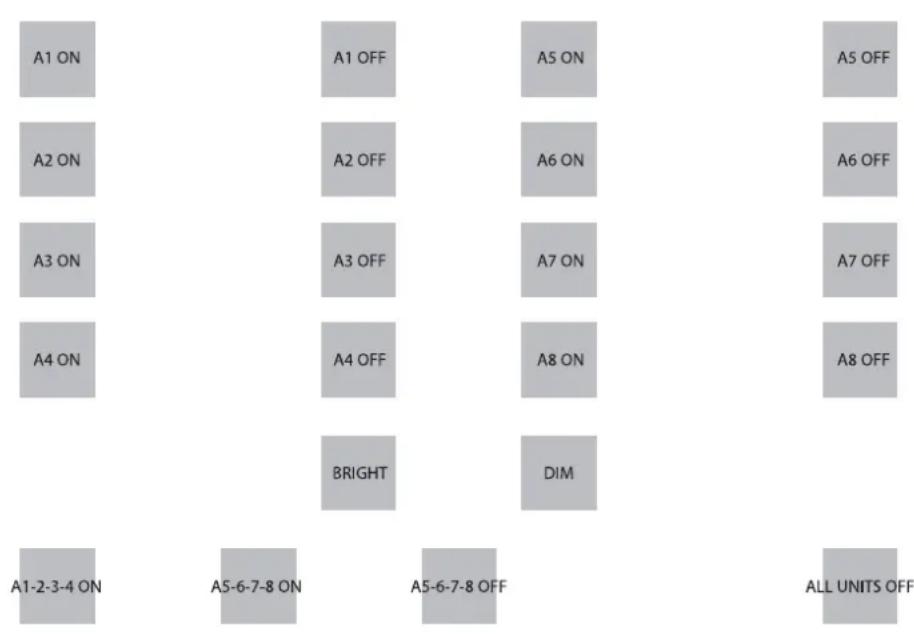
If you press on the first button, then address A1 ON will be sent. The appliances and/or lights that are at the address (A1) will, therefore, go ON. And so on.
You can use the BRIGHT and DIM buttons to brighten or dim the light that you last operated.
Note: this only applies if a light (module) is installed at this address.
Below, there are three examples of so-called macro buttons. A macro carries out the commands of between 1 and 4 other buttons. By pressing on the macro button, bottom left, you can send A1 ON, A2 ON, A3 ON and A4 ON successively.
The 2nd macro button will switch on modules A5 to A8 one by one. The 3rd macro will switch off modules A5 to A8 one by one. The button on the far right sends the 'ALL UNITS OF' command and all units on house code A will be switched off as a result.
If you are using a TM13 transceiver and this is set to house code A, you can test the panel by using the first 2 buttons (A1 ON, A1 OFF) to switch the light or appliance that is controlled in the TM 13 on and off. TM 13's unit code is always 1.
4. PERSONALISING YOUR EASYTOUCH PANEL 10
The factory settings are handy for a short demonstration or test. However, in order to get the most from the options offered by the EasyTouch Panel 10, you can set it to suit you. This is very easy to do, on the back of the panel. You do not need a computer for this. You are free to choose the position, size and function of the buttons.
Configurations
You can configure MEMORY 1 as well as MEMORY 2 as you wish and, if required, easily switch between the 2 configurations. If you carry out a FACTORY RESET, configuration 1 will revert to factory settings. Configuration 2 will then be empty.
Buttons
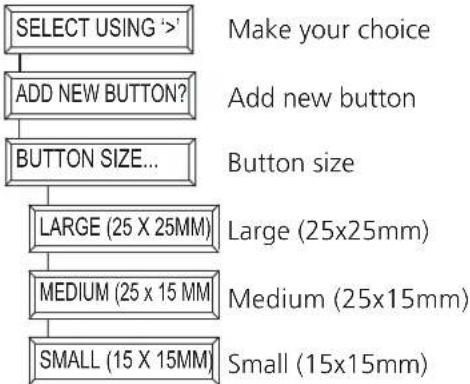
You can programme a maximum of 30 buttons per configuration. You can choose from 3 dimensions:
Small (15x15mm)
Medium (25x15mm)
Large (25x25mm).
Don't forget that there must be around half a centimetre between the buttons.
Functions and addresses
You can use all functions, house and unit codes with one another in 1 configuration.
5. BACKGROUND
Creating
You can place the desired background in the panel. You may wish to use a photo of your family, a map of your home or any other image, photo or diagram. More information can be found at www.marmitek.com.
Changing
Place the EasyTouch Panel 10 on a table with the touch screen facing downwards. Turn the two catches towards the centre of the panel. You can now carefully open the panel and replace the background with your own. Close the panel and turn the two catches back again.
PROGRAMMING
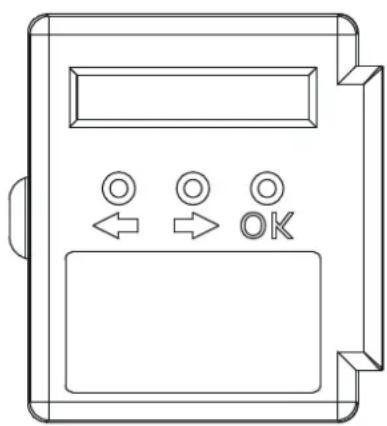
Place the EasyTouch Panel 10 on a table with the touch screen facing downwards. On the right hand side you can see an LCD display with 3 buttons underneath: ↔ , → and the 'OK' button.
Press a random button. The display will show the text and you hear a short beep to confirm that you have pressed a button.
Use the ↔, → to browse through the menu. A summary of the menus can be found on the first page of this manual.
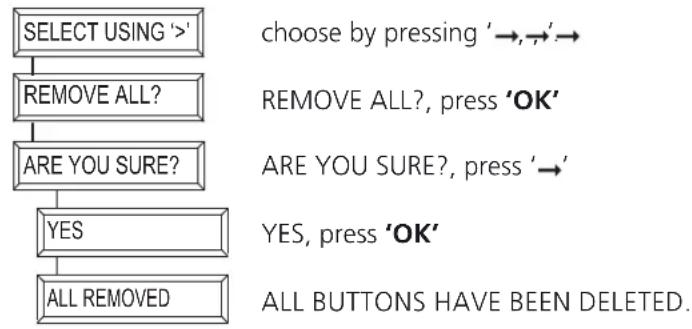
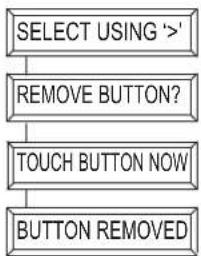
Deleting buttons
If you wish to define your own configuration, you must first delete the existing buttons. In this way, you delete all the existing buttons in the active configuration (configuration 1 or 2):
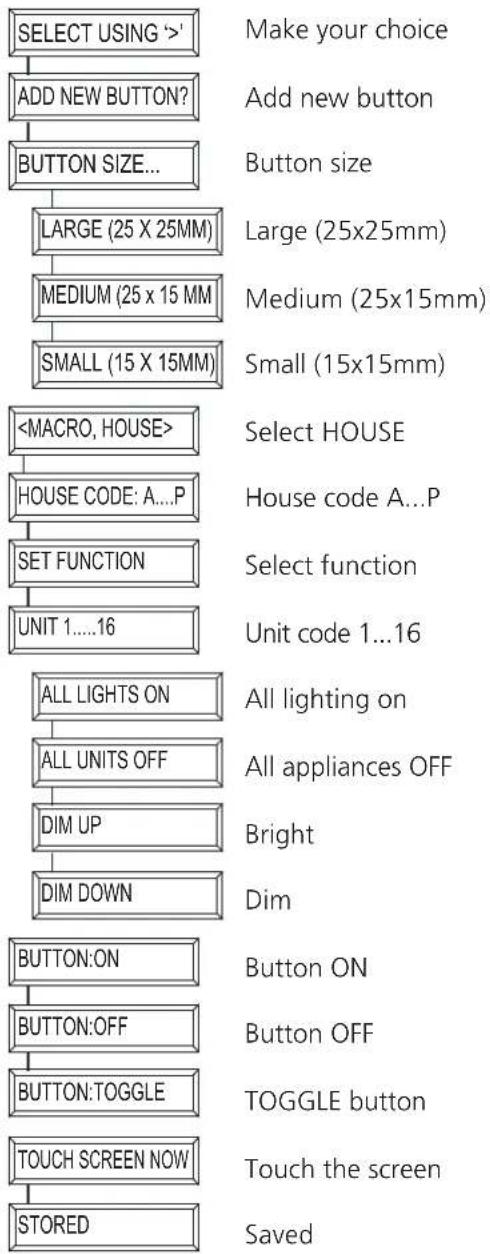
Add buttons
You are free to choose the position, size and function of the buttons. Here, we provide you with an example of how you add a large (25x25mm) button with house/unit code 'B4' and function 'ON'
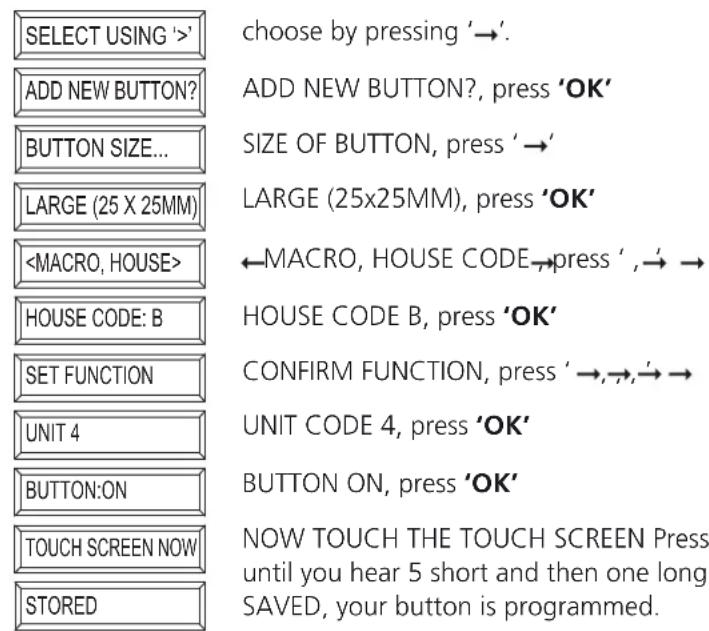
*Note: If you try to programme one button too close to another one, the message 'ERROR OVERLAP!' will appear on the screen. You must then choose another position for the button.
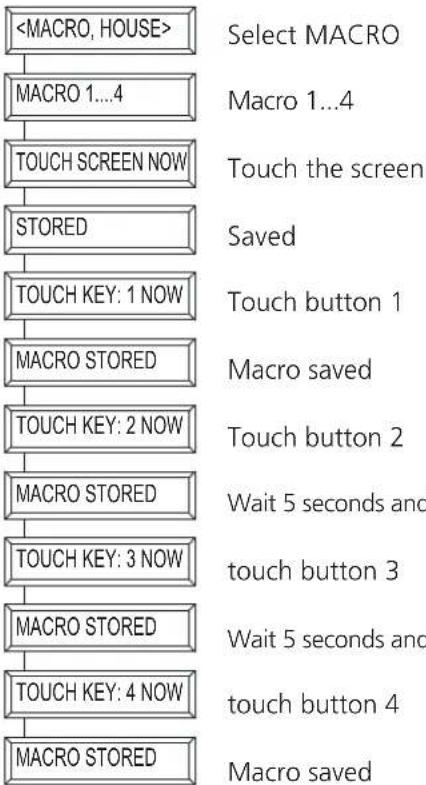
Adding macros
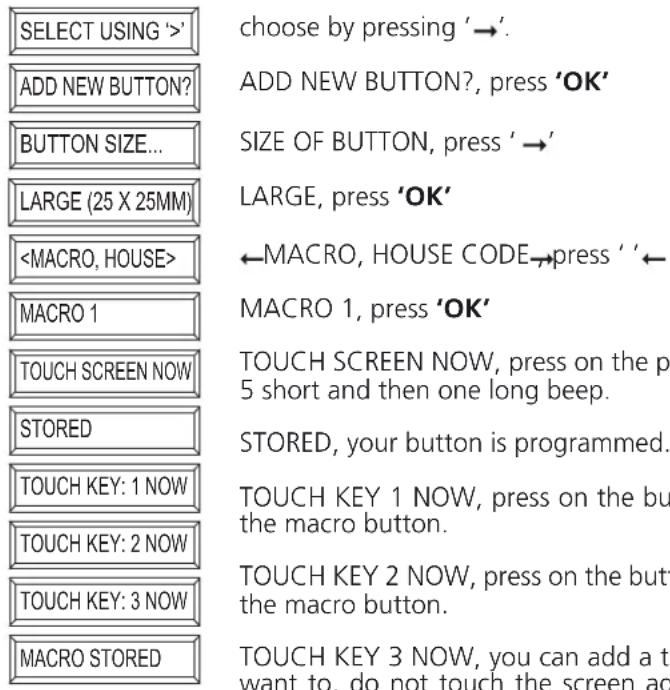
It is also possible to define a button which will carry out the functions of between 1 and 4 other buttons. This is known as a macro function. You first programme the individual buttons. If you use the macro button once this has been programmed, the commands which you have selected under the programmed button will be carried out one by one.
Here, we provide you with an example of how you can add a macro button (25x25mm) which will carry out two commands:
6. EASYTOUCHPANEL10 AND SAFEGUARD OR TOTALGUARD ALARM SET
If you own the SafeGuard or TotalGuard alarm set, you can also switch your set on or off with the EasyTouchPanel10.
You can add the following push buttons:FULL ARM, HOME ARM, DISARM, PANIC.
If you add these push buttons, you are of course not supposed to show them in your own background. They should be situated in a 'secret' place on your EasyTouchPanel10, only known by authorized persons. In the fold-out diagram you can find the structure to program these buttons.
When you have programmed one of these push buttons, then follow the procedure 'Registration of the key fob remote control' in the user manual of your SafeGuard/TotalGuard.
When asked to push a key of the key fob, you have to push the programmed push button (FULL ARM, HOME ARM, DISARM or PANIC) on your EasyTouchPanel10. The base will emit a beep to confirm the action. The text 'AFST X OK' will appear on the display.
You only have to execute this procedure once.
7.PROGRAMMINGSUMMARY
Adding a macro button
Adding a function button
Delete a button
Make your choice
Delete button
Touch the button
Button deleted
Delete all buttons
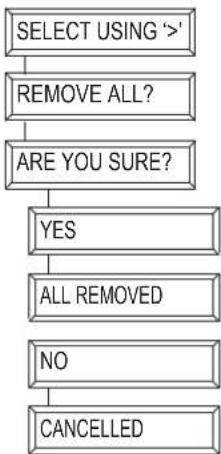
Make your choice
Delete all buttons?
Are you sure?
YES
All buttons deleted
NO
Cancelled
Factory settings
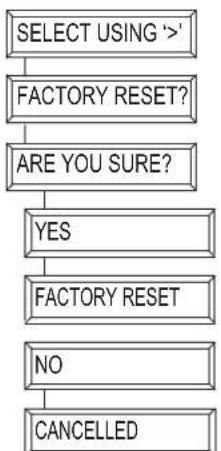
Make your choice
Factory settings?
Are you sure?
YES
Factory settings
NO
Cancelled
Change memory
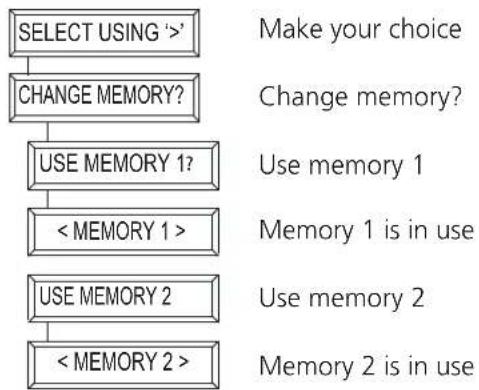
8. FREQUENTLY ASKED QUESTIONS
What is the reason for modules to switch on/off spontaneously?
It is possible that a Marmitek X-10 System is installed at one of your neighbours using the same House Code. To solve this problem try to change the House Code of your system, or have FD10 Phase Coupler/Filter installed at your incoming mains.
My modules will not respond to my controller.
Make sure that the House Code on all Modules and Controllers are set to the same House Code (A . P).
My modules will not react to my remote / sensor.
When you use a remote or sensor, you should have at least one TM13 Transceiver or Marmitek X-10 Security Console installed in your house. These components will translate the radio signals to the Marmitek X-10 signal on the power line. Using several remotes and sensors, you only need one central transceiver.
Am I able to increase the range of my remotes by using more Transceivers?
Yes, you can use more than one TM13 Transceiver in your home when the range of your Remote is not sufficient. The TM13 is using so called collision detection to prevent signals to be disturbed when more than one TM13 is transmitting. TM13's will wait for a quite power line before transmitting their data. To prevent your Marmitek X-10 System to become slow or to prevent dimming from becoming less smooth, make sure that the TM13 units are placed as far away from each other as possible.
I have defined a button but if I press this I hear a short beep but nothing happens.
The EasyTouch Panel 10 ensures that, after touching the screen, the corresponding Marmitek X-10 code is sent wirelessly. This signal must be received by a Marmitek X-10 transceiver which then places this signal on the power line and can then operate a module. Check whether your transceiver is receiving this by using a TM13 and defining, for example, a TOGGLE button which is set to the house code of the TM13 and unit code 1. If you touch this button on the screen, leaving a slight pause of 1 second between each touch, you should be able to hear the TM13 switch. If you have used several house codes together, ensure that you also use several TM13 modules, each of which is set to a house code that has been used. Or set the house code of your TM13 to house code P. Then, the TM13 will place ALL received house codes on the power line.
I cannot find the selections 'ALL LIGHTS ON', 'ALL LIGHTS OFF', 'ALL UNITS OFF', 'DIM UP' and 'DIM DOWN'.
These functions are not bound to a unit code. If you wish to programme these functions, browse through the unit codes (1...16). You will find the above functions after unit code 16.
How can I move a button?
You move a button by deleting the existing button and adding it again.
How can I clean the screen?
You can use a clean, soft, lint-free cloth which you can moisten slightly with distilled water. Do not spray any fluids directly onto the screen.
Do you still have questions? Please check out www.marmitek.com for more information.
9. TECHNICAL DATA
Touch screen and frame
Power: 2 x AAA batteries
Material frame: Brushed aluminium
Photo size: 218x165mm
Visible photo size: 210x154mm
Dimensions: 260 × 205 × 20 mm
Transmitter
Transmitter: Incorporated Marmitek X-10/RF transmitter
Antenna: Integrated antenna
Range: Up to 30 free field, up to 20m through floors and walls
Protocol: Marmitek X-10 RF protocol
Controller
Number of configurations: Maximum 2
Number of buttons: Maximum 30 per configuration
Button size: Small (15x15mm)
Medium (25x15mm)
Big (25x25mm)
Minimum room between buttons: 4mm
Screen resolution: 255x255 points
X resolution 0.9mm
Y resolution 0.7mm
Memory: Settings are saved after loss of power
Functions: Set house/unit code, Unit ON, Unit OFF, ON, CHANGE (toggle),
ALL UNITS OFF, ALL LIGHTING ON DIM+, DIM-
3 macros each with 4 functions
2 memories for buttons and settings
a. Mem 1: with factory settings
b. Mem 2: empty
Factory reset
Ambient temperature: -10° +60° C (in operation)
Specifications may be modified without prior notice.

Environmental Information for Customers in the European Union
e
unsorted municipal waste. The symbol indicates that this product should be disposed of separately from regular household waste streams. It is your
responsibility to dispose of this and other electric and electronic equipment via designated collection facilities appointed by the government or local authorities.
C
SICHERHEITSHINWEISE
VEILIGHEIDSWAARSCHUWINGEN
GROOT (25x25mm), druk op "OK"
←MACRO,HUISCODE→druk op"→
HUISCODE B, druk op "OK"
DECLARATION OF CONFORMITY
Hereby, Marmitek BV, declares that this EasyTouchPanel10 is in compliance with the essential requirements and other relevant provisions of the following Directives:
Directive 1999/5/EC of the European Parliament and of the Council of 9 March 1999 on radio equipment and telecommunications terminal equipment and the mutual recognition of their conformity
DIRECTIVE 2004/108/EC OF THE EUROPEAN PARLIAMENT AND OF THE COUNCIL of 15 December 2004 on the approximation of the laws of the Member States relating to electromagnetic compatibility
Directive 2002/95/EC of the European Parliament and of the Council of 27 January 2003 on the restriction of the use of certain hazardous substances in electrical and electronic equipment
Hiermit erklart Marmitek BV die Übereinstimmung des Gerätes EasyTouchPanel10 den grundlegenden Anforderungen und den anderen relevanten Festlegungen der Richtlinien:
Richtlinie 1999/5/EG des Europäischen Parlaments und des Rates vom 9. März 1999 über Funkanlagen und Telekommunikationsendeinrichtungen und die gegenseitige Anerkennung ihrer Konformität
RICHTLINIE 2004/108/EG DES EUROPÄISCHEN PARLAMENTS UND DES RATES vom 15. Dezember 2004 zur Angleichung der Rechtsvorschriften der Mitgliedstaaten über die elektromagnetische Verträgelichkeit
Richtlinie 2002/95/EG des Europäischen Parlaments und des Rates vom 27. Januar 2003 zur Beschänkung der Verwendung bestimmter gefährlicher Stoffe in Elektro- und Elektronikgeräten
Par la presente Marmitek BV déclare que l'appareil EasyTouchPanel10 est conforme aux exigences essentielles et aux autres dispositions pertinentes de la directives:
Directive 1999/5/CE du Parlement européen et du Conseil, du 9 mars 1999, concernant les équipements hertziens et les équipements terminaux de télécommunications et la reconnaissance mutuelle de leur conformité
DIRECTIVE 2004/108/CE DU PARLEMENT EUROPEEN ET DU CONSEIL du 15 décembre 2004 relative au rapprochement des législations des États membres concernant la compatibilité electromagnétique
Directive 2002/95/CE du Parlement européen et du Conseil du 27 janvier 2003 relative à la limitation de l'utilisation de certaines substances dangereuses dans les équipements électriques et Electroniques
Marmitek BV declara que este EasyTouchPanel10 cumple con las exigencias esenciales y con las demas reglas relevantes de la directriz:
Direcva 1999/5/CE del Parlamento Europeo y del Consejo, de 9 de marzo de 1999, sobre equipos radioeléctricos y equipos terminales de telecomunicación y reconocimiento mutuo de su conformidad
DIRECTIVA 2004/108/CE DEL PARLAMENTO EUROPEO Y DEL CONSEJO de 15 de días de 2004 relativa a laapproximacion de las legislaciones de los Estados miembros en materia de compatibilidad electromagnética
Directiva 2002/95/CE del Parlamento Europeo y del Consejo de 27 de enero de 2003 sobre restricciones a la utilizacion de determinadas sustancias peligrosas en aparatos electricos y electronicos
Copyrights
Marmitek is a trademark of Pattitude B.V. • EasyTouchPanel10 is a trademark of Marmitek B.V. All rights reserved.
Copyright and all other proprietary rights in the content (including but not limited to model numbers, software, audio, video, text and photographs) rests with Marmitek B.V. Any use of the Content, but without limitation, distribution, reproduction, modification, display or transmission without the prior written consent of Marmitek is strictly prohibited. All copyright and other proprietary notices shall be retained on all reproductions.
DECLARATION OF CONFORMITY


- TABLE OF CONTENTS
- HOW DOES MARMITEK X-10 WORK
- ADRESSES
- SIGNAL RANGE
- RANGE OF MARMITEK X-10 SIGNALS OVER THE POWER LINE AND HOW TO INCREASE THE RANGE
- IF YOU HAVE DIFFICULTIES WITH THE RANGE OF YOUR MARMITEK X-10 SIGNALS, PLEASE PAY ATTENTION TO THE FOLLOWING FACTS
- KNOWN DEVICES WHICH CAN CAUSE ATTENUATION ARE
- INTRODUCTION
- HOW DOES THE EASYTOUCH PANEL 10 WORK
- INSTALLATION (FACTORY SETTINGS)
- MEMORY (FACTORY SETTINGS)
- OPERATING (FACTORY SETTINGS)
- PERSONALISING YOUR EASYTOUCH PANEL 10
- CONFIGURATIONS
- BUTTONS
- FUNCTIONS AND ADDRESSES
- BACKGROUND
- CREATING
- CHANGING
- PROGRAMMING
- DELETING BUTTONS
- ADD BUTTONS
- ADDING MACROS
- EASYTOUCHPANEL10 AND SAFEGUARD OR TOTALGUARD ALARM SET
- 7.PROGRAMMINGSUMMARY
- ADDING A MACRO BUTTON
- ADDING A FUNCTION BUTTON
- DELETE A BUTTON
- DELETE ALL BUTTONS
- FACTORY SETTINGS
- CHANGE MEMORY
- FREQUENTLY ASKED QUESTIONS
- WHAT IS THE REASON FOR MODULES TO SWITCH ON/OFF SPONTANEOUSLY
- MY MODULES WILL NOT RESPOND TO MY CONTROLLER
- MY MODULES WILL NOT REACT TO MY REMOTE / SENSOR
- AM I ABLE TO INCREASE THE RANGE OF MY REMOTES BY USING MORE TRANSCEIVERS
- I HAVE DEFINED A BUTTON BUT IF I PRESS THIS I HEAR A SHORT BEEP BUT NOTHING HAPPENS
- I CANNOT FIND THE SELECTIONS 'ALL LIGHTS ON', 'ALL LIGHTS OFF', 'ALL UNITS OFF', 'DIM UP' AND 'DIM DOWN
- HOW CAN I MOVE A BUTTON
- HOW CAN I CLEAN THE SCREEN
- TECHNICAL DATA
- TOUCH SCREEN AND FRAME
- TRANSMITTER
- CONTROLLER
- ENVIRONMENTAL INFORMATION FOR CUSTOMERS IN THE EUROPEAN UNION
- SICHERHEITSHINWEISE
- VEILIGHEIDSWAARSCHUWINGEN
- DECLARATION OF CONFORMITY
- COPYRIGHTS
Brand : MARMITEK
Model : EasyTouch Panel 10
Category : Universal remote