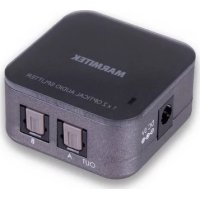
MARMITEK Split TS12 - Universal remote

Split TS12 - Universal remote MARMITEK - Free user manual and instructions

Find the device manual for free Split TS12 MARMITEK in PDF.

English EN Download 💬 AI Question 10 questions ⚙️ Specs
📄

Document temporarily unavailable

The manual is currently being transferred to our new server. It will be accessible again in a few hours. Thank you for your patience.

Pick your language and provide your email: we'll send you a specifically translated version.
Brand Marmitek
Model Split TS12
Product type Digital optical audio splitter (Toslink)
Dimensions 46 × 46 × 24 mm
Weight 22 grams
Power supply 100-240 VAC, 50-60 Hz (5V DC power adapter)
Audio input 1x optical (Toslink)
Audio output 2x optical (Toslink)
Supported audio formats PCM2, Dolby Digital 5.1, DTS 5.1
Sampling frequency Up to 192 kHz
Operating temperature 0 to +40°C
Operating humidity 10% to 85%
Maintenance and cleaning Clean with a dry, soft cloth. Do not use solvents or abrasive products.
Safety Use only indoors in a dry place. Do not open the device. Disconnect before cleaning.
Package contents 1x splitter, 1x power adapter, 1x user manual

Frequently Asked Questions - Split TS12 MARMITEK

How to connect the Split TS12?
Connect your audio source (e.g., TV) to the optical input of the Split TS12 using a Toslink cable. Then connect your two output devices (amplifiers, speakers) to the optical outputs. Finally, connect the power adapter and plug it in.
What audio formats are supported?
The Split TS12 supports PCM2 (uncompressed stereo), Dolby Digital 5.1, and DTS 5.1 compressed audio signals.
Can I use the Split TS12 with a Dolby Atmos system?
The Split TS12 does not support Dolby Atmos as this format requires more channels and a different transport. It is limited to PCM2, Dolby Digital 5.1, and DTS 5.1.
What is the maximum sampling frequency?
The maximum sampling frequency is 192 kHz, ensuring excellent sound quality.
Does the Split TS12 require an external power supply?
Yes, the Split TS12 requires an external power supply via the included power adapter (5V DC). Plug it into a power outlet.
How to clean the Split TS12?
Clean the device with a dry, soft cloth. Never use liquids, solvents, or abrasive products. Always disconnect before cleaning.
What to do if the power LED does not light up?
Check that the power adapter is properly connected to the Split TS12 and to the power outlet. If the LED still does not light up, the adapter may be defective. Contact customer service.
Can I connect the Split TS12 to a TV?
Yes, if your TV has an optical audio output (Toslink), you can connect it to the input of the Split TS12 to distribute the sound to two audio systems.
Is the Split TS12 compatible with standard optical cables?
Yes, the Split TS12 uses standard Toslink connectors. Make sure to use good quality digital optical cables.
Where to find the declaration of conformity?
The full declaration of conformity is available on Marmitek's website: http://www.marmitek.com.

User questions about Split TS12 MARMITEK

0 question about this device. Answer the ones you know or ask your own.

Ask a new question about this device

The email remains private: it is only used to notify you if someone responds to your question.

No questions yet. Be the first to ask one.

Download the instructions for your Universal remote in PDF format for free! Find your manual Split TS12 - MARMITEK and take your electronic device back in hand. On this page are published all the documents necessary for the use of your device. Split TS12 by MARMITEK.

USER MANUAL Split TS12 MARMITEK

Manual assistant
Powered by Anthropic
Waiting for your message
Product information

Brand : MARMITEK

Model : Split TS12

Category : Universal remote