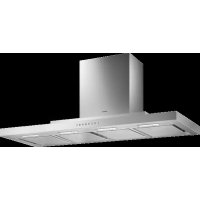
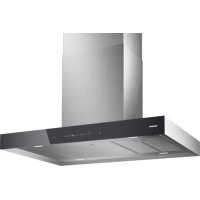
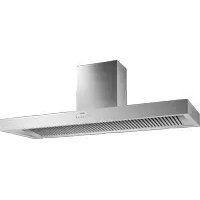
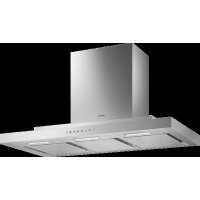
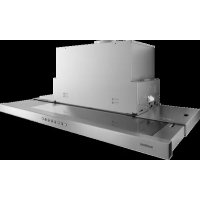
AW230120 - Range hood GAGGENAU - Free user manual and instructions
Find the device manual for free AW230120 GAGGENAU in PDF.



| Product Type | Range hood |
| Brand | Gaggenau |
| Model | AW230120 |
| Category | Hood |
| Operating modes | Air extraction and Air recirculation |
| Suction power | 3 speeds + intensive speed |
| Intensive speed | Automatic return to previous speed after 6 minutes |
| Automatic mode | Yes, with air quality sensor (4 adjustable sensitivity levels) |
| Filter saturation indicator | Audible and visual signal, resettable |
| Lighting | LED with brightness dimming |
| Audible signal | Activable and deactivatable |
| Grease filter | Metallic, dishwasher-safe or hand-washable (at least every 2 months) |
| Activated carbon filter (optional) | For recirculation mode, reference AA200812 (initial) / AA200110 (replacement) |
| Surface cleaning | Stainless steel, lacquered, aluminum, plastic, glass - soft cloth and non-abrasive products |
| Power supply | 230 V, 50 Hz (standard estimate) |
| Safety | Fire protection, electric shock, burns; child lock (not explicitly mentioned but supervision required) |
| After-sales service | Telephone assistance by country (see manual) |
Frequently Asked Questions - AW230120 GAGGENAU
User questions about AW230120 GAGGENAU
0 question about this device. Answer the ones you know or ask your own.
Ask a new question about this device
Download the instructions for your Range hood in PDF format for free! Find your manual AW230120 - GAGGENAU and take your electronic device back in hand. On this page are published all the documents necessary for the use of your device. AW230120 by GAGGENAU.
USER MANUAL AW230120 GAGGENAU
Table of contents 13
Störungen – was tun? 11
Kundendienst 12
Hinweise
Störungen – was tun?
Wechselfilter
AA200110
Table of contents
Important safety information 14
Environmental protection 16
Saving energy 16
Environmentally-friendly disposal 16
Operating modes 17
Exhaust air mode 17
Circulating-air mode 17
Operation 17
Operating the appliance 17
Setting the fan 17
Intensive setting 18
Automatic mode 18
Sensor control 18
Saturation display 18
Lighting 19
Audible signal 19
Cleaning and maintenance 19
Trouble shooting 21
After-sales service 22
Accessories for circulating-air mode 22
Additional information on products, accessories, replacement parts and services can be found at
www.gaggenau.com and in the online shop
www.gaggenau-eshop.com
⚠️ Important safety information
Read these instructions carefully. Only then will you be able to operate your appliance safely and correctly. Retain the instruction manual and installation instructions for future use or for subsequent owners.
The appliance can only be used safely if it is correctly installed according to the safety instructions. The installer is responsible for ensuring that the appliance works perfectly at its installation location.
This appliance is intended for domestic use and the household environment only. The appliance is not intended for use outside. Do not leave the appliance unattended during operation. The manufacturer is not liable for damage which is caused by improper use or incorrect operation.
This appliance is intended for use up to a maximum height of 2000 metres above sea level. This appliance may be used by children over the age of 8 years old and by persons with reduced physical, sensory or mental capabilities or by persons with a lack of experience or knowledge if they are supervised or are instructed by a person responsible for their safety how to use the appliance safely and have understood the associated hazards.
Children must not play with, on, or around the appliance. Children must not clean the appliance or carry out general maintenance unless they are at least 8 years old and are being supervised.
Keep children below the age of 8 years old at a safe distance from the appliance and power cable.
Check the appliance for damage after unpacking it. Do not connect the appliance if it has been damaged in transport.
This appliance is not intended for operation with an external clock timer or a remote control.
Danger of suffocation!
Packaging material is dangerous to children.
Never allow children to play with packaging material.
Danger of death!
Risk of poisoning from flue gases that are drawn back in.
Always ensure adequate fresh air in the room if the appliance is being operated in exhaust air mode at the same time as room air-dependent heat-producing appliance is being operated.
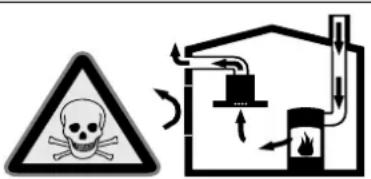
Room air-dependent heat-producing appliances (e.g. gas, oil, wood or coal-operated heaters, continuous flow heaters or water heaters) obtain combustion air from the room in which they are installed and discharge the exhaust gases into the open air through an exhaust gas system (e.g. a chimney).
In combination with an activated vapour extractor hood, room air is extracted from the kitchen and neighbouring rooms - a partial vacuum is produced if not enough fresh air is supplied. Toxic gases from the chimney or the extraction shaft are sucked back into the living space.
- Adequate incoming air must therefore always be ensured.
- An incoming/exhaust air wall box alone will not ensure compliance with the limit.
Safe operation is possible only when the partial vacuum in the place where the heat-producing appliance is installed does not exceed 4 Pa (0.04 mbar). This can be achieved when the air needed for combustion is able to enter through openings that cannot be sealed, for example in doors, windows, incoming/exhaust air wall boxes or by other technical means.
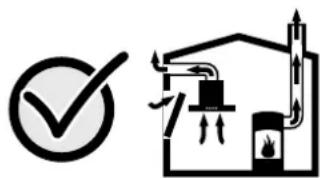
In any case, consult your responsible Master Chimney Sweep. He is able to assess the house's entire ventilation setup and will suggest the suitable ventilation measures to you.
Unrestricted operation is possible if the vapour extractor hood is operated exclusively in the circulating-air mode.
Risk of fire!
- Grease deposits in the grease filter may catch fire.
Clean the grease filter at least every 2 months.
Never operate the appliance without the grease filter.
- Grease deposits in the grease filter may catch fire. Never work with naked flames close to the appliance (e.g. flambéing). Do not install the appliance near a heat-producing appliance for solid fuel (e.g. wood or coal) unless a closed, non-removable cover is available. There must be no flying sparks.
- Hot oil and fat can ignite very quickly. Never leave hot fat or oil unattended. Never use water to put out burning oil or fat. Switch off the hotplate. Extinguish flames carefully using a lid, fire blanket or something similar.
- When gas burners are in operation without any cookware placed on them, they can build up a lot of heat. A ventilation appliance installed above the cooker may become damaged or catch fire. Only operate the gas burners with cookware on them.
- Operating several gas burners at the same time gives rise to a great deal of heat. The ventilation appliance may become damaged or catch fire. The ventilation appliance must only be combined with gas burners that do not exceed the maximum total output of 18 kW. If the total output exceeds 12 kW, the local regulations regarding room ventilation, room size and the combination of ventilation appliances with recirculation or circulated air mode must be observed.
Risk of burns!
The accessible parts become very hot when in operation. Never touch hot parts. Keep children at a safe distance.
Risk of injury!
- Components inside the appliance may have sharp edges. Wear protective gloves.
- Items placed on the appliance may fall down. Do not place any objects on the appliance.
- The light emitted by LED lights is very dazzling, and can damage the eyes (risk group 1). Do not look directly into the switched on LED lights for longer than 100 seconds.
Risk of electric shock!
- A defective appliance may cause electric shock. Never switch on a defective appliance. Unplug the appliance from the mains or switch off the circuit breaker in the fuse box. Contact the after-sales service.
- Incorrect repairs are dangerous. Repairs may only be carried out and damaged power cables replaced by one of our trained after-sales technicians. If the appliance is defective, unplug the appliance from the mains or switch off the circuit breaker in the fuse box. Contact the after-sales service.
- Do not use any high-pressure cleaners or steam cleaners, which can result in an electric shock.
Causes of damage
Caution!
Risk of damage due to corrosion. Always switch on the appliance while cooking to avoid condensation. Condensate can produce corrosion damage.
Risk of damage due to ingress of humidity into the electronic circuitry. Never clean operator controls with a wet cloth.
Surface damage due to incorrect cleaning. Clean stainless steel surfaces in the direction of the grain only. Do not use any stainless steel cleaners for operator controls.
Surface damage due to strong or abrasive cleaning agents. Never use strong and abrasive cleaning agents.
Risk of damage from returning condensate. Install the exhaust duct in such a way that it falls away from the appliance slightly ( 1° slope).
Environmental protection
Your new appliance is particularly energy-efficient. Here you can find tips on how to save even more energy when using the appliance, and how to dispose of your appliance properly.
Saving energy
- During cooking, ensure that there is a sufficient supply of air so that the extractor hood can work efficiently and with a low level of operating noise.
- Adjust the fan speed to the intensity of the cooking fumes. Only use intensive mode where this is required. A lower fan speed means that less energy is consumed.
- If there are intensive cooking fumes, select a higher fan speed in good time. If cooking fumes have already spread in the kitchen, the extractor hood must be operated for longer.
- Switch off the extractor hood if you no longer require it.
- Switch off the lighting if you no longer require it.
- Clean and, if required, replace the filter at regular intervals in order to increase the effectiveness of the ventilation system and to prevent the risk of fire.
Environmentally-friendly disposal
Dispose of packaging in an environmentally-friendly manner.
This appliance is labelled in accordance with European Directive 2012/19/EU concerning used electrical and electronic appliances (waste electrical and electronic equipment - WEEE). The guideline determines the framework for the return and recycling of used appliances as applicable throughout the EU.
Operating modes
This appliance can be used in exhaust-air mode or circulating-air mode.
Exhaust air mode

The air which is drawn in is cleaned by the grease filters and conveyed to the exterior by a pipe system.
Note: The exhaust air must not be conveyed into a functioning smoke or exhaust gas flue or into a shaft which is used to ventilate installation rooms which contain heat-producing appliances.
- Before conveying the exhaust air into a non-functioning smoke or exhaust gas flue, obtain the consent of the heating engineer responsible.
- If the exhaust air is conveyed through the outer wall, a telescopic wall box should be used.
Circulating-air mode

The air which is drawn in is cleaned by the grease filters and an activated carbon filter and conveyed back into the kitchen.
Note: To bind odours in circulating-air mode, you must install an activated carbon filter. The different options of operating the appliance in circulating-air mode can be found in the brochure or ask your dealer. The required accessories are available from specialist outlets, from customer service or from the Online Shop. The accessory numbers can be found at the end of the instructions for use.
Operation
Note: Switch on the extractor hood when you start cooking and switch it off again several minutes after you have finished cooking. This is the most effective way of removing the kitchen fumes.
Operating the appliance
Control panel
| 1 | 2 | 3 | >> | A |
Explanation
| 1 Fan on/off |
| 1 Fan speed 1 |
| 2 Fan speed 2 |
| 3 Fan speed 3 |
| >> Intensive setting |
 |
 |
 |
Setting the fan
Note: Always adjust the fan strength to meet current conditions. If there is a large build-up of steam or fumes, select a high fan setting.
Switching on the appliance
1 Press the Ⓘ button.
The fan starts at level 2.
2 Press the 1, 2, 3 or >> button to set the corresponding fan level.
Switching off
Press the Ⓐ button.
Intensive setting
You can use the intensive setting if there is a large build-up of odours and fumes/vapours.
1 Press the ① button.
The fan starts at speed 2.
2 Press the >> button.
The intensive setting is activated.
Note: If you press the >> button while the fan is running at speed 1, 2 or 3, the electronics automatically switch back to the previously selected fan speed after 6 minutes.
3 Press the ① button or the button for another fan speed.
The intensive setting is deactivated.
Automatic mode
Switching on
1 Press the ① button.
The fan starts at speed 2.
2 Press the A button.
The optimum fan speed 1, 2 or 3 is set automatically by a sensor.
Switching off
Press the A or Ⓘ button.
Automatic mode is switched off.
The fan switches off automatically if the sensor no longer detects a change in the air quality of the room. The automatic mode lasts 4 hours at most.
Sensor control
In automatic mode, a sensor in the extractor hood detects the intensity of the cooking and roasting fumes. Depending on the setting of the sensor, the fan automatically switches to another fan speed.
Default sensitivity setting: 2
Lowest sensitivity setting: 1
Highest sensitivity setting: 4
Changing the sensitivity of the sensor
If the sensor control reacts too quickly or too slowly, change the sensitivity setting.
1 When the fan is switched off, press and hold the A button for approx. 4 seconds. The setting is displayed.
2 Press button 1, 2, 3 or the >> button to change the sensitivity setting.
Button 1 = Sensitivity 1
Button 2 = Sensitivity 2
Button 3 = Sensitivity 3
button = Sensitivity 4
3 Press and hold the A button for approx. 4 seconds.
The change is saved.
Saturation display
When the metal mesh grease filters are saturated, a signal sounds for approx. 4 seconds after the fan is switched off. The saturation indicator ⚙ also lights up.
If you have not yet done so, the metal grease filters should be cleaned now.
For instructions on how to clean the metal grease filters, please refer to the Cleaning and maintenance section.
Resetting the saturation indicator
Press and hold the ⏻ button until the saturation indicator is no longer lit.
The saturation indicator is reset.
Lighting
The lighting can be switched on and off independently of the ventilation.
Press the 🔊 button.
Setting the brightness
Press and hold the ⚙ button until the desired brightness is reached.
Audible signal
Switching on the audible signal
When the fan is switched off, press and hold the ① and >> buttons at the same time for approx. 3 seconds. An audible signal sounds. The audible signal is switched on.
Switching off the audible signal
When the fan is switched off, press and hold the ① and >> buttons at the same time for approx. 3 seconds. An audible signal sounds. The audible signal is switched off.
Cleaning and maintenance
Risk of burns!
The appliance will become hot during operation, especially near the bulbs. Allow the appliance to cool down before cleaning.
⚠️ Risk of electric shock!
Penetrating moisture may result in an electric shock. Clean the appliance using a damp cloth only. Before cleaning, pull out the mains plug or switch off the circuit breaker in the fuse box.
⚠️ Risk of electric shock!
Do not use any high-pressure cleaners or steam cleaners, which can result in an electric shock.
Risk of injury!
Components inside the appliance may have sharp edges. Wear protective gloves.
Cleaning agents
Observe the information in the table to ensure that the different surfaces are not damaged by using the wrong type of cleaning agent. Do not use
- harsh or abrasive cleaning agents,
cleaning agents with a high concentration of alcohol,
• hard scouring pads or sponges,
● high-pressure cleaners or steam cleaners.
Wash new sponge cloths thoroughly before use.
Follow all instructions and warnings included with the cleaning agents.
Area Cleaning agents
| Stainless steel Hot soapy water: | |
| Clean with a dish cloth and dry with a soft cloth. | |
| Clean stainless steel surfaces in the direction of the grain only. | |
| Special stainless steel cleaning products are available from our after-sales service or from specialist retailers. Apply a very thin layer of the cleaning product with a soft cloth. | |
| Painted surfaces Hot soapy water: | |
| Clean using a damp dish cloth and dry with a soft cloth/towel. | |
| Do not use any stainless steel cleaners. | |
| Aluminium and plastic | Glass cleaner: |
| Clean with a soft cloth. | |
| Glass Glass cleaner: | |
| Clean with a soft cloth. Do not use a glass scraper. | |
| Operating controls Hot soapy water: | |
| Clean using a damp dish cloth and dry with a soft cloth. | |
| Risk of damage to the electronics from penetrating moisture. Never clean operator controls with a wet cloth. | |
| Do not use any stainless steel cleaners. | |
Cleaning the metal mesh grease filters
These instructions apply to several appliance variants. It is possible that individual features are described which do not apply to your appliance.
Risk of fire!
Grease deposits in the grease filter may catch fire.
Clean the grease filter at least every 2 months.
Never operate the appliance without the grease filter.
Notes
- Do not use any aggressive, acidic or alkaline cleaning agents.
- When cleaning the metal mesh grease filters, also clean the holder for the metal mesh grease filters in the appliance using a damp cloth.
- The metal mesh grease filters can be cleaned in the dishwasher or by hand.
By hand:
Note: You can use a special grease solvent for stubborn dirt. It can be ordered via the Online Shop.
- Soak the metal mesh grease filters in a hot soapy solution.
- Clean the filters with a brush and then rinse them thoroughly.
- Leave the metal mesh grease filters to drain.
In the dishwasher:
Note: If the metal mesh grease filters are cleaned in the dishwasher, slight discolouration may occur. This has no effect on the function of the metal mesh grease filters.
- Do not clean heavily soiled metal mesh grease filters together with utensils.
- Place the metal mesh grease filters loosely in the dishwasher. The metal mesh grease filters must not be wedged in.
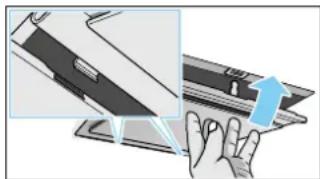
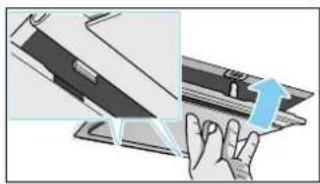
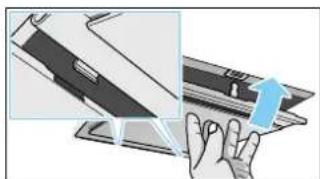
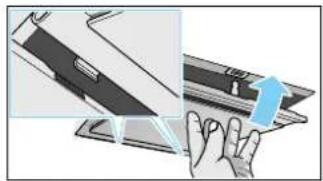
Removing metal grease filter
1 Take the metal grease filter out of the holder.
2 Pull the metal grease filter downwards. While doing this, place your other hand under the metal grease filter.
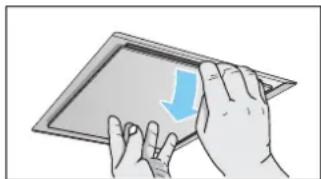
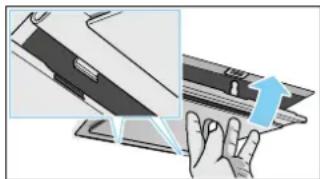
Notes
- Grease may accumulate in the bottom of the metal grease filter.
- Hold the metal grease filter level, otherwise grease will drip out.
3 Clean the metal grease filter.
Installing the metal mesh grease filter
1 Insert the metal mesh grease filter.
While doing this, place the other hand under the metal mesh grease filter.
2 Fold the metal mesh grease filter upwards, locking it in place.
Trouble shooting
Malfunctions often have simple explanations. Please read the following notes before calling the after-sales service.
⚠️ Risk of electric shock!
Incorrect repairs are dangerous. Repairs may only be carried out and damaged power cables replaced by one of our trained after-sales technicians. If the appliance is defective, unplug the appliance from the mains or switch off the circuit breaker in the fuse box. Contact the after-sales service.
LED lights
Defective LED lights must only be replaced by the manufacturer, their customer service department or a licensed technician (electrician).
Malfunction table
| Disruption Possible cause Solution | |
| The appliance does not work The plug is not plugged into the mains Connect the appliance to the electricity supply | |
| Power failure Check whether other kitchen appliances are working | |
| Faulty fuse Check in the fuse box to make sure that the fuse for the appliance is OK | |
| The lighting does not work The bulbs are faulty Call the after-sales service | |
After-sales service
Our after-sales service is there for you if your appliance needs to be repaired. We will always find the right solution in order to avoid unnecessary visits from a service technician.
When calling us, please give the product number (E no.) and the production number (FD no.) so that we can provide you with the correct advice. The rating plate with these numbers can be found inside the appliance (remove the metal mesh grease filter to gain access).
You can make a note of the numbers of your appliance and the telephone number of the after-sales service in the space below to save time should it be required.
E no. FD no.
After-sales service
Please be aware that a visit by an after-sales engineer will be charged if a problem turns out to be the result of operator error, even during the warranty period.
Please find the contact data of all countries in the enclosed customer service list.
To book an engineer visit and product advice
GB 0344 892 8988
Calls charged at local or mobile rate.
IE 01450 2655
0.03 € per minute at peak. Off peak 0.0088 € per minute.
AU 1300 368 339
NZ 09 477 0492
Trust the expertise of the manufacturer, and rest assured that the repair will be carried out by trained service technicians using original spare parts for your domestic appliance.
Accessories for circulating-air mode
(not included in the delivery)
Note: Follow the installation instructions supplied with the accessories.
Basic equipment
AA200812
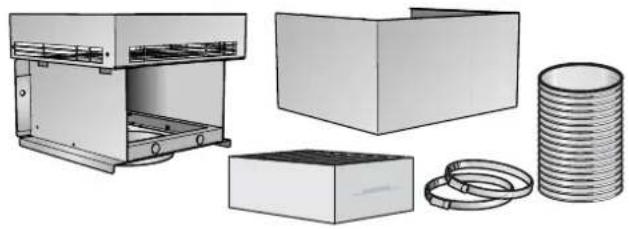
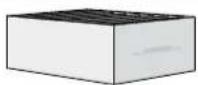
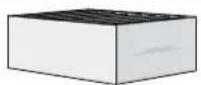
Throw-away filter
AA200110
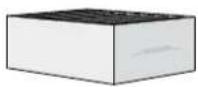
Table des matières
Remarques
Avvertenze
Filtri sostitutivi
AA200110
Inhoudsopgave
Aanwijzingen
Vervangingsfilter
AA200110
- KUNDENDIENST 12
- HINWEISE
- STÖRUNGEN – WAS TUN
- TABLE OF CONTENTS
- IMPORTANT SAFETY INFORMATION 14
- ENVIRONMENTAL PROTECTION 16
- OPERATING MODES 17
- OPERATION 17
- CLEANING AND MAINTENANCE 19
- TROUBLE SHOOTING 21
- AFTER-SALES SERVICE 22
- ACCESSORIES FOR CIRCULATING-AIR MODE 22
- ⚠️ IMPORTANT SAFETY INFORMATION
- DANGER OF SUFFOCATION
- DANGER OF DEATH
- RISK OF FIRE
- CLEAN THE GREASE FILTER AT LEAST EVERY 2 MONTHS
- RISK OF BURNS
- RISK OF INJURY
- RISK OF ELECTRIC SHOCK
- CAUSES OF DAMAGE
- CAUTION
- ENVIRONMENTAL PROTECTION
- SAVING ENERGY
- ENVIRONMENTALLY-FRIENDLY DISPOSAL
- OPERATING MODES
- EXHAUST AIR MODE
- CIRCULATING-AIR MODE
- OPERATION
- OPERATING THE APPLIANCE
- SETTING THE FAN
- SWITCHING ON THE APPLIANCE
- SWITCHING OFF
- INTENSIVE SETTING
- AUTOMATIC MODE
- SWITCHING ON
- SENSOR CONTROL
- CHANGING THE SENSITIVITY OF THE SENSOR
- SATURATION DISPLAY
- RESETTING THE SATURATION INDICATOR
- LIGHTING
- SETTING THE BRIGHTNESS
- AUDIBLE SIGNAL
- SWITCHING ON THE AUDIBLE SIGNAL
- SWITCHING OFF THE AUDIBLE SIGNAL
- CLEANING AND MAINTENANCE
- ⚠️ RISK OF ELECTRIC SHOCK
- CLEANING AGENTS
- CLEANING THE METAL MESH GREASE FILTERS
- NOTES
- BY HAND
- IN THE DISHWASHER
- REMOVING METAL GREASE FILTER
- INSTALLING THE METAL MESH GREASE FILTER
- TROUBLE SHOOTING
- LED LIGHTS
- MALFUNCTION TABLE
- AFTER-SALES SERVICE
- TO BOOK AN ENGINEER VISIT AND PRODUCT ADVICE
- ACCESSORIES FOR CIRCULATING-AIR MODE
- TABLE DES MATIÈRES
- REMARQUES
- AVVERTENZE
- INHOUDSOPGAVE
- AANWIJZINGEN
Brand : GAGGENAU
Model : AW230120
Category : Range hood