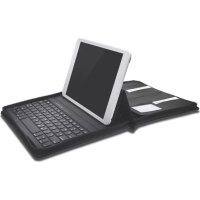
KeyFolio Executive - Keyboard KENSINGTON - Free user manual and instructions
Find the device manual for free KeyFolio Executive KENSINGTON in PDF.



| Product Type | Bluetooth Keyboard with Folio Expert Case for iPad |
| Brand | Kensington |
| Model | KeyFolio Executive |
| Connectivity | Wireless Bluetooth |
| Power | Integrated rechargeable lithium-polymer battery |
| Charging Port | Micro-USB |
| Indicator Lights | Bluetooth status (blue), charging (green), power (blue) |
| Function Keys | Home, Search, On-screen keyboard, Siri, Audio control (play/pause, next/previous track, volume, mute), Lock, Copy/Paste, word selection, language toggle |
| Pairing | Press the pairing key for 3 seconds, enter the security key displayed on the iPad |
| Sleep Mode | Automatic after 15 minutes of inactivity |
| Bluetooth Range | Approximately 10 meters |
| Compatibility | iPad (models compatible with the Folio Expert case) |
| Operating Temperature | 10 °C to 27 °C |
| Maintenance and Cleaning | Clean with a soft, dry cloth. Do not use harsh products. Avoid moisture. |
| Safety | Do not expose to heat, do not puncture, do not incinerate. Contains a lithium-polymer battery. |
| Recycling | Do not dispose of with household waste. Recycle at a certified collection point (RBRC in USA/Canada). |
| Warranty and Support | Technical support available at kensington.com and by phone. Register the product for better support. |
| Spare Parts and Repairability | Do not open or repair yourself. Contact Kensington support for any repair. |
Frequently Asked Questions - KeyFolio Executive KENSINGTON
User questions about KeyFolio Executive KENSINGTON
0 question about this device. Answer the ones you know or ask your own.
Ask a new question about this device
Download the instructions for your Keyboard in PDF format for free! Find your manual KeyFolio Executive - KENSINGTON and take your electronic device back in hand. On this page are published all the documents necessary for the use of your device. KeyFolio Executive by KENSINGTON.
USER MANUAL KeyFolio Executive KENSINGTON
Zipper Folio with Keyboard for iPad Air
QUICK START GUIDE
GUIDE DE DEMARRAGE RAPIDE
KURZANLEITUNG
SNELSTARTGIDS
GUIDA RAPIDA
GUIA RAPIDA
GYORSKALAUZ
PRÍRUČKA ZACÍNÁME
SZYBKI START
KPATKOE PYKOBOIDCTBO
ПОЛьЗВATEЛЯ
MANUAL DE INICIO RAPIDO

Register Now!
Enregisterer maintainant!
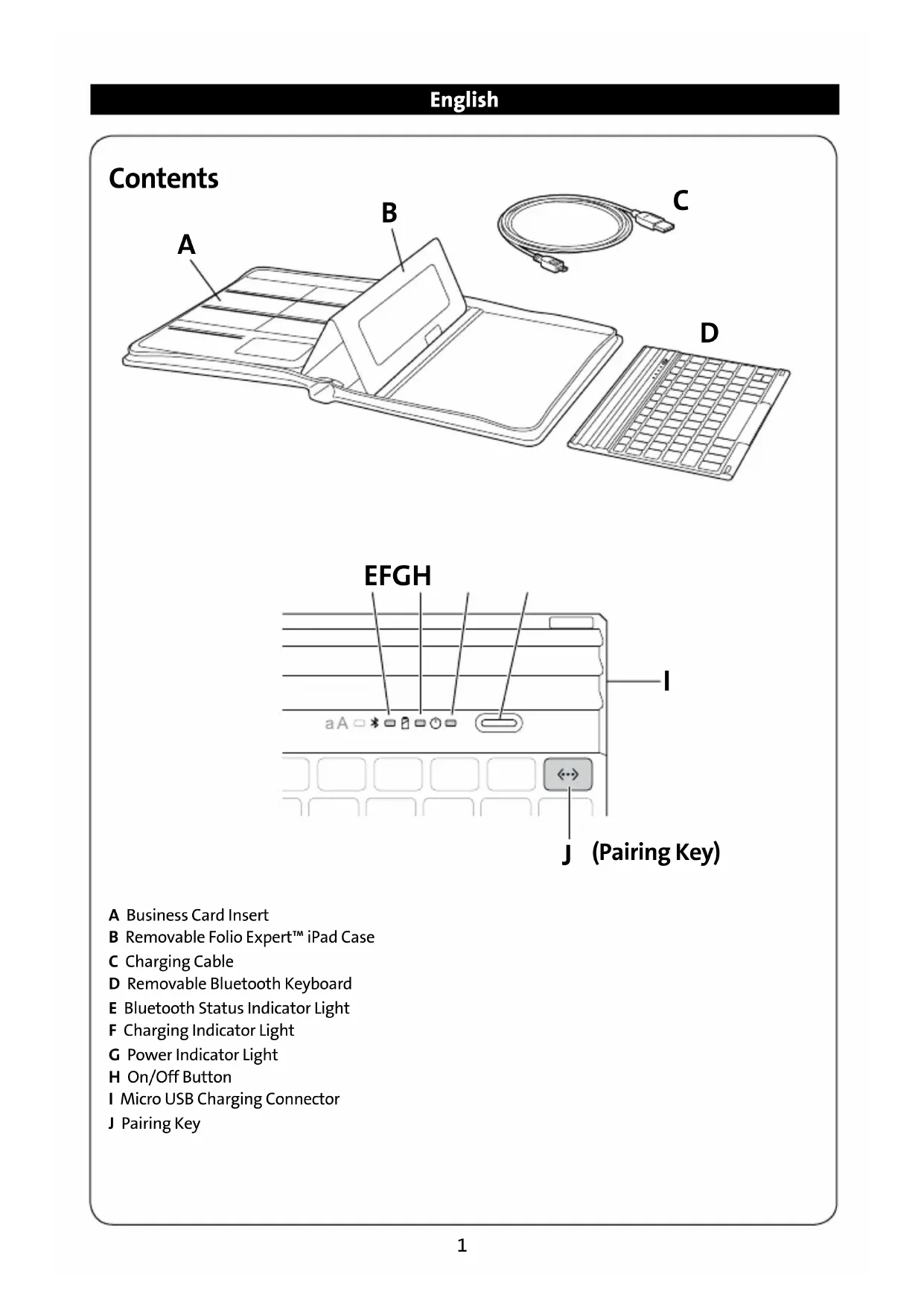
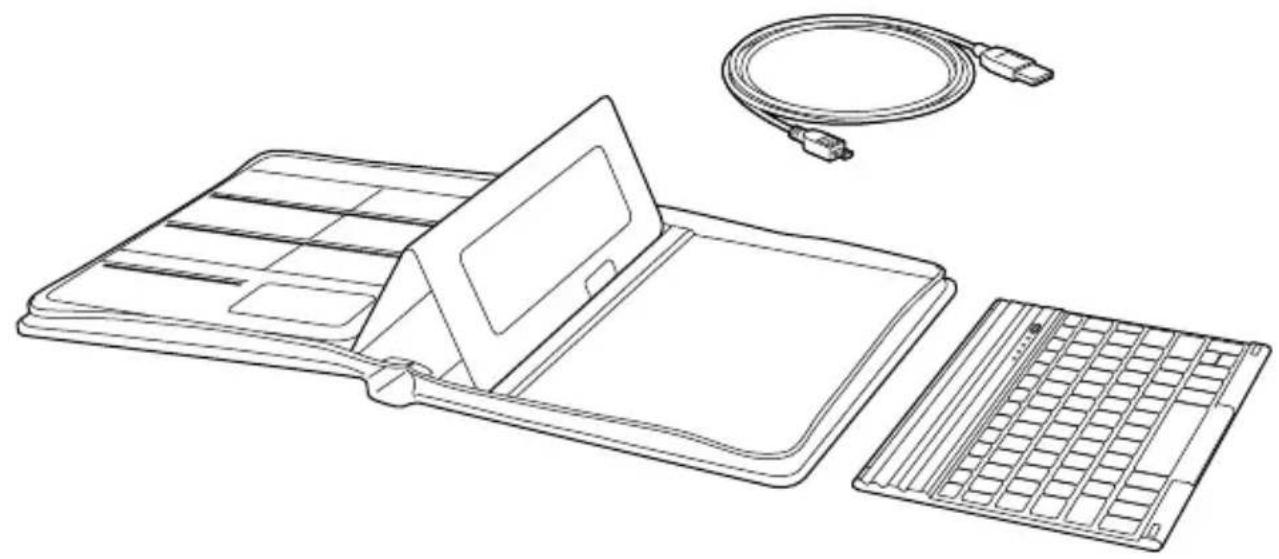
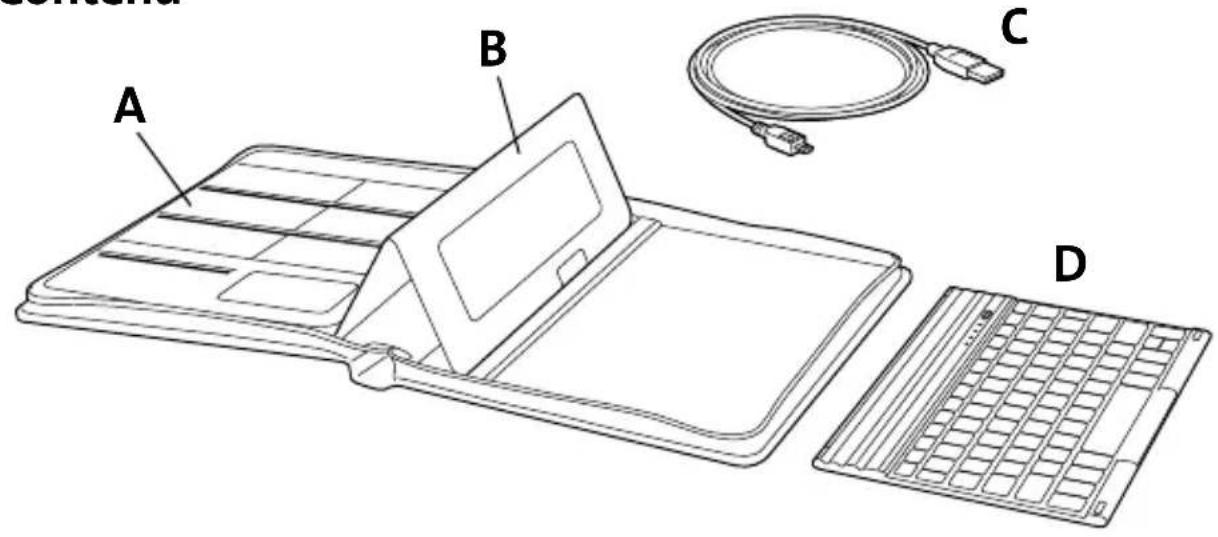
A Business Card Insert
B Removable Folio Expert™ iPad Case
C Charging Cable
D Removable Bluetooth Keyboard
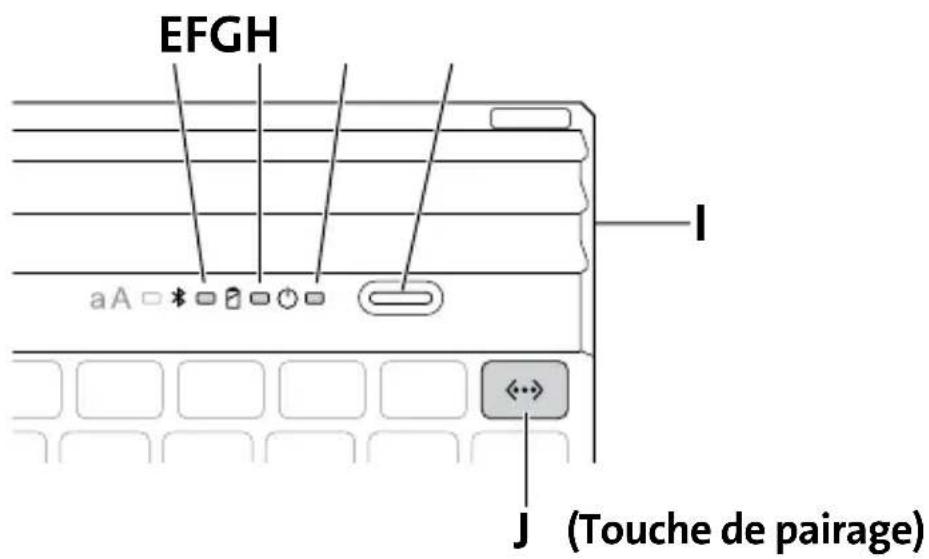
E Bluetooth Status Indicator Light
F Charging Indicator Light
G Power Indicator Light
H On/Off Button
I Micro USB Charging Connector
J Pairing Key
Pairing
1 Place your iPad on the KeyFolio as shown. The Folio Expert iPad Case can be removed and used separately.
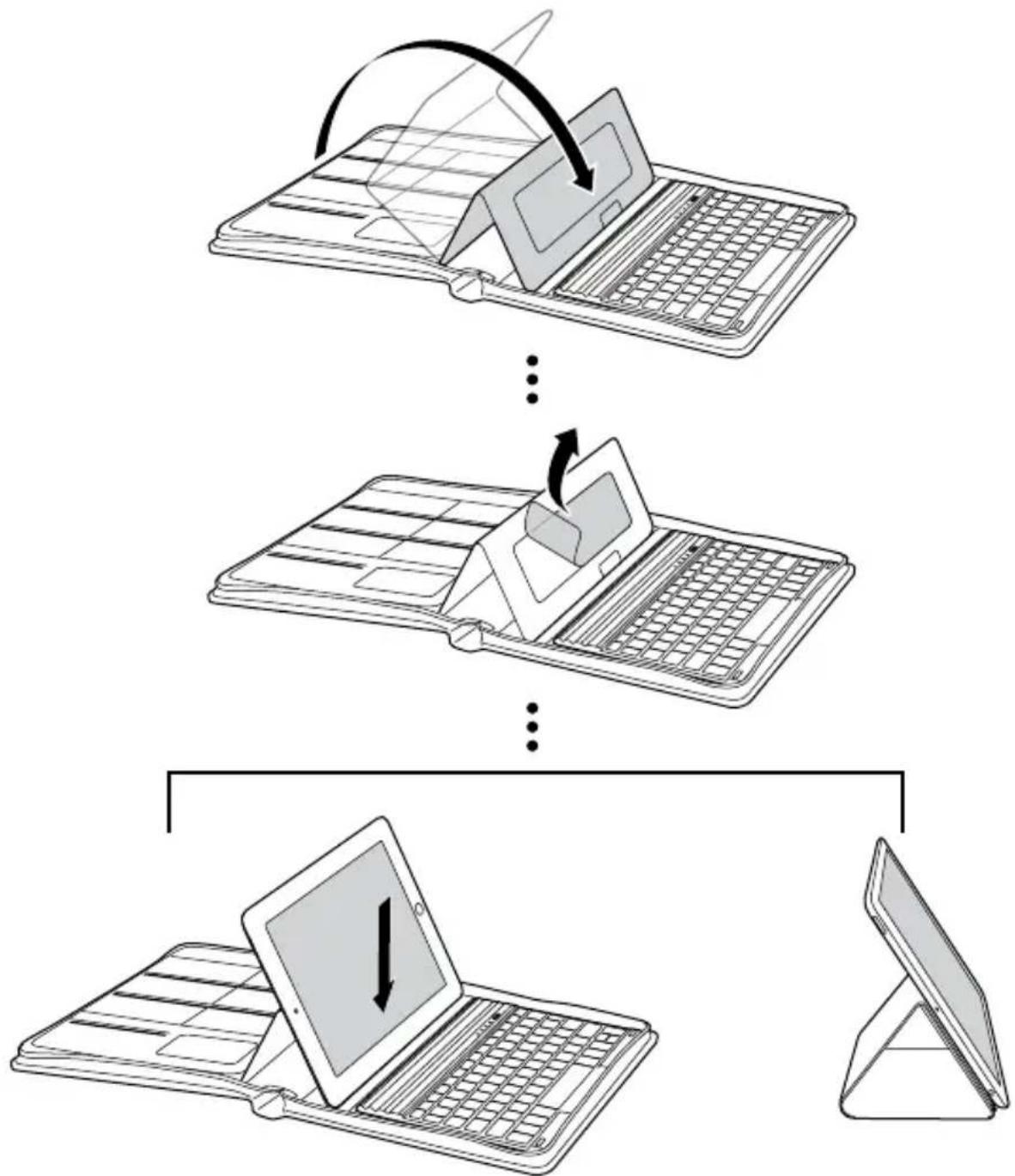
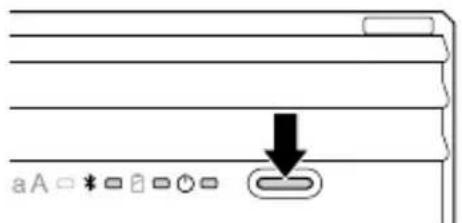
2 Press the On/Off Button. The Power Indicator Light glows.
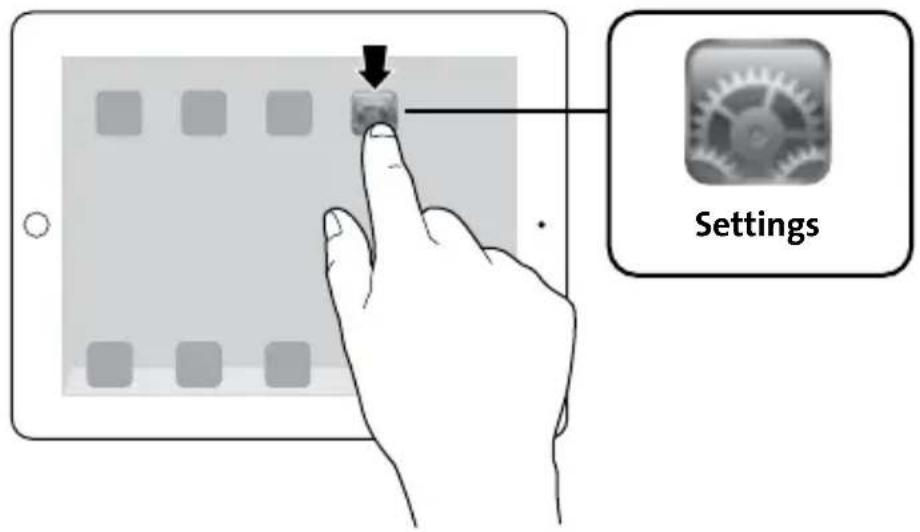
3 On your iPad, tap Settings.
4 Open Bluetooth and make sure Bluetooth is on.

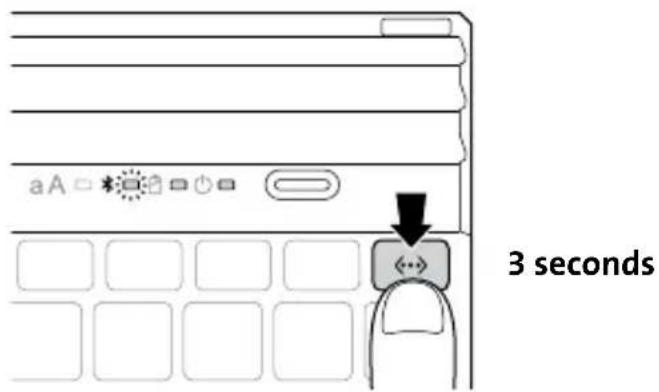
5 On the Keyboard, press the Pairing Key for 3 seconds. The Bluetooth Status Indicator Light starts blinking.
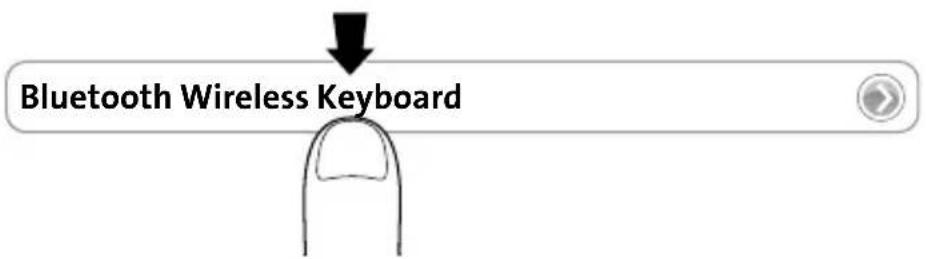
6 The Keyboard now appears on your iPad screen. Tap Bluetooth Wireless Keyboard.
7 Your iPad screen displays a passkey. Enter the passkey on the Keyboard, and press Enter.
8 Your iPad screen shows the Keyboard as Connected. On the Keyboard, the Bluetooth Status Indicator Light turns off. You can now use your Keyboard to type in any app.

NOTE: The Keyboard will go into sleep mode if left idle for 15 minutes. To wake up the Keyboard, press any key to resume the connection.
To extend battery life, turn off the keyboard when not in use.
Viewing Angles
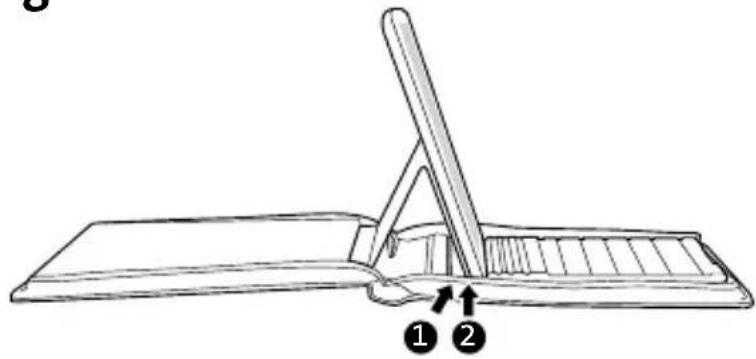
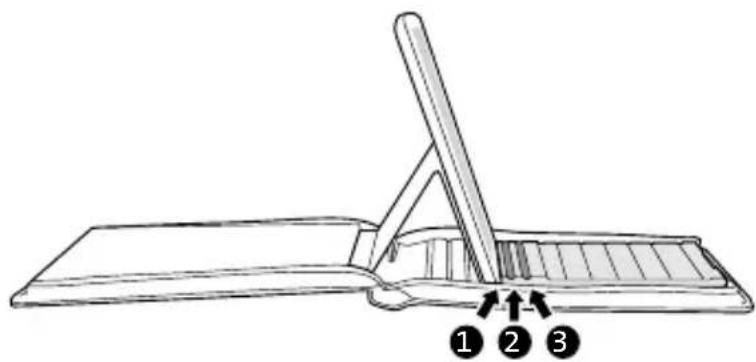
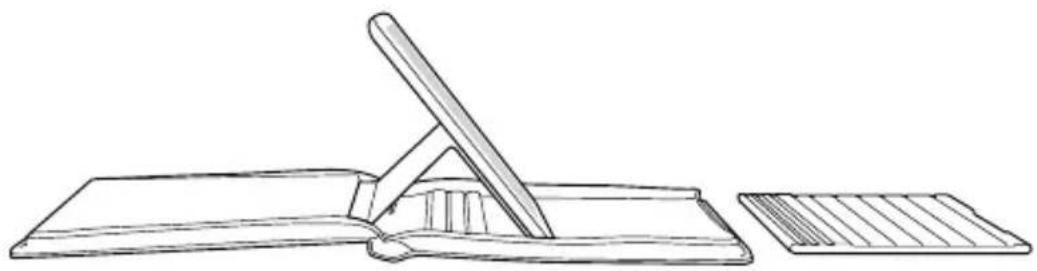
Charging
| Blinking Battery needs charging | |
| Glowing green Charging in progress | |
| Turns off Battery is fully charged | |
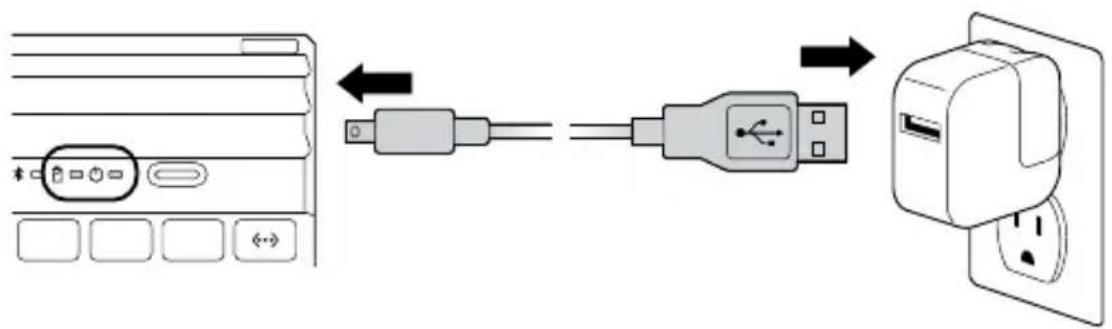
Key Functions
| Key | Function | Key | Function |
| Home Search | |||
| On-screen keyboard International keyboard* | |||
| Siri® Last track | |||
| Play/pause Next track | |||
| Mute Volume down | |||
| Volume up Lock | |||
| Pair Fn + X = Cut | |||
| Fn + C = Copy Fn + V = Paste | |||
| Display recently opened apps Fn + Select | left word | ||
| Fn + → Select right word |
- Toggles between available languages
Troubleshooting
I can't connect the Keyboard to my iPad.
Try the following in sequence. You can stop when the problem is fixed.
1 Make sure you have installed and set up Bluetooth correctly on your iPad. Check the documentation that came with your iPad for instructions.
2 Make sure that the Keyboard is within range of your iPad. Maximum Bluetooth range is about 10 meters/33 feet.
3 If your iPad is connected to other Bluetooth devices, you may need to disconnect some devices before you can connect to the Keyboard.
4 If you changed any Bluetooth settings on your iPad, try connecting the Keyboard to your iPad again.
5 Make sure that both your iPad battery and the Keyboard battery are sufficiently charged.
If this does not solve the problem, please contact Kensington Support at kensington.com.
Technical Support
Technical support is available to all registered users of Kensington products. Technical Support contact information can be found on the back page of this manual.
Web Support
You may find the answer to your problem in the Frequently Asked Questions (FAQ) section of the Support area on the Kensington Website: www.support.kensington.com.
Telephone Support
There is no charge for technical support except long-distance charges where applicable. Please visit www.kensington.com for telephone support hours. In Europe, technical support is available by telephone Monday to Friday 09:00 to 21:00 (Central European time).
Please note the following when calling support:
- Call from a phone where you have access to your device.
- Be prepared to provide the following information:
Name, address, and telephone number
- Name of the Kensington product
- Make and model of your computer
- System software and version
- Symptoms of the problem and what led to them

WARNING! IMPORTANT SAFETY INSTRUCTIONS
Failure to read and follow these safety instructions could result in fire, explosion, electrical shock or other hazard, causing serious and/or fatal injury and/or property damage.
- Do not modify, disassemble, open, drop, crush, puncture, or shred the KeyFolio.
- The KeyFolio contains a lithium-polymer battery, which is flammable. Keep away from open flame.
- To prevent short circuit or other potential hazards, prevent metal objects such as coins or keys from coming into contact with the KeyFolio, and do not insert foreign objects into the KeyFolio or its ports.
- Keep your KeyFolio dry, and do not use with wet hands. Moisture in or on the KeyFolio may lead to electrical shock. If exposed to moisture during use, unplug the KeyFolio immediately. If your KeyFolio gets wet, have a qualified technician evaluate the product's safety before resuming use.
- Your KeyFolio may become warm during operation. This is normal. However, to prevent overheating, keep area around KeyFolio ventilated and do not place anything on or around KeyFolio during operation. Do not operate your KeyFolio near a heat source, heat vent, or in direct sunlight. Your KeyFolio should be used in temperatures between 50 - 80^ (10-27°C).
- If the KeyFolio begins to swell or expand, emits a strong odor, or becomes hot to the touch, discontinue use of the KeyFolio, and have the product examined by a qualified electronic technician.
- Inspect your KeyFolio and cables for damage before use. Have any damaged part repaired or replaced before use.
- Your KeyFolio is not user serviceable. Do not attempt to open, modify, or repair.
- If the battery inside the KeyFolio leaks for any reason, discontinue use, and do not allow the KeyFolio's contents to contact your skin or eyes. In the event of accidental contact wash the affected area with large amounts of water and seek medical attention immediately.
- Your KeyFolio is not a toy. Keep them away from children. Insure that all persons who use this product read and follow these warnings and instructions.
- Do not leave the KeyFolio on prolonged charge when not in use.
Enhancing Performance by Proper Care and Storage of your KeyFolio
- Do not store your KeyFolio either fully charged or discharged. It is best to store your KeyFolio with at least 30% charge remaining. To check the charge level of your KeyFolio press the battery indicator button.
- Avoid frequent full discharges because this puts additional strain on the battery in the KeyFolio. Charge your KeyFolio between uses even if it is not fully discharged. The lithium-polymer battery
used in this product has no "memory effect." Therefore, several partial discharges with frequent recharges are better than one full discharge, and will help prolong the life of your KeyFolio. Short battery life in laptops is mainly caused by heat, rather than charge/discharge patterns.
Do not store your KeyFolio at elevated temperatures (such as in your car) or in high humidity.
Disposing of your KeyFolio
- Do not incinerate or dispose of your KeyFolio in a fire or microwave.
- Do not dispose of your KeyFolio as ordinary refuse, as it contains a lithium-polymer battery. Consult your local municipal or civil authority for instructions on correctly disposing of a lithium-polymer battery.
- In the USA and Canada: This mark indicates your KeyFolio can be recycled by the Rechargeable Battery Recovery Corporation ("RBRC"). When you are ready to dispose of the KeyFolio, please contact the RBRC at 1-800-8-BATTERY or www.rbrc.org.
FEDERAL COMMUNICATIONS COMMISSION RADIO FREQUENCY INTERFERENCE STATEMENT
This device has been tested and found to comply with the limits for a Class B digital device, pursuant to Part 15 of the FCC Rules. These limits are designed to provide reasonable protection against harmful interference in a residential installation. This equipment generates, uses, and can radiate radio frequency energy and, if not installed and used in accordance with the instructions, may cause harmful interference to radio communications.
However, there is no guarantee that interference will not occur in a particular installation. If this equipment causes harmful interference to radio or television reception, which can be determined by turning the equipment off and on, the user is encouraged to try to correct the interference by one or more of the following measures:
- Reorient or relocate the receiving antenna.
- Increase the separation between the equipment and receiver.
- Connect the equipment into an outlet on a circuit different from that to which the receiver is connected.
- Consult the dealer or an experienced radio/TV technician for help.
MODIFICATIONS: Modifications not expressly approved by Kensington may void the user's authority to operate the device under FCC regulations and must not be made.
SHIELDED CABLES: In order to meet FCC requirements, all connections to equipment using a Kensington input device should be made using only the shielded cables.
FCC DECLARATION OF CONFORMITY COMPLIANCE STATEMENT
This product complies with Part 15 of the FCC rules. Operation is subject to the following two conditions: (1) This device may not cause harmful interference, and (2) This device must accept any interference received, including interference that may cause undesired operation. As defined in Section 2.909 of the FCC Rules, the responsible party for this device is Kensington Computer Product Group, 333 Twin Dolphin Drive, Redwood Shores, CA 94065, USA.
INDUSTRY CANADA CONFORMITY
This device has been tested and found to comply with the limits specified in RSS-210. Operation is subject to the following two conditions: (1) This device may not cause interference, and (2) This device must accept any interference, including interference that may cause undesired operation of the device.
This Class [B] digital apparatus complies with Canadian ICES-003.
CE DECLARATION OF CONFORMITY
Kensington declares that this product is in compliance with the essential requirements and other relevant provisions of applicable EC directives. For Europe, a copy of the Declaration of Conformity for this product may be obtained by clicking on the Compliance Documentation link at www.support.kensington.com.
INFORMATION FOR EU MEMBER-STATES ONLY
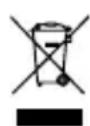
The use of the symbol indicates that this product may not be treated as household waste. By ensuring this product is disposed of correctly, you will help prevent potential negative consequences for the environment and human health, which could otherwise be caused by inappropriate waste handling of this product. For more detailed information about recycling of this product, please contact your local city office, your household waste disposal service, or the shop where you purchased the product.
Kensington and the ACCO name and design are registered trademarks of ACCO Brands. The Kensington Promise is a service mark of ACCO Brands. KeyFolio Executive is a trade mark of ACCO Brands. iPad and Siri are registered trademarks of Apple Inc., registered in the U.S. and other countries. Bluetooth is a registered trademark owned by Bluetooth SIG. All other registered and unregistered trademarks are the property of their respective owners.
© 2013 Kensington Computer Products Group, a division of ACCO Brands USA LLC. Any unauthorized copying, duplicating, or other reproduction of the contents hereof is prohibited without written consent from Kensington Computer Products Group. All rights reserved. 10/13
Contenu
Composants
Assistance technique
INDUSTRY CANADA-KONFORMITÄT
www.support.kensington.com.
Telefonische ondersteuning
WAARSCHUWING! BELANGRIJKE VEILIGHEIDSVOORSCHRIFTEN
CONFORMITEIT MET INDUSTRY CANADA
DEKLARACJA ZGODNOSCI WE
He ydaemcnaodknochumkbnaubamypkycmpooucmbyiPad.ymo denamb?
BbInonHnTe yKa3aHHbIe HnJke DeiCTBn. Ecn ydaocb ycTpaHnTb HenCnpaBHOCtB, To daJIbHeNlne DeiCTBn YBJIaOTcR Heo63aTeNbHbIMN.
1 Y6eIITecb B TOM, yTO texHONorna Bluetooth doCTyPnHa n npaBnIbHo HaCTpoEHa Ha yCTPOIcTB e iPad. CoOTBeTCTByIOUne IHCTpyKuIN cM. B DOkUMeHTaUIN K yCTPOIcTB by iPad.
2 Y6eIITecb B TOM,чTO KJIaBnAtypa HaxOHTcB 3OHe DeiCTBna yCTpoiCTBa iPad. MakcImaIbHbI paIynC DeiCTBna Bluetooth coCTaBnEe npIMepHO 10 MeTPOB.
3 Ecnn yctpoicTBo iPad noKniOyeHo Kdpyrmu yctpoiCTBaM Bluetooth, otKlouHte HeKOtOpbIe yctpoiCTBa nepei noKJIooyeHnem KlaBnAtypbl.
4 B clyuae n3meHnHaCTpoek Bluetooth Ha yctpoiCTBe iPad, BbINOHHTe NOBTOpHOe IODKnIOUeHHe KlaBnaTpybl K iPad.
5 Y6eIITecb B TOM, yTO 6aTapeu yCTpoiCTBa iPad n KlaBnaTypbI 3apJxKeHbl.
EcIn He ydaLoCb peuNTb npo6JIemy cAmOCToTeJbHo, o6paTtEcB B ClyX6y NODepKKn
Kensington Ha caIte www.kensington.com.
Texnueckajnoidepka
TexHnuecka NOdEprKka DOCTynHa IJRA BCex 3apernctpnpoBaHbIX NOpb3OBaTeJeiN3deIIN KOMnAHn Kensington. KoHTaKTHa INΦopMaζuO TExHnuecko NOpdepXKe IMeETcHa O6paTHoI CTopoHe O6NoxKn DaHHoro pyKOBOIDCTBa.
Be6-noDepkka
BbI MoXeTe HaIITN OTBeT Ha BaI W Bonpoc Ha CTpaHnue OTBeTOB Ha YaactO 3aJaBaEmbIe Bonpocbl (FAQ) pa3dela TexHnuecko NopdepKKn caI-Ta: www.support.kensington.com.
TelefoHHa noDepKka
3BOHOK B cnyk6y noidepKK 6ecnlaTbI, 3a nckloueHem MejdyropoHnx IMeJHynapoHbIX 3BOHkoB. yTo6bl y3HaTb ycbl pa60bl cnyk6bl noidepKK no TelefoHy, nocTeTte www.kensington.com. B Ebpone cnyk6a texnuecko noidepKK no TelefoHy pa60taet c noHeelbHnka no pTnUc, c 09:00 do 21:00.
IoxaIyIcTa,yuTnte cIeIyUoIee,KoIa 6yIeTe 3BOHITb B ClyJx6y noIepKKn:
3BOHnTe C TelefoHa, paCNOJoxKeHHoro pAOM C yCTPOINCTBOM.
- BydTe rOToBbl npedocTaBtB cneIyUcIyU nHΦOpMaIu:
-IMMa,adpecHHomepTelefoHa
- Ha3BaHne n3dJIeNn KOMNaHnKensington
- IV3rOToBnteIb N MoJeIb BaWero KOMTbIOTepa
- BauchcintemHoe nporpaMMHoe oecneueHne n ero Bercn
- PpIn3HaKn HeNCpPaBHOCTn UTO NocLyKNo IpnuHNo ee BO3HNKHOBEHnA

IPEDUNIPEXKDEHNE.MEPBIPNEDOCTOPOXHOCTN.
IrhOpnpoBaHne noIOXeHn TexHNK 6e3ONaCHOCTM MoXe TnpNBecTn K NOxApy, B3pbIBy, NopaxeHIO 3JIeKTPnueCKm TOKOM nIN K dpyrIM INHcUdEHTaM, BNeKyuIm 3a CO6oI cepBe3HbIe n/nn CMePTeNbHbIe TpaBMbl n/nn NpOHy mMyuEcTba.
3aPpeaaetcBUNOn3MeHnTb,pa36npaTb,BCKpbBaTb,pOHraTb,NOMaTb,JeTaOTBepCTnI HApuataB CEIOCTHOCT npOdykta KeyFolio.
- UcTpoIcTBo KeyFolio coIepKNT IInTneBO-NolImepHyO 6aTapeIO, KOtOpAra YBnIeTcR orHeonacHO. UcTpoIcTBo dOnkHO xpaHITbcRA BdaII NTOKpbITOrO OrHJ.
- UTo6bI npEoTbpaTb KOpOTKoe 3aMbKaHne n npOue OAnChbIe CnTyauCn, 3aPpe7aeTcXpaHNTb yCTpoiCTBO KeyFolio prdom cMetaJIuYeCKmM NObBeKTamN, HApPImep, MoHeTaM NII KJIouAm. TakaKe 3aPpe7aeTcBCTaBnTb NOCTOpOHHne ObeKtbl B OTBepCTna DAHHOro yCTpoiCTBa.
3anpeuetaTcnoBepraYyCTPOINCTBOKeyFolio BO3deICTBnIO BnAri n 6paTb erO MOKpbIM pykAmn. Bnara chapxN ININ BHyTPn yCTPOINCTBa MoXeT npINBeCTN K NopaxKeHIO 3JIeKTPnueCKM TOKOM. B cnyae IOnaHaHn BnAri NOBn BO Bpem NcNoB3OBaHn, yCTPOINCTBO KeyFolio DOJXHO 6bITb He3aMeDInTeBHO OTKnIOyeHo. IpexJe YEM BO3o6HOBtB NcNoB3OBaHne yCTPOINCTBA, NODBeprWeroCRA Bo3deICTBNI BO BnAr, peKOMeHNyEm npOKOHcyNbTIpOBAtBcRy KBaIIuΦuIPoBAHHOrO cneuaJIInCTa.
- Uсточьу KeyFolio может HarpeBaTbca BO Bpempa60tbl.3TO HopMaIbHo.Tem He MeHee,чTo6blпрдOTBpaTbBO3MOxHbIперрев усточьу KeyFolio, peKOMeHdYeM ИСПОЛБ3OBaTb erOВхороюпветраимомnomeшени.КрмetoTORO,BOВрем pa60tbl yсточьа 3aPpeuaetcpa3MeaTaKaKHe-Ni6o прdmtebl, KaK Ha camom uystpoiCTbe,TakИ OkOLO Hero.3aPpeuaetcЯИСПОЛБ3OBaTbUstochьуKeyFolio радOM сИСТочнКами TeIIa,обогрBaTeJMyIMIлп ДпprMbIMI COJIHeuHbIMIn Lyuamn.Ystochьоу KeyFoliodoJxHNoИСПОЛБ3OBaTbca pri TEmNepaType 10-27 °C.
- Ecnn yctpoiCTBO KeyFolio nauHaeT yBelenuHBaTbcra, HarpeBaTbcra nn n3daBaTb cnIbHbI 3anax, peKOMeHnyem He3aMeDnITeNbHO npeKpaTntb erO nCNoJIb3OBaHne n npOKOHcyJbTnpoBaTbcra y KBaIInΦnUpOBaHHoro CneuaJIncTa.
- UcTpoIcTBo KeyFolio n Ka6eNn DoJxHbI npOBepaTbcra Ha HAIuYne NOBpeXdHn Npeed KaXdbIM NCNoJIb3OBAHnEM. IpexJe cem npIcTpyNTb K NCNoJIb3OBAHnIO, peKOMeHdyEm NOUHNITb IIN 3aMeHHTb IOBpeXdEHHyU qAcTb.
- UcTpoIcTBo KeyFolio He o6cnyknaeTcra nOJIb3OBaTeIeM. 3anpeuaeTcra OTKpbIBaTb n PemOHtnpOBA Tb yCTpoIcTBo CaMOCToRrTeNbHO.
- EcII 6aTapeB BHTpN uCTpoIcTa KeyFolio NaJana IPOTeKaTb, Heo6xOIMo ee 3aMeHITb. HAcToIeJIbHO peKOMeHdyem N36eRaTb BO3MOXHOro IOnaHaHnC OedePXMoro 6aTapeH Ha KOKy INB rIa3a. Ppi ClyuaiHOM KOHTaKe Theo6xOIMo IpOMbITb NOCTpaDaBUn yUactOK 60JIbWMKOLIueCTBOM BObl N HeMeJeHNO O6paNTbCS K BpaCy.
- IcnoIb3OBAHnE yCTpoiCtBa KeyFolio npeIctabIaRET HeKOTOpyIO onaCHOCTb. YCTpoIcTBO DoJXHO xpaHITbcB HneIOCTyINHom IJIa DeTee MeCTe. Y6eIITecB TOM, UTO JInuA, NcNoIb3yUoIe DaHHbI INPOdYKT, O3HaKOMUNICb I ONHOCTbIO CO6JIOnaIOT daHHbIe MEPbl PpeIOCTOPOXHOCTN.
3anpeaetcnoctabTb Heucnojbyemoe yctpoiCTBO KeyFolio Ha dniltehny 3aprky.
IprodJeHne cpoKa cnJx6bI ycTpoiCTBa KeyFolio 6laRopapra HndLejkaUeMy IcNoIb3OBAHnIO n Co6JIoDeHnIO ycNOBni XpaHeHnIa
3aPpeaaetxpaHnTb yctpoiCTBO KeyFolio nolnoctbIO 3apjkeHHbIM nn pa3pjkEHHbIM. OtnmabHoe ycNoBne xpaHeHne - 3TO 30% OT noNHO 3apja. TTo6bl npOBepntb ypoBeHb 3apya yctpoiCTBa KeyFolio, haxMITE coOTBeTCTByUOyU KhoNky.
Bo n36exaHne doONHnTeBbIX Harpy3OK, peKOMeHnyem CneIITb 3a TeM, YTO6bl yCTpoiCTBO KeyFolio kak moxho pexe OKa3bIbaNocb nonHOctbIO pa3pJxKeHHbIM. UcTPOiCTBO KeyFolio dOnXHO 3apjkaTbc B npomExkyTKax MeJdy NCNoB3OBAHNMA, daJe ECIN OHO He 6blIO noJIHOCTbIO pa3pJxKeHo. IInTneBO-noiIMepHa8 batape, INCNOB3yeMa8 B daHHOM npOdyKte, He IMeET aΦΦeKTA 3anOMHaHnI. PoTOMy, uactuHbIe pa3pJdKN uacTbIe NO3apJdKN 6Oone 6laorTOBpHO BnIAOT Ha pa60Tu yCTpoiCTBa KeyFolio, yBeJIuHbA cPok erO cnJk6bl, no cpaBHeHIO c ODHo nnHOH Pa3pJdko. PpruHnOH ne6oBbUoro cPoka cnJk6bl 6atapeB HooTyke ABnIeTcckopee HarpeBaHne, a He peryIaRPhIbe pa3pJdkn i 3apJdkn.
- 3anpeaetcxaHnntb yctpoiCTBO KeyFolio B Mectax,ДЯ KOTopbIX xapaKtepHO HJIuHne BbICOKOI TemnepaTypbl (HaNPmEp, B MaUNHe) UNI NOBbUeHHoB BJaXHOCTN.
Yttn3aun yctpoNCTBa KeyFolio
- 3anpeaetcraTnunnupobatb yctpoCTBO KeyFolio c nomoou bO rHr nn MkpoBONHOBoi neu.
3aPpeaetcBb6paBbTaB yCTpoCtBO KeyFolio kak 0bHbie 6bTOBbIE OTXOdbi, TaK KaK OHO coepknt IITnEBO-NOIMePHyIO 6aTapeIO. YTo6bl nOlyuHTb INΦOpMaUIO O npaBnIbHOY TINIIN3aUNI IITnEBO-NOIMePHbIX 6aTapeN, o6paNTteCB B rOpOdCKyIO aDMNHnCTpauIO NII KnpedCTaBnTeJAM rpaKaDaHcKoB BnactN. - INHOpMaunIaCLJAnKaHaIbI. DaHHbI 3HaK
0603nhaaet,TO KopnpapraRechargeable Battery
Recovery («RBRC») roTOBa npINaTb yCTpoiCtBO KeyFolio Ha yTuIN3aUIO. YTo6bl nepeDaTb
yCTpoiCtBO KeyFolio Ha yTuIN3aUIO, CBJXnTEcB c KOpnpaUneR RBRC no TeJefoHy 1-800-8-2288379
Hnnu Chee3 Be6-y3en www.rbrc.org.
IIOJIOXEHNE O PAADINOMEXAX ΦEDEPAJIbHOI KOMUCCNI IO CBA3N
PnmeHue: daHHoe yctpoCTBO 6bIIO npOBepHO n np3HaHO COOTBeTCTByUOUM ORpaHueHNm dIaCpOBbIX yctpoCTB KnaCa B B COOTBeTCTBn C YactbIO 15 npaBn IepeAubHO Komnccn IO CB3N. DaHbE OrpaHueHN pa3pa6oTaHb, YTO6bI o6ecneuMb pa3ymHyIO 3aunTy OT BpeHoro BnHnHnB XKnbX NOMEeHNx. DaHHoe o6OpydoBaHne BBipapabTaBIAeT, INcNoJb3yeT IN MOKeT IN3nyaTb paAnOcaToTHyIO 3HeprINO IN, eCNY UcTAHOBNEHO IN cNoJIb3yeTcR He B COOTBeTCTBn C INCHtpkUINM, MOKeT CO3DaBaTb NOMEx INNHNM paDnOCB3N.
OdaHKO He HnKaKoI rapaHTnn, YTO nomexn He 6ydyT co3aBaTcBcB aONpeJeHHO bOCTaHOBe. Ecn daHHoe 6OpuyOBaHHe CO3dAeT NOMExn paNo I TeleBu3NHOHOMy pInEmy, HxKHO ppePpHbTcNeDuOuMe Mebl:
- NObepHyb uINI nepeHectn npMeMHyO aHTehHy.
- YBENuHTb pacCToHnme MeKdy o6OpyIOBaHnEm n npneMHNKOM.
- PoiKJIIOUHTb o6OpUdOBaHHe K pO3eTke, KOtOpA He IMeet O6uX cTeN C ToI, B KOTOpYIO BKJIOUeH npIeMHNIK.
- PpOKOHcyIbTIpOBaTbcra y dIeepa IINn ObnTHoro paAnOTexHnka dnnnoJnyeHnna NOMOu.
N3MEHEHn: n3MeHeHn, He oO6peHHbIe KOMNaHneiKensington, MoryT IINuNTb NOB3OBaTeR B03MOxHOCTn NcIOJIb3OBaTb DaHHoe yCTpOInCTBO B COOTBeTCTBn C Tpe6OBaHnMn FedepaJIbHOJ KOMCCn IIO CBa3N, IN He DOJIxHbI 6blT BblONHeHbl.
3KPAHPOBAHHBIE KABENI:ДЯ COOTBeTCTBNA Tpe6oBaHnM ΦeepaJIbHOJ KomCCN NO CB3N, BCE NOKJIIOUeHnK O6OpydoBaHnO C NcNoJIb3OBAHnEM BXoHOrO yCTpoiCTBa nPOn3BOJCTBa KOMNaHnKensington, DOnXhbl 6bTb BbINOJIHeHbI TOJIbKO C NcNoJIb3OBAHnEM yKa3aHHbIX 3KpaHpOBAHHbIX Ka6enei.