SD9480 - Vacuum Cleaner SAMSUNG - Free user manual and instructions
Find the device manual for free SD9480 SAMSUNG in PDF.



Frequently Asked Questions - SD9480 SAMSUNG
User questions about SD9480 SAMSUNG
0 question about this device. Answer the ones you know or ask your own.
Ask a new question about this device
Download the instructions for your Vacuum Cleaner in PDF format for free! Find your manual SD9480 - SAMSUNG and take your electronic device back in hand. On this page are published all the documents necessary for the use of your device. SD9480 by SAMSUNG.
USER MANUAL SD9480 SAMSUNG
Vacuum Cleaneruser manual
-
Before operating this unit, please read the instructions carefully.
-
For indoor use only.
English
imagine the possibilities
Thank you for purchasing a Samsung product.
To receive a more complete service,
please register your product at
www.samsung.com/register
SAMSUNG
SAFETYINFORMATiOn

- Before operating the appliance, please read this manual thoroughly and retain it for your reference.

- Because these following operating instructions cover various models, the characteristics of your vacuum cleaner may differ slightly from those described in this manual.
CAUTION/WARNING SYMBOLS USED
| WARning | Indicates that a danger of death or serious injury exists. |
| cAuTiOn | Indicates that a risk of personal injury or material damage exists. |
OTHER SYMBOLS USED
| ○ | Represents something you must NOT do. |
| ★ | Represents something you must follow. |
| → | Indicates that you must disconnect the power plug from the socket. |
save these instructions!
iMpORTAnT sAFEguARds
- Read all instructions carefully. Before switching on, make sure that the voltage of your electricity supply is the same as that indicated on the rating plate on the bottom of the cleaner.
- WARNING : Do not use the vacuum cleaner when rug or floor is wet. Do not use to suck up water.
- Close supervision is necessary when any appliance is used by or near children. Do not allow the vacuum cleaner to be used as a toy. Do not allow the vacuum cleaner to run unattended at any time. Use the vacuum cleaner only for its intended use as described in these instructions.
- Do not use the vacuum cleaner without a dust bin. Empty the dust bin before it is full in order to maintain the best efficiency.
- Do not use the vacuum cleaner to pick up matches, live ashes or cigarette butts. Keep the vacuum cleaner away from stoves and other heat sources. Heat can deform and discolour the plastic parts of the unit. Also do not use your vacuum cleaner to pick up sugar, salt, dust of building materials (e.g. cement, metal shavings and so on).
- Avoid picking up hard, sharp objects with the vacuum cleaner as they may damage the cleaner parts. Do not stand on the hose assembly. Do not put weight on the hose. Do not block the suction or the exhaust port.
- Switch the vacuum cleaner off on the body of the machine before unplugging from the electrical outlet. Disconnect the plug from the electrical outlet before emptying the dust bin. To avoid damage, please remove the plug by grasping the plug itself, not by pulling on the cord.
- This appliance is not intended for use by persons (including children) with reduced physical, sensory or mental capabilities, or lack of experience and knowledge, unless they have been given supervision or instruction concerning use of the appliance by a person responsible for their safety.
- Children should be supervised to ensure that they do not play with the appliance.
- The plug must be removed from the socket outlet before cleaning or maintaining the appliance.
- The use of an extension cord is not recommended.
- If your vacuum cleaner is not operating correctly, switch off the power supply and consult an authorized service agent.
- If the supply cord is damaged, it must be replaced by the manufacturer or its service agent or a similarly qualified person in order to avoid a hazard.
- Don't carry the vacuum cleaner by holding the hose. Use the handle on the vacuum cleaner set.
- Unplug the cleaner when not in use. Turn off the power switch before unplugging.
- Be careful when you clean stairs. Do not use the vacuum cleaner when it fall over.
- Do not tilt the dust bin, when water is inside the dust chamber.
- Do not spray water.
Do not clean the switch part.
- Strictly follow the recommendations in respect of servicing of filters and dust pack. Ignoring these requirements could result in damage to the cleaner and reduce its service life.
ASSEMBLING THE CLEANER

05 Assembling the cleaner
06 Preparing the aqua cyclone
07 Power cord
07 Power control
MAINTAIN TOOLS AND FILTER

09 Using accessory
10 Maintain floor tools
11 Emptying the dust bin
12 Cleaning the dust pack
13 Changing the outlet filter
13 Change the battery (Optional)
TROUBLESHOOTING

assembling the cleaner
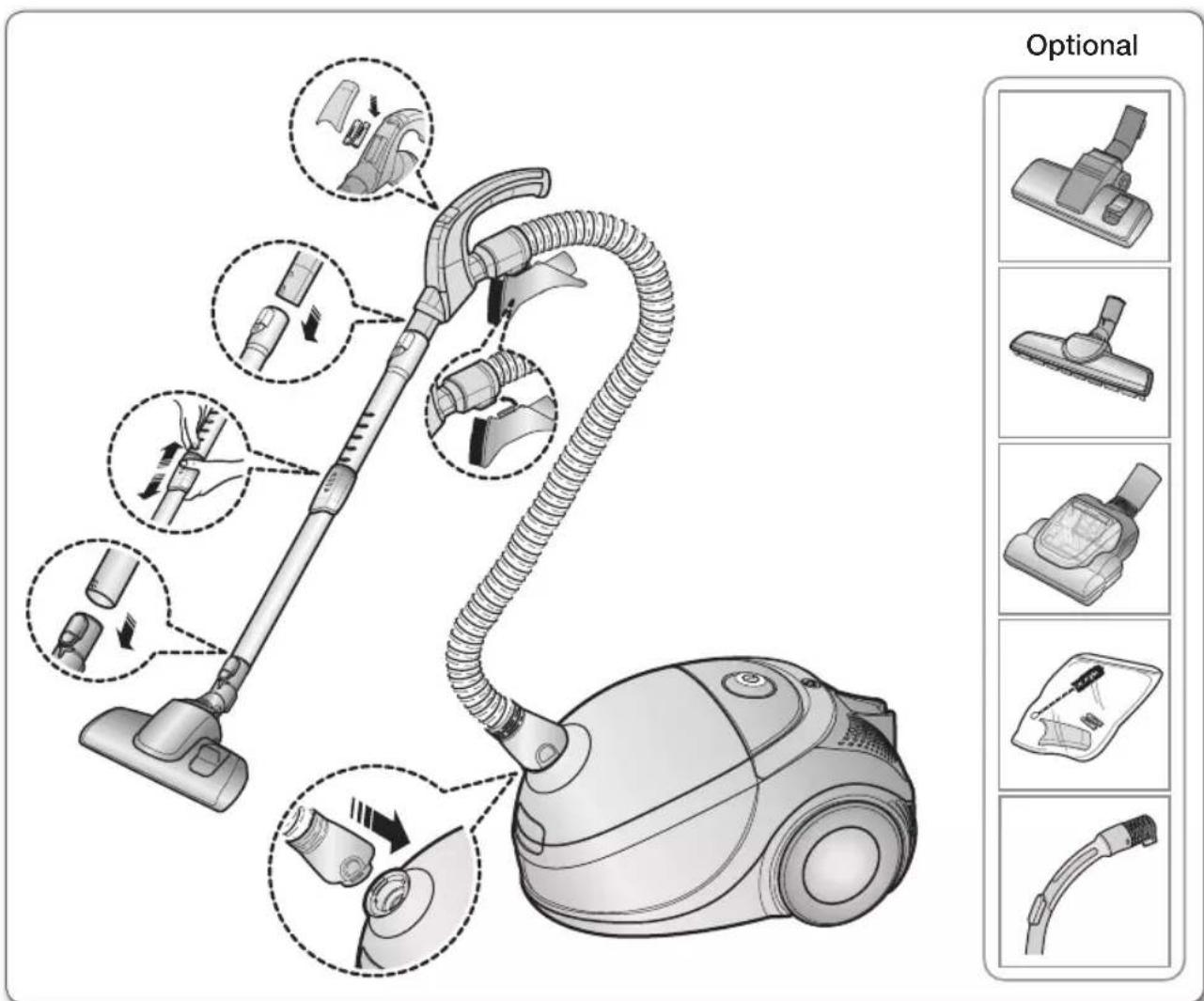
ASSEMBLING THE CLEANER
ONINBWESSV L0

- Features may vary according to model. Refer to 5,7,8,10 page.

- For storage, park the floor nozzle.
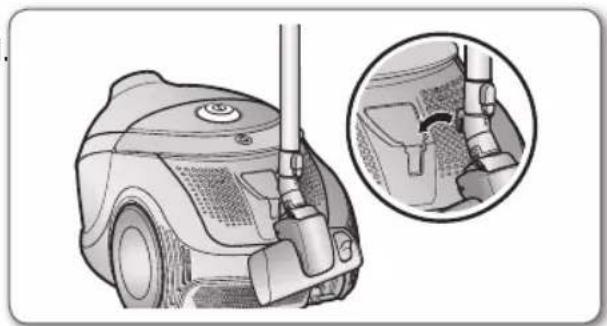
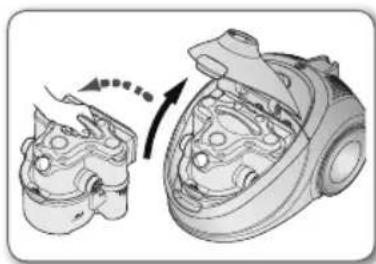
- For preparing the cleaning, take the aqua cyclone out by opening the cover.
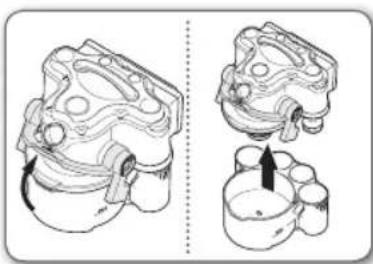
- Pull the lever up to disassemble the aquacyclone and separate the upper part.
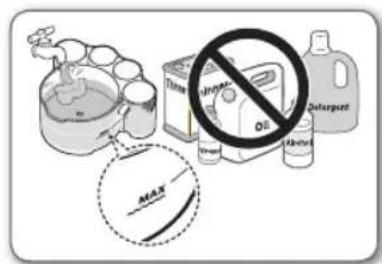
- Pour water until it reaches "MAX" level. Do not use oil, vinegar, detergent and all volatile matter.
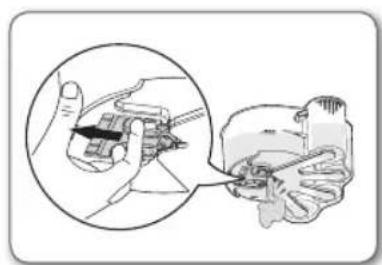
- To adjust the water level by the adjusting lever, pull the lever open until no water drops from the dust bin.
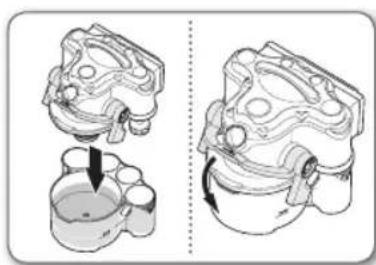
- Put on the upper part and push the lever down to assemble the aqua cyclone.
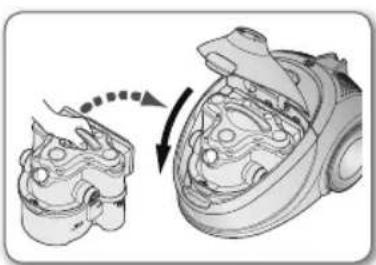
- Before use, push the dust bin into the main body and press the cover dust of the vacuum cleaner until you hear the "click" sound.
Maintain the aquacyclone properly
Clean the vacuum cleaner to avoid dust, lint, and hair build up.
Clean or change the HEPA filters at regular intervals.
- Empty and clean the device after each use. Can lead to the breeding of bacteria and fungus.
- Before disposing of the Aqua cyclone, cut the power plug off of the power cord. Then, follow your local laws regarding the disposal of electrical appliances.
POWER CORD
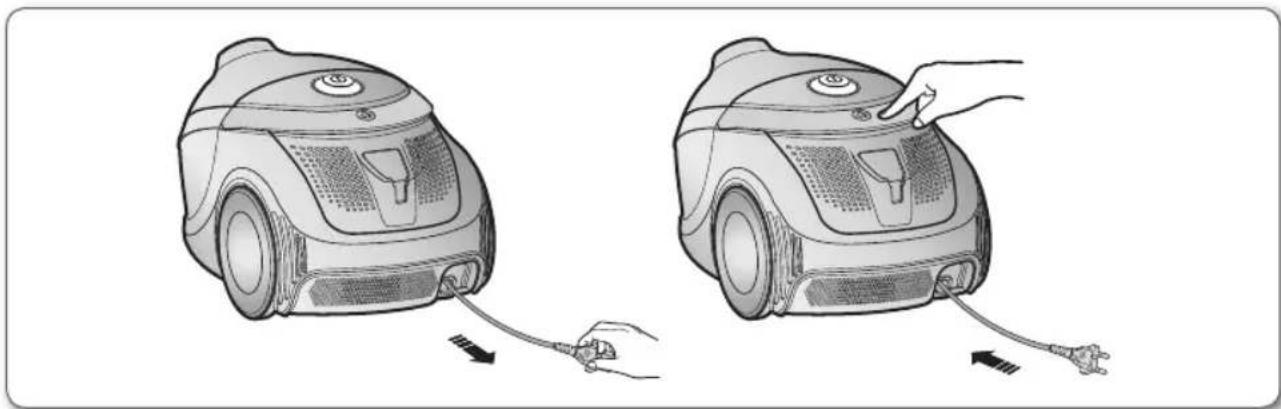

- When removing the plug from the electrical outlet, grasp the plug, not the cord.
POWER CONTROL
Remote-control type (Optional)
- HOSE
- Vacuum cleaner ON/OFF
Press the ON/OFF button to operate the vacuum cleaner. Press again to stop the vacuum cleaner.
- Vacuum cleaner (+, -)
Press the (+) button to operate the vacuum to high suction power. Press the (-) button to operate the vacuum to low suction power.

Don't cover the handle sender when you use a handle control button.
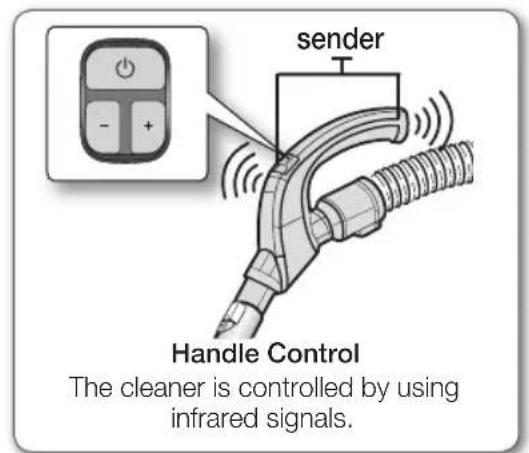
operating the cleaner
-BODY
Press the power control button repeatedly to select the correct mode.
(ON[MAX] OFF)

If the remote handle control is not working, the cleaner can be operated using the control button on the body of the machine.

The ON/OFF button operates the vacuum cleaner or stops it.
body-control type (Optional)
- HOSE
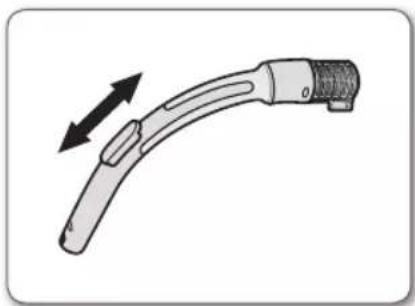
To reduce suction for cleaning draperies, small rugs and other light fabrics, pull the tap air until the hole is open.
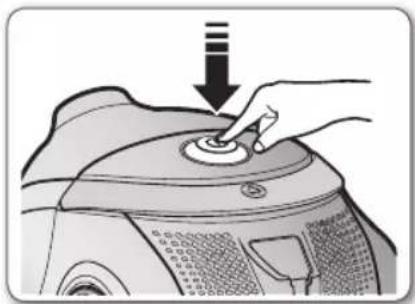
-BODY
Press the power ON/OFF button repeatedly to start and to stop the vacuum cleaner.
(ON OFF)
maintain tools and filter
USING ACCESSORY
Accessory
- Push the accessory on to the end of the hose handle.
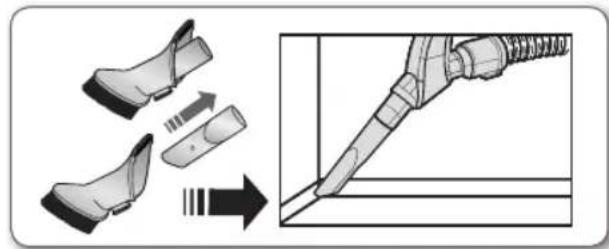
To use the dusting tool, push the accessory on to the end of the hose handle.
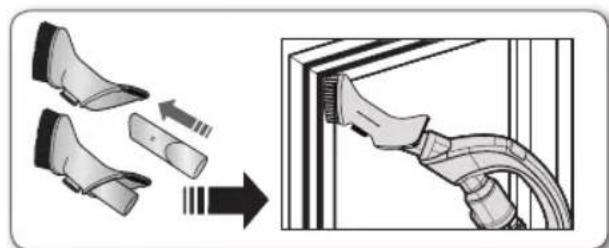
- To use the upholstery tool, push the accessory on to the end of the hose handle.
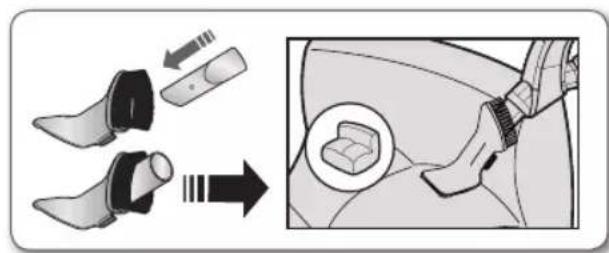
Pipe
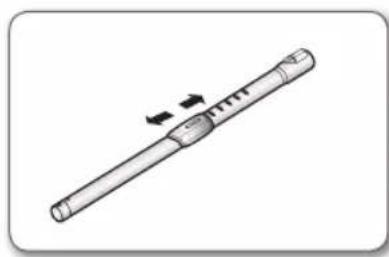
- Adjust the length of the telescopic pipe by sliding the length control button located in the center of the telescopic pipe back and forth.
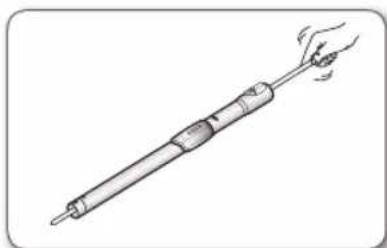
- To check for blockages, separate the telescopic pipe and adjust to shorten. This allows for easier removal of waste clogging the tube.
MAINTAIN FLOOR TOOLS
2-Step brush (Optional)
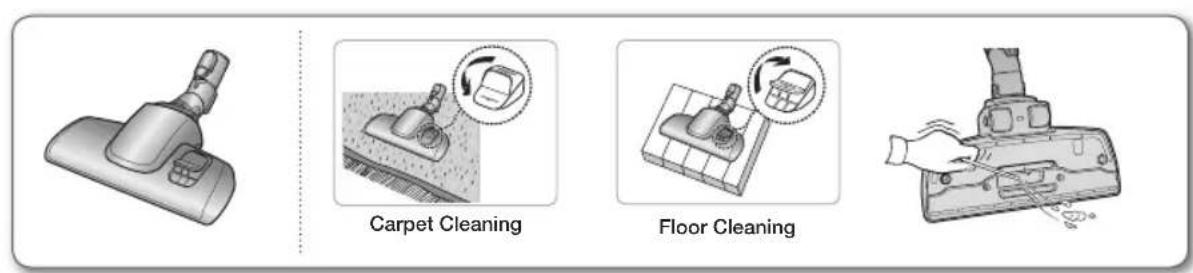
- Adjust the inlet lever according to the floor surface. Remove waste matter completely if the inlet is blocked.
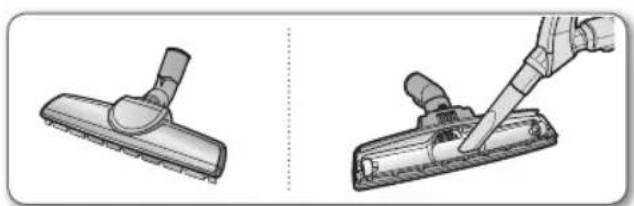
Parquet master brush (Optional)
Vacuum dust inwide area at once. Remove waste matter completely if the inlet is blocked.
Super turbine brush (Optional)
For improved pickup of pet hair and fibre on carpets.
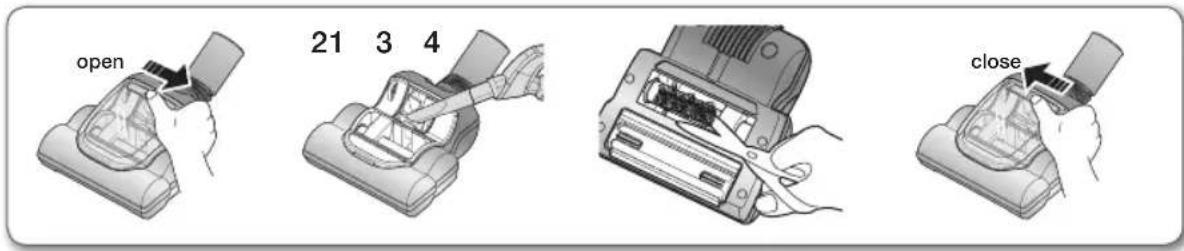
Frequent vacuuming of hair or pet fur may cause a falling-off of the rotation due to matters tangled around the drum. In this case, clean the drum with care.
- Click the lever to the arrow direction as shown figure1 and open the cover.
- Remove dust inside the brush housing using a dry duster or crevice tool.
- Remove waste matter such as dust and hair tangled around the brushbar using scissors.
- Click the lever to the arrow direction as shown figure4 and close the cover.
Please be careful not to damage the brush.
You should clean the Aqua cyclone after each vacuuming. Be sure to clean the vacuum over a sink or other basin to keep your floor and carpets. To clean the Aqua cyclone, do the following.
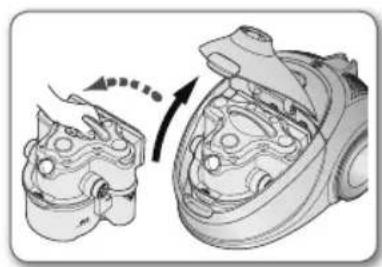
- Lift the cover lock and open the cover to take the aquacyclone out of the main body.
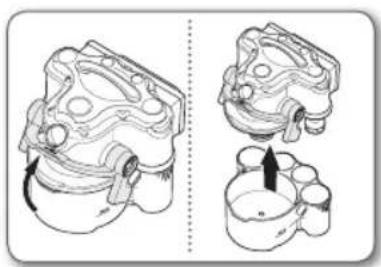
- Place the aqua cyclone on the flat table. Hold the lever up and separate the upper part completely.
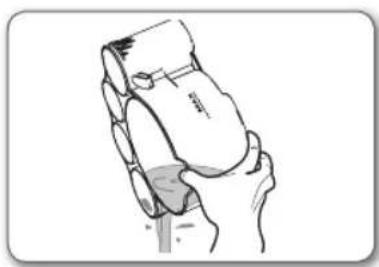
- Throw the dust away to a bin, plastic bag.
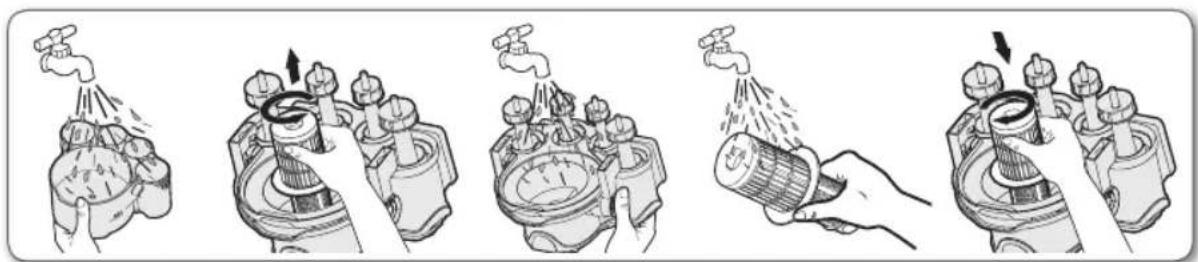
- Rinse the full set of aquacyclone.
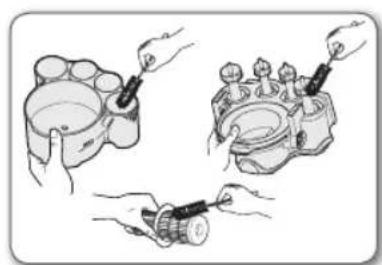
- Use the cleaning brush if it is needed.
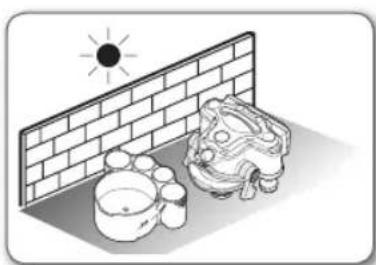
- Let the full set of aquacyclone fully dried in the shade.
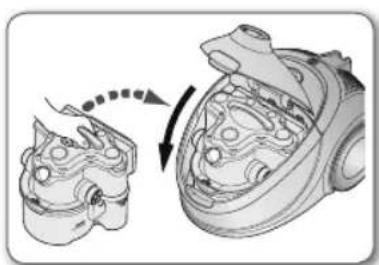
- Put the assembled cyclone into the main body.
maintain tools and filter
CLEANING THE DUST PACK

When to clean the dust pack
- When suction is noticeably reduced continuously.
- When the sponge is heavily polluted.

- Remove the dust bin and the dust pack as shown.

- Remove the fixed frame and open the dust pack cover.
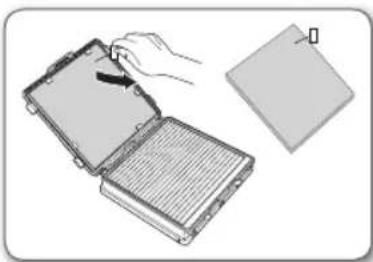
- Separate the sponge from the dust pack.
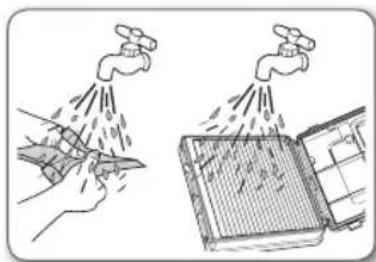
- Wash the sponge and the filter inside the dust pack with water.
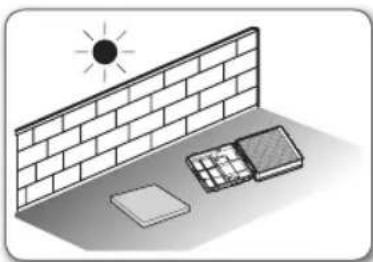
- Let the sponge and filter dry in the shade for more than 12 hours.
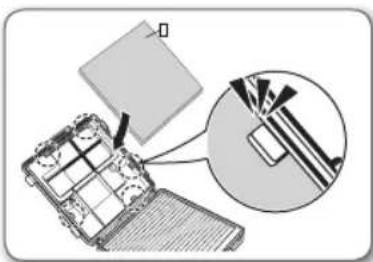
- Put the sponge into the dust pack carefully.
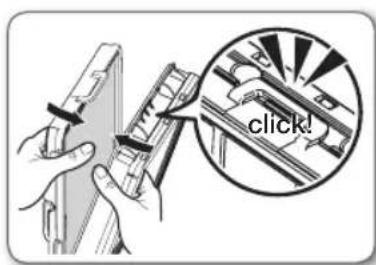
- Close the dust pack cover and check the fixed frame locked property.
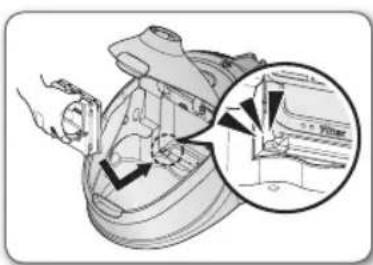
- Place the assembled dust pack from the bottom of the dust pack space first and push it to the main body.
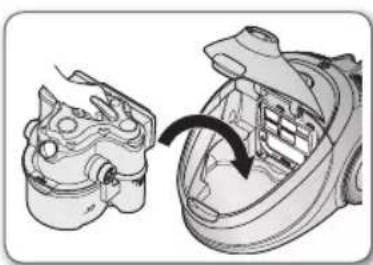
- Put the assembled cyclone into the main body.

Make sure that the dust pack filter is changed once a year. If you use a vacuum cleaner very often, resource filter can be reduced. In this case it is recommended to change the filter with greater frequency.

Try to keep the dust pack clean constantly. Regularly check its condition. Ignoring this requirement can lead to motor and body overheating, failure and reduce the service life of the appliance.
CHANGING THE OUTLET FILTER
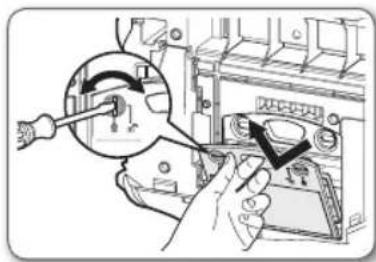
- Turn the locks in clockwise (to) to open the cover.
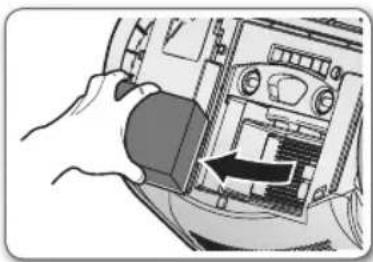
- Separate the HEPA filter from inside of the main body.
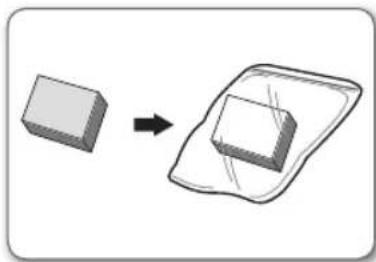
- Changing the used filter to new HEPA filter.
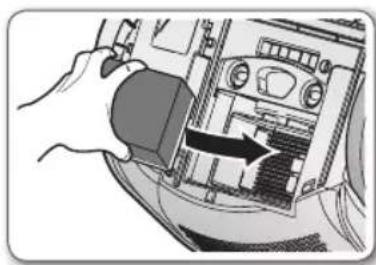
- Put the new HEPA filter to the main body carefully.
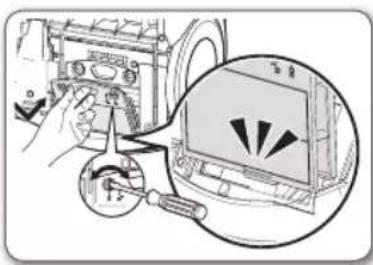
- Put the cover on the main body from the bottom of the case and lock ( ) the cover properly.

Make sure that the outlet filter is changed once a year. If you use a vacuum cleaner very often, resource filter can be reduced. In this case it is recommended to change the filter with greater frequency.

Regularly check its condition. Ignoring this requirement can lead to body overheating, failure and reduce the service life of the appliance.
CHANGE THE BATTERY (Optional)

- When the vacuum cleaner does not work, replace the batteries. If the problem persists, please contact our authorized dealer.
- Use 2 batteries of size AAA.

- Never disassemble or recharge the batteries.
- Never heat up the batteries or throw them into fire.
- Do not reverse (+) ,(-)poles.
- Dispose of the batteries property.
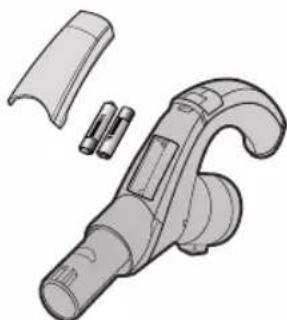

BATTERY TYPE: AAA Size
troubleshooting
| PROBLEM SOLUTION | |
| Motor downs and does not start. | Check cable, plug and socket. Leave to cool. |
| Suction force is gradually decreasing. | Check for blockage and remove. |
| Cord does not rewind fully. | Pull the cord out 2~3m and push down the cord rewind button. |
| Vacuum cleaner downs, does not pick up dirt | Check hose and replace if required. |
| Water leakage from the dust bin. | Check rubber packing inserted tightly at the upper part. Check rubber packing to the lever at the bottom of the dust bin. |
| Excessive water drops from the inside of the body. | Some droplets on the inside body are to be expected. Please dry the aqua cyclone fully. |
| Dirty water comes out of the top of the main body | Check the filter is located properly. If the amount of water becomes excessive, check if water inside dust bin is over the max line and make the water level is under the max line. |
| Water comes out from the back cover. | Check the water level of the aqua cyclone. Please operate the vacuum cleaner without the aqua cyclone until water does not come out from the back cover. |
| Low or decreasing suction. | Please check filters. If required clean it as illustrated in the instruction. If filters are out of conditions, change them to new one. |
| Body overheating | Please check filters. If required clean it as illustrated in the instruction. |
| Static electricity discharge | Please decrease power suction. |
| Unpleasant smell during vacuuming | Please note that there may be a slight smell during vacuuming when the cleaner is new (4-5 days). |
This Vacuum cleaner is approved the following.
EMC Directive: 2004/108/EEC
Low Voltage Directive: 2006/95/EC
SAMSUNG

Directive EMC:2004/108/EEC