DIY 3.6V LiIon - Screwdriver SILVERLINE - Free user manual and instructions
Find the device manual for free DIY 3.6V LiIon SILVERLINE in PDF.



Frequently Asked Questions - DIY 3.6V LiIon SILVERLINE
User questions about DIY 3.6V LiIon SILVERLINE
0 question about this device. Answer the ones you know or ask your own.
Ask a new question about this device
Download the instructions for your Screwdriver in PDF format for free! Find your manual DIY 3.6V LiIon - SILVERLINE and take your electronic device back in hand. On this page are published all the documents necessary for the use of your device. DIY 3.6V LiIon by SILVERLINE.
USER MANUAL DIY 3.6V LiIon SILVERLINE
SILVERLINEC® Mini Screwdriver Set
3.6V Li-ion Mini Screwdriver Set 1.3Ah

natural_image
Electric power adapter with attached cable and terminal connector (no text or symbols visible)SILVERLINEC® The Screwdriver Se
3.6V Li-ion Mini Screwdriver Set 1.3Ah
English 4
Français 8
Deutsch 12
Español 16
Italiano 20
Nederlands......24
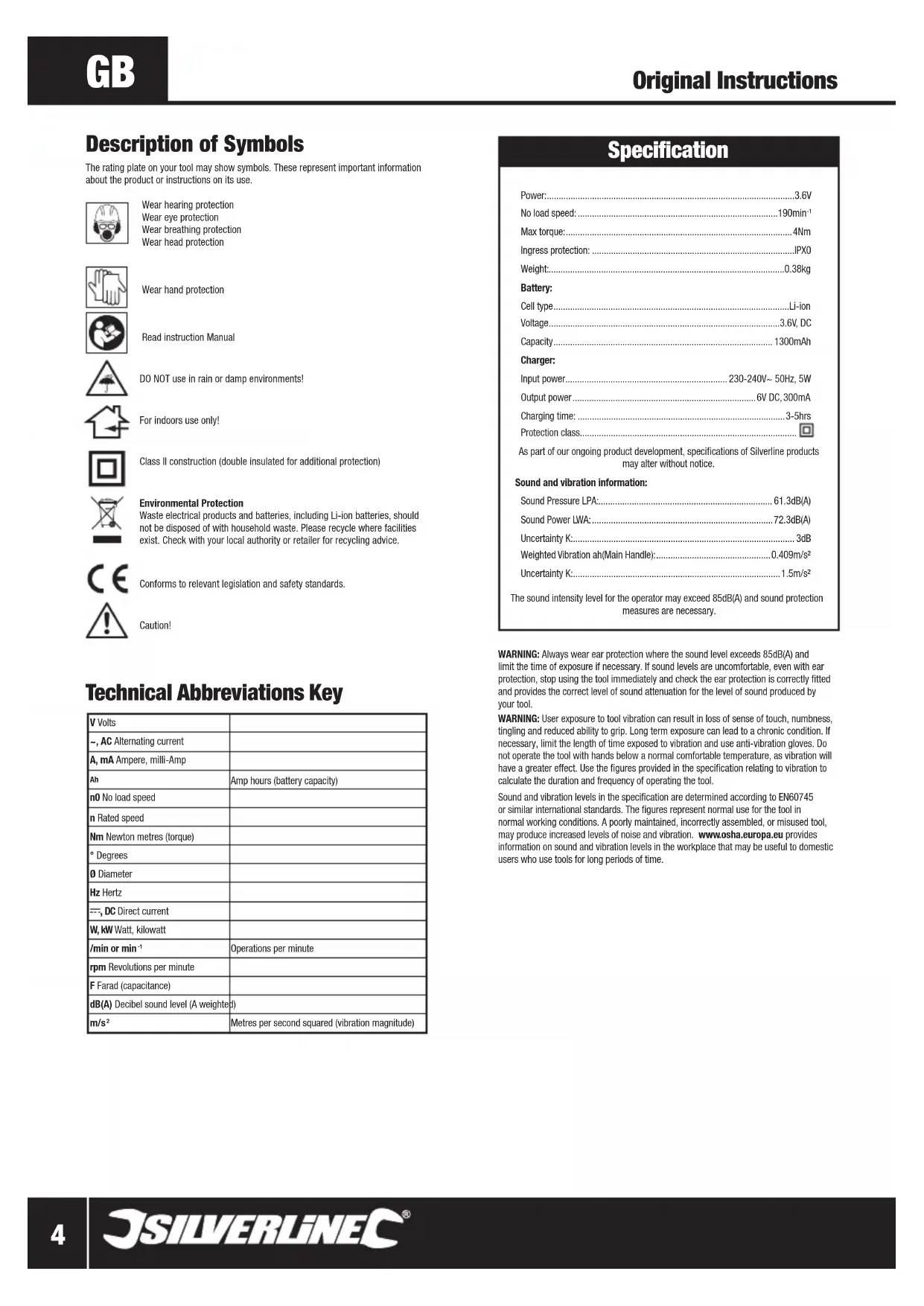
Description of Symbols
The rating plate on your tool may show symbols. These represent important information about the product or instructions on its use.

Wear hearing protection
Wear eye protection
Wear breathing protection
Wear head protection

Wear hand protection

Read instruction Manual

DO NOT use in rain or damp environments!

For indoors use only!

Class II construction (double insulated for additional protection)

Environmental Protection
Waste electrical products and batteries, including Li-ion batteries, should not be disposed of with household waste. Please recycle where facilities exist. Check with your local authority or retailer for recycling advice.

Conforms to relevant legislation and safety standards.

Caution!
Technical Abbreviations Key
| V Volts | |
| ~, AC Alternating current | |
| A, mA Ampere, milli-Amp | |
| Ah | Amp hours (battery capacity) |
| n0 No load speed | |
| n Rated speed | |
| Nm Newton metres (torque) | |
| ° Degrees | |
| ∅ Diameter | |
| Hz Hertz | |
| ---, DC Direct current | |
| W, kW Watt, kilowatt | |
| /min or min ^-1 | Operations per minute |
| rpm Revolutions per minute | |
| F Farad (capacitance) | |
| dB(A) Decibel sound level (A weighted) | |
| m/s ^2 | Metres per second squared (vibration magnitude) |
Specification
Power: 3.6V
No load speed: 190min ^-1
Max torque: 4Nm
Ingress protection: IPX0
Weight: 0.38kg
Battery:
Cell type....Li-ion
Voltage....3.6V, DC
Capacity 1300mAh
Charger:
Input power....230-240V\~ 50Hz, 5W
Output power....6V DC, 300mA
Charging time: 3-5hrs
Protection class....
As part of our ongoing product development, specifications of Silverline products may alter without notice.
Sound and vibration information:
Sound Pressure LPA: 61.3dB(A)
Sound Power LWA: 72.3dB(A)
Uncertainty K: 3dB
Weighted Vibration ah(Main Handle): 0.409m/s²
Uncertainty K: 1.5m/s²
The sound intensity level for the operator may exceed 85dB(A) and sound protection measures are necessary.
WARNING: Always wear ear protection where the sound level exceeds 85dB(A) and limit the time of exposure if necessary. If sound levels are uncomfortable, even with ear protection, stop using the tool immediately and check the ear protection is correctly fitted and provides the correct level of sound attenuation for the level of sound produced by your tool.
WARNING: User exposure to tool vibration can result in loss of sense of touch, numbness, tingling and reduced ability to grip. Long term exposure can lead to a chronic condition. If necessary, limit the length of time exposed to vibration and use anti-vibration gloves. Do not operate the tool with hands below a normal comfortable temperature, as vibration will have a greater effect. Use the figures provided in the specification relating to vibration to calculate the duration and frequency of operating the tool.
Sound and vibration levels in the specification are determined according to EN60745 or similar international standards. The figures represent normal use for the tool in normal working conditions. A poorly maintained, incorrectly assembled, or misused tool, may produce increased levels of noise and vibration. www.osha.europa.eu provides information on sound and vibration levels in the workplace that may be useful to domestic users who use tools for long periods of time.
General Safety
WARNING Read all safety warnings and all instructions. Failure to follow the warnings and instructions may result in electric shock, fire and/or serious injury.
WARNING: This appliance is not intended for use by persons (including children) with reduced, physical or mental capabilities or lack of experience or knowledge unless they have been given supervision or instruction concerning use of the appliance by a person responsible for their safety. Children must be supervised to ensure that they do not play with the appliance.
Save all warnings and instructions for future reference.
The term "power tool" in the warnings refers to your mains-operated (corded) power tool or battery-operated (cordless) power tool.
1) Work area safety
a) Keep work area clean and well lit. Cluttered or dark areas invite accidents.
b) Do not operate power tools in explosive atmospheres, such as in the presence of flammable liquids, gases or dust. Power tools create sparks which may ignite the dust or fumes.
c) Keep children and bystanders away while operating a power tool. Distractions can cause you to lose control.
2) Electrical safety
a) Power tool plugs must match the outlet. Never modify the plug in any way. Do not use any adapter plugs with earthed (grounded) power tools. Unmodified plugs and matching outlets will reduce risk of electric shock.
b) Avoid body contact with earthed or grounded surfaces, such as pipes, radiators, ranges and refrigerators. There is an increased risk of electric shock if your body is earthed or grounded.
c) Do not expose power tools to rain or wet conditions. Water entering a power tool will increase the risk of electric shock.
d) Do not abuse the cord. Never use the cord for carrying, pulling or unplugging the power tool. Keep cord away from heat, oil, sharp edges or moving parts. Damaged or entangled cords increase the risk of electric shock.
e) When operating a power tool outdoors, use an extension cord suitable for outdoor use. Use of a cord suitable for outdoor use reduces the risk of electric shock.
f) If operating a power tool in a damp location is unavoidable, use a residual current device (RCD) protected supply. Use of an RCD reduces the risk of electric shock.
3) Personal safety
a) Stay alert, watch what you are doing and use common sense when operating a power tool. Do not use a power tool while you are tired or under the influence of drugs, alcohol or medication. A moment of inattention while operating power tools may result in serious personal injury.
b) Use personal protective equipment. Always wear eye protection. Protective equipment such as dust mask, non-skid safety shoes, hard hat, or hearing protection used for appropriate conditions will reduce personal injuries.
c) Prevent unintentional starting. Ensure the switch is in the off-position before connecting to power source and/or battery pack, picking up or carrying the tool. Carrying power tools with your finger on the switch or energising power tools that have the switch on invites accidents.
d) Remove any adjusting key or wrench before turning the power tool on. A wrench or a key left attached to a rotating part of the power tool may result in personal injury.
e) Do not overreach. Keep proper footing and balance at all times. This enables better control of the power tool in unexpected situations.
f) Dress properly. Do not wear loose clothing or jewellery. Keep your hair, clothing and gloves away from moving parts. Loose clothes, jewellery or long hair can be caught in moving parts.
g) If devices are provided for the connection of dust extraction and collection facilities, ensure these are connected and properly used. Use of dust collection can reduce dust-related hazards.
4) Power tool use and care
a) Do not force the power tool. Use the correct power tool for your application. The correct power tool will do the job better and safer at the rate for which it was designed.
b) Do not use the power tool if the switch does not turn it on and off. Any power tool that cannot be controlled with the switch is dangerous and must be repaired.
c) Disconnect the plug from the power source and/or the battery pack from the power tool before making any adjustments, changing accessories, or storing power tools. Such preventive safety measures reduce the risk of starting the power tool accidentally.
d) Store idle power tools out of the reach of children and do not allow persons unfamiliar with the power tool or these instructions to operate the power tool. Power tools are dangerous in the hands of untrained users.
e) Maintain power tools. Check for misalignment or binding of moving parts, breakage of parts and any other condition that may affect the power tool's operation. If damaged, have the power tool repaired before use. Many accidents are caused by poorly maintained power tools.
f) Keep cutting tools sharp and clean. Properly maintained cutting tools with sharp cutting edges are less likely to bind and are easier to control.
g) Use the power tool, accessories and tool bits etc. in accordance with these instructions, taking into account the working conditions and the work to be performed. Use of the power tool for operations different from those intended could result in a hazardous situation.
5) Battery tool use and care
a) Recharge only with the charger specified by the manufacturer. A charger that is suitable for one type of battery pack may create a risk of fire when used with another battery pack.
b) Use power tools only with specifically designated battery packs. Use of any other battery packs may create a risk of injury and fire.
c) When battery pack is not in use, keep it away from other metal objects, like paper clips, coins, keys, nails, screws or other small metal objects that can make a connection from one terminal to another. Shorting the battery terminals together may cause burns or a fire.
d) Under abusive conditions, liquid may be ejected from the battery; avoid contact. If contact occurs, flush with water. If liquid contacts eyes, additionally seek medical help. Liquid ejected from the battery may cause irritation or burns.
6) Service
a) Have your power tool serviced by a qualified repair person using only identical replacement parts. This will ensure that the safety of the power tool is maintained.
Battery Safety
WARNING: Li-Ion batteries, if incorrectly used, stored or charged are a fire, burn and explosion hazard.
- Keep the battery out of reach of children
• ONLY charge Li-Ion batteries designed specifically for this charger - ONLY use Li-Ion batteries provided with this product or specifically designed to be compatible
- Allow batteries to cool for 15 minutes after charging or heavy use. Failure to follow these instructions may cause overheating or fire
- When not in use batteries should be stored at room temperature (approximately 20°C)
- Ensure battery contacts cannot accidentally short in storage. Keep batteries clean; foreign objects or dirt may cause a short. Keep away from other metal objects, for example paperclips, coins, keys, nails and screws
- Under abusive conditions, liquid may be ejected from the battery. This liquid may cause skin irritation or burns. Avoid contact. If contact accidentally occurs, flush with water. If liquid contacts eyes, seek medical help
- DO NOT open, disassemble, crush, heat above 60°C or incinerate. Do not dispose of in fire or similar
Mini Screwdriver Safety
- Hold the power tool by insulated gripping surfaces only when performing tasks where the tool bit comes within close proximity or may contact hidden wiring. Fasteners or cutting accessories contacting a "live" power source may make exposed metal parts of the power tools "live" and could give the operator an electric shock.
- Hold the tool with a firm grip. Impact wrenches can provide instantaneous high levels of torque whilst driving fasteners, that could easily be transferred to the operator.
- Use the auxiliary handle(s), if provided. Loss of control can cause harm to the operator.
- Always ensure the workpiece is secured. A properly secured workpiece using a vice or other clamping equipment is held more secure than by hand.
- Always wait until the machine has come to a complete stop before setting the tool down. The tool insert can jam leading to a loss of control over the power tool.
Product Familiarisation
- Bit Holder
- LED
- Charge Indicator LED
- Charge Indicator
- Handle Adjustment Button
- On/Off Trigger Switch
- Direction Button
- DC Charging Socket
- DC Charging Plug
- Charger
Accessories (not shown):
- Hard Plastic Carry Case
- 1 x Socket Adaptor
- 102 x Assorted Bits
- 1 x Magnetic Bit Holder
- 7 x Nut Driver
- 6 x 14 " Sockets
Intended Use
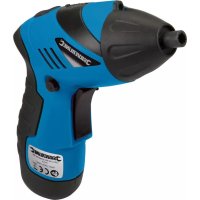
Battery-powered mini screwdriver with adjustable two-position body for light duty screwdriving and fastening tasks to a minimal torque level.
Unpacking Your Tool
- Carefully unpack and inspect your new tool. Familiarise yourself with all its features and functions
- Ensure that all parts of the tool are present and in good condition. If any parts are missing or damaged, have such parts replaced before attempting to use this tool
Before Use

WARNING: Ensure the battery is disconnected from the power supply before attaching or changing any accessories, or making any adjustments.
Checking battery charge level
- Press the Charge Level Indicator (4), one or more of the Charge Level Indicator LED (3) lights will illuminate, depending on the level of charge
Charging the battery
- The Li-Ion battery can be placed on charge at any time as the intelligent charging system will charge from any level of existing charge in the battery
- The battery should be charged at 20^ (room temperature)
- Plug the charger into the power supply
- Insert the DC Charging Plug (9) into the DC Charging Socket (8)
Note: Ensure that no metal parts are allowed to touch the battery charge point as this could cause an electrical short, damaging the battery
- Switch on the power supply. The red Charge Indicator LED (3) will illuminate, indicating that the battery is being charged
- After 3-5 hours the battery will be fully charged and should be disconnected from the power supply
- Allow 15 minutes for the battery to cool before use
- Disconnect the charger from the power supply and store in a clean, dry environment out of the reach of children
- Do not leave the battery on charge for extended periods
WARNING: The battery will gradually lose charge in storage. Do not store the screwdriver for long periods discharged. Always fully charge the battery before long term storage.
IMPOR TANT: Failure to follow the correct procedure when charging the battery will result in permanent damage. You must follow the correct procedure.
Fitting a screwdriver bit
- You can fit hex type screwdriver bits directly into the hex Bit Holder (1), or use the additional bit holder (supplied)
Operation

WARNING: ALWAYS wear eye protection, adequate respiratory and hearing protection, as well as suitable gloves, when working with this tool.
- Depress the On/Off Trigger Switch (6) fully to operate the tool
- Change the direction of the Bit Holder (1) by pressing the Direction Button (7) on either side of the tool to switch between anti-clockwise and clockwise rotation.
Note: If the Direction Button is not correctly pushed into position, you will be unable to operate the On/Off Trigger Switch.
Accessories
- A range of accessories and consumables, including Depth-Sensitive Bit Holder (868641), Quick Release Bit-Fix Holder ¼" (868528), and Off Line Driver (153145), is available from your Silverline stockist. Spare parts can be obtained from toolsparesonline.com
Maintenance

WARNING: Ensure the battery is disconnected from the power supply before attaching or changing any accessories, or making any adjustments.
General inspection
• Regularly check that all the fixing screws are tight
- Inspect the supply cord of the tool, prior to each use, for damage or wear. Repairs should be carried out by an authorised Silverline service centre. This advice also applies to extension cords used with this tool
Cleaning
- Keep your tool clean at all times. Dirt and dust will cause internal parts to wear quickly, and shorten the machine's service life. Clean the body of your machine with a soft brush, or dry cloth. If available, use clean, dry, compressed air to blow through the ventilation holes
- Clean the tool casing with a soft damp cloth using a mild detergent. Do not use alcohol, petrol or strong cleaning agents
- Never use caustic agents to clean plastic parts
Lubrication
- Slightly lubricate all moving parts at regular intervals with a suitable spray lubricant
Storage
- Store this tool carefully in a secure, dry place out of the reach of children
Disposal
Always adhere to national regulations when disposing of power tools that are no longer functional and are not viable for repair.
- Do not dispose of power tools, or other waste electrical and electronic equipment (WEEE), with household waste
- Contact your local waste disposal authority for information on the correct way to dispose of power tools
Silverline Tools Guarantee
This Silverline product comes with a 3 year guarantee
Register this product at www.silverlinetools.com within 30 days of purchase in order to qualify for the 3 year guarantee. Guarantee period begins according to the date of purchase on your sales receipt.
Registering your purchase
Registration is made at silverlinetools.com by selecting the Guarantee Registration button. You will need to enter:-
- Your personal details
• Details of the product and purchase information
Once this information is entered your guarantee certificate will be created in PDF format for you to print out and keep with your purchase.
Terms & Conditions
Guarantee period becomes effective from the date of retail purchase as detailed on your sales receipt.
PLEASE KEEP YOUR SALES RECEIPT
If this product develops a fault within 30 days of purchase, return it to the stockist where it was purchased, with your receipt, stating details of the fault. You will receive a replacement or refund.
If this product develops a fault after the 30 day period, return it to:
Silverline Tools Service Centre
PO Box 2988
Yeovil
BA21 1WU, UK
The guarantee claim must be submitted during the guarantee period.
You must provide the original sales receipt indicating the purchase date, your name, address and place of purchase before any work can be carried out.
You must provide precise details of the fault requiring correction.
Claims made within the guarantee period will be verified by Silverline Tools to establish if the deficiencies are related to material or manufacturing of the product.
Carriage will not be refunded. Items for return must be in a suitably clean and safe state for repair, and should be packaged carefully to prevent damage or injury during transportation. We may reject unsuitable or
unsafe deliveries.
All work will be carried out by Silverline Tools or its authorized repair agents.
The repair or replacement of the product will not extend the period of guarantee
Defects recognised by us as being covered by the guarantee shall be corrected by means of repair of the tool, free of charge (excluding carriage charges) or by replacement with a tool in perfect working order.
Retained tools, or parts, for which a replacement has been issued, will become the property of Silverline Tools.
The repair or replacement of your product under guarantee provides benefits which are additional to and do not affect your statutory rights as a consumer.
What is covered:
The repair of the product, if it can be verified to the satisfaction of Silverline Tools that the
deficiencies were due to faulty materials or workmanship within the guarantee period.
If any part is no longer available or out of manufacture, Silverline Tools will replace it with a functional replacement part.
Use of this product in the EU.
What is not covered:
Silverline Tools does not guarantee repairs required as a result of:
Normal wear and tear caused by use in accordance with the operating instructions eg blades, brushes, belts, bulbs, batteries etc.
The replacement of any provided accessories drill bits, blades, sanding sheets, cutting discs and other related items.
Accidental damage, faults caused by negligent use or care, misuse, neglect, careless operation or handling of the product.
Use of the product for anything other than normal domestic purposes.
Change or modification of the product in any way.
Use of parts and accessories which are not genuine Silverline Tools components.
Faulty installation (except installed by Silverline Tools).
Repairs or alterations carried out by parties other than Silverline Tools or its authorized repair agents.
Claims other than the right to correction of faults on the tool named in these guarantee conditions are not covered by the guarantee.
Battery Guarantee
Silverline batteries are guaranteed for 30 days. If a defect occurs on a registered battery during the term of the Battery Guarantee, due to material or manufacturing fault, then Silverline will replace it free of charge. This guarantee does not apply to commercial use nor does it extend to normal wear and tear or damage as a result of accident, abuse or misuse.
CE Declaration of Conformity
The undersigned: Mr Darrell Morris
as authorised by: Silverline Tools
Declares that
Identification code: 791721
Description: 3.6V Li-ion Mini Screwdriver Set
Conforms to the following directives and standards:
• Machinery Directive 2006/42/EC
• EMC Directive 2004/108/EC
• RoHS Directive 2011/65/EU
• EN60745-1:2009+A11:2010
• EN60745-2-2:2010
• EN55014-1:2006+A1:2009+A2:2011
• EN55014-2:1997+A1:2001+A2:2008
• EN61000-3-2:2006+A1:2009+A2:2009
• EN61000-3-3:2013
Notified body: Bureau Veritas
The technical documentation is kept by: Silverline Tools
Date: 01/04/2015
Signed:
Mr Darrell Morris
Managing Director
Name and address of the manufacturer:
Powerbox International Limited, Company No. 06897059. Registered address: Central House,
Church Street, Yeovil, Somerset BA20 1HH, United Kingdom.
Silverline Tools Service Centre
PO Box 2988
Yeovil
Hand-Arm-Vibration ah (Hauptgriff): 0,409 m/s²
Silverline Tools Service Centre
PO Box 2988
Yeovil
Silverline Tools Service Centre
PO Box 2988
Yeovil
BA21 1WU, GB
Signor Darrell Morris
Central House, Church Street, Yeovil, Somerset BA20 1HH, Regno Unito.
Silverline Tools Service Centre
PO Box 2988
Yeovil
BA21 1WU, GB
natural_image
Black industrial electric shaver with brand logo and certification badge (no visible text or symbols on body)
3 Year Guarantee
*Register online within 30 days. Terms & Conditions apply