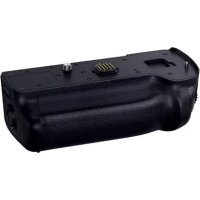
Lumix DMWBGGH5 - Other camera accessories PANASONIC - Free user manual and instructions
Find the device manual for free Lumix DMWBGGH5 PANASONIC in PDF.



| Product type | Power supply (battery grip) for camera |
| Brand | Panasonic |
| Model | DMW-BGGH5 |
| Dimensions | Approx. 135.5 mm (W) x 41.0 mm (H) x 70.7 mm (D) |
| Weight | Approx. 319 g (with battery), 245 g (without battery) |
| Power supply | Panasonic DMW-BLF19 lithium-ion battery (sold separately) |
| Compatibility | Panasonic DC-GH5 camera (as of February 2017) |
| Battery life | Approx. 810 photos (with two batteries) |
| Main functions | Shutter button, front dial, [AF/AE LOCK] button, [Fn] button, [WB] button, [ISO] button, [Exposure compensation] button, switch, joystick, rear dial |
| Dust and splash resistance | Yes |
| Operating temperature | -10 °C to 40 °C |
| Operating relative humidity | 10% to 80% |
| Warranty | 1 year parts and labor (digital camera accessories, Canada) |
| Package contents | Terminal cap (installed on power supply), instruction manual |
| Maintenance and cleaning | Wipe with a soft, dry cloth. Do not use solvents such as benzene, thinner, alcohol. |
| Safety | Use only with recommended Panasonic batteries. Do not expose to heat, disassemble, or dispose of in fire. |
| Replacement parts and repairability | DMW-BLF19 battery, DMW-DCC12 DC coupler, DMW-AC10PP AC adapter (sold separately) |
| General information | Improves grip and ease of operation in vertical shooting. Allows using an additional battery to extend battery life. |
Frequently Asked Questions - Lumix DMWBGGH5 PANASONIC
User questions about Lumix DMWBGGH5 PANASONIC
0 question about this device. Answer the ones you know or ask your own.
Ask a new question about this device
Download the instructions for your Other camera accessories in PDF format for free! Find your manual Lumix DMWBGGH5 - PANASONIC and take your electronic device back in hand. On this page are published all the documents necessary for the use of your device. Lumix DMWBGGH5 by PANASONIC.
USER MANUAL Lumix DMWBGGH5 PANASONIC
Operating Instructions
Please read these instructions carefully before using this product, and save this manual for future use.
If you have any questions, visit:
USA : http://shop.panasonic.com/support
Canada: www.panasonic.ca/english/support
Operating Instructions
BATTERY GRIP
Thank you for purchasing this Panasonic product.
Please read these instructions carefully before using this product, and save this manual for future use.
Contents
Information for Your Safety 2
Precautions 5
Supplied Accessories. 5
Names of the components 6
Mounting on and removing from the digital camera. 7
Inserting/Removing the Battery. 8
Using the battery grip 11
Cautions for Use 11
Specifications 13
Limited Warranty (ONLY FOR U.S.A.) 14
Limited Warranty (ONLY FOR CANADA) 17
Information for Your Safety
The socket outlet shall be installed near the equipment and shall be easily accessible.
CAUTION!
To reduce the risk of fire, electric shock or product damage,
- Do not install or place this unit in a bookcase, built-in cabinet or in another confined space. Ensure this unit is well ventilated.
About the battery pack
CAUTION
Battery pack (Lithium ion battery pack)
- Use the specified unit to recharge the battery pack.
- Do not use the battery pack with equipment other than the specified unit.
- Do not get dirt, sand, liquids, or other foreign matter on the terminals.
- Do not touch the plug terminals (+ and -) with metal objects.
- Do not disassemble, remodel, heat or throw into fire.
If any electrolyte should come into contact with your hands or clothes, wash it off thoroughly with water.
If any electrolyte should come into contact with your eyes, never rub the eyes. Rinse eyes thoroughly with water, and then consult a doctor.
CAUTION
- Danger of explosion if battery is incorrectly replaced. Replace only with the type recommended by the manufacturer.
-
When disposing of the batteries, please contact your local authorities or dealer and ask for the correct method of disposal.
-
Do not heat or expose to flame.
- Do not leave the battery(ies) in a car exposed to direct sunlight for a long period of time with doors and windows closed.
Warning
Risk of fire, explosion and burns. Do not disassemble, heat above 60°C (140°F) or incinerate.
Disposal of Old Equipment
Only for European Union and countries with recycling systems
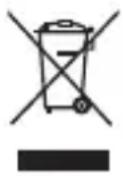
This symbol on the products, packaging, and/or accompanying documents means that used electrical and electronic products must not be mixed with general household waste.
For proper treatment, recovery and recycling of old products, please take them to applicable collection points in accordance with your national legislation.
By disposing of them correctly, you will help to save valuable resources and prevent any potential negative effects on human health and the environment.
For more information about collection and recycling, please contact your local municipality.
Penalties may be applicable for incorrect disposal of this waste, in accordance with national legislation.
Precautions
- This unit is exclusively for Panasonic digital camera DC-GH5. (As of February 2017)
For the latest information on compatible devices, see the operating instructions, catalogue or website of the digital camera. -
Ease of operation and grip when held vertically during the recording will improve. The attached battery pack* (optional), in addition to the battery in the digital camera, will allow longer recording time.
-
Indicated as battery pack or battery in the text.
Handling the unit
-
The dust- and splash-proofing of this unit is not a guarantee of a full protection against the intrusion of dust and water. Please take care of following when using. If the unit does not operate properly, please contact the dealer where you have purchased the unit or Panasonic.
-
Mount this unit firmly to the digital camera.
- Close the battery door and DC coupler cover firmly.
- Be careful not to allow sand, dust, or water to adhere or enter into the terminal area, digital camera, or this unit when attaching or removing this unit.
-
This unit is not water-proof, so this cannot be used underwater. For splash-proofing, this unit is constructed to resist the entry of water. If splashes of water etc. do adhere to this unit, wipe after use with a soft dry cloth.
-
Do not subject the unit to strong vibration or impact. Those actions may result in malfunctions and failure.
- Please also read the manual of your digital camera.
Supplied Accessories
Product numbers correct as of February 2017. These may be subject to change.
The battery is optional.
Terminal Cap
- The terminal cap is attached to the battery grip at the time of purchase.

DVKV1001Z
Names of the components
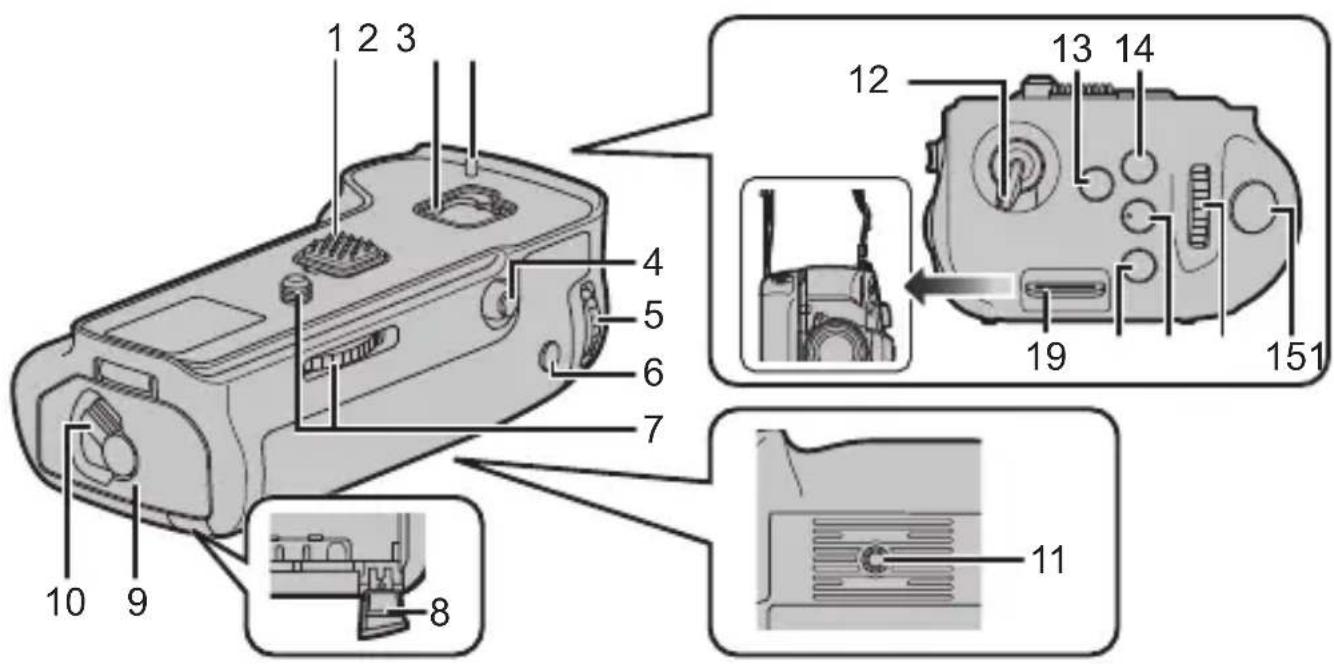
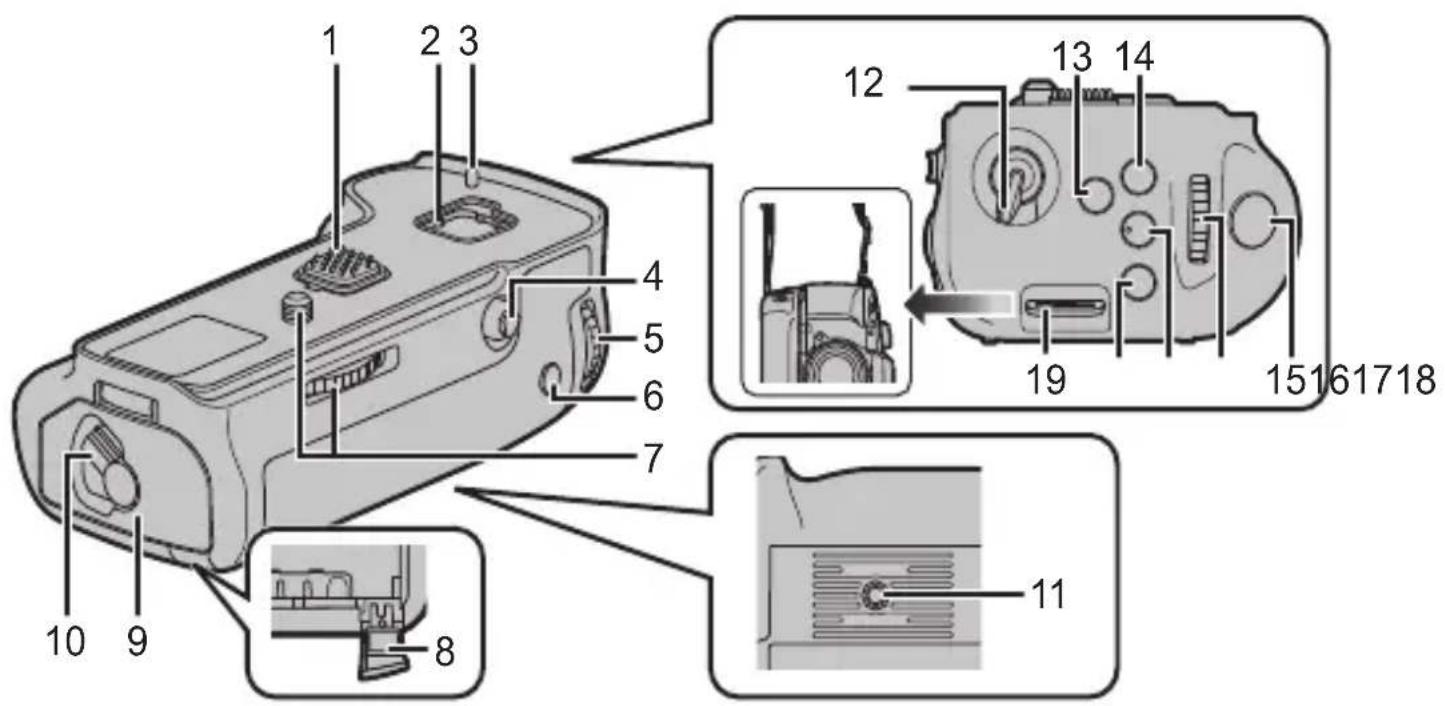
1 Electrical contacts
2 Cover storage
3 Camera attachment pins
4 Joystick
5 Rear dial
6 [AF/AE LOCK] button
7 Attachment screw
8 DC coupler cover
9 Battery door
10 Release lever
11 Tripod mount
12 Operation ON/OFF switch
13 [Fn] button
14 [WbWhite Balance) button
15 Shutter button
16 Front dial
17 [ISO sensitivity) button
18 [Exposure Compensation) button
19 Strap attachment holder
- We recommend using the battery grip and the digital camera with the supplied shoulder strap attached to prevent them from dropping. (Read the digital camera operating instructions for details on how to attach the strap.)
Mounting on and removing from the digital camera
- Check that the digital camera is turned off. (Mounting the unit onto, or disengaging it from, the camera while the power is on may cause trouble and is not recommended.)
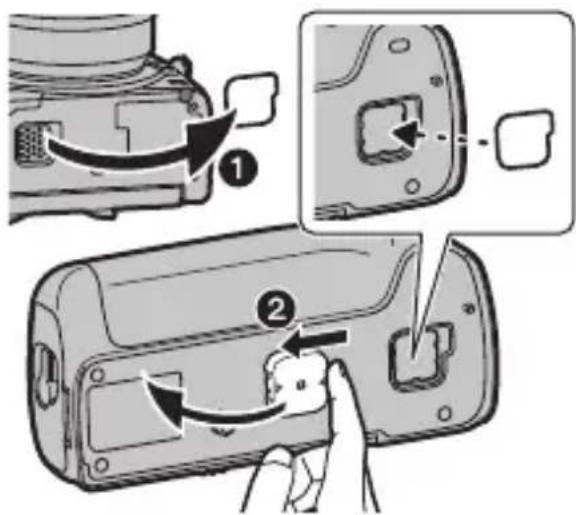
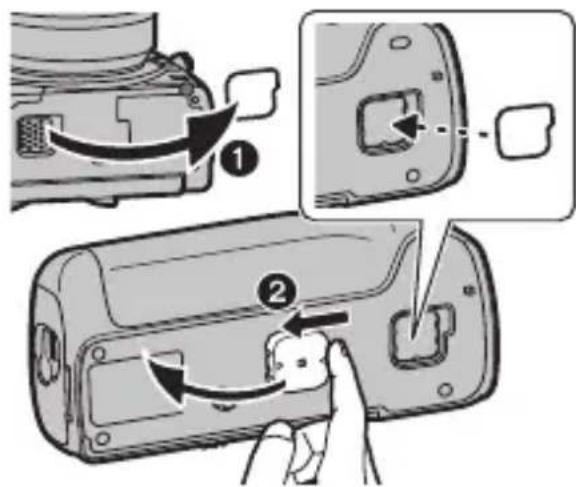
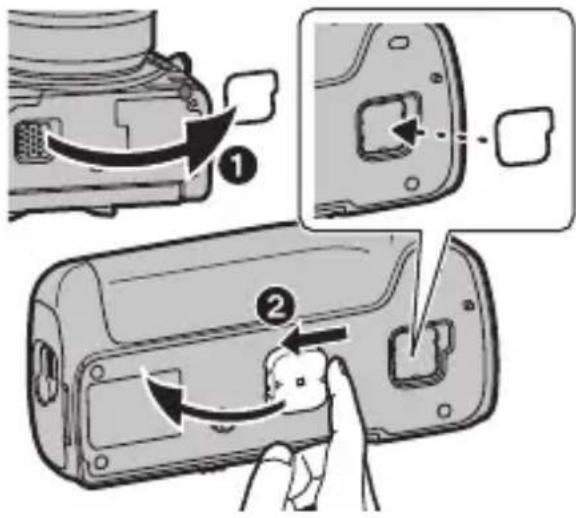
1 Remove the cover for the battery grip connector on the digital camera.
- The cover for the battery grip connector can be stored in the cover storage in the battery grip.
2 Remove the terminal cap on the electrical contacts of the battery grip. - Return the cover for the battery grip connector and the terminal cap to their original position after use to protect the terminals.
- Be careful not to lose the terminal cap.
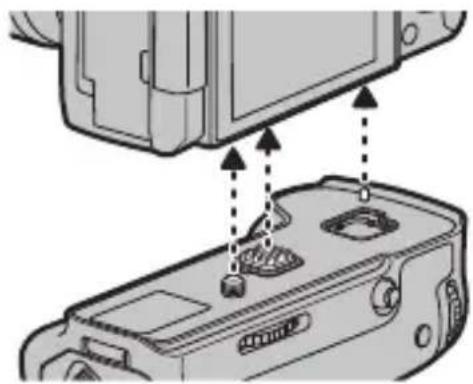
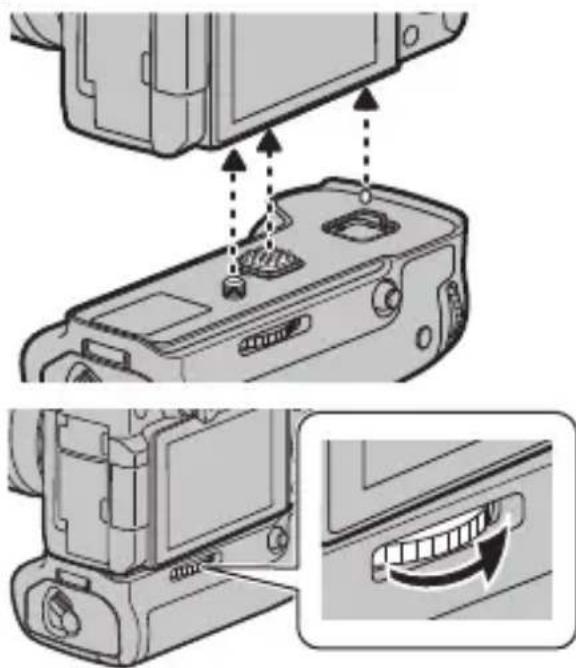
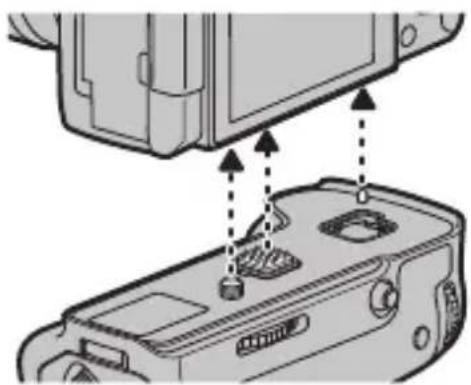
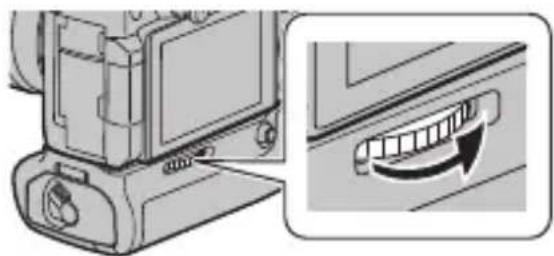
2 Insert by aligning the attachment screw, electrical contacts, and camera attachment pins.
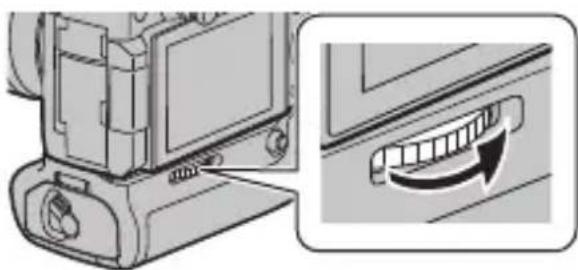
3 Turn the attachment screw in direction of the arrow to attach securely.
- Confirm that the attachment screw is not loose while using.

Note
- Keep the Terminal Cap out of reach of children to prevent swallowing.
Remove the battery grip from the digital camera
- Confirm that the digital camera is not powered, and turn the attachment screw in the opposite direction of the attachment.
Inserting/Removing the Battery
For the U.S.A., CANADA and Latin America
- Always use genuine Panasonic batteries (DMW-BLF19PP: optional).
- If you use other batteries, we cannot guarantee the quality of this product.
For Taiwan
- Always use genuine Panasonic batteries (DMW-BLF19GT: optional).
- If you use other batteries, we cannot guarantee the quality of this product.
For China
- Always use genuine Panasonic batteries (DMW-BLF19GK: optional).
- If you use other batteries, we cannot guarantee the quality of this product.
For Other Countries
- Always use genuine Panasonic batteries (DMW-BLF19E: optional).
-
If you use other batteries, we cannot guarantee the quality of this product.
-
Use the battery after charging with a dedicated charger.
- The battery grip can be used when the battery is inserted in either the digital camera or the battery grip.
- Check that the digital camera is turned off.
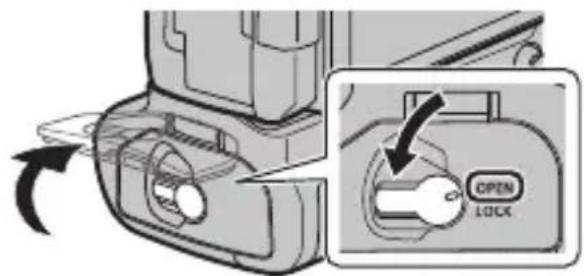
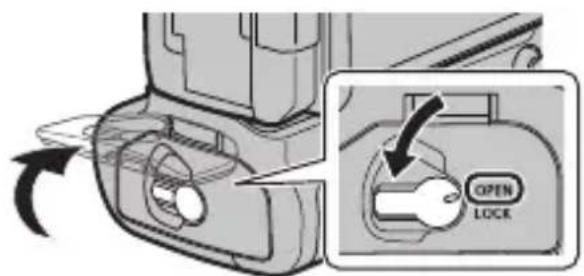
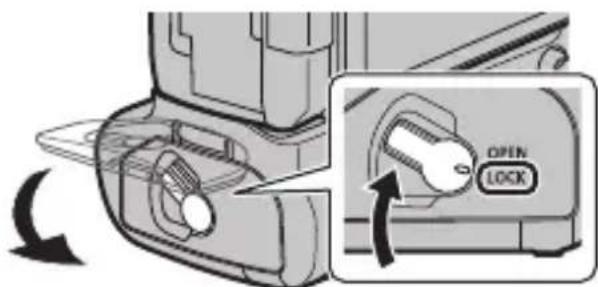
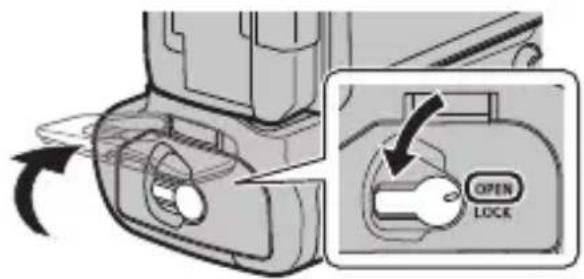
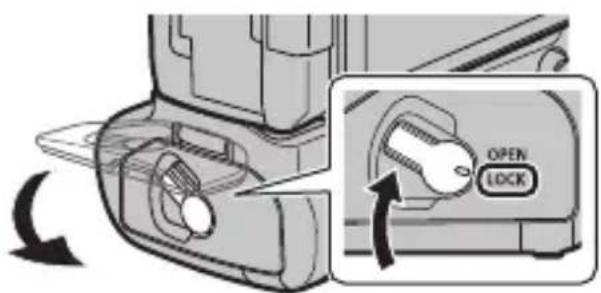
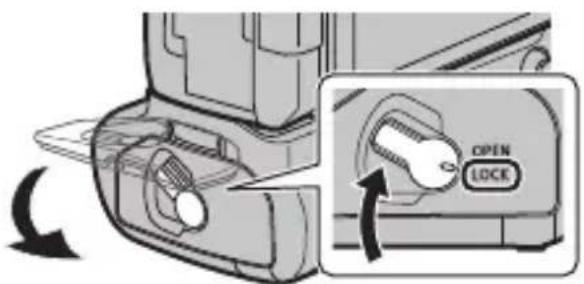
1 Turn the release lever of the battery grip toward [OPEN], and open the battery door.
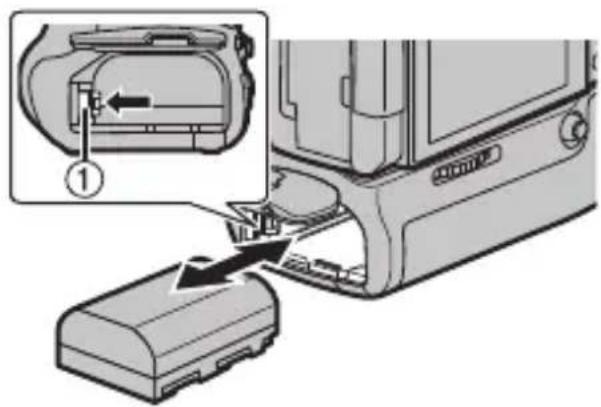
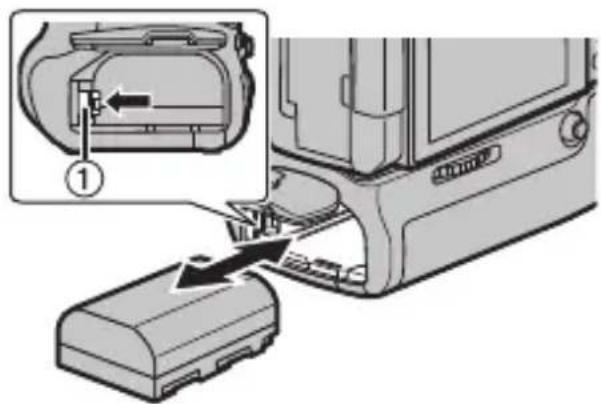
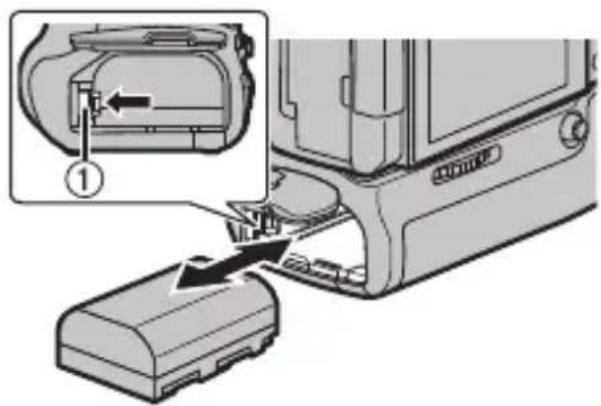
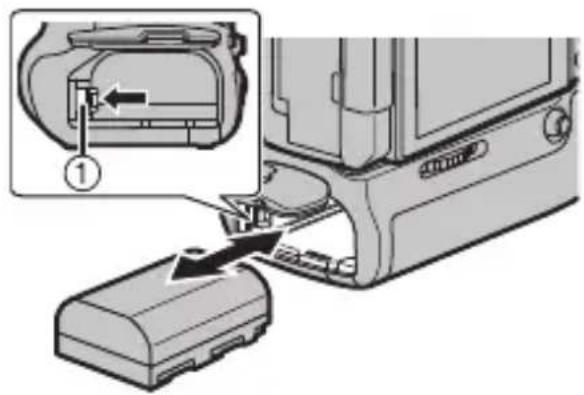
2 Taking care of the orientation, insert securely all the way until you hear locking, and confirm that the ① lever is hooked to the battery.
- When removing the battery, push the ① lever toward the arrow and pull out the battery.
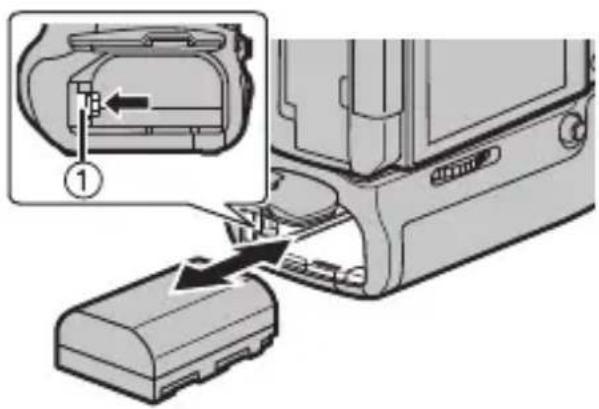
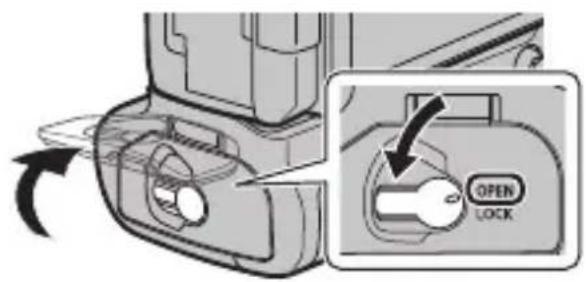
3 Close the battery door and turn the release lever toward [LOCK].
![PANASONIC Lumix DMWBGGH5 - Close the battery door and turn the release lever toward [LOCK]. - 1](/content/2026/02/426106/images/521f795d8d35808040787392f4101688b441ec316417c77062c9973f2a7ee705.jpg)
Note
- Remove the battery after use. (The battery will exhaust if it is left unused for long period of time.)
- The battery will be warm after using, while charging, and right after charging. The battery grip will also be warm while using, but this is not a malfunction.
- Confirm that there is no foreign matter on the battery door.
Using 2 batteries
The digital camera can be used for longer periods of time when batteries are inserted in both the digital camera and the battery grip. (It will switch to the other battery when one of the batteries is exhausted.)
- The battery to be used primarily can be set in the digital camera. Read the operating instructions of your digital camera for details.
Note
- Do not remove the battery when the battery in the battery grip is being used. (Power of the digital camera will be turned off.)
Using the AC adaptor (optional) and the DC coupler (optional) instead of the battery
For the U.S.A., CANADA and Latin America
- When using an AC adaptor, ensure that the Panasonic DC coupler (DMW-DCC12: optional) and AC adaptor (DMW-AC10PP: optional) are used.
- Always use a genuine Panasonic AC adaptor (DMW-AC10PP: optional).
For the Europe and CIS
- When using an AC adaptor, ensure that the Panasonic DC coupler (DMW-DCC12: optional) and AC adaptor (DMW-AC10E: optional) are used.
- Always use a genuine Panasonic AC adaptor (DMW-AC10E: optional).
For Taiwan
- When using an AC adaptor, ensure that the Panasonic DC coupler (DMW-DCC12: optional) and AC adaptor (DMW-AC10GT: optional) are used.
- Always use a genuine Panasonic AC adaptor (DMW-AC10GT: optional).
For Korea
- When using an AC adaptor, ensure that the Panasonic DC coupler (DMW-DCC12: optional) and AC adaptor (DMW-AC10GD: optional) are used.
- Always use a genuine Panasonic AC adaptor (DMW-AC10GD: optional).
For Other Countries
- When using an AC adaptor, ensure that the Panasonic DC coupler (DMW-DCC12: optional) and AC adaptor (DMW-AC10G: optional) are used.
-
Always use a genuine Panasonic AC adaptor (DMW-AC10G: optional).
-
Always use a genuine Panasonic DC coupler (DMW-DCC12: optional).
The digital camera can be used without worrying about exhaustion of battery by connecting the AC adaptor and connect it to the outlet. To use the AC adaptor, the DC coupler is required.

Note
- When the DC coupler is being mounted, the DC coupler cover opens, so the structure ceases to be dust-proof and splash-proof. Be careful not to allow sand, dust and water etc. to adhere to or enter the structure. After use, check that there is no foreign matter attached to the coupler cover, and close it firmly.
- Also read the operating instructions for the AC adaptor and DC coupler.
- Some optional accessories may not be available in some countries.
Using the battery grip
Operation of the dials, joystick and buttons on the battery grip is same as the digital camera.
Read the operating instructions for your digital camera for details.
1 Turn the power switch of the digital camera to [ON].
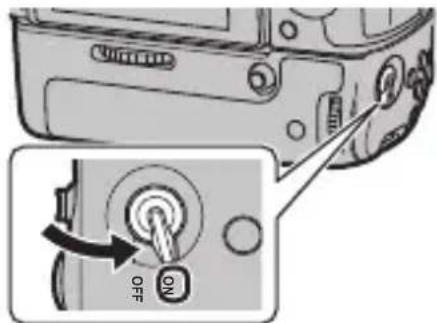
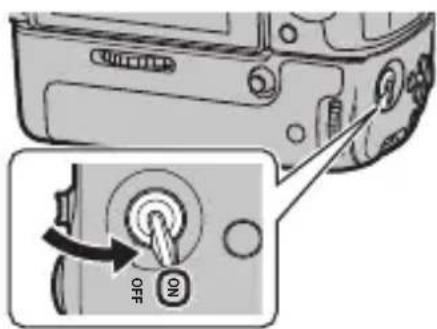
2 Turn the operation ON/OFF switch on the battery grip to [ON].
- Enables the operations of the dials, joystick and buttons.
- This cannot turn the power of the digital camera ON/OFF.
![PANASONIC Lumix DMWBGGH5 - Turn the operation ON/OFF switch on the battery grip to [ON]. - 1](/content/2026/02/426106/images/92953655fd8ffbf2ed8004d0ae0a54fe39df7389760009c6c1f4de2f5dbf6833.jpg)
![PANASONIC Lumix DMWBGGH5 - Turn the operation ON/OFF switch on the battery grip to [ON]. - 2](/content/2026/02/426106/images/2402afb73d132c664af7dc6429504da84895f558d26e930368155ae1ec37bcb5.jpg)
Note
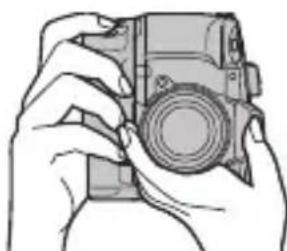
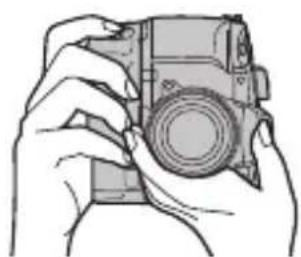
- When the digital camera is held grasping on the grip, a button on the battery grip may be pushed accidentally. In such case, turn the operation ON/OFF switch of the battery grip to [OFF].
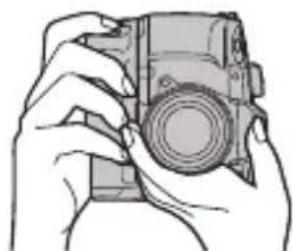
Cautions for use
About the unit
Keep the unit away from insecticide sprays and other volatile substances.
-
If the unit is exposed to these sprays or substances, its external case may deteriorate and/or its paint may come off.
-
Do not leave the unit in contact with any items made of rubber or PVC for prolonged periods of time.
-
Under no circumstances should the unit be used or stored in any of the following locations since doing so may cause trouble in operation or malfunctioning:
-
In direct sunlight or on a beach in summer
- In locations with high temperatures and humidity levels or where changes in temperature and humidity are acute
Where there is fire
Near heaters, air conditioners or humidifiers
Where there is vibration -
Inside a vehicle
-
Do not drop the unit, knock it into other objects or subject it to any other kind of strong impact or shock.
- This unit has an electrical contact that is connected to the digital camera electrically. Attach the supplied terminal cap when this unit is not attached to the digital camera and do not allow any metal objects (such as clips) to come in contact.
Do not use while directly touching this unit at low temperatures for a long period of time.
- In cold places (environments below 0°C ( 32°F ), such as ski slopes), prolonged direct contact with the metal parts of this unit may cause skin injury. Use gloves or similar when using this unit for long periods.
Cleaning
When cleaning, wipe the unit with a dry soft cloth.
- When the unit is soiled badly, it can be cleaned by wiping the dirt off with a wrung wet cloth, and then with a dry cloth.
- Do not use solvents such as benzine, thinner, alcohol, kitchen detergents, etc., to clean the unit, since they may deteriorate the external case or the coating may come off.
- When using a chemical cloth, be sure to follow the accompanying instructions.
Specifications are subject to change without notice.
Battery Grip (DMW-BGGH5):
Information for your safety
Power Source: DC 8.4 V (8.4 V)

| Number of pictures that can be recorded | Approx. 810 pictures (when 2 batteries are used) ·The above are Panasonic recording condition when connected to the digital camera DC-GH5. ·You may only record less number of pictures depending on the condition of use. |
| Dimensions | Approx. 135.5 mm (W)×41.0 mm (H)×70.7 mm (D) [5.33" (W)×1.61"(H)×2.78" (D)] (excluding the projecting parts) |
| Mass (weight) | Approx. 319 g/0.703 lb (with the battery), Approx. 245 g/0.540 lb |
| Dust-proof and splash-proof | Yes |
| Operating temperature — | 10 °C * to 40 °C (14 °F * to 104 °F) * The performance of the battery (number of recordable pictures/operating time) may decrease temporarily when using in a temperature between -10 °C and 0 °C (14 °F and 32 °F) (cold places such as ski resorts or places at high altitude). |
| Operating humidity 10%RH | RH to 80%RH |
The symbols on this product (including the accessories) represent the following:
DC
For the U.S.A.
Panasonic Corporation of North America
Two Riverfront Plaza, Newark, NJ 07102-5490
http://shop.panasonic.com
For CANADA
Panasonic Canada Inc.
5770 Ambler Drive, Mississauga, Ontario L4W 2T3
www.panasonic.com
Printed in China
Panasonic Products Limited Warranty
Limited Warranty Coverage (For USA Only)
If your product does not work properly because of a defect in materials or workmanship, Panasonic Corporation of North America (referred to as "the warrantor") will, for the length of the period indicated on the chart below, which starts with the date of original purchase ("warranty period"), at its option either (a) repair your product with new or refurbished parts, (b) replace it with a new or a refurbished equivalent value product, or (c) refund your purchase price. The decision to repair, replace or refund will be made by the warrantor.
| Product or Part Name Parts Labor | ||
| Digital Camera Peripherals 1 Year 1 Year | ||
| Digital Camera Accessories 90 Days 90 Days | ||
| Rechargeable Batteries 1 Year 1 Year |
During the "Labor" warranty period there will be no charge for labor. During the "Parts" warranty period, there will be no charge for parts. This Limited Warranty excludes both parts and labor for non-rechargeable batteries, antennas, and cosmetic parts (cabinet). This warranty only applies to products purchased and serviced in the United States. This warranty is extended only to the original purchaser of a new product which was not sold "as is".
Mail-In Service--Online Repair Request
Online Repair Request
To submit a new repair request and for quick repair status visit our Web Site at http://shop.panasonic.com/support.
When shipping the unit, carefully pack, include all supplied accessories listed in the Owner's Manual, and send it prepaid, adequately insured and packed well in a carton box. When shipping Lithium Ion batteries please visit our Web Site at http://shop.panasonic.com/support as Panasonic is committed to providing the most up to date information. Include a letter detailing the complaint, a return address and provide a daytime phone number where you can be reached. A valid registered receipt is required under the Limited Warranty.
IF REPAIR IS NEEDED DURING THE WARRANTY PERIOD, THE PURCHASER WILL BE REQUIRED TO FURNISH A SALES RECEIPT/PROOF OF PURCHASE INDICATING DATE OF PURCHASE, AMOUNT PAID AND PLACE OF PURCHASE. CUSTOMER WILL BE CHARGED FOR THE REPAIR OF ANY UNIT RECEIVED WITHOUT SUCH PROOF OF PURCHASE.
Limited Warranty Limits and Exclusions
This warranty ONLY COVERS failures due to defects in materials or workmanship, and DOES NOT COVER normal wear and tear or cosmetic damage. The warranty ALSO DOES NOT COVER damages which occurred in shipment, or failures which are caused by products not supplied by the warrantor, or failures which result from accidents, misuse, abuse, neglect, mishandling, misapplication, alteration, faulty installation, set-up adjustments, misadjustment of consumer controls, improper maintenance, power line surge, lightning damage, modification, introduction of sand, humidity or liquids, commercial use such as hotel, office, restaurant, or other business or rental use of the product, or service by anyone other than a Factory Service Center or other Authorized Servicer, or damage that is attributable to acts of God.
THERE ARE NO EXPRESS WARRANTY EXCEPT AS LISTED UNDER "LIMITED WARRANTY COVERAGE".
THE WARRANTYOR IS NOT LIABLE FOR INCIDENTAL OR CONSEQUENTIAL DAMAGES RESULTING FROM THE USE OF THIS PRODUCT, OR ARISING OUT OF ANY BREACH OF THIS WARRANTY.
(As examples, this excludes damages for lost time, travel to and from the servicer, loss of or damage to media or images, data or other memory or recorded content. The items listed are not exclusive, but for illustration only.)
ALL EXPRESS AND IMPLIED WARRANTY, INCLUDING THE WARRANTY OF MERCHANTABILITY, ARE LIMITED TO THE PERIOD OF THE LIMITED WARRANTY.
Some states do not allow the exclusion or limitation of incidental or consequential damages, or limitations on how long an implied warranty lasts, so the exclusions may not apply to you.
This warranty gives you specific legal rights and you may also have other rights which vary from state to state. If a problem with this product develops during or after the warranty period, you may contact your dealer or Service Center. If the problem is not handled to your satisfaction, then write to:
Consumer Affairs Department
Panasonic Corporation of North America
661 Independence Pkwy
Chesapeake, VA 23320
Shop
Accessories!
for all your Panasonic gear
Go to
http://shop.panasonic.com/support
Get everything you need to get the most out of your Panasonic products
Accessories & Parts for your Camera, Phone, A/V products, TV, Computers & Networking, Personal
Care, Home Appliances, Headphones, Batteries, Backup Chargers & more...
Customer Services Directory
For Product Information, Operating Assistance, Parts, Owner's Manuals, Dealer and Service info go to http://shop.panasonic.com/support
For the hearing or speech impaired TTY: 1-877-833-8855
As of March 2016
Panasonic Canada Inc.
5770 Ambler Drive, Mississauga, Ontario L4W 2T3
PANASONIC PRODUCT - LIMITED WARRANTY
Panasonic Canada Inc. warrants this product to be free from defects in material and workmanship under normal use and for a period as stated below from the date of original purchase agrees to, at its option either (a) repair your product with new or refurbished parts, (b) replace it with a new or a refurbished equivalent value product, or (c) refund your purchase price. The decision to repair, replace or refund will be made by Panasonic Canada Inc.
| Digital Camera One (1) year, parts | and labour |
| Digital Camera Peripherals One (1) year, parts and labour | |
| Digital Camera Accessories Ninety (90) days, parts and labour | |
This warranty is given only to the original purchaser, or the person for whom it was purchased as a gift, of a Panasonic brand product mentioned above sold by an authorized Panasonic dealer in Canada and purchased and used in Canada, which product was not sold "as is", and which product was delivered to you in new condition in the original packaging.
IN ORDER TO BE ELIGIBLE TO RECEIVE WARRANTY SERVICE HEREUNDER, A PURCHASE RECEIPT OR OTHER PROOF OF DATE OF ORIGINAL PURCHASE, SHOWING AMOUNT PAID AND PLACE OF PURCHASE IS REQUIRED
LIMITATIONS AND EXCLUSIONS
This warranty ONLY COVERS failures due to defects in materials or workmanship, and DOES NOT COVER normal wear and tear or cosmetic damage. The warranty ALSO DOES NOT COVER damages which occurred in shipment, or failures which are caused by products not supplied by Panasonic Canada Inc., or failures which result from accidents, misuse, abuse, neglect, mishandling, misapplication, alteration, faulty installation, set-up adjustments, misadjustment of consumer controls, improper maintenance, improper batteries, power line surge, lightning damage, modification, introduction of sand, humidity or liquids, commercial use such as hotel, office, restaurant, or other business or rental use of the product, or service by anyone other than a Authorized Servicer, or damage that is attributable to acts of God.
Dry cell batteries, printer ink cartridge and paper are also excluded from coverage under this warranty.
Rechargeable batteries are warranted for ninety (90) days from date of original purchase.
THIS EXPRESS, LIMITED WARRANTY IS IN LIEU OF ALL OTHER WARRANTYES, EXPRESS OR IMPLIED, INCLUDING ANY IMPLIED WARRANTYES OF MERCHANTABILITY AND FITNESS FOR A PARTICULAR PURPOSE. IN NO EVENT WILL PANASONIC CANADA INC. BE LIABLE FOR ANY SPECIAL, INDIRECT OR CONSEQUENTIAL DAMAGES RESULTING FROM THE USE OF THIS PRODUCT OR ARISING OUT OF ANY BREACH OF ANY EXPRESS OR IMPLIED WARRANTY.
(As examples, this warranty excludes damages for lost time, travel to and from the Authorized Servicer, loss of or damage to media or images, data or other memory or recorded content. This list of items is not exhaustive, but for illustration only.) In certain instances, some jurisdictions do not allow the exclusion or limitation of incidental or consequential damages, or the exclusion of implied warranties, so the above limitations and exclusions may not be applicable. This warranty gives you specific legal rights and you may have other rights which vary depending on your province or territory.
WARRANTY SERVICE
For product operation, repairs and information assistance, please visit our Support page:
www.panasonic.ca/english/support
Manuel d'utilisation PRISE D'ALIMENTATION
Panasonic Canada Inc.
5770 Ambler Drive, Mississauga, Ontario L4W 2T3
www.panasonic.com
Imprimé en Chine
POUR LE CANADA
Panasonic Canada Inc.
5770, Ambler Drive, Mississauga (Ontario) L4W 2T3
PRODUIT PANASONIC - GARANTIE LIMITÉE
Panasonic Corporation of North America
Two Riverfront Plaza, Newark, NJ 07102-5490
http://shop.panasonic.com
Impreso en China
Bedienungsanleitung
AKKU-GRIFF
- arraRlRiRiRiRiRiRiRiRiRiRiRiRiRiRiRiRiRiRiRiRiRiRiRiRiRiRiRiRiRiRiRiRiRiRiRiRiRiRiRiRiRiRiRiRiRiRiRiRiRiRiR1
·習相長述在人云的
·古國國國國國國國國國國國國國國國國國國國國國國國國國國國國國國國國國國國國國國國國國國國國國國國國國國國國國國國國國國國國國國國國國國國國國國國國國國國國國國國國國國國國國國國國國國國國國國國國國國國國国
·화기가 기재자장소
·HiTe,에어려 퍷는 흀고从根本上서 흀은 죽소
·徒昧也見在長
·자동chaft내부
He harpeBaIte n He noDBepraIte BO3deIcTBnIO ORHJ.
He octabnTe aKKymyIaTOp(bI) Ha dInTeIbHoe BpeMBABTOMO6nne c 3aKpbITbIMN OKHAMN IN DBePAMN Ha CoNHce.
PpeDynpexKdene
CyuieCTByeT pNCK BO3ropaHnA, B3pBa nIIN OXOROB. 3anpeuaetcra pa3bnpaTb, HarpeBaTb cBblwe 60°C nII IN CxNraTb.
Пре dioctepexeHЯ
-Данhoe устpoистBO npedHa3HaueHo ncknUHTeIbHO dЯ zufoBoiФотokamepbl Panasonic DC-GH5 (No coCToHHIO ha feBpaJIb 2017 r.).Дя поуеня послднй ИнфopmaцIN O COBmecTmblx uSTpoiCTbax obpaTnteckИNHTpyKUnnoЗКСПЛУATAuIN, kataJORY nIN Be6-caITy zufoBoi foTOkamepbl.
C foToKamepo cTaHeT IerYe pa6oTaB n IdepXaTb ee B BeptnKaJbHOM noIooKeHN BO BpeM 3aIncn. PpIKpeNHeHne 6Ioka aKKymyJrTopa* (noCTabJIeTcR OTdEJIbHO) B dONONHeHne K aKKymyJrTopy B uIΦpOBoi foTOkamepe No3BOJNT yBeJIuHTb BpeM 3aIncn.
* Danee B TeKCTe 6Iok aKKymyJrTopa IIN aKKymyJrTop.
ObpaanseHne c yctpoiCTBOM
-
Пыленьтоноаemocьи 6рьИЗRO3aшишенHOCTb Данногу cTpoIcTBa He rapaHTnpyOT NOHOn 3auntbI OT nonaDaHnЯ nbIIn N BoI.Bo BpeMЯ nCNoJIb3OBAHnY cTpoIcTBa npIMnTe cIeDyUoJne Mepbl ppeOcTOPOXHOCTN. EcIи yCtpoIcTBO He pa6Otaet NaIeJaIIM o6pa3OM, o6paITeCsB BФИрMy, B KOTopoI prno6peJIy cTpoIcTBO, ИЛВ KMnAnHIO Panasonicic.
-
Празно подампсенидаднhoe устpoиств К сфробо Фотokampe.
- Плотно зakpoite Деву AkkymлгОTOCEкипегнka NOCTOHHORO TOKA.
Bo Bpem npinkpenHn nn CHaTna DaHHoro yctpoNCTBa CTapaTecb He OnyckaTb IOnaHaHn neCKa, nbIIN N BObl INNX pOHNKHOBeHn BHyTpB OTceKa pa3bEmOB, uΦpOBOuΦOTOKaMepbl IN DaHHoro yctpoNCTBa.
-Данhoe yctpoiCTBO HeЯBnEeTcB ODoHepOnucaeMbIM,No3Tomy erO HeIb3a NcNoJIb3OBaTb NOBdoJ.HTo Kacaetc6pbI3ro3aunueHHocTN, KOHCTpyKUra yCTPOICTBa He Donyckaet npOHnKHOBeHnBHyTpB BoDbI. EcIIHa yCTpoiCTBO nonaayT KaIIN BObl T.I.,nocJe NcNoJIb3OBaHnA npOTpIte erO cyXoMmRKOITKaHbIO.
He noDBepraTe yCTPOcTBO BO3dEcTBnO cINbHOB Bn6paunn n36eraTe ydapOB. HecobIoudeHne 3TOrO MOKeT pINBeCTN K HEnCnpaBHOCTn I OTKa3y.
-Прочтite takke rykoBoDCTBO NO экплуataци СBOe ζнфpoBoI Фотokamepbl.
Bo Bpemr nCnoJb3ObaHn npOBepaTe, He ocna6JeH nn BNHT KpePHeHn.

Приимechаиме
XpaHnte KJIeMMHyO KpbIuKy B MeCTe, HeIOCTyINHom IJra DeTei, BO n36exKaHne npOrIaTbIBaHn.
CnTne 6aTapeHOn pyKn c nOpoBoN oToKamepbl
-Übeintecb,чTo nItaHne cIΦpOBoI φOTOKaMepbl BbIKIQUeHO,N NOBepHnte BnHT KpePHeHnB HapBaJIeHn, IpOTUBONIOJXHom HapBaJIeHnIpNKpeJIeHn.
YcTaHOBka/n3BJIeUeHne aKKyMylJTopa
- Bcerda nCloNb3yIe cHpMeHbIe aKKymJrTopbI Panasonic (DMW-BLF19E: noCTaBnIeTcR oTdeJIbHo).
- Пи IncnoIb3OBAHnДpyrnx akKymyIaTOPOB kaueCTBeHHa pa6oTa n3dEJIra He rapaHTnPyeTcra.
- ИспосьуITE akkyмлгетор посте erо зардкн сnomоцью спесиально рededназ nauseHHORO зарднoro устрочь.
- BaTapeiHyO pyKy MoXHO iCnOJIb3OBaTb, KOrDa aKKyMylrTop BCTaBJIeH B zuΦpOByU φOTOKaMepy IIN B baTapeiHyO pyKy.
- Y6eI NTecb, YTO NITaHne ZnΦpOBoN ΦOTOKaMepbI BbIKJIIOUyeHO.
1 ПовернITE зашираюшиpbучжok 6aтAPEйно ручьНаразвленьи [OPEN] nOTKpoIte DBePuy OTceKa ДЯakkyмлЯTopa.
2 Co6JIIOJa npaBnIbHoe HApBaJIeHHe,HaJExKHO BCTaBbTe aKKymJrTOp Do KOHca, Noka He ycIbIuHte 3ByK 3aUeJIKNBaHnA, a 3aTeM yBeIHTecb, YTO pbIyaxkOK ① 3aΦNKcnpOBaJI aKKymJrTOp.
-Дяи3Впeунаakумлгетopa Cдвиньт epbчakOK ①В
HapabHeHH, yka3aHHOM CTpeJIko, n BbIHbTe aKKyMyJrTOp.
3 3aКроTe ДВеру OTсЕкдЯKKуМЛЯТОпи NOВернITEЗПИРаЮши рБИЧОКВНаразВлeнn [LOCK].

Приимechие
- После Использовая Выньт eKKумлгтор. (Ecni aKKумлгтор OCTaВNTb I He ICSNoIb3OBaTb ДИТeЛьHoe BpeM, OH pa3prdntc.)
- Akkymулар Top HarpeBaetc npi pa6ote, BO Bpemn nocne 3aprKn. BaatapeHna pyka taKke HarpeBaetc BO Bpemn nCnoJb3OBaHn, HO 3TO He YBnAeTc npn3HaKOM HeNCnpaBHOCTn.
- y6eIntecb, YTO Ha DBepue OTceKa dIy aKKymyIaTopa HeT NHOpOdHbIX qactnuc.
IcnoJIb3OBAHne 2 aKKymyJrTopoB
LcnpoByu ofoToKaMepy MoXHO nCnOJb3OBaTb dIInTeJIbHoe BpeM, ecnBCTaBnTb aKKymjTOp n B zuΦpoByu ofoToKaMepy, n B 6aTaapeiHyu pyky. (Korda OdnH n3 aKKymjTOpOB pa3pIITcra, npOn30JeT nepeKnUoyeHne Ha dpyroAkkymjTOp.)
- AkkymyIaTOp, KOTOpbI npeIIOlaRaETcA IcNoIb3OBAtbcA B NepByIO OuepeIb, MoKHO yCTaHOBnTB B cHΦpOBYIO φOTOKaMepy. POnpo6HyIO HΦopMauIcM. B INHCTpyKuIN NO 3KcPnyaTaUuN cHΦpOBOJ φOTOKaMepbl.

Приимechanicals
He BbHmMaTe aKKymyJrTop, KOrda NcNoJb3YeTcAaKymyJrTop B 6aTapeHnO pyUke. (IHTaHne uΦpOBoN φOTOKaMepbl OTKnIOuHTc.)
IcnoIb3OBAHne BMeCTo aKKymyJTopa ceTeBOro aanTepa (noCTaBnEeTcra OTdJIbHo) n nepexoHnKa noctoHHoro Toka (noCTaBnEeTcra OTdJIbHo)
-При Испосьовни сетугоадалтета убадитесь в том,чToИспосьуются посяднок постонно тoka Panasonic (DMW-DCC12:поставлаяся OTделно) и сетугоадалтетер Panasonic (DMW-AC10E:поставлаяся OTделно).
- Bcerda nCnoJb3yIe ΦnRMeHnBcTeBoa aDanTep Panasonic (DMW-AC10E: NOCTaBnAETcO TdJIbHO).
- Bcerda nCnoJb3yIe fHnHbI nepExoDnK NOCTOaHHOro Toka Panasonic (DMW-DCC12: noctabIaTcra OTdJIbHo).
LHpOByu o foToKaMepy MoXHO nCNoIb3OBaTb, He 6ecnOKoRc b O pa3PraKe aKKymJrTopa, NOdKJIIOUvB CeTeBOJ aAdantep, BKJIIOUeHHbI B po3eTKy. IJIa nCNoIb3OBaHnA ceTeBOr o adanTepa Tpe6yeTcra nepexOHNK NOCTOARHHORo TOka.

Приимechание
Bo Bpem yctaHOBKn nepexODnka nocToHHoro TOKa OTKpbIbAeTcKpbIuKa OTceKa dIy InepeXODnka nocToHHoro TOKa, I NO3tOMy KOHCTpyKuIy IpepcTaET 6bITb IIJIeHeIpOnHuaEMoN I 6pbI3ro3aunuEHHoN. CtapaiTeCb He DOynckaTb IOnaHaHnI NECKa, IIIN, BOdI N T. IIN INX IPOHNKHOBeHnBHyTpB KOHCTpyKuIy. PocNe IcNoJb3OBAHnY6eDInTEcb, YTO Ha KpbIuKe OTceKa dIy InepeXODnka Het IHOPoDHbIX YacTnU, I NNOTHO 3aKpOIte KpbIuKy.
- Пючтаite Такке Инструкции по зацип сетуго оадапета и переконка постаяногу тoka.
- HeKOTOpbIe IOnONHnTeJIbHbIe npHaJNeJXHOCTN MOryT OTCyTCTBOBaTb B ONpeJeJIeHHbIX CTpaHax.
IcnoJb3ObaHne 6aTapeiHoN pyKn
ДиСКИ, KHONKИ ДJO成ТнК Ha 6aTapeHoi ручke DeiCTbYOT TaK JKe, KaK N Ha UΦpOBoI ΦOTOKaMepe.
Ioppo6Hyo IHOpMauno CM. B INHCTpyKunn NO 3KcNJaTaunu UΦpOBoiΦOTOKaMepbl.
1 UctahOBIne nepeKJIouaTeIb NHTAHnY cNΦpOBoi ΦOTOKaMepbI B NOJoxEHe [ON].
2 YcTaHOBnTe NepeKJIouaTeIb BKJIoueHnA/BbIKJIoueHnA 6aTapeHnOpyKn B noJoxeHne [ON].
CTaHOBITcB03MOXHbIM BblIOJIHrTb OepaCn C NOMOUsI O DnCKOB, KHOJOK IN DKOJCTNka.
- 3TtM NpeeknOuHaTeJeH HeIb3a BkIoUHTb/ BBIKIOUHTb IITaHHe LIOPOBOI FOToKamepbl.

Приимechanicals
- Ecni DepeKaTb cHcpoBvO cToKamepy, B3aBmncs 3a pyky, MoXHO cIyauHNO haxaTb KHOkny Ha 6aTaapeHOn pyKe. B TAKOM cIyuae yCTaHOBnTe nepeKIOuYaTeJb BKIOUeHn/ BBIKIOUeHn 6aTaapeHOn pyKn B NOIOKeHne [OFF].
IpeodocTopoXHocTn npN nCNoJb3OBaHn
HΦopMaun o6 yctpoiCTBe
Бергente устюпстBO OT BO3дeйстВЯ ИнсектuaIDOB и ДругХ leTuynx BeuceTB.
- Ecni yctpoiCTBO NOBepHETcA DeIcTBIO NOO6hIX BeIeCTB, 3TO MOKeT pNBeCTN K yxudHenIO COCToAHnB HHeuHero Kopnyca n/nn OTCNoEHIO erO NOKpbITnA.
- I36eraIte ocTbIaTb yCTpoIcTBO Ha JInTeJIbHoe BpeMBA COnpIKOCHOBeHN C N3DeJIyMaN N3 pe3INHbI INn PBX.
-
Hn npKkIX o6ctOaTeJIbCTBax yCTPOcTBO He DoJXHO NcNoIb3OBaTbcra nn XpaHntbcra B KaKOM-JIn6o n3 nepeuNCJIeHHbIX MeCT, T. K. 3TO MOxET pPnBeCTN K npo6JIemam B pa6ote nn HeucnPpABHOCTaM:
-
Пов празьим солпесьим лучами на пяже Летом
B Mectax C BbICOKOI TempeatypoN IN BnaXHOCTbIO INIIN TaM, rDe cIyuaOTcpe3Kne I3MeHeHnA TempeatypbI IN BnaXHOCTN
-Bo3ne orHn
Praom c o6orpeBaTeIaMn, KOHdNcNoHepaMn IIN yBnaXHITeIaMn
B Mectax C BbICOKO Bn6paunei
BHytpn TpaHcnpTHoro cpeCTBa
He poHnTe yCTpoNcTBo, He ydApAe Te erO O dpYrne npEaMeTbI Hne NOdBepraTe DpyrIM CINbHbIM yDapam NII TOJcAm.
-Данhoe yctpoCTBO IMeET 3JIeKTPnueCKne KOHTaKTbI, KOTOpblie NOdKJIIOUaIOTcK C uINΦpOBoN ΦOTOKaMepe. Korda dAnHoe yCTPOIcTBO He npIKpeJIeHO K cINΦpOBoN ΦOTOKaMepe, HadeBaIte Ha KOHTaKTbI KJIeMMHyIO KpbIshKy, KOTopAЯ NOCTaBnIeTcB KOMnJIeKTe, n He DoNYCKaITe INx COnpNKOCHOBeHnC MeTaJIInuYeCKMm IpeDmTaMn (HaNPIMep, CKpeKNAM).
B cIyuae nCnoJb3OBAHnB T TeueHne dIITeJIbHO BpeMeHn npn Hn3KoTtemepaType He npkacaTeCb HEnocpeDCTBeHNO K DaHHOMy yCTpOiCTBy.
BxOIOHbIX MecTAX (c TemnepaTypoi HnKe 0°C, HnApmEp, Ha JbIXhIXCKNoHax), npMOn IpOdoJXnTeJbHbI KOHTaKT C MeTaJIInueCKIMN DeTaJIaMn ycToPocCTBa MoKeT npIBecTu K NOBpeJdeHnAm KoKn. Ppn DInTeJbHOM nCNOJb3OBaHnU ycToPocCTBa HaDeBaIte nepuATKn.
OuNTka
Bo Bpemr ouncTk npotpnte yctpoicTBO MrgkO cyxO TkaHbIO.
- Ecnn yctpoiCTBO cnIbHO 3aqr3HeHO, ero MOxHO OuNCTnTb, BblTepeB 3aqr3HeHnO TkaToB BlaXHO TkaHbIO, a 3aTeM cyXoN TkaHbIO.
He nCnoJb3yIe TaKne paCTBOpHTeJI, KaK 6eH3OJ, pa36aBNTeJIb, cNnrt, MOUoIe CpeIcTBA IJIg KUXHNI T. D., NOCKOJIbKY 3TO MOKeT pINBeCTN K yXuDSeHnIO COCTOJHnI BHeIhEro Kopnyca JIn6O OTCNoEHNIO NOKpbITnI. - Пи ИСПОЛБЗОВАнN TKAH N, РОПИТаНHOД XIMNUeCKM BeIeCTBOM, OБЯЗATEЛьно СледуNTe пИЛагаЕМоК HeN INHCTpyKUIN.
TexHnueckne XapakTepncTnKn
Texnueckne xapaKtepncTNk MoYr 6bITb n3MeHeHbI 6e3 yBeDoMJIeHna.
-NepekoHaTeCra, 0xKuBHeHHa cHpOBoi fOToKamepn BmKHeHO. (Akuo npn BCTaHOBHeHHi MikoPoHa Ha KaMepy Ta 3HimaHHi 3 Kamepn He BmKATn XuBHeHHa, MoKe BnHKHyTN HeCnpaBHicTb, TOMy ue He peKOMeHdyEcbra.)
1 3HimItb KpNkUy 3 Po3'Emy 6aTapeHoro 6Joka Ha cnΦpoBii ΦOTokamepi.
Kpnkny po3'Emy 6aTaapeHoro 6noka MoXHa 36epiratN B Micci dIy KpnKn B 6aTaapeHomy 6nozi.
3Himitb 3aIyuky po3'EmiB 3 eJektpnUHN KONTaKTiB akymylTopHoro 6JOKy.
- 3axnctnt np03'emn, yctahOBiTb
Kpnsky po3'emy 6atapeinoro 6noka ta 3aunnyky po3'emy ha micue.
-Будъе уваджни, He 3ary6iTb 3aŋnyшky po3'EMiB.
2 BupiBnIte 3akpinIOBaIbHn I'BNHT, eJIeKtpuHi KOHTaKTn Ta WtNΦTn dIy 3akpinJeHHa Kamepn.
3ДЯ3'EDHaHnnoBepHiTb 3aKpInIIOBaIbHn I'BnHT y nO3HaueHomy CtrpiIkoI HaprMky.
- IpekeHauTeC, 10 nId yac ekcnnyatau3akpinlObaIbHn I'BNHT MiUHO 3aTARHyTO.
Ppimitka
36epiraTe 3arnyuKy po3'EMiB y Micx, HeDocKHXn DnA dTei, o6 yHnKHyTu II KOBTaHHJ.
■Bidinitb akymyIaTOPHn 6NoK BiD uΦpOBoi φOTokamepn
- Ipekehaitecra, 0u cnpoBa foToKamepa He BBIMKHeHa, i nobepHiTb 3akpinHOBaIbHn rBnHT y HaprMky, npOTnJeKHOMy 3aTjXci.
BcTaBka/BnMaHnA kymyJTopa
- 3aBxdi BnKOpncToByte cnpaBXHi akymyIaTopi Panasonic (DMW-BLF19E: noctaAcTbcra OkpeMo).
-ЯкsoВиКОРИСТОВУTOBсAншiakymyЛТОПи,якісha рobotaцboro npICrpoI He rapaHTyETbCry.
KopntyTea aKymyTOpOM, 3apnBn noRo CneiaIbHm 3apnHm PnCTPOeM.
- AkymyJIaTOpHn 6JOK MoJHa BnKOpNCToBvBaTn KOJIaKymyJIaTOp BCTaBNeHO Do UePpOBoI FOtOKaMepn a6o Do aKymyJIaTOpHoro 6JOKy.
- IpepeBipTe, 10 uufoPoBy foToKamepy BiKluoyeHo.
1Перемicitьфikcatop akymларpopHOrO6IOKyB6iK Hanncy [OPEN]Ta BiDUnHItb DBePcTaakymylatopa.
2 BcTaBTe Do xapaKTephoro KlaaHn, NJIbHyOuN NOJoxeHH aKymyIaTopa, Ta nepekoHaTeC, 0 BaXiNb ① 3auePHeHO 3a 6aTaapeHo.
BntraounakymyIaTOp,TOBXHITb BaxiNb ① y6ik cTpiIKn Ta BNTaHITb akymyIaTOp.
3 3akpnTe DBePcIa akymyIaTOPHO BIDciKy Ta nepemictiB φikcatop y 6ik Hanncy [LOCK].

Ppimitka
-Пись ВИКОРИСТАнгь ВИМаite akумлгтор. (Я Кцо ИOrо habOBro 3aIIuHTN pIД'EDHaHm, BIn 3peWTOU BnCHaKtBcR).
-Пись ВИКОРиСТанг,пд уасзарджання i BiДра3у Nicлязарджання akymлгтор TeПи. AkymлгторньбLOK TeK rpiEtsяпд уас ekсплуataцii — Ze He e O3HaKOю HecnpaBHOCTi.
- PepekohaTec, 1o Ha DBePcTaX aKymyIaTopa HemaC cToPOHHix peOBOH.
BnKOpncTaHHa 2 akymyIaTopiB
LcnpoBOH cToKamepoHO MoXHa 6yde KOpNCtYBaTnCra DoBWe, RaKIO BCTaBHTn akymylAToPn i B camy kamepy, i B akymylAToPnHn 6JOK. (PiCJIa BnchAnKeHHr OndHOro po3NoUHeTBcR XnVBJeHHra BiD npyroro).
- AkymyjTOp, kIyI NOBHeH BnKOpNCTOBvBaTncr NepuM, BCTaBJIte Do uΦpOBoi φotokamepn. DeTaJIbHiSe DnB. iHCTpyKciU 3 ekCnPyatauCi ζΦpOBoi KaMepn.

PnmiTka
He BnMaIte akymyIaTOp 3 akymyIaTOpHoro 6IOKy, KOnn BiN BnKOpNCToBvEcTbCra. (BnMkHeTbcra XnVBJIeHHra ZnΦpOBoi φoToKaMepn).
■ Викорисанна мерекевого щадапета зminho ro ctpуmy (noctaасъся Okpemo) ta nepexiДнka постиHoro ctpуmy (noctaасъся Okpemo) 3amictb akymлг口罩
- При викорисанни щадапета зміногостру му обов'язково викорисовиные перешдник постеногостру му Panasonicе (DMW-DCC12: постачастся okремо) ta щадаптор 3miногостру му (DMW-AC10E: постачастся okремо).
- 3aBxdi BnKOpncToByTe cnpaBXHi aanTep 3MiHoro ctpymy Panasonic (DMW-AC10E: noctaAcTbcra Okpemo).
- 3aBxdi BnKOpNCToByTe cnpaBXHi nepexiDnK nocTiHOrO cTpyMy Panasonic (DMW-DCC12: noctaAcTbcra OkpeMo).
Lio6 He XBnIOBaTnCS Ipo BnCnaJehn AkyMnyTopa, Do nIooBOi
fOTOKaMeRn MoXHa IprEHaTu aAdaTep 3MiHOrO CTrpMy, BBIMKHyBUn
NoRo Do p03eTKn. Iy KOpNCtUBaHnAaAnTePOM 3MiHOrO CTrpMy
Heo6xIDn NepexiDnK NoCTiHOrO CTrpMy.

PnmiTka
-При приедноу постійного стуму вдповідна кршka 3аишаettingь ВдКрntою, TOMY BCS KONCTpyкія CTaE OCOБЛВО Вра3ЛВОЮ Do ПИл'tа 6рИЗOK. Пиьн'te, StOB BCEpeДИнHy He NotpanNB NiL a6O BODa. ПicЯ ВИКOPиСТаннЯ MцHO 3aunHЯTe Кршky поpeДнka, nonepeДнbo pepeBipuBShn, StOBdo КршКн He priueплпся CTOpOHHi peчOBHH.
- Празитугкци 3 ekслуацii adanTepa 3MiHoro ctpmy Ta nepexiDnka noctiHoro ctpmy.
-ДякдоаTkobi akcecyapn moKyTB 6ytB bIDcyTHiMn y npoJaKy B neBnX kpaIHax.
Manufactured by: Panasonic Corporation
Kadoma, Osaka, Japan
Importer for Europe: Panasonic Marketing Europe GmbH
Panasonic Testing Centre
Winsberging 15, 22525 Hamburg, Germany
Panasonic Corporation
Web Site: http://www.panasonic.com
© Panasonic Corporation 2017
Jg
: (DMW-BGGH5)
sioJ 10
(8.4V=)DC 8.4
:
© Panasonic Corporation 2017
a
a
1/9 4
J 1
(PVC)
∴ ED = 2GD = 2√10
15y1 1
aall 1 bll l 10
g 1
aagaae
jill 12 gi lo
j1 jai li
jL
aieae aee eae ee eae eae eae eae eae eae eae eae eae eae eae eae eae eae eae eae eae eae eae eae eae eae eae eae eae eae eae eae eae eae eae eae eae eae eae eae eae
a 1
Lg (s) 1
aia jdoy aiaia i 1i jn nn nnnn nn nnnn nn nnnn nn nnnn nn nnnn nn nnnn nn nnnn nn nnnn nn nnnn nn nnnn nn nnnn nn nnnn nn nnnn nn nnnn nn nnnn nn nnnn nn nnnn nn nnnn nn nnnn nn nnnn nn nnnn nn nnnn nn nnnn nn nnnn nn nnnn nn nann
.
()0n
p 1
iDyjiojdoalglipid
()
aLg aeg aagaae aee eae eae ae aee
aLg aegbgln 100000000000000000000000000000000000000000000
a
Jol 100000000000000000000000000000000000000000000
.
aal 1 aal
e 1 1 1 1 1 1 1 1 1 1 1 1 1 1 1 1
A
Jaae Jaaaee aae 11 1
[ON] 1
JON/OFF) 1/2 [ON] g
J 1111111111111111111111111111

a 1 1 1 1 1 1 1 1 1 1 1 1 1 1 1 1 1 1 1 1 1 1 1 1 1 1 1 1
.[OFF]
AaRyIyIyIyIyIyIyIyIyIyIyIyIyIyIyIyIyIyIyIyIyIyIyIyIyIyIyIyIyIyIyIyIyIyIyIyIyIyIyIyIyIyIyIy
Abdo

)
()DC ()AC
:DMW-DCC12) DC rAe AaA aA aA aA aA aA aA aA aA aA aA aA aA aA aA aA aA aA aA aA aA aA aA aA aA aA aA aA aA aA aA aA aA aA aA aA aA aA aA aA aA aA aA aA aA aA aA aA aA aA aA
:DMW-DCC12) Panasonic DC
JyI JyI yI yI yI yI yI yI yI yI yI yI yI yI yI yI yI yI yI yI yI yI yI yI yI yI yI yI yI yI yI yI yI yI yI yI yI yI yI yI yI yI yI yI yI yI yI yI yI yI yI yI. DC
a

DC JyWJyI yJIgcl DC JyWJyI yJIgcl 1
LJyI yJyI yJyI yJyI yJyI yJyI yJyI yJyI yJyI yJyI yJyI yJyI yJyI yJyI yJyI yJyI yJyI yJyI yJyI yJyI yJyI yJyI yJyI yJyI yJyI yJyI
(1)DMW-BLF19E)Panasonic
1
aalalalalalalalalalalalalalalalalalalalalalalal
1 1
a
[OPEN]
2
aai i 1
①
.
① 1
1
3
.[LOCK]
边

()
y 1
a a a a a a a a a a a a a a a
45g 1 1 1 1 1 1 1 1
15 45g 1 1 1 1 1 1 1 1 1 1 1 1 1 1 1 1 1 1 1 1 1
(.
a 1
a 1
y
y
J 2
Jalj
A
1bc+ 1
y
.
2
a
1rals
aaloljai jlll Jauo
1
四

a 15
[Fn] 13
()[WB]J14
15
16
(ISO 17
]j 18
19
y
i51j 5 j000000000000000000000000000
()
Jaae Jooaee 1
(.j
1
2
3
4
5
[AF/AE LOCK] 6
yJy1 JLa
DC 8
9
10
11
(ON/OFF) 12
.DC-GH5 jJ Panasonic 1
(2017 1
g jyssll g, ljssll caiy jbi i aaii o jy yiaai all cai yxall d
a 1
L 1
J 1
Jgbl a jdo
aaiy
a 1
- OPERATING INSTRUCTIONS
- BATTERY GRIP
- CONTENTS
- INFORMATION FOR YOUR SAFETY
- CAUTION
- ABOUT THE BATTERY PACK
- WARNING
- DISPOSAL OF OLD EQUIPMENT
- ONLY FOR EUROPEAN UNION AND COUNTRIES WITH RECYCLING SYSTEMS
- PRECAUTIONS
- HANDLING THE UNIT
- SUPPLIED ACCESSORIES
- TERMINAL CAP
- NAMES OF THE COMPONENTS
- MOUNTING ON AND REMOVING FROM THE DIGITAL CAMERA
- NOTE
- INSERTING/REMOVING THE BATTERY
- FOR THE U.S.A., CANADA AND LATIN AMERICA
- FOR TAIWAN
- FOR CHINA
- FOR OTHER COUNTRIES
- 3 CLOSE THE BATTERY DOOR AND TURN THE RELEASE LEVER TOWARD [LOCK]
- USING 2 BATTERIES
- USING THE AC ADAPTOR (OPTIONAL) AND THE DC COUPLER (OPTIONAL) INSTEAD OF THE BATTERY
- FOR THE EUROPE AND CIS
- FOR KOREA
- USING THE BATTERY GRIP
- 1 TURN THE POWER SWITCH OF THE DIGITAL CAMERA TO [ON]
- 2 TURN THE OPERATION ON/OFF SWITCH ON THE BATTERY GRIP TO [ON]
- CAUTIONS FOR USE
- ABOUT THE UNIT
- KEEP THE UNIT AWAY FROM INSECTICIDE SPRAYS AND OTHER VOLATILE SUBSTANCES
- DO NOT USE WHILE DIRECTLY TOUCHING THIS UNIT AT LOW TEMPERATURES FOR A LONG PERIOD OF TIME
- CLEANING
- WHEN CLEANING, WIPE THE UNIT WITH A DRY SOFT CLOTH
- BATTERY GRIP (DMW-BGGH5)
- FOR THE U.S.A
- FOR CANADA
- PANASONIC PRODUCTS LIMITED WARRANTY
- LIMITED WARRANTY COVERAGE (FOR USA ONLY)
- MAIL-IN SERVICE--ONLINE REPAIR REQUEST
- ONLINE REPAIR REQUEST
- IF REPAIR IS NEEDED DURING THE WARRANTY PERIOD, THE PURCHASER WILL BE REQUIRED TO FURNISH A SALES RECEIPT/PROOF OF PURCHASE INDICATING DATE OF PURCHASE, AMOUNT PAID AND PLACE OF PURCHASE. CUSTOMER WILL BE CHARGED FOR THE REPAIR OF ANY UNIT RECEIVED WITHOUT SUCH PROOF OF PURCHASE
- LIMITED WARRANTY LIMITS AND EXCLUSIONS
- THERE ARE NO EXPRESS WARRANTY EXCEPT AS LISTED UNDER "LIMITED WARRANTY COVERAGE
- SHOP
- ACCESSORIES
- CUSTOMER SERVICES DIRECTORY
- PANASONIC CANADA INC
- PANASONIC PRODUCT - LIMITED WARRANTY
- LIMITATIONS AND EXCLUSIONS
- WARRANTY SERVICE
- MANUEL D'UTILISATION PRISE D'ALIMENTATION
- POUR LE CANADA
- BEDIENUNGSANLEITUNG
- AKKU-GRIFF
- PPEDYNPEXKDENE
- ПРЕ DIOCTEPEXEHЯ
- OBPAANSEHNE C YCTPOICTBOM
- ПРИИМECHАИМЕ
- CNTNE 6ATAPEHON PYKN C NOPOBON OTOKAMEPBL
- YCTAHOBKA/N3BJIEUEHNE AKKYMYLJTOPA
- ПРИИМECHИЕ
- ICNOJIB3OBAHNE 2 AKKYMYJRTOPOB
- ПРИИМECHANICALS
- ICNOIB3OBAHNE BMECTO AKKYMYJTOPA CETEBORO AANTEPA (NOCTABNEETCRA OTDJIBHO) N NEPEXOHNKA NOCTOHHORO TOKA (NOCTABNEETCRA OTDJIBHO)
- ПРИИМECHАНИЕ
- ICNOJB3OBAHNE 6ATAPEIHON PYKN
- IPEODOCTOPOXHOCTN NPN NCNOJB3OBAHN
- HΦOPMAUN O6 YCTPOICTBE
- БЕРГENTE УСТЮПСТBO OT BO3ДEЙСТВЯ ИНСЕКТUAIDOB И ДРУГХ LETUYNX BEUCETB
- B CIYUAE NCNOJB3OBAHNB T TEUEHNE DIITEJIBHO BPEMEHN NPN HN3KOTTEMEPATYPE HE NPKACATECB HENOCPEDCTBEHNO K DAHHOMY YCTPOICTBY
- OUNTKA
- BO BPEMR OUNCTK NPOTPNTE YCTPOICTBO MRGKO CYXO TKAHBIO
- TEXHNUECKNE XAPAKTEPNCTNKN
- PPIMITKA
- BCTABKA/BNMAHNA KYMYJTOPA
- BNKOPNCTAHHA 2 AKYMYIATOPIB
- PNMITKA
- ВИКОРИСАННА МЕРЕКЕВОГО ЩАДАПЕТА ЗMINHO RO CTPУMY (NOCTAАСЪСЯ OKPEMO) TA NEPEXIДНKA ПОСТИHORO CTPУMY (NOCTAАСЪСЯ OKPEMO) 3AMICTB AKYMЛГ口罩
- A
- AAL 1 AAL
- 45G 1 1 1 1 1 1 1 1
Brand : PANASONIC
Model : Lumix DMWBGGH5
Category : Other camera accessories