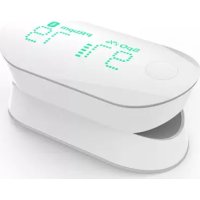
Wireless Pulse Oximeter Air - Measuring equipment IHEALTH - Free user manual and instructions
Find the device manual for free Wireless Pulse Oximeter Air IHEALTH in PDF.



| Technical Features | Measurement of oxygen saturation (SpO2), heart rate, digital display, wireless technology. |
|---|---|
| Usage | Designed for personal use, easy to use, suitable for adults and children. |
| Maintenance and Repair | Regular cleaning with a soft cloth, avoid exposure to moisture, check batteries regularly. |
| Safety | Do not use on patients with serious heart conditions without medical advice, do not expose to extreme temperatures. |
| General Information | Lightweight and portable device, clear display, Bluetooth connectivity for synchronization with health apps. |
Frequently Asked Questions - Wireless Pulse Oximeter Air IHEALTH
User questions about Wireless Pulse Oximeter Air IHEALTH
0 question about this device. Answer the ones you know or ask your own.
Ask a new question about this device
Download the instructions for your Measuring equipment in PDF format for free! Find your manual Wireless Pulse Oximeter Air - IHEALTH and take your electronic device back in hand. On this page are published all the documents necessary for the use of your device. Wireless Pulse Oximeter Air by IHEALTH.
USER MANUAL Wireless Pulse Oximeter Air IHEALTH
PARTS AND DISPLAY INDICATORS 21
PARTS AND DISPLAYS 38
DEVICE DESCRIPTION 38
CONTRAINDICATIONS 4
WARNING 4
△Notice 4
68
CARE AND MAINTENANCE 9
SPECIFICATIONS 10
TROUBLESHOOTING 125
IMPORTANT INFORMATION REQUIRED BY THE FCC 13
IMPORTANT INFORMATION REQUIRED BY THE INDUSTRY CANADA 13
Manufacturer Information 14
SELECTROMAGNETICCOMPATIBILITYINFORMATION 145
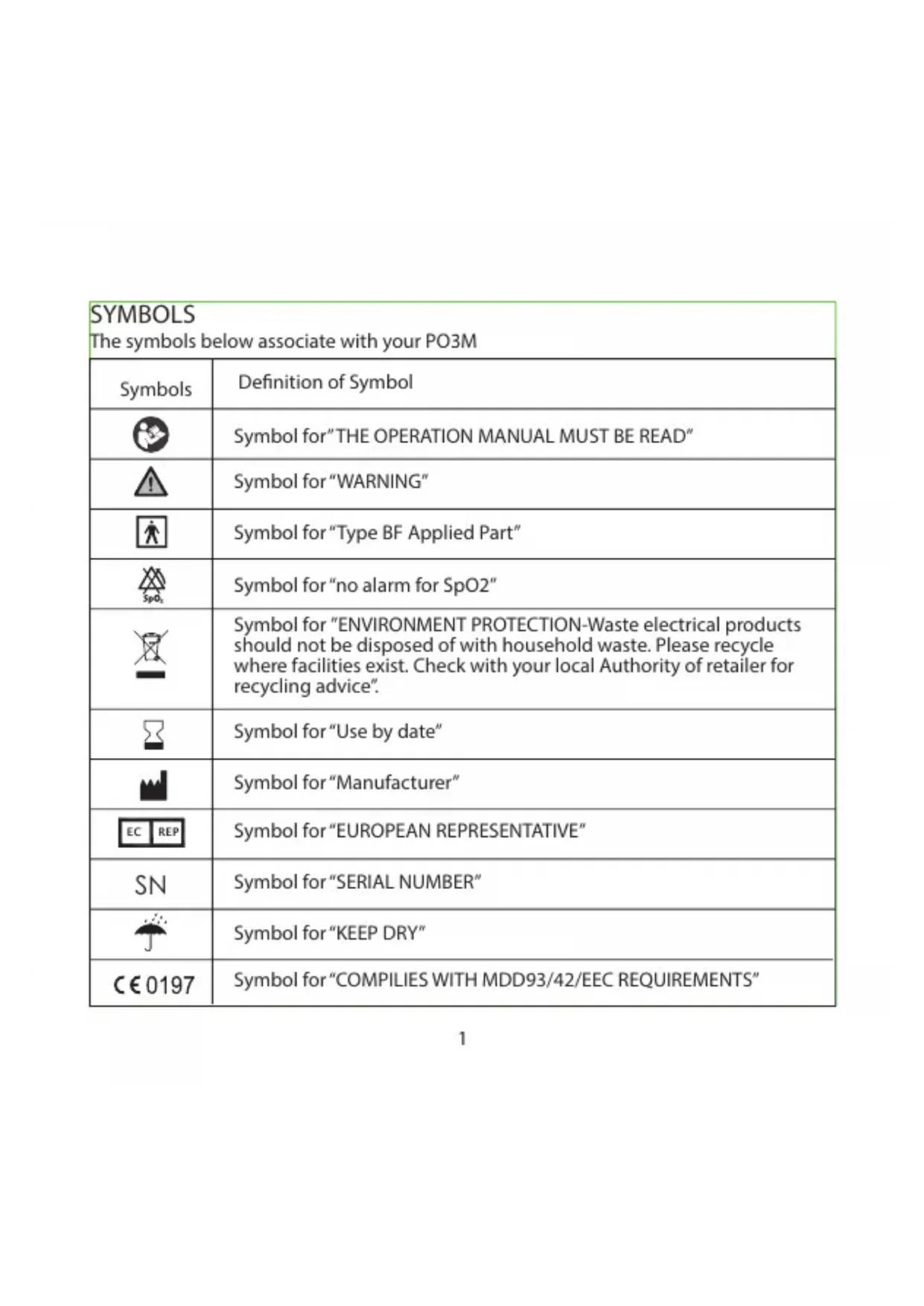
| SYMBOLS The symbols below associate with your PO3M | |
| Symbols | Definition of Symbol |
| Symbol for "THE OPERATION MANUAL MUST BE READ" | |
| Symbol for "WARNING" | |
| Symbol for "Type BF Applied Part" | |
| Symbol for "no alarm for SpO2" | |
| Symbol for "ENVIRONMENT PROTECTION-Waste electrical products should not be disposed of with household waste. Please recycle where facilities exist. Check with your local Authority of retailer for recycling advice". | |
| Symbol for "Use by date" | |
| Symbol for "Manufacturer" | |
| EC REP | Symbol for "EUROPEAN REPRESENTATIVE" |
| SN | Symbol for "SERIAL NUMBER" |
| Symbol for "KEEP DRY" | |
| €0197 | Symbol for "COMPILIES WITH MDD93/42/EEC REQUIREMENTS" |
INTENDED USE
The PO3M Wireless Pulse Oximeter is a non-invasive device intended for spot-checking of functional oxygen saturation of arterial hemoglobin (SpO2) and pulse rate. The wireless pulse oximeter is intended to measure blood oxygen saturation and pulse rate of adults above 16 years old in home and hospital environments (including clinical use in internist/surgery, anesthesia, intensive care, etc.). The Wireless Pulse oximeter is not intended for continuous monitoring.
Compatibility
The Wireless Pulse Oximeter PO3M is designed for use with the following devices: iPod touch 5th generation iPhone 4S iPhone 5 New iPad iPad 4 with an iOS version of V5.0 or higher. iPhone and iPod touch are trademarks of Apple Inc., registered in the U.S. and other countries. iPad is a trademark of Apple Inc.
PARTS AND DISPLAY INDICATORS
One (1) Wireless Pulse Oximeter PO3M One (1) Lanyard One (1) Operation Manual One (1) Quick Start Guide One (1) USB cable
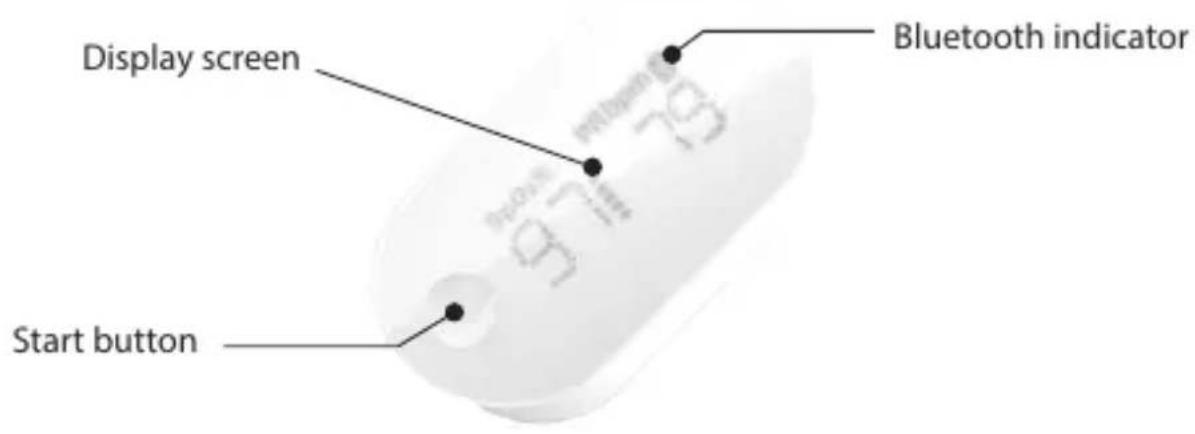
PARTS AND DISPLAYS
DEVICE DESCRIPTION
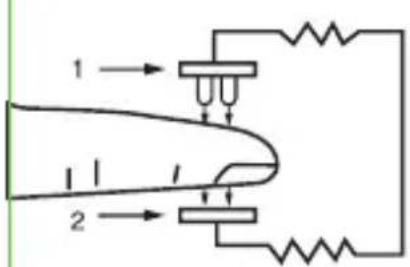
PO3M pulse oximeter measures the amount of oxygen in your blood and the pulse rate. The oximeter works by shining two light beams into the small blood vessels or capillaries of the finger; the measured signal is then obtained by a photosensitive element and processed by the microprocessor. The oxygen saturation (SpO2) is
measured as a percentage of full capacity.
Typically, a SpO2 reading between 94% - 99% is considered normal. High altitudes and other factors may affect what is considered normal for a given individual. Concerns about your readings should be shared with your physician or healthcare professional.
IEC 60601-1:2005 + CORR.1 (2006) + CORR.2 (2007)/EN 60601-1:2006/AC:2010 (Medical electrical equipment-Part1: General requirements for basic safety and essential performance)
IEC60601-1-2:2007/EN 60601-1-2:2007/AC:2010 (Medical electrical equipment - Part 1-2: General requirements for basic safety and essential performance - Collateral standard: Electromagnetic compatibility - Requirements and tests)
IEC 60601-1-11 (First Edition): 2010 (Medical electrical equipment-Part 1-11: General requirements for basic safety and essential performance - Collateral Standard: Requirements for medical electrical equipment and medical electrical systems used in the home healthcare environment)
ISO 80601-2-61:2011 (Medical electrical equipment-Particular requirements for the basic safety and essential performance of pulse oximeter equipment for medical use).
CONTRAINDICATIONS
The PO3M Wireless Pulse Oximeter cannot be used on infant babies.

WARNING
- This device is for use on adults only.
- Certain activities may pose a risk of injury, including strangulation, if the lanyard should become wrapped around your neck. Use the lanyard with caution.
3.Do not use the device in a magnetic resonance (MR) environment.

Notice
-
Do not use the device as the only basis for making medical decisions. It is intended only to be used as additional information that you can give to your licensed health care professional.
-
The device might misinterpret excessive movement as good pulse strength. Limit finger movement as much as possible when using the device.
3.Do not use the device on the same hand/arm when using a blood pressure cuff or monitor. - The device has no alarms of blood oxygen saturation and pulse rate, and it will not sound if the amount of oxygen in your blood is too low or your pulse rate is abnormal.
If the measurement of SpO2 and pulse rate is not in the normal range, please contact your health care professional.
5.Do not place the device in liquid or clean it with agents containing ammonium chloride or products that are not listed in this Operation Manual.
6.Any of the following conditions may reduce the performance of the device:
a)Flickering or very bright light;
b)Excessive Movement;
c)Weak pulse quality (low perfusion);
d)Low hemoglobin;
e)Nail polish, and/or artificial nails;
f)Any tests recently performed on you that required an injection of intravascular dyes
- The device may not work if you have poor circulation. Rub your finger to increase circulation, or place the device on another finger.
- The device measures oxygen saturation of functional hemoglobin. High levels of dysfunctional hemoglobin (caused by sickle cell anemia, carbon monoxide, etc.) could affect the accuracy of the measurements.
9.Do not use the device in a combustible environment (oxygen enriched environ- ment). -
Do not use the device outside the specified operating temperature range, and do not store the device outside the specified storage temperature ranges
-
The materials used in the device conform to the biocompatibility and nontoxic regulations and present no hazard to the body.
12.Use in emergency vehicles with communication systems may affect accuracy of the measurements. - The packaging of the device is recyclable, and it must be collected and disposed according to the related regulation in the country or region where the package of the device or its accessories is opened.
14.Any material of the device that may cause pollution must be collected and disposed according to local rules and requirements.
15.Any single functional tester cannot be used to assess the accuracy of a pulse oximeter.
16.Do not stare at the lighting LED, as it may irritate your eyes.
17.The device is calibrated to display FUNCTIONAL OXYGEN SATURATION
18.Do not use the device for more than 30 minutes.
19.The wavelength range of pulse oximeter can be especially useful to clinicians
20.Because the pulse oximeter measurements are statistically distributed, only about two-thirds of pulse oximeter measurements can be expected to fall within ± Arms of the value measured by a oximeter. - The SpO2 accuracy was tested by comparing it to a Co-oximeter and the pulse rate accuracy was tested by comparing it to a function tester.
USING YOUR PULSE OXIMETER
Before Using Pulse Oximeter
The wireless pulse oximeter may be used when the user is seated, standing or lying down. The user should not walk or run during measurements and should take care of not excessively moving the finger where the device is attached and the corresponding hand and arm.
It is recommended that the user should wash hands before use. Nail polish, especially dark shades, may affect the accuracy of the measurement and it is suggested that any polish be removed prior to monitoring.
The device is suitable for using on any finger excluding the thumb. It is preferred to use the index or middle finger.
Charge the battery before first use
Link the wireless Pulse Oximeter to a USB port of a electrical power source (may be a PC), and press the "start" button. Then the battery indicator "□" will blink, which means the battery charging is started. When the battery indicator "□" stops blinking, it means the battery has been fully charged.
Download App
Download the app from the App Store and install it. Search for "iHealth MyVitals". (Your compatible iOS device should be version 5.0 or later.)
Create User and Cloud Account
After downloading the app, register and set up your user account following the on-screen instructions.
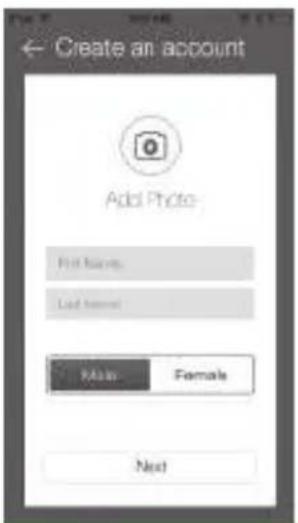
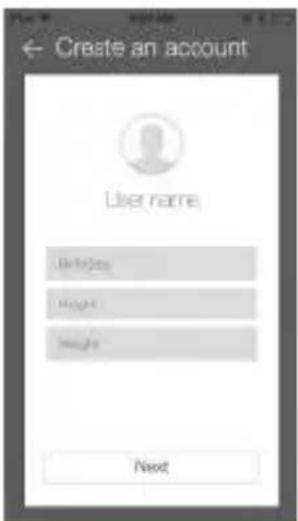
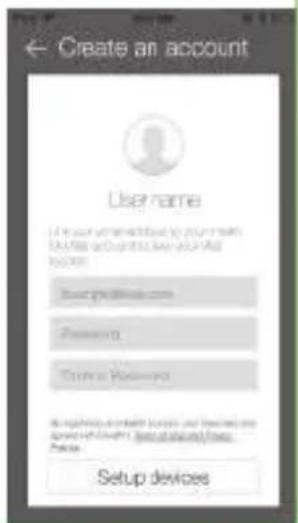
When setting up your user account, you will also have access to a free, secure iHealth Cloud account. Go to www.ihealthlabs.com, then click "Sign In" to access your cloud account from PC or Mac.
Turn Bluetooth "On"
Turn Bluetooth "On" under the "Settings" menu of your iOS device (The date and time of the Pulse Oximeter will be synced with your iOS device upon first successful connection). Once your Bluetooth is on, the Pulse Oximeter will connect automatically when the app is launched and the Bluetooth indicator on the screen of oximeter will turn on.
TESTING INSTRUCTIONS
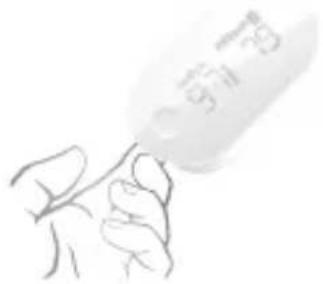
- Open the clamp of the Pulse Oximeter PO3M, then place the middle, ring or index finger of your left hand into the rubber opening of the oximeter with nail side down, as pictured.
- On the front panel, press the "Start" button once to turn the oximeter on.
- Keep your hand still for the reading.
Note: If the pulse signal is too weak to measure, dashes (---) will appear on the display.
- After a few seconds, your SpO2 reading will appear on the oximeter display screen and the app if the app is turned on.
- If the signal strength is too low, switch to another finger and perform the test again.
- Remove the oximeter from the finger. The oximeter will automatically turn off after 8 seconds.
USING WITHOUT iOS DEVICE
After it has been used for the first time, the date and time of the Pulse Oximeter PO3M will be synchronized with your iOS device. It can also be used without being connected to an iOS device. In this case, the measurement data is stored in the memory and can be uploaded to the app when the connection is re-established. The Pulse Oximeter PO3M can store up to 100 measurements. When the memory is full, any new measurement overwrites the oldest ones.
CARE AND MAINTENANCE
- Clean the device once per week or more frequently if handled by multiple users.
- Wipe the device with a soft cloth dampened with rubbing alcohol to avoid cross infection. Do not pour the alcohol directly on or into the device. Dry with a soft cloth, or allow to air dry.
- Avoid dropping this device on a hard surface.
- Do not immerse the device in water or other liquid, as this will result in damage to the device.
- If this device is stored below 0^ , please acclimate the device to room temperature before use.
- Do not try to disassemble this device.
- The PO3M is a precision electronic instrument and must be repaired/serviced by an accredited iHealth service center.
- Incorrect replacement of battery by inadequately trained personnel could result in an unacceptable risk (e.g., excessive temperatures, fire or explosion).
- The patient simulator « Index 2», made by the Fluke company, can be used to verify operation of the oximeter.
10.The expected service life of the PO3M is about 5 years.
SPECIFICATIONS
- Model: PO3M
2.Classification:Internally powered,type BF
3.Enclosure degree of ingress protection: IPX1
4.Display System:LED
5.Power Source: battery 3.7V = Lithium-ion 330mAh
6.Peak wavelength: 660nm/880nm;
7.Maximum optical output power: 1mW;
8.SpO2 Measuring Range: 70-99%
9.Average Root Mean Square (ARMS) of SpO2 Accuracy: 80% 99% : ±2%, 70%~79%; ±3%, <70%; no definition.
10.
| Range | Arms |
| 90%~100% | 1.2215 |
| 80%~89% | 1.3282 |
| 70%~79% | 1.7277 |
The figure below shows the graphical plot of all SaO2 versus SpO2 with linear regression fit for all the sample data in the clinical protocol.
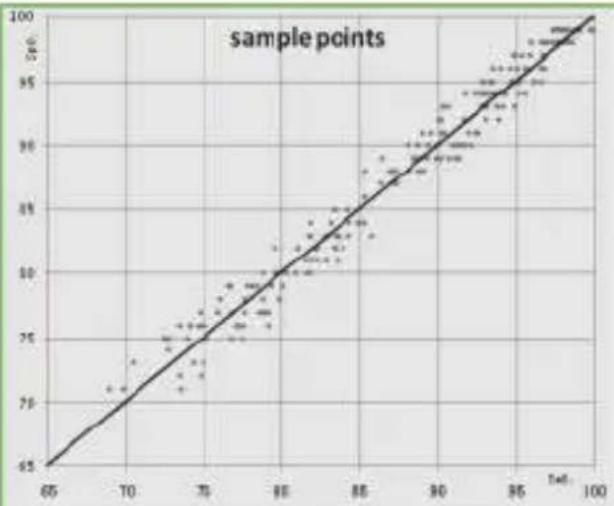
Scatter plot of SaO2 versus SpO2 with linear regression fit The figure below shows the graphical plot of SaO2 versus error (SpO2 - SaO2) with upper 95% and lower 95% limits of agreement:
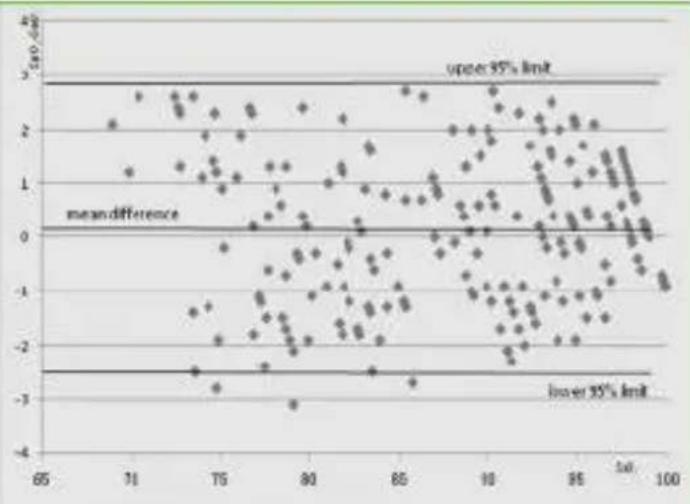
Scatter plot of difference between methods against the SaO2
11.Pulse Rate Measuring Range: 30/min-250/min
12.Pulse Rate Accuracy: 30/min ~ 99/min: ±2, 100/min ~ 250/min: ±2%.
13.Data update period: 15s
14Automatic Shut-off: After 8 seconds of no indication on the sensors
15. Operation Environment: 5^ - 40^ ; Humidity <80%; Atmospheric pressure: 700hPa-1060hPa
16.Storage Environment: -20 C-55 C; Humidity <95%; Atmospheric pressure: 700hPa-1060hPa
| TROUBLESHOOTING | ||
| Problem | Possible Cause | Solution |
| SpO2 or pulse rate shows no value, or the number fluctuates. | 1.Finger may not be inserted correctly. 2.Finger or hand may be moving. 3.The device may be damaged | 1.Remove finger and reinsert, as directed. 2.Try to keep perfectly still and test again. 3.Please contact the iHealth Customer Service |
| The device does not turn on. | 1.The battery may be low. 2.The device might be damaged. | 1.Charge the battery and try again. 2.Please contact the iHealth Customer Service |
| "E1" is displayed on the screen | The sensor is damaged | Please contact the iHealth Customer Service |
| Low Battery indicator is □ blinking. | The battery is low. | Charge the battery and try again. |
| The app cannot find the Wireless Pulse Oximeter PO3M. | The Bluetooth does not work | Reestablish the Bluetooth connection. If still not successful, restart your wireless device (iPod, iPhone or iPad). |
IMPORTANT INFORMATION REQUIRED BY THE FCC
This device complies with Part 15 of the FCC Rules. Its operation is subject to the following two conditions:
(1) This device may not cause harmful interference.
(2) This device must accept any interference received, including interference that may cause undesired operation.
Note: This product has been tested and found to comply with the limits for a Class B digital device, pursuant to Part 15 of the FCC Rules. These limits are designed to provide reasonable protection against harmful interference in a residential installation. This product generates, uses, and can radiate radio frequency energy and, if not installed and used in accordance with the instructions, may cause harmful interference to radio communications. However, there is no guarantee that interference will not occur in a particular installation. If this product does cause harmful interference to radio or television reception, which can be determined by turning the equipment of and on, the user is encouraged to try to correct the interference by one or more of the following measures:
Reorient or relocate the receiving antenna.
Increase the separation between the equipment and receiver.
Connect the equipment into an outlet on a circuit different from that to which the receiver is connected.
Consult the dealer or an experienced radio/TV technician for help.
IMPORTANT INFORMATION REQUIRED BY THE INDUSTRY CANADA
Under Industry Canada regulations, this radio transmitter may only operate using an antenna of a type and maximum (or lesser) gain approved for the transmitter by
Industry Canada. To reduce potential radio interference to other users, the antenna type and its gain should be so chosen that the equivalent isotropically radiated power (e.i.r.p.) is not more than that necessary for successful communication.
This device complies with Industry Canada license-exempt RSS standard(s). Operation is subject to the following two conditions: (1) this device may not cause interference, and (2) this device must accept any interference, including interference that may cause undesired operation of the device.
Manufacturer Information

ANDON HEALTH CO., LTD.
No. 3 Jinping Street, YaAn Road, Nankai District, Tianjin 300190, China.
Tel: 86-22-60526081
EC REP
IHealthLabs Europe SARL
3 rue Tronchet, 75008, Paris, France
Tel: +33 1 44 94 04 81
Health is a trademark of iHealth Lab Inc. Bluetooth® associated logos are registered trademarks owned by
Bluetooth SIG, Inc. and any use of such marks by iHealth Lab Inc. is permitted under license.
Other trademarks and trade names are those of their respective owners.
ELECTROMAGNETICCOMPATIBILITYINFORMATION
| Table 1 For all ME EQUIPMENT and ME SYSTEMS | |||
| Guidance and manufacture's declaration - electromagnetic emissions | |||
| The PO3M is intended for use in the electromagnetic environment specified below. The customer or the user of the PO3M should assure that it is used in such an environment. | |||
| Emissions test | Compliance | Electromagnetic environment - guidance | |
| RF emissions CISPR 11 | Group 1 | The PO3M uses RF energy only for its internal function. Therefore, its RF emissions are very low and are not likely to cause any interference in nearby electronic equipment. | |
| RF emissions CISPR 11 | Class B | The PO3M is suitable for use in all establishments other than domestic and those directly connected to the public low-voltage power supply network that supplies buildings used for domestic purposes. | |
| Harmonic emissions IEC/EN 61000-3-2 | Not applicable | ||
| Voltage fluctuations/flicker emissions IEC/EN 61000-3-3 | Not applicable | ||
| Table 2 For all ME EQUIPMENT and ME SYSTEMS | |||
| Guidance and manufacturer's declaration - electromagnetic immunity | |||
| The PO3M is intended for use in the electromagnetic environment specified below. The customer or the user of the PO3M should assure that it is used in such an environment. | |||
| IMMUNITY test | IEC 60601test level | Compliance level | Electromagnetic environment - guidance |
| Electrostatic discharge (ESD) IEC/EN 61000-4-2 | ±6 kV contact ±8 kV air | ±6 kV contact ±8 kV air | Floors should be wood, concrete or ceramic tile. If floors are covered with synthetic material, the relative humidity should be at least 30%. |
| Power frequency (50/60 Hz) magnetic field IEC/EN 61000-4-8 | 3 A/m | 3 A/m | Power frequency magnetic fields should be at levels characteristic of a typical location in a typical commercial or hospital environment. |
| NOTE: UT is the A.C. mains voltage prior to application of the test level. | |||
| Table 3 For ME EQUIPMENT and ME SYSTEMS that are not LIFE-SUPPORTING | |||
| Guidance and manufacturer's declaration - electromagnetic immunity | |||
| The PO3M is intended for use in the electromagnetic environment specified below. The customer or the user of the PO3M should assure that it is used in such an environment. | |||
| IMMUNITY test | IEC/EN 60601 test level | Compliance level | Electromagnetic environment -guidance |
| Radiated RF IEC/EN 61000-4-3 | 3 V/m 80 MHz to 2.5 GHz | 3 V/m | Portable and mobile RF communications equipment should be used no closer to any part of the [PO3M], including cables, than the recommended separation distance calculated from the equation applicable to the frequency of the transmitter. Recommended separation distance: d=1.2√p 80 MHz to 800 MHz d=2.3√p 800 MHz to 2,5 GHz Where P is the maximum output power rating of the transmitter in watts (W) according to the transmitter manufacturer and d is |
| the recommended separation distance in meters (m).Field strengths from fixed RF transmitters, as determined by an electromagnetic site survey,a should be less than the compliance level in each frequency range.bInterference may occur in the vicinity of equipment marked with the following symbol: | |||
| NOTE 1 At 80 MHz and 800 MHz, the higher frequency range applies.NOTE 2 These guidelines may not apply in all situations. Electromagnetic propagation is affected by absorption and reflection from structures, objects and people. | |||
| A) Field strengths from fixed transmitters, such as base stations for radio (cellular/cordless) telephones and land mobile radios, amateur radio, AM and FM radio broadcast and TV broadcast cannot be predicted theoretically with accuracy. To assess the electromagnetic environment due to fixed RF transmitters, an electromagnetic site survey should be considered. If the measured field strength in the location in which the PO3M is used exceeds the applicable RF compliance level above, the PO3M should be observed to verify normal operation. If abnormal performance is observed, additional measures may be necessary, such as re-orienting or relocating the [PO3M].B) Over the frequency range 150 kHz to 80 MHz, field strengths should be less than [V1] V/m. | |||
| Table 4 For ME EQUIPMENT and ME SYSTEMS that are not LIFE-SUPPORTING | |||
| Recommended separation distances between portable and mobile RF communications equipment and the [PO3M] | |||
| The PO3M is intended for use in an electromagnetic environment in which radiated RF disturbances are controlled. The customer or the user of the PO3M can help prevent electromagnetic interference by maintaining a minimum distance between portable and mobile RF communications equipment (transmitters) and the PO3M as recommended below, according to the maximum output power of the communications equipment. | |||
| Rated maximum output power of transmitter W | Separation distance according to frequency of transmitter m | ||
| 150 kHz to 80 MHz d=1.2√p | 80 MHz to 800 MHz d=1.2√p | 800 MHz to 2,5 GHz d=2.3√p | |
| 0,01 | 0.12 | 0.12 | 0.23 |
| 0,1 | 0.38 | 0.38 | 0.73 |
| 1 | 1.2 | 1.2 | 2.3 |
| 10 | 3.8 | 3.8 | 7.3 |
| 100 | 12 | 12 | 23 |
For transmitters rated at a maximum output power not listed above, the recommended separation distance in meters (m) can be determined using the equation applicable to the frequency of the transmitter, where P is the maximum output power rating of the transmitter in watts (W) according to the transmitter manufacturer.
NOTE 1 At 80 MHz and 800 MHz, the separation distance for the higher frequency range applies.
NOTE 2 These guidelines may not apply in all situations. Electromagnetic propagation is affected by absorption and reflection from structures, objects and people.
C€0197
iHealth
MODELE PO3M Oxymetre de pouls au doigt MANUEL DE PRESENTATION
TABLE DES MATIÈRES
SYMBOLES 1
3. UTILISATION PRÉVUE 215
CONTENU ET VOYANTS D'AFFICHAGE5 2
PARTIES COMPOSANTES ET AFFICHAGES 38
DESCRIPTION DU DISPOSITIF 3
CONTRE-INDICATIONS 4
AVERTISSEMENTS 4
PRECAUTIONS 4
UTILISATION DE VOTRE OXYMÈTURE DE POULS 6
SOINS ET ENTRETIEN 91
SPECIFICATIONS 10
DEPANNAGE 11
Informations sur le fabricant 128
INFORMATIONS SUR LA COMPATIBILITE ELECTROMAGNETIQUE 12
professional sanitary.
IEC 60601-1:2005 + CORR.1 (2006) + CORR.2 (2007)/EN 60601-1:2006/AC:2010
No. 3 Jinping Street, YaAn Road, Nankai District, Tianjin 300190, China. Tel: 86-22-60526081

IHealthLabs Europe SARL
3 rue Tronchet, 75008, Paris, France
Tel: +33 1 44 94 04 81
Ein (1) iHealth-Pulsoximeter PO3M
Ein (1) Tragriemen
No. 3 Jinping Street, YaAn Road, Nankai District, Tianjin 300190, China. Tel: 86-22-60526081

IHealthLabs Europe SARL
3 rue Tronchet, 75008, Paris, France
Tel: +33 1 44 94 04 81