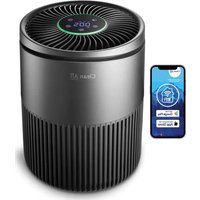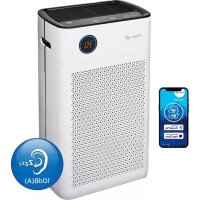
CA509Pro Smart - Air purifier Clean Air Optima - Free user manual and instructions
Find the device manual for free CA509Pro Smart Clean Air Optima in PDF.



| Product type | Air purifier |
| Model | CA509Pro Smart |
| Brand | Clean Air Optima |
| Color | Living White |
| Dimensions (LxWxH) | 560 x 320 x 210 mm |
| Weight | 7.5 kg |
| Power supply | 220-240 V, 50/60 Hz |
| Nominal power | Max. 53 W |
| CADR (solid particles) | 400 m3/h |
| CADR (formaldehyde) | 100 m3/h |
| Filter efficiency | 99.97% |
| Sterilization rate | 99.9% |
| Negative ions | 2,000,000 ions/cm3 |
| Filters | Composite: TRUE HEPA + activated carbon, nano-silver pre-filter |
| UV LED lamp | Lifespan 8000 hours |
| Noise level | Silent <20 dB(A), Low 35 dB(A), Turbo 55 dB(A) |
| Maximum area | Up to 90 m2 / 225 m3 |
| Connectivity | WiFi (2.4 GHz), CleanAirOptima app |
| Functions | Auto mode, Sleep, 3 speeds, timer (1/4/8h), child lock, remote control |
| Filter maintenance | Clean pre-filter 1x/month; replace composite filter every 6-8 months (2000h) |
| Sensor maintenance | Clean lens every 6-8 weeks with a cotton swab |
| Warranty | 2 years |
Frequently Asked Questions - CA509Pro Smart Clean Air Optima
User questions about CA509Pro Smart Clean Air Optima
0 question about this device. Answer the ones you know or ask your own.
Ask a new question about this device
Download the instructions for your Air purifier in PDF format for free! Find your manual CA509Pro Smart - Clean Air Optima and take your electronic device back in hand. On this page are published all the documents necessary for the use of your device. CA509Pro Smart by Clean Air Optima.
USER MANUAL CA509Pro Smart Clean Air Optima
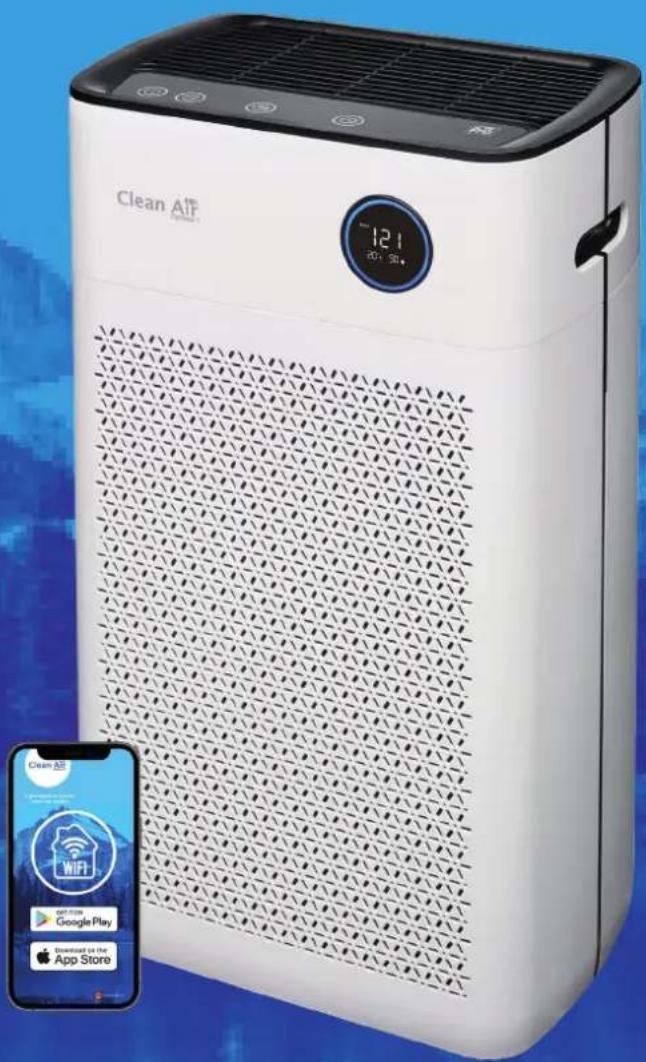
Clean Air Optima Intelligent Air Purifier CA-509Pro Smart
(GB) User manual
(DE) Gebrauchsanweisung
(NL) Gebruiksaanwijzing
(FR) Mode d'emploi
(ES) Manual del usuario
(IT) Manuale d'uso
(PL) Instrukcja obslugi
(CZ) Uživotelská príručka
(R0) Manual de utiliser
(LT) Naudotojo vadovas
(EE) Kasutusjuhend
(LV) Lietosanas pamacba
(RU)PykoBoOdCTBO NOIb3OBaTeJIa
(MK)Ппрачнк 3aКористe
Find more languages on: www.cleanairoptima.com/ info/manuals
Read these instructions carefully before you start using the Air Purifier and keep the manual for future reference.
Clean Air Optima
Table of contents
English 3
German 21
Dutch 39
French 57
Spanish 75
Italian 93
Polish 111
Czech 129
Romanian 147
Lithuanian 165
Estonian 183
Latvian 201
Russian 219
Macedonian 237
English
Thank you for purchasing the Clean Air Optima Intelligent Air Purifier CA-509Pro Smart.
We wish you many years of healthy indoor air with this efficient and effective product.
Ensure that all safety precautions are followed when using this electrical device for the proper operation of the device. These instructions describe the safety precautions to be observed during operation. They are meant to prevent injuries and to avoid damaging the device.
Before using your new Clean Air Optima Intelligent Air Purifier CA-509Pro Smart.
Remove the sealing from the filters first, see page 19. How to use.
Description of the device
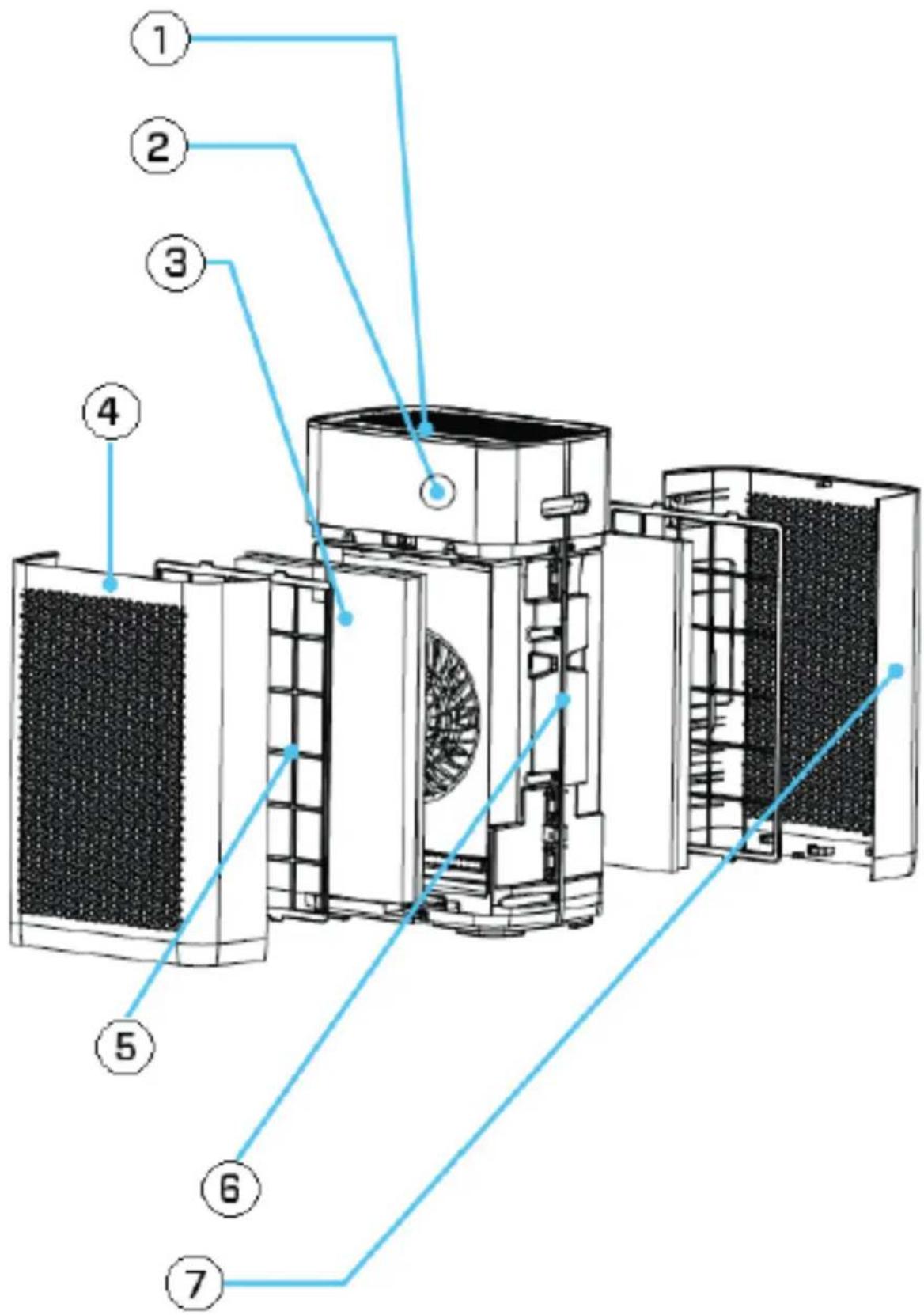
The device consists of the following main components:
- Control panel
- Digital monitor indoor air quality
-PM2.5 Particle measurement
-Relative air humidity in %
-Temperature in ^ C
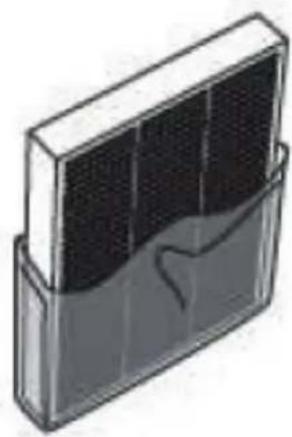
- Composite filter: TRUE HEPA and Activated carbon filter
- Front panel
- Pre-filter
- Main part of the air purifier
- Rear panel
Clean Air Optima
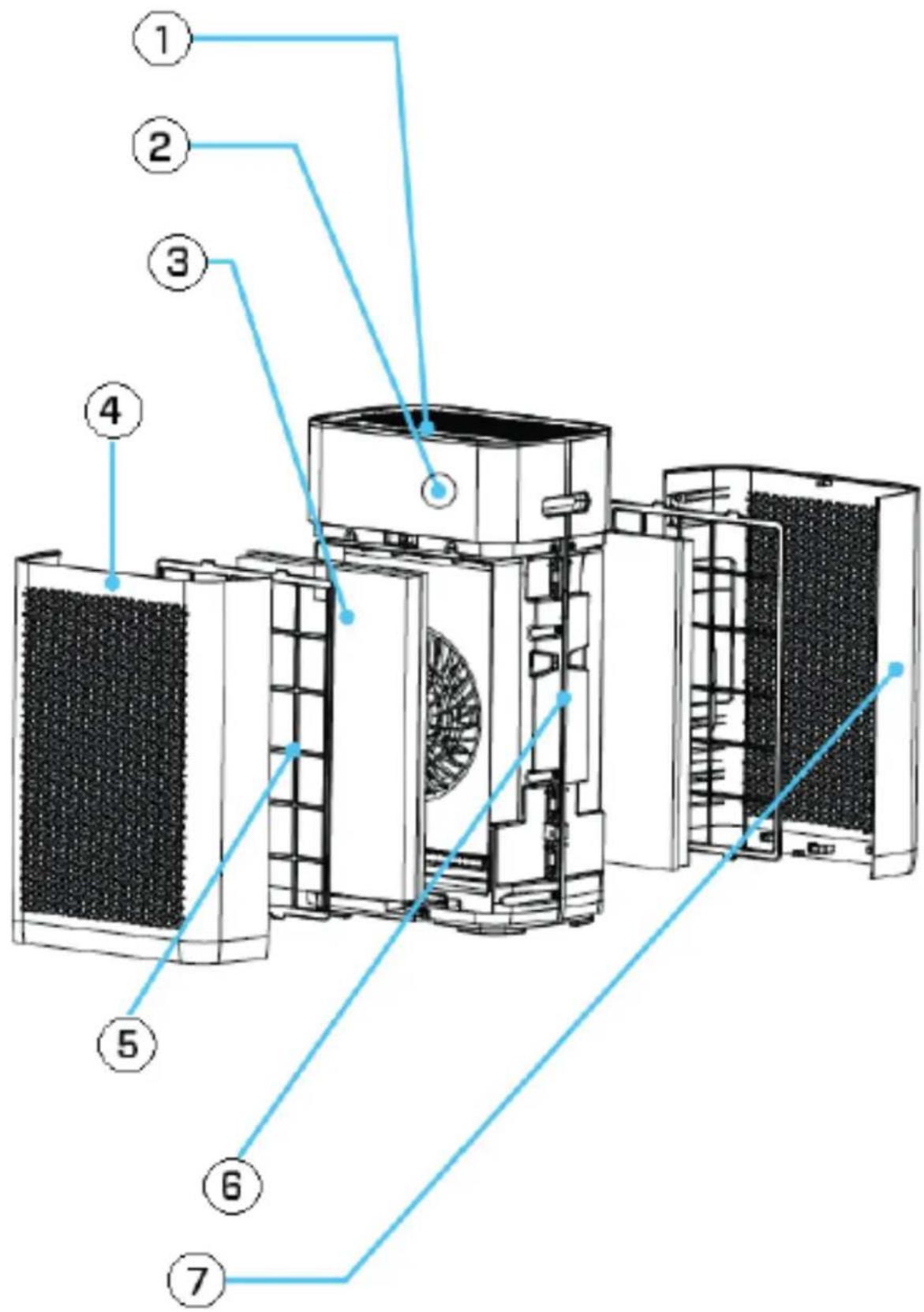
CA-509Pro Smart/ Main unit
Dual Airflowsystem - Dual Filtersystem - Dual Ionizer for double air purification!
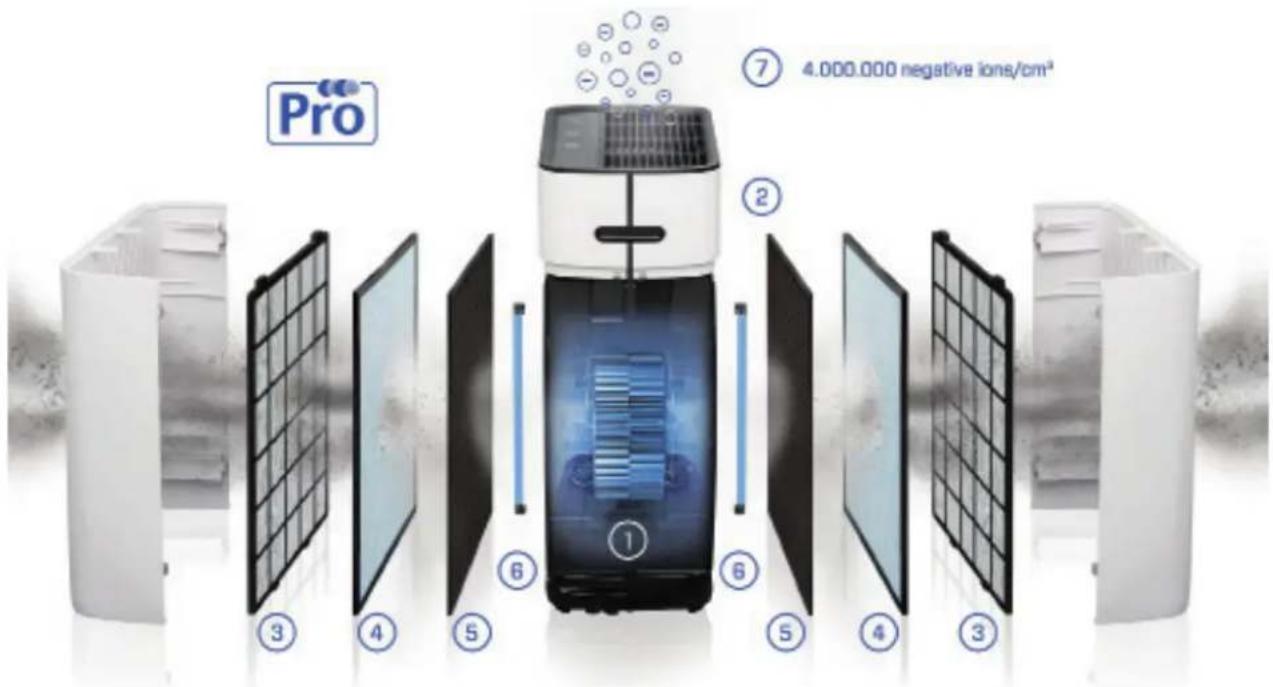
- Dual Fan
- Intelligent Particle SensorTM
- Pre-filter
- Nano-Zilver True HEPA Filter
- Activated Carbon Filter
- UV LED lamp
- Dual Ionizer
Clean Air Optima
Safety warnings
This device may only be used in accordance with this safety instructions. Take the following steps to minimize the risk of personal injury caused by for example electric shocks or fire.
- Only for indoor use. Do not use or store outdoors.
- The device is not intended to be used by children or persons with reduced physical, sensory or mental capabilities, unless they are supervised by a person responsible for their safety.
- Do not use the device when there is visible damage on the electrical cord or on the device itself. Do not repair the device yourself in case of damage. Never pull the device by its cord. If the power cord is damaged, then it must be replaced by an authorized service person to prevent electric shock or fire.
- Repairs may only be performed by authorized service personal. Do not try to repair the device yourself to prevent electric shock or fire.
- Always remove the plug from the cord when the device is not being used.
- Only use power cords provided.
- Pull the plug when you do not use the device or when you clean internal or external parts of it.
- For safety use put the device in a steady, horizontal position. Do not move while using.
- Do not use the device in rooms where inflammable liquids or gases are stored, close to heat sources or in particular humid rooms like the bathroom.
- Never insert any other object into the body to avoid breakdown.
- Never cover the air inlet and air outlet grid.
- Never disassemble or replace the device's inner parts.
- When the device is running, do not touch the air inlet and outlet grilles, and do not insert the handle or any object into the air outlet to avoid injury or damage to the air purifier.
- To keep the inlet and outlet air grille of the air purifier unimpeded, do not place objects above or near the front cover of the air purifier.
- Do not put heavy objects on the unit.
- Please avoid places with direct sunlight. There is a risk that the device discolors.
- Never immerse the unit in water or other liquids.
- Do not touch the power cord with wet hands.
- Clean the Pre-filter regularly, if the Pre-filter is saturated with dust, it will lead to poor purifying effect. The power consumption will increase, it can cause failure.
- The normal operating environment of the device is 0^ C to 40^ C degrees.
- Use, maintain and clean the device as described in this manual.
How to use (Filter installation for the front and the back)
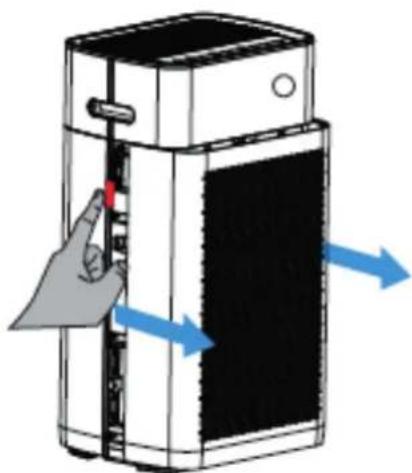
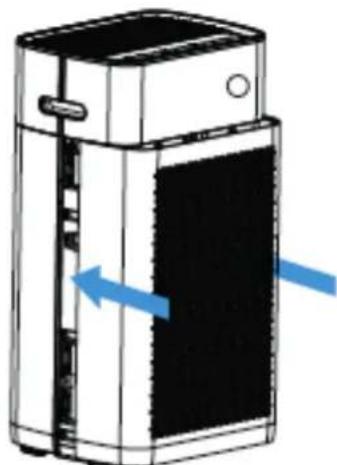
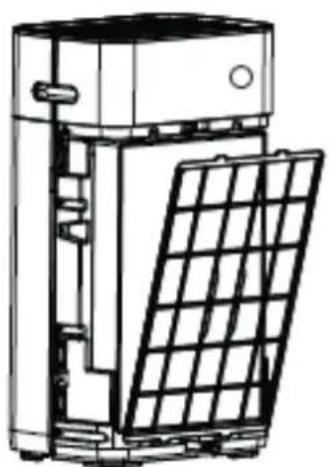
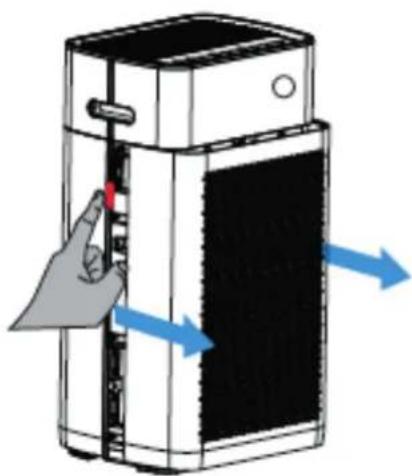
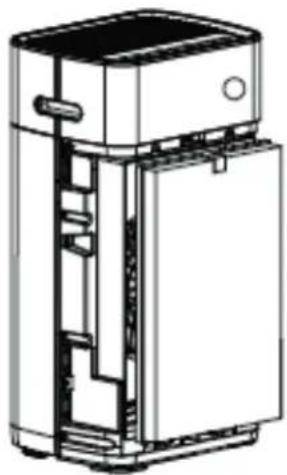
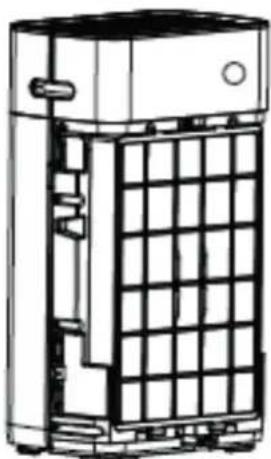
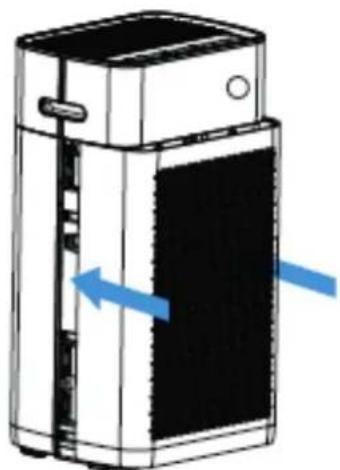
1. Disassemble the panel
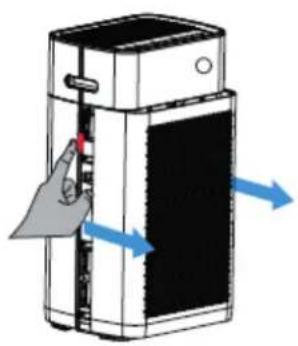
Press on the red indicated icon on the left and right side on the air purifier with both fingers, see figure. Pull the panel towards you like indicated by the blue arrows.
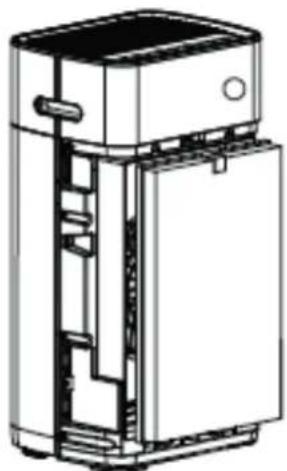
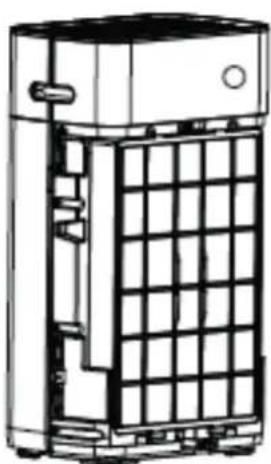
2. Install the composite filter
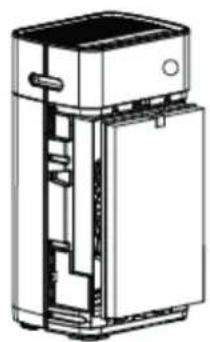
Remove the sealing from the filters. Place the filters back into the device. The tap on the bottom and the top must be visible at the front (The HEPA side from the filter is visible).
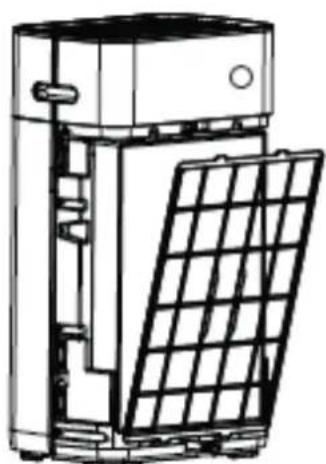
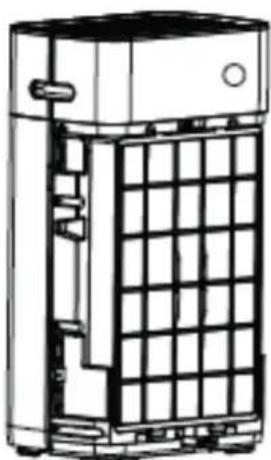
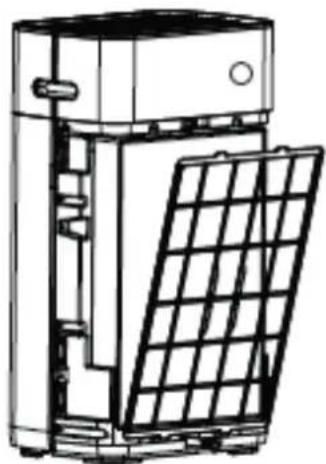
3. Install the Pre-filter
Install the Pre-filter with the black bulge outward. Put its lower part into the bottom slot and push the top (with the arrows on it) gently into the upper slot.
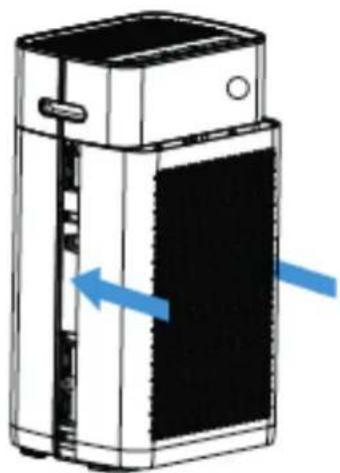
4. Install the panel
Push the front panel parallel along the upper and lower edges in the direction shown in blue, see figure. When you are hearing a click, then the panel is installed.
The device needs to be positioned at least 30~cm from walls and furniture to obtain a good air flow. Make sure that the air in-and outlets are not blocked.
Clean Air Optima
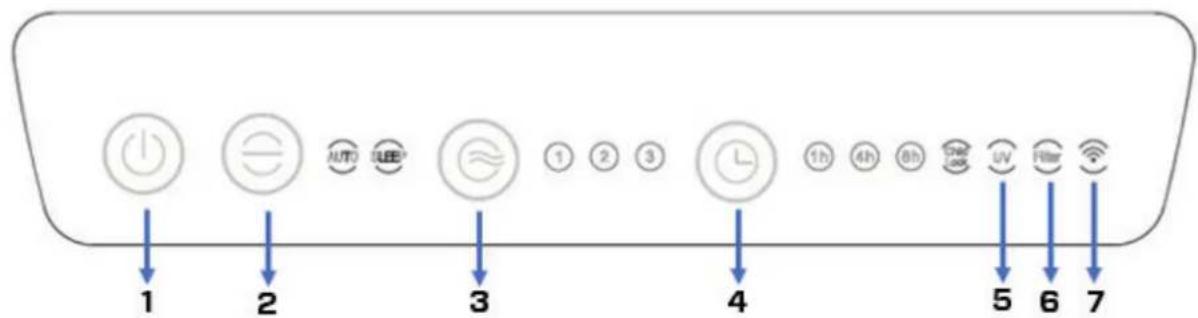
Control Panel / Operation Instruction
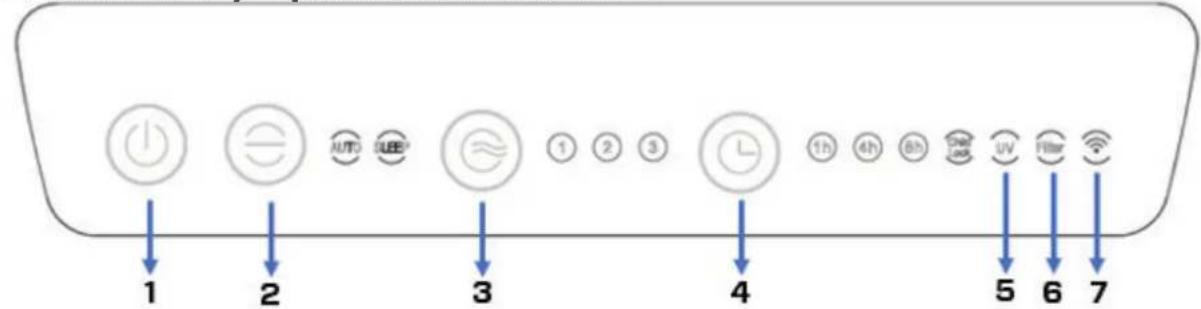
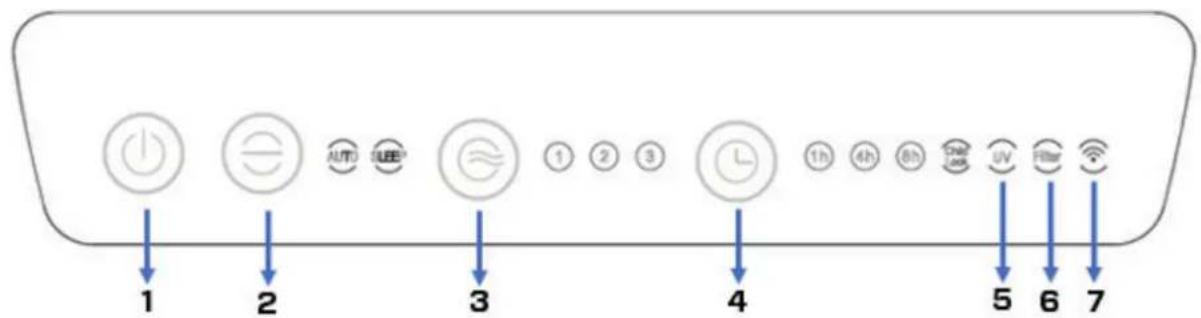
1 Power Button
Pressing the Power button you turn the device on and off. (Default is Auto mode after turning on the device).
2 Mode
Pressing the Mode button for Auto and Sleep function.
In the setting Auto the integrated smart sensor (Intelligent Particle Sensor™) measures and regulates air quality automatically. The fan, controlled by a sensor anticipates automatically to what extent indoor air is polluted by particles size PM2.5 and adapting to the 3 different speeds accordingly.
In the setting Sleep the indicator light is bright. The indicator light including the digital display will go off after 5 seconds. Press any key to restart the indicator light and the digital display. The indicator light and digital monitor will goes out again after 5 seconds. (The fan is running in the lowest speed level).
3 Speed
By pressing the Speed button, you can change the speed level. The 3 fan speeds offer individual air flow. (1-2-3 means the wind speed increases).
4 Timer
Press on the Timer button to set the timer to "switch of automatically" in a range between 1, 4 and 8 hours. The number of hours selected can be read on the display of the timer.
5 UV LED lamp
The UV LED lamps should be replaced after 8,000 hours of operation, or if the indicator light (UV) on the display goes out.
6 Filter
If the indicator light flashes, the composite filter (HEPA and Activated Carbon Filter) must be replaced. The composite filter has a lifespan of 2.000 hours.
7WiFi
WiFi indicator.
2 + 3 Child Lock
Child lock protects from unwanted use of the device.
The child lock is switched on / off by pressing simultaneously both Mode and Speed buttons.
The indicator light child lock will be bright.
3 + 4 Filter Reset
Reset the timer for the composite filter by pressing and holding the button Speed and Timer (for about 3 seconds). If the indicator light goes out, the timer has been successfully reset.
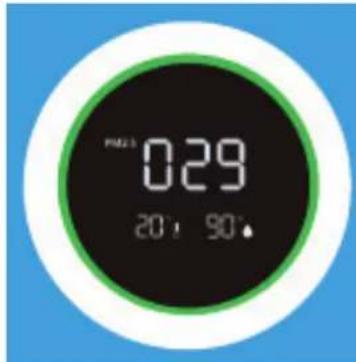
Digital Monitor
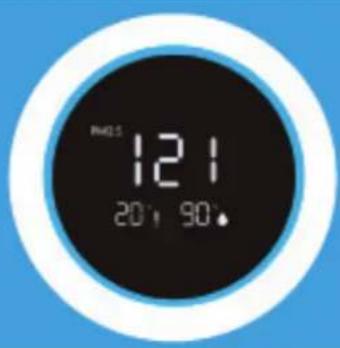
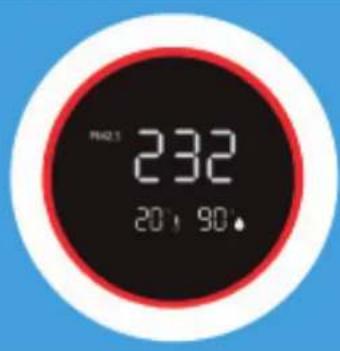
The digital monitor on the front side of the air purifier CA-509Pro Smart indicates automatically and exactly current air quality by measuring the level of Particle measurement PM2.5, indoor humidity and temperature.
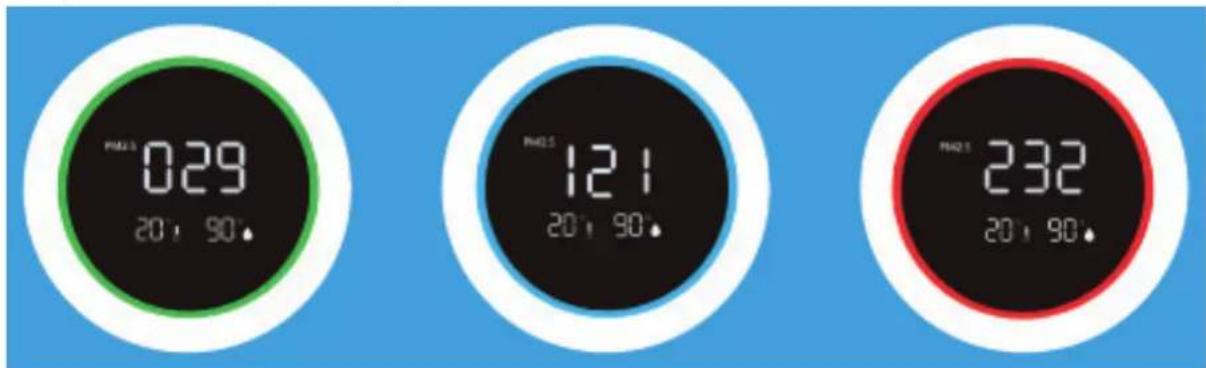
Green-Good:0-80ug/m3
Blue - Average: 80-150ug/m³
Red-Bad:150ug/m3or more
Particulate matter of 10um (PM10) and smaller 2,5 um (PM2.5) can get into the lungs and belongs to the top 10 threats for human health. These small particles develop through typical indoor processes such as cooking, baking, frying, smoking, as well as heating or are also transported in big quantities into indoor air because of transportation, industry, construction, biological material (pollen, bacteria, mites, and viruses), imported particles from other regains such as (airplane) exhaust gases and volcano eruptions.
Allergens such as pollen and dust cause serious and long-term health threats to millions of persons each spring: the numbers are increasing constantly.
Measurement of relative humidity and temperature
Important aspects for effective air purification: relative humidity between 45 - 60% and room temperature of about 20 - 23 °C
Power Cord
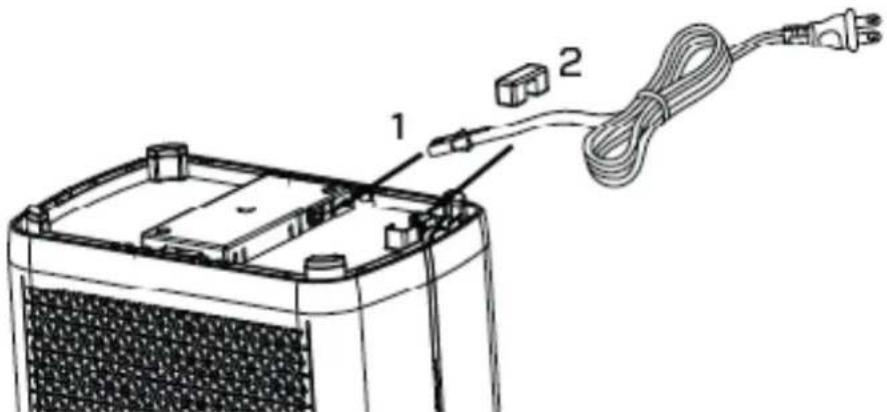
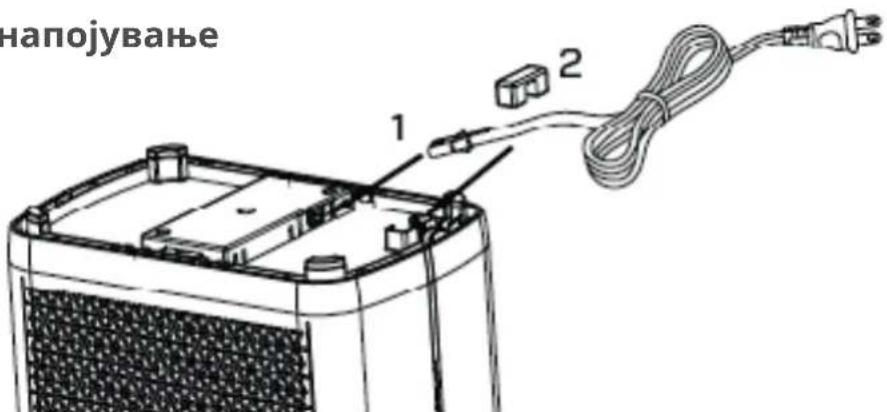
- Remove the power cord glue from the bottom of the device and insert the end of the power cord into the socket at the bottom of the device (as shown in figure 1).
- Put the power line into the wire slot and fix it with the wire pressing adhesive (as shown in figure 2).
Clean Air Optima
Operation with Clean Air Optima® App
Connectivity
Compatibility with smartphone and tablet:
iPhone, iPad and Android devices
Device connets via WiFi with App:
CleanAirOptima
Attention: The router must be set to the 2.4 GHz broadband. If the router is set to the 5.0 GHz, it is impossible to establish a connection.
Setup up WiFi connection
- Download and install the Clean Air Optima App in the App Store or Google Play Store.
- Make an account and log in.
- Plug the device into the power socket and switch it on. The WiFi indicator will blink.
- The router must be set to the 2.4 GHz broadband. If the router is set to the 5.0 GHz, no connection can be established.
- Make sure Bluetooth is enabled on your smartphone.
- Make sure that your smartphone or tablet is successfully connected to your WiFi network.
- Open the Clean Air Optima App and click on 'Add device'. Your device is listed and you can select it. If not choose 'Auto Scan'. Follow the on-screen instructions to connect the device to your network.
- Choose to add the Clean Air Optima device on the App, follow the instructions in the App.
- When the device is paired, the WiFi indicator right stays on constantly.
- After the configuration is successful, you can use the Clean Air Optima App to operate the device.
Note:
- If your default network has changed, reset the WiFi connection, follow step 3 to 8 in the 'Set up WiFi connection' section.
If you want to pair multiple devices to your smartphone or tablet, you have to do this one after the other. - Make sure that the distance between your smartphone or tablet and the device is less than 5 meters and there are no obstacles. Also make sure you are in the same room as the device.
Reset the WiFi function:
- Reset the WiFi by pressing the 'Mode' and 'Timer' button for 3 seconds, the indicator light of the WiFi will blink rapidly.
Connect devices to multiple phones
Note: First the other person needs to install the Clean Air Optima® App on his/her phone and create a new account.
Share the device with limited access:
You can choose to share 1 device with several persons.
This person will then have access, but will not be able to manage all the settings.
Follow the instructions below to share the device with several persons:
- Go to the relevant device.
- Go to the pencil or three dots in the top right.
- Select 'Share device.'
- Choose 'Add sharing'.
- Choose the sharing method e.g. via email, Whatsapp, sms etc. and continue.
6 The device will automatically appear in the Clean Air Optima® App with the other account.
Share device with full access:
You can add a person or several persons to your home management.
That person will then have access to all your devices that are already linked and has full rights and permissions. You will always remain the main administrator.
Follow the instructions below to add someone to your home management:
- Open the Clean Air Optima App and go to 'Me'.
- Then choose 'Home Management'.
- Choose 'Create a home'
- Select the relevant 'Home' and 'Add member'.
- Choose the sharing method e.g. via email, Whatsapp, sms etc. and continue.
6 The corresponding 'Home' will automatically appear in the Clean Air Optima® App of the person with whom you have shared your 'Home'. - On the other account:
Go to the home screen from the Clean Air Optima® App. Go to the top left and select the 'Home'.
Clean Air Optima
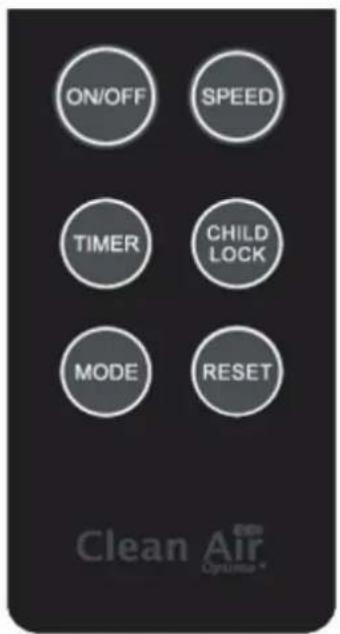
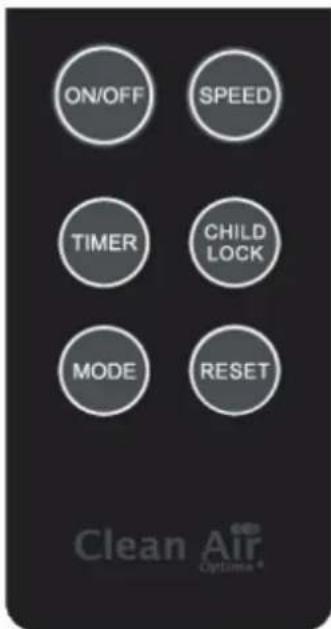
Remote Control
ON/OFF
Pressing the Power button you turn the device on and off. (Default is Auto mode after turning on the device).
SPEED
By pressing the 'Speed' button, you can change the speed level. The 3 fan speeds offer individual air flow.
TIMER
Press on the 'Timer' button to set the timer to "switch of automatically" in a range between 1, 4 and 8 hours.
CHILDLOCK
The Child lock is switched on / off by pressing the 'Child lock button' for about 3 seconds.
MODE
Pressing the Mode button for switching between Mode and Sleep function.
RESET
Reset the timer for the composite filter by pressing and holding the Reset button for about 3 seconds.
Battery Replacement
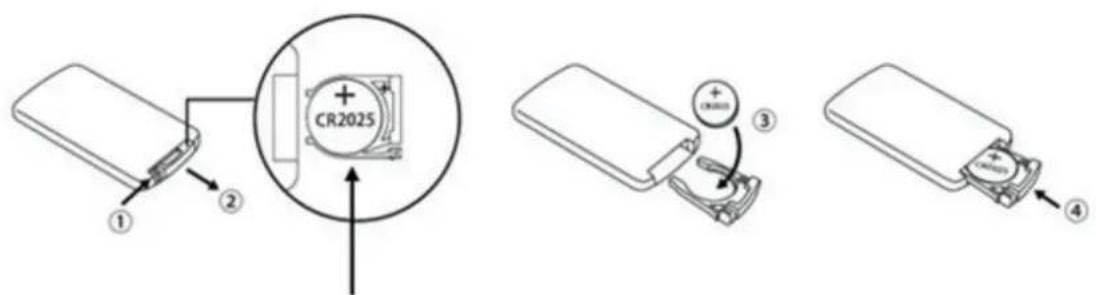
- Open the battery holder on the back of the remote by pressing the locking tab (step 1) to the right with your thumb, then pull the battery holder out (step 2).
- Remove the old battery and insert the new battery (type CR2025.3V) with the correct polarity (step 3).
- Insert a new battery (type CR2025.3V).
- Push the battery holder back into the remote (step 4).
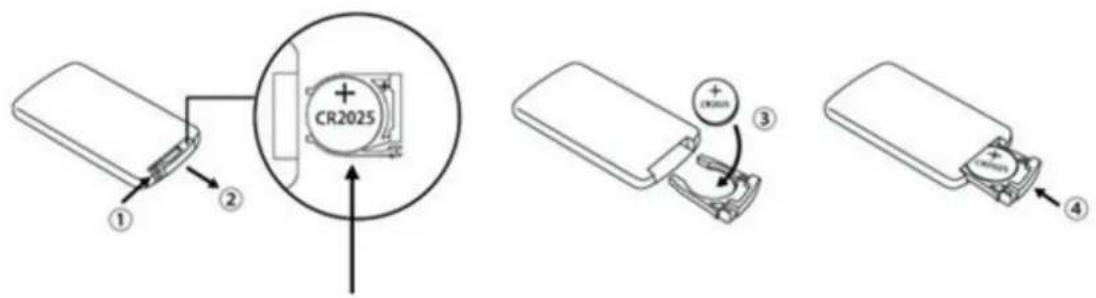
Battery (type CR2025)
Precautions
- If you do not use the remote control for a long time, please take out the battery to prevent it from leaking and damaging the remote control.
- Operate the remote control within the scope of the air purifier
- If the remote control does not work properly, please remove the battery and place it back after 30 seconds. If it still doesn't work properly, replace the battery.
Clean Air Optima
Maintenance
Cleaning the outside of the air purifier
- Switch off the device and pull the plug.
- Use a soft and humid piece of cloth to clean the device from dust and dirt.
- Make sure that no water gets into the device.
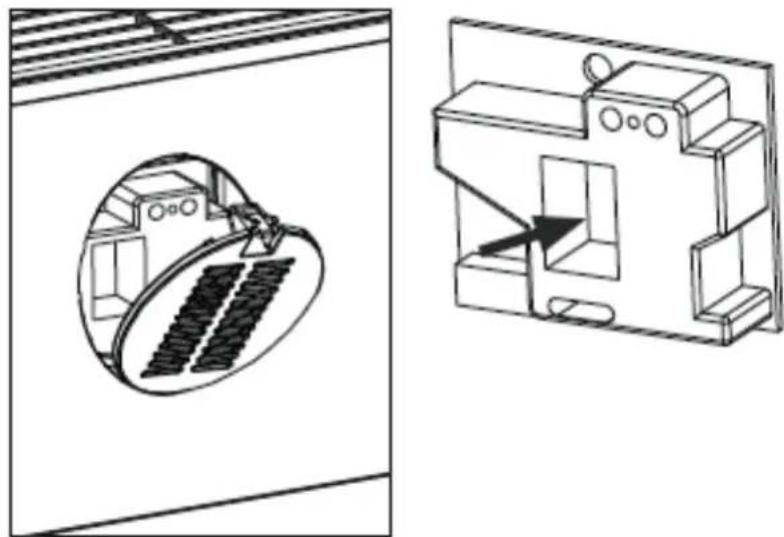
Cleaning of the Intelligent Particle Sensor™ Clean the air quality sensor every 6 to 8 weeks.
When the value of PM 2.5 is displayed incorrectly, a cotton swab can be used to clean the sensor lens.
- Remove the cover of sensor.
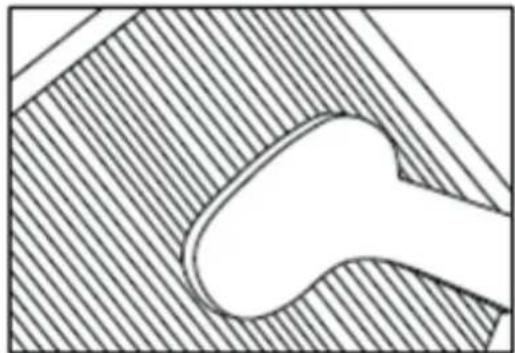
- Clean the sensor lens with a cotton swab and water as indicated by the arrow. Then dry the lens with a clean cotton swab.
- Install the cover of sensor.
- Do not wipe the sensor lens with alcohol or other organic solvent.
Attention! If the humidity in the room is very high, there is a risk of condensation on the air quality sensor. This may cause the air quality indicator (Digital Display - Particle Measurement) to indicate that the air quality is poor, while this should not be the case. In this case, we recommend that you clean the air quality sensor or do not use the air purifier in automatic mode.
Replacing of filters
The Clean Air Optima Intelligent Air Purifier CA-509Pro Smart is equipped with a filter lifespan surveillance mechanism that signals that the filters have to be replaced after 2.000 working hours. To show that the composite filters (HEPA + Activated Carbon Filter) need to be replaced, the air purifier emits a flashing indicator light. Reset the timer for the composite filter by pressing and holding the button Speed and Timer (for about 3 seconds). If the indicator light goes out, the timer has been successfully reset.
Depending on the use, the composite filters (HEPA + Activated Carbon Filter) has a lifespan of approx. 6-8 months.
Filter cleaning
The best effect is reached by cleaning the filters once a month. If indoor air is extremely polluted, more cleaning can be required.
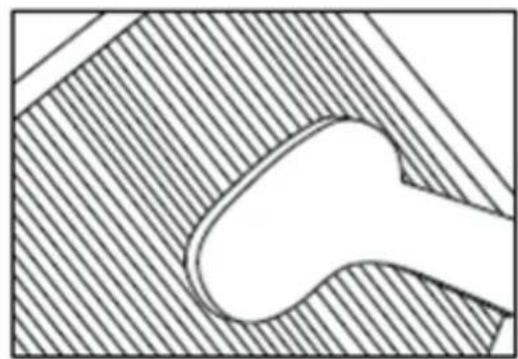
Clean the Pre-filter and the HEPA filter with a brush or your vacuum cleaner. That way bigger dust particles like lint, hair and dander of pets can be removed from the filter.
Warning! Do never wet or rinse the composite filters (HEPA + Activated Carbon Filter) with water.
Signs for used up filters
Increased sound, reduced air flow, congested filters, rising presence of smells. The filter needs to be replaced by a new one when the HEPA filter changes its color from white to grey or black. If the HEPA filter remains white, there is NO need to replace the filter.
How to order filters:
Contact Clean Air Optima Customer Service tel. + 31 (0) 742670145 or visit our webshop: https://www.cleanairoptima.com
Clean Air Optima
Replacing UV LED lamps (on the front and rear of the unit)
Both UV LED lamps of the Clean Air Optima CA-509Pro Smart air purifier have a service life of 8,000 operating hours = 1 year of 24/7 operation. The UV LED lamps should be replaced after 8,000 hours of operation, or if the indicator light (UV) on the display goes out.
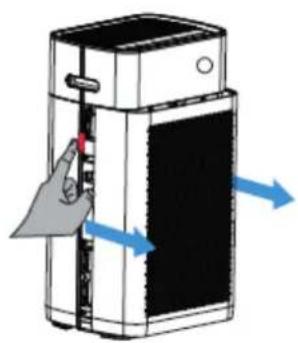
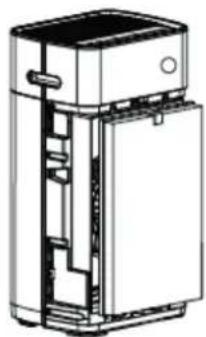
- Switch off the device and pull the plug out of the socket.
- Press the release buttons with both fingers and remove the front and rear covers.
- Remove the filters (front and rear).
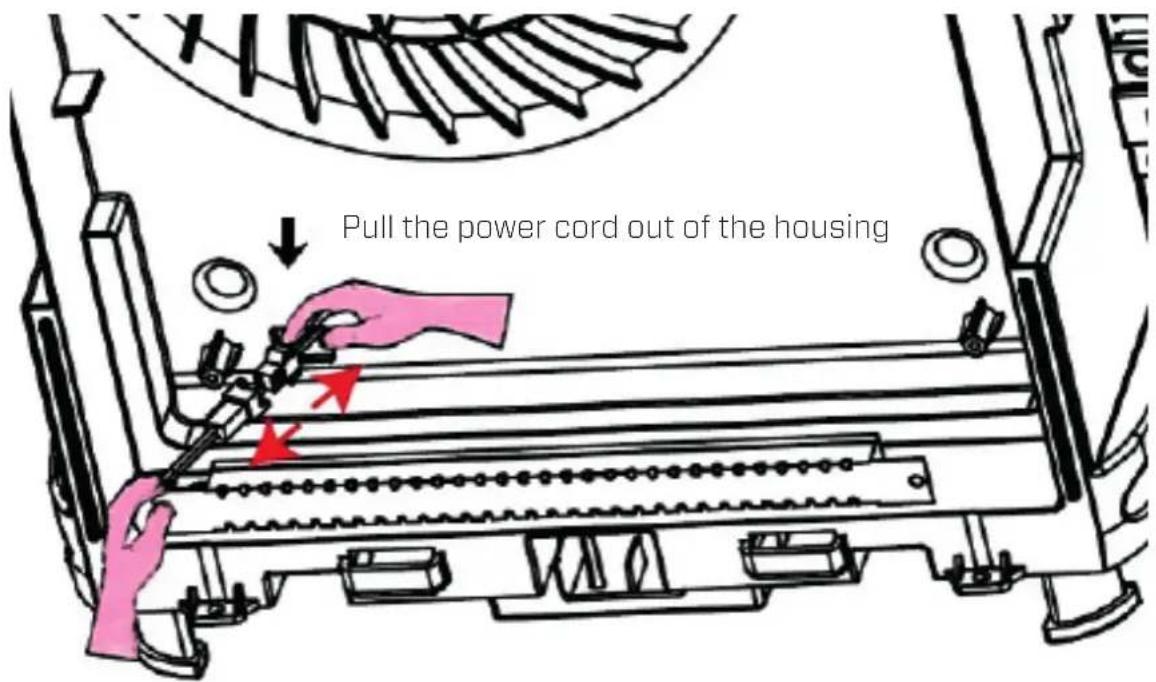
- Use a Philips-head screwdriver and remove the screws from the metal guard of both UV LED lamps (front and rear).
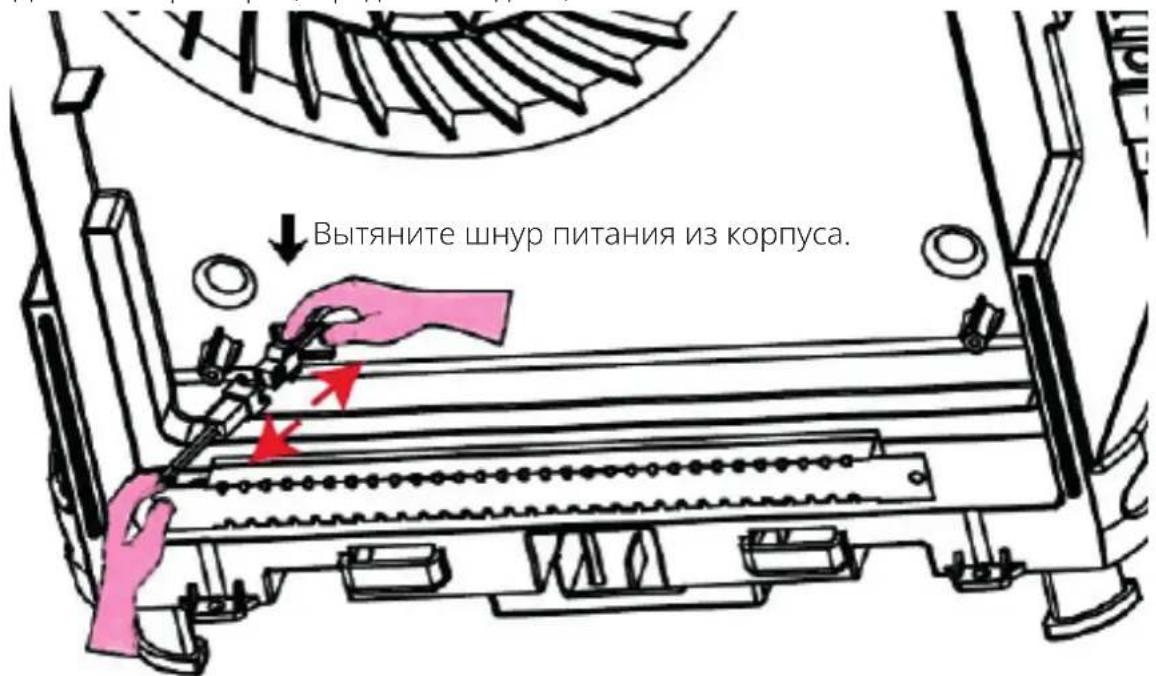
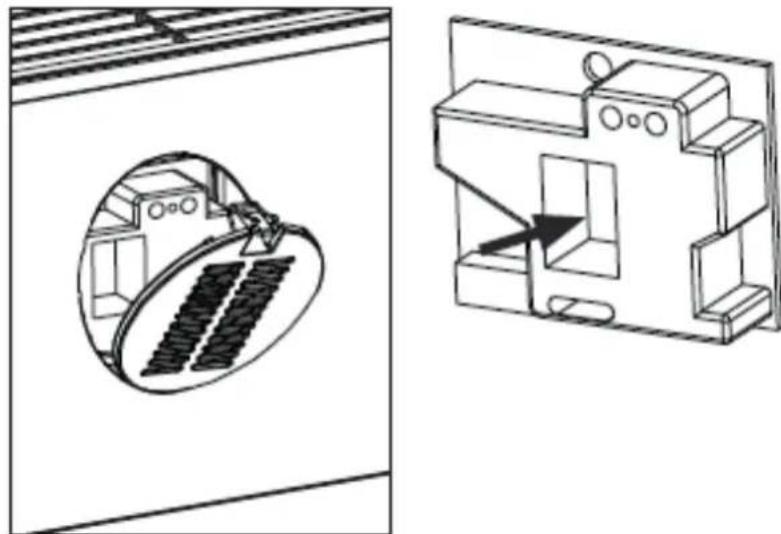
- Pull the power cord out of the housing towards you until you see the plug connectors. Unlock the plug connectors, see figure.
- You can now fit the new UV LED lamps. After the UV LED lamps have been fitted, the indicator light (UV) will light up again.
How to order UV LED lamps:
Contact Clean Air Optima customer service on + 31 (0) 742670145 or visit our webshop:
https://www.cleanairoptima.com
Troubleshooting
The following is a troubling shooting guide to help you solve any issues that you may have using the Clean Air Optima Intelligent Air Purifier CA-509Pro Smart.
| Problem Possible | Cause Solution | |
| Device does not switch on | The power cord does not connect correctly | Connect the power plug and power socket correctly |
| The power cord is broken | Replace the power cord | |
| The front or back panel is not installed correctly | Install the panel correctly. See chapter: How to use | |
| The air outlet smells foul | The filter traps too much odor or dust | Replace the composite filters |
| The lifetime of the filters has expired | Replace the composite filters | |
| Poor purification effect | Check if the humidity in the room is too dry | Increase the humidity |
| The device is placed in an unventilated room or surrounded by obstacles | Remove the obstacles | |
| No air is blowing out of the device | The airinlet or airoutlet is being blocked | Remove the obstacles |
| The remote control does not work | Check if the battery is installed | Install the battery |
| Check if the battey is installed correctly | Install the battery correctly | |
| Check the capacity of the battery | Replace te battery | |
| Check the remote control distance exceeds the range | Range is within 5 meters from the front-side of the device | |
| Operation with Clean Air Optima® App does not work | Smartphone or tablet is not connected to WiFi network | Reset the device by pressing and holding down the STAND and TIMER buttons together for three seconds. The WiFi indicator will blink. Then follow steps 4 to 8 from the chapter “Operation with Clean Air Optima® App.” |
| The device has no connection to the network |
Clean Air Optima
WARNING!
If the above recommended solutions do not work, please contact Clean Air Optima technical support at the telephone number for your region. Do not attempt to disassemble, reassemble, or repair the device as this may void the warranty.
Specifications
Model CA-509Pro Smart
For rooms up to 90m^2 / 225m^3 / 970ft^2
Rated voltage 220V - 240V, 50Hz/60Hz
Rated power Max. 53W
Fan capacity (CADR) 400 m³/h (solid particles) - 100 m³/h (formaldehyde)
Filter performance 99,97%
Sterilization rate 99.9%
Negative ion 2.000.000 ions/cm²
Sound level Silent fan < 20dB(A) Low 1/35dB(A) Middle 2/55dB(A) Turbo 3
Dimensions 560× 320× 210mm
Weight 7.5kg
Colour Living white
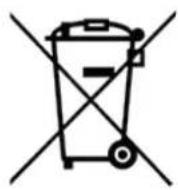
Complies with EU
regulations CE/WEEE/RoHS
Ask your retailer or your municipality for updated information regarding the disposal of the packaging and of the device.

Service
Warranty Certificate for the Clean Air Optima Intelligent Air Purifier CA-509Pro Smart.
Date of purchase:
Customers name:
Address:
Telephone:
Email:
Seller's name:
Address:
- Please fill in completely this Warranty Certificate. Send it with the invoice and the unit, postage pre-paid and using the original packing box, to your distributor. Make sure to include the appropriate return postage for the package.
- Please enclose a short description of the damage, fault or malfunction, and the circumstances under which these problems arose.
The Clean Air Optima Intelligent Air Purifier CA-509Pro Smart is subjected to strict testing procedures before leaving the factory. If within 2 years from the date of purchase the product does not perform according to the specifications, because of factory defects, the purchaser is entitled to free repairs or replacement of parts upon presentation of this warranty (provided that the malfunction or damage to the device and/or parts occurred under normal operating conditions). What is covered: All parts defective in material and workmanship. For how long: two years from purchase date. What we will do: Repair or replace any defective parts.
Exclusions: Regular replacement filters.
Other Conditions
The provisions of this warranty are in lieu of any other written warranty whether express or implied, written or oral, including any warranty of merchantability or fitness for a particular purpose. The manufacturer's maximum liability shall not exceed the actual purchase price paid by you for the product. In no event shall the manufacturer be liable for special, incidental, consequential, or indirect damages. This warranty does not cover a defect that has resulted from improper or unreasonable use or maintenance, faulty assembly, accident, natural catastrophes, improper packing, or unauthorized tampering, alteration, or modification as determined solely by us. This warranty is void if the label bearing the serial number has been removed or defaced.
Thank you for reading!

Share your feedback about the Clean Air Optima Intelligent Air Purifier CA-509Pro Smart on: www.cleanairoptima.com

For frequently asked questions about the CA-509Pro Smart go to: www.cleanairoptima.com and search for the CA-509Pro Smart.

Download PDF instruction manual on: www.cleanairoptima.com/info/manuals

Watch all Clean Air Optima Product animation video's on: www.youtube.com
Clean Air Optima International B.V. | Rientjesoven 26 | 7621 HG Borne
The Netherlands | Phone: +31 (0) 74 - 2670145
Clean Air Optima Germany GmbH | Enschedestraße 14 | 48529 Nordhorn
Germany | Phone: +49 (0) 5921 879-121
E-mail: info@cleanairoptima.com Internet: www.cleanairoptima.com
Deutsch
Model CA-509Pro Smart
Voor kamers tot 90m^2 /225m^3 /970ft^2
Nominale spanning 220 V - 240 V, 50 Hz/60 Hz
Nominal vermogen Max. 53 W
Ventilatorcapaciteit (CADR) 400m^3 /h (vaste deeltjes) - 100 m^3 /h (formaldehyde)
Filterprestaties 99,97%
Sterilisatiegraad 99.9%
Comment commander des lampes UV LED:
Model CA-509Pro Smart
Pro mistnasti do velikosti 90 m²/225 m³/970 ft²
Jmenovite napeti 220 V-240 V, 50 Hz/60 Hz
Jmenovity vykon Max. 53 W
Kapacita ventilatoru (CADR) 400 m³/h (pevné Částice) - 100 m³/h (formaldehyde)
Vykon filtru 99,97%
Model CA-509Pro Smart
Pentru incaperi de pana la 90 m²/225 m³/970 ft²
Child Lock (Lapselukk)
Lapseluku sisse-/valjalulitamiseks tuleb vajutada nuppu Child Lock (Lapselukk) umbes 3 sekundit.
Režiim
E-posti aaddress: info@cleanairoptima.com
Internet: www.cleanairoptima.com
Latviešu valodā
Paldies, ka iegadajaties gaisa attiritaju Clean Air Optima Intelligent Air Purifier CA-509Pro Smart!
Ceram, ka varesit ilgstoisi izbaudit veseligu iekestelpu gaisu, pateicoties sim efektivajam un lietderigajam izstradajumam.
CA-509Pro Smart/ Main ice
2.YcTaHOBNTe KOMNo3HTbIeΦnJIbTp
CHIMITE yIIOHTHeHne C
fNtBPOB. IOMeCTnte fNtBtpbl
O6paTHo B yCTpoiCTBO. KpaH
Ha dHnue Hn Ha BepxHey cactn
doJXeH 6bTb BnDeH cpeeni
(BnDa CTopoHa HEPA ot fNtBtpa).
3.YctaHOBnteΦnIbTp npedBaPnteIbHOn OuNCTKn
YctaHOBNTe QnIbTp npeBaPntelHoN OuNCtKN TaKIM o6pa3OM, yTO6bl C cepHa BbInyKnOCTb 6bla O6paueHa HApKy. BcTaBBTe ero HxHNOU qAcTb B HxHNOU npope3b N OCTOpOXHO BdBnHbTe BepXHIOU qAcTb (co CTpeKAMn Ha He) B BepXHIOU npope3b.
4. YctaHOBntb naHeJIb
HaMnte Ha nepedHIO naHeIb BdoJI BepxHIX HnKHX KpaEB BHaPabLeHIn, NOKa3aHHOM CnHM, CM.PncyHok.KoRaBblYcNbIShTe UeHOK, NaHeIb yCTaHOBNeHa.
YcTpoIcTBo DoJxHo paCnOlaRaTbCra Ha pacCToHn He MeHee 30 cm OT cTeH n Me6eHn dIy oBecneueHn XopoWero Bo3dyuHoro nToKa. Y6eIntEcB, yTO B03dyXOBnycKHoe I BO3dyXOBblNyCKHoe OTBepCTn He nepeKpbITbl.
Clean Air Optima
PanaheIynpaBLeHnra / NHCtpyKzna no 3KcnLyatau
1 KhoNka nHTaHnA
KhoNka nntaHn Cnyknt dIy BkHoueHn I OTKluoeyHn yCTpoiCTBa. (No ymoJuaHnIO nocJe BkHoueHn yCTpoiCTBa aKTNBnpyeTcA bTOMaTneckn peKm).
2pekm
KhoNka Mode (PexnM) clyxnt dnypekeHcyHKnu Auto (ABTO) n Sleep (CoH). B pexnme Auto (ABTO) BCTpoeHHbI nHTeJIeKTyaIbHbI daTcHk (Intelligent Particle SensorTM) aBTOMaTHueCKn u3MepeRt npeylnpyet kaeCTBO BO3dyxa. BeHTnJrTop, ynpabJIeMbI daTcHkOM, aBTOMaTHueCKn oPpeJeRt, B KaKo CTePeHN BO3dYB NOMEeHN 3aPr3HeN qactNuAM pa3Mpom PM2.5 n COOTBeTCTByOUsm O6pa3OM Bbl6IpaET OndHy n3- x pa3LIuHbIX cKOpocTei. B HacTpOkaX Sleep (Coh) nHdNKaTOP CBeNTcraRPKO. INDnKaTOp, BKIOUaYr ZNFpOBo DNcPLeN, norachet uepe3 5 cekyHd. HaxMtte IIO6byo KnaBnSy, YTO6bl nepe3aNyCTNb IHdNKaTOp n UfPOBOI dncIeN. INDnKaTOp n UfPOBOI MOHTOP CHBa nOracHyT uepe3 5 cekyHd. (BeHTnJIrT oppaot aET Ha camOM Hn3KOM yPoBHe cKOpocTN).
3ckopocTb
Haxab KhoNky Speed (CKopocb), Bbl MoXeTe N3MeHnTb yPoBeHb CKOpocTN. 3 CKOpocTN BpaUeHnBcHTnIaTopa o6ecneuBaHOT INDINBuaJbHO HAcTpaINBaEmbI NOtOK BO3dyxa. (1-2-3 O3Haayet YBeJIueHne cKOpocTN noToKa BO3dyxa).
4 TaImeP
Haxmte KhoNky Timer (Taimep), yTo6bl yCTaHOBnTB TaIMep B pexHM «ABTOMaTHueCKOTo OTKIOUeHn» B dHaIa3OHe MExdy 1, 4 n 8 YacAMn. KoJIueCTBO BbIbpaHHbIX YacOB MOXHO yBnDeTb Ha dncnlee TaIMepa.
5 CBeToaNoHa yΦ-naMaNa
CBeToIIOIDHnay YΦ-JaAMNbI nOIIeXaT 3ameHe uepez 8000 yacob kcnnyataun nnB cnyuae BbIKIOUeHnra CBETOBORo INHnKaTopa (UV) Ha naHenn.
6ΦnIbTp
Ecnn HndkaTop MnaeT, KOMno3HTbI h Nnltp (HEPA n fNtBtp cakTNBupoBaHHbIM yrlem) DOnkHe 6bItb 3aMeHeHb. Cpok cnxkbI kOMno3HTHO fNtBtpca coCTabIaTe 2000 yacob.
7 Wi-Fi
HdkaTop Wi-F
2+36JOKnPOBkaOTTeT
Блokировka ot DeTe 3aunuaeT OT HekeIaTeIbHOrO NcNoIb3OBAHHaYCTPOINCTBa.
Блokировka ot DeTe BkInuHaTcra / BblKInuHaTcra npO ndOBpeMeHHOM HaxaTN KHOJOK Mode (Pekm) u Speed (CkopocTB).ИндИкатop 6lokировkn ot DeTe 3aropaetraRPKM CBETOM.
3+4c6pocΦnIbTpα
C6pocTe TaHMeP dIa KOMnO3HTHO r Haxab N ydepkvBaK Honky Speed (Ckopoctb) n Timer (TaHMeP) (OKoI 3 cekyHd). Ecnn HndkaTOp rachet, TaHMeP 6bl ycneuho c6poweH.
UHΦpOBoMOnHTOp
LHpOBoMOnHToPHa nepdHeCtOPOHe OuncntTeJb Bo3dyxa CA-509Pro Smart aBtOMaTnueckn I ToUHO NOKa3bIBaet TeKyuIe KauEcTBo Bo3dyxa, I3Mepey ypoBeHb coepxahna qactn PM2.5, BlaXHoCTb n Tempepatpy B IomeuHn.
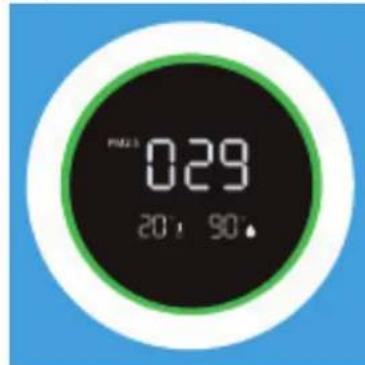
3eHbI -XoPoWo: 0-80MKr/M³
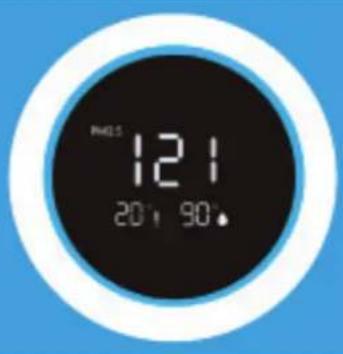
CnHn - cpeDHe: 80-150Mkr/M3
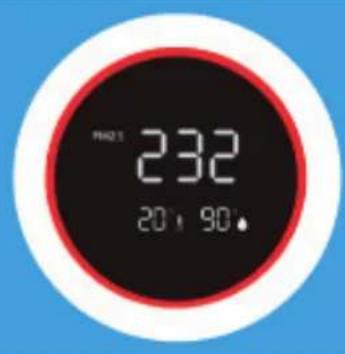
KpaChbI - IIOXO: 150 Mkr/M³ UJN 60Jee
Tbepeuactnpu pa3mepom 10 mKpOH (PM10) n Mehwe 2,5 mKpoHa (PM2.5) moyt nonadabBJIeKne u OTHocTcK 10 rIaBHbIM yrpo3am dIy 3doPobBy cheIOBeKa. TNI MeIKe uactnucB03NkAOT B TINNUHbIX dIy NOMEUeHN IPOUeCCax, TaNX KaK BApKa, BblNeYka, XapKa, KpyHne nn OToNLeHne, a TaKxe IOnaDaHT B6OJIbXx KOJNueCTBaX B03DyX NOMeH Neu OT TpaHCnOpTHbIX cpeCTB, o6OpyIDoBAHry IpOMbIShJeHHOCtN, CTPONTeJIbCTBa, B VnDe 6NoIOnuYeCKoro MaTePnAna (UBeToHna PbIbua, 6aKTePnN, KLeuN IN BvpyCb), BBXIONHBx Ra3OB CaMOJETOB IN PpOdyKTOB IVBepXeH Neu BYlKaHOB.
Anleprehbl, TaKne KaK cBeToHnA NbIbcaa n NbIb, AByJIOTc Cepbe3HbIMN I DOJIROCPoHbIMN yrpo3Am 3doPoBbIO MmIIHOHO BIOe KAKdyo BeChy: UOp bIOCTOARHO pAcTyT.
I3mepeHne OTHOCHTBHO BnaxHoCTn N Tempeatypbl
BaxHbIe acNeKTbI 0fOeKtNBHO OuNcTK Bo3dyxa: OTHCNTeJIbHaBnaxHoCTb 45-60%
i KOMHaTHaTeMnepaTypa 20-23°C
Hyp nItaHn
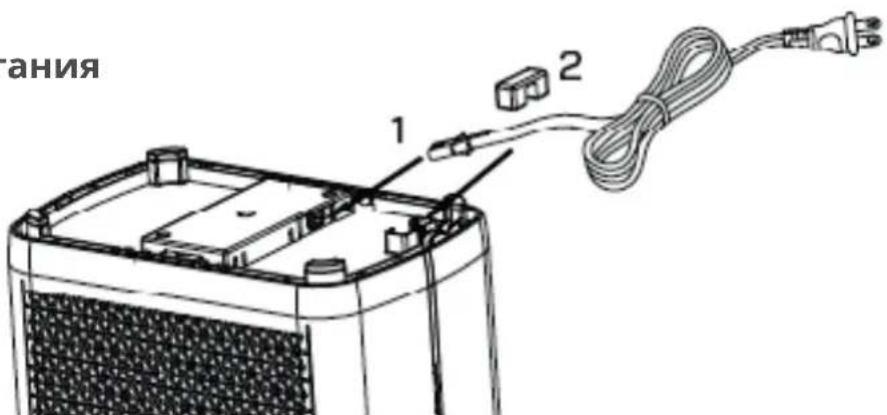
- YdaInte Klen shHpya nHTAHnC HxKHe yactn yCTpoiCTBa N BCTaBbTe KOHeC hHypa nHTAHnB rHe3do B HxKHe yactn yCTpoiCTBa (kak noKa3aHO Ha pncyHke 1).
- BCTaBbTe IINHIO 3JNEKTPoNITAHnB I Na3 DnI npOBoa n 3aΦHKcnpyIe ee Kneem dIra npIXkMa npOBOda (kak noka3aHo Ha pucyHke 2).
Pa60Ta c npiloxeHnem Clean Air Optima
Bo3MOxHocTb POKJIoueHnI
CoBmectnMoCTb Co CMapTfoHAMN n PnaHwetamN: ycToiCTBa iPhone, iPad u Android
Pn6opbl, noKluoyauounec K npnoxehnno Wi-Fi: CleanAirOptima
BHHMaHHe:MapuTy3aTOpdoJKeH6bItbHaCTpoeHa 1nPoKoNoLoChbI DoCTyB DnAna3OHe2,4 Tt. Ecn poyTeP HAcTpoEHa5,O Tt,HeBO3MOxHO yCTaHOBtB CoeINHeHne.
HactpoKa coeHHenra Wi-Fi
- 3arpyuTE uycTaHOBuTe npuiJoxeHne CleanAirOptima B App Store nn Google Play.
- Co3daIte yuTeHyU 3aNNcB u BOyIDnTe B CnCTeMy.
- BCTaBbTe BnIky B 3JIeKtpoPo3eTky n BKNHOnuTe yCTpoNcTBO. INdkaTop Wi-Fi HauHET MmraTb.
- MapspTy3aTOp dOJxH 6bITb HAcTpoEH Ha shpOKoJIoCHbI DOCTyN B DnAna3OHe 2,4 TtC. Ecn MapspTy3aTOp HAcTpoEH Ha yactOTy 5,0 TtC, coeINHeHne He MoXeT 6bITb yCTaHOBJIeHO.
- Y6eIntecb, yTO Bluetooth BkIIOueH Ha BaWem CMapTfoHe.
- Y6eHITecb, yTO cMapTfoH nIIN pHaHwET noKJIHOueH K cTeN Wi-Fi.
- OtkpoiTe npniloxeHne CleanAirOptima n haxMITE KhoNky Add device BaW np6op Dolxeh HaxOHTbCnCKe, Ecln Bbl He moXeTe Bbl6paTb erO, HaxMITE KhoNky Auto Scan. CledyTe INCTpyKzmaH Na 3kpaHe, YTO6bl NOdkHouHTb np6op K cetn.
8.Добавытпрбop Clean Air OptimaВ пиложен,сдунHTpyKцяM. - Nocle yctaHOBKn cnpjXeHn np60pa HdkaTOp Wi-Fi CBETTCHeHpepbIBHO.
- Посл заевшинахтоюкп пиюжени Clean Air Optima мохно Испьзоватдя уравлиени пибором.
Ppimechnna
BcIyae n3MeHnna cTe n no yMOJuaHHo c6pocbTe coeHNHeHne Wi-Fi n BbIOnHnTe 3-8B pa3dene «HaCToPka coeHNHeHna Wi-Fi>.
- 706bI NODKIIIOHHT K CMaprfoHy IIN IINIaHWeTy HeckOJIbKO npI6OpOB, ONNCAHHBIE DeICTBnCLeDyET BbIIOJNHrTb NoOuepeEHO JIA KaKDo npI6opa.
- Y6eHNTecb, yTo npn6Op HaxoHTcHa paCCTOaHn He 60lee 5 M oT cMaprTOHa nn nI IaHWeTa, a TaKxe B OTCyTCTBn MeJxHy HmN npenrTCTBn. KpOme TOrO, BbldoJXhbl HaxoHTbcra Toi Jx Ke KomHaTe, yTo n np6Op.
C6poc Hactpoek Wi-Fi:
- c6pocbTe HacTroponn Wi-Fi, Haxab KhoNky Mode n TaMepydepxnbAe ee B TeueHne 3 ceKynD, npn 3TOM INdkaTop Wi-Fi 6ydtuacto mntaTb.
IopKJIouHTe yctpoiCTBa K HeckOJIbKIM TeJefoHaM
IpimMeaHne: cHaJana Heo6xOIMo yCTaHOBnTb npInIOXeHne Clean Air Optima Ha cBoem TelefoHe n CO3dA Tb HOByu yUeTHyO 3aNNcB.
DJIHTECB CBOUM yCTPOINCTBOM C OrpaHnueHHbIM DOCTYnOM.
Bb mokeTe npedocabntb 6uyn doctyn K 1 yctpoiCTby nHeckoJIbKnx Iu.
Takm nnzam npedocabIeTcnaOCTyn K yctpoiCTby, Ho OHn He CMOry UnpaBJIaTb BCEMN Hactpoikamn.
Iy npdeoctabenno oouero doctyna K yctpoiCTby dna Heckolbknx nuc cyeuTe npBedeHHbIM Hnxe uHCTpyKunm.
- BbIbepnTe COOTBeTCTBHyOuJee yCTpoNCTBO.
2.ПерейдenteК карандашу плтетм точкам Вьерху справа. - BbI6epnte Share device (O6uyn doctyn k ycTpoiCTby).
- BbIbepnte Add sharing (PpeoCTaBnTb o6uN doctyn).
- Bb6epnte cnoc6 npedocTabHeHn o6uero doctya, HapnpMeP nocpeCTBOM 3JeKtpoHHoNoTb,Whatsapp, sms n T, d, n pdoJxte.
6 YcTPOICTBO aBTOMaTnueckn nOBuTcB npiNoxKeHnn Clean Air OptimaC pyroynyehno 3aNNscbu.
Ppeoctabte noHbI doCTyn K yCtpoiCTBy.
Bb mokeTe npedocabntb doctyn K ynpaBleHIO BaUM dOMOM JnOHO Hn HeckoJIbKnx NOBJ3OBaTeJeN.
Takoi noIb3oBaTeIb noIyuae TIOCTyn KO BcEM BaIIM yCTpOiCTBaM, KOTOpBie yXe CBa3aHbI Mekdy c60o, a TAKKe emy npedocTabJIaHTcN oJIHbI e npaba n pa3peuHn. Bbl Bcerda OCTaTeCb rIaHBiM aDMHNICTpaTOPOM.
YTo6bI Do6aBnTb Nolb3OBaTeJI K ynpaBHeHIO BaUIM DOMOM CJeDyIe PnPBeDeHHbIM HIXe INCTpyKcIyM.
- OtkpoTe npiloxeHne Clean Air Optima ^国 n nepenDnte B Me (R).
- 3aTeM bIbepnTe Home Management (UnpaBJIeHne DOMOM).
- BbI6epnte Create a home (Co3daTb IOM).
- Bb6epnte cooTBeTCTBvHouuHm Home (Dom) n Add member (O6aBnTb noIb3ObaTeJI).
- Bb6epnte cnoc6 npedocTabJeHnO o6eTo DocTyna, HapnpMeP nocpeCTBOM 3JleKtpoHHoNoTbI,Whatsapp,smS n T.D.N PPOdoJxte.
6 CoOTBeTCTBHyUHm Home (Dom) aBTOMaTnueckn NOBHTcB npIIOJKeHN Clean Air Optima® Nolb3OBaTeJI, KOTOPOMV Bbl PpeIOCTaUNI DOCTYK CBOeMy Home (Domv). - B pyroynu yetno 3a nncn: nepeynte Ha hauhblb nnepan B npiloxenn Clean Air Optima.Bbepx cybeBa b6epnte Home (Dom).
Clean Air Optima
3HaKnIaIncNoJIb3OBAHHbIXΦJIbTpOB
yBeIuHbI yM, yMeHbIeHHbI nOTOK B03dyxa, 3acopeHHbIe fNJIbTpbl, NOBblIeHHoe npCytCTBnE 3aIaxOB. fNJIbTp HEPA Heo6xOIMo 3aMeHITb HObblm, eCIN OH N3MeHIN CBeT c 6eIoro Ha cepbl nll uepbl. EcIn fNJIbTp HEPA OCTaETc8eblm, HET Heo6xOIMocTn 3aMeHATb erO.
Ka3aKa3bBaTbΦNJIbTpbl:
CbXnTeCb co cnyx6oN noDepkKn KIneHTOB KOMNaHn Clean Air Optima nO TeJefoHy + 31 (0) 742670145 nn Nocetnte Haaw nHTepHeT-Mara3nH: https://www.cleanairoptima.com
Clean Air Optima
3aMeHa CBeToAnoHna YΦ-λamn (cpepeu n c3ayn yctpoNCTBa)
Obe CBeToNoDHa YΦ-lambl OunchteIaBo3dyxa Clean Air Optima CA-509Pro Smart Imeot cpoK cnjkb8000 pa6oHx yacOB, yTO kBnBaIeHTHO 1 roy HnepepbIBHO rnoB3OBAHn. CBeToNoDHa YΦ-lambl IopIexkat 3ame Hepe3 8000 yacOB ekCnpyaTuIN nII B clyuae BbIKIOUeHn CBeTOBOrO INdkaTopa (UV) Ha naHei.
- Bbiklouhnte yctpoiCTBO n doCTaHbTe BnIky n3 po3eTKN.
2.DBymnaIbIaMnHaXMMTe Ha KHOKnKcATopa n CHIMNTe nepeHIOu 3aHIOo KpbIuKN.
3.ДocTaHbTeФиьTpbl(пepeнииЗаднii).
- Pn nmoi KpctOBo OTBepKn BbIKpyTte BNHTbI N3 MeaJIInueckO 3aunTBIO6eNX CBeToNDHna YΦ- lamn (pepeHne n 3adHe).
- BbIyraBauTe 1Hyp nHTaHn 13 KOpnyca Ha Ce6, noka He yBnnte WTeNcBhble coeHNHTeIN. OTcoeHNHTe WTeNceNBhble coeHNHTeIN (CM. pucyHOK).
- Tenepb MoxHO BCTaBnTb HOBbIe CBeToIONoHna YΦ-JaMnbl. NocJe yCTaHOBKn HOBbIX CBeToIONoHna YΦ-JaMn CBeTOBOH nHnKaTOp (UV) cHOBa 3arOpntcra.
3aka3 CBeToDIOJHna YΦ-lamn:
6paTteCb B ueHtp 06cLyXnBaHnna NokyNaTeJe Clean Air Optima no TeJefoHy + 31 (0) 742670145 nnn noCeTne Haaw nHTepHeT-Mara3nH: https://www.cleanairoptima.com
Диагстикa и устараенье несправност
Hnke npnbdeHb yka3aHnno DnaHocTne HycTaPHeHNO HeCnpaBHOCTe, KOtOpbIe NOMORY TpeuNb IOTeHuaJIbHbIe npo6IeMbI npn EKcnLyatauOcUHTeNr INTeNkTyalbHoro BO3dYoouchntTeN Clean Air Optima Intelligent Air Purifier CA-509Pro Smart.
COOTBeTCTByet HopMaM EC CE / WEEE / RoHS
3a npocnte y BaIero npoabua nI npedctabNTeMa MeCTHOrO opraHa ynpaBHeHn O6HOBHeHHyU HOpMaunno yTuIN3aun ynaKOBKn n np6opa.

TexHnueckoe 6cIyKnbHne
Гарань сегнфкат Дд Ителковаьного Вордухочител Clear Air Optima Intelligent Air Purifier CA-509Pro Smart.
- Hukoraш He notonybaite ro ypeot BO BODa nn Dpyn TeuHOCTN.
18.He donnpaite ro ka6eJot 3a HanoivbaHe co BlaXn paue.
- PeIOBHO uHCTeTe ro nped-phiHTepoT aKO e HApOJIHeT co npaunHa, nHaKy eΦeKToT Ha npOuHCTyBaHBe Ke 6nIe cna6. NpTOPOUByBaUkata Ha eHeprJia Ke ce 3roJeMn I MoKe Da npEdu3Bvka DeΦeKT.
20.HopmaHOTo pa6OTHO OIKPVKvBaHcHaVpeDTo e 0°C Do 40°C.
- Kopnctete ro, odxvbaite ro n uchtete ro ypeodt kaKo 7to e onuHaHO BO OBOJ npndaHik.
Kako ce kopncTn (HCTaIauJHa H a nItePOT Ha npEHaTa N 3aHa cTpaHa)
1. Packlonete ro naheJot
PnTncHeTe Co DbTa npCTa Ha CpBeHnot HndkaTOp Ha JeBaTa
H DecHaTa CtpaHa Ha npOuNCTyBaUOT
Ha BO3dYx, BNDeTe ja CnKata.
NoBLeueTe ro naHeJot KOH Bac KaKO
WTo e Ha3HaueHo CO CnHn CTrpEkn.
2.ИнсталарajTe ro KOMno3nTHNOT cnntep
I3BaTe ja nIOM6aTa od qHITpnte. IocTaBeTe rN qHITpnte Ha3aD BO ypeDoT. HeNOT Ha dOJHHOT DeN I rOpHNOT DeM oMa Da 6uDat BvIDINBn Ha npEHaTcCTpaHa (BvIDInBa e HEPA cTpaHata Ha qHITepoT).
3.Инсталпajte ro nped-Фиntepot
HCTaIIpajTe ro nped-phiItepot COUphOTO NcnaKHyBaHbe KOH HAdBOp. CTabete Ro DOJIHNOT DeN Bo XJle60T HaDHTO IN PnITChETe Ro ROPHNO T DeN (co CTrpeKNITE) HexHO BO ROPHNOT XJle6.
4.Инсталрajte ro naHeJOT
PnTnCHHe r npedHnot naneI napaJIeHNO D0Jx RopHnte NdoHNte pa6OBN BO HAcOKaTa npkKaXaHa CO cTePkA Bo CInHO, BndTe ja cnKata. Kora Ke cnUshete Klnk, 3Naun Deka naHeNoT e NHCTaIIpaH.
UpeoT Tpe6a da 6nde nocTaBeH ha pactoJahne od HajmaKy 30 cm od sIOBnte n Me6enot, co 9a ce do6ne npotoK Ha BO3dyx. Ocnypete ce deka n3Je3nTe n Bn3OBNTe 3a BO3dyxOT He ce 6nokpaHN.
Clean Air
KoHTpOJIeH HJIeH/YnATcTBA 3a KOpIcTeHe
1 Konue 3a HanojyBaHe
Co npntnckahe Ha konueTo 3a HanojyBaHe, ce BklyCyBa n NckLyCyBa ypeDoT. (Ctanhapdno e nocTaBeH BO aBTOMatcKn pexm no BklyCyBaHaTeTo Ha ypeDoT).
2 Pekim
IpnTnCKaHe Ha KOnyTeTo 3a peXIM 3a aBTOMatcKa pa6oTa n fYHKuJaTa 3a cIneHbe. Co noCTabKaTa Auto (aBtOMaTcKn) BrpaedHnot nHTenIReHteH ceH3Op (Intelligent Particle SensorTM) aBbOMaTcKn rO Meprn Iro perylnipa KBaJInteTOr HA BO3dYoxr. BeHTnlaTopOT, KOHTpOJIpaH od ceH3Op, aBbOMaTcKn ppeBnDyBa Do KoJ CTeNeH BHaTpeWHNOT BO3dYx e 3araDeH co yeCTnKu co roJeMaHa PM2.5 ncoDbETHO ce npnaIarOyBa Ha 3 pa3nUHH 6p3HH. INdNKaTOpckata cnjAunka 3a NoCTabKaTa Sleep (cIneHbe) e CBeTla. INdNKaTOpckata cnjAunka, BKnyBuajkn Ro dNrtalHNO tncnJej, Ke ce nckLuyat no 5 cekyni. PpNTnCHete Koe 6nlo konue 3a da ja pectapTpIpaTe INdNKaTOpckata cnjAunka n dNrtalHNO tncnJej. INdNKaTOpckata cnjAunka n dNrtalHNO tMOHTop HO nOBTOpHO Ke ce n3raChat no 5 cekyni. (BeHTnlaTOpot pa60Tu co Hajmala 6p3nHa.)
3Брзинa
Co npntnckahe Ha konueTo 3a 6p3nHa, moxe Ta ro npomeHnte HNBOTo Ha 6p3nHa. Obo3moxeh noeHneuH npotok Ha BO3dyx co nomow Ha 3 6p3HHa BeHTnlaTopoT. (1-2-3 3NaHn Deka 6p3nHaTa Ha BeHTnlaTopoT ce 3roJeMyBa.)
4 Tajmep
IpnTnCHeTe ro KonueTo „Timer" (TajMep) 3a da NoCTaBnTe TajMepOT aBTOMaTcN da ro NCKJyU ypeoT no 1, 4 n 8 yaca. BpojoT ha n36paHn YacOBn MoXeTe da ro npOHTaTe Ha npKa3OT 3a TajMepOT.
5 UV LED cBeTnIka
UV LED cnjaJInuKInTe Tpe6a da ce 3aMeHyBaat Ha cekon 8.000 yaca pa6oTa nIi Kora Ke ce ncknyuHnDnKaTopoT (UV) Ha dncnJeot.
6 Φιπερ
Ako INdkaTOpckata cnajnueka TpeNka, Toa 3NaHn Deka Mopa Da ro 3aMeHnTe KOMNo3HTHnOT fntep (HEPA fntepot n fntepot co akTbnpaH jaIepo). Komno3HTHnOT fntep mAm XIBoteH Bek od 2.000 yaca.
7 Wi-Fi
ИнданkaTOp 3a Wi-Fi.
2+3dTeTcKa6paBa
Teckata 6paba ro wntu ypeot od HecaKaHa ynoTpe6a.
Teckata 6paba ce BklyuBa/ncknyBa co nCTOBpeMeHO npTnCKaHe Ha konuHbTa ,Mode" "Speed". Tora, 3acBeTuBa HndkaTopcKaTa cnajnuka 3a Teckata 6paba.
3+4peceTnpaHbHeHaΦnITepoT
Tajmepot 3a KOMN03HTHNO Tcpepecapo npntnckahe n dpxehe Ha konyhbata "Speed" u,Timer"(okony 3 cekyHni).Ako Hndnkatopckata cnjaniuka ce n3rache,3naH deka tajmepot e ycneuho pecetpan.
Дигтулень монитор
Дигиталнnot MOHITOP Ha npedha TcpaHa Ha npoynctybaoyt Ha BO3dyx CA-509Pro Smart aBTOMaTCKI I TOUHO IOKaKBya MOMeHTaJIHNot KBaJIntET Ha BO3dyXOT CO MepeHBe Ha HNBOTO Ha cheTnukn PM2.5, BlaJxHocTa BO BHaTePseHocTa n Tempepaypata.
3eNo -do6po: 0-80ug/m³
CnHO - npocuHo: 80-150 ug/m3
UpbHo -Noo: 150ug/m3nnoBeke
YeCTnukTe od 10 um (PM10) n nomani n od 2,5 um (PM2.5), moXaT da Bne3at Bo 6eHnte npobu n cnaaat Bo 10-Te hajrolemn 3akaHn no 3dpabjeto Ha lyreTo. Obne mAnuectnKc ce pa3BnBaat npeky TnunHn npouecn wTo ce OdBnBaat BO 3aTBopeH npocTOp, kaO wTO ce rOBeHe, neueHe, npxeHe, nyweHe, Ho n rpeHe, nIi HABLeyBaAT BO rOleMn KOnuHN Bo BaWnte npocTOpn npedn3BnKaHo od coo6paKaJot, nHdycptpJaTa, rpaexHNwTBoTo, 6noLoShk MaTepnjaHn (NoIeH, 6akTepnn, MmKpocKnck 6b6aKn n BvpyCn), yBe3EHn cheTnKn OD npuyr peHOnn, kako wTo ce n3dyBn (ABNOHcN) racOBn n epynn Ha BylkaHn.
AnepeHnte, kako StTo ce noJeHoT n PpaunHaTa, npeDn3BvkyBaat cepNo3Hn IdoIropOuHN 3dpabCTBeHH 3aKaHH 3a MmnoHO nlyre cekoja npoJeT: 6pojKnte noctoJaHO ce 3roJeMyBaAT.
Mepehe peIaTINbHa BJIaxHocr N TeMnepaTypa
BaxHn acNeKTH 3a eFikacHo npOuNcTyBaHbe Ha BO3dyXOT: peIaTINbHa BJIaxHocr Nomey 45-60%
i co6Ha TemnepaTypa od okoly 20-23 ^ C
Ka6eI 3a HanojyBaHbe
- OTePahete ro Ka6eIot 3a HanojyBaHe co cTpyja OD hHOTo Ha ypeDTo IN BMeTHeTe Ro BO wTeKePOT Ha dHOTo Ha ypeDTo (kako To e npKacKaHO Ha cnka 1).
- Ctabete ro ka6eIOT BO OTBOPOT 3a Xnua n fukcapajTe ro co Iennilo 3a npntncKaHe Ha Xnca (Kako To e npnkaxaHo Ha cnka 2).
Pa6ota co anlinajata Clean Air Optima
Pobp3yBaHe
KoMaTn6HIOHcT co nAmTeH TelefoH n Ta6JeT: iPhone, iPad u Android ypeu
YpeoT ce noBp3yBa npeky Wi-Fi co anlkaunja: CleanAirOptima
BhimaHne: Pyerot mopa da 6nde noctabeh Ha shipokonojaeh nHTepnet od 2,4 GHz. Ako pyerot e noctabeh ha 5,0 GHz, HeBO3MOXHO e da ce BocnoctabN Bpcka.
PocTaBete Wi-Fi Bpcka
- Празимею щ и саллар щ ща пькцида „CleanAirOptima" bo App Store ун Google Play Store.
- Co3dajTe cMeTka HajaBeTe ce.
- ПиклuyеTe ro anapaToT BO shteKepe n BkIyueTe ro. ИнданkaTopoT 3a Wi-Fi ke Tpenka.
- pyTepoT mopa da 6nne noctabeH ha wnpokonojace nHTepHeT oD 2,4 GHz. Ako pyTepoT e noctabeH ha 5,0 GHz, He moKe da ce BocnoctabN Bpcka.
- IpoBepTe daJIe e BkJyuEh Bluetooth Ha BaIuOT nAmTeH TeJefoH.
- Поберете далы вшиот пам teн Teleфон Илл Табл e успшно NOBp3aH co BaшаТа Wi-Fi мржа.
- OTbopete ja anlkauijata „CleanAirOptima" n KlnkheTe Ha „Add device" (Iodaj ypei) Baunot ypei e habeHn moxe da ro n3bepeTe. Ako He e, n3bepeTe „Auto Scan" (ABTOMATCKO ckeHnpaHe). CneTe rN uHCTpyKuHrTe Ha ekpaHOT 3a da ro noBp3eTe ypeDTo co BaWATA MPexa.
- Дожа对接у畴от Clean Air Optima® BO anлkaцида и седente Гу naTCTBaTa BO anlkaцида.
- Kora ypeoTe cnapen, INdkaTopoT 3a Wi-Fi octaHbBA BklyueH noctojaHO.
- OTKaKO KOHfNrypaunjata Ke 6nIe ycneuHa, MoKe da ja KOpNCrTe annkaunjata Clean Air Optima3a da ynpabvate co ypeDoT.
3a6eileka:
- Ako ja npomeHnte cTAndapHaTa MpeXa, peceTupajTe ja Wi-Fi Bpckata, cIeTe ro YekopoT 3do8BO denot „Set up WiFi connection" (NocTabu Wi-Fi Bpcka).
Ako cakate da cnapitne noBeke ypeNi co Baunot nameTeH Telefoh nn Ta6JeT, Mopa da ro HaPabNTe Oba eNo no dpyro.
Ocnrgpajte ce deka pactojaHneTo nomey Baunot naMeTeH TelefoH nn Ta6nT uyeDoTe nomano od 5 metpn N deka Hema npuekn. IcTo TaKa, norgxKeTe ce da 6uTe Bo ncta npocTopuja co ypeDor.
Pecetnpajte ja yHKnjaTa Wi-Fi:
- Pecetupajte ja Wi-Fi Bpckata co npntncKaHe Ha konyeTo „Mode" n „TajMep" 3 cekyHn INHdkaTopcckaTa cnjannuka 3a Wi-Fi Ke TpeNka 6p30.
Повзете уреди на поевке телеги
3a6eewka: PpBO dpyroTO liue Tpe6a da ja nHctanipa annkaunjata Clean Air Optima Ha cBoJr TelefoH n Da co3daJe HOBa CmETka.
CnoJeLyBajTe ro ypeoT co orpaHnueH npuctan:
MoxTe da u36epTe da cnoJeIte 1 ype co HeKoIky Iuca. JInueBO nToa Ke HMa npCTan, Ho Hema da MoKe da ynpaByBa co CnTe NoCTaBKn.
Cnepe Tn ynaTcBaTa Dony 3a da ro cnoJeNte ypeDoT co HeKoNky Nua:
- OndeHa peIeBaHTHnOtypei.
- OndeHa Nkohata 3a MoJIb NII TpN TOUKNrOpe DecHO.
3.ИЗбете „Share device"(СпделуpeД).
4.ИЗберетe „Add sharing" (Додaj сюдуbaиь). - ɪnʒepeTe ro haunHot Ha cnoJeLyBaHbe, Ha npɪmep, npeky e-noʊtTa, WhatsApp, SMS uTH.ɪnpɔdɒlʌkete.
6 YpeoT aBtOMaTcKne ce ce nojABn BO anJikaunjata Clean Air Optima co npyra cMeTka.
CnojnybajTe ro ypeoT co ueioen npucan:
Moxete da doadaTe eHNO nIIN NOBeKe Iua BO ynpaByBaHeTo CO domOT. Toa Iuue noToa Ke Ima npctan Do cnte Baun ypeN uTO ce Beke Nobp3aHn Ke Ima ueoCH npaba Ndo3BOJN.Bne cekoraW Ke 6ndTe rnaBHNOT aDMNHCTpaTOp.
CnepeTe rnyuataDolny3a da odaTe HekoJ BO ynpaByBaHeTo CO DOMOT:
- OTbopeTe ja anIIkaunjata Clean Air Optima 串 n oTe Ha,Me" (MeHe).
- Iotoa n36epete "Home Management" (UnpaByBaHbe co doMoT).
3.ИЗберетe „Create a home"(CoэдajДом).
4.ИЗбете ro peileBaHTHnOT „Home" (ДOM)иnotoa n36peTe „Add member" (Додaj унeH). - ɪnʒepeTe ro haunHot Ha cnoJeLyBaHbe, Ha npɪmep, npeky e- noʊtTa, WhatsApp, SMS uTn.ɪnpɔdɒlʌkete.
6 CooDBeTHNOT DOM aBTOMaTcKNe ce npkaKe BO annkaunjata Clean Air Optima Ha JnueTo CO KOE CTe Ro CNODeJIne BaHNoT DOM. - Ha pyra tca metka: OTe Ha noeHTnoT ekpaH od anikaunjata Clean Air Optima. OTe rope leBo n 36epete "Home" (dom).
Clean Air Optima
Далецнскуnpаыba
BKJyUBAHbE/NCKJyUyBAHbE
Co npntnckaHe Ha konyeto 3a HanojyBaHbe, ce BknyuBa u nckluyuBa ypeDoT. (Ctahapdno e noCTaBeH BO aBtOMaTcKn peKIM NO BknyuBaHbeTo Ha ypeDoT).
Брзина
Co npntnckahe Ha konueTo 3a 6p3nHa, moxeTe da ro npomeHnte HNBOTo Ha 6p3nHa. OBO3MOxHe noeDInHeueH npoTOK Ha BO3dyX co NOMOu Ha\3 6p3HHn Ha BEHTnlaTopoT.
Tajmep
PntncHeTo KOnueTo „Timer" (TajMep) 3a da noCTaBnTe TajMepOT aBTOMaTcKn Da ro nCKJyH ypeoT no 1, 4 n 8 uaca.
DeTcKa 6paBa
IeTcKaTa 6paBa Ce BkJyBa/ncKJyBa co npNTnCHyBaHbe Ha KOJIeTo 3a JeTcKa 6paBa „Child lock" oKoJy 3 cekHydN.
Pekm
PnTnCHeTe ro KonueTo 3a pexim „Mode" 3a da MeHyBaTe nomery fynKcInTe 3a pexim n 3a cnneHbe.
Pecetupahe
PecetupajTe ro Tajmepot 3a KOMno3HTHNOt fHnTep co npntuCKaHe n dpXeHbe Ha KOpueTo "Reset" okoly 3 cekyHdN.
3aMeHa Ha 6aTepnjaTa
- OTbopete ro dpxaOT ha 6atepujata Ha 3aHaTc TpaHa Ha daLeuHCKOTO co npNTnCKaHe ha ja3nueTo 3a 3aknyuBaHe (yekop 1) KOH deCHO co naleoT, a noToa nBleueTe ro dpxaOT 3a 6atepuja (yekop 2).
- OtrctpaheTe ja cTapaTa 6aTepnja n BMeTHeTe HOba 6aTepnja (Tn CR2025.3V) co ToueH noJapntet (YeKOp 3).
- BmTeHeTe HOba 6aTeepnja (Tun CR2025.3V).
4.ПиТиСнeTe ro Ha3aДрЖаЧТЗбATEPиJaTа BO daleuHcKnOT ynpaBvBaU (ueKOp 4).
bATEpjua (TIN CR2025)
MepknHa npetna3nBOcT
1.Дokолky He rokopnstte daJeunHcknoT ynpaByBauch noJIoIro BpeMe, n3BaTe ja 6aTepnjata 3a da cnpeHTe HeJ3nHO nCTeKyBaHe n OWTeTyBaHe Ha daJeunHcknOT ynpaByBaU.
2. KopinTeTe ro daJeunHcknOT ynpaBvBauchmo 3a nOpTeHa npOuNCTyBaOH Ha BO3dyXOT
3. Ako daJIeunHcKnOT ynpaBvBaH He pa60Tu npabuHIO,OTCTpaHete ja 6aTepujata n CTaBeTe ja Ha3ad no 30 cekyHn. Ako ce yuTe He pa60Tu npabuHIO, 3ameHeTe ja 6aTepujata.
Clean Air Optima
OdpkUbaHbe
YnCTeHBe Ha HAdBOpeWHoCTa Ha npOuNCyBaUOT Ha BO3dyX
- Ncknyuete ro ypeodnt n 3BneueTe ro npnknyokuot od ctpya.
- KopncTeMeKO u BnaXHo napue TkaeHnHa 3a YnCTeHe Ha ypeDoT O npaunHa n HeuNCTOTnJa.
3.Ocunypete ce deka Hema da Bne3e BOa BO ypeoT.
YncTeHe Ha Intelligent Particle SensorTM
Ynctete ro ceH3OpOT 3a KBaIITeT Ha BO3dyXoT cekon 6 do 8 HeJen.
Kora bpeHocTa Ha PM2.5 He ce npkaKyBa npaBnIHo, Moxe da ynoTpe6nte YenkaKa 3a yuN 3a da ro nCnCTnte ceH3OpOT.
- OtctpaheTe ro kanakOT Ha ceH3OpOT.
2.ИсчicteTe ja lekata Ha ceH3OpOT co YeNkaKa 3a yuN n BOda KaKO uTo e HabeDeHo co cTpeKkata. Notoa, nCywete ja lekata co uNCT naMyK. - BpaTeTe ro KaNaKoHa ceH3OpOT.
- He r n 6pniweTe ja lekata Ha ceH30pot co aIkoXoJ nn npyr opraHcKn paCTBOpvBaU
BhimaHne! Ako BnaJxHocTa BO npocTopuJaTe MHOry BnCoka, NOCTOn pN3NK OJ KOHNHe3aUJa Ha CEH3OpOT 3a KBaJIITeT Ha BO3DyXOT. OBa MoKe Da npEIN3BnKa INHdkaTOPOT 3a KBaJIITeT Ha BO3DyXOT (IInrItaleH dncnJe - MepeHe yeCTnueK) Da NOKaxe Deka KBaJIITeTOT Ha BO3DyXOT e cna6, nako Toa He e Cnyajot. Bo TaKOB Cnyaj, npenopaYBaMe Da rO nCnCTnte ceH3OpOT 3a KBaJIITeT Ha BO3DyXOT IInI Da He rO KOpNCITE npoucTByBaQOT Ha BO3DyX BO aBTOMATCKNOT pexIM.
3aMeHa Ha 0nItpn
HHTeINrEHTHnOT npOuNCTyBaU Ha BO3dyx Clean Air Optima CA-509Pro Smart e ONpeMeH co MexaHn3am 3a CLeJeHe Ha XINBOTHnOT BEK Ha fIInTePOT, KOJ CnIHaJIbIbIpa DeKa fIInTpIte Tpe6a da ce 3aMeHaT no 2.000 pa6oTHn YacOBn. 3a da ce NOKaKe DeKa KOMNo3HTHnTe fIInTpI (HEPA + fInTePOrCo AKTNBupan jaJIen) Tpe6a da ce 3aMeHaT, INPOcNCTyBaUOT Ha BO3dyXOT ja aKtNBpA INdIKaTOPCKaTa cnJaJInuKh Co TpeNkaBe. TajMepOT 3a KOMNo3HTHnOT fIInTepeceTnpa Co npITnCKaBe n DpKeHe Ha KOnUnbTa, "Speed" n, "Timer" (okony 3 cekyn). Ako INdIKaTOPCKaTa cnJaJInuKh Ce n3rache, 3NaU DeKa TajMepOT yCneSho peCeTIpaH.
Bo 3aBnCHoCT Oy ynoTpe6aTa, KOMNo3HTHnTe ΦnItpn (HEPA + ΦnItep co aKTuBeH jarLeH) mMaat XnBOTeH BeK Oy npn6JnxHo 6-8 Meceu.
UncTeHeΦnIteP
Hajdo6pnoT eefekt ce noctnhyba ako rni uchtnte fniltpnte edHaW MeceuHO. Ako BHaTpeHnnot Bo3dyx encknyuhtelno 3araedeH, moke da e notpe6Ho norolmo uchtteHe.
Icunctete ro nped-phiinTepoT n HEPA fInTepoT co yeTKa nnco npabocmykaJa. Ha Toj NaHH MoXeTe da Tn OTCTpaHnTe od fInTepoT nOroJemnte YecTNKn npab, KaKO BnaKHeucaTa Od TKaEHnH, Kocata n npByToT oMJIeHNuHa.
IpeynpeyBahe! HeMoJTe da rN MOKpnte nn Nn PAnKHeTe KOMNo3HTHnTe fNnTpn
HOMHaJIHa MOKHOCT MaKc.53 W
Kanauntet
Ha BeHTnlaTopoT (CADR) 400 m³/uc (Ubpctu cheTnue) - 100 m³/uc (ofopMaIdexnI)
PepopmaHcna hIHTepoT 99,97%
CTanKa Ha CTepnIIN3auNiJa 99,9%
HeraTnBn JOHN 2.000.000 JOHN/cm²
HnBO Ha 3ByK TnBOK BeHTnilaTOp < 20 dB(A), HnCKo 1/35 dB(A) cpeiNo 2/
55 dB(A) Typ6o 3
ДиMuH3n560x320x210mm
Texinha 7,5 kg
Boja Bena
Bo corlaacnoct
co nponncnte Ha EY CE / WEEE / RoHS
Ipaawte ro npoabaot nnn onuTHnHaTa 3a HajHOBn HOpMaun BO Bpcka co nCpPnaheTo Ha am6anaxkata n Ha ypeodT Bo OTnA.

CepBnC
TapaHTeH cepTuΦnKaT 3a INTeJIuREHTHnOT npOuNCTyBaU Ha BO3dUx Clean Air Optima CA-509Pro Smart.
Датун ha KynyBaHbe:
Ime Ha KnyBaU:
Adeca:
Telefoh:
E-noTu:
Ime Ha npodabauot:
Adpeca:
1.Пононе Го цeLOСн OBOJ rapaHTe CepTnФИКaT.NcnpaTeTe ro Do BaUNOT nIcTpN6yTeP 3aEDHcO coФakTypa T upeDTo, ПlaTeHa NOUtapInHa N BO opuRHaJIHaTa KUTna 3a NaKyBaHbE. IeJaJa BkLyuHte cHaNrTa 3a NoUtapInHa Ha NaKeTOT.
2. Пилхete краToK onnc Ha StTeTata, rpeWkaT a nn DeΦeKTOT n OKoHocHTe noD KOn ce nojabuna npo6JIemnte.
IHTeJIrREHTHNOt npOuNCTyBaH a Bo3dUx Clean Air Optima CA-509Pro Smart ce noJIOKByBa Ha cTporn nocTAnKn 3a TectnpaHe nped da 3amHne od fapRkata.AKO BO pOK od 2 roDHH Od DeHOT HA KnyBaHbTo npOn3BOoT He pa6OT CnopeCneuNfkaunTe npaDNf a6pNcKn DeEeKTN, KnyBaOH tma npABo H beCnPaTHN NoppaBKN nn 3aMeHa Ha deNoBn OTkako Ke ja npInOxN oBaa rapaHUnja (doKoJky DeEeKToT nn OSteTyBaHbTo Ha ypeDoT nn/nn IeNoBnTE ce cnuyHn npn HopMaHN yCNoBn Ha pa6ota). LTO e onfo: Cnte deEeKtn BO nOrIeHa MaTePnJaONi H3pa6OtKaTa. KolKy doJIro: DBe roDHH OD daTymOT Ha KnyBaHbE. LTO Ke CTOpIMe: POnpaBKa nn 3aMeHa Ha deEeKTHnTe DeLOBn. NcklyuOz: 3aMeHa Ha peoOBn fuiItpn.
Dpyru ycnoBu
Ondep6nte od OBaa rapaHnja r3aMeHyBaAT KOI 6nlo dpyrnnncMeHH rapaHn, 6e3 pa3nka daJI Tne CE n3pa3EHNI INN NmIIINcIpaHI, NcMeHN IIN yCHN, BknyBajKn I KAKBa 6nlo rapaHnJa 3a npodaxHnOT kapaKTe pnn COoDBeTHOCTa 3a ODpeDeHa HameHa. MakcImaHata OndROBOPHOCT Ha npoIN3BOIDNTeON He Tpe6a Da ja HAdmNHyBA BVCTNHCKATA KynOBHa ZHe SA TO KnyBaOH Ja IIaTIN 3a npoIN3BOODOT. Bo HNKoJ clyuaj npoIN3BOIDNTeON He ODROBAPA 3a Noce6HIn, CnyauHIn, NocJeIOBATEHN IIN INHINPEKTHN 7TeTIn. OBaa rapaHnja He NOKPINA BeΦeKTH To npoIN3JIgYBaAT OD HeCOoDBeTHA INN HepaZymHa YNOtpe6a INN ODPXyBaHbe, NorpeShO CKlOnyBaHBe, HecpeKa, npipOAni KaTACTroΦH, HecooDBeTHO NaKyBaHbe INN HeOBlaCTeHO MeShaHe, MeHyBaHBe INN MOdNphiKUcaNJHa DeIOBITE, OHaka KaKO 7To e ONpeDeJeHo CaMO od Hac. OBaa rapaHnja e HeBaXeUka Ako eTNKeTata Co cepnckn 6proj e OTCPaHeta INN OwTeTeHa.