IAN 281552 - Binoculars AURIOL - Free user manual and instructions
Find the device manual for free IAN 281552 AURIOL in PDF.



| Brand | Auriol |
| Model | IAN 281552 |
| Product type | Hunting binoculars 8x60 |
| Magnification | 8x |
| Objective diameter | 60 mm |
| Delivery contents | Binoculars, shoulder bag, cord, cleaning cloth, instruction manual |
| Housing material | Not specified (plastic/rubber likely) |
| Approximate weight | About 1 kg (estimate) |
| Dimensions | Not specified (typical for 8x60) |
| Power supply | None (pure optics) |
| Main functions | Central focus, diopter adjustment, fold-down eyecups for glasses, tripod thread |
| Interpupillary distance adjustment | Yes, by pivoting the housing |
| Intended use | Observation of distant objects outdoors |
| Care and cleaning | Soft lint-free cloth, pure alcohol for dust residues |
| Safety | Do not look at the sun, do not expose to over 60°C, keep out of reach of children |
| Spare parts and repairability | Spare parts available during the warranty period; tripod and adapter not included |
| Warranty | 5 years from date of purchase |
| After-sales service France | Tel. 0800904879, Email: owim@lidl.fr |
| After-sales service Belgium | Tel. 080071011, Email: owim@lidl.be |
Frequently Asked Questions - IAN 281552 AURIOL
User questions about IAN 281552 AURIOL
0 question about this device. Answer the ones you know or ask your own.
Ask a new question about this device
Download the instructions for your Binoculars in PDF format for free! Find your manual IAN 281552 - AURIOL and take your electronic device back in hand. On this page are published all the documents necessary for the use of your device. IAN 281552 by AURIOL.
USER MANUAL IAN 281552 AURIOL
natural_image
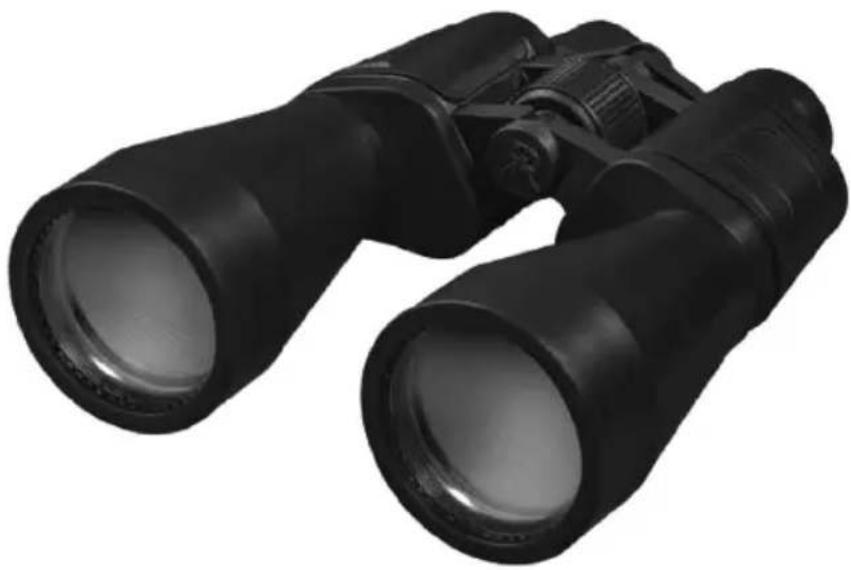
Black binoculars with lenses, isolated on white background (no text or symbols)JAGD-FERNGLAS 8X60 / BINOCULARS 8X60 / JUMELLES DE CHASSE 8X60
DE AT CH
JAGD-FERNGLAS 8X60
Operation and safety notes
FR BE
JUMELLES DE CHASSE 8X60
GB/IE Operation and safety notes Page 8
natural_image
Black binoculars with circular arrows indicating rotational motion (no text or symbols)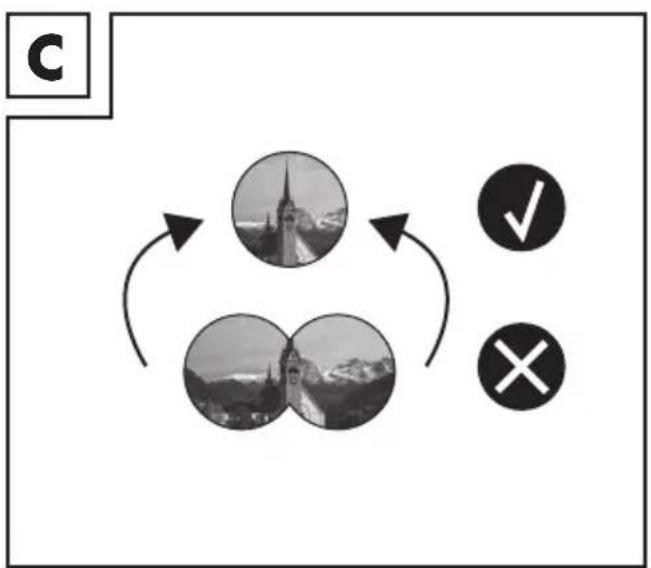
flowchart
graph TD
    A["Circle 1"] --> B["Circle 2"]
    B --> C["Circle 3"]
    C --> A
    style A fill:#f9f,stroke:#333
    style B fill:#ccf,stroke:#333
    style C fill:#cfc,stroke:#333
natural_image
Close-up of a camera lens with rope strap and cable, no visible text or symbolsJAGD-FERNGLAS 8X60
Einleitung
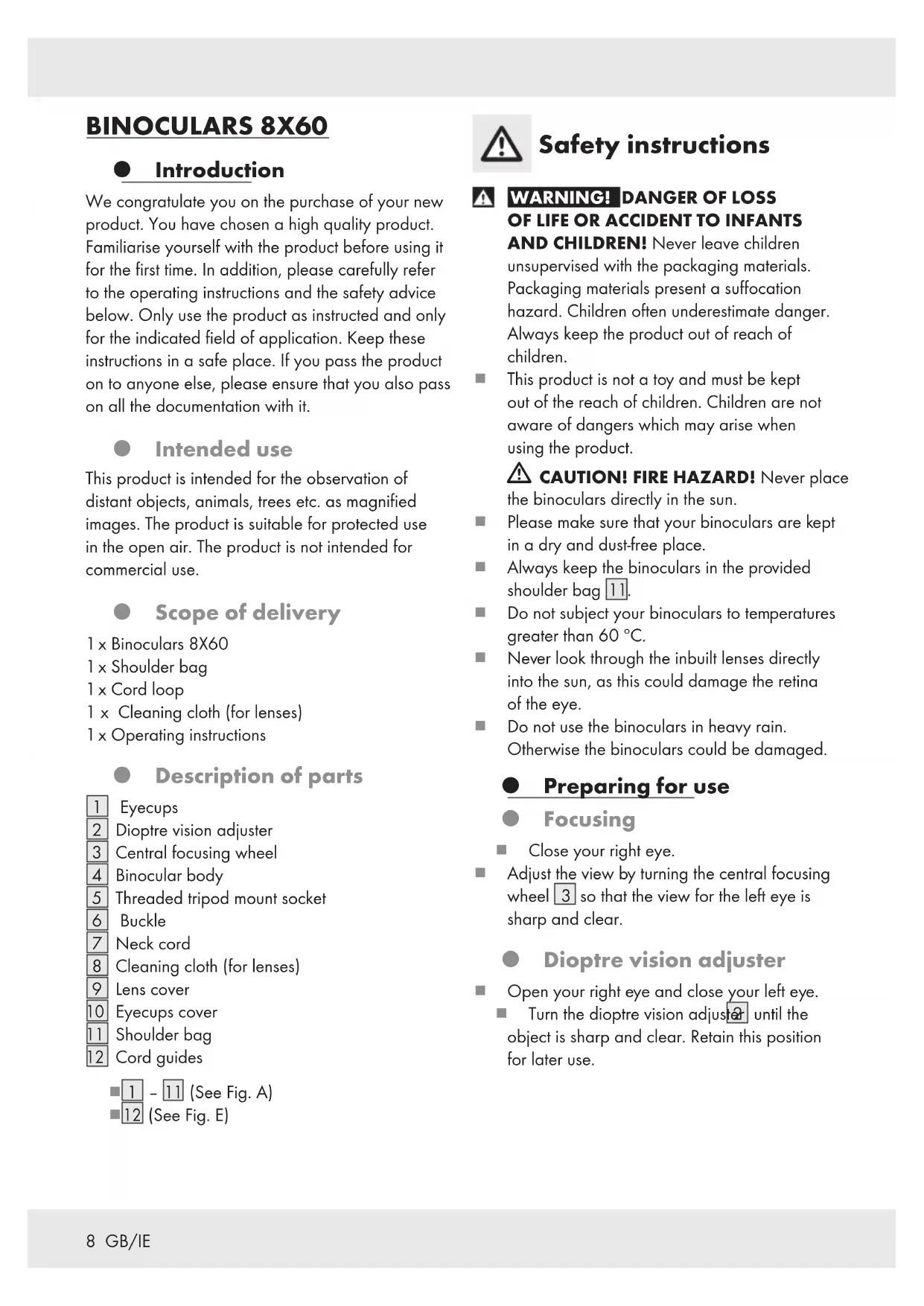
We congratulate you on the purchase of your new product. You have chosen a high quality product. Familiarise yourself with the product before using it for the first time. In addition, please carefully refer to the operating instructions and the safety advice below. Only use the product as instructed and only for the indicated field of application. Keep these instructions in a safe place. If you pass the product on to anyone else, please ensure that you also pass on all the documentation with it.
Intended use
This product is intended for the observation of distant objects, animals, trees etc. as magnified images. The product is suitable for protected use in the open air. The product is not intended for commercial use.
- Scope of delivery
1 x Binoculars 8X60
1 x Shoulder bag
1 x Cord loop
1 x Cleaning cloth (for lenses)
1 x Operating instructions
● Description of parts
1 Eyecups
2 Dioptre vision adjuster
3 Central focusing wheel
4 Binocular body
5 Threaded tripod mount socket
6 Buckle
7 Neck cord
8 Cleaning cloth (for lenses)
9 Lens cover
10 Eyecups cover
11 Shoulder bag
12 Cord guides
1 - 11 (See Fig. A) 12 (See Fig. E)

Safety instructions
WARNING! DANGER OF LOSS OF LIFE OR ACCIDENT TO INFANTS
AND CHILDREN! Never leave children unsupervised with the packaging materials. Packaging materials present a suffocation hazard. Children often underestimate danger. Always keep the product out of reach of children.
This product is not a toy and must be kept out of the reach of children. Children are not aware of dangers which may arise when using the product.
CAUTION! FIRE HAZARD! Never place the binoculars directly in the sun.
Please make sure that your binoculars are kept in a dry and dust-free place.
■ Always keep the binoculars in the provided shoulder bag 11.
Do not subject your binoculars to temperatures greater than 60 °C.
■ Never look through the inbuilt lenses directly into the sun, as this could damage the retina of the eye.
- Do not use the binoculars in heavy rain.
Otherwise the binoculars could be damaged.
● Preparing for use
Focusing
■ Close your right eye.
- Adjust the view by turning the central focusing wheel 3 so that the view for the left eye is sharp and clear.
- Dioptre vision adjuster
■ Open your right eye and close your left eye.
■ Turn the dioptre vision adjuster until the object is sharp and clear. Retain this position for later use.
| + Focus on a closer object |
| - Focus on a more distant object |
| 0 No adjustment |
- Adjustment for eye positions
- Hold your binoculars with both hands and move the binocular body 4 (see Fig. B) until the two circles are superimposed to form one full circle (see Fig. C).
- Fold down the eyecub if you wear eyeglasses.
■ After use: Before stowing away the product, fold up the eyecups.
- Adjusting the neck cord
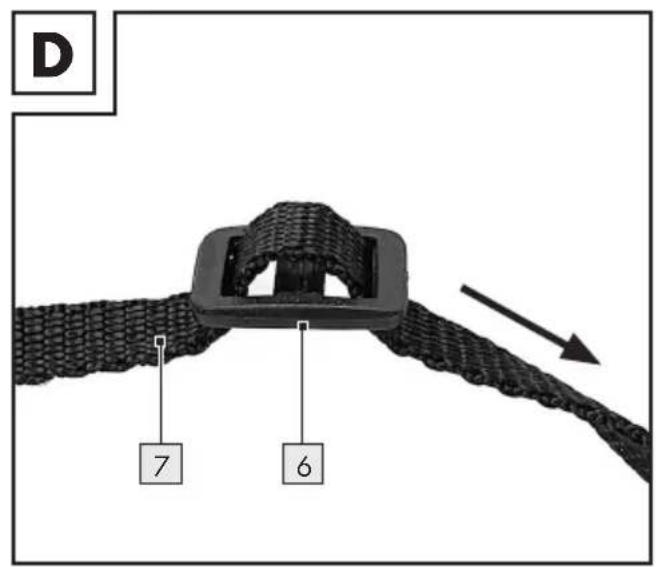
Thread the ends of the neck cord through the buckles 6 (see Fig. D).
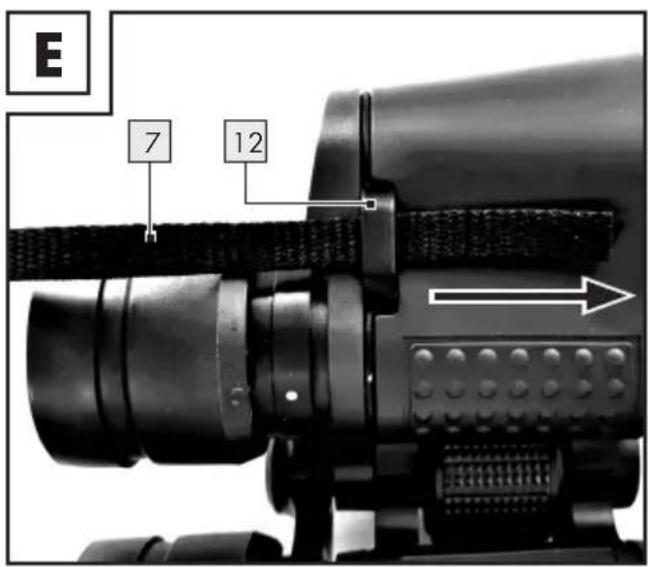
Thread the ends of the neck cord through the cord guides 12 (see Fig. E).
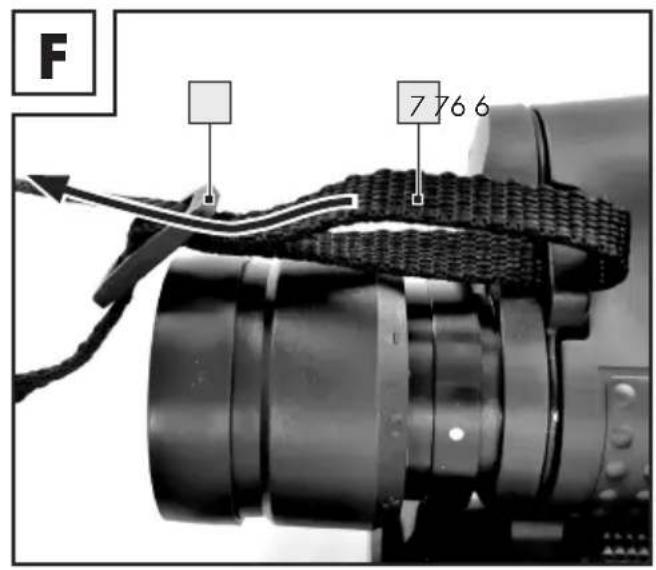
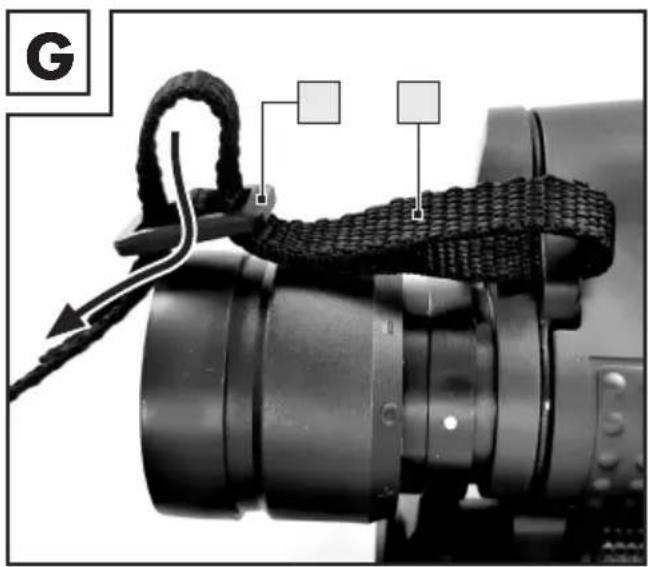
■ Then thread the ends of the neck cord through the buckles 6 (see Fig. F+G).
Pull the neck cord 7 tight on both sides of the buckle 6. This fixes the neck cord 7 on the buckles 6 (see Fig. G).
Use with a tripod
① Note: The tripod and the tripod adapter are not included with the product. They can be purchased separately from your specialist dealer.
- Observe the operating instructions supplied with your tripod during its assembly and use.
Connecting the tripod adapter: Unscrew the protective cap from the threaded tripod mount socket 5. Do not misplace the protective cap, keep it at a safe place.
Screw the threaded connector of the tripod adapter clockwise into the threaded tripod mount socket 5 on the binoculars. Then connect the tripod to the attached tripod adapter.
After use, separate the tripod from the tripod adapter. Then unscrew the threaded connector of the tripod adapter anticlockwise out of the threaded tripod mount socket 5 on the binoculars. Before stowing away the product, screw the protective cap again onto the threaded tripod mount socket 5.
● Cleaning and care
■ Never take your binoculars apart for cleaning.
- Clean the binocular lenses with the provided cleaning cloth 8 or use a soft threadless cloth.
- Do not press hard when cleaning the delicate lens surface.
If the lenses are still dirty, dampen the cloth with a little clear alcohol (methylated spirit).
During periods of non-use: Always cover the eyecups 1 and the lenses by the eyecups cover 10 and the lens cover 9 respectively. This helps to avoid scratches on the lenses.
- Clean the binocular body with a dry, lint-free cloth.
Disposal
The packaging is made entirely of recyclable materials, which you may dispose of at local recycling facilities.
Contact your local refuse disposal authority for more details of how to dispose of your worn-out product.
Warranty
The product has been manufactured to strict quality guidelines and meticulously examined before delivery. In the event of product defects you have legal rights against the retailer of this product. Your legal rights are not limited in any way by our warranty detailed below.
The warranty for this product is 5 years from the date of purchase. Should this product show any fault in materials or manufacture within 5 years from the date of purchase, we will repair or replace it – at our choice – free of charge to you.
The warranty period begins on the date of purchase. Please keep the original sales receipt in a safe location. This document is required as your proof of purchase. This warranty becomes void if the product has been damaged, or used or maintained improperly.
The warranty applies to defects in material or manufacture. This warranty does not cover product parts subject to normal wear, thus possibly considered consumables (e.g. batteries) or for damage to fragile parts, e.g. switches, rechargeable batteries or glass parts.
Warranty claim procedure
To ensure quick processing of your case, please observe the following instructions:
Please have the till receipt and the item number (e.g. IAN 123456_7890) available as proof of purchase.
You will find the item number on the rating plate, an engraving, on the front page of the instructions for use (bottom left), or as a sticker on the rear or bottom of the product.
If functional or other defects occur, please contact the service department listed either by telephone or by e-mail.
You can return a defective product to us free of charge to the service address that will be provided to you. Ensure that you enclose the proof of purchase (till receipt) and information about what the defect is and when it occurred.
Service

Service Great Britain
Tel.: 08000569216
E-Mail:owim@lidl.co.uk

Service Ireland
Tel.: 1800 200736
E-Mail:owim@lidl.ie
JUMELLES DE CHASSE 8X60
Introduction



- JAGD-FERNGLAS 8X60 / BINOCULARS 8X60 / JUMELLES DE CHASSE 8X60
- JAGD-FERNGLAS 8X60
- Einleitung
- Intended use
- - Scope of delivery
- ● Description of parts
- Safety instructions
- WARNING! DANGER OF LOSS OF LIFE OR ACCIDENT TO INFANTS
- CAUTION! FIRE HAZARD! Never place the binoculars directly in the sun.
- ● Preparing for use
- Focusing
- - Dioptre vision adjuster
- - Adjustment for eye positions
- - Adjusting the neck cord
- Use with a tripod
- ● Cleaning and care
- Disposal
- Warranty
- Warranty claim procedure
- Service
- Service Great Britain
- Service Ireland
- JUMELLES DE CHASSE 8X60
- Introduction
Brand : AURIOL
Model : IAN 281552
Category : Binoculars