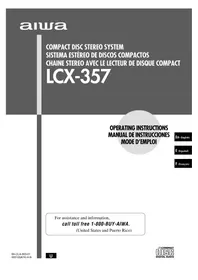
LCX357 - Hi-fi system AIWA - Free user manual and instructions
Find the device manual for free LCX357 AIWA in PDF.


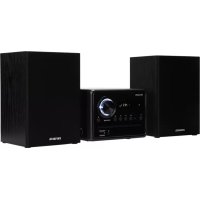
| Product type | Hi-fi system (integrated stereo system) |
| Brand | Aiwa |
| Model | LCX357 |
| Dimensions (main unit) | 160 x 231.5 x 197 mm |
| Weight (main unit) | 2.5 kg |
| Dimensions (speakers) | 140 x 231.5 x 198 mm |
| Weight (speakers) | 1.1 kg |
| Power supply | 120 V, 60 Hz, 26 W |
| Output power | 5.5 W + 5.5 W (1% THD, 4 Ω) or 7 W + 7 W (10% THD, 4 Ω) |
| FM tuner | 87.5 – 108 MHz, sensitivity 13.2 dBf, antenna 75 Ω |
| AM tuner | 530 – 1710 kHz (step 10 kHz) or 531 – 1602 kHz (step 9 kHz), sensitivity 350 µV/m |
| CD player | Semiconductor laser, linear 1-bit D/A converter |
| Cassette deck | 4 tracks, 2 stereo channels, frequency response 50 – 15,000 Hz (normal tape) |
| Graphic equalizer | Rock, Pop, Jazz modes |
| Special functions | Sleep timer, programmed playback, random, repeat, AI and programmed recording |
| Supplied accessories | Remote control, AM loop antenna, FM antenna |
| Maintenance and cleaning | Soft dry cloth; clean cassette heads every 10 hours |
| Safety | Installation precautions (ventilation, heat, humidity) and power supply (polarized plug) |
| Repairability | Have repaired by a professional; do not open yourself |
Frequently Asked Questions - LCX357 AIWA
User questions about LCX357 AIWA
0 question about this device. Answer the ones you know or ask your own.
Ask a new question about this device
Download the instructions for your Hi-fi system in PDF format for free! Find your manual LCX357 - AIWA and take your electronic device back in hand. On this page are published all the documents necessary for the use of your device. LCX357 by AIWA.
USER MANUAL LCX357 AIWA
For assistance and information,
call toll free 1-800-BUY-AIWA.
(United States and Puerto Rico)
WARNING
TO REDUCE THE RISK OF FIRE OR ELECTRIC SHOCK, DO NOT EXPOSE THIS APPLIANCE TO RAIN OR MOISTURE.
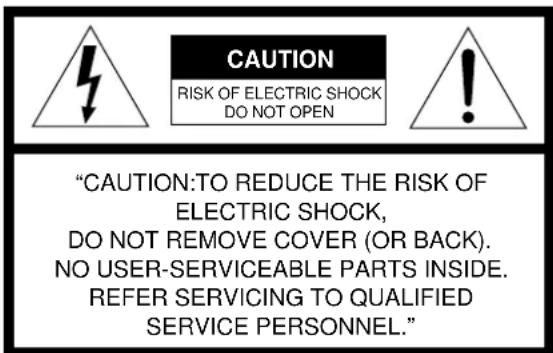
Explanation of Graphical Symbols:

The lightning flash with arrowhead symbol, within an equilateral triangle, is intended to alert the user to the presence of uninsulated "dangerous voltage" within the product's enclosure that may be of sufficient magnitude to constitute a risk of electric shock to persons.

The exclamation point within an equilateral triangle is intended to alert the user to the presence of important operating and maintenance (servicing) instructions in the literature accompanying the appliance.
PRECAUTIONS
Read the Operating Instructions carefully and completely before operating the unit. Be sure to keep the Operating Instructions for future reference. All warnings and cautions in the Operating Instructions and on the unit should be strictly followed, as well as the safety suggestions below.
Installation
1 Water and moisture - Do not use this unit near water, such as near a bathtub, washbowl, swimming pool, or the like.
2 Heat - Do not use this unit near sources of heat, including heating vents, stoves, or other appliances that generate heat. It also should not be placed in temperatures less than 5^ (41^) or greater than 35^ (95^) .
3 Mounting surface - Place the unit on a flat, even surface.
4 Ventilation - The unit should be situated with adequate space around it so that proper heat ventilation is assured. Allow 10cm (4 in.) clearance from the rear and the top of the unit, and 5cm (2 in.) from each side.
- Do not place the unit on a bed, rug, or similar surface that may block the ventilation openings.
- Do not install the unit in a bookcase, cabinet, or airtight rack where ventilation may be impeded.
5 Objects and liquid entry - Take care that objects or liquids do not get inside the unit through the ventilation openings.
6 Carts and stands - When placed or mounted on a stand or cart, the unit should be moved with care. Quick stops, excessive force, and uneven surfaces may cause the unit or cart to overturn or fall.

7 Condensation - Moisture may form on the CD pickup lens when:
- The unit is moved from a cold spot to a warm spot
- The heating system has just been turned on.
- The unit is used in a very humid room
- The unit is cooled by an air conditioner
When this unit has condensation inside, it may not function normally. Should this occur, leave the unit for a few hours, then try to operate again.
8 Wall or ceiling mounting - The unit should not be mounted on a wall or ceiling, unless specified in the Operating Instructions.
Electric Power
1 Power sources - Connect this unit only to power sources specified in the Operating Instructions, and as marked on the unit.
2 Polarization - As a safety feature, some units are equipped with polarized AC power plugs which can only be inserted one way into a power outlet. If it is difficult or impossible to insert the AC power plug into an outlet, turn the plug over and try again. If it still does not easily insert into the outlet, please call a qualified service technician to service or replace the outlet. To avoid defeating the safety feature of the polarized plug, do not force it into a power outlet.
3 AC power cord
- When disconnecting the AC power cord, pull it out by the AC power plug. Do not pull the cord itself.
- Never handle the AC power plug with wet hands, as this could result in fire or shock.
-
Power cords should be routed to avoid being severely bent, pinched, or walked upon. Pay particular attention to the cord from the unit to the power socket.
-
Avoid overloading AC outlets and extension cords beyond their capacity, as this could result in fire or shock.
4 Extension cord - To help prevent electric shock, do not use a polarized AC power plug with an extension cord, receptacle, or other outlet unless the polarized plug can be completely inserted to prevent exposure of the blades of the plug.
5 When not in use - Unplug the AC power cord from the AC outlet if the unit will not be used for several months or more. When the cord is plugged in, a small amount of current continues to flow to the unit, even when the power is turned off.
Outdoor Antenna
1 Power lines - When connecting an outdoor antenna, make sure it is located away from power lines.
2 Outdoor antenna grounding - Be sure the antenna system is properly grounded to provide protection against unexpected voltage surges or static electricity build-up. Article 810 of the National Electrical Code, ANSI/NFPA 70, provides information on proper grounding of the mast, supporting structure, and the lead-in wire to the antenna discharge unit, as well as the size of the grounding unit, connection to grounding terminals, and requirements for grounding terminals.
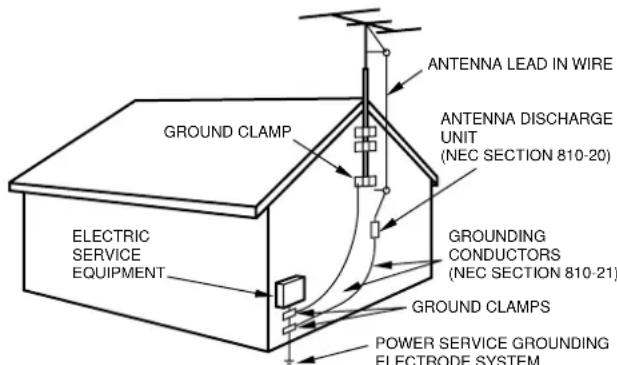
Antenna Grounding According to the National Electrical Code
(NEC ART 250 PART H)
NEC-NATIONAL ELECTRICAL CODE
Maintenance
Clean the unit only as recommended in the Operating Instructions.
Damage Requiring Service
Have the units serviced by a qualified service technician if:
- The AC power cord or plug has been damaged
- Foreign objects or liquid have gotten inside the unit
- The unit has been exposed to rain or water
- The unit does not seem to operate normally.
- The unit exhibits a marked change in performance
- The unit has been dropped, or the cabinet has been damaged DO NOT ATTEMPT TO SERVICE THE UNIT YOURSELF.
Owner's record
For your convenience, record the model number and serial number (you will find them on the rear of your set) in the space provided below. Please refer to them when you contact your Aiwa dealer in case of difficulty.
| Model No. Serial No. (Lot No.) | |
| LCX-357U | |
Check your accessories
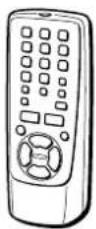
Remote control
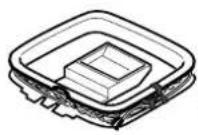

AM loop antenna
FM antenna
Operating Instructions, etc.
TABLE OF CONTENTS
PRECAUTIONS 2
PREPARATIONS
CONNECTIONS 4
BEFORE OPERATION 6
SETTING THE CLOCK. 6
SOUND
AI EDIT RECORDING 14
PROGRAMMED EDIT RECORDING 15
TIMER
Before connecting the AC cord
The rated voltage of your unit shown on the rear panel is 120 V AC. Check that the rated voltage matches your local voltage.
IMPORTANT
- Connect the speakers, antennas, and all optional equipment first. Finally, connect the AC cord.
- There are no differences between the front speakers. Both speakers can be connected as L (Left) or R (Right).
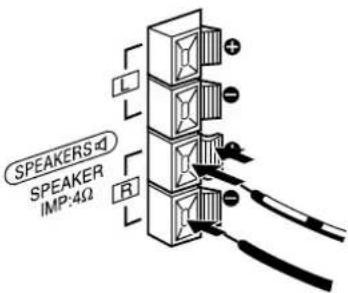
1 Connect the speaker cords to the main unit.
The cords with the white stripes should be connected to the terminals and the other cords to the terminals.
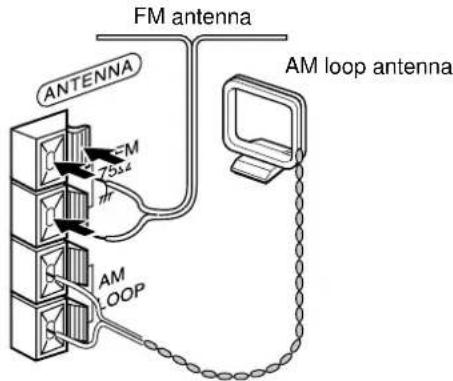
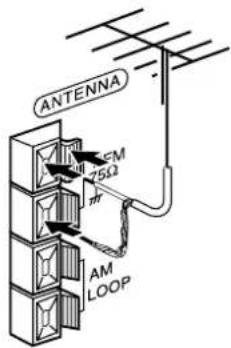
2 Connect the supplied antennas.
Connect the FM antenna to the FM 75Ω terminals and the AM loop antenna to the AM LOOP terminals.
3 Connect the AC cord to an AC outlet.
The clock will flash on the display when the AC cord is plugged into an AC outlet for the first time after purchase. For setting the clock, see page 6.

To position the antennas
FM feeder antenna:
Extend this antenna horizontally in a T-shape and fix its ends to the wall.
AM loop antenna:
Position for the best reception.
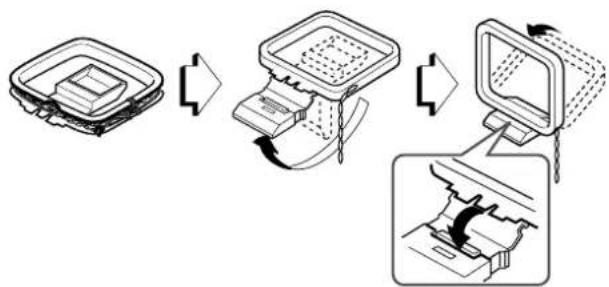
To stand the AM loop antenna on a surface
Fix the claw to the slot.
NOTE
- Do not short-circuit the and speaker cord leads, otherwise the sound may become inaudible or the unit may be turned off. If this happens, disconnect the AC cord from the AC outlet and re-connect the speaker cord correctly. Then connect the AC cord and turn the unit on again.

- Do not connect any speakers to the unit other than the supplied ones.
- Do not leave objects generating magnetism near the speakers, as these objects may be damaged.
- Do not bring the FM antenna near metal objects or curtain rails.
- Do not bring the AM loop antenna near other optional equipment, the stereo system itself, the AC cord or speaker cords, since noise will be picked up.
- Do not unwind the AM loop antenna wire.
CONNECTING AN OUTDOOR ANTENNA
For better FM reception, use of an outdoor antenna is recommended.
Connect the outdoor antenna to FM 75Ω terminals.
To connect other optional equipment page 18.
REMOTE CONTROL
Inserting batteries
Detach the battery cover on the rear of the remote control and insert two size AA (R6) batteries.
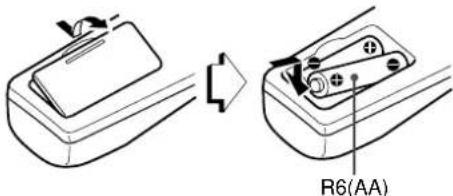
When to replace the batteries
The maximum operational distance between the remote control and the sensor on the main unit should be approximately 5 meters (16 feet). When this distance decreases, replace the batteries with new ones.
Using the FUNCTION button
The FUNCTION button substitutes for the function buttons (TAPE/ REV MODE, TUNER/BAND, CD, AUX) on the main unit.
Each time FUNCTION is pressed, the next function is selected cyclically.
NOTE
- on the remote control has the same function as on the main unit.
- If the unit is not going to be used for an extended period of time, remove the batteries to prevent possible electrolyte leakage.
- The remote control may not operate correctly when:
- The line of sight between the remote control and the remote sensor is exposed to intense light, such as direct sunlight
- Other remote controls are used nearby (television, etc.)
BEFORE OPERATION
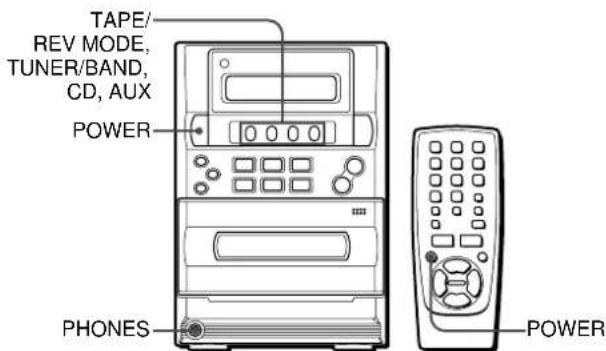
To turn the unit on
Press one of the following buttons.
POWER on the main unit or on the remote control.
TUNER/BAND:
The unit is turned on and tuned in to the previously received radio station.
TAPE/REV MODE:
The unit is turned on and the inserted tape begins to play.
CD:
The unit is turned on and the inserted CD begins to play.
Pressing AUX also turns the unit on.
To turn the unit off
Press POWER.
Using headphones
Connect the headphones with a stereo mini plug (Ø3.5 mm) to PHONES.
No sound is heard from the speakers while the headphones are plugged in.
SETTING THE CLOCK

When the AC cord is connected to an AC outlet for the first time, the clock flashes on the display.
Set the clock as follows while the power is off.
1 Press II.
The hour flashes.

2 Press or to designate the hour.
3 Press II.
The hour stops flashing and the minute starts flashing.
4 Press or to designate the minute.
5 Press to set the minute and complete setting.
The minute stops flashing and the clock starts from 00 seconds.
To correct the current time
Press POWER to turn the unit off. Press so that the clock flashes, and carry out steps 1 to 5 above.
To display the current time
Press DISPLAY on the remote control once. The clock is displayed for 4 seconds.
To switch to the 24-hour standard
Press DISPLAY on the remote control once to display the clock, and then press within 4 seconds.
To restore the 12-hour standard, repeat the same procedure. In the 12-hour standard, "AM 12:00" indicates midnight and "PM 12:00" indicates noon.
If the clock flashes while the power is off
This is caused by a power interruption. The current time needs to be reset.
If power is interrupted for more than approximately 12 hours, all settings stored in memory after purchase need to be reset.
ADJUSTING THE SOUND

ADJUSTING THE VOLUME
Press VOLUME UP/DOWN on the main unit, or VOL / on the remote control.
The volume level is shown on the display for 4 seconds. It can be set from 0 to 30, followed by MAX (maximum).
The volume remains memorized even after the power is turned off. However, when the power is turned off while the volume level is set to 21 or more, the volume level is automatically set to 20.
GRAPHIC EQUALIZER
This unit provides the following three different equalization curves:
ROCK: Powerful sound emphasizing treble and bass
POP: More presence in the vocals and midrange
JAZZ: Accented lower frequencies for jazz-type music
Press one of the three buttons; ROCK, POP or JAZZ to select the desired equalization curve.
Example: when POP is selected
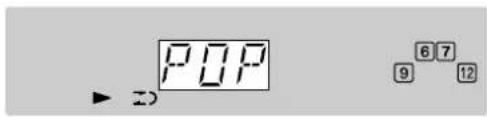
To cancel equalization
Press ROCK, POP or JAZZ which was previously pressed to select the equalization curve. "EQ OFF" is displayed.
To select with the remote control
Press EQ repeatedly.
MANUAL TUNING
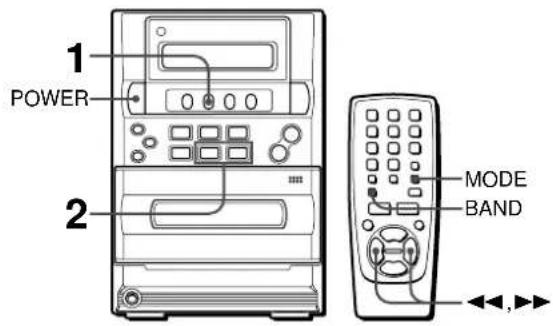
1 Press TUNER/BAND repeatedly to select the desired band.
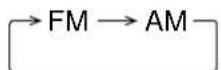
If TUNER/BAND is pressed while the power is turned off, the previously tuned station will be played (Direct Play Function). When using the remote control, press BAND repeatedly while the power is on.
2 Press or to select a station.
Each time the button is pressed, the frequency changes.
When a station is received, "TUNE" is displayed.
During FM stereo reception, "STEREO" is displayed.

To search for a station quickly (Auto Search)
Keep or pressed until the tuner starts searching for a station. After tuning in a station, the search stops. To stop the Auto Search manually, press or The Auto Search may not stop at stations with very weak signals.
When an FM stereo broadcast contains noise
Press MODE on the remote control so that "MONO" lights up on the display. Noise is reduced, although reception is monaural.
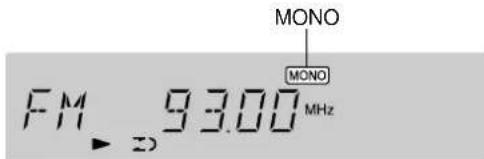
To restore stereo reception, press MODE again.
To change the AM tuning interval
The default setting of the AM tuning interval is 10kHz step. If you use this unit in an area where the frequency allocation system is 9kHz step, change the tuning interval. Press POWER while pressing TUNER/BAND while the power is on. To reset the interval, repeat this procedure.
NOTE
When the AM tuning interval is changed, all preset stations are cleared. The preset stations have to be set again.
PRESETTING STATIONS
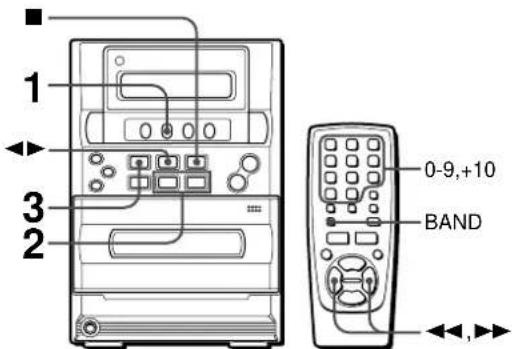
The unit can store a total of 32 preset stations. When a station is stored, a preset number is assigned to the station. Use the preset number to tune in a preset station directly.
1 Press TUNER/BAND repeatedly to select a band.
Or press BAND on the remote control repeatedly.
2 Press or to select a station.
3 Press to store the station.
A station is assigned a preset number, beginning from 1 in consecutive order for each band.

4 Repeat steps 1 to 3.
The next station will not be stored if a total of 32 preset stations have already been stored.
NOTE
Each band can only store a maximum of 16 preset stations.
PRESET NUMBER TUNING
1 Press TUNER/BAND to select a band.
Or press BAND on the remote control.
2 Press
Each time the button is pressed, the next ascending preset number is selected.
Tuning by preset number
1 Press TUNER/BAND to select a band.
2 Press the numbered buttons on the remote control to select a preset number.
Example:
To select preset number 10, press +10 and 0.
To select preset number 15, press +10 and 5.
To clear a preset station
Select the preset number of the station to be cleared. Then, on the main unit, press and press within 4 seconds.
The preset numbers of all other stations in the band with higher numbers are also decreased by one.
OPERATION
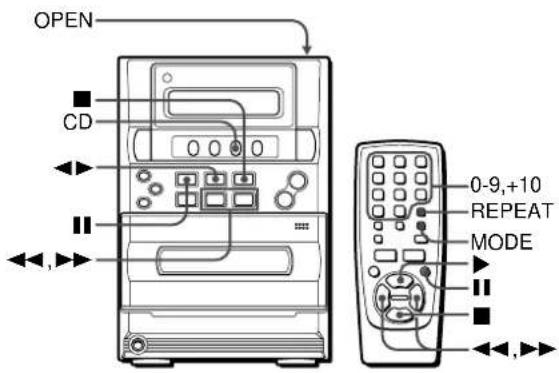
LOADING A DISC
Press CD, then press the OPEN position to open the disc compartment. Load a disc with the label side up and close the disc compartment.


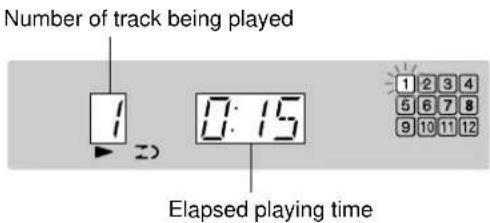
Total number of tracks
Music calender (only the first 16 tracks are displayed)
Total playing time
PLAYING A DISC
Load a disc.
Press
Play begins with the first track.
To stop play, press
To pause play, press II. To resume play, press again.
To search for a particular point during play, keep or pressed and release the button at the desired point.
To skip to the beginning of a track during play, press or repeatedly.
To remove the disc, press the OPEN position.
To start play when the power is off (Direct Play Function)
Press CD. The power is turned on and play of the loaded disc begins.
To replace the disc before play, press the OPEN position to open the disc compartment.
Selecting a track with the remote control
Press the numbered buttons and the +10 button to select a track. Example:
To select the 25th track, press +10 , +10 and 5.
To select the 10th track, press +10 and 0.
The selected track starts to play and play continues to the end of the disc.
NOTE
- The unit may not play a CD-R/RW disc that is recorded on personal computers or some kinds of CD-R/RW recorders because of differences in recording platforms.
- Do not attach any seal or label to either side (the recordable side or the labeled side) of a CD-R/RW disc. It may cause malfunction.
- Do not use irregular shape CDs (example: heart-shaped, octagonal ones). It may result in malfunction.
- Do not load more than one compact disc in the disc compartment.
- Do not try to open the disc compartment during play.
- Do not touch the CD pickup lens. If it is soiled, a CD may not be played normally.
- When a CD-RW disc is loaded, it takes about 15 seconds before it can be played back.
- Do not load an unrecorded CD-R/RW disc.
It will take over 30 seconds to read the disc. The disc may be damaged if you try to open the disc compartment while reading the disc.
RANDOM PLAY
All the tracks on the disc can be played randomly.
In stop mode, press MODE on the remote control once to display "RAN."
Press to start play.
To cancel random play, press MODE repeatedly in stop mode until "RAN" disappears and the normal display reappears.
NOTE
- Even if is pressed, a previously played track cannot be skipped. The unit returns to the beginning of the current track only.
- Direct selection of the tracks with the numbered buttons cancels the random play mode.
- During random play, "REPEAT 1" play cannot be performed.
REPEAT PLAY
One or all the tracks can be played repeatedly.
Press REPEAT on the remote control to display "REPEAT 1" or "REPEAT ALL."
To repeat the current track only, select "REPEAT 1." To repeat all the tracks, select "REPEAT ALL."
To cancel repeat play, press REPEAT to turn off "REPEAT."
NOTE
- The random play can be performed during "REPEAT ALL" mode.
- If the random play mode is activated during "REPEAT 1" play mode, the "REPEAT 1" play mode will be canceled and "REPEAT ALL" play mode is selected instead.
- To repeat only selected tracks, select the "REPEAT ALL" play mode and program the desired tracks (see below). You can program the desired tracks first before selecting the "REPEAT ALL" play mode.
PROGRAMMED PLAY
Up to 30 tracks can be programmed from the loaded disc. Use the remote control.
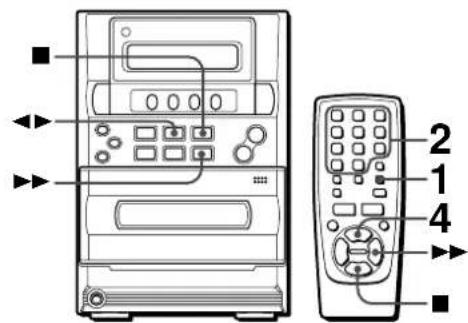
1 Press MODE repeatedly so that "M" flashes on the display.

2 Press the numbered buttons to program a track.
Example: To select the 12th track, press +10 and 2. To select the 20th track, press +10 , +10 and 0.
3 Repeat step 2 to program other tracks.
4 Press to start play.
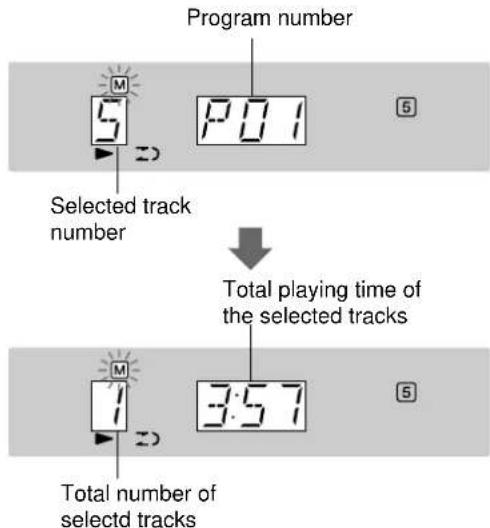
To check the program
Each time is pressed in stop mode, a track number and program number will be displayed.
To clear the program
Press in stop mode.
To add tracks to the program
Before playing, repeat step 2. The track will be programmed after the last track.
To change the programmed tracks
Clear the program and repeat all the steps again.
NOTE
- During programmed play, the following operations cannot be performed:
-Random play
-One-track repeat (REPEAT 1)
-Direct selection of the tracks with the numbered buttons - If the programmed time is more than 99:59 minutes, or the disc track number 31 and above is programmed, the display shows "---" as the total playing time.
OPERATION
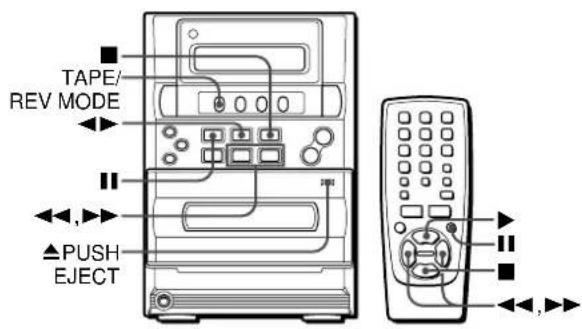
INSERTING TAPE
- You can select a reverse mode to play back one or both sides.
- Use only type I (normal) tapes.
Press TAPE/REV MODE and press the PUSH EJECT position to open the cassette holder.
Insert a tape with the exposed side down. Push the cassette holder to close.

To select a reverse mode
Each time TAPE/REV MODE is pressed, the reverse mode changes.

To play one side only, select
To play from front side to back side once only, select
To play both sides repeatedly, select (二).
PLAYING BACK A TAPE
Insert a tape. Then press to start play.
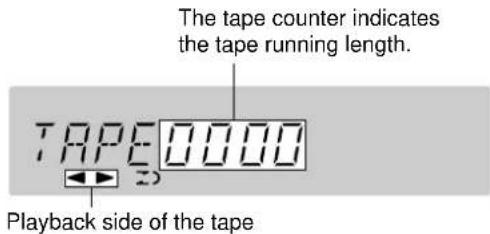
: The front side is being played (forward).
: The back side is being played (reverse).
To stop play, press
To pause play, press II. To resume play, press again.
To change the playback side, press in play mode.
To fast forward or rewind, press or in stop mode.
Then press to stop the tape.
To start play when the power is off (Direct Play Function)
Press TAPE/REV MODE. The power is turned on and play of the inserted tape begins.
To set the tape counter to 0000
Press in stop mode.
The counter is also set to 0000 when the cassette holder is opened.
About cassette tapes
- To prevent accidental erasure, break off the plastic tabs on the cassette tape after recording with a screwdriver or other pointed tool.
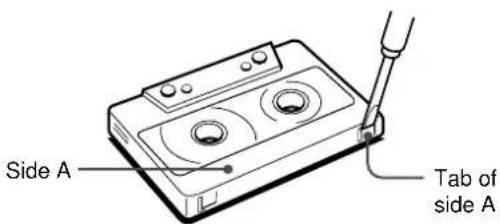
To record on the tape again, cover the tab openings with adhesive tape, etc.

- 120-minute or longer tapes are extremely thin and easily deformed or damaged. They are not recommended.
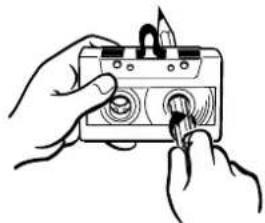
- Take up any slack in the tape with a pencil or similar tool before use. Slack tape may break or jam in the mechanism.
BASIC RECORDING
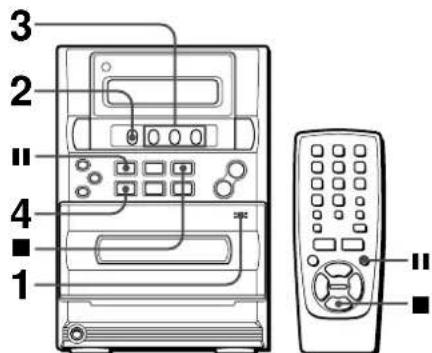
Preparation
- Set the tape to the point where recording will start.
- Only Type I (normal) tapes can be recorded.
1 Insert the tape to be recorded on into the deck.
Insert the tape with the side to be recorded on first facing out from the unit and the exposed side down.
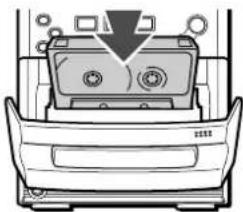
2 Press TAPE/REV MODE to select the reverse mode.
To record on one side only, select. To record on both sides,select or
3 Press one of the function buttons and prepare the source to be recorded.
To record from a CD, press CD and load the disc.
To record from a radio broadcast, press TUNER/BAND and tune in to a station.
To record from the connected equipment, press AUX and prepare to play.
4 Press to start recording.

When the selected source is CD, play and recording start simultaneously.
When the selected source is connected equipment, start playback on the source.
To stop recording, press
To pause recording, press II. (Applicable when the source is the radio or connected equipment.) To resume recording, press again.
INSERTING BLANK SPACES
Insertion of 4-second blank spaces may help you to locate the beginning of the track on other equipment. (Applicable when the source is the radio or connected equipment.)
1 Press during recording or while in recording pause mode. REc flashes for 4 seconds and the tape runs without recording. After 4 seconds, the deck enters the recording pause mode.
2 Press II to resume recording.
To insert a blank space of less than 4 seconds, press again while REC is flashing.
To insert blank spaces of more than 4 seconds, after the deck enters recording pause mode, press again. Each time the button is pressed, a 4-second blank space is added.
To erase a recording
4 Press AUX
1 Insert the tape to be erased into the deck.
2 Set the tape to the point where the erasure is to be started.
3 Set the reverse mode by pressing TAPE/REV MODE.
If optional equipment is connected to the AUX jacks, turn it off.
5 Press to start the erasure.
AI EDIT RECORDING
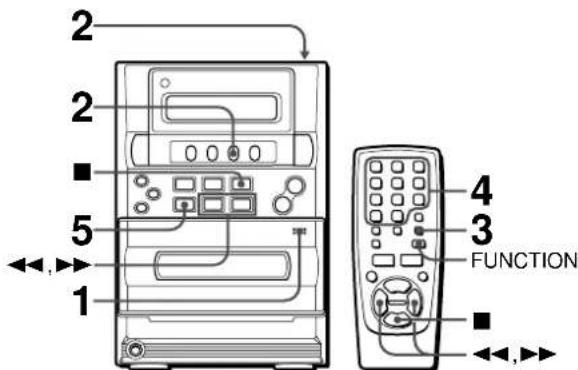
The AI edit function enables CD recording without worrying about tape length and track length. When a CD is inserted, the unit automatically calculates track lengths. If necessary, the order of tracks is rearranged so that no track is cut short. (AI: Artificial Intelligence)
NOTE
AI edit recording will not start from a point halfway into the tape. The tape must be recorded from the beginning of either side.
1 Insert the tape into the deck.
Insert the tape with the side to be recorded on first facing out from the unit.
2 Press CD, and load the disc.
You can press FUNCTION on the remote control repeatedly to select the CD function.
3 Press MODE three times.
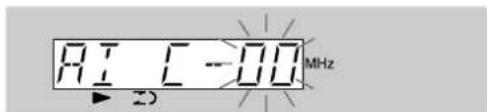
4 Press the numbered buttons to designate the tape length.
10 to 99 minutes can be specified.
Example: When using a 60-minute tape, press 6 and 0.
In a few seconds, the microcomputer determines the tracks to be recorded on each side of the tape.
and are also available to designate the tape length.
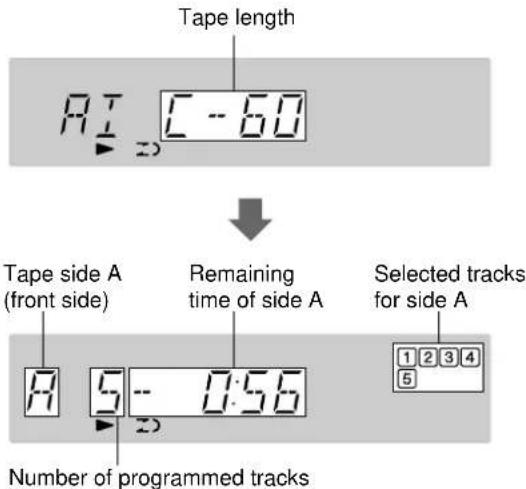
5 Press to start recording.
The tape is rewound to the beginning of the front side, the lead segment is played through for 10 seconds, and recording starts. When recording on the front (side A) ends, recording on the back (side B) starts.
To stop recording
Press. Recording and CD play stop simultaneously.
To clear the edit program
Press twice
To check the order of the programmed track numbers
Before recording, press MODE to select side A or B, and press
repeate

Time on cassette tapes and editing time
The actual cassette recording time is usually a little longer than the specified recording time printed on the label. This unit can program tracks to use the extra time.
NOTE
- Recording is prohibited if the erasure prevention tab on either side of the tape is broken off.
- The AI edit function cannot be used with discs containing 31 tracks or more.
PROGRAMMED EDIT RECORDING

Programmed edit function enables CD recording while checking the remaining time on each side of the tape as the tracks are programmed.
NOTE
The programmed edit recording will not start from a point halfway in the tape. The tape must be recorded from the beginning of either side.
1 Insert the tape into the deck.
Insert the tape with the side to be recorded on first facing out from the unit.
2 Press CD, and load the disc.
You can press FUNCTION on the remote control repeatedly to select the CD function.
3 Press MODE four times.
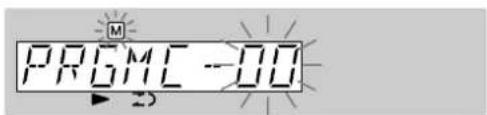
4 Press the numbered buttons to designate the tape length.
10 to 99 minutes can be specified.
Example: When using a 60-minute tape, press 6 and 0.
- and buttons are also available to designate the tape length.
5 Press the numbered buttons to program a track.
Example: To select the 10th track, press +10 and 0.
6 Repeat step 5 for the rest of the tracks for side A.
A track whose playing time is longer than the remaining time cannot be programmed.

7 Press MODE to select side B and program the tracks for side B.
After confirming B on the display, repeat step 5.
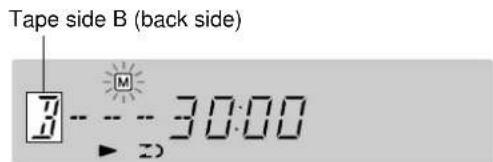

8 Press to start recording.
The tape is rewound to the beginning of the front side, the lead segment is played through for 10 seconds, and recording starts. When recording on the front side (A) ends, recording on the back side (B) starts.
To stop recording
Press. Recording and CD play stop simultaneously.
To check the order of the programmed track numbers
Before recording, press MODE to select side A or B, and press repeatedly.
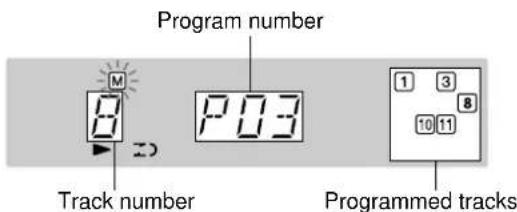
To change the program of each side
Press MODE to select side A or B, and press to clear the program of the selected side. Then program tracks again.
To clear the edit program
Press twice.
NOTE
Recording is prohibited if the erasure prevention tab on either side of the tape is broken off.
TIMER
The unit can be turned on at a specified time with the built-in timer.
Preparation
Make sure the clock is correctly set. (See page 6.)
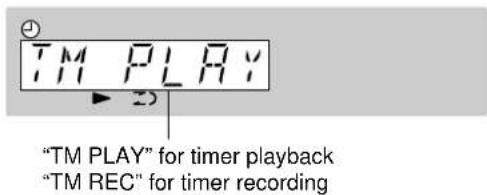
1 Press TIMER/SLEEP repeatedly to select timer playback or timer recording.
2 Within 4 seconds, press II.
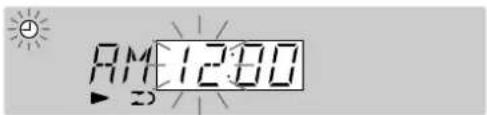
NOTE
If you do not press within 4 seconds, another operation may start.
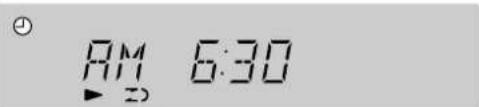
3 Set the timer-on time.
Designate the hour of the timer-on time by pressing or and press. Then designate the minute of the timer-on time by pressing or ,and press.
4 Press or to select the source, and press II.
- For timer play of a CD, select "CD."
- For timer play of a tape, select "TAPE."
- For timer play/recording of a radio broadcast, select "FM" or "AM." You will select the band later in step 6.
- For timer play/recording of the equipment connected to the AUX jacks, select "AUX."
5 Select the duration for the timer-activated period with or , and press I.
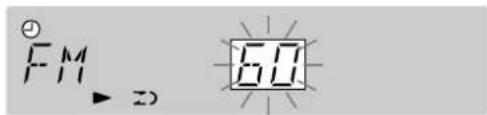
The duration for the timer-activated period can be set between 5 to 240 minutes in 5-minute steps.
6 Prepare the source.
- For timer play of a CD, load the CD.
- For timer play of a tape, insert the tape.
- For timer play/recording of a radio broadcast, press TUNER/BAND to select the band and tune in to the desired station.
- For timer play/recording of the equipment connected to the AUX jacks, set the timer of the equipment so that play begins at the same time.
7 For timer recording: Insert the tape to be recorded.
8 Adjust the volume and tone.
The source sound will be audible at the volume set here when the power turns on at the set time. However, If the volume level is set to higher than 20, it is automatically set to 20 when the unit turns on by the timer.
9 Press POWER to turn the unit off.
( and REc ) remain on the display after the power is turned off (timer standby mode).
When the timer-on time is reached, the unit turns on and begins play (or recording) with the selected source.
NOTE
- Timer playback and timer recording will not begin unless the power is turned off.
- If you use the unit while the timer is set, repeat steps 6 to 8 to prepare the source (and the recording destination), and adjust the volume and tone before turning off the power.
To check the timer setting
Press TIMER/SLEEP repeatedly so that "TM PLAY" or "TM REC" flashes. After 4 seconds, the timer-on time, the source and the duration for the timer-activated period are displayed for 4 seconds.
To change the timer setting
Set the timer again from the beginning.
To cancel timer standby mode temporarily
Press TIMER/SLEEP repeatedly so that "TM OFF" is displayed.
( and REc ) disappear on the display.
SLEEP TIMER
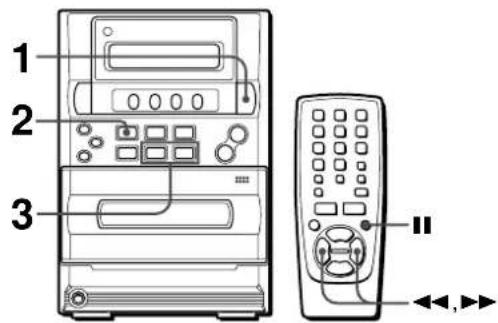
The unit can be turned off automatically at a specified time.
1 Press TIMER/SLEEP so that "SLEEP" appears on the display.
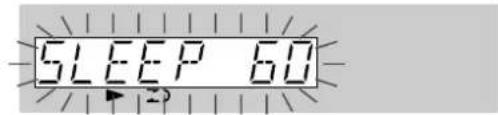
2 Within 4 seconds, press II.
3 Within 4 seconds, press or to specify the time until the power is off.
Each time the button is pressed, the time changes between 5 to 240 minutes in minute steps.
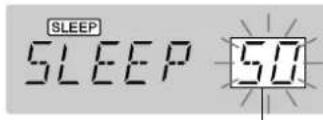
Specified time
To check the time remaining before the power is turned off
Press TIMER/SLEEP.
The remaining time is displayed for 4 seconds.
To cancel the sleep timer
Press TIMER/SLEEP so that "SLEEP" appears on the display, and within 4 seconds, press.
OTHER CONNECTIONS
CONNECTING OPTIONAL EQUIPMENT
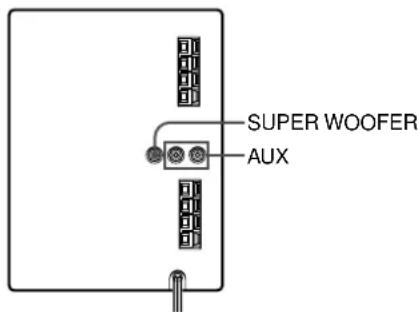
Refer to the operating instructions of the connected equipment for details.
- The connecting cords are not supplied. Obtain the necessary connecting cords.
- Consult your local AIWA dealer for optional equipment.
AUX JACKS
Analog sound signals can be input through these jacks.
Use a cable with RCA phono plugs to connect audio equipment (turntables, LD players, VCRs, etc.).
Connect the red plug to the R (right) jack, and the white plug to the L (left) jack.
When connecting a turntable
Use an AIWA turntable equipped with a built-in equalizer amplifier.
SUPER WOOFER JACK
Connect an optional powered sub woofer with a built-in amplifier to the jack.
LISTENING TO EXTERNAL SOURCES

To play equipment connected to the AUX jacks, proceed as follows.
1 Press AUX.
"AUX" appears on the display.
2 Play the connected equipment.
CARE AND MAINTENANCE
Occasional care and maintenance of the unit and the software are needed to optimize the performance of your unit.
To clean the cabinet
Use a soft and dry cloth.
If the surfaces are extremely dirty, use a soft cloth lightly moistened with mild detergent solution. Do not use strong solvents, such as alcohol, benzine or thinner as these could damage the finish of the unit.
To clean the tape heads
When the tape heads are dirty;
- high frequency sound is not emitted
the sound is not adequately high - the sound is off-balance
the tape cannot be erased
the tape cannot be recorded on
After every 10 hours of use, clean the heads with a head cleaning cassette.
Refer to the instructions of the cleaning cassette for details.
Care of CDs
- When a CD becomes dirty, wipe the CD from the center out with a cleaning cloth.
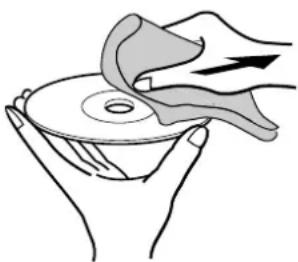
After playing a CD, store the CD in its case. Do not leave the CD in places that are hot or humid.
Care of tapes
- Store tapes in their cases after use.
- Do not leave tapes near magnets, motors, television sets, or any source of magnetism. This will downgrade the sound quality and cause noise.
- Do not expose tapes to direct sunlight, or leave them in a car parked in direct sunlight.
To reset
If an unusual condition occurs in the display window or the cassette decks, reset the unit as follows.
1 Press POWER to turn off the power.
2 Press VOLUME UP while pressing. Everything stored in memory after purchase is canceled.
If the power cannot be turned off in step 1 because of a malfunction, reset by disconnecting the AC cord and repeat step 2.
TROUBLESHOOTING
If the unit fails to perform as described in these Operating Instructions, check the following guide.
GENERAL
There is no sound.
- Is the AC cord connected properly?
- Is there a bad connection? (→page 4)
- Was an incorrect function button pressed?
The sound becomes inaudible or the unit is turned off suddenly.
- There may be a short circuit in the speaker terminals.
Disconnect the AC cord from the AC outlet and re-connect the speaker cords correctly. Then connect the AC cord and turn the unit on again.
Sound is emitted from one speaker only.
- Is the other speaker disconnected?
An erroneous display or a malfunction occurs.
Reset the unit as stated below.
TUNER SECTION
There is constant, wave-like static.
- Is the antenna connected properly? (→ page 4)
Is the signal weak?
Connect an outdoor antenna.
The reception contains noise interferences or the sound is distorted.
- Is the system picking up external noise or multipath distortion?
Change the orientation of the antenna.
Move the unit away from other electrical appliances.
CASSETTE DECK SECTION
The tape does not run.
Is the deck in pause mode? ( page 12)
The sound is off-balance or not adequately high.
- Is the playback head dirty? (→ page 19)
Recording is not possible.
- Is the erasure prevention tab on the tape broken off? (→ page 12)
Is the recording head dirty? ( page 19)
Erasure is not possible.
Is the erasure head dirty? ( page 19)
- Is CrO_2 or metal tape being used?
High frequency sound is not emitted.
Is the recording/playback head dirty? ( page 19)
CD PLAYER SECTION
The CD player does not play.
Is the disc correctly loaded? ( page 10)
Is the disc dirty? ( page 19)
Is the lens affected by condensation?
Wait approximately one hour and try again.
SPECIFICATIONS
MAIN UNIT
FM tuning section
Tuning range 87.5 MHz to 108 MHz
Usable sensitivity (IHF) 13.2 dBf
Antenna terminals 75 ohms (unbalanced)
AM tuner section
Tuning range 530 kHz to 1710 kHz (10 kHz step) 531 kHz to 1602 kHz (9 kHz step)
Usable sensitivity 350 V / m
Antenna Loop antenna
Amplifier section
Power output 5.5W + 5.5W
(100 Hz to 15 kHz, THD less than
1%, 4 ohms)
7W+7W
(100 Hz to 15 kHz, THD less than
10%, 4 ohms)
Input AUX: 500mV
Outputs SPEAKERS: accept speakers of
4 ohms or more
PHONES (stereo minijack):
accepts headphones of 32 ohms or more
Cassette deck section
Track format 4 tracks, 2 channels stereo
Frequency response Normal tape: 50Hz - 15000Hz
Recording system AC bias
Heads Recording/playback·1
Erase head·1
Compact disc player section
Laser Semiconductor laser ( = 780~nm)
D-A converter 1 bit linear
Wow and flutter Unmeasurable
SPEAKER SYSTEM
Speakers 100 mm cone type
Impedance 4 ohms
Dimensions (W·H·D) 140·231.5·198 mm
(5 5/8 · 9 1/8 · 7 7/8 in.)
Weight 1.1 kg
(2 lbs 7 oz)
GENERAL
Power requirements 120V AC, 60 Hz
Power consumption 26 W
Dimensions of main unit 160·231.5·197 mm
(W·H·D) (6 3/8·9 1/8·7 7/8 in.)
Weight of main unit 2.5 kg
(5 lbs 8 oz)
Specifications and external appearance are subject to change without notice.
COPYRIGHT
Please check the laws on copyright relating to recordings from discs, radio or external tape for the country in which the machine is being used.
NOTE
This equipment has been tested and found to comply with the limits for a Class B digital device, pursuant to Part 15 of the FCC Rules. These limits are designed to provide reasonable protection against harmful interference in a residential installation.
This equipment generates, uses, and can radiate radio frequency energy and, if not installed and used in accordance with the instructions, may cause harmful interference to radio communications. However, there is no guarantee that interference will not occur in a particular installation. If this equipment does cause harmful interference to radio or television reception, which can be determined by turning the equipment off and on, the user is encouraged to try to correct the interference by one or more of the following measures:
- Reorient or relocate the receiving antenna.
- Increase the separation between the equipment and receiver.
- Connect the equipment into an outlet on circuit different from that to which the receiver is connected.
- Consult the dealer or an experienced radio/TV technician for help.
CAUTION
Modifications or adjustments to this product, which are not expressly approved by the manufacturer, may void the user's right or authority to operate this product.
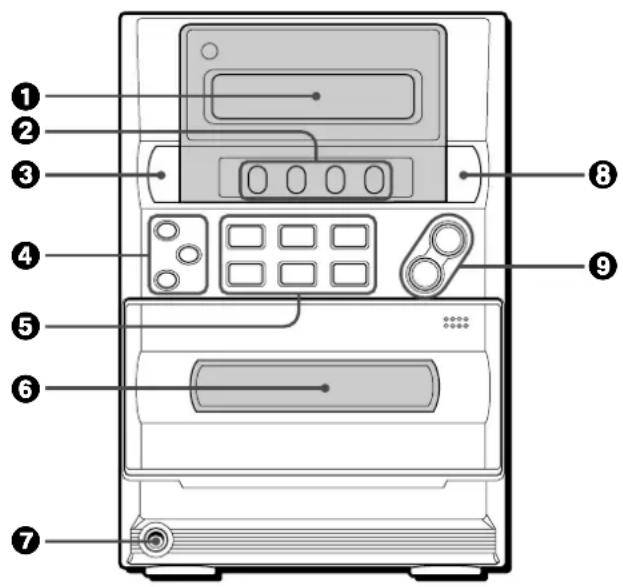

Name Page
Display
Function buttons
TAPE/REV MODE 6,12,13
TUNER/BAND. 6,8,9
CD 6,10,14,15
AUX 6,18
POWER 品 STANDBY/ON 6,8,16
ROCK/POP/JAZZ 7
SET. 6,9,10,12,13,16,17
DIR/PRESET. 10,12
CLEAR. 9,10-15
REC/REC MUTE 13-15
TUNING DOWN/UP. 6,8-10,12,16,17
Cassette holder 12
7PHONES 6
③ TIMER/SLEEP 16,17
VOLUME UP/DOWN. 7
Name Page
Numbered buttons 9, 10, 11, 14, 15
DISPLAY 6
EQ 7
MODE. 8,10,11,14,15
BAND 8,9
POWER 6,16
14 PLAY 5,11
STOP 6,9-15
A/1A,
SKIP/SEARCH. 6,8-10,12,16,17
REPEAT 11
FUNCTION 5
VOL V/
PAUSE 6,9,10,12,13,16,17
ADVERTENCIA
PARA REDUCIR EL RIESGO DE INCENDIOS O SACUDIDAS ELECTRICAS, NO EXPONGA Este APARATO A LA LLUVIA NI A LA HUMEDAD.
SINTONIZATION MANUAL 8
Paraocularly, the eye is usually positioned in a horizontal position. The eyes are positioned in a vertical position.
A工程技术 of the system of systems of functions.
Section platine cassette
Format des pistes
1 Touches numerotees 9, 10, 11, 14, 15
DISPLAY 6
EQ 7
MODE. 8,10,11,14,15
BAND 8,9
POWER 6,16
14 PLAY 5,11
STOP 6,9-15
A/1A,
SKIP/SEARCH. 6,8-10,12,16,17
REPEAT 11
FUNCTION 5
VOL V/▲ 7
IIPAUSE 6,9,10,12,13,16,17
For assistance and information,
call toll free 1-800-BUY-AIWA. (United States and Puerto Rico)
- WARNING
- Explanation of Graphical Symbols:
- PRECAUTIONS
- Installation
- Electric Power
- AC power cord
- Outdoor Antenna
- Maintenance
- Damage Requiring Service
- Owner's record
- Check your accessories
- TABLE OF CONTENTS
- PREPARATIONS
- SOUND
- TIMER
- Before connecting the AC cord
- IMPORTANT
- Connect the speaker cords to the main unit.
- Connect the supplied antennas.
- Connect the AC cord to an AC outlet.
- To position the antennas
- FM feeder antenna:
- AM loop antenna:
- To stand the AM loop antenna on a surface
- NOTE
- CONNECTING AN OUTDOOR ANTENNA
- REMOTE CONTROL
- Inserting batteries
- When to replace the batteries
- Using the FUNCTION button
- BEFORE OPERATION
- To turn the unit on
- TUNER/BAND:
- TAPE/REV MODE:
- CD:
- To turn the unit off
- Using headphones
- SETTING THE CLOCK
- Press II.
- Press II.
- Press or to designate the minute.
- Press to set the minute and complete setting.
- To correct the current time
- To display the current time
- To switch to the 24-hour standard
- If the clock flashes while the power is off
- ADJUSTING THE SOUND
- ADJUSTING THE VOLUME
- GRAPHIC EQUALIZER
- To cancel equalization
- To select with the remote control
- MANUAL TUNING
- Press TUNER/BAND repeatedly to select the desired band.
- Press or to select a station.
- To search for a station quickly (Auto Search)
- When an FM stereo broadcast contains noise
- To change the AM tuning interval
- PRESETTING STATIONS
- PRESET NUMBER TUNING
- OPERATION
- LOADING A DISC
- PLAYING A DISC
- Press
- To start play when the power is off (Direct Play Function)
- Selecting a track with the remote control
- RANDOM PLAY
- REPEAT PLAY
- Press REPEAT on the remote control to display "REPEAT 1" or "REPEAT ALL."
- PROGRAMMED PLAY
- Press the numbered buttons to program a track.
- Repeat step 2 to program other tracks.
- Press to start play.
- To check the program
- To clear the program
- To add tracks to the program
- To change the programmed tracks
- INSERTING TAPE
- Press TAPE/REV MODE and press the PUSH EJECT position to open the cassette holder.
- To select a reverse mode
- PLAYING BACK A TAPE
- Insert a tape. Then press to start play.
- To set the tape counter to 0000
- About cassette tapes
- BASIC RECORDING
- Preparation
- Insert the tape to be recorded on into the deck.
- Press TAPE/REV MODE to select the reverse mode.
- Press one of the function buttons and prepare the source to be recorded.
- To stop recording, press
- INSERTING BLANK SPACES
- To erase a recording
- Press AUX
- AI EDIT RECORDING
- Insert the tape into the deck.
- Press CD, and load the disc.
- Press MODE three times.
- Press the numbered buttons to designate the tape length.
- Press to start recording.
- To stop recording
- To clear the edit program
- To check the order of the programmed track numbers
- Time on cassette tapes and editing time
- PROGRAMMED EDIT RECORDING
- Press MODE four times.
- Press the numbered buttons to program a track.
- Repeat step 5 for the rest of the tracks for side A.
- Press MODE to select side B and program the tracks for side B.
- Press to start recording.
- To change the program of each side
- Press TIMER/SLEEP repeatedly to select timer playback or timer recording.
- Within 4 seconds, press II.
- Set the timer-on time.
- Select the duration for the timer-activated period with or , and press I.
- Prepare the source.
- For timer recording: Insert the tape to be recorded.
- Adjust the volume and tone.
- Press POWER to turn the unit off.
- To check the timer setting
- To change the timer setting
- To cancel timer standby mode temporarily
- SLEEP TIMER
- To cancel the sleep timer
- OTHER CONNECTIONS
- CONNECTING OPTIONAL EQUIPMENT
- AUX JACKS
- SUPER WOOFER JACK
- LISTENING TO EXTERNAL SOURCES
- CARE AND MAINTENANCE
- To clean the cabinet
- To clean the tape heads
- Care of CDs
- Care of tapes
- To reset
- TROUBLESHOOTING
- GENERAL
- There is no sound.
- TUNER SECTION
- There is constant, wave-like static.
- CASSETTE DECK SECTION
- CD PLAYER SECTION
- The CD player does not play.
- SPECIFICATIONS
- MAIN UNIT
- AM tuner section
- Amplifier section
- Compact disc player section
- SPEAKER SYSTEM
- COPYRIGHT
- CAUTION
- Name Page
- ADVERTENCIA
- Paraocularly, the eye is usually positioned in a horizontal position. The eyes are positioned in a vertical position.
- Section platine cassette
Brand : AIWA
Model : LCX357
Category : Hi-fi system