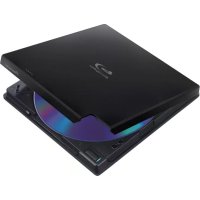
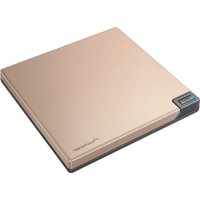
BDRXD05TB - Hard Drive PIONEER - Free user manual and instructions
Find the device manual for free BDRXD05TB PIONEER in PDF.



| Product Type | External Blu-ray/DVD/CD Writer |
| Brand | Pioneer |
| Model | BDR-XD05TB |
| Dimensions (W x H x D) | 133 mm x 14.8 mm x 133 mm |
| Weight | 0.23 kg |
| Power Supply | 5 V DC, 1.0 A (via USB or AC adapter) |
| Interface | USB 3.0 (compatible with USB 2.0 and 1.1) |
| Max Write Speed | BD-R: 6x, DVD-R: 8x, CD-R: 24x |
| Supported Disc Formats | BD-R/RE, DVD±R/RW, DVD-RAM, CD-R/RW |
| Average Access Time | BD-ROM: 210 ms, DVD-ROM: 200 ms, CD-ROM: 190 ms |
| Buffer Memory | 4 MB |
| Operating Temperature | +5 °C to +35 °C |
| Operating Humidity | 5% to 85% (without condensation) |
| Included Accessories | USB cable, software disc, operating instructions |
| Care and Cleaning | Use a damp cloth; do not use liquids, aerosols, or alcohol |
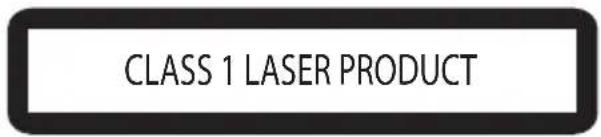
| Safety | Class 1 laser product; do not open the case; refer servicing to qualified personnel |
| Spare Parts and Repairability | No user-serviceable parts; contact authorized support |
| General Information | Ensure adequate ventilation; avoid exposure to water, dust, and shocks |
Frequently Asked Questions - BDRXD05TB PIONEER
User questions about BDRXD05TB PIONEER
0 question about this device. Answer the ones you know or ask your own.
Ask a new question about this device
Download the instructions for your Hard Drive in PDF format for free! Find your manual BDRXD05TB - PIONEER and take your electronic device back in hand. On this page are published all the documents necessary for the use of your device. BDRXD05TB by PIONEER.
USER MANUAL BDRXD05TB PIONEER
Thank you for buying this Pioneer product. Before using the drive, read all warnings, cautions, notices and other important safety information contained in these Operating Instructions. Please read the entire manual before using this drive as it contains important information, such as regulatory data, software license agreement(s), product registration details, service instructions and guidelines.
WARNING
This equipment is not waterproof. To prevent a fire or shock hazard, do not place any container filled with liquid near this equipment (such as a vase or flower pot) or expose it to dripping, splashing, rain or moisture.
D3-4-2-1-3_B_En
Operating Environment
Operating environment temperature and humidity: +5^ to +35^ (+41^ to +95^) less than 85 % RH (cooling vents not blocked)
Do not install this unit in a poorly ventilated area, or in locations exposed to high humidity or direct sunlight (or strong artificial light)
D3-4-2-1-7c*A1En
Precautions Regarding Use
- Pioneer may not be held liable for the loss of any data or any other direct or indirect damage suffered as the result of the use or breakdown of this product. It is strongly recommended to regularly back up all critical data.
- Care must be taken not to infringe copyright restrictions under the laws of each country. If this device is used to record copyrighted materials, approval must be obtained from the respective copyright holders. The recording of copyrighted materials without the express approval of the respective copyright holders may result in legal penalties. Pioneer disclaims any and all responsibility for any legal damages resulting from the use of this device in the unauthorized copying of copyrighted materials.
- All names of corporations, products, and systems listed herein, even when the (^TM) or () symbols are omitted, are considered the registered trademarks of the respective owners.
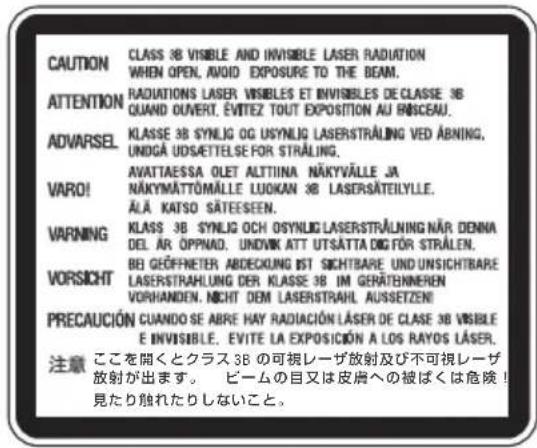
DANGER - VISIBLE AND INVISIBLE LASER RADIATION WHEN OPEN. AVOID DIRECT EXPOSURE TO BEAM.
IMPORTANT

The lightning flash with arrowhead symbol, within an equilateral triangle, is intended to alert the user to the presence of uninsulated "dangerous voltage" within the product's enclosure that may be of sufficient magnitude to constitute a risk of electric shock to persons.
CAUTION
RISK OF ELECTRIC SHOCK DO NOT OPEN
CAUTION:
TO PREVENT THE RISK OF ELECTRIC SHOCK,DO NOT REMOVE COVER (OR BACK).NO USER-SERVICEABLE PARTS INSIDE.REFER SERVICING TO QUALIFIED SERVICE PERSONNEL.

The exclamation point within an equilateral triangle is intended to alert the user to the presence of important operating and maintenance (servicing) instructions in the literature accompanying the appliance.
D3-4-2-1-1_A1_En
CAUTION
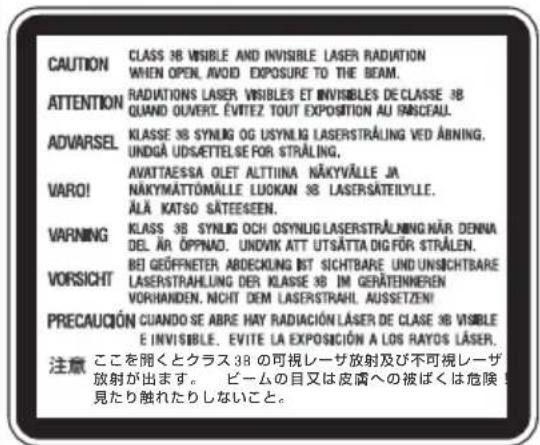
This product is a class 1 laser product classified under the Safety of laser products, IEC 60825-1:2007, but this product contains a laser diode higher than Class 1. To ensure continued safety, do not remove any covers or attempt to gain access to the inside of the product. Refer all servicing to qualified personnel. The following caution label appears on your unit. Location: bottom of the unit
D58-5-2-2b*A1En
CAUTION: USE OF CONTROLS OR ADJUSTMENTS OR PERFORMANCE OF PROCEDURES OTHER THAN THOSE SPECIFIED HEREIN MAY RESULT IN HAZARDOUS RADIATION EXPOSURE.
CAUTION: THE USE OF OPTICAL INSTRUMENTS WITH THIS PRODUCT WILL INCREASE EYE HAZARD.
D58-5-1-2a_A1 En
For PLUGGABLE EQUIPMENT, the socket-outlet shall be installed near the equipment and shall be easily accessible.
IMPORTANT NOTICE
RECORD THE MODEL NUMBER AND SERIAL NUMBERS OF THIS EQUIPMENT BELOW. THE NUMBERS ARE ON THE BOTTOM.
MODEL NO. BDR-XD05T
SERIAL NO.
KEEP THESE NUMBERS FOR FUTURE USE.
D1-4-2-6-2*A1En
Machine Noise Information Regulation 3.
GPSGV: The highest sound-pressure level is 70 dB(A) or less in accordance EN ISO 7779.
Information to User
Alterations or modifications carried out without appropriate authorization may invalidate the user's right to operate the equipment. D8-10-2 A1
CAUTION
This product satisfies EMC regulations when shielded cables and connectors are used to connect the unit to other equipment. To prevent electromagnetic interference with electric appliances such as radios and televisions, use shielded cables and connectors for connections.

is a trademark of Blu-ray Disc Association.

is a trademark of DVD Format/Logo Licensing Corporation.
AFTER-SALES SERVICE FOR PIONEER PRODUCTS
Please contact the dealer or distributor from where you purchased the product for its after-sales service (including warranty conditions) or any other information. If the necessary information is not available, please contact the Pioneer's subsidiaries (regional service headquarters) listed below:
PLEASE DO NOT SHIP YOUR PRODUCT TO THE COMPANIES at the addresses listed below for repair without advance contact.
AUSTRALIA
Pioneer Electronics Australia Pty Ltd
5 Arco Lane, Heatherton, VIC 3202, Australia
Telephone: (03) 9586 6380 or 1800 988 268
9am to 5pm Monday to Friday (EST)
OTHER REGIONS
PIONEER HIGH FIDELITY TAIWAN CO., LTD.
8F., No.407, Ruiguang Rd., Neihu Dist., Taipei City 114, Taiwan (R.O.C)
S022_A_En

If you want to dispose this product, do not mix it with general household waste. There is a separate collection system for used electronic products in accordance with legislation that requires proper treatment, recovery and recycling.
Private households in the member states of the EU, in Switzerland and Norway may return their used electronic products free of charge to designated collection facilities or to a retailer (if you purchase a similar new one).
For countries not mentioned above, please contact your local authorities for the correct method of disposal.
By doing so you will ensure that your disposed product undergoes the necessary treatment, recovery and recycling and thus prevent potential negative effects on the environment and human health.
K058b_A1_En
Safety instructions
To ensure your personal safety and to maximize the full operating potential of your unit, read and follow these safety instructions.
Read & Retain Instructions - Read all operating and user information provided with this drive.
Cleaning - Use a damp cloth to clean the exterior housing. Avoid using any fluids including liquid, aerosol or alcohol-based cleaning products.
Water or Moisture - Avoid operating or locating this drive near water or other sources of fluid.
Installation - Do not place this product on an unstable cart, stand, or table. The product may fall and be seriously damaged.
Ventilation - Slots and openings in the chassis are for cooling and proper operation of the unit. Do NOT block or cover the openings. Do NOT place this unit on a bed, rug, etc. as this can block the openings. This unit should not be placed in a built-in installation unless properly ventilated.
Operation - Avoid moving, lifting or reorienting this drive while a disc is rotating inside.
Environment - Avoid installing this drive in a location with exposure to large quantities of dust, high temperatures, high humidity, or subject to excessive vibrations or shocks.
Power Sources - Operate this drive only from the recommended power sources. If you are unsure of the power source, consult an authorized Pioneer representative.
Power-Cord Protection - When unplugging the unit, pull on the plug - not on the cord. Do not handle the cord or plug with wet hands; doing so could cause an electric short or shock. Do not allow anything to pinch or rest on the power cord and do not place in a walkway.
Object & Liquid Entry - Never push inappropriate objects into the device. Avoid spilling any liquids into or on the outside of the drive.
Condensation - Moisture can form in the operating section of the product if the drive is taken from cool surroundings to a room with a warmer temperature. Let the drive stand for one to two hours in the new location before turning it ON.
Servicing - Opening or removing the cover exposes you to possible electrical shock or other danger. Contact a Pioneer authorized service representative for repairing this drive (refer to the enclosed Service & Support Card).
Damage Requiring Service – Unplug the unit and refer servicing to qualified service personnel in the following situations:
- When the power cord, plug, or chassis is damaged.
If liquid has been spilled, or objects have fallen into the video product.
If the product has been exposed to rain or water. - If the product does not operate normally when the operating instructions are followed. Adjust only those controls that are covered by the operating instructions. Improper adjustment of other controls may result in damage and can require extensive work by a qualified technician to restore the unit to its normal operation.
- When the product exhibits a distinct change in performance – this indicates a need for service.
About DualDisc Playback - DualDisc is a two-sided disc with one side containing DVD video/audio/etc. content and the opposite side containing non-DVD content such as digital audio material. The non-DVD audio side is not compliant with the CD Audio Specification; therefore, may not play. The DVD side of DualDisc media plays in this unit. For more details about the DualDisc specification, please refer to the disc manufacturer or your retailer.
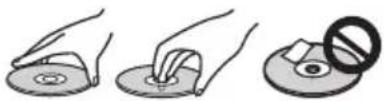
- Avoid touching or scratching the signal surface (shiny side) of the disc.
- Hold the disc by the edges or by the center hold and one edge.
- Do not affix paper or labels to the disc.
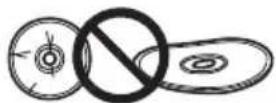
- Discard warped or cracked discs as they may cause damage to the drive.
- Avoid specially shaped discs such as hearts or polygons.
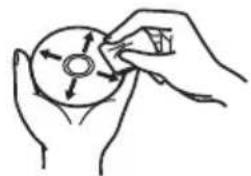
- Remove dust or lint from the disc with a soft cloth by wiping from the inside to the outside edge rather than in a circular motion.
- Do not use record-cleaning or anti-static agents as the solutions may cause damage to a disc.
Always be sure to store your discs in proper disc storage cases when not in use, and always be sure to check for dirt or dust on discs (especially on the recording side) before use.


Note
Some discs may not be playable due to different recording formats or the physical condition of the disc at the time of recording or playback.
Features
| Write Speed (▲ZCLV, ★CAV) | |
| BD-R | 2X, 4X▲, 6X★*(3) |
| BD-R DL | 2X, 4X▲, 6X★*(3) |
| BD-R TL | 2X, 4X▲ |
| BD-R QL | 2X, 4X▲ |
| BD-R (LTH) | 2X, 4X▲, 6X★*(3) |
| BD-RE | 2X |
| BD-RE DL | 2X |
| BD-RE TL | 2X |
| DVD-R | 1X, 2X, 4X▲, 6X▲, 8X★ |
| DVD-R DL | 2X, 4X▲, 6X★ |
| DVD-RW | 1X, 2X, 4X▲, 6X▲ |
| DVD+R | 2.4X, 4X▲, 6X▲, 8X★ |
| DVD+R DL | 2.4X, 4X▲, 6X★ |
| DVD+RW | 2.4X, 3.3X*(1), 4X▲, 6X▲, 8X▲ |
| DVD-RAM | 2X, 3X, 5X▲ |
| CD-R | 4X, 10X, 16X▲, 24X★ |
| CD-RW | 4X, 10X, 16X*(2)▲, 24X*(2)▲ |
| Maximum Read Speed (▲ZCLV, ★CAV, ●PCAV) | |
| BD-ROM | 6X* |
| BD-ROM DL | 6X* |
| BD-R | 6X* |
| BD-R DL | 6X* |
| BD-R TL | 4X* |
| BD-R QL | 4X* |
| BD-R (LTH) | 6X* |
| BD-RE | 6X* |
| BD-RE DL | 6X* |
| BD-RE TL | 4X* |
| DVD-ROM | 8X* |
| DVD-ROM DL | 8X* |
| DVD-R | 8X* |
| DVD-R DL | 8X* |
| DVD-RW | 8X* |
| DVD+R | 8X* |
| DVD+R DL | 8X* |
| DVD+RW | 8X* |
| DVD-RAM | 5X* |
| CD-ROM | 24X* |
| CD-R | 24X* |
| CD-RW | 24X* |
*1) High Speed Media Only
*2) US,US+CD-RW Only
*3) When used with a USB 2.0 port, the drive will be unable to write at 6X speed without the installation of the supplied USB 2.0 high-speed driver.
Buffer Memory Size 4 MBytes (Read/Write) Interface USB3.0&2.0
Disc Format
BD-ROM Single layer/dual layer
BD-R
BD-RE
DVD-ROM Single layer/dual layer
DVD-Video Single layer/dual layer
• DVD - R
DVD-RW
DVD+R
- DVD + RW
DVD-RAM (Non-cartridge), ver2.0&2.1&2.2
- CD-ROM Mode 1
- CD-ROM XA Mode 2 (form 1, form 2)
KODAK Photo CD (Single and Multi-session)
CD-Extra(CDPLUS)
-CDtext
CD-R - CD-RW (MS/HS/US/US+)
RAM2 media is supported only reading.

Note
- A specific application software is necessary to write the formats listed above.
- Supported media required for specific BD, DVD and CD writing speeds.
Average writing speed may decrease when multiple discs are written during the same session.
Interface
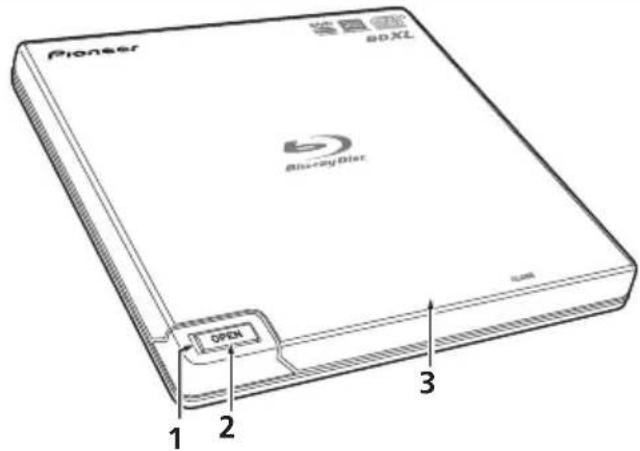
Front/Top view
1 Power/Busy Indicator
Operation status is indicated as follows:
During Power ON: Lights dimly
During reading/writing: Lights
During disc cover open: Lights
2 OPEN Button
Press to open the disc cover.
3 Disc Cover
Press the OPEN button to open the disc cover then place a BD, DVD or CD disc onto the tray with the label facing up. Close the disc cover gently.
Do not manually force open the disc cover.
Use the Forced Open Lever to open the disc cover during POWER OFF.
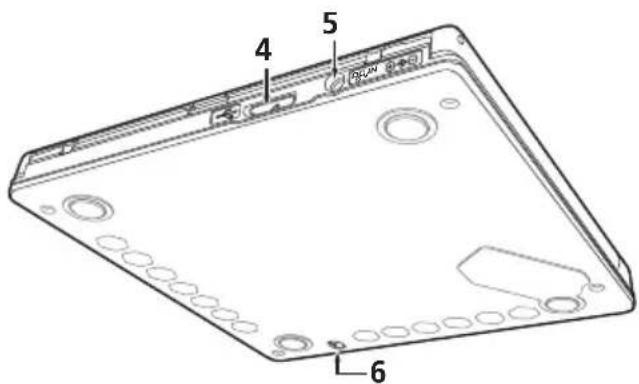
Rear/Bottom view
4 USB 3.0
USB 3.0 Micro-B Connector
5 D C
AC Adapter Connector
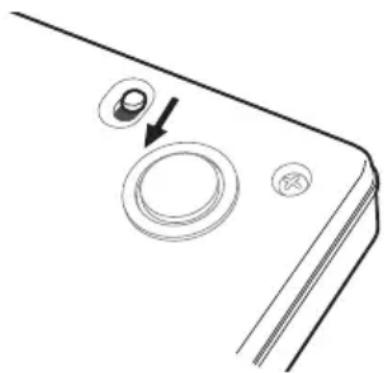
6 Forced Open Lever
Use to open the disc cover when the drive is not powered. If the disc cover fails to open when the OPEN button is pressed, turn the power to the drive OFF and wait approximately one minute until the disc stops spinning before trying to open the disc cover. During normal operation, the OPEN button should be used to open the disc cover.

Caution
About Region codes
- The region code can only be changed five (5) times, including the initial setting. Please be aware that the fifth change becomes PERMANENT. Therefore, avoid changing the region code unless absolutely necessary.
- Region codes are part of the DVD Standard. However, region codes on DVD discs are optional. DVD discs with no specified region code can be played on all compliant players.
Connection
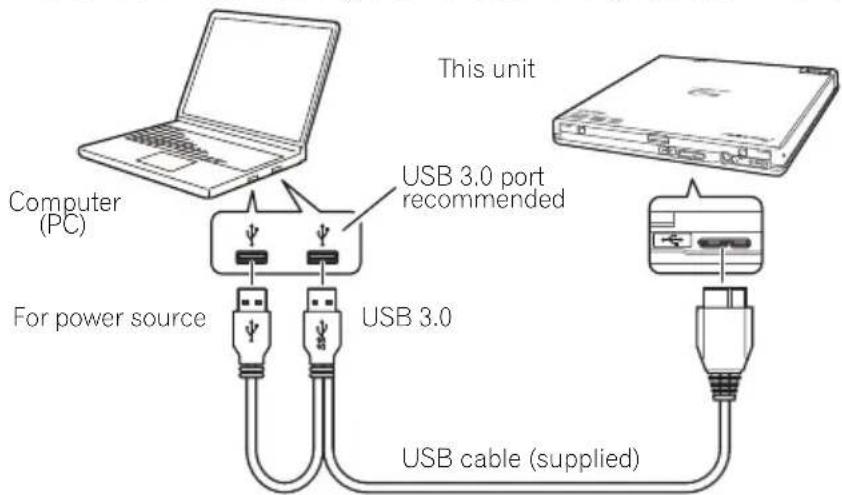
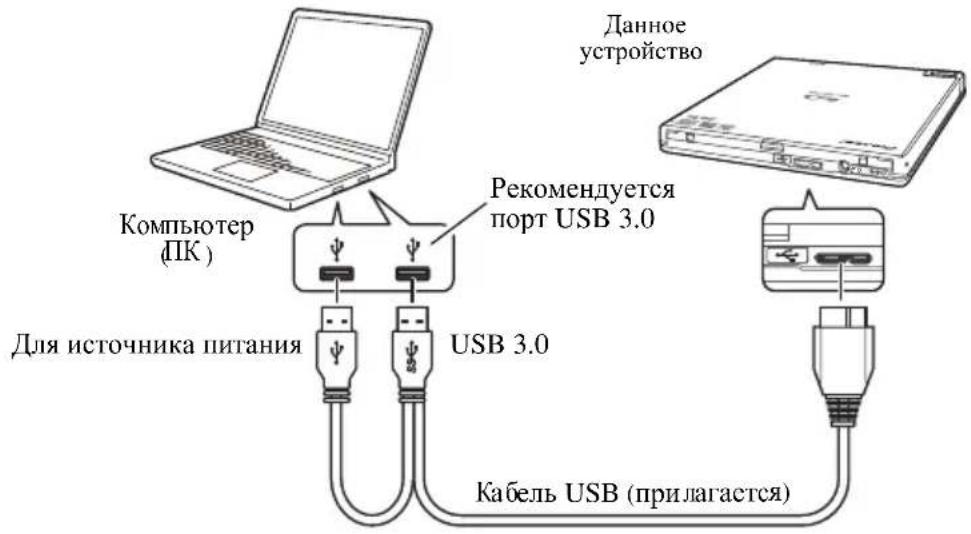
This is a hot-plug unit. Connect the unit to the supplied USB cable.
1 Confirm that your computer (PC) has available USB ports.
2 With your Windows® or Mac® operating system running, use the supplied USB cable to connect this unit to the PC.

Caution
- Do not disconnect the USB cable during data transfers.
- Do not disconnect the USB cable during the PC start nor any operation with the unit.

Note
- Connection to a USB 3.0 port is recommended, since when a USB 3.0 cable is connected to a USB 2.0 port, the connection will be limited to USB 2.0 performance standards.
- When connecting the unit to a USB 2.0 port, the USB 2.0 high-speed filter driver should be installed.
- This unit can operate with USB 1.1 but will not provide optimum performance.
- Connecting this unit through a USB HUB or using unspecified cables may not guarantee proper operation.
- In some cases, the use of a single USB port may be insufficient for normal operation. Use two USB ports for power enhancement.
Operations
The unit writes to BD-R/RE media when the supplied software application is installed on your PC. Writing fails if the PC or operating system does not support the software.
Begin writing to BD-R/RE
1 Connect the necessary USB cable.
2 Turn on the PC.
3 Press the OPEN button, and gently lift the disc cover by hand.
4 Place the disc in the tray with the label facing up.
5 Close the disc cover gently.
6 Start the disc-burning application.
End the writing session
1 Quit the disc burning application.
2 Press the OPEN button, and gently lift the disc cover by hand.
3 Remove the disc.
4 Close the disc cover gently.
5 Shut down the PC.
- For software installation directions, please refer to the manual available on the software disc included with your drive. For assistance with writing or playing back discs, see the HELP function within the software application.
- When the lock mechanism is released, the disc cover needs to be fully opened in order to close again.
Manual disc cover open
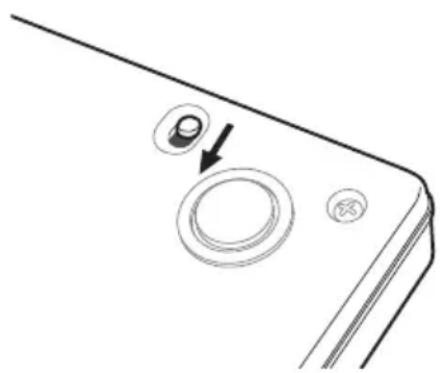
Use the Forced Open Lever to remove discs if the disc cover fails to open and all other methods have been exhausted.
1 Shut down the PC.
2 Wait for the disc to stop spinning.
3 Slide the Forced Open Lever to open the disc cover.
4 Gently open the disc cover and remove the disc.

Warning
To prevent injury and damage to the unit, do NOT force the disc cover to open while the disc is spinning.
Specifications
Position . This drive is horizontal use.
Disc Size. 12 cm/8 cm
(Drive does not support non-standard shapes such as business cards, diamond, etc.)
(Drive does not support 8 cm adapter.)
Disc Transfer Rate * Media that is dirty or damaged can affect the transfer rate.
Data Read (sustained) BD. Max. 21.06 MBytes/sec.
DVD. Max. 8.64 MBytes/sec.
CD Max. 3.24 MBytes/sec.
Data Write (sustained) BD. Max. 21.06 MBytes/sec. (6X BD-R)
DVD. Max. 8.64 MBytes/sec. (8X DVD-R)
CD. Max. 3.24 MBytes/sec. (24X CD-R)
Access Time/Seek Time (Random Averages)
Access Time BD-ROM 210 ms
DVD-ROM 200 ms
CD-ROM 190 ms
Seek Time BD-ROM 190 ms
DVD-ROM 180 ms
CD-ROM 170 ms
Power
Standby 0.5 W
DC IN Connector
Power Supply DC +5V 1.0 A (AVE)
Physical Information
Dimensions (excluding foot pad) 133 mm (W) x 14.8 mm (H) x 133 mm (D)
Weight (Drive only). 0.23 kg (Typ.)
Operating Temperature +5^ to +35^
Operating Humidity 5% to 85% (no condensation)
Storage Temperature -40°C to +60°C
Storage Humidity 5 % to 90 % (no condensation)
Accessories
Operating Instructions (This document)
USB Cable (PIONEER, ODF8003) 1
Software disc. 1

Note
Specifications and designs are subject to possible modifications without notice, due to improvements.
© 2013 PIONEER CORPORATION.
All rights reserved.
Pioneer Electronics Australia Pty Ltd
5 Arco Lane, Heatherton, VIC 3202, Australia
Telephone: (03) 9586 6380 ou 1800 988 268
8F., No.407, Ruiguang Rd., Neihu Dist., Taipei City 114, Taiwan
(R.O.C)
S022_A_Fr

| BD-ROM | 6X★ |
| BD-ROM DL | 6X★ |
| BD-R | 6X★ |
| BD-R DL | 6X★ |
| BD-R TL | 4X★ |
| BD-R QL | 4X★ |
| BD-R (LTH) | 6X★ |
| BD-RE | 6X★ |
| BD-RE DL | 6X★ |
| BD-RE TL | 4X● |
| DVD-ROM | 8X★ |
| DVD-ROM DL | 8X★ |
| DVD-R | 8X★ |
| DVD-R DL | 8X★ |
| DVD-RW | 8X★ |
| DVD+R | 8X★ |
| DVD+R DL | 8X★ |
| DVD+RW | 8X★ |
| DVD-RAM | 5X▲ |
| CD-ROM | 24X★ |
| CD-R | 24X★ |
| CD-RW | 24X★ |
1 Voyant Power/Busy (Alimentation/Occupe)
Pendant la lecture/Pendant I'ecriture: S'allume
© 2013 PIONEER CORPORATION.
Pioneer Electronics Australia Pty Ltd
5 Arco Lane, Heatherton, VIC 3202, Australia
8F, No. 407, Ruiguang Rd., Neihu Dist., Taipei City 114,
Taiwan (R.O.C.)
S022_A_De

| BD-ROM | 6X★ |
| BD-ROM DL | 6X★ |
| BD-R | 6X★ |
| BD-R DL | 6X★ |
| BD-R TL | 4X★ |
| BD-R QL | 4X★ |
| BD-R (LTH) | 6X★ |
| BD-RE | 6X★ |
| BD-RE DL | 6X★ |
| BD-RE TL | 4X● |
| DVD-ROM | 8X★ |
| DVD-ROM DL | 8X★ |
| DVD-R | 8X★ |
| DVD-R DL | 8X★ |
| DVD-RW | 8X★ |
| DVD+R | 8X★ |
| DVD+R DL | 8X★ |
| DVD+RW | 8X★ |
| DVD-RAM | 5X▲ |
© 2013 PIONEER CORPORATION.
CD-RW (MS/HS/US/US+)
Pioneer Electronics Australia Pty Ltd
5 Arco Lane, Heatherton, VIC 3202, Australia
電話:(03)95866380或1800988268
MepblnpedoctopoxxHoctn npn 3KcnIyataun
KoMaHnP Pioneer He MoKeT HecTN OTBeTCTBHeHOctn 3a NOTepIO IIO6bIX daHHbIX nIN 3a IIO60I pyroon npAmOn nn HnpamOn yuep6, NOHeceHHbIB pe3yIbTaTe NCNOJb3ObaHnN nn NOmKn DaHHoro n3dJIeN. HactoTeNbHO peKomeHdyetcpeynrApoHO BblONHraTb pe3epBHOe KOnIpOBaHne BCex BaXbIX daHHbx.
Heo6xOIMO yDnTb BHMmaHne, YTo6bl He HapuyuNTb orpaHnueHnna, KacaOuIeNc ABTOpCKnx npab, ycTaHOBJIeHHbIe 3aKOHAMn B kaxdoi n3 cTpaH. Ecn DaHHoe yCTpoNCTBO nCNoJIb3yETcIy 3aIncm MaTePnAIOB, OXpaHReMbIX aBTOpCKM npabOM, Heo6xOIMO noJyUHTb pa3peSeHne depKaTeJIe COOTBeTCTByUOnx aBTOpCKNX npab. 3aNcB MaTePnAIOB, OXpaHReMbIX aBTOpCKM npabOM, 6e3 RaCHO BBipaxHeHHoro Ha To pa3peSeHnra DePKaTeJIe ABTOpCKNX npab MoKeT NOBNeYb Haka3aHne, ycTaHOBJIeHHoe 3aKOHOM. KomNaHnra Pioneer 3aBnREt O TOM, YTO OHa He Hecet JIOboi OTBeTCTBEHHOCTH 3a IIObIe IOpNDUeCKNE y6bITKn, NoHeceHNbIe B pe3yJIbTaTe NcNOJIb3OBAHn DaHHORO yCTPOINCTBA dIg HecaHKUHOPOBaHHORO KOIIPOBaHHMaTePnAIOB, OXpaHReMbIX aBTOpCKM npabOM.
Bce HaimeHOBAHNAHn, npOyKTOB nCCTeM, npNBedeHHbE B daHHOM DOkyMeHTe, daKe ecn CmBOJbl (TM) nIIN (8) ONyUeHbI, cHTaOTcra 3apeNCTpnpOBaHHbIMN TOPROBbIMN 3HaKaAMn COOTBeTCTByuOx npaboo6naDatenei.
BAXHO

CmBbONMOHn,3aKIOUeHHbIN B paBHocToPOHH TpeyroIbHNK, nOcNObIy3eTcI NpIpeDynpEckHeHn NOIb3OBaTeJIo6 O6'OnaCHOM HApRKeHnBHyTpNI KOpNCAu3dEHNr,KOTopoE MoKeT 6bItb DocTaTOuHO BbICOKM NCTaTB npuHNO npopKeHn IIOeJ 3JIeKTpueckIM TOKOM.
CAUTION
RISK OF ELECTRIC SHOCK DO NOT OPEN
BHIMAHNE: BO IN36EXKAHNE IOPAKKEHNA JIJEKTPNUECKUM TOKOM HE CHIMAIITE KPBILIKY (INN 3ADHIIO CTEHKY).BHTPNHE CODEPJKATCJ DEATJI, PEPDA3HAUHHe BIIPEMOHTA NOLb3OBATEIEM. INI OBCJNYIBAHNOBSPATINECB K KBALNFUNPOBAHHOMY COTPYDHNKCEPBNCHO CJUYKbl.

BocnntateIbHb3hak3aKIOeHHbB paBHOCTOPOHHN TpeyrolbHK, nCNOB3yETcDnPpeDyPekDeHn NOB3OBATeJI O HAIINH B NITepaType, NOCTABNReMoB KOMPiKeTc N3dEINEM, BAKbXyK3A3AHN No pa60Te C HIMN 06cnykBaHIO.
D3-4-2-1-1_A1_Ru
BHIMAHNE
JaHHe n3dJeIe RaJIeTc Ja3epHbIM n3dEInem
Knacca 1 cornacHo KnaaccuKaUINo
Be3OaNACHO Ta3epHbIX n3dEni, IEC
60825-1:2007, Ho DaHHe n3dEnIe copeKNT
Ja3epHbI dIOB BblIe KNaCca 1. DnIy o6ecneueHnra
NoCToHHo 63oNACHOCTNe CHImaTe KpbIuKN He NItAEb NOJyHTb DOCTyn BHyTpB n3dEnIe.
No BCEM BnDAM O6cnyKbAHnro O6paauTecb K
KBaJIuPfNPOBaHHbIM CneuaNNCTaM.
Ha BaWeM n3dEnIin HaxoITcR cNeyuOuaar
npdyIpTeJIbHaer 3TNKeTka.
MeToNOJoxKeHne : DNIIe yCTpoIcTaBA
JI3EPHbI IPOJyKT KJIACC1
D58-5-2-2b*A1_Ru
3aMeHa mONTax CINOBO BUNKI DnI CEIT NEPeMeHHORo TOKa Ha IHNype NITAHNr DaHNO rYCTPOIcTBaDOnXhbl BbINOJIHrTBCrTOJbKO KBAJINΦuNpOBAHHbIM CNEUAnlNTOM NO TEXHHeCKOMy O6ClyKBAHIO.
Ttencbna po3eTKa IINI POIKIOHYAEMO OOBPOYIOBAHNA DOJXHa HaxoOnbC B6n3n oBOPyOBAHN B NERKOIOCTynHom MeCTe.
YcIOBnE3KcnIyatauN
I3dJIe 3KcNpyaTnpyetc npn CneJyUOx TemnepaType n BnaXHOCTn: +5°Cdo+35°C; BNaXHOCTb MeHee 85% (He 3acNoHrTe OXNaXDaIOUs HeHTINrTopbl) He yCTaHaBnBaIte I3dJIe NpOBeTpNBaEMOM NOMEseHm Hm B MeCTe C BbICOKo BNaXHOCTbIO, OTKpbITOM DnI pRmORo COInHeuHOro CBeta (Hnn CNbHOrO NCKycCTBeHHOrO CBeta). D3-4-2-17c*A1_Ru
Perlanent HOpMaun O MaunHHom 3. GPSGV: Cambl BbICOKn ypoBeHb 3ByKOBOrO daBneHncoCTaJIeT 70 d(A) nIN MeHee, B COOTBeTCTBnC EN ISO 7779.

Ecnn Bbl jknae Tynn3npoabTa daHnoe n3deJine, He Bb6paCbBaIte erO BMcTe C obHybIM 6bITOBIM Mycopom. CyueCTByet OTdJIbHa cntema c6opa nCNoB30aHHbIX 3neKToPOnHHbx N3deNn B COOTBeTCTBNu C 3aKHOdaTeNbCTBOM, KOTopA npednonaraet COOTBeTCTbyIOue o6paUHe, BO3BpAT n nepepa60Ky.
YacthbIe KInHeTbI-B CTpaHax-ueHax EC, B IWeBauapnn HOpBerHmOmyt 6ecnnaTHo BO3Bpaaatb nCNOJb30BaHHbIe 3neKtpoHHbIe N3dennr B COOTBeTCTByIOUme NyHTbI c6op a nn Dnepy (pnp NOKynke CXoDHorO HOBO rN3denna).
B ctpaHax, He nepenncnHbix Bblwe, Ira noIyehn Hfopmaun O npabnIbHbIX cnocobax ytnn3auun opaanTeCB coOTBeTCTByuueyUpeJxDn.
IocTynar TAKIM O6pa3OM, Bbl MoKeTe 6bItb YbepeHbB TOM, QTO YTNImn3pyEmbI npOyKT 6dyET COOTBeCTByOuMm O6pa3OM O6pa6oTah, IpeDaH B COOTBeCTByOuN PyHKT n Ipepa6oTah 6e3 Bo3MOxHBx HERATMBHbX NocEeCTBn DnA OKpyKaHOSe CpeDbI N3DopOBBaIIOe.
K058b_A1_Ru

AEBTCTC TopROB MapKo Blu-ray Disc Association.

YBJIaTcTOpROBmApKoΦOpMaTaDVD/Logo Licensing Corporation.
ПразвILA Тхнки 6e3ОпаСоCTN
B neJx o6ecneHn JInHnO 6e30nacHocTH n HAn6oJIee NOIHOr OcIOJIb3OBaHHra pa6oeryo IOTeHNHaJa yctpoiCTBa, IpOHTHe n cJeNyIte IpaBNJiam TexHNKn 6e30nacHocTH.
IpoHTte n coXpaHnte HhctpyKuun - IooKaJyHcTa, IIOHTTE IOJIHOCTbIO BCIO HhOOPMaUNIO pa6ote c DaHHbIM IIpHBODOM, IIpHJIaTACMyIO K HcMy.
YnCTKa -JIy YnCTKN BHeHIIHrO KOpNya HcIOJIb3yIe TBJaXHyTO TkaHB. H36aRte HcIOJIb3OBAHHra JIO6bIX KnIKoCTe, BKJIOUayar KnIKHe, aPpO30JIbHbIe HJIN cIHNPocOIEpKaIiue YnCTaIIne cpeCTBa.
Boda nnn Bnara - H36eraIte HcIOJIb3OBaHHN HJH paCIOIOKeHHN daHHORO IIpHBODa B6JIN3H BOJb IJH npTyHX KJIKOCTeH.
PnHaJnxHocTn - He cTabbTe JaHHoe H3deJIHe Ha HeycToIuHBbIe TeJIeKKn, IOnCTaBKn HIn cTOJIb. H3JeJIne MoKeT yINaCTb H cepBe3HO IOBpeIHTbcra.
Bentnua - IIeH H OTBepCTN B KOpNyce IpeHa3NaueHb IIN OXIAxKeHn H NaIeKaaIIe 3KcIIyataunn yctpoictBa. HE 6IOknpyte H HE 3aKpbBaHTe OTBepTHe. HE Iomeuau Te daHHoe ycToPoiCTBO Ha KPOBaTb, KOBep H dp.,IOCKOJIbky 3TO MOKeT IpnBeCTH K 6IOKpOBKe OTBepCTH. DaHHoe ycToPoiCTBO He cIeJyert pa3MeMaTb C IOMOIIBO BCTPOCHHO YCTAHOBKN, CCJH HC ObecHnBACTcN IOCTaTOUHAR BEHTNJIIINr.
3Kcnnyataa - Bo BpemBpaHnHn DnckBa BHytpn HpHBoHa H36eTaIe IepemHeHH, IObEMOB HINIOBOPOTOB yCTPOIcTBA.
Okpykaoune ycnoBn - H36eraIte ycTaHOBNHOro IaHHoro B MecTax, IOIBeRpeHHbIX BO3JeHCTBIO 6OJIbIHorO KOJIInueCCTBa IIbIJ, BBICOKHX TcMIIEpaTyP, BBICOKOH BJIaXHOCTH JIN Ype3MepbIX Bn6paIIH N yIapOB.
NcToHKn nHTAHn - 3KcIIpyaHTpyIe IaHHbI IIpHBOI TOJIbKO OT peKOMeHdyEMbIX HCTOCHNKOB IIHTAHn. Korla xapaKtepcHCTHKn HcTOHHKa IIHTAHn HcH3BecTHbI, O6paHTTcCb 3a KOHCyJIbTaUHeN K aBTOpH3OBAHHOMY npctabHTcJIIO Pioneer.
3aunTa uHpya nHTAHy - Pn OTKIOUeHHN yCTpoIcTBA O t cETH, TAnIte 3a BUNKy, a He 3a HInyp. He BbIOJIHnTe OIEpaHn CO IHHypom IITaHn HIN CNIIOB NIIKOIM MOKpbIMN pyKaMn, IocKOJIbky 3TO MoKeT IprNBecTH K KOPOTKOMY 3aMbIKaHHIO HIN yIapy 9JEkTpHueCKHM TOKOM. He I03BOJnTe HHKAHM IpEiMeTAM IpeKHMATb IIHyp pTTaHn HIN CToRr TaHem, a TaKke He pa3MeMaIte erO B IPOXODax.
InonaHaHne BHyTpB npEmdToB HNKoTa He BtAikBaIte B yCTpoIcTBO IocTopoHHne npEmdTe. He npJInBaIte KaKHe-JIN6o KnIKOCTH BHyTpB npNBoJa Hn Ha erO hapyKbIe NOBepxHocTH.
KoHecaua - B pa6oey ceknnn H3deJnna MoKeT o6pa3OBbIbTaBcBlaRa Pn NpepeMeHHN nPBOJa H3 XOIOHO MCTa B IOMeHHeH C 6OJIcc BBICOKO TcMIcPaTyPo. IpcTc KAK BKIOHTb IIpHBOD, DaNTc CMY IOCToTB OINH-DA Ba Yaca B HOBOM MecTe.
06cnyxuBaHne - OTKpbIthe HIN CHTHe KOxya IIOBepraet OAnCHOCTN BO3MOXHO IOpaKeHH NJIeKTPnueckHM TOKOM HpyHM OIIaCHOCTAM. IIN BbIIOJIeHHNpeMOHTa DAHHORO IIpHBOJa ObaaItecb K ABTOPH3OBAHHomy cepBHCHomY IpeIcTaBHTeJIIO Pioneer (CM. BIOJKeHHyIO KapTOUYo 6cJIyXHBaHHN I NOJIepKKN).
IOnomka, Tpe6yUo7a 06cnyKbAHn - OTCOeHHHTc yCTPOHCTBO H o6paHTTcB 3a 06cJyKbAHnEM K KBaIHHfHnHOBAHHOMy CIEHnAHHCTy IIO TEXHNueCKOMy 06cJyKbAHnIO B cJeDyIOHx CHTyaIIHX:
DVD-R 1X,2X,4X*,6X*,8X*
DVD-R DL 2X,4X▲,6X
DVD-RW 1X,2X,4X6X
DVD+R 2.4X,4X▲,6X▲,8X
DVD+R DL 2.4X,4X▲,6X
DVD+RW 2.4X,3.3X*1,4X6X8X
DVD-RAM 2X,3X,5X
CD-R 4X,10X,16X▲,24X
CD-RW 4X,10X,16X*(2)▲,24X*(2)
MaKcMaJIbHaI CKOpOCTb YTeHnA (▲ZCLV, ★CAV, ●PCAV)
BD-ROM 6X^
BD-ROM DL 6X
BD-R 6X
BD-R DL 6X
BD-RTL 4X^
BD-ROL 4X
BD-R (LTH) 6X*
BD-RE 6X
BD-REDL 6X
BD-RE TL 4X
DVD-ROM 8X
DVD-ROMDL 8X
DVD-R 8X
DVD-R DL 8X
DVD-RW 8X
DVD+R 8X
DVD+R DL 8X
DVD+RW 8X*
DVD-RAM 5X
CD-ROM 24X
CD-R 24X
CD-RW 24X
^*(1) ToJIbKO BbICOKOcKOpocTHIbe IIOCHTeJIH
*2)ToIbKO US,US+CD-RW
*3) IIpH HcIOJIb3OBAHHN C IIOPTOM USB 2.0 IIpHBOJ He CMOKET 3aIIINCbIBaTb Ha cKOPOCTH 6X 6e3 yctAHOBKN HA KOMIIbIOTep BXoJIIETO B KOMIIJEKT IOCTaBKn BBICOKOCKOPoCTHO pAIBcpa USB 2.0.
Pa3Mep 6yepHOn namrTu 4 M6 (yTeHne/3aNNcB) INHTeppeic USB 3.0 u2.0
ΦopMaTДиСka
B D - R O M OДHOCIOHbIyCxIOHbI
B D - R
B D - R E
DVD-ROM OJHOCIOHbI/DbYCxIOHbI
DVD-Video OIOHbI/DBYXcIOHbI
DVD-R
DVD-RW
DVD+R
DVD+RW
DVD-RAM (6e3 KaptpnJa), Ver.2.0, 2.1, 2.2
CD-ROM M o d e 1
- CD-ROM XA Mode 2 (form 1, form 2)
KODAK Photo CD (OIOHO-MyJBTHCECCHOHHbI)
CD-Extra (CD PLUS)
CDtex
CD-R
CD-RW (MS/HS/US/US+)
HIOHOCHTEJIe RAMI NOIDepKHBAcTcTOJIbKO YTeHC.

3aMeuHne
- IJIy BbIIOJIeHHa 3aIHcN B IpeueHcJIeHHbIX BbIIe fOpMaTax Tpe6yeTcIeHHaJIbHOe IporpaMMHe o6ecIeHHe.
- JIyOnpeJeHHeBx ckopocTei 3aHHCN HcKOB BD, DVD n CD TpebyOTcH IOJIepKHaembIe HOCHTeJIN.
CpeHsckopoctb 3aHHCHMOKET6bITbMeHbIe,ecJH BO BpemOIOH H ToH Je cecchN 3aHHCbBAeTc HecKOJIbKO INCKOB.
HTepceC
BnD cnepeH/cBepxy
1 HndnkaTop nHTaHna/3aHrTOCTN
PaobuH CTatyc OTo6paKaCTcra CJIeDyIOIIMM 06pa3OM:
IIHTaHHe BkIIOueHo: IIpHITyIeHHO rOpHT IJeT cHTbIBaHHe/3aIINcB: TOpHT
KpbIIka DnCKOBORO oTceKa OTKpbIra: TogHr
2 Khonka OPEN
HaKMHTe, TTO6bI OTKpbITb KpbHky IHHKOBOO OTEcKa.
3 KpbIshaDnCKOBoroOTceka
HaKMHTe KHOIKy OPEN, yTO6bI OTKpbITb KpbIIHKy INCKOBORO OTcKa, 3aTeM IHomeCTHe Ha IOTOK INCK BD, DVD HIN CD cTOpOH C 3THKEKIO BBePx. OToPOJHO 3aKpOIte KpbIIHKy INCKOBORO OTcKa. He IIItaITecb OTKpbIBaTB KpbIIHKy INCKOBORO OTcKa BpyHyIO, IIpJIaIar aCNIJy. YTO6bI OTKpbITb KpbIIHKy INCKOBORO OTcKa IIpH BbIKIHOEHOM IINTAHHH, HcIOJIb3yIte pbUar IIpNHUYNTeJIbHOrO OTKpbITHra.
BnDc3aAn/CHn3y
4 U S B 3.0
Pazbem USB 3.0 Micro-B
5 DC IN
Pa3bEmIINIOKIOueHnAaITepaIcTINIEpeMeHHOrTOka
6 Pbyar npHnydnteIbHoro OTkpbITnA
HcnoIb3yeTcJIOKpbITNKePbIHKn DnCKOBOrO OTeKa, KOrJa Ha IpNBOD He
IIOdaetcIITAHHe.EcJIN KpbIIka IINCKOBOrO OTcKa He OTKpbIBaEtcIpn HaxaTHN KHOIIKN OPEN,IEpeTEm KAOK TPKpbIBaTB KpbIIHKy IINCKOBOrO OTcKa, BbIKJIIOHTe IINTaHHe IIPOBOJa H IOIOKJNTc OKOJIIO OJOHO MNHyTbI, IIOKA BpaIeHHe IINcKa He OCTaHOBHTc.Bo Bpem HOpMaJIbHOH pa6OTbI dIry OTKpbITn KpbIIHKn IINCKOBOrO OTcKa cJeIyET HeIOJIb3OBaTB KHOIIKN OPEN.
BHMaHne
O koda xpe zuohoe
KoI pcHNoHa MoKcT 6bITb H3McHcH TOnbKO NpTb (5) pa3, BKIOUaH HCxOHyIO HaCTpoiKy. YUHTHe, IIOKaJIyIcTa, YTO IIrTOc H3McHcHHe cTAHcI IOCTOAHHHbIM. IIOToMy H36eAITc H3McHcHNa KODa pcHOHa 3a HCKJIOUeHHem CJUYaEB, KOJa 3TO a6COJIOTHO Heo6XoHMo.
KoIbI perHOHOB JBJIIOITcAactbIO cTAHdapTa DVD. B To JKe BpeM, KOIbI perHOHOB Ha IINckax DVD JBJIIOCTc HEO63aTeJbHbIMN ⅡIeMeHTaMn. Hcckn DVD, He coepKaIIne OIIpeJeHHoro KoJa peHOHOB, MOrYT BOCIpOHBOINTbcra Ha BCEx IOJIePJKBaIOIHx Hx IIpoIHpbIbATEJIAX.
CoéniHéNHЯ
JaHHOC yCTPOBBO ABJIECTCABTOMATHueCKn paCIO3HAbcMbIM (Hot-Plug).IIOcOeHHHTe yCTPOBTO K IIpHJIaEOMY B KOMIIICKTE IOCTABKN Ka6JIIO USB.
1 Y6eIITecb B TOM, UTO KOMNBJOTep (PK) IMeet CBO6oHbI Nopt USB.
2 POnDCoeHNHTe yCTpOcTBo C NOMOsbIO npNJraemoro Ka6eJRA USB K KOMNbTepy c pa6oTaUSeI onepaunOHHO cnCTeMoI Windows® nJMac®.

BHHMaHHe
He orcoeHHnIe Ka6eJIb USB BO BpeM IpepaH daHHbx.
He orcoeHHaTe Ka6eJIb USB Bo BpeM 3aIycka IIK HIN BO BpeM BbIOJIHeHn KaHX-JH6o OIIepaHn c yCTpOInCTBOM.

3aMeuHne
- PeKOMeHnyETcIIOKJIIOUHeHne K IOpTy USB 3.0, IIOCKOJIbky IIpiN IOIKJIIOUeHH Ka6eII USB 3.0 K IOpTy USB 2.0 coeHNHeHne 6yTeT OpAHuHBaTbc StaHApTaMn yHKINHOPOBaHH USB 2.0.
- IIpn IIOKJIIOUChHH yIcPOHCTBa K IIOpTy USB 2.0 HcO6XoIHMO ycTaHOBHTb Ha KOMIBKOTcp BbICOKOCOPocTHOH φHJbTPyUHIN dpaHBep USB 2.0.
JaHHoe yctpoCTBO MOKeT pa6oTaTb c HcIOJIb3OBAHHe CTAHApTa USB 1.1, HO B 3OM cIyue He IpOABJAEOTHMaJIbHbIX pa6OuHX xapaKTePepnTHK.
HaJIeKaIIa pa60ra yCTpoIcTBa He rapaHTpyerTc, KOrJa ycTPOIcTBIO IOIcoEINHeHO C HIOJIb3OBaHHem KOHcHTpaTopa USB nIc IOMOIIbIO Ka6JIeJ, KpOme yKa3aHHoro.
B HeKOTopbIX CJyuaX HIOJIb3ObaHne OJHO r USB MoKeT OKa3aTbcr HeIOCTaTOHbIM JI HOpMaJIbHOH paobTy. IIOBbUChnMoIHOCTH IIHTAHN HIOJIb3yIte DBA IOPTa USB.
Pa6ota c ycTpoiCTBOM
YcTpoIcTBo BbIIIOJIHReT 3aIHcB Ha HocHTeJiBD-R/RE, KOrJa IIpHJIraEMOe B KOMIIJEKeT IocTaBKN IIporpaMMHOe o6ecIIeHHe yCTaHOBJEHO Ha HcIOJIb3yEmOM IIK. 3aIHcB He MoKet 6bITb BBIOJIHeHa, ccJH IIIN OHepaIIHOHHa cHcTeMa He IIIOJIePrkHBaOT IIporpaMMHOe o6ecIIeHHe.
Hauza lo 3a\Pncn Ha BD-R/RE
1 PoiocoeHnHTe Heo6xOaMbI Ka6eJb USB.
2 BknoHTe PIK.
3 Haxmnte KhoNky OPEN n ocToPoxHNOdHMnTe KpbIuKy dNcKOBOrO oTceKa pykoJ.
4 IonoXnTe DnCK B JIoTOK CTOPOHOJ 3TNKeTKB BBePx.
5 OctopoxHo 3akpoTe KpbIuKy DnCKOBOrO oTceKa.
6 3anyctnte npnloxeHne dna 3annc nDCKOB.
3aBepweHne cecnn 3aNNcN
1 BbInonHnTe BbIXoN 3 npInoxKeHn IJIa 3aNNc IuCKOB.
2 Haxmnte KhoNky OPEN n octopoxnoNDHMnTe KpbIuKy DnCKOBoro oTceKa pyko.
3 YdaanTe nck.
4 OctopoxHo 3akpoTe KpbIkwky DnCKOBoro OTCeKa.
5 BbIKJIIOUHTe KOMNbIOTeP.
3a Hnctpykunmno yctahOBKe nporpaMMHOro oecneeyHn, nokaJyIcTa, o6paIaIrcb K pykoBOJCTBy, coepkaIeMycra Ha nCke C nporpaMMHbIM oecieyeHnEM, BKIOueHHOM B KOMIIeKT IOCTABKN IIpHBOJa. IJIaIOUeyHn IOMOINI NO 3aINCH N BOCIPON3BeDEHNIO INCKOB IOnBJ3yITecb cIpaBOOH OyHKIneH, IpeDycmOTpeHHoB B nporpaMMHom oecneeyHn.
- IocJIe pa36IOKHPOBKN MEXAHN3Ma 3aMka KpbHIIky INCKOBORO OTceKa Heo6xOINMO IOJHOCTbIO OTKpbITb, TTO6bl 3aKpbITb ee cHOBA.
OTkpbltne KpbIuKN DnCKOBORO OTceKa BpyHyIO
JIy BbIpy3KN HNCKOB, KOrJa KpbIIka HNCKOBORO OTcKa He OTKpbBaetcH BCE IpyrHe MeToIbI He IOMoAIOT, HIOJIb3yIte pbIar IIpHHyIHTCJBHOro OTKpbITn.
1 BbIKJIOUHTe KOMNbIOTep.
2 Iopoknte, noka BpaueHne dNcKa He octaHOBNTc.
3 Iepemecnte pbIar npHdynteIbHorO OTkpbltna,TO6bl OTkpblkPbIuKy DnCKOBOROTCEKa.
4 Octopoxho oTKpoTe KpbIuKy DnCKOBOrO OTCeKa N n3BneKeTepnck.
!PpeDynpexKdEHHe
B IIeIax IpeIOITbpaIIeHn TpaBM HIN IOBpeKJeHHy ycTpoiCTBa, HE IIbIaIteScb IIpHHyIITeJIbHO OTKpbITb KpbIIIKy INsCKOBORO OTcKa, IOKa INsCK BpaIaIaeTcI.
Texhnueckne xapaktepnctnkn
PacnoIoxKeHne. IaHHbI IIpHBOI IIpeIHHa3HaueH IJIa HcIOJb3OBaHHB TOpH3OHTaJIbHOM IOJOKeHHN.
Pa3mep dncka 12 cm/8 cm (IpuBod he nooepkcbam ducku hecmaandapmnoi foopmy, Hanpumep ducku bube buzumho karmouku, pom6a u m. n.)
(IIpuod ne noodepocuaem 8-cm adanmpebl.)
CkopoocTb nepeDaun daHbIX dNcKa
* 3aepnne u n nopeckene hocumel mokem okazb6amb nezamu6noe 6nue na ckopocmb nepedaun daanbix.
TReHHe DaHHbIX (HeIIpepbBHO) BD .Macc.21,06 M5/c
DVD. MaKc. 8,64 M6/c
CD. MaKc. 3,24 M6/c
3aHcB aHHbIX (HeIpepbIBHO) BD .MaKc. 21,06 M6/c (6X BD-R)
DVD. 8,64 M6/c (8X DVD-R)
CD. MaKc. 3,24 M6/c (24X CD-R)
Bpemdoctyna/BpemnoncKa (npou36016hbl,cpedhee3auehenie)
BpemnIOCTyIIa BD-ROM 210MC
DVD-ROM 200 MC
CD-ROM 190 mc
Bpemra IIOncKa BD-ROM 190MC
DVD-ROM 180 mc
CD-ROM 170 mc
Питаннe
PcKIM OxHJaHH 0,5 Br
Φn3nueckne xapaKTepeNCTnKN
Ia6apHtHbIe pa3MepbI (6c3 H0Kek-IOdklaIOK) 133 MM (IIHpHa) x 14,8 MM (Bbcota) x 133 MM (THy6HHa)
Bec (ToJIbKO IIpHBOI). 0.23 K
IOnyctHmra pa6oay TcMncpaTpya . O_T + 5°C I0 +35^
IOnyctHMABBlaJXHOCTb npn EKcIpyataa.. 0r 5 % 85% (6e3 KOHJeHcaHH)
IOnyctHmTtemepatypxpaHeHHn Or-40°C+60°C
IOnyctHMABBlaJXocTB npxpaHeHHn Or 5% 90% (6e3 KOHcHcaHH)
PnHaJdxKHOCTN
HnctpykuHH no 3KcIIyataaHH (hactouiu nn DOKymeHT)
Ka6eJIb USB (PIONEER, ODF8003) 1
HcK cIporpaMMHbIM oecieueHHem 1

3aMeuHne
TexHHueckn XapaKTepHCTNKN H KOHcTpkyINa MOryT McHrTBc86c3 IpeIbapHTcJIbHO yBCIOHMJHIN, B CBA3N C BHOCHMBIMN yCOBepHeHCTBOBAHNM.
PnmeaHne:
B COOTBETCTBm co CTAbe 5 3aKoHa PocnckOeepauu "O 3aunTe npab notpe6nten" u Yka3aHem IpapntbctBa PocnckOeepauu N720 ot 16 nHOH 1997 roda kOpnpaunPioneer Europe NV ycTaHabnBaet ycNoBne Ha cNeIyIOUyIO npOdoJXnTeNbHOCTb cPOKa cLyXbI OfuaJIbHo NoCTaBnEMybIX Ha Pocnckn pbHOK TObApOB.
Aynno n BndeooobopyoBaHne: 7 neT
Ipehenochoe aydnoo6opydoBaHne: 6 neT
DpyrOe o6OpyIOBaHne (HayuHnK, MnkpoOH T.D.): 5 net
ABTomO6nJIbHa 3JIeKTpOHHa:6JeT
DVD/CD YctpoCTBO 3annc
Cpok cnjxkbipnoodykta n rapaHTnHbI cpoK - 1 ro
D3-7-10-6_A_Ru
PONJIENPOJADJXHOE OBCJYKINBAHNE
I3DEJIN KOMPAHNI PIONEER
3a noclenpoDAxHbIM o6cnyxHBaHHeM (BkIIOyArapaHTnHbIe clyuAn) IIN 3a KaKoJ-ImBo dpyroINHopMaueNe O6paauTecb K npOdaBuy ININCTpN6bIoTOpY IO MeCy npNo6peTeHnI N3dEInn. EcIn Heo6XoIMMa HΦOpMaunr HeDocTyHnA, NOxAlyNCTa, O6paauTecb B DoUepHne CtpyKtypbl KomnaHn Pioneer (pernoHaNbHbIe UeHTpbI ObcLyxNBaHn), npBedeHHbIe HIXke:
HE OTTPABJIYTE BAWE N3DEJINE B 3TN KOMIAHNI NO npBedeHHbIM HIXe aDpecam IJa BBINOJIHHeNpaMOHTa 6e3 ppeBapntelbHoro o6paueHnB HIX.
ABCTPAJIM
Pioneer Electronics Australia Pty Ltd
5 Arco Lane, Heatherton, VIC 3202, Australia
Tepeoh: (03) 9586 6380 nn 1800 988 268, c 9 do 17 dacob,
cNoheJeBnka no PAnu (CtaH.D.BoCT.Bpem)
ДРУГЕ ПEGIOHы
PIONEER HIGH FIDELITY TAIWAN CO., LTD.
8F, No.407, Ruiguang Rd., Neihu Dist., Taipei City 114,
Taiwan (R.O.C)
S022_A_Ru
PIONEER CORPORATION, 2013.
Bce npaba 3aunncnHbI.
© 2013 PIONEER CORPORATION.
All rights reserved.
© 2013 PIONEER CORPORATION.
HmnpTeP: OOO "ПиОHEP PYC"
125040, Poccn, r. MockBa, yI. IpaBbl, d.26 TeI.: +7(495) 956-89-01
PIONEER EUROPE NV
Haven 1087, Keetberglaan 1, B-9120 Melsele, Belgium
PIONEER HIGH FIDELITY TAIWAN CO., LTD.
8F., No.407, Ruiguang Rd., Neihu Dist., Taipei City 114, Taiwan (R.O.C) TEL: +886-2-2657-3588
Pioneer Electronics Australia Pty Ltd
5 Arco Lane, Heatherton, VIC 3202, Australia TEL: 61-3-9586-6300
Printed in China
Imprime en Chine
Gedruckt in China
OTneuataHO B Kntae


- WARNING
- Operating Environment
- Precautions Regarding Use
- IMPORTANT
- CAUTION
- CAUTION:
- IMPORTANT NOTICE
- Information to User
- AFTER-SALES SERVICE FOR PIONEER PRODUCTS
- AUSTRALIA
- OTHER REGIONS
- Safety instructions
- Note
- Features
- Buffer Memory Size 4 MBytes (Read/Write) Interface USB3.0&2.0
- Disc Format
- Interface
- Front/Top view
- Power/Busy Indicator
- OPEN Button
- Disc Cover
- Rear/Bottom view
- USB 3.0
- D C
- Forced Open Lever
- Connection
- Operations
- Begin writing to BD-R/RE
- End the writing session
- Manual disc cover open
- Specifications
- Voyant Power/Busy (Alimentation/Occupe)
- MepblnpedoctopoxxHoctn npn 3KcnIyataun
- BAXHO
- RISK OF ELECTRIC SHOCK DO NOT OPEN
- BHIMAHNE
- JI3EPHbI IPOJyKT KJIACC1
- YcIOBnE3KcnIyatauN
- ПразвILA Тхнки 6e3ОпаСоCTN
- Pa3Mep 6yepHOn namrTu 4 M6 (yTeHne/3aNNcB) INHTeppeic USB 3.0 u2.0
- ΦopMaTДиСka
- 3aMeuHne
- HTepceC
- BnD cnepeH/cBepxy
- HndnkaTop nHTaHna/3aHrTOCTN
- Khonka OPEN
- KpbIshaDnCKOBoroOTceka
- BnDc3aAn/CHn3y
- U S B 3.0
- DC IN
- Pbyar npHnydnteIbHoro OTkpbITnA
- BHMaHne
- O koda xpe zuohoe
- CoéniHéNHЯ
- BHHMaHHe
- Pa6ota c ycTpoiCTBOM
- Hauza lo 3a\Pncn Ha BD-R/RE
- 3aBepweHne cecnn 3aNNcN
- OTkpbltne KpbIuKN DnCKOBORO OTceKa BpyHyIO
- !PpeDynpexKdEHHe
- Texhnueckne xapaktepnctnkn
- CkopoocTb nepeDaun daHbIX dNcKa
- Bpemdoctyna/BpemnoncKa (npou36016hbl,cpedhee3auehenie)
- Питаннe
- Φn3nueckne xapaKTepeNCTnKN
- PnHaJdxKHOCTN
- PnmeaHne:
- PONJIENPOJADJXHOE OBCJYKINBAHNE
- I3DEJIN KOMPAHNI PIONEER
- HmnpTeP: OOO "ПиОHEP PYC"
- PIONEER EUROPE NV
- PIONEER HIGH FIDELITY TAIWAN CO., LTD.
- Pioneer Electronics Australia Pty Ltd
Brand : PIONEER
Model : BDRXD05TB
Category : Hard Drive