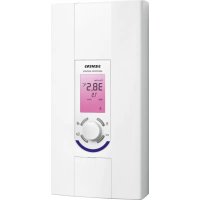
DE1518628M - Thermostat SIEMENS - Free user manual and instructions
Find the device manual for free DE1518628M SIEMENS in PDF.

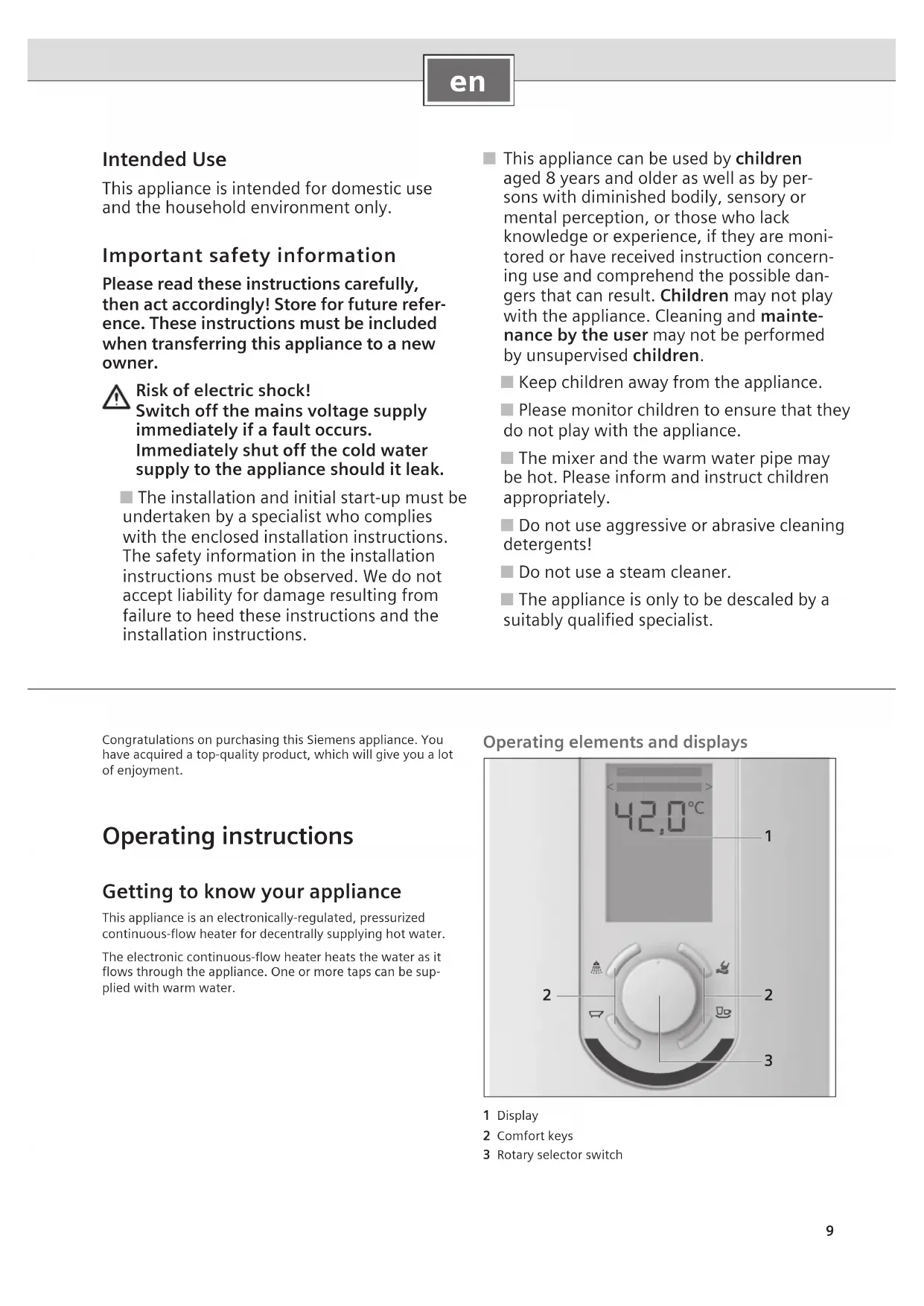


| Product type | Electronic instantaneous water heater (regulation thermostat) |
| Brand | Siemens |
| Model | DE1518628M |
| Usage | Domestic, non-professional |
| Installation | By a certified specialist |
| Display | Yes, background lighting from blue to red depending on temperature |
| Controls | Programmable Comfort buttons and rotary selector |
| Temperature setting | Via rotary selector or Comfort buttons (preconfigurable) |
| Maximum temperature | 60 °C (via setting for thermostatic mixer) |
| Child safety lock | Limitation to 42 °C, activation by key combination |
| Solar mode | Compatibility with preheated water (≥30 °C) |
| Consumption display | Energy (kWh), water (L, m³), cost (€) per period |
| Cleaning | Damp cloth, no aggressive detergents, no steam cleaner |
| Descaling | Only by a specialist |
| Hydraulic safety | AquaStop with water damage guarantee |
| Warranty | According to distributor conditions |
| Certification | CE, WEEE directive 2012/19/EU |
| Maintenance | Check tap strainer, call customer service if error code |
Frequently Asked Questions - DE1518628M SIEMENS
User questions about DE1518628M SIEMENS
0 question about this device. Answer the ones you know or ask your own.
Ask a new question about this device
Download the instructions for your Thermostat in PDF format for free! Find your manual DE1518628M - SIEMENS and take your electronic device back in hand. On this page are published all the documents necessary for the use of your device. DE1518628M by SIEMENS.
USER MANUAL DE1518628M SIEMENS
Operating instructions
Eine Störung, was tun?

Achtung!
This appliance is intended for domestic use and the household environment only.
Important safety information
Please read these instructions carefully, then act accordingly! Store for future reference. These instructions must be included when transferring this appliance to a new owner.

Risk of electric shock!
Switch off the mains voltage supply immediately if a fault occurs. Immediately shut off the cold water supply to the appliance should it leak.
The installation and initial start-up must be undertaken by a specialist who complies with the enclosed installation instructions. The safety information in the installation instructions must be observed. We do not accept liability for damage resulting from failure to heed these instructions and the installation instructions.
This appliance can be used by children aged 8 years and older as well as by persons with diminished bodily, sensory or mental perception, or those who lack knowledge or experience, if they are monitored or have received instruction concerning use and comprehend the possible dangers that can result. Children may not play with the appliance. Cleaning and maintenance by the user may not be performed by unsupervised children.
- Keep children away from the appliance.
Please monitor children to ensure that they do not play with the appliance.
The mixer and the warm water pipe may be hot. Please inform and instruct children appropriately.
Do not use aggressive or abrasive cleaning detergents!
Do not use a steam cleaner.
The appliance is only to be descaled by a suitably qualified specialist.
Congratulations on purchasing this Siemens appliance. You have acquired a top-quality product, which will give you a lot of enjoyment.
Operating instructions
Getting to know your appliance
This appliance is an electronically-regulated, pressurized continuous-flow heater for decentrally supplying hot water.
The electronic continuous-flow heater heats the water as it flows through the appliance. One or more taps can be supplied with warm water.
Operating elements and displays
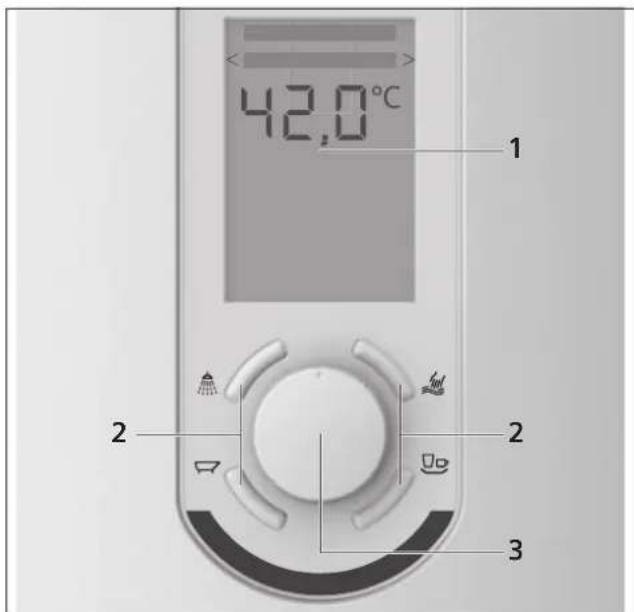
1 Display
2 Comfort keys
3 Rotary selector switch
Display
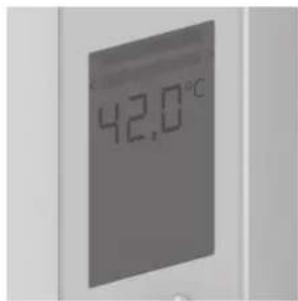
The display indicates the current operating state and makes it possible to change various settings and retrieve consumption figures via the menu.
It is designed to save energy and remains dimmed when the appliance is not being used.
The background lighting and the display readout (e.g. 42^ ) light up if either the water tap is opened, the rotary selector switch is turned, or a comfort key is pressed.
The colour of the background lighting changes depending on the set temperature - the colour ranges from blue (cold) to red (hot). The background lighting switches off about 10 seconds after the last operation. The display readout (e.g. 42^ ) dims after approximately 2 minutes.
Comfort keys
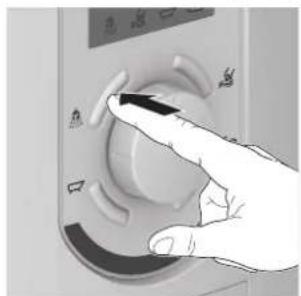
Briefly pressing the keys enables you to directly select the respective temperature setting (see chapter "Setting the water temperature").
Rotary selector switch
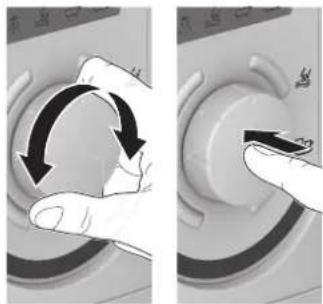
Turning and then pressing the rotary selector switch allows you to set the selected water temperature and use the menu (see chapter "Using the menu").
Operating the appliance
Switching the appliance on and off
The continuous-flow heater switches on and heats the water when the warm water tap is opened. It switches off again if the water tap is closed.
Setting the water temperature
The water temperature is set by turning the rotary selector switch.
Briefly pressing the comfort keys enables you to directly select the temperature respectively saved for each key. The display shows the set temperature as well as the associated text and symbol.

Showering 38^ approx.

Washing hands 35^ approx.

Bathing 40^ approx.

Rinsing 48^ approx.
The preset temperatures saved for each key can be changed.
Example: How to change the "Washing hands" temperature
Briefly press the key.
Turn the rotary selector switch to the desired new temperature.
Press and hold the key. The new temperature setting is saved when the display shows the symbol and the text "Washing hands" as well as a readout of the new temperature.
Note: The comfort keys can also be used by several different users as individual "Temperature keys". Select any of the keys and save your own specific "wellness temperature".
Note: The factory setting for the water temperature after the first start-up or a power failure is less than 35^
Using the menu
The appliance requires less energy to heat the water and therefore economies on costs. The consumption figures for energy, water and the resulting costs can be displayed. In order to retrieve the consumption figures, it is necessary to make some settings via the menu.
Open the menu
Press and hold the rotary selector switch for at least 5 seconds.
Select the menu items
The following menu items can be selected:
Turn the rotary selector switch: to switch between the menu items in the current menu level.
Briefly press the rotary selector switch: to navigate to the next menu level or to confirm a selection.
Note: Following a successful entry, the selected value will be displayed for 10 seconds.
Exit the menu
Select Zurich [back] in the menu.
or
Press any comfort key.
Note: If no entry is made within 30 seconds, then the appliance automatically exits the menu.
Menu item Einstellung [settings]
Important: The entries for Datum/Uhrzeit [date/time] and Kosten [cost] are required in order to subsequently retrieve consumption figures from Verbrauch [consumption]. If no entry is made, then the appliance only displays partial values.
Example of a menu setting
In this example, the language is to be set to Englisch [enl iish].
The factory setting for the menu language is Deutsch [german]. To change the language to English [english]:
Press and hold the rotary selector switch for at least 5 seconds.
Turn the rotary selector switch and select Einstellung [setting]. Press the rotary selector switch.
Turn the rotary selector switch and select Sprache [language]. Press the rotary selector switch.
Turn the rotary selector switch and select English [english]. Press the rotary selector switch. The language is now set to English.
Wait a moment or press the rotary selector switch.
Turn the rotary selector switch. Select other menu items and enter settings.
or
Press any comfort key to exit the menu.
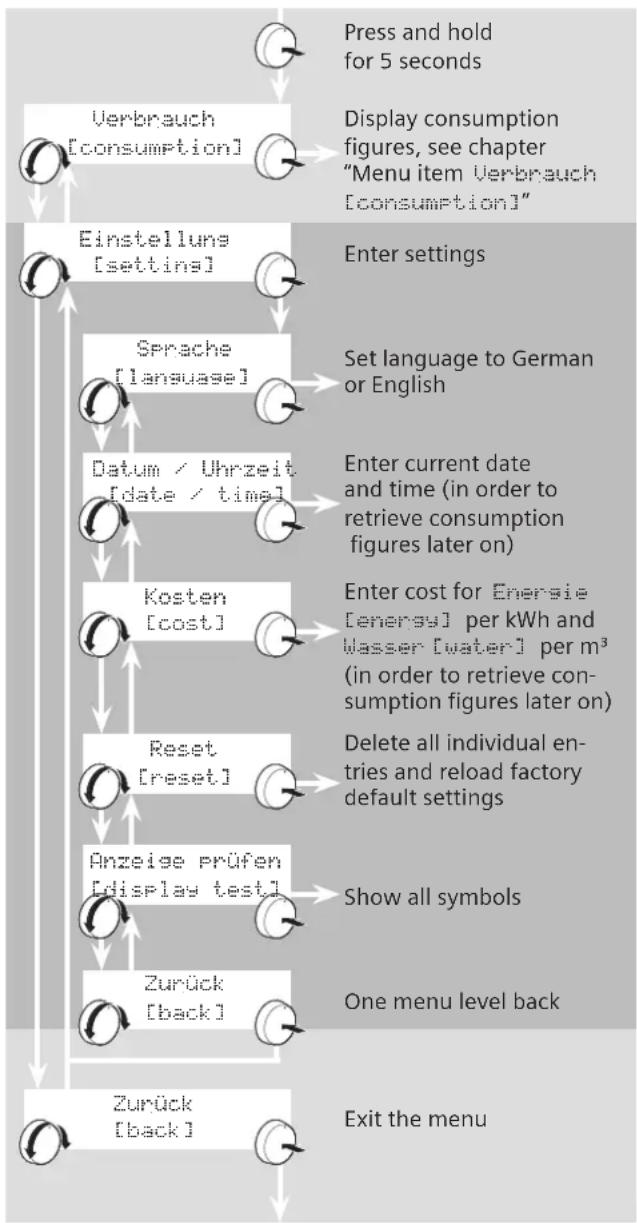
The following settings can be selected
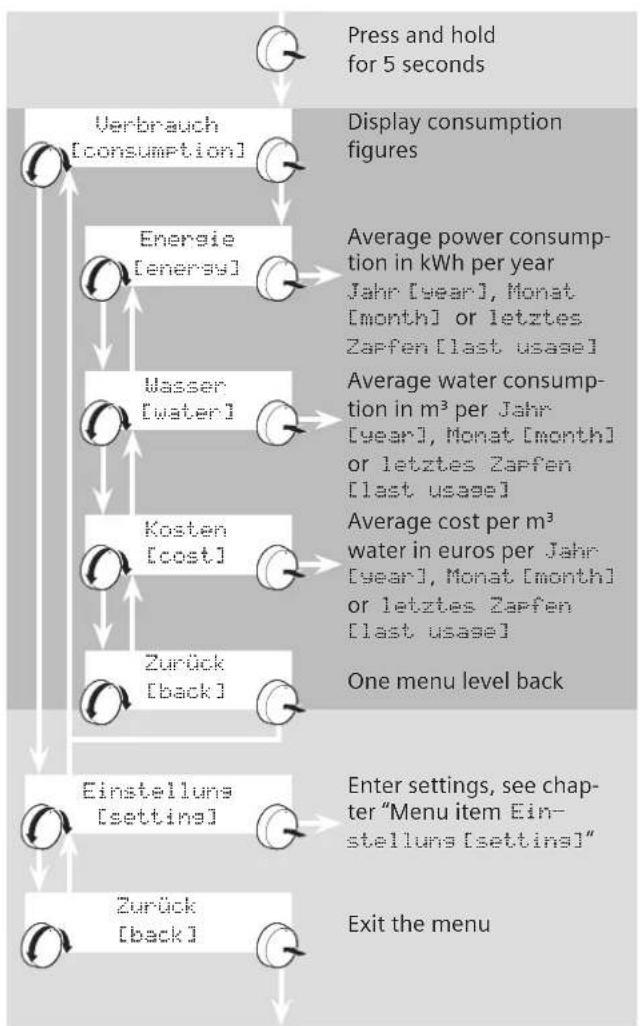
Menu item Verbrauch [consumption]
Note: If either no entry is input or if the entry is incomplete under Einstellung [setting], then only the consumption figures accumulated since initial start-up (or since last reset) are displayed: Gesamtlaufzeit [total currency].
Example of a consumption readout
To display the energy consumption:
Press and hold the rotary selector switch for at least 5 seconds.
Turn the rotary selector switch and select Verbrauch [consumption]. Press the rotary selector switch.
Turn the rotary selector switch and select Eneraié [enerai]. Press the rotary selector switch.
Turn the rotary selector switch and select Jahr [year]. The energy consumption of the selected year is displayed in kWh.
Turn the rotary selector switch and select Monat [month]. The energy consumption of the selected month is displayed in kWh.
Turn the rotary selector switch and select letztes Zapfen [last usage]. The energy consumption of the last usage is displayed in kWh.
To retrieve other consumption figures, navigate up one menu level by pressing the rotary selector switch or select Zurück [back].
or
Press any comfort key to exit the menu.
The following consumption information can be selected
Symbols and readouts shown in display
The following symbols and characters may be shown in the display.
| < Menu selec | tion left, turn the rotary selector switch counterclockwise. |
| > Menu selection right, turn the rotary selec- tor switch clockwise. | |
| 00,0°C | Temperature in degrees celsius |
| 5010 | Cost in euros |
| eco | Economical operation |
| kWh | Power consumption in kilowatt hours |
| l/min | Water flow-rate in litres per minute |
| I | Wasserverbrauch in Liter |
| m3 | Water consumption in cubic metres |
| Child lock active (see chapter "Child lock") | |
| Solar heating active (see chapter "Solar heating") | |
| Power limit reached (see chapter "Power limit") | |
| "Rinsing" water temperature active | |
| "Showering" water temperature active | |
| "Washing hands" water temperature active | |
| "Bathing" water temperature active | |
Child lock

You have the option of limiting the temperature to 42^ to e.g. prevent children from being accidentally scalded.
To activate the child lock:
Simultaneously press and hold the and keys for a few seconds.
The Kindersicherung deaktiviert [child lock deactivated] text appears for a few seconds in the display.
The symbol lights up. The child lock is now activated.
To deactivate the child lock:
Simultaneously press and hold the and keys for a few seconds.
The Kindersicherung deaktiviert [child lock deactivated] text appears for a few seconds in the display.
The symbol goes out. The child lock is now deactivated.
Power limit

If the set temperature is not reached because the water flow rate is too high, then lights up.
Solar heated

The appliance can be operated with pre-warmed water (for example, from a solar energy unit). If the supply water temperature is warmer than 30^ , then the symbol lights up in the display.

Attention!
Scalding danger!
If the output temperature of the water leaving the tap is higher than the set temperature, then this is because the supply water temperature from the domestic system is too hot, e. g. due to its being heated by a solar energy unit.
The thermostatic premixer in the domestic supply must be set accordingly to lower temperatures.
Saving energy ECO
The symbol g rights up if the appliance is economically operated.
Turn the rotary selector switch until the symbol eco lights up.
Startup after power failure
Open the warm water tap fully and allow water to flow until it is warm.
Note: During the initial start-up, the , ^ c flashes in the display.
Using the appliance after switching off the water supply
Switch off the appliance (unscrew the fuse in the fusebox).
- Open the warm water tap and keep it open until the air has been completely forced out of the water pipe.
Switch the fuse back on again.
The appliance is now ready to operate.
Saving energy
Set the desired water temperature directly on the appliance.
Note: Mixing in of cold water at the faucet/fitting consumes unnecessary water and energy. This also accelerates calcification (scaling) of the appliance. Therefore, please always set the desired temperature directly on the continuous-flow heater.
Winter operation
Note: It is possible in winter that the supply temperature of the water is reduced and the required outlet temperature is no longer achieved.
Reduce the water flow on the taps until the desired water temperature is reached.
Cleaning
Only wipe off the appliance using a moist cloth.
Do not use acidic or abrasive cleaning materials.
Do not use a steam cleaner.
Customer Service
We ask you to always provide the E-No. and the FD-No. of your appliance when calling in a customer service engineer. You will find the numbers on the ratings plate on the inner side of the front flap.
The contact information for your country can be found on the last pages of these instructions.
Environmentally-friendly disposal
- Dispose of the packaging in an environmentally sound manner.

This appliance is labelled in accordance with European Directive 2012/19/EU concerning used electrical and electronic appliances (waste electrical and electronic equipment - WEEE).
The guideline determines the framework for the return and recycling of used appliances as applicable throughout the EU.
Please ask your specialist retailer about current disposal facilities.
Guarantee
The guarantee conditions for this appliance are as defined by our representative in the country in which it is sold.
Details regarding these conditions can be obtained from the dealer from whom the appliance was purchased. The bill of sale or receipt must be produced when making any claim under the terms of this guarantee.
In addition to the warranty claims against the vendor arising from the sales contract and in addition to our appliance guarantee, we offer compensation in accordance with the following conditions:
- If water damage is caused due to a malfunction of our AquaStop system, then we shall compensate damages to private consumers.
- The liability guarantees applies for the service life of the appliance.
- The prerequisite of the guarantee claim is that the appliance is correctly installed and connected with AquaStop in accordance with our instructions. Our guarantee does not extend to cover defective supply piping or faucets up to the AquaStop connection.
In general, you neither need to supervise appliances with AquaStop while they are operating nor do you need to shut off the water supply afterward by closing the water tap. The water tap only needs to be shut off during longer absences from your residence, e.g. when going on holidays lasting several weeks.
Subject to change without notice.
A fault, what to do?

Attention!
Repairs must only be carried out by an authorised technician. Improper repairs can lead to risk of serious injury to the user.
If your appliance does not operate as required, it is often due to a very minor problem. Please check whether you can remedy the fault yourself by using the following guidelines. You will save yourself the costs of an unnecessary visit by customer service personnel.
Faults that the customer can troubleshoot himself
| Fault Cause Solution | ||
| Water flow-rate is too low The filter in either the water tap or the showerhead is clogged. | Remove the filter and either clean it or descale it. | |
| A high water temperature is set, but it is not reached. | The continuous-flow heater is connected to a thermostatically-controlled water tap. | Set the temperature on the continuous-flow heater to „60 °C". |
| The display is blank. The fuse in the fusebox has tripped/blown. Check the fuse in the fusebox. | ||
| The water is not warm. The supply temperature has reduced. Reduce the water flow on the taps until the desired water temperature is reached. | ||
| The temperature of the water leaving the tap is higher than the set temperature. | The temperature of the water supplying the continuous-flow heater is higher than the set temperature (e.g. due to pre-warmed water supplied from a solar water heater). | The thermostatic premixer in the domestic supply must be set accordingly to lower temperatures. |
| lights up in the display. | The power limit has been reached. Reduce the water flow at the tap or lower the temperature setting on the appliance. | |
If the fault could not be eliminated, please call customer service.
Faults that the customer service specialist should troubleshoot
| Fault Cause Solution | ||
| Water flow-rate is too low despite cleaning of filter using the water tap or showerhead | A filter in the appliance is clogged. Get a servicing expert to clean the appliance. | |
| The display is blank despite fault-free function of the mains electricity supply fuses. | There is a fault in the appliance. Get a servicing expert to check the appliance. | |
| The display shows the error code “E.” | There is a fault in the appliance. Get a servicing expert to check the appliance. | |
Faults that are automatically remedied
| Fault Cause Solution | ||
| The display shows "00,0°C". The air sensor in the appliance detects air in the water and momentarily switches the heating element off. | After a few seconds, the continuous-flow heater automatically goes back into operation. | |
Rincer, 48^ env.
Sous reserve de modifications.
www.siemens-home.com/tr
www siemens-yetkiliservisi.com
Faks :0216.528.91.88
E-posta : siemenscagrimerkezi@bshg.com.
Yetkilinin imzasi :
SATICI FIRMANIN
Unvani :
Adresi
Telefonu:
Faks
E-posta :
Bandrol ve Seri No. :
European Trade Center Building, 5th floor
1784 Sofia
Tel.: 0700 208 18
Fax:028787972
mailto:informacia.servis-bg@bshg.com
www.siemens-home.bg
CH Schweiz, Suisse, Svizzera, Switzerland
BSH Hausgeräte AG
Central Branch Service
17 km E.O. Athinon-Lamias &
Potamou 20
14564 Kifisia
Unit 1 & 2, 3rd Floor
North Block, Skyway House
3 Sham Mong Road
Tai Kok Tsui, Kowloon
Hong Kong
Tel.: 2565 6151
Fax: 25656681
mailto:siemens.hk.service@bshg.com
www.siemens-home.com.hk
HR Hrvatska, Croatia
BSH kučni uredaji d.o.o.
Kneza Branimira 22
10000 Zagreb
Tel.: 015520999
Fax:016403603
mailto:informacije.servis-hr@bshg.com
www.siemens-home.com/hr
LU Luxembourg
www.siemens-home.com/lu
ME Crna Gora, Montenegro
Elektronika komerc
UI.Slobode17
84000 Bijelo Polje
Tel./Fax:050432575
Mobil: 069324812
mailto:ekobosch.servis@t-com.me
MK Macedonia,Makeonna
GORENEC
Jane Sandanski 69 lok.3
1000 Skopje
Tel.: 022454600
Mobil:070697463
mailto:gorenec@yahoo.com
PH Philippines
Hafele Philippines, Incorporated
Levi Mariano Avenue, Brgy. Ususan,
Taguig City 1632
Metro Manila
Tel.: 0842 3353
Fax:05713662
mailto:siemens-home@hafele.com.ph
PL Polska, Poland
TH Ratcha Anachak Thai,
BSH Home Appliances Limited
2034/1-5 Itai Thai Building,
1st Floor, New Petchburi Road
Bangkapi, Huaykwang,
Bangkok, 10310
Tel.: 02 769 7970
Fax:027697971
Service Call Center 02 351 8995
Spareparts 02 769 7975
www.siemens-home.com/th
TR Türkiye, Turkey
BSH Ev Aletleri Sanayi
ve Ticaret A. S.
Fatih Sultan Mehmet Mahallesi
Balkan Caddesi No: 51
34771 Umraniye, Istanbul
Tel.: 02164446688
Fax:02165289188
mailto:careline.turkey@bshg.com
www.siemens-home.com/tr
www.siemens-homeappliances.com
9001217887