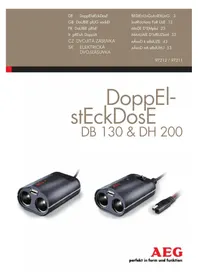
DB 130 - Car cigarette lighter adapter AEG - Free user manual and instructions
Find the device manual for free DB 130 AEG in PDF.



| Product type | Double 12V cigarette lighter socket with USB port |
| Brand | AEG |
| Model | DB 130 |
| Reference | 97212 |
| Operating voltage | 12 V |
| Maximum power | 130 W (5 A) |
| USB output | 5 V / 1 A |
| Dimensions (without cable) | 9 x 6 x 4 cm |
| Weight | 108 g |
| Number of sockets | 2 cigarette lighter sockets 12V + 1 USB port |
| Power supply | Via vehicle 12V cigarette lighter socket |
| Main functions | Extension of cigarette lighter socket to power two 12V devices simultaneously, USB charging for smartphones |
| Safety | Do not use in the deployment zone of airbags, avoid contact with moisture |
| Care and cleaning | Clean with a soft dry cloth, do not immerse |
| Storage | In a clean and dry place |
| Warranty | In accordance with general terms and conditions (production and material defects) |
Frequently Asked Questions - DB 130 AEG
User questions about DB 130 AEG
0 question about this device. Answer the ones you know or ask your own.
Ask a new question about this device
Download the instructions for your Car cigarette lighter adapter in PDF format for free! Find your manual DB 130 - AEG and take your electronic device back in hand. On this page are published all the documents necessary for the use of your device. DB 130 by AEG.
USER MANUAL DB 130 AEG
Always follow these instructions when using this product. Include all documentation when transferring the product to other users.
These instructions are for the following units:
Double plug socket DB 130 - Article number 97212
Double plug socket DH 200 - Article number 97211
Images may slightly deviate from the actual product. Subject to change in the interest of technical advances. Decorations not included.
Included in delivery
Double plug socket DB 130 with vehicle connection plug or double plug socket DH 200 with comfort connection, instructions.
Control immediately as to whether the delivery is complete as shown. Check the device and all parts for damage. Do not use a defective device or defective parts.
Intended Use
The double plug sockets DB 130 and DH 200 have two 12-V vehicle connectors and a USB connection. The USB connection serves for the electricity supply and/or for charging, e.g., mobile phones. The USB connection cannot be used for data transmission.
The double plug socket DB 130 is to be connected to a 12-V vehicle plug and adapts this for an extra two connections.
The double plug socket DH 200 is to be connected directly to the vehicle battery. This means that a high-er connected power is possible to the double plug socket. In addition, this device has a voltage indicator with a battery monitor function. The comfort connection of the device can also be used as a charging connection (compatible with the following GEC battery chargers: 97101, 97102).
Any other use or change the double plug socket is not permitted as it is not in accordance with the requirements and can cause danger. The double plug socket is to be used exclusively for private purposes. Observe the maximum permitted connected power (see "technical data").
SAFETY INFORMATION

Warning!

Fatal or dangerous to children!
Children are unable to assess the risks associated with this product!
Choking and strangulation hazard! Do not allow children to play
with the packaging materials and this product.
This device is not intended for use by persons (including children) with reduced physical, sensory or mental abilities or who lack experience and / or knowledge, unless they are supervised by a person who is responsible for their safety or unless they receive instructions from this person on how the equipment is to be used. Children must be supervised in order to ensure that they do not play with the device.

Warning!
Read and observe all of the Safety Information. Failure to follow this advice can lead electric shock, burns and serious injury.
Mortal danger! Do not mount the double plug socket within the deployment radius of air bags.
Danger of injury from fire and damage due to short circuit or overload! The improper use of the unit can lead to serious injury and damage. Do not attempt to open or manipulate the device in any way.
Danger of injury! A damaged device can lead to injuries. Do not use a damaged device. Take it to a certified electrician or back to where you bought it from.

15
Fire risk! Note that the vehicle plug warms up during extended use. Unplug the double plug socket when it is not required.
Danger from electric shock! Make sure that the socket does not come into contact with liquids. Do not use the unit in humid or wet conditions. Make sure that all plugs and cables are free from moisture. Never connect the unit to the vehicle with wet or moist hands.
Short circuit danger! Keep electrically conductive objects away from the plug socket contacts.
Danger of injury! Do not pull on the unit's cables. These could be damaged. Damaged cables in-crease the risk of an electric shock.
Additional Safety Information for Model DH 200
Short circuit danger! Always make sure that you connect the correct polarity cables when you make the connections to the battery.
Do not attach the connecting leads if a device is connected to the double plug socket.
Use only the connecting leads provided (comfort connection with ring terminals) to connect the unit to a battery.
Fire risk! Do not leave the double plug socket unattended when switched on.
16
PRODUCT DESCRIPTION
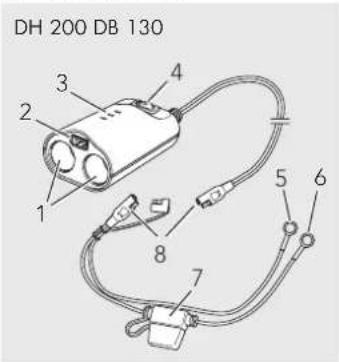
Product Overview

- 12 V Vehicle socket
- USB connection
- LED Voltage indicator
- ON/OFF switch
-
Terminal Connection Cable (-) with black ring terminal connector
-
Terminal Connection Cable (+) with red ring terminal connector
- Fuse
- Comfort connector
- LED monitor light
- Connector cable with vehicle plug

Field of Application and Features
Extension of a 12 V vehicle plug into two separate connections, making simultaneous operation of two 12 V devices possible.
USB connection socket (Charging connection, e.g., for Smartphones).
Additionally for Model DH 200:
Permanent power supply directly from the vehicle battery (even when the vehicle is switched off). This creates a high amount of power, made possible via the double plug socket. For 12 V devices up to 200 W power output.
deal for connecting devices with a high power requirement (e.g., fridges or heating units).
Voltage indicator with a battery monitor function
ON/OFF switch
Comfort connector
Technical Data
| DB 130 DH 200 | ||
| Article Number 97212 97 | 211 | |
| Operating Voltage 12 V 1 | 2 V | |
| Power Output (max.) 130 | W 200 W | |
| Current (max.) 5 A 15 A | ||
| USB connection | 5 V / 1 A | 5 V / 2,1 A |
| Weight | 108 g | 275 g |
| Dimensions (not including cable) | 9 × 6 × 4 cm | 9 × 6 × 4 cm |
ASSEMBLY AND CONNECTION
Model DB 130
Connecting to a 12-V vehicle socket:
- Insert the vehicle plug [10] into the 12 V vehicle socket.
- Place the double plug socket in such a way that the unit or the cable does not hinder the driver.
Model DH 200
Connecting to the vehicle battery:
The DH 200 model is connected directly to the battery with the ring terminal connector cable.
Warning! The connecting cable from the double plug socket must run through the interior of the vehicle. This is usually achieved by running it along a section of vehicle body panelling.
If you are unable to run the cable through the interior of the vehicle yourself, take the job to a vehicle repair shop.
If the connecting cable has to be led through sharp or rough walls (e.g., metal panels), use rubber grommets or cable channels to avoid damage to the cable.
lay and fasten the cable in such a way that it cannot come into contact with any movable, hot or sharp-edged parts.
- Place the double plug socket in such a way that you are not hindered by the unit or the cable whilst driving.
- Lead the double plug socket connecting cable from the vehicle interior to the battery.
- Connect the terminal connection cable (red ring connection) (+) [6] to the positive terminal on the battery.
- Connect the terminal connection cable (black ring connection) (-) [5] to the negative terminal on the battery.
- Connect the comfort connection plugs [8] with one another.
OPERATION

Model DB 130
As soon as the vehicle plug [10] is connected with the 12 V vehicle socket and is conducting an electrical charge, the red LED will illuminate. Now the double plug socket is ready for use and devices can be connected to both 12 V vehicle sockets, as well as to the USB connection socket.
Note that with some vehicles, the 12 V vehicle socket may only function when the ignition is switched on.
Use the double plug socket for a short time only if the vehicle engine is not switched on. Failure to observe this can cause the vehicle battery to run down.
After use, always remove the plug from the 12 V vehicle socket. When removing the connection, pull on the plug itself, and never on the connecting cable.
Model DH 200
To switch the unit on, switch the ON/OFF switch [4] on the double plug socket to ON. Now the double plug socket is ready for use.
Make sure that the total power consumption connected to the double plug socket does not exceed 15 A.
Voltage Indicator LED functions [3]:
| Red Current < 10.5 V |
| Yellow Current between 10.5 V-12.5 V |
| Green Current > 12.5 V |
Battery monitor function: As soon as the double plug socket is switched on, an LED illuminates which corresponds to the battery voltage. If the battery voltage sinks below 10.5V , the LED will light up red. If this happens, the double plug socket will automatically switch off in order to prevent the vehicle battery from running down. This will resume if the battery return to 11.8V or above.
20
SERVICE AND MAINTENANCE
Fuse
The DH 200 model is protected with a fuse (flat vehicle fuse, 15 A) in the terminal connection cable (+). This is designed to break the circuit if a power surge or short circuit occurs, and will then require changing.
Changing the fuse:
Warning! Do not use a more powerful fuse.
This can lead to fire and can also damage the electronic system.
- Open the fuse box.
- Remove the defective fuse.
- Replace with a new (15 A) fuse.
- Close the fuse box.
Care
Clean the device with a soft, dry cloth. Do not use abrasive cleaners or solvents for cleaning.
Do not allow the double plug socket to come into contact with liquids.
Check the unit for damage before every use.
Store the unit in a clean and dry place.
Warning! Do not use the unit if it appears to be damaged (e.g., worn cables, broken casing).
If the unit is damaged, requires repair, or if you experience any other problems with the unit, please consult the sales staff at the place of purchase or a certified specialist agent.

Disposal

Do not dispose of packaging or the product through your household waste! The product and packaging are made from recyclable materials (plastics, metals, paper).
If the product is no longer suitable for use dispose of it in an environmentally friendly manner in accordance with your local ordinances.
Warranty and Service
The general warranty terms apply to defects in manufacturing and material. Please return the defective product to your retailer.
To process your claim efficiently you will also need:
A copy of the receipt including date of purchase.
Reason for return (description of defect).
INTRODUCTION

www.aeg-automotive.com AEG is a registered trademark used under license from AB Electrolux (publ)
Stand der Informationen: 09 / 2011. Ident.-No.: 4038373972118 & 4038373972125
- Included in delivery
- Intended Use
- SAFETY INFORMATION
- Warning!
- Additional Safety Information for Model DH 200
- PRODUCT DESCRIPTION
- Field of Application and Features
- ASSEMBLY AND CONNECTION
- Model DB 130
- Connecting to a 12-V vehicle socket:
- Model DH 200
- Connecting to the vehicle battery:
- OPERATION
- SERVICE AND MAINTENANCE
- Fuse
- Care
- Disposal
- Warranty and Service
- INTRODUCTION
Brand : AEG
Model : DB 130
Category : Car cigarette lighter adapter