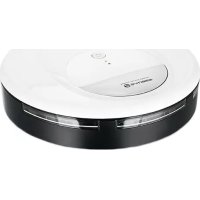
RVC120592.1 - Robot vacuum Emerio - Free user manual and instructions
Find the device manual for free RVC120592.1 Emerio in PDF.


| Brand | Emerio |
| Model | RVC120592.1 |
| Category | Robot vacuum cleaner |
| Battery voltage | 7.2 V DC |
| Power adapter | Input 100-240 V~50/60 Hz, 0.2 A MAX; Output 12 V=500 mA |
| Charging time | 3 to 4 hours |
| Runtime | 90 minutes |
| Battery type | Rechargeable lithium-ion (replacement by a professional) |
| Cleaning modes | Automatic, on/off, pause |
| Brushes | Side brush, central rotating brush |
| Sensors | Drop sensor, light sensor, obstacle sensor |
| LED indicator | Solid on: charged; flashing: charging or low battery (depending on rate) |
| Safety | Automatic shutdown after 60 s of inactivity; do not use on wet surfaces; keep out of reach of children |
| Maintenance | Empty dust compartment regularly; clean brushes and sensors |
| Spare parts | Side brush, central brush, battery, adapter |
| Warranty | 2 years (excluding normal wear and misuse) |
| Customer service | Emerio Deutschland GmbH, Tel. +49 (0) 3222 1097 600, info.de@emerio.eu |
Frequently Asked Questions - RVC120592.1 Emerio
User questions about RVC120592.1 Emerio
0 question about this device. Answer the ones you know or ask your own.
Ask a new question about this device
Download the instructions for your Robot vacuum in PDF format for free! Find your manual RVC120592.1 - Emerio and take your electronic device back in hand. On this page are published all the documents necessary for the use of your device. RVC120592.1 by Emerio.
USER MANUAL RVC120592.1 Emerio
Robotic vacuum cleaner (EN)
Before use make sure to read all of the below instructions in order to avoid injury or damage, and to get the best results from the appliance. Make sure to keep this manual in a safe place. If you give or transfer this appliance to someone else make sure to also include this manual.
In case of damage caused by user failing to follow the instructions in this manual the warranty will be void. The manufacturer/importer accepts no liability for damages caused by failure to follow the manual, a negligent use or use not in accordance with the requirements of this manual.
- This appliance can be used by children aged from 8 years and above and persons with reduced physical, sensory or mental capabilities or lack of experience and knowledge if they have been given supervision or instruction concerning use of the appliance in a safe way and understand the hazards involved.
- Children shall not play with the appliance.
- Cleaning and user maintenance shall not be made by children without supervision.
- The appliance is only to be used with the power supply unit provided with the appliance.
- Before inserting the plug into the mains socket, please check that the voltage and frequency comply with the specifications on the rating label.
- Disconnect the mains plug from the socket when the appliance is not in use and before cleaning.
- Ensure that the mains cable is not hung over sharp edges and keep it away from hot objects and open flames.
-
Do not immerse the appliance or the mains plug in water or other liquids. There is danger to life due to electric shock!
-
To remove the plug from the plug socket, pull the plug. Do not pull the power cord.
- Do not touch the appliance if it falls into water. Remove the plug from its socket, turn off the appliance and send it to an authorized service center for repair.
- Do not plug or unplug the appliance from the electrical outlet with a wet hand.
- Never attempt to open the housing of the appliance, or to repair the appliance yourself. This could cause electric shock.
- Never leave the appliance unattended during use.
- This appliance is not designed for commercial use.
- Do not use the appliance for other than intended use.
- Do not wind the cord around the appliance and do not bend it.
- The appliance is for indoor use only.
- The unit is suitable for cleaning hard floor, tile, thin carpet, not for thick carpet.
- A damaged power supply should be replaced only with the original parts from manufacture.
- Do not use on wet or greasy dust.
- Before operation, move away the fragile things (glass, light and etc.) and other things (long hair, plastic bag, rope, wire and etc.) possibly entangle brushes.
- Do not sit on the machine or put heavy things on it.
- Clean the machine regularly. Empty the dust container.
- Charge the machine without use for three months.
- Charge the machine only when alarms for low power or power off. Use it after fully charged.
- Recycle the battery when machine becomes broken.
- WARNING: For the purposes of recharging the battery, only use the detachable supply unit provided with this appliance.
- This appliance contains batteries that are only replaceable by skilled persons.
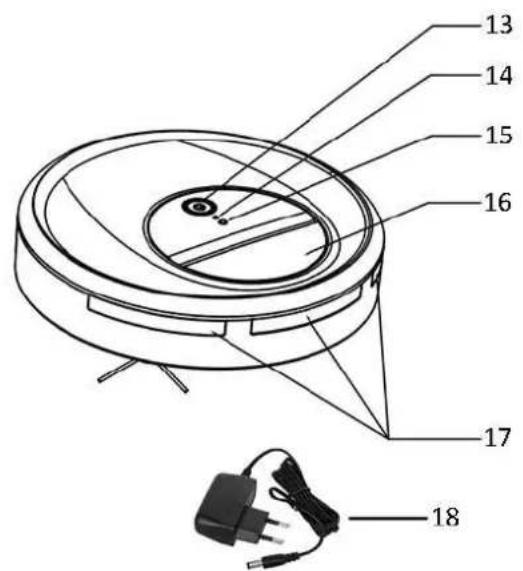
COMPONENTS
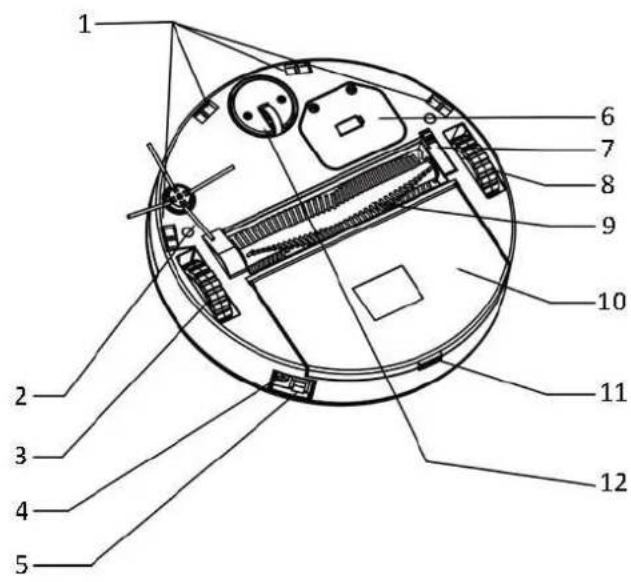
- Cliff detection sensor
- Side brush
- Right wheel
- Charger port
- On/off button
- Battery cover
7.Middle brush holder
8.Left wheel -
Brush wheel
-
Dustbin
- Dustbin release button
- Universal wheel
13.Start/pause button - LED indicator
- Light sensor
- Handle
- Obstacle sensor
- Adapter
How to assemble the side brush
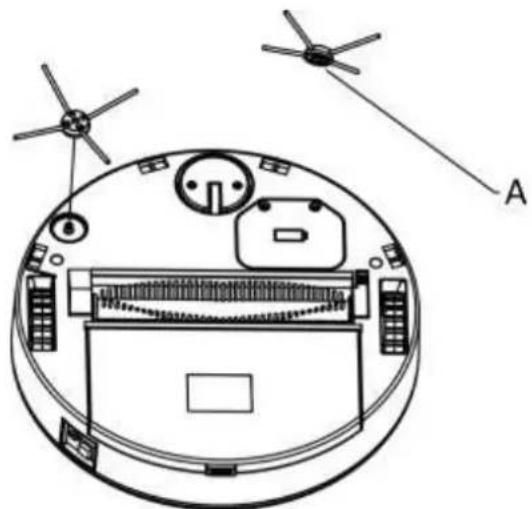
There is a hexagonal hole (A) at the bottom of the side brush.
Align the brush with the hexagonal hole facing down and press it until clicks in the unit.
USE
- Install the side brush as described above.
- Place the machine on the ground to be cleaned.
- Press the on/off button to turn on the machine with music playing accordingly. LED indicator is on; the machine enters into standby status.
- Press the start/pause button; the machine starts working.
- During operation, press the start/pause button the machine will stop temporarily.
NOTE: The machine will automatically power off without working for approx. 60 seconds. Press the on/off button to restart the machine if needed. - After use, press the dustbin release button to open the dustbin. Clean any dirt left behind in the dustbin.
NOTE: When machine stops unexpectedly and LED indicator flashes 3 times quickly in a second, please check carefully if the machine is being entangled or brush wheel fails to operate.
- If the machine is being entangled, move it to the spacious place to restart.
- If the brush wheel fails to operate, take it out and make it clean.
If the machine still cannot start properly, product malfunction happens. A long press on the on/off button to power off the machine and start once again. - If the malfunction cannot be recovered by its own, send the machine for repairing.
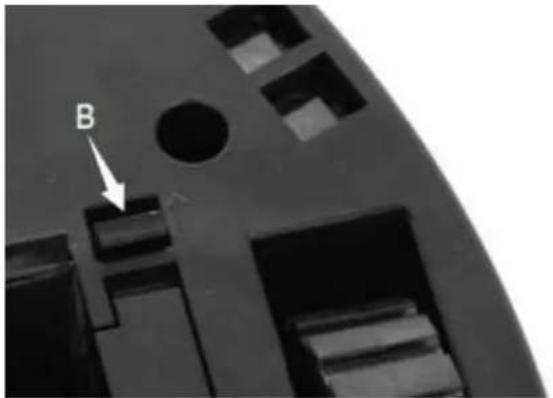
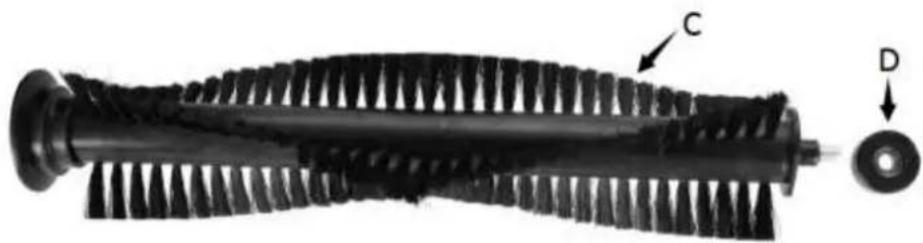
How to remove and reinstall the middle brush
Turn the machine upside down on a flat surface. Slide the middle brush release catch (B) and take out the brush (C) and the side wheel (D). Clean the brush and the side wheel. Reverse the procedure to reinstall.
How to charge
When machine stops working and LED indicator flashes once slowly in a second, it means run out of battery. Charge the machine in time.
- Plug the adapter into the charging port next to the on/off button.
- Plug the adapter into the power outlet.
- During charging, the LED indicator will flash all the time.
- When fully charged, the LED indicator will stay lit.
- Plug out when finished.
How to replace the battery
(This appliance contains batteries that are only replaceable by skilled persons. Batteries cannot be replaced by the end users.)
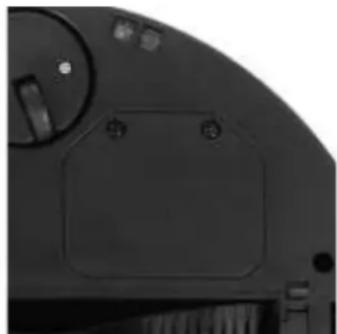
- Loosen the screws on the battery cover.
- Take out the battery.
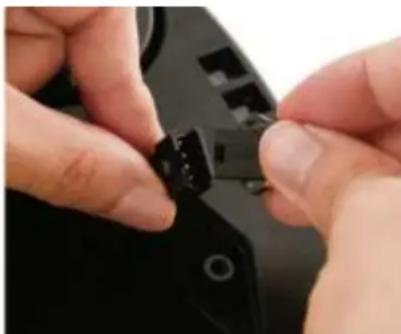
- Remove the connector. Press the lock on the connector and pull off.
- Replace with new battery. Attach the connector.
- Close the battery cover and secure with the screws.

CLEANING AND MAINTENANCE
- Make sure the machine is unplugged before cleaning.
- Do not clean the machine and power supply by immersing in water or in other liquids.
- Metal parts (power plug or terminal): wipe them with a clean dry cloth.
- Plastic parts: wipe them gently by a clean, soft cloth together with water or a mild detergent.
- Do not use gasoline, alcohol and other strong irritant cleaning lotion to clean the machine.
- Store the machine in a cool and dry place.
PRODUCT SPECIFICATIONS
Voltage: 7.2VDC
Current: 800mA
Adaptor input: 100-240V~50/60Hz
0.2A MAX
Adaptor output: 12V = 500mA
Charging time: 3-4hrs.
Continuously working time: 90min.
TROUBLESHOOTING
| Trouble | Possible cause | Solution |
| Abnormal sound | The machine is entangled or trapped. | Clear the area around the brush wheel. |
| Work for a short time after battery is fully charged. | The brush wheel cannot operate or battery is defected. | Remove the brush wheel and clear it. If it still does not work, replace with new battery. |
| Without obstacle ahead, machine often makes wrong turn. | 1. Dust in the universal wheel 2. Dirt in cliff detection sensor | 1. Remove the universal wheel, open the cover board, and clean the dust. 2. Clean the cliff detection sensor by soft cloth. |
| Machine often moves back and forth in the same spot. | Some object is under the bottom of the machine. | Check if it's on an even floor, if any object is under the bottom of the machine. |
| Machine falls from height or upstairs. | Malfunction on cliff detection sensor | Clean the cliff detection sensor by soft cloth. Send for repairing if problem cannot be solved. |
| Machine often stops under the bed. | 1. Lack of light under bed 2. Dirt on the light sensor | 1. Working room is dark. Open window or turn on light. 2. Clean the light sensor. |
| Serious deformation of side brush | Normal damage | Replace with a new side brush. |
| Side brush does not work. | Side brush is entangled by hair. | Take off the brush and remove the hair. |
| Dustbin cannot be closed. | Bottom cannot pop out after press in. | Remove the screws in the dustbin cover. Take off the button cover, clean it and reinstall. |
GUARANTEE AND CUSTOMER SERVICE
Before delivery our devices are subjected to rigorous quality control. If, despite all care, damage has occurred during production or transportation, please return the device to your dealer. In addition to statutory legal rights, the purchaser has an option to claim under the terms of the following guarantee:
For the purchased device we provide 2 years guarantee, commencing from the day of sale. If you have a defective product, you can directly go back to the point of purchase.
Defects which arise due to improper handling of the device and malfunctions due to interventions and repairs by third parties or the fitting of non-original parts are not covered by this guarantee. Always keep your receipt, without the receipt you can't claim any form of warranty. Damage caused by not following the instruction manual, will lead to a void of warranty, if this results in consequential damages then we will not be liable.
Neither can we hold responsible for material damage or personal injury caused by improper use if the instruction manual is not properly executed. Damage to accessories does not mean free replacement of the whole appliance. In such case please contact our service department. Broken glass or breakage of plastic parts is always subject to a charge. Defects to consumables or parts subjected to wearing, as well as cleaning, maintenance or the replacement of said parts are not covered by the warranty and are to be paid.
ENVIRONMENT FRIENDLY DISPOSAL

Recycling - European Directive 2012/19/EU
This marking indicates that this product should not be disposed with other household wastes. To prevent possible harm to the environment or human health from uncontrolled waste disposal, recycle it responsibly to promote the sustainable reuse of material resources. To return your used device, please use the return and collection systems or contact the retailer where the product was
purchased. They can take this product for environmental safe recycling.
Emerio Deutschland GmbH (no service address)
Lerchenweg 3
40789 Monheim am Rhein
Deutschland
Customer service:
T: +49 (0) 3222 1097 600
E: info.de@emerio.eu
SICHERHEITSHINWEISE
CHCTKA IN TEXHINCHECKOE OBCLJXINBAHNE
1.перд усткои пибopa y6eДntecb,чTo OH OTKJIIOueH OT cTeN.
2.He norpykaTe np6Op n 6lok nntaHn B Body n6o Hhbe XnDkoCTn dIra OChTkn.
3. MeTJIuueckne uactn np6opa (BUNka n KJIeMMbl) cIeDyET npOTnpaTb YNCTOJ cyXOJ TKAHbIO.
4. Пл actikobbieчспnpbopa cneуet akkypaTHO npoTnpaTb MrgKo TkaHbIO, cmoeHHoB B BoJe mMgKOM MOUeM CpeCTBe.
5. He nCnoJIb3yIe IJn qIcTKn npIbopa 6eH3nH, cInpT n dpyrne cIIbHbIe pa3dpaKaIOuIe MOUuIe CpeIDCTBa.
6. XpaHnte npn6Op B npoxlaHOM cyxom MeCTe.
TEXHNUECKNE XAPAKTEPNCIKI PIPBOPA
HanpexHe:7.2BDC
Cuna Toka: 800 mA
BxoI aIantepa: 100-240B 50 / 60U
0.2 A MAX

- COMPONENTS
- How to assemble the side brush
- USE
- How to remove and reinstall the middle brush
- How to charge
- How to replace the battery
- (This appliance contains batteries that are only replaceable by skilled persons. Batteries cannot be replaced by the end users.)
- CLEANING AND MAINTENANCE
- PRODUCT SPECIFICATIONS
- GUARANTEE AND CUSTOMER SERVICE
- ENVIRONMENT FRIENDLY DISPOSAL
- SICHERHEITSHINWEISE
- CHCTKA IN TEXHINCHECKOE OBCLJXINBAHNE
- TEXHNUECKNE XAPAKTEPNCIKI PIPBOPA
Brand : Emerio
Model : RVC120592.1
Category : Robot vacuum