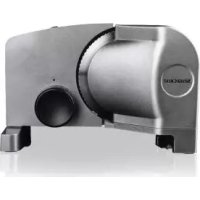
SAS 150 B2 - Slicer SILVERCREST - Free user manual and instructions
Find the device manual for free SAS 150 B2 SILVERCREST in PDF.



Frequently Asked Questions - SAS 150 B2 SILVERCREST
User questions about SAS 150 B2 SILVERCREST
0 question about this device. Answer the ones you know or ask your own.
Ask a new question about this device
Download the instructions for your Slicer in PDF format for free! Find your manual SAS 150 B2 - SILVERCREST and take your electronic device back in hand. On this page are published all the documents necessary for the use of your device. SAS 150 B2 by SILVERCREST.
USER MANUAL SAS 150 B2 SILVERCREST
User manual and service information
F
Introduction 3
Intended use 3
Package contents 4
Technical specifications. 5
SO time 5
Safety instructions 5
Copyright 10
Before you start 10
Getting started 11
Cleaning 14
Maintenance 15
Storage 15
Troubleshooting 15
Environmental regulations and disposal information 15
Conformity notes 15
Warranty information 16
Introduction
Thank you for purchasing the SilverCrest SAS 150 B2 Food Slicer, hereinafter referred to as a food slicer. This is a quality, modern product which makes your work in the kitchen in easier and helps you to slice bread, cheese, sausage and other foodstuffs into slices of adjustable thicknesses just as you require in no time at all.
Intended use
This food slicer is a household appliance which is used for cutting suitable foods such as bread, cheese and sausage. It may not be used outdoors or in tropical climates. It has not been designed for corporate or commercial applications. Use the food slicer in domestic environments for private applications only. Any other use does not correspond to the intended use. This food slicer fulfils all relevant norms and standards concerning CE conformity. In the event of any modification to the food slicer that was not approved by the manufacturer, compliance with these standards is no longer guaranteed. The manufacturer shall not be liable for any damage or malfunctions resulting from such modifications. Only use accessories supplied with the appliance by the manufacturer.
Observe the regulations and laws in the country of use.
Package contents
Remove the food slicer and all the accessories from the packaging. Remove the packaging material and check that all components are complete and undamaged. If you find anything missing or damaged, please contact the manufacturer.
SilverCrest SAS 150 B2 Food Slicer
supply carriage
- food holder
- catcher plate
these operating instructions
These operating instructions have a fold-out cover. On the inside of the cover is a diagram of the SilverCrest SAS 150 B2 Food Slicer with all its accessories and control elements numbered. You can keep this page folded out whilst reading the different chapters of this user manual. This allows you to refer to the relevant accessory/control element at any time. The meanings of the numbers are as follows:
1 Switch (I = continuous operation, 0 = off, II = short operation mode)
2 Blade
3 Blade lock
4 Food holder
5 Power cord store
6 Power cord
7 Device base
8 Catcher plate
9 Adjusting knob (for slice thickness)
10 Supply carriage
11 Holding plate
Technical specifications
| Name SilverCrest SAS 150 B2 | |
| Power supply | 220-240 V~, 50/60 Hz |
| Power consumption 120 W max. | |
| SO time 5 minutes | |
| Safety class | II ☐ |
| Slice thickness 0 mm up to approx. 20 mm | |
| Dimensions (W x D x H) approx. 335 x 225 x 225 mm | |
| Weight approx. 2,600 g | |
| Operating temperature | 5°C to 35°C |
| Operating humidity 85% rel. humidity | |
| Permissible storage conditions | -10°C to +50°C, max. 85% rel. humidity |
The technical specifications and design can be changed without prior notice.
SO time
The SO time (short operating time) indicates how long the food slicer can be operated without the motor overheating and getting damaged. The short operating time for the SilverCrest SAS 150 B2 Food Slicer is 5 minutes. After this time, the food slicer needs to be switched off until the motor has cooled down.
Safety instructions
Before you use this food slicer for the first time, please read the following notes and heed all warnings, even if you are familiar with handling electric devices. Keep these operating instructions in a safe place for future reference. If you sell the food slicer or give it away, pass on the user manual at the same time. It is part of the device.

DANGER! This icon and the word "Danger" alert you to a potentially dangerous situation. Ignoring it can lead to severe injury or even death.

WARNING! This symbol and the word "WARNING" denote important information required for the safe operation of the food slicer and for the safety of its users.

DANGER! This symbol denotes danger for human health and risk of death and/or risk of damage to equipment due to electric shock.

This symbol denotes further information on the topic.

DANGER! Children and persons with disabilities
This food slicer is not to be used by children. The appliance and its power cord should be kept out of the reach of children. This food slicer may be used by persons with reduced physical, sensory or mental capabilities and/or who have no experience in, or knowledge of, using such appliances providing they are supervised or have been instructed in how to use the appliance safely and have understood the associated risks. Do not allow children to play with the appliance. Small parts can represent choking hazards. Keep the packaging away from children and persons with disabilities. There is a risk of suffocation.

DANGER! Power cord

Always hold the power cord (6) by the mains plug and never pull on the power cord (6) itself. Never put heavy objects or furniture on the power cord (6) and make sure it does not get trapped, especially at the mains plug. To avoid damaging it, never lead the power cord around hot or sharp objects or edges. Do not use adapters or extension cables which do not meet the applicable safety standards and do not attempt to modify the power cord (6) yourself! If the power cord is damaged, it must be replaced by the manufacturer, its customer service or a similarly qualified person, in order to avoid any possible danger. Never tie knots in the power cord (6) and do not tie it to other cables. The power cord (6) should be positioned such that nobody can trip over it or be obstructed by it. There is a danger of injury.

DANGER! Maintenance/cleaning

Repairs are required if the food slicer has been damaged in any way, for example, if liquid has entered the product, if the product has been exposed to rain or moisture, if the product does not work normally or if the product has been dropped. If you notice any smoke, unusual noises or strange smells, immediately unplug the power cord (6) of the food slicer from the mains socket. If this occurs, the food slicer should no longer be used until it has been inspected by authorised service personnel. All repair work must be carried out by qualified personnel. Never open the food slicer housing. Before cleaning
the food slicer, always remove the mains plug from the mains socket. When cleaning the food slicer, never immerse it in water or hold it under running water.
Be careful removing and cleaning the blade (2). The blade (2) is very sharp! There is a danger of injury.

DANGER! Operation
- Before removing the blade (2), disconnect the food slicer from the mains.
- Only use it in conjunction with the accessories provided. There is a danger of injury.
- When using the food slicer, make sure that long hair, ties or loose clothing do not get caught up in the blade (2). There is a danger of injury.
- Never put your hands near the rotating blade (2). There is a danger of injury.
- Never use your bare hands to hold bits of food near the blade (2) for cutting! Always use the food holder (4) provided. There is a danger of injury.
- Never operate the food slicer without the blade (2). Never attempt to slice packaged or frozen foods, ice cubes, foods with bones or large stones or nuts in their shells. This could damage the food slicer.
- After use, or when the food slicer is unattended, always remove the mains plug from the mains socket!
Operating environment
Position the food slicer on a stable, flat surface and do not place any objects on the food slicer. The food slicer is not for use in rooms with a high temperature or humidity (e.g. bathrooms), and must be kept free of excessive dust. Operating temperature and operating humidity: 5^ to 35^ , max. 85% rel. humidity.

WARNING! Make sure that:
-
no direct heat sources (e.g. heating) affect the food slicer;
-
the food slicer is not exposed to direct sunlight or bright artificial light;
-
contact with spray and dripping water and abrasive liquids is avoided and the food slicer is never operated near water, and it must especially never be immersed. Do not place any recipients containing liquids, e.g. drinks or vases, onto or next to the food slicer;
-
there are no open fire sources (e.g. burning candles) on or near the food slicer;
-
no foreign bodies enter the device;
-
the food slicer is not exposed to any extreme temperature fluctuations as this can lead to moisture through condensation and cause short-circuits. If the food slicer has been exposed to strong temperature variations, wait for it to reach the ambient temperature before switching it on (about 2 hours);
-
the food slicer should not be subjected to excessive shocks and vibrations.
Storage when not using the product
If you do not intend to use the food slicer for an extended period, disconnect it from the mains power. Also make sure that the storage temperature is maintained between -10^ and +50^ . Humidity must not exceed 85% rel. humidity.
Copyright
All the contents of this user manual are protected by copyright and provided to the reader for information only. Copying data and information without the prior explicit written consent of the author is strictly forbidden. This also applies to any commercial use of the contents and information. All texts and diagrams are up-to-date as of the date of printing. Subject to change without notice.
Before you start
Remove the SAS 150 B2 Food Slicer and all accessories from the packaging and check that the package contents are complete. Remove all protective films. We recommend cleaning all accessories before first use. Place the food slicer on a firm, even surface near a mains socket.
Getting started

DANGER! Never touch the blade (2) when the food slicer is running. There is a danger of injury!

DANGER! Always use the supply carriage (10) in conjunction with the food holder (4). Exception: The food is too big to use the food holder (4).
Always use the food holder (4) to guide remnants of food towards the blade (2).

WARNING! Only use the food slicer for cutting normal household foodstuffs and never for other purposes. The food slicer is not suitable for slicing packaged or frozen foods, ice cubes, foods with bones or large stones or nuts in their shells.

WARNING! For safety reasons, always use the adjusting knob (9) to set the slicing thickness to "O" when you have finished using the food slicer.

Soft foods:
Soft foods such as ham or cheese are easier to cut when they are cold. Gently push the supply carriage (10) against the blade (2) to achieve good slicing results.
Hard foods:
For hard foods, such as salami, bread or cabbage, you can push the supply carriage (10) against the blade (2) more quickly.
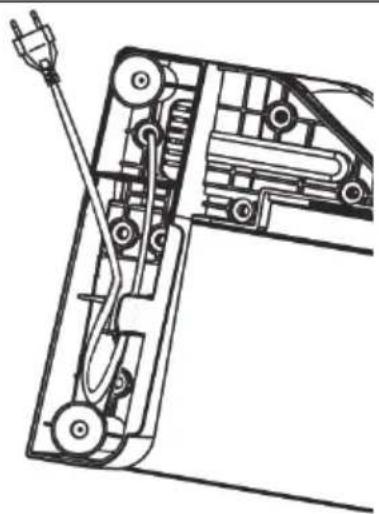
Unwind the length of power cord (6) you need and store the power cord (6) you do not need in the power cord store (5). Guide the power cord (6) through the gap in the device base (7) between the power cord store (5) and the outside.
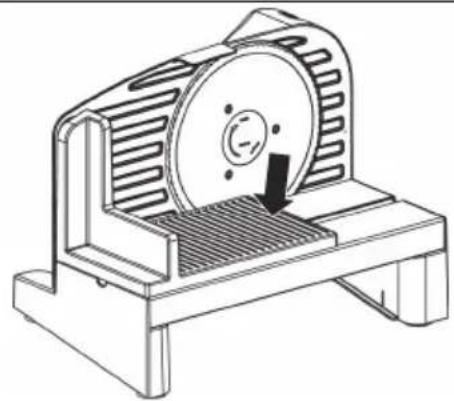
Place the supply carriage (10) vertically into the guide groove on the food slicer from the top. Push it into the guide grove and make sure that the supply carriage (10) clicks into place properly.
Place the food holder (4) onto the supply carriage (10). Now position the catcher plate (8) below the device base (7) so that it can catch the sliced food.
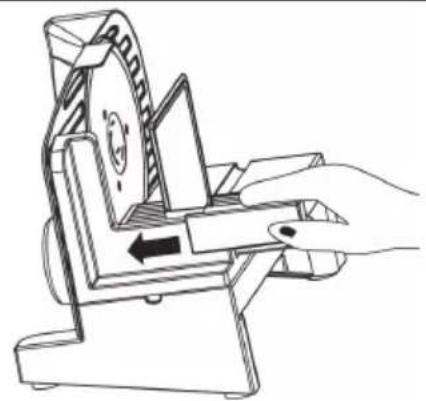
Now plug the mains plug into an easily accessible mains socket.
Use the adjusting knob (9) to set the thickness you wish to slice your food. In the "O" position, the blade (2) is covered by the holding plate (11) for safety reasons. Please note that the slice thickness scale is not calibrated in millimeters. It is intended for orientative purposes only. The maximum slice thickness is approx. 20mm .
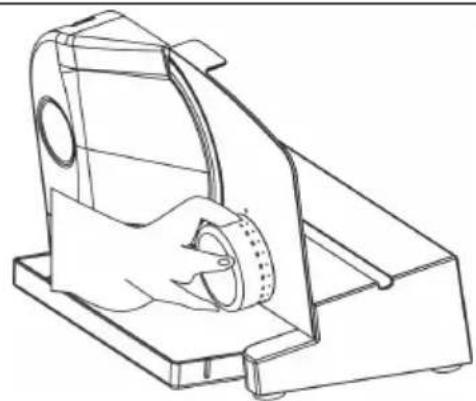
Place the food you wish to slice on the supply carriage (10) and use the food holder (4) to press it lightly against the holder plate (11).
Prevent injuries by always using the food holder (4), unless the food you wish to slice is very large.
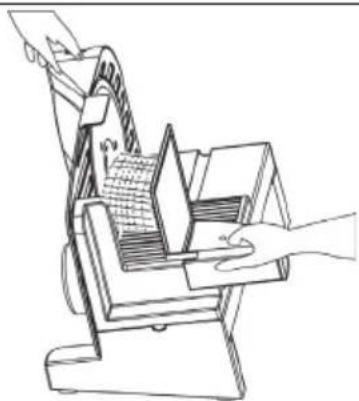
Use the switch (1) to switch between two operating modes and "Off":
| Position I | Continuous operation: The blade (2) rotates without the switch (1) having to be depressed all the time. To stop the blade (2), move the switch (1) to the 0 position by briefly pressing II. | |
| Position O | Off: The blade (2) does not turn. | |
| Position II | Short operation: The blade (2) turns as long as you hold the switch (1) pressed down in this position. | |
| Switch on the food slicer using the switch (1).Hold the supply carriage (10) containing your food lightly against the rotating blade (2) and gently push forward. Once you have cut one slice, pull the supply carriage (10) back and repeat the process until you have cut sufficient slices.Switch the food slicer off using the switch (1) and wait for the blade (2) to stop turning. | ||

WARNING! For safety reasons, always use the adjusting knob (9) to set the slicing thickness to "O" when you have finished using the food slicer.
Remove the catcher plate (8) with the sliced food by pulling it out to the left under the device base (7).
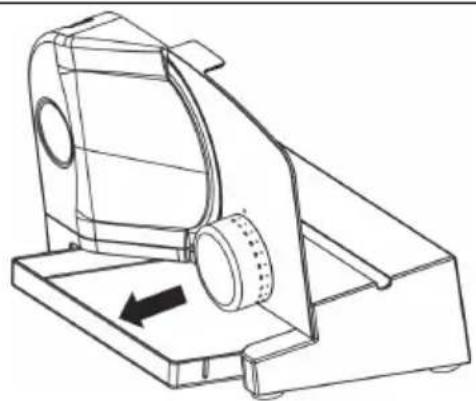
Cleaning

DANGER! Always disconnect the mains plug before cleaning. Never immerse the food slicer in water and never clean it under running water as this could cause an electric shock!

DANGER! Be careful using and cleaning the blade (2). The blade (2) is very sharp. There is a danger of injury!

Do not use aggressive, abrasive or chemical detergents. This could irreparably damage the surface of the food slicer and its accessories.
- Unplug the power cord (6) from the mains socket.
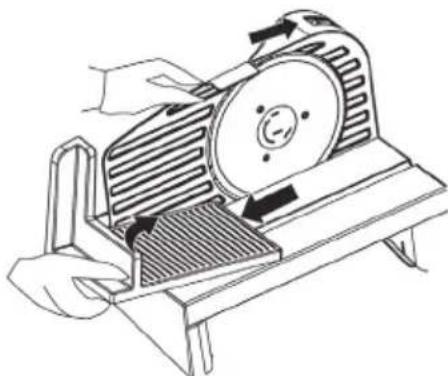
- Remove the supply carriage (10), food holder (4) and catcher plate (8). These parts can be cleaned in a bowl of warm water and washing-up liquid. After cleaning, rinse the parts of with clean water and dry them carefully. Alternatively, the food holder (4) and catcher plate (8) can be cleaned in the dishwasher.
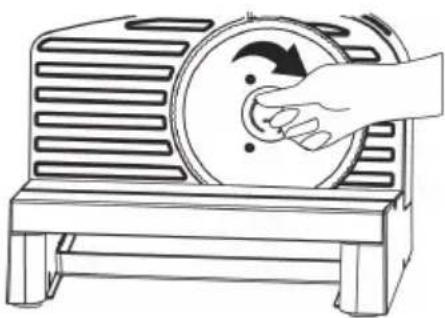
- Remove the blade (2). To do this, use a suitable coin and put it into the slot on the blade lock (3). Now turn the blade lock (3) clockwise (direction of arrow) until you can remove it. Then grab the blade (2) in the centre and remove it.
- Clean the blade (2) with warm washing-up water, but not in the dishwasher. Rinse with clean water and dry thoroughly. Grease the gear wheel on the blade (2) with a little Vaseline.
- Clean the area behind the blade (2) with a brush or slightly damp cloth.
Once you have finished cleaning, refit the blade (2). Place it straight on the centre axis and tighten the blade lock (3) again by turning it anticlockwise. - The housing of the food slicer can also be cleaned with a damp cloth.

Cleaning intervals: We recommend cleaning the housing, plastic parts and the built-in blade (2) with a damp cloth after every use. It is worth cleaning all the plastic parts in the washing-up from time to time. The same applies to the blade (2).
Maintenance
The food slicer is maintenance-free. To ensure the supply carriage (10) runs smoothly, we recommend greasing the guide with a little Vaseline occasionally.
The plastic adjustment screws on the bottom of the appliance are intended for a one-time adjustment during manufacturing. We recommend that you don't move these screws!
Storage
If the food slicer is not to be used for an extended period, store it in a clean and dry place.
- Clean the food slicer and all accessories as described in the previous chapter.
- Store the power cord (6) to in the power cord store (5).
Troubleshooting
The food slicer does not work.
- The mains plug is not plugged in. Insert the mains plug into a mains socket.
- The mains socket is defective. Test the food slicer in a different mains socket that you are certain is working.
The food slicer is faulty. Consult customer services.
Environmental regulations and disposal information

Devices marked with this symbol are subject to the European Directive 2012/19/EU. All electrical and electronic devices must be disposed of separately from household waste at official disposal centres. Avoid damage to the environment and risks to your personal health by disposing of the device properly. For further information about proper disposal, contact your local government, disposal bodies or the shop where you bought the device.
Dispose of all packaging in an environmentally-friendly manner. Cardboard packaging can be taken to paper recycling centres or public collection points for recycling. Any film or plastic contained in the packaging should be taken to your public collection points for disposal.
Conformity notes

This appliance has been approved for compliance with the basic and other relevant requirements of the Low-voltage Directive 2006/95/EC, the EMC Directive 2004/108/EC, the ErP Directive 2009/125/EC and the RoHS Directive 2011/65/EU. The corresponding Declaration of Conformity can be found at the
end of this User Manual.
Warranty information
Warranty of TARGA GmbH
Dear Customer,
This device is sold with three years warranty from the date of purchase. In the event of product defects, you have legal rights towards the seller. These statutory rights are not restricted by our warranty as described below.
Warranty conditions
The warranty period commences upon the date of purchase. Please keep the original receipt in a safe place as it is required as proof of purchase. If any material or manufacturing faults occur within three years of purchase of this product, we will repair or replace the product free of charge as we deem appropriate.
Warranty period and legal warranty rights
The warranty period is not extended in the event of a warranty claim. This also applies to replaced and repaired parts. Any damage or defects discovered upon purchase must be reported immediately when the product has been unpacked. Any repairs required after the warranty period will be subject to charge.
Scope of warranty
The device was carefully manufactured in compliance with stringent quality guidelines and subjected to thorough testing before it left the works. The warranty applies to material and manufacturing faults. This warranty does not cover product components which are subject to normal wear and which can therefore be regarded as wearing parts, or damage to fragile components such as switches, rechargeable batteries or components made of glass. This warranty is void if the product is damaged, incorrectly used or serviced. To ensure correct use of the product, always comply fully with all instructions contained in the user manual. The warnings and recommendations in the user manual regarding correct and incorrect use and handling of the product must always be observed and complied with. The product is solely designed for private use and is not suitable for commercial applications. The warranty is rendered void in the event of incorrect handling and misuse, if it is subjected to force, and also if any person other than our authorised service technicians interfere with the device. No new warranty period commences if the product is repaired or replaced.
Submitting warranty claims
To ensure speedy handling of your complaint, please note the following:
Before using your product for the first time, please read the enclosed documentation carefully. Should any problems arise which cannot be solved in this way, please call our hotline.
- Always have your receipt, the product article number as well as the serial number (if available) to hand as proof of purchase.
- If it is not possible to solve the problem on the phone, our hotline support staff will initiate further servicing procedures depending on the fault.

Service

Phone: 0207-3650744
E-Mail: service.GB@targa-online.com

Phone: 01-2421583
E-Mail: service.IE@targa-online.com

Phone: 800-62175
E-Mail: service.MT@targa-online.com

Phone: 800-92496
E-Mail: service.CY@targa-online.com
IAN:108551

Manufacturer
Please note that the following address is not a service address. First contact the service point stated above.
TARGA GmbH
Coesterweg 45
59494 SOEST
GERMANY
Table des matieres
Specifications techniques
Cher client, chere clientele,
BE Telephone:02-7001643
E-Mail service.BE@targa-online.com
LU Telephone:800-24143
E-Mail service.LU@targa-online.com
CH) Telephone: 044-5118291
E-Mail service.CH@targa-online.com
IAN:108551

Fabricant
EU Declaration of Conformity
Address:
Targa GmbH
Coesterweg 45
59494 Soest, Germany
Product:
Electric multi-purpose slicer
Model:
Silvercrest SAS 150 B2
Identification number:
IAN 108551
The product complies with the requirements of the following European directives:
2006/95/EC
Low Voltage Directive (LVD)
2004/108/EC
Electromagnetic Compatibility
2009/125/EC
Energy Relating Products
This declaration of conformity is issued under the sole responsibility of the manufacturer
The object of the declaration described above is in conformity with Directive 2011/65/EU of the European Parliament and of the Council of 8 June 2011 on the restriction of the use of certain hazardous substances in electrical and electronic equipment
Compliance was proved by the application of the following standards:
EMC:
EN 55014-1:2006 + A1:2009 + A2:2011
EN 55014-2:1997 + A1:2001 + A2:2008
EN 61000-3-2:2006 + A1:2009 + A2:2009
EN 61000-3-3:2013
RoHS:
EN 62321:2009
LVD:
EN 60335-1:2012 + A11:2014
EN 60335-2-14:2006 + A1:2008 + A11:2012
EN 62233:2008
ErP:
Regulation 1275/2008 with amendment 801/2013/EU
Year of CE marking:
2015
Soest, 11^th of August 2015
Matthias Klauke, Managing Director